brake AUDI A5 COUPE 2013 Owner's Guide
[x] Cancel search | Manufacturer: AUDI, Model Year: 2013, Model line: A5 COUPE, Model: AUDI A5 COUPE 2013Pages: 294, PDF Size: 73.84 MB
Page 94 of 294
92 Transmission
& WARNING
Hill descent control cannot overcome
physical limitations, so it may not be able
to maintain a constant speed under all
conditions. Always be ready to apply the
brakes.
Manual shift program
Applies to vehicles: with S tronic transmission
Using the manual shift program you can
manually select gears .
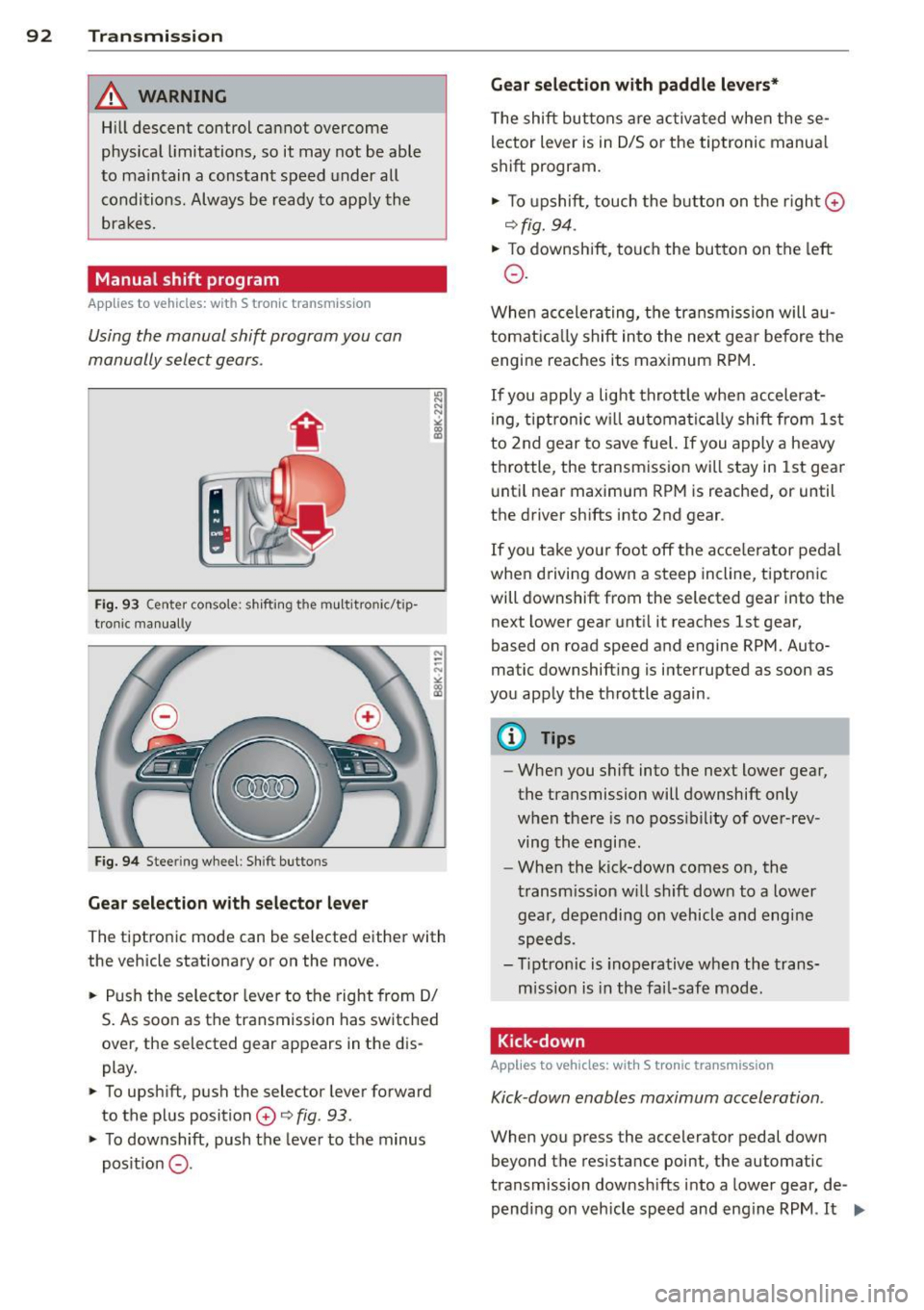
Fig. 93 C en ter conso le : shift in g th e mu ltitro nic/t ip
tron i c manually
Fig. 94 Steering wheel : Shi ft buttons
Gear selection with selector lever
"' N N N
" "' a)
The tiptronic mode can be s elected either with
the vehicle stationary or on the move.
.. Push the selector lever to the right from 0/
S. As soon as the transmission has switched
over , the selected gear appears in the dis
play .
.. To upshift, push the selector lever forward
to the plus position
0 o fig . 93 .
.. To downshift, push the lever to the minus
pos it ion
0 -
Gear selection with paddle levers*
The shift buttons are activated when these
lector lever is in 0/5 or the tiptronic manua l
shift program.
.. To upshift, touch the button on the right ©
ofig. 94 .
.. To downshift, touch the button on the left
0 .
When accelerating, the transmission will au
tomatically shift into the next gea r before the
engine reaches its maximum RPM.
If you apply a light throttle when accelerat
ing, tiptronic will automatically shift from 1st
to 2nd gear to save fuel. If you apply a heavy
throttle , the transmission will stay in 1st gear
until near maximum RPM is reached, or until
the drive r shifts into 2nd gear .
If you take you r foot off the acce le rator pedal
when dr iving down a steep incline, tiptronic
will downshift from the selected gear into the
next lower gear until it reaches 1st gear,
based on road speed and engine RPM. Auto
matic downshifting is interrupted as soon as
you apply the throttle again.
@ Tips
-When you shift into the next lower gear,
the transmission will downshift only
when there is no possibility of over-rev
ving the engi ne.
- When the kick-down comes on, the
transmission will shift down to a lower
gear, depending on vehicl e and engine
speeds .
- Tiptronic is inoperative when the trans
mission is in the fail-safe mode .
Kick-down
Applies to vehicles: with S tronic transmission
Kick-down enables maximum acceleration .
When you press the accelerator pedal down
beyond the resistance point, the automatic
transmission downshifts into a lower gear, de
pending on vehicle speed and engine RPM .
It ...
Page 95 of 294
shifts up into the ne xt higher gea r once the
maximum specified engine RPM is reached .
A WARNING
Please note that the wheels could spin on
slick or slippery roads when kick-down is
active.
Launch Control Program
Applies to vehicles: with S tronic transmission
The Launch Control Program provides the
best ac celeration possible when starting from
a s top .
Requirement: The engine must be at operat
i ng temperature and the steering wheel must
not be turned.
... Press the
I~ OFF I button ¢ page 187 while
the engine is running . The
II indicator light
i ll uminates in the instrument cluster and
T raction control (ASR ): Off. Wa rn ing! Re
stricted stabil it y
appears in the driver infor
mation system d isplay .
... Move the selector lever to the D/S position
o r se lect t he
dynamic d riving mode in Aud i
drive selec t* ¢ page 110 .
... Press the br ake ped al stro ng ly w it h your left
f oot and hold it down for at least one sec
ond.
... At t he same time, press the accelerato r
peda l down completely with your right foot
unti l the engine reaches and maintains a
high RPM.
... Remove your foot from the brake peda l
within 5 seconds¢_&. .
A WARNING
-Always adapt you r d rivi ng to the traffic
flow.
- Only use the Launch Control P rogram
when roa d and tr affic cond it ions allow it
and ot her dr ivers will not be end angered
o r annoyed by yo ur driv ing and the vehi
cl e's acce leration .
- P lease note th at t he driving wheels can
spin and the vehicle can brea k away
-
Tran sm iss ion 93
when ASR is switched off, especially
when t he road is sli ppery .
- Once you have accelerated, you shou ld
sw itch the ASR back on by pressing the
I ~ OFFI button.
(D Tips
- The transmission temperature may in
crease s ignificantly after using the
launch control program. I f that happens,
the program may not be ava ilable for a
few minutes. It w ill be available again af
t er a cool-down per iod .
- When accelerating using the Launch
Cont ro l program, a ll vehicle parts are
subjec t to heavy loads . T his can r esult in
increase d wear .
Transmission malfunction
Applies to vehicles: with S tronic transmission
[O] Tran smission: Press brake pedal and s e
lect gear again.
P ress the brake pedal and select the desire d
selector lever position again. You ca n the n
continue d riving.
[O] Transmis sion overheating: Pleas e driv e
conservatively .
The transmiss ion temperature has increased
s ignificantly due to the sporty driving manner.
D rive in a less sporty ma nner until the tem
perature returns to the normal range and the
i ndicato r light switches of.
[O] Transmission malfunction: You can con
tinue driving
There is a system malfunction in the transmis
s ion. You may cont inue driving. Drive to yo ur
authori zed Aud i dea ler or qualified repa ir fa
c ili ty soon to have the malfunction corrected .
[O] Transmission malfunction : Limited dr iv-
ing functionality
""°
Page 97 of 294
Audi adaptive cruise control and braking guard 95
Audi adaptive cruise
control and braking
guard
Introduction
App lies to vehicles: with Audi adaptive cruise co ntrol
The adaptive cruise control system assists the
driver by regu lating vehicle speed and helping
to maintain a set distance to the vehicle
ahead, within the limits of the system . If the
system detects a moving vehicle up ahead,
adaptive cruise control can brake and then ac
celerate your vehicle. This he lps to make driv
ing more comfortable on long highway
stretches.
The braking guard system can warn you about
an impending collision and initiate braking
maneuvers
c::;, page 101.
Adaptive cruise control and braking guard
have technical limitations that you must
know , so please read this section carefully, un
derstand how the system works and use them properly at all times.
General information
General information
Applies to vehicles: with Audi adaptive cruise control
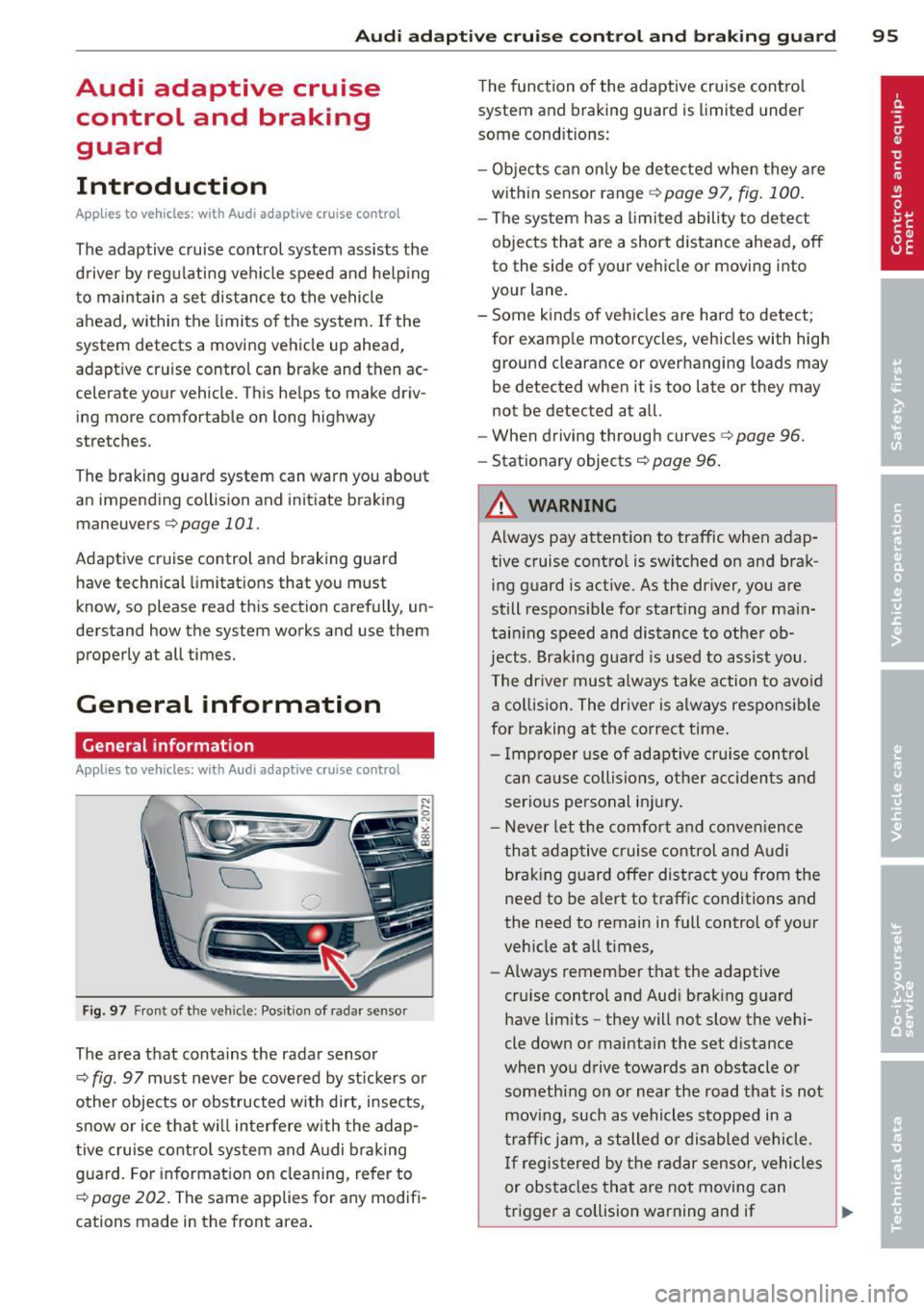
Fig. 97 Front of the veh icle: Pos ition of radar sensor
The area that contains the radar sensor
c::;, fig. 97 must never be covered by st ickers or
other objects or obstructed with dirt, insects,
snow or ice that will interfere with the adap
tive cruise control system and Audi braking
guard. For information on cleaning, refer to
c::;, page 202. The same applies for any modifi
cations made in the front area . The
function of the adaptive cruise contro l
system and braking guard is limited under
some cond itions:
- Objects can only be detected when they are
within sensor range
c;,page 97, fig . 100 .
-The system has a limited ability to detect
objects that are a short distance ahead, off
to the side of your vehicle or moving into
your lane.
- Some kinds of vehicles are hard to detect;
for examp le motorcycles, vehicles with high
ground clearance or overhanging loads may
be detected when it is too late or they may
not be detected at all.
- When driving through curves
c::;, page 96.
-Stationary objects c::;, page 96 .
A WARNING
-Always pay attention to traffic when adap-
tive cruise control is switched on and brak ing guard is active. As the dr iver, you are
still responsible for starting and for ma in
tain ing speed and distance to other ob
jects. Braking guard is used to assist you.
The driver must always take action to avoid
a collision. The driver is always responsible
for braking at the correct time.
- Improper use of adaptive cruise con trol
can caus e collisions, other accidents and
serious personal injury .
- Never let the comfort and convenience
that adaptive cruise control and Audi
braking guard offer distract you from the
need to be alert to traff ic conditions and
the need to remain in full control of yo ur
veh icle at a ll times,
- Always remember that the adaptive
cru ise contro l and Aud i brak ing guard
have lim its -they will not slow the vehi
cle down or maintain the set d istance
when you drive towards an obstacle o r
someth ing on or nea r the road that is not
moving, such as vehicles stopped in a
traffic jam, a stalled or disabled vehicle.
If registered by the radar sensor, vehicles
or obstacles that are not moving can
trigger a collision warning and if .,.
Page 98 of 294
96 Audi adaptive cruise control and braking guard
confirmed by the video camera, an acute
collision warning.
- For safety reasons, do not use adaptive
cruise control when driving on roads with
many curves, when the road surface is in
poor condition and/or in bad weather
(such as ice, fog, gravel, heavy rain and
hydroplaning). Using the system under
these conditions could result in a colli
sion.
- Switch adaptive cruise control off tempo
rarily when driving in turning lanes, on
expressway exits or in construction
zones. This prevents the vehicle from ac
celerating to the set speed when in these
situations.
- The adaptive cruise control system will
not brake by itself if you put your foot on
the accelerator pedal. Doing so can over
ride the speed and distance regulation.
- When approaching stationary objects
such as stopped traffic, adaptive cruise
control will not respond and braking
guard will have limited function.
- The adaptive cruise control system and
braking guard do not react to people, an
imals, objects crossing the road or on
coming objects .
- The function of the radar sensor can be
affected by reflective objects such as
guard rails, the entrance to a tunnel,
heavy rain or ice.
- Never follow a vehicle so closely that you cannot stop your vehicle safely. The
adaptive cruise control cannot slow or
brake the vehicle safely when you follow
another vehicle too closely . Always re
member that the automatic braking
function cannot bring the vehicle to a sudden or emergency stop under these
conditions.
- To prevent unintended operation, always
switch ACC
off when it is not being used.
{[) Note
The sensor can be displaced by impacts or
damage to the bumper, wheel housing and
underbody. That could affect the adaptive cruise control system and braking guard.
Have your authorized Audi dealer or au
thorized Audi Service Facility check their
function.
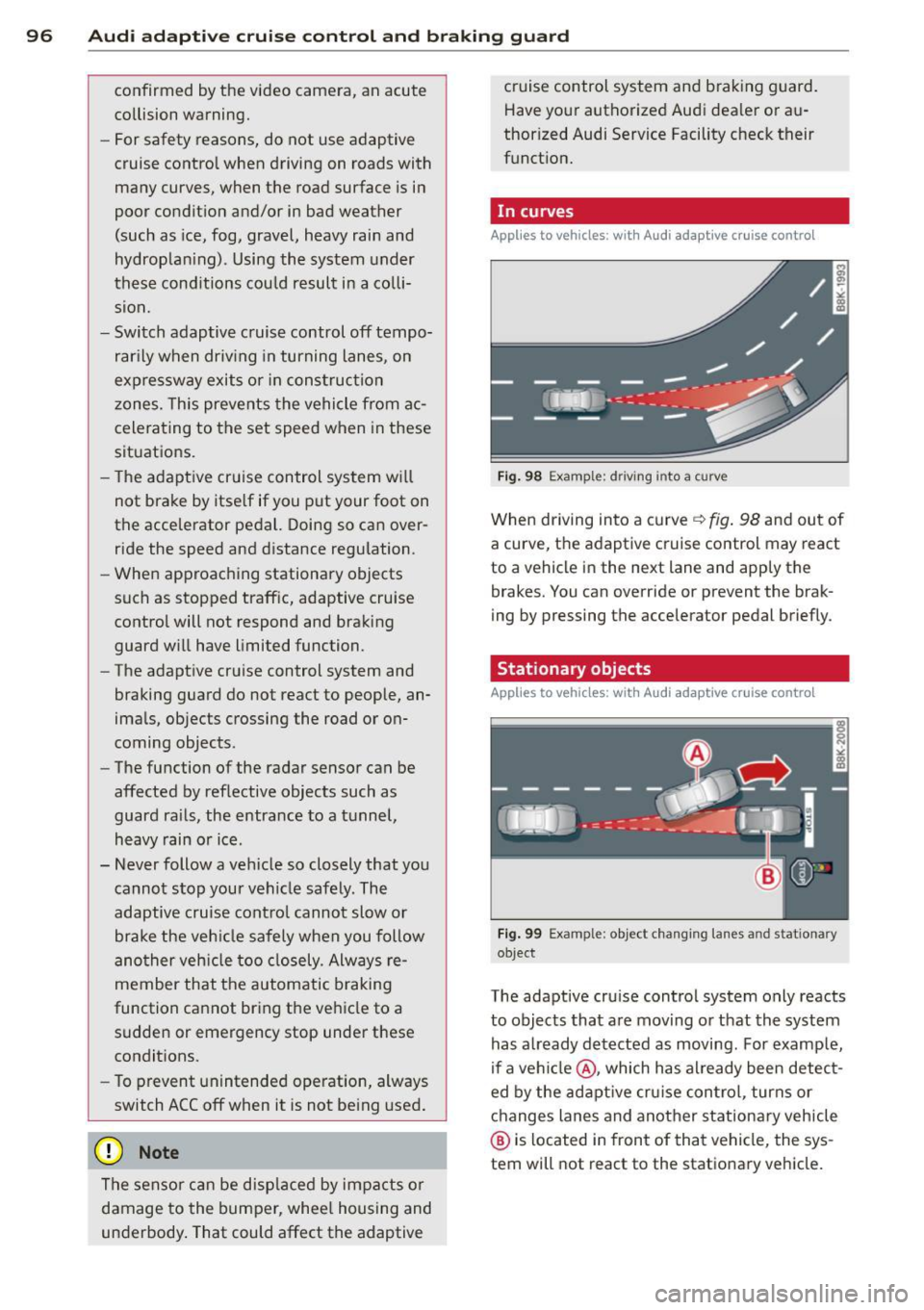
, In curves
App lies to vehicles: wi th Audi ada ptive c ruise contro l
Fig. 98 Example: d riving i nto a curve
When driving into a curve ~ fig. 98 and out of
a curve, the adaptive cruise control may react
to a vehicle in the next lane and apply the
brakes. You can override or prevent the brak
ing by pressing the accelerator pedal briefly.
Stationary objects
Applies to vehicles : wi th Audi adapt ive crui se contro l
Fig. 99 Example: object changing lanes a nd stat ionary
object
The adaptive cruise control system only reacts
to objects that are moving or that the system
has already detected as moving. For example,
if a vehicle @, which has already been detect
ed by the adaptive cruise control, turns or
changes lanes and another stationary vehicle
@ is located in front of that vehicle, the sys
tem will not react to the stationary vehicle.
Page 100 of 294
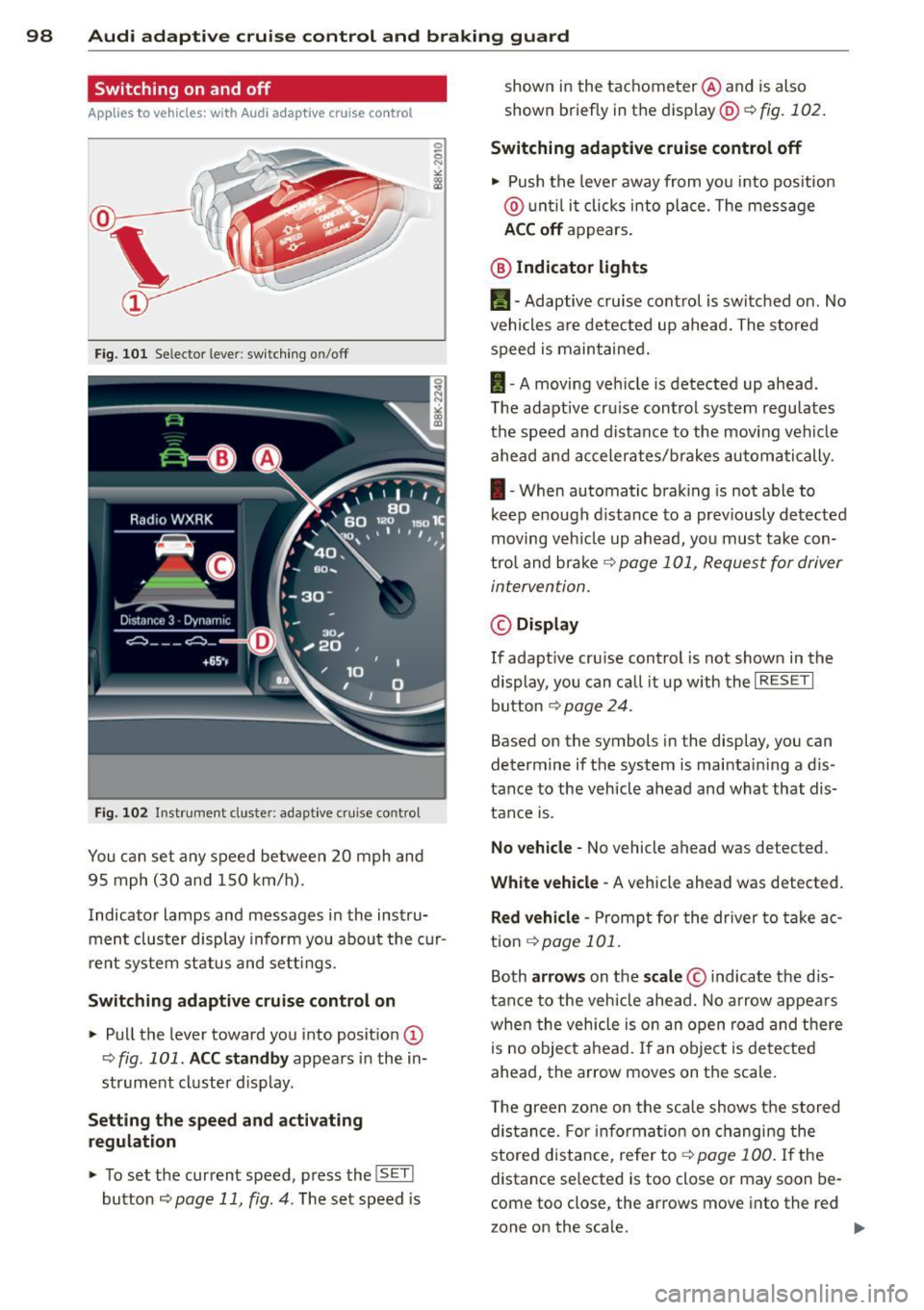
98 Audi adaptive cruise control and braking guard
Switching on and off
Applies to vehicles: with Audi adaptive cruise co ntrol
Fig. 101 Selec tor lever: switching on/off
Fig . 102 Instrument clus te r: adap tive cru ise control
You can set any speed between 20 mph and
95 mph (30 and 150 km/h).
Indicator lamps and messages in the instru
ment cluster display inform you about the cur
r ent system status and settings.
Switching adaptive cruise control on
.. Pull the lever toward you into posit ion @
-:>fig . 101 . ACC standby appears in the in
strument cluster d isplay .
Setting the speed and activating
regulation
.. To set the current speed , press the ISET !
button r:::> page 11 , fig. 4. The set speed is shown in the tachometer
@and is also
shown briefly in the display@r:::>fig.
102.
Switching adaptive cruise control off
.. Push the lever away from you into pos itio n
@ unt il it clicks into place. The message
ACC off appears.
@ Indicator lights
II-Adaptive cruise control is switched on. No
vehicles are detected up ahead. The stored
speed is maintained.
I -A moving vehicle is detected up ahead .
T he adapt ive cru ise control system regulates
the speed and distance to the moving vehicle
ahead and accelerates/brakes automatically.
I -When automatic braking is not able to
keep e nough d istance to a prev iously detected
moving veh icle up ahead, you must take con
trol and brake
r:::> page 101, Request for driver
intervention.
© Display
If adapt ive cru ise control is not shown in the
display, you can call it up w ith the
I RESET I
button r:::> page 24.
Based on the symbols in the display, you can
determine if the system is maintai ning a d is
tance to the vehicle ahead and what that dis
tance is.
No vehicle -No vehicle ahead was de tected .
White vehicle -A vehicle ahead was detected .
Red vehicle -Prompt for the driver to take ac
tion
r:::> page 101 .
Both arrows on the scale© indicate the dis
tance to the vehicle ahead. No arrow appears
when the vehicle is on an open road and there
is no object ahead. If an object is detected
ahead, the arrow moves on the scale .
T he green zone on the scale shows the stored
distance. For information on changing the
stored distance, refe r to ~
page 100 . If the
distance se lected is too close or may soon be
com e too close , the arrows move into the re d
z one on the sca le.
Page 101 of 294
Audi adapt ive crui se c ontrol an d bra kin g guard 99
A WARNING
Imprope r use of the adaptive cruise con
trol can cause collis ions, other acc idents
and serious personal injuries.
- Pressing the
ISE TI button whe n driving at
speeds below 20 mph (30 km/h), will au
tomat ica lly accelerate the veh icle to
20 mph (30 km/h), which is the m ini
mum speed that can be set.
@ Tips
- If you switch the ignition or the adapt ive
cruise control off, the set speed is erased
from the system memory.
- The elect ronic stabilization control (ESC)
and the a nti-slip-regulation (ASR) are au
tomatically tu rned on when the adaptive
cruise control is turned on. Both systems
cannot be turned off if the adaptive
cruise control is turned on.
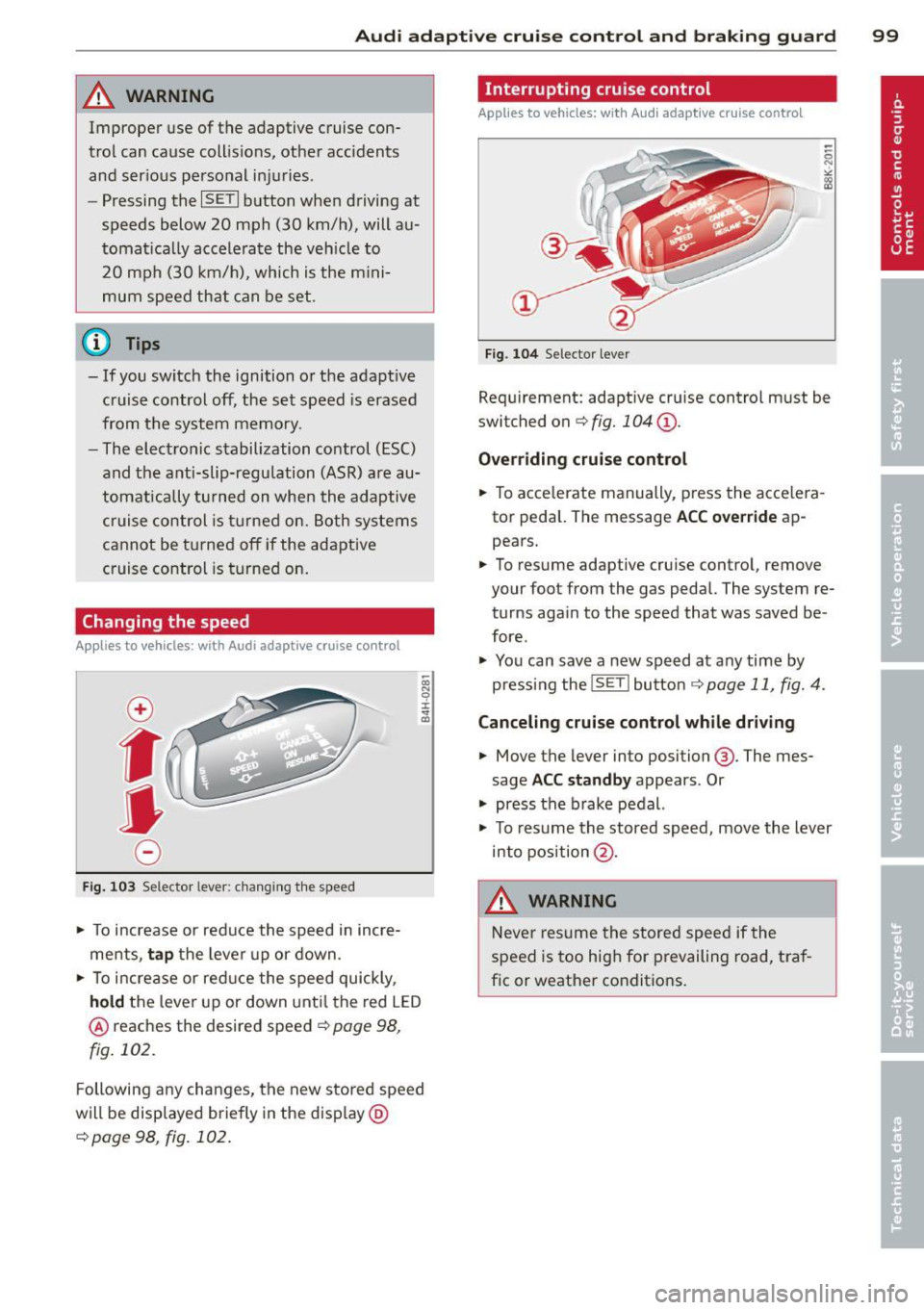
Changing the speed
Applies to vehicles: with Audi adaptive cruise co ntrol
~ 0) g
±. .., 0 al
f
• 0
Fig. 103 Se lecto r lever: cha nging t he speed
• To increase or red uce the speed in incre
me nts ,
tap the lever up or down.
• To increase or reduce the speed quickly ,
hold the lever up or down unt il the red L ED
@ reaches the desired speed ¢ page 98,
fig. 102.
Following any changes, the new sto red speed
will be displayed briefly in the disp lay @
¢page 98, fig. 102 .
Interrupting c ruise control
App lies to vehicles: with Aud i adapt ive cruise contro l
F ig. 104 Selecto r lever
Requ irement: adaptive cru ise control must be
switched on ¢
fig. 104 (D.
Ove rriding crui se cont rol
• To acce lerate manually, p ress the acce le ra
tor peda l. The message
ACC over ride ap
pears.
• To resume adaptive cruise contro l, remove
your foot from the gas pedal. The system re
turns again to the speed that was saved be
fore .
• You can save a new speed at any time by
pressing the
! SE TI button ¢ page 11, fig. 4.
Canceling cruise control while driv ing
• Move the lever into position @. The mes
sage
ACC st andby appears . Or
• press the brake pedal.
• To res ume the stored speed, move the lever
into position @.
A WARNING
Never resume the stored speed if the
speed is too high for prevailing road, tra f
fic or weather condit ions.
Page 102 of 294
100 Audi adaptive cruise control and bra king guard
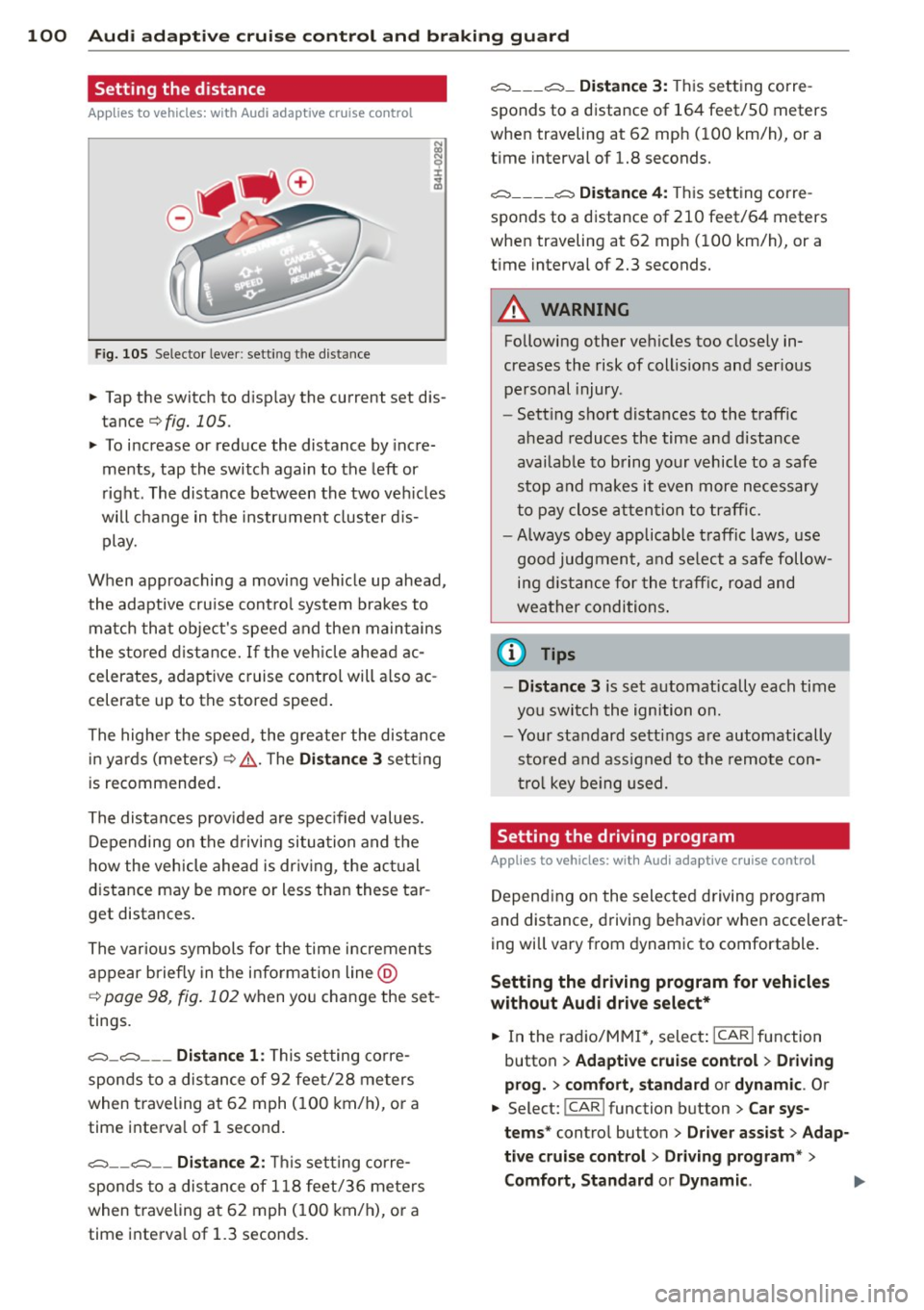
Setting the distance
App lies to vehicles: with Audi adaptive cruise control
Fig. 105 Selector lever: setting the distance
~ Tap the switch to display the current set dis
tance¢
fig. 105.
~ To increase or reduce the distance by incre
ments, tap the switch again to the left or
right. The distance between the two veh icles
will change in the instrument cluster dis
play.
When approaching a moving vehicle up ahead,
the adaptive cru ise cont rol system brakes to
matc h that object's speed and then maintains
the stored distance. If the vehicle ahead ac
celerates, adaptive cruise control will a lso ac
celerate up to the stored speed.
The higher the speed, the greater the distance
in yards (meters)¢ ,&.. T he
Distance 3 setting
is recommended .
The distances p rov ided are spec ified values.
Depending on the driving situation and the
how the vehicle ahead is dr iving, the actual
distance may be more or less than these tar
get distances .
The various symbols fo r the time increments
appear briefly in the in fo rmation line @
c;, page 98, fig. 102 when you change the set
tings .
c::::::,_c::::::, ___ Distance 1: This setting corre-
sponds to a distance of 92 feet/28 meters
when traveling at 62 mph (100 km/h), or a
time interva l of 1 second.
c::::::, __ c::::::, __ Distance 2: This setting corre
sponds to a distance of 118 feet/36 meters
when traveling at 62 mph (100 km/h), or a
time interval of 1.3 seconds .
c::::::, ___ c::::::,_ Distance 3: This setting corre-
sponds to a distance of 164 feet/SO meters
when traveling at 62 mph (100 km/h), or a
t ime interval of 1.8 seconds.
c::::::, ____ c::::::, Distance 4: This setting corre-
sponds to a distance of 210 feet/64 meters
when traveling at 62 mph (100 km/h), or a
t ime interval of 2.3 seconds.
A WARNING
Following other veh icles too closely in
creases the risk of collis ions and ser ious
personal injury.
- Sett ing short distances to the traffic
ahead reduces the time and d istance
availab le to bring your vehicle to a safe
stop and makes it even more necessary
to pay close attention to traffic.
-
-Always obey applicab le traffic laws, use
good judgment, and se lect a safe follow
ing distance for the traffic, road and
weather conditions .
0) Tips
-Distance 3 is set automatically each time
you switch the ignition on.
- Your standard sett ings are automatically
stored and ass igned to the remote con
trol key being used.
Setting the driving program
Applies to vehicles: with Audi adaptive cruise control
Depending on the selected driving program
and distance, driving behavior when accelerat
ing will vary from dynamic to comfortable .
Setting the driving program for vehicles
without Audi drive select*
~ In the radio/MM!*, select : ICARlfunction
button >
Adaptive cruise control > Driving
prog.
> comfort, standard or dynamic . Or
~ Select: !CAR ! function button> Car sys
tems *
control button > Driver assist > Adap
tive cruise control
> Driving program * >
Comfort, Standard or Dynamic .
Page 103 of 294
Audi adaptive cruise control and braking guard 101
Setting the driving mode for vehicles with
Audi drive select*
Refer to <=> page 1 10.
(D Tips
Yo ur setti ngs a re automatically store d an d
assig ned to the remote contro l key be in g
used.
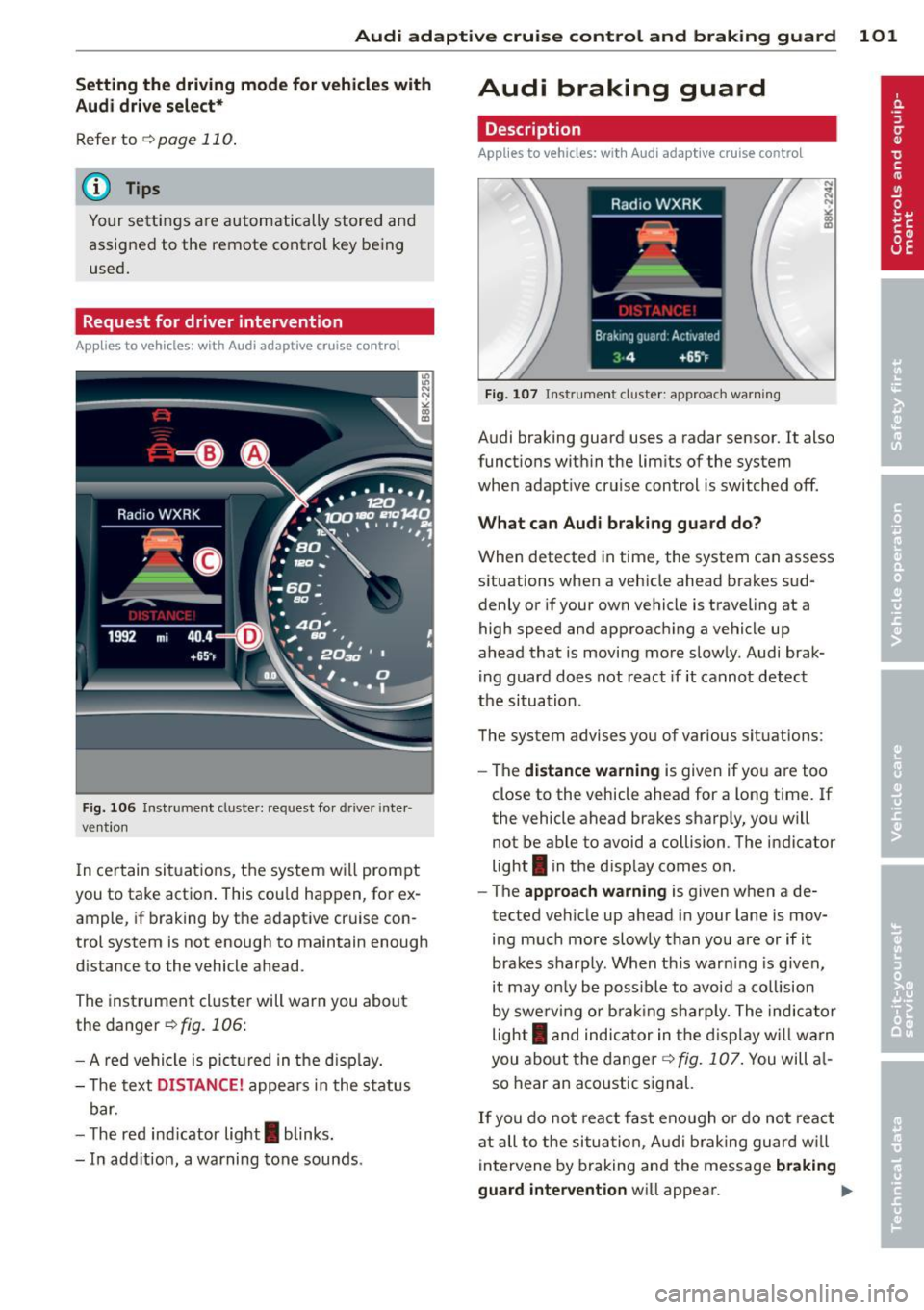
Request for driver intervention
A pp lies to vehicles: w ith Audi a daptive cruise control
Fig. 106 Inst rumen t cl uster: reques t fo r drive r in te r·
ve ntio n
In ce rtain si tuations, t he sys tem w ill prom pt
you to take actio n. This cou ld ha ppen, for ex
ample, if braking by the a daptive cr uise con
trol system is not enough to maintain enough
d istance to the vehicle ahead.
The inst rument cluste r will war n you about
the danger
<=>fig. 106:
- A red ve hicle is pic tured in the d is pla y.
- The text
DISTANCE! appea rs in the s ta tus
b ar.
- T he r ed indi cator lig ht
I blinks .
- In add it ion, a warning tone sounds.
Audi braking guard
Description
App lies to vehicles: wi th Audi ada ptive c ruise con tro l
Fig. 10 7 In str um ent clus ter: approach warnin g
Audi braking guard uses a radar sensor . It also
funct ions wit hin the lim its of the system
whe n adapt ive cruise control is switched off.
What can Audi braking guard do?
When detected in time, the system can assess
situations when a veh icle ahead brakes s ud
denly or if your own vehicle is t raveling at a
high speed and approac hing a ve hicle up
ahead that is movi ng mo re sl ow ly. Audi brak
ing guard does not react if it canno t detect
the si tua tion.
The system advis es yo u of various s ituations:
- The
distance wa rning is given if yo u are too
close to the vehicle ahead for a long time. If
the vehicle ahead bra kes sharply , yo u will
not be ab le to avoid a collision . The ind icator
light
I in the d isp lay comes o n.
- The
approach warning is given when a de
tected ve hicle up ahead i n your lane is mov
ing m uch mo re sl owly than you are or if i t
brake s sh arp ly. W hen t his war ning is g iven,
it may on ly be poss ible to avoi d a co llision
by swe rving or b ra kin g sharp ly. The indic ator
light
I a nd indic ator in t he di spl ay w ill war n
you abo ut the d ange r¢
fig . 107. You will a l
so hear an aco ustic s ignal.
If y o u do no t rea ct fas t eno ugh o r do not r eact
at all to the si tuat ion, A udi brak ing g uard w ill
i nt ervene by braking and the message
braking
guard intervention
w ill appea r. ~
Page 104 of 294
102 Audi adapti ve cruise control and br aking guard
- If a co llision is imminent, the system will
first provide an
acute warning by bri efly and
sharp ly app ly ing the brakes .
- If you do not react to the ac ute warning ,
braking guard can brake within the limits of
the system. This reduces the veh icle speed
in the event of a collis ion.
- At speeds under 20 mph (30 km/h), the sys
tem can in it iate a complete deceleration
s hortly before a collision .
1>.
- If the Audi braking guard senses that you
are not braking hard enough when a colli
sion is imminent, it can increase the braking
force .
Which functions can be contr oll ed ?
You can sw itch Audi braking g uard and the
distance/approach warning on or off in the ra
d io or MMI Qpage 102, Set tings in the ra
dio/MM!.
A WARNING
Lack of attention can cause col lisions, oth
er accidents and serious persona l injuries.
The Audi b raking guard is an assist system
and cannot prevent a collis ion by itself.
The driver must always intervene. The dr iv
er is always responsible for braking at the
correct time.
- Always pay close attention to traffic,
even when the Audi braking guard is
switched on. Be ready to intervene and
be ready to take comp lete control when
ever necessary. Always keep the safe and
legal distance between your vehicle and
vehicles up ahead .
- Audi braking guard works within limits
and w ill not respond outs ide the system
limits, for examp le when approaching a
stopped vehicle or stationary obstacle
(end of a traff ic jam or veh icle that has
broken down in traffic).
- Always remember that the radar s ensor
for the A udi braking guard works only
within defined detect ion and range limits
l ) Th is is not available in some c oun tries .
that may prevent the proper detection of
other veh icles.
- The radar sensor's function and range
can be reduced by rain, snow and heavy
spray. Moving veh icles up ahead may not
be prompt ly detected or may not be de
tected at all .
- Reflective surfaces including crash barri
ers or tunne l entrances may impair the
function of the radar sensor .
(D Tips
- You can cancel the braking that is in it iat
ed by the system by braking yourse lf, by
accelerating not iceably or by swerving .
- Audi braking guard error messages
Qpage 103.
- Keep in mind that brak ing guard can
brake unexpectedly. Always secure any
cargo or objects that you are transport
ing to reduce the risk of damage or in
jury .
Settings in the radio/MMI
Applies to vehicles: with Audi adaptive cruise control
., Sele ct: I CAR I func tion button > Car system s
contro l but ton > Driver a ssist> Audi brak
ing guard .
Or
., Select: !CAR ! function b utton > Aud i brak-
ing guard .
S ys tem -
Switch A udi braking guard On and
Off . When you switch the ignition on, the
message
Audi b raking guard off appears if
the system is switch ed off .
Ea rl y warnin g -The distance and approach
warnings in the display can be switched
O n/
Off .
(D Tips
-Yo ur settings are automatically stored
and assigned to the remote contro l key
being used at the times the settings are
made.
Page 105 of 294
Audi adaptive cruise control and braking guard 103
-If you switch the ASR/ESC off or the off
road mode on (allroad), Audi braking
guard switches off automatically
<=> page 187.
-Switch Audi braking guard off when you
are loading the vehicle onto a vehicle car
rier, train, ship or other type of transpor
tation. This can prevent undesired warn ings from the braking guard system .
Messages
Applies to vehicles: with Audi adaptive cruise co ntrol
Braking guard: Off
This driver message appears if the system is
turned off via the radio/MM I*. Otherwise, if
the system is turned off, the information ap
pears every time shortly after the start of the
trip.
Braking guard: Activated
This driver message appears if sharp brake
pressure was applied due to an acute warning.
•••
Three white dots appear if a setting cannot be
selected with the operating lever. For exam
ple, this happens if you want to raise/lower
the speed even though there was no previous
ly saved speed .
ACC: Deactivation
The driver message appears in vehicles with
manual transmission . If the clutch pedal was
pressed down for too long, the adaptive cruise
control turns off. A chime sounds as a remind
er.
ACC: Sensor blocked
This message appears if the sensor view is ob
structed, for example by leaves, snow, heavy
spray or dirt. Clean the sensor<=>
page 95,
fig. 97.
ACC: not available
The driver message appears if there is a mal
function. The adaptive cruise control turns off.
A chime sounds as a reminder. Have the sys- tern checked by an authorized Audi dealer or
authorized Audi Service
Facility.
ACC: unavailable
The driver message appears if, for example,
the brake temperature is too high . The adap
tive cruise control is temporarily unavailable.
A chime sounds as a reminder.
Engine speed!
This driver message appears in vehicles with
manual transmission if the driver had not up
shifted or downshifted in time while using
adaptive cruise control braking or accelerat ing, causing the vehicle to exceed or not reach
the permitted limit speed. The adaptive cruise
control turns off. A chime sounds as a remind
er .
Shift lever position!
Vehicles with an automatic transmission: the
driver message appears if the selector lever is
shifted to the N position . The adaptive cruise
control is not available while in this position .
Vehicles with manual transmission: the driver message appears for vehicles with manual
transmission if there is no forward gear en
gaged, meaning if the reverse gear or the 1st
gear is engaged or if the selector lever is in
the neutral position. The adaptive cruise con
trol is not available while in this position.
Stabilization control (ESC)
This message appears if the electronic stabili
zation control (ESC) is taking action to stabi
lize the vehicle. The adaptive cruise control
turns off . A chime sounds as a reminder.
Speed too low
This message appears if the current speed is
too low
to set or to maintain the desired
speed .
The speed being saved must be at least
20 mph (30 km/h). The cruise control is
turned off for speeds lower than 12 mph
(20 km/h). The adaptive cruise control re
mains turned on for speeds above 95 mph
(150 km/h) (override).
It will stabilize again at.,..