remote control AUDI A5 COUPE 2013 Owners Manual
[x] Cancel search | Manufacturer: AUDI, Model Year: 2013, Model line: A5 COUPE, Model: AUDI A5 COUPE 2013Pages: 294, PDF Size: 73.84 MB
Page 4 of 294
2 Table of contents Vehicle literature .. .. .. .. .. ... .
About this Owner's Manual ...
Controls and equipment .. ... .
Ins truments and controls .. . .
General illus tration .... ... .. .. ... .
Instruments and warning /
indicator lights ........ .. .. .. . .
Ins truments . .. .. ..... ... .. .. ... .
War ning/ indi cator lights ... .. ... .. .
Driver information d isplay .. . .
Introduct ion . .. .. ..... ... .. .. ... .
Trip computer .. .. ..... ... .. .. ... .
Gearshift Indicator ........ .. .. ... .
Efficiency program ........ .. .. .. . .
Service interval d isp lay .. .. .. .. .. . .
On -Board Diagnostic system (OBD) .. .
Opening and closing .... .. .. . .
Power locking system .. ... .. .. .. . .
R ear lid .. .. ................ ... . .
5
6
8
8
8
10
1 0
13
24
24
25
27
27
29
30
32
32
39
P owe r windows . . . . . . . . . . . . . . . . . . 40
P anorami c til ting s unroof .. .. .. .. . .
Va let p arki ng ............ .. .. .. . .
Clear vision .............. .. ... .
Lig hts . .. .... ........... .. .. .. . .
I n ter ior lights .. . ...... ... .. .. ... .
V1s 1on ...... .. .. ..... ... .. .. ... .
Wi per and washer system . ... .... . .
Dig ita l compass .......... .. .. ... .
Seats and storage ... .. .. .. ... .
General recommendat ions ... ... .. .
Front seats ................ .. ... .
H ead restraints .......... .. .. ... .
Seat memory . .. ...... .... ... .. . .
As htray .. .. ................ ... . .
C igar ette lighte r .... ...... .. .. .. . .
S to rage .... ... .......... .. .. .. . .
Ro of r ack .. ............. ....... .
L uggage compartmen t .. .. .. .. .. . .
41
42
43
4 3
46
46
49
51
53
53
54
56
57
58
59
5 9
6 1
63
Warm and cold . . . . . . . . . . . . . . . . 67
C lima te controls. . . . . . . . . . . . . . . . . . 6 7
On the road ... ... .. ..... .... . .
Stee ring . ..... .. .. ... ..... ... .. .
Ig nit ion loc k ... .. ... .. ..... ... .. .
Convenience key .. ............. .. .
Driver messages .. ............. .. .
E lectromechanical pa rking brake ... .
Speed warning system .. .. ... ... .. .
71
71
71
74
75
76
78
Cru ise cont ro l . . . . . . . . . . . . . . . . . . . . 80
Transm1ss1on . . . . . . . . . . . . . . . . . . 82
Manua l transm iss ion . . . . . . . . . . . . . . 82
T iptronic . . . . . . . . . . . . . . . . . . . . . . . . 82
S troni c® . . . . . . . . . . . . . . . . . . . . . . . . 88
Audi adaptive cruise control
and braking guard . . . . . . . . . . . .
95
I n troduc tion . . . . . . . . . . . . . . . . . . . . . 95
Genera l informa tion . . . . . . . . . . . . . . 95
Audi adaptive cruise contro l . . . . . . . .
97
A udi braking guard . . . . . . . . . . . . . . . 101
Messages . . . . . . . . . . . . . . . . . . . . . . . 103
Audi side assist .... ..... ... .. .
Lane change ass istant
105
105
Audi drive select . . . . . . . . . . . . . . 109
Driving settings . . . . . . . . . . . . . . . . . . 109
Park as sist . . . . . . . . . . . . . . . . . . . . . 112
Pa rking system ... ... .. ..... ... .. . 112
Pa rking system (rear) . . . . . . . . . . . . . . 112
Parking system (rea r, with rear view
camera) . . . . . . . . . . . . . . . . . . . . . . . .
113
Homelink ® . . . . . . . . . . . . . . . . . . . . 119
Universa l remote control........ ... 119
Safety first . . . . . . . . . . . . . . . . . . . . 124
Driving Safely . . . . . . . . . . . . . . . . . 124
General notes . . . . . . . . . . . . . . . . . . . . 124
Proper occ upant seating positions . . . 125
Drive r and passenge r side foo twe ll . . . 129
Pedal a rea . . . . . . . . . . . . . . . . . . . . . . . 129
Stow ing luggage . . . . . . . . . . . . . . . . . 130
Re po rting Sa fety Defects . . . . . . . . . . . 132
Page 16 of 294
14 Instrum ent s and w arn ing /indic ato r light s
Engine cooling system Tire pressure monitor ing
¢ page 18
system,/
¢page250
Steering column lock Tire pressure monitoring system
¢ page 18
1181~1 ¢page250
Ignition lock
Im
Electronic power cont ro l ,/
r:::;,page 18
c:>page20
U SA mod els:
•
Malfunction indicator Lamp
Speed warning system (MIL),/
r:::;, page 78
c:> page 20
Canada models :
•
Engine speed limitation
Speed warning system c:>page 21
r:::;, page 78
Engine oil level
Aud i adapt ive cru ise control./
•
c:>page 17
¢ page 98
•
Engine o il sensor
Yellow indic ato r lights c:> page 21
Yellow symbols indicate a priority 2 ma lfunc-
-
&1
Battery
tion -Warning!
c:>page 17
Jj]
Electron ic Stabilization Control
Ill
Tank system
(ESC) ,/
c:>page 21
r:::;, page 19
-Electronic Stabilization Control
•
Warm up engine *
ti
(ESC) ./ c:>
page 212
r:::;, page 19
•
Windshie ld washer fluid level
U SA m odel s: c:>page 21
~
Anti-lock braking system (ABS)
defective ,/
m
Windshield wipers
r:::;, page 19 c:>page
21
Canada models :
le
Remote control key
[I]
Anti-lock braking system (ABS)
c:>page 74
defective ,/
r:::;, page 19
I!
Battery in remote control key
USA models: c:>page 34
I
Safety systems ,/ --
l:J
Defective light bulb warning ' r:::;, page 20
c:>page 21
Canada models :
El
Safety systems ,/
•
Fog lights
<=>page20 c:>
page 21
•
Worn brake pads
E
Rear fog light(s)*
<=> page 20
c:>page 21
•
Electromechanical parking brake
II
Headlight range control *
<=>page
76 c:> page 22
Page 35 of 294
-If the power lock ing system should ma l
function, you can lock the driver's door
using the mechanical key
~ page 3 7.
- If the power locking system should fail,
you can still open the fue l tank flap in an
emergency <=>
page 215.
-You are well advised not to keep valua
bles inside an unattended vehicle, visible
or not . Even a properly locked vehicle
cannot provide the security of a safe .
- If the LED in the upper edge of the driv
er's door panel comes on for about
30
seconds after the vehicle is locked, there
i s a malfunction in the power locking or
the anti-theft warning system. Have the
malfunction corrected by an author ized
Audi dealersh ip or qua lified repair fac ili
ty.
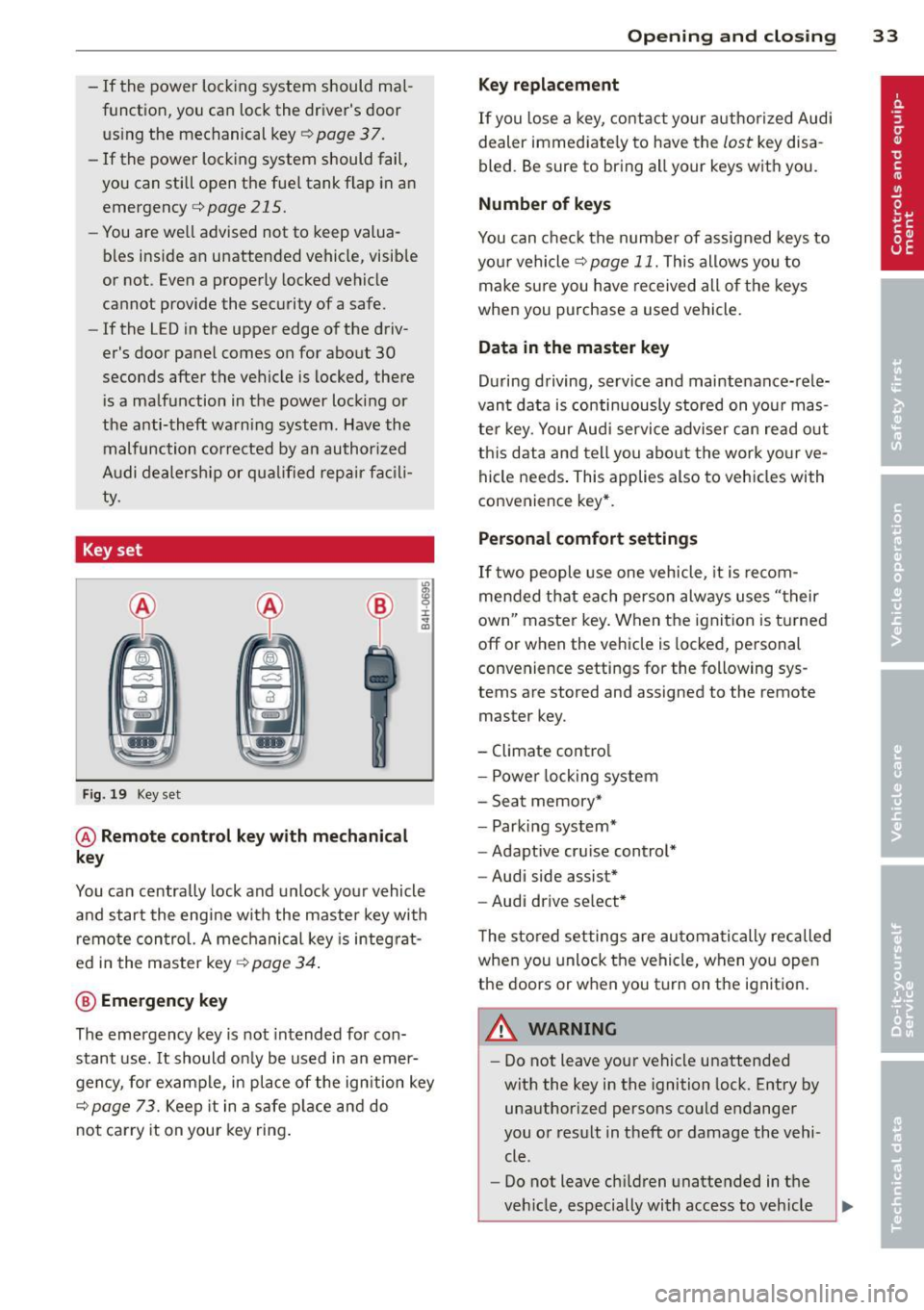
Key set
Fig. 19 Key set
@ Remote cont rol k ey with me chanical
ke y
You can centrally lock and unlock your vehicle
and start the engine with the master key with
remote control. A mechanical key is integrat
ed i n the master key
<=> page 34 .
@ Emerg ency key
The emergency key is not intended for con
stant use.
It should on ly be used in an emer
gency, for example, in place of the ign ition key
<=> page 73. Keep it in a safe p lace and do
not carry it on your key ring .
Openin g an d clos ing 33
Ke y re plac ement
If you lose a key, contact your author ized Audi
dealer immediate ly to have the
lost key disa
bled. Be sure to bring all your keys with you .
Number of keys
You can check the number of assigned keys to
you r vehicle <=>
page 11. This allows you to
make sure you have re ceived all of the keys
when you purchase a used vehicle.
Data in th e mast er ke y
During driving, service and maintenance-rele
vant data is continuously stored on your mas
ter key. Your Audi service adviser can read out
this data and tell you abo ut the work yo ur ve
hicle needs . This applies also to vehicles with
convenience key*.
Person al comf ort settings
If two people use one vehicle, it is recom
mended that each person always uses "their
own'' master key. When the ignition is turned
off or when the vehicle is locked, pe rsonal
convenience settings for the following sys
tems are stored and assigned to the remote
master key.
- Climate control
- Powe r locking system
- Seat memory*
- Parking system*
- Adaptive cruise control*
- Audi side assist*
- Audi drive se lect*
T he sto red settings are automatically recalled
when you unlock the vehicle, when you open
the doors or when you turn on the ignition .
A WARNING
--
-Do not leave your vehicle unattended
with the key in the ignition lock . Entry by
unauthorized persons could endanger
you or result in theft or damage the vehi
cle .
- Do not leave ch ildren unattended in t he
veh icle, especially with access to vehicle
Page 37 of 294
@ For the sake of the environment
Dispose of dead batteries properly so as
not to pollute the environment.
@ Tips
The replacement battery must be the
same specification as the original.
Emergency unlocking of the ignition key
In the event of malfunctions in the electrical
system, it may happen that you cannot re move the ignition key .
• Remove the mechanical key<:? page 34.
• Lock the vehicle using the mechanical key
<:?page 37.
• Have the e lectrica l system inspected by an
authori zed Audi dealership .
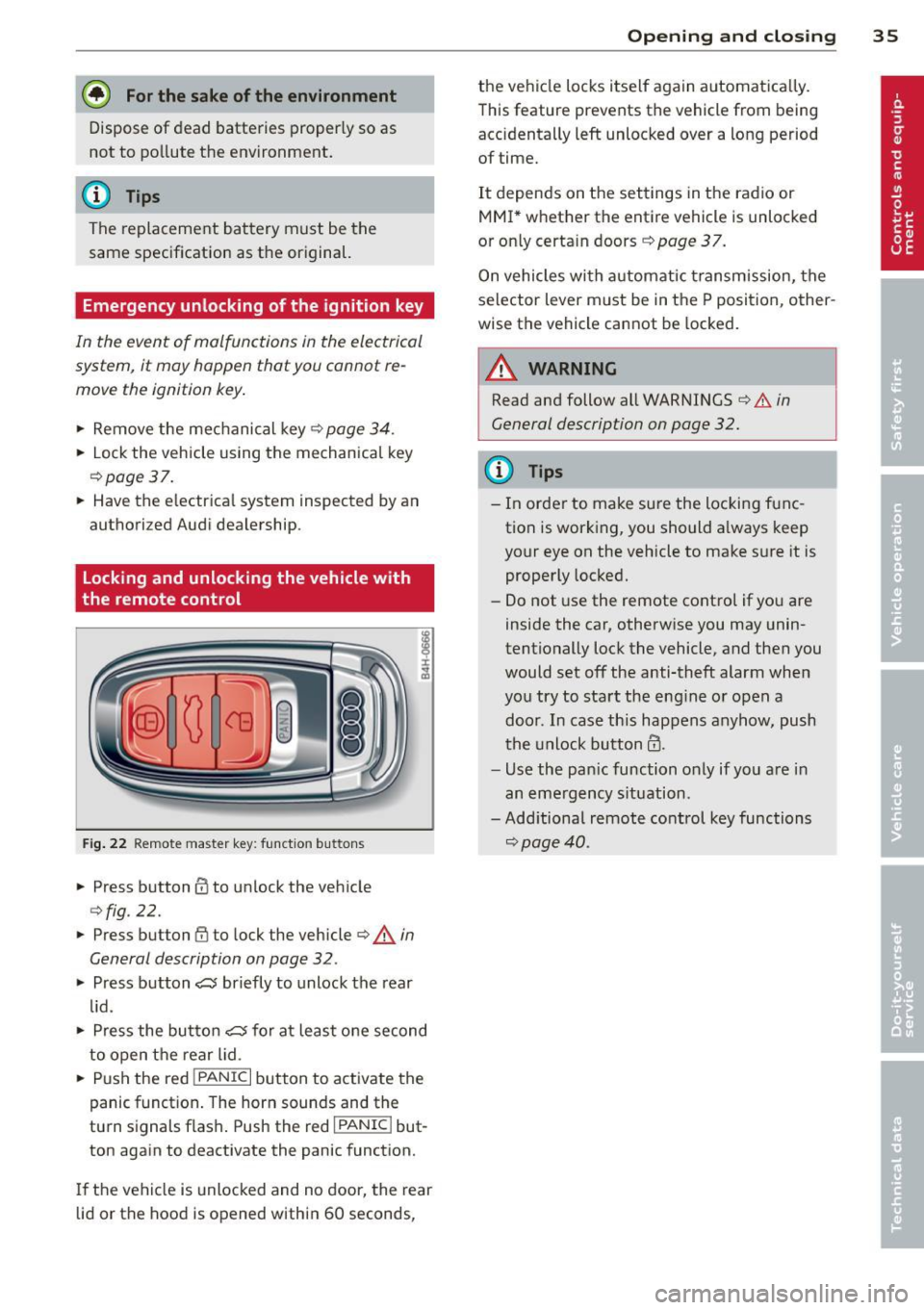
Locking and unlocking the vehicle with
the remote control
Fig. 22 Remote master key: function but tons
• Press button @to unlock the vehicle
Qfig . 22.
• Press button fij to lock the vehicle QA in
General description on page
32 .
• Press button ,c:;5 briefly to unlock the rear
lid .
• Press the button
,c:;5 for at least one second
to open the rear lid .
• Push the red
I PANIC I button to activate the
panic function. The horn sounds and the
turn s ignals flash . Push the red
I PANIC ! but
ton again to deactivate the panic function.
If the vehicle is unlocked and no door, the rear
lid or the hood is opened within 60 seconds,
Opening and closing 35
the vehicle locks itself again automat ica lly.
This feature prevents the vehicle from being
accidentally left unlocked over a long period of time.
It depends on the settings in the radio or
MMI* whether the entire vehicle is unlocked
or only certain doors <:?
page 37.
On vehicles with automatic transmission, the
selector lever must be in the P position, other
wise the vehicle cannot be locked.
A WARNING
Read and follow all WARNINGS ¢.&. in
General description on page
32.
(D Tips
- In order to make sure the locking func
tion is working, you should a lways keep
your eye on the vehicle to make sure it is properly locked.
- Do not use the remote control if you are
inside the car, otherwise you may unin
tentionally lock the vehicle, and then you
would set off the anti-theft alarm when
you try to start the eng ine or open a
door . In case this happens anyhow, push
t he unlock button@.
- Use the pan ic function only if you are in
an emergency s ituation.
-Add itional remote control key functions
¢page 40 .
Page 38 of 294
36 Opening and clo sing
locking and unlocking with convenience
key
Appl ies t o vehicles : wit h convenience key
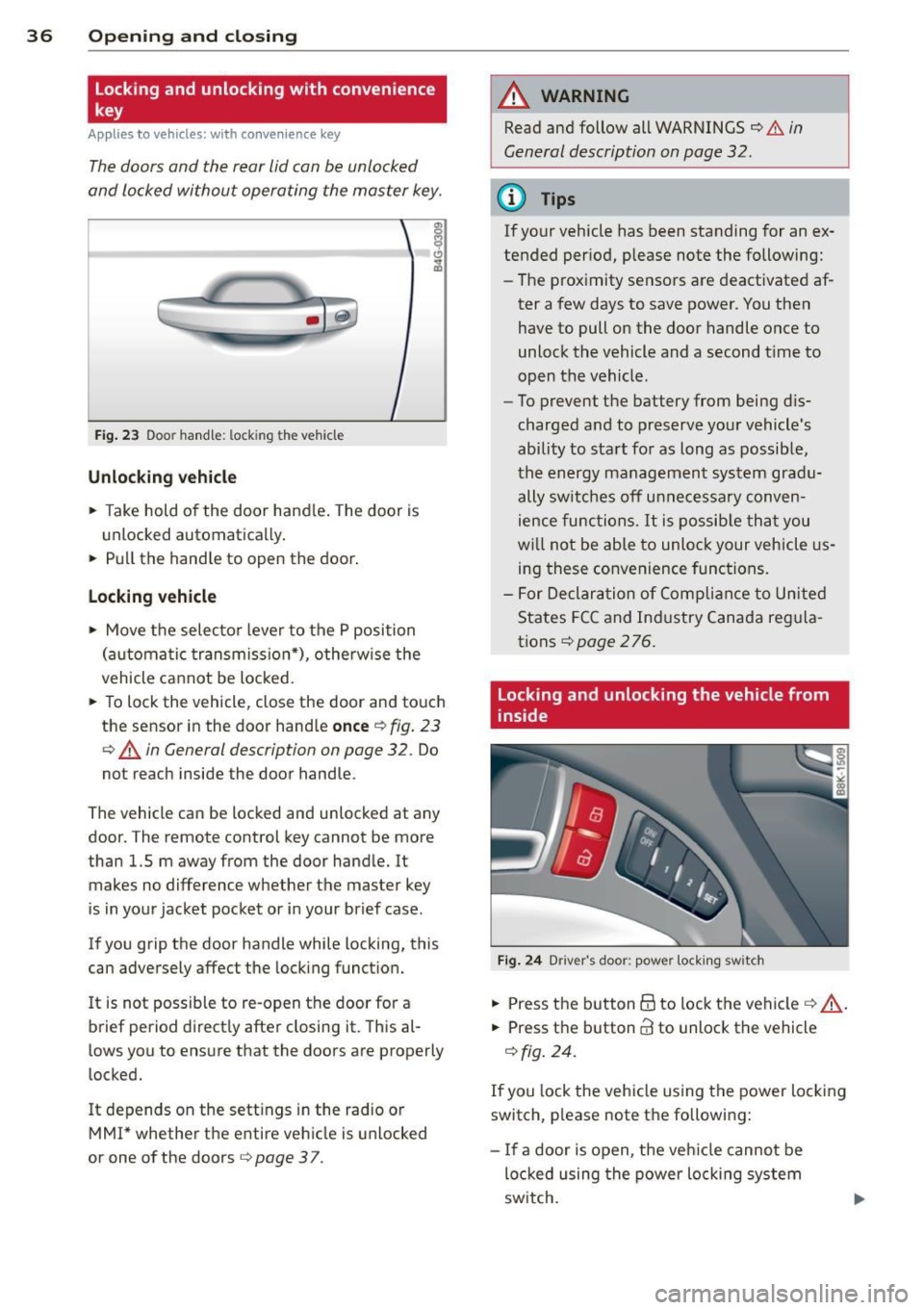
The doors ond the rear lid can be unlocked
and locked without operating the master key.
Fig . 23 Door hand le: lock ing the v ehi cle
Unlocking vehicl e
.. Take hold of the door hand le . The door is
unlocked automatically .
.. Pull the handle to open th e door .
locking vehicle
.. Move the selecto r lever to the P position
(a ut oma tic transmiss ion *) , othe rwi se the
vehicle cannot be locked.
.. To lock the vehicle , close the door and touch
the sensor in th e door hand le
onc e¢ fig. 23
c:> A in General description on page 32 . Do
not reach inside the door handle .
The vehicle ca n be locked and unlocked at any
door. The remote control key cannot be more
t han 1.5 m away from the door hand le. It
makes no difference whether the m aster key
is in your jacket pocket or i n your brief ca se .
If you grip the door handle while lo cking, th is
can adversely affect the lock ing funct ion.
I t is not possible to re-open the door for a
brief period direct ly after closing it. This al
l ows you to ensure that the doors are properly
locked.
I t depends on the sett ings in the radio or
MMI* whether the e ntire vehicle is unlocked
or one of the doors
c:> page 3 7 .
A WARNING
-
Read and follow all WARNINGS c:> .&. in
General description on page
32 .
(D Tips
If your vehicle has been standing for an ex
tended per iod, please note the following:
- The proximity sensors are deactivated af-
ter a few days to save power. You then
have to pull on the door handle once to
unlock the vehicle and a second t ime to
open the vehicle .
- To prevent the battery from being d is
charged and to preserve yo ur vehicle 's
ability to start for as long as possib le,
the energy managemen t system gra du
ally switches off u nnecessa ry c onven
ience func tions.
It is possib le th at you
w ill not be able to unloc k your veh icle us
ing these convenience func tions.
- F or Declar ation of Comp lian ce to Unite d
States FC C and Ind ustry Canada reg ula
tions
¢ page 276.
locking and unlocking the vehicle from
inside
Fi g. 24 Drive r's doo r: pow er lock ing sw it c h
.. Press the b utton B to lock the vehicle c::> ,& .
.. Press the button @ to unlock the vehicle
c::> fig. 24.
If you lock the veh icle using the power loc king
switch, p lease note the followi ng:
- I f a door is open, the veh icle canno t be
loc ked u sing the power loc king system
sw itch.
Page 39 of 294
- You cannot open the doors or the rear lid
from the outside (increased security, for ex
amp le when you are stopped at a red light).
- The diodes in the power locking switc h illu
minate when all the doors are closed and
locked.
- You can unlock and open the doors from the
i nside by pul ling on the door hand le .
- If you have a crash and the airbag is activat
ed , the doors automatically un lock .
_& WARNING
- The power locking switch works with the
ignition off and automatically locks the
entire vehicle when it is actuated .
- On a vehicle locked from the outside the
power locking system switch is inopera
t ive.
- locked doors make it more difficult for
emergency workers to get into the vehi
cle, which puts lives at risk . Do not leave
anyone behind in the veh icle, especially
children .
@ Tips
Your vehicle is locked automatically at a
speed of 9 mph (15 km/h) (Auto lock)
Qpage 32. You can un lock the vehicle
aga in using the opening function in the
powe r locking system switch~-
Setting power locking
In the radio/MM!*, you can set which doors
the centrol locking system will unlock .
~ Select : ICARI funct ion button > Central lock
ing .
Or
~ Select: ~ IC_A_R~I funct ion button > Car system s
control button > Vehicle settings > (C entral
locking )* .
Sin gle door unlocki ng /Unl ock door s* -
you
can specify which doors u nlock when you open
the vehicle .
- Se lecting
off / All and pressing the Ii button
on the remote control key unlocks the entire
vehicle.
Opening and clo sin g 3 7
- Select ing o n/Dri ver and pressing the~ but
ton on the remote control key once u nlocks
only the driver's door . In vehicles w ith a con
ven ience key*, only the door whose handle
you pull w ill unlock . If you press the @! but
ton tw ice, the entire vehicle will u nlock . If
you press the [@] button, t he e ntire ve hicle
w ill always lock .
Luggage comp. lock /Lock e xterio r trunk han
dl e -
If you select On , you can no longer open
the luggage compartment us ing the rear lid
hand le
Q page 39, fig. 28 . In this case, the
r ear lid can be opened with the
l""I bu tton on
the maste r key
Q poge 35, fig. 22 or with the
I"" I* button in the driver's door .
Tone when locking -if you select On, a tone
will sound when yo u loc k the vehicle .
Auto Lock /Lock when driv ing -if you select
On, the entire vehicle w ill lock automatically
when the speed reaches 9 mph (15 km/h) .
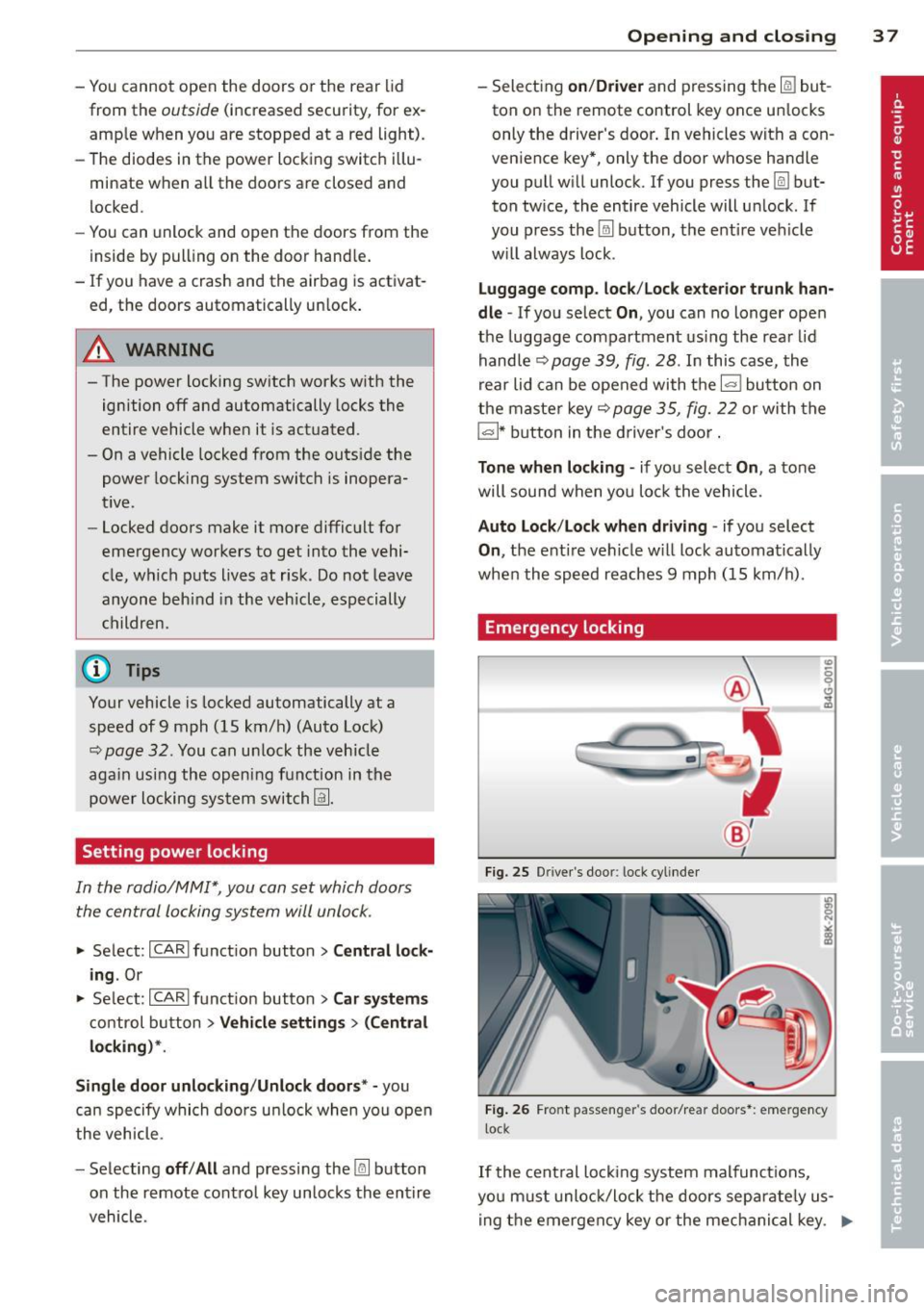
Emergency locking
Fig. 25 D rive r's doo r: lock cylinder
Fig . 26 Fro nt p assen ger 's doo r/rear doors*: eme rgency
lock
If the cent ral locking system malfunct ions,
yo u m ust unlock/lock the doors separate ly us
ing the emergency key or the mec hanical key . .,,.
Page 40 of 294
38 Opening and closing
Unlocking/locking the driver's door with
the m echanic al key
.. Remove the mechanical key ¢ page 34.
.. To un lock the dr iver 's door, t urn the key to
the open position@¢
fig. 25.
.. To lock the dr iver's door , move the se lector
lever to the P position (automa tic transmis
s ion*) and t urn the key
once to the close po
s it ion
@ ¢,& in General d escription on
page
32.
Locking the front passenger's door/rear
doors* with the mechanical key
Th e emergency lock is located on the rea r sid e
of the fron t passe nger's door a nd t he rea r
doors.
It i s only vis ible when the doo r is open.
.. Remove the mechanical key¢
page 34 .
.. Pu ll th e cove r cap out of th e opening
¢ fig . 26.
.. Inse rt the key in the inside slot and turn i t
all the way to the right ( right doo r) o r left
(left door) .
On ce the front passenger 's do orrear doo rs *
close, you canno t open them ag ain from t he
outside. The door can be o pened from the in
side by pulling the doo r handle . If the c hild
safety loc k in a rear door* is act ivated, you
must first pull the door hand le on the ins ide.
Then you can open the door from the outside .
A WARNING
Read and follow all WARNINGS¢.&. in
General description on page
3 2 .
(D Tips
-
After the ign ition is switched on, the pow
er l ock ing system switch and the unlocking
button fo r the rea r lid~ in the door are
e na bled.
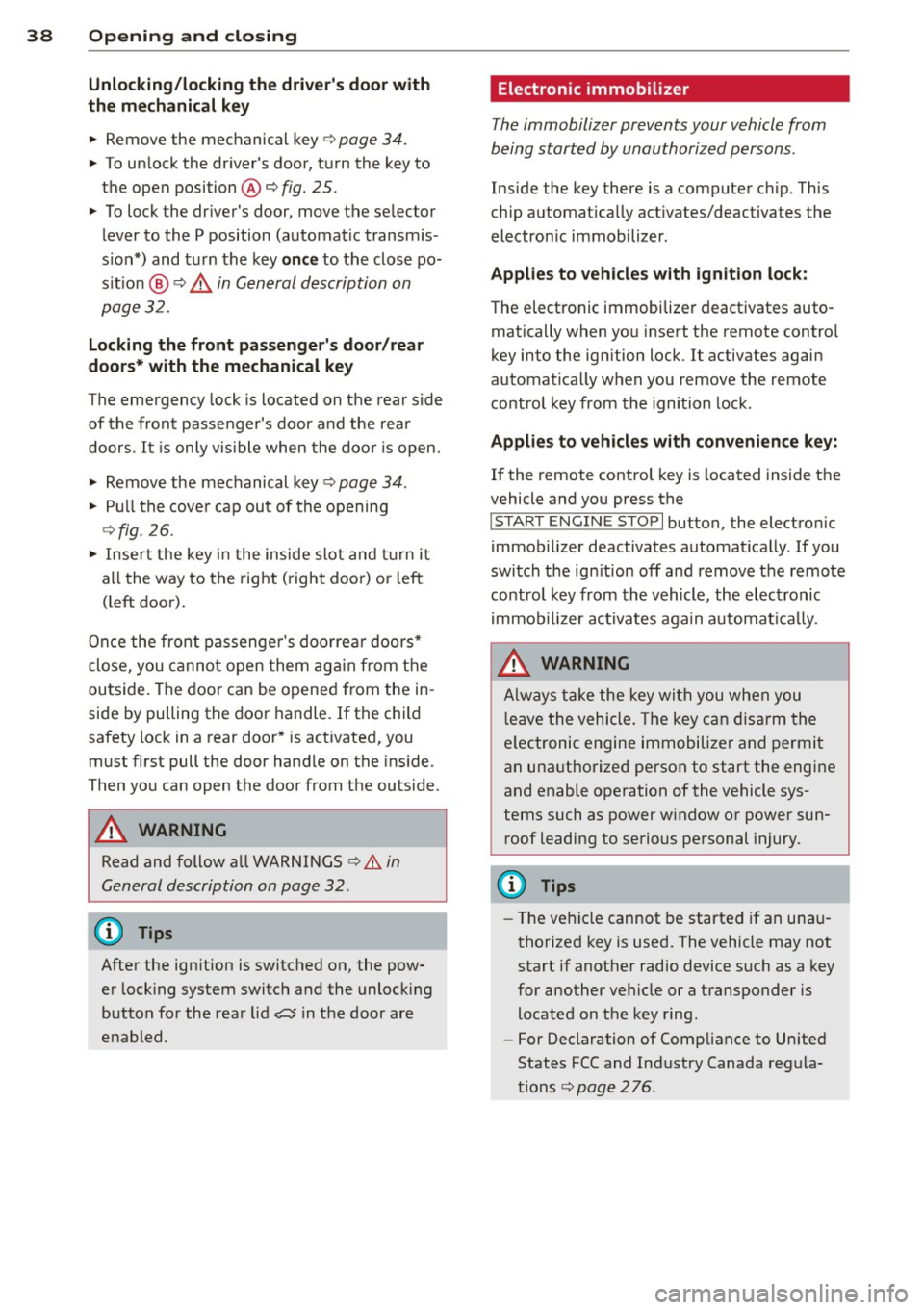
Electronic immobilizer
The immobilizer prevents your vehicle from
being started by unauthorized persons .
Inside the key there is a computer chip. This
c h ip automat ica lly act ivates/deactiva tes the
electron ic immobilizer .
Applies to vehicles with ignition lock:
The electronic immobilize r deact ivates auto
matically when yo u inse rt the remote contro l
key into the ign ition lock.
It activates again
automa tica lly w hen you remove the remote
control key from th e ignition lock .
Applies to vehicles with convenience key:
If the remote control key is located inside t he
vehicle and you press the
I S TART ENGI NE STOP I button, the electro nic
immob il izer deactivates automat ica lly. If you
swi tch the ign it ion off and remov e the remote
co ntrol key from the vehicle, the el ectronic
immob ili zer ac tiva tes aga in a utoma tically.
_& WARNING
-
Alw ays t ake the key wit h you when you
l eave the vehicle . The key can disa rm the
e lectronic engine immobilize r and permi t
an una uthorized person to start the engine
and enable opera tion of the vehicle sys
tems such as power w indow o r power sun
roof leading to se rious pe rsonal injury.
(D Tips
- The ve hicl e cannot be started if an una u
thorized key is used. The vehicle may not
start i f anot her radio device s uch as a key
for another ve hicle or a transponder is
located on t he key ring .
- Fo r Declaration of Compliance to Unite d
States FCC and Ind ustry Canada reg ula
t ions
c;:, page 2 76 .
Page 41 of 294
Rear lid
Opening/closing rear lid
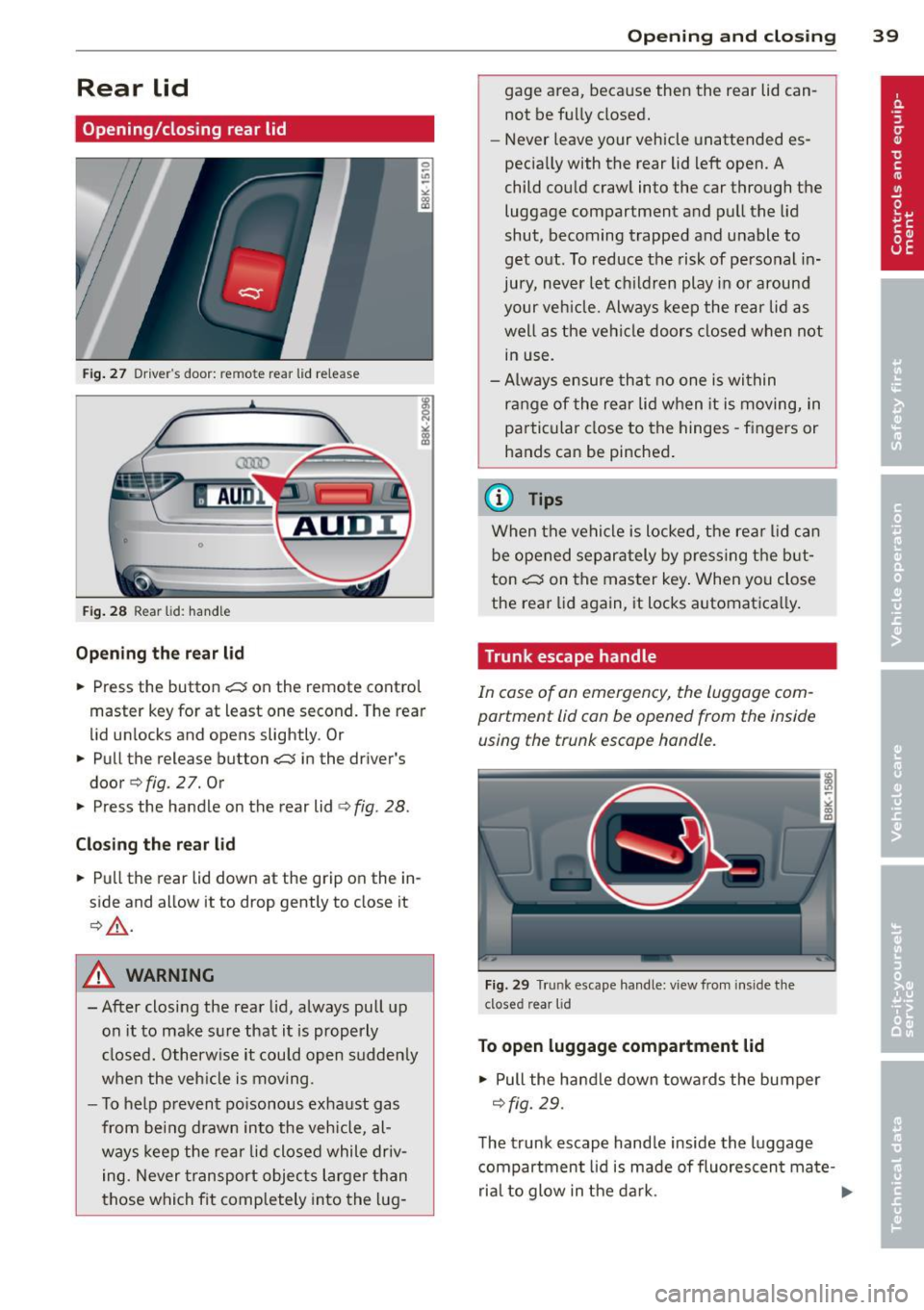
Fig. 27 Drive r"s door: re m ote rear lid rele ase
Fig. 28 Rear lid: handle
Opening the rear lid
.,. Press the button .c::5 on the remote control
master key for at least one second. The rear
lid unlocks and opens slightly . Or
.,. Pull the release button
.c::5 in the driver's
door
q fig. 2 7. Or
.,. Press the handle on the rear lid
¢fig . 28.
Closing the rear lid
.,. Pull the rear lid down at the grip on the in
side and allow it to drop gently to close it
¢ ,&. .
A WARNING
-After closing the rear lid, always pull up
on it to make sure that it is properly
closed. Otherwise it could open sudden ly
when the veh icle is moving .
- To help prevent poisonous exhaust gas
from being drawn into the vehicle, al
ways keep the rear lid closed while driv
ing. Never transport objects larger than
those which fit comp letely into the lug-
Opening and closing 39
gage area, because then the rear lid can
not be fully closed.
- Never leave your vehicle unattended es
pecia lly with the rear lid left open. A
child could craw l into the car through the
luggage compartment and pull the lid
shut, becoming trapped and unable to
get out. To reduce the risk of personal in
jury, never let childre n play in or around
your vehicle. Always keep the rear lid as
well as the vehicle doors closed when not
in use.
- Always ensure that no one is within
range of the rear lid when it is moving, in
particular close to the hinges -fingers or
hands can be pinched .
@ Tips
When the vehicle is locked, the rear lid can
be opened separately by pressing the but
ton
.c::5 on the master key . When you close
the rear lid aga in, it locks automat ica lly.
Trunk escape handle
In case of an emergency, the luggag e com
partment lid can be opened from the inside using the trunk escape handle .
Fig . 29 T run k escape handle: view fr om ins ide the
closed rear lid
To open luggage compartment lid
.,. Pull the handle down towards the bumper
¢fig. 29.
The trunk escape handle inside the luggage
compartment lid is made of fluorescen t ma te-
rial to glow in the dark. .,..
Page 50 of 294
48 Clear vision
-If swallowed and person is conscious,
rinse mouth with water for at least 15
minutes. Do not induce vomiting unless
instructed to do so by medical professio
nal. Get medical attention immediately.
d) Note
Liquid electrolyte leaking from broken mir
ror glass will damage any plastic surfaces
it comes in contact with. Clean up spilled
electrolyte immediately with clean water
and a sponge.
@ Tips
- Switching off the dimming function of
the inside rear view mirror also deacti
vates the automatic dimming function of
the exterior mirrors.
-Automatic dimming for the mirror only
operates properly if the sun shade* for
the rear window is not in use or the light
striking the inside mirror is not hindered
by other objects.
- The automatic dimming mirrors do not
dim when the interior lighting is turned
on or the reverse gear is selected.
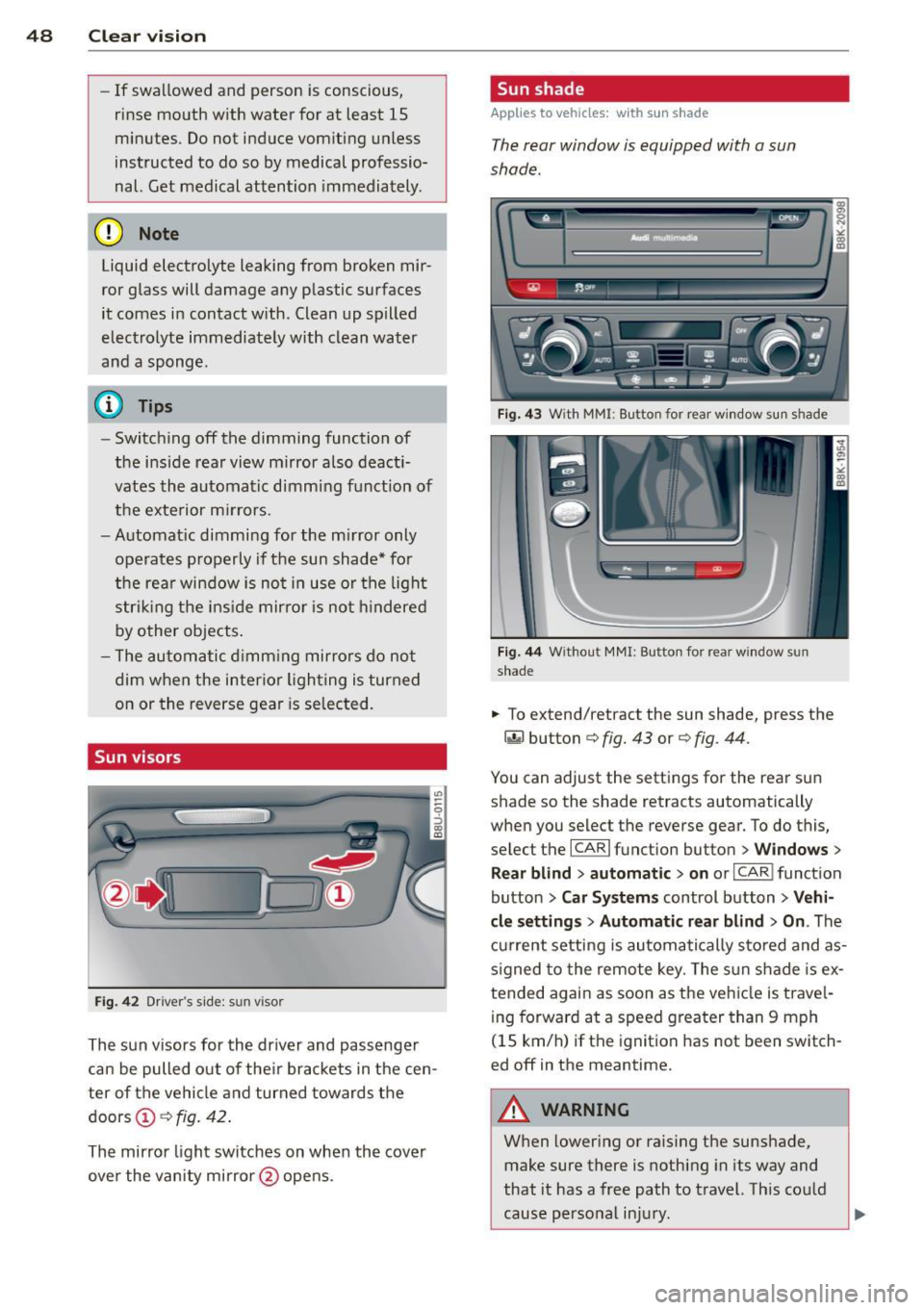
Sun visors
Fig. 42 Drive r's side : su n v isor
The sun visors for the driver and passenger
can be pulled out of their brackets in the cen
ter of the vehicle and turned towards the
doors
Ci) c::> fig. 42.
The mirror light switches on when the cover
over the vanity mirror @opens .
Sun shade
Applies to vehicles: with sun shade
The rear window is equipped with a sun
shade.
Fig. 43 W ith MM I: Bu tton for rear window sun s hade
Fig. 44 Withou t MMI : Bu tton for rea r win dow s un
shade
.. To extend/ret ract the sun shade, press the
~ button c::> fig. 43 or c::> fig. 44 .
You can adjust the settings for the rear sun
shade so the shade retracts automatically
when you select the reverse gear. To do this,
select the
I CAR I function button > Windows >
Rear blind> automatic> on or I CAR I function
button
> Car Systems control button > Vehi
cle settings> Automatic rear blind > On .
The
current setting is automatically stored and as
signed to the remote key. The sun shade is ex
tended again as soon as the vehicle is travel ing forward at a speed greater than 9 mph
(1 S km/h) if the ignition has not been switch
ed off in the meantime.
_8 WARNING
= When lowering or raising the sunshade,
make sure there is nothing in its way and
that it has a free path to travel. This could
cause personal injury.
-
Page 53 of 294
-To help prevent damage to the wiper
arms or other components, do not at
tempt to move the wipers by hand .
@ Tips
-Commercial hot waxes applied by auto
matic car washes affect the how easily
the glass surface can be cleaned.
- You can also use the service position, for
example, if you want to protect the
windshield from icing by using a cover.
Digital compass
Switching the compass on and off
A pp lies to vehicles: with digital compass
The compass direction is shown in the rear
view mirror .
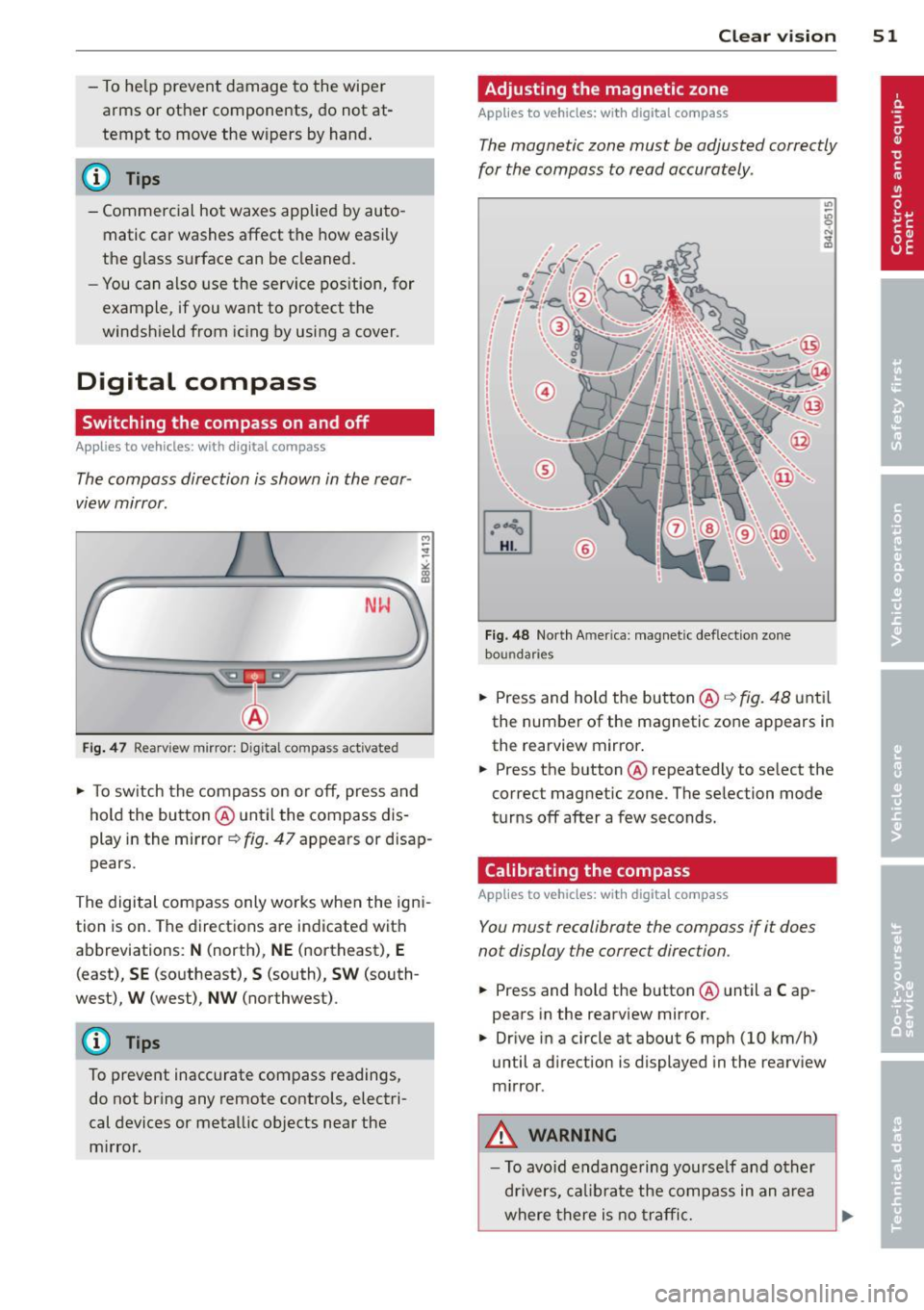
NlrJ
Fig . 47 Rearview mirror: D ig ital compass act ivated
.. To sw itch the compass on or off, press and
hold the button @ until the compass dis
play in the mirror~ fig. 47 appears or disap
pears.
The digital compass only works when the igni
tion is on. The directions are indicated with
abbreviations:
N (north), NE (northeast), E
(east), SE (southeast), S (south), SW (south
west),
W (west), NW (northwest).
(D Tips
To prevent inaccurate compass readings,
do not bring any remote controls, electri
cal devices or metallic objects near the
m irror. Clear vi
sion 51
Adjusting the magnetic zone
App lies to vehicles : wi th digi ta l co mpass
The magnetic zone must be adjusted correctly
for the compass to read accurately .
Fig. 48 North Amer ica: magne tic deflect ion zone
bou ndaries
.. Press and hold the but ton @ C? fig. 48 until
the number of the magnetic zone appears in
the rearview mirror .
.. Press the button @repeatedly to select the
correct magnetic zone. The selection mode
turns off after a few seconds.
Calibrating the compass
App lies to vehicles: wit h digita l comp ass
You must recalibrate the compass if it does
not display the correct direction.
.. Press and hold the button @ until a Cap
pears in the rearview mirror.
.. Drive in a circle at about 6 mph (10 km/h)
until a direction is displayed in the rearv iew
m irror.
,&. WARNING
- To avo id endange ring yourse lf and other
d rivers, calibrate the compass in an area
where there is no traffic.