change time AUDI A5 COUPE 2014 User Guide
[x] Cancel search | Manufacturer: AUDI, Model Year: 2014, Model line: A5 COUPE, Model: AUDI A5 COUPE 2014Pages: 286, PDF Size: 70.99 MB
Page 103 of 286
General information
Applies to vehicles: with Audi side assist
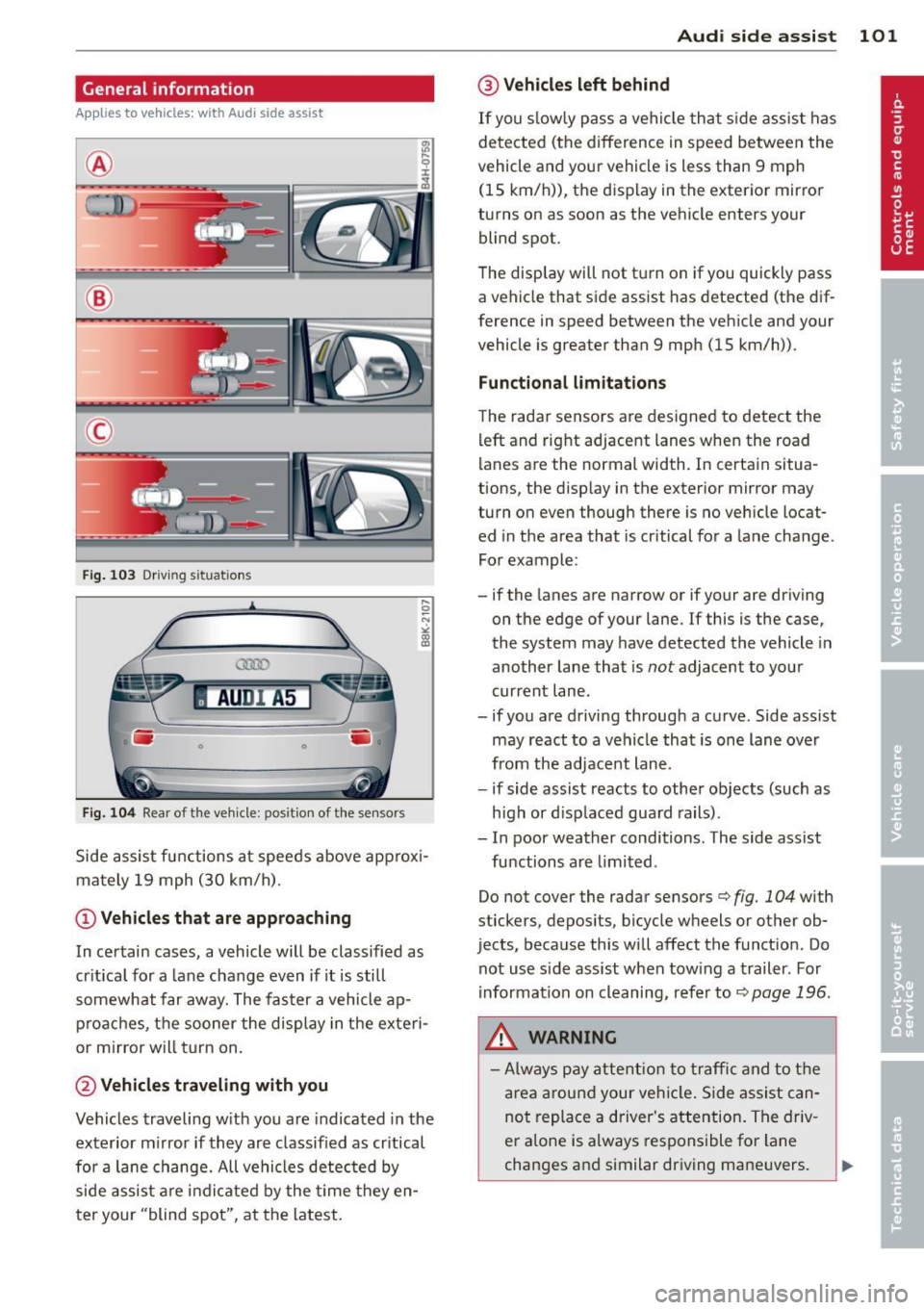
®
©
Fig . 103 Dr iving situations
AUDI A5
•
Fi g. 104 Rear of t he ve hicle: positio n of t he se nsors
Side assist functions at speeds above approx i
mately 19 mph (30 km/h).
@ Vehicl es th at ar e approaching
In certain cases, a vehicle will be classified as
cr itical for a lane change even if it is still
somewhat far away. The faster a vehicle ap
p roaches, the sooner the display in the exteri
or m irror will t urn on.
@ Vehicles traveling with you
Vehicles traveling w ith you are indicated in the
exterior m irror if they are classified as cr itical
for a lane change. All vehicles detec ted by
side assist are indicated by the time they en
ter your "blind spot", at the latest.
Audi side assist 101
@ Veh icle s left behind
If you s low ly pass a vehicle that s ide assist has
detected (the difference in speed between the
vehicle and your vehicle is less than 9 mph (15 km/h)), the display in the exterior mirror
turns on as soon as the vehicle enters your blind spot.
The disp lay will not t urn on if you quickly pass
a vehicle that side assist has detected (the dif
ference in speed between the vehicle and your
vehicle is greater than 9 mph (15 km/h)).
Functional limitation s
The radar senso rs are designed to detect the
left and right adjacent lanes when the road
lanes are the normal width. In certain situa
tions, the disp lay in the exterior mirror may
turn on even though there is no vehicle locat
ed in the area that is cr itical for a la ne change.
For example:
- if the lanes are narrow or if your are dr iving
on the edge of your lane.
If this is the case,
the system may have detected the vehicle in
another lane that is
not adjacent to your
current lane .
- if you a re driving through a curve. Side assist
may react to a vehicle that is one lane ove r
from the adjacent lane.
- if side assist reacts to other objects (such as
high or d isp laced guard rails) .
- In poor weather conditions. The side assist
functions are l imited .
Do not cover the radar sensors <=>
fig. 104 with
stickers, depos its, bicycle wheels or other ob
jects, because this will affect the funct ion. Do
not use s ide ass ist when towing a trailer. For
i nformation on cleaning, refer to<=>
page 196.
_&. WARNING
- Always pay attention to traffic and to t he
area around your ve hicl e. S ide assist can
not replace a driver's attention. The driv
er a lone is always responsible for lane
changes and similar driving mane uvers.
Page 104 of 286
102 Audi side assist
-Improper reliance on the side assist sys
tem can cause collisions and serious
personal injury:
- Never rely only on side assist when
changing lanes.
- Always check rear view mirrors to make
sure that it is safe to change lanes.
- Side assist cannot detect all vehicles un
der all conditions- danger of accident!
- Please note that side assist indicates
there are approaching vehicles, or
vehicles in your blind spot, only after
your vehicle has reached a driving speed
of at least 19 mph (30 km/h).
- In certain situations, the system may not
function or its function may be limited.
For example:
- if vehicles are approaching or being left
behind very quickly . The display may
not turn on in time.
- in poor weather conditions such as
heavy rain, snow or heavy mist .
- on very wide lanes, in tight curves or if
there is a rise in the road surface.
Vehicles in the adjacent lane may not
be detected because they are outside
of the sensor range.
(D Note
The sensors can be displaced by impacts or
damage to the bumper, wheel housing and
underbody. This can affect the system.
Have your authorized Audi dealer or au
thorized Audi Service Facility check their
function.
@ Tips
- If the window glass in the driver's door
or front passenger's door has been tint
ed, the display in the exterior mirror may
be misinterpreted.
- For Declaration of Compliance to United
States FCC and Industry Canada regula
tions¢
page 267.
Activating and deactivating
A pp lies to vehic les : wi th Audi s ide ass ist
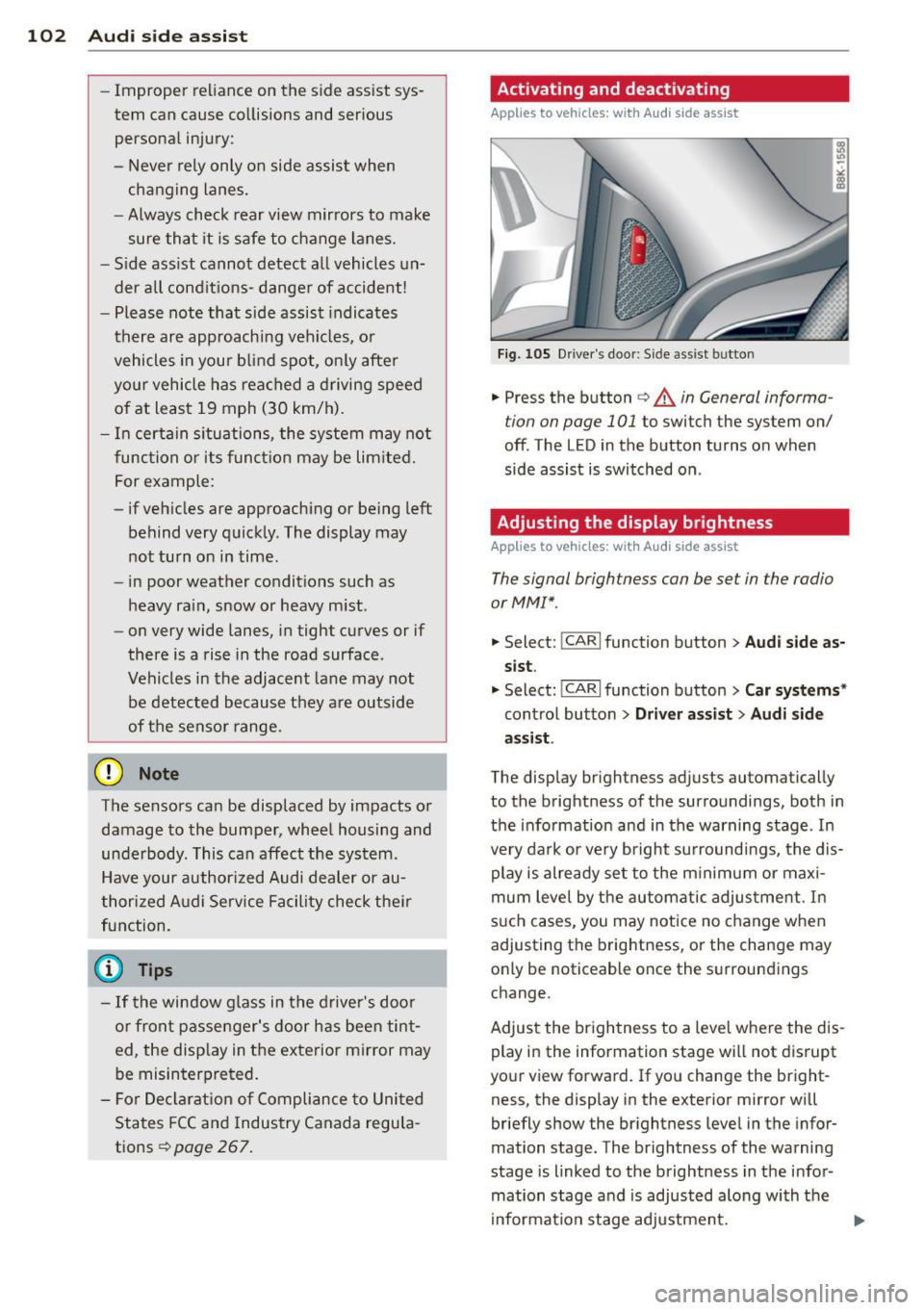
Fig. 105 D river's door: Side ass ist butto n
.. Press the button c> A in General informa
tion on page 101
to switch the system on/
off. The LED in the button turns on when
side assist is switched on .
Adjusting the display brightness
Applies to vehicles: wit h Audi side ass ist
The signal brightness con be set in the radio
or MM!*.
.. Select: I CAR I function button > Audi side as
sist.
.. Select: !CARI function button> Car systems*
control button > Driver assist> Audi side
assist .
The display brightness adjusts automatically
to the brightness of the surroundings, both in
the information and in the warning stage . In
very dark or very bright surroundings, the dis play is already set to the minimum or maxi
mum level by the automatic adjustment. In
such cases, you may notice no change when
adjusting the brightness, or the change may
only be noticeable once the surroundings
change.
Adjust the brightness to a level where the dis
play in the information stage will not disrupt
your view forward. If you change the bright
ness, the display in the exterior mirror will
briefly show the brightness level in the infor
mation stage. The brightness of the warning
stage is linked to the brightness in the infor
mation stage and is adjusted along with the
information stage adjustment.
Page 106 of 286
104 Audi drive select
Audi drive select
Driving settings
Introduction
App lies to vehicles: with Audi drive select
Drive select provides the possib ility to exper i
e nce diffe ren t types of vehi cle sett ings in o ne
ve hicl e. For ins tance, us ing t he three
Com
fort , Auto and Dynamic modes, the driver can
switch from a sporty to a comfortab le drivi ng
mode with the press of a b utton.
A ddit ionally, in veh icles wi th MM I*, the vehi
cle setup for
Individual* mode can be c us
tom ized by you . This makes it possib le to
comb ine settings such as a sporty engine tun
ing with comfortable steering.
A WARNING
Improper use of the A udi drive select can
cause collisions , ot her acc idents and se ri
ous pe rsonal injury .
Description
Applies to vehicles: with Audi drive select
The vehicle setup in each mode depends on
the veh icle's features . However, the engin e,
automa tic t ransmissio n* and steer ing are al
ways involved.
-
Engine and automatic transmission*
Depending on the mode , the e ngine and the
automatic t ransm ission respond quicke r or i n
a mo re ba la nced manne r to a cce le rator pedal
move ments. In t he sporty dynam ic mode, the
a utom atic t ra nsm ission shifts at h igher R PMs.
Steering
The stee ring adapts in terms of stee ring effort
and st eering ra tios . Ind ir e ct steer ing that
moves easi ly, l ike the stee ring in comfort
mode, is bes t su ite d to long dr ives on a high
way. In co ntr ast, dynam ic mo de p rov ides
sporty, direct steerin g.
Th e fo llow ing applies to vehicl es with dynam ic
s teer ing*: the stee ring rati o changes based on
ve hicl e spee d in order to main ta in op timum stee
ring effort for the drive r at all times . This
sets the stee ring to be less sens itive at higher
speeds in order to provide improved vehicle
control. At reduced speeds, however, steer ing
is more d irect in order to keep the steering ef
fort as minima l as poss ible when the drive r is
mane uveri ng the veh icle . At low and ave rage
spe eds, dynamic steering add itiona lly pro
vides more responsive stee ring pe rforma nce.
Adaptive dampers*
The adaptive dampers* use se nsors to record
i nforma tion regard ing st eer ing movements,
braking and acceleration o perations by the
drive r, road surfac e, d riv ing speed, and load.
T his makes it poss ible to adapt damp ing to
t h e dr iving si tua tion v irtu ally in real t ime.
Dr ive sele ct also makes i t possib le to sa tisfy
t h e desi re fo r spo rty suspension ( Dynamic)
and comfortab le suspension (Comfort) with
o ut giving up ba lanced tuning (Auto) .
Sport differential*
As a compone nt of t he all whee l dr ive sys tem
(quat tro)
~ page 185, t he spo rt differential *
dist ributes the driving power to the rear ax le
depen ding on the sit uat io n. The distrib ution
of power var ies depending on the mode se
lected. The goal is a high level of agility and
ability to accelerate on curves . T he ve hicle is
very res pons ive to steering .
Audi adaptive crui se control*
The behav ior when accelerating can be adjust
ed from comfortab le to sporty, depending on
t h e drive select mode. Adaptive cr uise control
also responds to the driv ing behavior of the
vehicle ahead in a mo re conservative o r spo rty
man ner.
Engine sound*
The sound of the eng ine is adapted to these
lected mode and ranges from subtle to sporty.
(!) Tips
- In s ome models, the maximum vehicle
spee d can only be reached in the
Auto
and Dynamic modes.
Page 107 of 286
-For vehicles with an automatic transmis
sion, selecting the
Dynamic mode re
su lts in sporty shifting characteristics .
The
5 gear posit ion engages automati
cally.
- In vehicles that have dynamic steering*,
operating noise is heard when starting or
stopping the eng ine. Th is does not ind i
cate a problem .
Selecting the driving mode
Applies to vehicles: with Audi drive select
You con choose between Comfort, Auto, Dy
namic and Individual* modes.
drive I I fi el•ct _ ~-=
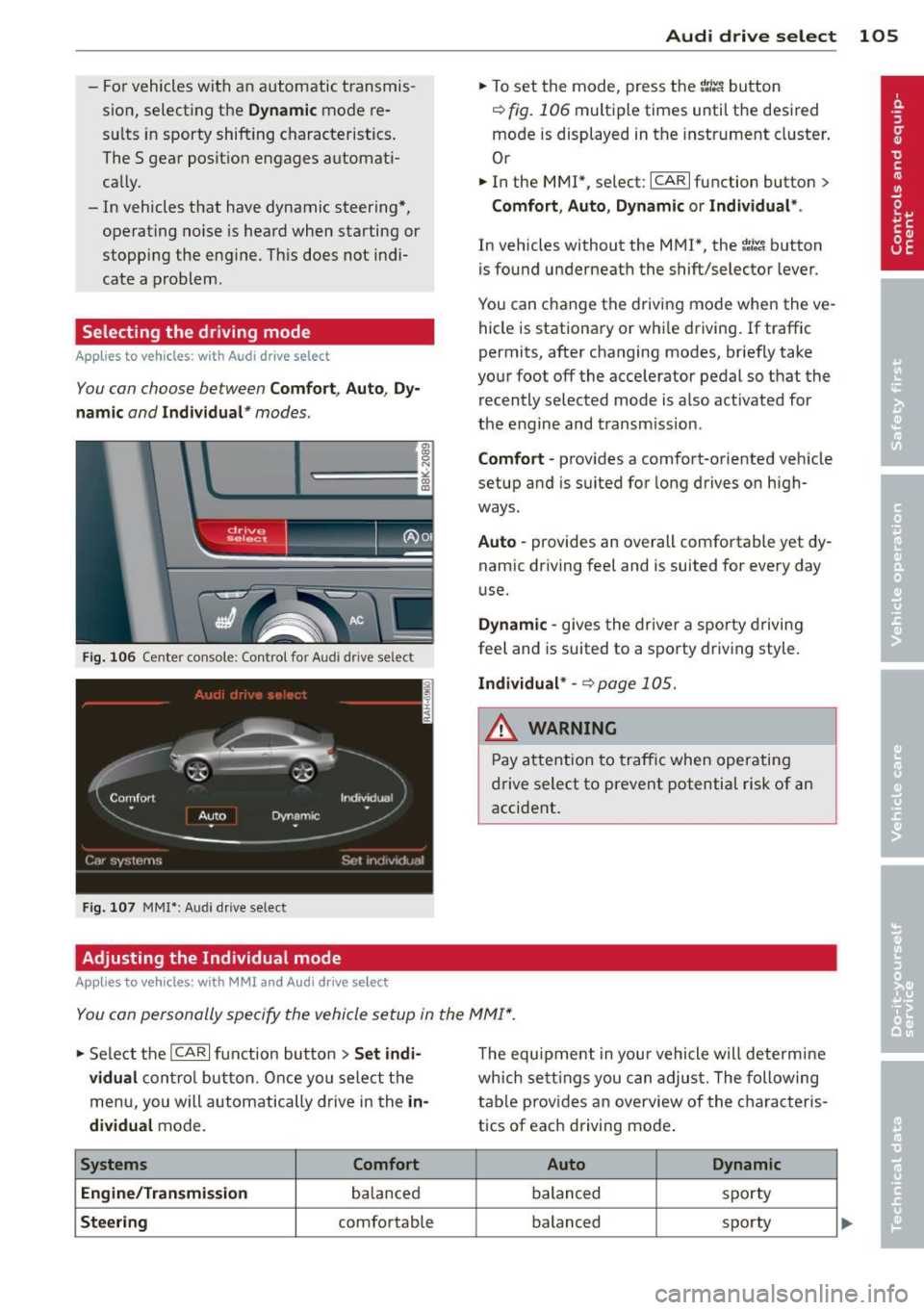
Fig. 106 Center console ; Con trol for Aud i dr ive se lect
Fig. 107 MMI *: Aud i drive select
Adjusting the Individual mode
Applies to vehicles: with MMI and Aud i d rive select
Audi drive select 105
.. To set the mode, press the 1.:il'.'l button
r=> fig. 106 multiple times until the desired
mode is displayed in the instrument cluster .
Or
.. In the MMI*, select: ICARlfunction button>
Comfort, Auto , Dynamic or Individual* .
In vehicles without the MMI*, the ~:/~c1 button
is found underneath the shift/selector lever.
You can change the driving mode when the ve
hicle is stationary or whi le driving.
If traffic
permits, after changing modes, briefly take
your foot off the accelerator pedal so that the recently selected mode is also activated for
the engine and transmission.
Comfort -provides a comfort-oriented vehicle
setup and is suited for long drives on high
ways.
Auto -provides an overall comfortable yet dy
namic driving feel and is suited for every day
u se.
Dynamic -gives the driver a sporty driving
feel and is suited to a sporty driving style .
Individual* -~ page 105.
& WARNING ~
Pay attention to traffic when operating
drive select to prevent potential risk of an
accident .
You con personally specify the vehicle setup in the MMI* .
.. Select the ICARI function button > Set indi
vidual
control button. Once you select the
menu, you will automatically drive in the
in
dividual
mode.
Systems Comfort
Engine/Transmission
ba lanced
Steering comfortable The
equipment in your vehicle will determine
which settings you can adjust. The following
table prov ides an overview of the characteris
tics of eac h driving mode .
Auto Dynamic
balanced spo
rty
balanced sporty
Page 113 of 286
Switching off
• Drive faster than 9 mph (15 km/h), or
• take the vehicle out of reverse gear. The
acoustic parking system is immediately de
activated, and the rear view camera picture is deactivated automatically after a period
of about 15 seconds, or
• switch off the ignition.
The delay in deactivating the camera provides
an uninterrupted view behind the vehicle es
pecially when maneuvering in tight parking
spaces and prevents the picture from turning
off the every time you sh ift out of reverse .
If the warning message appears in the display but not the rear view camera picture, read and
confirm the warning message . The acoustic
d istance signal is always active.
If you press a function button on the MMI
control console, the rear view camera picture
disappears . The rear view camera picture reap
pears the next time you park.
Further information on the warning message
and the MMI control console can be found in
the MMI instruction booklet.
A WARNING
- Only use the rearview camera to assist
you if it shows a good, clear picture. For
example, the image may be affected by
the sun shining into the lens, dirt on the
lens or if there is a defect.
- Use the rearview camera only with the
rear lid completely closed. Make sure any
objects you may have mounted on the
rear lid do not block the rearview cam
era.
(D Tips
- The rear v iew camera picture is available
as soon as the MMI Display or the MMI is
switched on, or the start-up phase is
completed.
- The sensors must be kept clean and free
of snow and ice for the park assist to op
erate.
Park assist 111
- You can change the vo lume and pitch of
the signals as we ll as the disp lay
~page 113.
-What appears in the display is time-de
layed.
Reverse Parking
App lies to vehicles: wit h parking system (rear, with rear
v iew camera}
Parking mode 1 can be used when parking in
a garage or parking space.
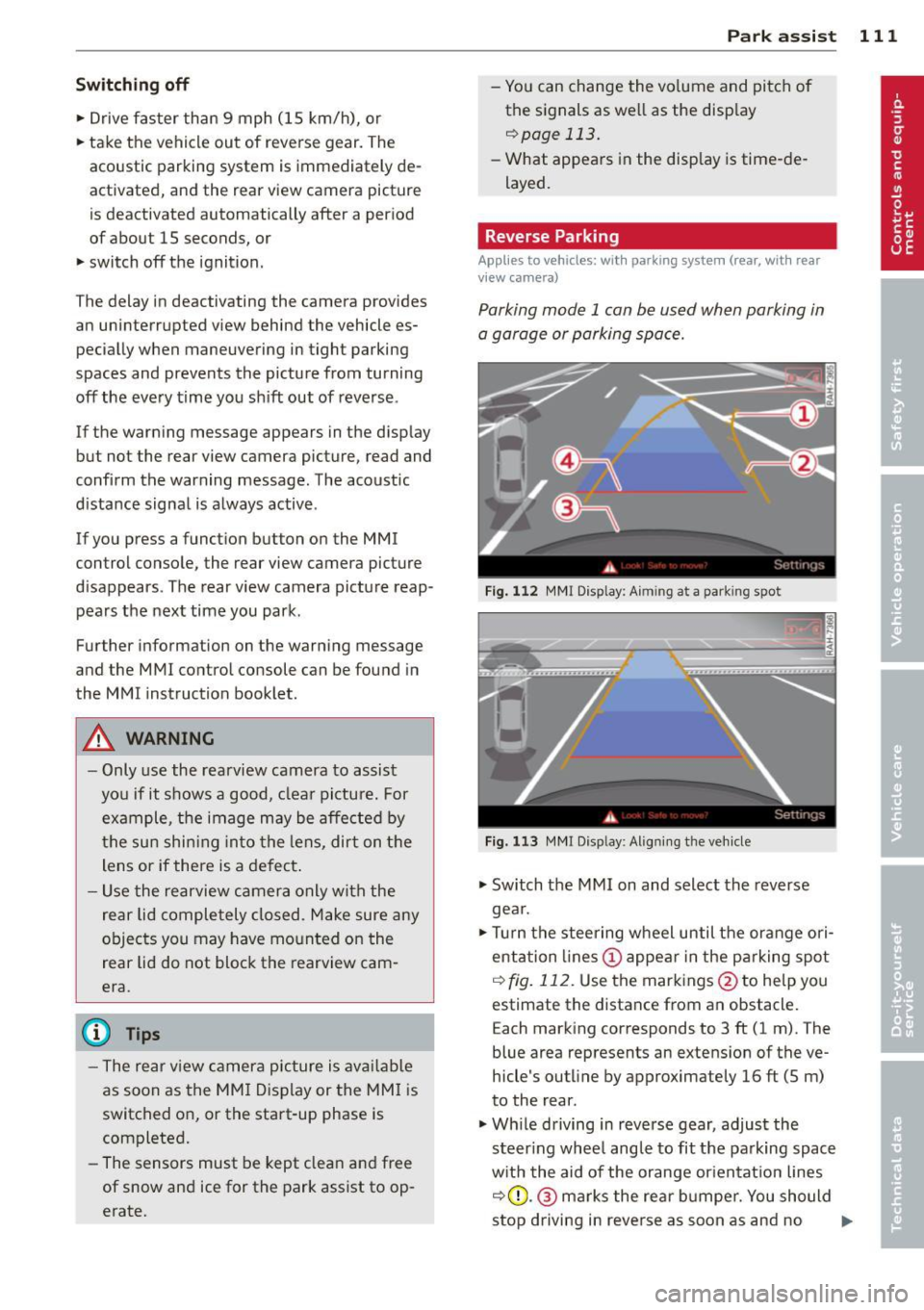
Fig. 112 MMI Display: Aim ing at a park ing spot
Fig. 113 MMI Disp lay : Al ign ing the veh icle
• Switch the MMI on and select the reverse
gea r.
• Turn the steering wheel until the orange ori
entation lines (!) appear in the parking spot
i=> fig. 112. Use the markings @to help you
estimate the distance from an obstacle.
Each marking corresponds to 3 ft (1 m). The
blue area represents an extens ion of the ve
hicle's outline by approximately 16 ft (5 m)
to the rear.
• Wh ile driving in reverse gear, adjust the
steer ing whee l angle to fit the parking space
with the aid of the orange orientation lines
i::>0 .@ marks the rear bumper. You should
stop driving in reve rse as soon as and no
Ill>-
Page 152 of 286
150 Airbag system
possible that the airbag will inflate when
it is not supposed to, or will not inflate
when it should.
A WARNING
If the front airbag inflates, a child without
a child restraint, in a rearward-facing child
safety seat or in a forward-facing child re
straint that has not been properly installed
will be seriously injured and can be killed.
- Even though your vehicle is equipped
with an Advanced Airbag System, make certain that all children, especially 12
years and younger, always ride on the back seat properly restrained for their
age and size.
- Always install forward or rear-facing
child safety seats on the rear seat -even
with an Advanced Airbag System.
- If you must install a rearward-facing
child safety seat on the front passenger
seat because of exceptional circumstan
ces and the
PASSENGER AIR BAG OFF
light does not appear and stay on, imme
diately install the rear-facing child safety
seat in a rear seating position and have
the airbag system inspected by your au
thorized Audi dealer.
- A tight tether or other strap on a rear
ward-facing child restraint attached to
the front passenger seat can put too
much pressure on the weight-sensing
mat in the seat and register more weight
than is actually on the seat. The heavier
weight registered can make the system
work as though an adult were on the seat
and deploy the Advanced Airbag when it
must be suppressed causing serious or
even fatal injury to the child.
- If, in exceptional circumstances, you
must install a forward-facing child re
straint on the front passenger seat, al
ways move the seat into its rearmost po
sition in the seat's fore and aft adjust
ment range, as far away from the airbag
as possible. The backrest must be adjust
ed to an upright position. Make sure that the
PASSENGER AIR BAG OFF light
comes on and stays on all the time when
ever the ignition is switched on.
A WARNING
-
- If the PASSENGER AIR BAG OFF light
does not go out when an adult is sitting
on the front passenger seat after taking
the steps described above, make sure the
adult is properly seated and restrained at
one of the rear seating positions.
- Have the airbag system inspected by
your authorized Audi dealer before trans
porting anyone on the front passenger
seat.
(D Tips
If the weight-sensing mat in the front pas
senger seat detects an empty seat, the
front airbag on the passenger side will be
turned off, and
PASSENGER AIR BAG OFF
will stay on.
Repair, care and disposal of the airbags
Parts of the airbag system are installed at
many different places on your Audi. Installing,
removing, servicing or repairing a part in an
area of the vehicle can damage a part of an
airbag system and prevent that system from
working properly in a collision.
There are some important things you have to know to make sure that the effectiveness of
the system will not be impaired and that dis carded components do not cause injury or pol
lute the environment.
A WARNING
Improper care, servicing and repair proce
dures can increase the risk of personal in
jury and death by preventing an airbag
from deploying when needed or deploying an airbag unexpectedly:
- Never cover, obstruct, or change the
steering wheel horn pad or airbag cover
or the instrument panel or modify them
in any way.
Page 182 of 286
180 Intellige nt tec hno logy
Intelligent technology
Notice about data
recorded by veh ic le
control modules
Your vehicle is not equipped with an Event Da
ta Recorder (EDR), installed by some manu
facturers fo r the express purpose of capturing
data for retrieval after an accident or crash
event . EDR's are sometimes called "crash re
corders".
Some state laws restrict the retrieval or down
loading of data stored by EDR's that were in
stalled in a vehicle for the express purpose of
retrieving data after an accident or crash
event without the owner's consent.
A lthough your vehicle is not equipped with an
EDR, it is equipped with a number of electron
ic control modules for various vehicle systems
such as, for example, engine function, emis
sion control, as well as for the airbags and
safety belts.
These electronic control modules also record
vehicle-related data during normal vehicle op
eration for diagnostic and repair purposes.
The recording capacity of the electronic con
trol modules is limited to data (no sound is re
corded) and only a small amount of data is ac
tually recorded over a very limited period of
time and stored when a system fault or other
condition is sensed by a control unit. Some of
the data then stored may relate to vehicle
speed, direction, braking as well as restraint
system use and performance in the event of a
crash or other condition. Stored data can only
be read and downloaded with special equip
ment.
Electronic Stab ilization
Control (ESC)
Description
ESC helps to improve road holding and vehicle
dynamics to help reduce the probability of
skidding and loss of vehicle control. It works
only when the engine is running. ESC detects certain difficult driving situations, including
when the vehicle is beginning to spin (yaw)
out of control and helps you to get the vehicle back under control by selectively braking the
wheels, and/or reducing engine power and
providing steering assistance to help hold the
vehicle on the driver's intended course. The in
dicator light
J.i) in the instrument cluster
blinks when ESC is taking action to help you
control the vehicle.
ESC has limitations.
It is important to remem
ber that ESC cannot overcome the laws of
physics. It will not always be able to help out
under a ll cond itions you may come up against.
For example, ESC may not always be able to
help you master situations where there is a
sudden change in the coefficient of friction of
the road surface. When there is a section of dry road that is suddenly covered with water,
slush or snow, ESC cannot perform the same
way it would on the dry surface . If the vehicle
hydroplanes (rides on a cushion of water in
stead of the road surface), ESC will not be
able to help you steer the vehicle because con
tact with the pavement has been interrupted
and the vehicle cannot be braked or steered.
During fast cornering, particularly on winding
roads, ESC cannot always deal as effectively
with difficult driving situations than at lower
speeds. When towing a trailer, ESC is not able
to help you regain control as it would if you
were not towing a trailer.
Always adjust your speed and driving style to road, traffic and weather conditions. ESC can
not override the vehicle's physical limits, in
crease the available traction, or keep a vehicle
on the road if road departure is a result of
driver inattent ion. Instead, ESC improves the
possibility of keeping the vehicle under con
trol and on the road during extreme maneu
vers by using the driver's steering inputs to
help keep the vehicle going in the intended di
rection . If you are traveling at a speed that
causes you to run off the road before ESC can
provide any assistance, you may not experi
ence the benefits of ESC.
Page 204 of 286
202 Fuel supply and filling your fuel tank
Seasonally adjusted gasoline
Many gasoline grades are blended to perform
especially well for winter or summer driving. During seasonal change-over, we suggest that
you fill up at busy gas stations where the sea
sonal adjustment is more likely to be made in
time.
CD Note
- Fuels containing a high percentage of
ethanol such as ESO and E85 may only be used in vehicles with flexible fuel en
gines. Using high ethanol fuel in vehicles not equipped with flexible fuel engines
can cause severe engine damage.
- Methanol fuels which do not meet these
requirements may cause corrosion and
damage to plastic and rubber compo nents in the fuel system.
- Do not use fuels that fail to meet the
specified criteria in this chapter .
- If you are unable to determine whether
or not a particular fuel blend meets the
specifications, ask your service station or
its fuel supplier.
- Do not use fuel for which the contents
cannot be identified.
- Fuel system damage and performance
problems resulting from the use of fuels
different from those specified are not
the responsibility of Audi and are not
covered under the New Vehicle or the
Emission Control System Warranties.
- If you experience a loss of fuel economy
or driveability and performance prob
lems due to the use of one of these fuel
blends, we recommend that you switch
to unblended fuel.
Ethanol fuel (Bio -ethanol)
App lies to vehicles: with flexible fuel e ngi ne
You con recognize vehicles with a flexible fuel
engine by looking at the label on the inside of the fuel filler flap.
Vehicles with flexible fuel engines may be op
erated with bio-ethanol fuels such as E85 (8S% ethanol and
15% gasoline) or with un
leaded gasoline (91 AKI/ROZ 95). The vehicle
may also be operated with a mixture of these
fuels.
Your fuel consumption will increase when us
ing bio-ethanol fuels due to the lower amount
of energy contained per unit volume in etha
nol.
Warming up the flexible fuel engine in low temperatures
Due to the chemical composition of bio-etha
nol, a certain amount of fuel ends up in the
engine oil when driving short distances in very
low temperatures . This fuel evaporates again
when the engine is warmed up.
II Please warm up engine.
If the driver message appears in the instru
ment cluster display, drive with a warm en
gine to reduce the oil level.
CD Note
- Never fill with methanol or with a higher
percentage of bio-ethanol than 85%
(E85). A higher percentage of bio-etha
nol in the fuel can cause damage to the
engine or to the fuel system.
- If you use only E85, it is recommended
to fill the fuel tank completely with un
leaded premium grade gasoline every
5,000 miles.
- If you experience starting, rough idle or
hesitation driveability problems, fill the
fuel tank completely with unleaded pre mium grade gasoline and drive it nor
mally until the gasoline is used. See your
authorized Audi dealer if the problem
persists.
- Inform your authorized Audi dealer that
you are operating or have operated the
vehicle with E85.
- Read and follow the information and tips
about gasoline
c::> page 201. .,.
Page 211 of 286
Modern eng ine lubrication has taken a quan
tum leap in the last few years . Many synt hetic
oils ava ilable today provide better engine lu
brication that can outlast traditional petrole
um-based o ils, making them a smart choice
for use throughout the life of your Audi.
Whether you use synthetic or petroleum based engine oil, the oil that you use must
conform to Audi's oil quality standard
VW 502 00 to help keep your vehicle's engine running smoothly and help prevent the for
mat ion of harmfu l deposits, sometimes called
"sludge", that ove r time can lead to expensive
r epairs.
At the t ime of pri nting, engine o ils available in
the U.S . and Canada that meet the exacting
specifications of Audi oi l standard VW 502 00
are synthetic engine oils. This does not mean, h owever, that every synthetic engine oil w ill
meet Audi oil standard VW 502 00. So always
be sure that you use an approved oi l.
To help preve nt the format ion of harmful de
posits use only oi l with the fo llowing spec ifi
cations printed on the oil container:
Audi oil standard VW 502 00
O il conta iner labels may carry the specif ica
tion s ingly or in comb inat ion w ith other des ig
nations and oil qua lity standards.
Viscos ity
Engine oi ls are graded according to their vis
cosity. The proper v iscosity grade oi l for your
engine depends on cl imactic or seasonal con
d itions where you dr ive. You can use oil with a
viscosity grade of SAE SW40 across all tem
pe rature ranges for normal d riving conditions .
However, if eng ine oi l viscosity grade SAE
SW40 is not avai lab le, you can also use viscos
ity grade SAE SW-30 or SAE OW-40 as long as
it meets Audi o il quality standard VW 502 00
specifications.
Because engine oil that meets the Audi oil
standard may not be available everywhere
when you need it, we st rongly recomme nd
that you always carry with you a n ext ra quart
Checkin g and fillin g 209
(li ter) of oil that exp ress ly con forms to the
VW 502 00 specificatio n, in case you have to
top
off the o il while on the road.
Only if the level of the o il is at or be low the
minimum mark -and no oi l that expressly
confo rms to Audi oil standard VW 502 00
spec ifications is available -may you top
off
with a h igh quality engine o il, preferab ly syn
thet ic-based, that meets ACEA A3 or API SM
spec ifications, but even then, only in v iscosity
grades SAE SW-40, SA E SW-30, o r SAE
OW- 40. However, dur ing the entire time be
tween o il cha nge inte rva ls, never top
off with
more than a tota l of 0. 5 q t/liter engine o il
that does not con form to A udi oil specification
vw 502 00.
Fo r more information abo ut eng ine oi l tha t
has been approved for your veh icle, ple ase
contac t eit h er yo ur autho rized Aud i dea le r or
Audi C ustomer Re lations at 1 (800) 822 -2834
or visit our web site at www .a u diusa.com or
www.aud icanada.ca. Here you w ill also find a
current list of oils (manufacturers, brand
names etc.) that conform to Audi oil standard
vw 502 00.
Changing the engine oil
T he eng ine oi l and o il f ilter m ust be changed
according to the mileage (kilometers) and
time intervals specified i n your ve hicle's War
ranty
& Maintenance booklet. Do not exceed
these interva ls - harmful deposits from old
engine oil can reduce engine performance and
can lead to expensive engine repairs.
Changi ng the oil at the recommended inter
vals is so very important beca use the lubricat
ing propert ies of oil decrease gradually during
norma l veh icle use. If you a re not sure when
yo u have your o il cha nged, ask your author
ized Audi Se rv ice Adv isor.
Under some circumstances the engine oil
shou ld eve n be changed more frequent ly.
Change oil more often if you dr ive most ly
sho rt distances, operate the ve hicle in dusty
areas o r most ly under stop-and -go traff ic con-
di tions, o r when you use your vehi cle where .,..
•
•
Page 212 of 286
210 Check ing and filling
temperatures stay below freezing point for
long periods.
Detergent addit ives in the o il w il l make fresh
oil look dark after the eng ine has been run
ning for a short time . This is norma l and is not
a reason to change the oi l more often than
recommended.
D am age or m alfunc tions du e to lack of
m ainten ance
It is essential that you change your oil at the
recommended in tervals using only engine o il
that complies with Audi oi l standard
VW 502 00. Your Limited New Vehicle War
ranty does not cover damage or malfunctions
due to fail ure to fo llow recommended mainte
nance and use requ irements as set forth in
the Audi Owner's Manual and Warranty
&
Maintenance book let . Your dealer will have to
deny warranty coverage unless you present to
the dea ler proof in the form of Service or Re
pa ir Orders that all scheduled ma intenance
was performed in a t imely manner.
Eng ine oil consumption
The engine in your vehicle depends on an ade
quate amount of oil to lubricate and cool all
of its moving parts.
In order to provide effective lubrication and
cool ing of internal engine components, a ll in
ternal combustion eng ines consume a certa in
amount of oil. O il consumption varies from
engine to engine and may change significantly
over the life of the engine. Typica lly, engines
with a specif ied break-in period (see
¢
page 188) consume more oil during the
break-in period than they consume after oil
consumption has stabilized.
Under norma l conditions, the rate of oil con
sumption depends on the quality and viscosity
of the oil, the RPM (revolutions per minute) at
which the engine is operated, the ambient
temperature and road condit ions . Further fac
tors are the amount of oil d ilution from water
condensat ion or fuel residue and the ox ida
tion level of the oi l. As any engine is subject to wear as mi
leage builds up, the oil consump
tion may increase over time until replacement
of worn components may become necessary.
With a ll these variab les coming into play, no
standard rate of oil consumption can be es
tablished or specified. There is no alternative
to regu lar and frequent check ing of the o il lev
el, see
Note .
If the yellow engine oil leve l warning symbo l
Ill in the instrument cl uster lights up, you
shou ld check the oil leve l as soon as possib le
¢
page 211. Top off the oil at your earliest
convenience ¢
page 211.
A WARNING '"---
Before you check anythi ng in the engine
compartment, always read and heed all
WARNINGS¢
A in Working in the engine
compartment on page 206.
(D Note
Driving w ith an insufficient o il level is like
ly to cause severe damage to the engine .
(D Tips
-The oil pressu re warn ing display. is
not an indic ator of the oil l evel. Do not
r e ly on it . Instea d, check the oil level in
y our engin e at r egular in ter val s, pref
erably ea ch time y ou r efu el, and alwa ys
befor e go ing on a long trip.
- If you have the impression you r engine
cons umes excessive amoun ts of o il, we
recommend that you consu lt an author
ized Aud i dea le r to have the cause of
your concern properly diagnosed. Keep in m ind that the accurate measu rement of
oil consumption requ ires great care and
may take some time. An authorized Aud i
dea ler has instructions about how to
measu re oil consumption accurately.
-