fuel AUDI A5 COUPE 2014 User Guide
[x] Cancel search | Manufacturer: AUDI, Model Year: 2014, Model line: A5 COUPE, Model: AUDI A5 COUPE 2014Pages: 286, PDF Size: 70.99 MB
Page 30 of 286
28 Driver information d isplay
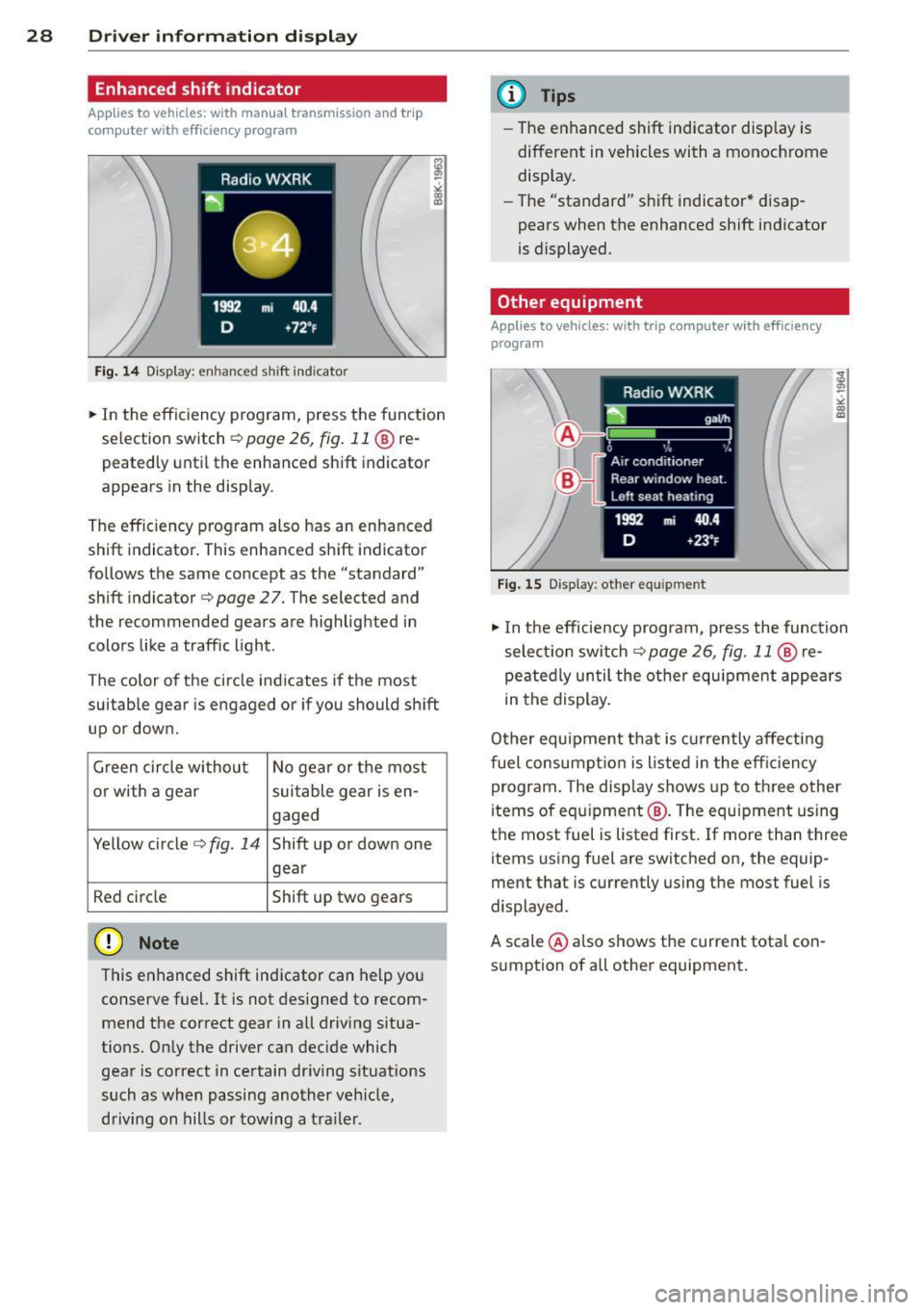
Enhanced shift indicator
Applies to vehicles: with manu al t ransmission a nd trip
c o mp ute r with e fficiency pr ogram
Fig. 14 Display: en hanced s hift ind icator
• In the efficiency program, press the funct ion
selection switch
c:> page 26, fig. 11 ® re
peatedly until the enhanced shift indicator
appears in the display .
The effic iency program also has an enhanced
shift indicator . This enhanced shift indicator
follows the same concept as the "standard"
shift indicator
c:> page 27. The selected and
the recommended gears are highlighted in
colors like a traffic light .
The color of the circle indicates if the most
suitable gear is engaged or if you should shift
up or down.
Green circle without No gear or the most
or with a gear suitable gear is en-
gaged
Yellow circle
c:> fig. 14 Shift up or down one
gear
Red circle Shift up two gears
(D Note
This enhanced shift indicator can help you
conserve fuel. It is not des igned to recom
mend the correct gear in all driving situa
tions. Only the driver can decide which gear is correct in certain driving situations
such as when passing another veh icle,
driving on hills or towing a trailer.
(D Tips
-The enhanced shift indicator display is
different in vehicles with a monochrome
display.
- The "standard" shift indicator* disap
pears when the enhanced shift indicator
is displayed.
Other equipment
App lies to vehicles: wit h trip co mputer with e fficiency
prog ra m
Fig . 15 Display: othe r equ ipment
"'I n the efficiency program, p ress the function
selection switch
c:> page 26, fig. 11 @ re
peatedly until the other equ ipment appears
in the display.
Other equipment that is currently affecting
fuel consumpt ion is l isted in the effic iency
program. The disp lay shows up to three other
items of equipment @. T he equ ipment using
the most fuel is listed first. If more than three
items using fuel are switched on, the equip
ment that is currently using the most fuel is
displayed .
A scale @also shows the current total con
sumption of all other equipment.
Page 31 of 286
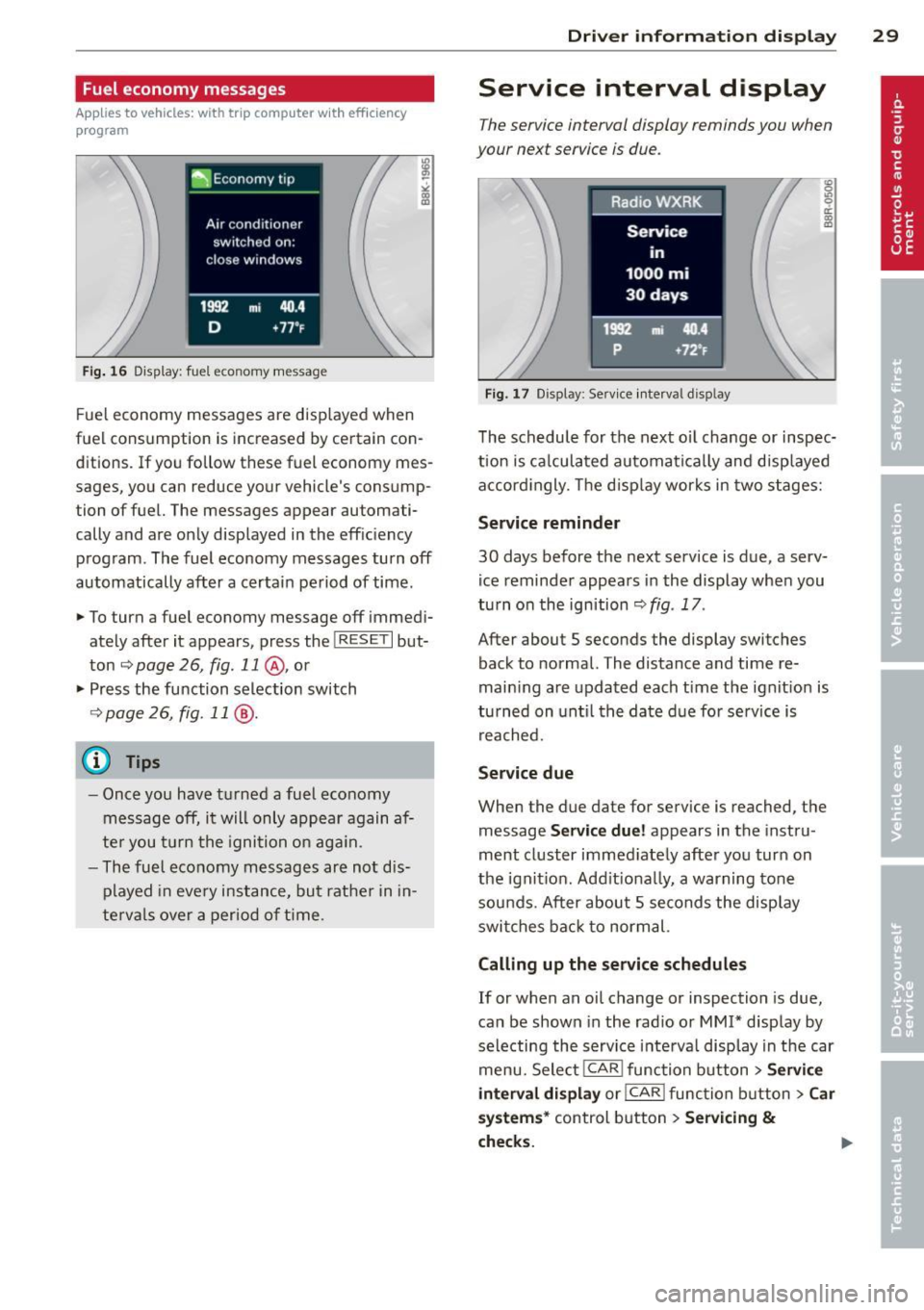
Fuel economy messages
Applies to vehicles: with trip computer w ith efficiency
program
Fig . 16 Display: fuel eco nomy me ssage
F ue l economy messages are disp layed when
fuel consumption is increased by certa in con
ditions. If you follow th ese fu el economy mes
sages, you can reduce your vehicle's consump
tion of fuel. The messages appear automati
cally and are only displayed in the eff ic iency
program . The fuel economy messages turn off
automatically after a certain period of time .
• To turn a fuel economy message off immedi
ately after it appears, pres s the !R ES ETI but
ton
~ page 26, fig . 11 @ , or
• Press the function selection switch
¢ page 26, fig. 11 @ .
(D Tips
- Once you have turned a fuel economy
message off, it will only appear again af
te r you turn the ignition on aga in.
- The fuel economy messages are not dis
played in every instance, but rathe r in in
te rva ls over a period of time .
Driver inform ation di spl ay 29
Service interval display
The service interval display reminds you when
your next service is due .
Fig. 17 Disp lay: Se rvice i nterval d is pl ay
The schedule for the next oi l change or inspec
tion is ca lculated automatica lly and disp layed
accord ingly. The d isp lay works in two stages:
Service reminde r
30 days before the next service is due, a serv
ice reminder appears in the display whe n you
turn on the ignition ¢
fig. 17 .
After about S seconds the display switches
back to normal. The distance and time re
main ing are updated each time the ignit ion is
tu rned on unt il th e date due for service is
reached.
Service due
When the due da te for service is reached , the
message
Ser vice due! appears in the in stru
ment cluster immed iately after you turn on
the ignit ion. Add it iona lly, a warning tone
sou nds . After about S seconds the disp lay
switches bac k to normal.
Calling up the service schedule s
If or when an oil change or inspection is due,
can be shown in the rad io or
MMI* disp lay by
selecting the service interva l display in the car
menu. Select !CAR ! func tion button>
Servic e
interval d ispl ay
o r! CAR ! function button> C ar
sys te m s*
control button > Serv icing &
check s.
Page 32 of 286
30 Driver information display
Resetting the service interval display
Your authorized Audi dealer will reset the cor
responding service schedule after performing
the appropriate service on yo ur vehicle . Yo u
also have the possibility to reset the oil
change schedule after having performed an
oil change according to Audi specifications.
Select
I CAR I function button > Service interval
display > Reset oil change interval
or ICARI
function button> Car systems* control but
ton
> Servicing & checks > Reset oil change
interval.
(D Note
If you disconnect the battery terminals, no
calculations can be made for the serv ice
interval display during this time and no
service rem inder wi ll appear. Remember
that observing the proper service intervals
is vitally important to extend ing the life of
your vehicle, particu larly the eng ine, and
maintaining its value. Even if the mileage
driven is low, the maximum period of one
yea r from one service to the next must not
be exceeded .
@ Tips
-Do not reset the display between oil
changes, otherwise the display will be in
correct.
- The information in the Service Reminder
r ema ins stored even when the vehicle
battery is disconnected.
On-Board Diagnostic
system (OBD)
Malfunction Indicator Lamp (MIL)
The Malfunction Indicator Lamp (MIL) ¢4' i n
the instrument cluster is part of the On-Board
Diagnostic (OBD II) system.
The warning/indicator light illuminates when
the ignition is switched on and goes out after
the engine starts and the idle has stabilized .
This indicates that the MIL is working proper
ly.
If the light does not go out after the engine
is started, or illuminates while you are driv
i ng, a malfunction may exist in the eng ine sys
tem . If the light illuminates, the catalytic con
verter could be damaged .
Continue driving
with reduced power (avoid
ing sustained high speeds and/or rapid accel
erations) and have the cond ition corrected.
Contact your authorized Audi dealer.
If the light il luminates, the electronic speed
limiter may also be malfunct ioning. For more
information
c:> page 31 , Electronic speed
limiter.
An improperly closed fuel filler cap may also
cause the
MIL light to illuminate
c:>page 204.
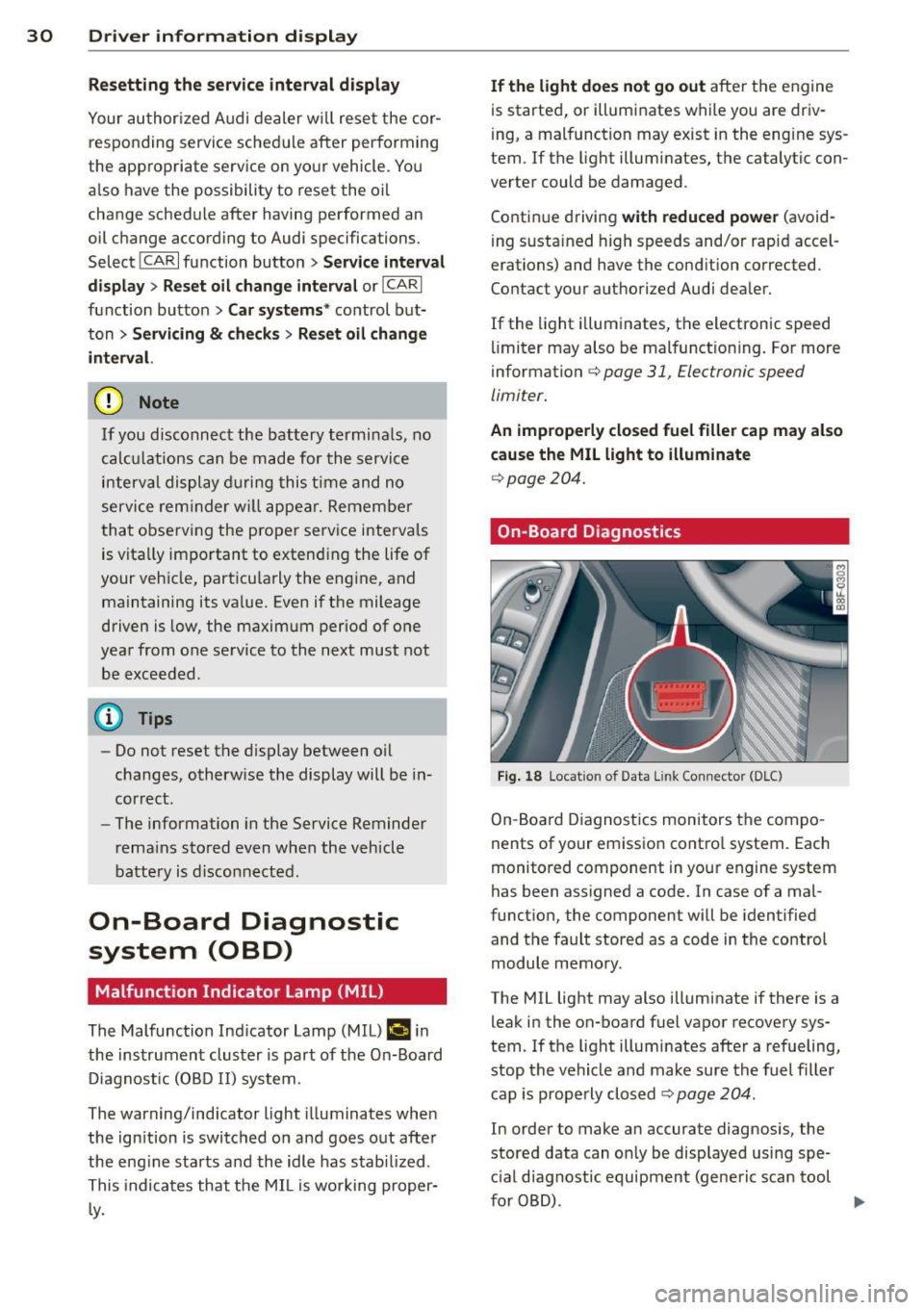
On-Board Diagnostics
Fig . 18 Locat io n of Data Link Con nector (D LC)
On-Board Diagnostics monitors the compo
nents of your emission control system . Each
monitored component in your engine system
has been assigned a code. In case of a mal
function, the component will be identified
and the fault stored as a code in the control
module memory.
The MIL light may also illuminate if there is a leak in the on-board fuel vapor recovery sys
tem. If the light illuminates after a refueling,
stop the vehicle and make sure the fuel filler
cap is properly closed
c:> page 204.
In order to make an accurate diagnosis, the
stored data can on ly be displayed using spe
c ial diagnostic equipment (generic scan tool
furOBD) .
~
Page 84 of 286
82 Transmission
Transmission Manual transmission
Gearshift lever
Applies to vehicles: with manual transmission
The clutch pedal must be depressed all the
way before you can start the engine.
The manual transmission in your Audi is
equipped with an
interlock-feature .
• Depress the clutch pedal all the way.
• Start the engine with the gearshift lever in
Neutral and the clutch pedal depressed.
(D Note
Always depress the clutch pedal fully when
changing gears. Do not hold the vehicle on
a hill with the clutch pedal partially de
pressed. This may cause premature clutch
wear or damage .
@ Tips
-Resting your hand on the gearshift lever
knob while driving will cause premature
wear in the transmission.
- The back-up lights go on when you sh ift
in to Reverse with the ignition on.
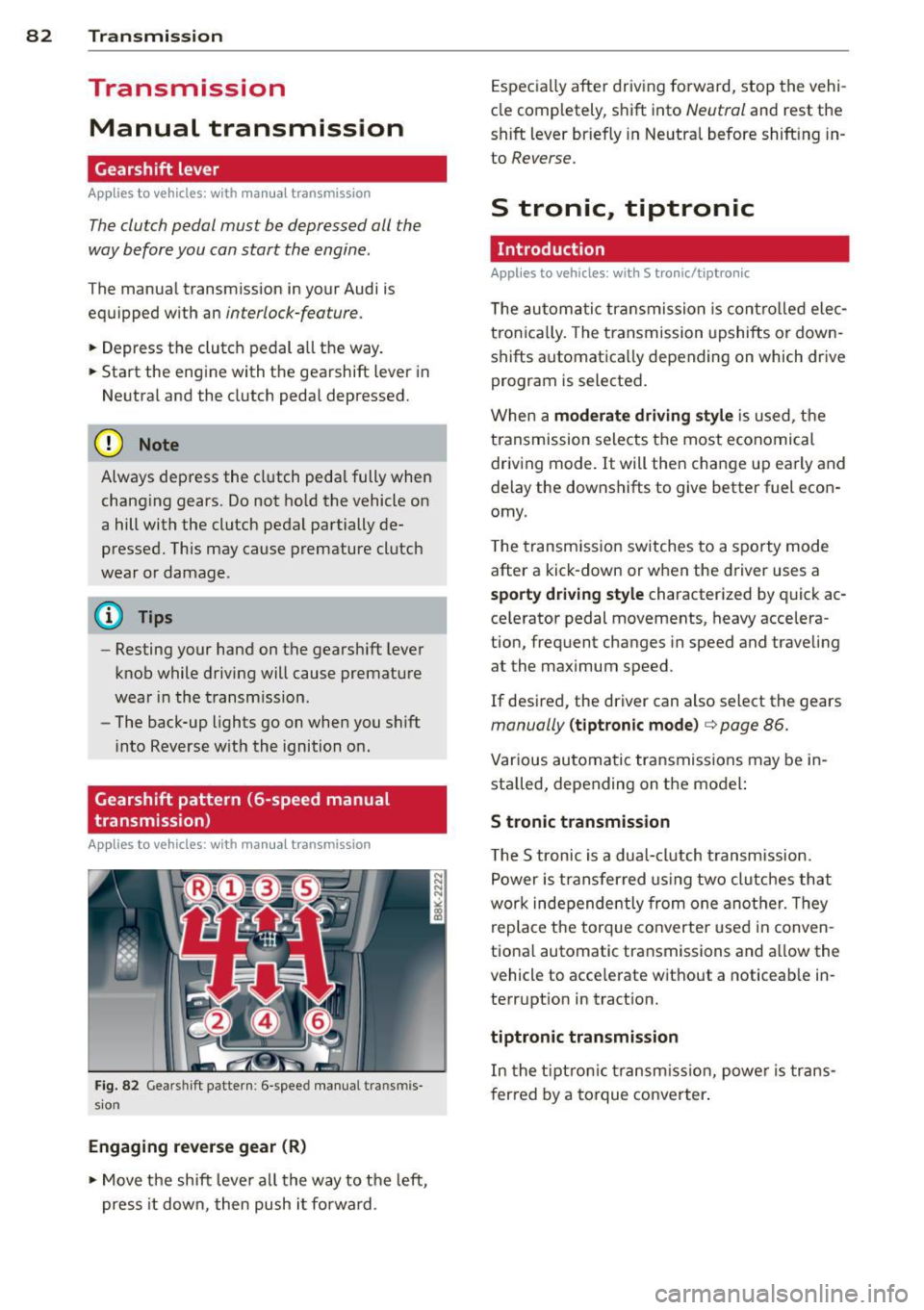
Gearshift pattern (6-speed manual
transmission)
Applies to vehicles: with manual transmission
Fig. 82 Gears hi ft pattern : 6 -speed manual tra n smi s
sio n
Engaging reverse gear (R)
• Move the shift lever all the way to the left,
press it down, then push i t forward . Especially
after driving forward, stop the vehi
cle completely, shift into
Neutral and rest the
shift lever briefly in Neutral before shift ing in
to
Reverse.
S tronic, tiptronic
Introduction
Applies to vehicles: with S tronic/tiptronic
T he automatic transmission is controlled elec
tronically. The transmission upshifts or down
shifts automatica lly depending on which drive
program is selected.
When a
moderate driving style is used, the
transmission selects the most economical
driving mode. It will then change up early and
delay the downshifts to give better fuel econ
omy .
T he transmission switches to a sporty mode
after a kick-down or when the driver uses a
sporty driving style characterized by quick ac
ce lerator pedal movements, heavy accelera
tion, frequent changes in speed and traveling
at the maximum speed.
If desired, the driver can also select the gears
manually (tiptronic mode) c> page 86.
Various automatic transmissions may be in
stalled, depending on the model:
S tronic transmission
The S tronic is a dual-clutch transmission.
Power is transferred using two clutches that
work independe ntly from one another. Th ey
replace the torque converter used in conven
tional automatic transmissions and al low the
vehicle to acce lerate without a noticeable in
terruption in tract ion.
tiptronic transmission
In the tiptronic transmission, power is trans
f er red by a torque converter.
Page 190 of 286
188 Driving and environment
Driving and
environment
The first 1,000 miles
(1,500 km) and
afterwards
New engine
The engine needs to be run-in during the first
1,000 miles (1,500 km).
For the fir st 600 miles (1,000
kilometers ):
.,. Do not use full throttle.
... Do not d rive at engine speeds that are more
than 2/3 of the max imum permitted RPM.
From 600 to 1,000 miles (1 ,000 to
1,500 kilometers):
.,. Speeds can gradually be increased to the
max imum pe rm iss ible road or eng ine speed .
During and after break-in period
... Do not rev the eng ine up to high speeds
when it is cold. Th is app lies whether the
transmission is in N (Neutra l) or in gear.
After the break- in period
... Do not exceed max imum engine speed un
der any circumstances .
... Upshift into the next higher gear before
reaching the red area at the end of the tach
ometer scale¢ page 10.
During the first few hours of driving, the en
g ine's inter na l friction is higher than later
when all the moving parts have been broken
i n. How well this break- in process is done de
pends to a conside rable extent on the way the
ve hicl e is driven du ring the first 1,000 miles
(1, 500 kilome ters).
(D Note
E xtremely high engi ne speeds are auto
mat ica lly r educ ed. However, t hese rpm
lim its are programme d for a n engine well
r u n- in, not a new eng ine.
{® For the sake of the environment
Do not d rive with unnecessarily high en
g ine speeds - upshifting ear ly saves fuel,
reduces no ise and protects the environ
ment.
, New tires
If your vehicle is runni ng on new tires, drive
very carefully for the first 350 miles (500 ki lo
meters) after fitting.
_& WARNING
N ew tires tend to be slip pery a nd mus t al
so be "b roken -in" . Be s ure to remembe r
this dur ing the fi rst 350 mi les ( 500 kilo
meters) . Brake gently . Avoid fo llow ing
closely behind other vehicles or other sit
uations that m ight require sudden, hard
braking.
Avoid damaging the
vehicle
When you a re d rivi ng on poo r roads, or over
cu rbs, ste ep ramps, etc., ma ke certai n that
low- ly ing parts s uch as spoile rs and ex ha ust
s ystem parts do not bot tom o ut and get dam
aged.
T his is espec ially true for veh icles with low
s lu ng chassis (s por ts chassis)* and fully load
ed vehicles.
Driving through water
on roads
Note th e following to avoi d ve hicle damage
whe n driving through water, for examp le on
flooded roads:
- The wa ter must not be any hig he r th an the
bottom of the vehicle bo dy.
- Do not dr ive faste r than wal king speed.
Page 191 of 286
A WARNING 1= ~
After driving through water, mud, slush, etc., the brakes may be slow to take effect
because of wet brake rotors and pads. Dry
the brakes first by braking carefully to re
store the full brak ing effect.
([) Note
Vehicle components such as the engine,
transmiss ion, suspension or electrical sys
tem can be severely damaged by driving
through wate r.
@ Tips
- Check the depth of the water before dr iv
i ng through it.
- Do not stop the veh icle, dr ive in reverse
or switch the engine off when driving
th rough water.
- Keep in mind that oncoming vehicles
may create waves that raise the water
level and make it too deep for you r vehi
cle to drive th rough safely.
- Avoid dr iving through sa lt water because
i t can ca use corrosion.
Catalytic converter
It is very important that your emission con
trol system (catalytic converter) is function
ing properly to ensure that your vehicle is run
ning in an environmentally sound manner.
11-Always use lead -free gaso line¢ page 201,
Fuel supply .
"'"Never run the tank down all the way to emp
ty.
11-Never put too much motor oil in your engine
¢ page 211, ~ Adding engine oil .
11-Never try to push -or tow -start your veh icle .
The catalytic converter is an efficient "clean up" device built into the exhaust system of
the vehicle . The catalytic converter burns
many of the pollutants in the exhaust gas be
fore they are released into the atmosphere .
Drivin g and en vironm ent 18 9
The exclusive use of unleaded fuel is critically
important for the life of the catalytic convert
er and proper f unct ion ing of the engine.
A WARNING
- The temperature of the exhaust system
is high, both when driving and after stop
ping the eng ine.
- Never touch the exhaust tail pipes once
they have become hot. This could result in burns.
- Do not park or operate the vehicle in
areas where the hot exhaust system may
come in co ntact with dry grass, br ush,
fue l spill or other material wh ich can
cause a fire .
- Do not apply additional undercoating or
ru stp roof ing on or nea r the exhaust
manifold, exhaust pipes, cataly tic con
ve rter or heat shield s. Dur ing driving, the
substance used for undercoating could
overheat and cause a fire.
(D Note
- Be aware that just o ne tank filling with
leaded fuel w ill already ser iously de
grade the performance of the catalytic
converter .
- Do not exceed the cor rect engine oil level
¢ page 211.
-Do not drive until the f ue l t ank becomes
comple tely empty . The engine co uld m is
fire . Unburned fuel could also get into
the exhaust system and this co uld cause
the catalytic converter to overheat.
- Do not turn off the ignition while the ve
hicle is mov ing.
- Do not continue to operate your vehicle
under these conditions, as othe rwise fuel
can reach the catalyt ic converter. Th is
cou ld result in overheating of the con
verter, requir ing its replacement.
- To assure efficient operation of the Emis -
sion Control System: ..,. •
•
Page 192 of 286
190 Driving and en vironm ent
- Have your vehicle main tained properly
and in accordance with the service rec
ommendations in your Warranty
&
Ma intenance booklet.
- Lack of proper maintenance as well as
improper use of the vehicle will impair
the function of the emission control
system and cou ld lead to damage.
@ For the sake of the environment
Even when the Emission Contro l System is
operating properly, the exhaust gas can have a sulfur-like exhaust gas smell under
some operating states. This depends on
the sulfur content of the fuel being used.
Using a different brand of fuel may help,
or filling the tank w it h lead-free super
grade gasoline.
Shutting down vehicle
If you wou ld like your veh icle to remain inop
e rat ive for a longer period of time, con tact an
Aud i or other specialized dealer. They can ad
vise you on necessary precautions e .g. corro
sion prevention, maintenance and storage. Pay attention to add itiona l information con
cerning the battery. Refer to
c:> page 217.
Operate your vehicle
economically and minimize pollution
General
Your personal style of driving will determine
the economy of your vehicle, as well as ex
haust and noise levels .
Fuel economy, environmental impact, and
wear on your engine, brakes and t ires largely
depend on three factors:
- yo ur persona l dr iving style
- operating conditions
- tec hnic al lim itations
If you anticipate what you need to do next and
d rive economically, you can eas ily cut your
f u el cons umption by 10 -15 pe rcen t. T his sec- t
ion w ill give you some tips on how you can
help the environment and your pocketbook .
(D Tips
The cons umption estima tes as published
by ENVIRONME NTAL PROTEC TION AGENCY
(EPA) and Transport Canada may not corre
spond to your actual consumption on the road, which will va ry depending upon vehi
cle load and speed, road and weather con
dit ions, trip length, etc.
Drive smoothly and keep a lookout
ahead
Vehicles use the most fuel when they are ac
celerating .
.. Avo id u nnecessary accelerating and brak ing.
Vehicles use the most fue l when they are ac
ce lerat ing. If you ant icipate what is going to
happen next, you wi ll need to brake less and,
t h us, acce lerate less . Let the veh icle coast
whenever possible -for example when you see
that the next t raff ic light is red.
Avoid full throttle
Driving at moderate speeds saves fuel and
improves your mileage.
.. Try and keep well below your car's maximum
speed.
Acce lerat ing gently red uces fue l cons ump
t ion, eng ine wear, and does not disturb the
environment .
Fuel consumption, exhaust emissions and en
gine noise increase disproportionate ly at h igh
speeds. If you drive at approximately three quarters of top speed, fuel consumption w ill
be reduced by one half. Never drive faster
than the posted speed limit and weathe r con
ditions pe rm it.
Page 193 of 286
Reducing unnecessary idling
Even when your car is just idling it burns up
fuel.
11-Shut the engine off when you are not driving
the vehicle.
11-Do not warm up the vehicle by letting the
engine run at idle .
It makes sense to shut
off the engine in traffic
jams, when waiting for trains to pass at rail road cross ings, or at traffic lights that have
long wa its on red. Turning the engine
off for
just 30-40 seconds saves more fue l than is
burned s tarting the eng ine again.
It takes a long time for the engine to warm up
fully when it is running at idle . However, wear
and nox ious em issions are especially high
when the engine is warming up. So you should
drive away as soon as you start the engine and
avoid running at high rpms while the engine is
still warming up .
(D Note
Do not leave engine idling unattended af
ter starting . If warning lights should come
on to indicate improper operation, they
wou ld go unheeded. Extended idling also
produces heat, which cou ld result in over
heating or other damage to the vehicle or
other property .
Regular maintenance
A badly tuned engine unnecessarily wastes a lot of fuel .
11-Have your vehicle serviced at regular inter-
vals.
By having your vehicle regular ly serviced by an
authorized Audi dealer he lps to ensure that it
runs properly and economically. The condition
of your vehicle not only affects its safety and
ab ility to hold its value, it also affects fuel
co nsumpt ion .
Ch eck you r oil each time you fill you r ta nk .
Dri vin g and en vironm ent 191
The amount of oi l used is re lated to engine
load and speed.
It i s normal for the oil consumption of a new
engine to reach its lowest value after a certa in
mileage has been driven.
You must drive your veh icle about 3,000 m iles
(S,000 kilometers) before yo u can properly
assess oil consumpt ion.
Th is also app lies to fue l consumption and en
gine output.
(D Note
- Have your veh icle ma inta ined properly
and in accordance with the service rec
ommendations in your Wa rranty
& Ma in
t enance book let. Lack of p roper mainte
nance as well as improper use of the ve
hicle will impair the function of the
emission cont ro l system and could lead
to damage.
- Do not alter or remove any component of
the Emission Control System unless ap
proved by the manufacturer.
- Do not alter or remove any device, such
as heat shie lds, switches, ignition wires,
valves, which are designed to protect
your vehicle's Emission Control System and other important vehicle compo
nents.
Fewer short trips
Fuel consumption will always be relatively
high on short trips .
11-Try to avoid driving short distances w ith a
cold engine.
T he engine and cata lytic converter have to
reach their optimal opera ting temp era ture to
reduce fuel consumpt ion and noxious em is
s ions effectively .
Just after starting, a co ld engine in a mid-size
car on ly achieves a fuel economy of 6-8 mi les
per gallon (30-40 l/100 km). After about a
half a mile, fuel economy climbs to 12 mpg
(20 l/100 km). After about
2 .5 miles (4 km), liJI,
•
•
Page 194 of 286
192 Driving and environment
the engine is at its proper ope rat ing tempera
ture and fue l economy has reac hed a no rma l
l eve l. So you can see that you sho uld avoid
short tr ips wheneve r possib le .
T he
outside temperature is a lso cri tical i n this
regard. Your car cons umes more fuel in the
winter than in t he summer .
Page 200 of 286
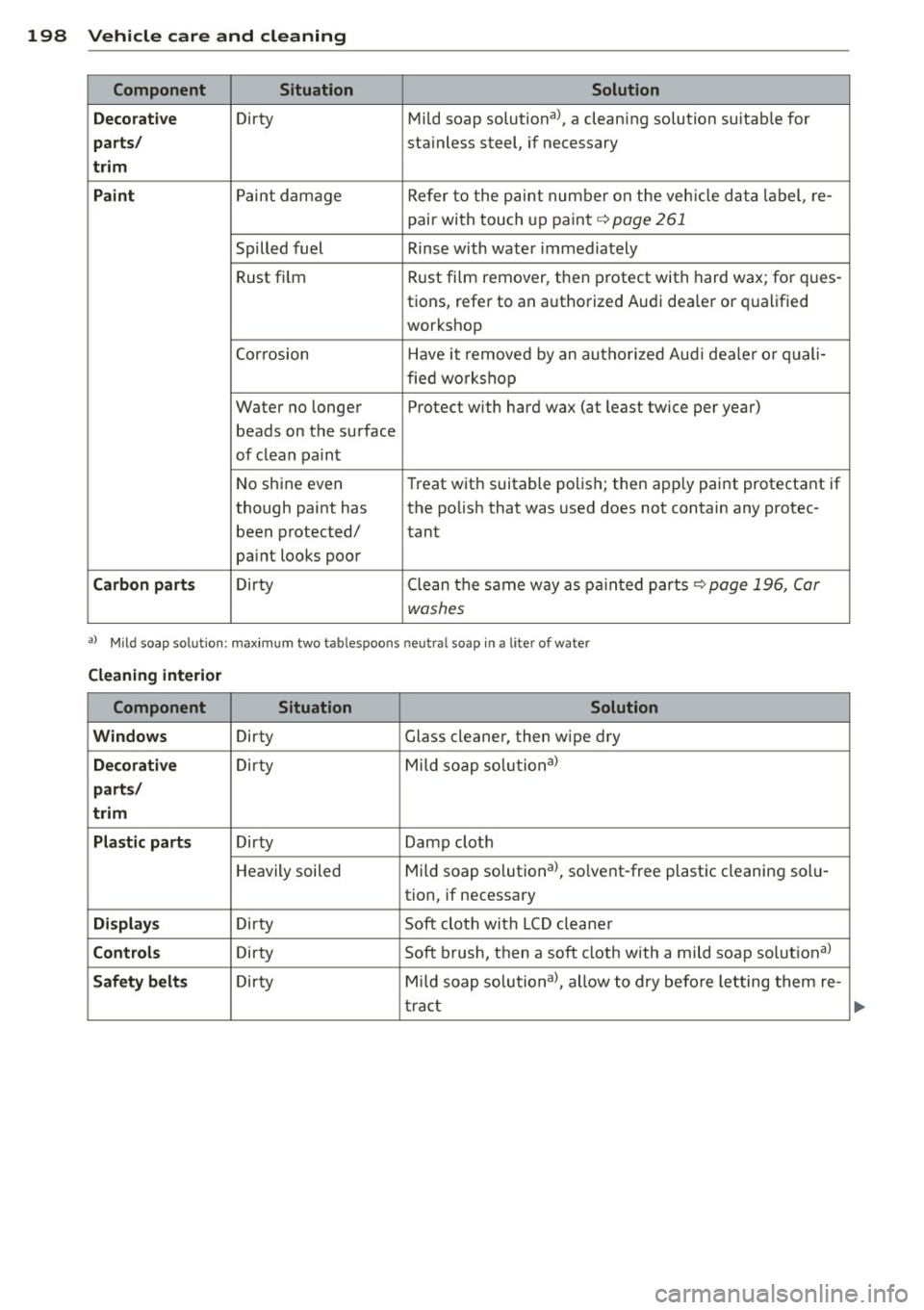
198 Vehicle care and cleaning
Component Situation Solution
Decorative
Dirty Mild soap solutional, a cleaning solution suitab le for
parts/ sta inless steel, if necessary
trim
Paint
Paint damage Refer to the paint number on the vehicle data label, re-
pair with touch up paint
q page 261
Spilled fuel Rinse with water immediately
Rust film Rust
film remover, then protect with hard wax; for ques-
tions, refer to an authorized Audi dea ler or qualified
workshop
Corrosion Have it removed by an autho rized Aud i dealer or quali-
fied workshop
Water no longer Protect with hard wax (at least twice per year)
beads on the surface
of clean paint
No shine even T
reat with suitable polish; then app ly paint protectant if
though paint has the polish that was used does not contain any protec-
been protected/
tant
pa int looks poor
Carbon parts Dirty Clean tlhe same way as painted parts qpage 196, Car
washes
a ) Mild soap so lution: maximum two tablespoons neut ra l soap in a lite r of water
Cleaning interior
Component Situation Solution
Windows
Dirty Glass cleaner, then wipe dry
Decorative Dirty Mild
soap solutional
parts/
trim
Plastic parts
Dirty Damp cloth
Heavily soiled Mild soap solutional, solvent-free plastic cleaning solu-
tion, if necessary
Displays Dirty Soft cloth with LCD cleaner
Controls Dirty Soft brush, then a soft cloth with a mild soap solutional
Safety belts Dirty Mild soap solutional, allow to dry befo re letting them re-
tract
...