key AUDI A5 COUPE 2014 User Guide
[x] Cancel search | Manufacturer: AUDI, Model Year: 2014, Model line: A5 COUPE, Model: AUDI A5 COUPE 2014Pages: 286, PDF Size: 70.99 MB
Page 39 of 286
- You cannot open the doors or the rear lid
from the
outside (increased security, for ex
amp le when you are stopped at a red light).
- The diodes in the power locking switc h illu
minate when all the doors are closed and
locked.
- You can unlock and open the doors from the
i nside by pul ling on the door hand le .
- If you have a crash and the airbag is activat
ed , the doors automatically un lock .
_& WARNING
- The power locking switch works with the
ignition off and automatically locks the
entire vehicle when it is actuated .
- On a vehicle locked from the outside the
power locking system switch is inopera
t ive.
- locked doors make it more difficult for
emergency workers to get into the vehi
cle, which puts lives at risk . Do not leave
anyone behind in the veh icle, especially
children .
@ Tips
Your vehicle is locked automatically at a
speed of 9 mph (15 km/h) (Auto lock)
¢page 32. You can un lock the vehicle
aga in using the opening function in the
powe r locking system switch~-
Setting power locking
In the radio/MM!*, you can set which doors
the centrol locking system will unlock .
~ Select: I CAR I function button > Central lock
ing .
Or
~ Select: ~IC_A_R~I funct ion button> Car systems *
control button > Vehicle settings > (C entral
locking )* .
Sin gle door unlocki ng /Unl ock door s* -
you
can specify which doors u nlock when you open
the vehicle .
- Se lecting
off / All and pressing the Ii button
on the remote control key unlocks the entire
vehicle.
Opening and clo sin g 3 7
- Select ing o n/Dri ver and pressing the~ but
ton on the remote control key once u nlocks
only the driver's door . In vehicles w ith a con
ven ience key*, only the door whose handle
you pull w ill unlock . If you press the @! but
ton tw ice, the entire vehicle will u nlock . If
you press the [@] button, t he e ntire ve hicle
w ill always lock .
Luggage comp. lock /Lock e xterio r trunk han
dl e -
If you select On , you can no longer open
the luggage compartment us ing the rear lid
hand le ¢
page 39, fig. 28 . In this case, the
r ear lid can be opened with the
l""I bu tton on
the maste r key ¢
poge 35, fig. 22 or with the
l"" I* button in the driver's door ¢ page 39,
fig .
27 .
Ton e when lo cking -if you select On, a tone
will sound when yo u loc k the vehicle .
Auto Lock /Lock when dri ving -if you select
On, the enti re ve hicle w ill lock automatica lly
when the speed reaches 9 mph (15 km/h).
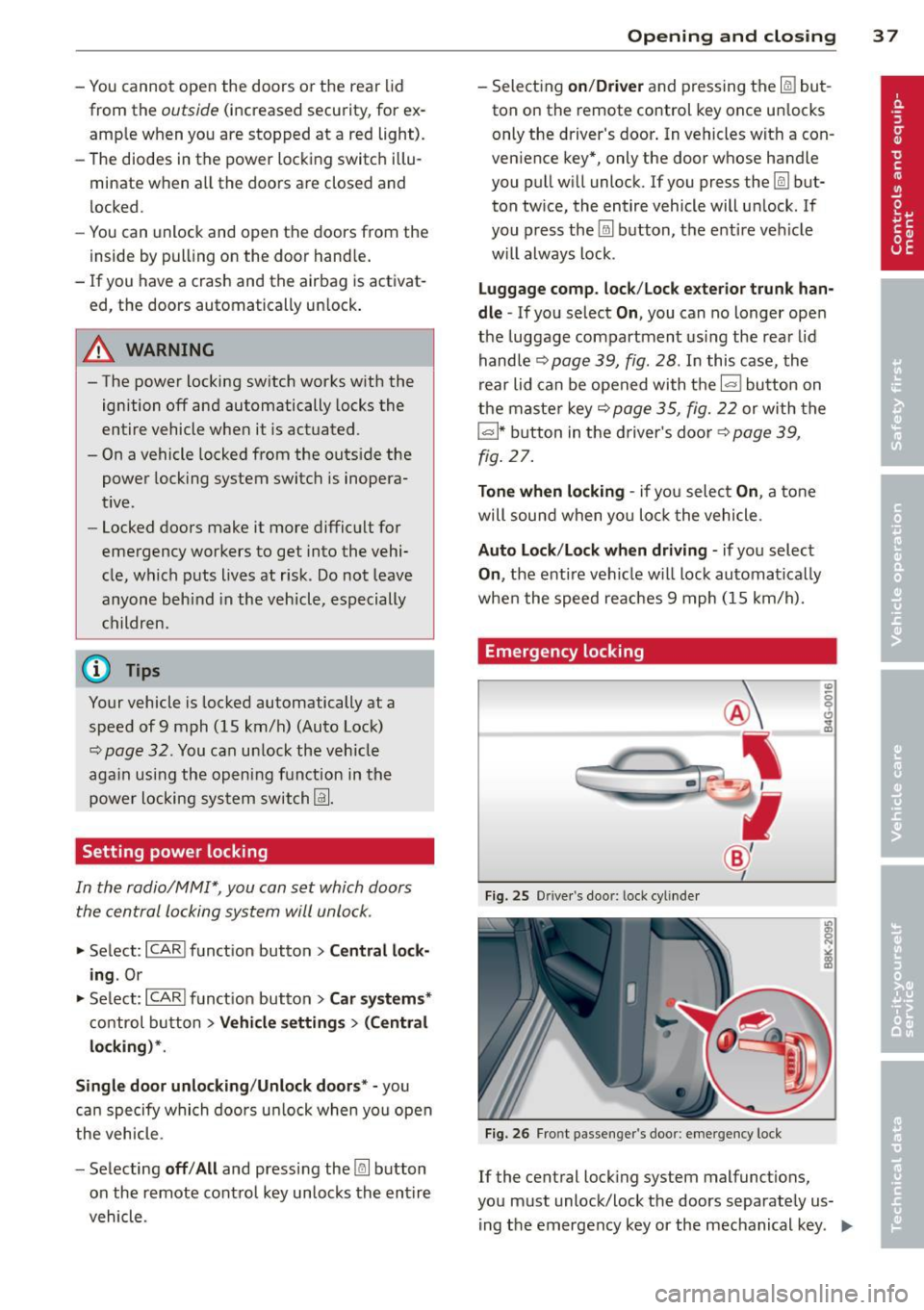
Emergency locking
Fi g. 25 Drive r's doo r: lock cylinde r
Fig. 26 Fro nt passenger 's doo r: emergency lock
If the central lock ing system malfunct ions,
you must unlock/lock the doors separate ly us
ing t he emergency key or the mechanical key .
IJJJ,
Page 40 of 286
38 Opening and closing
Unlocking/locking the driver's door with
the m echanic al key
.. Remove the mechanical key¢ page 34.
.. To un lock the driver's door, t urn the key to
the open position@¢
fig. 25.
.. To lock the dr iver's door, move the se lector
lever to the P position (automatic transmis
s ion) and t urn the key
once to the close pos i
t ion
@ ¢ &. in General description on
page
32.
Locking the front passenger's door with
the mechanical key
Th e emergency lock is located on t he rea r sid e
of the fron t passe nger's door.
It is o nly visib le
when t he doo r is open.
.. Remove the mechanical key ¢
page 34 .
.. Pull th e cove r cap out of th e opening
¢ fig . 26.
.. In se rt the key in the insi de slo t and turn it
all the way to the right.
On ce the front passenger 's doo r has been
closed, you cann ot ope n it ag ain from the o ut
si de. The door can be opened from the ins ide
by pulling the doo r hand le.
A WARNING
Read and follow a ll WARNINGS ¢.&. in
General description on page
32.
(D Tips
A ft er t he ign ition is swi tched on, the pow
er lock ing system switch an d the unloc king
button fo r the rea r lid
c:s in the door are
enabled.
Electronic immobilizer
T he immobilizer prevents your vehicle from
being started by unauthorized persons .
Inside the key there is a computer chip. This
chip automatically activates/deact ivates the
e lectronic immob ilizer.
Applies to vehicles with ignition lock:
The ele ctronic immobi lizer de activa tes auto
matically when yo u inse rt t he remote con tro l
k ey into the ign ition lock.
It activates again
a utomat ica lly w hen you remove the remote
control key from the ignition lock.
Applies to vehicles with convenience key:
If t he remo te co ntro l key is loca ted ins ide the
vehicle and you press the
I STAR T ENGI NE S TOP I button, the elect ro ni c
immobilizer deactivates automat ica lly. If you
switch the ign ition off and rem ove the remote
control key from the vehicle, the electronic
i mmob ilizer act ivates again a utomat ica lly.
A WARNING
= -
Always take the key wit h you when you
l e ave th e vehicle . Th e key ca n disa rm th e
e lectronic e ngine immobili ze r and permi t
an una utho rized pers on to st art t he engi ne
a nd enable opera tion o f the vehicle sys
tems such as power w indow o r power sun
roof leadi ng t o se rious pe rsonal injury.
(D Tips
- The ve hicl e c ann ot b e started if an una u
t hori zed key is used . The vehicle m ay not
s tart i f anot her radio device s uch as a key
for another ve hicle or a transponder is
located on the key ring .
- For Declaration of Comp liance to Unite d
States FCC and In dustry Canada reg ula
tions
c:> page 267.
Page 41 of 286
Rear lid
Opening/closing rear lid
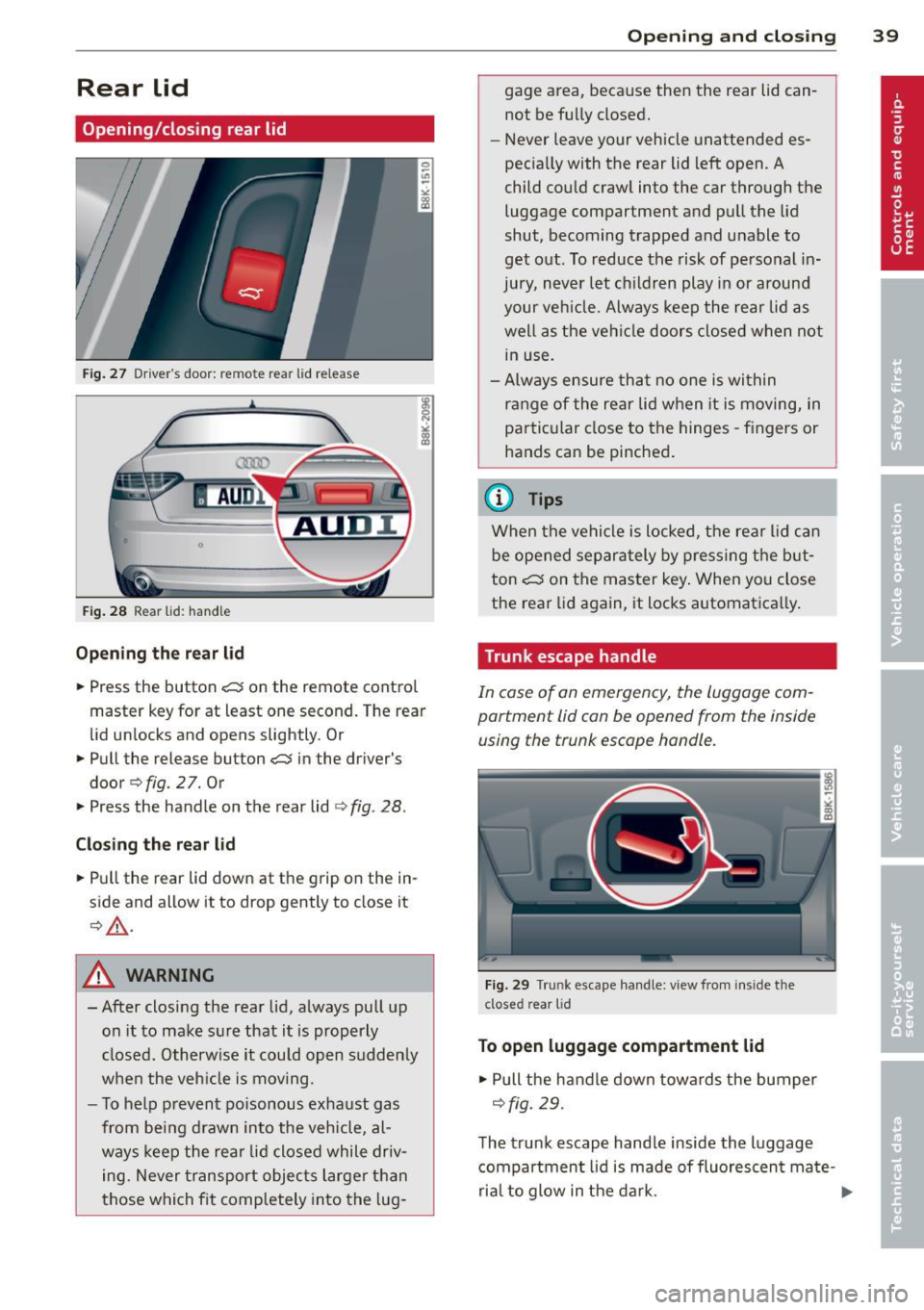
Fig . 27 Driver"s door: remote rear lid release
Fig. 28 Rear lid: hand le
Op en ing th e rea r lid
.,. Press the button -c:s on the remote contro l
master key for at least one second. The rear
lid unlocks and opens slightly. Or
.,. Pull the release button
-c:s in the driver's
door
q fig. 2 7. Or
.,. Press the handle on the rear lid
¢ fig . 28.
C losi ng th e re ar lid
.,. Pull the rear lid down at the grip on the in
side and allow it to drop gently to close it
¢,&. .
A WARNING
-After closing the rear lid, always pull up
on it to make sure that it is properly
closed. Otherwise it could open sudden ly
when the veh icle is moving.
- To help prevent po isonous exhaust gas
from being d rawn into the vehicle, al
ways keep the rear lid closed while driv ing. Never transport objec ts larger than
those which fit comp letely into the lug -
Openin g an d clos ing 39
gage area, because then the rear lid can
not be fully closed.
- Never leave your vehicle unattended es
pecia lly with the rear lid left open. A
child could craw l into the car through the
luggage compartment and pull the lid
shut, becoming trapped and unable to
get out. To reduce the risk of personal in
jury, never let ch ildren play in or around
your veh icle. Always keep the rear lid as
well as the vehicle doors closed when not in use.
- Always ensure that no one is within
range of the rear lid when it is moving, in
particular close to the hinges -fingers or
hands can be pinched .
@ Tips
When the vehicle is locked, the rea r lid can
be opened separately by pressing the but
ton
-c:s on the master key . When you close
the rear lid aga in, it locks automat ica lly.
Trunk escape handle
In case of an emergency, the luggage com
partment lid can be opened from the inside
using the trunk escape handle .
Fig. 29 Trunk escape handle: view from inside the
closed rear lid
To open lu ggage compartment lid
.,. Pull the handle down towards the bumper
¢fig. 29.
The trunk escape hand le inside the luggage
compartment lid is made of fluorescen t ma te-
rial to glow in the dark. .,..
Page 42 of 286
40 Opening and clo sing
WARNING
The trunk escape handle is to be used only
in an emergency .
(D Tips
The emergency re lease leve r shou ld never
be used as a h andle for closing the lug
gage compartment lid.
Power windows
Controls
The driver can operate the window regulator
for the driver's door with the left switch and the window regulator for the passenger 's
door with the right switch .
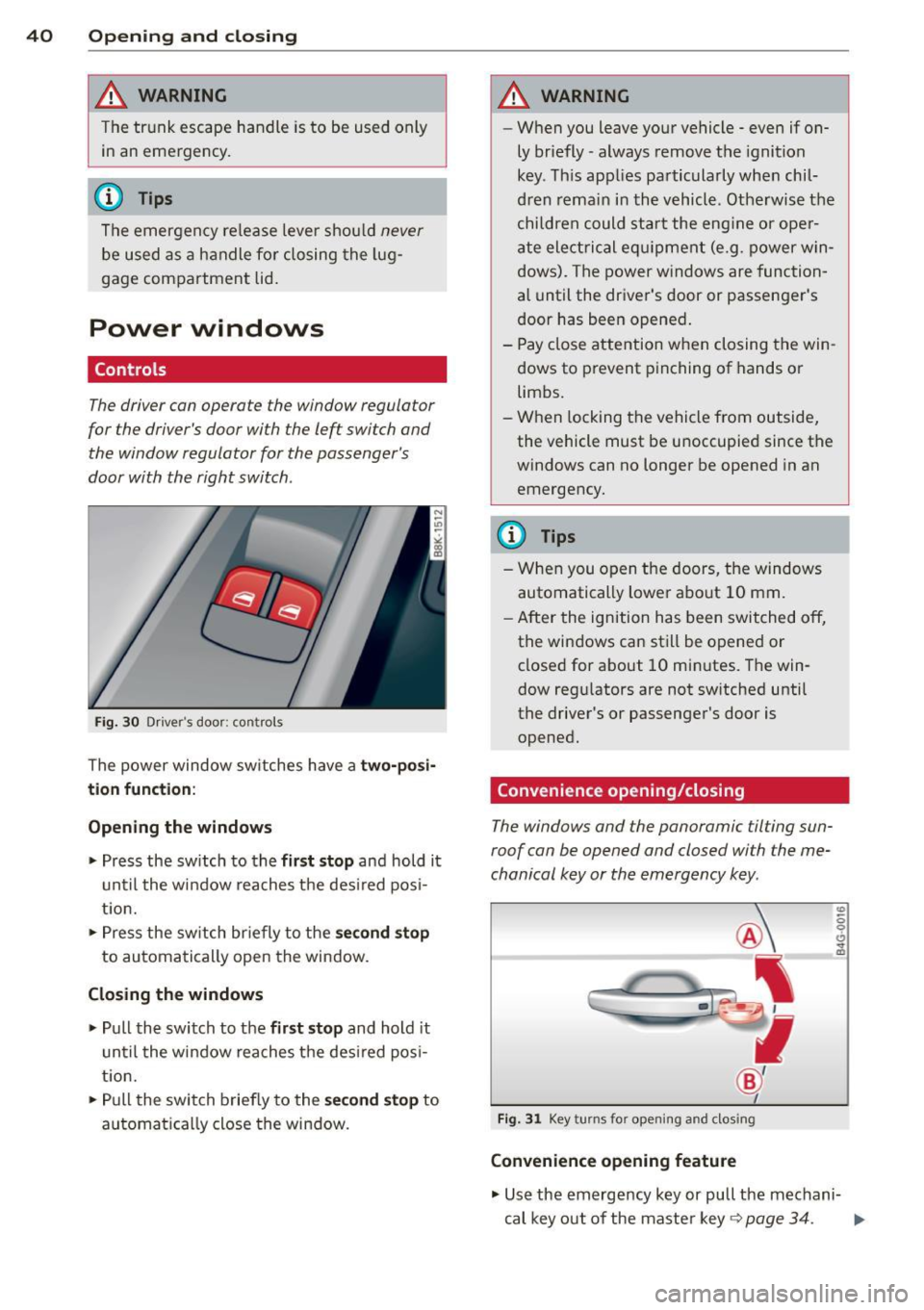
Fig. 30 Dr iver 's doo r: con trols
The power window sw itches have a tw o-posi
tion function :
Opening the windows
• Pr ess the sw itch to the fir st stop and hold it
until the w indow reaches t he des ired pos i
t io n.
• Press the sw itch br iefly to the
s e cond stop
to automa tically open the window .
Closing the windows
• Pull th e switch to the first stop and hold it
unt il the w indow rea ches t he des ired pos i
t ion.
• Pull the switch briefly to the
s econd stop to
automatica lly close the window .
A WARNING
--W hen you leave your ve hicle -even if on-
ly br iefly- always remove t he ignition
key . Th is app lies pa rticularly when chil
d ren remai n in the vehicle. Otherwise t he
chi ldren could sta rt the eng ine o r ope r
a te ele ctric al eq uipment (e.g . power w in
dows). The power w indows are function
a l until the dr iver's door or passen ger's
door has been opened .
- Pay close attention w hen closing the win
dows to p revent pinching of hands o r
limbs.
- W hen locking the vehicle from outside,
the vehicle must be u noccupied since t he
windows can no longer be opened in an
emergency .
(D Tips
-When you o pen the doors, the windows
automatically lowe r abo ut 10 mm.
- After the ignition has been switched off,
the windows can st ill be opene d or
closed for about 10 mi nutes. The win
dow regu lators are not sw itched until
the driver's or passenger's door is
opened.
Convenience opening/closing
The windows and the panoramic tilting sun
roof can be opened and closed with the me
chanical key or the emergency key .
Fig. 3 1 Key turns fo r openin g and clos ing
Convenience opening feature
"' 0 0 6 .. a,
• Use the emergency key or pull the me chani-
cal key o ut o f the maste r key ~
page 34 . ....
Page 43 of 286
.. Inse rt the key into the lock of the driver's
door.
.. Turn the key to position¢
fig. 31 @until all
the windows have reached the desired posi
tion and the panoramic tilting sunroof is tilt
ed .
Con venie nce clo sing f eature
.. Use the emergency key or pull the mechani
ca l key out of the master key¢
page 34.
.,. Turn the key in the lock of the driver's door
to the lock position ® until the windows
and the panoramic t ilting sunroof are closed
¢ A .
When the panoramic tilting sunroof is tilted/
closed , the electric sun shade* is also opened/
closed .
A WARNING
-Never close the windows and the pano r
amic t ilting sunroof inatten tively and
without checking -there is r is k of injury .
- You must always watch when the win
dows are being ra ised so that no one can
be trapped. If you release the key, the
closing action is immediate ly canceled.
- Always read and heed WARNING
¢ &. in
General description on page 32 .
Correcting window regulator
malfunction
After disconnecting the vehicle battery, the
one-touch up and down feature must be acti
vated again.
.. Pull and hold the power w indow switch unt il
the window is completely closed.
.. Re lease the switch and pull the switch again
for one second .
Openin g an d clos ing 41
Panoramic tilting
sunroof
Operation
=r.;-;-1= _..::__:J_
B ([j' G
o .. o
l
Fig. 32 Section of head line r: sw itch for su nroof
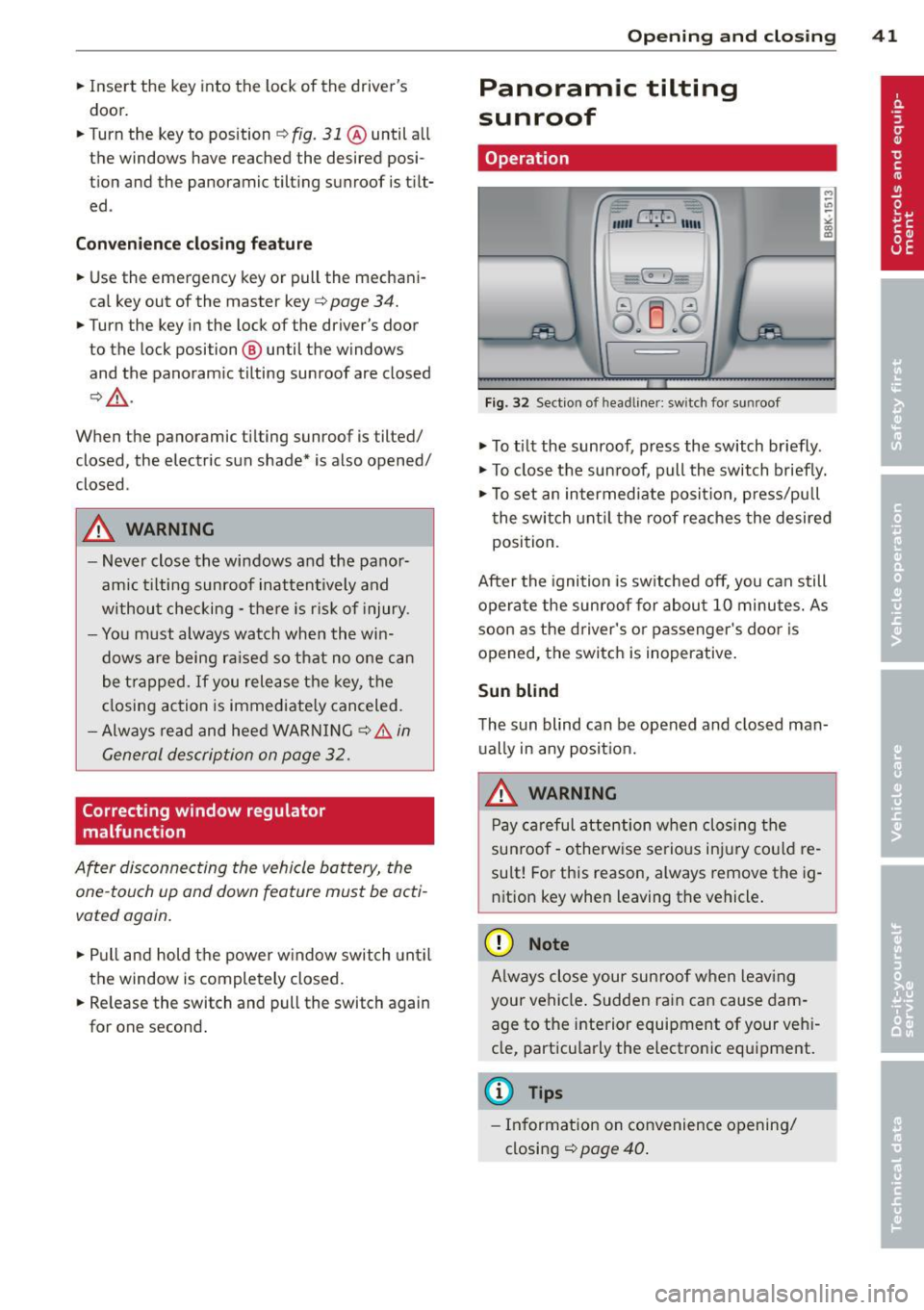
.,. To ti lt the sunroof, press the switch briefly.
.. To close the sunroof, pull the switch briefly.
.,. To set an intermediate posit ion, p ress/pull
the switch unt il the roof reaches the desired
position.
After the ignition is switched off, you can still
operate the sunroof for about 10 minutes. As
soon as the driver's o r passenger's doo r is
opened, the switch is inoperative.
Sun blind
The sun blind can be opened and closed man ually in any posit ion.
A WARNING
Pay careful attention when closing the
sunroof -otherwise serio us in ju ry could re
sult! For this reason, always remove the ig nition key when leaving the vehicle .
(D Note
Always close your sun roof when leav ing
your vehicle . Sudden rain can cause dam
age to the interior equipment of your veh i
cle, particu larly the electronic equipment.
(D Tips
- Information on convenience opening/
closing
¢ page 40 .
Page 44 of 286
42 Opening and clo sing
Emergency closing of the panoramic
tilting sunroof
If the sunroof detects an object in its path
when it is closing , it will open again a utomati
cally. In this case, you can close the roof with
the power emergency closing function .
.. Within five seconds after the s unroof opens
automatically, pull the switch until the roof
closes .
Valet parking
Applies to vehicles : wit h va let pa rking funct io n
The valet parking feature protects the lug
gage compor tment from unau thorized ac
cess .
-
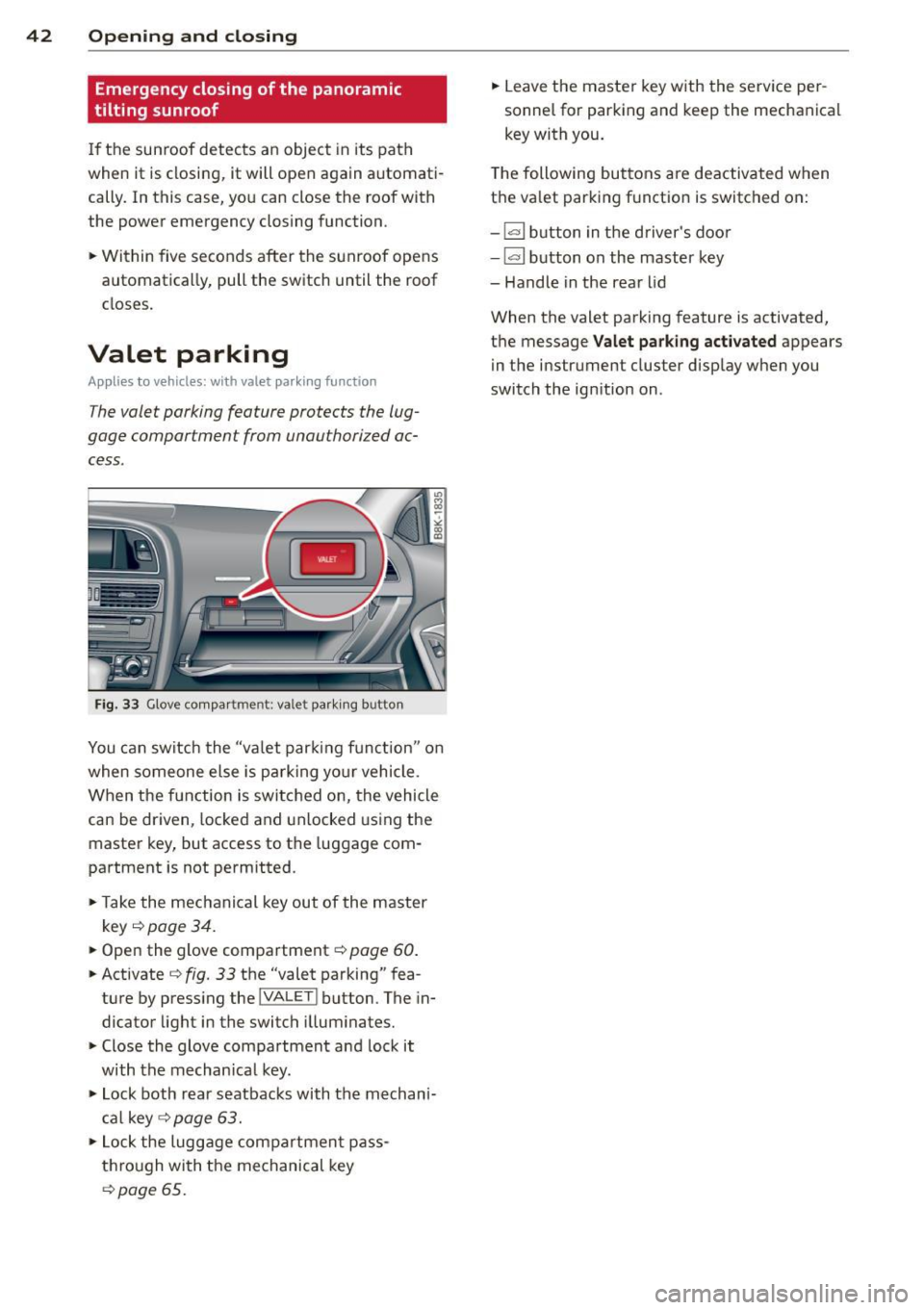
Fig. 3 3 G lo ve co mpa rtm en t: va le t pa rk in g b utton
You can switch the "va let par kin g f unct ion " on
when someone else is park ing yo ur vehicle.
When the function is switc hed on, the vehicle
can be dr iven , locked and unlocked using the
master key, but access to the luggage com
partment is not permitted .
.. Take the mechanical key out of the master
key
c::> page 34 .
.. Open the glove compartment c::> page 60 .
.. Activate c::> fig. 33 th e "valet parking" fea
ture by press ing the
!VA LE T ! button . The in
dicator light in the switch illum inates .
.. Close the glove compartment a nd lock it
with the mechan ica l key .
.. Lock both rear seatbacks with the mechani
c al key
c::> page 63 .
.. Lock the lugg age compa rtmen t pa ss
th rough wi th the mechanical key
~ page 65 .
.. Leave the master key w ith the serv ice per
sonnel for parking and keep the mechanica l
key with you.
T he following buttons are deactivated when
the va let parking f unction is switched on:
-lar l button in the d river 's doo r
-lar l button on the master key
- Handle in the rear lid
When the valet parking feature is activated,
t h e message
Valet parking activated appears
in the instrumen t clus ter disp lay when you
switch the ign ition on .
Page 46 of 286
44 Clear vis ion
@ Tips
- The light sensor* for headlight control is
located in the rear view m irror mount.
You should therefore not apply any st ick
ers to the windsh ield in this area in order
to prevent malfunctions or failures.
- Some exterior lighting functions can be
adjusted
c> page 44.
- When you remove your key from the igni
tion while the vehicle's lights are turned
on, a buzzer sounds as long as the driv
er's door is open .
- In cool or damp weather, the ins ide of
the headlights, turn signals and tail lights can fog over due to the tempera
ture difference between the inside and
outside. They will clea r shor tly after
switching them on. This does not affect
the service life of the lighting.
- In the even t of a light sensor malfunc
tion, the driver is no tified in the instru
ment cluster disp lay¢
page 22.
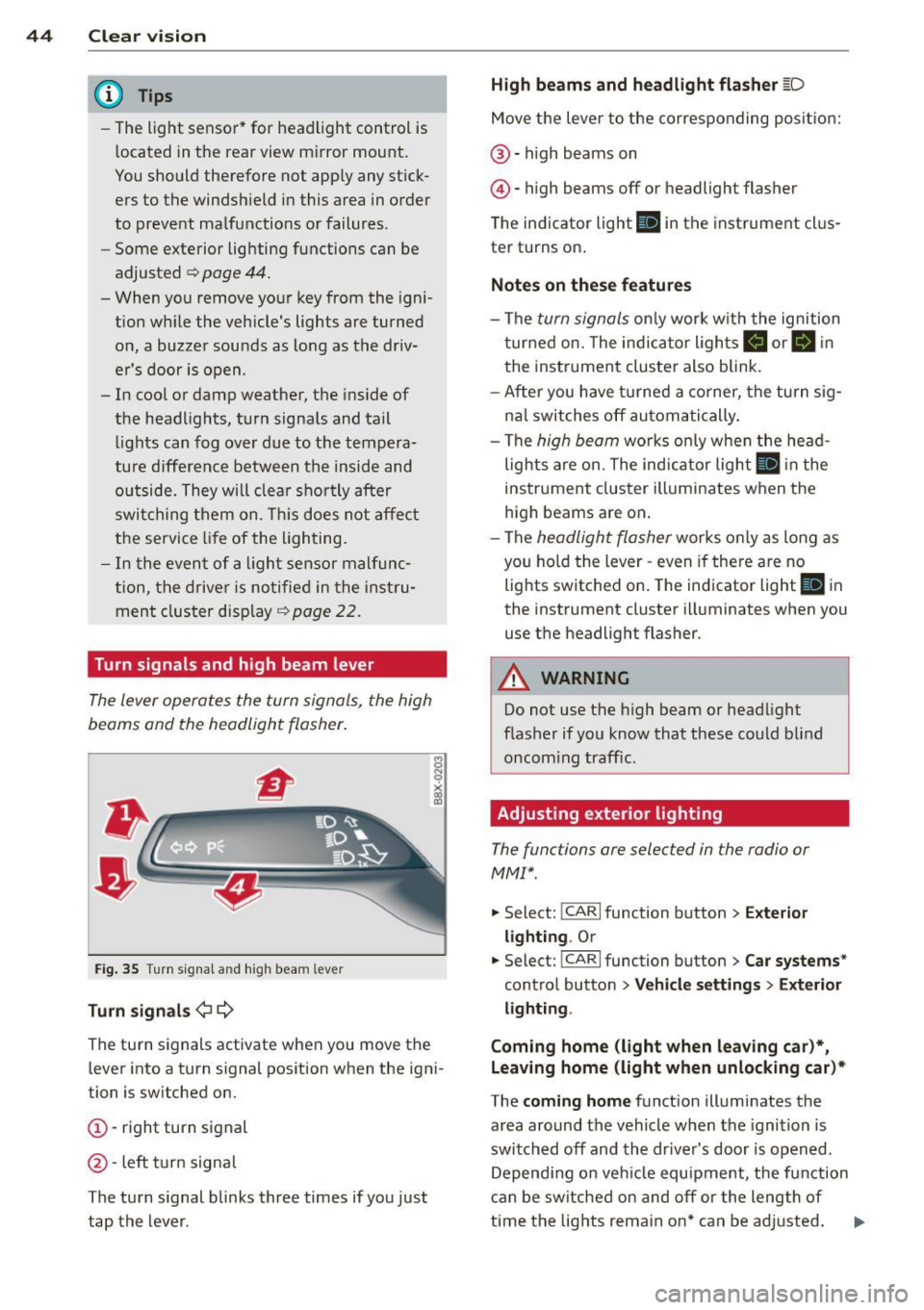
Turn signals and high beam lever
The lever operates the turn signals, the high
beams and the headlight flasher .
Fig. 35 T u rn s ig na l and hig h beam lever
Turn sign als ¢i ¢
The turn signals activate when you move the
l ever into a turn s ignal pos ition when the ign i
tion is switched on.
(D -right turn signal
@-left tur n signa l
The turn s ignal blinks three times if you just
tap the lever .
High be ams and headlight flasher [D
Move the lever to the correspon ding posit io n:
@ -high beams on
@ -high beams off or headlight flasher
The indicator light
ii in the instrument cl us
te r turns on .
Notes on thes e features
-The turn signals on ly wor k w ith the ignition
t ur ned on. The indicator ligh ts
Ct or a in
the instrument cluster also blink.
- After you have turned a co rner, the turn s ig
na l switches off au toma tically .
- The
high beam works on ly w hen the head
lights a re on. The ind icator ligh t
II in the
instrument cluster illuminates when the
high beams are on .
- The
headlight flasher works o nly as long as
you ho ld the lever -even if there a re no
lights switched on . The indicator light
II in
the instrument cluster illuminates when you
use the headlight flasher.
A WARNING
--
Do not use the h igh beam or headlight
flasher if you know that these could blind
oncom ing traffic.
Adjusting exterior lighting
The functions ore selected in the radio or
MMI" .
.,. Select: !CARI function button> Exte rior
light ing .
Or
.,. Select: !CARI function button > Car systems *
control button > Vehicle s etting s> Exterior
lighting .
Coming home (light when leav ing car }*,
Leav ing home (light when unlocking car )*
The coming home function illuminates the
area around the vehicle when the ignition is
switched off and th e dr ive r's door is open ed.
Depend ing on veh icle equ ipment, the function
can be switched on and off or the length of
time the lig hts remain on* can be ad justed . ..,.
Page 48 of 286
46 Clear vis ion
Interior lights
Front /rear interior lights
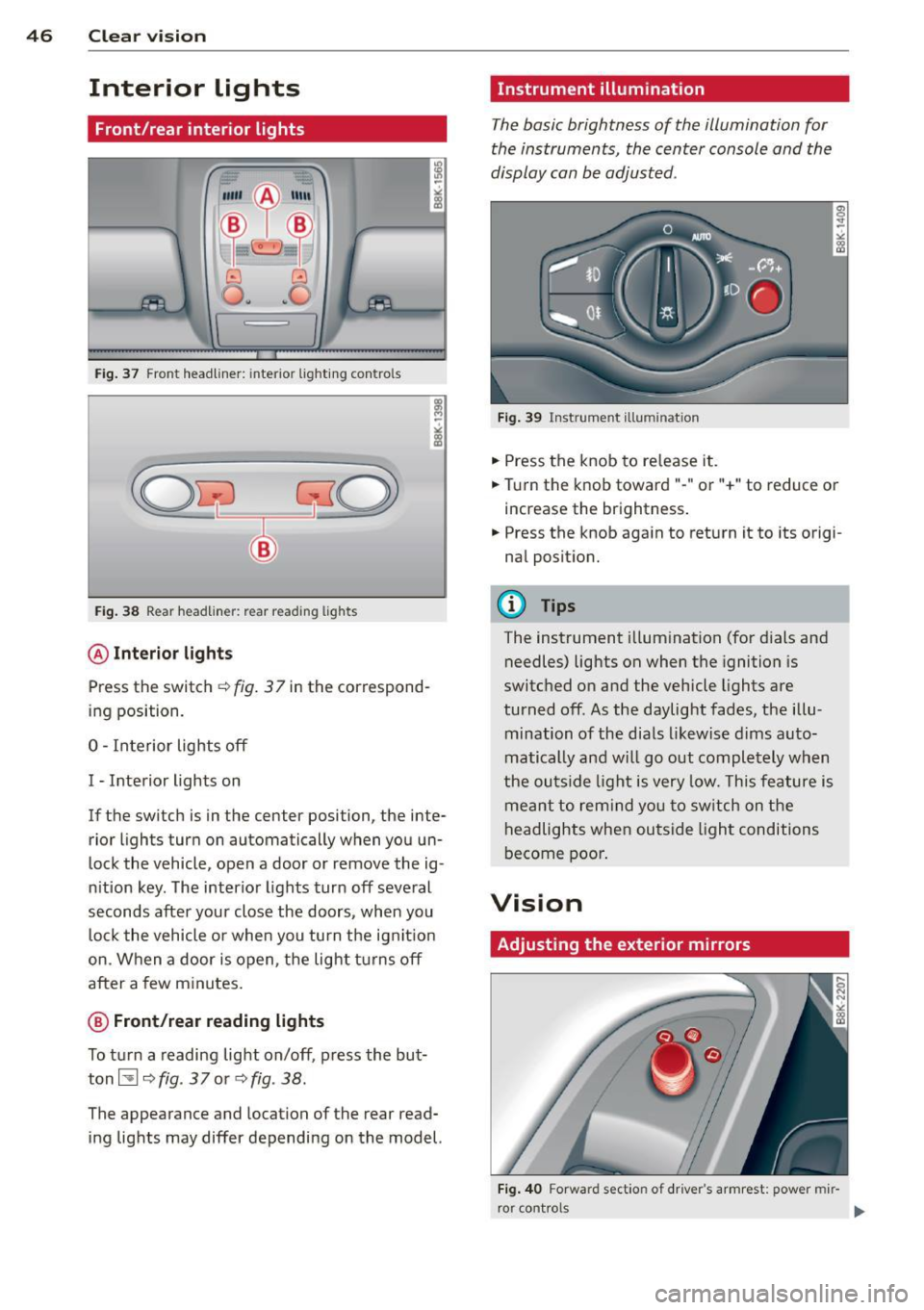
Fig . 37 Front headliner: inte rior lighting controls
Fig. 38 Rear headliner: rear reading lights
@Interio r ligh ts
Press the switch ~ fig. 3 7 in the correspond
ing position.
0 -Interior lights off
I -Interior lights on
If the switch is in the center position, the inte
rior l ights turn on automatically when you un
lock the vehicle, open a door or remove the ig
n ition key. The interior lights turn off several
seconds after your close the doors , when you
lock the vehicle or when you turn the ign it ion
on. When a door is open, the light tu rns off
after a few minutes.
@ Front /rear r eading lights
To turn a reading light on/off, press the but
ton~
~ fig. 37 or ~fig. 38.
The appearance and location of the rear read
ing lights may differ depending on the model.
Instrument illumination
The basic brightness of the illumination for
the instruments, the center console and the
display can be adjusted .
Fig . 39 Inst rume nt illu mination
.,. Press the knob to release it .
.,. Turn the knob toward"-" or"+" to reduce or
increase the brightness .
.,. Press the knob again to return it to its origi
nal posit ion.
(!') Tips
The instrument i llum ination (for dials and
needles) lights on when the ignition is
switched on and the vehicle lights are
turned off . As the daylight fades, the illu
mination of the dia ls likewise dims auto
matically and wi ll go out completely when
the ou tside light is very low. This feature is
meant to rem ind you to sw itch on the
headlights when ou tside light conditions
become poor .
Vision
Adjusting the exterior mirrors
Fig . 4 0 Forward section of driver's armrest: power mir
r or controls
Page 49 of 286
Turn the knob to the desired position:
Q/ P -In th is position , you can adjust the
d river's and front passenger's ex ter io r mir ro rs
by turning the knob in the des ired direc tion.
(ijjl -The mirrors are heated depending on the
ou tside temperature.
P assenger exter ior mirro r tilt function*
To help yo u see the curb when backing into a
parking space, the surface of the mi rror tilts
slightly . The knob must be in the P posit ion
for this to happen .
You can adjus t the tilted mirror sur face by
turn ing the knob in the des ired direction .
When you move out of reverse and into anoth
e r gear, the new mirror posit ion is stored a nd
assig ned to t he key you are using.
T he mirror goes back into its origina l posit io n
once yo u drive forward faster than 9 mph
(15 km/h) or switch the ignition off .
_& WARNING
Curved mirror sur faces (convex or sp he ri
c al *) in cre ase yo ur field o f view. Remem
ber that vehicles or o ther objects will ap
pear smaller and farther away than when
seen in a flat m irror. If you use this mirror
to estimate distances of following veh icles
w hen changing lanes, you co uld estimate
incorrectly and cause an accide nt.
(D Note
- If yo u wash t he ve hicle in an automatic
car wash, yo u m ust fold the exterior m ir
rors in to reduce the r isk of damage to
the mirrors.
{!) Tips
- The exterior mirror settings are stored
with the memory funct ion*
r=> page S 7.
- If there sho uld be a ma lf u nction in the
electr ical system, yo u can st ill adjust the
exter ior mirrors by press ing the edge of
the mirror .
.
Clear vision 4 7
Dimming the mirrors
N
~
><
~===~=======~ ~
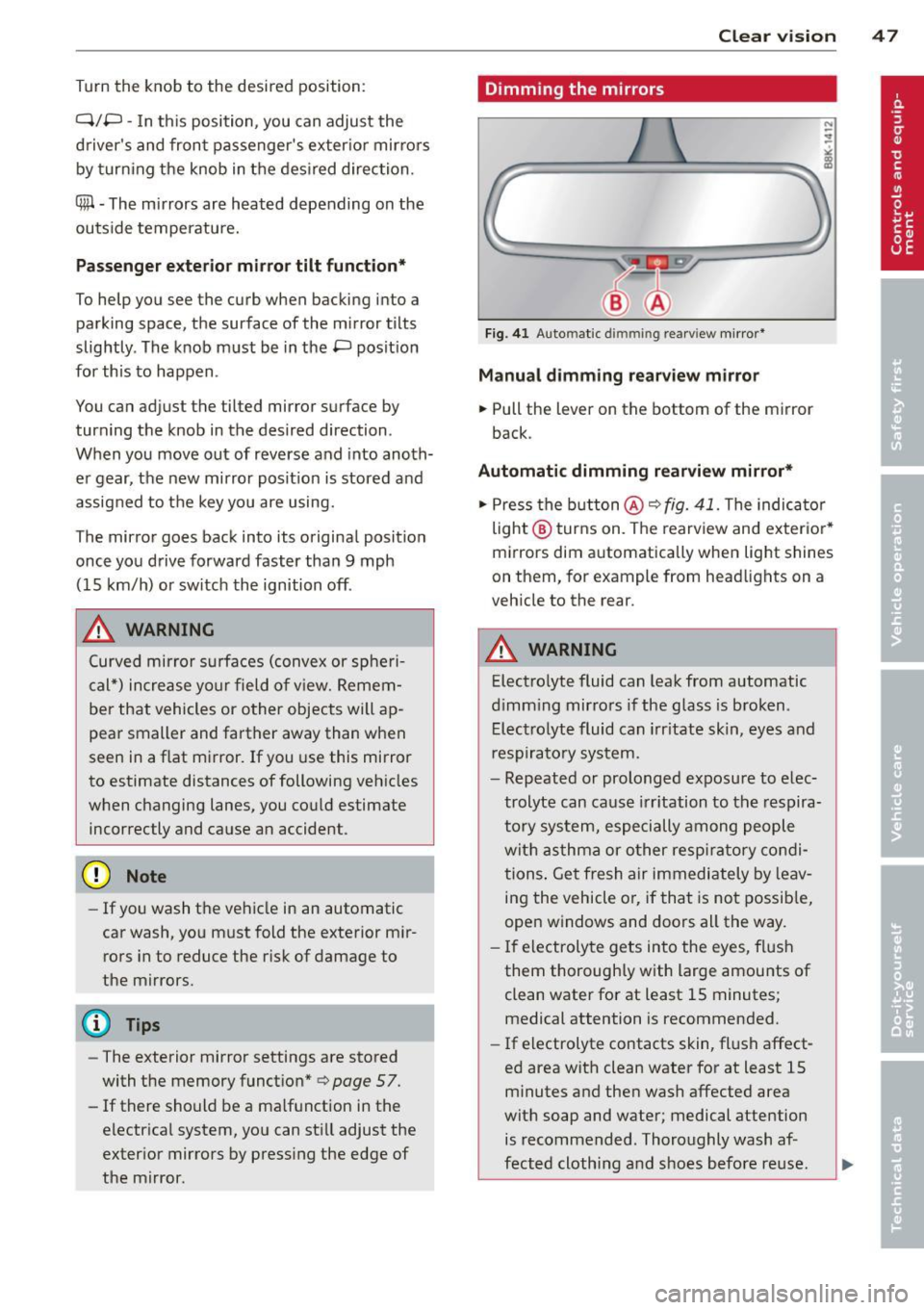
Fig. 41 Auto matic dimmin g rearv iew mirro r*
Manual d imming rearview mir ror
.,. Pull the lever on the bottom of the mirror
back .
Automat ic dimming rearview mirror*
.,. Press the b utton @'*
fig. 41. The indica to r
light @ turns on . The rearview and ex terio r*
mi rrors dim a utomatically when light shines
on them, for example from headlights on a
veh icle to the rear .
_& WARNING
-
Electrolyte fluid can leak from aut omatic
d imm ing mirrors if the glass is broken .
E lec trolyt e fluid can irritate skin , eyes and
res pirato ry system.
- Repeated or prolonged exposu re to elec
trolyte can ca use i rritation to the respira
to ry sy stem, especially among people
wit h asthma or o ther resp iratory co ndi
tions . Ge t fresh a ir immediately by leav
ing the vehicle o r, if tha t is no t possib le,
open w indows and doors all the way.
- If electroly te gets in to the eyes, f lush
them thorough ly with large amounts of
clean water for at least 15 minutes;
medical attention is recommended.
- If electrolyte contacts skin, fl ush affect
ed area with clean water for at least 15
minutes a nd the n wash affected area
wit h soap and water; medical attention
is recommended. Thoroughly wash af
fected cloth ing and shoes before re use .
.
Page 50 of 286
48 Clear vision
-If swallowed and person is conscious,
rinse mouth with water for at least 15
minutes. Do not induce vomiting unless
instructed to do so by medical professio
nal. Get medical attention immediately.
d) Note
Liquid electrolyte leaking from broken mir
ror glass will damage any plastic surfaces
it comes in contact with. Clean up spilled
electrolyte immediately with clean water
and a sponge.
@ Tips
- Switching off the dimming function of
the inside rear view mirror also deacti
vates the automatic dimming function of
the exterior mirrors.
-Automatic dimming for the mirror only
operates properly if the sun shade* for
the rear window is not in use or the light
striking the inside mirror is not hindered
by other objects.
- The automatic dimming mirrors do not
dim when the interior lighting is turned
on or the reverse gear is selected.
Sun visors
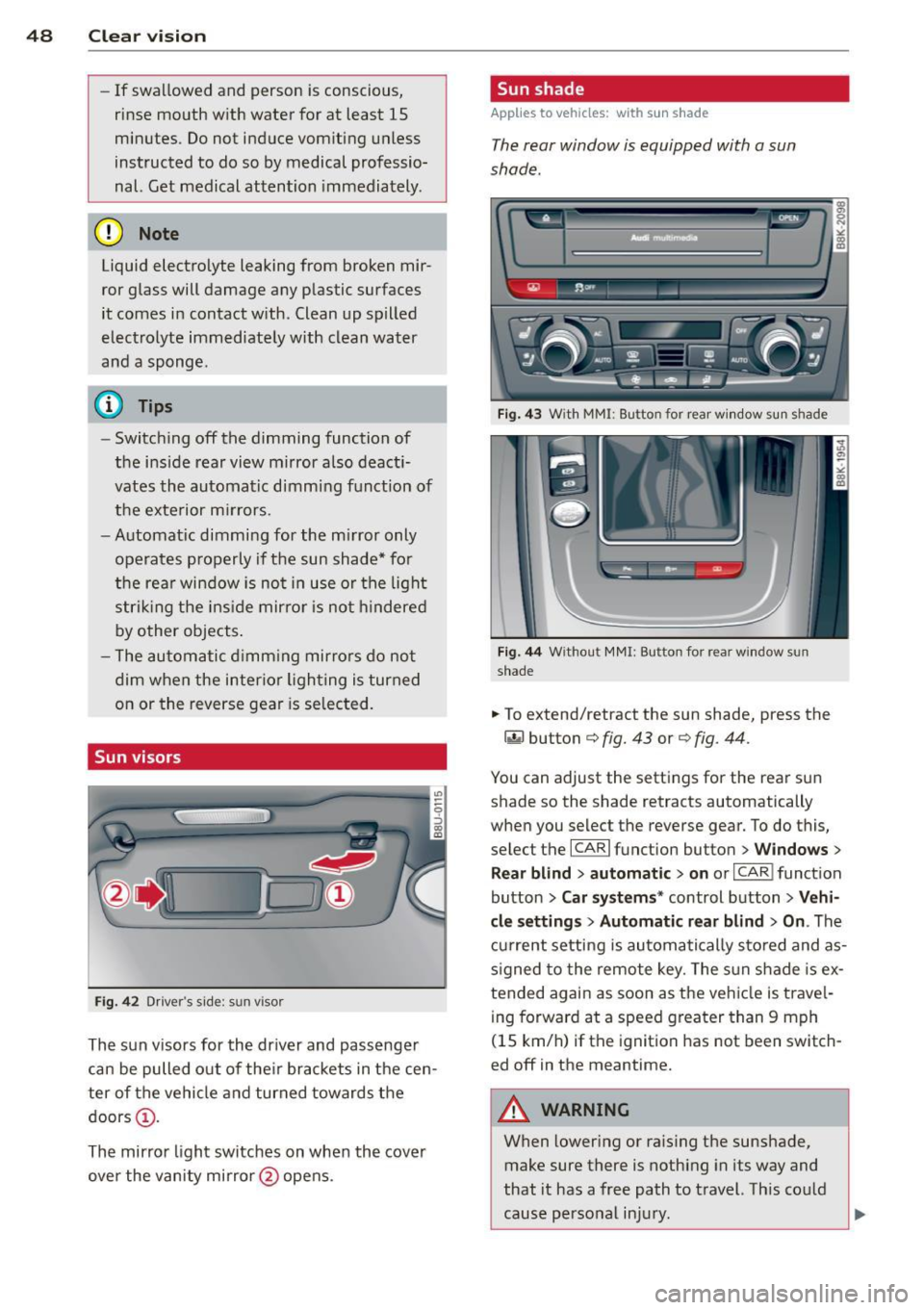
Fig. 42 Drive r's side : su n v isor
The sun visors for the driver and passenger
can be pulled out of their brackets in the cen
ter of the vehicle and turned towards the
doors
(D .
The mirror light switches on when the cover
over the vanity mirror @opens .
Sun shade
Applies to vehicles: with sun shade
The rear window is equipped with a sun
shade.
Fig. 43 W ith MM I: Bu tton for rear window sun s hade
Fig. 44 Withou t MMI : Button for rea r win dow s un
shade
.. To extend/retract the sun shade, press the
~ button c::> fig. 43 or c::> fig. 44 .
You can adjust the settings for the rear sun
shade so the shade retracts automatically
when you select the reverse gear. To do this,
select the
I CAR I function button > Windows >
Rear blind> automatic> on or I CAR I function
button
> Car systems* control button > Vehi
cle settings> Automatic rear blind > On .
The
current setting is automatically stored and as
signed to the remote key. The sun shade is ex
tended again as soon as the vehicle is travel ing forward at a speed greater than 9 mph
(15 km/h) if the ignition has not been switch
ed off in the meantime.
_8 WARNING
= When lowering or raising the sunshade,
make sure there is nothing in its way and
that it has a free path to travel. This could
cause personal injury.
-