remote control AUDI A5 COUPE 2014 User Guide
[x] Cancel search | Manufacturer: AUDI, Model Year: 2014, Model line: A5 COUPE, Model: AUDI A5 COUPE 2014Pages: 286, PDF Size: 70.99 MB
Page 97 of 286
Audi adapt ive crui se c ontrol an d bra kin g guard 95
Setting the distance
Applies to vehicles: with Audi adaptive cruise control
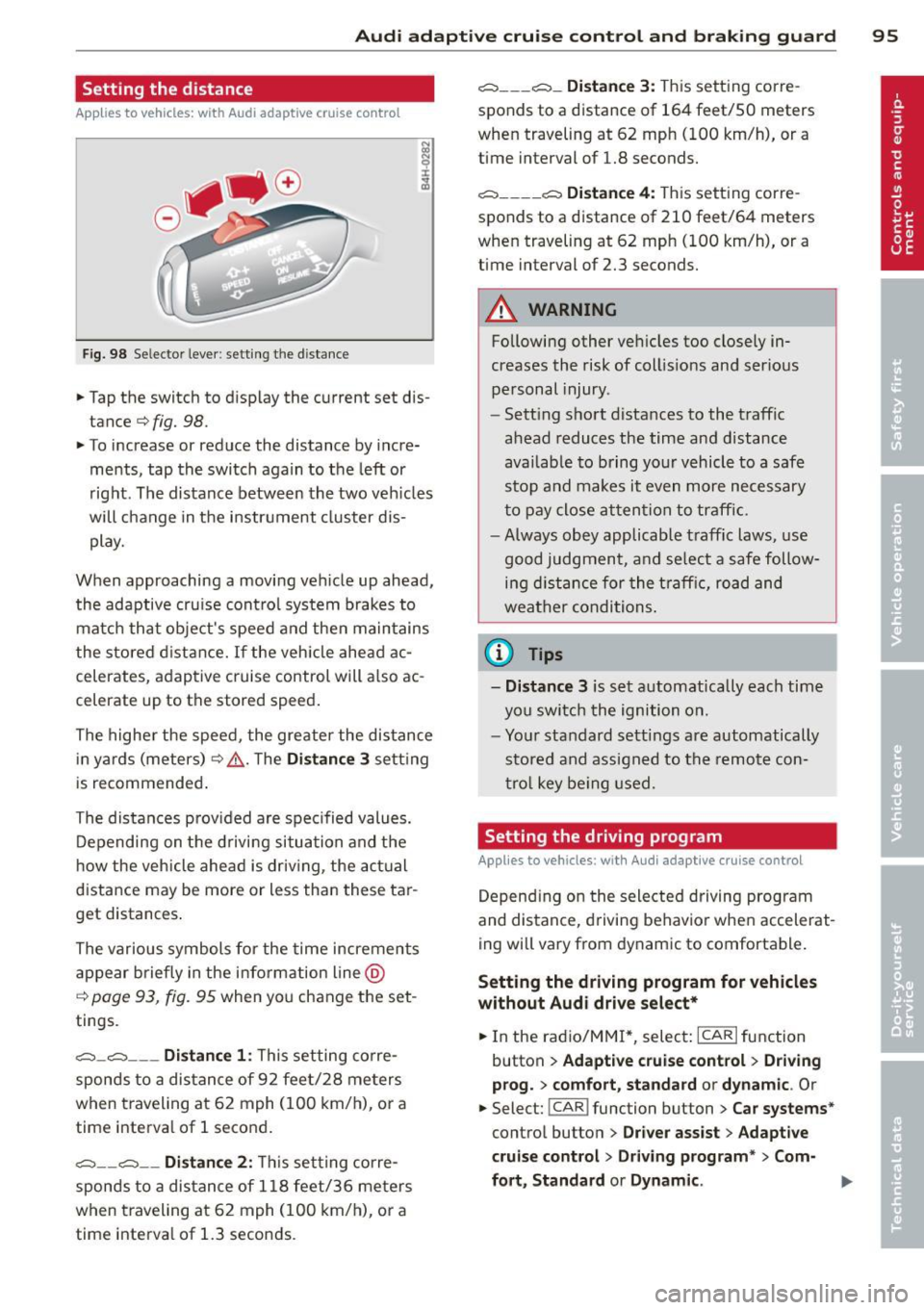
Fig. 98 Selector lever: setting the distance
• Tap the switch to display the current set dis
tance¢
fig. 98.
• To increase or reduce the distance by incre
ments, tap the switch again to the left or
right. The distance between the two veh icles
will change in the instrument cluster dis play.
When approaching a moving veh icle up ahead,
the adaptive cru ise contro l system brakes to
match that object's speed and then maintains
the stored d ist ance.
If the veh icle ahead ac
celerates, adaptive cruise control will a lso ac
celerate up to the stored speed.
The highe r the speed, the greate r the distance
in yards (meters)¢ .&,.. T he
Dis tanc e 3 setting
is recommended.
The distances prov ided are spec ified values.
Depending on the drivi ng situation and the
h ow the veh icle ahead is driv ing, the actual
distance may be more or less than these tar
get distances .
The various symbols for the time increments
appear briefly in the information line @
¢
page 93, fig. 95 when you change the set
tings.
c::::,_c::::, ___ Distance 1: This setting corre-
sponds to a distance of 92 feet/28 me ters
when traveling at 62 mph (100 km/h), or a
time interva l of 1 second.
c::::, __ c::::, __ Distan ce 2 : This setting corre
sponds to a distance of 118 feet/36 meters
when traveling at 62 mph (100 km/h), or a
time interva l of 1.3 seconds .
c::::, ___ c::::,_ Distanc e 3: This setting corre-
sponds to a distance of 164 feet/SO meters
when traveling at 62 mph (100 km/h), or a
time interval of 1.8 seconds.
c::::, ___ _ c::::, Di stanc e 4: This setting corre-
sponds to a distance of 210 feet/64 meters
when traveling at 62 mph (100 km/h), or a
time interval of 2.3 seconds.
A WARNING
Following other vehicles too closely in
creases the risk of coll is ions and ser ious
personal injury .
- Sett ing short distances to the traffic
ahead reduces the time and distance
available to bring your vehicle to a safe
stop and makes it even more necessary
to pay close atten tion to traffic.
- Always obey applicab le traffic laws, use
good judgment, and se lect a safe follow
ing d istance for the t raff ic, road and
weather conditions .
@ Tips
- Di stanc e 3
is set automatically each time
yo u swi tch the ignition on.
- You r standard settings are automatically
stored and assigned to the remote con
t ro l key be ing used.
Setting the driving program
Applies to vehicles: with Audi adaptive cruise control
Depend ing on the selected driving program
and distance, driving behavior when accelerat
ing will vary from dynamic to comfortable.
Setting the d riv ing program f or vehicles
without Aud i dri ve sel ec t*
• In the radio/MM!*, select: !CARI function
button
> Ad apt ive crui se control > Drivin g
p rog. > comfort, st a nd ard or dyna m ic.
Or
• Select: !CAR I function button > Car s yste m s*
control button > Dr iver a ssist > Adapti ve
crui se control> Driv ing program " > Com-
f o rt , St andard or Dynamic .
IJI-
Page 98 of 286
96 Audi adaptive cruise control and braking guard
Setting the driving mode for vehicles with
Audi drive select*
Refer to¢ page 105 .
@ Tips
Your settings are automatically stored and
assig ned to the remote contro l key being
used .
Request for driver intervention
Appl ies to vehicles : with Audi adaptive cruise co ntrol
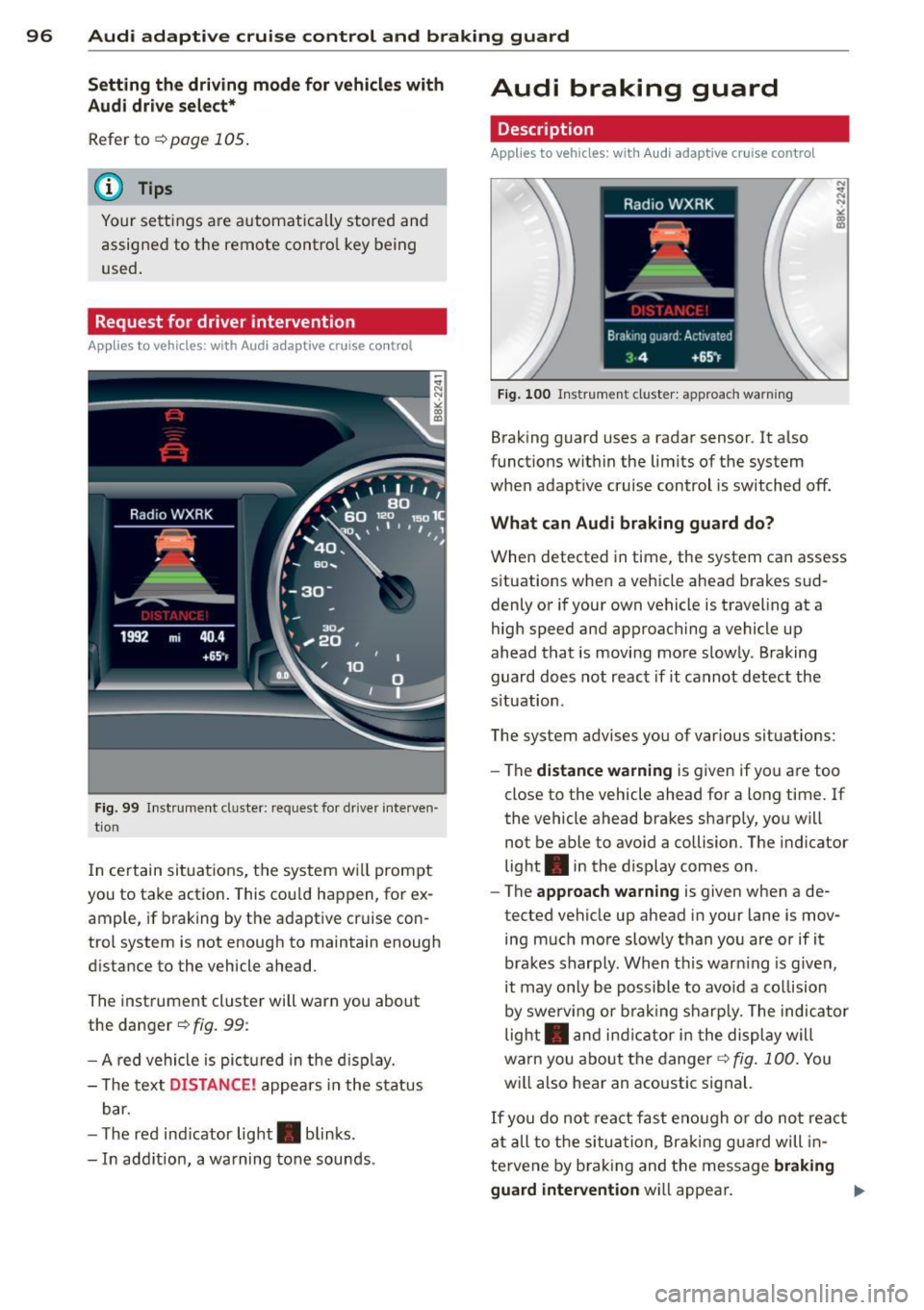
F ig . 99 In st ru m ent cl uster: request for drive r in te rven
t io n
In ce rtain situ ations, t he system w il l prompt
you to take action . This cou ld happen, for ex
ample, if braking by the adaptive cr uise con
trol system is not enough to maintain enough
d ista nce to the vehicle ahead.
The inst rument cluste r will warn you about
the danger ¢
fig. 99:
- A red vehicle is pic tured in t he d is pla y.
- T he text
DISTANCE! appea rs in the st atus
b ar.
- T he red ind icator light . blinks.
- In add itio n, a warning tone sounds .
Audi braking guard
Description
Applies to vehicles: wi th Audi ada ptive cr uise contro l
Fig. 100 In str ume nt clus ter: approach wa rning
Braking guard uses a radar sensor. It a lso
funct ions wit hin the lim its of the system
when adapt ive cruise control is switched off.
What can Audi braking guard do?
When detected in time, the system can assess
s ituations when a vehicle ahea d brakes s ud
denly o r if your own vehicle is traveling at a
high speed and approach ing a vehicle up
ahead that is moving mo re slowly . Braking
guard does not react if it cannot detec t the
s ituation .
The system advises you of var ious situations:
- The
distance warning is given if yo u are too
close to the vehicle ahead for a long time. If
the vehicle ahead brakes sharp ly , yo u will
not be ab le to avoid a collision . The indicator
light . in the display comes on .
- The
approach warning is given when a de
tected vehicle up ahead in your lane is mov
ing m uch more slowly than yo u are or if it
brakes s harply . When t his war ning is given,
it may o nly be poss ibl e to avo id a co llision
by swe rv in g or b ra ki ng s harp ly. The indica tor
light . and indicator i n the di spl ay will
warn yo u about the danger ¢
fig. 100. You
w ill also hea r an acoustic signal.
If you do not rea ct fas t eno ugh o r do not r eact
at all t o the si tu at ion, B raki ng g uard will in
tervene by b raking and the message
braking
guard intervention
wi ll appea r.
Page 99 of 286
Audi adaptive cru ise control and brakin g guar d 97
-If a co llision is imminent, the system will
first provide an
acute wa rnin g by briefly and
sharp ly app lying the brakes .
- If you do not react to the ac ute warning,
braking guard can brake within the limits of
the system. This reduces the vehicle speed
in the event of a coll is ion.
- At speeds under 20 mph (30 km/h), the sys
tem can in it iate a complete decelerat ion
shortly before a collis ion
1>.
- If the braking guard senses that you are not
braking hard enough when a collision is im
minent, it can increase the braking force.
Which function s can be controll ed?
You can switch braking guard and the dis
tance/approach warning on or off in the radio
or MM I
¢ page 9 7, Settings in the radio/
MMI.
A WARNING
Lack of attention can cause col lis ions, oth
er accidents and serious persona l injuries.
The braking guard is an assist system and
cannot prevent a coll is ion by itself. The
driver must always intervene. The d river is
always responsib le for br aking at the cor
rect time .
- Always pay close attention to traffi c,
even when the bra king g uard is switched
on . Be ready to intervene and be ready to
take complete control whenever necessa ry. A lways keep the safe and lega l dis
tance between your vehicle and vehicles
up ahead.
- Braking guard works w ith in limits and
will not respond outs ide the system lim
its, for example when approaching a
stopped vehicle or stationary obstacle
(end of a traff ic jam or vehicle that has
broken down in traffic).
- Always remember that the radar sensor
for the braking guard wo rks only within
defined detection and ra nge limits that
1
> T hi s is not ava ilable in some countries .
may prevent the proper detection of oth
er vehicles .
- The radar sensor's function and range
can be reduced by rain, snow and heavy
spray. Moving ve hicles up ahead may not
be prompt ly detected or may not be de
tected at all.
- Reflective surfaces incl uding crash barri
ers or tunne l entrances may impair the
function of the radar senso r.
(D Tips
- Yo u can cancel the bra king that is in itiat
ed by the system by braking yourself, by
accelerating not iceably or by swerving.
- Braking guard error messages
¢page 98.
- Keep in mind that braking g uard can
brake unexpected ly. Always secure any
cargo or objects that you a re tra nsport
ing to reduce the risk of damage or in
jury .
Settings in the radio/MMI
Applies to veh icles: w it h Audi ada ptive cru ise co ntro l
.,. Sele ct: !CAR ! func tion button> Car sy ste m s*
con trol butto n > Driv er a ssist > Audi brak
ing guard .
Or
.,. Select: !CAR ! function button > Audi braking
gua rd.
Sy stem -
Switch A udi braking guard On an d
Off. When you switch the ignit ion on, the
message
Audi braking guard off appears if
the system is switched off.
Early warning -The distance and approach
warnings in the d isplay can be switched
On/
Off.
(D Tips
- Yo ur settings are au tom atically stored
and assigned to the remote cont ro l key
bein g used at the times the settings are
made.
Page 105 of 286
@ Tips
-Side assist is not active whi le you are
making the adjustment.
- Your settings are automatica lly stored
and assigned to the remote control key
being used.
Driver messages
Applies to vehicles: with Audi side assist
If s ide ass ist switches off by itself, the LED in
the button turns off and a message will ap
pear in the instrument cluster display:
Audi side assist unavailable: Sensors blocked
The radar sensors' vision is affected. Do not
cover the area in front of the sensors with bike
wheels, stickers, dirt or other objects. Clean
the area in front of the sensors, if necessary
c;.page 101, fig. 104.
Audi side assist: Currently unavailable
Side assist cannot be switched on temporarily
because there is a malfunc tion (for example,
the battery charge leve l may be too low) .
Audi side assist: System fault!
The system cannot guara ntee that it will de
tect veh icles correctly and it is switched off .
The sensors have been displaced or are faulty.
H ave the system checked by an authorized
Aud i dealer or authorized Aud i Service Facility
soon.
Audi side assist: Unavailable when towing
Side assist sw itches off automatically when a
factory- insta lled trailer h itch is connected to
the electrical connector on the trailer. There is
no guarantee the system will switch off when
usi ng a retrofitted trailer hitch. Do not use
side assist when towing a trailer .
Audi side assist 103
Page 110 of 286
108 Park assist
Approaching another obstacle will result in
the distance warning sounding at the normal
volume again.
Malfunctions in the system
If a warning tone is audible for about five sec
onds when you turn on the ignition, there is a
malfunction in the system. Have the problem
corrected by your authorized Audi dealer.
Keep the sensors in the rear bumper clean and
free from ice so that the acoustic park assist
system can function properly.
A WARNING
-Sensors have dead spaces in which ob
jects cannot be detected. Be especially
alert for small children and animals,
since they are not always detected by the sensors.
- The acoustic parking system is not a sub
stitute for the driver's own caution and alertness . Ultimate responsibility always
remains with the driver during parking
and similar maneuvers. Always watch
where you are driving.
- You should always adjust the volume and
frequency of the warning tones so that
you can easily hear the acoustic distance
warning even if the radio is playing, the
air-conditioner blower is on High or there is a high level of outside noise.
- Check the settings whenever anyone
else has driven the vehicle before you .
{[) Note
-Remember that low obstacles for which
-
a warning has already been issued may
"dive" below the system's sensing zone if
the vehicle is being backed up closer . In
this case, the warning sound shutting off
does
not indicate that you have cleared
the obstacle. Instead, impact is immi
nent.
- Objects such as trailer hitches, chains,
narrow posts or fences covered by a thin
layer of paint may not always be detect- ed by the system. They can still damage
your vehicle without warning.
(D Tips
Keep the sensors in the rear bumper clean
and free of snow and ice so that the acous
tic parking assist system can function properly.
Adjusting the warning tones
Applies to vehicles: wit h parking syste m (rear)
The warning tones con be adjusted in the
MMI*.
.. Select: I CAR I function button > Parking sys
tem .
Or
.. Select:
!CAR I function button > Car systems*
control button > Driver assist > Parking aid.
- Rear volume -
rear sensor volume
-Rear frequency -rear sensor frequency
-Music volume while parking -when the
parking system is switched on, the volume
of the active audio source is lowered.
The newly adjusted value is briefly heard from
the signal generator. The settings are auto
matically stored and assigned to the master
key with remote control.
Page 115 of 286
the blue area should be o n the curb. The en
tire b lue area must fit into the parking spot.
~ While the vehicle is stationary, t urn the
steering wheel to the right as far as it will go.
~ Back into the park ing spot . Stop the vehicle
as soon a s the blue curve touches the curb
¢ fig . 115.
~ While the vehicle is stationary, tu rn the
steering wheel to the left as far as it w ill go.
~ Continue to back up into the park ing spot
until the vehicle is parked paralle l to the
curb .@ marks the rear bumper . You should
stop dr iving in reverse as soon as and no lat
er than when the red orientation line@
abuts an object¢,& ! Keep an eye on the
front of your vehicle wh ile doing this ¢(D .
Par kin g ne xt to obst acles
When there is an obstacle (such as a wall)
next to the parking spot, choose a spot with
more space on the sides. Position the long
side of the blue area so that there i s sufficien t
space from the curb . The area must not be on
the curb . You w ill also need to start turning
the steeri ng whee l much ear lie r. T he re should
be a suffic ien t amo unt of space between the
curb and the b lue curve, and the blue c urve
¢
fig . 115 mus t not touch the curb .
&_ WARNING
-The rear view came ra does not show the
entire area behind the vehicle
¢ page 109, fig. 110. Watch out espe
c ially for small children and an imals. The
rear view camera cannot a lways detect
them, posing risk of an accident!
- Please note that objects not touch ing the
ground can appear to be further away
than they really are (for example, the bumper of a pa rked vehicle, a t railer
hi tc h, or the rear of a tru ck) . In this case,
yo u should not use the help lines to he lp
with park ing, which poses danger of an
accident!
P ark a ssis t 113
@ Note
In the MMI display, the direction of travel
of the vehicle rear is represented depend
i ng on the steering wheel angle . The vehi
cle front swings out more than the vehicle
rear. Maintain p lenty of d istance from an
obstacle so that your outs ide mirror or a
corner of you r vehicle does not coll ide with
any obstacles - dange r of accident!
(D Tips
The left o r right orie ntation lines and su r
faces will be displayed, depending on the
turn s ignal being used .
Adjusting the display and warning tones
Applies to vehicles: with parking system (rear, with rear
view camera)
The display and warning tones are adjus ted in
the radio or MM!*.
~ Select: !CAR ! function button > Par king sys
tem .
Or
--~ Select: !C AR ! function but ton> Car systems *
contro l butto n > Driver ass ist > Parking aid .
Di splay
- Off -when the parking system is switched
off, only a udible s ignals a re g iv en .
- On -when the parking system is switched
on, the picture from the rear view camera is
disp layed.
Warning tones
- Rear volum e -
rear sensor vo lume
- Rear frequency -rear senso r frequency
- Music volume while parking -when the
park ing system is sw itched on, the volume
of t he active audio sour ce is lowered.
The newly adjusted value is briefly heard from
the sig nal generato r. Th e settings are auto
matically stored and assigned to the remote
control key. ..,.
Page 117 of 286
Homelink
Universal remote
control
Description
Applies to vehicles: with Home link
The HomeLink universal remote control can
be programmed with the remote control for
devices that are already present.
With Home Link, you can control devices such
as the garage door, security systems, house
lights , etc. comfortably from the inside of you
vehicle.
Homelink makes it possible for you to rep lace
three different remote controls from dev ices
in your home with one universal remote. This
feature works for most garage door and exte
rior door motor signals. Programming the in
dividual remote control for your remote con
trol takes place near the center of the radiator
grille. There is a control module attached at
this location .
A one-time programming of the sensor must be performed before you are able to use sys
tems with Homelink. If the system does not activate after performing the one-time pro
gramming, check whether the system uses a rolling coder:!.>
page 118 for vehicles without
the
MMI*.
,& WARNING
-
- Never use the Homelink transmitter
with any garage door opener that does
have not the safety stop and reverse fea
ture as requ ired by federa l safety stand
ards. This includes any garage door open
er model manufactured before April 1,
1982.
-A garage door opener which cannot de
tect an object, signaling the door to stop
and reverse does not meet current feder
al safety standards . Using a garage door
opener without these features increases
risk of serious injury or death.
Homelink 115
- For safety reasons never release the
parking brake or start the engine while
anyone is standing in front of the vehicle .
- A garage door or an estate gate may
sometimes be set in motion when the
Homelink remote control is being pro
grammed. If the device is repeatedly ac
tivated, th is can overstrain motor and
damage its electrical components - an
overheated mo tor is a fire hazard!
- To avoid possib le injuries or property
damage, please always make abso lutely
certa in that no persons or objects are lo
cated in the range of motion of any
equipment being operated.
(0 Tips
- If you would like more information on
Homelink, where to purchase the Home
Link compat ible products, or would like
to purchase the Home Link Home Light
ing Package, please call toll-free :
1-800-355-3515.
-For Declaration of Compliance to United
States FCC and Industry Canada regula
tions
¢ page 267.
-For security reasons, we recommend that
you clear the programmed buttons be
fore selling the vehicle.
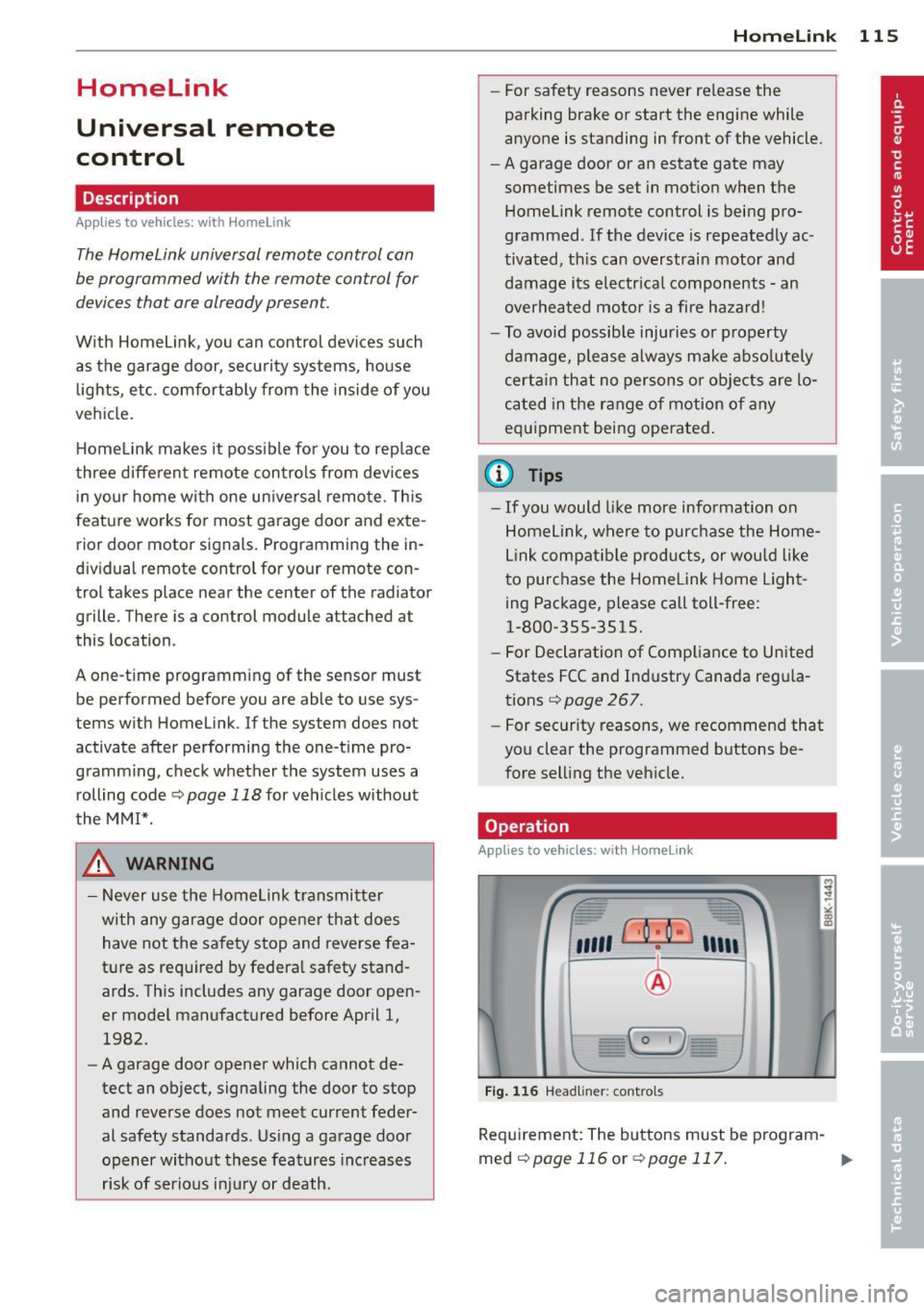
Operation
App lies to vehicles : with Homeli nk
,~
1~
1 r ·O : O ·) 1111 ~
®
Fig.
116 Headl iner: controls
Req uirement: The buttons must be program-
med
¢page 116 or ¢page 117. ..,_
Page 118 of 286
116 Homelink
• To open the garage door, press the p rogram
med button . The LED @will light up or
flash.
• To close the garage door, pre ss the button
again.
@ Tips
To open the garage door, press the button, but do not press it for longer ten seconds
or the Homelink module will switch to
programming mode.
Programming the transmitter (version A)
Appl ies to vehicles: with Home link and MMI
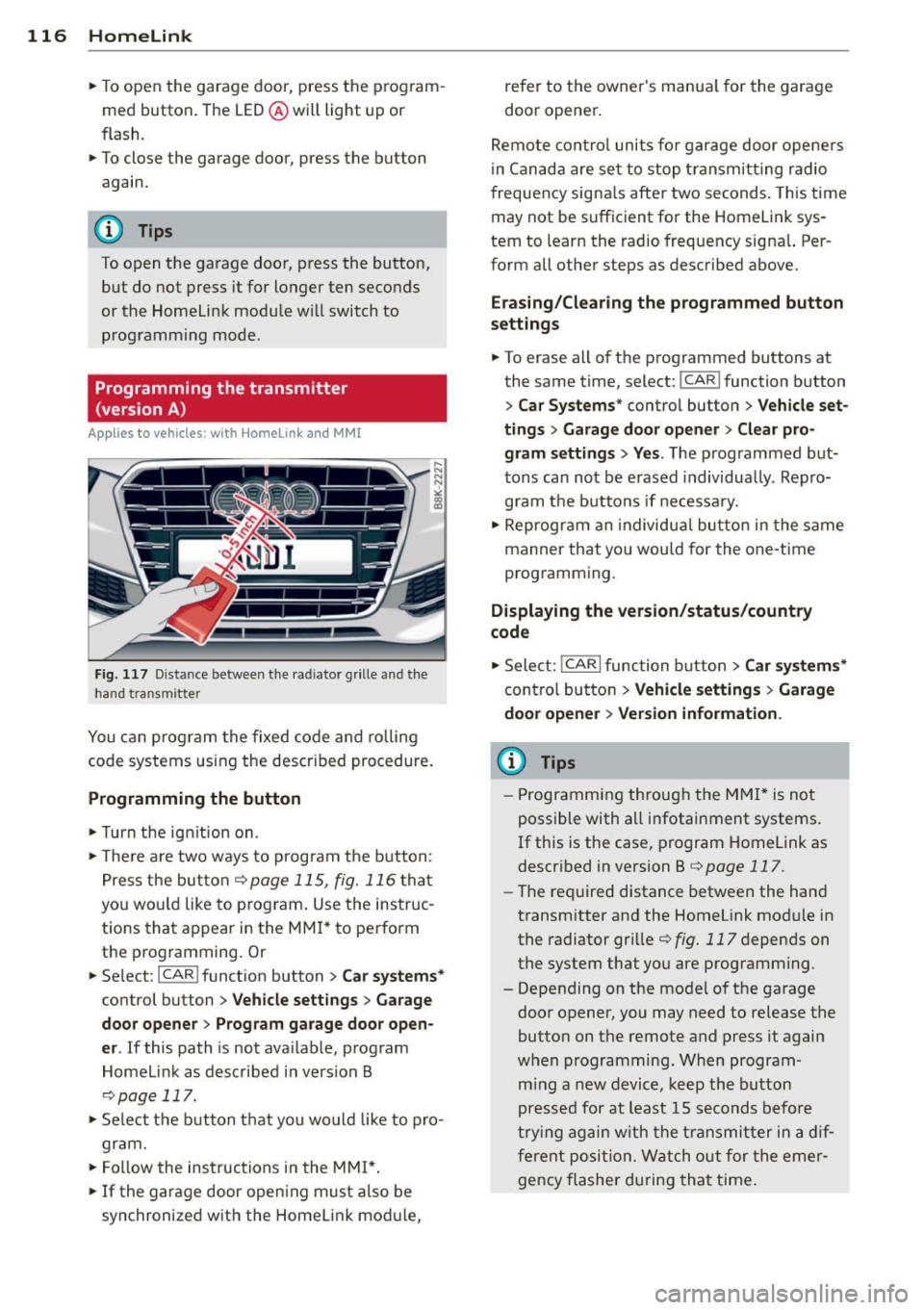
Fig. 1 17 D ista nce between t he ra d iato r grille and t he
hand tran sm itter
You can p rogram the fixed code and ro lling
code systems using the descr ibed procedure.
Programming the button
• Turn the ign ition on .
• The re a re two ways to program the button :
P res s the but ton
¢ page 115, fig. 116 tha t
you wou ld like to p rogram. Use the instruc
tions that appear in the MM I* to pe rform
the p rogramming. Or
• Se lect : ICAR ifunct ion button>
Car sy stems*
con trol but ton > Vehicle sett ing s> Garage
door opener
> Program garage door open·
er .
If this path is not ava ilable, program
Homelink as desc ribed in vers ion B
~ page 117.
• Se lect t he button t hat yo u wo uld like to p ro
gram.
• Fo llow the ins tructions in the MMI* .
• If the garage door open ing must also be
synchronized w it h the Homel ink modu le, refer to the owner
's manua l for the garage
door opener .
Remote con tro l unit s fo r garage door ope ne rs
in Canada are se t to stop t ransmi tting radio
frequency signa ls afte r two seconds . This time
may not be sufficient for the Homelink sys
tem to learn the radio frequency signa l. Per
form all other steps as described above.
Erasing /Clearing the programmed button
s etting s
• To erase all of the programmed buttons at
the same time, select : ICAR !function b utton
> Car Systems * control butto n > Vehicle set·
tings
> Garag e door opener > Clear pro·
gram setting s> Yes .
The prog rammed but
tons can not be erased individua lly. Repro
gram the buttons if ne cess ary.
• Reprogr am an individua l bu tton in the same
manner that you wou ld for the one-time
programming .
Displaying the version /status /country
code
• Sele ct: !CAR I function bu tton > Car sy stem s*
contro l but to n > Vehicle settings > Garage
door opener
> Version information .
(D Tips
- Programming throug h the MMI* is not
possible with all infotainment systems.
If this is the case , program Homelink as
descr ibed in version B
c:) page 117.
-The required distance betwee n the hand
transm itter and the Homelink module in
the radiator gr ille
¢ fig. 117 depends on
the system that you are prog ramming .
- Depending on the mode l of the garage
door opener, you may need to release the
butto n on the remote and press it again
w hen programming. When program ·
m ing a new device, keep the butto n
presse d for at least 15 seconds before
t ry ing ag ain w ith the transmit ter in a dif
fere nt posi tion. W atch o ut for the emer
gency flasher during tha t time.
Page 119 of 286
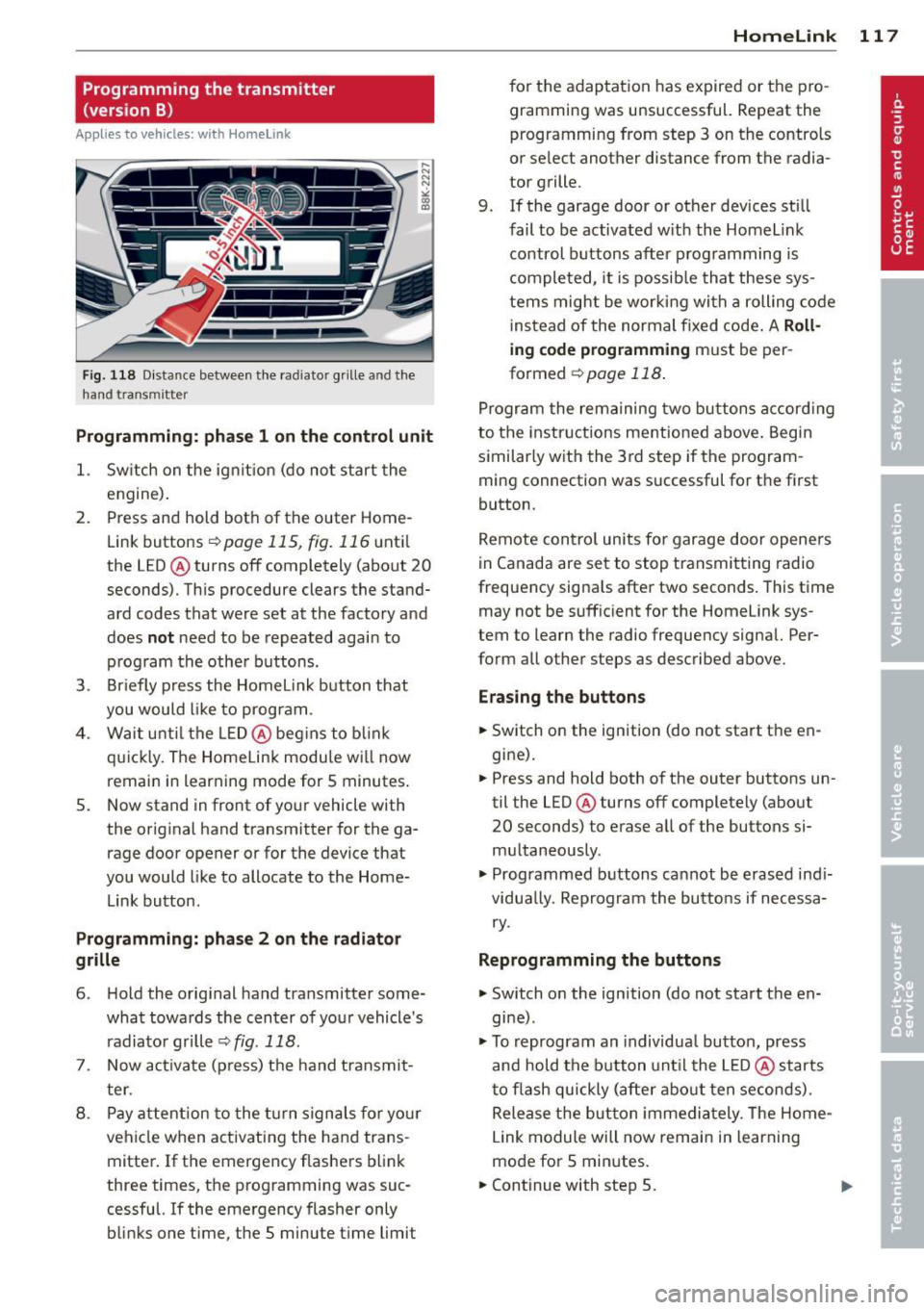
Programming the transmitter (version B)
Applies to vehicles: with Horne link
Fig. 118 D istance between t he rad ia to r gr ille a nd the
h and trans mitter
Programming: phase 1 on the control unit
1. Sw itch on the ig nit io n (do no t start the
engine ).
2. Press and hold bot h of the outer Home
Link buttons
r=> page 115, fig. 116 until
the LED @ turns off completely (about
20
seconds). Th is procedure clears the stand
ard codes that were set at the factory and
does
not need to be repeated agai n to
p rog ram the othe r buttons.
3 . Briefly press the Homelink button that
you would like to prog ram .
4 . Wai t unti l the LED @ beg ins to blink
q ui ckly . The Home Lin k modu le wi ll now
remai n in learning mode for
5 minutes .
5. Now stand in front of your vehicle with
the original hand transmitter for the ga rage door opener or for the device that
you would like to allocate to the Home
Link button.
Programming: pha se 2 on the radiator
grille
6 . Hold the orig inal hand t ransmitter some
what towa rds the center o f you r vehicle 's
radiato r gr ille
r=> fig . 118 .
7. Now activate (p ress) t he hand transmit
ter.
8 . Pay a ttention to the t urn sign als for yo ur
vehicle when activating the ha nd trans
mitter . If t he emergency flashers b link
three times, the programming was suc
cessful. If the emergency flasher only bli nks one t ime, the 5 minute t ime limit
Homelink 11 7
for the adaptat ion has expired or the pro
gram ming was unsuccessful. Repeat the
programming from step 3 on the controls
o r se lect another distance from the radia
tor grille.
9. If the garage door or other devices sti ll
fail to be activated w it h the Homelin k
control buttons after p rogramming is
comple ted, it is possib le tha t these sys
tems might be w ork ing wi th a roll ing co de
ins tead of the normal fixed co de.
A Roll
ing code programming must be per
formed
r=> page 118 .
Program the rema ining tw o butt ons accor ding
to the instructions mentioned above . Beg in
similar ly w ith the 3rd step if the program
m ing connection was successful for t he fi rst
button .
Remote con trol units fo r garage door opene rs
in Canada are set to stop tra nsmitting radio
frequency signa ls after two seconds . This t ime
may not be suffic ient for the Homelink sys
tem to learn the radio frequency signa l. Per
form all other steps as described above.
Erasing the buttons
.,. Switch on the ignition (do not sta rt the en
gi ne).
.,. Press and hold both o f the outer buttons un
til the LED@ turns off completely (abo ut
20 seconds) to e rase a ll of the buttons si
m ultaneously .
.,. Programmed b uttons ca nnot be erased ind i
vidua lly. Reprogram the butto ns if necessa
ry .
Reprogramming the buttons
.,. Switch o n the ignition (do not start t he en
gine) .
.,. To reprogram an individua l bu tto n, press
and hold the button unt il the LED @ starts
t o f lash quickly (a fter ab out ten seconds) .
Release t he bu tton imme dia tely. The Home
L ink module will now remai n in learning
mo de for 5 min utes.
.,. Continue with step 5.
Page 120 of 286
118 Homelink
-Programming using the Homelink but
tons is not poss ible with all infotainment
systems. If this is the case, program Homelink as described in vers ion A
¢ page 116.
-The requ ired distance between the hand
transmitter and the Homelink module in
the radiator grille
¢ fig . 118 depends on
the system that you are programming.
- Depend ing on the model of the garage
door opener, you may need to release the
button o n the remote and press it again
when prog ramming . W hen p rogram
ming a new dev ice, keep the button
pressed for a t le ast 15 se con ds before
trying again wi th the transmitte r in a dif
ferent posit ion . Watch out for the emer
gency flasher during that time.
Programming the rolling code
App lies to vehicles: with Home link
Additionally, a rolling code programming for
the Homelink universal remote control is re
quired for some systems.
Identifying the rolling code
"' Press the prev io usly progr amme d Homelink
bu tton aga in and ho ld it down .
"' Look at th e LED @¢
page 115, fig . 116 . If
the LED b links quickly, the features, s uch as
the garage door opene r, are equipped with
t he rolling code .
"' Program the rolling code as follows :
Activating the g arage door opene r motor
unit
"' Locate the setting button on the garage
door opener motor unit . The exact location
and co lor of t he button may vary depend ing
on the ga rage door opener ma nufactu rer .
"' Press the sett ing button on the ga rage door
opener motor unit (usually th is w ill act ivate
a "se tting ligh t disp lay" on the mo to r u nit).
Now you w ill have abo ut
30 second s time to
perform the Homelink button programming
on the cont ro ls.
Programming on the controls
"' Press the Homelink bu tton tha t was a lready
programmed and hol d for two seconds .
"' To end ro llin g code programming , press and
hold t he Home link button for two seconds
aga in.
"' The Home link button may need to be press
ed a t hird t ime to end the adjustment proce
dure for some ga rage doo r openers .
After the controls have been programmed, the
garage door opener shou ld recognize the
Homelink signa l and operate when the Home
Lin k button is pressed . N ow you may prog ram
t h e other buttons as needed .
(D Tips
- Programming the rolling code can be
perfor med quicke r and more easily with
the help of a se cond person .
- If d iff iculties should ar ise when pro
gramming the rolling code, consult the
operating instructions fo r th e garage
door opener or o ther dev ices for po ssible
so lutions.