stop start AUDI A5 COUPE 2014 Owner's Manual
[x] Cancel search | Manufacturer: AUDI, Model Year: 2014, Model line: A5 COUPE, Model: AUDI A5 COUPE 2014Pages: 286, PDF Size: 70.99 MB
Page 107 of 286
-For vehicles with an automatic transmis
sion, selecting the
Dynamic mode re
su lts in sporty shifting characteristics .
The
5 gear posit ion engages automati
cally.
- In vehicles that have dynamic steering*,
operating noise is heard when starting or
stopping the eng ine. Th is does not ind i
cate a problem .
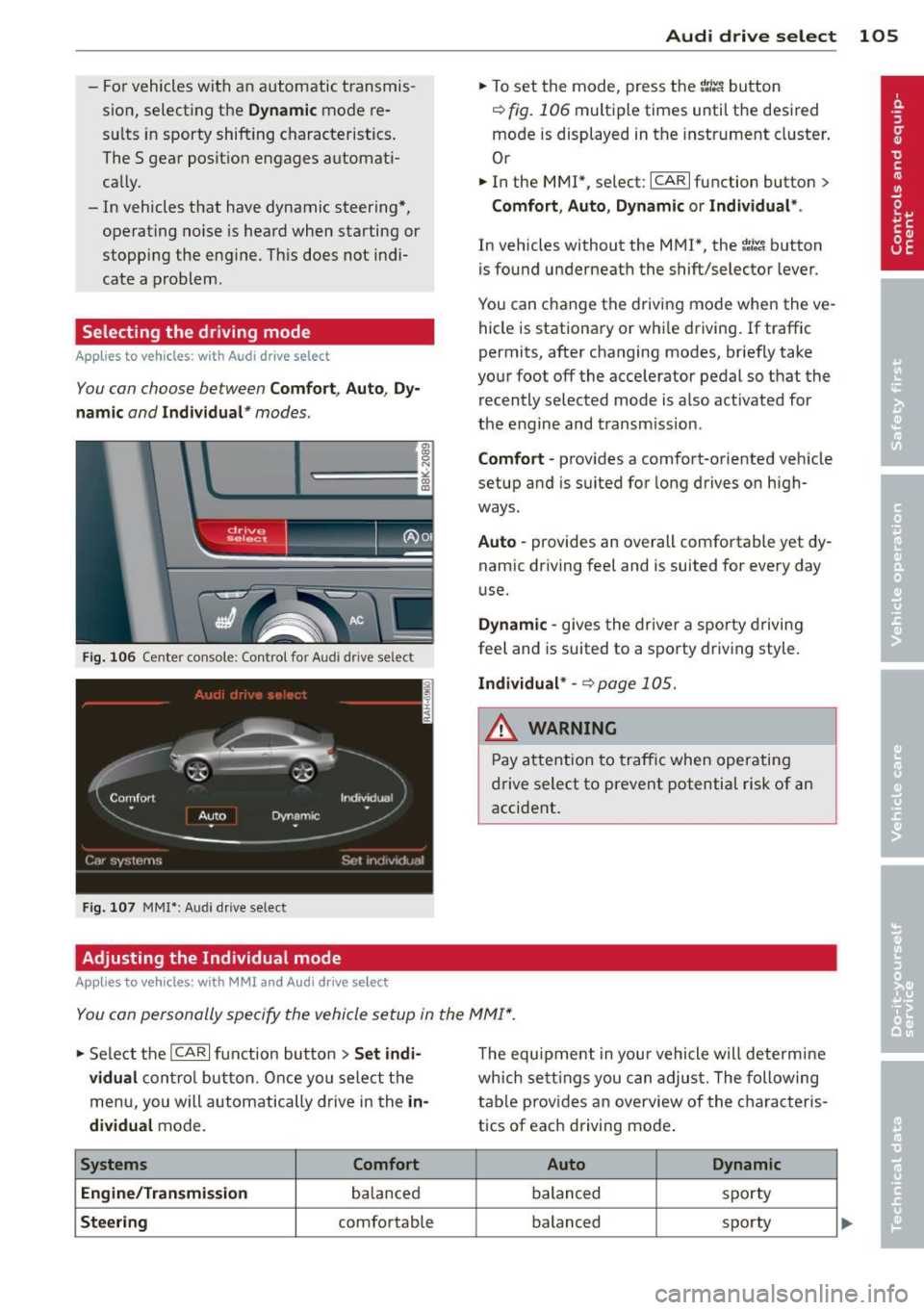
Selecting the driving mode
Applies to vehicles: with Audi drive select
You con choose between Comfort, Auto, Dy
namic and Individual* modes.
drive I I fi el•ct _ ~-=
Fig. 106 Center console ; Con trol for Aud i dr ive se lect
Fig. 107 MMI *: Aud i drive select
Adjusting the Individual mode
Applies to vehicles: with MMI and Aud i d rive select
Audi drive select 105
.. To set the mode, press the 1.:il'.'l button
r=> fig. 106 multiple times until the desired
mode is displayed in the instrument cluster .
Or
.. In the MMI*, select: ICARlfunction button>
Comfort, Auto , Dynamic or Individual* .
In vehicles without the MMI*, the ~:/~c1 button
is found underneath the shift/selector lever.
You can change the driving mode when the ve
hicle is stationary or whi le driving.
If traffic
permits, after changing modes, briefly take
your foot off the accelerator pedal so that the recently selected mode is also activated for
the engine and transmission.
Comfort -provides a comfort-oriented vehicle
setup and is suited for long drives on high
ways.
Auto -provides an overall comfortable yet dy
namic driving feel and is suited for every day
u se.
Dynamic -gives the driver a sporty driving
feel and is suited to a sporty driving style .
Individual* -~ page 105.
& WARNING ~
Pay attention to traffic when operating
drive select to prevent potential risk of an
accident .
You con personally specify the vehicle setup in the MMI* .
.. Select the ICARI function button > Set indi
vidual
control button. Once you select the
menu, you will automatically drive in the
in
dividual
mode.
Systems Comfort
Engine/Transmission
ba lanced
Steering comfortable The
equipment in your vehicle will determine
which settings you can adjust. The following
table prov ides an overview of the characteris
tics of eac h driving mode .
Auto Dynamic
balanced spo
rty
balanced sporty
Page 109 of 286
Park assist
Parking system
Applies to vehicles: wit h pa rk in g system
Different park assist systems may be used for
parking or maneuvering, depending on the
vehicle's features.
Parking system (rear)*:
For the parking system (rear), the acoustic
park assist system is installed in the rear of
the vehicle
¢ page 107.
The rear parking assist system uses ultrasonic
sensors to determine the distance of the vehi
cle from a detected obstacle. There are a total
of four sensors located on the rear bumper
(two in the middle and two on the sides) .
Parking system (rear, with rear view
camera)*:
For the parking system (rear, with rear view
camera),
the rear acoustic park assist system
is integrated in the rear of the vehicle and the
rear view camera is integrated in the rear lid
¢page 110.
The parking system (rear , with rear view cam
era)
uses ultrasonic sensors to determine the
distance of the vehicle from a detected obsta
cle . There are a total of four sensors located
on the rear bumper (two in the m iddle and
two on the sides).
_& WARNING
Make sure the sensors are not covered by
stickers, deposits or any other obstruc
tions as it may impair the sensor function.
For information on cleaning, refer to
qpage 196.
Park assist 107
Parking system (rear)
Rear acoustic park assist
Applies to veh icles: w it h pa rk ing system (rear)
The rear acoustic park assist warns you of ob
stacles or objects behind your car .
Description
The rear acoustic parking assist system deter
mines the distance of the vehicle from an ob
stacle using ultrasonic sensors. There are 4
sensors in the rear bumper.
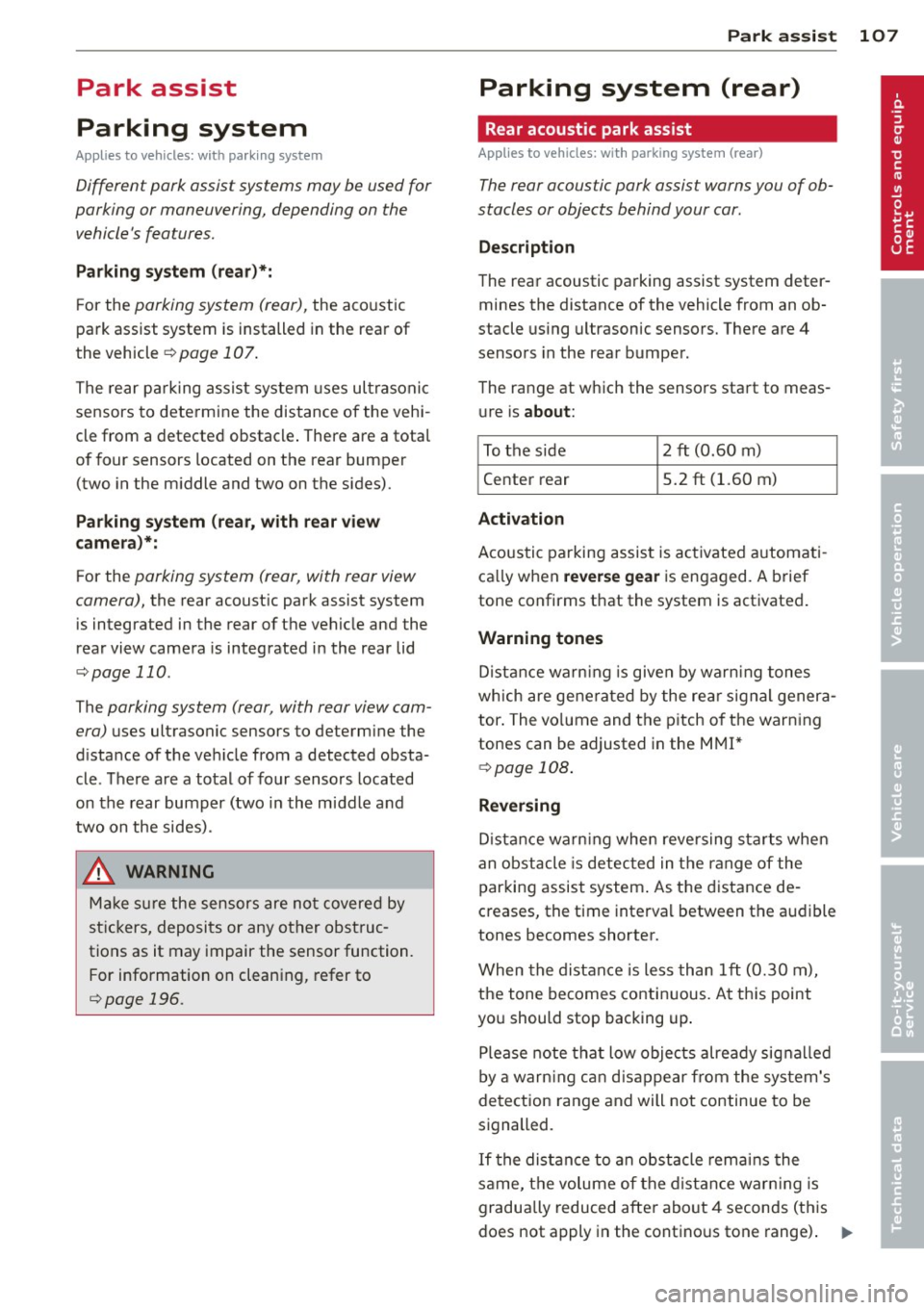
The range at which the sensors start to meas ure is
about:
To the side 2 ft (0.60 m)
Center rear 5.2 ft (1.60 m)
Activation
Acoustic parking assist is activated automati
ca lly when
reverse gear is engaged. A brief
tone confirms that the system is activated.
Warning tones
Distance warning is given by warning tones
which are generated by the rear signal genera
tor. The volume and the pitch of the warning
tones can be adjusted in the MMI*
¢page 108.
Reversing
Distance warning when reversing starts when
an obstacle is detected in the range of the
parking assist system . As the distance de
creases, the time interval between the audible
tones becomes shorter.
When the distance is less than 1 ft (0.30 m),
the tone becomes continuous. At this point
you should stop backing up .
Please note that low objects already signalled
by a warn ing can disappear from the system's
detection range and will not continue to be
signalled .
If the distance to an obstacle remains the
same, the volume of the distance warning is
gradually reduced after about 4 seconds (this
does not apply in the continous tone range).
ll-
Page 111 of 286
Parking system (rear,
with rear view camera)
Introduction
Applies to vehicles: with parking system (rear, with rear
view camera)
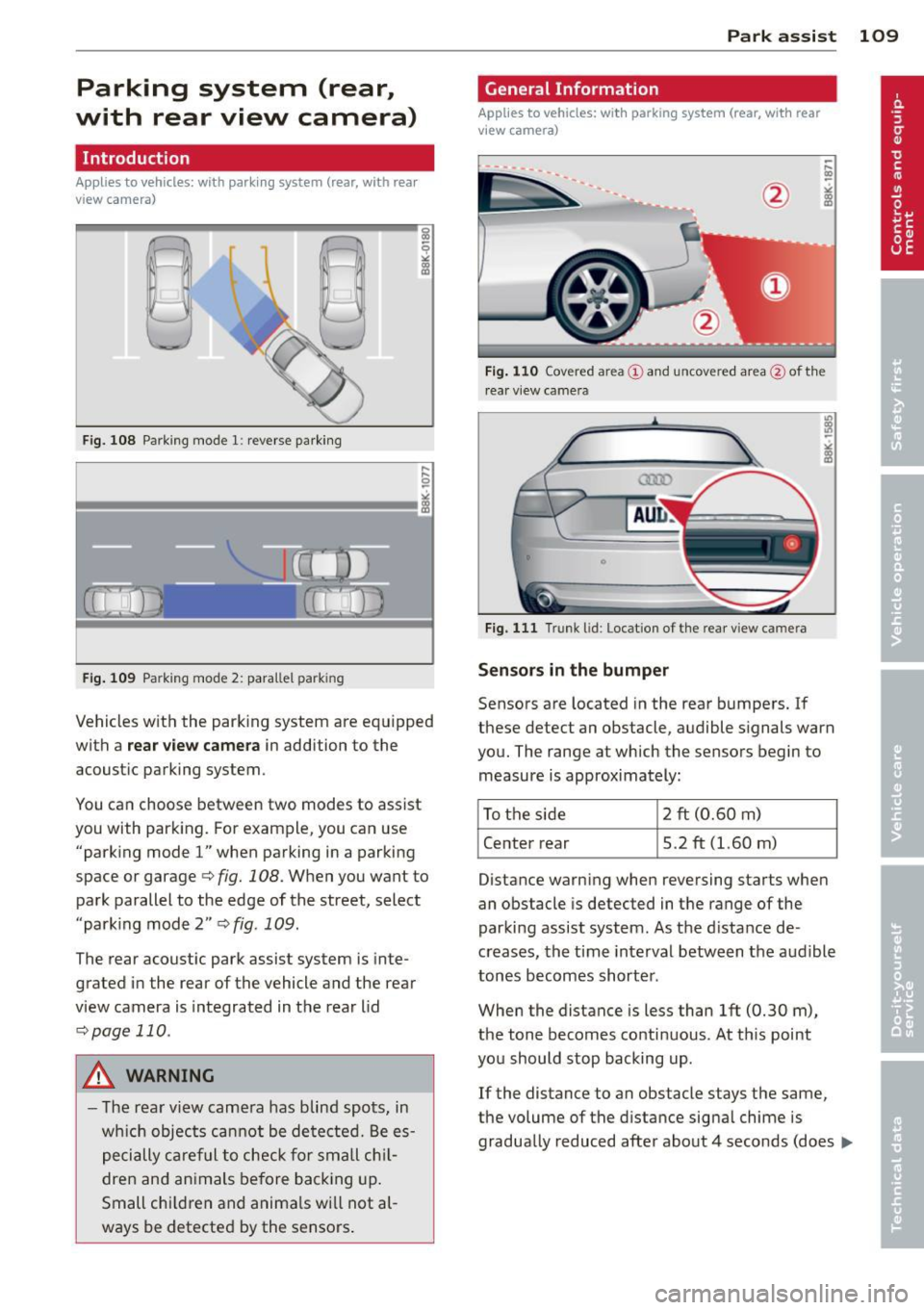
Fig. 108 Parking mode 1: reverse parking
Fig. 109 Parking mode 2: parallel park ing
Vehicles with the parking system are equipped
with a
rear view camera in addition to the
acoustic parking system.
You can choose between two modes to assist
you with parking. For example, you can use "parking mode
l" when parking in a parking
space or garage
q fig. 108. When you want to
park parallel to the edge of the street, select
"parking mode 2"
qfig. 109.
The rear acoustic park assist system is inte
grated in the rear of the vehicle and the rear
view camera is integrated in the rear lid
qpage 110.
A WARNING
-The rear view camera has blind spots, in
wh ich objects cannot be detected. Be es
pecially careful to check for small chil
dren and animals before backing up.
Small chi ldren and anima ls will not al
ways be detected by the sensors . Park assist 109
General Information
Applies
to vehicles: with parking system (rear, with rear
view camera)
Fig. 110 Covered area(!) and uncovered area@of th e
r ear v iew camera
0
Fig. 111 Trunk lid: Locat ion of the rear view camera
Senso rs in the bumper
Sensors are located in the rear bumpers. If
these detect an obstacle, audible signals warn
you. The range at which the sensors begin to
measure is approximately:
To the side
2 ft (0.60 m)
Center rear 5.2 ft (l.60 m)
Distance warning when reversing starts when
an obstacle is detected in the range of the
parking assist system . As the distance de
creases, the time interval between the audible
tones becomes shorter .
When the distance is less than 1ft (0.30 m),
the tone becomes continuous. At th is point
you should stop backing up.
If the distance to an obstacle stays the same,
the volume of the distance signa l chime is
gradually reduced after about 4 seconds (does ..,_
Page 113 of 286
Switching off
• Drive faster than 9 mph (15 km/h), or
• take the vehicle out of reverse gear. The
acoustic parking system is immediately de
activated, and the rear view camera picture is deactivated automatically after a period
of about 15 seconds, or
• switch off the ignition.
The delay in deactivating the camera provides
an uninterrupted view behind the vehicle es
pecially when maneuvering in tight parking
spaces and prevents the picture from turning
off the every time you sh ift out of reverse .
If the warning message appears in the display but not the rear view camera picture, read and
confirm the warning message . The acoustic
d istance signal is always active.
If you press a function button on the MMI
control console, the rear view camera picture
disappears . The rear view camera picture reap
pears the next time you park.
Further information on the warning message
and the MMI control console can be found in
the MMI instruction booklet.
A WARNING
- Only use the rearview camera to assist
you if it shows a good, clear picture. For
example, the image may be affected by
the sun shining into the lens, dirt on the
lens or if there is a defect.
- Use the rearview camera only with the
rear lid completely closed. Make sure any
objects you may have mounted on the
rear lid do not block the rearview cam
era.
(D Tips
- The rear v iew camera picture is available
as soon as the MMI Display or the MMI is
switched on, or the start-up phase is
completed.
- The sensors must be kept clean and free
of snow and ice for the park assist to op
erate.
Park assist 111
- You can change the vo lume and pitch of
the signals as we ll as the disp lay
~page 113.
-What appears in the display is time-de
layed.
Reverse Parking
App lies to vehicles: wit h parking system (rear, with rear
v iew camera}
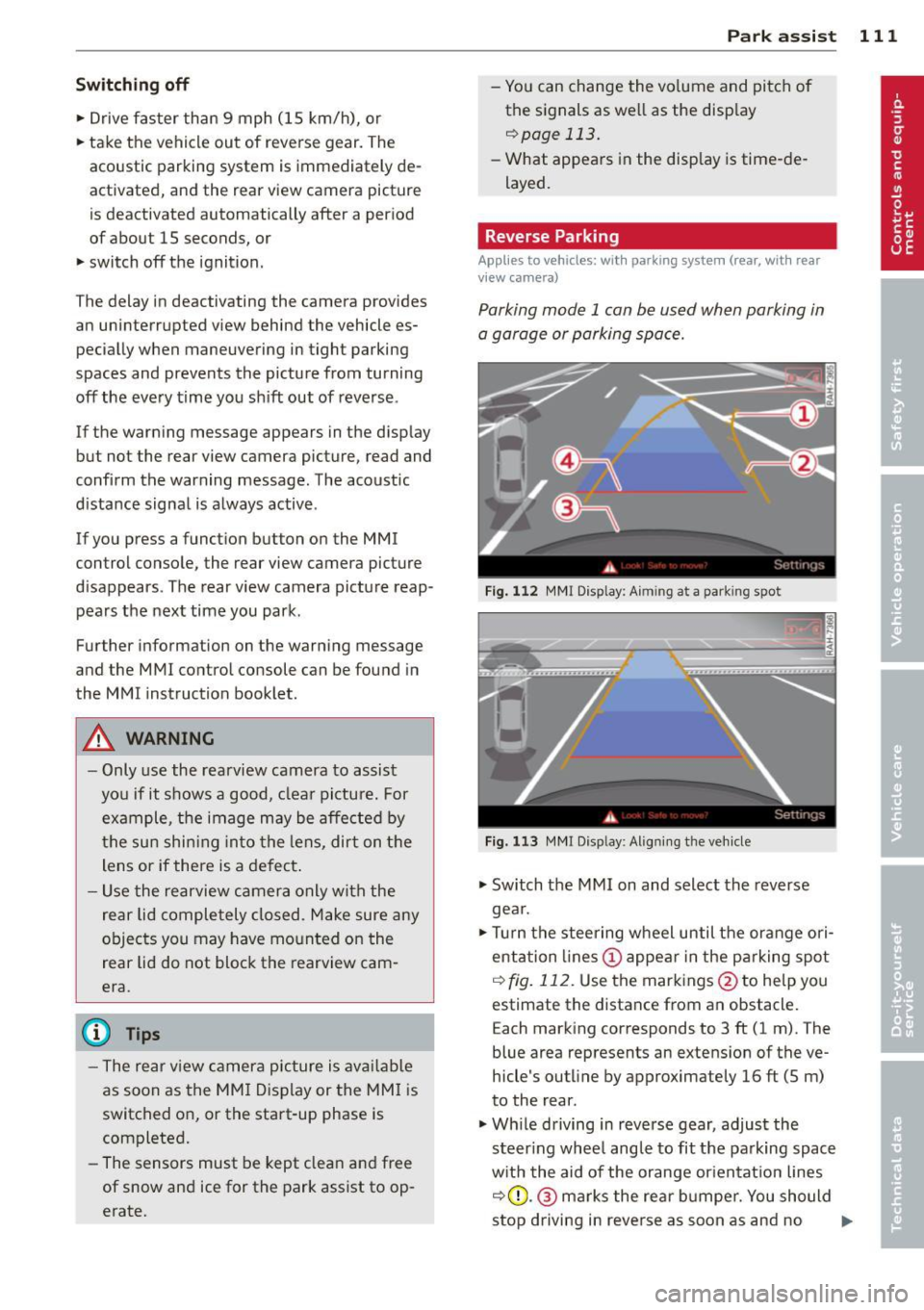
Parking mode 1 can be used when parking in
a garage or parking space.
Fig. 112 MMI Display: Aim ing at a park ing spot
Fig. 113 MMI Disp lay : Al ign ing the veh icle
• Switch the MMI on and select the reverse
gea r.
• Turn the steering wheel until the orange ori
entation lines (!) appear in the parking spot
i=> fig. 112. Use the markings @to help you
estimate the distance from an obstacle.
Each marking corresponds to 3 ft (1 m). The
blue area represents an extens ion of the ve
hicle's outline by approximately 16 ft (5 m)
to the rear.
• Wh ile driving in reverse gear, adjust the
steer ing whee l angle to fit the parking space
with the aid of the orange orientation lines
i::>0 .@ marks the rear bumper. You should
stop driving in reve rse as soon as and no
Ill>-
Page 115 of 286
the blue area should be o n the curb. The en
tire b lue area must fit into the parking spot.
~ While the vehicle is stationary, t urn the
steering wheel to the right as far as it will go.
~ Back into the park ing spot . Stop the vehicle
as soon a s the blue curve touches the curb
¢ fig . 115.
~ While the vehicle is stationary, tu rn the
steering wheel to the left as far as it w ill go.
~ Continue to back up into the park ing spot
until the vehicle is parked paralle l to the
curb .@ marks the rear bumper . You should
stop dr iving in reverse as soon as and no lat
er than when the red orientation line@
abuts an object¢,& ! Keep an eye on the
front of your vehicle wh ile doing this ¢(D .
Par kin g ne xt to obst acles
When there is an obstacle (such as a wall)
next to the parking spot, choose a spot with
more space on the sides. Position the long
side of the blue area so that there i s sufficien t
space from the curb . The area must not be on
the curb . You w ill also need to start turning
the steeri ng whee l much ear lie r. T he re should
be a suffic ien t amo unt of space between the
curb and the b lue curve, and the blue c urve
¢
fig . 115 mus t not touch the curb .
&_ WARNING
-The rear view came ra does not show the
entire area behind the vehicle
¢ page 109, fig. 110. Watch out espe
c ially for small children and an imals. The
rear view camera cannot a lways detect
them, posing risk of an accident!
- Please note that objects not touch ing the
ground can appear to be further away
than they really are (for example, the bumper of a pa rked vehicle, a t railer
hi tc h, or the rear of a tru ck) . In this case,
yo u should not use the help lines to he lp
with park ing, which poses danger of an
accident!
P ark a ssis t 113
@ Note
In the MMI display, the direction of travel
of the vehicle rear is represented depend
i ng on the steering wheel angle . The vehi
cle front swings out more than the vehicle
rear. Maintain p lenty of d istance from an
obstacle so that your outs ide mirror or a
corner of you r vehicle does not coll ide with
any obstacles - dange r of accident!
(D Tips
The left o r right orie ntation lines and su r
faces will be displayed, depending on the
turn s ignal being used .
Adjusting the display and warning tones
Applies to vehicles: with parking system (rear, with rear
view camera)
The display and warning tones are adjus ted in
the radio or MM!*.
~ Select: !CAR ! function button > Par king sys
tem .
Or
--~ Select: !C AR ! function but ton> Car systems *
contro l butto n > Driver ass ist > Parking aid .
Di splay
- Off -when the parking system is switched
off, only a udible s ignals a re g iv en .
- On -when the parking system is switched
on, the picture from the rear view camera is
disp layed.
Warning tones
- Rear volum e -
rear sensor vo lume
- Rear frequency -rear senso r frequency
- Music volume while parking -when the
park ing system is sw itched on, the volume
of t he active audio sour ce is lowered.
The newly adjusted value is briefly heard from
the sig nal generato r. Th e settings are auto
matically stored and assigned to the remote
control key. ..,.
Page 117 of 286
Homelink
Universal remote
control
Description
Applies to vehicles: with Home link
The HomeLink universal remote control can
be programmed with the remote control for
devices that are already present.
With Home Link, you can control devices such
as the garage door, security systems, house
lights , etc. comfortably from the inside of you
vehicle.
Homelink makes it possible for you to rep lace
three different remote controls from dev ices
in your home with one universal remote. This
feature works for most garage door and exte
rior door motor signals. Programming the in
dividual remote control for your remote con
trol takes place near the center of the radiator
grille. There is a control module attached at
this location .
A one-time programming of the sensor must be performed before you are able to use sys
tems with Homelink. If the system does not activate after performing the one-time pro
gramming, check whether the system uses a rolling coder:!.>
page 118 for vehicles without
the
MMI*.
,& WARNING
-
- Never use the Homelink transmitter
with any garage door opener that does
have not the safety stop and reverse fea
ture as requ ired by federa l safety stand
ards. This includes any garage door open
er model manufactured before April 1,
1982.
-A garage door opener which cannot de
tect an object, signaling the door to stop
and reverse does not meet current feder
al safety standards . Using a garage door
opener without these features increases
risk of serious injury or death.
Homelink 115
- For safety reasons never release the
parking brake or start the engine while
anyone is standing in front of the vehicle .
- A garage door or an estate gate may
sometimes be set in motion when the
Homelink remote control is being pro
grammed. If the device is repeatedly ac
tivated, th is can overstrain motor and
damage its electrical components - an
overheated mo tor is a fire hazard!
- To avoid possib le injuries or property
damage, please always make abso lutely
certa in that no persons or objects are lo
cated in the range of motion of any
equipment being operated.
(0 Tips
- If you would like more information on
Homelink, where to purchase the Home
Link compat ible products, or would like
to purchase the Home Link Home Light
ing Package, please call toll-free :
1-800-355-3515.
-For Declaration of Compliance to United
States FCC and Industry Canada regula
tions
¢ page 267.
-For security reasons, we recommend that
you clear the programmed buttons be
fore selling the vehicle.
Operation
App lies to vehicles : with Homeli nk
,~
1~
1 r ·O : O ·) 1111 ~
®
Fig.
116 Headl iner: controls
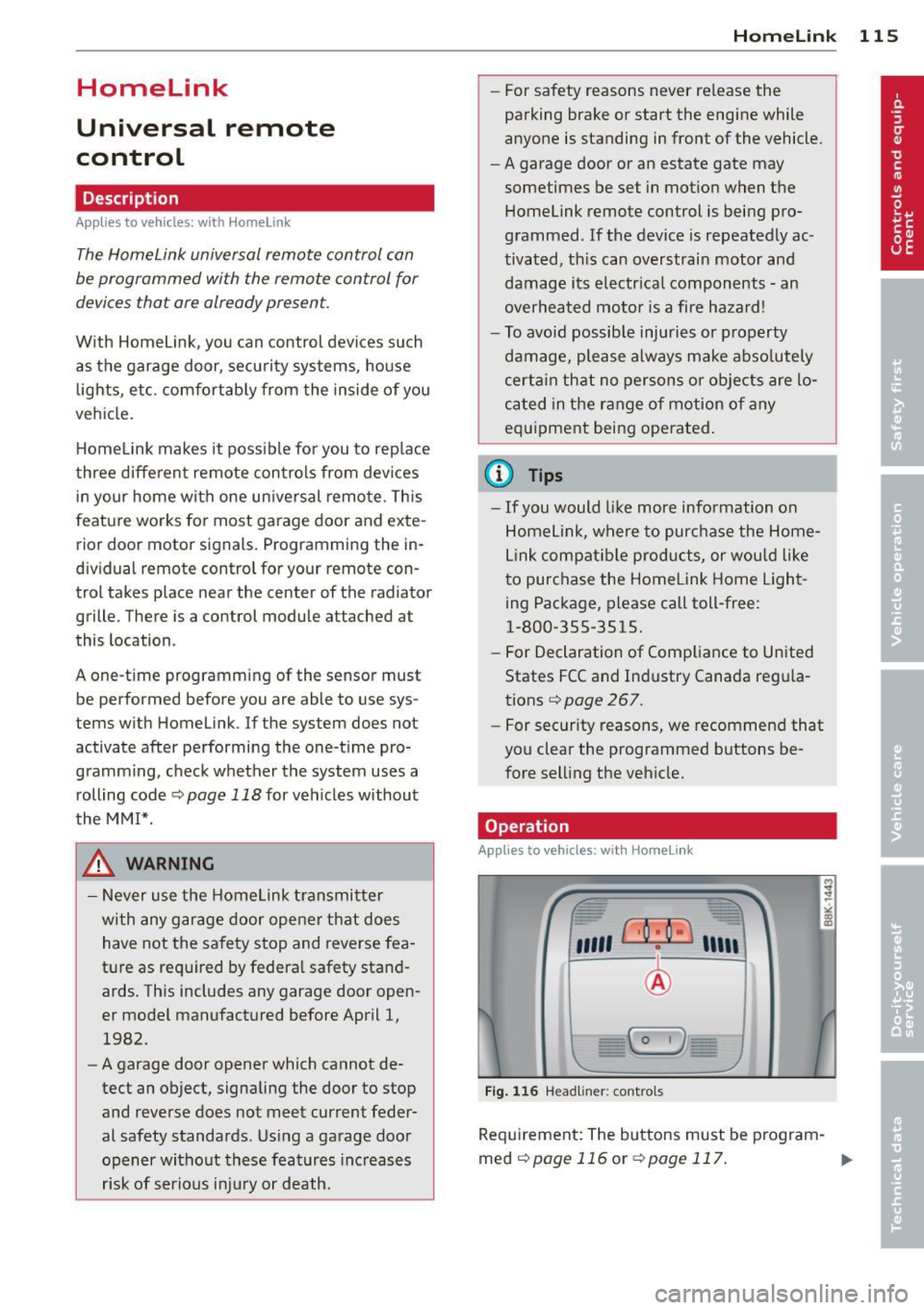
Req uirement: The buttons must be program-
med
¢page 116 or ¢page 117. ..,_
Page 119 of 286
Programming the transmitter (version B)
Applies to vehicles: with Horne link
Fig. 118 D istance between t he rad ia to r gr ille a nd the
h and trans mitter
Programming: phase 1 on the control unit
1. Sw itch on the ig nit io n (do no t start the
engine ).
2. Press and hold bot h of the outer Home
Link buttons
r=> page 115, fig. 116 until
the LED @ turns off completely (about
20
seconds). Th is procedure clears the stand
ard codes that were set at the factory and
does
not need to be repeated agai n to
p rog ram the othe r buttons.
3 . Briefly press the Homelink button that
you would like to prog ram .
4 . Wai t unti l the LED @ beg ins to blink
q ui ckly . The Home Lin k modu le wi ll now
remai n in learning mode for
5 minutes .
5. Now stand in front of your vehicle with
the original hand transmitter for the ga rage door opener or for the device that
you would like to allocate to the Home
Link button.
Programming: pha se 2 on the radiator
grille
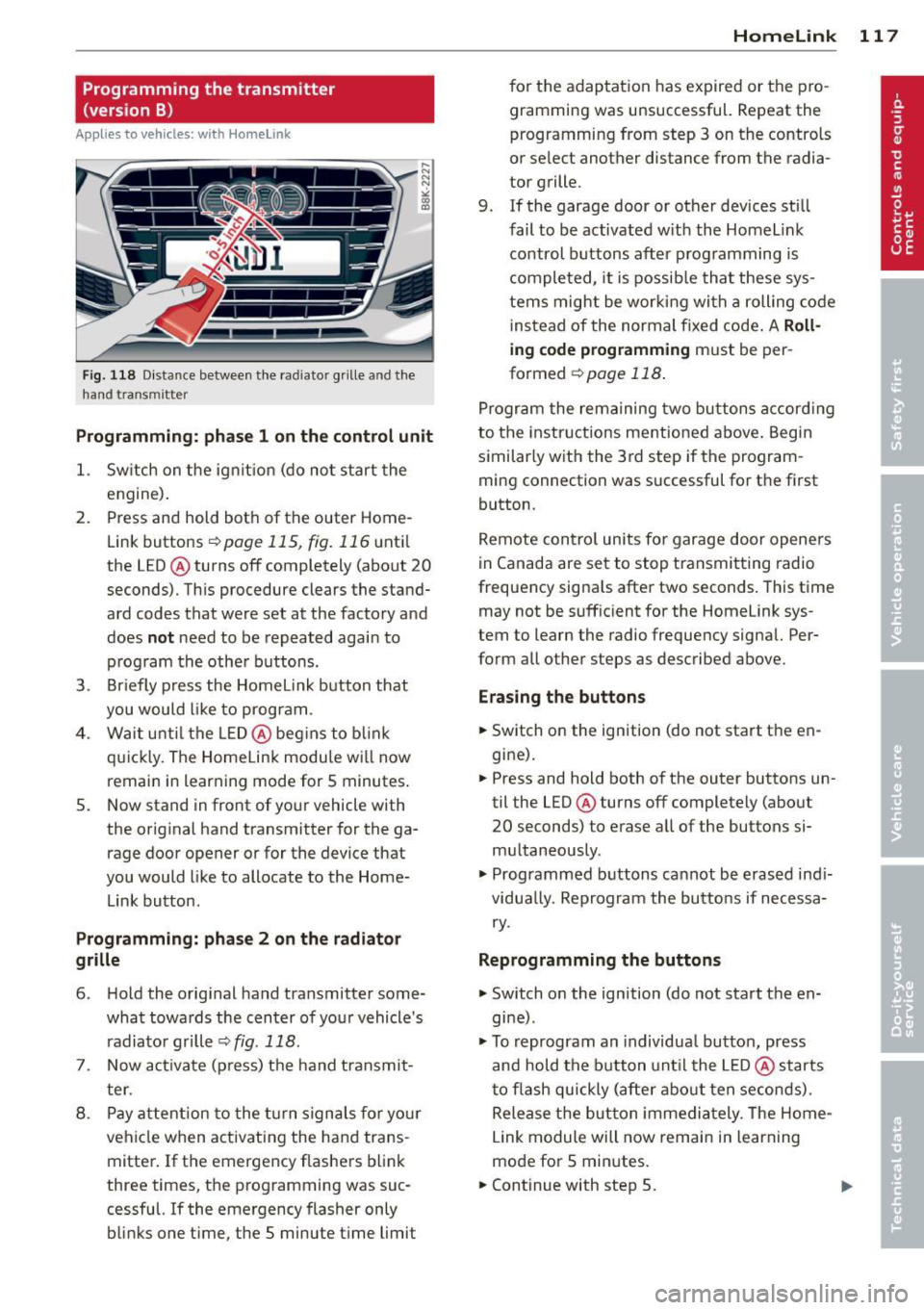
6 . Hold the orig inal hand t ransmitter some
what towa rds the center o f you r vehicle 's
radiato r gr ille
r=> fig . 118 .
7. Now activate (p ress) t he hand transmit
ter.
8 . Pay a ttention to the t urn sign als for yo ur
vehicle when activating the ha nd trans
mitter . If t he emergency flashers b link
three times, the programming was suc
cessful. If the emergency flasher only bli nks one t ime, the 5 minute t ime limit
Homelink 11 7
for the adaptat ion has expired or the pro
gram ming was unsuccessful. Repeat the
programming from step 3 on the controls
o r se lect another distance from the radia
tor grille.
9. If the garage door or other devices sti ll
fail to be activated w it h the Homelin k
control buttons after p rogramming is
comple ted, it is possib le tha t these sys
tems might be w ork ing wi th a roll ing co de
ins tead of the normal fixed co de.
A Roll
ing code programming must be per
formed
r=> page 118 .
Program the rema ining tw o butt ons accor ding
to the instructions mentioned above . Beg in
similar ly w ith the 3rd step if the program
m ing connection was successful for t he fi rst
button .
Remote con trol units fo r garage door opene rs
in Canada are set to stop tra nsmitting radio
frequency signa ls after two seconds . This t ime
may not be suffic ient for the Homelink sys
tem to learn the radio frequency signa l. Per
form all other steps as described above.
Erasing the buttons
.,. Switch on the ignition (do not sta rt the en
gi ne).
.,. Press and hold both o f the outer buttons un
til the LED@ turns off completely (abo ut
20 seconds) to e rase a ll of the buttons si
m ultaneously .
.,. Programmed b uttons ca nnot be erased ind i
vidua lly. Reprogram the butto ns if necessa
ry .
Reprogramming the buttons
.,. Switch o n the ignition (do not start t he en
gine) .
.,. To reprogram an individua l bu tto n, press
and hold the button unt il the LED @ starts
t o f lash quickly (a fter ab out ten seconds) .
Release t he bu tton imme dia tely. The Home
L ink module will now remai n in learning
mo de for 5 min utes.
.,. Continue with step 5.
Page 187 of 286
overhea t red ucin g the e ffec tiveness of
t h e ent ire brake system.
- Failure of one brake circuit will impair
the bra king capability resulting in an in
creased stopp ing distance. Avoid driv ing
the vehicle and have it towed to the near est author ized Audi dealer or qualified
wor kshop .
- Never let the vehicle roll to a stop w ith
the engine shut off.
- If the brake booster is not work ing, the
brake pedal must be pressed considera
bly harder to make up for the lac k of
booster assistance.
Electro-mechanical
power assist, dynamic
steering
The electro-mechanical power assist helps
the driver when steering.
Power steering adapts electronically based on
the vehicle speed.
Indicator light s and messages
• Steering defecti ve! Do not drive vehicle!
If th is ind icator light tu rns on and stays on
and th is message appears, t he power s teeri ng
may have f ailed.
Do
not co ntin u e d riving . See yo ur autho rized
Aud i dea ler o r a qua lifi ed r epai r fac ility for as
sis tance .
':rj Dynam ic steering: Sy stem fault! You can
continue driving
If the indicator light t urns on and the mes
sage appears, the steer ing may be more diffi
cult to move or more sensitive than usual. The
steer ing wheel may also be at an angle whe n
d riving st raight .
Drive s low ly to your au thor ized Audi dealer or
qua lified workshop to have the malfunction
corrected.
'y.ij Dynam ic steering : initializing
Int ellig ent technolog y 185
If this drive r message appea rs and the indica
tor lig ht is f lashing on the instrument panel,
dynamic steer ing * is being rein itia lized. After
starting the engine, the steering wheel will move s light ly. Re- initiali zation might be nec
essary if the steering wheel was moved hard
to the left and right wh ile the vehicle was not
moving . Th e display goes out as soo n as ini ti
ali zation is comple te .
A WARNING
H ave the dy namic s tee ring * system mal
f u nction repa ired as soon as possible by an
authorized Audi dealer or qualified work
shop - risk of acc ident !
(D Tips
- If the . or l;rj indic ator l ight only st ays
on fo r a short time, you may continue
dr iving.
- T he dynamic s teering* s tabilit y systems
are not availab le in the even t of a system
ma lfunction.
- F or ad ditiona l information on dynamic
steering *, refer to ¢page 104 .
-
Driving with your
quattro
Applies to vehicles: with all-wheel drive
With all-wheel drive, all four wheels are driv
en .
General informati on
With a ll-wheel d rive, power is distrib uted to
all four wheels. This happens automatically depending on your driving style and the road
cond it ions at the time. See also¢ page 180 .
A center d ifferential distributes the driving
power variably to the front and rear ax le. It
wor ks together with selective wheel torque
control, wh ich activates when dr iv ing t hrough
curves Qpage 181. With the sport differen
t ia l*, power d istr ibut io n to the rea r wheels is
var iable a nd can be adjusted w ith dr ive se lect
¢ page 10 4.
IJII>
•
•
Page 191 of 286
A WARNING 1= ~
After driving through water, mud, slush, etc., the brakes may be slow to take effect
because of wet brake rotors and pads. Dry
the brakes first by braking carefully to re
store the full brak ing effect.
([) Note
Vehicle components such as the engine,
transmiss ion, suspension or electrical sys
tem can be severely damaged by driving
through wate r.
@ Tips
- Check the depth of the water before dr iv
i ng through it.
- Do not stop the veh icle, dr ive in reverse
or switch the engine off when driving
th rough water.
- Keep in mind that oncoming vehicles
may create waves that raise the water
level and make it too deep for you r vehi
cle to drive th rough safely.
- Avoid dr iving through sa lt water because
i t can ca use corrosion.
Catalytic converter
It is very important that your emission con
trol system (catalytic converter) is function
ing properly to ensure that your vehicle is run
ning in an environmentally sound manner.
11-Always use lead -free gaso line¢ page 201,
Fuel supply .
"'"Never run the tank down all the way to emp
ty.
11-Never put too much motor oil in your engine
¢ page 211, ~ Adding engine oil .
11-Never try to push -or tow -start your veh icle .
The catalytic converter is an efficient "clean up" device built into the exhaust system of
the vehicle . The catalytic converter burns
many of the pollutants in the exhaust gas be
fore they are released into the atmosphere .
Drivin g and en vironm ent 18 9
The exclusive use of unleaded fuel is critically
important for the life of the catalytic convert
er and proper f unct ion ing of the engine.
A WARNING
- The temperature of the exhaust system
is high, both when driving and after stop
ping the eng ine.
- Never touch the exhaust tail pipes once
they have become hot. This could result in burns.
- Do not park or operate the vehicle in
areas where the hot exhaust system may
come in co ntact with dry grass, br ush,
fue l spill or other material wh ich can
cause a fire .
- Do not apply additional undercoating or
ru stp roof ing on or nea r the exhaust
manifold, exhaust pipes, cataly tic con
ve rter or heat shield s. Dur ing driving, the
substance used for undercoating could
overheat and cause a fire.
(D Note
- Be aware that just o ne tank filling with
leaded fuel w ill already ser iously de
grade the performance of the catalytic
converter .
- Do not exceed the cor rect engine oil level
¢ page 211.
-Do not drive until the f ue l t ank becomes
comple tely empty . The engine co uld m is
fire . Unburned fuel could also get into
the exhaust system and this co uld cause
the catalytic converter to overheat.
- Do not turn off the ignition while the ve
hicle is mov ing.
- Do not continue to operate your vehicle
under these conditions, as othe rwise fuel
can reach the catalyt ic converter. Th is
cou ld result in overheating of the con
verter, requir ing its replacement.
- To assure efficient operation of the Emis -
sion Control System: ..,. •
•
Page 196 of 286
194 Trailer towing
Tire pre ss ure
When towing a trai le r, inflate the t ires of your
vehicle to the co ld tire pressure listed under
"Full load" on the label located on the driver 's
side B-pillar (visible when the door is open).
Inflate trailer tires to trailer and tire manufac
turers' specifications.
Light s
The headlight settings should be checked with
the trailer attached before dr iving off. Check
to make sure both vehicle and tra iler lights
are working properly.
Saf ety chains
Be sure tra iler sa fe ty cha ins a re p roperly con
nected from the trailer to the hitch on the ve
hicle. Leave eno ugh slack in the chains to per
mit turning corners. When you install safety
cha ins, make sure they w ill not drag on the
road when you are driving.
The chains shou ld cross under the trai ler
tongue to prevent it from dropping in case of
separation from the hitch.
Driving instructions
Driving with a trailer always requires extra
care and consideration.
To obtain the best possible handling o f vehicle
and trai ler, p lease note the following:
.,. Do no t tow a lo aded tra ile r when your car it
self is no t loaded .
.,. Be especia lly carefu l when passing other
vehicles .
.,. Observe speed lim its .
.,. Do not drive at the maximum permissible
speed.
.,. Always apply brakes early.
.,. Monitor the temperature gauge.
Weight di stribution
Towing a loaded trai ler with an empty car re
sults in a highly unstable distribution of
weight . If this cannot be avo ided, drive at very
low speeds only to avoid the risk of losing
steering control. A "ba
lanced" rig is easier to operate and con
tro l. This means that the tow vehicle should
be loaded to the extent possible and permissi
ble, while keep ing the trai ler as light as possi
ble under the c ircumstances. Whenever poss i
ble, transfer some ca rgo to the luggage com
partment of the tow veh icle while obse rv ing
tongue load requ irements and vehicle load ing
co nsiderations.
Speed
The higher the speed, the more d iff icu lt it be
comes for the driver to control the rig. Do not
drive at the maximum permissible speed. Re
duce your speed even more if load, weather or
wind conditions are unfavorable -pa rtic ularly
whe n goi ng downhill.
Reduce veh icle speed
imm ediately if the trail
er shows the slightest s ign of sway ing.
Do not
try t o sto p th e swaying by a ccelerating .
Observe speed limits . In some areas, speeds
fo r vehicles tow ing tra ile rs a re lower than for
regular veh icles .
Always apply brakes early. When driving downh ill, shift into a lower gear to use the en
gine braking effect to slow the vehicle . U se of
the b rakes alone can cause them to overheat
and fail.
Coolant tempe rature
The coo lant temperature gauge c> page 10
must be observed carefu lly. If the need le
moves close to the upper end of the scale, re
duce speed immediately and/or turn off the
air condi tioner.
If the coolant temperature warning light •
i n t he i nstrument cluster starts flashing, pull
off the road, stop and let the engine
idle for
abo ut two min utes to prevent heat build-up .
_& WARNING
Anyone not proper ly restra ined in a mov
i ng vehicle is a t a much greater risk in an
accident . Never let anyone ride in yo ur car
who is not p roper ly wea ring the rest raints
prov ided by A udi.
-