191 AUDI A5 COUPE 2015 Owners Manual
[x] Cancel search | Manufacturer: AUDI, Model Year: 2015, Model line: A5 COUPE, Model: AUDI A5 COUPE 2015Pages: 264, PDF Size: 66.83 MB
Page 5 of 264
M N
i? co ,...., \!) 1.1'1
N 1.1'1 ,....,
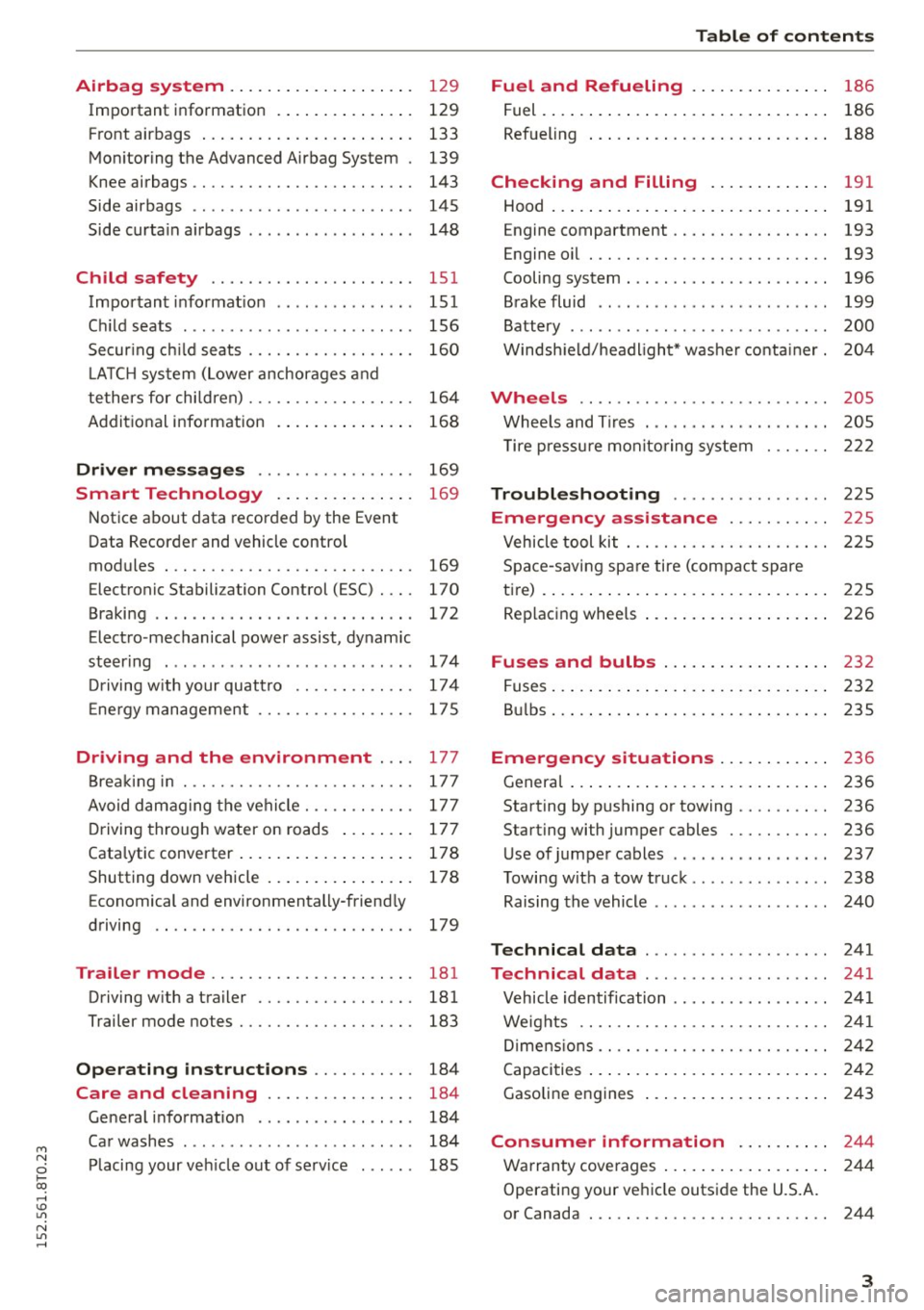
Airbag system . . . . . . . . . . . . . . . . . . . . 129
Important information . . . . . . . . . . . . . . . 129
Front ai rb ags . . . . . . . . . . . . . . . . . . . . . . . 133
Mon ito ring the Adv anced A irb ag Sys tem . 139
Knee airbags . . . . . . . . . . . . . . . . . . . . . . . . 143
Side airbags . . . . . . . . . . . . . . . . . . . . . . . . 145
Side curta in a irbags . . . . . . . . . . . . . . . . . . 1 48
Ch ild safety . . . . . . . . . . . . . . . . . . . . . . 151
Important informat ion . . . . . . . . . . . . . . . 151
Ch ild seats . . . . . . . . . . . . . . . . . . . . . . . . . 156
Secur ing c hild seats . . . . . . . . . . . . . . . . . . 160
L A TC H system (Lower anchorages and
tethers for chi ldren) . . . . . . . . . . . . . . . . . . 164
Addit ional info rmation
168
Driver me ssages . . . . . . . . . . . . . . . . . 169
Smart Technology . . . . . . . . . . . . . . . 169
N otice about data recorded by the Event
Data Recorder and vehicle cont rol
modules . . . . . . . . . . . . . . . . . . . . . . . . . . . 169
Electronic Stabili za tion Control (ESC) . . . . 170
Braking . . . . . . . . . . . . . . . . . . . . . . . . . . . . 172
Electro -mechanical power assist, dynamic
steer ing . . . . . . . . . . . . . . . . . . . . . . . . . . . 174
Dr iving w ith your quattro . . . . . . . . . . . . . 17 4
E ne rgy management . . . . . . . . . . . . . . . . . 17 5
Driving and the environment . . . . 177
Brea king in . . . . . . . . . . . . . . . . . . . . . . . . . 177
Avoid damaging the vehicle . . . . . . . . . . . . 177
D riving through water on roads . . . . . . . . 17 7
Catalytic converter . . . . . . . . . . . . . . . . . . . 178
Shutting down vehicle . . . . . . . . . . . . . . . . 178
E conomical and environmentally-friend ly
driving . . . . . . . . . . . . . . . . . . . . . . . . . . . . 179
Trailer mode . . . . . . . . . . . . . . . . . . . . . . 181
Driving w ith a tra iler . . . . . . . . . . . . . . . . . 181
Trailer mode notes . . . . . . . . . . . . . . . . . . . 183
Operating instructions . . . . . . . . . . . 184
Care and cleaning . . . . . . . . . . . . . . . . 184
Gene ral i nformation . . . . . . . . . . . . . . . . . 184
Car washes . . . . . . . . . . . . . . . . . . . . . . . . . 184
P lacing your veh icle out of se rv ice . . . . . . 185
Tab le of conten ts
Fuel and Refueling . . . . . . . . . . . . . . .
18 6
Fuel. ... .. .... .. .. ... ..... ... .. .. .. 186
Ref ueling . . . . . . . . . . . . . . . . . . . . . . . . . . 188
Checking and Filling . . . . . . . . . . . . . 191
Hood . . . . . . . . . . . . . . . . . . . . . . . . . . . . . . 191
Engine compartment . . . . . . . . . . . . . . . . . 193
Engine oil . . . . . . . . . . . . . . . . . . . . . . . . . . 193
Cooling system . . . . . . . . . . . . . . . . . . . . . . 196
B rake fluid . . . . . . . . . . . . . . . . . . . . . . . . . 199
Battery . . . . . . . . . . . . . . . . . . . . . . . . . . . . 200
Windsh ield/headlight* washer conta iner. 204
Wheels .. ... ... .. .............. ... 205
Whee ls and T ires . . . . . . . . . . . . . . . . . . . . 205
T ire p ressu re monitoring system 222
Troubleshoot ing . . . . . . . . . . . . . . . . . 2 25
Emergency assistance . . . . . . . . . . . 22 S
Vehicle tool kit . . . . . . . . . . . . . . . . . . . . . . 22 S
Space -saving spa re tire (com pact spare
tire) . . . . . . . . . . . . . . . . . . . . . . . . . . . . . . . 2 25
Replacing whee ls . . . . . . . . . . . . . . . . . . . . 226
Fuses and bulbs . . . . . . . . . . . . . . . . . . 232
Fuses ... .. .... .. .. ... ..... ... .. .. .. 232
B ul bs . . . . . . . . . . . . . . . . . . . . . . . . . . . . . . 235
Emergency situations . . . . . . . . . . . . 236
Genera l . . . . . . . . . . . . . . . . . . . . . . . . . . . . 236
Starting by pushing or towing . . . . . . . . . . 236
Starting with jumper cables . . . . . . . . . . . 236
Use of jumpe r cables . . . . . . . . . . . . . . . . . 237
T owing with a tow truc k . . . . . . . . . . . . . . . 238
Raising the vehicle . . . . . . . . . . . . . . . . . . . 240
Technical data . . . . . . . . . . . . . . . . . . . . 24 1
Technical data . . . . . . . . . . . . . . . . . . . . 241
V ehicle identification . . . . . . . . . . . . . . . . . 241
Weights . . . . . . . . . . . . . . . . . . . . . . . . . . . 241
Di mens ions . . . . . . . . . . . . . . . . . . . . . . . . . 242
C apacities . . . . . . . . . . . . . . . . . . . . . . . . . . 2 42
Gasoline engines . . . . . . . . . . . . . . . . . . . . 243
Consumer information .. .. .. .. .. 2 4 4
Warranty cove rages . . . . . . . . . . . . . . . . . . 2 44
Operating your ve hicle outside the U.S.A.
or Canada . . . . . . . . . . . . . . . . . . . . . . . . . . 244
3
Page 11 of 264
M N
i? co ,...., \!) ..,.,
N l/'I ,....,
CD
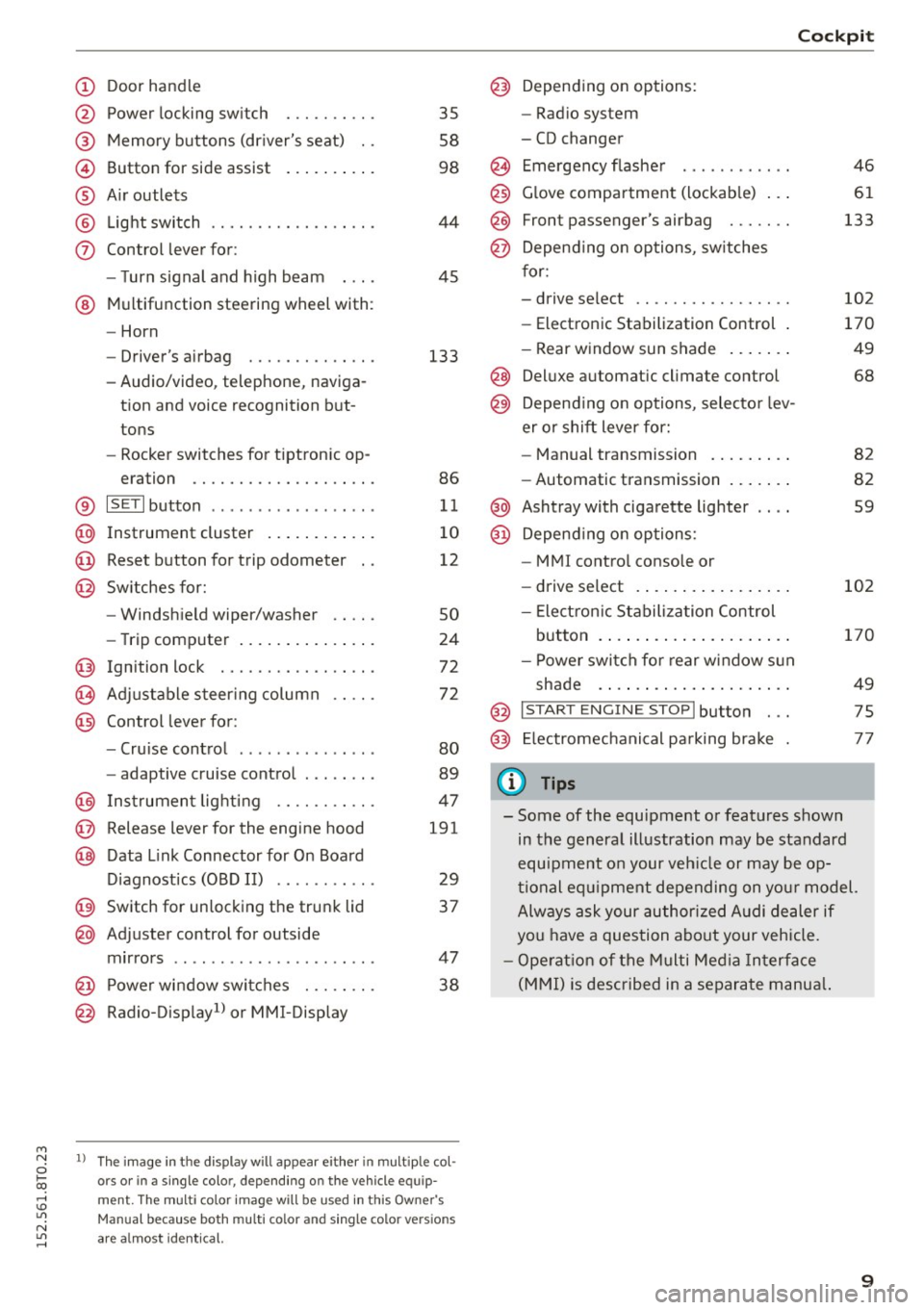
@
®
©
®
®
(j)
Door handle
Power locking swi tch
Memory buttons (driver's seat) . .
Button for side assist
A ir outlets
Light switch
Control lever for:
- Turn signal and high beam
@ Multifunction steering wheel with :
- Horn
- Driver' s airbag ....... .. .. .. .
- Audio/video , telephone, naviga-
tion and voice recognition but
tons
- Rocker switches for tiptronic op-
eration ............. .... .. .
® IS ETI button ................. .
@ Instrument cluster ........ ... .
@ Reset button for trip odometer
@ Switches for:
- Windshield wiper/washer
- Trip computer .............. .
Ignition lock . .......... ... .. .
Adjustable steering column
Control lever for:
- Cruise control ............ .. .
- adaptive cruise control ..... .. .
@ Instrument lighting ...... .. .. .
@ Release lever for the engine hood
@ Data Link Connector for On Board
Diagnostics (OBD II) ..... ... .. .
@ Switch for unlocking the trunk lid
@ Adjuster control for outside
mirrors ................ ... .. .
@ Power window switches . .. .. .. .
@ Radio-Display1l or MMI-Display
35
58
98
44
45
133
86
11
10
12
so
24
72
72
80
89
47
191
29
37
47 38
l) Th e im age in t he d ispl ay will app ea r e ither in mult ipl e col
or s or in a s ingle color, depending on the vehicle e quip
m ent. The mul ti color image w ill b e used in this Ow ne r's
Man ual bec ause both multi co lo r an d single color vers io n s
are a lmo st i de nti cal.
Cockpit
Depending on options:
- Radio system
- CD changer
Emergency flasher
Glove compartment (lockable) .. .
F ront p assenger's airbag . .. .. . .
Depend ing on options, switches
for:
- drive select .. ........... .. . .
- Electronic Stabilization Control .
- Rear window sun shade ...... .
@ Deluxe automa tic climate control
@) Depend ing on options, selector lev
er or shift lever for:
- Manual transmission ........ .
- Automatic transmission ...... .
@ Ashtray with cigarette lighter
@ Depend ing on options:
- MM I control console or
- drive select . ............... .
- Electron ic Stabilization Control
button . ..... .............. .
- Power switch for rear window sun
shade .... .. .............. .
@ I START ENG IN E STOPI button . . .
@) Electromechanical parking brake
(D Tips
46
61
133
102
170
49
68
82
82
59
102
170
49
75
77
- Some of the equipment or features shown
in the general illustration may be standard
equipment on your veh icle or may be op
tional equ ipment depending on your model.
Always ask your author ized Audi dealer if
you have a question about your vehicle.
- Operation of the Multi Media Interface
(MMI) is described in a separate manua l.
9
Page 13 of 264
M N
0 loo
rl I.O
"' N
"' rl
A WARNING
-Always observe the warning in¢ page 191,
before open ing the hood and check ing the
engine coolant level.
- Never open the engine hood if you see or
hear steam, or if you see engine coolant
dr ipping from the engine compartment. You
cou ld burn yourself. Let the eng ine cool off
first so that you cannot hear o r see any
steam o r engine coo lant.
0 Note
- Mount ing additional lights or accesso ries in
fron t of the a ir inlets reduces the cooling ef
fect of the radia to r. A t high outside temper
atu res or high e ngine load, the eng ine could
overheat.
- The front spo iler has been designed to prop
erly distribute the cooling air when the veh i
cle is moving. If the spo iler is damaged, this
could reduce the cooling effect and the en
gine could then overheat. Ask your author ized Audi dealer for assistance.
Tachometer (engine rev counter)
The tachometer indicates the engine RPM (revo
lutions per minutes).
If engine RPM drops be low 1,5 00, you should
downshift to the next lower gea r. T he red area at
the end of the scale indicates max imum permis
sible eng ine RPM after the break-in period . Be
fore reachi ng this area, move the selector lever to
position D/S or ease your foot off the accelerator
pedal.
(D Note
The tachometer needle@¢ page 10, fig. 3
should o nly briefly be in the red zone: you
co uld damage your eng ine! The beginn ing of
the r ed zone varies depending on the engine.
@ For the sake of the environment
Upshift ing early saves fuel and reduces eng ine
noise .
Instrument s and indi cator ligh ts
~ button
Fig. 4 SET butto n in the instrument cluste r
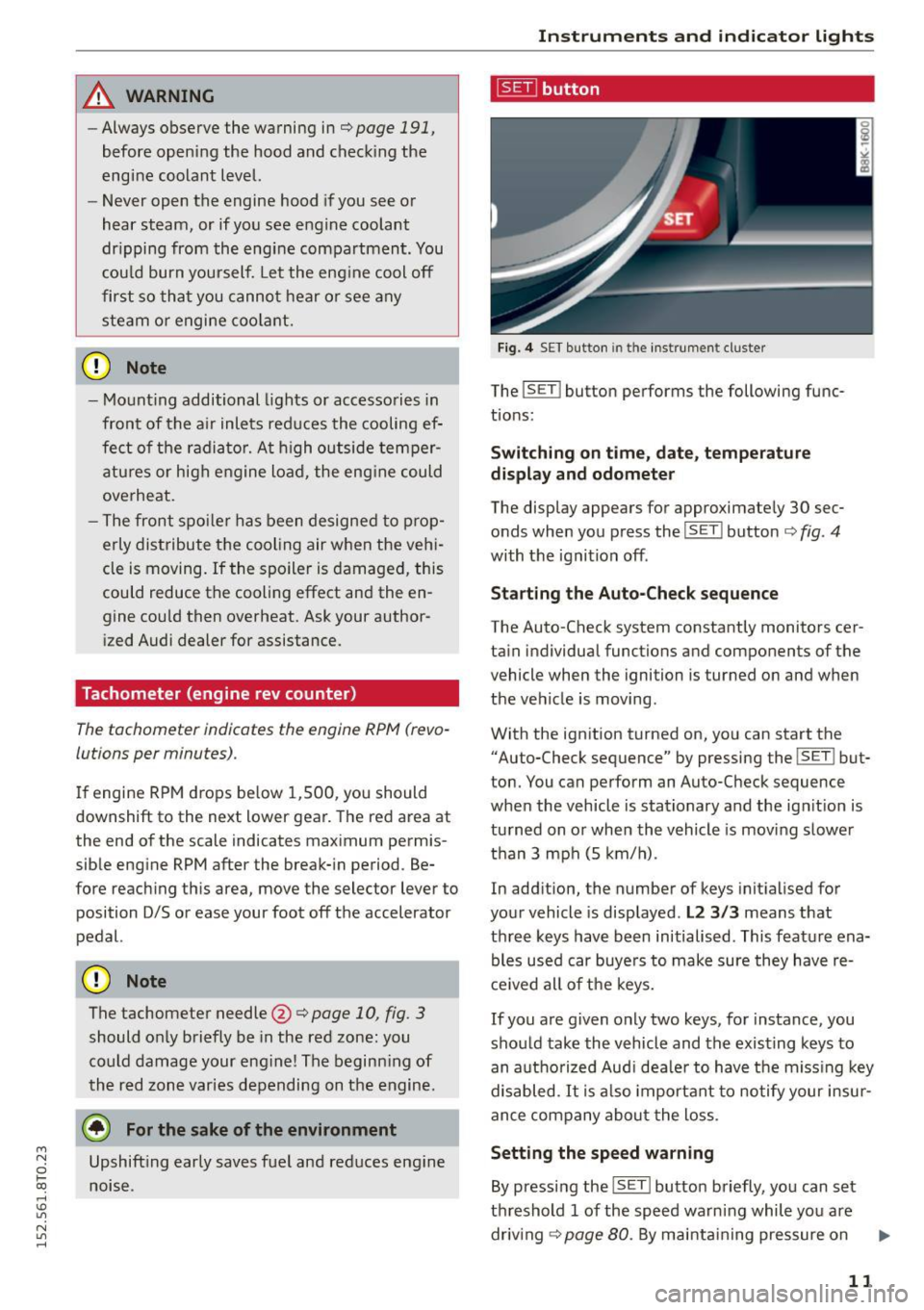
The lsET j button performs the following func
t ions:
Switching on t ime, date , temperature
display and odometer
The display appears for approximate ly 30 sec·
onds when you press the
! SE T! button c;, fig . 4
with the igni tion off .
Starting the Auto-Check sequence
The Auto-Check system constantly monitors cer
tain individual functions and components of the
vehicle when the ignition is turned on and when
the vehicle is moving .
With the ign ition turned on, you can start the
"Auto-Check sequence" by pressing the
I SE TI but
ton. You can perform an Auto-Check sequence
when the vehicle is sta tionary and the ign it ion is
tu rned on o r whe n th e vehicle is moving slowe r
t h an 3 mph (5 km/ h).
In add ition , the number of keys init ia lised for
your vehicle is disp layed .
L2 3/3 means that
th ree keys have be en initialised. This feature ena
bles used car buye rs to make sure they have r e
c e ived all of the keys.
If you are g iven only two keys, for instance, you
should take the vehicle and the existing keys to
an a utho rized Aud i dea le r to have the miss ing key
disabled.
It i s also important to no tify your insur
ance company abo ut the loss.
Setting the sp eed warning
By pressi ng the !SET ! button briefly, you can set
th reshold 1 of the speed wa rn ing while you are
dr iv ing ¢page 80. By ma intai ning pressure on
11
Page 15 of 264
M N
i? co ,...., \!) 1.1"1
N 1.1"1 ,....,
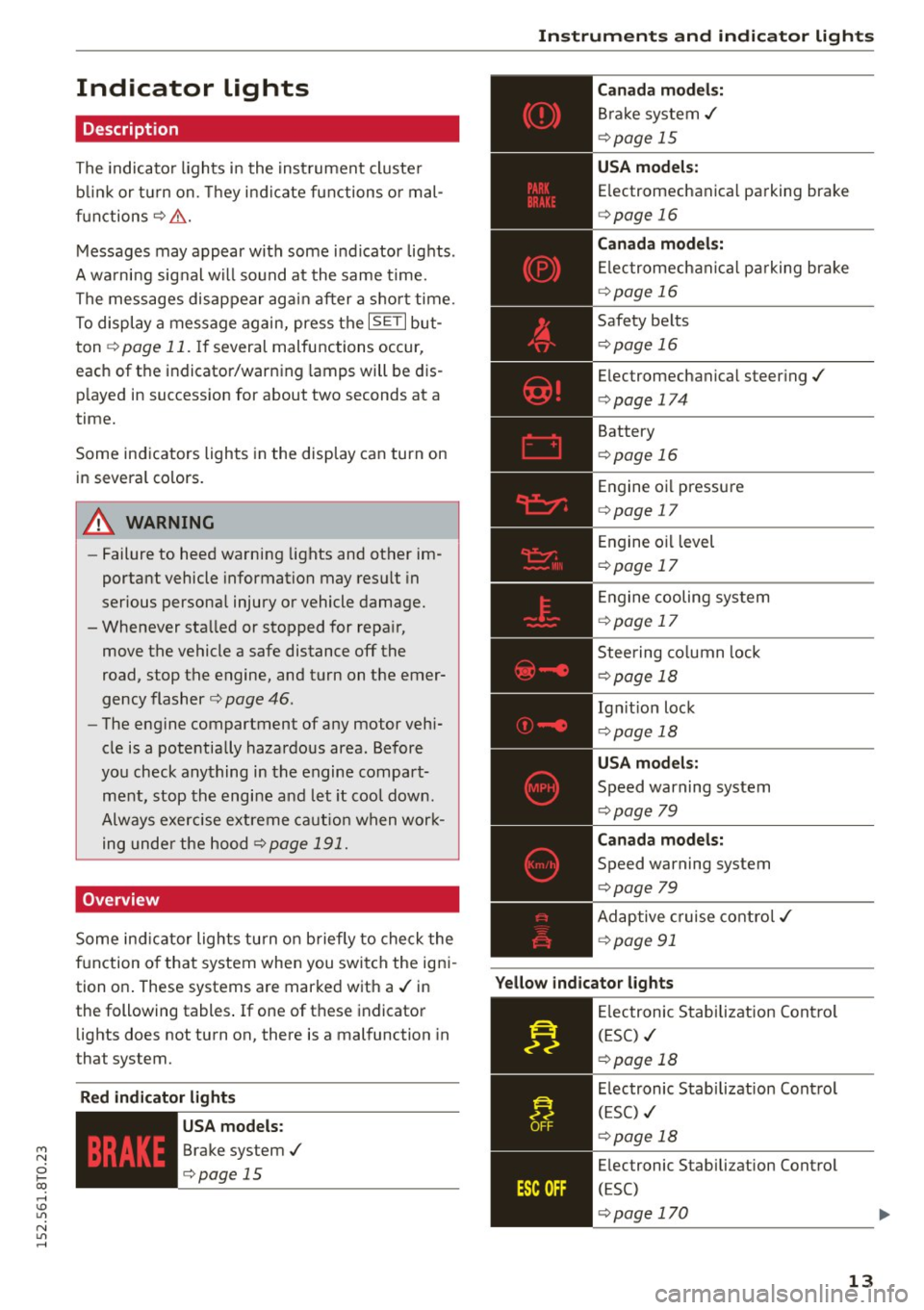
Indicator lights
Description
The indicator lights in the instrument cluster
blink or turn on. They indicate functions or mal
functions¢ &.
Messages may appear with some indicator lights .
A warning signal will sound at the same time.
The messages disappear again after a short time.
To display a message again, press the
I SE TI but
ton ¢
page 11. If several malfunctions occur,
each of the indicator/warning lamps will be dis
p layed in succession for about two seconds at a
time.
Some indicators lights in the display can turn on
in several colors.
8_ WARNING
- Failure to heed warning lights and other im
portant vehicle information may resu lt in
serious personal injury or vehicle damage.
- Whenever sta lled or stopped for repa ir,
move the vehicle a safe distance off the
road, stop the engine, and turn on the emer
gency flasher ¢
page 46.
-The engine compartment of any motor vehi
cle is a potentially hazardous area. Before
you check anything in the engine compart
ment, stop the engine and let it cool down.
Always exercise extreme caution when work
ing under the hood ¢
page 191.
Overview
Some ind icator lights turn on briefly to check the
function of that system when you switch the igni
tion on . These systems are marked with a./ in
the following tables .
If one of these indicator
lights does not turn on, there is a malfunction in
that system.
Red indicator light s
--------------
US A models:
Brake system./
¢page 15
Instruments and indicator lights
Canada models:
Brake system./
¢page 15
USA models:
Electromechanical parking brake
¢ page 16
Canada models:
Electromechanical parking brake
¢ page 16
Safety belts
¢page 16
Electromechanical steering./
¢page 174
Battery
¢page 16
Engine oil pressure
¢page 17
Engine oil level
¢page 17
Engine cooling system
¢page 17
Steering column lock
¢page 18
Ign it ion lock
¢ page 18
USA models:
Speed warning system
¢page 79
Canad a models:
Speed warning system
¢page 79
Adaptive cruise control./
¢page 91
Yellow indicator lights
--------------
Electronic Stabilization Contro l
(ESC) ./
¢page 18
Electronic Stabilization Contro l
(ESC) ./
¢page 18
Electronic Stabilization Control
(ESC)
¢page 170
13
Page 17 of 264
M N
i? co ,...., \!) 1.1'1
N 1.1'1 ,....,
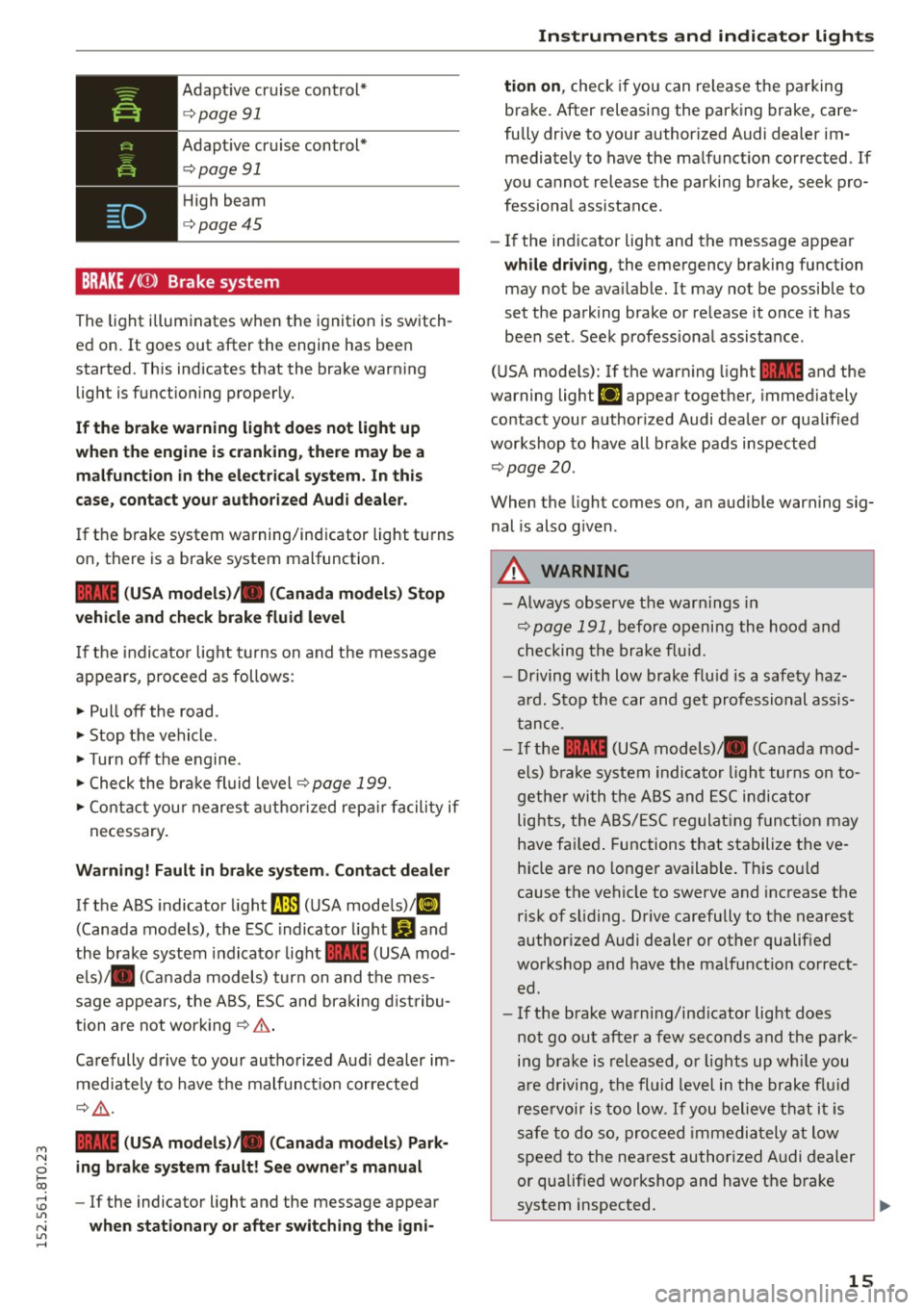
Adaptive cruise control*
c:>page 91
Adaptive cruise control*
c:>page 91
High beam
c:>page45
BRAKE /((J) ) Brake system
The light illuminates when the ignition is switch
ed on. It goes out after the engine has been
started. This indicates that the brake warning light is functioning properly.
If the brake warning light does not light up
when the engine is cranking, there may be a
malfunction in the electrical system. In this
case, contact your authorized Audi dealer.
If the brake system warning/indicator light turns
on, there is a brake system malfunction.
1111 (USA models)/ . (Canada models) Stop
vehicle and check brake fluid level
If the indicator light turns on and the message
appears, proceed as follows :
.,. Pull off the road .
.. Stop the vehicle.
.,. Turn off the engine .
.,. Check the brake fluid level
c:> page 199.
.,. Contact your nearest authorized repair facility if
necessary.
Warning! Fault in brake system. Contact dealer
If the ABS indicator light fl]) (USA models)/tl]
(Canada models), the ESC indicator light Gland
the brake system indicator light 1111 (USA mod
els)/ . (Canada models) turn on and the mes
sage appears, the ABS, ESC and braking distribu
tion are not working
c:> .&. .
Carefully drive to your authorized Audi dealer im
mediately to have the malfunction corrected
¢ .&,.
1111 (USA models)/ . (Canada models) Park
ing brake system fault! See owner's manual
- If the indicator light and the message appear
when stationary or after switching the igni-
Instruments and indicator lights
tion on, check if you can release the parking
brake. After releasing the parking brake, care
fully drive to your authorized Audi dealer im mediately to have the malfunction corrected. If
you cannot release the parking brake, seek pro
fessional assista nee.
- If the indicator light and the message appear
while driving, the emergency braking function
may not be available. It may not be possible to
set the parking brake or release it once it has
been set . Seek professional assistance .
(USA models): If the warning light
1111 and the
warning light
111 appear together, immediately
contact your authorized Audi dealer or qualified
workshop to have all brake pads inspected
c:>page20 .
When the light comes on, an audible warning sig
nal is also given .
A WARNING
--Always observe the warnings in
c:> page 191, before opening the hood and
checking the brake fluid.
- Driving with low brake fluid is a safety haz
ard. Stop the car and get professional assis
tance .
- If the
1111 (USA models) . (Canada mod
els) brake system indicator light turns on to
gether with the ABS and ESC indicator
lights, the ABS/ESC regulating function may
have failed. Functions that stabilize the ve
hicle are no longer available. This could
cause the vehicle to swerve and increase the
risk of sliding. Drive carefully to the nearest
authorized Audi dealer or other qualified
workshop and have the malfunction correct
ed.
- If the brake warning/indicator light does
not go out after a few seconds and the park
ing brake is released, or lights up while you
are driving, the fluid level in the brake fluid
reservoir is too low. If you believe that it is
safe to do so, proceed immediately at low
speed to the nearest authorized Audi dealer
or qualified workshop and have the brake
system inspected.
15
Page 19 of 264
M N
i? co ,...., \!) 1.1'1
N 1.1'1 ,....,
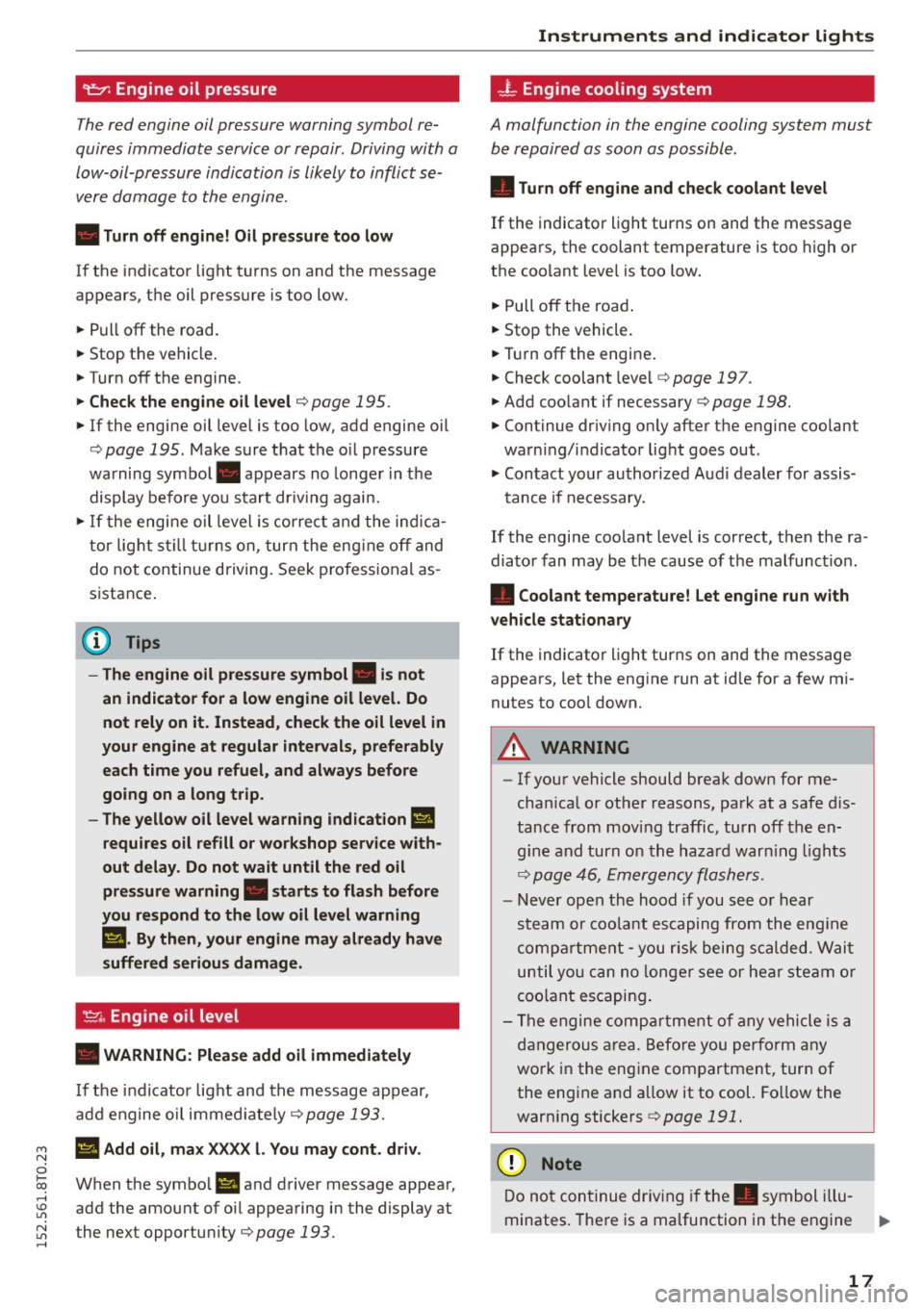
9:::1: Engine oil pressure
The red engine oil pressure warning symbol re
quires immediate service or repair . Driving with a
low-oil-pressure indication is likely to inflict se
vere damage to the engine.
• Turn off engin e! Oil pressure too low
If the indicator light t urns on and the message
appears, the oil pressure is too low.
• Pull
off the road.
• Stop the vehicle .
• Turnoff the engine.
• Check the engine oil level ¢ page 195.
• If the engine oil level is too low, add engine oil
¢ page 195. Make sure that the o il pressure
warning symbol. appears no longe r in the
display before you start dr iving again.
• If the engi ne oil leve l is correct a nd the ind ica
tor light st ill turns on, turn the eng ine
off and
do not continue driving . Seek p rofess ional as
s istance .
(D Tips
- The engine oil pressure symbol. is not
an indicator for a low engine oil level. Do
not rely on it. Instead , check the oil level in
your engine at regular intervals, prefe rably
each time you refuel, and always before
going on a long trip.
- The yellow oil level warning indication
Ill
requires oil refill or workshop service with
out delay. Do not wait until the red oil pressure warning. starts to flash before
you respond to the low oil leve l warning
Ill . By then , your engine may already have
suffered serious damage.
~ . Engine oil level
• WARNING : Plea se add oil immediately
If the indicator light and the message appear,
add engine o il immed iate ly
¢page 193.
Ill Add oil, max X XXX l. You may cont . driv .
When the symbo l II and driver message appear,
add the amount of oi l appearing in the display at
the next opportu nity
¢page 193.
Instruments and indicator lights
-L Engine cooling system
A malfunction in the engine cooling system must
be repaired as soon as possible .
• Turn off eng ine and check coolant level
If the indicator light turns on and the message
appears, the coolant temperature is too high o r
the coo lant leve l is too low.
• Pull
off th e roa d.
• Stop the vehicle.
• Tur noff the engine .
• Check coolant leve l
¢page 197.
• Add coo lant if necessary ¢ page 198.
• Continue dr iv ing o nly after the engine coolant
warning/ indicator light goes out .
• Contact your autho rized Aud i dealer for assis-
tance if necessa ry.
If the engi ne coo lant level is correct, t hen the ra
dia to r fan may be the cause o f th e malfunct io n.
• Coolant temperature! Let engine run with
v ehicle stationary
If the indicator ligh t turns on and the message
appears, let the eng ine run at id le for a few mi
nutes to coo l down.
A WARNING
-- If your vehicle should brea k down for me
cha nica l o r other reasons, pa rk at a safe d is
tanc e from moving traffic, turn
off the en
g ine and turn o n the h azard warn ing lights
¢ page 46, Emergency flashers.
- Ne ver open the hood if you see o r hear
steam or coo la nt es caping fro m the eng ine
compa rtment - y ou risk being scalded. Wai t
until yo u can no longer see or hear s te a m o r
coo lant escapin g.
- Th e engine comp artment o f any vehicle is a
d angerous a rea. Befo re you perfo rm any
wo rk in the eng ine com partment, tur n of
the engine and a llow it to cool. Fo llow the
warn ing stickers
¢ page 191.
(D Note
Do not con tinue dr iv ing if the . symbol illu-
minates. The re is a ma lfunction in the engine
II>-
17
Page 88 of 264
Automatic transmission
¢ page 191. Otherwise, any increase in en
gine speed may set the veh icle in motion,
even with the parking brake applied.
(D Note
- When stopping on an incline, do not try to
hold the vehicle in place by pressing the ac
ce lerator pedal while a driving gear is se
lected. This can cause the transmission to
overheat and can damage it . Activate the
parking brake or press the brake pedal to
prevent the vehicle from rolling.
- Allowing the vehicle to roll when the engine
i s stopped and the selector lever is in
N w ill
damage the transm ission because it is not
lubr icated under those circumstances.
@ Tips
For safety reasons, the park ing brake is re
leased automatically only when the dr iver's
safety belt is engaged in the buckle.
Hill descent control
A pp lies to veh icles: w ith 5 tro nic/t iptronic
The hill descent control system assists the driver
when driving down declines.
Hill descent control is activated when the selec
tor lever is in D/S and you press the brake pedal.
The transmission automatica lly selects a gear
that is suitable for the incline. Hill descent con
trol tries to maintain the speed achieved at the
tim e of braking, within physical and technical
limitations. It may still be necessary to adjust the
speed with the brakes.
Hill descent control switches off once the decline
levels out or you press the acce lerator pedal.
On veh icles w ith the cruise control system*
¢ page 80, hill descent control is also act ivated
when the speed is set.
& WARNING
Hi ll descent control cannot overcome physical
limitations, so it may not be ab le to maintain
a constant speed under all conditions. Always
be ready to apply the brakes.
86
Manual sh ift program
App lies to vehicles: wit h S tron ic/tip tro nic
Using the manual shift program you can man
ually select gears.
'
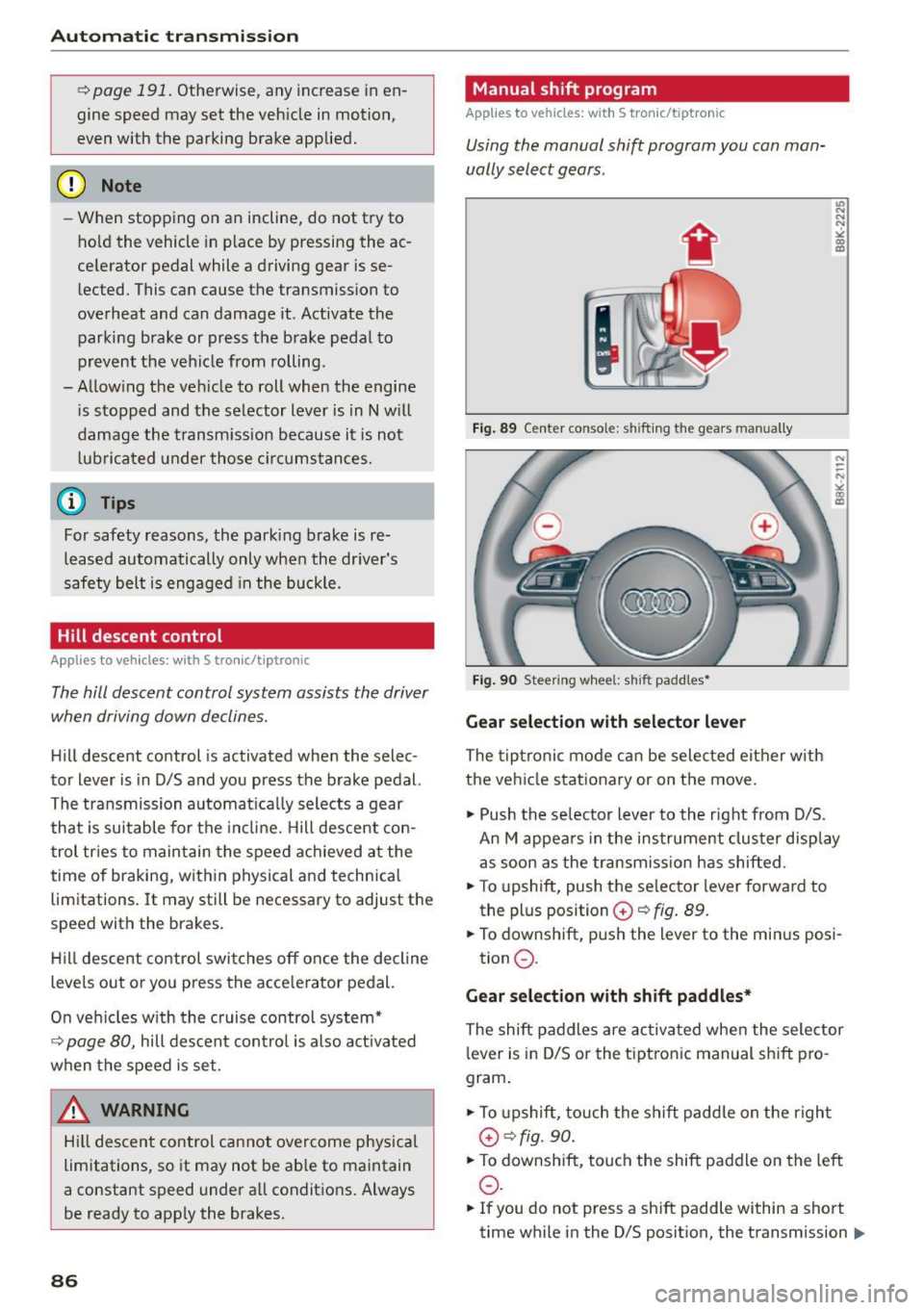
Fig. 89 Center console: shifting the gears manually
Fig. 90 Steering wheel: sh ift padd les•
Gear selection with selector lever
The tiptronic mode can be selected either w ith
the vehicle stationary or on the move.
11> Push the se lector lever to the right from D/S.
An M appears in the instrument cluster display
as soon as the transmission has shifted .
"T o upshift, push the se lector lever forwa rd to
the plus position
G) ¢ fig. 89.
" To downshift, push the lever to the minus posi-
tion
0 .
Gear selection with shift paddles*
The shift paddles are activated when the selector
l ever is in D/S or the tiptronic manual sh ift pro
gram .
" To upshift, touch the shift padd le on the r ight
G) ¢fig. 90.
"To downshift, touch the shift paddle on the left
0 .
11o Ifyou do not press a shift p addle within a short
time while in the 0/5 position, the transmission .,.
Page 193 of 264
M N
0 loo
rl I.O
"' N
"' rl
Checking and Filling Hood
Releasing and opening the engine hood
The engine hood is released from inside the vehi
cle.
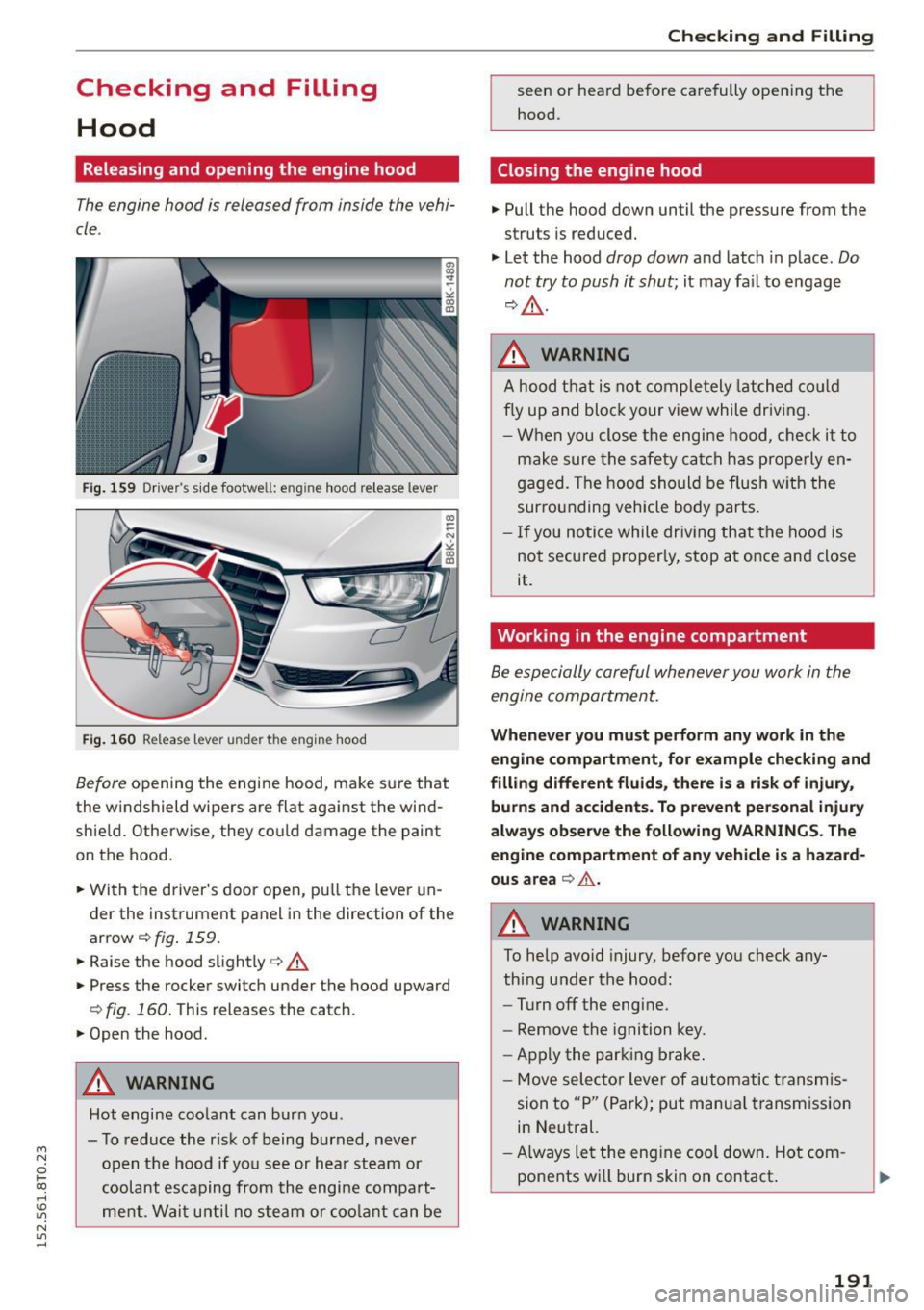
Fig. 159 Driver's side footwell: e ng in e hood release lever
Fig. 160 Releas e lev er un der t he e ngin e hood
Before opening the engine hood, make sure that
the windshield wipers are flat against the wind
shield . Otherwise, they could damage the paint
on the hood.
.. With the driver's door open, pu ll the lever un
der the instrument panel in the direction of the
arrow
c::> fig . 159.
.. Ra ise the hood slightly c::> &.
.. Press the rocker switch under the hood upward
c::> fig . 160. This releases the catch .
.. Open the hood.
A WARNING
Hot engine coolant can burn you.
- To reduce the r isk of being burned, never
open the hood if you see or hear steam or
coolant escaping from the engine compa rt
ment. Wait until no steam or coolant can be
Checking and Filling
seen or heard before carefully opening the
hood .
Closing the engine hood
.. Pull the hood down until the pressure from the
struts is reduced.
"' Let the hood
drop down and latch in place. Do
not try to push it shut;
it may fa il to engage
c::> &. -
A WARNING
A hood that is not comp letely latched could
fly up and block your view while driving.
- When you close the engine hood, check it to
make sure the safety catch has properly en
gaged . The hood should be flush with the
surrounding vehicle body parts.
- If you notice while driv ing that the hood is
not secured properly, stop at once and close
it.
Working in the engine compartment
Be especially careful whenever you work in the
engine compartment.
-
Whenever you must perform any work in the
engine compartment, for example checking and
filling different fluids , there i s a risk of injury ,
burns and accidents. To prevent personal injury
always observe the following WARNINGS . The
engine compartment of any vehicle is a hazard
ous area
c:> .&. .
A WARNING
-
To help avoid injury, before you check any-
thing under the hood:
- Turn off the engine.
- Remove the ignition key .
- Apply the parking brake.
- Move selector lever of automatic transmis-
sion to "P" (Park); put manua l transmission
in Neutral.
-Always let the engine cool down. Hot com
ponents wi ll burn skin on contact .
191
Page 195 of 264
M N
0 loo
rl I.O
"' N
"' rl
Checking and Filling
Engine compartment
Engine compartment
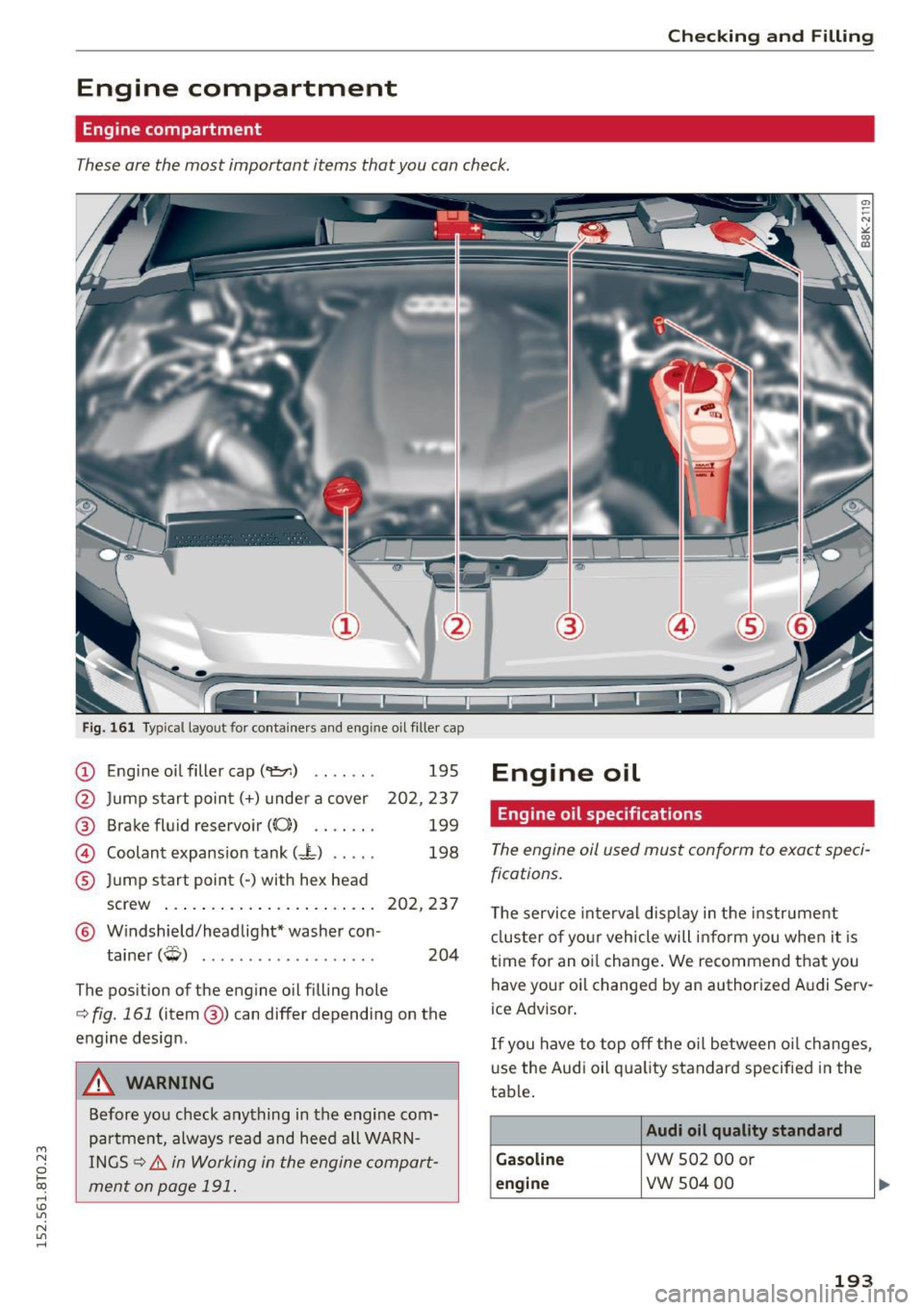
These are the most important items that you can check.
Fig. 161 Typical layout for containers and eng ine oil filler cap
(D Eng ine o il filler cap (
@ Brake fluid reservoir((();) .... .. .
@ Coolant expansion tank (- L) .. .. .
® Jump start point(-) with hex head
195
202,237
199
198
screw ... .. ............... .. . 202, 237
@ Windshield/headlight* washer con-
tainer
(Q) . . . . . . . . . . . . . . . . . . . 204
The position of the engine oil filling hole
c:> fig. 161 (item@) can differ depending on the
engine design .
A WARNING
Before you check anything in the engine com
partment, always read and heed all WARN
INGS
c:> &. in Working in the engine compart
ment on page 191.
Engine oil
Engine oil specifications
The engine oil used must conform to exact speci
fications.
T he service interval disp lay in the instrument
cluster of your vehicle will inform you when it is
time for an oi l change . W e recommend that you
have your oil changed by an authorized A udi Serv
ice Advisor .
If you have to top off the oil between oil changes,
use the Audi oil qua lity standard specified in the
table .
Audi oil quality standard
Ga soline
VW 502 00 or
engine vw 504 00
193
Page 196 of 264
Checking and F ill in g
Using the proper engine o il is important for the
functionality and service life of the engine. Your
engine was factory-fi lled w ith a high-quality o il
which can usually be used throughout the ent ire
year.
@) Note
Your L imited New Vehicle Warranty does not
cover damage or malfunctions due to failure
to follow recommended ma intenance and use
requ irements as set forth in the Audi Ow ne r's
Manual and Wa rranty
& Ma intenance booklet .
- Use only a high quality eng ine oil t hat ex-
pressly comp lies w ith the Audi o il quality
standard specified for your vehicle's e ngine .
Using a ny other oil can cause se rious engine
damage.
- Do not mix any lubricants o r othe r addit ives
i nto the engine oil. Doing so can cause en
g ine damage.
(D Tips
If you need to add oil and there is none availa
ble that meets the Audi o il quality standard
y o ur eng ine requires, you m ay add a total of
no more than 0.5 quart/li ter o f a h igh-quali ty
"synthet ic"oil that meets the fo llowing speci
fications .
- V ehicles wi th gasoline engine: AC EA A3 o r
API SM with a viscosity grade of SAE 0W- 30,
SAE SW -30 or SAE SW-40 .
- Fo r more informa tion abo ut engine oi l that
has been approved for your vehicle, please
contact either you r a uthorized Aud i dea ler
or Audi Customer Relations at
1 (800) 822-2834 or visit o ur web site at
www .aud iusa.com or www .aud icanada .ca .
Engine oil consumption
The engine in your vehicle depends on an ade
quate amount of oil to lubricate and cool all of
its moving parts .
In order to provide effective lubrication and cool
i n g of internal engine components, all interna l
combustion engines consume a certai n amount
of oil. O il consumption var ies from engine to en
g ine and may change significant ly ove r the life of
194
the engine. Typically, eng ines with a specif ied
break-in period (see
¢ page 177) consume mo re
o il dur ing the b reak -in per iod than they consume
after oil consumption has stabili zed.
U nder normal cond itions , the rate of oi l con
s u mption depends on t he qu ality and viscosity of
the oil, the RPM (revolutions per minute) at
which the engine is operated, the ambient tem
perature and road condit ions. Further factors are
the amount of o il di lution from water condensa
tion or fuel residue and the ox idat ion level of the
o il. As any engine is s ubject to wear as mileage
builds up, t he oil consump tion may inc rease ove r
t ime unt il rep lacement of wo rn component s may
become necessary.
With a ll these va riab les coming into p lay, no
sta ndard ra te of oil consumpt ion can be estab
li shed or spe cified . There i s no altern ative to reg
u la r and freq uent checking o f the oil leve l, see
Note .
If the yellow e ngine oi l leve l wa rning symbo l El
in the instr ument cluster lights up, yo u should
chec k the o il level as soon as possible
¢ page 195 . Top off the oil at your ear liest con
venience ¢page 195.
A WARNING
Before you chec k anything in the eng ine com
partment, always read and heed a ll WARN
INGS¢ .&. in Working in the engine compart
ment on page 191.
@ Note
Driving with an insufficient oi l level is likely to
cause severe damage to the engine.
(D Tips
- The oil pressu re warning display. is not
an indicator of the oil level. Do not rely on
it . Instead, check the oil level in your en
gine at regular intervals, preferably each
time you refuel, and always before going on a long trip.
- If you have the impression yo ur engine con
sumes excessive amounts of oil, we r ecom-
mend that yo u consult an au tho rized Audi .,.