CD player AUDI A5 COUPE 2018 User Guide
[x] Cancel search | Manufacturer: AUDI, Model Year: 2018, Model line: A5 COUPE, Model: AUDI A5 COUPE 2018Pages: 409, PDF Size: 67.63 MB
Page 247 of 409
<( a, ..... N ,....
N ..... 0 \0
3 a,
Media
Supported media and file formats
Overview
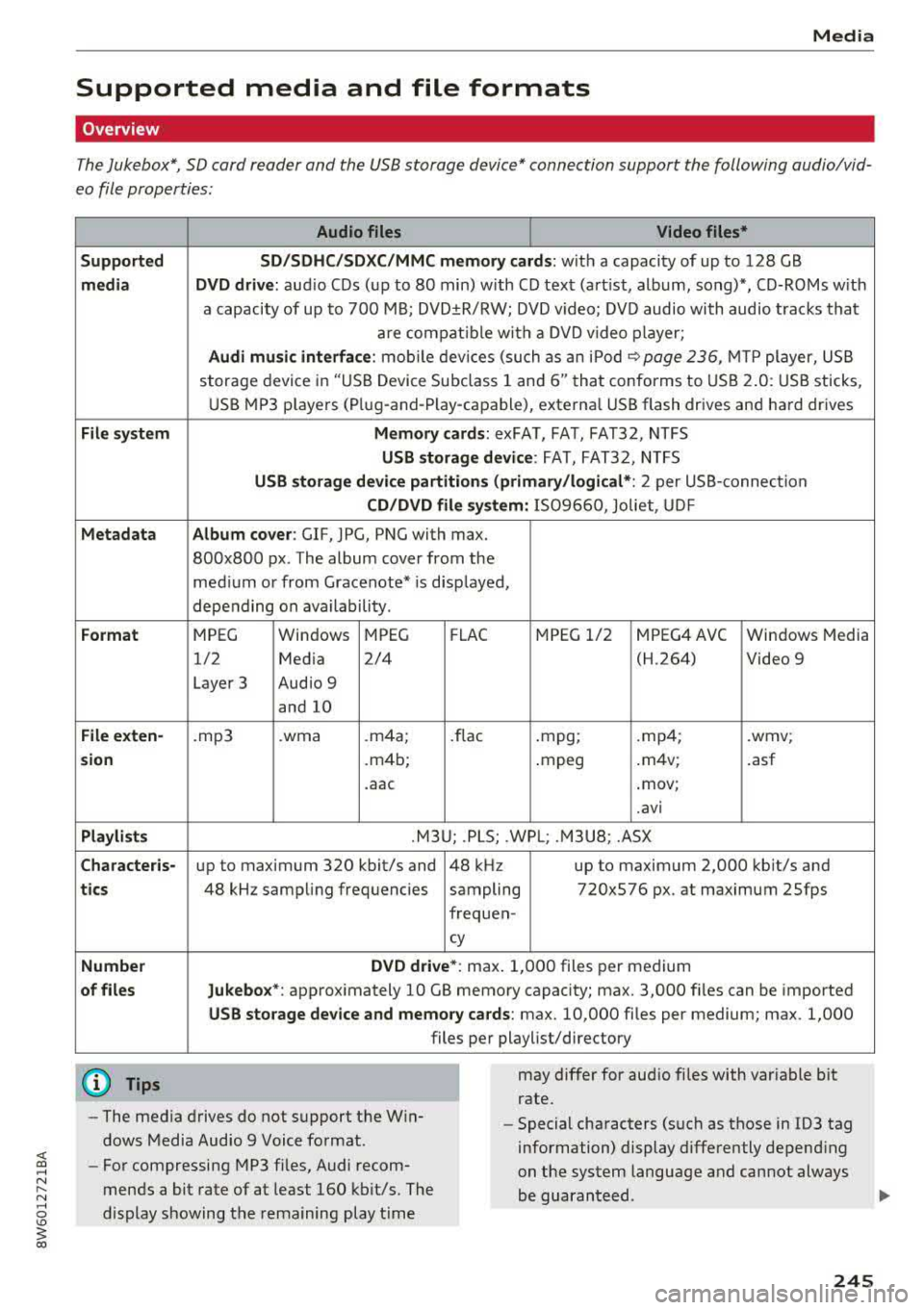
The Jukebox*, SD card reader and th e USB storage d evice* connection support the follo wing audio/vid
e o file prop erti es :
Supported
media
File system
Metadata
Format
File exten-
s ion
Playlists
Character is-
tic s
Number
of files Audio files
Video files*
SD /SDHC/SDXC/MMC memory cards: w ith a capaci ty of up to 128 GB
DVD drive: au dio C Ds (u p to 80 min) w ith CD tex t (art ist, album, song)*, CD-ROMs w ith
a capacity of up to 700 M B; DVD ±R/RW; DVD video; DV D audio with audio trac ks tha t
a re compatible w ith a DVD video p layer;
Audi music interface : mobile devi ces (su ch as a n iP od <:? page 236, MTP player, US B
stor age device in "US B Device Subclass 1 and
6" tha t conforms to USB 2.0 : U SB sticks,
U SB MP3 p laye rs (P lug-and -P lay-capable), external USB flash drives and ha rd dr ives
Memory cards : exFAT, FAT, FAT32, NTFS
USB storage de vice : FAT, FAT32, NTFS
USB storage device partitions (primary /logical *: 2 per USB -connection
CD /DVD file sy stem: 1509660, Joliet, UDF
Album cover: GIF, JPG, PNG with max.
800x800 px. The album cover from the
med ium or from Gracenote* is disp layed,
depending on availability.
MPEG Windows MPEG
FL AC M
PEG 1/2 MPEG4 AVC
Windows Media
1/2 Media 2/4 (H.264) Video 9
Layer 3 Audio 9
and 10
. mp3 .wma .m4a;
.flac .mpg; .mp4; .wmv;
.m4b; .mpeg .
m4v; .asf
.aac .mov;
.avi
.M3 U; .PLS; .WPL; . M3U8; .ASX
up to maximum 320 kbit/s and 48 kHz up to maximum 2,000 kb it/s and
48 kHz sampling frequencies sampling 720x576 px. at maximum 2Sfps
frequen-
cy
DVD dri ve* : max . 1,000 files per medium
Jukebo x*: approximately 10 GB memory capacity; max. 3,000 files can be imported
USB stor age device and memory cards : max. 10,000 files per medium; max . 1,000
files per playlist/directory
may differ for aud io files with var iable b it
rate.
- The media drives do not support th e W in
dows Media Audio 9 Voice format. -
Special characters (s uch as those in 103 tag
information) display differently depend ing
on the system language a nd cannot always
be guaranteed.
-
For compressing MP3 files, Audi recom
mends a bit rate of at least 160 kb it/s. The
display showing the rema ining play t ime
245
Page 248 of 409
Media
-The manufactu rer of the storage device can
provide information about its "USB Device
Subclass" . - Some MTP player functions are not support
ed, such as rating music tracks and video
playback.
CD drive
Applies to: ve hicles w ith a CD drive
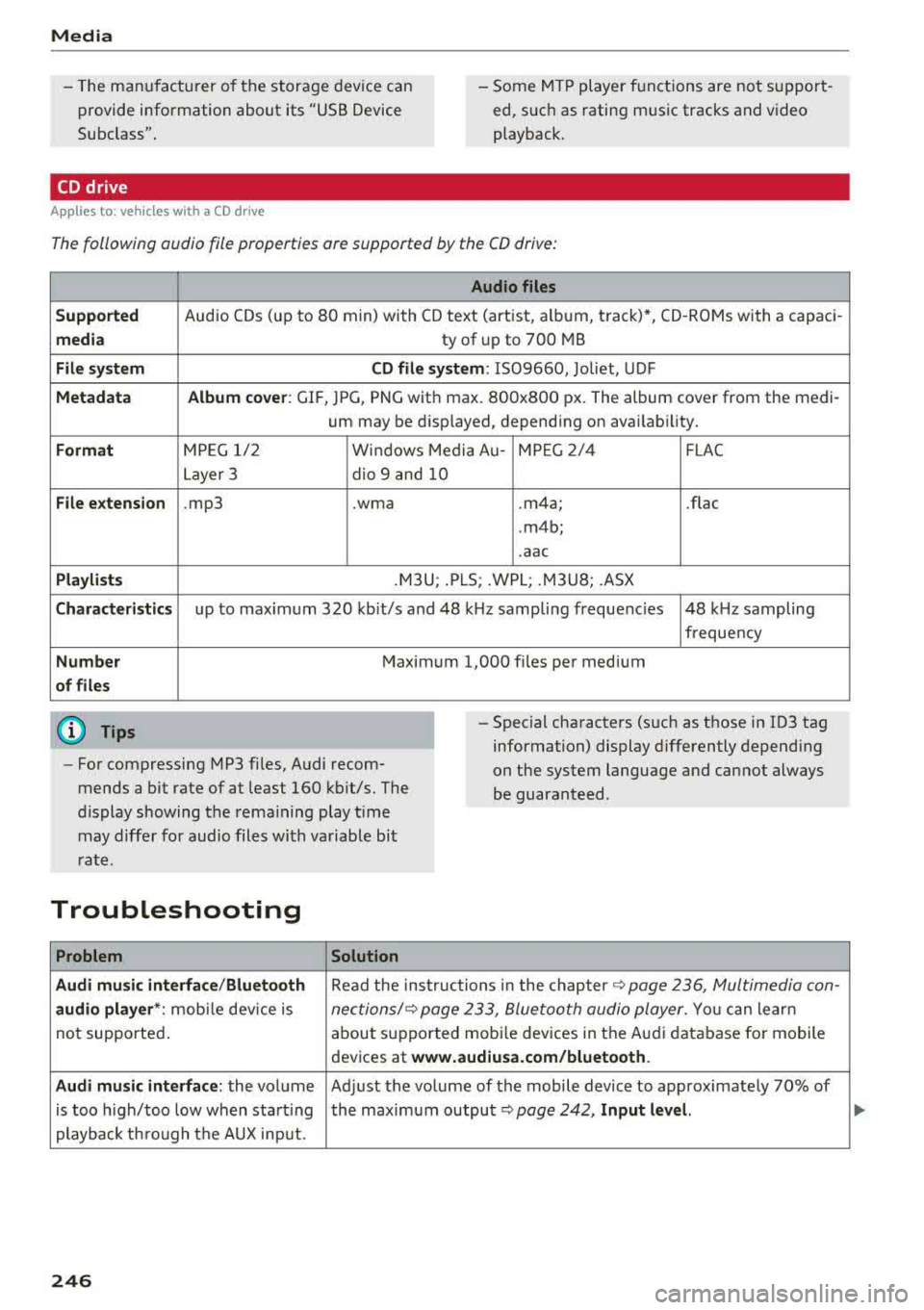
The following audio file properties are supported by the CD drive:
Audio files
Supported
Audio CDs (up to 80 min) with CD text (artist, alb um, track)*, CO-ROMs with a capaci-
media ty of up to 700 MB
File system CD file system: 1509660, Joliet, UDF
Metadata Album
cover : GlF, )PG, PNG with max . 800x800 px. The album cover from the medi-
um may be disp layed, depending on availability.
Format M PE G 1/2 Windows Media Au- MP EG 2/4 FLAC
Layer 3 dio 9 and 10
File extension .mp3 .wma
.m4a; .flac
. m4b;
. aac
Playlists .M3U; .PLS; .WPL; .M3U8; .ASX
Characteristics up to maximum 320 kbit/s and 48 kHz sampling frequenc ies 48 k Hz sampling
frequency
Number Maximum 1,000 files per medium
of files
(D Tips
-For compressing MP3 files, Audi recom
mends a bit rate of at least 160 kb it/s. The
display showing the remaining play time
may differ for audio files with variable bit
rate .
-Special characters (such as those in 103 tag
information) display differently depending
on the system language and cannot always
be guaranteed .
Troubleshooting
Problem Solution
Audi music interface /Bluetooth
Read the instructions in the chapter ~ page 236, Multimedia con-
audio player *: mobile dev ice is nectionsl~ page 233, Bluetooth audio player . You can learn
not supported . about
supported mobi le devices in the Audi database for mobile
devices at
www.audiusa.com/bluetooth.
Audi music interface :
the volume Adjust the volume of the mobile device to approximately 70% of
is too h igh/too low when start ing the maximum
output ~ page 242, Input level.
playback th ro ugh the AUX input.
246
Page 249 of 409
<( a, .... N ,....
N .... 0 \0
3 a,
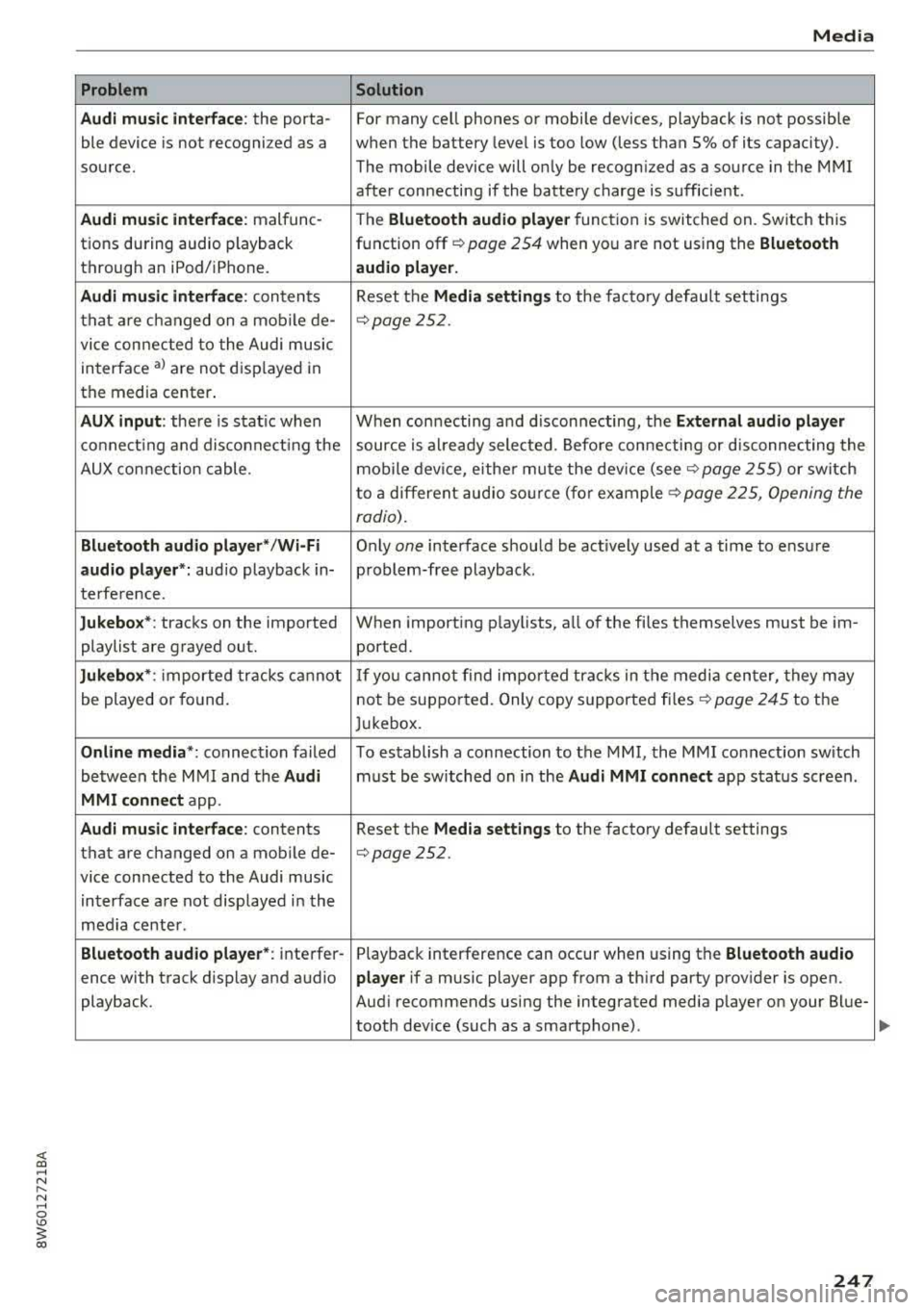
Problem
Audi music interface :
the porta-
ble device is not recogni zed as a
source.
Audi music interface : malfunc-
tions during audio playback
through an iPod/ iPhone.
Audi music interface : contents
that are changed on a mobile de-
vice connected to the Audi music
interface
a l are not displayed in
the media center.
AUX input: there is stat ic when
connecting and disconnecting the
AUX connection cable .
Bluetooth audio player* /Wi-Fi
audio player *:
aud io playback in-
terference.
Jukebox* : tracks on the imported
playlist are grayed out.
Jukebox* : imported tracks cannot
be played or found.
Online media *: connection failed
between the MMI and the
Audi
MMI connect
app.
Audi music interface: contents
that are changed on a mobile de-
vice connected to the Audi music
interface are not displayed in the
med ia center .
Bluetooth audio player *: interfer-
ence with track d isplay and audio
playback.
Media
Solution
For many ce ll phones or mobile devices, playback is not possible
when the battery level is too low (less than 5% of its capacity).
The mobile
de -vice will only be recognized as a source in the MMI
after connecting if the battery charge is sufficient .
The
Bluetooth audio player f unction is switched on. Switch this
function off
c:> page 2 54 when you a re not using the Bluetooth
audio player.
Reset the Media settings to the facto ry defau lt settings
¢ page 2 52.
When connecting a nd disconnecting, the External audio player
source is already selected. Before connecting or disconnecting the
mobile device, either mute the device (see
c:> page 255) or switch
to a different audio source (for example
c:> page 225, Opening the
radio) .
Only one interface should be act ively used at a time to ensure
problem-free playback .
When importing playlists, a ll of the fi les themselves must be im-
ported.
If yo u cannot find impor ted tracks in the media center, they may
not be supported. Only copy supported files
c:> page 245 to the
Jukebox.
To establish a connection to the MMI, the MMI connection sw itch
must be switched on in the
Audi MMI connect app status screen .
Reset the
Media settings to the factory default settings
c:> page 252.
Playback interference can occur when using the Bluetooth audio
player
if a music player app from a th ird party provider is open.
Aud i recommends using the integrated media player on your Blue-
tooth dev ice (such as a smartphone) .
247
Page 254 of 409
<( a, ..... N ,....
N ..... 0 \0
3 a,
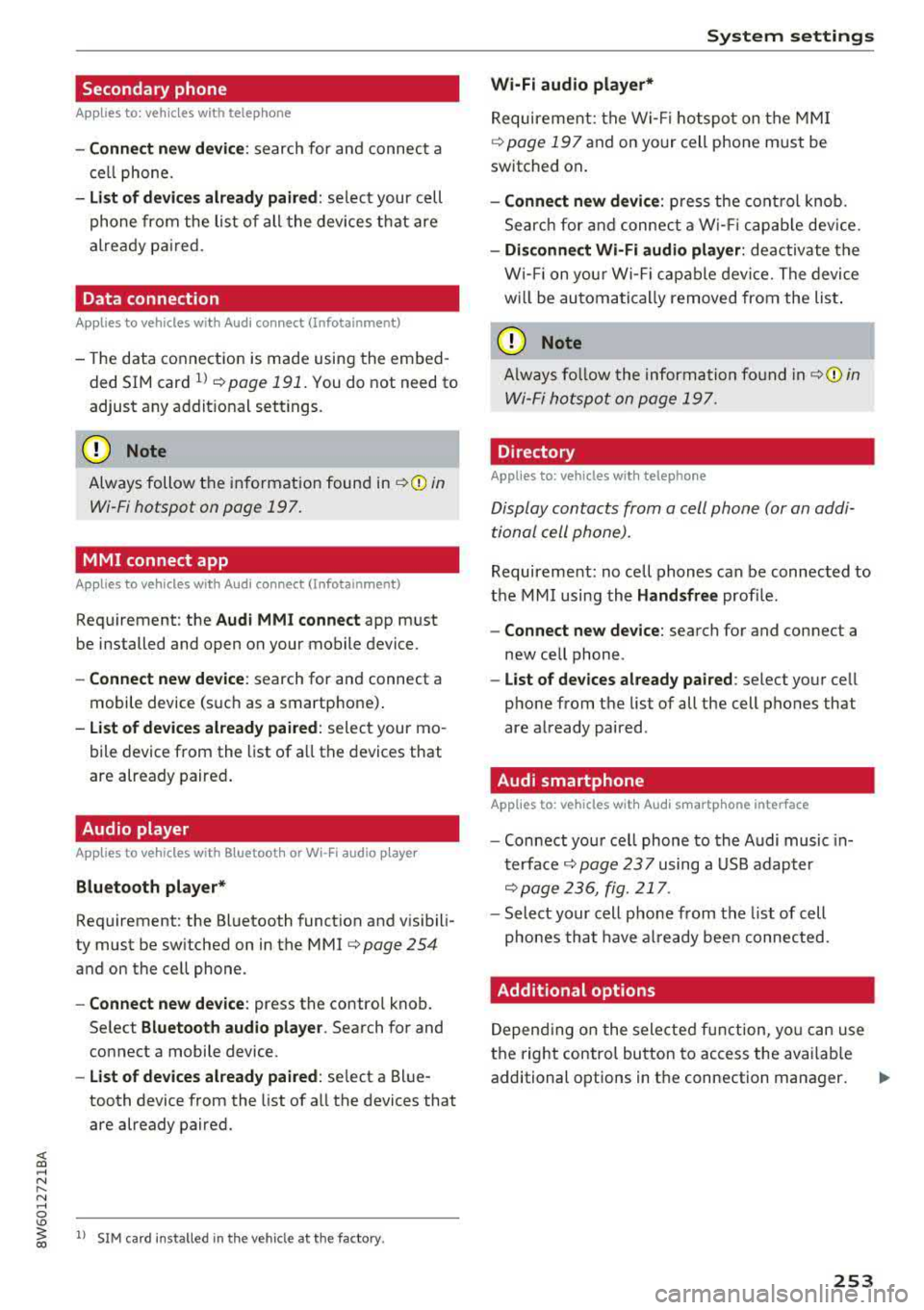
Secondary phone
Applies to: vehicles with telephone
-Connect new device: search for and connect a
cell phone.
- List of devices already paired: select your cell
phone from the list of all the devices that are
already paired.
Data connection
Applies to vehicles with Audi connect (Infotainment)
- The data connection is made using the embed
ded SIM card
ll ¢ page 191. You do not need to
adjust any additional settings.
Always follow the information found in
¢(D in
Wi-Fi hotspot on page 197.
MMI connect app
Applies to vehicles with Aud i connect (Infotainment)
Requirement: the Audi MMI connect app must
be installed and open on your mobile device.
- Connect new device: search for and connect a
mobile device (such as a smartphone).
- List of devices already paired: select your mo
bile device from the list of all the devices that
are already paired.
Audio player
Applies to vehicles with Bluetoot h or Wi-F i a udio player
Bluetooth player*
Requirement : the Bluetooth function and visibili
ty must be switched on in the MMI
¢ page 254
and on the cell phone.
-Connect new device: press the control knob.
Select
Bluetooth audio player . Search for and
connect a mobile device.
- List of devices already paired: select a Blue
tooth device from the list of all the devices that
are already paired.
l) S IM card inst alle d in the v ehicle at th e fac to ry .
System settings
Wi-Fi audio player*
Requirement: the Wi-Fi hotspot on the MMI
¢
page 197 and on your cell phone must be
switched on.
- Connect new device: press the control knob.
Search for and connect a Wi-Fi capable device.
-Disconnect Wi-Fi audio player: deactivate the
Wi-Fi on your Wi-Fi capable device. The device
will be automatically removed from the list.
(Q) Note
Always follow the information found in ¢Q) in
Wi-Fi hotspot on page 197.
Directory
Applies to: vehicles with telephone
Display contacts from a cell phone (or an addi
tional cell phone).
Requirement: no cell phones can be connected to
the MMI using the
Handsfree profile.
-Connect new device: search for and connect a
new cell phone .
-List of devices already paired : select your cell
phone from the list of all the cell phones that
are already paired .
Audi smartphone
Applies to: vehicles with Aud i smartphone interface
-Connect your cell phone to the Audi music in
terface¢ page 23 7 using a USB adapter
¢page 236, fig. 217 .
-Select your cell phone from the list of cell
phones that have already been connected.
Additional options
Depending on the selected function, you can use
the right control button to access the available
additional options in the connection manager.
.,.
253
Page 255 of 409
System settings
Delete Bluetooth device*
The selected cell phone/mobile device is discon
nected from the MMI and is removed from the
list of all devices that are already paired .
Show Bluetooth profiles*
You can Connect or Disconnect the Handsfree ,
Messages *, Dire ctory/contacts
and Bluetooth
audio player
profiles separately.
Bluetooth settings*
- Bluetooth :
select and confirm a setting for the
B luetooth connection v is ibility. Select
Visible
for the MMI to be visible to other dev ices. Se
lect
Invisible for the MMI to not be vis ible to
other devices. Howeve r, it is still possib le to es
tablish a Bluetooth connection with paired de
vic es when the visibility is switched off. Select
Off to turn visibility off. Then a B luetooth con
nection is not possible .
-Bluetooth audio player: when this function is
switched
on~' the Bluetooth audio player is
available as a source in the
Media menu .
-Bluetooth name : the MMI Bluetooth name (for
example ,,AUDI MM I
2016") is displayed and
can be changed .
Online settings*
- Data usage counter :
the amount of data pack
ets that are sent and received through the MMI
is disp layed. You can reset the data usage infor
mation to zero using the
Reset data counter
option.
-Network status : the mobile network provider
for data service as well as the network status
are displayed .
Wi-Fi settings*
See <=> page 19 7, Wi-Fi hotspot.
Storing as a default telephone
Applies to: veh icles with telephone
Requirement: a cell phone must be connected to
the MMI
<=> page 178.
As soon as the cell phone is in range and the
Bluetooth function on the cell phone and in the
MMI is swit ched on, this cell phone is given pr ior
ity ove r the other Bluetooth devices and is con-
254
nected directly to the MMI. The connected ce ll
phone is displayed first in the device list .
Network settings*
- Login :
you can chose an automatic log in to
your cell phone service provider's network, or
you can choose a
manual login from the list of
avai lab le networks .
-Network selection: available networks in the
present location can be selected under network
selection . This function is on ly availab le for the
Manual l ogin setting.
Apple CarPlay sound settings/ Android Auto
sound settings
Applies to: vehicles with Audi sma rtphone interface
See ~page255.
About Apple CarPlay/ About Android Auto
Applies to: vehicles with Audi smartphone interface
Here you wi ll find legal information regarding
the use of Apple CarPlay or Andro id Auto and in
formation about device-specific data exchange.
Delete CarPlay device/Delete Android Auto
device
Applies to: vehicles with Audi smartphone interface
Requirement: your cell phone must not be con
nected to the Audi music interface with a USB
adapter .
Se lect:
Audi smartphone > a device from the list
> r ight control button.
T o remove your cell phone from the list, select
and confirm
Delete CarPlay device or Delete An
droid Auto device .
System update
"Select: !M ENUI button> Settings > left control
button >
System maintenance .
- System update:
slide the storage device with
the update data into the appropriate drive
<=> page 231 . Select and confirm the dr ive>
Start update . The length of the process de
pends on the size of the update .
-Reset driver installation: the selected media
dr iver package is reset to the settings at the
time of delivery.
Page 283 of 409
Airbag system
-Never hold the steering wheel at the 12
o'clock position or with your hands any
where inside the steering wheel or on the
steering wheel hub. Holding the steering
wheel the wrong way increases the risk of
severe injury to the arms, hands, and head if
the driver airbag deploys.
,& WARNING
Objects between you and the airbag will in
crease the risk of injury in a crash by interfer
ing with the way the airbag unfolds and/or by
being pushed into you as the airbag inflates.
- Always make sure nothing is in the front air-
bag deployment zone that could be struck
by the airbag when it inflates.
-
- Objects in the zone of a deploying airbag
can become projectiles when the airbag de
ploys and cause serious personal injury.
- Never hold things in your hands or on your
lap when the vehicle is in use.
- Never place accessories or other objects
(such as cup holders, telephone brackets,
note pads, navigation systems, or things
that are large, heavy, or bulky) on the doors;
never attach then to the doors or the wind
shield; never place them over or near or at
tach them to the area marked ,,AIRBAG" on
the steering wheel, instrument panel or the
seat backrests; never place them between
these areas and you or any other person in
the vehicle.
- Never attach objects to the windshield
above the passenger front airbag, such as
accessory GPS navigation units or music
players. Such objects could cause serious in
jury in a collision, especially when the air bags inflate.
- Never recline the front passenger seat to transport objects. Items can also move into
the deployment area of the side airbags or
the front airbag during breaking or in a sud
den maneuver. Objects near the airbags can
fly dangerously through the passenger com partment and cause injury, particularly
when the seat is reclined and the airbags in
flate.
282
,& WARNING
, -
A person on the front passenger seat, espe
cially infants and small children, will receive
serious injuries and can even be killed by be ing too close to the airbag when it inflates .
- Although the Advanced Airbag System in your vehicle is designed to turn off the front passenger airbag if an infant or a small child
is on the front passenger seat, nobody can
absolutely guarantee that deployment un
der these special conditions is impossible in
all conceivable situations that may happen
during the useful life of your vehicle.
- The Advanced Airbag System can deploy in accordance with the
,.low risk" option for 3-
and 6-year-old children under the U.S. Fed
eral Standard if a child with electrical capac
itance greater than the combined capaci
tance of a typical one-year old infant re
strained in one of the forward facing or rear
ward-facing child seats with which your ve hicle was certified is on the front passenger
seat and the other conditions for airbag de
ployment are met.
- Accident statistics have shown that children
are generally safer in the rear seat area than
in the front seating position.
- For their own safety, all children, especially
12 years and younger, should always ride in
the back properly restrained for their age
and size.
Advanced front airbag system
Your vehicle is equipped with a front Advanced
Airbag System in compliance with United States
Federal Motor Vehicle Safety Standard (FMVSS)
208, as well as Canada Motor Vehicle Safety
Standard (CMVSS) 208 as applicable at the time
your vehicle was manufactured .
-
The front Advanced Airbag System supplements
the safety belts to provide additional protection
for the driver's and front passenger's heads and upper bodies in frontal crashes. The airbags in
flate only in frontal impacts when the vehicle de-
celeration is high enough.
ll>
Page 287 of 409
Airbag syste m
The additio na l l ayers prevent the capacitive
passenger detection system from accurately
measuring the capac itance of the ch ild safe
ty seat and/or the person on the seat and
thus keep the Advanced Airbag System from
working p roperly.
- Never place or use any electrical device (such as a laptop, CD player, elect ronic
games dev ice, power inverte r or seat heater
for child seats) on the front passenger seat
if the device is connected to the 12-vol t
socket or the cigarette lighter socket . S uch
devices can infl uence the capacitance regis
tered by the capacitive passenger detection
system, so that incorrect information is pro
vided to the airbag control unit.
- If you must use a c hild restraint on the front
passenger seat and the child restraint man
ufacturer's instructions require the use of a
towel, foam cushion or something else to prope rly position the ch ild restraint, make
certain that the
PASSENGER AIR BAG OFF
~; light comes on and stays on whenever
the chi ld restraint is installed on the front
passenge r seat .
-If the PASSENGER AIR BAG OFF ~; light
does not come on and s tay on , immediate ly
ins tall child restra int in a rea r seating posi
tion and have the airbag system inspected
by you r A udi dealer.
_& WARNING
If the front passenger seat gets wet, dry it im
mediately.
- If liquid soaks into the front passenger seat,
this can keep the a irbag system from work
ing prope rly and may, for instance, deact i
vate the passenger frontal airbag. If this happens, the
PASSENGER AIR BAG OFF ~;
light will come on and stay on togethe r with
the a irbag ind icator
light E,I in the inst ru
men t cluster.
- If liquid is poo led on the seat, bu t has not
soa ked i n, this may also keep the airbag sys
tem from wo rking properly and ca use the
passenge r frontal a irbag to be enabled
(tu rned on), even though there is a properly
286
installed child rest raint system on the seat .
Wet towels or other wet things on the seat
cushion can have the same effect.
If the
front passenger fronta l airbag is turned on,
t he
PASSENGER AIR BAG OFF ~; light light
w ill go out.
How the Advanced Airbag System
components work together
The front Advanced A irbag System and the side
airbags supp lement the p rotection offered by the
front three-point safety be lts and the adjustable
head restraints to he lp reduce the risk of injury in
a wide range of accident and crash situat ions. Be
sure to read the important i nformat ion about
safety and heed the WARNINGS in this chapter .
Deployment of the Advanced A irbag System and
the activation of the safety belt pretensioners de pend on the dece leration measured by the crash
sensors and registered by the elec tronic contro l
u nit . Crash severity depends on speed and decel
e ration as well as the mass and stiffness of the
vehicle or object invo lved in the cras h.
On the passenger side, regard less of safety be lt
u se, the front passenge r frontal airbag will be
turned off if t he e lectr ica l capaci tance m easured
by the capaci tive p assenge r detection system o n
t h e fron t passenger sea t is less th an the amou nt
programmed in t he e lec tronic cont ro l unit. The
front passenger frontal airbag wi ll also be turned
off if the capacitance measured by the system for
the front passenger seat equals that of an infant
of about one year of age in one of the child seats
that was used to certify the Advanced Airbag Sys
tem under Federal Motor Vehicle Safety Standard 208. The
PASSENGER AIR BAG OFF ~; light
comes on and stays on to tell you whe n the front
Advanced Airbag System on the passenge r side
has been tu rned
off~ page 289.
_& WARNING
T o reduce the ris k of injury when an airbag in
f lates, always wea r safety belts prope rly.
- If you are un res trained, leaning forward, sit
ting sideways or out of position in any way,
your r isk of injury is much higher.
Page 304 of 409
<( a, .... N ,....
N .... 0 \0
3 a,
A WARNING
Child ren on the front seat of any car even w ith
Advanced Airbags can be seriously injured or
even killed when an airbag inflates. A child in
a rearward-facing child safety seat installed
on the front passenger seat will be seriously
injured and can be killed if the front airbag in
flates.
- The inflating airbag will hit the child safety
seat or infant carrier with great force and
will smash the ch ild safety seat and child
against the backrest, center armrest, or
door.
- Always install rear-facing child safety seats
on the rear seat.
- If you must install a rearward fac ing ch ild
safety seat on the front passenger seat in
exceptiona l circumstances and the
PA SSEN
GE R AIR BAG OFF
,;; light does not come
on and stay on, immediately install the rear
facing child safety seat in a rear seating po sition and have the airbag system inspected
immediately by your Audi dealer.
A WARNING
- Forward-facing chi ld seats installed on the
front passenger seat may interfere with the deployment of the a irbag and cause serious
personal injury to the child.
- If except ional circumstances require the use
of a forward-facing child restraint on the
front passenger's seat, the child's safety and well-being require the following special
precautions to be taken:
- Always make sure that the fo rward-facing
seat has been designed and certified by its manufacturer for use on a front passenger
seat with a front and s ide a irbag.
- Always carefully follow the manufacturer's instructions provided with the child seat
or infant carrier.
- Never install a chi ld restraint without a
properly attached top tether strap if the
child restraint manufacturer's instructions require the top tether strap to be used.
Ch ild safety
-Never put the forward-facing child re
straint up against or very near the instru
ment panel.
- Applies to: vehicles with safety be lt height
adjustment: Always set the safety belt up
per anchorage to the adjustment pos ition
that permits proper installation in accord
ance with the child restraint manufactur
er's instructions.
- Always move the front passenger seat to the h ighest position in the up and down
adjustment range and move it back to the
rearmos t position in the seat's fore and
a ft ad justment range, as far away from
the a irbag as poss ible, before installing
the forward-facing child restraint .
- Always make sure that the safety belt up
per anchorage is behind the chi ld restraint
and not next to or in front of the child re
straint so that the safety belt will be prop
erly pos it ioned.
- Always make sure that nothing prevents
the front passenger's seat from being
moved to the rearmost position in its fore
and aft adjustment range.
- Never place objects on the seat (such as a
laptop, CO player, electronic games de
vice, power inverter or seat heater fo r
ch ild seats) . These may influence the elec
trical capacitance measu red by the capac i
tive passenger detec tion system and can
also fly around in an acc iden t and c ause
serious personal injury .
- Never place or use any ele ct rical devi ce
(such as a laptop, CO player, electroni c
games device, powe r inverter or seat heat
er for child seats) on the front passenger
seat if the device is connected to the
12-
vo lt socket or the cigarette lighter socket.
- If a seat heater has been retrofitted or
otherw ise added to the front passenger
seat, never insta ll any child restraint sys
tem on this seat.
- Make su re that there are no wet objects
(such as a wet towe l) and no water or oth
er liquids on the front passenger seat
cush ion.
303
Page 308 of 409
<( a, .... N ,....
N .... 0 \0
3 a,
-The child and the passenger can also in
jure each other in an accident.
- Never install rear-facing chi ld safety seats
or infant carriers on the front passenger
seat. A child will be serious ly injured and
can be killed when the passenger airbag in
flates - even with an Advanced Airbag Sys
tem.
- The inflating a irbag will hit the child safety
seat or infant carrier with great force and
will smash the ch ild safety seat and chi ld
against the backrest, center armrest, door
o r roof.
- Always install rear-facing child safety seats
o r infant carriers on the rear seat.
- Make sure there is enough space in front of
the ch ild in the child seat. If necessary, ad
just the ang le and posit ion of the seat in
front of the child sea t.
- Forward-fac ing ch ild safety seats installed
on the front passenger's seat can inte rfe re
with the airbag when it inflates and cause
serious injury to the child . Always insta ll for
ward-facing child safety seats on
the rear
seat.
- If exceptional circumstances require the use
of a forward-facing child restraint on the
front passenger's seat, the child's safety and well-being require that the following
special precautions be taken:
- Make sure the forward-fa cing seat h as
been designed and certif ied by its manu
facturer for use on a front seat with a pas
senger front and side airbag.
- Always care fully follow the manufacturer's
instr uctions provided with the child safety
seat or carrier.
- Always move the front passenger seat to the highest position in the up and down
ad justment range and move it back to the
rearmost posit ion in the seat's fore and
aft adjustment range, as far away from
the airbag as possible, before installing
the forward-fac ing ch ild restraint.
- Always make sure that the safety be lt up
per anchorage is behind the child restra int
and not next to or in front of the child
r e-
Ch ild safety
straint so that the safety belt wi ll be prop
erly pos it ioned.
- Always make sure that nothing prevents
the front passenger's seat from being moved to the rearmost position in its fore
and aft adjustment range.
- Always make sure that the backrest is in the upright posit ion.
- Never place or use any elect rical device
(such as a laptop, CD player, electronic
games device, power inverter or seat heat
er for child seats) on the front passenger
seat if the device is connected to the
12-
vo lt socket or the cigarette lighter soc ket.
- If a seat heater has been retrofitted or othe rw ise added to t he fron t passenger
seat, neve r insta ll any child rest raint sys
tem on this seat.
- Make su re that there a re no wet objects
(such as a wet towe l) and no water or oth
er liquids on the front passenger sea t
cush ion .
- Neve r place objects o n the sea t (such as a
laptop, CD player, e lect ronic games de
vice, power inverter or seat heater for
child seats). These may inf luence the elec
trical capacitance meas ured by t he capaci
tive passenger detection system and can also fly around in an acc ident and cause
serious personal injury.
- Always buckle the child safety seat firmly in
p lace even if a ch ild is not sitt ing in it. A
loose child safety seat can fly around dur ing
a sudde n stop or i n a co llision .
- Always read and heed all WARNINGS when
ever us ing a child restrained in a vehicle is
be ing
u sed~ page 268, Safety belts,
<=> page 2 77, Airbag system and
<=> page 302, Child safe ty.
_&. WARNING
To reduce the risk of serious injury, ma ke sure
t hat the
PASSENGER AIR BAG OFF '1; light
comes on and stays on whenever a child re
straint is installed on the front passenger seat
and the ign it ion is switched on.
..,
307
Page 310 of 409
<( a, .... N ,....
N .... 0 \0
3 a,
seats support the baby 's back, neck and head in a
crash
¢ fig . 257.
The a irbag on the passenger side makes the front
seat a potentia lly dangerous p lace for a child to
ride . The front seat is not the safest place for a
child in a forward-facing chi ld seat. It is a very
dangerous place for an infant or a larger child in
a rearward-facing seat .
A WARNING
Not using a child safety seat, using the wrong
child safety seat or improperly installing a
child restra int increases the r isk of serious
personal injury and death in a crash .
- Never install rear -facing child safety seats
or infant carriers on the front passenger
seat -even with an Advanced Airbag Sys
tem . A chi ld w ill be seriously injured and can
be k illed when the inflat ing airbag hits the
child safety seat or infant carrier with great
force and smashes the child safety seat and
child against the backrest, center armrest
'
door or roof c> page 2 78, Child restraints on
the front seat -some important things to
know .
-Always install rear-facing child safety seats
or infant carriers on the rear seat.
- Never install a rear-facing child restraint in the forward-facing direct ion. Such restraints
are designed for the spec ial needs of infants
and very small children and cannot protect
them properly if the seat is forward-facing .
- If you must install a rearward fac ing ch ild
safety seat on the front passenger seat be
cause of exceptiona l circumstances and the
PAS SENGER AIR BAG OFF ~; light does not
c ome on and stay on, immed iate ly install
the rear-fac ing child safety seat in a rear
seating position and have the airbag system
inspected by your Audi dealer.
- Never place or use any electrical device (such as a laptop, CD player, electronic
games dev ice, power inverter or seat heater
for child seats) on the front passenger seat
if the device is connected to the 12-volt
socket or the cigarette lighter socket .
Child safety
-If a seat heater has been retrofitted or oth
erwise added to the front passenger seat,
never install any child restra int system on
this seat .
- Make sure that there are no wet objects
(such as a wet towel) and no water or other
liquids on the front passenger seat cush ion.
- Never place objects on the seat (such as a
laptop, CD p layer, electronic games device,
power inverter o r seat heater fo r ch ild
seats) . These may influence the elect rical
capacitance measu red by the capacitive pas
senger de tect io n system and can also fly
aro und in an accident and cause serious per
sonal injury .
- Always read and heed all WARNINGS when
ever using a child restrained in a vehicle is
be ing used
¢ page 268, Safety belts,
c::!;> poge 277, Airbag system and
c::!;> page 302, Important information.
309