lights AUDI A5 COUPE 2018 User Guide
[x] Cancel search | Manufacturer: AUDI, Model Year: 2018, Model line: A5 COUPE, Model: AUDI A5 COUPE 2018Pages: 409, PDF Size: 67.63 MB
Page 29 of 409
<( a, .... N ,....
N .... 0 \0
3 a,
'
-Yli-, I '
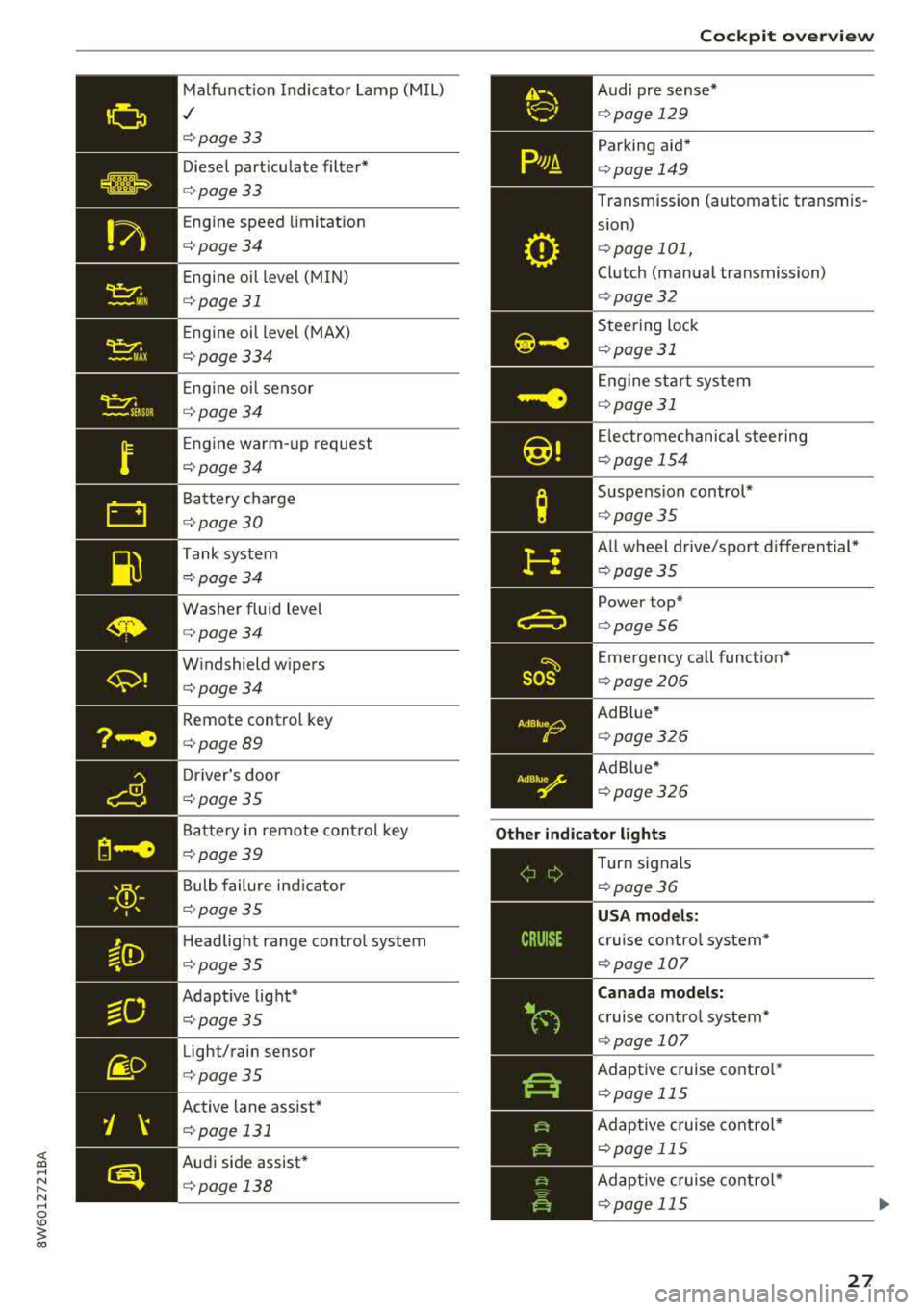
Malfunct ion Indicato r Lamp (MIL)
,/
c:>page 33
Diese l part icu late filter*
c:>page33
Eng ine speed limitat ion
c:> page 34
Eng ine oil level ( MIN)
c:>page 31
Eng ine oil level ( MAX)
c:> page 334
Eng ine oi l sensor
c:> page 34
Eng ine warm- up request
c:>page 34
B attery charge
c:> page 30
Tank system
c:>page34
Washer fluid level
c:> page 34
W indshield w ipers
c:> page 34
Remote control key
c:>page 89
D river's door
c:> page 35
Battery in remote cont rol key
c:>page 39
B ulb failure ind icator
c:>page 35
H eadlight ra nge contro l system
c:> pag e 35
Adapt ive light*
c:> page 35
Light/ rain sensor
c:> page 35
Active lane ass ist *
c:> page 131
Audi side assist*
c:> page 138
so~
Cockpit o verview
Audi pr e se nse *
c:>page 129
Par king aid*
c:> page 149
Transmission (automatic transmis
s ion)
c:> page 101,
Clutch (man ual transmission)
c:> page 32
Steering lock
c:> page 31
En gine st art system
c:> page 31
Electrome chanical stee ring
c:> page 15 4
Suspension control*
c:>page 35
All w heel drive/sport differential*
c:> page 35
Power top*
c:>page 56
Emergency call funct ion "
c:> page 206
Ad B lue*
c:> page 326
Ad Blu e*
c:> page 326
Other indicator lights
--------------
Turn signals
c:> page 36
USA models:
cruise contro l system*
c:> page 107
Canada models:
cruise contro l system*
c:> page 107
Adaptive c ruise contro l*
c:> page 115
Ad aptive cruise contro l*
c:> page 115
Ad aptive cruise cont ro l*
c:> page 115
27
Page 31 of 409
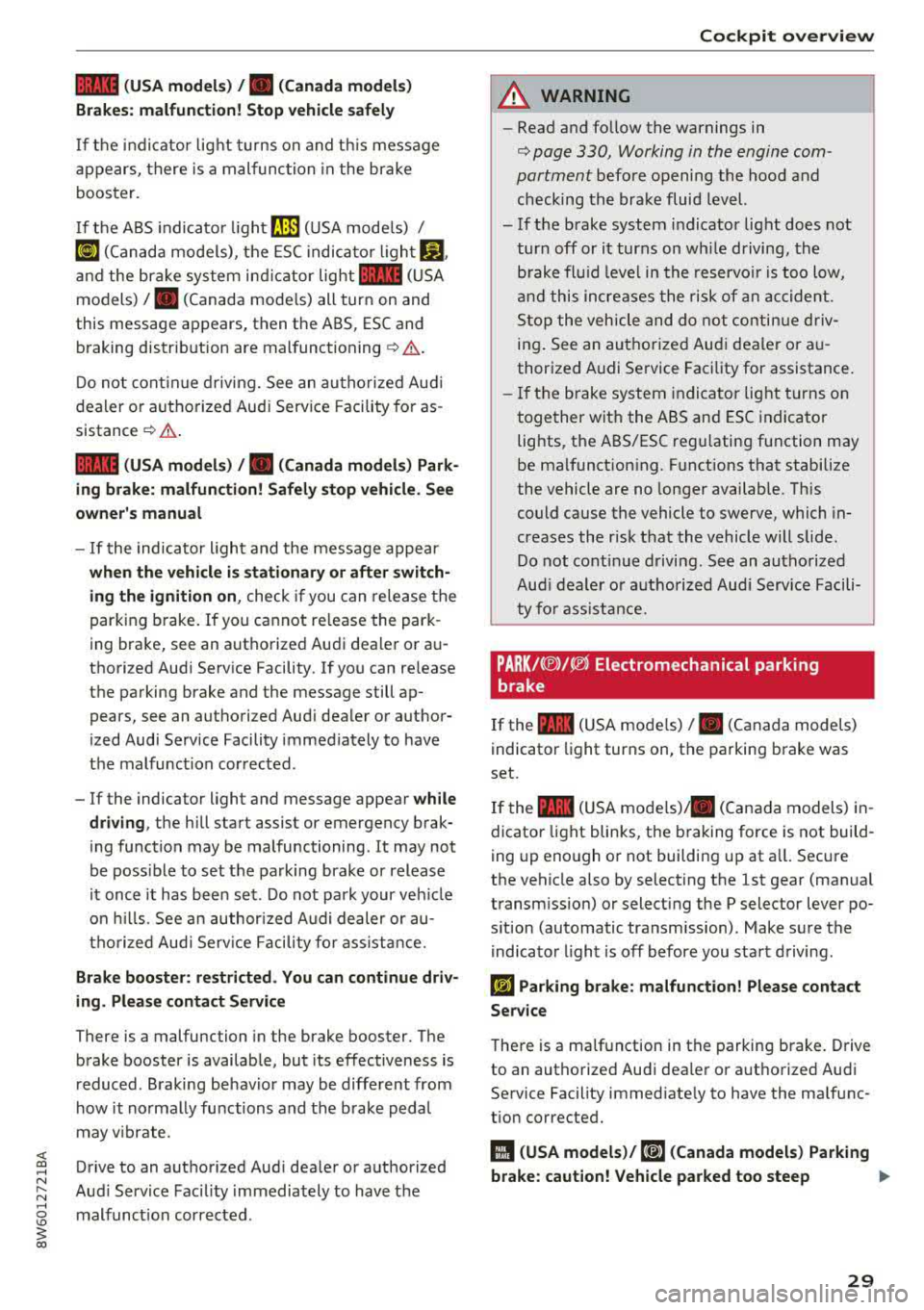
1111 (USA model s) /. (C anada mod els )
B rake s: malfuncti on! Stop vehicle safel y
If the indi cator lig ht t urns on and th is mess age
appears, there is a malfunction in the brake
booster.
I f the A BS indicato r
light ~ (USA mode ls) I
~ (Canada mode ls), the ESC indicato r ligh t GJ.
and the brake system ind icator light 1111 (USA
models)
/ . (Canada mode ls) all turn on and
this message appears, then the ABS, ESC and braking distrib ution are
malfunctioning ¢& .
Do not cont in ue driv ing. See an au thorized Aud i
dea ler or autho rized Aud i Service Facility for as
sistance
¢ .&. .
1111 (USA mod els) / . (Canada model s) Park
ing br ake: malfun ction! Safely st op v ehicle . See
o wn er's manu al
- If the indicato r light and the message appear
when the vehicl e is stationar y or aft er switch
ing the igniti on on ,
check if you can release the
parking brake. If you cannot re lease the park
ing brake, see an authorized Audi dealer or au
thorized Aud i Serv ice Facility. If you can re lease
the parking brake and the message still ap
pears, see an authorized Aud i dealer or author
ized Audi Service Facility immediately to have
the malfunction cor rected.
-If the indicator light and message appear wh ile
dri ving ,
the hill start assist or emergency brak
ing function may be malfunctioning. It may not
be poss ible to set the parking brake or release
it once it has been set . Do not park your veh icle
on hills. See an author ized Audi dealer or au
tho rized Aud i Serv ice Facility fo r ass ista nce.
Brake boo ster : re strict ed . You can continu e dri v
ing . Plea se con tac t Service
There is a malfunction in the brake booster. The
brake booster is available, but its effectiveness is
reduced . B raking be havio r may be diffe rent from
how it normally functions and the brake peda l
may v ibrate .
;;!; Drive to an authorized Aud i deale r or authorized ....
~ Aud i Serv ice Facility immediately to have the
8 malfunct ion corrected . \0
3
A WARNING
-Read and fo llow the warnings in
¢ page 330, Working in the engine com
partment
befo re opening the hood and
checking the brake fluid level.
- If the brake system indicator light does not tur n off or it turns on wh ile driving, the
b rake fl uid leve l in the reservo ir is too low,
a nd this increases the risk of an accident.
S top the vehicle and do not contin ue d riv
ing . See an authorized Aud i dealer o r au
thorized A udi Service Facility for assistance.
-If the b rake system indi cator light turns on
together with the ABS and ESC indicato r
lights, the ABS/ESC regu lating function may
be malfunct ion ing. Funct ions that stabilize
the vehicle are no longer available. This
could cause the vehicle to swerve, which in
creases the risk that the vehicle will slide. Do not cont inue drivi ng . See an autho rized
Aud i deale r o r a utho rized Audi Serv ice Facili
ty fo r ass is tance.
PARK /(®)/~ Electrom echanical parking
b rake
If the -(U SA mode ls) I. (Canada models)
indicator light turns on, t he pa rking brake was
set.
If the -( U SA mode ls) . (Canada models) in
dicator light blinks, the b raking force is not build
ing up enough o r not building up at a ll. Secu re
the vehicle also by selecting the 1st gear (man ual
transm ission) or select ing the P selector lever po
s ition (automatic transm ission) . Make sure the
indicator light is off before you start driving .
l~j Parking brake: malfunction! Please contact
Servic e
There is a ma lfunction in the parking brake. Drive
to an autho rized Audi dealer or a uthorized Audi
Service Facility immed iate ly to have the malfunc
t ion corrected.
11 ( USA model s)/ ,1~a (Canada models) Parking
brake: caution! Vehicle parked too steep
IJJ,
29
Page 37 of 409
![AUDI A5 COUPE 2018 User Guide <( a, .... N ,....
N .... 0 \0
3 a,
c::S Drivers door
II] Driver s door: malfunction! Shift to P before
l e aving vehi cle. See own ers manual
There is a malfunction in the driver](/img/6/57577/w960_57577-36.png "AUDI A5 COUPE 2018 User Guide <( a, .... N ,....
N .... 0 \0
3 a,
c::S Drivers door
II] Driver s door: malfunction! Shift to P before
l e aving vehi cle. See own ers manual
There is a malfunction in the driver")
<( a, .... N ,....
N .... 0 \0
3 a,
c::S Driver's door
II] Driver' s door: malfunction! Shift to P before
l e aving vehi cle. See own er's manual
There is a malfunction in the driver's door. Select
the P se lector lever position (automat ic transmis
sion) to secure the vehicle.
Drive to an authori zed Aud i dealer or authorized
Aud i Service Facility immediately to have the
malfunct ion corrected .
-:
If the II indica to r li ght turns on, a b ulb has
fa iled. The message ind icates the location of the
bu lb . Rep lace the b ulb immediately .
Vehicle lights: malfunction! Please c ont ac t
Servic e
There is a malfunction in the headlights or the
light switch . Drive to an authorized Audi dealer o r
author ized Audi Se rvice Facility immed iate ly to
h ave the ma lf u nction co rre cted.
_& WARNING
- Ligh t bul bs are under pressu re and can ex
plode when bulbs are replaced, which in
creases the risk of injury.
- Wi th H ID headlights (xenon headlights), the
high -voltage component must be handled
correctly. Otherwise, there is a risk of fata l
injury.
{(D Dynamic headlight range control
II He adlight range cont rol: malfun ctio n! S ee
o w ner 's manual
There is a malfunction in the headlight range
control system, which may ca use glar e for other
drivers.
Drive to an authorized Audi dea ler o r a uthorized
Audi Servic e Facility immediately to have the
malfunct ion corr ected.
-
Coc kpit o ve rv iew
~O Audi adaptive light
Applies to: vehicles with Audi adaptive light
m;J Audi adapt ive light : malfun ction! See own
er's manual
Adaptive light is not working . The headlights still
funct ion .
Drive to an au thorized Audi dealer or authorized
Audi Service Facility immed iately to have the
malfunction corrected .
@ Light/rain sensor
!;I Automatic headlights: ma lfunction! See
o wner' s manual
!;I Automati c wipers : malfunction ! See owner' s
manual
The light/rain sensor is malfunctioning.
The low beams remain switched on at a ll times
for safety reasons when the light switch is in the
AUTO position. However, you can continue to
turn the lights on and off using the light switch.
You can still contro l all functions that a re inde
pendent of the rain sensor through the wind
shield wiper leve r.
Drive to an au thori zed Audi dealer or authori zed
Audi Service Facility immed iately to have the
malfunction corrected.
Q Suspension control
Applies to : vehicles with suspension control
II Su sp ension: malfunction! You may continue
drivin g
There is a suspension control malfunction .
Drive to an authorized Audi d eal er or authorized
Audi Service Facility immed iate ly to have the
malfunction correc ted.
r : All wheel drive/sport differential
Applies to: vehicles with all wheel drive/sport diffe rentia l
(II All-wh eel dri ve : malfun ction! You may con-
tinue driv ing. Pl ease contact Service
.,.
35
Page 39 of 409
Opening and closing
Central locking
Description
You can lock and unlock the veh icle centrally . You
have the following options:
-Remote control key¢ page 40,
-Sensors in the door handles* ¢ page 40,
-Lock cylinder on the driver's door c::> page 42,
or
-Interior central locking switch c::> page 41.
Turn signals
The turn s ignals flash twice when you unlock the
veh icle and flash once when you lock the veh icle.
If they do not flash, then one of the doors, the
rear lid or the hood is not closed.
Automatic locking (Auto Lock)
The Auto Lock funct ion locks all doors and the
luggage compartment lid once the speed has
ex
ceeded approximately 9 mph (15 km/h).
The vehicle can be unlocked if the opening func
tion in the central locking system sw itch is used
or one of the door handles is pulled.
In the event of a crash with airbag deployment,
the doors will a lso automat ically unlock to allow
access to the vehicle.
Selective door unlocking
The doors and luggage compartment lid will lock
when they close . You can set in the Infotainment
system whether
only the driver's door or the en
tire vehicle should be unlocked when unlocking
c::> page 41.
Unintentionally locking yourself out
Only lock your vehicle when all of the doors and
the luggage compartment lid are closed and the remote control key is not in the vehicle . This
helps to prevent you from locking yourse lf out
accidentally .
<( ~ The following cond it ions prevent you from lock-
"' ~ ing your remote control key in the vehicle:
.... 0 \0
3
-If the driver's door is open, the vehicle cannot
be locked by pressing the
fi'.) button on the re
mote contro l key or by touching the locking
sensor* on a door.
-If the most recently used convenience key* is
detected in the luggage compartment, the lug
gage compartment lid automatically unlocks
again after closing it.
-If the convenience key* that was last used is de
tected inside the vehicle, then the vehicle will
not be able to lock from the outside .
_& WARNING
---
-When you lock your vehicle from outs ide,
nobody- espec ially children
-should rema in
inside the vehicle. Remember, when you
loc k the vehicle from the outside the win
dows cannot be opened from the inside .
- When you leave the vehicle, always take the
ignit ion key with yo u. This will prevent pas
sengers (children, for examp le) from acci
dentally being locked in the vehicle should
they accidentally press the power locking
switch in the doors.
- Do not leave children inside the vehicle
un
supervised. In an emergency it would be im
possible to open the doors from the outside
without the key.
(D Tips
-Do not leave valuables unattended in the ve
hicle. A locked vehicle is not a safe!
-The LED in the driver's door rail blinks when
you lock the vehicle. If the LED lights up for
approximately 30 seconds after locking,
there is a malfunction in the central locking
system. Have the problem corrected by an
authorized Audi dealer or authorized Audi
Service Facility.
37
Page 53 of 409
Valet parking function
Applies to: vehicles wit h valet parking funct ion
The valet parking function protects the luggage
comportment from unauthorized access.
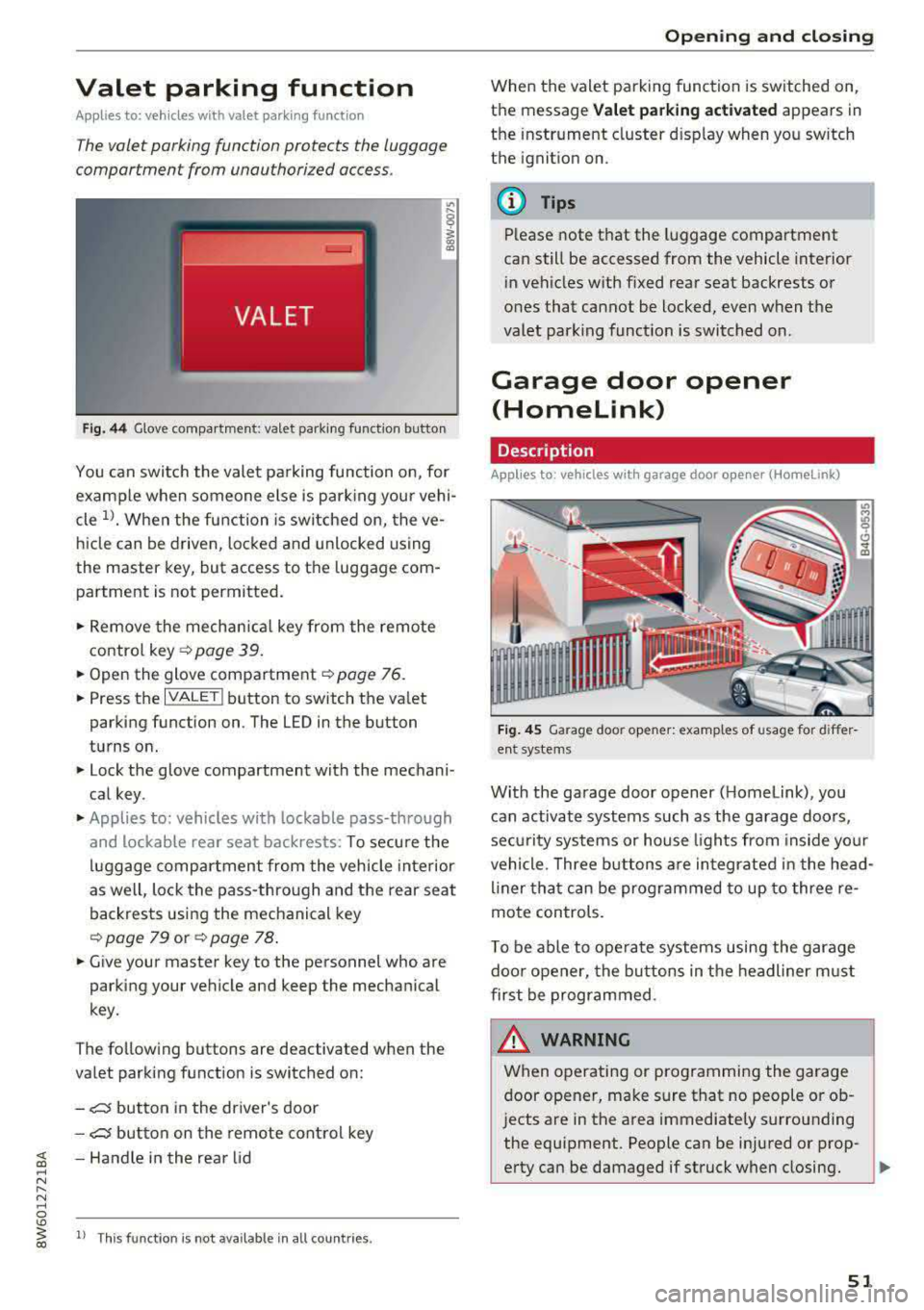
Fig. 44 Glove compartment: valet parking function butto n
You can switch the valet parking function on, for
example when someone else is parking your vehi
cle
l)_ When the function is switched on, the ve
hicle can be driven, locked and unlocked using
the master key, but access to the luggage com
partment is not permitted .
.,. Remove the mechan ical key from the remote
contro l
key~ page 39 .
.,. Open the glove compartment ~ page 76 .
.,. Press the IVALET I button to switch the valet
parking function on . The LED in the button
turns on.
.,. Lock the glove compartment with the mechani
cal key .
.,. Applies to: vehicles with lockable pass-through
and lockable rear seat backrests: To secure the
luggage compartment from the vehicle interior
as well, lock the pass-through and the rear seat
backrests using the mechanical key
~ page 79 or ~ page 78 .
.,. Give your master key to the personnel who are
parking your vehicle and keep the mechanical
key.
The following buttons are deactivated when the
va let parking function is switched on:
-,c:;5 button in the driver's door
-,c:;5 button on the remote control key
~ -Handle in the rear lid ..... N
" N ..... 0
'° ~ ll Th is function is not available in all countr ies . co
Open ing and closing
When the valet parking function is switched on,
the message
Valet parking activated appears in
the instrument cluster disp lay when you sw itch
the ignition on.
@ Tips
Please note that the luggage compartment
can still be accessed from the vehicle interior
in vehicles with fixed rear seat backrests or
ones that cannot be locked, even when the
valet park ing funct ion is switched on.
Garage door opener
(Homelink)
Description
Applies to: vehicles with garage door opener (Home Link)
Fig. 45 Garage door opener: examples of usage for differ
ent system s
With the garage door opener ( Homelink), you
can activate systems such as the garage doors,
sec urity systems or house lights from inside your
vehicle. Three buttons are integrated in the head
liner that can be programmed to up to three re
mote controls.
T o be able to operate systems using the garage
door opener, the buttons in the headliner must
first be programmed .
_& WARNING ~
When operating or programming the garage
door opener, make sure that no people or ob
jects are in the area immediately s urrounding
the equipment. People can be injured or prop-
erty can be damaged if struck when closing.
Ill>
51
Page 63 of 409
Lights and Vision
Exterior Lighting
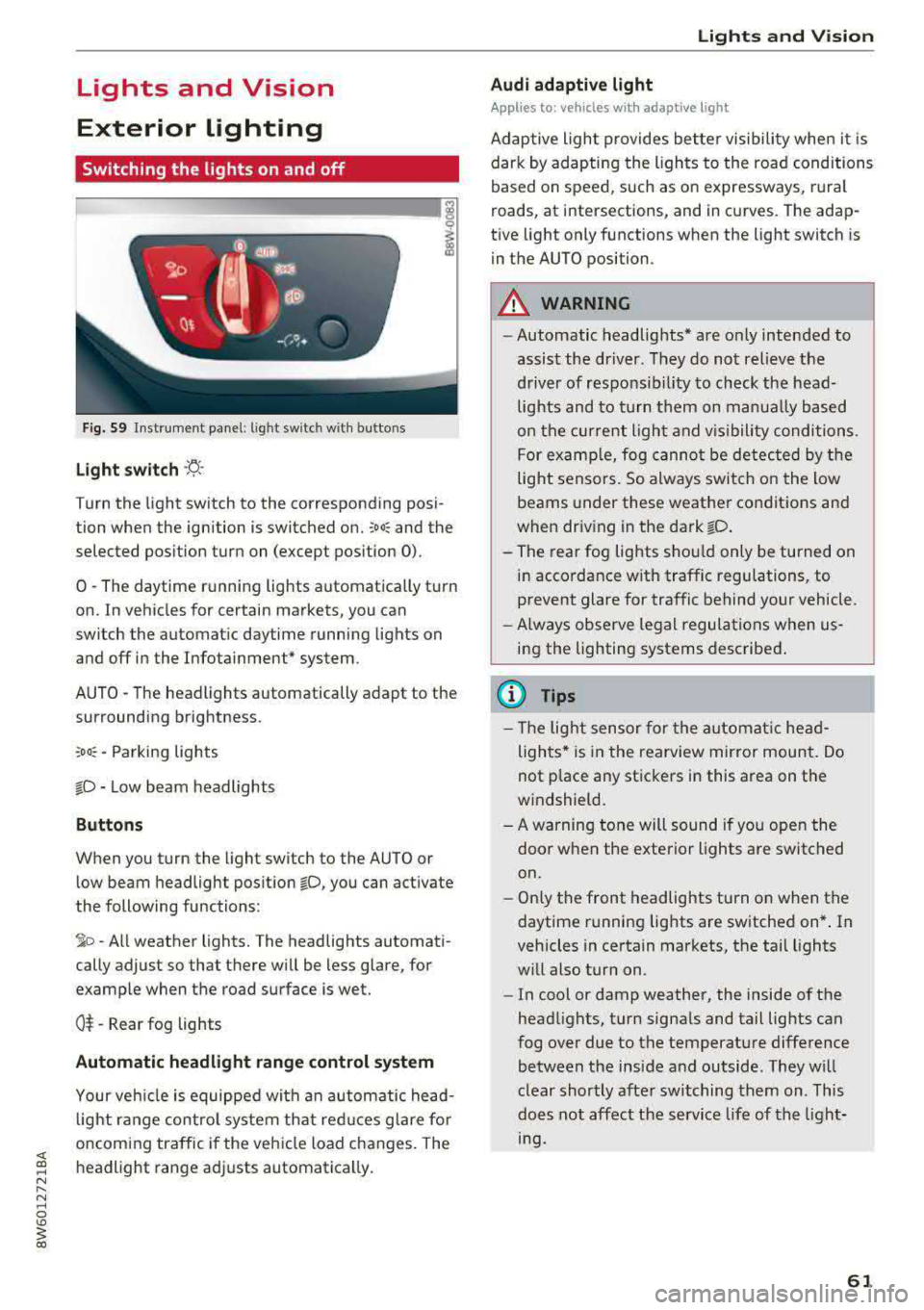
Switching the lights on and off
--- ----~------'~
i
Fig . S9 Instrument panel: l ig ht sw itc h w ith buttons
Light switch ·'!;5- ·
Turn the light sw itch to the corresponding posi
tion when the ignition is switched on.
~oo: and the
selected pos ition turn on (except pos ition 0).
0 · The daytime r unning lights automat ica lly t urn
on. In veh icles for certain markets, you can
switch the automat ic daytime running lights on
and
off i n the Infotainment* system.
AUTO
-T he headlights automatically adapt to the
surrounding brightness.
~oo : -Parking lights
io -Low beam headlights
Buttons
When you turn the light switch to the AUTO or
l ow beam headlight pos it ion
io, you can activate
the following functions:
~ o -A ll weat her lights. The headlights automati
cally adjust so that there w ill be less glare, for
examp le when the road surface is wet.
0$ -Rear fog lights
Automatic headlight range control system
Your veh icle is equippe d with an autom atic head
l ight range contro l system that re duces glare fo r
oncoming traffic if the vehicle load c hanges. The
headlight range ad justs automatica lly.
Lights and V ision
Audi adaptive light
Appl ies to: vehicles wit h adaptive light
Ad aptive ligh t provides be tter visibili ty when i t is
dark by adapting the ligh ts to the road condi tions
based on speed, such as on e xpressways, rura l
roads, at intersections, and in c urves. The adap
t ive light only functions when the light switch is
i n the AUTO position .
A WARNING
--Automatic headlights* are on ly intended to
assist the driver. They do no t relieve the
driver of responsibil ity to check the head
lights and to turn t hem on manu ally b ased
on t he cur ren t ligh t and v is ibility conditi on s.
F o r e xamp le, fog canno t be de tec ted by t he
light sensors. So always swit ch o n the low
beams under these weather co nditions and
when dr iv ing in the dark
io .
- The rear fog lights s hou ld only be turned on
in acco rdance w ith traffic regulation s, to
prevent glare for traffic behind your vehicle.
- Always observe le g al regulations when
us
ing the lighting systems desc ribed .
(D Tips
- The lig ht sen sor for the automat ic he ad
ligh ts* is in the rearview mir ror mount. Do
not p lace any st ickers in this area on the
windshield.
- A warning tone will sound if yo u ope n the
door whe n the e xte rior lights a re switched
on .
- Only t he front headlights turn on when t he
daytime running lights are sw itche d on* . In
vehicles in certain markets, the tail lights
w ill also turn on.
- In cool or damp weather, the inside of the
head lights, turn signa ls and tail lights can
fog over due to the temperature diffe rence
b etween the insi de and outside . They wi ll
clear shortly afte r swi tching them on . This
does n ot aff ect the service life of the light
mg.
61
Page 64 of 409
Lights and Vi sion
Turn signal and high beam lever
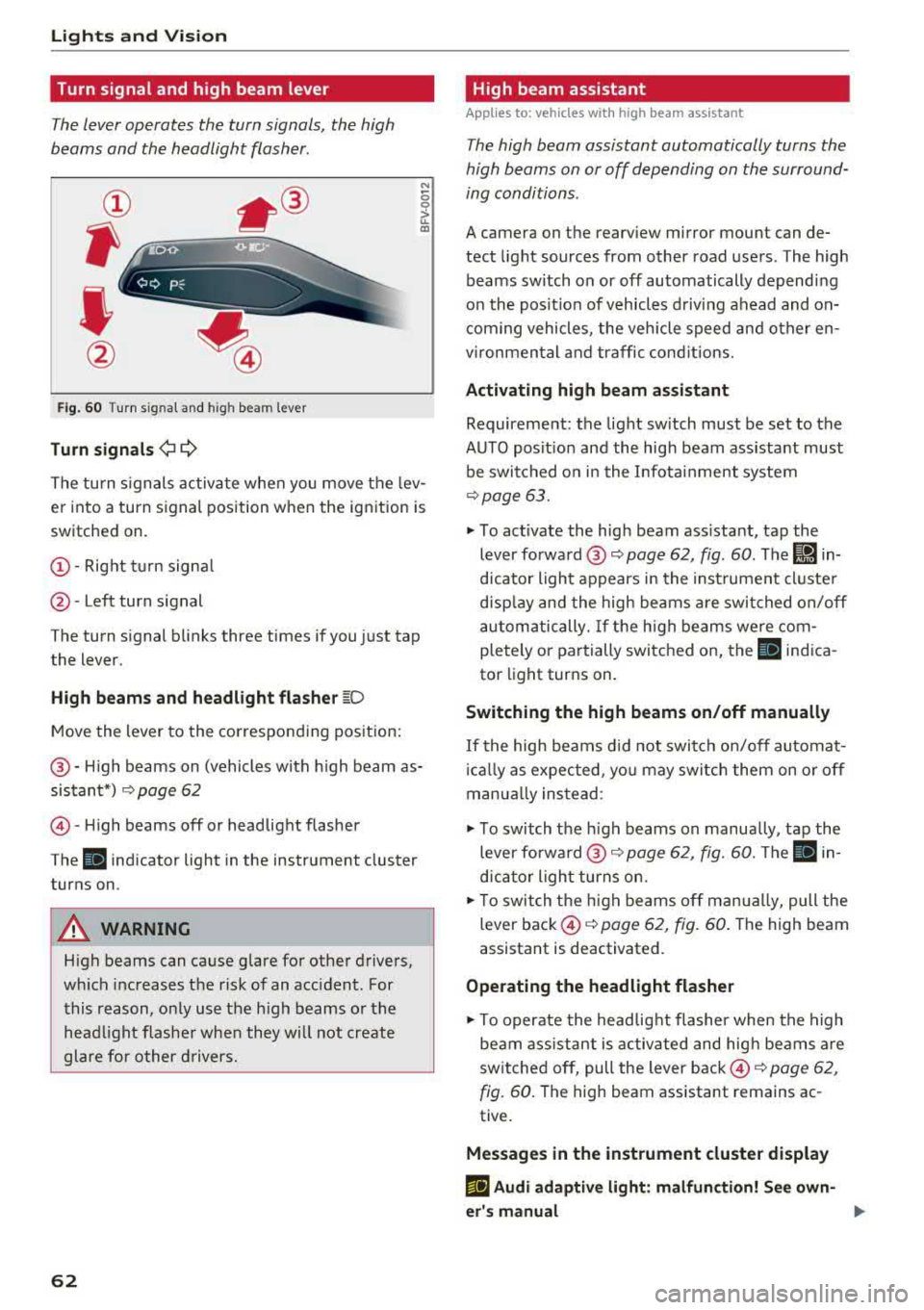
The lever operates the turn signals, the high
beams and the headlight flasher.
®
,
I
@
F ig . 60 Turn s ignal and high beam lever
Tu rn signals ¢ 9
N
0 0
> u. a,
The turn s ignals activate when you move the lev
er into a turn signal position when the ignition is
switched on.
@ -Right tu rn signa l
@-Left turn signal
The turn signal blinks three times if you just tap
the lever.
High b eams and h eadlight fl ash er ~D
Move the lever to the corresponding pos ition:
@ -High beams on (vehicles with h igh beam as
sistant*)
Q page 62
© -High beams off or headlight flasher
The
II indicator light in the instrument cluster
turns on.
A WARNING
High beams can cause glare for other drivers,
wh ich increases the risk of an accident. For
this reason, only use the h igh beams or the
head light f lasher when they will not create
glare for other d rivers.
62
· High beam assistant
Applies to: vehicles with high beam assistant
The high beam assistant automatically turns the
high beams on or off depending on the surround
ing conditions.
A camera on the rearview mirror mount can de
tect light sources from other road users. The high
beams switch on or off automatically depending
on the posit ion of vehicles d riving ahead and on
com ing vehicles, the veh icle speed and other en
vironmental and traffic cond itions.
Activ ating high b eam assistant
Requirement: the light sw itch must be set to the
AUTO posit ion and the high beam ass istant must
be switched o n in the Infota inment system
¢page 63.
~ To activate the high beam ass istant, tap the
lever forward @
c:> page 62, fig. 60 . The I!) in
dicator light appears in the inst rument cluste r
disp lay and the high beams a re swit ched on/off
automatically. If the h igh beams we re com
pletely or partially switched on, the II indica
tor light turns on.
Switching the high beams on /off manually
If the high beams d id not switch on/off automat
i ca lly as expected, yo u may switch them on or off
manua lly ins tead:
~ T o switch the h igh beams on manually, tap the
lever forward @
Q page 62, fig. 60. The Ill in
dicator light turns on.
~ T o switch the h igh beams off man ua lly, pull the
lever back ©
c:> page 62, fig. 60 . The high beam
assistant is deactivated.
Ope rating the headlight flasher
~ To operate the head lig ht flashe r when the high
beam ass istant is activated and hig h beams are
switched off, pull the lever back ©
c:> page 62,
fig. 60 .
The high beam assistant remains ac
tive.
Message s in the instrument cluster display
rlJ Audi adaptiv e light : malfun ction! See own
e r's manual
...
Page 65 of 409
• Headlight assista nt: m alfun cti on! See own
e r's manual
Drive to an autho rized Aud i deale r or a uthorized
Aud i Service Facility immedia tely to have the
malfunct ion corrected. You can still switch the
high beams on or off manually.
• Headlight a ssi stant : currently unavailabl e.
C amera view re stricted due to surrounding s.
See owne r's manual
The camera view is b locked, fo r example by a
sticker o r debris.
The sensor is located between the interior rear
view mirror and the windshield . Do not place any
stickers in th is area on the wi ndsh ield .
& WARNING
High beam assistan t is only i ntended to assist
the drive r. The dr iver is still responsible for
controlling the headlights and may need to
switch them on and off manually depend ing
on light and visibility conditions. It may be
necessary to ope rate them manually in s itua
tions such as:
- In adverse weather conditions such as fog, heavy ra in, b low ing snow or spraying water .
- On roads where oncoming traffic may be
partially obsc ured, such as expressways.
- When there are road users that do not have
su fficient lighting, s uch as bicyclers or
vehicles with dirty ta il lamps.
- In tight cu rves and on steep hills .
- In poorly lit areas.
- Wi th strong ref lec to rs , such as s igns.
- If the area of the windsh ield near the senso r
is f ogged ove r, dirty, icy or covere d wi th a
st icker.
Adjusting the exterior lighting
The functions ore adjust ed in the Infotainment
system.
• Select in the Info tainment system : IM ENUI but-
~ ton >Vehicle > left contro l button > Vehicle ~
~ setting s> Exterior lighting . N ~ 0
'° ~ co
Lights and Vision
Automatic headlights
You can adjust the following se ttings in the Au
t o matic headlights
menu :
Activation tim e -you can adjust if the headlights
switch on
Early , Medium or Late accord ing to the
sensit ivi ty of the light sensor .
Headlight assistant * -you can switch the high
beam assistant* on and off.
Entry /exit lighting
When it is dark, the Ent ry /e xit lighting ill umi
nates the area around the vehicle when unlocking
the vehicle and after switching off the ignit ion
and opening the dr iver's door .
The
Entry /exit lighting only works when it is
dark and the light sw itch is in the
AUTO position.
Daytime running l ight s
USA model s:
the daytime running lights can be
switched on/off . Sel ect
On or Off.
Canad a model s:
this f unction canno t be switched
off. They activate automatically eac h time the ig
nition is switched on .
Emergency flashers
-- ---
] -~ ~-
--------
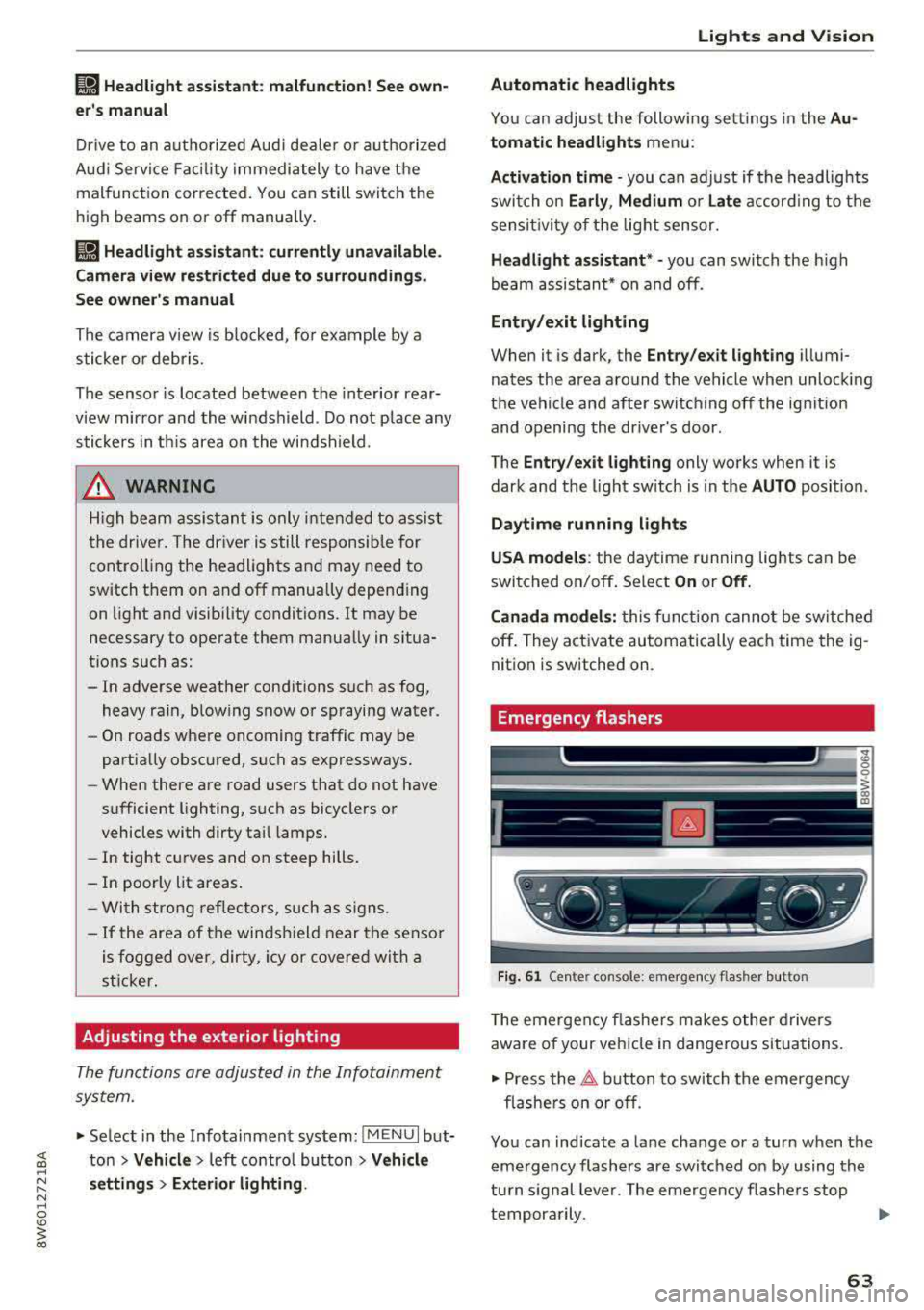
Fig . 61 Ce nte r con so le: emergency flas her butto n
T he emergen cy flashe rs makes othe r d rivers
aware of your vehicle in dangerous situat ions.
• Press the 11 b utton to switch the emergency
flashe rs on or off .
You can ind icate a lane change or a turn when the
eme rgency flashers are switched on by using the
tu rn s ignal lever. The emergency flashe rs stop
tempora rily.
.,.
63
Page 66 of 409
Lights and Vision
The emergency flashers also work whe n the igni
tion is turned off.
@ Tips
You s hou ld sw itch the emergency flashers on
if:
- you are the last car in a traff ic jam so that
a ll other vehicles approaching from behind
can see you, or if
- your ve hicle has bro ke n down or you are
having an eme rgency, or i f
- you r vehicle i s being towed or if yo u are tow
ing another vehicle
Interior lighting
Front interior lighting
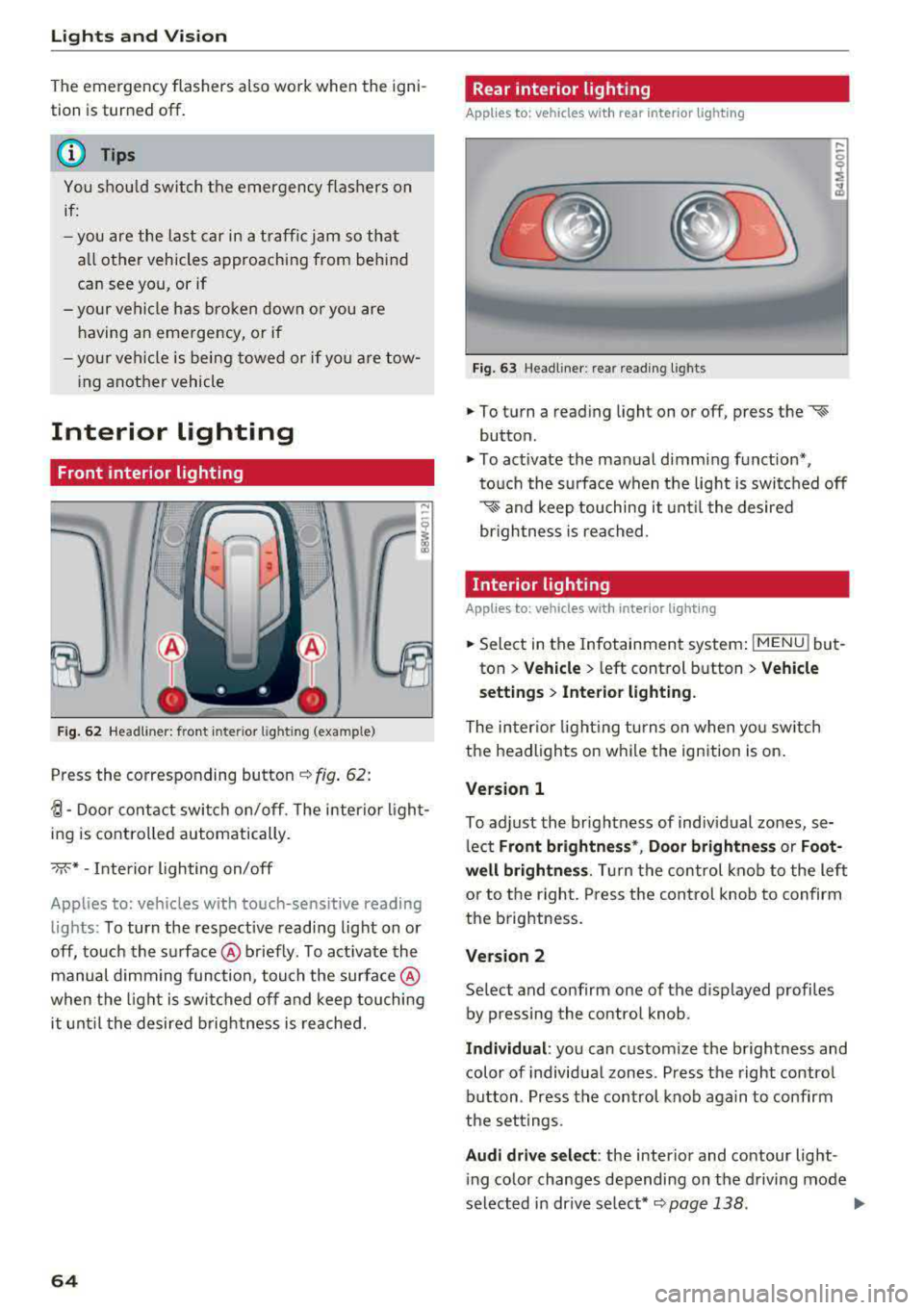
F ig. 62 Headliner: front inter ior l ight ing (example)
Press the corresponding button c::> fig . 62:
~-Door contac t switch on/off. The interior ligh t
ing is controlled automatically.
->;<-* -Inte rior l ighting on/off
Applies to: vehicles with touch-sensitive reading
lights: To turn the respect ive reading light on or
off, touch the surface @ briefly . To activate the
manual dimming function, touch the surface @
when the light is swi tched off and keep touching
it unt il t he desired brig htness is reached.
64
Rear interior lighting
Applies to: vehicles with rear interior lighting
Fig. 63 Headline r: rear reading lights
.,. To turn a reading light on or off, press the «~
button .
.,. To activate the ma nual dimming f unction*,
t o uch the s urface when the light is swi tc h ed off
'* and keep touching it unt il the desired
brightness is rea ched.
Interior lighting
Applies to: vehicles with interior lighting
.,. Select in the Infotainment system : IMENUj but
ton
> Vehicle > l eft control b utton > Vehicle
s etting s
> Interior lighting.
The inter io r l ight ing turns on when you sw itch
the headlights on w hile the ignition is on.
Version 1
To adjust the brightness of indiv idual zones, se
l ect
Front brightne ss*, Door brightnes s or Foot
well brightness .
Tur n the control kno b to the left
or to the right. Press the con trol knob to confirm
the b rightness.
Version 2
Se lect and confirm one of the d isplayed p rofiles
by pressing the con tro l knob.
Individual : you can custom ize the brightness and
color of individual zones. Press the right contro l
button. Press the control knob aga in to confirm
the set tings .
Audi driv e sel ect : the interio r and contour lig ht
i ng color changes depending on the d riving mode
selected in dr ive se lect*
c::> page 138 . ..,.
Page 67 of 409
@ Tips
The setting is automatica lly stored and as
signed to the remote control key that is be ing
used.
Instrument illumination
The brightness of the illumination for the instru
ments, display and head-up display* con be ad
justed.
Fig. 64 Instrument illum inatio n
~ Press the knob to release it.
~ Turn the knob toward "-" or"+" to reduce o r in
crease the brightness.
~ Press the knob again to return it to its original
position .
(D Tips
Depending on vehicle equ ipment, the instru
ment illumination (needles and gauges) may
turn on when the lights are off and the igni
tion is sw itched on. The illumination for the
gauges reduces automat ica lly and eventually
turns off as brightness outside increases. This
function reminds the driver to turn the low
beams on at the appropr iate time .
Lights and V ision
Vision
Adjusting exterior mirrors
Fig. 65 Driver's door: knob for the exterior mirrors
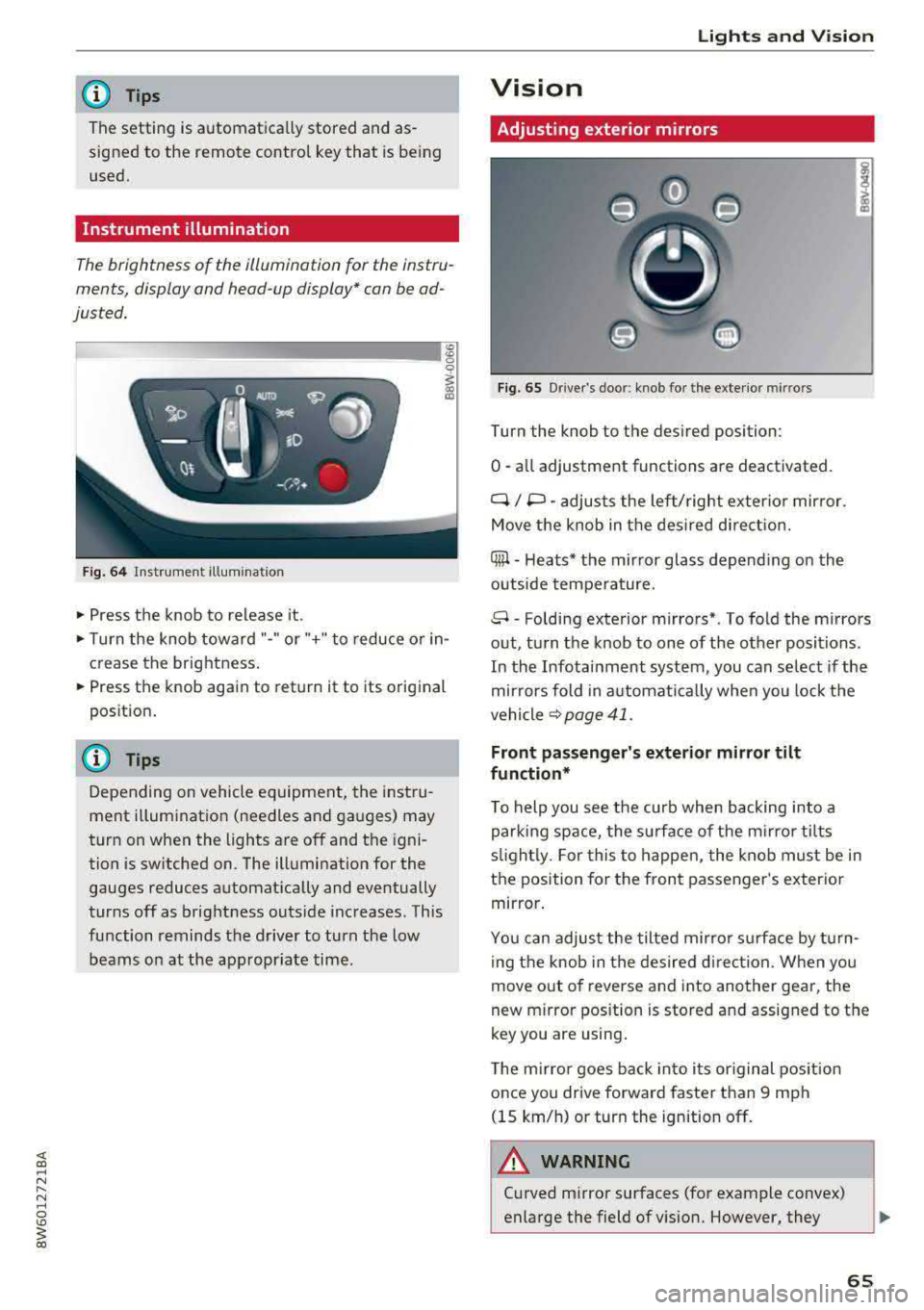
Turn the knob to the des ired position:
0
-a ll adjustment functions are deactivated.
q / P -adjusts the left/ right exter io r mirror.
Move the knob in the des ired direct ion.
Qiµ -Heats* the mirror glass depend ing on the
outside tempe rature.
8 -Folding exterior mirrors*. To fold the mirrors
out, turn the knob to one of the other positions.
In the Infotainment system, you can se lect if the
mir rors fold in a utomat ically when you lock the
vehicle
~ page 41.
Front passenger's exterior mirror tilt
function*
T o help you see the curb when backing into a
parking space, the surface of the mi rro r tilts
s lightl y. For this to happen, the knob must be in
the position for the front passenger 's exterio r
mirror .
You can adjust the tilted mirror s urfa ce by turn
i ng the knob in the desired direct ion. When you
move out of reverse and into another gear, the
new m irror pos ition is stored and assigned to the
key you are using .
The mirror goes back into i ts or iginal pos ition
once you drive forward faster than 9 mph
(15 km/h) or turn the ignition off .
.&_ WARNING
-C urved mirror surfaces (for example convex)
enlarge the field of vision. However, they
65