roof AUDI A5 COUPE 2018 User Guide
[x] Cancel search | Manufacturer: AUDI, Model Year: 2018, Model line: A5 COUPE, Model: AUDI A5 COUPE 2018Pages: 409, PDF Size: 67.63 MB
Page 127 of 409
<( a, .... N ,....
N .... 0 \0
3 a,
This message appears if you would like to switch
the system on and there is a stationary object di
rectly in front of your vehicle .
Door open
The system is not ava ilable when the door is
open.
Audi pre sense
Introduction
App lies to: vehicles with Audi pre sense
Within the limits of the system, the pre sense
functions can initiate measures in particularly
dangerous situations to protect the vehicle pas
sengers and other road users.
- Due to the interlinking of various vehicle sys
tems, critical driving situations can be detected by
pre sense basic and measures for preventa
t ive occupant protection are can be initiated .
- The
pre sense front system uses the data from
the adaptive cruise control* radar sensors and
the camera to calculate the probability of a col
li sion. Within the limits of
the system, an im
pending collision with vehicles can be detected
in both urban and rural speed ranges. In this
case, the system warns the driver visually,
acoustically and with a jerk on the brakes if nec
essary. If needed, it can initiat e a partial or full
deceleration to reduce the collision speed or to
avoid the collision under certain circumstances .
I n conjunction with pre sense basic/rear, the
front safety belts are also revers ibly tensioned
when needed . The pre sense front is also active
when adapt ive cruise control* is switched off .
-Pre sense rear contains pre sense basic func
tions. It uses the data from the side assist* ra
dar sensors and calcu lates withi n the limits of
the system the probability of a rear end coll i
sion with the vehicle beh ind you. Pre sense rear
is also active when side assist* is switched
off.
- Within the limits of the system, pre sense city
uses the camera data and can detect an im
pending collision with vehicles and pedestrians.
In this case, the system warns the dr iver visual
ly, acoustically and with a jerk on the brakes if
necessary. If needed, it can initiate a full decel
eration to reduce the collision speed or to avoid
Assistance systems
the collision under certain circumstances. In
conjunction with pre sense basic/rear, the front
safety belts are a lso reversibly tens ioned when
needed .
A WARNING
Read the genera l information in c:>&. in Gen
eral information on page 114,
c:> &. in Gener
al information on page 135.
(D Tips
- Certain pre sense functions switch off when driving in reverse.
- The pre sense functions may not be availa ble if there is a malfunction in the ESC sys
tem or the airbag control module.
- Note that the reversible belt tensioner on
the front passenger's side deactivates when
the front passenger's airbag is deactivated .
- Switch the pre sense
off when you a re not
using public streets or when loading the ve
hicle onto a vehicle carrier, tra in, sh ip or
other type of transportat ion. This can pre
vent an undesired inte rvention from
the pre
sense system.
Audi pre sense basic
Description
Applies to : vehicles with Audi pre sense basic
The pre sense basic functions are activated at a
speed of approx imately 20 mph (30 km/h) or
higher .
The following functions can be triggered under certain conditions within the limits of the sys
tem:
- Tensioning of the safety belts (for examp le,
during heavy braking): the front safety belts have reversible belt tensioners . If a collision
does not occur, the safety belts loosen slightly
and are ready to trigger aga in .
- Closing the windows and sunroof* .
-
125
Page 128 of 409
Assistance systems
-Activating the emergency flashers l) .
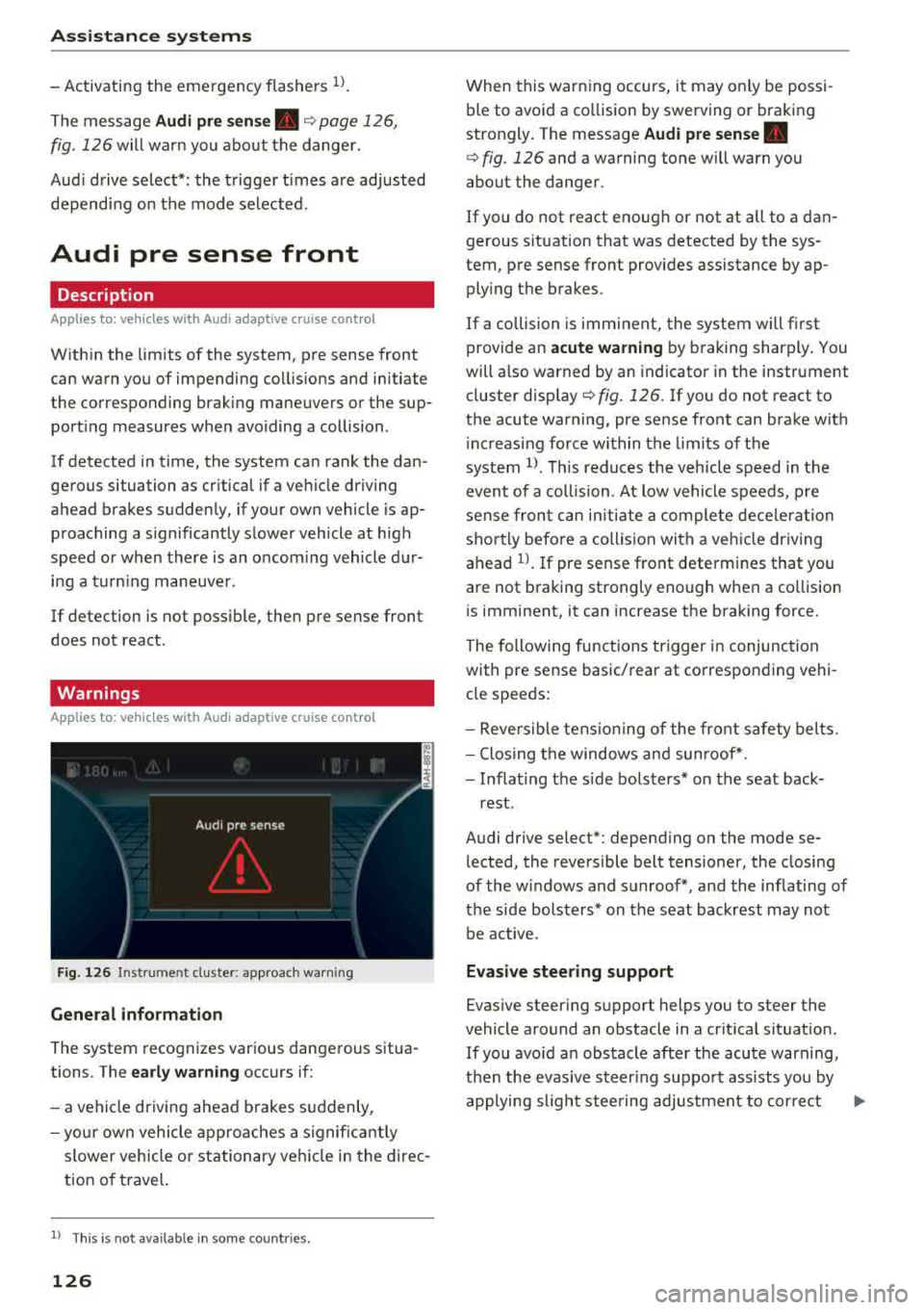
The message Audi pre sense. ¢ page 126,
fig. 12 6 will wa rn you abo ut the danger.
Aud i d rive select *: the t rigger t imes are adjusted
dependi ng on the mode selected.
Audi pre sense front
Description
A ppl ies to: ve hicles w ith Audi a daptive cruise co ntrol
W ith in the limits of the system, pre sense front
can warn you of impending coll is ions and initiate
t he corresponding brak ing maneuvers or the sup
port ing measures when avo iding a collision .
I f detected in time, the system can rank the dan
ge rous situation as cr itical if a ve hicle driving
a head brakes s udden ly, if your own vehicle is ap
p roaching a s ignificantly s lower vehicle at high
speed or when there is an oncom ing vehicle d ur
i n g a t urning maneuve r.
If detection is not poss ible , the n pre sense front
does not react .
Warnings
App lies to: ve hicles w ith Audi a daptive cruise co ntro l
F ig . 126 In strum ent cl uste r: appro ach warn ing
General information
The system recognizes var ious dangerous situa
tions. The
early warning occurs if:
-a veh icle d riving ahead brakes s uddenly,
- yo ur own vehicle ap pro aches a signific antly
s lower vehicle o r stationary ve hicle in the direc
tion o f travel.
l) Thi s is not a va ilab le in some co untri es .
126
When this warn ing occurs, i t may o nly be pos si
ble to avo id a co llision by swerving o r braking
strongly . T he message
Audi pre sense.
¢ fig. 126 and a wa rning tone will warn you
about the danger .
If you do not react enough or not at all to a dan
gerous s ituat ion that was detected by the sys
tem, pre sense front provides assistance by ap plying the b rakes.
If a collision is imminent, the system will fi rst
provide an
acute warning by b raking sharply . You
will a lso warned by an indicato r in the instrument
cluster
disp lay¢ fig. 126. If yo u do not react to
the acute warning, pre se nse front can bra ke w it h
i nc reas ing force wi thin the lim its o f th e
system
1> . Thi s reduc es the v ehicl e spe ed in t he
even t of a collision . At low vehicle s peeds , pre
s ense fr on t can initi ate a com plete dece le rat ion
sho rtly befo re a collision with a veh icle dr iv ing
ahead
l ) . If pre sense front determines that you
a re not b raking st rongly enough when a co llision
i s imminent, it can increase t he b raking force.
The followi ng func tions trigge r in conjunc tion
with pre sense basic/ rear at corresponding vehi
cl e speeds :
-Reversible tens io nin g of the front s afety bel ts.
-Clos ing t he windows and sun roof* .
-Infla ting t he side bols ters* on the seat back-
rest .
Audi drive select* : depending on the mode se
l ected , the reversible belt tensioner, the closing
of the windows and s unroof*, and the inflating of
t h e side bolste rs* on the seat backrest may not
be active.
Evasive steering support
Evas ive steering s upport helps you to steer the
vehicle around an obstacle in a crit ica l sit uat io n.
If you avo id a n obs tacle afte r the acu te warning,
t he n th e evasive ste ering suppo rt assists you by
applying slight stee ring adjus tment to corre ct
.,..
Page 129 of 409
<( a, .... N ,....
N .... 0 \0
3 a,
your steering wheel ang le as long as you a re ac
tively steer ing . Evasive steering support is availa
ble at speeds between approximately 20 mph
(30 km/h) and 90 mph (150 km/h).
Tu rn as sist
When starting to drive a nd up to speeds of maxi
mum
6 mph (10 km/h), the turn assist uses a
braking intervention to prevent your vehicle from
colliding with an oncoming vehicle when tu rning
left or right (available in certain countries). The
braking intervention causes your vehicle to stay
in its lane.
A WARNING
- Pre sense front cannot overcome the laws of
physics . It is a system des igned to assist and
it cannot prevent a collision in every circum
stance. The drive r must always i nte rvene.
T he driver is always responsib le for b raking
at the correct time. Do not let the increased
safety provided tempt you into taking risks .
This cou ld increase your risk of a collision .
- The system can deploy incorrectly due to
system-specific limits .
- Please note that the sensors and the camera
do not always detect all objects or lane
markings. This increases the risk of an acci
dent .
- Pre sense front does not react to people, an
imals or objects that are cross ing the veh i
cle's path or that are difficu lt to
detect¢ &
in General information on page 114 .
-Reflective objects such as guard rails or the
entrance to a tunnel, heavy rain and ice can
affect the function of the radar sensors and
the system's ability to detect a collis ion risk .
@:) Note
The sensors can be displaced by impacts or
damage to the bumper, whee l housing and
underbody. Pre sense front can be impa ired
by this . H ave an autho rized Aud i dealer or au
thorized Audi Service Fac ility check their func
tion .
l) Th is is no t a va ilable in som e countries.
A ss ista nce sys te m s
{!) Tips
-You can cancel the braking with increasing
force that is initiated by the system by brak
ing yourself, by acce lerating noticeably or
by swerving.
- Keep in mind that pre sense front can brake unexpectedly. Always secure any cargo or
objects that you are transporting to reduce
the risk of damage or injury.
- Certa in pre sense front funct ions are switch
ed off when the ESC is limited or switched
off
Q page 152.
Audi pre sense rear
Description
Appl ies to: vehicles with Aud i s ide ass ist
If the risk of a collision with a vehicl e a h ead is de
tected, the fo llowing functions can be triggered:
- Reversible tensioning of the front safety belts
at the corresponding speeds .
- Closing the windows and sun roof* .
- I nflat ing the side bolsters* on the seat back-
rest.
- Activating the emergency flashers with in-
creased frequency
l).
The message Audi pr e sense. ¢ page 126,
fig . 126
will warn you about the danger .
Audi drive select*: the function is not act ive de
pending on the mode selected.
A WARNING
-~
- To reduce the r isk of an accident, please
note that the s ide ass ist* radar sensors do
not always detect every object.
- Pre sense rear does not react to people, ani
mals or objects that are c rossing the vehi
cle's path o r th at are d ifficul t to detect.
- Reflective objects such as guard ra ils, heavy
rain and ice ca n impair the function of the
radar sensors and the ability to detect a col-
lision risk.
~
127
Page 130 of 409
Assistance systems
CJ) Note
The radar sensors can be displaced by impacts
or damage to the bumper, wheel housing and
underbody. Pre sense rear can be impaired by
this. Have an authorized Audi dealer or au
thorized Audi Service Fac ility check their func
tion.
(D Tips
- The pre sense rear functions switch off
when towing a trailer.
- The pre sense rear functions may also
switch off if there is a malfunction in the
side assist* system.
Audi pre sense city
Description
A ppl ie s to: ve hicles w ith Aud i p re se nse c ity
Within the limits of the system, pre sense city
can warn you of impending collisions with
vehicles and pedestrians and initiate the applica
ble braking maneuver if needed. Pre sense city is
active at speeds of approximately 6 mph (10 km/ h) and higher .
A pedestrian warning can occur at speeds up to
SO mph (85 km/h), and vehicle warnings can oc
cur at speeds up to 155 mph (250 km/h). A pre
sense city braking maneuver is poss ible at speeds
up to SO mph (85 km/h).
Warnings
A ppl ies to: ve hicles w ith Aud i p re sense c ity
The system recognizes various dangerous situa
tions. The
early warning occurs if:
- a veh icle driving ahead brakes suddenly,
- your own vehicle approaches a significantly
slower vehicle or stationary vehicle in the direc
tion of travel.
- a pedestrian is standing in the lane or is moving
into the lane .
When this warning occurs, it may only be possi
ble to avoid a collision by swerving or braking
strongly . The message
Audi pre sense.
128
¢ page 126, fig. 126 and a warning tone will
warn you about the danger.
Additionally, a jerk on the brakes may occur as an
acute warning when there is an impending colli
sion . If you do not react to the acute warning, pre
sense city can brake to the point of complete de
ce leration within the limits of the system . This
reduces the vehicle speed in the event of a colli
sion. The message
Audi pre sense. also ap
pears.
The following functions are triggered in conjunc
tion with pre sense basic/rear :
- Reversible tensioning of the front safety belts.
- Closing the windows and sunroof* .
- Inflating the s ide bolsters* on the seat back-
rest.
Audi drive select*: the function is not active de
pending on the mode selected .
&_ WARNING
- Pre sense city cannot overcome the laws of
phys ics.
It is a system designed to assist and
it cannot prevent a collision in every circum
stance. The driver must always intervene.
The driver is always responsible for braking
at the correct time. Do not let the increased
safety provided tempt you into taking risks .
This could increase your risk of a collision.
-The system can dep loy incorrectly due to
system-specific limits.
-To reduce the risk of an accident, please
note that the camera does not always detect
every object.
-Pre sense city does not react to animals,
crossing or oncoming vehicles, objects such
as bars, railings or railcars, and objects that
are difficult to detect
c:> &. in General infor
mation on page 114.
-In trailer mode, the braking behavior of the
trailer can be d ifferent than usual during au
tomatic braking.
&_ WARNING
Pre sense city may be restr icted or not ava ila
b le in the following example situations:
- in heavy fog, rain, spray or snow
Page 173 of 409
Voice recognition system Operating
Appl ies to: veh icles wit h vo ice recog nitio n system
You con operate many Infotainment functions
conveniently by speaking .
Requirements: the ignition and the MM I must be
switched on
~page 158, the re must not be any
phone call in progress and the park ing system
must not be active.
~ Switching on : press the 51 button@
~ page 15, fig. 11 or~ page 16, fig. 13 briefly
on the mu ltifunction steering wheel and say
the des ired command after the
Beep .
~ Switching off : press and hold the 51 button.
Or: press the [2] butto n.
~ Pau sing : say the command Pau se . To resume,
press the
l2;J button .
~ Correcting : say the command Corre ction . Or :
simply say a new command during an an
nouncement
<=> page 251.
Input assistance
The system gu ides you throug h the input with
v isua l and audio feedbac k.
- Vi sua l input as sistan ce: after switching on
vo ice recogn it io n, a display w ith a selection of
poss ible commands appears. This command
display can be sw itched on o r off. Se lect:
IMENU I button> Setting s> left cont rol button
> MMI setting s > Speech dialog system .
- Audio input a ssis tance :
to have the poss ible
commands read, tu rn the voice recognition sys
tem on and say
Help.
For the s yst em to understand you:
Speak clearly and dist inctly at a normal vo lume .
Speak louder when d riving faste r.
Emphasize the words in the commands evenly
and do not leave long pauses .
C lose the doors, the windows and the sunroof* to
reduce background noise . Make sure that passen-
;;!; gers are not speaking when you are giving a voice
;::; command. ,....
N .... 0 \0
3
Do not direct the air vents toward the hands-free
microphone, which is on the roof headliner near
t h e front inte rior lights .
Only use the system from the dr iver's seat be
ca use the hands -free microphone is directed to
ward that seat.
Additional settings
Seer=;, page 251, Spee ch dialog system .
A WARNING
-Direct your full attention to dr iv ing. As the
driver, you have complete responsibility for
safety in traffic . Only use the functions in
such a way that you a lways maintain com
p lete contro l over your vehicle in all traffic
situations.
-Do not use the voice recognition system in
emergencies beca use your voice may change
in stressful situations. It may take longer to
d ial the number or the system may not be
able to dial it at all. Dial the emergency
number manually.
@ Tips
- The d ialog pauses when there is an incom
ing phone call and will continue if you ig
nore the call. The d ialog ends if you answer
the ca ll.
- You can select an item in the list using ei
ther the vo ice recognit ion system or the
cont rol knob .
Command overview
information
Appl ies to: ve hicles w ith vo ice recognit ion system
T he following overv iews describe the comma nds
t h at can be used to operate the MMI using the
voice recognition system.
Alte rnative commands a re separate d using
a"/",
for example say: Telephone / (or) Navigation /
(or) Radio.
Sequences of commands used to perfo rm an ac
t ion are iden tified w it h
a"> ", fo r ex ample say:
Ente r addre ss > (t hen) Enter country /state . ..,.
171
Page 191 of 409
using the Ringtone function. Select and confirm
an entry from the list . For the
Ringt one volume /
Mess age volume
sett ings, see c::> page 256 . The
Microphone input le vel can be adjusted during a
phone call using the control knob.
@ Tips
- Several cell phones can be paired to the
MMI, b ut only two* cell phones can be ac
tively connected.
- To delete all paired Bluetooth devices, the
Blu etooth function can be reset to the fac
tory default sett ings
c::> page 252.
Additional options
~ Se lect: I MENU I button> Tel ephone > right co n-
t rol button .
Connection man ager
See c::> page 252.
Blu etooth setting s*
See q pag e 2 54.
Online settings*
See <=:> page 254 .
Wi-Fi setting s*
See c::, page 19 7, Wi-Fi hotspot .
Directory settings
Applies to: ve hicles with telephone
~ Select : I MENU I button> Telepho ne > left con
trol button >
D irector y> right control button>
Directory setting s.
Memor y cap acity
Shows the Memo ry cap acity for the directory.
You can manage up to 17 ,000 contacts with the
d irectory. You can load up to 4,000 contacts
from your cell phone into each directory. You can
also import up to 1,000 contacts from a storage
device.
Teleph one
Sort order
You can sor t the contacts in your d irectory alpha
be tica lly according to
la st name or First name .
Import contacts /Export contacts
See c::> page 188 .
Download direct ory
To update the contacts in the MMI, you can man
ually download your cell phone contacts. De
pending on the cell phone, the Bluetooth connec
t ion may need to be disconnected and reconnect
ed to update the contacts .
Hide cont act s without phone number
When this funct ion is switched on~. contacts
that do not have any numbers assigned to them
will be grayed out i n the directory .
Safety belt microphone
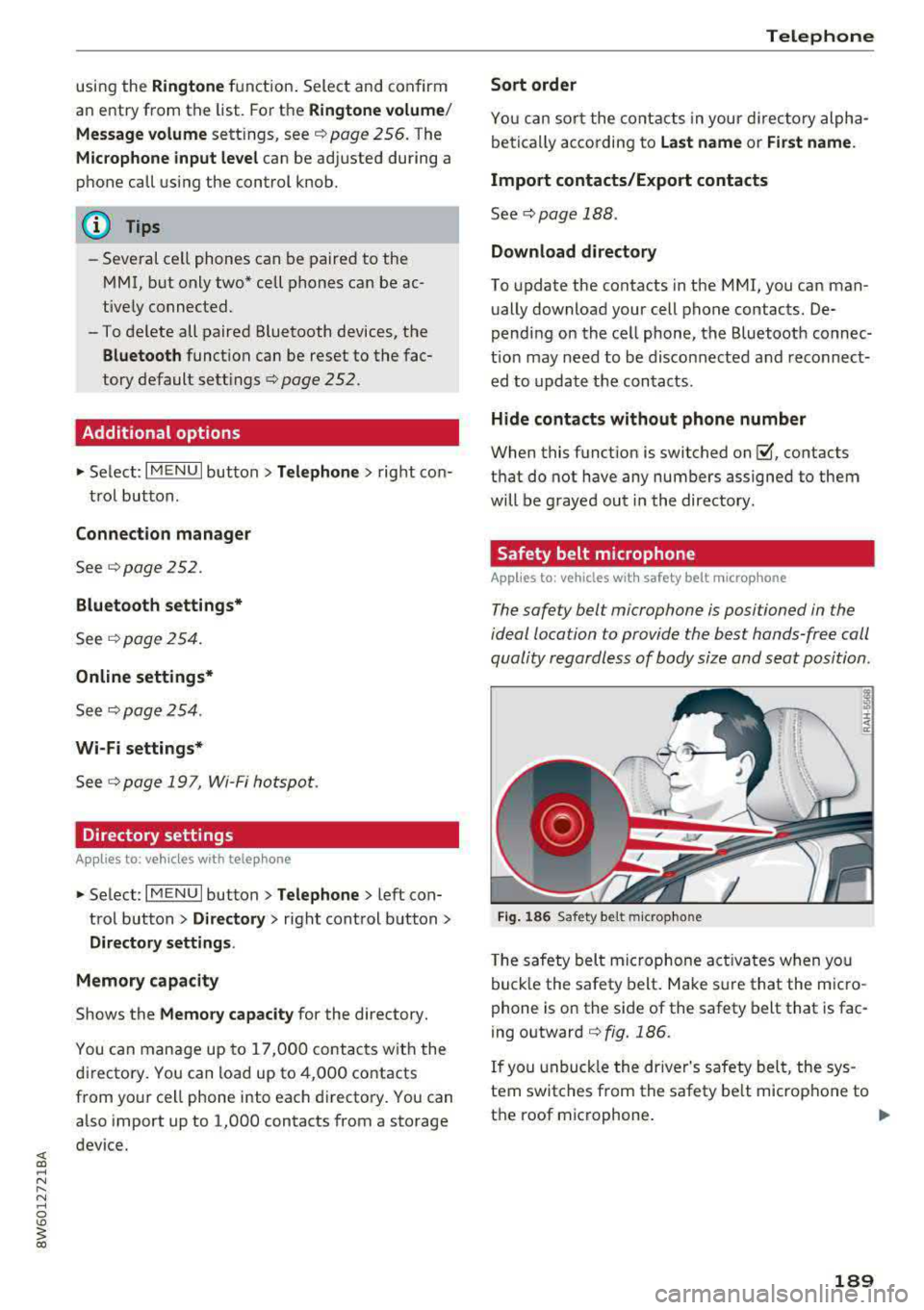
Applies to: vehicles wit h safety belt microp hone
The safety belt microphone is positioned in the
ideal location to provide the best hands-free call
quality regardless of body size and seat position .
Fig . 1 86 Safet y belt m icrop ho n e
T he safety belt mic rophone act ivates when you
buck le the safety belt. Make sure that the m icro
phone is on the side of the safety belt that is fac
ing outward
c::> fig. 186.
If you unbuck le the dr iver's safety belt, the sys
tem switches from the safety be lt microphone to
the roof microphone.
..,.
1 8 9
Page 227 of 409
Radio
Opening the radio
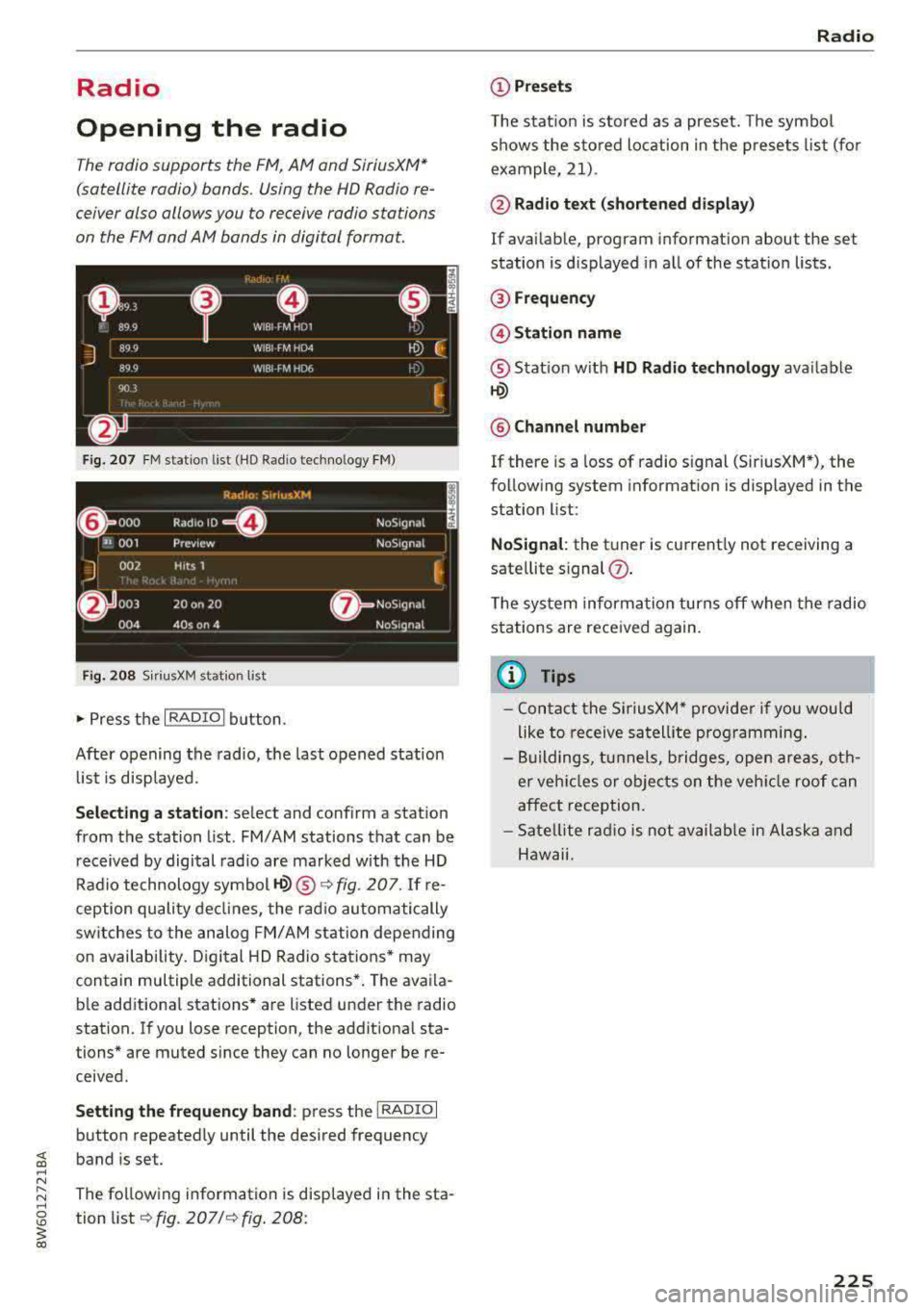
The radio supports the F M , AM and SiriusXM *
(satellite radio) bands. Using the HO Radio re
ceiver also allows you to receive radio stations
on the FM and AM bands in digital format.
Fig . 20 7 FM stat ion list ( HO Ra dio tec hn ology FM)
R.td10: SiriusXM
~ 000 ---=0---Radio ID , NoS19nal
... 001 Prev iew N oS19nal
J 002 H its 1
~
f) 003 20 on 20 N
oS19na l
004 40s on 4 NoS19nal
F ig. 208 S iri usXM station list
.. P ress the I RAD IO I bu tton.
Afte r opening the rad io, t he last opened station
lis t is disp laye d.
.
I
Selecting a station : select and confirm a stat io n
from the station list . FM/ AM stations t hat can be
received by digital rad io are ma rked w ith the HD
R adio technology symbol
tQ) ® ¢fig. 207. If re
ception quality decl ines, the r adio automatically
switches to the analog FM/AM station depe nding
on availability . D igi tal HD Radio s ta tions * may
contain multiple additional stations* . The ava ila
b le add itiona l stations* are listed under the radio
station. I f you lose reception, the add it iona l sta
tions* are muted since they can no longer be re
ceived.
Setting the frequency band : press the I RADIO I
button repeated ly until the desired frequency
band is set.
The follow ing information is displayed in the sta
tion
li st ¢ fig. 207 /¢ fig . 208:
Radio
(D Presets
The s tat ion is stored as a preset. The symbo l
shows the s to red lo cation in the prese ts list (fo r
example, 21).
@ Radio text (shortened display )
If avai lab le, program information about the set
station is d isplayed in a ll of the statio n lists.
@ Frequency
@Station name
® Stat io n w ith HD Radio t echnolog y available
tQ)
® Channel number
If there is a loss of radio signal (Sir iusXM*), the
fo llowing system in format ion is displayed in the
station list:
NoSignal : the tu ner is cu rrent ly not receiving a
sate llite s ignal
(j) .
The system informa tion turns off when the radio
st ations are rece ived again.
(D Tips
- Con tact the SiriusXM" provide r if you would
like to receive sa tel lit e programming .
- B uilding s, tu nnels, b ridges, open area s, oth
er veh icles or objects o n the veh icle roof can
affect reception.
- Satel lite ra dio is not availab le in Alaska and
Hawaii.
225
Page 265 of 409
Driving sa fe ty
Loose items in the luggage compartment can
shift s udden ly, changing vehicle handling charac
ter istics . Loose items can also increase the risk of
serious personal in jury in a sudden vehicle
ma
neuver or in a coll is ion.
.,. Distribute the load evenly in the luggage com
partment .
.,. Always place and properly secure heavy items in
the luggage compartment as low and as far for
ward as possible
c> fig . 230 .
.,. Secure luggage us ing the tie-downs provided
¢ page 79 .
.,. Make su re that the rea r seatbac k is securely
latched in place .
A WARNING
Improperly stored luggage or othe r items can
fly through the vehicle causing serious per
sonal injury in the event of hard braking or an
accident . To help reduce the risk of serious
personal injury :
- Always put objects, for example, luggage or
other heavy items in the luggage compart
ment.
- Always sec ure objects in the luggage com
partment using the tie-down eyelets and
s u itable straps.
A WARNING
Heavy loads will influence the way your vehi
cle handles . To he lp reduce the r isk of a loss
of contro l leading to serious pe rsonal i njury:
- Always keep in mind when transporting heavy objects, that a change i n the center of
grav ity can also cause changes in vehicle
hand ling:
- Always distr ibute the load as even ly as
possible.
- Place heavy objects as far forward in the
luggage compartment as poss ible.
- Never exceed the Gross Axle Weight Rating
o r the Gross Vehicle Weight Rating specified
on the safety compliance sticker on the
front end of the driver's door. Exceeding permissible weight standards can cause the
vehicle to s lide and handle diffe rently .
264
-Please observe info rmation on safe driving
¢page 258 .
A WARNING
To he lp prevent po isonous exhaust gas from
being drawn into the vehicle, always keep the
rear lid closed while driving.
- Never transport objects larger than those
fitting completely into the luggage area be
cause the rear lid cannot be fully closed .
- If you absolutely must dr ive with the rear lid
open, observe the following notes to reduce
the risk of poisoning :
- C lose all windows,
- Close the s unroof*,
- Close the power top*,
- Open all a ir outlets in the instrument pan -
el,
- Switch off the air reci rculat ion,
- Set the fresh air fan to the highest speed.
A WARNING
-
Always make sure that the doors, all win
dows, the sunroof*, the power top * and the
rear lid are securely closed and locked to re
duce the risk of in jury when the veh icle is not
being used.
-After clos ing the rear lid, always make sure
that it is properly closed and locked .
- Never leave your veh icle unattended espe
cially wi th the rear lid left ope n. A child
could crawl into th e vehicle th rough the lug
gage compa rtment and close the rea r lid be
comi ng trapped and u nable to ge t out. Be
ing trapped in a vehicle can lead to ser ious
pe rsonal inj ury.
- Never let c hild ren p lay in o r around the vehi
cle.
- Never let passenge rs ride in the luggage
comp artment. Vehicle occu pants mus t
al
ways be proper ly restrained in one of the ve
hicle's seat ing pos itions.
(D Tips
- Air circu lation helps t o reduce w indow fog
ging . Stale air escapes to the o uts ide
Page 281 of 409
Airbag syste m
the electronic control unit¢ page 289, PASSEN
GER AIR BAG
OFF~; ON@ light.
A lways remember, a child safety seat or infant
carrier installed on the front seat may be struck
and knocked out of position by the rapid ly inflat
ing passenger's airbag in a fronta l co llision. The
airbag cou ld greatly reduce the effect iveness of
the child restraint and even seriously injure the
child during inflation.
For this reason, and because the back seat is the
safest place for ch ildren
-when properly restra in
ed according to the ir age and size
-we strong ly
recommend that children always sit in the back
seat
¢ page 302, Child safety.
A WARNING
A ch ild in a rearward-facing child safety seat
installed on the front passenger seat w ill be
ser iously injured and can be killed if the fron t
airbag infla tes
-even w ith an Advanced Ai rbag
System.
- T he inflating a irbag w ill hit the child safety
seat or infant carrier with great force and
will smash the chi ld safety seat and child
against the backrest, center armrest, door
or roof.
- Always install rear -facing child safety seats
on the rear seat .
- If you must install a rearward facing ch ild
safety seat on the front passenger seat be
cause of exceptiona l circumstances and the
PA SSENGER AIR BAG OFF ~; light does not
come on and stay on, immed iately install
the rear-fac ing ch ild safety seat in a rear
seat ing pos ition and have the airbag system
inspected by your authorized Audi dea ler.
- Forward-facing ch ild safety seats installed
on the front passenger's seat may interfere
with the deployment of the airbag and ca use serio us pe rsonal injury to the child.
A WARNING
If, in except ional circumstances, you must i n
stall a forward -facing chi ld res train t on the
front passenger's seat:
- Alw ays make sure the forward-facing seat
has been designed and ce rt ified by its man-
280
ufacturer for use on a front seat with a pas
senger front and side airbag.
- Never put the forward-facing child restraint
up against or very near the instrument pan
el.
- Always move the front passenger seat to
the highest posit ion in the up and down ad
justment range and move it back to the
rearmost posit ion in the seat's fore and aft
ad justment range, as far away from the a ir
bag as poss ible, before installing the for
ward-facing chi ld restraint.
- Always make sure that the safety be lt upper
anchorage is behind the ch ild rest raint and
not next to o r in front of the child rest raint
so th at the safety be lt will be p roperly posi
tioned.
- Ma ke sure that the
PASSENGER AIR BAG
OFF
~; light comes on and stays on all the
time wheneve r the ign it ion is switched on .
A WARNING
To reduce the risk of serious injury, make sure
that the PASSENGER AIR BAG OFF~; light
will be disp layed whenever a ch ild restraint is
installed on the front passenger seat and the
ignit ion is switched on.
- If the
PASSENGER AIR BAG OFF ~; light
does not stay on, perform the checks descri
bed
¢ page 289, Monitoring the Advanced
Airbag System.
- Take the child restra int off the front passen
ger seat and install it properly at one of the rear seat positions if the
PASSENGER AIR
BAG
OFF ~ light does not stay on .
- Have the airbag system inspected by your author ized Audi dealer immed iate ly.
- Always carefully follow instructions from
child restraint manufacturers when instal
ling child restra ints.
A WARNING
If, in exceptional ci rcumstances, you must in
stall a forward or rearward-fac ing child re-
stra int on the fron t passenger's seat:
..,.
Page 285 of 409
Airbag syste m
-If you are unrestrained, leaning forward, sit
ting sideways or out of position in any way,
your risk of injury is much higher.
- You will also receive serious injuries and
could even be killed if you are up aga inst the
airbag or too close to it when it inflates
-
even with an Advanced Airbag ¢page 277.
A WARNING
A child in a rearward-facing child safety seat
installed on the front passenger seat w ill be
ser iously injured and can be killed if the front
airbag inflates
-even w ith an Advanced Airbag
System.
- Although the Advanced A irbag System in
yo ur vehicle is designed to turn off the front
airbag when a rearward-facing child re
straint has been insta lled on the front pas
senger seat, nobody can absolutely guaran
tee that deployment is impossible in all con ceivable s ituations that may happen during
the useful life of your vehicle.
- The inf lating airbag will hit the child safety
seat or infant carrier with great force and
will smash the chi ld safety seat and child
against the backrest, center armrest, door,
or roof.
- Always install rearward-facing ch ild re
straints on the rear seat.
- If you must install a rearward fac ing ch ild
safety seat on the front passenger seat be
cause of exceptiona l circumstances and the
PAS SENGER AIR BAG OFF ~; light does not
come on and stay on, immed iate ly install
the rear-fac ing ch ild safety seat in a rear
seating position and have the airbag system
inspected by your authorized Audi dea ler.
A WARNING
If, in exceptional circumstances, you must in
stall a forward-facing chi ld restraint on the
front passenger's seat:
- Always make sure the forward-facing seat
has been designed and certified by its man
ufacturer for use on a front seat with a pas
senger front and side a irbag.
284
- Never put the forward-facing child restraint
up against or very near the instrument pan
el.
- Always move the front passenger seat to
the highest posit ion in the up and down ad
justment range and move it back to the rearmost posit ion in the seat's fore and aft
ad justment range, as far away from the a ir
bag as poss ible, before install ing the for
ward-facing chi ld restraint.
- Always make sure that the safety be lt upper
anchorage is behind the ch ild rest raint and
not next to o r in fron t of the child rest raint
so that the safety be lt will be properly posi
tioned.
- Always make sure th at there is noth ing on
the front passenger seat that will cause the
capacitive passenger detection system in
the seat to signal to the Airbag System that
the seat is occup ied by a person when it is
not, or to signal that it is occupied by some
one who is heavier than the person actually
sitt ing on the seat. The presence of addi
tional objects could cause the passenger
front airbag to be turned on when it should
be off, or could cause the airbag to work in a
way that is d ifferent from the way it wou ld
have worked withou t the objec t on the seat .
- Ma ke sure that the
PASSENGER AIR BAG
OFF
"1; light comes on and stays on all the
time wheneve r the ignit ion is switched on .
' Advanced Airbag System components
The front passenger seat in your vehicle has a lot
of very important parts of the Advanced Airbag
System in it. These parts include the capacitive passenger detection system, wir ing, brackets,
and more. The control unit monitors the system
on the front passenger seat when the ignit ion is
switched on and turns the airbag indicato r light
o n when a malfunction in the one of the system
components is
detec ted¢ page 289. Because
t h e fron t passenger seat contains impo rtant
parts of the Advanced Ai rbag System, you must
take care to prevent it from being damaged .
Damage to the seat may prevent the Advanced
.,.