brake light AUDI A5 COUPE 2018 Owner's Manual
[x] Cancel search | Manufacturer: AUDI, Model Year: 2018, Model line: A5 COUPE, Model: AUDI A5 COUPE 2018Pages: 409, PDF Size: 67.63 MB
Page 110 of 409
Ass is tan ce sys tems
operation. You are always responsible for
your speed and the distance between your
vehicle and other vehicles.
- For safety reasons, cruise control should not
be used in the city, in stop-and-go traffic, on
winding roads and when road condit ions are
poor (such as ice, fog, gravel, heavy rain and
hydroplaning), because th is increases the
risk of an accide nt.
- Switch the cru ise control off temporar ily
when driving in turn ing lanes, h ighway exits
o r in construction zones.
- Please note that u nconsciously "resting"
your foot on the accelerator pedal prevents
the cruise control from braking. This is be
ca use p ressing the acce le rato r pedal
over
rides the cruise contro l system.
- If a brake system ma lf u nction such as over
heating occu rs when the c ruise control sys
tem is switched on, the braking function in
the system may be switched off . The rest of
the cruise control system functions remain
act ive as long as the
tij;jl)~i# (USA models) /
ii (Canada models) indicator light is on.
(D Note
Before driving downhill a long distance on a
steep hill, decrease your speed and select a
lower gear. Th is makes use of the eng ine
braking effect and relieves the brakes.
(D Tips
- Applies to: vehicles with manual transmis
sion: The set speed can on ly be reached if
the engaged gear permits it so that the en
gine is not over-rewed and will run smooth ly. Therefore, sh ift into the higher or lower
gear in a timely manner .
- The brake lights turn on when the brakes are applied automatically.
Changing the speed
Applies to: vehicle s with cruise control system
.. To inc rease/decrease the speed in 1 mph (1
km/ h) increments, br iefly
t ap the leve r toward
0 10 q page 107, fig. 107 t o the first level.
108
.. To increase/decrease the speed in 5 mph (10
km/h) increments, briefly
tap the lever toward
0 10 to the second level.
.. To increase or decrease the speed qu ickly, hold
the lever toward 0 10 to the first or second
level unt il the desired speed is reached .
· Overriding the speed
Applies to: vehicles with cruise control system
You can press the acce lerator pedal to increase
you r speed, fo r example if you want to pass
someone . The speed you set earl ie r will resume
as soon as you release the acce lerato r pedal.
However, if you are exceeding the stored speed
by a considerable amount fo r a long time, the
cruise contro l system will tempo rar ily switch off.
The
(ij;ji)~i# (USA mode ls) !ill (Canada mode ls) in
dicator light in the inst rument cluste r turns
off
and the stored speed is maintained.
Preselecting a speed
Applies to: vehicles with cruise control system
You can pre-select your desired speed when the
vehicle is stationary.
.. Switch the ignit io n on.
.. Pull the lever i nto pos ition @ q page 10 7,
fig. 107 .
.. To increase or decrease the speed, tap the lever
toward
0 10 .
This function makes it possible, fo r example, to
save the speed you want before driving on the
highway. Once you are on the expressway, acti
vate the cruise contro l system by pulling the lev
er into
position @.
Switching off
Applies to: vehicles with cruise control system
Deactiva ting temporarily
.. Press the brake pedal, or
.. Press the lever toward @ (not locked into
place)
q page 107, fig . 107 .
Page 118 of 409
Assistance systems
Indicator lights and messages in the instrument
cluster display inform you about the current sit
uation and setting.
An add itiona l ind icator appears in the head-up
disp lay*.
Switching adaptive cruise control on
.,. Pull the lever toward you into position@
<::;,fig. 115.
Storing the speed and activating regulation
.,. To store the current speed, press the !SET ! but
ton
¢ fig . 115 . The stored speed is shown in the
speedometer in the LED line @and appears
briefly in the status
line @c:;, fig. 116 .
.,. Applies to: vehicles with automatic transmis
sion: To activate the control when stationary,
also press the brake pedal.
Switching adaptive cruise control off
.,. Push the lever away from you into position @
until it clicks into place. The message
ACC: off
appears.
@ Indicator lights
Ill-Adaptive cruise control is switched on . No
veh icles are detected ahead . The stored speed is
maintained.
• -A vehicle driving ahead was detected. The
adapt ive cruise control system regulates the
speed and distance to the vehicle dr iv ing ahead
and accelerates/brakes automatically.
• -Automatic transmission : adaptive cruise
control must be switched on . A vehicle was de
tected ahead . Your vehicle is stat ionary and will
not start driving automatically .
fai-Automatic transmission : adaptive cruise
control must be switched on . No vehicles were
detected ahead. Your vehicle is stationary and
will not start dr iving automatically .
•-The automatic braking is not enough to
maintain a sufficient distance to a vehicle driving
ahead . You must intervene
c:;, page 119, Driver
intervention request.
116
© Instrument cluster display
If the Driver assistance display is not shown in
the instrument cluster display, you can open it
using the multif unction steering wheel buttons
c:;, page 13.
Based on the graphic display, you can determine
if the system is maintaining a distance to the ve
hicle driving ahead and what that distance is .
No vehicle -no veh icle was detected driv ing
ahead .
Silver vehicle -a vehicle was detected driving
ahead.
Red vehicle -request for driver intervention
¢ page 119 .
The five distance bars on the gauge© represent
the set distance (refer to
c:;, page 118 for infor
mation on how to change the distance). If you
fall below the selected d istance, the distance
bars become red from the bottom upwa rd .
A WARNING
Applies to: vehicles with automatic transmis
sion: If you press the
ISET ! button when driv
ing at speeds below 20 mph (30 km/h), the
vehicle accelerates automatically up to 20
mph (30 km/h), which is the minimum speed
that can be set.
(D Tips
- If you switch the ignitio n or the adaptive
cruise control system off, the set speed is
erased for safety reasons .
- T he electronic stabilization control (ESC)
and the anti-slip-regulation (ASR) are auto
matically switched on when the adaptive
cruise control is switched on.
Page 119 of 409
Changing the speed
Applies to: vehicles with Audi adaptive cruise contro l
0
f
' 0
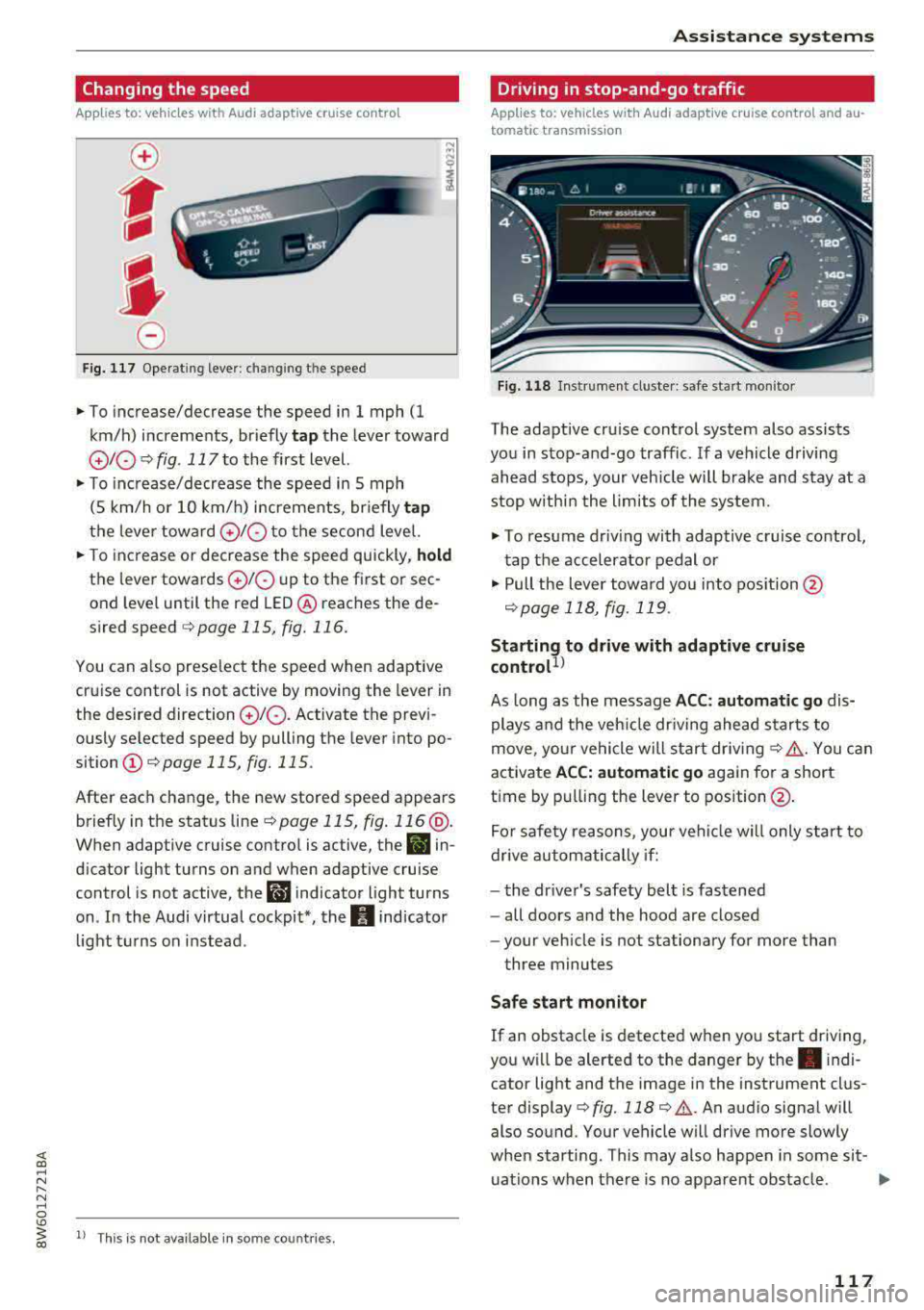
Fig. 117 Operating lever: chang ing the speed
.,. To increase/decrease the speed in 1 mph (1
km/h) increments, br iefly
tap the lever toward
010 ¢ fig. 117 to the first level.
.,. To increase/decrease the speed in 5 mph
(5 km/h or 10 km/h) increments, br iefly
tap
the lever toward 0 10 to the second level.
.,. To increase or decrease the speed quickly, hold
the lever towards 0 10 up to the first or sec
ond level until the red LED@ reaches the de
s ired speed
¢page 115, fig. 116.
You can a lso preselect the speed when adaptive
cruise control is not active by moving the lever in
the desired direction
0 10 . Activate the previ
ously selected speed by pulling the lever into po
sition
(I) ¢ page 115, fig. 115.
After each change, the new stored speed appears
briefly in the status
line¢ page 115, fig. 116 @.
When adaptive cruise control is active, the II in
d icator light turns on and when adaptive cruise
control is not active, the
I.I indicator light turns
on . In the Audi virtual cockpit*, the
II indicator
light t urns on instead .
ll This is not available in some countries.
Assistance systems
Driving in stop-and-go traffic
Applies to: vehicles with Audi adaptive cruise control and au
tomatic transmission
Fig. 118 Instrume nt cluste r: safe start monitor
The adaptive cru ise control system also assists
you in stop-and-go traffic. If a vehicle driving
ahead stops, your vehicle will brake and stay at a
stop within the limits of the system.
"' To resume driv ing with adaptive cruise control,
tap the accelerator pedal or
"' Pull the lever toward you into pos ition @
<:!)page 118, fig. 119 .
Starting to drive with adaptive cruise
controt1>
As long as the message ACC: automatic go dis
plays and the vehicle dr iving ahead starts to
move, your vehicle will start driv ing
r:!) .&. -You can
activate
ACC: automatic go again for a short
time by pulling the lever to position@.
For safe ty reasons, your vehicle w ill only start to
drive automatically if:
- the driver's safety belt is fastened
- all doors and the hood are closed
- your veh icle is not stationary for more than
three minutes
Safe start monitor
If an obstacle is detected when you start driving,
you w ill be alerted to the danger by
the. indi
cator light and the image in the instrument clus
ter
display¢ fig. 118 ¢ .&,. .An audio signal will
also sound. Your vehicle will drive more slowly
when starti ng. This may also happen in some sit-
uations when there is no apparent obstacle.
.,.
117
Page 122 of 409
Assistance systems
Predictive control
(efficiency assist)
Description
Applies to: vehicles with Audi adaptive cruise control and pre·
dict ive efficiency assist
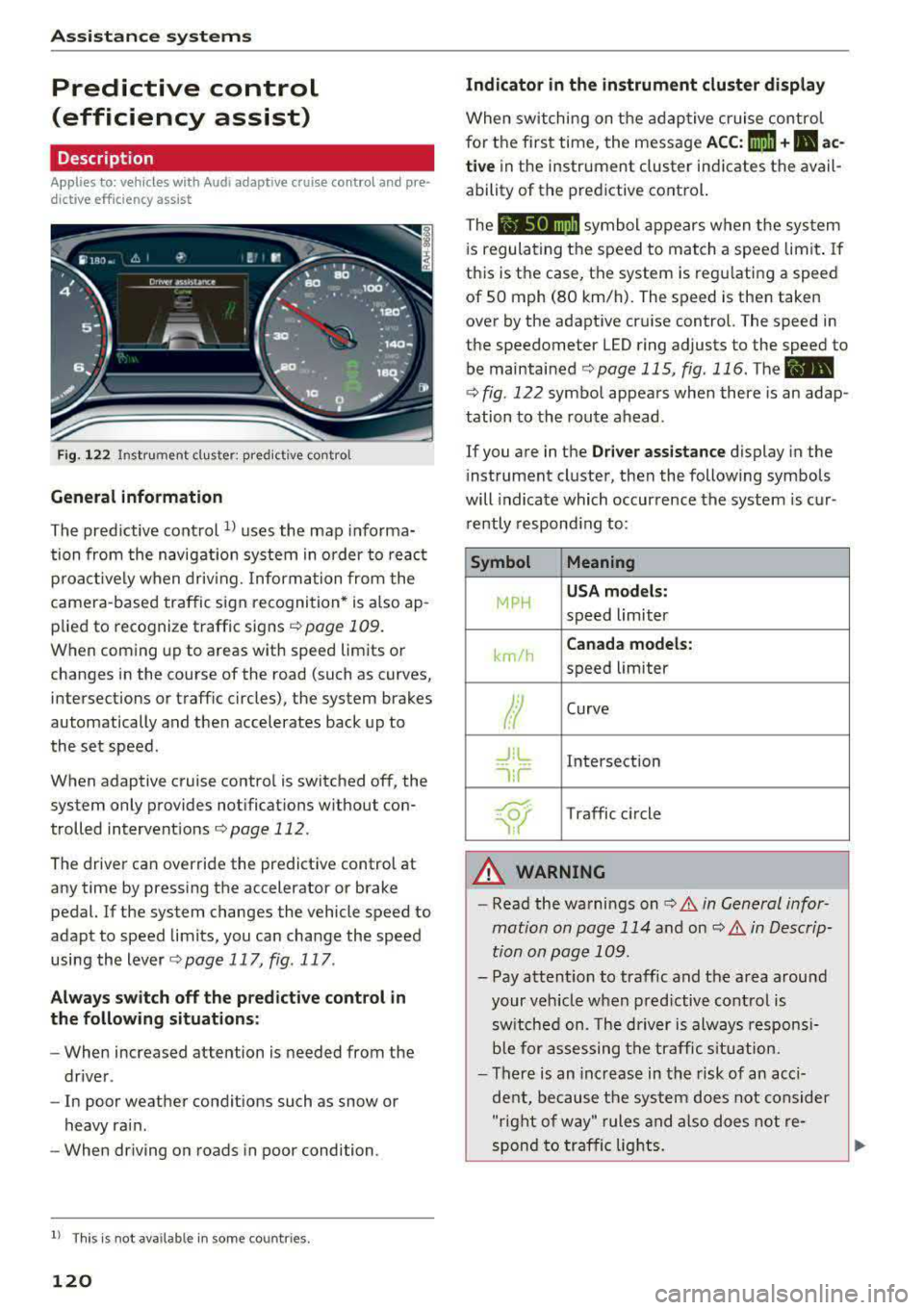
Fig. 122 Instrument cluster: predictive control
General information
The predictive control 1l uses the map informa·
tion from the navigation system in order to react
proactively when driving. Information from the
camera -based traffic sign recognition* is also ap·
plied to recognize traffic signs
r::!> page 109.
When coming up to areas with speed limits or
changes in the course of the road (such as curves,
inte rsections or traffic circles), the system brakes
automatically and then accelerates back up to
the set speed.
When adaptive cruise cont rol is switched off, the
system only provides notificat ions without con
trolled intervent ions
r::!> page 112 .
The driver can override the predictive control at
any time by pressing the accelerator or brake
pedal. If the system changes the vehicle speed to
adapt to speed limits, you can ch ange the speed
using the lever
<:!> page 117 , fig . 117 .
Always switch off the predictive control in
the following situations:
- When increased attention is needed from the
driver .
- In poor we ather condit ions such as snow or
heavy rain .
- When driving on roads in poor condition.
l) This is no t a vail able in som e coun trie s.
120
Indicator in the instrument cluster display
When switching on the adaptive cruise control
for the first time, the message
ACC: 1111 + B ac
tive
in the instr ument cluster indicates the avail
ability of the predictive control.
The symbol appears when the system
i s regulating the speed to match a speed limit .
If
this is the case, the system is regulating a speed
of 50 mph (80 km/h). The speed is then taken
over by the adaptive cruise control. The speed in
the speedometer LED ring adjusts to the speed to
be maintained
r::!> page 115, fig. 116 . The ..
r::!> fig. 122 symbol appears when there is an adap
tation to the route ahead .
If you are in the
Driver assistance display in the
i nstrument cluster, then the following symbols
will indicate which occurrence the system is cur
rently responding to:
Symbol Meaning
MPH
USA models:
speed limiter
km/h
Canada models:
speed limiter
Ir
Curve
_J!L
,ir
Intersection
~ Traffic circle ·· Of );
A WARNING
- Read the warnings on c> .& in General infor
mation on page 114
and on r::!> .& in Descrip
tion an page 109 .
-Pay attention to traffic and the area around
your vehicle when predictive control is
sw itched on. The driver is always responsi
ble for assessing the traffic situation.
-There is an increase in the risk of an acci
dent, because the system does not consider
"right of way" rules and also does not re-
spond to traffic lights.
._
Page 124 of 409
Assistance systems
In a speed range under 40 mph (65 km/h), traffic
jam assist can help to keep the vehicle within a
lane calculated by the system. Within the limits
of the system, the system controls the steering
automatically when adaptive cruise control is
switched on . Since traffic jam assist is only an as
sist system, the driver must always keep his or
her hands on the steering wheel and be ready to
steer. The driver can override the control at any
time by actively steering.
The system is designed for driving on express
ways and highways.
Switching traffic jam assist on and off
.., Press the button to switch the system on and
off¢fig. 123.
.., To turn the system off completely, select in the
Infotainment system:
I M ENU I button > Vehicle
> left contro l button > Driver assistance > Traf
fic jam assist.
If traffic jam assist was deactivated through the
Infotainment system, you can cont inue operating
the active lane assist using the
c::> fig . 123 button
c::> page 131. T he traffic jam assist functions a re
no longer available.
Requirements for using traffic jam assist:
- Traffic jam assist must be switched on in the
Infota inment system.
- Adaptive cruise control must be switched on
and active
c;> page 115 .
Always switch off traffic jam assist in the
following situations:
- When increased attention is needed from the
driver .
- In poor weather conditions such as snow or
heavy rain .
- When driving on roads in poor condition.
- In construction zones.
- In city driving.
Traffic jam assist availability:
If you are in the Driver assistance disp lay in the
i n strument cluster,
the@ indicat or light and
the message
Traffic jam assist available appea rs
if traffic congestion situation was recognized.
You can open the
D rive r assistance disp lay using
122
the multifunction steering wheel buttons
¢ page 13. To activate traffic jam assist, you
must press the
c;> fig. 123 button and switch on
the adapt ive cruise control
¢ page 115.
Indicator lights
Ill and. -traff ic jam assist is switched on.
Vehicles driving ahead were detected. Your vehi
cle adapts whi le driving
c;> fig. 124.
• - Traffic jam assist switches off if the driver
does not take over steering after multiple driver
intervention requests. The system brakes the ve
hicle until it is stationary.
A WARNING
A lways keep your hands on the steering wheel
so you can be ready to steer at any t ime . The
driver is always respons ible for staying in a
lane and for assessing traffic situations . Read
and follow the warnings on
c;> .& in General
information on page 114.
Never use traffic
jam ass ist in the following situations or you
will increase the risk of an accident.
- Driving offroad or on unpaved roads. Traffic
jam assist is only designed for use on paved
roads.
- In city driv ing or in construction zones.
- On curv ing stretches of road.
- In narrow lanes.
- In unclear traffic situat ions such as at inter-
sections or toll stations.
(D Tips
You are not necessarily guided to the center
of your lane.
Page 126 of 409
Assistance systems
reach the pe rm it t ed eng ine s peed . The ad aptive
cr uise cont ro l switc hes off automatically an d ca n
not be switc hed back on.
Ill ACC with traffic jam assist: currently un
available. Parking brake applied
Th e systems sw it c h o ff if yo u set the p arking
b rak e. The sy st em s ar e av a ila ble ag a in a fter you
release the p arking brak e.
m'J ACC with traffic jam assist: currently un
available . Stabilization control (ESC) input
This message appea rs if the electronic stab iliza
tion co ntrol (E SC) is taki ng action to stab ilize t he
ve hicle . Th e sys tems sw itch off in th is scenar io .
m'J ACC with traffic jam assist: manual control!
This message appea rs if the veh icle rolls bac k
when sta rting on a slight incl ine, even thoug h the
systems are active. P ress the b rake pedal to pre
ve nt the vehicle fr om rolling o r sta rt ing to move.
II ACC with traffic jam assist: currently un
available . Downhill assist activated
Y o u can not a cti va te the sys tem whe n hill hold as·
sis t is ac tive .
Ill ACC with traffic jam assist: manual control!
This message appea rs if the dr iver does not take
over steer ing af ter mu ltiple dr iver in terve ntio n
reques ts a nd the sys tem switches off. The vehicle
b ra kes until it i s sta tiona ry.
I! Traffic jam assist: unavailable. See owner's
manual
The system can no longe r ensure that t he ve hicle
will stay in the lane and switches off. Have yo ur
ve hicle checked by an a uth orized Audi dea ler or
author ized Audi Se rvice Facility if the ma lfu nc
t io n is con tinuous.
I! Traffic jam assist: Please take over steering!
This message appears as soon as the system
sto ps detecting steer ing activity whe n the system
lim its are reached. Always keep yo ur hands on
the stee rin g wheel so yo u ca n be ready to stee r at
a ny time.
II Traffic jam assist: currently unavailable .
Please fasten seat belt
124
T he sys tem swi tches off when t he dr ive r's safety
b elt is unfastened .
m'J ACC: efficiency assist not available in this
country
The ada ptati on to spee d lim its an d rou tes ahead
i s no t a vailable in this coun try.
ti.I ACC: predictive control currently unavaila
ble . See owner's manual
The adaptation to speed lim its and routes a head
switc hes off at speed limits under 20 mph
(30 km/ h).
The messa ge ca n also appear if the adaptation to
s p eed limits and ro utes ahead has a temporary
failu re. Have your ve hicle checked by an a uth o r
i zed Audi dealer or author ized A udi Se rvice Facili
ty if t he malfunc tion is con tinuo us.
Distance warning: malfunction! Please contact
Serv ice
The system ca nnot gua rantee t hat it will detect
vehicles correct ly and it has sw itched off . T he ra
dar sensors have shifted or are fa ulty. D rive to an
aut horize d Aud i dea le r o r authorized Aud i Serv ice
Fac ility i mmed iate ly to have the ma lfu nction cor
r ec ted .
Distance warning: currently unavailable. Sensor
view restricted due to surroundings. See own
er's manual
This message ap pears if t he radar se nsor v iew is
o bstr ucte d, for examp le by leaves, s now, heavy
spray or dirt. Clean t he
se nsors¢ page 114,
fig. 112 .
Distance warning: currently unavailable. See
owner's manual
T his mess age app ears i f th e system h as a temp o
r ary fai lure.
If this occurs m ultip le t imes, drive to
an a uthorized Audi dea le r or a uthorized Audi
Se rvice Facility immed iate ly to have the ma lfunc
tion co rrecte d.
ACC: Please fasten seat belt
The sy stem is not com plete ly availabl e if the d riv
e r's se at belt is unfa stene d.
Stationary object ahead
Page 127 of 409
<( a, .... N ,....
N .... 0 \0
3 a,
This message appears if you would like to switch
the system on and there is a stationary object di
rectly in front of your vehicle .
Door open
The system is not ava ilable when the door is
open.
Audi pre sense
Introduction
App lies to: vehicles with Audi pre sense
Within the limits of the system, the pre sense
functions can initiate measures in particularly
dangerous situations to protect the vehicle pas
sengers and other road users.
- Due to the interlinking of various vehicle sys
tems, critical driving situations can be detected by
pre sense basic and measures for preventa
t ive occupant protection are can be initiated .
- The
pre sense front system uses the data from
the adaptive cruise control* radar sensors and
the camera to calculate the probability of a col
li sion. Within the limits of
the system, an im
pending collision with vehicles can be detected
in both urban and rural speed ranges. In this
case, the system warns the driver visually,
acoustically and with a jerk on the brakes if nec
essary. If needed, it can initiat e a partial or full
deceleration to reduce the collision speed or to
avoid the collision under certain circumstances .
I n conjunction with pre sense basic/rear, the
front safety belts are also revers ibly tensioned
when needed . The pre sense front is also active
when adapt ive cruise control* is switched off .
-Pre sense rear contains pre sense basic func
tions. It uses the data from the side assist* ra
dar sensors and calcu lates withi n the limits of
the system the probability of a rear end coll i
sion with the vehicle beh ind you. Pre sense rear
is also active when side assist* is switched
off.
- Within the limits of the system, pre sense city
uses the camera data and can detect an im
pending collision with vehicles and pedestrians.
In this case, the system warns the dr iver visual
ly, acoustically and with a jerk on the brakes if
necessary. If needed, it can initiate a full decel
eration to reduce the collision speed or to avoid
Assistance systems
the collision under certain circumstances. In
conjunction with pre sense basic/rear, the front
safety belts are a lso reversibly tens ioned when
needed .
A WARNING
Read the genera l information in c:>&. in Gen
eral information on page 114,
c:> &. in Gener
al information on page 135.
(D Tips
- Certain pre sense functions switch off when driving in reverse.
- The pre sense functions may not be availa ble if there is a malfunction in the ESC sys
tem or the airbag control module.
- Note that the reversible belt tensioner on
the front passenger's side deactivates when
the front passenger's airbag is deactivated .
- Switch the pre sense
off when you a re not
using public streets or when loading the ve
hicle onto a vehicle carrier, tra in, sh ip or
other type of transportat ion. This can pre
vent an undesired inte rvention from
the pre
sense system.
Audi pre sense basic
Description
Applies to : vehicles with Audi pre sense basic
The pre sense basic functions are activated at a
speed of approx imately 20 mph (30 km/h) or
higher .
The following functions can be triggered under certain conditions within the limits of the sys
tem:
- Tensioning of the safety belts (for examp le,
during heavy braking): the front safety belts have reversible belt tensioners . If a collision
does not occur, the safety belts loosen slightly
and are ready to trigger aga in .
- Closing the windows and sunroof* .
-
125
Page 128 of 409
Assistance systems
-Activating the emergency flashers l) .
The message Audi pre sense. ¢ page 126,
fig. 12 6 will wa rn you abo ut the danger.
Aud i d rive select *: the t rigger t imes are adjusted
dependi ng on the mode selected.
Audi pre sense front
Description
A ppl ies to: ve hicles w ith Audi a daptive cruise co ntrol
W ith in the limits of the system, pre sense front
can warn you of impending coll is ions and initiate
t he corresponding brak ing maneuvers or the sup
port ing measures when avo iding a collision .
I f detected in time, the system can rank the dan
ge rous situation as cr itical if a ve hicle driving
a head brakes s udden ly, if your own vehicle is ap
p roaching a s ignificantly s lower vehicle at high
speed or when there is an oncom ing vehicle d ur
i n g a t urning maneuve r.
If detection is not poss ible , the n pre sense front
does not react .
Warnings
App lies to: ve hicles w ith Audi a daptive cruise co ntro l
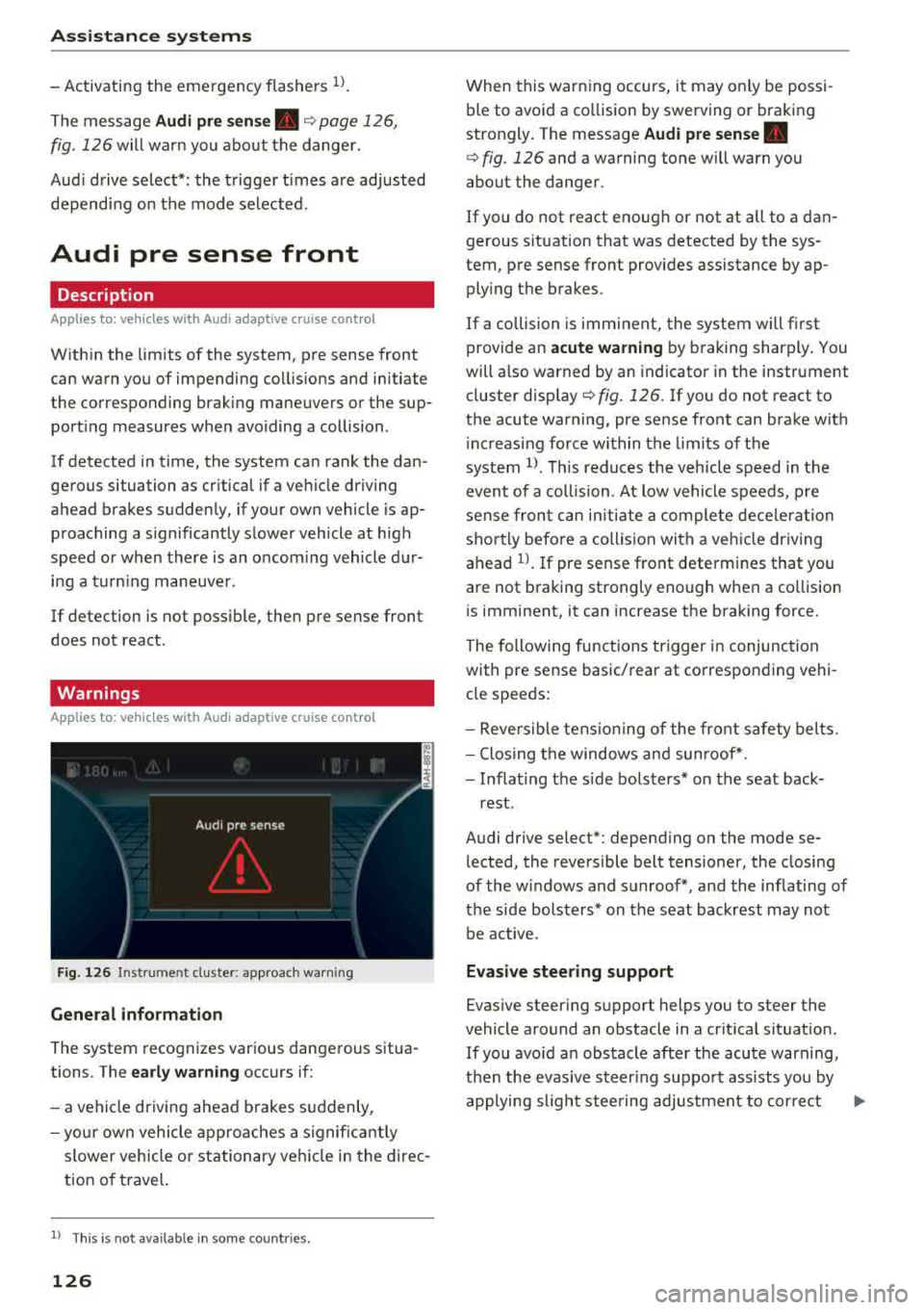
F ig . 126 In strum ent cl uste r: appro ach warn ing
General information
The system recognizes var ious dangerous situa
tions. The
early warning occurs if:
-a veh icle d riving ahead brakes s uddenly,
- yo ur own vehicle ap pro aches a signific antly
s lower vehicle o r stationary ve hicle in the direc
tion o f travel.
l) Thi s is not a va ilab le in some co untri es .
126
When this warn ing occurs, i t may o nly be pos si
ble to avo id a co llision by swerving o r braking
strongly . T he message
Audi pre sense.
¢ fig. 126 and a wa rning tone will warn you
about the danger .
If you do not react enough or not at all to a dan
gerous s ituat ion that was detected by the sys
tem, pre sense front provides assistance by ap plying the b rakes.
If a collision is imminent, the system will fi rst
provide an
acute warning by b raking sharply . You
will a lso warned by an indicato r in the instrument
cluster
disp lay¢ fig. 126. If yo u do not react to
the acute warning, pre se nse front can bra ke w it h
i nc reas ing force wi thin the lim its o f th e
system
1> . Thi s reduc es the v ehicl e spe ed in t he
even t of a collision . At low vehicle s peeds , pre
s ense fr on t can initi ate a com plete dece le rat ion
sho rtly befo re a collision with a veh icle dr iv ing
ahead
l ) . If pre sense front determines that you
a re not b raking st rongly enough when a co llision
i s imminent, it can increase t he b raking force.
The followi ng func tions trigge r in conjunc tion
with pre sense basic/ rear at corresponding vehi
cl e speeds :
-Reversible tens io nin g of the front s afety bel ts.
-Clos ing t he windows and sun roof* .
-Infla ting t he side bols ters* on the seat back-
rest .
Audi drive select* : depending on the mode se
l ected , the reversible belt tensioner, the closing
of the windows and s unroof*, and the inflating of
t h e side bolste rs* on the seat backrest may not
be active.
Evasive steering support
Evas ive steering s upport helps you to steer the
vehicle around an obstacle in a crit ica l sit uat io n.
If you avo id a n obs tacle afte r the acu te warning,
t he n th e evasive ste ering suppo rt assists you by
applying slight stee ring adjus tment to corre ct
.,..
Page 131 of 409
<( a, .... N ,....
N .... 0 \0
3 a,
-when there are visual obstructions, such as glare, reflections or var iations in light
-when it is dark
-if the camera window or the windshie ld is
dirty, iced over, damaged or covered
-when driving on snow, ice or loose ground
-in curves
-if the ESC was restricted or switched off
-when towing a trailer
-when the driver's seat belt is unfastened
-up to ten seconds after switching on the ig-
nition
(D Note
Impacts or damage to the camera mount on
the windshield can displace the sensor. Pre
sense city can be impaired by this. Have an au
thorized Audi dealer or authorized Audi Serv
ice Facility check the ir function.
-You can cancel the system braking interven
tion if you accelerate considerably or swerve
away.
-Keep in mind that pre sense city can brake
unexpectedly. Always secure any cargo or
objects that you are transport ing to reduce
the risk of damage or injury.
-Certain pre sense city funct ions are switch
ed off when the ESC is limited or switched
off¢ page 152.
-When there is a malfunction in the camera,
the pre sense city functions also switch off.
Settings in the
Infotainment system
A ppl ies to: ve hicles with Audi pre sense
~ Se lect in the Infotainment system: !MENUI but
ton
> Vehicle > left contro l button > Driver as
sistance> Audi pre sense.
Turn on /off Audi pre sense -
the pre sense func
tions can be turned on and off.
If the system is switched off, it switches o n again
automatically once the ignition is sw itched on
again.
Assistance systems
Prewarning -the early warning can be switched
off or the pre sense city/front warning point can
be set
(Ea rly/Medium /Late ).
Set the warning t ime for the early warning to
Early at first. If this causes undesired ear ly warn
ings to appear, then set the warning time to
Me
dium .
The Late warning time should on ly be set
in special circumstances, for example, when driv
ing with a very dynamic style.
(D Tips
Your settings are automatically stored and as
signed to the remote control key being used.
Messages
Applies to : v ehicles wi th Audi pre sense
IIJ Audi pre sense: malfunction! Please contact
Service
T his message appears when the pre sense func
tion is affected. For example, this could be
ca used by a faulty sensor. Drive to an authorized
Audi dealer or authorized Audi Service Facility im
mediately to have the malfunction corrected.
II Audi pre sense currently restricted. Restrict
ed sensor vision due to surroundings. See own
er's manual
This message appears if the radar sensor and
camera view is obstructed, for example by leaves,
snow, heavy spray or dirt. If necessary, clean the
sensors and the area around the camera
¢ page 114, fig . 112 or ¢page 134, fig. 134 .
II Audi pre sense: currently restricted. Towing
mode
For vehicles with a trailer hitch installed at the
factory, the pre sense rear functions switch off
when the electrical connector at the socket is
plugged in. There is no guarantee the functions
will switch off when using a retrofitted trailer
hitch.
II Audi pre sense: currently restricted
This message appears if the ESC is restricted or
switched off, for example.
IJl,,
129
Page 153 of 409
Intelligent Technology Electronic stabilization
control (ESC)
Description
Ele ctronic stabilization control (ESC) supports
driver safety . It reduces the risk of slipping and
improves d riving stability. ESC detects critica l sit
uations such as when the vehicle is oversteering
and understeering or the wheels are spinn ing.
T he vehicle is stabilized by applying the brakes or
reducing eng ine torq ue. When the ESC engages,
the
J;,j ind icator light blinks in the instrument
cluste r.
T he follow ing systems are integrated in the ESC:
Ant i-loc k bra king s ystem (ABS)
ABS prevents the whee ls from locking when brak
ing. The vehicle can still be steered even during
hard brak ing. Apply steady pressure to the brake
pedal. Do not pump the pedal. A pulsing in the
b rake pedal indicates that the system is act ing to
stabilize the vehicle .
Br ake a ssist s ystem
The brake assist system can decrease braking dis
tance. It increases brak ing power when the driver
presses the brake pedal quickly in emergency sit
uations . You must press and hold the brake pedal
unti l the dangerous sit uat io n is ove r. In veh icles
with adaptive cr uise contro l*, the bra ke assist
system is more sensitive if t he d istance detec ted
to the veh icle dr iv ing ahead is too small.
Anti-Slip Regulation (ASR )
ASR red uces eng ine power when the drive wheels
begin spinning and adapts the force to the road
conditions . This makes it easie r to sta rt, acceler
ate and dr ive up hill s.
Electronic differenti al lock (EDL )
EDL applies the brakes to a wheel that starts
spi nning and t ransfers t he drive powe r to the
;;§ other driving wheels. This f unct ion is not availa-....
~ b lea t higher speeds.
N .... 0 \0
3
In extreme cases , ED L automat ica lly switches off
to keep the brake o n the braked wheel from over
heating. The veh icle is still working correct ly. ED L
will switch on again automatically when condi
tions have returned to normal.
Ste ering recommendation
The ESC he lps to stabilize the vehicle by changing
the steering torque.
In veh icles wi th dynamic steer ing*, ESC also
helps to stab ilize the steer ing in crit ica l sit ua
tions.
Selective wheel torque control
Se lective w heel to rque con trol is used w hen d riv
i ng on curves. Bra king is targeted towa rd t he
whee ls on the inside of the cu rve as needed. This
allows mo re precise driving in curves .
Automatic post -collision braking system
The "automat ic post-collision braking system "
can help to reduce the risk of sliding and of addi
tiona l co llisions after an acciden t. If the a irbag
contro l
module detects a co llision, the veh icle is
braked by the ESC.
T he veh icle does not bra ke automatically if:
- the dr iver presses the acce lerator pedal, or
- the ESC, the brake system or the veh icle elect ri-
cal system are not functioning.
A WARNING
=
- The ESC and its integrated systems cannot
overcome the lim its imposed by natural
phys ica l laws. This is especially important
on slippery or wet roads. If the systems be
gin acting to s tabilize yo ur vehicle, you
should immediately alter your speed to
match the road and traffic conditions. Do
not let the inc reased safety provided tempt
you into taking risks. This could increase
your r isk of a coll is ion.
- Please note the ris k of a collis ion increases
when dr iv ing fast, especially through curves
and on slippery or wet roads, and when dr iv-
ing too close to objects ahead . The ESC and
~
151