warning lights AUDI A5 COUPE 2018 Owner's Manual
[x] Cancel search | Manufacturer: AUDI, Model Year: 2018, Model line: A5 COUPE, Model: AUDI A5 COUPE 2018Pages: 409, PDF Size: 67.63 MB
Page 74 of 409
Sea ts and stor age
Operating
.. If you turn the m ultif unction bu tton CD
¢ page 71, fig . 72 to the left or to the right,
the possible seat settings @ are shown in the
Infotainment system
~ fig . 73 .
.. To se lect a seat setting, turn the multifunction
button
CD in the corresponding direction until
the des ired seat setting is outlined in red.
• The arrows @ represent the possible adjust
ments . Fo r example, to lower the lumbar sup
po rt, p ress the m ultifunction bu tton
CD down.
T he co rresponding arrow © lights up.
The fo llowing seat sett ings @ are possible :
Massage func tion * -select the massage type
Wave, St retch , Knead or Off . You can adjust the
i n tens ity of each massage from 1 to 3 . You can
sw itch the selected massage on/off using the
button @~ fig. 73 .
Lumb ar support -you can adjust t he lumbar sup
port up/down and to be stronger/weaker .
Side bolsters * -you can increase/decrease the
side support in the seat using the side bo lsters
on the seat backrest .
(I) Tips
-The massage function switches off a uto
matically after approx imately 10 minutes.
- The air in the side bo lsters* is released as
soon as the driver's door opens. This makes
i s possible to enter and exit the vehicle
mo re comfortab ly. As soon as you sta rt driv
i ng the veh icle, the s ide bo lsters fill.
1l Requ irem en t: the ve hicl e battery m ust have a suff icien t
c ha rge le v e l.
72
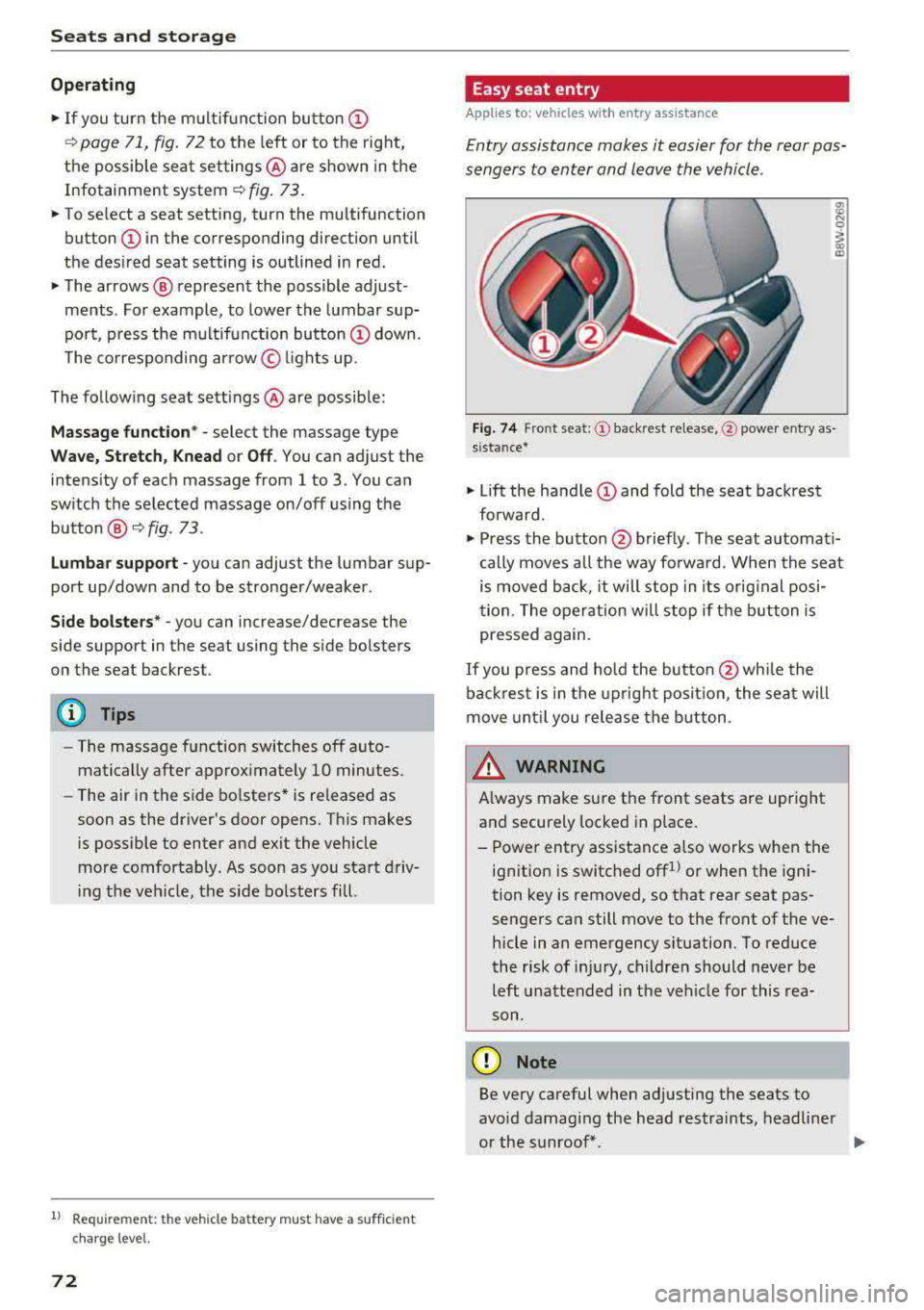
Easy seat entry
App lies to: vehicles with entry ass istance
Entry assistance makes it easier for the rear pas
sengers to enter and leave the vehicle .
Fig . 7 4 Fro nt seat: © backrest re lease, @powe r entry as
s ista nce*
• Lift the hand le CD and fold the seat backrest
forward .
• Press the button@ briefly . T he seat automati
cally moves a ll the way fo rwa rd . When the seat
is moved back, it will stop in its o rig inal posi
tion . The operation will stop if t he b utton is
pressed again.
If you p ress and hold the butto n
@while the
bac kres t is in the upright posi tion, the sea t will
move unt il you release the b utton .
& WARNING
Always make su re the front seats are upright
and securely locked in p lace .
- Power entry assistance also works when the
ignit ion is switched off
1
) or when the igni
tion key is removed , so t hat rear seat pas
sengers can still move to the front of the ve
hicle in an emergency s ituation. To red uce
the risk of inj ury, childre n should never be
left unattended in the vehicle for this rea
son .
(D Note
Be very careful when adjusting the seats to
avo id damaging the head restraints, headline r
or the sunroof*.
Page 89 of 409
engaged, for example when you notice that the next traffic light is red . This produces an engine
braking effect, which helps to protect the brakes
and tires and reduces the emissions and fuel con
sumpt ion to zero (fuel shut-off dur ing decelera
tion) .
Shift efficiently
Upshifting earlier is an effective way to save fuel.
Staying in a gear too long uses fuel unnecessari
ly.
Applies to: vehicles with manual transmission
Shift as soon as possible from first to second
gear. S hifting to the next highest gear at approxi
mately 2,000 RPMs if poss ible is recommended.
Applies to: vehicles with automatic transmissions
Press down on the acce le rator peda l slowly and
avoid "kick -down".
Avoid full acceleration
You should rarely travel at the maximum vehicle
speed. High speeds cause a disproportionately
high increase in fuel consumption, emissions and
traffic noise. Driving more slowly saves fuel.
Reduce idling time
The Start/Stop system* he lps to reduce the idling
time automatically. In vehicles without the Start/
Stop system*, it is efficient to switch the engine
off when stopped at railroad cross ings and long
r ed lights. Stopping the engine for 30-40 sec
onds already saves more fuel than the amount of
extra fuel needed to restart the eng ine.
It takes a very long time in idle to warm the en
g ine up to operating temperature. Wear and
emissions are especially h igh in the wa rm-up
phase . Therefore, you should begi n driving im
mediately a fter starting the engine . Avoid high
RPMs while do ing this .
Have maintenance performed regularly
By having maintenance performed regu larly on
your veh icle, yo u ca n he lp to reduce f uel con-
<(
~ sumption before yo u even start to drive. The
N ~ maintenance condition of your vehicle not only
8 affects traffic safety and long-term value but a l
'° 3
so impacts fuel consumption . A poorly main
tained engine can lead to fuel consumption that is 10% higher than norma l.
Avoid short trips
The eng ine and exhaust cleaning system must
reach their optimal operat ing temperatu re to ef
f ectively reduce consumption and emissions.
A cold engine uses a disproportionately high
amount of fue l. The engine reaches operating
temperat ure and consumption normalizes on ly
after approximate ly 2.5 miles (4 km).
Check the tire pressure
To save fuel, make sure the tires are always in
flated to the correct press ure
~page 351. The
fuel consumption can increase by 5% if the pres
s u re is only 0.5 bar too low. Due to the increased
rolling resistance, low tire pressures wi ll also
l ead to greater tire wear and will affect driving
behavior.
Do not drive on winter tires year-round, as this
will consume up to 10% more fuel.
Eliminate unnecessary weight
S in ce eve ry po und of ext ra weight increases f uel
consumption, a quick inspection of the luggage
compartment may be worth it to avoid unneces
sary weight .
When not be ing used, a roof rack should be re
moved to decrease the wind resistance of the ve
hicle. This will save you approximately 12% fuel
at speeds from 62 -75 mph (100 - 120 km/h) .
Save energy
The eng ine drives the generator, which generates
electric ity; the fuel consumpt io n also incr eases
with the demand for electr icity. The refore, switch
electrical eq uipment off when you no longer
need it . Examples of equipment that uses a lo t of
energy are air blowers at a high setting, the rear
window defogger and seat heating* .
@ Note
Do not leave engine idling unattended after
starting. If warning lights shou ld come on to
indicate improper operation, they would go
87
Page 95 of 409
@j indicator light appears in the instrument clus
ter disp lay, the engine will not be stopped, for
examp le in the following situations:
- T he eng ine has not reached the minimum re
quired temperature for Start/Stop mode.
- T he interior temperature selected by the cli-
mate contro l system has not been reached .
- T he outs ide temperature is ext remely h igh/low.
- The windshield is being defrosted.
- The neck heating* is turned on .
- The vehicle battery charge level is too low.
- The steering wheel is turned at a sharp angle or is moving .
- After engaging the reverse gear.
- On sharp inclines.
- At high altitudes .
Engine automatically restarts
The standard Start/Stop mode will be canceled
during a stop phase in the follow ing s ituations .
The engine resta rts without any action by the
driver.
- The vehicle rolls , for example while on a slope.
- The interior temperature differs from the tem-
perature selected in the A/C system .
- The windshield is being defrosted.
- The brake pedal is pressed several times in a
row.
- The vehicle battery charge level is too low .
- Power consumption is high.
The engine can turn off again when the condi
tions for Start/Stop mode are met.
Ignition is switched off automatically
To prevent the vehicle battery from draining, the
ignition will switch off automat ically under the
following conditions :
- The Start/Stop system has stopped the engine .
- The vehicle is stationary.
- You left the ve hicle and the engine was not re-
started within approximate ly 30 seconds .
If th is happens, you w ill see the message
Igni
<( ~ tion turns off automatically in the instrument
~ cluster and the activated low beams are replaced N
8 by the parking light. The parking lights will \0
3
switch off after approximately 30 minutes or
when you lock the vehicle .
T he ign ition also switches off when you lock the
vehicle from the outside during a stop phase.
If the Start/Stop system has not turned off the
engine or if you have switched the Start/Stop sys
tem off manually, the ignition w ill no t be auto
matically sw itched off and the eng ine will contin
ue to
run ¢& .
A WARNING
To reduce the risk of poisoning, never allow
the engine to run in confined spaces.
(D Tips
Applies to: vehicles with automatic transmissions
- If you leave the vehicle with the 0/5 or R se
lector lever position engaged, the parking
brake is automatically set.
- If you select the D or N selector lever posi
tion after shifting into reverse, the vehicle
must be driven faster than 6 mph (10 km/h)
in order for the engine to switch off again .
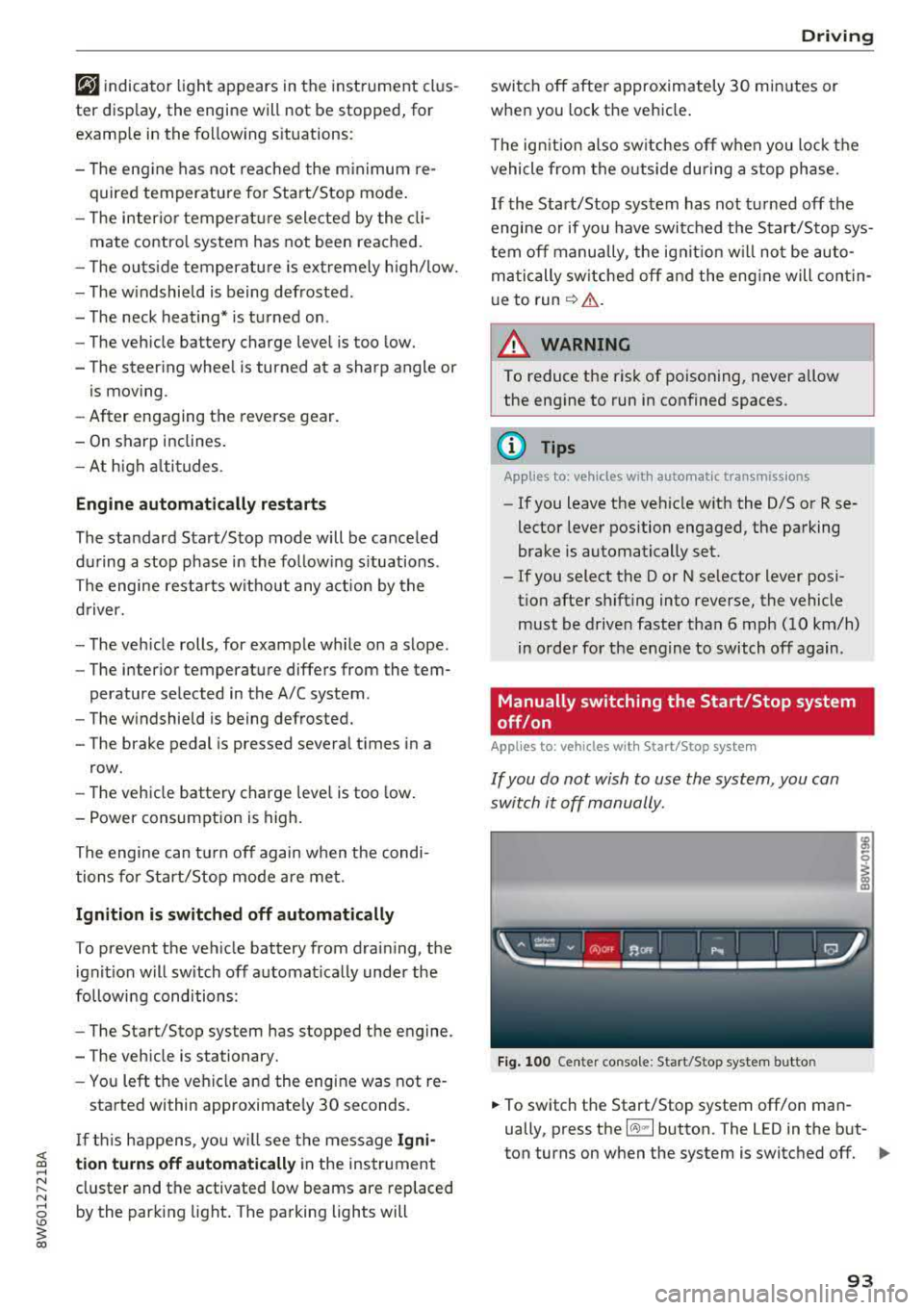
Manually switching the Start/Stop system
off/on
Applies to: veh icles w ith Start/Stop system
If you do not wish to use the system, you can
switch it off manually.
Fig. 100 Center co nsole: Start/Stop system butto n
-
.,. To switch the Start/Stop system off/on man
ually, press the
l (A) ml button. The LED in the but
ton turns on when the system is switched off.
Ill-
93
Page 106 of 409
Trailer towing
Trailer towing
Driving with a trailer
General information
Your Audi was designed primarily for passenger
transportation.
If you plan to tow a trailer, please remember that
the additional load will affect durability, econo
my and performance.
Trailer towing not on ly places more stress on the
ve hicle, it also ca lls for more concentration from
the dr iver.
F or this reason, always follow the operating and
driving instructions provided and use common
sense.
Technical requirements
Trailer hitch
Use a weight-carrying hitch conforming to the
gross tra iler weight. The hitch must be suitab le
for your veh icle and tra iler and must be mounted
securely on the vehicle's chassis at a technically
sound
locat ion . Use on ly a trailer hitch with a re
movable ba ll mount . Always che ck with the t rail
er hitch man ufac tur er to make s ure t hat you are
using the co rrect hi tc h.
Do not use a bumper hitch.
The hitch must be installed in such a way that it
does not interfere with the impact -absorbing
bumper system. No mod ificat ions should be
made to the vehicle exhaust and b rake systems .
Fr om t ime to t ime, che ck that all hitch mo unti ng
bol ts rem ain securely f aste ned.
W hen you are not tow ing a tra iler, remove the
tra ile r hitc h ba ll mount . This prevents the hit ch
from caus ing damage s hou ld your veh icle be
s truck from be hind
¢ ,&. .
Trailer brakes
If you r trailer is equipped with a brak ing system,
check to be su re that it conforms to all regula
tions .
104
The t rai ler hydraulic bra ke system must not be
directly connected to the vehicle's hydraulic
bra ke
system ¢&. .
Safety chains
Always use s afety chains be tween you r vehi cle
and t he tra ile r.
Trailer lights
Traile r lights must meet all regula tions . B e s ure
to check w ith your author ized Audi dealer for cor
r ec t wir ing, swi tches and relays.
Mirrors
If you are unable to see t he traffic behind you us
i ng t he regular outs ide mirrors, then yo u
must in
stall ex tended mirrors . It is impo rtant that you
al ways have clear vision to the rear.
.&_ WARNING
Afte r remov ing the tra ile r hi tc h, do not s tore
it i n y our vehicle. In case o f su dden brak ing,
the hitch could fly fo rward and injure you or
your passengers.
Operating instructions
Maximum trailer weight
A tra iler f or yo ur vehicle is lim ite d to a typical
class 1 or class 2 trailer.
Trailer load distribution
Be sure the load in the t rai le r i s he ld se curely in
pla ce to p reve nt i t from shi fting forwar d, bac k
ward or si deways.
Never allow a passenger to ride in a trailer ¢ &.
in Driver messages on page 105.
Engine cooling system
Towi ng a tra iler makes the engine work harder. It
is important that the cooling system's perform
ance is up to the additional load . Make sure tha t
the coo ling system has enoug h flu id.
Tire pressure
When towing a trailer, inflate the tires of your
vehicle to the tire p ressure listed under "Full
load" on the label
c> page 351. Inflate trailer
Page 107 of 409
<( a, .... N ,....
N .... 0 \0
3 a,
tires to trailer and tire manufacturers' specifica
tions.
Lights
The headlight settings should be checked with
the trailer attached before driving off. Check to
make sure both vehicle and trailer lights are
working properly.
Safety chains
Be sure trailer safety chains are properly connect
ed from the trailer to the hitch on the vehicle.
L eave enough slack in the chains to permit turn
ing corners . When you install safety chains, make
sure they will not drag on the road when you are
driving .
The cha ins shou ld cross under the trailer tongue
to prevent it from dropping in case of separat ion
from the hitch.
Driver messages
Driving with a trailer requires extra caution.
Weight distribution
Towing a loaded trailer with an empty car results
in a high ly unstable distribution of weight .
If this
cannot be avo ided, drive at very low speeds only
to avoid the risk of losing steering control.
A "balanced" rig is easier to operate and control.
This means that the tow vehicle should be loaded to the extent possible and permissible, whi le
keep ing the trailer as light as possible under the
circumstances . Whenever possible, transfer
some cargo to the luggage compartment of the
tow vehicle whi le observ ing tongue load require
ments and vehicle loading considerations.
Speed
The highe r the speed, the more difficult it be
comes for the driver to control the rig. Do not
drive at the maximum permissible speed. Reduce
your speed even more if load, weather or wind conditions are unfavorable
-particularly when
going downhill.
Tra iler towing
Reduce vehicle speed immediately if the trailer
shows the slightest sign of swaying.
Do not try
to stop the swaying by accelerating.
Observe speed limits. In some areas, speeds for
vehicles towing trailers are lower than for regular
vehicles .
Always apply brakes early. When driving down
hill, shift into a lower gear to use the engine
braking effect to slow the vehicle . Use of the
brakes alone can cause them to overheat and fail.
Coolant temperature
T he coo lant temperature gauge ~ page 11 must
be observed carefully. The coolant temperature
can increase if you drive on long inclines in a low
gear at high engine speeds . Reduce your speed
immediately if the LEDs in the top part of the dis
play turn on.
For more information about indicator lights, re
fer
to . ~page 30 .
A WARNING
=
Anyone not properly restrained in a moving
vehicle is at a much greater risk in an acci
dent. Never let anyone ride in your car who is
not properly wearing the restraints provided
by Aud i.
Trailer towing
information
Important to know
-
Your vehicle handles differently when towing a
trailer because of the addit ional weight and dif
ferent weight distribution . Safety, performance
and economy will greatly depend on how careful
ly you load your trailer and operate you r rig.
Before you actually tow your trailer, pract ice
turning, stopping and backing up in an area away
from traffic . Keep pract ic ing until you have be
come complete ly familiar w ith the way your vehi
cle-trailer combination behaves and responds.
105
Page 118 of 409
Assistance systems
Indicator lights and messages in the instrument
cluster display inform you about the current sit
uation and setting.
An add itiona l ind icator appears in the head-up
disp lay*.
Switching adaptive cruise control on
.,. Pull the lever toward you into position@
<::;,fig. 115.
Storing the speed and activating regulation
.,. To store the current speed, press the !SET ! but
ton
¢ fig . 115 . The stored speed is shown in the
speedometer in the LED line @and appears
briefly in the status
line @c:;, fig. 116 .
.,. Applies to: vehicles with automatic transmis
sion: To activate the control when stationary,
also press the brake pedal.
Switching adaptive cruise control off
.,. Push the lever away from you into position @
until it clicks into place. The message
ACC: off
appears.
@ Indicator lights
Ill-Adaptive cruise control is switched on . No
veh icles are detected ahead . The stored speed is
maintained.
• -A vehicle driving ahead was detected. The
adapt ive cruise control system regulates the
speed and distance to the vehicle dr iv ing ahead
and accelerates/brakes automatically.
• -Automatic transmission : adaptive cruise
control must be switched on . A vehicle was de
tected ahead . Your vehicle is stat ionary and will
not start driving automatically .
fai-Automatic transmission : adaptive cruise
control must be switched on . No vehicles were
detected ahead. Your vehicle is stationary and
will not start dr iving automatically .
•-The automatic braking is not enough to
maintain a sufficient distance to a vehicle driving
ahead . You must intervene
c:;, page 119, Driver
intervention request.
116
© Instrument cluster display
If the Driver assistance display is not shown in
the instrument cluster display, you can open it
using the multif unction steering wheel buttons
c:;, page 13.
Based on the graphic display, you can determine
if the system is maintaining a distance to the ve
hicle driving ahead and what that distance is .
No vehicle -no veh icle was detected driv ing
ahead .
Silver vehicle -a vehicle was detected driving
ahead.
Red vehicle -request for driver intervention
¢ page 119 .
The five distance bars on the gauge© represent
the set distance (refer to
c:;, page 118 for infor
mation on how to change the distance). If you
fall below the selected d istance, the distance
bars become red from the bottom upwa rd .
A WARNING
Applies to: vehicles with automatic transmis
sion: If you press the
ISET ! button when driv
ing at speeds below 20 mph (30 km/h), the
vehicle accelerates automatically up to 20
mph (30 km/h), which is the minimum speed
that can be set.
(D Tips
- If you switch the ignitio n or the adaptive
cruise control system off, the set speed is
erased for safety reasons .
- T he electronic stabilization control (ESC)
and the anti-slip-regulation (ASR) are auto
matically switched on when the adaptive
cruise control is switched on.
Page 122 of 409
Assistance systems
Predictive control
(efficiency assist)
Description
Applies to: vehicles with Audi adaptive cruise control and pre·
dict ive efficiency assist
Fig. 122 Instrument cluster: predictive control
General information
The predictive control 1l uses the map informa·
tion from the navigation system in order to react
proactively when driving. Information from the
camera -based traffic sign recognition* is also ap·
plied to recognize traffic signs
r::!> page 109.
When coming up to areas with speed limits or
changes in the course of the road (such as curves,
inte rsections or traffic circles), the system brakes
automatically and then accelerates back up to
the set speed.
When adaptive cruise cont rol is switched off, the
system only provides notificat ions without con
trolled intervent ions
r::!> page 112 .
The driver can override the predictive control at
any time by pressing the accelerator or brake
pedal. If the system changes the vehicle speed to
adapt to speed limits, you can ch ange the speed
using the lever
<:!> page 117 , fig . 117 .
Always switch off the predictive control in
the following situations:
- When increased attention is needed from the
driver .
- In poor we ather condit ions such as snow or
heavy rain .
- When driving on roads in poor condition.
l) This is no t a vail able in som e coun trie s.
120
Indicator in the instrument cluster display
When switching on the adaptive cruise control
for the first time, the message
ACC: 1111 + B ac
tive
in the instr ument cluster indicates the avail
ability of the predictive control.
The symbol appears when the system
i s regulating the speed to match a speed limit .
If
this is the case, the system is regulating a speed
of 50 mph (80 km/h). The speed is then taken
over by the adaptive cruise control. The speed in
the speedometer LED ring adjusts to the speed to
be maintained
r::!> page 115, fig. 116 . The ..
r::!> fig. 122 symbol appears when there is an adap
tation to the route ahead .
If you are in the
Driver assistance display in the
i nstrument cluster, then the following symbols
will indicate which occurrence the system is cur
rently responding to:
Symbol Meaning
MPH
USA models:
speed limiter
km/h
Canada models:
speed limiter
Ir
Curve
_J!L
,ir
Intersection
~ Traffic circle ·· Of );
A WARNING
- Read the warnings on c> .& in General infor
mation on page 114
and on r::!> .& in Descrip
tion an page 109 .
-Pay attention to traffic and the area around
your vehicle when predictive control is
sw itched on. The driver is always responsi
ble for assessing the traffic situation.
-There is an increase in the risk of an acci
dent, because the system does not consider
"right of way" rules and also does not re-
spond to traffic lights.
._
Page 124 of 409
Assistance systems
In a speed range under 40 mph (65 km/h), traffic
jam assist can help to keep the vehicle within a
lane calculated by the system. Within the limits
of the system, the system controls the steering
automatically when adaptive cruise control is
switched on . Since traffic jam assist is only an as
sist system, the driver must always keep his or
her hands on the steering wheel and be ready to
steer. The driver can override the control at any
time by actively steering.
The system is designed for driving on express
ways and highways.
Switching traffic jam assist on and off
.., Press the button to switch the system on and
off¢fig. 123.
.., To turn the system off completely, select in the
Infotainment system:
I M ENU I button > Vehicle
> left contro l button > Driver assistance > Traf
fic jam assist.
If traffic jam assist was deactivated through the
Infotainment system, you can cont inue operating
the active lane assist using the
c::> fig . 123 button
c::> page 131. T he traffic jam assist functions a re
no longer available.
Requirements for using traffic jam assist:
- Traffic jam assist must be switched on in the
Infota inment system.
- Adaptive cruise control must be switched on
and active
c;> page 115 .
Always switch off traffic jam assist in the
following situations:
- When increased attention is needed from the
driver .
- In poor weather conditions such as snow or
heavy rain .
- When driving on roads in poor condition.
- In construction zones.
- In city driving.
Traffic jam assist availability:
If you are in the Driver assistance disp lay in the
i n strument cluster,
the@ indicat or light and
the message
Traffic jam assist available appea rs
if traffic congestion situation was recognized.
You can open the
D rive r assistance disp lay using
122
the multifunction steering wheel buttons
¢ page 13. To activate traffic jam assist, you
must press the
c;> fig. 123 button and switch on
the adapt ive cruise control
¢ page 115.
Indicator lights
Ill and. -traff ic jam assist is switched on.
Vehicles driving ahead were detected. Your vehi
cle adapts whi le driving
c;> fig. 124.
• - Traffic jam assist switches off if the driver
does not take over steering after multiple driver
intervention requests. The system brakes the ve
hicle until it is stationary.
A WARNING
A lways keep your hands on the steering wheel
so you can be ready to steer at any t ime . The
driver is always respons ible for staying in a
lane and for assessing traffic situations . Read
and follow the warnings on
c;> .& in General
information on page 114.
Never use traffic
jam ass ist in the following situations or you
will increase the risk of an accident.
- Driving offroad or on unpaved roads. Traffic
jam assist is only designed for use on paved
roads.
- In city driv ing or in construction zones.
- On curv ing stretches of road.
- In narrow lanes.
- In unclear traffic situat ions such as at inter-
sections or toll stations.
(D Tips
You are not necessarily guided to the center
of your lane.
Page 154 of 409
Intelligent Technology
its integra ted systems cannot always pre
vent collisions
-there is still a risk of acci
dents!
- Press the accelerator pedal carefully when
acce lerating on smooth, slippery surfaces
such as ice and snow. The dr ive wheels can
spin even when these control systems are
Switching on and off
installed and this can affect dr iv ing stab ility
and increase the risk of a collision.
@ Tips
- The ABS and ASR only funct ion correctly
when a ll four wheels have a simi lar wear
condition . Different tire sizes can lead to a
red uction in engine power.
- You may hear noises when the systems de
scribed are working.
ESC turns on automatically when you start the engine.
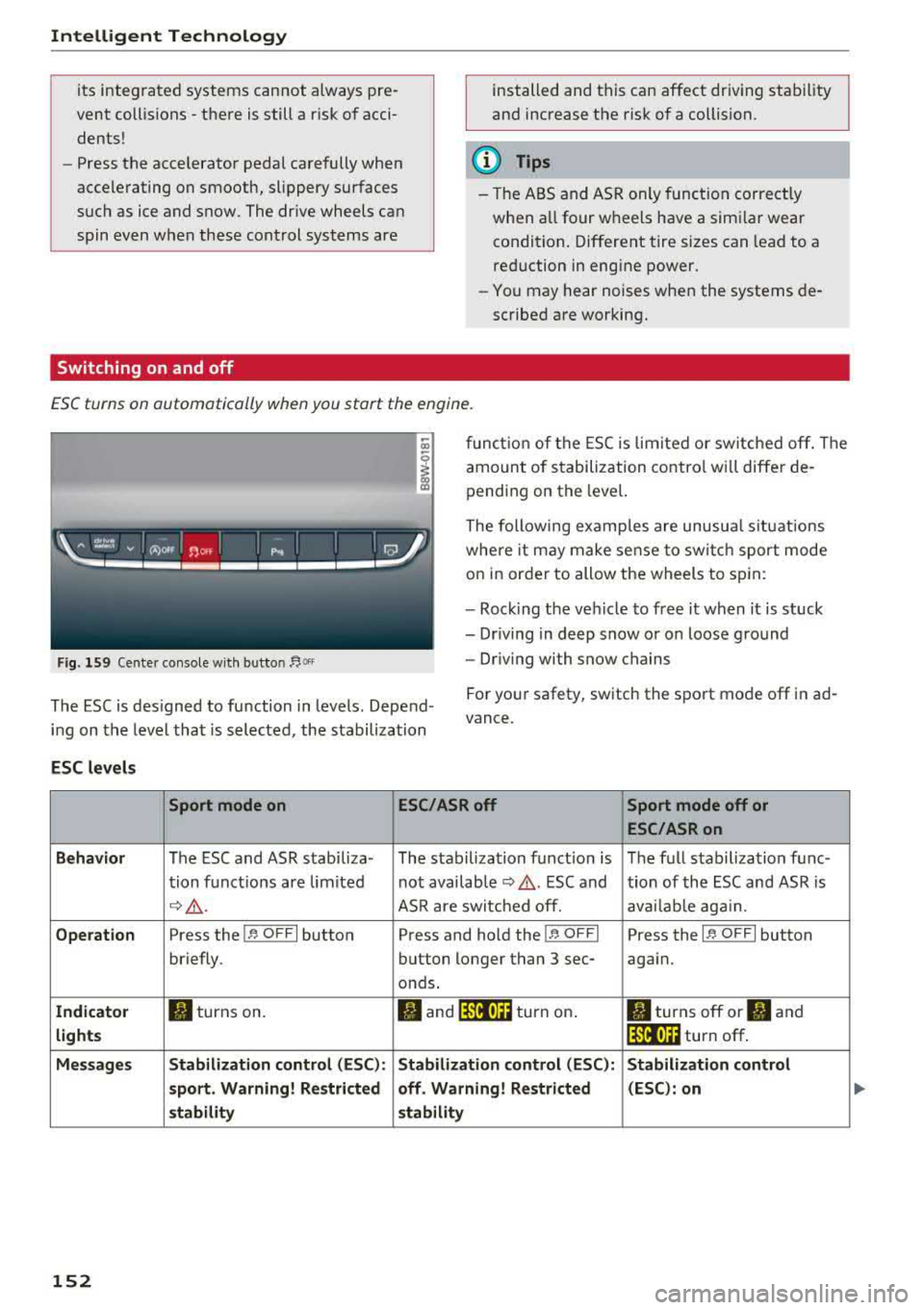
Fig . 159 Cente r co nso le w it h button ~Of'
fun ct io n of the ESC is lim ited or switc hed off. The
amount of s tabilization contro l w ill differ de
pending on the leve l.
The following examp les are unusua l situat ions
whe re it may make se nse to sw itch sport mode
on in order to allow the wheels to sp in:
- Roc king the veh icle to free it when it is stuck
- Dr iving in deep snow or on loose g round
- Dr iving with snow chains
The ESC is des igned to function in levels . Depend
i n g on the level that is selected, the stabilization For you
r safety, switch the sport mode
off in ad
vance.
ESC levels
Sport mode on ESC/ASRoff Sport mode off or
ESC /ASRon
Behavior
The ESC and ASR stabiliza- The stabilization funct ion is The f ull s tabilization func-
t ion funct ions are lim ited not availab le
¢ .&. . ESC and tion of the ESC and ASR is
c;> .&. . ASR are switc hed off. ava ilab le aga in.
Operation Press the 11' OFF I button Press and hold the !1' O FFI Press the 11' OFFI button
briefly. button longer than 3 sec- aga in.
onds.
Indicator II turns on. fl and 14'tl•)H turn on . II turns off or II and
lights lf'tl•)H turn off .
Message s Stabilization control (ESC ): Stabilization control (ESC ): Stabilization control
sport . Warning! Restricted off . Warning! Restricted (ESC) : on
s tability stability
152
Page 173 of 409
Voice recognition system Operating
Appl ies to: veh icles wit h vo ice recog nitio n system
You con operate many Infotainment functions
conveniently by speaking .
Requirements: the ignition and the MM I must be
switched on
~page 158, the re must not be any
phone call in progress and the park ing system
must not be active.
~ Switching on : press the 51 button@
~ page 15, fig. 11 or~ page 16, fig. 13 briefly
on the mu ltifunction steering wheel and say
the des ired command after the
Beep .
~ Switching off : press and hold the 51 button.
Or: press the [2] butto n.
~ Pau sing : say the command Pau se . To resume,
press the
l2;J button .
~ Correcting : say the command Corre ction . Or :
simply say a new command during an an
nouncement
<=> page 251.
Input assistance
The system gu ides you throug h the input with
v isua l and audio feedbac k.
- Vi sua l input as sistan ce: after switching on
vo ice recogn it io n, a display w ith a selection of
poss ible commands appears. This command
display can be sw itched on o r off. Se lect:
IMENU I button> Setting s> left cont rol button
> MMI setting s > Speech dialog system .
- Audio input a ssis tance :
to have the poss ible
commands read, tu rn the voice recognition sys
tem on and say
Help.
For the s yst em to understand you:
Speak clearly and dist inctly at a normal vo lume .
Speak louder when d riving faste r.
Emphasize the words in the commands evenly
and do not leave long pauses .
C lose the doors, the windows and the sunroof* to
reduce background noise . Make sure that passen-
;;!; gers are not speaking when you are giving a voice
;::; command. ,....
N .... 0 \0
3
Do not direct the air vents toward the hands-free
microphone, which is on the roof headliner near
t h e front inte rior lights .
Only use the system from the dr iver's seat be
ca use the hands -free microphone is directed to
ward that seat.
Additional settings
Seer=;, page 251, Spee ch dialog system .
A WARNING
-Direct your full attention to dr iv ing. As the
driver, you have complete responsibility for
safety in traffic . Only use the functions in
such a way that you a lways maintain com
p lete contro l over your vehicle in all traffic
situations.
-Do not use the voice recognition system in
emergencies beca use your voice may change
in stressful situations. It may take longer to
d ial the number or the system may not be
able to dial it at all. Dial the emergency
number manually.
@ Tips
- The d ialog pauses when there is an incom
ing phone call and will continue if you ig
nore the call. The d ialog ends if you answer
the ca ll.
- You can select an item in the list using ei
ther the vo ice recognit ion system or the
cont rol knob .
Command overview
information
Appl ies to: ve hicles w ith vo ice recognit ion system
T he following overv iews describe the comma nds
t h at can be used to operate the MMI using the
voice recognition system.
Alte rnative commands a re separate d using
a"/",
for example say: Telephone / (or) Navigation /
(or) Radio.
Sequences of commands used to perfo rm an ac
t ion are iden tified w it h
a"> ", fo r ex ample say:
Ente r addre ss > (t hen) Enter country /state . ..,.
171