ECO mode AUDI A6 2011 User Guide
[x] Cancel search | Manufacturer: AUDI, Model Year: 2011, Model line: A6, Model: AUDI A6 2011Pages: 370, PDF Size: 87.15 MB
Page 34 of 370
Driver information display
Applies to veh icles : w ith eng ine s peed limitat ion
Engine speed limitation .?i
11'1 Do not exceed max. engine speed of XXXX rpm
The -symbol illuminates when there is an engine control malfunc
tion. The indicator light in the instrument cluster also illuminates.
The engine speed is limited to the speed displayed in the driver infor
mation system. Keep in mind that the engine speed will not exceed
the value d isp layed in the drive r informat ion system, for example
when downshifting.
Please go to an authorized Audi dealer or other qualified workshop to
have the malfunction repaired.•
Applies to vehicles: wi th Adap tive Light
Adaptive Light defective
adaptive light defective • r
When this symbol illuminates, it means that Adaptive Light is
defective. Go to an authorized dealership to have the headlights or
the control unit for the Adaptive Light repaired. •
Ignition lock malfunction ..e
If the symbol in the display comes on, there is a malfunc-
t ion in the electronic ignition lock. An additional driver
message can be displayed by pressing the [CHECK] button:
Defective ignition switch
-Drive to an aut horized service facility at your earliest
convenience to have the malfunction corrected.•
Windshield wipers faulty , . .>
.... Windshield wiper malfunction
When this symbol . illuminates, it means that the electronics for
the windshield wipers are defective . Please go to an authorized deal
ership to have the windshield wiper system repaired. •
Speed warning system
Overview
The speed warning system helps you to keep your driving
speed below a set speed limit.
Th e speed warning system warns the driver if he exceeds a previously
stored maximum speed. A warning tone will sound as soon as the
vehicle speed exceeds the set speed by about 3 mph (3 km/h). At the
same time, a warning symbol appears in the display.
The speed warning system has
two warning thresholds that function
independently of each other and that have somewhat different
purposes :
Speed warning 1
You can use speed warning 1 to set the maximum speed while you are
driving. This setting w ill remain in effect until you turn off the igni
tion, assum ing that you have not changed or reset the setting .
Th e speed warning symbo l
'8 (USA models)/ 8 (Canada mode ls) in
the warning 1 display appears when you exceed the maximum speed.
It goes out when the speed falls be low the stored maximum speed.
Th e speed warning symbol will also go out if the speed
exceeds the
stored maximum speed by more than about 25 mph (40 km/h) for at
least 10 seconds. The stored maximum speed is deleted.
Sett ing speed warn ing 1
=> page 33. ~
Page 35 of 370
Speed warning 2
Storing war ning 2 is recommended i f you o/woyswantto be reminded
of a certain speed, fo r example when you are travel ing in a country
that has a genera l maximum speed limit, or if you do not want to
exceed a specified speed fo r winter tires .
The speed warning 2 symbol,
8 , (USA mode ls)/ 8, (Canada models)
appears in the display when you exceed the stored speed limi t. Unlike
warning 1, it will not go out until the vehicle speed drops below the
sto red speed limi t.
Setting speed warn ing 2
=> page 33 .
(I) Tips
Even though your ve hicle is eq uipped with a speed war ning system,
you should st ill watch the speedometer to make sure you are no t
dr iv ing faste r th an the speed lim it. •
Speed warning 1: setting a speed Limit
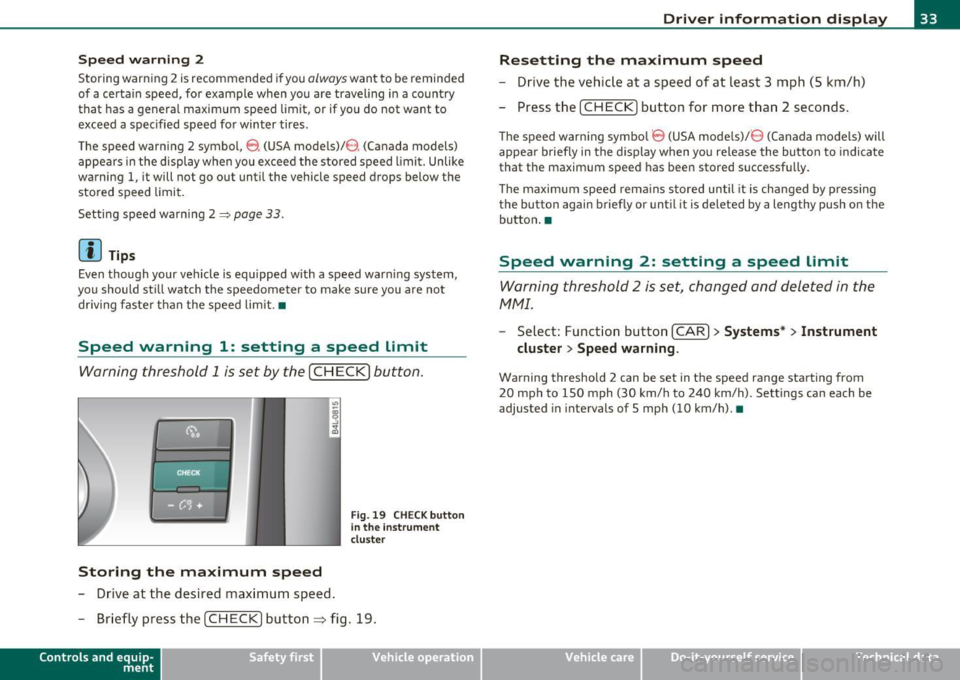
Warning threshold 1 is set by the [ CH ECK] button .
Storing the maximum speed
-Drive at the desired max imum speed .
Fig. 19 CHE CK butt on
in the i nstrument
clu ste r
- Briefly pre ss the [CHECK] button ~ fig. 19.
Con tro ls a nd e quip
m en t Vehicle
OP-eration
Driver information display
Resetting the maximum speed
- Drive the vehic le at a speed of at leas t 3 mph (S k m/h)
- Press the [ CH EC K] button for more t han 2 seconds .
The speed warning symbo l 8 (USA models)/ 8 (Canada models) will
appea r briefly in the d ispl ay when you release the bu tton to indica te
that the maximum speed has been stored successf ully.
Th e maximum spee d rema ins s tored until it is cha nged by p ressing
the button again briefly or until it is deleted by a lengthy push o n the
bu tton .•
Speed warning 2: setting a speed Limit
Warning threshold 2 is set, changed and deleted in the
fv1fv1l.
- Select: Funct io n button [CAR ]> Systems* > Instrument
cluster > Speed warning .
Warning threshold 2 can be set in the speed range starting from
20 mph to 150 mph (30 km/ h to 240 km/h). Settings can each be
adjusted in intervals of 5 mph (10 km/h). •
Vehicle care Do-it-yourselt service iTechnical data
Page 36 of 370
Driver information display
Trip computer
Introduction
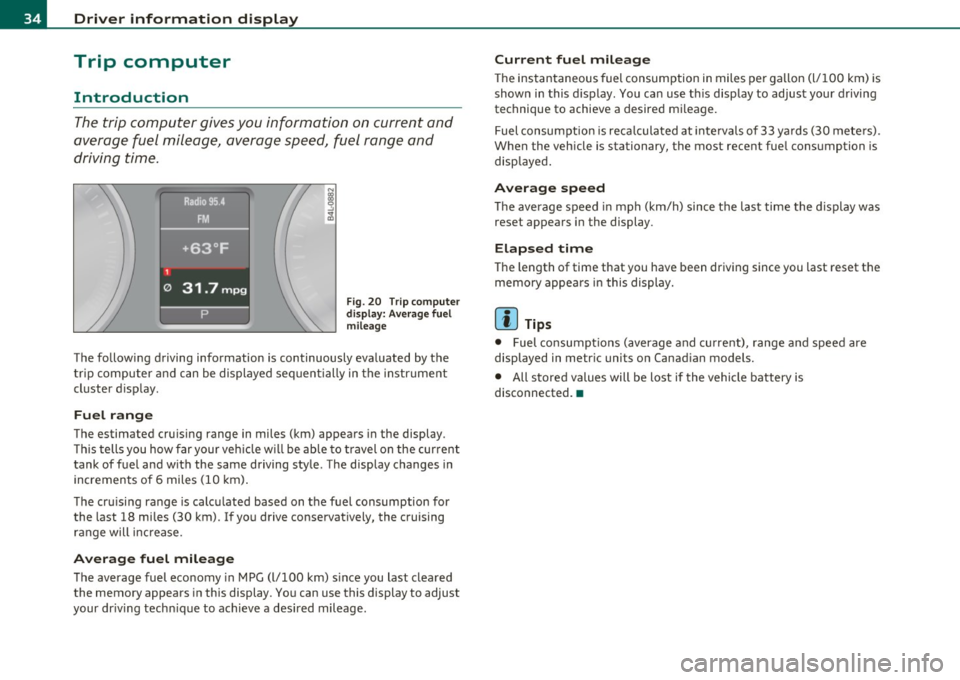
The trip computer gives you information on current and
average fuel mileage, avera ge speed, fuel range and
driving time .
Fig . 2 0 Tri p c om pute r
di sp la y: Av erag e fuel
mile age
T he fo llow ing driving information is continuously eva luated by the
t rip co mpute r and can be displayed se quen tially in the instr ument
cl uster d isplay.
Fuel range
The estimated cru ising range in miles (km) appea rs in the display.
Thi s tells you how far your veh icle w ill be ab le to travel o n the cur rent
tank of fuel a nd w ith the same driving sty le . The display changes in
in cremen ts of 6 miles (1 0 km).
Th e cru ising range is calc ulated based on t he f uel consumption for
the last 18 mi les (30 km). I f yo u drive conservatively, the cruising
r an ge will increase.
Average fuel mileage
T he average fuel economy in MPG (l/100 km) s ince you last clea red
the memory appears in this display . You can use this display to adjust
your dr iv ing tech nique to achieve a des ired mileage .
Current fuel mileage
The ins tan taneous fuel consumption in miles pe r ga llon (l/ 100 km) is
shown in this display . You can use t his disp lay to ad jus t your d riving
technique to achieve a desired m ileage.
Fuel consumpt io n is reca lculated at inte rvals of 33 y ards (30 me te rs).
When the veh icle is stationary, the most recent fue l consumption is
disp laye d.
Average speed
Th e average s peed in mph (km/h) since t he last ti me the display was
reset appea rs i n the display .
Elapsed time
The length of time that you have been dr iving since you last reset the
memory appea rs in this display.
[I) Tips
• Fuel consump tions ( average and cu rrent), range a nd speed are
displayed in metr ic units on Canad ian models.
• All stored values will be lost if the vehi cle battery is
disconnected. •
Page 61 of 370
brightness increases again, the low beams are turned off again auto
matically =>& .
In the
AUTO position the low beams are switched off automatically
when the ignition is turned off.
Light Sensor Malfunction
In the event of a light sensor ma lfunct ion, the driver is notified in the
instrument cluster display:
Automatic headlights/automatic wipers defective
For safety reasons the low beams are turned on permanently with t he
switch in
AUTO. However, you can continue to turn the lights on and
off using the light switch. Have the light sensor checked as soon as
possible at a dealership.
& WARNING
• Never use daytime running lights to see where you are going.
They are not bright enough and will not let you see far enough
ahead for safety, especially at dusk or when it is dark. Always
switch on the low beams at dusk or when it is dark.
• Automatic headlights are only intended to assist the driver .
They do not relieve the driver of his responsibility to check the
headlights and to turn them on manually according to the current
light and visibility conditions. For example, fog and rain cannot be
detected by the light sensors. So always switch on the headlights
under these weather conditions and when driving in the dark
io.
• Crashes can happen when you cannot see the road ahead and
when you cannot be seen by other motorists.
- Always turn on the headlights so that you can see ahead and
so that others can see your car from the back.
[ i ) Tips
• With the switch in AUTO front fog lights and rea r fog ligh ts cannot
be turned on in addition .
Controls and equip
ment Safety first
Clear vision
•
The light sensor for headlight control is located in the rear view
mirror mount. Do not apply any stickers to the winds hield in this area
to prevent malfunctions or failures .
• If you remove the ignition from the ignitio n lock w hile the head
lights are still on, a buzzer will sound as long as the dr iver's door is
open to remind you to turn off the lights.
• Always observe the specific loca l regulations for your area as to
when to use your lights .•
Adjusting exterior lighting
The functions are set in the MMI.
-Select: Function button [CAR]> Systems* > Exterior
lighting .
Coming home
The Coming home function ensures tha t after turning off the igni
tion and opening the driver's door
the vehicle per iphery is illum i
nated in the dark. In addition, the front fog lights, the tail lights and
the license plate light are turned on. On-time can be set for a per iod
from O (off) to 60 seconds .
Leaving home
The Leaving home function ensu res that when unlocking the vehicle
per iphery is illuminated in the dark. In addition, the front fog lights,
the tail lights and the license plate light are turned on. This function
can be turned on and off .
Daytime running lights
USA models: On vehicles with xenon lights the daytime running
lights can be turned on or off using this function . On vehicles with
halogen lights there is no daytime running lights function .
Canada models: The function cannot be turned off. It is activated
automatically each time the ignition is tur ned on. This menu item is
shown "greyed out". •
Vehicle care Technical data
Page 69 of 370
Rain sensor
The rain sensor operates on ly in the interval wiper position . When it
starts to rain, the interval wiper mode is activated automat ically .
I f the windshield wiper lever is in the interval wipe position with the
ign ition switched off, the rain sensor is not activated until vehicle
speed is above 4 mph (6 km/h) .
To reduce the sensitivity of the rain sensor, the switch @ must be
moved down . To increase the sensit ivity of the rain sensor, the switch
must be moved up.
The higher the sensitiv ity sett ing, the sooner the windsh ield wipers
react to mo isture on the windshie ld. Increased sensitivity is signa led
by the windshield w ipers making a single pass over the windshie ld.
T he rain sensor wiper intervals depend on the sensitivity setting as
we ll as vehicle speed. During brief stops, wiper motion will adjust in
relation to the amount of rain on the windshield .
& WARNING
• Wiper blades are crucial for safe driving! Only when they are in
good condition are they able to clear the windows properly to
provide uncompromised visibility. Worn or damaged wiper blades
are a safety hazard =>
page 68, "Replacing windshield wiper
blades"!
• The rain sensor is only designed to assist and support the
driver. It remains entirely the driver 's responsibility to monitor
outside weather conditions and to manually activate the wipers as
soon as rain or drizzle reduces visibility through the windshield.
• The windshield must not be treated with water-repellent
materials. They can increase glare under poor visibility conditions
such as wetness, darkness, or when the sun is low on the horizon.
In addition, they can cause the w indshield wipers to chatter.
0 Note
In freez ing or near freezing conditions:
Controls and equip
ment Safety first
Clear vision
•
Always check that the wiper blades are not frozen to the glass
before you turn the wipers on. Loosen a wiper blade which is frozen in
place before operat ing the w ipers to prevent damage to the wiper
blade or the wiper motor.
• Do not use the wipers to clear a frosted window . Us ing the wipers
as a convenient ice scraper will destroy the wiper blades.
• Before you take your vehicle to an automatic car wash, make sure
you have the windshield wipe r system switched off (lever in position
0), otherw ise the windshield wiper system could get damaged in the
car wash if it shou ld suddenly come on.
(I] Tips
• Worn or dirty windshield wiper blades cause smearing which can
affect the operation of the rain sensor . Check the condit ion of your
windshield wiper b lades regularly.
• The rain sensor is part of the interval wiping system . Turn ing off
the ignition will a lso deactivate the rain sensor. To reactivate the
sensor, switch off the interval wip ing function, then switch it back on
again.
• The w indshield wipers are switched off when the ignition is turned
off . Activate the windsh ie ld wipers after the ignition is switched back
on by mov ing the w indshield wiper lever to any pos it ion.
• Make sure the washer fl uid reservoir in the engine compar tment is
topped off before going on a long trip . Look up::::>
page 294 for
checking and filling the washer conta iner. •
App lies to ve hicle s: with headli ght was h er syste m
Headlight washer system
The headlight washer system cleans the headlights.
- Operate the windshield wiper/washer system~ page 66,
fig. 57 ®with the headlights turned on by holding the
lever for longer than one second. _,,,,
Vehicle care Technical data
Page 75 of 370

Digital compass
Applies to veh icles: wit h digita l co mp ass
Activating or deactivating the compass
The direction is displayed on the interior rear view mirror.
Fig. 62 Inside rear
view mirror: digital
compass activated
To activate or deactivate, hold the@ button down until
the red display appears or disappears .
The digital compass only works with the ignition turned on. The direc
tions are displayed as initials:
N (North), NE (Northeast), E (East), SE
(Southeast), S (South) , SW (Southwest), W (West), NW (Northwest).
(I) Tips
To avoid inaccurate directions, do not allow any remote controls ,
electr ical systems, or metal parts close to the mirr or.•
Con tro ls a nd e quip
m en t Vehicle
OP-eration
Clear vision
Applies to veh icles : w ith d ig ita l compass
Setting the magnetic deflection zone
The correct magnetic deflection zone must be set in order
to display the directions correctly .
.
,_ ,;=.~a,, I I
I I
I I
I ' I I
I I
1 ! ©
l 4
l
l
I ' I ,,
l ----
'
'
'
®
\, ,, ...... _______ ,.,.
©
@
Fig. 63 North America: magnetic deflection zone boundaries
-Hold the@=> fig . 62 button down until the number of
the set magnetic deflection zone appears on the interior rear view mirror .
- Adjust the magnetic deflection zone by repeatedly pressing on the@ button . The set mode automatically
deactivates after a few seconds. •
Vehicle care Do-it-yourselt service iTechnical data
Page 89 of 370
- Pull out and unfold the ski sack.
- Load skis or similar objects through the luggage compart-
ment into the interior of the vehicle~&.
Securing ski sack
- Insert the ski sack strap@~ page 86, fig. 80 in the
center buckle
® ·
- Pull the safety belt taut on the free end of the belt @.
Stowing ski sack
- Pull the ski sack through the rear backrest to the rear.
- In the passenger compartment, close the ski sack flap.
- Fold the ski sack carefully.
& WARNING
• The ski sack is intended only for the transportation of skis and
other light objects. To reduce the risk of serious personal injury
never transport heavy or pointed objects in the ski sack.
• When braking rapidly or during an accident the load could be
displaced and cause injury to occupants.
• Sharp edges on the load must be covered for protection.
Always fasten the belt tightly around the sack and its contents
=> page 86, fig. 80.
[ i] Tips
Never stow the ski sack away if it's wet or damp (for example, snow
melting from skis). Let it dry completely before you stow it away. •
Controls and equip
ment Safety first
Seats and storage
Roof rack
First things first
A roof
rack can be fitted to carry additional luggage on
the roof
-Always read and follow the instructions provided by the
roof rack manufacturer when the roof rack system must
be installed.
If you are transporting luggage or other objects on the roof, please
note the following:
• Your vehicle has specially designed aerodynamic roof rails. Only
install a roof rack specifically designed for your model. Contact the
nearest Audi dealer for information on approved modular roof racks
for your vehicle .
• These approved roof racks are the basis for a complete roof rack
system. Additional attachments for the basic roof rack are necessary
to safely transport luggage, bicycles, surf boards, skis or small boats.
All necessary hardware for these systems is available at your autho
ri zed Audi dealer .
• We recommend that you keep the installation instructions for
your roof rack system together with your Owner's literature in the
vehicle.
When should the roof rack be removed?
• Before going through an automatic car wash (it is best to ask the
car wash operator for advice).
• When not in use, to reduce fuel consumption, wind noise and to
guard against theft. _,,,
Vehicle care Technical data
Page 98 of 370
Warm and cold
Warm and cold
Climate control
Description
The air conditioner is fully automatic and is designed to
maintain a comfortable and uniform climate inside the
vehicle.
We recommend the following settings:
- Set the temperature to 75 °F (+23 °C).
- Press the [AUTO] button.
With this setting, you attain maximum comfort in the least amount
of time. Change this setting , as desired, to meet your personal needs.
The climate controls are a combination of heating, ventilation and cooling systems, which automatically reduce humidity and cool the
air inside your vehicle.
The air temperature, air flow and air distribution are automatically regulated to achieve and maintain the desired passenger compart
ment temperature as quickly as possible .
The system automatically compensates for changes in outside
temperature and for the intensity of the sunlight entering the
vehicle. We recommend you use the
Automatic mode=> page 99 for
year-round comfort .
Please note the following:
Turn on the air conditioner to reduce humidity in the vehicle. This also
prevents the windows from fogging up .
When the outside temperature is high and the air is very humid,
condensation from the evaporator may drip under the vehicle. This is
normal and does not indicate a leak. If the outside temperature
is low, the fan normally only switches to a
higher speed once the engine coolant has warmed up sufficiently .
The air conditioner temporarily switches off when you drive off from
a standstill using full throttle to save engine power.
The compressor also switches off if the coolant temperature is too
high, so that the engine can be adequately cooled under extreme
loads.
Air pollutants filter
The air pollutants filter (a combined particle filter and activated char
coal filter) reduces or prevents outside air pollution (dust, or pollen)
from entering the vehicle. The air is also filtered in air recirculation
mode.
The air pollutants filter must be changed at the intervals specified in
your Warranty
& Maintenance booklet, so that the air conditioner can
properly work .
If you drive your vehicle in an area with high air pollution, the filter
may need to be changed more frequently than specified in your Audi
Warranty
& Maintenance booklet. If in doubt, ask your authorized
Audi Service Advisor for advice .
Key coded settings
The air conditioner settings selected are automatically stored and
assigned to the key being used. When the vehicle is started, the air
conditioner automatically selects the settings assigned to that key.
This way every driver will maintain his/her own personal settings and
does not have to reset them manually.
If a different driver uses your key and changes the air conditioner
settings, the latest adjustments will erase and replace the settings
you have stored . _.,
Page 101 of 370
![AUDI A6 2011 User Guide Automatic mod e [AUTO j
The automatic mode is the standard setting for all
seasons .
- Select temperature between 60 °F (+16 °C) and 84 °F
(+28 °().
- Press the [AUTO] button.
A](/img/6/57593/w960_57593-100.png "AUDI A6 2011 User Guide Automatic mod e [AUTO j
The automatic mode is the standard setting for all
seasons .
- Select temperature between 60 °F (+16 °C) and 84 °F
(+28 °().
- Press the [AUTO] button.
A")
Automatic mod e [AUTO j
The automatic mode is the standard setting for all
seasons .
- Select temperature between 60 °F (+16 °C) and 84 °F
(+28 °().
- Press the [AUTO] button.
Automatic operation ensures constant temperatures in the interior
and dehumidifies the air inside the vehicle. Air temperature, vol ume
and distribution are controlled automatically to reach or maintain the
desired interior temperature as quickly as possib le . Fl uctuations in
exterior temperature and the effects of temperature from the pos i
tion of the sun are compensated for automatically.
T his operating mode works only in the adjustable temperature range,
from 60
°F ( + 16 °() to 84 °F (+28 °(). If a temperature below 60 °F
(+ 16 °() is selected , LO appea rs in the display. At tempe rat ures above
84
°F (+28 °(), H I is displayed. A t both extreme set tings, climate
control runs continuously at max imum cool ing or heat ing power.
There is no temperature regulation .•
Turning on and off [ ON/OFF]
Turning the air conditioning on
Press the [ON/OFF] button, or
- Press the
[AUTO] button.
Turning the air conditioning off
- Press the [ ON/OFF] button to switch the air conditioning
off and to block the air supply from the outside.
The air conditioner turns back on when you press the t e m pe rat ure
re gulat or
or one of the buttons.
Controls and equip
ment Safety first
W
arm and cold
(I] Tip s
With the ignition turned off, you can activate the residua l heat func
tion by pressing the [ ON/OFF) button. The residual heat from the
coo lant can be used to heat the vehicle interio r. •
Swi tching air cooling on /off [AC]
Switching off the compressor which operates the air
cooling system saves fuel.
- To switch the air cooling system on/off, press the [AC]
button.
When the air cooling system is switched on, the diode in the button
is lit and the heating and ventilation are regulated automat ically .
Please note that the interior temperature cannot be lower than the
outs ide temperature when the air cooling system is switched off. The
blower does not cool or dehumidify the air in the interior. It is there
fore possible that the windows mist up. •
Setting the temperature
Separate temperatures can be selected for the driver's
and front passenger's side.
Rotate the regulator to the left to reduce the tempera
ture, or to the right to increase the temperature .
The selected temperature appears on the climate control disp lay. The
temperature setting will also appear for a few seconds in the MMI
display. •
Vehicle care Technical data
Page 102 of 370
![AUDI A6 2011 User Guide llffl!l.___w __ a _r_ m __ a_n_ d_ c_ o _ l_d _______________________________________________ _
Fan @
The automatically preset fan speed can be reduced or
increased.
- Press the [ ae] b](/img/6/57593/w960_57593-101.png "AUDI A6 2011 User Guide llffl!l.___w __ a _r_ m __ a_n_ d_ c_ o _ l_d _______________________________________________ _
Fan @
The automatically preset fan speed can be reduced or
increased.
- Press the [ ae] b")
llffl!l.___w __ a _r_ m __ a_n_ d_ c_ o _ l_d _______________________________________________ _
Fan @
The automatically preset fan speed can be reduced or
increased.
- Press the [ ae] button .
- Rotate the regulator to the desired fan speed.
The climate control system automatically regulates fan speed
depending on inte rior temperatu re . You can adjust the vo lume of air
produced by the fan to your own requirements.
T he fan speed setting wi ll appear for a few seconds in the MM I
display .
rn Tips
It is possible that the fan speed may change automatically . This
occurs to ens ure that the desired temperature setting is reached as
quickly as possib le. •
Air distribution [~)
The automatically controlled air distribution can be
changed manually .
-Press the [-..:o] button .
Rotate the regulator to the desired setting.
You can adjust the air d istr ibut ion so that air flows from specific
vents. In position
:0 air flows only to the windows, in position ;J, it
flows to the drive r o r passenger, and in pos it ion
~ it flows to the
footwe ll. There are additional combinations avai lable to adjust air
distribution as needed.
To regu late air d istribut ion automatically, switch to [AUTO] . The air distribution setting w
ill appear for a few seconds in the MMI
display .•
Defrosting (@]
The windshield and side windows are rapidly defrosted or
defogged.
- Press the[@] button to turn on the defroster.
- Press the[@] button again, or press the[AUTO] button to
turn it off.
T emperat ure is controlled a utomatically. The maximum amount of
air flows mainly from the vents below the windsh ield .•
Manual air circulation [,:::.g, )
Air recirculation prevents exhaust fumes or other pollu
tion from entering the vehicle.
Turning on ai r recirculation
- Press the I~] button ~ &
Turning off air recirculation
Press the~ button again, or
press the [AUTO] button, or
- press the I@] button .
In the air recirculation mode, the air in the passenger compartment
is recirc ul ated and fi ltered to prevent exhaust fumes and other pollu
tion from entering the veh icle. We recommend that you use the
man ual air rec irculat ion under the following conditions :
• when driving through tunnels