Rear light AUDI A6 2011 User Guide
[x] Cancel search | Manufacturer: AUDI, Model Year: 2011, Model line: A6, Model: AUDI A6 2011Pages: 370, PDF Size: 87.15 MB
Page 52 of 370
Opening and closing
locked. The indicator light on top of the door trim start flash ing
r a pidly fo r 30 se con ds and t hen blink s low ly.
How is the anti-theft alarm system switched off?
T he anti -theft a larm system is swi tched off only whe n yo u unlock your
vehicle. If you do not open a door w ith in 60 seconds after you have
unloc ked w ith the remote contro l, t he veh icle will lock itself again
automatically .
When will the anti -theft alarm system be
triggered?
W hen the vehicle is locke d, the alarm system moni tors and protec ts
the following parts of the veh icle :
• engine compa rtment
• luggage compartment
• door s
• vehicle incline
• ignition
When the system is activated, the alarm will be triggered if one of the doors, the engine hood or the rea r lid are opened, or if the ign ition is
turned on or if the veh icle incline has been changed. The anti-theft
a larm sys tem w ill also go off when the ba ttery is d isconnected.
You can also trigger the alarm by pressing the PANIC button on your remote control. This will a lert other peop le in case of emergency.
Press the
PANIC bu tton aga in to tu rn off the ala rm.
How is the anti-theft alarm switched off when
tr igge red?
The alarm system is switched off when you un lock the vehicle or when
the ignition is switched on . The a larm will also switch itself off when
it comes to the end of its cycle .
Emergency flasher and ho rn
Th e emerge ncy flasher will blink briefly and the hor n sounds when
the doors, e ngine hood a nd rear lid a re properly closed. If the emergency flashers do not blink, or the horn does
not sou nd,
c heck t he doo rs, engine hood and re a r lid t o make sure t hey a re prop
erly closed . If you close a door , the hood o r the rear lid with t he anti
theft alarm switched on, t he emergency flashe rs will b link and the
horn will sound only after you have closed the door o r lid .
[I] Tips
For the an ti-theft a la rm system to function properly, m ake s ure all
vehicle doors and windows are closed before leav ing the veh icle .•
Power windows
Controls
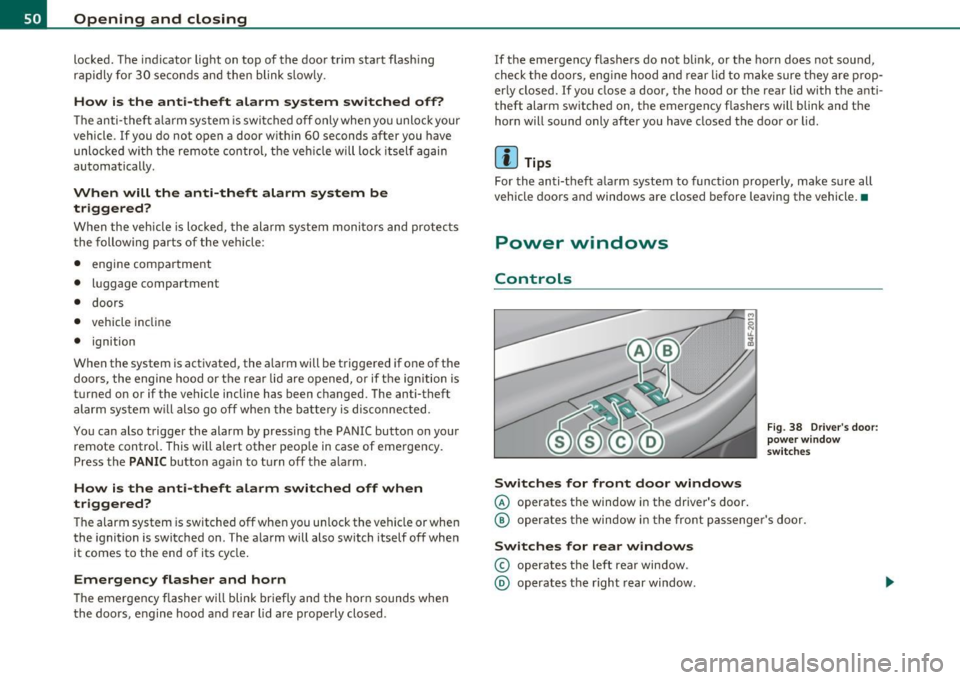
Switches for front door window s
© operates the window in the driver's door.
Fig. 38 Driver 's doo r:
p ow er wind ow
s wit ches
© operates the window in the front passenger 's door.
Switches for rear windows
© operates t he left rea r window .
@ operates the right rear window.
Page 53 of 370

Safety switch
® Safety swi tch for rea r window operat ion .
& WARNING
• Do not leav e children unattended in the vehicle, especially with
access to vehicle keys. Unsupervised use of the keys can result in
starting of the engine and u se of veh icle systems su ch a s power
windows, etc. which could result in se rious injury .
• Remember -you can still open or close the power window s for
about ten minutes a fter the ignition is switched off. Only when
either of the front doors are opened are the power windows
switched off.
• Be careful when closing the window s. Check to see that no one
is in the way, o r serious injury could result !
• Alway s remove the ignition key whenever you leave your
vehicle.
• If you lo ck your v ehicle from the outside, no one, e specially
children, should remain in the vehicle.
• Do not stick anything on the windows or the windshield that
may interfere with the dr iver's field of vi sion.
[ i ] Tips
In ad dition to the switches in the d river's doo r there is a separate
switch in each door for the powe r window in that door~
page 52,
fig.39. •
Switches in the driver 's door
T he driver can operate all wind ows.
If the res pective sw itch is pushe d or pulled t he window will
o pen or c los e. Th e powe r window swi tches have a
two-posi
tion function:
Controls and equip
ment Safety first
Opening and closing
Opening the windows
- Push the switch to the first stop and h old i t th ere until the
window has lowered to the desired posi tion .
- Push the switch br iefly to t he
second stop : the window
will automatica lly open a ll the way .
Closing the windows
- Pull the swi tch up to the first stop a n d ho ld it t her e u ntil
the window h as r is e n to t he desir ed posit ion.
- P ull the swi tch qu ickly to th e
second position: the window
w ill automatica lly cl os e a ll th e way ~
& in "Co ntro ls" on
page SO.
Activating/deactivating rear windows
- Press the le ft Cf) sw itch ~ page 50, fi g. 38 to deactivate
o nly the wi ndow reg ulator in the left door. The in dicator
light in the switch illumi nates .
- Press t he r ight
Cf) switc h~ page 50, fig . 38 to deactivate
only the w indow regulator in the right door. The ind icator
lig ht in t he switch illumi nates .
- Press the
[fl switch agai n to reactivate the wi ndow regu-
lator. T he ind icator lig ht in the switch goes out .
This function can a lso deact ivate d. Press both(!) switches ® in
s u ccession.
• If
only the left(!) switch was pressed, only the window regu lator
s w itch in the
left rear door is de acti vated. In a ddi tion , the door i s
locked.
• If
only the right(!) switch wa s pressed, only the window regu lator
switch in the
right rear door is deact ivated. In addition, the door is
locked.
~
Vehicle care Technical data
Page 54 of 370
![AUDI A6 2011 User Guide Open ing and closing
This feature has been provided for the safety of small ch ildren riding
in the rear of the vehicle.
[ i ] T ips
• The windows can still be opened and c](/img/6/57593/w960_57593-53.png "AUDI A6 2011 User Guide Open ing and closing
This feature has been provided for the safety of small ch ildren riding
in the rear of the vehicle.
[ i ] T ips
• The windows can still be opened and c")
Open ing and closing
This feature has been provided for the safety of small ch ildren riding
in the rear of the vehicle.
[ i ] T ips
• The windows can still be opened and closed for about ten minutes
after the ignition has been turned off . The power windows are not
shut off unt il one of the front doors is opened .
• In order to activate the child safety lock on the left and the right
side, you have to press the two safety switches in succession. Make
certain that the check light comes on the corresponding safety sw itch
when the child safety lock is activated .•
Switch in the front passenger 's door and on
the rear doors
"' 5 N
F ig. 39 Switch loca·
t ion front pass enge rs
doo r
The power window switch has a two-po sitio n funct ion :
Op ening the windows
- Press the switch to the fi rs t position and hold it unti l you
have opened the window as far as you want .
- Press the switch quickly to the
second pos iti on and the
window will automatically open all the way.
Closing the windows
- Pull the switch to the fi rst positi on and hold it until you
have closed the window as far as you want.
- Pull the switch quickly to the
second po sitio n and the
window will automatically close all the way.
(I] Ti ps
The windows can still be opened and closed for about ten minutes
after the ignition has been turned off. The power windows are not
shut off until one of the front doors is opened .•
Convenience close/open feature with the
lock in the driver 's door
You can close or open the windows from outside when you
lock or unlock your car with the key in the driver's door
lock.
, ,~
f~ -==--- 00--$] @
Closing windows
Fig . 4 0 Key turns fo r
openi ng a nd closi ng
- Insert the key into the lock of the driver's door.
Make sure that the windows are not blocked
==> & .
Page 55 of 370

-Turn and hold the k ey in the lock posit ion®~ page 52,
fig. 40 until t he windows and th e power roof * are
comple tely closed .
Opening windows
-Inse rt the key into the lock o f th e driver's door.
Turn and hold the key in t he open posit ion @.
The a utomat ic close/open fu nction will cease if the key is returned to
i t s or iginal pos it io n.
& WARNING
• Be careful when closing the windows . Check to see that no one
is in the way, or serious injury could re sult!
• Always read and heed WARNING=>
& in "General des cription "
on
page 41 . •
Reactivating the system after battery
disconnection
If the vehicle battery is disco nnected and t hen reconnected ,
the automatic closing and opening function will not work
u nti l it is reactivated. To reactivate th is featu re, perform the
fo llowing steps:
Reactivating close /open feature
- Pull and hol d th e power w indow sw itc h until t he window is
comp letely closed .
- Release the switch.
- Pull the swi tch again for one second. The automat ic
closi ng/opening is now reactivated. •
Contro ls a nd e quip
m en t Vehicle
OP-eration
Opening and closing
Sliding/tilting power sunroof
Applies to veh icles: with slid ing/t ilting powe r sunroof
How the power sunroof works
Fig . 41 Section of th e
h eadliner : su nroo f
s wit ch pos itio ns
The roof will slide open or ti lt up at the rear as required. When the
ignition is on, yo u can slide the roof open or close it to the des ired
position by turning the rotary control sw itch located overhead next to
the inte rior light. The roof is tilted open o r closed by p ressing or
pulling the control switch at posit ion ®=>fig. 41.
You can s till close or open the sunroof for up to ten minutes after you
have switched off the ignition with the key remaining in the ignition
lock. If either door is opened, powe red operation of the sun roo f will
be deact ivated.
Solar protection with sliding glass sun roof*
The sliding glass sun roof is equipped with an ad justable sunshade to
reduce the effects of strong sunlight. The so lar protection can be
moved at the recessed hand le to open and close it. To p revent the
vehicle interior f rom heat ing up, you should close the solar protection
when you park yo ur vehicle in the s un .
When the roof is
slid open , the sunshade is opened automat ica lly.
Whe n the roof is closed, the sunshade can be closed man ua lly. .,
Vehicle care Do-it-yourselt service iTechnical data
Page 56 of 370
Opening and closing
When the roof is tilted open, the closed sunshade is also raised at the
rear edge . But it can still be slid open or closed.
0 Note
You should always closed the sliding/tilting sunroof when you leave
your vehicle . Sudden rain can drench the interior equipment and
damag e the electronic convenienc e features in your v ehicle .
[ i ] Tips
If you park your vehicle in the sun , we recommend that you close the
sunshade*. •
Applies to vehicles : with slid ing/t il t ing po wer sunroof
Sliding/tilting the power sunroof open
Sliding the power sunroof open to the comfort position
keeps wind noise to a minimum .
Sliding the roof open to the comfort position
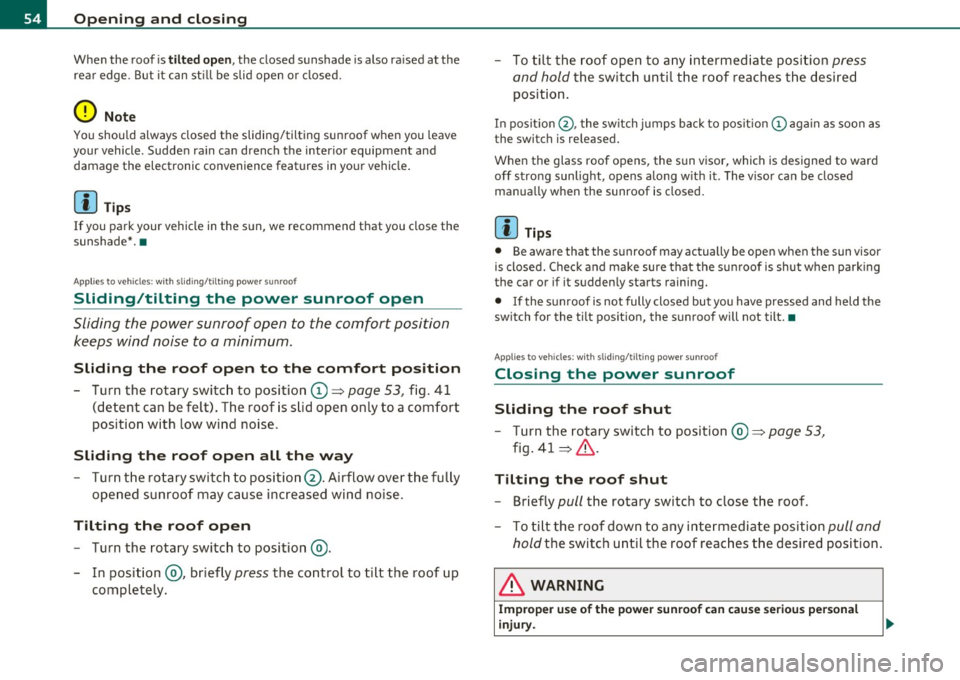
- Turn the rotary switch to position (D ~ page 53, fig. 41
(detent can be felt) . The roof is slid open only to a comfort
position with low wind noise .
Sliding the roof open all the way
-Turn the rotary switch to position@. Airflow over the fully
opened sunroof may cause increased wind noise .
Tilting the roof open
-Turn the rotary switch to position @.
- In position @, briefly
press the control to tilt the roof up
completely. -
To tilt the roof open to any intermediate position
press
and hold the switch until the roof reaches the desired
position.
In positio n@ , the switch jumps back to pos it ion © again as soon as
the swit ch is released.
When the glass roof opens, the s un visor, which is designed to ward
off strong sunlight, opens a long w ith it . The v isor can be closed
manually when the sunroof is closed.
[I) Tips
• Be aware that the sunroof may actually be open when the sun visor
is closed. Chec k and make sure that the sunroof is shut when park ing
the car or if it suddenly st art s raining.
• If the sunroof is not fully closed but you have pressed and held the
switch for the tilt pos ition, the sunroof will not tilt. •
App lies to veh icles: w ith sli ding/ tilting power sunroof
Closing the power sunroof
Sliding the roof shut
-Turn the rotary switch to position @~ page 53,
fig. 41 ~& -
Tilting the roof shut
- Briefly pull the rotary switch to close the roof .
- To tilt the roof down to any intermediate position
pull and
hold
the switch until the roof reaches the desired position.
& WARNING
Improper use of the power sunroof can cause serious personal
injury.
Page 61 of 370
brightness increases again, the low beams are turned off again auto
matically =>& .
In the
AUTO position the low beams are switched off automatically
when the ignition is turned off.
Light Sensor Malfunction
In the event of a light sensor ma lfunct ion, the driver is notified in the
instrument cluster display:
Automatic headlights/automatic wipers defective
For safety reasons the low beams are turned on permanently with t he
switch in
AUTO. However, you can continue to turn the lights on and
off using the light switch. Have the light sensor checked as soon as
possible at a dealership.
& WARNING
• Never use daytime running lights to see where you are going.
They are not bright enough and will not let you see far enough
ahead for safety, especially at dusk or when it is dark. Always
switch on the low beams at dusk or when it is dark.
• Automatic headlights are only intended to assist the driver .
They do not relieve the driver of his responsibility to check the
headlights and to turn them on manually according to the current
light and visibility conditions. For example, fog and rain cannot be
detected by the light sensors. So always switch on the headlights
under these weather conditions and when driving in the dark
io.
• Crashes can happen when you cannot see the road ahead and
when you cannot be seen by other motorists.
- Always turn on the headlights so that you can see ahead and
so that others can see your car from the back.
[ i ) Tips
• With the switch in AUTO front fog lights and rea r fog ligh ts cannot
be turned on in addition .
Controls and equip
ment Safety first
Clear vision
•
The light sensor for headlight control is located in the rear view
mirror mount. Do not apply any stickers to the winds hield in this area
to prevent malfunctions or failures .
• If you remove the ignition from the ignitio n lock w hile the head
lights are still on, a buzzer will sound as long as the dr iver's door is
open to remind you to turn off the lights.
• Always observe the specific loca l regulations for your area as to
when to use your lights .•
Adjusting exterior lighting
The functions are set in the MMI.
-Select: Function button [CAR]> Systems* > Exterior
lighting .
Coming home
The Coming home function ensures tha t after turning off the igni
tion and opening the driver's door
the vehicle per iphery is illum i
nated in the dark. In addition, the front fog lights, the tail lights and
the license plate light are turned on. On-time can be set for a per iod
from O (off) to 60 seconds .
Leaving home
The Leaving home function ensu res that when unlocking the vehicle
per iphery is illuminated in the dark. In addition, the front fog lights,
the tail lights and the license plate light are turned on. This function
can be turned on and off .
Daytime running lights
USA models: On vehicles with xenon lights the daytime running
lights can be turned on or off using this function . On vehicles with
halogen lights there is no daytime running lights function .
Canada models: The function cannot be turned off. It is activated
automatically each time the ignition is tur ned on. This menu item is
shown "greyed out". •
Vehicle care Technical data
Page 62 of 370

Clear vision
Front fog Lights }O
Fig. 47 Ins trume nt
p an el: li gh t s witch
The light switch must n ot be overtu rn ed past the stops in
either d irect ion .
Switching on the front fog lights }D
Turn the light switch to ~oo: or to iD.
- Pull the light switch to the first stop (D .
When the front fog lights are on , the symbo l }0 next to the ligh t
switch will illum inate.
(I) Tips
With the sw itch in AUTO front fog lights and rear fog lights cannot be
turned on in addition .•
Rear fog Lights 0$
Fi g. 48 Ins tru men t
p an el: light sw itc h
The light switch must not be overtur ned pas t th e stops i n
either d irection .
- Tur n the light switch to
~oo: or t o iD.
- Pull the light switch to the second stop @.
When the rear fog lights are on, both the }D and symbols next to
t he light sw itch will il luminate .
0 Note
The rear fog lights can distract drivers be hind yo u, so, they shou ld be
turned on
only in condit ions of very poor visib ility . A lways observe
loca l reg ulations w hen usin g the rear fog lights .
(I) Tips
With the sw itch in AUTO front fog lights and rear fog lights cannot be
tu rned on in addition .•
Page 66 of 370
Clear vision
When a door is open, the interior lights are turned off after about 10
minutes to prevent draining the battery.
The brightness of the lights is controlled automatically by a dimmer
when they a re switched on and off .•
Rear interior Lights
There ore reading lights in the rear for the passengers.
0 '-80
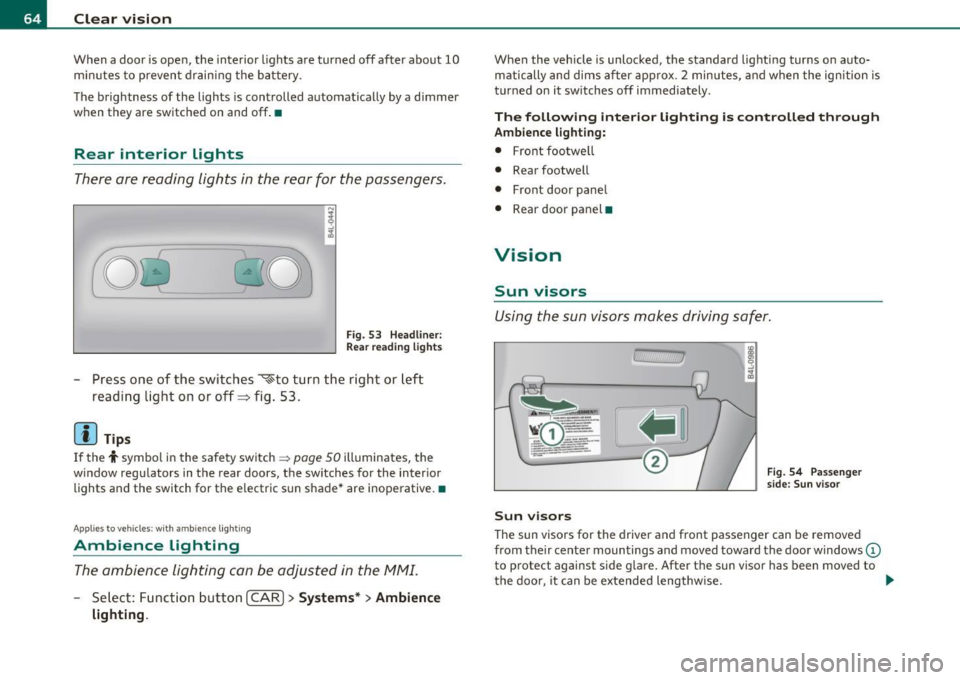
Fig . 53 Headline r:
Rea r read ing lights
Press one of the switches ~to turn the right or left
reading light on or off=> fig . 53 .
[I) Tips
If the t symbol in the safety switch ~ page 50 illuminates, the
w indow regulators in the rear doors, the switches for the interior
lights and the switch for the electric s un shade* are inoperative. •
Applies to ve hic le s: wit h am bien ce ligh tin g
Ambience Lighting
The ambience lighting con be adjusted in the MMI.
-Select: Function button I CAR ]> Systems* > Ambience
lighting.
When the vehicle is unlocked, the standard lighting turns on auto matically and dims after approx . 2 minutes, and when the ignition is
turned on it sw itches off immediately.
The following interior lighting is controlled through
Ambience lighting:
• Front footwe ll
• Rear footwell
• Front door panel
• Rear door panel •
Vision
Sun visors
Using the sun visors makes driving safer.
Sun visors
Fig. 54 Passenger
side: Sun visor
The sun visors for the driver and front passenger can be removed
from the ir center mountings and moved toward the door w indows
(D
to protect against side glare. After the sun visor has been moved to
the door, it can be extended lengthw ise. ..
Page 67 of 370
Make-up mirrors
The vani ty m irrors in the sun visors are equ ipped with lids . When the
lid is open end@, the mirror light in the roof lin ing tu rns on au toma t
ically . It t urns off when the lid is closed or the visor is folded up
agai n.•
App lies to vehicles: wit h sun sha de
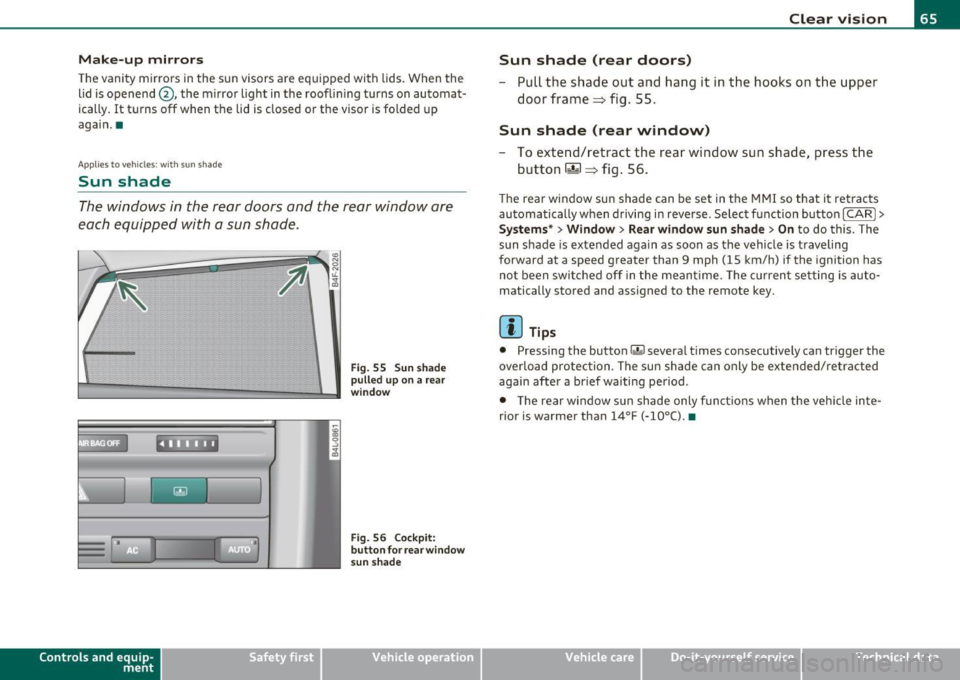
Sun shade
The windows in the rear doors and the rea r window are
each equipped with a sun shade.
Con tro ls a nd e quip
m en t
. l
F ig . 55 S un sh ad e
p ulled up on a rear
w in dow
Fi g. 56 Co ckpit:
b utt on f or rea r wind ow
s un sh a de
Vehicle OP-eration
Clear vision
Sun shade (rear doors)
- Pull the shade out and hang it in the hooks on the upper
doo r frame=> fig. 55.
Sun shade (rear window)
-To extend/retract the rear window sun shade, press the
button
rn => fig. 56.
T he rear window sun shade can be set in t he M MI so that it retracts
au tomatically w hen driving in reve rse . Selec t fu nction bu tton
[CARI >
Systems* > Window > Rear window sun shade > On to do this. The
s u n shade is extended again as soon as the vehi cle is traveling
forward at a speed greater than 9 mph (15 km/h) if the ignition has
no t b een swi tched off in the meant ime . T he c urren t se tting is auto
matically stored and assigned to the remote key.
[ i ] Tips
• Pressing the button r.&I severa l times co nsecutive ly can tr igger the
overlo ad protec tion. The su n shade can only be exte nded/ re tra cted
again after a brief waiting period .
• T he rear window sun sh ade only fun ct io ns when t he ve hicle in te
rior is warmer than
14°F (-10°() . •
Vehicle care Do-it-yourselt service iTechnical data
Page 72 of 370
Clear vision
Applies to vehicles : w ith automat ically d imm ing ins ide m ir ror w ith d ig ital compass
Automatically dimming inside mirror
The automatic dimming function can be turned on and
off if required .
Disabling auto dimming
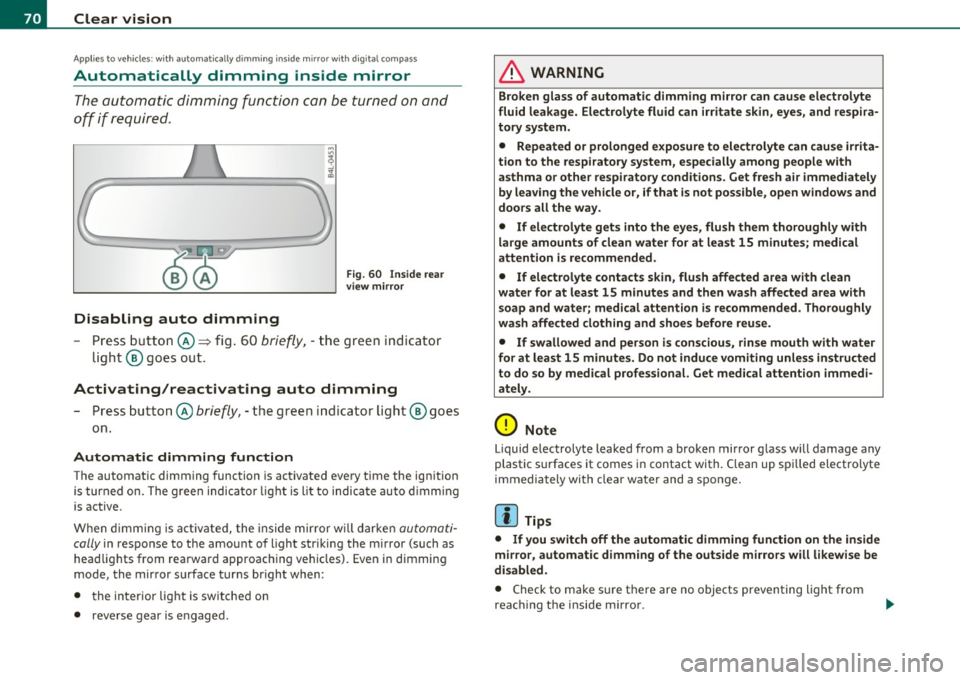
Fig . 60 I nside rea r
v ie w mirror
- Press but ton @ ~ fig . 60 brie fly, -the green ind icator
light ® goes out.
Activating/reactivating auto dimming
- Press button @ briefly, -the green indicator ligh t® goes
on .
Automat ic dimming function
The automatic dimming function is activated every tim e the ignition
is turned on. The g ree n indicator light is lit to indica te auto d imming
is active.
When d imming is act ivated, the inside mir ror w ill darke n
automati
cally
in response to the amou nt of light striking the mirror (such as
head lights from rearward approaching vehicles). Even in d imming
mode, the mirror surface turns br ight when :
• the interio r light is switched on
• reverse gear is engaged .
& WARNING
Broken glass of automatic dimming mirro r can cause electrolyte
fluid leakage . El ec trolyte fluid can irritate skin , eyes, and respira
tory system .
• Repeated or p rolonged expo sur e to ele ctrolyte can cau se irrita
tion to the resp iratory system, esp ecially among p eople with
asthma or other r espiratory condition s. G et fre sh air immediately
by le aving the vehicl e or, if that is not po ssible , open window s and
doors all the wa y.
• If ele ctrolyte g ets into the eye s, flush th em tho roughly with
large am ount s of clean water f or at lea st 15 minute s; medical
attention is re commended .
• If el ectrolyte contacts skin , flu sh affected area with clean
water for at l east 15 minut es and then wash aff ected area with
s oap and wat er; medical attention is rec ommend ed . Thoroughly
wash affected clothing and sho es before reu se.
• If swallowed and per son is c on sciou s, rinse mouth with water
fo r at le ast 15 minut es. Do not indu ce vomit ing unle ss instru cted
to do so by medical profe ssional. Get medical attenti on imm edi
ate ly .
0 Note
Liquid e lectrolyte leaked from a broken mirror g lass will damage any
plastic surfaces it comes in contact with. Clean up spi lled electrolyte
immediately with clear water and a sponge.
[I) Tips
• If you switch off the automatic dimming function on th e in side
mir ro r, automatic dimming of the outside mirrors will l ikewise be
di sabled .
• Check to make sure there are no objects preventing light from
reac hing t he i nside m irro r.