key AUDI A6 2011 Owner's Manual
[x] Cancel search | Manufacturer: AUDI, Model Year: 2011, Model line: A6, Model: AUDI A6 2011Pages: 370, PDF Size: 87.15 MB
Page 54 of 370
![AUDI A6 2011 Owners Manual Open ing and closing
This feature has been provided for the safety of small ch ildren riding
in the rear of the vehicle.
[ i ] T ips
• The windows can still be opened and c](/img/6/57593/w960_57593-53.png "AUDI A6 2011 Owners Manual Open ing and closing
This feature has been provided for the safety of small ch ildren riding
in the rear of the vehicle.
[ i ] T ips
• The windows can still be opened and c")
Open ing and closing
This feature has been provided for the safety of small ch ildren riding
in the rear of the vehicle.
[ i ] T ips
• The windows can still be opened and closed for about ten minutes
after the ignition has been turned off . The power windows are not
shut off unt il one of the front doors is opened .
• In order to activate the child safety lock on the left and the right
side, you have to press the two safety switches in succession. Make
certain that the check light comes on the corresponding safety sw itch
when the child safety lock is activated .•
Switch in the front passenger 's door and on
the rear doors
"' 5 N
F ig. 39 Switch loca·
t ion front pass enge rs
doo r
The power window switch has a two-po sitio n funct ion :
Op ening the windows
- Press the switch to the fi rs t position and hold it unti l you
have opened the window as far as you want .
- Press the switch quickly to the
second pos iti on and the
window will automatically open all the way.
Closing the windows
- Pull the switch to the fi rst positi on and hold it until you
have closed the window as far as you want.
- Pull the switch quickly to the
second po sitio n and the
window will automatically close all the way.
(I] Ti ps
The windows can still be opened and closed for about ten minutes
after the ignition has been turned off. The power windows are not
shut off until one of the front doors is opened .•
Convenience close/open feature with the
lock in the driver 's door
You can close or open the windows from outside when you
lock or unlock your car with the key in the driver's door
lock.
, ,~
f~ -==--- 00--$] @
Closing windows
Fig . 4 0 Key turns fo r
openi ng a nd closi ng
- Insert the key into the lock of the driver's door.
Make sure that the windows are not blocked
==> & .
Page 55 of 370

-Turn and hold the k ey in the lock posit ion®~ page 52,
fig. 40 until t he windows and th e power roof * are
comple tely closed .
Opening windows
-Inse rt the key into the lock o f th e driver's door.
Turn and hold the key in t he open posit ion @.
The a utomat ic close/open fu nction will cease if the key is returned to
i t s or iginal pos it io n.
& WARNING
• Be careful when closing the windows . Check to see that no one
is in the way, or serious injury could re sult!
• Always read and heed WARNING=>
& in "General des cription "
on
page 41 . •
Reactivating the system after battery
disconnection
If the vehicle battery is disco nnected and t hen reconnected ,
the automatic closing and opening function will not work
u nti l it is reactivated. To reactivate th is featu re, perform the
fo llowing steps:
Reactivating close /open feature
- Pull and hol d th e power w indow sw itc h until t he window is
comp letely closed .
- Release the switch.
- Pull the swi tch again for one second. The automat ic
closi ng/opening is now reactivated. •
Contro ls a nd e quip
m en t Vehicle
OP-eration
Opening and closing
Sliding/tilting power sunroof
Applies to veh icles: with slid ing/t ilting powe r sunroof
How the power sunroof works
Fig . 41 Section of th e
h eadliner : su nroo f
s wit ch pos itio ns
The roof will slide open or ti lt up at the rear as required. When the
ignition is on, yo u can slide the roof open or close it to the des ired
position by turning the rotary control sw itch located overhead next to
the inte rior light. The roof is tilted open o r closed by p ressing or
pulling the control switch at posit ion ®=>fig. 41.
You can s till close or open the sunroof for up to ten minutes after you
have switched off the ignition with the key remaining in the ignition
lock. If either door is opened, powe red operation of the sun roo f will
be deact ivated.
Solar protection with sliding glass sun roof*
The sliding glass sun roof is equipped with an ad justable sunshade to
reduce the effects of strong sunlight. The so lar protection can be
moved at the recessed hand le to open and close it. To p revent the
vehicle interior f rom heat ing up, you should close the solar protection
when you park yo ur vehicle in the s un .
When the roof is
slid open , the sunshade is opened automat ica lly.
Whe n the roof is closed, the sunshade can be closed man ua lly. .,
Vehicle care Do-it-yourselt service iTechnical data
Page 57 of 370

& WARNING (continued)
• Be careful when closing the power sunroof. Not paying atten
tion could cause you or others to be trapped and injured as the roof
closes.
• Always take the key with you when you leave the vehicle to
prevent injuries caused by the roof closing.
• Never leave children or persons requiring assistance alone in
the vehicle, especially when they could access the vehicle keys.
Unsupervised use of the keys can result in the engine being started
or use of vehicle systems such as the power windows, etc. which
could result in serious injury. The doors could be locked with the
remote key, delaying help in an emergency.
• The power sunroof will continue to operate until the ignition
key has been removed and one of the front doors has been
opened. •
Applies to veh icl es: w ith s lid in g/ti lt ing powe r sunroof
Convenience closing feature
The power sunroof can be closed from outside with the
key in the driver 's door lock.
- Insert the key into the d river 's door lock .
- Turn and hold th e ke y in the lock position®=:>
page 43,
fig. 29 until the sunroof is completely closed=:>&, in
"Closing the power sunroof " on
page 54.
& WARNING
Be careful when closing the power sunroof. Not paying attention
could cause you or others to be trapped and injured as the roof
closes. •
Controls and equip
ment Safety first Opening and closing
App
lies to vehicles : w ith sliding/tilting power sunroof
Power emergency closing
The sunroof can still be closed electrically if for some
reason the overload protection function becomes acti
vated.
The power sunroof is equipped with an overload protection
feature. If, under normal conditions, the power sunroof will
not close, you can close it using this feature .
- Turn the rotary switch to position@=:>
page 53, fig. 41.
- Now pull the switch
and hold it in this position until the
power sunroof closes completely .
& WARNING
Improper use of the power sunroof can cause serious personal
injury.
• Be careful when closing the power sunroof. Not paying atten
tion could cause you or others to be trapped and injured as the roof
closes.
• Always take the key with you when you leave the vehicle to
prevent injuries caused by the roof closing.
• Never leave children or persons requiring assistance alone in
the vehicle, especially when they could access the vehicle keys.
Unsupervised use of the keys can result in the engine being started
or use of vehicle systems such as the power windows, etc. which
could result in serious injury. The doors could be locked with the
remote key, delaying help in an emergency.
• The power sunroof will continue to operate until the ignition
key has been removed and one of the front doors has been
opened. •
Vehicle care Technical data
Page 65 of 370
High beam l[D
-Push the lever forward ® to switch on the high beam.
- Pull the lever back towards you to switch off the high
beam.
H eadlight flasher l[D
- Pull the lever toward the steering wheel© to use the
headlight flasher.
Notes on the se fea ture s
• The turn signals only work with the ignition turned on. The indi
cato r lights ¢ or¢ in the instrument cluster=>
page 12 also blink.
• After you have turned a corner, the turn signal switches off auto
matically.
• The
high beam works only when the headlights are on. The indi
cato r light [D in the instrument cluster illuminates when the h igh
beams are on.
• T he
headlight flasher works only as long as you ho ld the lever -
even if there are no lights turned on. The indicator light~D in the
instrument cluste r illuminates when yo u use the headlight flasher.
0 Note
Do no t use the high beam or head light flasher if you know that these
could blind oncoming traffic .•
Con tro ls a nd e quip
m en t Vehicle
OP-eration
Clear vision
Interior lights
Front interior lights
The interior lights include reading lights for both the
driver and the front passenger.
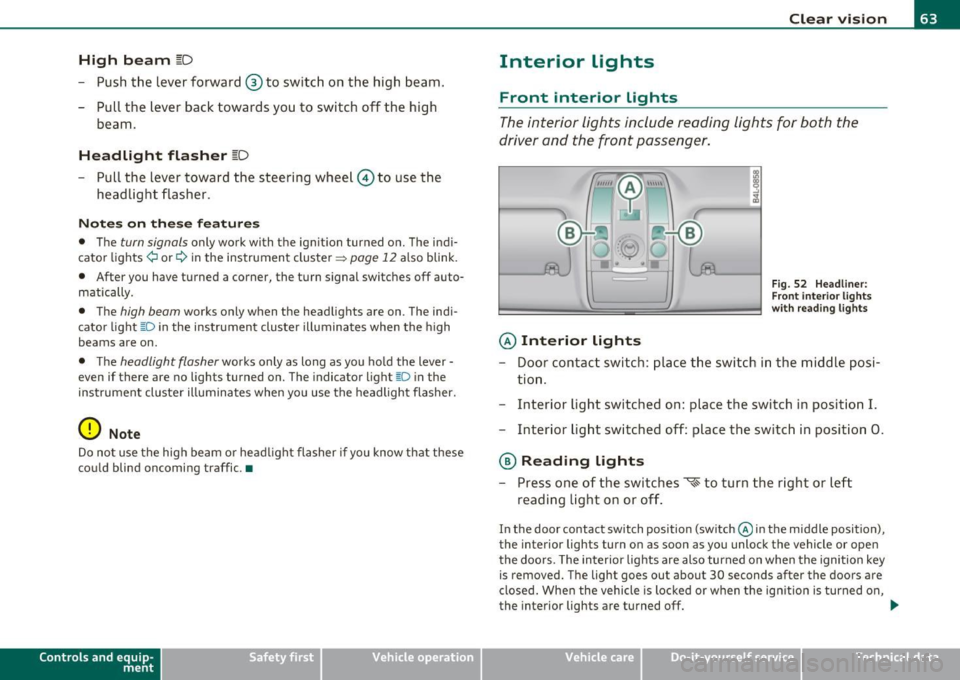
© Interior lights
Fig . 52 Headli ner:
F ron t inte rior lights
wit h rea ding lights
- Door contact switch : place the switch in the middle posi-
tion .
- Interior light switched on: place the switch in position
I.
-Interior light switched off: place the switch in position 0.
® Reading lights
- Press one of the switches '* to turn the right or left
reading light on or off .
In the door contact switch position (switch @in the middle position),
the interior lights turn on as soon as you unlock the vehicle or open
the doors. The interior lights are also turned on when the ignition key is removed. The light goes out about 30 seconds after the doors are
closed . When the vehicle is locked or when the ign ition is turned on,
the interior lights are turned off.
~
Vehicle care Do-it-yourselt service iTechnical data
Page 67 of 370
Make-up mirrors
The vani ty m irrors in the sun visors are equ ipped with lids . When the
lid is open end@, the mirror light in the roof lin ing tu rns on au toma t
ically . It t urns off when the lid is closed or the visor is folded up
agai n.•
App lies to vehicles: wit h sun sha de
Sun shade
The windows in the rear doors and the rea r window are
each equipped with a sun shade.
Con tro ls a nd e quip
m en t
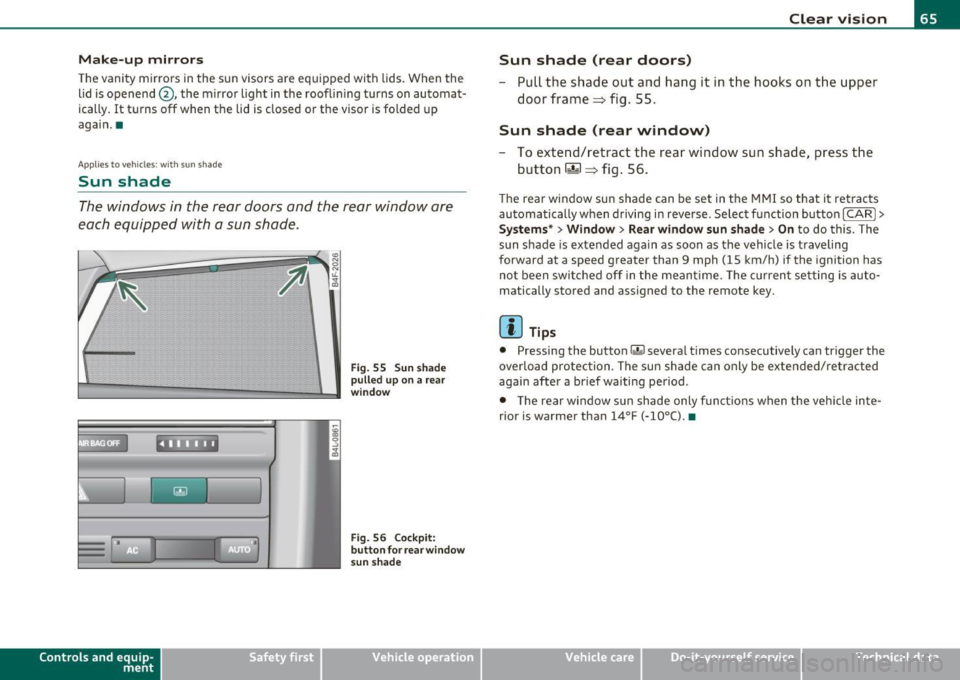
. l
F ig . 55 S un sh ad e
p ulled up on a rear
w in dow
Fi g. 56 Co ckpit:
b utt on f or rea r wind ow
s un sh a de
Vehicle OP-eration
Clear vision
Sun shade (rear doors)
- Pull the shade out and hang it in the hooks on the upper
doo r frame=> fig. 55.
Sun shade (rear window)
-To extend/retract the rear window sun shade, press the
button
rn => fig. 56.
T he rear window sun shade can be set in t he M MI so that it retracts
au tomatically w hen driving in reve rse . Selec t fu nction bu tton
[CARI >
Systems* > Window > Rear window sun shade > On to do this. The
s u n shade is extended again as soon as the vehi cle is traveling
forward at a speed greater than 9 mph (15 km/h) if the ignition has
no t b een swi tched off in the meant ime . T he c urren t se tting is auto
matically stored and assigned to the remote key.
[ i ] Tips
• Pressing the button r.&I severa l times co nsecutive ly can tr igger the
overlo ad protec tion. The su n shade can only be exte nded/ re tra cted
again after a brief waiting period .
• T he rear window sun sh ade only fun ct io ns when t he ve hicle in te
rior is warmer than
14°F (-10°() . •
Vehicle care Do-it-yourselt service iTechnical data
Page 73 of 370
• Do not attach any st ickers to the w indshield in front of the light
sensor, as this would inte rfe re with the a utomat ic operat ion of the
headlights and the automat ic dimming of the ins ide mir ror.
• Be aware that a utomatic dimming o f the in si de mir ror can on ly
operate proper ly if the rear w indow s un b lin d* is retracted . •
Outside mirrors
The outside mirrors are elec trically ad jus ted.
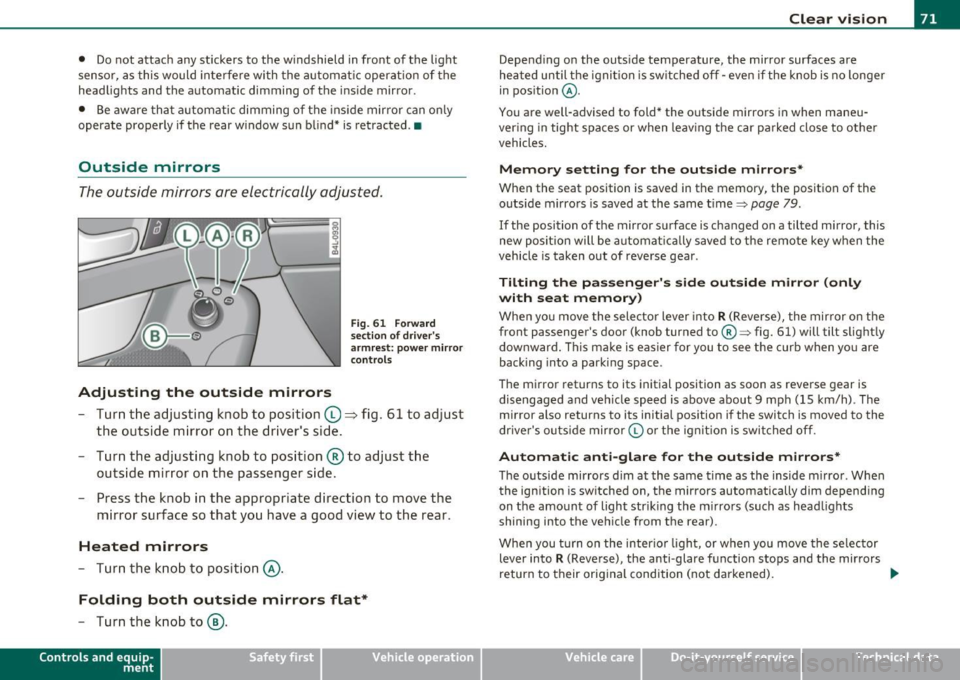
Adjusting the outside mirrors
F ig . 6 1 Forward
sec tion of dri ve r's
a rmr est: p ow er mirr or
con tro ls
- Tur n th e adjus ting k no b to position (0 ~ fig. 61 to ad just
the outsi de mi rror on the drive r's sid e.
- Turn the adjusting knob to position ® to adjust the
outside mir ror on the passenger side .
- Press the knob in the appropriate direction to move the
mirror surface so that you have a good view to the rear .
Heated mirrors
- Turn the knob to position @.
Folding both outside mirrors flat*
-Turn the knob to@ .
Con tro ls a nd e quip
m en t Vehicle
OP-eration
Clear vision
Depend ing on the outs ide temperature, the mirror surfaces are
heated un til t he ignit ion is sw itched off -eve n if the knob is no longe r
in pos ition
@ .
You are well-advised to fold* the o utside mirrors in when maneu
ver ing in tight spa ces or when leav ing t he car parked close to ot her
vehicles.
Memory setting for the outside mirrors *
When the seat position is saved in the memory, the position of the
outs ide mirro rs is saved at the same time~ page 79.
If the position of the mirro r su rface is changed on a tilted mirror, this
new posit io n wi ll be automat ically saved to the rem ote key w hen the
vehicle is taken out of reverse gear .
Tilting the passenger's side outside mirror (only
with seat memory )
When yo u move the selector lever into R (Reverse), the mir ror on t he
front passenger 's door (knob turned to@ ~ fig. 61) will tilt slight ly
downward . Th is ma ke is eas ier for you to see t he curb when you are
back ing into a parki ng space .
T he mirror returns to its initial position as soon as reverse gear is
disengaged and ve hicle speed is above about 9 mph (15 km/h) . The
mirro r also returns to its initia l position if the switch is moved to the
dr ive r's o uts ide mirro r© or th e ig ni tion is swit ched off .
Automatic anti-glare for the outside mirrors*
The o utside mirrors dim at the same t ime as the inside m irro r. When
the ign it ion is sw itched on, the mirrors automatically dim depend ing
on the amo unt of light str iking the m irro rs (su ch as head lights
shining into the vehicle from the rear).
When you turn on the inter io r li ght, or w hen you move the se lec tor
lever into
R (Reverse), the anti-glare f unction stops and the mirrors
return to their orig inal condition (not darkened).
~
Vehicle care Do-it-yourselt service iTechnical data
Page 79 of 370

& WARNING (co ntinued )
• Be careful when adjusting the seat height. Check to see that no
one is in the way, or serious injury could re sult!
• Becau se the seats can be ele ctrically adjusted with the ignition
key removed, never leave children unattended in the v ehicle.
Unsupervised use of the electric seat adjustments may cau se
serious injury .•
Seat adjustment
Fi g. 65 P ower s ea t:
Swit ch f or sea t adjust·
ment
Moving the seat forward and backward ©
- Press th e switc h forwa rd or backward horizonta lly=>& .
Adjusting the seat height@ and ® together
-Pull the switch evenly at both ends to raise th e seat=> &.
-Push the switch evenly at both ends to lower the seat
=> & .
Angling the seat cushion up and down@ or®
-To a ngle t he seat c ushio n up, pull the switch at the front
only =>& .
Cont rols a nd e quip
m en t Vehicle
OP-eration
Seats and storage
-Alternative ly, push the sw itch at the rear only=>& .
-To angle t he seat cushion down, push the switch at the
front only=>& .
-Alternative ly, pull the sw itch at the rear only=>& .
& WARNING
• Never adjust the driver' s or front passenger's seat while the
vehicle is moving . If you do this while the vehicle is moving , you
will be out of position. Always adjust the dri ver's or front
pa ssenger 's seat when the vehicle is not moving.
• Be careful when adjusting the seat he ight. Check to see that no
one i s in the way , or seriou s injury could result!
• Be cause the seats can be ele ctrically ad justed with the ignition
key removed, never leave children unattended in the veh icle.
Unsupervised use of the electric seat adjustments may cause
serious injury. •
Adjusting the seatback
,.._
----:-:----:--=-=-=-=-1~ jg
Fig. 66 Power s eat:
Sw itch for sea t bac k
an gle
- Push the switch => fig . 66 forward or to the rear i n the
direction of the arrow to adjust the angle of the seat back
=> & . ...
Vehicle care Do-it-yourselt service iTechnical data
Page 81 of 370

Seat memory
Applies to veh icles: with seat memory
Driver's seat memory
The seat adjustment settings for two drivers can be
stored using the memory buttons in the driver's door.
-...... SET 1 2 ,,..,
Fig. 68 Driver's door:
Seat memory
In addition to the setting for the driver's seat, the settings for the
steering column* and both exterior mirrors can be stored.
Storing and r ecalling setting s
Using the memory buttons 1 and 2, you can store and recall the
settings for two different drivers~ fig . 68 .
T he current settings are also automatically stored on the remote
control key being used when the vehicle is locked. When the vehicle is
unlocked, the settings stored on the remo te contro l key being used
are automatically recalled. This function has to be activated in the
MMI
~ page 80, " Activating remote cont rol key memo ry" .
Tur ning seat m em ory o n and off
If the [ ON/OFF I switch is depressed , the seat memo ry is inoperative .
The word
OFF next to the [ ON/OFF ) switch illuminates.
All the stored settings are retained. We recommend using the
I ON/OFF ) switch and deact ivat ing the seat memory if the vehicle is
Controls and equip
ment Safety first
S
eats and storage
only going to be used temporarily by a driver whose settings are not
going to be stored .•
App lies to veh icles : w it h seat memo ry
Storing and recalling a seat position
Before you can store or recall your seat position, the
[ON/OFF) button must be engaged (down) .
Storing settings
-Adjust the driver 's seat => page 76.
- Adjust the steering column*=>
page 107.
-Adjust both outside mirrors=> page 71. In the ti lt-down
position, the passenger mirror can be adjusted to the
preferred position and saved in the seat memory.
- Press the
[SETI button and hold it down. At the same
time, press one of the memory buttons for at least one
second .
- Release the buttons. The settings are now stored under the corresponding memo ry bu tton.
Recalling settings
- Driver's door open -press the des ired memory button.
- Driver's door closed - press the corresponding memory
button unt il the stored position is reached .
Su ccessfu l storage is confirmed audib ly and by the light in the [SET )
button illuminat ing .
When the vehicle is
locked , the current settings are stored and
assigned to the remote control key. But the settings sto red on
memory buttons 1 and 2 are not deleted. They can be recalled at any ..,
Vehicle care Technical data
Page 82 of 370
Seats and storage
time. When the vehicle is unlocked , the settings stored on the
remote con trol key are res to red .
If your ve hicle is driven by othe r persons using yo ur remo te con trol
key, you sho uld save yo ur individ ua l seat position on one of the
memo ry bu tton s. Yo u can recall you r se tting s ag ain sim ply and
conveniently by p ressing the cor responding memory button. When
t he vehi cle i s lo ck ed , the se se tt ings are a uto mati ca lly re-assig ned to
the remote cont rol key and stored .
& WARNING
• For safety reasons , the seat setting can only be recalled when
the vehicle is stationary -otherwise you risk having an accident .
• In an emergency , the recall operation can be stopped by
pressing the [
ON/OFF ] button or by briefly pressing any given
memory button. •
Applies to ve hicl es : w it h seat m em ory
Activating remote control key memory
To be ab le to re ca ll the st ore d set tings with the rem ote
co ntr ol key, the func tion h as to be activa ted in the MMI.
- Sele ct: Funct ion butt on I CAR] > Systems* > Seat
adjustment > Driver's seat > Key mem. profile> On. •
Rear seats
General information
Safe transpo rtat ion of pa sseng ers on t he re ar seat s
r eq uires prope r safety prec aut ion s.
All passengers on the rear seats must be seated in compliance with
t he s afe ty gu idelin es expl ain ed in~
page 18 7 and ~ pa ge 19 7. T he correct seating position is critica
l for the safety of front
and rear seat
p assenge rs alik e~
page 180.
& WARNING
• Occupants in the front and rear seats must always be properly
restrained .
• Do not let anyone ride in the vehicle without the head
restraints provided. Head restraints help to reduce injuries.
• Loose items inside the passenger compartment, can fly
forward in a crash or sudden maneuver and injure occupants .
Always store articles in the luggage compartment and use the
fastening eyes, especially when the rear seat backs have been
folded down.
• Read and heed all WARNINGS~
page 180, "Proper seating
positions for passengers in rear seats ".•
Rear window shelf
You can place light articles of c lothing on the rea r win dow
sh elf behi nd th e s eatbac k.
& WARNING
Whenever you are driving, do not leave any hard objects on the
rear window shelf or allow your pet to sit on the shelf . These could
become a hazard for vehicle occupants in the event of sudden
braking or a crash!
[ i ] Tips
• A vent slot is located between the shel f and the rear window . Do
no t bl ock the ven t wi th any item s you m ay pla ce o n the re ar window
shelf.
• Do not place b ulky items o n the rea r window she lf as t hey wo uld
restrict or bloc k the driver 's vis ion thro ug h the rear view m irror. •
Page 85 of 370
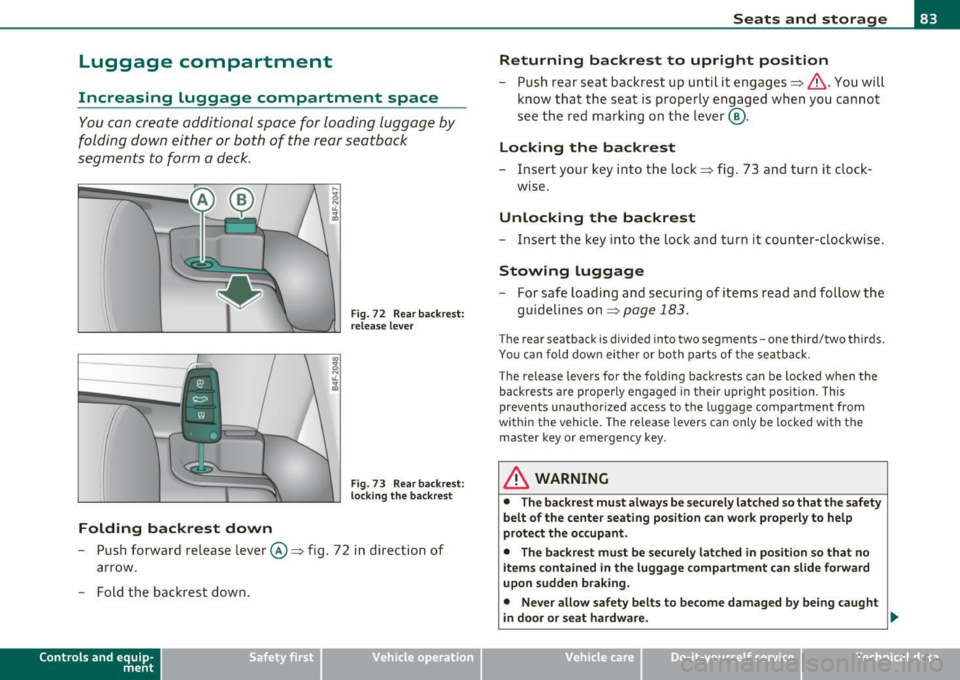
Luggage compartment
Increasing Luggage compartment space
You can create additional space for loading luggage by
folding do wn either or both of the rear seatback
segments to form a deck .
Folding backrest down
Fig. 72 Rear backr es t:
rele ase lever
Fig. 73 Rea r ba ckr est:
l o cki ng t he b ackre st
- Push forwa rd release lever ©~ fig. 72 i n direction of
arrow.
- Fold the backrest down .
Contro ls a nd e quip
m en t Vehicle
OP-eration
Seats and storage
Returning backrest to upright position
- Push rear seat backrest up unti l it engages~ &. You will
know that the seat is properly engaged when you canno t
se e t he red marking on the lever @.
Locking the backrest
- Insert your key into t he lock ~ fig . 73 and turn it clock
w ise.
Unlocking the backrest
- Ins ert the key in to the lock and turn it count er-clockwise .
Stowing luggage
-For safe loading and securing of items read an d follow the
guidelines on~
page 183.
The rear seatback is divided into two segments -one third/two thirds.
You can fold down ei ther or bo th parts of t he sea tback.
T he release levers for the fo lding backrests can be loc ked when the
back rests are properly engaged in their upr ight position. This
prevents unauthor ized access to the luggage compartment from
withi n the vehicle. The release levers can only be locked with the
master key o r emergency key.
& WARNING
• The backr est must always be s ecurely latched so that the sa fety
belt of the center seating position can work properly to help
prote ct the occupant .
• The backrest must be securely latched in position so that no
items contained in the luggage compartm ent can s lide forward
upon sudden b raking.
• Never allow safety belts to become damag ed by being caught
in d oor or seat hardware. _,.
Vehicle care Do-it-yourselt service iTechnical data