warning AUDI A6 2011 Repair Manual
[x] Cancel search | Manufacturer: AUDI, Model Year: 2011, Model line: A6, Model: AUDI A6 2011Pages: 370, PDF Size: 87.15 MB
Page 93 of 370

Ashtray
Front ashtray
To open ashtray
- Tap the edge of the ashtray =>& .
To close ashtray
Fig. 85 Center
conso le: front asht ray
- Tap the lid to close the ashtray automatically .
Removing ashtray ins ert
- Grasp the ashtray insert => fig . 85 by th e recesses on both
sides and pull it upward and out -Arrow -.
To reinstall ashtray
-Press the ashtray insert back into its holder.
& WARNING
Never put waste pap er in the a sht ray. Hot ashe s or o ther hot
obj ects in th e ashtra y could set w ast e pape r on fire. •
Cont rols a nd e quip
m en t Vehicle
OP-eration
Seats and storage
Rear ashtray
-
F ig. 86 Rea r asht ray
To open asht ray
- Touch the lid to open the ashtray .
Removing ashtray insert
-Press the front of the open lid downward in the direction
of the arrow => fig . 86 -the ashtray insert pops out
slightly .
- Lift the ashtray insert up and out.
Reinstalling ashtray insert
-Open the lid on the ashtray insert and press the insert into
the housing as far it can go.
& WARNING
N ev er pu t waste paper in th e ashtray . Hot ashes or othe r ho t
obj ects in the a shtr ay c ould set w aste pap er on fire .•
Vehicle care Do-it-yourselt service iTechnical data
Page 94 of 370
Seats and storage
Cigarette lighter/socket
Cigarette lighter
. .
. .
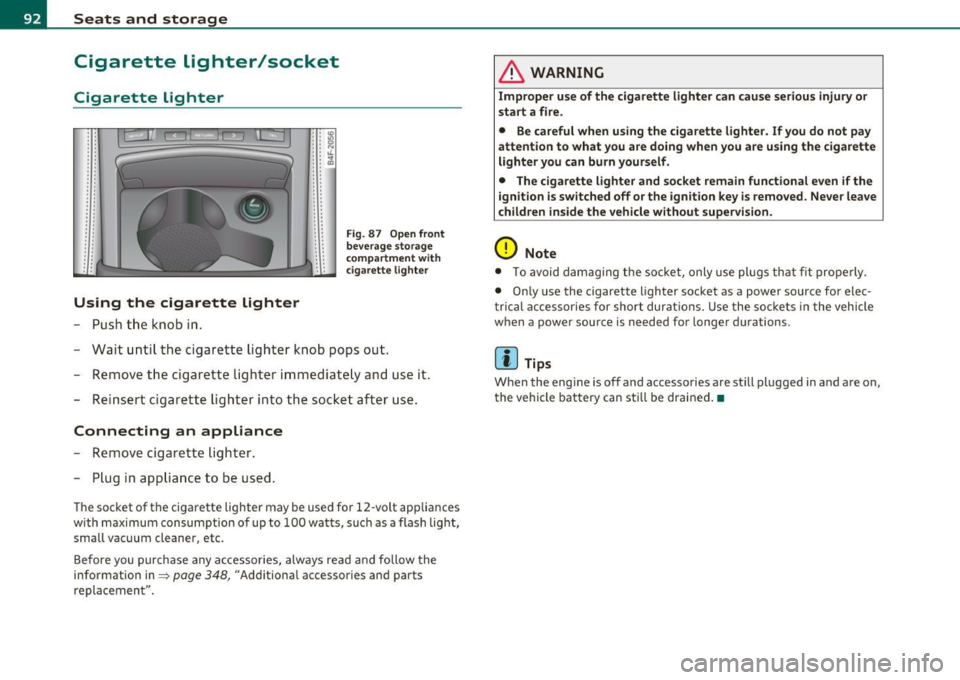
Using the cigarette lighter
- Push the knob in.
• • IO .. :g • • N : : "-.. ~ . .
.. . .
Fig . 87 Open front
beverage storage
c ompartment wit h
ciga rette lighter
-Wait until the cigarette lighter knob pops out.
- Remove the cigarette lighter immediately and use it.
- Reinsert cigarette lighter into the socket after use.
Connecting an appliance
-Remove cigarette lighter.
- Plug in appliance to be used.
The socket of the cigarette lighter may be used for 12 -volt app liances
w ith maximum consumption of up to 100 watts, such as a flash light,
small vacuum cleaner, etc.
Before you purchase any accessories, always read and follow the
information in=>
page 348, "Additional accessor ies and parts
replacemen t".
& WARNING
Improper use of the cigarette lighter can cause serious injury or
start a fire.
• Be careful when using the cigarette lighter. If you do not pay
attention to what you are doing when you are using the cigarette
lighter you can burn yourself .
• The cigarette lighter and socket remain functional even if the
i gnition is switched off or the ignition key is removed. Never leave
children inside the vehicle without supervision.
0 Note
• To avoid damag ing the socket, only use plugs that fit properly.
• Only use the cigarette lighter socket as a power source for elec
t rical accessories for short durat ions. Use the sockets in the vehicle
when a power source is needed for longer durations .
[ i ] Tips
When the engine is off and accessories are st ill plugged in and are on,
the vehicle battery can sti ll be drained. •
Page 95 of 370
Outlet
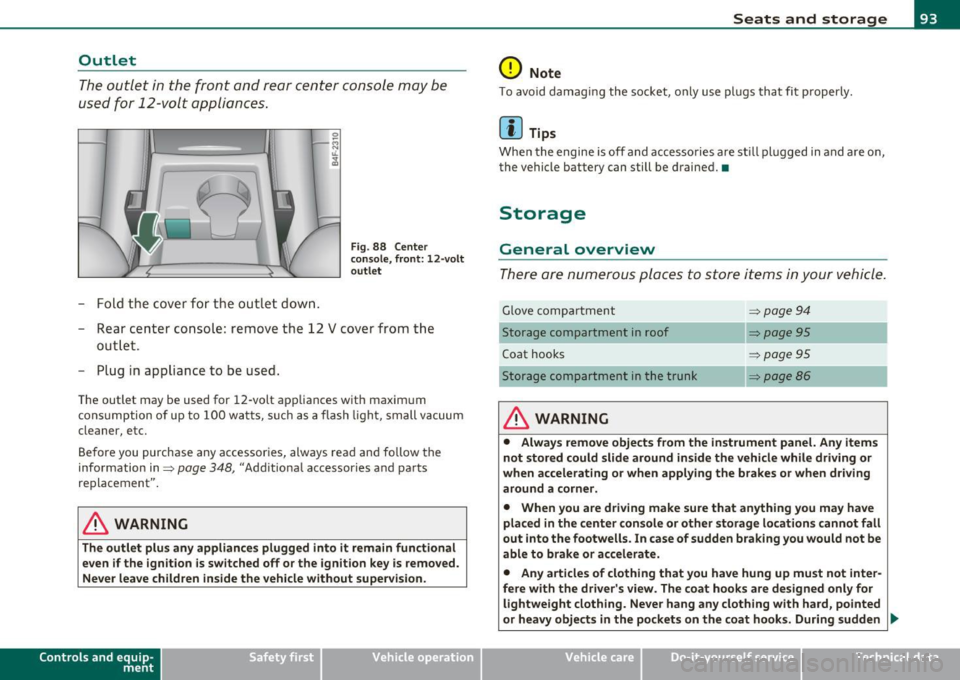
The outlet in the front and rear center console may be
used for 12-volt appli ances .
- Fold the cover fo r the outlet down .
Fig. 88 Center
c on sole , fr ont: 12 -vol t
ou tlet
- Rear center console: remove the 12 V cover from the
out le t.
- Plug in appliance to be used.
The outlet may be used for 12-volt appliances with maxim um
consumption of up to 100 wat ts, su ch as a flash light, small vacuum
cleaner, etc.
Be fore you purchase any accessories, always read and fo llow the
information in:::::,
page 348, "Additional accessories and parts
replacement".
& WARNING
The outlet plus any applianc es plugged into it r emain functional
even if the ign ition is switched off or th e ign itio n key is remo ved.
Ne ver leave children in side the vehicle without supervi sion.
Cont rols a nd e quip
m en t Vehicle
OP-eration
Seats and storage
0 Note
To avo id damaging the socket, only use p lugs that fit p roperly.
[ i ] Tips
Whe n the engine is off and accesso ries a re st ill plugged in and a re on,
the vehicle battery can still be drained. •
Storage
General overview
There are numerous places to store items in your vehicle .
Glove compa rtment :::::, page 94
Storage compartment in roof :::::, page 95
Coat hooks :::::, page 95
Storage compartment in the trunk :::::, page 86
& WARNING
• Alwa ys rem ove objects from the in strument panel. Any items
not stor ed could slid e around in side the v ehicle while driv ing or
when a ccelerating o r whe n applying t he br ake s or whe n driv ing
around a corn er.
• When you are dri ving make sure that an ything you ma y have
placed in the center con so le or other sto rage locat ion s cannot fall
out into the footwells . In case of sudden br aking you would not be
able to b rake or acc ele rate.
• An y article s of clothing that you ha ve hung up mu st not inter
f e re with th e driver's view . The co at hooks are d esigne d only for
lightweight clothing. Ne ver ha ng any clothing with ha rd, pointed
or heavy obj ects in the pockets on th e co at hooks . During sudden
~
Vehicle care Do-it-yourselt service iTechnical data
Page 96 of 370
Seats and storage
& WARNING (continued )
braking or in an accident· especially if the airbag is deployed -
the se object s could injure any passengers inside the vehicle. •
Glove compartment
The media p layer is in the glove compartment.
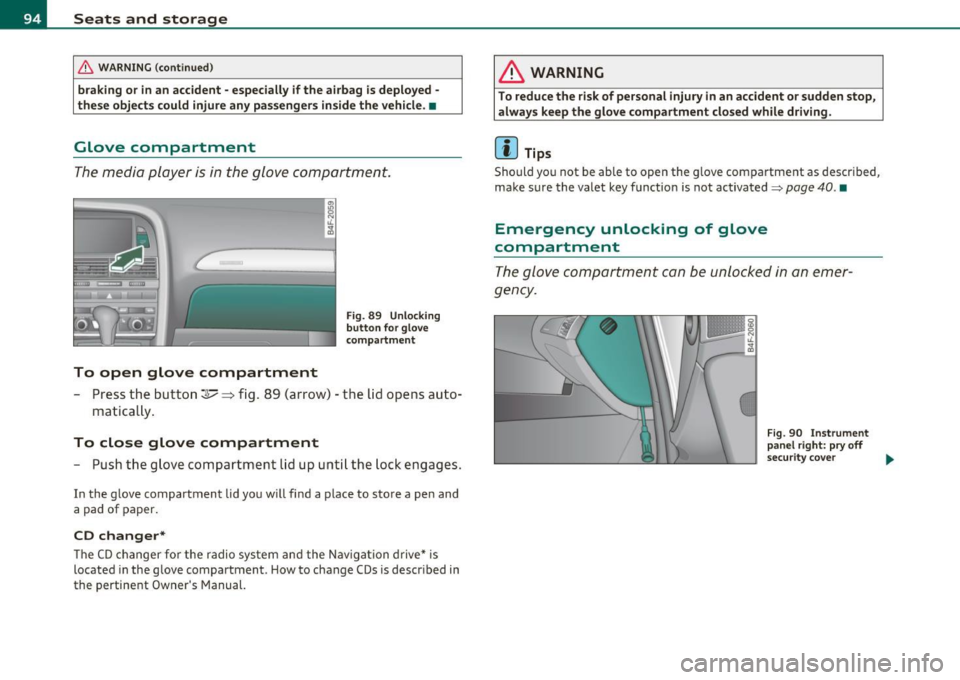
To open glove compartment
Fig. 89 Un lo cking
button fo r g love
c om partm ent
- Press the button~~ fig. 89 ( arrow) - the lid opens auto-
matica lly .
To close glove compartment
- Push the glove comp art ment lid up unt il th e lo ck en gag es.
In the g love compartment lid yo u w ill find a plac e to sto re a pen and
a pad of paper.
CD changer*
Th e C D ch an ger f or the radio sy stem and t he Nav igation drive* is
located in the g love compartment . How to change CDs is descr ibed in
the pertinent Owner's Manual.
& WARNING
To reduce the risk of personal injury in an accident or sudden stop,
always keep the glove compartment clo sed while driving.
[I) Tips
Sho uld you not be ab le to open the g love compa rtme nt as descr ibed,
make s ure the valet key f unction is not activated~
page 40. •
Emergency unlocking of glove
compartment
T h e glov e co mp artm ent can be unl ocke d in a n em er
g ency.
Fig . 90 In strument
panel right: pry off
s ecu rit y cove r
~
Page 97 of 370

Fig. 91 Lock ing pin
for glove compartment
-Remove with the cover with the aid of a screwdriver
==>
page 94, fig . 90.
- Now press the locking pin inward with the screwdriver
==> fig . 91. •
Storage compartment in roof
111111 \\\H
. '
Fig. 92 Storage
compartment in roof
-To open the lid you have to touch the bar==> fig . 92
(arrow) . The lid opens automatically.
- To close the lid, push it up until it engages.
Con tro ls a nd e quip
m en t Vehicle
OP-eration
Seats and storage
& WARNING
Always keep the lid closed while driving to reduce the risk of injury
during a sudden braking maneuver or in the event of an accident. •
Coat hooks
& WARNING
Fig. 93 Coat hooks at
rear doors
• Hang clothes in such a way that they do not impair the driver's
vision .
• The coat hooks must only be used for lightweight clothing. Do
not leave any heavy or sharp edged objects in the pockets which
may interfere with the side curtain airbag deployment and can
cause personal injury in a crash.
• Do not use coat hangers for hanging clothing on the coat hooks
as this can interfere with proper deployment of the side curtain
airbags in an accident.
• Do not hang heavy objects on the coat hooks, as they could
cause personal injury in a sudden stop. •
Vehicle care Do-it-yourselt service iTechnical data
Page 99 of 370

En ergy management
To prevent the ba ttery from be ing discharged and to resto re the
balance of energy, compone nts which req uire la rge amou nts of
ene rgy are temporari ly c ut back or switched off~
page 249. Heating
systems in part icu lar requ ire a g reat dea l of energy . If you not ice, fo r
example, that the seat * or rear w indow heating is not heating, they
have been temporari ly cut back or switch ed off by
energy manage·
ment .
These systems are available again as soon as the energy
balance has been res tored.
& WARNING
Reduced vi sibil ity i s dangerous and can cause accidents .
• For safe driving it i s very important that all window s be free of
ice, snow and condensation.
• Completely familiarize yourself with the proper use and func
tion of the heating and ventilation system and especially how to
defog and defrost the windows.
• Never use the windshield w iper/washer system in freezing
weather until you ha ve warmed the wind shield first , using the
heating and ventilation system . The washer solut ion may freeze
on the wind shield and reduce vi sibility.
0 Note
• If you s uspe ct tha t the clima te cont ro l system has been damaged,
switch the system off to avoid furthe r damages, and have i t in sp ected
by a q ua lified dealersh ip.
• Repa irs to the A ud i a ir cond it ioner require special tec hnical knowl
edge an d special tools. Cont act an au thor ized A udi dealer for assis
t ance .
Controls and equip
ment Safety first
Warm and cold
(I] Tips
•
Keep the air inta ke s lots (in front of the w indshield) free from ice,
snow and debris in orde r to maintai n the proper function of the
cl ima te contro l system.
• Th e air flowing out of the vents and throughout the vehicle's
e n tire in ter ior is discharged a t th e rea r of t he vehicle. Make sure that
the o utlet s lots are not covered by cloth ing, etc .
• Climate cont rol works most effectively i f the w indows and the
sunroof * are closed . However, if the interior of a par ke d vehicle is
extremely hot from t he sun's rays, briefly opening the wi ndows can
speed up t he cooling process .•
Vehicle care Technical data
Page 103 of 370

_________________________________________________ W_ a _r_m _ a _n.:..d~ c:.. o::...:. ld.:.;___,J-
• in a traff ic jam.
& WARNING
Do not use this setting for extended periods of time. The windows
could fog up since no fresh air can enter the vehicle. If the
windows fog up, press the air recirculation button again immedi
ately to switch off the air recirculation function or select defrost.•
Rear window defogger [Qiil ]
The rear window defogger clears the rear window of
condensation.
- Press the QW button to turn the rear window defogger on
and
off.
Th e rear window defogger works only when the engine is running. The
light in the switch will illuminate when the defogge r is on .
The rear window defogger will switch off automatically after a short time. The time the rea r window defogger remains on will vary
depending on the outside temperature.
A rear window defogger that was switched on also remains stored for
15 minu tes after the ign ition is switched off . If the engine is
restarted w ith in these 15 minutes, the rear window defogger is a lso
act ivated, depending on outside temperature. With a vehicle that is
parked for a short time, the rear window defogger does not need to
be manua lly activated again.
c£> For the sake of the environment
Turn the defogger off when the rear window is clear. When you save
electricity, you save fuel. •
Contro ls a nd e quip
m en t Vehicle
OP-eration
Air outlets
Air distribution determines the air flow to the individual
vents.
Fig. 95 Instrument panel: air outlet locations and airfl ow directions
Air outlets ® and ©
- Rotate the vertical thumb wheel beside the outlet to
increase, reduce or shut down the airflow from that
outlet .
- To adjust the direction of the a irflow from the outlet,
move the tab in the center of the outlet in the desired
direction. The direction of the air delivered from the vents
can be adjusted horizontally and vertically.
@ Air flows to windshield and to driver and front passenger side
windows
@ Air flows to w indshield
Vehicle care Do-it-yourselt service iTechnical data
Page 108 of 370
1111....__0_ n_ t_h_ e_ r_ o_ a _ d _________________________________________________ _
On the road
Steering
Applies to vehicles : w ith manua lly ad justab le stee ring whee l
Manually adjustable steering wheel
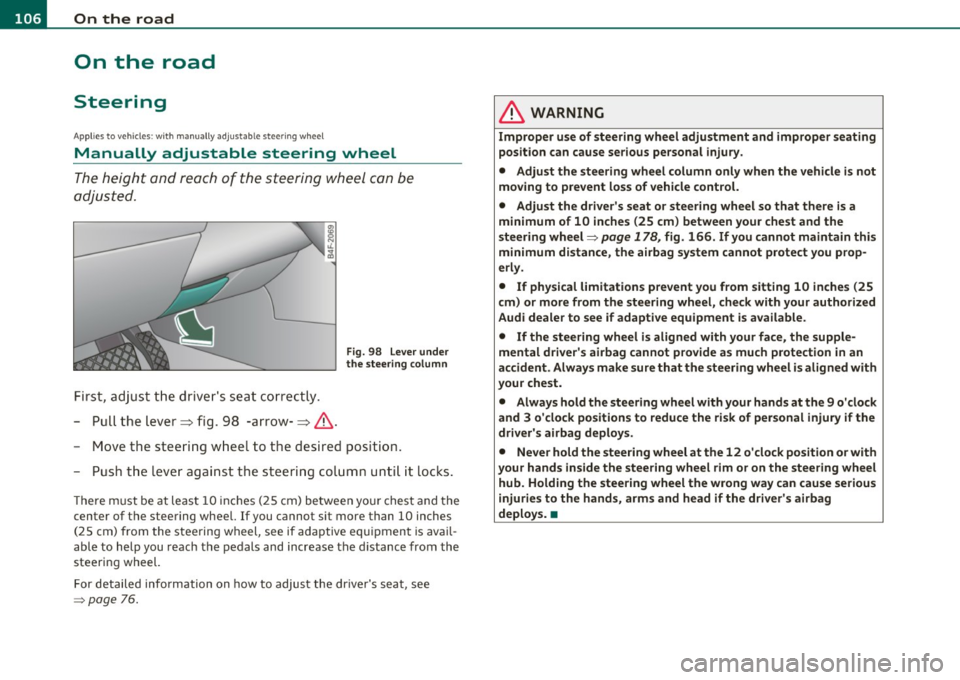
The height and reach o f the steering wheel can be
adjusted.
First, adjust t he driv er's seat correctly.
- Pull the lever~ fig. 98 -arrow-~ &.
Fig. 98 L ever under
the stee ring colum n
-Move the steering w heel to t he desired position.
- Push t he leve r against the s teering colum n unti l it locks .
The re m ust be at leas t 10 inc hes (25 cm) be tween yo ur chest and the
center of the steering wheel. If you cannot sit more than 10 inches
(25 cm) from the steering wheel, see if adaptive equ ipment is avail
able to help you reach the pedals and increase the d istance from the
steering wheel.
For detailed info rmation on how to adjust the dr ive r's seat, see
=> page 76.
& WARNING
Improp er use of steering wh eel adjustment and improper seating
position can cause serious personal injury .
• Adjust th e steering wheel column only when the v ehicle i s not
moving to p revent loss of vehicle control.
• Adjust the driver's seat or steering wheel so that th ere is a
minimum of 10 inches (25 cm ) between your chest and the
steering wheel=>
page 178 , fig. 166 . If you cannot maintain this
minimum distance , the airbag sy stem cannot protect you prop
erl y.
• If physical limitat ions p revent you from sitting 10 in ches (25
cm ) or more from the steering wheel, check with your authorized
Audi dealer to see if adaptive equipment is available.
• If the steering wheel is aligned with your face , the supple
mental driver' s airbag cannot provide a s much p rote ction in an
accident . Always make sure that the steer ing wheel i s aligned with
your che st.
• Always hold the ste ering wheel with your hands at th e 9 o'clock
and 3 o 'clock positions to reduce the risk of per sonal injury if the
driver' s airbag deploy s.
• Never hold the steering wheel at the 12 o 'clock position o r w ith
your hands inside the steering wh eel rim or on the steering wh eel
hub. Holding the stee ring wheel the wrong way can cause seriou s
injuries to the hands, arms and head if the driver' s airbag
deploy s. •
Page 109 of 370
_________________________________________________ O_ n_ t_ h_ e_ r _o_ a_d _ __.fflll
App lies to veh icles : w ith electrically adju stab le steer ing wheel
Electrically adjustable steering wheel
The height and reach of the stee ring wheel ca n be ele ctri
c ally adj usted to sui t th e d river.
Firs t, a djust t he dr iver's se at correct ly.
Height adjustment
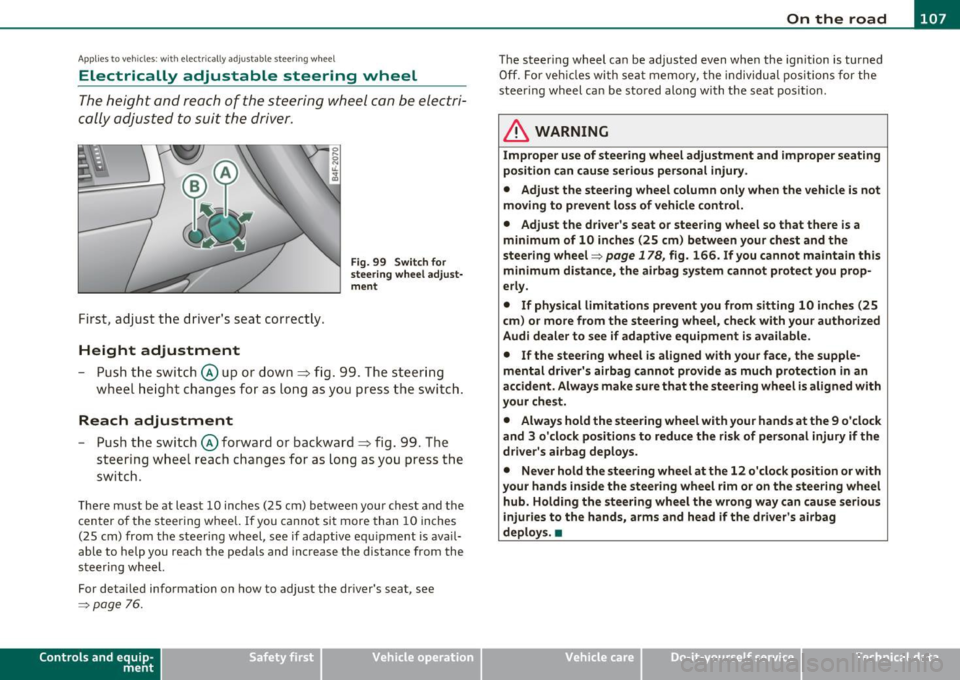
Fig . 99 Switch for
s teering whee l ad ju st
ment
- Push t he s witch © up or down=> fig. 99 . T he st ee rin g
w he el heig ht chang es f or as long as you press t he swi tch .
Reach adjustment
- Push t he switc h© forward or backward=> fig. 99 . T he
ste ering w hee l reac h changes for as long as yo u press the
swi tch .
The re m ust be at leas t 10 inches (25 cm) between you r chest and the
cen ter of the steering whee l. If you cannot sit more than 10 inches
(25 cm) from the steer ing wheel, see if adapt ive equ ipment is ava il
able to h elp you reach the pedals and increase the distance from the
steeri ng wheel.
For detailed information on how to adjust the dr iver 's seat , see
~ page 76.
Cont rols a nd e quip
m en t Vehicle
OP-eration
The steering wheel ca n be adjusted even when the ign ition is turned
O ff. For veh icles with sea t memory, the individu al pos it io ns for the
steer ing wheel can be sto red along with t he seat pos it ion.
& WARNING
Improper use of steering wheel adjustment and imprope r seating
position can cau se seriou s per sonal injury.
• Adjust the steering wheel column only when the vehicle i s not
moving to prevent loss of vehicle control.
• Adjust the driver 's seat or steering wheel so that there is a
minimum of 10 in ches (25 cm) between your chest and the
steering wheel~
page 178, fig. 166. If you cannot maintain this
minimum distance , the airbag system cannot prote ct you prop
erly.
• If phy sical limitations prevent you from sitting 10 inches (25
cm ) or more from the steering wheel, check with you r authorized
Audi dealer to see if adaptive equipment is available .
• If the steering wheel is aligned with your face , the supple·
mental driver 's airbag cannot provide as much protection in an
accident. Always make sure that the steering wheel is aligned with
your che st.
• Always hold the steering wheel with your hands at the 9 o'clock
and 3 o'clock po sition s to reduce the risk of personal injury if the
drive r's airbag deploys.
• Never hold the steering wheel at the 12 o'clock po sition or with
your hands inside the steering wheel rim or on the steering wheel
hub. Holding the steering wheel the wrong way can cause serious
injuries to the hands, arms and head if the driver's airbag
deploy s.•
Vehicle care Do-it-yourselt service iTechnical data
Page 111 of 370
_________________________________________________ O_ n_ t_ h_ e_ r _o_ a_d _ __._
& WARNING
• Never remove the key from the ignition lock while the vehicle
is moving. The steering wheel will lock , cau sing loss of control.
• If you ha ve to leave your vehicle, even for ju st a minute, alw ays
remove the ignition key and take it with you. This i s especially
important if you are going to leave children unattended in the
vehicle. The children could start the engine or use other vehicle c ontrols . Unsupervised us e of vehicle controls (for example, power
windows) can cause serious personal inju ries.
0 Note
• If the ~ symbol in the display blinks, there is a malfunction in the
electronic stee ring column lock. Follow the instr uctions in
~ page 28, "Steering malfu nction i" .
• If the ~ symbol in the display blinks, there is a malfunction in the
electronic ignition lock . Follow the instr uctions in~
page 29, "Igni
t ion lock malfunct ion ~" .
(I] Tips
• If you release the ignit ion key i n pos it io n @ , the key automati cally
returns to pos ition
(D .
• If you open the driver 's doo r whe n the ignition is sw itched on, a
buzze r sounds and the message
Ignition is on appears in the instru
ment cl uster d isplay. Please swi tch the ignition off. •
Ignition key safety lock
The ignition key con on ly be removed when the selector
lever is in the "P" (Pork) positi on.
After turning off the ignition, the ign ition key can only be removed
from the ignition lock when the se lector lever is in the "P " (Park) posi-
Con tro ls a nd e quip
m en t Vehicle
OP-eration
tion . After you have removed the key, the selector lever is locked and
canno t be move d.•
Starting and stopping the engine
Starting the engine
The engine can only be started with your original A udi
key.
.... _:::::•:
- Step on the b rak e.
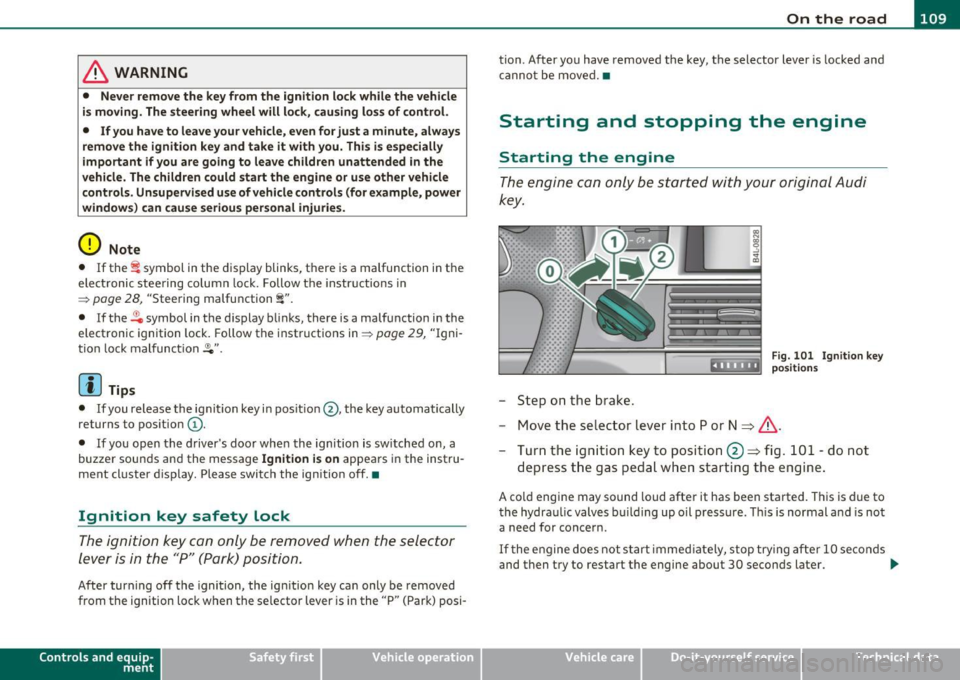
Fig . 10 1 Ig nitio n key
positio ns
- Move the se lector lever into P or N ~ &,.
- Turn the ig ni tion key to position @~ fig. 101 -do not
depress t he gas pedal when start ing t he engine .
A cold engine may sound loud after it has been started . T his is due to
the hydra ulic valves bu ilding up oil p ressu re . Thi s is normal and is not
a need for concern.
If t he e ngine does no t s tart immed iate ly, stop try ing af te r 10 seco nds
and then try to restart the engine about 30 seconds later . _.,
Vehicle care Do-it-yourselt service iTechnical data