mirror controls AUDI A6 2011 Owners Manual
[x] Cancel search | Manufacturer: AUDI, Model Year: 2011, Model line: A6, Model: AUDI A6 2011Pages: 370, PDF Size: 87.15 MB
Page 4 of 370
Table of contents
Table of contents
Vehicle literature ..... .
About this Owner's Manual .......... ....... .. .
Controls and
equipment .............. .
Instruments and controls ... .
General illustration ........... .
Instruments and
warning/indicator Lights ..... . Instruments ... ... .......... .
Warning/indicator ligh ts ..... . .
Driver information display ... .
Introduction ...... ......... . .
On-Board Diagno stic sy ste m
(OBD) . ..... ....... .......... .
Auto Ch eck Control ........... .
Speed warning system ........ .
Tr ip computer ............ ... .
Opening and closing ......... . Keys ............ ............ .
Power locking system
Rear lid .... ..... ............ .
Child safety Lock ............. .
Convenience key ............. .
Anti-theft alarm sys tem ...... .
Power windows .............. .
Sliding/tilting power sunroof .. .
Clear vision .. .... ............ .
L ights ... .. ........ ......... .
Interior ligh ts ... ... .. ....... .
4
5
6
7
7
8
8
12
19
19
23
24
32
34
37
3 7
41
46
47
47
49
so
53
58
58
63 Vi
sion .................... .. .
Wiper and washer system Mirrors ... ............... ... .
Digital compass ............ .
Seats and storage ........ ... .
General recommendations .... .
Power seat . ................. .
S eat m emory ............... . .
Rear sea ts ... ... .. .......... .
Head res train ts ........... ... .
Armrest .. .. ................ .
Luggage compar tm en t ..... .. .
Roof ra ck . .... .... .......... .
Cupholder .................. .
Ashtray .. ................... .
Cigarette Lighter/socket ...... .
S torag e ................ .. .. .
Warm and cold .... .......... .
Cl imate control ........ .. .... .
Ba sic se tt ings ............... .
On the road ... .... .......... .
S tee ring .................... .
Igni tion lock and ignition swi tch
Start ing and stopp ing the engine
Start ing and stopping the engine
with Convenience key ......... .
E lectromechanical parking brake
Cru ise control ............... .
Adaptive Cruise Control ..... . Speed and distance con trol
sys tem .............. ....... .
Dr iver information ........... .
Syst em Limitations ........... .
Audi Lane assist .......... .. .
Lane ass ist .... .. ............ . 64
66
69
73
75
75
76
79
80
81
82
83
87
89
91
92
93
96
96
104
106
106
108
109
110
113
116
119
119
12 7
131
134
134 Audi
side assist ............... 137
Lane Change Assistant ......... 137
No tes ....... .... ............. 144
Automatic transmission 146
tiptronic ® (6-sp eed au toma tic
tr ansmission) . . . . . . . . . . . . . . . . . 146
multitronic ® ............ ...... 152
Park assist . . . . . . . . . . . . . . . . . . . . 160
Park ing sys tem ......... .... .. . 160
Park ing syst em (r ear) . . . . . . . . . . 160
Park ing sy ste m (r ear, w ith r ear
view camera) . . . . . . . . . . . . . . . . . 162
Adaptive Air Suspension . . . . . . 168
Adap tive Air Suspens ion and
Damping . . . . . . . . . . . . . . . . . . . .. . 168
Homelink ® ............. .... .. 171
Universal remote control 171
Safety first . . . . . . . . . . . . . . . 17 6
Driving Safely ................. 176
General notes . . . . . . . . . . . . . . . . . 176
Proper occupant seating
posi tions . . . . . . . . . . . . . . . . . . . . . 17 8
Pedal area . . . . . . . . . . . . . . . . . . . . 182
Stowing Luggag e . . . . . . . . . . . . . . 183
Reporting Safe ty Defe cts . . . . . . . 185
Safety belts . . . . . . . . . . . . . . . . . . . 187
G eneral not es ................. 187
Why safe ty be lt s ? ........... .. 188
Safety belts . . . . . . . . . . . . . . . . . . . 191
Safe ty belt pretensio ners . . . . . . . 195
Page 9 of 370
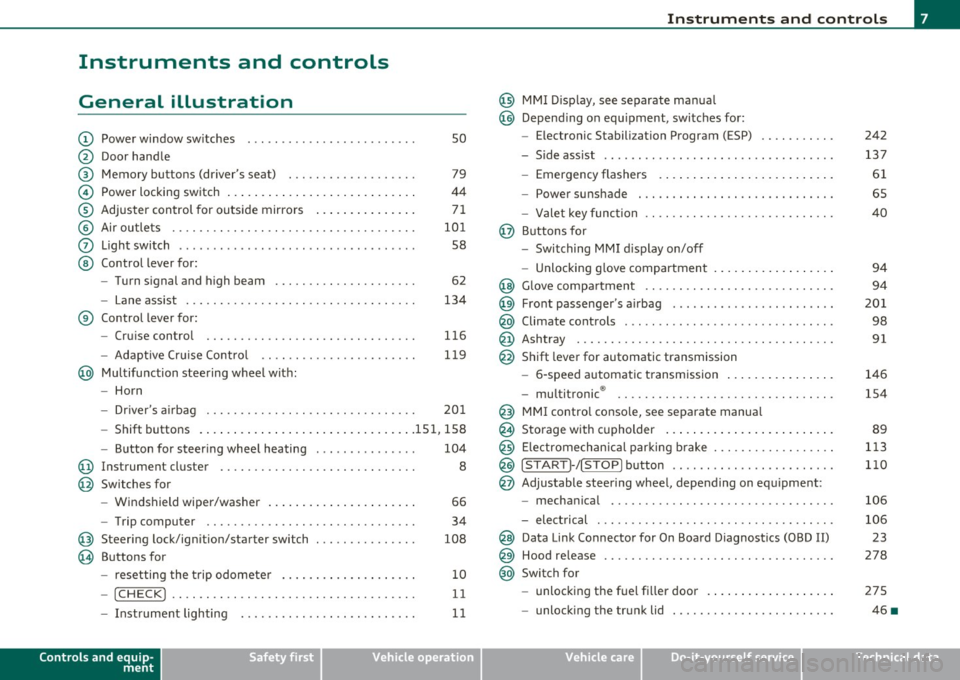
Instruments and controls
General illustration
(D Power window switches . . . . . . . . . . . . . . . . . . . . . . . . . 50
@ Door handle
@ Memory buttons (driver's seat) . . . . . . . . . . . . . . . . . . . 79
© Power locking switch . . . . . . . . . . . . . . . . . . . . . . . . . . . . 44
® Adjuster control for outside mirrors . . . . . . . . . . . . . . . 71
© Air outlets . . . . . . . . . . . . . . . . . . . . . . . . . . . . . . . . . . . . 101
0 Light switch . . . . . . . . . . . . . . . . . . . . . . . . . . . . . . . . . . . 58
@ Control lever for:
- Turn signal and high beam . . . . . . . . . . . . . . . . . . . . . 62
- Lane assist . . . . . . . . . . . . . . . . . . . . . . . . . . . . . . . . . . 134
® Control lever for:
- Cruise control . . . . . . . . . . . . . . . . . . . . . . . . . . . . . . . 116
- Adaptive Cruise Control . . . . . . . . . . . . . . . . . . . . . . . 119
@ Multifunction steering wheel with:
- Horn
- Driver 's airbag . . . . . . . . . . . . . . . . . . . . . . . . . . . . . . . 201
- Shift buttons ...... .. .. .... ........ .......... 151, 158
- Button for steering wheel heating . . . . . . . . . . . . . . . 104
@ Instrument cluster . . . . . . . . . . . . . . . . . . . . . . . . . . . . . 8
@ Switches for
- Windshield wiper/washer . . . . . . . . . . . . . . . . . . . . . . 66
- Trip computer ............... .. .. .. .. ....... .
@ Steering lock/ignition/starter switch ... .. ......... .
@ Buttons for
- resetting the trip odometer .......... .. .. .. ... .
- !CHECK] .... .... .. .... .. .... ............... .
-Instrument lighting . ....... .... .. .. .... .. .. . .
Controls and equip
ment Safety first
34
108
10
11
11
Instruments and controls
@ MMI Display, see separate manua l
@ Depending on equipment, switches for:
- Electronic Stabili zation Program (ESP)
- Side assist .. ... . .... .. .. .. .. .. .... .. .. .. ... .
- Emergency flashers .. .... .. .. .. ............. .
- Power sunshade . ... ... .. .. .. .. .... .. .. ... .. .
- Valet key function .. .. .. .. .... ....... ...... .. .
@ Buttons for
- Switching MMI display on/off
- Unlocking glove compartment
@ Glove compartment ...... .. .. .. .... .. ......... .
@ Front passenger 's airbag ............... ... .. .. . .
@ Climate controls ... .. .. .. .. .. .... .......... ... .
@ Ashtray .............. .. .... .. .. .. .. .... ..... .
@ Shift lever for automatic transmission
- 6-speed automatic transmission ....... .. ... ... .
- multitronic ® ....................... .. .... .. .
@ MMI contro l console, see separate manua l
@ Storage with cupholder ... .. ... .............. .. .
@) Electromechanical parking brake .............. .. . .
@ ISTAR T]-/ISTOP] button ........ .. ... .......... .
@ Adjustable steering wheel, depending on equipment :
- mechanical ............. .. .. .. ............. .
- electrical . ... ... .. .. .. .. .. .. .. .. .. ....... .. .
@ Data Link Connector for On Board Diagnostics (OBD II)
@ Hood release .......... .. .... .. .. .. .. ......... .
@ Switch for
unlocking the fuel fi ller door .............. .... .
- unlocking the trunk lid . .. ........ .. ... .. .. .. . .
Vehicle care
242
137
61
65
40
94
94
201
98
91
146
154
89
113
110
106
106 23
278
275
46 •
Technical data
Page 61 of 370
brightness increases again, the low beams are turned off again auto
matically =>& .
In the
AUTO position the low beams are switched off automatically
when the ignition is turned off.
Light Sensor Malfunction
In the event of a light sensor ma lfunct ion, the driver is notified in the
instrument cluster display:
Automatic headlights/automatic wipers defective
For safety reasons the low beams are turned on permanently with t he
switch in
AUTO. However, you can continue to turn the lights on and
off using the light switch. Have the light sensor checked as soon as
possible at a dealership.
& WARNING
• Never use daytime running lights to see where you are going.
They are not bright enough and will not let you see far enough
ahead for safety, especially at dusk or when it is dark. Always
switch on the low beams at dusk or when it is dark.
• Automatic headlights are only intended to assist the driver .
They do not relieve the driver of his responsibility to check the
headlights and to turn them on manually according to the current
light and visibility conditions. For example, fog and rain cannot be
detected by the light sensors. So always switch on the headlights
under these weather conditions and when driving in the dark
io.
• Crashes can happen when you cannot see the road ahead and
when you cannot be seen by other motorists.
- Always turn on the headlights so that you can see ahead and
so that others can see your car from the back.
[ i ) Tips
• With the switch in AUTO front fog lights and rea r fog ligh ts cannot
be turned on in addition .
Controls and equip
ment Safety first
Clear vision
•
The light sensor for headlight control is located in the rear view
mirror mount. Do not apply any stickers to the winds hield in this area
to prevent malfunctions or failures .
• If you remove the ignition from the ignitio n lock w hile the head
lights are still on, a buzzer will sound as long as the dr iver's door is
open to remind you to turn off the lights.
• Always observe the specific loca l regulations for your area as to
when to use your lights .•
Adjusting exterior lighting
The functions are set in the MMI.
-Select: Function button [CAR]> Systems* > Exterior
lighting .
Coming home
The Coming home function ensures tha t after turning off the igni
tion and opening the driver's door
the vehicle per iphery is illum i
nated in the dark. In addition, the front fog lights, the tail lights and
the license plate light are turned on. On-time can be set for a per iod
from O (off) to 60 seconds .
Leaving home
The Leaving home function ensu res that when unlocking the vehicle
per iphery is illuminated in the dark. In addition, the front fog lights,
the tail lights and the license plate light are turned on. This function
can be turned on and off .
Daytime running lights
USA models: On vehicles with xenon lights the daytime running
lights can be turned on or off using this function . On vehicles with
halogen lights there is no daytime running lights function .
Canada models: The function cannot be turned off. It is activated
automatically each time the ignition is tur ned on. This menu item is
shown "greyed out". •
Vehicle care Technical data
Page 71 of 370

- Press on both sides of the loc king spring @ on the wiper
blade~
page 68, fig. 58 . Hold t he wiper blade firm ly .
- Remove the wiper blade @.
Installing wiper blade
- Install the new wiper blade in the retainer on the wiper
arm ©~
page 68, fig . 59 u nti l it clicks into place on t he
w iper arm.
- Place the w iper arm bac k against the wi ndsh ield .
Clean yo ur wiper blades regularly with a windshie ld washe r so lution
to prevent streaking . If the blades are very dirty, for example with
insects, caref ully clean the blades with a sponge or a so ft brush.
If the w iper blades begin to st reak the windshield, this could be
caused by res idue left on the windsh ie ld by automatic car washes.
Fill the windshie ld washe r con tainer w it h a specia l solu tion ava ilab le
at your authori zed Audi dealer to remove the residue .
& WARNING
Be sure to inspect the condition of your w iper blades regularly. See
your authorized Audi d ealer f or r epla cement blade s.
0 Note
To preven t da mage to the wipe r system:
• To help prevent damage to the wiper system, always loosen
blades which are frozen to the wi nds hield before operati ng wipers.
• T o help prevent damage to w iper blades, do not use gasoline,
kerosene, paint thinner, or other solvents on or near the wipe r
blades .
• T o help prevent damage to wipe r arms or other components, do
not attempt to move the wipers by hand.
Controls and equip
ment Safety first
Clear v
ision
• The windshield wiper blades must only be replaced when in the
service positio n =>
page 68! Otherw ise, you risk dam ag ing the pain t
on the hood or the windshie ld w iper motor .
(I) Tips
Commercial hot waxes applied by automatic car washes affect the
cleanability of the win dsh ield. •
Mirrors
Manual anti-glare adjustment
Standard setting
-Move the small lever (located on t he bottom edge of the
mirror) to t he front.
Anti-glare setting
- Move th e small lever (locate d on t he bo ttom edge of the
m irror) to the rear .•
Vehicle care Technical data
Page 75 of 370

Digital compass
Applies to veh icles: wit h digita l co mp ass
Activating or deactivating the compass
The direction is displayed on the interior rear view mirror.
Fig. 62 Inside rear
view mirror: digital
compass activated
To activate or deactivate, hold the@ button down until
the red display appears or disappears .
The digital compass only works with the ignition turned on. The direc
tions are displayed as initials:
N (North), NE (Northeast), E (East), SE
(Southeast), S (South) , SW (Southwest), W (West), NW (Northwest).
(I) Tips
To avoid inaccurate directions, do not allow any remote controls ,
electr ical systems, or metal parts close to the mirr or.•
Con tro ls a nd e quip
m en t Vehicle
OP-eration
Clear vision
Applies to veh icles : w ith d ig ita l compass
Setting the magnetic deflection zone
The correct magnetic deflection zone must be set in order
to display the directions correctly .
.
,_ ,;=.~a,, I I
I I
I I
I ' I I
I I
1 ! ©
l 4
l
l
I ' I ,,
l ----
'
'
'
®
\, ,, ...... _______ ,.,.
©
@
Fig. 63 North America: magnetic deflection zone boundaries
-Hold the@=> fig . 62 button down until the number of
the set magnetic deflection zone appears on the interior rear view mirror .
- Adjust the magnetic deflection zone by repeatedly pressing on the@ button . The set mode automatically
deactivates after a few seconds. •
Vehicle care Do-it-yourselt service iTechnical data
Page 81 of 370

Seat memory
Applies to veh icles: with seat memory
Driver's seat memory
The seat adjustment settings for two drivers can be
stored using the memory buttons in the driver's door.
-...... SET 1 2 ,,..,
Fig. 68 Driver's door:
Seat memory
In addition to the setting for the driver's seat, the settings for the
steering column* and both exterior mirrors can be stored.
Storing and r ecalling setting s
Using the memory buttons 1 and 2, you can store and recall the
settings for two different drivers~ fig . 68 .
T he current settings are also automatically stored on the remote
control key being used when the vehicle is locked. When the vehicle is
unlocked, the settings stored on the remo te contro l key being used
are automatically recalled. This function has to be activated in the
MMI
~ page 80, " Activating remote cont rol key memo ry" .
Tur ning seat m em ory o n and off
If the [ ON/OFF I switch is depressed , the seat memo ry is inoperative .
The word
OFF next to the [ ON/OFF ) switch illuminates.
All the stored settings are retained. We recommend using the
I ON/OFF ) switch and deact ivat ing the seat memory if the vehicle is
Controls and equip
ment Safety first
S
eats and storage
only going to be used temporarily by a driver whose settings are not
going to be stored .•
App lies to veh icles : w it h seat memo ry
Storing and recalling a seat position
Before you can store or recall your seat position, the
[ON/OFF) button must be engaged (down) .
Storing settings
-Adjust the driver 's seat => page 76.
- Adjust the steering column*=>
page 107.
-Adjust both outside mirrors=> page 71. In the ti lt-down
position, the passenger mirror can be adjusted to the
preferred position and saved in the seat memory.
- Press the
[SETI button and hold it down. At the same
time, press one of the memory buttons for at least one
second .
- Release the buttons. The settings are now stored under the corresponding memo ry bu tton.
Recalling settings
- Driver's door open -press the des ired memory button.
- Driver's door closed - press the corresponding memory
button unt il the stored position is reached .
Su ccessfu l storage is confirmed audib ly and by the light in the [SET )
button illuminat ing .
When the vehicle is
locked , the current settings are stored and
assigned to the remote control key. But the settings sto red on
memory buttons 1 and 2 are not deleted. They can be recalled at any ..,
Vehicle care Technical data
Page 141 of 370

_________________________________________________ A_ u_d _ i_ s_i d_ e_ a_s _s_ i_s _t __ _
The detection~ page 138, fig. 131 of the radar sensor detection
area is made up of :
• the approach area (light green area)
(D, about 230 feet (70 m)
behind the vehicle, and
• the "blind spot" (dark green area)@.
The radar sensors cover the adjacent left and right lanes. Other lanes are
not cove red by the radar sensors.
rn Tip s
Side assist does not measure act ual lane width. The system assumes
a fixed lane w idth. Detection in the left and right lanes is based on
this assumed lane w idth. When driving on narrow roads or when
driving to the left or right of the center of a travel lane, it is possible
that vehicles will be detected that are
not in the lane next to the lane
you are using~
page 143. •
Applie s to ve hicl es: w ith s id e a ssist
Operation
Side assist compares the distance and difference in speed of detected
vehicles with the speed of your vehicle . Whenever the difference in
speed and distance is registered as notab le if you were to change
lanes, a signa l light appears on the respect ive m irror .
The signa l can light up if you are passed by a vehicle or if you are
passing another vehicle.
If you pass another vehicle slowly (d ifference in speed less than 9
mph, or 15 km/h) , the signa l light will come on as soon as the other
vehicle is in your blind spot and is detected by side ass ist . When the
difference in speed is greater, the signal light wi ll not come on. •
Controls and equip
ment Safety first
A
pp lies to ve hicles : w ith side assist
Informational and alert stage signals
S ide assis t has two signa l st ages:
• the informational stage signal, and
• t he ale rt stage signal.
S ide assist helps you by using the appropr iate s ignal stage,
depending on whether or not you have activated the turn signal, and
thus have indicated that you are or are not changing lanes .
Informat ional stage signal
As long as you have not activated the turn signal, side assist informs
you of detected vehicles that are registered as being in a notable loca
tion if you were to change lanes . Wheneve r the detected vehicle 's
difference in speed and distance is registered by side assist as
notable, the signal l ight on the respective m irror produces muted
illumination .
Th e br ightness of the info rmationa l stage signal is designed no t to be
as intense, so that it does not interfere w ith your v iew of the road
when you are driving and have no in tention of chang ing lanes. When
you look in the outside mirror, you can clearly see the informat ional
stage signal.
Alert stage signal
Whe n you act ivate the tu rn s ignal, a nd side assist has de tected a
vehicle in a notable location on that particular side, the signal light on
this side mirro r flashes b rightly. The repeated brief and bright
flash ing of the alert stage signal reminds you to carefully check
traffic to the rear in the outside mirror and over your shoulder, so t hat
you can safely complete the lane change~
& in "Safety tips" on
page 144.
rn Tips
The brightness of the signa l light on the outside mirrors can be
adjusted with the MMI
~ page 142. •
Vehicle care Technical data
Page 165 of 370

______________________________________________________ P_a _ r_ k_ a_ s_s _i _ s _t __ _
Sensors in the bumper
Sensors are located in the rear bumpers . If these detect a n obsta cle,
audib le and visual sig nals wa rn you. The range at w hich the sensors
beg in to measure is approximately:
T o the sid e
2 ft (0. 60 m)
Center rear 5 .2 ft (1.60 m)
Distan ce warning when reversing s tarts w hen an obsta cle is detec ted
in the range of the parking ass ist system. As the d ista nce decreases,
t he time in te rval between the audib le tones becomes shorter .
When the dis tance is less tha n 1ft
(0.30 m), the tone becomes
cont inuo us. At th is point yo u should stop back ing up.
If the dis tance to an obs tacle stays the s am e, t he volume o f the
distance signal chime is grad ually reduced after about
4 seconds
(does not affe ct the conti nuous signal tone) . App roac hing an oth er
obs tacle w ill cause the distance sig nal to sound aga in at t he normal
vol ume.
Rear view camera coverage area
Th e MM I display s hows the area covere d by the rea r view c amera
=>
page 16 2, fig. 156 G) . Objects that a re not in the area covered @
are not s hown on the MMI dis play .
W e recommend that you prac tice parking w ith th e rear v iew camera
in a traff ic-free location o r parking lot to become fam iliar with the
system, the or ientat ion lines, a nd their functi on . W hen doing this,
there should be good light and weathe r cond itions.
I n the MMI di spla y, obje cts o r ve hicl es appea r closer or fu rt h er aw ay
if:
• you are dr iv ing in reverse gea r from a level sur face onto an incline,
or a dow nwar d slop e,
• you are drivin g in reverse gear toward protrud ing ob jects,
• t he vehicle is ca rry ing too much load in the rear.
T he accuracy of the orientat ion lines and blue s urfaces d imin ishes if :
Controls and equip
ment Safety first
• t
he rear view camera does not provide a re liable image , fo r
ex am ple, in po or visib ility co ndi tion s or if the lens is dir ty,
• the image on the screen is not visible due to sun g la re and reflec
t io n.
Caring for the rear view camera lens
The re ar view came ra is locat ed above the r ear license pla te br acket .
For the pa rking ass ist to operate, the lens =>
page 162, fig. 157 m ust
be ke pt clean:
• Dampen the lens wi th a household alcoho l-based glass cleaner,
and clean the lens wi th a d ry cloth => 0.
• Remove snow with a hand br us h and ice preferab ly w it h a de- icing
sp ray =>0.
& WARNING
• The parking aid cannot replace the driver's attention. The
driver alone is responsible for parking and similar driving maneu •
vers.
• Always keep your eyes on the vehicle 's surroundings, using the
rear view mirror as well.
• Do not allow yourself to be distracted from traffic by the rear
view camera pictures.
• If the position and the installation angle of the camera has
changed, for example, after a rear end collision, do not continue
to use the system for safety reasons. Have it checked by a qualified dealership .
0 Note
• Low obstacles a lready s ignaled by a wa rning can disapp ea r from
the system's detection range as they are approached and will not
co ntinu e to be signaled. O bje cts such a s barrier c hains , trailer draw
bars, thin painted vertical po les or fences may not be detected by the
sys te m , pos ing r isk of d amage. _..
Vehicle care Technical data
Page 169 of 370
Park assist ffl'I _________________________________ _____;.....:;_;_.:..:,____;;_ ____ _
0 Note
In the MMI display, the d irect ion of t ravel of the vehicle rear is rep re
sented depend ing on the steering wheel angle. The vehicle front
swi ngs ou t mo re t han t he ve hicle re ar. M ain tain ple nty of dist ance
from an obstacle so t hat your outs ide mirror or a corner of your
vehicle d oes no t collide with any o bstacles - dange r of accide nt!
[ i ) Tips
Th e left or right or ientat ion lines and s urfaces will be displ aye d,
depending on the tu rn signal being used. •
App lies to veh icles : with park ing syst em (rear, wit h rea r view cam era)
Adjusting the display and warning tones
Th e display and warning tones can be adjusted in the
MM I.
-Select: Funct ion button !CA R]> Systems *> Parking
system .
Display
• Off -when the parking system is switche d off, only audible sig na ls
are given.
• On -when t he pa rking system is swi tched on, the pic ture from the
rear view camera is displayed.
Warning tones
• Rear volume -rear sensor vo lume
• Rear frequency -rear sensor frequency
• In-car entertainment fader -w hen the p ark in g sys tem is switche d
on, t he volume of the active audio source is lowered.
Th e newly adj uste d value is briefly hear d from the signal generator .
Th e set tings are automat ically stored and assigned to the master key
with remote control.
Controls and equip
ment Safety first
& WARNING
•
Always make sure that the volume and frequency of the
warning tones i s adju sted so that you can easily hear the acou stic
distance signal even if the radio is playing , the air-conditioner
blower is on High or there is a high level of outside noise.
• Check the settings whenever someone else has driven the
vehicle before you.
[I] Tips
• Th e warning tones can also be ad justed direct ly from the rear -view
camera image . Simply p ress the
[Settings I co ntro l button .
• C han ged settings are a ctivat ed w hen parking assist is switched on
again .•
A pplies to v ehicl es: w ith park ing syst em (r e a r, wi th re ar view cam era)
Error messages
If a warni ng tone is aud ible fo r about five se conds when yo u turn on
the ignition, the re is a ma lfunction in t he system. Have the prob lem
co rrected by yo ur a utho rized Audi dea ler .
K eep the se nsors in the rear b umper clean and free from i ce so t hat
the acoustic pa rk assist system can function p roper ly .•
Vehicle care Technical data
Page 179 of 370

Driving Safely ---------------------"~'----
Important things to do before driving
Safety is everybody's job! Vehicle and occupant safety
always depends on the informed and careful driver.
For your safety and the safety of your passengers, before
driving always:
- Make sure that all lights and signals are operating
correctly.
- Make sure that the tire pressure is correct.
- Make sure that all windows are clean and afford good visi-
bility to the outside.
- Secure all luggage and other items carefully::::>
page 93.
-Make sure that nothing can interfere with the pedals.
- Adjust front seat, head restraint and mirrors correctly for your height .
- Instruct passengers to adjust the head restraints according to their height.
- Make sure to use the right child restraint correctly to
protect children ::::,
page 219, "Child Safety".
- Sit properly in your seat and make sure that your passen gers do the same::::,
page 75, "General recommenda
tions".
- Fasten your safety belt and wear it properly. Also instruct
your passengers to fasten their safety belts properly
=:> page 187. •
Controls and equip
ment Safety first Vehicle operation
What impairs driving safety?
Safe driving is directly related to the condition of the
vehicle, the driver as well as the driver's ability to concen
trate on the road without being distracted .
The driver is responsible for the safety of the vehicle and all
of its occupants. If your ability to drive is impaired, safety
risks for everybody in the vehicle increase and you also
become a hazard to everyone else on the road::::,,& . There
fore:
Do not let yourself be distracted by passengers or by using
a cellular telephone.
NEVER drive when your driving ability is impaired (by
medications, alcohol, drugs, etc.).
- Observe all traffic laws, rules of the road and speed limits
and plain common sense .
- ALWAYS adjust your speed to road, traffic and weather
conditions.
- Take frequent breaks on long trips. Do not drive for more than two hours at a stretch.
- Do NOT drive when you are tired, under pressure or when
you are stressed .
& WARNING
Impaired driving safety increases the risk of serious personal
injury and death whenever a vehicle is being used.•
Vehicle care Do-it-yourself service Technical data