door lock AUDI A6 2012 User Guide
[x] Cancel search | Manufacturer: AUDI, Model Year: 2012, Model line: A6, Model: AUDI A6 2012Pages: 298, PDF Size: 74.43 MB
Page 40 of 298
38 Openin g and clo sing
- The power windows in the rear doors,
- The interior l ighting buttons.
In order to activate the child safety lock on
the left and the right side, press the two safe
ty buttons [!l in succession.
Power windows
Controls
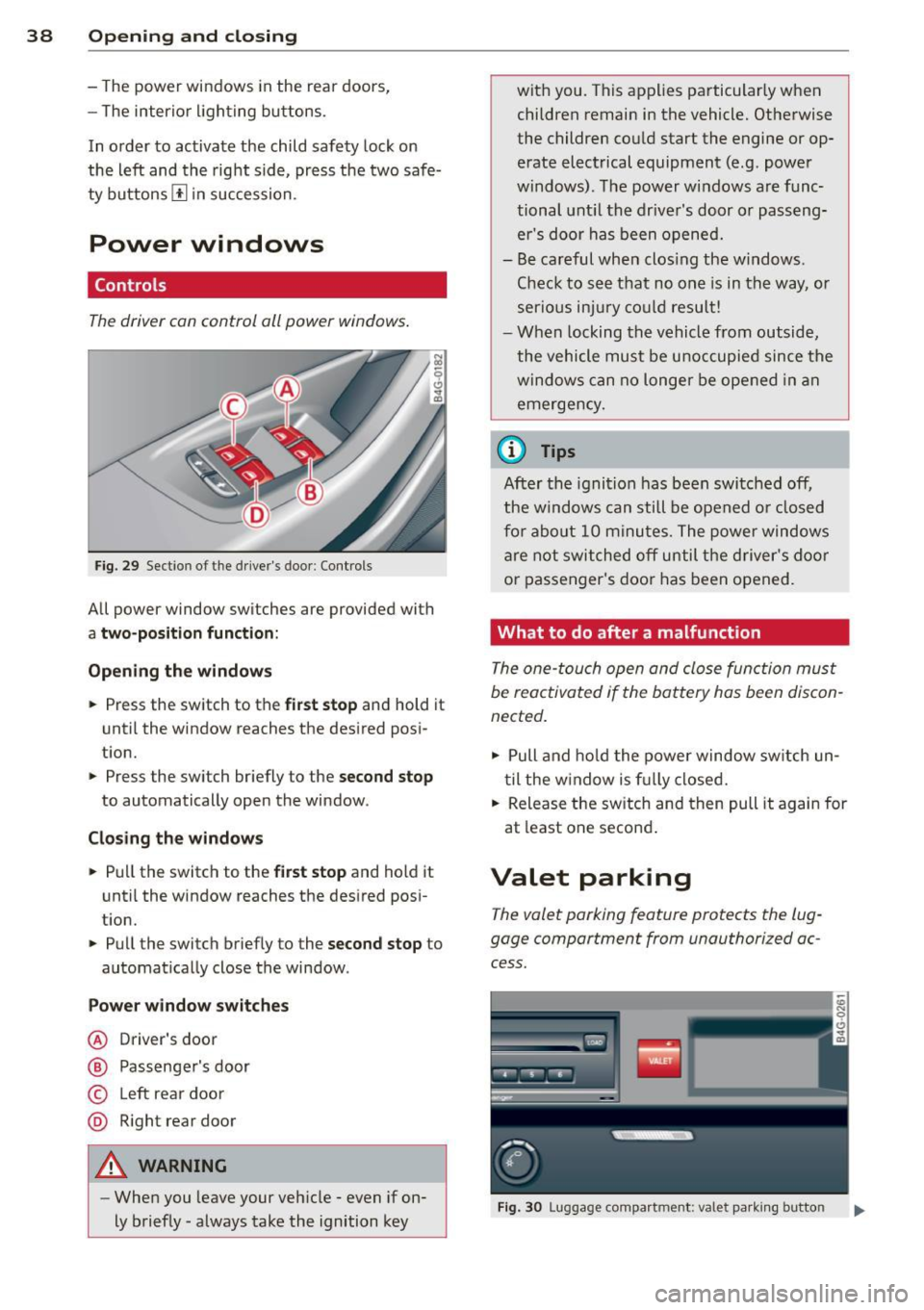
The driver can control all power windows .
Fig. 29 Section of the driver's door: Controls
All power window switches are provided with
a tw o-p osition fun ction :
Opening th e window s
• Press the switch to the
firs t stop and hold it
until the window reaches the desired posi
tion.
• Press the switch br iefly to the
se cond stop
to automatically open the window .
Cl os in g th e window s
• Pull the switch to the
firs t s top and hold it
until the window reaches the des ired pos i
tion.
• Pull the switch briefly to the
sec on d sto p to
automatically close the window .
P ow er wi ndow switche s
@ Driver's door
® Passenger's door
© Left rear door
® R ight rear door
A WARNING
- When you leave your veh icle -even if on
ly briefly -always take the ignition key with you. This applies particularly when
children remain in the vehicle. Otherwise
the children could start the engine or op
erate electrical equipment (e.g. power
windows). The power windows are func
tional unt il the driver's door or passeng
er's door has been opened.
- Be careful when clos ing the windows .
Check to see that no one is in the way, or
serio us inju ry cou ld result!
- When locking the vehicle from outside,
the vehicle must be unoccupied since the windows can no longer be opened in an
emergency.
(0 Tips
Afte r the ignition has been switched off,
the w indows can still be opened o r closed
fo r abo ut 10 minutes. The power windows
are not switched off until the driver's door
or passenger's door has been opened.
What to do after a malfunction
The one-touch open and close function must
be reactivated if the battery has been discon
nected.
• Pull and ho ld the power window sw itch un
til the w indow is f ully closed.
• Release the sw itch and then pull it again for
at least one second .
Valet parking
The valet parking feature protects the lug
gage compartment from unauthorized ac
cess.
F ig. 30 Luggage compartment: valet park ing button
Page 41 of 298
With "valet parking" activated, the rear lid
cannot be opened.
~ Remove the mechanical key¢ page 31.
~ Open the glove compartment and activa te
¢
fig. 30 the "valet parking" feature by
pressing the
I VALE T I button. The indicator
light in the switch illuminates.
~ Close the glove compartment and lock it
with the mechanical key.
~ L eave the master key with the service per
sonnel for parking and keep the mechan ical
key w ith you .
When the "valet parking" feature is activated:
- the un locking button for the rear lid
e::5 in
the dr iver's door is inactive
- the button
C::5 on the master key is inactive
- the opening hand le in the rear lid is inactive.
The vehicle can be driven and locked and un
locked w ith the master key. Access to the lug
gage compartment is blocked.
When the valet parking function is switched on, the message
Valet parking activated ap
pears in the instrument cluster display when
you switch the ig nition on.
Sliding/tilting sunroof
Operation
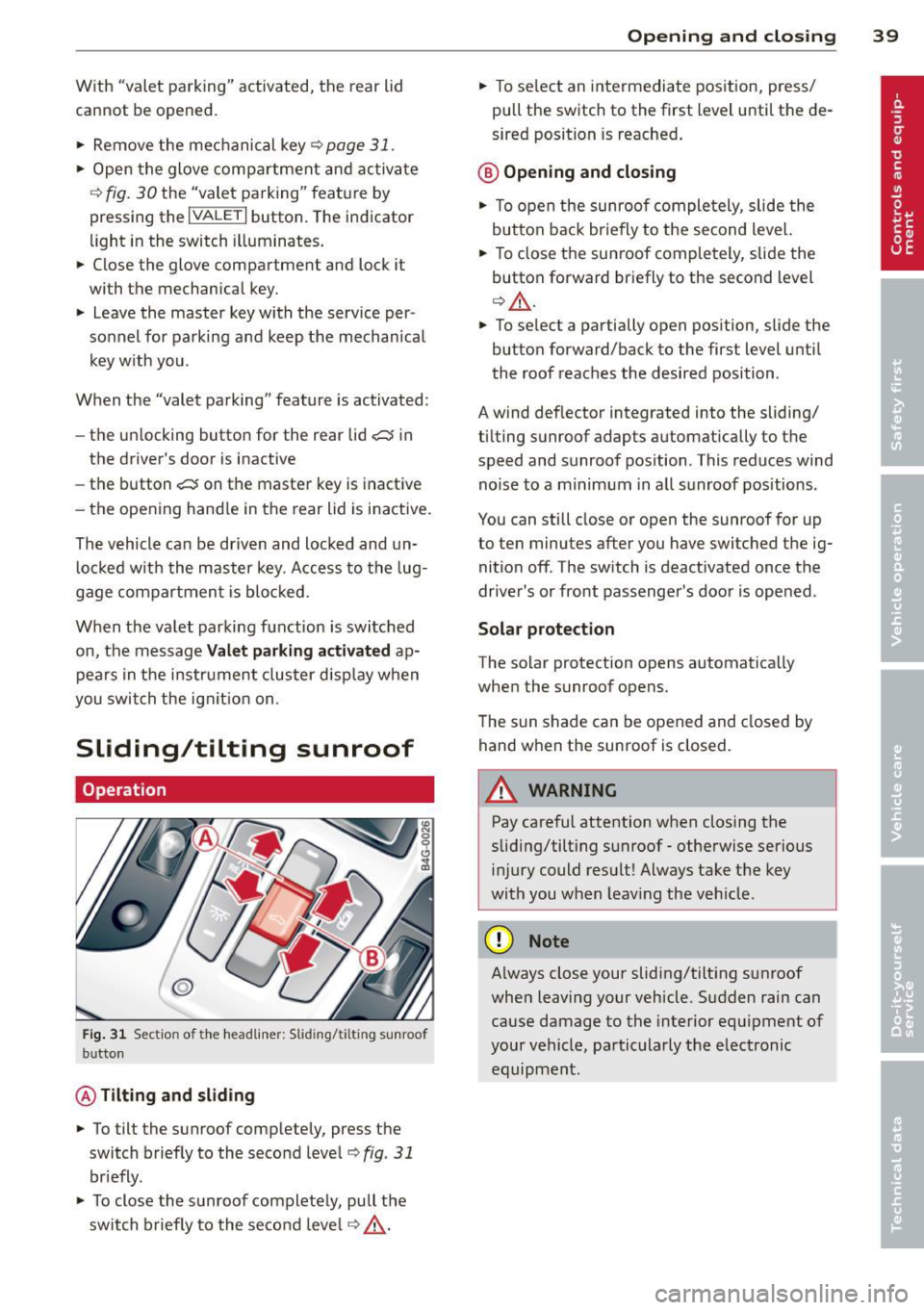
Fig . 31 Sect io n of t he he adlin er: S lidin g/tiltin g sunroo f
b u tto n
@ Tilting and sliding
~ To tilt the sunroof completely, press the
switch briefly to the second leve l¢
fig . 31
briefly.
~ To close the sunroof completely, pull the
switch briefly to the second level ¢
.&_.
Opening and closing 39
~ To se lect an intermediate position, press/
pull the switch to the first level until the de
sired position is reached .
@ Opening and closing
~ To open the sunroof completely , slide the
button back br iefly to the second level.
~ To close the sunroof completely, slide the
button forward briefly to the second level
¢ .&_.
~ To select a partially open position, slide the
button forward/back to the first level until
the roof reaches the desired position .
A wind deflector integrated into the sliding/
tilting sunroof adapts automatically to the
speed and sunroof pos ition . This reduces wind
noise to a minimum in all sunroof positions .
You can still close or open the sunroof for up
to ten minutes after you have switched the ig nition off . The switch is deactivated once the
driver's or front passenger's door is opened .
Solar protection
The solar protection opens automat ically
when the sunroof opens.
The sun shade can be opened and closed by
hand when the sunroof is closed.
A WARNING
-Pay careful attention when closing the
sliding/tilting sunroof -otherwise serious
injury could result! Always take the key
with you when leaving the vehicle .
(D Note
-
Always close your sliding/tilting sunroof
when leaving your vehicle. Sudden rain can
cause damage to the interior equipment of
your vehicle, particularly the electronic equipment .
Page 45 of 298
Coming home , Leav ing home
The coming home function il luminates the
area outside the vehicle when you switch the
ignition off and open the driver 's door . To turn
the function on, select
Light s when le aving
c a r > On .
The leav ing home function illuminates the
area outside the vehicle when yo u un lock the
veh icle . To turn the function on, select
Li gh ts
when unloc kin g ca r> On.
The coming home and leaving home functions
only operate when it is dark and the light
switch is in the
AUTO pos ition.
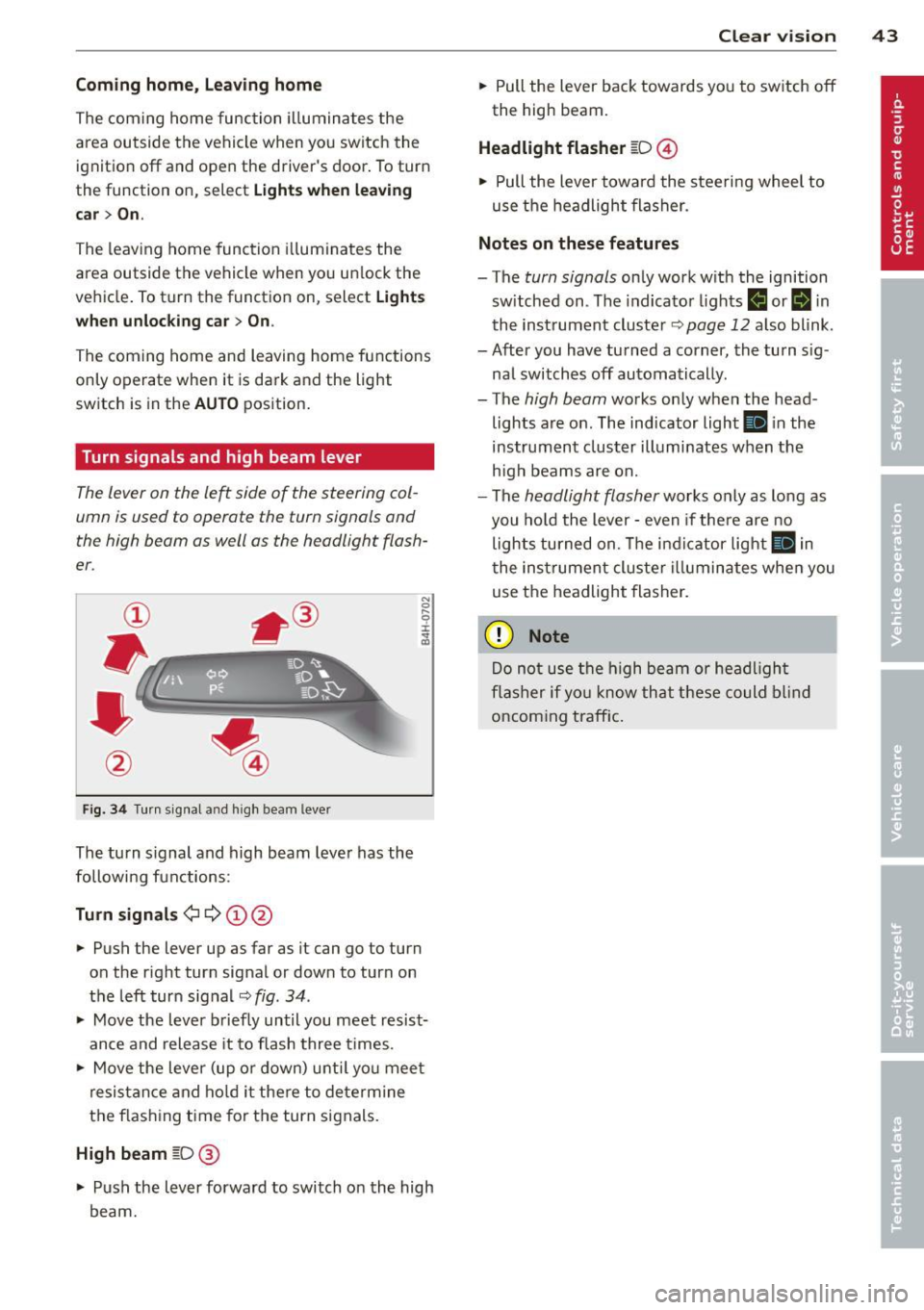
Turn signals and high beam lever
The lever on the le~ side of the steering col
umn is used to operate the turn signals and
the high beam as well as the headlight flash
er .
Fig. 3 4 Tu rn signal a nd h igh beam lever
The turn s ignal and high beam lever has the
followi ng functions:
Tu rn sign als ¢ ¢ @@
.. Push the lever up as far as it can go to turn
on the r ight turn signal or down to turn on
the left turn sig nal
c:::;, fig . 34 .
.. Move the lever b riefly until you meet resist
ance and release it to flash three times .
.. Move the lever (up or down) unti l you mee t
resistance and ho ld it there to dete rmine
the f las hing t ime for the turn signals.
High beam [D @
.. Push the lever forward to switch on the high
beam.
Clear vi sion 43
.. Pull the lever back towards you to switch off
the high beam.
Headlight fla sher [D ©
.. Pull the lever towa rd the stee ring wheel to
use the headlight flasher.
Note s on these features
- The turn signals on ly work with the ignition
sw itched on . The indicator lights
f,j or II in
the inst rument cluster~
page 12 also blink.
- After you have turned a corner, the turn s ig -
nal switches off automatically .
- The
high beam works only when the head
lights are on . The indicator light
Ill in the
instrument cluster illuminates when the
h igh beams are on.
- The
headlight flasher works only as long as
you hold the lever -even if the re a re no
lights turned on. The indicator light
Ill in
the inst rument cluster i lluminates whe n you
use the headlight flasher.
(D Note
Do no t use the high beam or headligh t
flasher if yo u know that these could blind
oncoming traffic.
Page 46 of 298
44 Clear vis ion
Interior lights
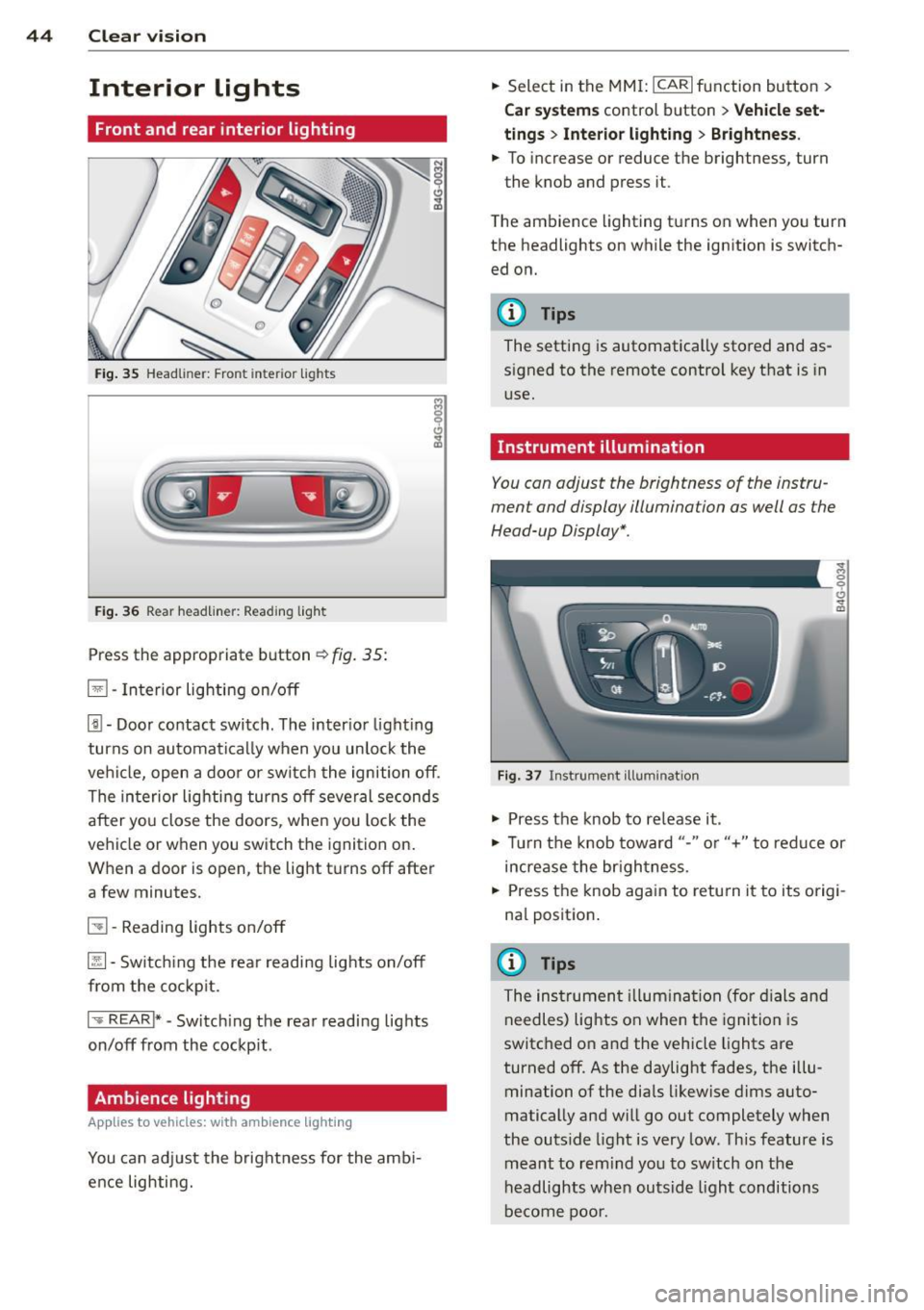
Front and rear interior lighting
Fig. 35 Head liner: Fron t int eri or ligh ts
Fig. 36 Rear headlin er: R ead in g light
Press the appropriate b utton ~ fig. 35:
El -Interior lighting on/off
[j) -Door contact switch . The inter io r l ight ing
turns on automatically when you unlock the
vehi cle, open a doo r or switch the ignition off .
The interior lighting turns off several seconds
after you close the doors , when you lock the
vehicle or when you switch the ignition on.
When a door is open, the light t urns off after
a few minutes.
51 -Reading lights o n/off
~ -Sw itch ing the rear readi ng lights on/off
from the co ckpit.
I .,.. REAR !* -Switch ing the rear reading lights
on/off from the cockp it .
Ambience lighting
Appl ies to vehicles: wit h ambience lighting
You can adj ust the brightness for the amb i
ence lighting. .,.
Select in the MM I: ICARlfunction button>
C ar sys tem s control button > Vehicle set
ting s
> Interio r light ing > Brightne ss .
.,. To increase or reduce the brightness, turn
the knob and press it .
T he ambience lighting turns on when you turn
the headlights on while the ignition is switch ed on.
@ Tips
The setting is automatically stored and as
signed to the remote control key that is in
use.
Instrument illumination
You can adjust the brightness of the instru
ment and display illumination as well as the
Head-up Display *.
F ig. 37 In strume nt ill umin ation
.,. Press the knob to re lease it .
~ 0
"'
.,. Tur n the knob toward "-" or"+" to redu ce or
increase the br ightness.
.,. Press the knob aga in to retu rn it to its origi
na l position .
(I} Tips
The instrumen t illum ina tion (for dials and
needles) lights on when the ignition is
switc hed o n and the vehicle lights are
turned off . As the daylight fades, the illu
mination of the dia ls likewise d ims auto
matically and will g o out completely when
the outs ide light is very low. This feature is
meant to rem ind yo u to sw itch on the
headlights when outsid e light conditions
be come poo r.
Page 55 of 298

.. To move the head restraint down, press the
button -arrow- ¢
fig. 48 and slide the head
restraint downward.
Removing the head restraints
.. Move the head restraint upward as far as it
can go .
.. Press the re lease ¢
fig. 49 with the me
chanical key¢
page 31 and the button
-ar row- ¢
fig. 48. Pull the head restraint out
of the backrest a t the same time¢,&. .
Installing the head rest raints
.. Slide the posts on the head restra int down
into the guides until you feel the posts lock
into place .
.. Press the button -arrow- ¢
fig. 48 and slide
the head restraint all the way down . You
s hould not be able to pull the head restrain t
out of the backrest .
So that the driver can have a better view to
t he rear, the head restraints should be pushed
down completely when the rear seats are not
occupied .
A WARNING
-Only remove the rear seat head restraints
when necessary in order to install a child
seat. Install the head restraint again im
med iately once the chi ld seat is removed.
Driving without head restraints or with
head restraints that are not properly ad
justed increases the risk of serious or fa
tal neck injury dramatically .
- Read and heed all WARNINGS
c:::>page 127.
Seat memory
Description
App lies to vehicles: wit h memory function
The memory function al lows you to quickly
and easily store and reca ll personal seating
profiles for the driver. The memory function is
operated through the master key and the memory buttons in the driver's door.
Seats and storage 53
The driver's seating profile is stored and as
signed to the master key each t ime the vehicle
is locked. The seating profile is reca lled auto
matically when the vehicle is unlocked . If two
people use one vehicle, it is recommended
that each person always uses "their own"
master key.
Two seating profiles can be stored in each of
the driver's door. Once s tored , these seating
profiles can be recalled at any time .
The following settings are stored:
- Dr iver's seat
- Steer ing wheel*
- Both exterior rearview mirrors*
Remote control key
Applies to veh icles: w ith memory function
To assign the driver's seat settings to the re
mote control key when locking the veh icle, the
function must be switched on.
.. Select:
I CAR ! function button > Car systems
control button > Vehicle settings > Seats >
Driver seat> Remote control key> On .
(D Tips
If you do not wan t another driver's set
tings to be assigned to the remote control
key, switch off the memory function using
the MMI or the
!O FF I button r::::> page 53 .
Memory buttons
Applies to veh icles: w ith memory functio n
Fig. SO Driver 's door : memo ry fun ction b utto ns
The memory buttons are located in the driv
er's door.
Page 58 of 298
56 Seats and storage
Front cuphold er
.,. To open the c upholder, tap the cover
~ fig. 56.
Rear cuphold er
.,. Press on the symbol 'i@ ~ fig. 57 .
.,. To adjust the a rm @ , swing it in the direc
t ion of the a rrow .
.,. Place the beverage in the holder and release
the arm . The arm swings back by itself and
automatically secures the beverage .
.,. Press on the center section between the
two arms and push the cup holder in the
slot as far as it will go.
_& WARNING
Spilled hot liquid can cause an accident
and personal inj ury .
-
- Never carry any beverage containe rs with
hot liquids, such as hot coffee or hot tea,
in the vehicle while it is mov ing . In case
of an accident, sudden b ra ki ng o r other
vehicle movement, hot liq uid c ould spill,
causing sca ld ing burns. Sp illed hot liq ui d
can also ca use an accident and personal
injury.
- Use only soft cups in the cupholde r. Hard
cups and g lasses can ca use inj ury in an
accident.
- Never use the cupho lder or adapter as an
ashtray- r isk of f ire.
(D Note
On ly drink containers wi th lids should be
carried in the cupho lder. Liqu id could spi ll
ou t and damage your vehicle's e lectronic
equ ipment or stain the upholstery, etc.
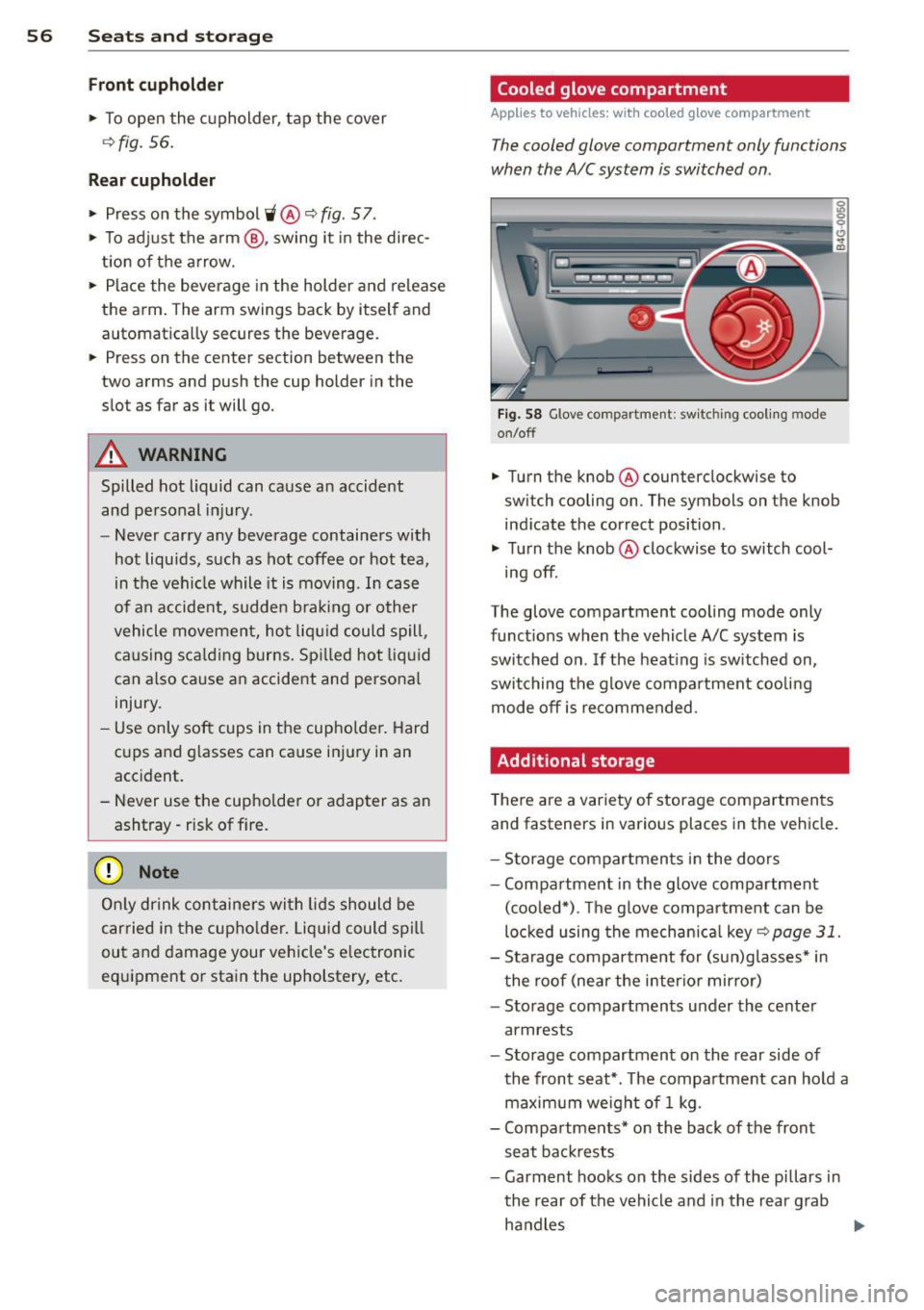
Cooled glove compartment
Applies to vehicles: wit h coo led g love compartment
The cooled glove compartment only functions
when the A/C system is switched on .
Fig . 58 G love compartme nt: sw it c hin g cooli ng m ode
on/off
.,. Turn the knob @counterclockwise to
sw itch cooling on . The symbols on the knob
ind icate the correct position .
.,. Turn the knob @clockwise to switch cool-
ing off.
The glove compartment cooling mode only
funct ions when the vehicle A/C system is
switched on . If the heat ing is sw itched on,
switching the g love compa rtment coo lin g
mode off is recommended.
Additional storage
T here a re a var iety of storage compartments
and fasteners in various places in the vehicle.
- S torage compartments in the doors
- Compartment in the glove compartment
(coo led*) . T he g love compar tment can be
loc ked using the mechan ica l
key ~ page 31.
-Sta rage compartment for (su n)g lasses* in
t he roof (near the interio r mirror)
- Storage compartments under the center
armrests
- Storage compartment on the rear side of
the front seat *. T he compa rtment can hold a
maximum weigh t of 1 kg.
- Compa rtments* on the back of the front
seat ba ckrests
- Garment hooks on the sides of the pi llars in
th e rear of the vehicle a nd in the rear g rab
ha ndles
lllJ,,
Page 62 of 298
60 Seats and st o rage
Enlarging cargo capacity of the vehicle
interior
The seat backs can be folded forward to en
large the cargo capacity .
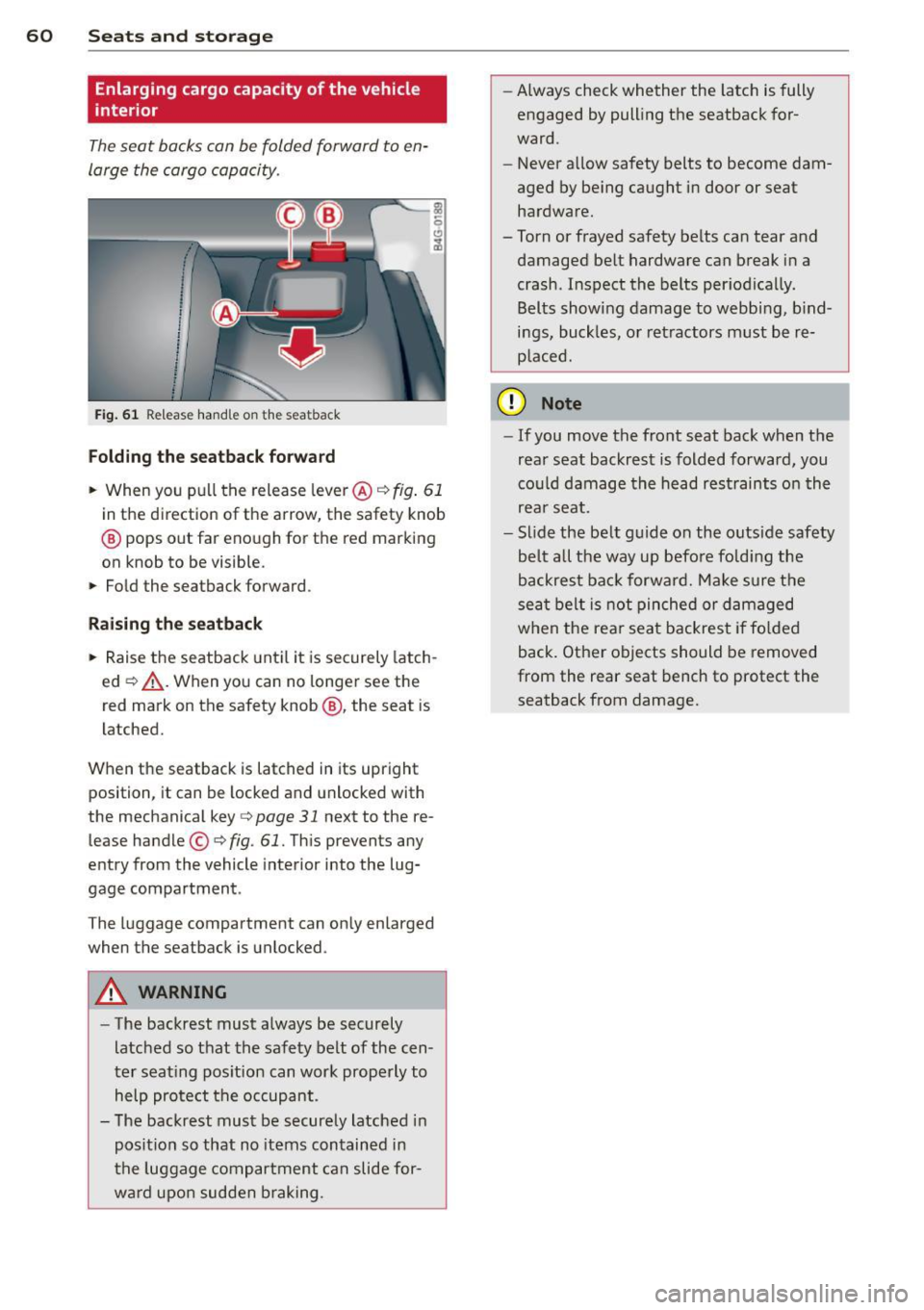
Fig. 61 Re lease handle on the seatback
Folding th e se atback forward
.. When you pu ll the release leve r@ ¢ fig. 61
in the direction of the arrow, the safety knob
@ pops out far enough for the red marking
on knob to be visible.
.. Fold the seatback forward .
Raising th e se atback
.. Raise the seatback until it is securely latch
ed ¢&_ . When you can no longer see the
red mark on the safety knob@, the seat is
l atched.
When the seatback is latched in its upright
position, it can be locked and unlocked with
the mechanical key
c> page 31 next to the re
lease handle ©
c>fig. 61. This prevents any
entry from the vehicle interior into the lug
gage compartment .
The luggage compartment can only enlarged
when the seatback is unlocked.
A WARNING
-
-The backrest must a lways be securely
latched so that the safety belt of the cen
ter seating pos ition can work properly to
help protect the occupant .
- The backrest must be securely latched in
posit ion so that no items contained in
the luggage compar tment can slide for
wa rd upo n sudden b raking . -
Always check whether the latch is fully
engaged by pull ing the seatback for
ward.
- Never allow safety belts to become dam
aged by be ing caught in door or seat
hardware.
-Torn or frayed safety belts can tear and
damaged be lt hardware can break in a
crash . Inspect the belts periodica lly.
Belts show ing damage to webb ing, b ind
ings, buckles, or retractors must be re
p laced.
(D Note
- If you move the front seat back when the
rear seat backrest is folded forward, you
cou ld damage the head r estraints on th e
rea r seat.
- Slide the belt guide on the outside safety
be lt a ll the way up befo re fold ing the
backrest back forward. Make sure the
sea t belt is not pinched or damaged
when the rear seat backrest if fo lded
back. Other objects should be removed
from the rear seat bench to protect the
seatback from damage.
Page 76 of 298

74 On the road
Parking
Various rules apply to prevent the parked ve
hicle from rolling away accidentally.
P a rking
.. Stop the vehicle with the foot brake .
.. Pu ll the switch <®l to apply the park ing
brake.
.. Se lect the
P se lector lever position
~ page 101.
• Turn the eng ine off ~.&.
In addition on incline s and grade s
.. Turn the steering wheel so that your vehicle
will roll against the curb in case it should
start to move .
A WARNING
-When you leave your veh icle - even if on
ly b rief ly - always take the ignition key
with you. This app lies par ticu la rly when
children remain in the veh icle . Otherw ise
the ch ildren could start the engine, re
lease the parking brake or ope rate e lec
trical equipment (e.g. power windows) .
There is the risk of an accident .
- When the vehicle is locked, no one - par
t icu larly not ch ildren should remain in
the vehicle. Locked doors make it more
difficult for emergency workers to get in
to the vehicle -putt ing lives at risk .
Starting from rest
The starting assis t function ensures tha t the
parking brake is released automatically upon
starting .
Stopping and appl ying park ing br ake
.. Pull the switch(®) to apply the parking
brake.
Starting and automatically releasing the par king brake
.. When you start to drive as usua l, the park
ing brake is automatically re leased and your
vehicle begins to move. When stopping at a traffic signal or stopping
in city t raffic, the parking brake can be ap
plied . T he vehicle does not have to be he ld
with the footbrake . The parking brake elimi
nates the tendency to creep w ith a dr ive range
engaged . As soon as you d rive off as usual,
the pa rking brake is released automat ically
and the vehicle starts to move .
Starting on slopes
When starting on inclines, the starting assist
prevents the vehicle from u nintent ionally roll
ing back . The braking force of the parking
brake is not released until suff ic ient driving
force has been built up at the wheels .
(D Tips
For safety reasons, the parking brake is re
leased automatically o nly when the d riv
er's safety belt is engaged in the buckle.
Starting off with a trailer
To prevent rolling back unintentionally on an
incline, do the following:
.. Keep the sw itch <®l pulled and depress the
accelerator. The parking brake stays applied
and prevents the vehicle from roll ing back
ward .
.. You can release the switch
<®l once you are
sure that you are developing enoug h for
ward momentum at the whee ls as you de
press the acce lerator .
Depend ing on the we ight of the rig (vehi cle
and t railer) and the severity of the incline, yo u
may ro ll backwards as yo u start . You can pre
vent rolling backwards by holding the parking
brake switch <®l pulled out and accelerating -
just as you wou ld when starting on a hill with
a conventiona l hand brake.
Page 132 of 298

130 Driving Safely
&_ WARNING
-
To help prevent poisonous exhaust gas
from being drawn into the vehicle, always keep the rear lid closed while driving .
- Never transport objects larger than
those fitting completely into the luggage
area because the rear lid cannot be fully
closed.
- If you absolutely must drive with the rear
lid open, observe the following notes to
reduce the risk of poisoning:
- Close all windows,
- Close the power roof*,
- Open all air outlets in the instrument
panel,
- Switch off the air recirculation,
- Set the fresh air fan to the highest
speed.
&_ WARNING
Always make sure that the doors, all win
dows, the power roof* and the rear lid are
securely closed and locked to reduce the
risk of injury when the vehicle is not being
used.
- After closing the rear lid, always make
sure that it is properly closed and locked.
- Never leave your vehicle unattended es
pecially with the rear lid left open. A
child could crawl into the vehicle through
the luggage compartment and close the
rear lid becoming trapped and unable to
get out . Being trapped in a vehicle can
lead to serious personal injury.
- Never let children play in or around the
vehicle .
- Never let passengers ride in the luggage
compartment . Vehicle occupants must
always be properly restrained in one of
the vehicle's seating positions.
(D) Tips
- Air circulation helps to reduce window fogging. Stale air escapes to the outside
through vents in the trim panel. Be sure
to keep these slots free and open .
-
-The tire pressure must correspond to the
load. The tire pressure is shown on the
tire pressure label. The tire pressure la
bel is located on the driver's side B-pillar.
The tire pressure label lists the recom mended cold tire inflation pressures for
the vehicle at its maximum capacity
weight and the tires that were on your
vehicle at the time it was manufactured.
For recommended tire pressures for nor
mal load conditions , please see chapter
r::!) page 2 3 9.
Tie-downs
The luggage compartment is equipped with
four tie-downs to secure luggage and other
items.
Use the tie-downs to secure your cargo prop
erly ¢
page 129, Loading the luggage com
partment.
In a collision, the laws of physics mean that
even smaller items that are loose in the vehi
cle will become heavy missiles that can cause
serious injury. Items in the vehicle possess en
ergy which vary with vehicle speed and the
weight of the item. Vehicle speed is the most
significant factor.
For example , in a frontal collision at a speed
of 30 mph (48 km/h), the forces acting on a 10-lb (4.5 kg) object are about 20 times the
normal weight of the item. This means that
the weight of the item would suddenly be about 200 lbs. (90 kg). You can imagine the
injuries that a 200 lbs . (90 kg) item flying
freely through the passenger compartment
could cause in a collision like this.
&_ WARNING
Weak, damaged or improper straps used
to secure items to tie-downs can fail dur
ing hard braking or in a collision and cause
serious personal injury.
- Always use suitable mounting straps and properly secure items to the tie-downs in ..,.
Page 149 of 298
q fig. 145. The general location of the airbags
is marked "AIRBAG".
There is a lot you need to know about the air bags in your vehicle. We urge you to read the
detailed information about airbags, safety
belts and child safety in this and the other
chapters that make up the owner's literature.
Please be sure to heed the WARNINGS -they
are extremely important for your safety and
the safety of your passengers, especially in
fants and small children .
A WARNING
Never rely on airbags alone for protection.
- Even when they deploy, airbags provide only supplemental protection .
- Airbag work most effectively when used
with properly worn safety belts .
- Therefore, always wear your safety belts
and make sure that everybody in your ve
hicle is properly restrained .
- Always hold the steering wheel with both
hands on the outside of the steering
wheel rim at the 9:00 o'clock and 3:00 o'clock positions to help reduce the risk
of personal injury if the driver's airbag in
flates.
- Never hold the steering wheel at the 12
o'clock position or with your hands any
where inside the steering wheel or on the
steering wheel hub. Holding the steering
wheel the wrong way increases the risk
of severe injury to the arms, hands, and
head if the driver airbag deploys .
A WARNING
Objects between you and the airbag will
increase the risk of injury in a crash by in
terfering with the way the airbag unfolds
and/or by being pushed into you as the air
bag inflates.
- Always make sure nothing is in the front
airbag deployment zone that could be
struck by the airbag when it inflates.
- Objects in the zone of a deploying airbag
can become projectiles when the airbag
Airbag system 147
deploys and cause serious personal in
Jury.
- Never hold things in your hands or on
your lap when the vehicle is in use.
- Never place accessories or other objects
(such as cup holders, telephone brackets,
note pads, navigation systems, or things
that are large, heavy, or bulky) on the
doors; never attach then to the doors or
the windshield; never place them over or
near or attach them to the area marked
,,AIRBAG" on the steering wheel, instru
ment panel or the seat backrests; never
place them between these areas and you
or any other person in the vehicle.
- Never attach objects to the windshield
above the passenger front airbag, such
as accessory GPS navigation units or mu
sic players. Such objects could cause seri
ous injury in a collision, especially when
the airbags inflate.
- Never recline the front passenger seat to
transport objects. Items can also move
into the deployment area of the side air
bags or the front airbag during breaking
or in a sudden maneuver. Objects near
the airbags can fly dangerously through
the passenger compartment and cause injury, particularly when the seat is re
clined and the airbags inflate.
WARNING
A person on the front passenger seat, es
pecially infants and small children, will re
ceive serious injuries and can even be kil
led by being too close to the airbag when
it inflates.
- Although the Advanced Airbag System in
your vehicle is designed to turn off the
front passenger airbag if an infant or a
small child is on the front passenger
seat, nobody can absolutely guarantee
that deployment under these special conditions is impossible in all conceiva
ble situations that may happen during
the useful life of your vehicle . .,.
•
•