SEN AUDI A6 2012 Owner's Guide
[x] Cancel search | Manufacturer: AUDI, Model Year: 2012, Model line: A6, Model: AUDI A6 2012Pages: 298, PDF Size: 74.43 MB
Page 68 of 298
66 Warm and cold
Four-zone automatic climate control
Operation
Applies to vehicles: with four -zone automatic climate control
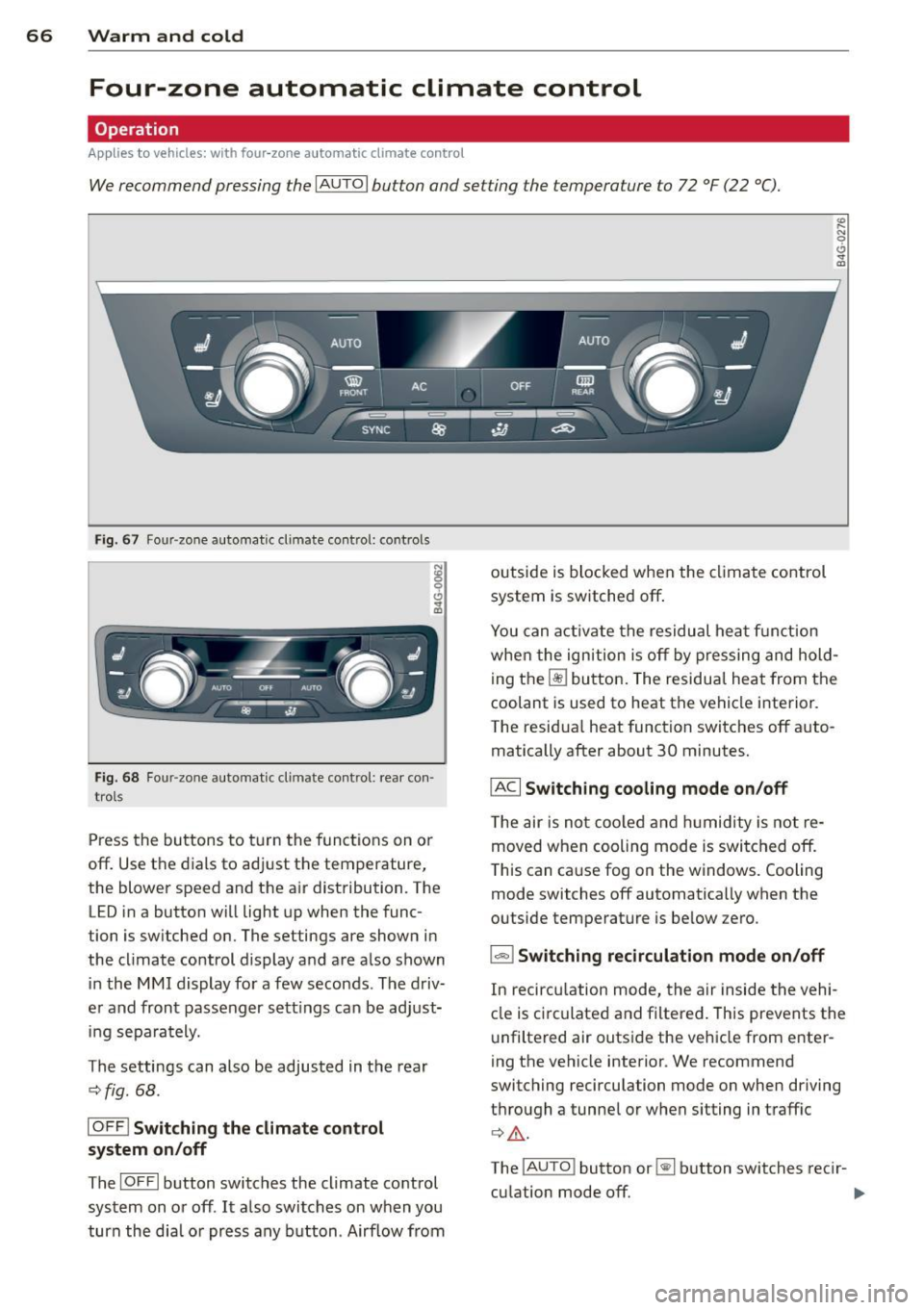
We recommend pressing the IAUTO I button and setting the temperature to 72 °F (22 °C).
Fig. 67 Four-zone automat ic climate contro l: controls
Fig . 68 Fou r-zone automatic cl imate cont rol: rear con ·
trol s
Press the buttons to turn the functions on or
off. Use the dials to adjust the temperature,
the blower speed and the air distribution. The
LED in a button will light up when the func
tion is switched on. The settings are shown in
the climate control display and are also shown in the MMI display for a few seconds . The driv
er and front passenger sett ings can be adjust
ing separately.
The settings can also be adjusted in the rear
<::;> fig. 68.
IOFF j Switching the climate control
system on/off
The I O FFI button switches the climate control
system on or off .
It also switches on when you
turn the dia l or press any button . Airflow from outside is blocked when the
climate control
system is switched off .
You can activate the residual heat f unction
whe n the ignition is off by pressing and hold
ing the ~ button. The residua l heat from the
coolant is used to heat the vehicle interior .
The residual heat function switches off auto
matically after about 30 minutes.
!ACI Switching cooling mode on/off
The air is not cooled and humidity is not re
moved when cooling mode is switched off.
This can cause fog on the windows. Cooling
mode switches off automatically when the
outside temperature is below zero .
1-1 Switching recirculation mode on/off
In recirculation mode, the air inside the vehi
cle is circ ulated and filtered. This prevents the
unfiltered air outside the vehicle from enter
ing the vehicle interior . We recommend
switching recirculation mode on when driving
through a tunnel or when sitting in traffic ¢ .&, .
The
! AUTO I button or~ button switches rec i r-
cu lation mode off. .,.
Page 69 of 298
IAUTO I Switching automatic mode on
Automatic mode mainta ins a constant tem
perature inside the vehicle . Air temperature,
airflow and air distribution are controlled au
tomatically.
Adjusting the temperature
Temperatu res between 60 °F (+16 °C) and
84 °F ( +28 °C) can be set. O uts ide of this
range,
lo or hi wi ll appear in the climate con
trol system disp lay. At both of these settings,
the climate control system runs continuously
at maximum cooling or heating power. There
is no temperature regulation.
~ Adjusting the airflow
You can adjust the airf low manually to suit
your needs . To have the airf low regulated au
tomatically, press the
I AU TOj button.
li!J Adjusting the air distribution
You can manually se lect the vents where the
air will flow. To have the air distribution regu
lated automatically, press the
IAUTOI button .
~I~ * Adjusting seat heating/
ventilation*
Pressing the button switches the seat heat
ing/ventilation on at the highest setting ( level
3). The LEDs indicate the heating/ventilation
level. To reduce the heating/venti lation, press
the button again. To switch the seat heating/
ventilation off, press the button repeatedly
until the LED turns off.
After 10 minutes, the seat heating automati
cally switches from level 3 to level 2.
I@ FRONT I Switch the defroster on/off
The windshield and side windows are defrost
ed or cleared of condensation as quickly as
possible. The maximum amount of air flows
mainly from the vents below the windshield.
Recircula tion mode switches off.
The
IAU TOI button switches the defroster off.
Warm and cold 67
liiii REAR! Switching rear window heater
on/off
The rear window heater only operates when
the engine is running. It switches off auto matically after 10 to 20 minutes, depending
on the outside temperature.
To prevent the rear window heater from
switching off automatically, press and ho ld
the~ button for more than 2 seconds. This
remains stored until the ignition is switched
off .
I SYNC I Synchronization*
When synchronization is switched on, the
same settings are applied to both the driver
and front passenger, except for the seat heat
ing/ventilation*. The rear zone is also
synchronized. Synchronization switches off
when the settings for the front passenger s ide
o r r ear are adjusted.
You can also switch synchronization on by pressing and holding a dial. For example, if
you press and hold the dial on the front pas
senger side, the settings for that side are
transferred to the driver side. The same ap
plies to the rear.
Air vents
You can open or close the center and outer
vents in the cockpit and the vents in the rear
cente r console and door pillars using the
ridged thumbwheels. The levers adjust the di
rection of the airflow from the vents.
&_ WARNING
-=
-Do not use this setting for extended peri-
ods of time . The windows could fog up
since no fresh air can enter the vehicle. If
the windows fog up, press the air recircu
lation button again immediately to
sw itch off the air recircu lation function
or select defrost.
- Individuals w ith reduced sensitivity to
pa in or temperature cou ld deve lop burns
when using the seat heating function . To
red uce the risk of injur y, these individu-
als should not use seat heating . ..,.
Page 70 of 298
68 Warm and cold
(D Note
To avoid damage to the heating e lements
in the seats, do not kneel on the seats or
place heavy loads on a small area of the
seat .
Setup
Applies to vehicles: with four-zone a utomat ic climate con·
trol
The climate control system setup is accessed
through the MMI .
.,. Se lect : ICARI funct ion button> Car sy stem s
control b utton > AC .
Rear cabin settings*
When th is fu nction is selected, all sett ings for
the rear can be adjusted through the climate
control sys tem in the cockpit. The cl imate
con trol sys tem se tt ings cannot be adjusted in
the rea r seat a t the same time. This func tion
switches
off after a certain period of time or
when one of the dials in the cockpit is press
ed .
Auto recirculation*
The sensit ivity level of the au tomatic rec ircu
lation mode can be set at vario us leve ls from
off to sensit ive. The recirculation mode is con
trolled a utomat ica lly. You must p ress the ~
button if fog forms on the windows.
Footwell temperature
You can adju st the footwell temperat ure so
that it is cooler or wa rme r.
AC mode
The strength of the airflow can be adjusted to
light, med ium or strong.
Steering wheel heating
Applies to vehicles: wit h heated stee rin g wheel
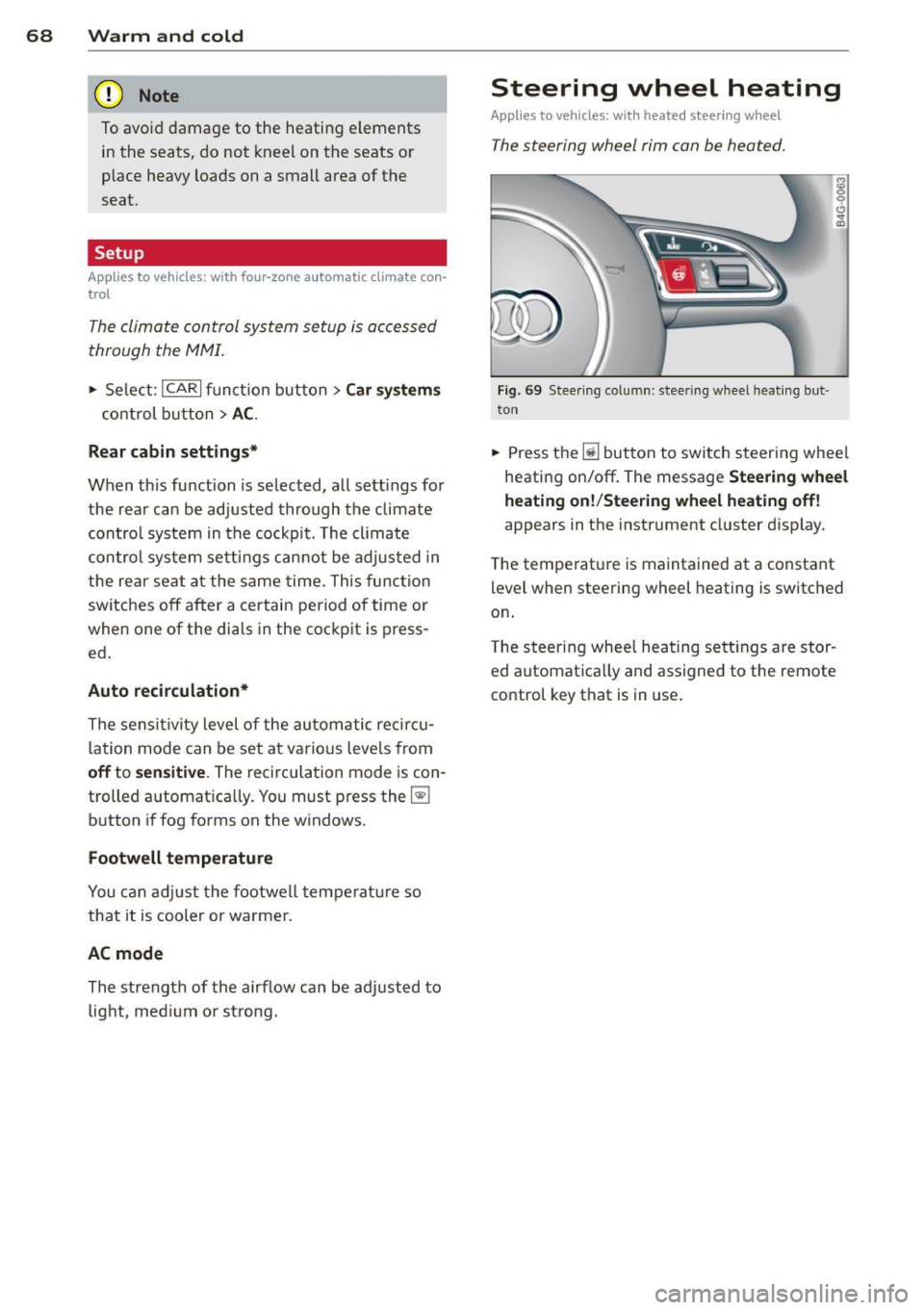
The steering wheel rim can be heated .
Fig. 6 9 Stee ring colu mn: steeri ng wheel hea tin g but ·
ton
.,. Press th e ~ button to switch steering whee l
heati ng on/off . The message
Steering wheel
heating on !/Steering wheel heating off !
appears in the instrument cluster d isplay.
T he temperat ure is maintained at a constant
level when steering wheel heating is switched
on.
T he steering wheel heating se tt ings are stor
ed automat ica lly and assigned to the remote
control key that is in use .
Page 80 of 298
78 Adaptive cruise control and braking guard
Adaptive cruise control
and braking guard
Introduction
Applies to vehicles: with adaptive cruise co ntrol
The adaptive cruise control system assists the
driver by regulating vehicle speed and helping
to maintain a set distance to the vehicle
ahead, within the limits of the system . If the
system detects a moving vehicle up ahead,
adaptive cruise control can brake and then ac
celerate your vehicle . This helps to make driv
ing more comfortable both on long highway
stretches and in stop -and-go traffic.
Aud i braking guard can warn you about an im
pending collision with a vehicle up ahead that
is slower or has slowed down and start slow
ing your vehicle down with the brakes
<::> page 84.
Adaptive cruise control and Audi braking
guard have technical limitations that you
must know, so please read this section care
fully, understand how the system works and
use them properly at all times.
General information
General information
Applies to vehicles: with adaptive cruise control
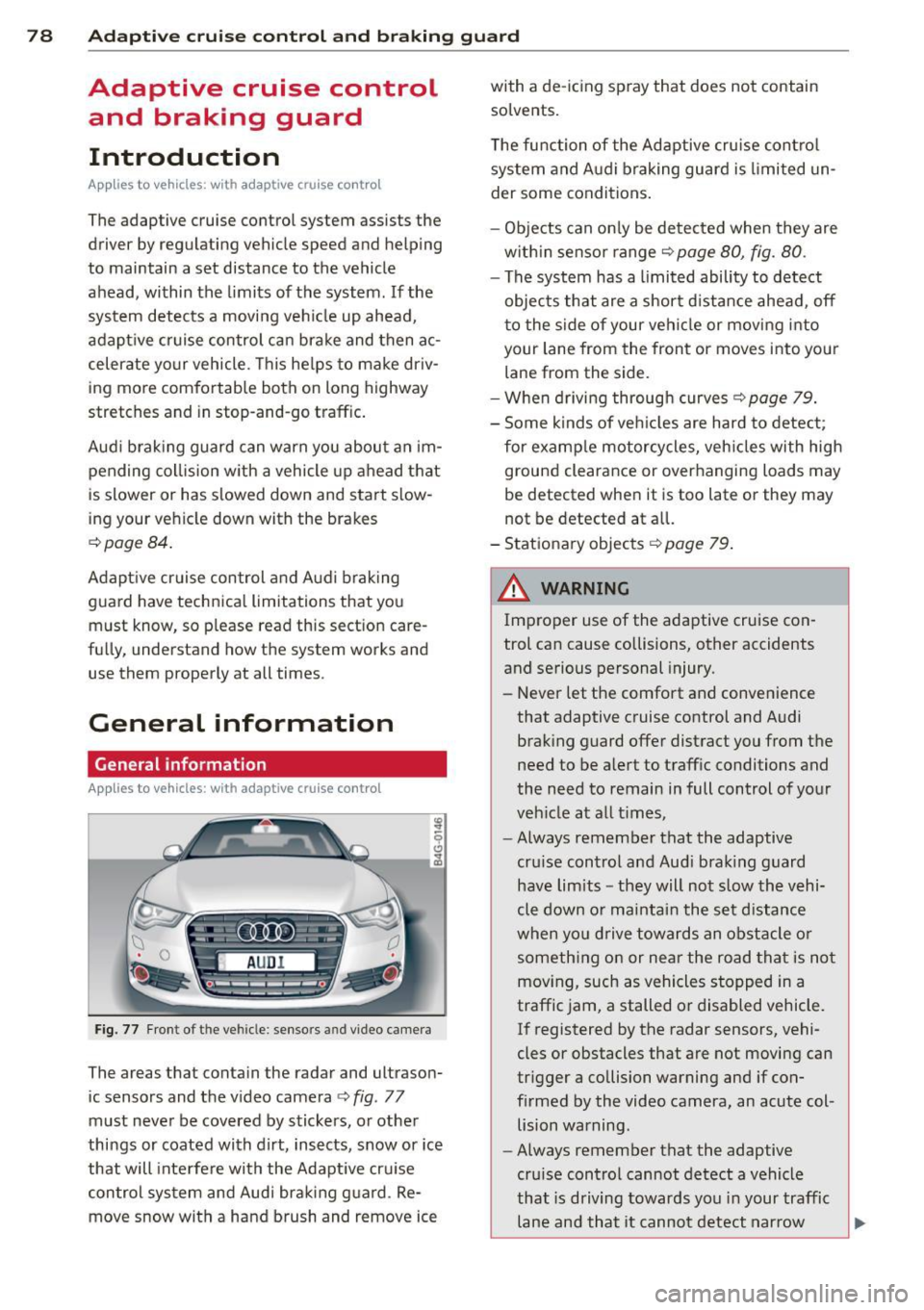
Fig. 77 Front of th e ve hicle : senso rs a nd vi deo camera
The areas that contain the radar and ultrason
ic sensors and the video camera
c::> fig . 77
must never be covered by stickers, or other
things or coated with dirt, insects, snow or ice
that will interfere with the Adaptive cruise
control system and Audi braking guard . Re
move snow with a hand brush and remove ice with a de-icing spray that does not contain
solvents.
The function of the Adaptive cruise control
system and Audi braking guard is limited un
der some conditions.
- Objects can only be detected when they are
within sensor range
c::> page 80, fig. 80.
- The system has a limited ability to detect
objects that are a short d istance ahead, off
to the side of your vehicle or moving into
your lane from the front or moves into your
lane from the side.
-When driving through curves
r=;>page 79.
- Some kinds of vehicles are hard to detect;
for examp le motorcycles, vehicles with high
ground clearance or overhanging loads may
be detected when it is too late or they may
not be detected at all.
- Stationary objects
c::> page 79 .
A WARNING
Improper use of the adaptive cruise con
trol can cause collisions, other accidents
and serious personal injury. -
-Never let the comfort and convenience
that adaptive cruise control and Audi
braking guard offer distract you from the
need to be alert to traffic conditions and
the need to remain in full control of your
vehicle at all times,
- Always remember that the adaptive
cru ise control and Audi braking guard
have lim its -they will not slow the vehi
cle down or maintain the set distance
when you drive towards an obstacle or
something on or near the road that is not
moving, such as vehicles stopped in a
traffic jam, a stalled or disabled vehicle.
If registered by the radar sensors, vehi
cles or obstacles that are not moving can
trigger a collision warning and if con
firmed by the video camera, an acute col lision warning.
- Always remember that the adaptive
cruise control cannot detect a vehicle
that is driving towards you in your traffic
lane and that it cannot detect narrow
~
Page 81 of 298
Adaptive cruise control and braking guard
vehicles such as motorcycles and bicy
cles.
- The adaptive cruise control system can
not detect people, animals and cannot
detect objects or traffic that crosses your
lane of travel.
- Never drive at speeds that are too fast
for traffic, road and weather conditions.
- Never use adaptive cruise control when
you cannot drive safely at a steady
speed, including on winding roads or
when road conditions are poor (for exam
ple, in construction sites, on ice, gravel,
in fog, heavy rain or on wet roads that in
crease the risk of hydroplaning).
- Never follow a vehicle so closely that you
cannot stop your vehicle safely. The
adaptive cruise control cannot slow or
brake the vehicle safely when you follow
another vehicle too closely. Always re
member that the automatic braking
function cannot bring the vehicle to a
sudden or emergency stop under these
conditions.
- Never rest your foot on the accelerator
pedal, especially when the adaptive
cruise control is being used. Pressure on
the accelerator will override the adaptive
cruise control braking function and pre
vent the brakes from being applied when
adaptive cruise control detects a situa
tion when the brakes must be applied.
- Never use adaptive cruise control when
the radar sensors cannot accurately de
tect vehicles moving in traffic. The radar
sensor's vision can be reduced by heavy
rain, ice, snow, heavy road spray and re
flections from guard rails, tunnel entran ces, etc. These and similar conditions can
prevent vehicles from being accurately
detected and in some cases they may not
be detected at all.
- Always turn off adaptive cruise control
when entering turn lanes, exit lanes and
construction zones or in similar situa
tions because the vehicle will automati cally accelerate to the stored speed when
the road ahead is clear. -
To prevent unintended operation, always
switch ACC off when it is not being used .
(D Note
The sensors can be moved by impacts or
damage to the bumper, wheel housing and
underbody. Damage in these areas could
change the way the adaptive cruise control
system and Audi braking guard work to
gether. Have your authorized Audi dealer
check to make sure that the adaptive
cruise control system is working properly if
your vehicle had a minor frontal impact or
was damaged in the area of the sensors.
In curves
Applies to vehicles: wi th adaptive cruise control
Fig. 78 Example: driving into a cu rve
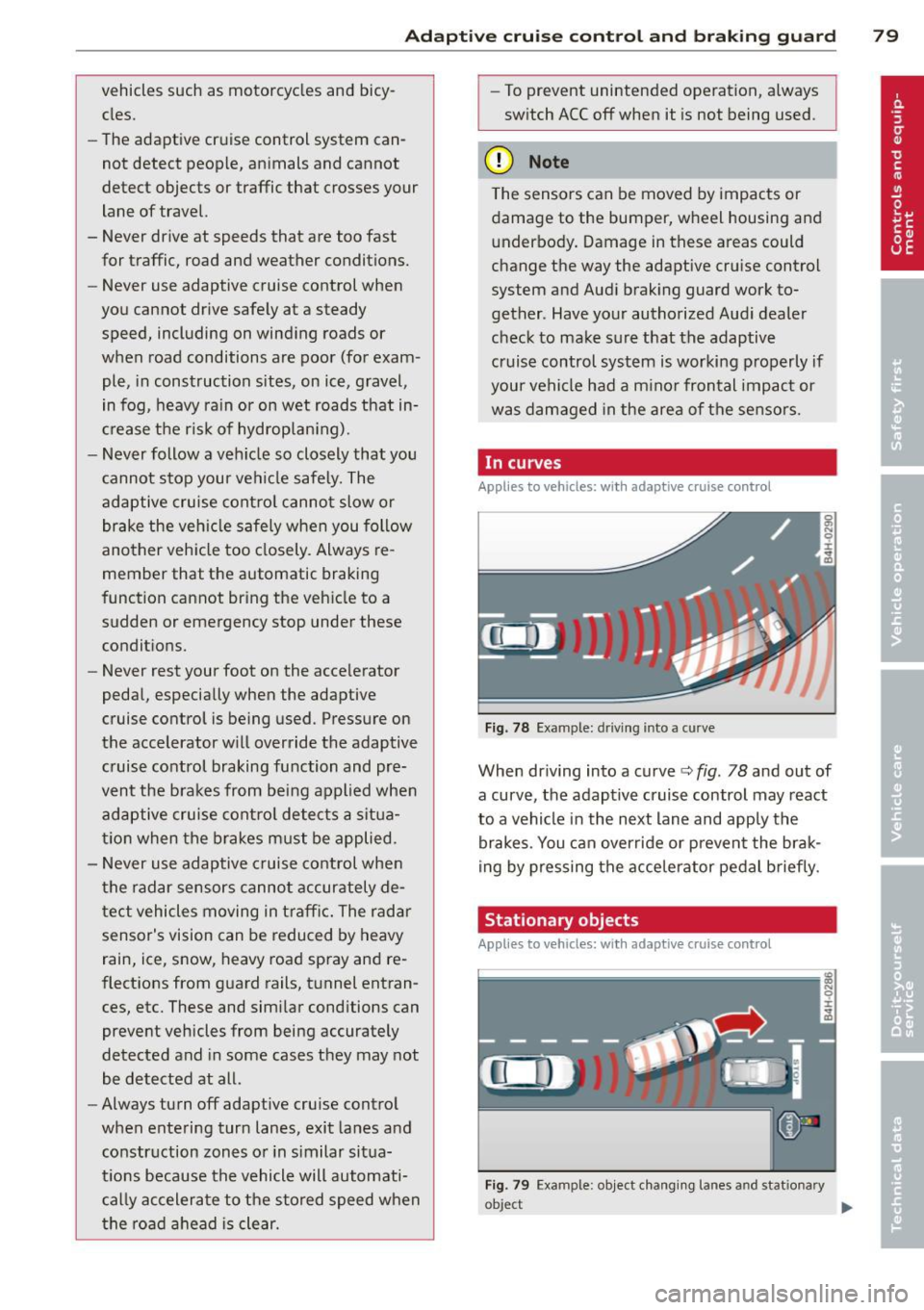
When driving into a curve ¢ fig. 78 and out of
a curve, the adaptive cruise control may react
to a vehicle in the next lane and apply the brakes. You can override or prevent the brak
ing by pressing the accelerator pedal briefly.
Stationary objects
Applies to vehicles: wit h adaptive cruise control
Fig. 79 Example : object c hanging lanes and stat iona ry
o~ect
~
79
Page 86 of 298
84 Adapti ve crui se control and bra king guard
@ Tips
- Di sta nce 3 is set automatically each time
you switch the ignition on.
- Your standard settings are automatically
stored and assigned to the remote con
trol key being used.
Audi braking guard
Description
Ap plies to vehicles: with a daptive cruise co ntrol
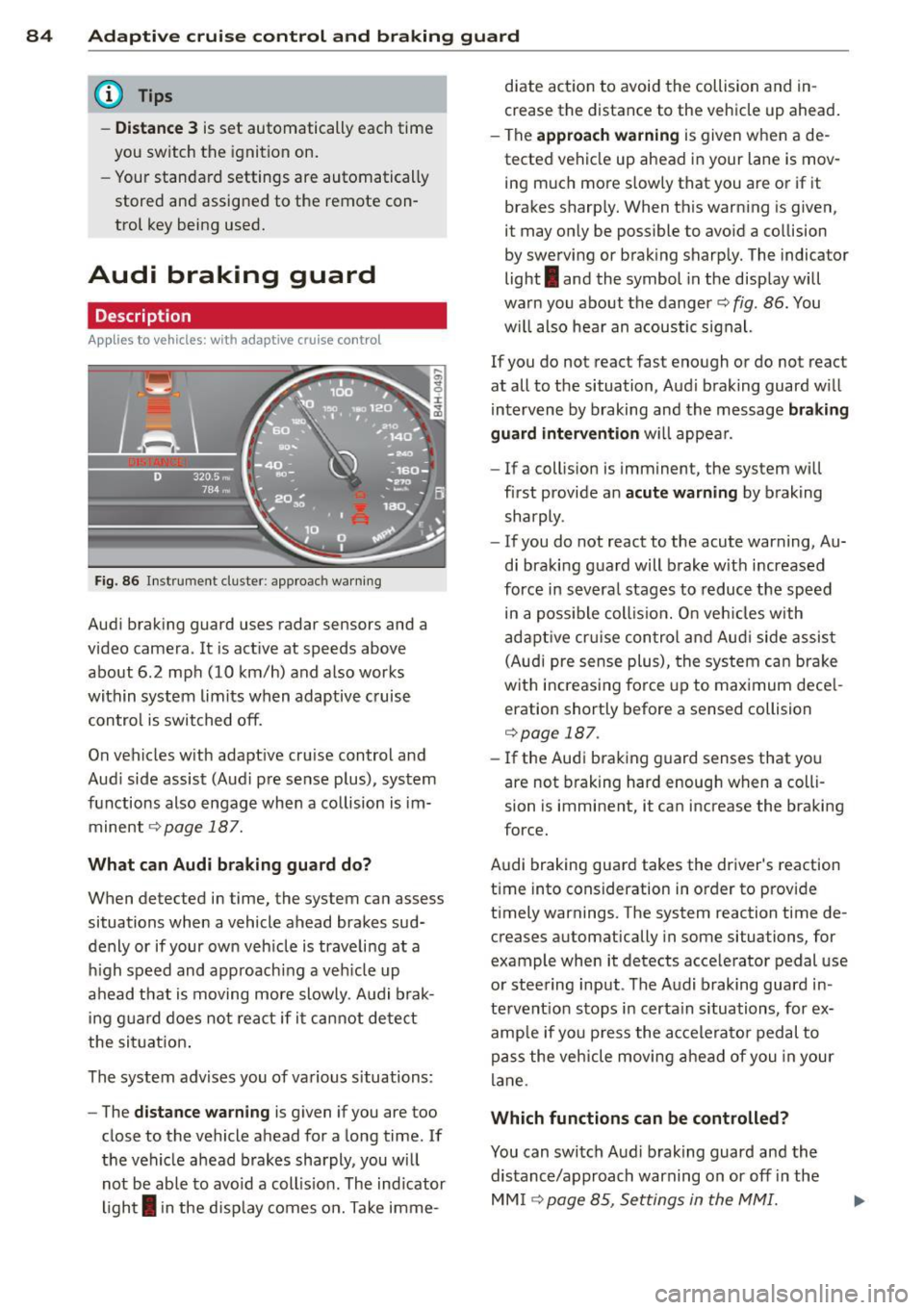
Fig. 86 Inst rument cluster: app roach wa rning
Aud i braking guard uses radar sensors and a
video camera. It is act ive at speeds above
about 6.2 mph (10 km/h) and also works
within system limits when adaptive cruise contro l is switched off.
On vehicles with adapt ive cruise control and
Aud i side assist (Audi p re sense plus), system
functions also engage when a co llision is im
minent
¢ page 187.
What c an Audi br aking gu ard do?
When detected in time, the system can assess
situations when a vehicle ahead brakes sud
denly or if your own veh icle is trave ling at a
h igh speed and approachi ng a veh icle up
ahead that is moving more slowly . A udi brak
i ng guard does not react if it ca nnot detect
the sit uat ion .
The system advises you of various situations:
- The
distan ce w arn ing is given if you are too
close to the vehicle ahead for a long time . If
the vehicle ahead brakes sharply, you will not be able to avoid a coll is ion . The ind icator
ligh t
I in the disp lay comes on. Take imme- diate action to avoid the collision and in
crease the distance to the vehicle up ahead
.
- The
appr oach warning is given when a de
tected vehicle up ahead in your lane is mov
ing much more slowly that you are or if it
brakes sharp ly. When this warning is given,
it may only be possible to avo id a co llision
by swerving or brak ing sharp ly. The indicator
light
I and the symbol in the display will
warn you about the danger¢
fig. 86. You
w ill also hear an acoustic signal.
If you do not react fast enough or do not react
at all to the situation, Aud i braking guard w ill
intervene by braking and the message
br aking
guard interv ention
w ill appear.
- If a collis ion is imminent, the system will
first provide an
a cute warning by braking
sharply .
- If you do not react to the acute warning, Au
di braking guard will brake w ith increased
force in severa l stages to reduce the speed
in a poss ible coll is ion. O n veh icles with
adapt ive cr uise con tro l a nd Aud i side assist
(Audi pre sense plus), the system can brake
w it h increas ing fo rce up to max imum dece l
eration shortly before a sensed collision
¢page 187.
- If
the Audi braking guard senses that you
are not braking hard enough when a colli
sion is imminent, it can increase the braking
force.
Audi braking guard takes the driver's reaction
time into consideration in order to provide
t imely warnings. The system reaction time de
creases automat ically in some situations, for
example when it detects acce lerator pedal use
or steering input. The Audi braking guard in
tervent io n stops in certa in situations, for ex
amp le if you p ress the accele ra to r pedal to
pass the vehicle moving a head of you in your
lane.
Which function s can be controlled?
You can switch Aud i brak ing guard and the
distance/approach warning on or off in the
MM I ¢page 85, Settings in the MMI.
Page 87 of 298

Adaptive cru ise co ntrol and b rakin g guar d 85
& WARNING
The Audi braking guard is an assist system
and cannot prevent a collision by itself .
The driver must always intervene. The driv
er is always responsible for braking at the
correct time.
- Always pay close attention to traffic, even when the Aud i braking guard is
switched on. Be ready to intervene and
be ready to take complete control when
ever necessary. Always keep the safe and
legal distance between your vehicle and
vehicles up ahead.
- Audi braking guard works within limits
and wi ll not respond outs ide the system
l imits, for examp le when approaching a
stopped vehicle or s tationary obstacle
(end of a traffic jam or vehicle that has
broken down in traffic).
- Always remember that the radar sensor
for the A udi braking guard works only
within defined detection and range limits
that may prevent the proper detection of
other vehicles.
- The radar sensor's function and range
can be reduced by rain, snow and heavy
spray. moving vehicles up ahead may not be promptly detected or may not be de
tected at al l.
- Reflective surfaces includ ing crash barr i
ers or tunnel entrances may impair the
function of the radar sensor .
(j) Tips
Lack of attention can cause coll is ions, oth
er accidents and ser ious persona l injuries.
- You can stop the Audi braking guard in-
tervention w ith increas ing braking force
by applying the b rakes yourself or by ac
ce lerat ing rapidly.
- Audi braking guard error messages
<=> page
85.
Settings in the MMI
App lies to vehicles : wi th adap tive c ruise contro l
.,. Select: I CAR I function button > Car s ystem s
cont ro l butto n > Driver a ssist > Audi brak
ing gua rd .
Sy stem -
Switch Audi b raking guard On and
Off . When you switch the ign it ion on, t he
message
Audi braking guard off a ppears in
the instr ument cluster d isp lay if the system is
switched off.
Early warning -The distance and approach
warnings in the d isp lay can be switched
On/
Off.
(D Tips
- Yo ur settings are automatically stored
and assigned to the remote cont ro l key
being used at the times the settings are
made.
- I f you switch the ESP to spor t mode, A u
di braking gua rd switches off a utomati
cally ¢page
191.
Messages
Applies to vehicles : wi th adap tive c ruise control
ACC una vailable
ACC and braking guard: unavailabl e
The system cannot detect moving vehicles up
ahead co rrectly and is switched off . The sen
sors have been d isplaced or are not working
proper ly. The Audi pre sense funct ions may a l
so be affected.
ACC: unavailabl e at this time. No sensor vi
s ion
ACC and b rak ing gu ide: una vailable at this
time . No s enso r vision
This message appears if the sensor view is ob
structed, for examp le by leaves, snow, heavy
spray or d irt . Clean the sensors¢ page
78,
fig. 77.
ACC: unavailable at this time . Incline too
steep
Page 89 of 298
Audi side assist Lane Change Assistant
Description
App lies to vehicles: with si de assist
The side assist helps you when changing
lanes .
H AUDI I
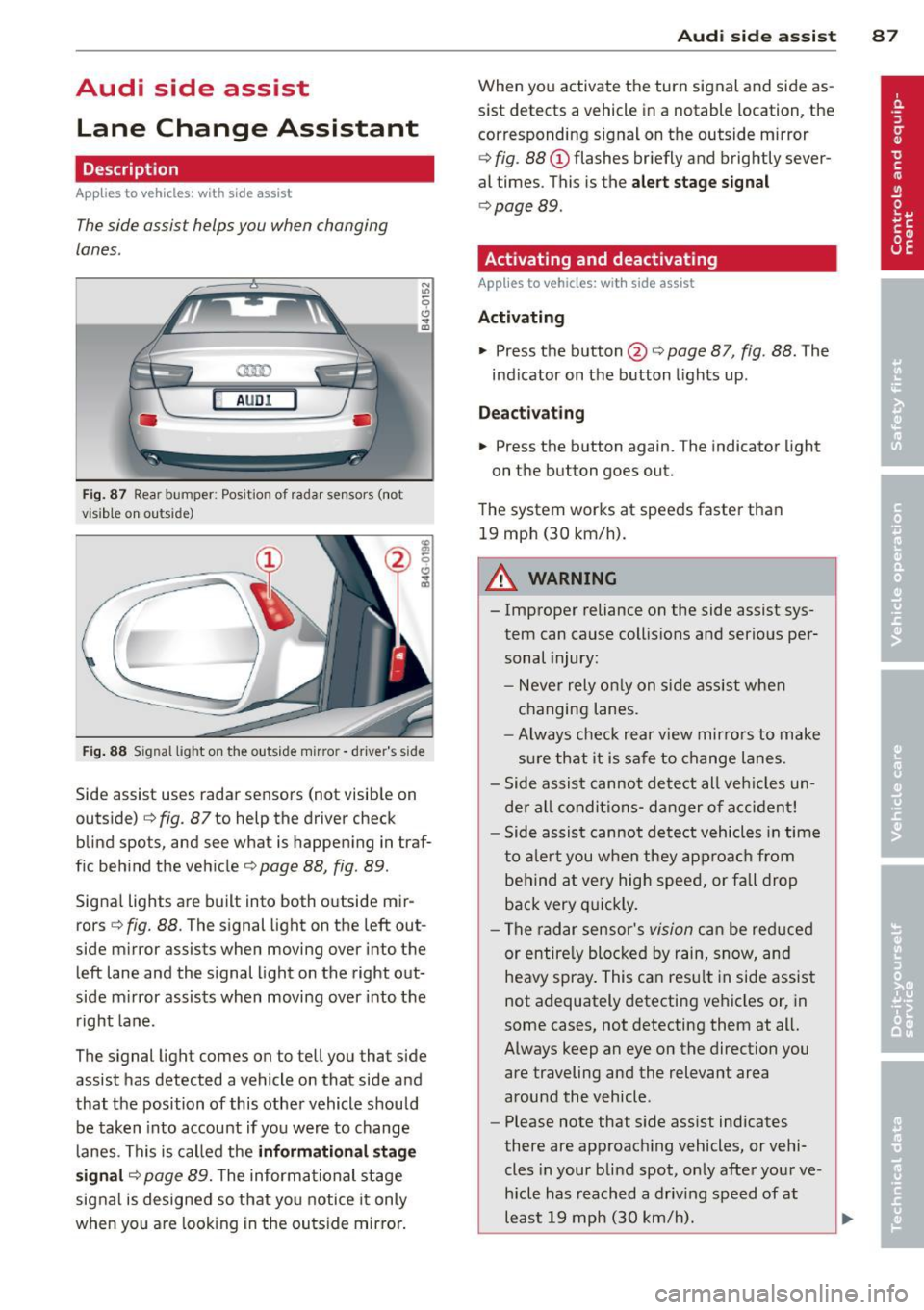
Fig. 87 Rear bumper : Pos ition of rada r sen sors (not
v isib le on outs ide)
Fig . 88 S ig n al l ight on the outside m irro r - drive r's side
Side assist uses radar sensors (not visib le on
outside)
c::> fig. 87 to help the driver check
blind spots, and see what is happening in traf
f ic beh ind the veh icle
c::> page 88, fig. 89 .
Signal lights are built into both outside mir
rors <=>
fig. 88. The signal light on the left out
side mirror assists when moving over into the left lane and the signal light on the right out
side m irror assists when moving over into the
right lane .
The signal light comes on to tell you that side
assist has detected a vehicle on that side and
that the position of this other vehicle should be taken into account if yo u were to change
lanes. This is called the
informati onal stag e
s ignal
c::> page 89. The informational stage
signal is designed so that you notice it only
when yo u are look ing in the outside mirro r.
Aud i side assist 8 7
When you activate the turn signal and side as
sist detects a vehicle in a notable location, the
corresponding signal on the outside mirror
c::> fig . 88 (D flashes br iefly and brightly sever
al times . This is the
aler t stage signal
c::> page 89 .
Activating and deactivating
Applies to vehicles: wit h side assist
Activating
.., Press the button @c::> page 87, fig. 88 . The
ind icator on the button lights up .
Dea ctivating
.., Press the button again. The indicator light
on the button goes out.
The system works at speeds faster than 19 mph (30 km/h).
A WARNING
-
- Improper reliance on the side assist sys-
tem can cause collisio ns and serious per
sonal injury:
- Never rely on ly on s ide assist whe n
changing lanes.
- Always check rear view mir rors to make
sure that it is safe to change lanes.
- Side assist cannot detect all veh icles un
de r al l conditions- danger of accident!
- Side assist cannot detect vehicles in time
to a le rt you when they approa ch from
behind a t very high speed, or fall drop
back very q uickly.
- The radar sensor's
vision can be red uced
or entire ly blocked by rain, snow, and
heavy spray . This can resu lt in side assis t
not adequately detecting vehicles or, in
some cases, not detecting them at all.
Always keep an eye on the direction you are traveling and the relevant area
around the vehicle .
- Please note that s ide assist indicates
there are approac hing vehicles, or vehi
cles in your blind spot, on ly afte r you r ve
hicle has reach ed a driv ing speed of at
least 19 mph (30 km/h).
~
Page 90 of 298
88 Audi side a ssis t
- Side assist signal does not work around
t ight corners (turning radius less than
328 feet or 100 m).
- Side assist is no rep lacement for the driv
er's full attent ion. The dr iver alone is re
sponsible for lane changes and similar dr iv ing maneuvers . Always keep an eye
on the di rection yo u are traveling and the
relevant area around the vehicle.
(D Note
- To ensure that you do not adversely af
fect side assist, do not block the area on
the rear bumper whe re the radar sensors
are located with foreign objects (such as
stickers o r bicy cle racks).
- Make sure that the signa l light on the
outside m irror is not blo cked by st ickers
or other items.
@ Tips
- Side assist a utomat ica lly deactivates if it
detects that the radar sensors a re
blocked E} page 93. The ind icator light
on the bu tton goes out.
- The area on the bumper where the radar
sensors are located must consis tently re
main free of snow, ice, and heavy soiling
so that side assist can function properly .
Fo llow the additional notes on
c> page 93.
-Additional tinting on the front side win
dows can make it harder to see and cor
rectly understand the signa l light on the
outside mirror.
- For Declarat ion of Compliance to United
States FCC and Industry Canada regula
tions
c> page 281.
Sensor detection area
Applies to veh icles: w ith side assist
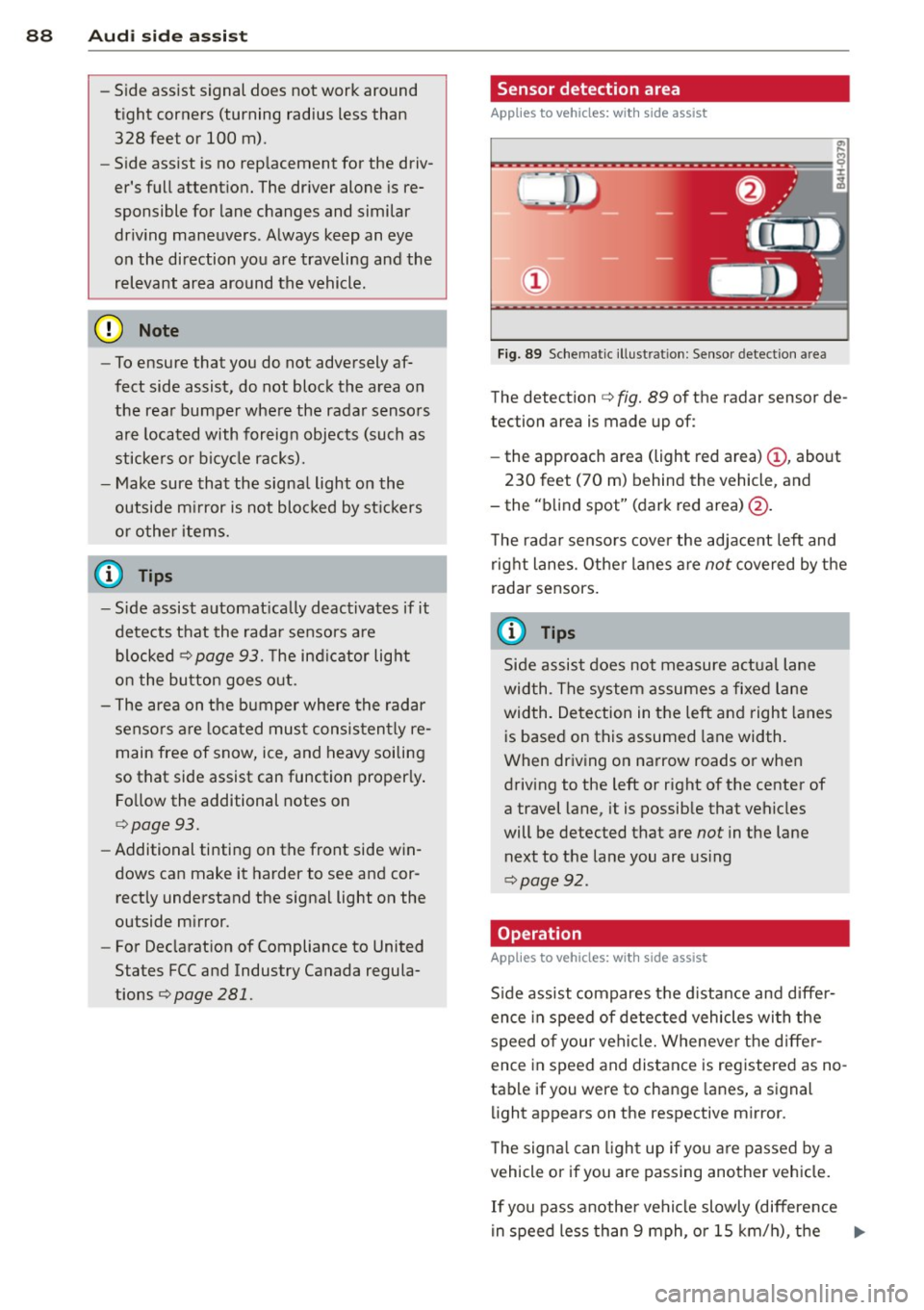
F ig. 89 Schemat ic ill ust rat ion : Sensor detect ion a rea
The detection c> fig. 89 of the radar sensor de
tection area is made up of:
- the approach area (light red area)
(D , about
230 feet (70 m) behind the vehicle, and
- the "b lind spot" (dark red area)@.
T he rada r sensors cover the adjace nt left and
right lanes. Other lanes a re
not covered by the
radar sensors.
(0 Tips
Side assist does not measure a ctual lane
wid th. The system assumes a fixe d lane
width. Detection in the left and right lanes
is based on this assumed lane width .
When driv ing on narrow roads or when
driving to the left or right of the center of
a travel lane, it is possible that vehicles
will be detected that are
not in the lane
next to the lane you are us ing
c> page 92.
Operation
Applies to veh icles: w ith s ide assist
S ide assist compares t he d istance and diffe r
ence in speed of detected vehicles wi th the
speed of your vehi cle. Wheneve r the d iffe r
ence in speed and distance is registered as no
tab le if you were to change lanes, a signal
li ght appears on the respective mirror.
T he signa l can ligh t up if yo u are passed by a
vehicle or if you are passing another vehicle.
If you pass another vehi cle slowly (difference
in speed less than 9 mph, o r 15 km/h), the ..,.
Page 91 of 298
signal light will come on as soon as the other
vehicle is in your blind spot and is detected by
side assist. When the difference in speed is
greater, the signa l light will not come on.
Informational and alert stage signals
App lies to vehicles: with side assist
Side assis t has two s ignal stages:
- the informationa l stage signal, and
- the a le rt stage signa l.
Side assist he lps you by usi ng the approp riate
signal s tage, depending on whether or not
you have activ ated the tu rn signal, and thus
have indicated that you are or are not chang
ing lanes .
Informational stage signal
As long as you have not a ctivated the tu rn sig
n al , side a ssis t inf orms you of detec ted vehi
cles th at are registered as being in a notable
l ocation if you were to change lanes. Whenev
er the detected vehicle's difference i n speed
and d istance is registered by side assist as no
table, the signal lig ht on the respective m irror
prod uces muted illuminat ion.
The brightness of the informat io na l stage sig
na l is designed not to be as intense, so that it
does not interfere wit h your view of the road
when you are driving and have no intention of
changing lanes. When you look in the o utside
mirror, you can clear ly see the info rmat iona l
stage signal.
Alert stage signal
When you activate the turn signa l, and side
assist has detec ted a vehicle i n a notable loca
tion o n that particular side, the s ignal l ight on
this sid e mirro r flashes b right ly . The repeated
b rie f and bright flashing of the alert stage
signal re minds yo u to carefully check tr aff ic to
the rear in the o utside mirror and ove r your
shoulder, so that yo u can safe ly complete the
l ane change
c:> & in Safety tips on page 93.
Aud i side assist 89
@ Tips
The br ightness of the s ignal li ght on the
outside m irr ors can be adjusted with the
MMI c:> page 92.
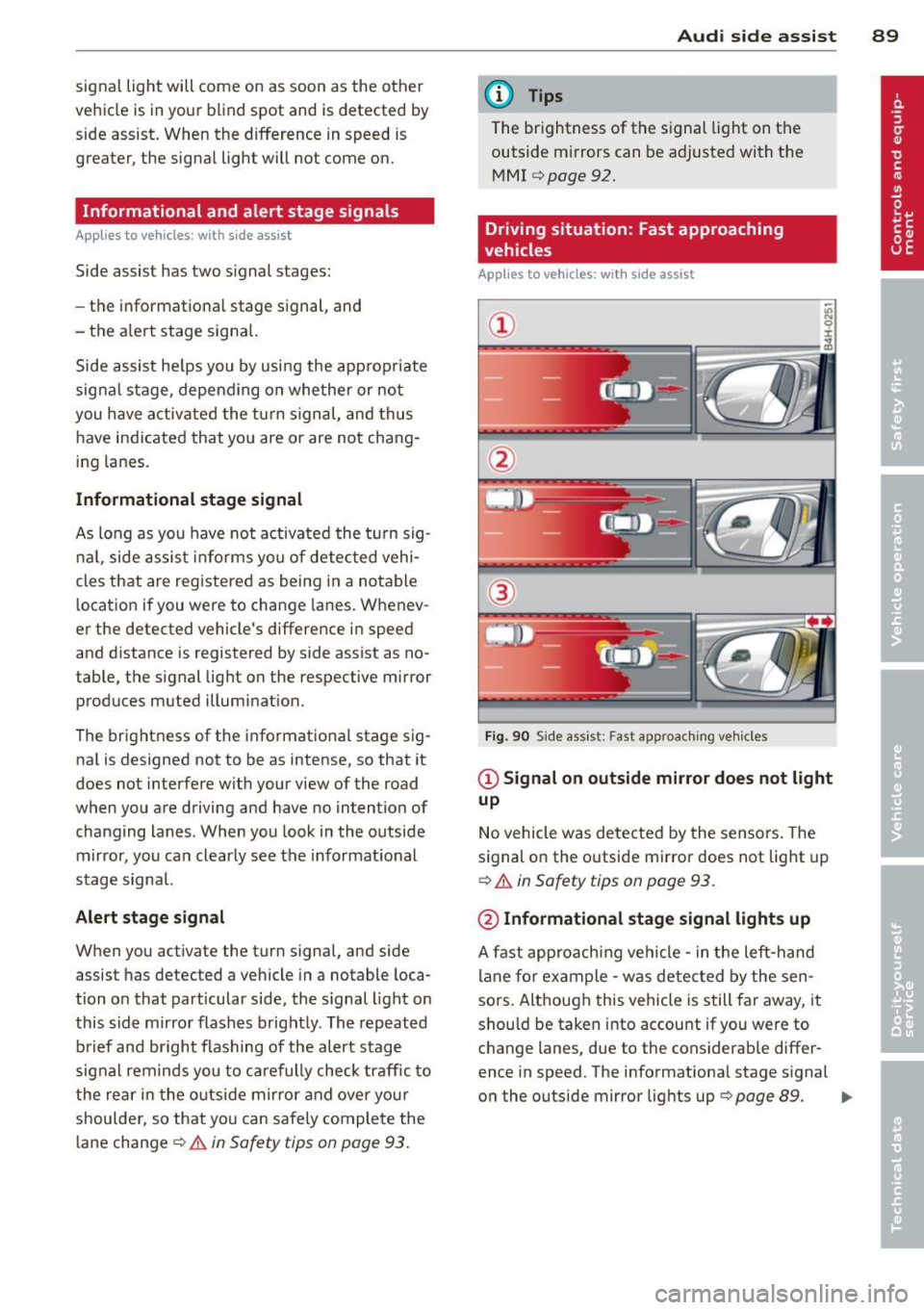
Driving situation: Fast approaching
vehicles
Applies to vehicles: with side assist
@
Fig. 9 0 Side as sis t: Fast approac hing ve hicle s
@ Signal on outside mirror does not light
up
No vehicle was detecte d by the sensors . The
s ignal on the o utside mirror does not lig ht up
c:> .&. in Safety tips on page 93 .
@ Informational stage signal lights up
A fast appro ach ing vehicle -in the left-h and
l ane fo r example - was detected by the sen
sors . Although this vehicle is still fa r away, it
sho uld be taken into accou nt if yo u were to
c hange lanes, due to the cons iderab le differ
ence in speed. The informationa l stage s ignal
o n the outside mirror lig hts up
r=> page 89. ..,.