warning light AUDI A6 2012 Workshop Manual
[x] Cancel search | Manufacturer: AUDI, Model Year: 2012, Model line: A6, Model: AUDI A6 2012Pages: 298, PDF Size: 74.43 MB
Page 109 of 298
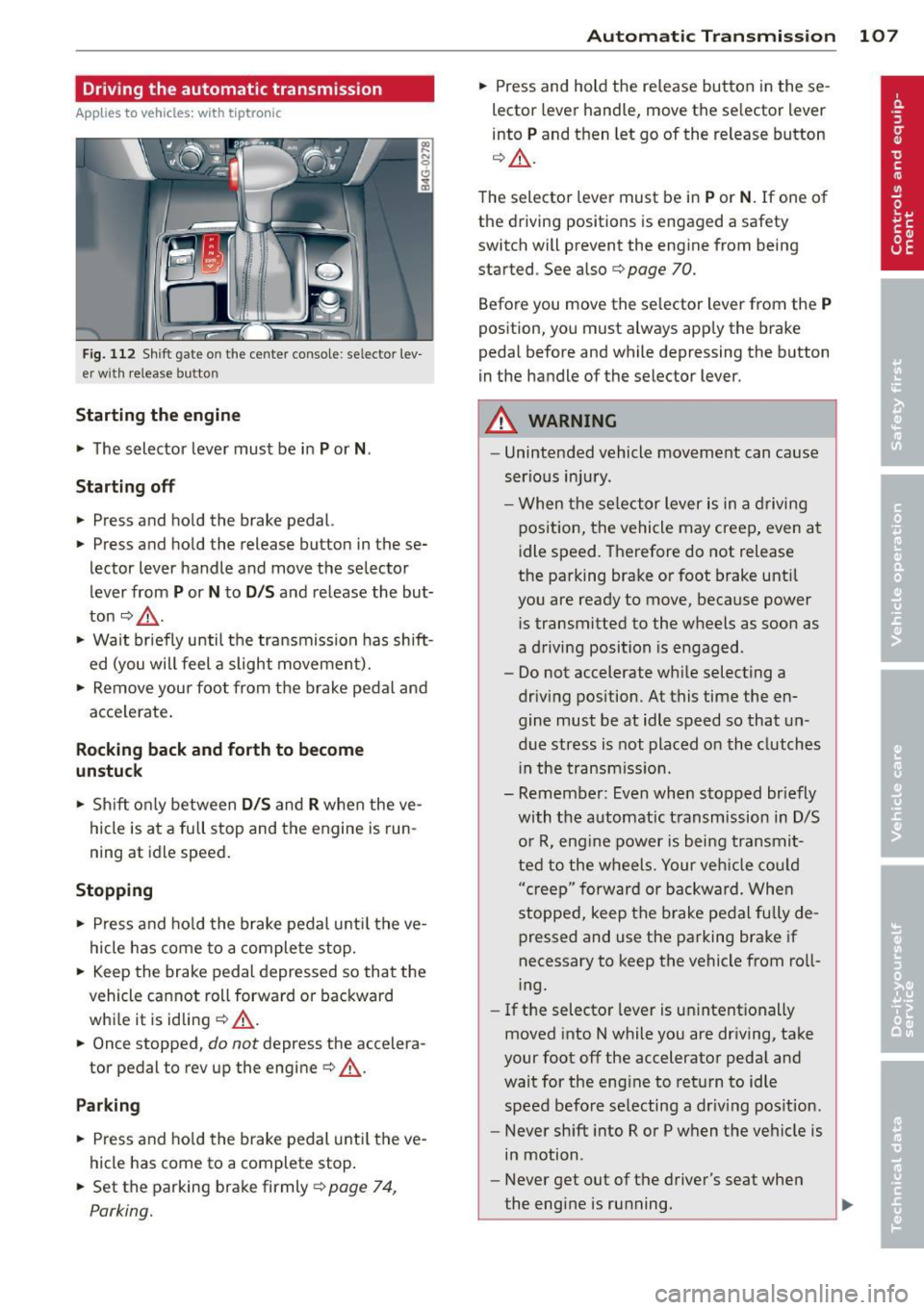
Driving the automatic transmission
Applies to vehicles: with tiptronic
Fig. 112 Shift gate on the center conso le: selector lev
er w ith release button
Startin g the engine
~ The selector lever must be in P or N.
St arting off
~ Press and hold the brake pedal.
~ Press and hold the release button in these
lector lever handle and move the selector
lever from
P or N to D /S and release the but
ton
c:> _& .
~ Wait briefly until the transmission has shift
ed (you will feel a slight movement).
~ Remove your foot from the brake pedal and
acce lerate .
Rocking back and forth to become
un stu ck
~ Shift on ly between D /S and R when the ve
hicle is at a fu ll stop and the engine is run
ning at idle speed.
St opping
~ Press and ho ld the brake pedal unti l the ve
hicle has come to a complete stop.
~ Keep the brake pedal depressed so that the
vehicle cannot roll forward or backward
whi le it is idling
c:> .&._ .
~ Once stopped, do not depress the accelera
tor pedal to rev up the engine
c:> .&._ .
Park ing
~ Press and ho ld the brake pedal unti l the ve
hicle has come to a complete stop .
~ Set the parking brake firmly r=;,page 74,
Parking.
Automatic Tra nsmi ssi on 10 7
~ Press and hold the re lease button in these
lector lever handle, move the se lector lever
into
P and then let go of the release button
q A .
The selector lever must be in P or N . If one of
the driving positions is engaged a safety
switch will prevent the engine from being
started . See also
r=;, page 70.
Before you move the se lector lever from the
P
position, you must always app ly the brake
pedal before and while depressing the button
in the handle of the selector lever.
A WARNING
- Unintended vehicle movement can cause
serious injury .
- When the se lector lever is in a d riving
position, the vehicle may creep, even at
idle speed. Therefore do not release
the parking brake or foot brake until
you are ready to move, because power
i s transmitted to the wheels as soon as
a driving position is engaged.
- Do not accelerate while selecting a
driv ing position. At this time the en
gine must be at idle speed so that un
due stress is not placed on the clutches
i n the transmiss io n.
- Remember: Even when stopped br iefly
with the automatic t ransmission in D/S
o r R, eng ine power is bei ng transmit
ted to the wheels. Your veh icle cou ld
"creep" forward or backward. Whe n
stopped, keep the b rake pedal fully de
pressed and use the parking brake if
necessary to keep the vehicle from ro ll
i ng.
- If the selector lever is un intent ionally
moved into N while you are driving, take
your foot off the accelerator peda l and
wait for the eng ine to retu rn to idle
speed before selecting a dr iv ing pos ition.
- Never sh ift into R or P when the vehicle is
in motion .
- Never get out of the driver's seat when
the eng ine is ru nning.
Page 111 of 298

to match specific driving conditions
¢page 110.
A WARNING
Read and follow all WARNINGS ¢.& in
Driving the automatic transmission on
page 107.
(D Note
Coasting downhill with the transmission in
N and the engine not running will resu lt in
damage to the automatic transmiss ion
and possibly the catalytic converter.
Automatic Shift Lock (ASL)
Appl ies to vehicles: with tiptro nic
The Automatic Shift Lock safeguards you
against accidentally shifting into a forward or
the reverse gear and causing the vehicle to
move unintentionally .
I
Fig. 114 Shift gate selector lever lock pos itions and
inte rlock butto n highlighted
The selector lever lock is released as follows :
• Turn the ignition on.
• Step on the brake peda l.
At the same time
press and hold the interlock button on the
side of the gear selector knob¢
fig. 114
with your thumb until you have moved the
selector lever to the desired position .
Automatic selector lever lock
"' N 0 0 (!)
cb
The selector lever is locked in the P and N po
sitions when the ignition is turned on. To
move the lever from these positions the driver
must depress the brake pedal. As a reminder
to the driver, the following warning appears in
Automatic Transmission 109
the instrument cluster display when the selec
tor is in
P and N :
When stationary apply footbrake while se
lecting gear
A time delay element prevents the selector
lever from locking when it is moved through
the
N posi tion (going from R to D/S ). The
locking element will lock the selector lever if
the lever is left in N (Neutral) for more than
approximately 1 second, without the brake
pedal being pressed .
At speeds above abo ut 3 mph (5 km/h) the
Automatic Shift Lock is automatically deacti
vated in the
N position .
Interlock button
The lock button on the selecto r lever prevents
the lever from being accidentally shifted into
certain positions. Pressing this button deacti
vates the selector lever lock. Depending on
the direction of the shift, the selector lever
locks at different positions . The positions are
highlighted in the illustration¢
fig. 114.
Kick-down
App lies to vehicles: wit h tiptro ni c
The kick-down feature allows the vehicle to
generate maximum acceleration .
When you press the accelerator pedal beyond
the resistance point that is reached at full
throttle, the transmission will select a lower
gear ratio based on vehicle speed and engine
RPM. The engine RPM will be controlled to
produce maximum vehicle acceleration as
long as you continue to press the accelerator
pedal beyond this resistance point .
_&. WARNING
Be careful when using the kick-down fea
ture on slippery roads. Rapid acceleration
may cause the vehicle to skid .
-
Page 115 of 298

Parking system
General information
Appl ies to vehicles: Audi parking system plus/Audi park
ing system plus with rear view camera
Depending on your vehicle's equipment, vari
ous parking aids will help you when parking
and maneuvering.
The
Audi parking system plus assists you
when parking by providing audio and visual
warn ings about objects
in front of and behind
the vehicle ¢page 113.
The Audi parking system plus with rear view
came ra
shows the area behind the vehicle in
the display . This image helps you when paral
lel parking or cross parking. The system also
provides the parking aid aud io and visual sig
nals
~ pag e 114 .
@ Tips
For information on cleaning , refer to
q page206.
Audi parking system
plus
De script ion
Appl ies to vehicles: with parking system plus
Audi parking system plus provides audio and
visual signals when parking .
Sensors are located in the front and rear
bumpers . If these detect an obstacle, audible
and v isual signals warn you. The range at
which the sensors begin to measure is approx
imately:
front
rear side
center
side
center
--~-
3 ft (0.90 m)
4 ft (1.20 m)
2 ft (0.60 m)
5.2 ft (1.60 m)
The closer you get to the obstacle, the shorter the interval between the audible signa ls. A
continuous tone sounds when the obstacle is
less than approximate ly 1 foot (0.30 meters)
away. Do not continue driving farther!
Parking system 113
If the distance to an obstacle remains con
stant, th e volume of the distance warning
gradually drops after about four seconds (this
does not apply in the continuous tone range).
Switching on and off
Applies to vehicles: with parking system plus
Fig. 119 Ce nt er co nsol e: Parkin g sy ste m sw it c h
Fig. 120 MMI di splay : v is u al d istance display
Switching on
.. Switch the MMI on
.. Activate
comfort or auto mode in Audi drive
select
q page 95.
.. Shift into reverse or
.. Press the switch~ in the center conso le
q fig. 119 . A short confirmation tone
sounds and the indicator light in the switch
lights up.
Switching off
.. Drive faster than 6 mph (10 km/h) , or
.. press the switch
~ or
.. switch off the ignition.
Segments in the visual display
The red segments in front of and behind the
vehicle
¢ fig. 120 help you to determine the
distance between you and an obstacle. As
your vehicle comes closer to the obstacle, the .,..
Page 117 of 298
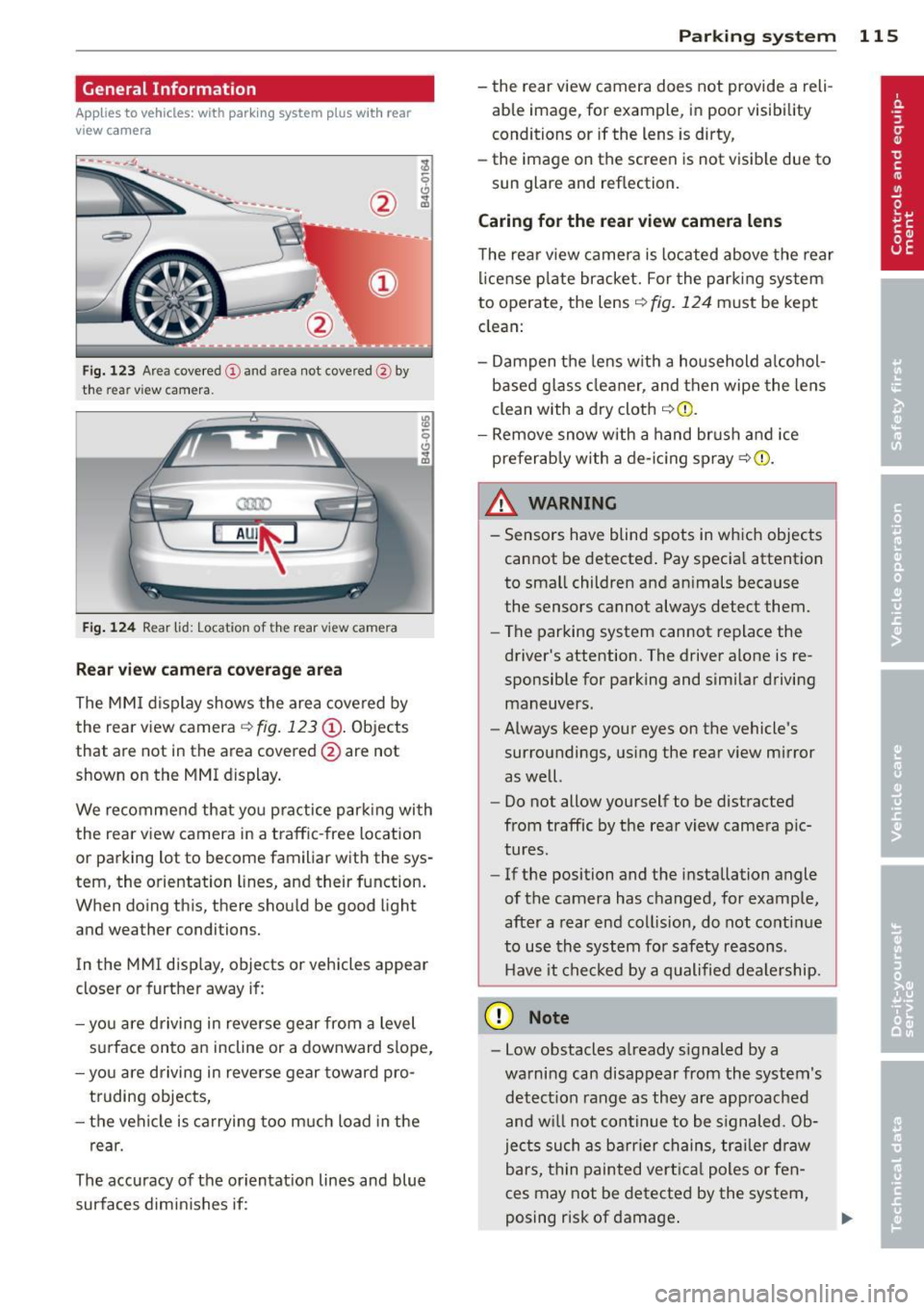
General Information
Applies to vehicles: with parking system plus wit h rea r
view came ra
Fig. 123 Area cove red (D and area not covered @by
the rear vi ew camera.
Fig. 124 Rear lid: Loc ation of the rear view came ra
Rear view camera coverage area
The MMI display shows the area covered by
the rear view camera
c::> fig. 123 @. Objects
that are not in the area covered @are not
shown on the MMI display.
We recommend that you practice parking with
the rear view camera in a traffic -free location
or parking lot to become familiar with the sys
tem, the orientation lines, and their function.
When doing this, there should be good light
and weather conditions.
In the MMI display, objects or vehicles appear
closer or further away if:
- you are driving in reverse gear from a level
surface onto an incline or a downward slope,
- you are driving in reverse gear toward pro
truding objects,
- the vehicle is carrying too much load in the
rear.
The accuracy of the orientation lines and blue
surfaces dimin ishes if:
Parking system 115
- the rear view camera does not provide a reli
able image, fo r example, in poor visibility
conditions or if the lens is dirty,
- the image on the screen is not visible due to
sun glare and reflection.
Caring for the rear view camera lens
The rear view camera is located above the rear
l icense plate bracket. For the parking system
to operate, the lens
c::> fig. 124 must be kept
clean:
- Dampen the lens with a household alcohol
based glass cleaner, and then wipe the lens
clean with a dry cloth
c::> Q) .
-Remove snow with a hand brush and ice
preferably with a de-icing spray
c::> (i) .
_& WARNING .. --- Sensors have blind spots in which objects
cannot be detected. Pay special attention
to small children and animals because
the sensors cannot always detect them.
- The parking system cannot replace the
driver's attention. The driver alone is re
sponsible for parking and similar driving
maneuvers.
- Always keep your eyes on the vehicle's
surroundings, using the rear view mirror
as well.
- Do not allow yourself to be distracted
from traffic by the rear view camera pic
tures.
- If the position and the installation angle
of the camera has changed, for example,
after a rear end collision, do not continue
to use the system for safety reasons .
Have it checked by a qualified dealership.
(D Note
-Low obstacles already signaled by a
warning can disappear from the system's detection range as they are approached
and w ill not continue to be s ignaled. Ob
jects such as barrier chains, trailer draw
bars, thin painted vertical poles or fen
ces may not be detected by the system,
posing risk of damage .
Page 118 of 298

116 Parking system
-Never use warm or hot water to remove
snow or ice from the rear view camera lens -this could cause the lens to crack!
- When cleaning the lens, never use prod
ucts that are abrasive.
Switching on and off
Applies to vehicles: with pa rk in g system plus w it h rear
view ca mera
The rear view camera switches on automati
cally together with the acoustic and visual
park assist when you put the vehicle in re vers e.
Switching on
• Switch the MMI on
• Activate
comfort or auto mode in Audi drive
select
r::!;) page 95.
• Shift into reverse or
• Press the switch
l""I in the center console
r::!;)page 113, fig. 119. A short confirmation
tone sounds and th e indicator light in the
switch lights up.
Switching between the rear view camera
and visual display
• Press the Graphic control button
r::!;) page 117 , fig . 12 S @ to see the visual
display .
• Press the
Rearview control button to see
the rear view camera image
r::!;) page 113,
fig . 120 .
Switching off
• Drive faster than 6 mph (10 km/h), or
• press the switch
I"" I or
• switch
off the ignition.
A WARNING
-The MMI display cannot show, or cannot
adequately show, certain objects (such as
small posts or grating), recesses in the
ground and protruding parts on another
car.
- Only use the rear view camera to assist
you if it shows a good, clear picture. For
example, the image may be affected by the sun shining into the lens, dirt on the
lens or if there is a defect .
- Use the rear view camera only with the
rear lid completely closed. Make sure any
objects you may have mounted on the
rear lid do not block the rear view cam
era .
(!) Tips
-The sensors must be kept clean and free
of snow and ice for the park assist to op
erate.
- If your vehicle is near an obstacle, an ad
ditional visual indicator appears in the
rearview camera image . This superim
posed image is there to help you to de
termined which area of the vehicle is af
fected.
- You can change the volume and pitch of
the signals as well as the display
r::!;) page 118.
-What appears in the display is time-de
layed .
Page 122 of 298

120 Homelink®
Homelink®
Universal remote
control
General information
Applies to vehicles: with Home link® universal remote
control
The Homelink universal remote control can
be programmed with hand-held transmitters
from existing equipment.
Using the Homelink universal remote control,
you can operate equipment such as garage
doors, property gates and house lights from
ins ide your vehicle .
Using the Homelink universal remote control,
you can replace up to three separate hand
held transmitters for equipment on your
property with just one universal remote con
trol. Most of these transmitters are used to
ope rate ga rage doo rs and property gates. The
individual transmitters are programmed at
the front bumper. That is where the control
module is located.
The transmitters must be programmed first in
order to operate systems using the Homelink
universal remote control.
.&_ WARNING
-
-Never use the Homelink ® transmitter
with any garage door opener that does have not the safety stop and reverse fea
ture as requ ired by federal safety stand
ards. This includes any garage door open
er model manufactured before April 1, 1982.
- A garage door opener which cannot de
tect an object, signa ling the door to stop
and reverse does not meet current feder
al safety standards . Using a garage door
opener witho ut these features increases
risk of serious injury or death.
- For safety reasons never release the
parking brake or start the engine while
anyone is standing in front of the vehicle .
- A garage door or an estate gate may
sometimes be set in motion when the Homelink
® remote control is being pro
grammed. If the device is repeatedly ac
tivated, this can overstrain motor and
damage its electr ical components - an
overheated motor is a fire hazard!
- To avoid possible injuries or property
damage, please always make absolutely
certain that no persons or objects are lo
cated in the range of motion of any
equ ipment being operated.
(D Tips
- If you would like additional information
on the Homelink ® Universal Transceiver,
Homelink compatible products, or to
purchase other accessories such as the
Homelink® Light ing Package, please
contact Homelink at 1-800 -355-3515 o r
on the Internet at www.homelink .com.
- For Declaration of Comp liance to United
States FCC and Industry Canada regula
tions¢
page 281.
Page 125 of 298

Driving Safely
General notes
Safe driving habits
Please remember -safety first!
This chapter contains important information,
tips, instructions and warnings that you need
to read and observe for your own safety, the
safety of your passengers and others. We have
summarized here what you need to know
about safety belts, airbags, child restraints as
well as child safety. Your safety is for us
priori
ty number 1.
Always observe the information
and warnings in this section - for your own
safety as well as that of your passengers.
The information in this section applies to all
model versions of your vehicle. Some of the
features described in this sections may be
standard equipment on some models, or may
be optional equipment on others. If you are
not sure, ask your authorized Audi dealer.
A WARNING
-Always make sure that you follow the in
structions and heed the WARNINGS in
this Manual. It is in your interest and in
the interest of your passengers.
- Always keep the complete Owner's Liter
ature in your Audi when you lend or sell
your vehicle so that this important infor
mation will always be available to the
driver and passengers.
- Always keep the Owner's literature handy
so that you can find it easily if you have
questions.
Safety equipment
The safety features are part of the occupant
restraint system and work together to help
reduce the risk of injury in a wide variety of
accident situations.
Your safety and the safety of your passengers
should not be left to chance. Advances in
technology have made a variety of features
available to help reduce the risk of injury in an
Driving Safely 123
accident. The following is a list of just a few of
the safety features in your Audi:
- sophisticated safety belts for driver and all
passenger seating positions,
- safety belt pretensioners,
- safety belt force limiters for the front seats,
- safety belt height adjustment systems for the front seats,
- front airbags,
- knee airbags for the front seats*
- side airbags in the front seats and outer rear
seats*,
- side curtain airbags,
- special LATCH anchorages for child re-
straints,
- head restraints for each seating position,
- adjustable steering column.
These individual safety features, can work to
gether as a system to help protect you and
your passengers in a wide range of accidents.
These features cannot work as a system if
they are not always correctly adjusted and cor
rectly used.
Safety is everybody's responsibility!
Important things to do before driving
Safety is everybody's job! Vehicle and occu
pant safety always depends on the informed and careful driver.
Fo r your safety and the safety of your passen
gers,
before driving always:
.. Make sure that all lights and signals are op
erating correctly.
.,. Make sure that the tire pressure is correct .
.. Make sure that all windows are clean and
afford good visibility to the outside.
.,. Secure all luggage and other items carefully
I::!) page 59, I::!) page 56.
.,. Make sure that nothing can interfere with
the pedals.
.. Adjust front seat, head restraint and mir
rors correctly for your height.
.. Instruct passengers to adjust the head re-
straints according to the ir height. .,.. •
•
Page 126 of 298

124 Driving Safel y
• Make sure to use the right child restraint
correct ly to protect children¢
page 168,
Child Safety.
• Sit properly in your seat and make sure that
your passengers do the same¢
page 50,
General recommendations.
• Fasten your safety belt and wear it properly.
Also instruct your passengers to fasten their
safety belts proper ly
r:::;, page 133 .
What impairs driving safety?
Safe driving is directly related to the condi
tion of the vehicle, the driver as well as the
driver 's ability to concentrate on the road
without being distracted.
The driver is respons ible for the safety of the
vehicle and all of its occupants.
If you r ability
to drive is impa ired, safety r isks for everybody
i n the vehicle increase and yo u also become a
hazard to everyone else on the road
r:::;, .&_ .
Therefore:
• Do not let you rself be di stracted by passen
gers or by using a cellular telephone.
• NEVER drive when yo ur driving ability is im
paired (by medications, alcohol, drugs, etc.).
• Observe all traffic laws, ru les of the road
and speed limits and plain common sense .
• ALWAYS adjust your speed to road, traffic
and weather condit ions .
• Take frequent breaks on long trips . Do not
dr ive for more than two hours at a stretch.
• Do NOT drive whe n you are ti red, under
pressure or when you are stressed.
_8. WARNING
Impaired driving safety increases the risk
of serious personal injury and death when
ever a vehicle is being used.
Proper occupant
seating positions
Proper seating position for the driver
The proper driver seating position is impor
tant for safe, relaxed driving.
Fig. 131 Correct seat ing posit ion
For your own safety and to reduce the risk of
injury in the event of an accident, we recom
mend that you adjust the driver's seat to the
following position:
• Adjust the driver's seat so that you can easi
ly push the pedals all the way to the floor
while keeping your knee(s) slightly bent
r:::;, A.
• Adjust the angle of the seatback so that it is
in an upr ight position so that your back
comes in full contact with it when you drive.
• Adjust the steering whee l so that there is a
distance of at least 10 inches (25 cm) be
tween the steering wheel and your breast
bone r:::;,
fig. 131. If not possible, see your au
thorized Audi dealership about adaptive equipment.
• Adjust the steering wheel so that the steer
ing wheel and airbag cover points at your
chest and not at your face .
• Grasp the top of the steer ing whee l with
your elbow(s) slightly bent.
• Adjust the head restraint so the upper edge
is as even as possible with the top of your
head. If that is not possible, try to adjust
the head restraint so that it is as close to
this position as possib le.
• Fasten and wear safety belts correctly
r::::>page 136.
Page 135 of 298

Safety belts
General notes
Always wear safety belts!
Wearing safety belts correctly saves lives!
This chapter exp lains why safety be lts a re nec
essary, how they work and how to adjust and
wear them correctly.
~ Read all the information that fo llows and
heed all of the inst ruct ions and WARNINGS.
A WARNING
Not wearing safety belts or wearing them
improperly increases the risk of ser ious
personal in jury and death .
- Safety belts are the sing le most effective
means availab le to red uce the r isk of se
rious injury and death in a utomob ile acci
de nts . For your prot ecti on and that of
yo ur passenge rs, always co rrec tly wear
sa fe ty bel ts when the ve hicle is mov ing.
- P re g nant women, injured, or physically
imp aired perso ns must also use safe ty
belts. L ike a ll vehicle occup ants, they are
more like ly to be ser ious ly injure d if they
do not wea r safety be lts . The best way to
protect a fet us is to protect the mother -
thro ughout the entire pregnancy.
Number of seats
Your Audi has a total of five seating posit ions:
two in the front and three in the rear. Each
seating position has a safety belt.
A WARNING
N ot wea ring safety belts or wea ring the m
improperly increases the risk of ser ious
perso nal i njur y an d deat h.
- Never st rap more than one pe rson, in
cl ud ing s mall ch ild ren, into any belt . It is
e speci ally dangerous t o pl ac e a safety
bel t over a child s itting on yo ur lap.
- N ever le t mo re peo ple ride in t he ve hicle
th an there are s afety be lts availab le.
Safety belts 13 3
- Be s ure everyone riding in the vehicle is
properly restrained w ith a separate sa fe
ty belt or child restra int.
~ Safety belt warning light
Your vehicle has a warning system for the
driver and front seat passenger (on USA mod
els only) to remind you about the importance
of buckling-up.
Fig . 1 33 Safety belt warning lig ht in the instr ument
cl uster -enla rged
Before driving off, alway s:
~ Fasten your safety be lt and make su re you
are wearing it properly .
~ Make sure that yo ur passengers a lso buck le
up and properly wear their safety be lts.
~ Protect children w it h a child restraint sys-
t em approp riate for the s ize and age .
The warning lig ht . in the instrument cluster
lights up when the ig nit io n is on as a reminder
to fasten the safety belts. In add it ion, you will
hear a wa rning tone fo r a ce rtain per iod of
t im e.
Fasten your safety belt and make sure that
your passengers also properly put on their
safety belt s.
A WARNING
- Safety b elts are th e single most eff ect ive
mean s ava ilable to reduce the r is k o f se
rio us inju ry and dea th in au tomobile a cci
dents. Fo r you r protection and that of
your passe ngers, a lways correctly wear
safety belts when t he ve hicle is m oving . •
•
Page 136 of 298

134 Safety belts
-Failure to pay attention to the warning
light that come on, could lead to person
al injury.
Why safety belts?
Frontal collisions and the law of physics
Frontal crashes create very strong forces for
people riding in vehicles.
Fig. 134 Unbe lted occupants in a vehicle heading for a
wall
Fig. 135 Th e vehicle crashes into the wall
The physical principles are simple. Both the
vehicle and the passengers possess energy
which varies w ith veh icle speed and body
weight . Engineers call this energy "kinetic en
e rgy."
The higher the speed of the vehicle and the
greater the vehicle's weight, the more energy
that has to be "absorbed" in the crash.
Vehicle speed is the most significant factor.
If
the speed doubles from 15 to 30 mph (25 to
50 km/h), the energy increases 4 times!
Because the passengers of this veh icle are not
using safety belts¢
fig. 134, they will keep
moving at the same speed the vehicle was
mov ing just before the crash, until something
stops them - here, the wall ¢
fig. 135.
The same principles apply to people sitting in
a vehicle that is involved in a frontal collision .
Even at city speeds of 20 to 30 mph (30 to 50
km/h), the forces acting on the body can
reach one ton (2,000 lbs, or 1,000 kg) or
more. At greater speeds, these forces are even
higher.
Peop le who do not use safety belts are also
not attached to their vehicle. In a frontal colli
s ion they will also keep moving forward at the
speed their vehicle was t ravell ing just before
the crash . Of course, the laws of physics don't
just apply to frontal collisions, they determine
what happens in all kinds of accidents and col
lisions .
What happens to occupants not wearing
safety belts?
In crashes unbelted occupants cannot stop
themselves from flying forward and being in
jured or killed. Always wear your safety belts!
Fig. 136 A driver not wearing a safety belt is violently
thrown fo rwa rd
Fig . 137 A rear passe nge r not wearing a safety belt
will fly forward and strike the driver
Unbelted occupants are not able to resist the
tremendous forces of i mpac t by holding tight
or bracing themselves. Without the benefit of
safety restraint systems, the unrestrained
ll-