warning AUDI A6 2013 Owners Manual
[x] Cancel search | Manufacturer: AUDI, Model Year: 2013, Model line: A6, Model: AUDI A6 2013Pages: 306, PDF Size: 76.92 MB
Page 124 of 306
122 Park in g s ystems
Trailer view
Ap plies to vehicles: with par king system p lus and tra iler
hitch
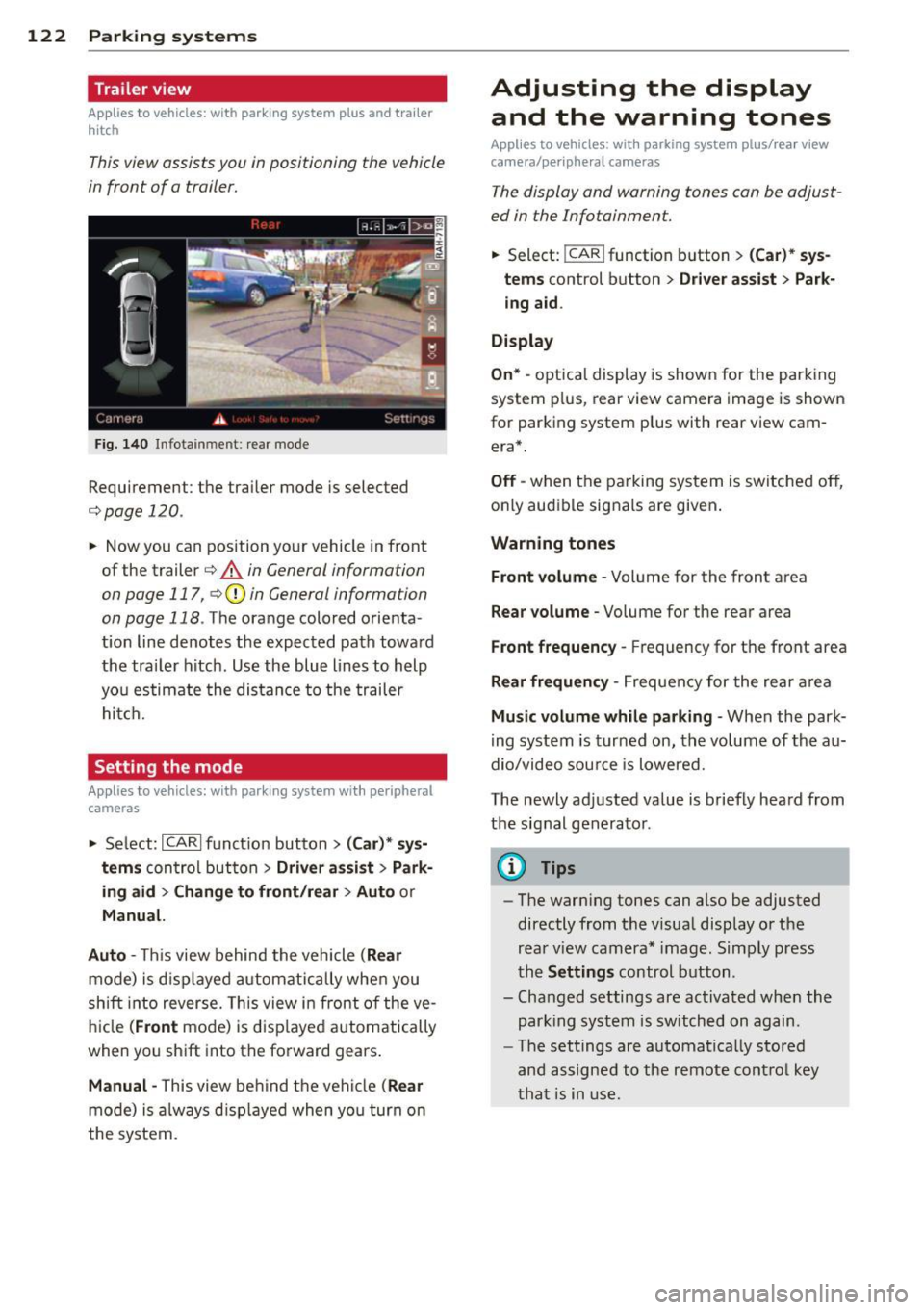
This view assists you in positioning the vehicle
in front of a trailer.
F ig. 1 40 Infotainment: rear mode
Requirement: the trailer mode is selected
c:;,page 120.
.. Now you can position your vehicle in front
of the trailer
c:;, .&. in General information
on page 117, c:;,Q) in General information
on page 118 .
The orange colo red orienta
t ion line denotes the expected path toward
the trai ler hitch . Use the blue lines to help
yo u estimate the distan ce to the trailer
hitch.
Setting the mode
Ap plies to veh icles: with par king system wi th peripheral
cameras
.. Select: ICARI funct ion button > ( Car )* sys
tem s
control button > Driv er a ssis t > Park
ing aid > Ch ange to front /rea r> A uto
or
Manu al.
Aut o -
This view behind the vehicle ( Rear
mode) is d isplayed a utomatically when you
shift into reverse. This view in front of the ve
hicle
( Front mode) is d isp layed automatically
when you sh ift into the forward gears .
Manual -This view behind the vehicle (Rear
mode) is a lways d isp layed when you turn on
the system.
Adjusting the display and the warning tones
Applies to vehicles: wit h parking syste m plus/ rea r view
came ra/ peri pheral cameras
The display and warning tones can be adjust
ed in the Infotainment.
.. Select: !CAR ! function b utton > (C ar)* sys
tem s
control button > Drive r a ssist > Par k
in g a id .
Di splay
On * -
optical display is shown for the parking
system p lus, rear view camera image is shown
for parking system plus with rear view cam era*.
Off -when the parking system is switched off,
only audible signals are given .
Warning tones
Fr ont volume -
Volume for the front area
Rear volume -Volume for the rear area
Front frequency -Frequency for the front area
Rear frequen cy -Frequency for the rear area
Mu sic v olum e wh ile parkin g -When the park
ing system is turned on, the volume of the au
dio/video sou rce is lowered.
The newly adjusted value is briefly heard from
the signal generator .
@ Tips
-The warn ing tones can also be adjusted
directly from the visual display o r the
rear v iew camera* image. Simply press
the
Setting s control button .
- Changed settings are act ivated when the
park ing system is switched on again.
- The settings are automatica lly stored
and assigned to the remote control key
that is in use .
Page 125 of 306
Error messages
Applies to vehicles: with parking system plus/rear view
camera/per ipheral cameras
There is an e rror in the system if the LED in
the
p, qA button is blinking and you hear a con
tinuous alarm for a few seconds afte r switch
ing on the parking system or when the park
ing system is already activated. If the error is
not corrected before you switch off the igni
tion, the LED in the
Pw.6. button will blink the
next time you switch on the parking system by
shifting into reverse.
Parking system plus
If a sensor is faulty, the~ symbol will appear
in front of/behind the vehicle in the Infotain
ment display. If a rear sensor is fau lty, only
obstacles that are in areas @ and @ are
shown
c:> fig. 117 . If a front sensor is fau lty,
only obstacles that are in areas © and @are
shown .
Peripheral cameras*
There is also a system error if:
- the
'(:8:)• • symbol appears in the display and
the corresponding display area is shown in
blue. The camera is not working in this area.
- all segments around the vehicles are red or
if no segments are displayed.
Drive to your authorized Aud i dea ler o r au
thorized repair fac ility immediately to have
the ma lfunction corrected.
Trailer hitch
Appl ies to vehicles: with parking system plus/rear view
camera/per ipheral cameras and trailer hitch
For vehicles using the tra iler socket, the park
ing system rear senso rs do not turn on when
you shift into reverse gear or when yo u press
the P
01A button. This resu lts in the following re
strictions:
Parking system plus*
There is no distance wa rning for the rear. The
front sensors rema in activated. The visual dis
play switches to the trailer towing mode.
Parking systems 123
Parking system plus and rear view
camera* /Peripheral cameras*
There is no distance warning for the rear. The
front sensors remain activated. The visual dis
play sw itches to the trailer towing mode. The
rear view camera image will not show the ori
entation lines and the blue surfaces .
{D Tips
Trailer hitches that are not installed at the
factory may cause the park ing system to
malfunction or they may restr ict its func
tion.
Page 126 of 306
124 Homelin k®
Homelink ®
Universal remote
control
General information
Applies to vehicles: with Homelink® unive rsal remote
co ntrol
The Homelink universal remote control can
be programmed with hand-held transmitters
from existing equipment.
With Homelink, you can control devices such
as the garage door, security systems, house lights, etc. comfortably from the inside of you
vehicle.
Homelink makes it possible for you to replace
three different remote controls from devices in your home with one universal remote . Th is
feature works for most garage door and exte rior door moto r signals. Programming the in
d iv idual remote control fo r you r remote con
trol takes p lace near the center of the radiator
grille. There is a control module attached at
this location .
A one-t ime programm ing of the sensor mus t
be performed before you are able to use sys
tems w ith Homelink.
A WARNING
- Never use the Homelink ® transmitter
with any garage door opener that does have not the safety stop and reverse fea
ture as required by federal safety stand
ards. This includes any garage door open
er mode l manufact ured before April 1,
1982.
- A garage door opener which cannot de
tect an object, signaling the door to stop
and reverse does not meet current feder
al safety s tandards. Us ing a garage doo r
o pener witho ut these fea tures increases
risk of serious inj ury or death.
- F or safety reasons never release t he
parking brake or s tart the engine while
anyone is standing in front of the vehicle .
- A garage door or an est ate gate may
sometimes be set in motion when the Homelink
® remote control is being pro
grammed. If the device is repeatedly ac
tivated, this can overstrain motor and
damage its electrica l components - an
overheated motor is a fire hazard!
- To avo id possible injuries or property
damage, please always make absolutely
certa in that no persons or objects are lo
cated in the rang e of motion of any
equ ipme nt being ope rated.
(0 Tips
- If you would like add itional information
on the Home Link® Unive rsal Transce iver,
Homelink compatib le products, or to
purc hase other accessories s uch as the
HomeL ink® Light ing Package, please
contact Homelink at 1-800 -355 -3515 or
on the Internet at www.homelink .com.
- For Declaration of Comp liance to United
States FCC and Ind ustry Canada reg ula
tions
¢page 288.
-For security reasons, we recommend that
you clear the programmed b uttons be
fore selling the vehicle .
Operation
Applies to vehicles: wit h Ho meli nk
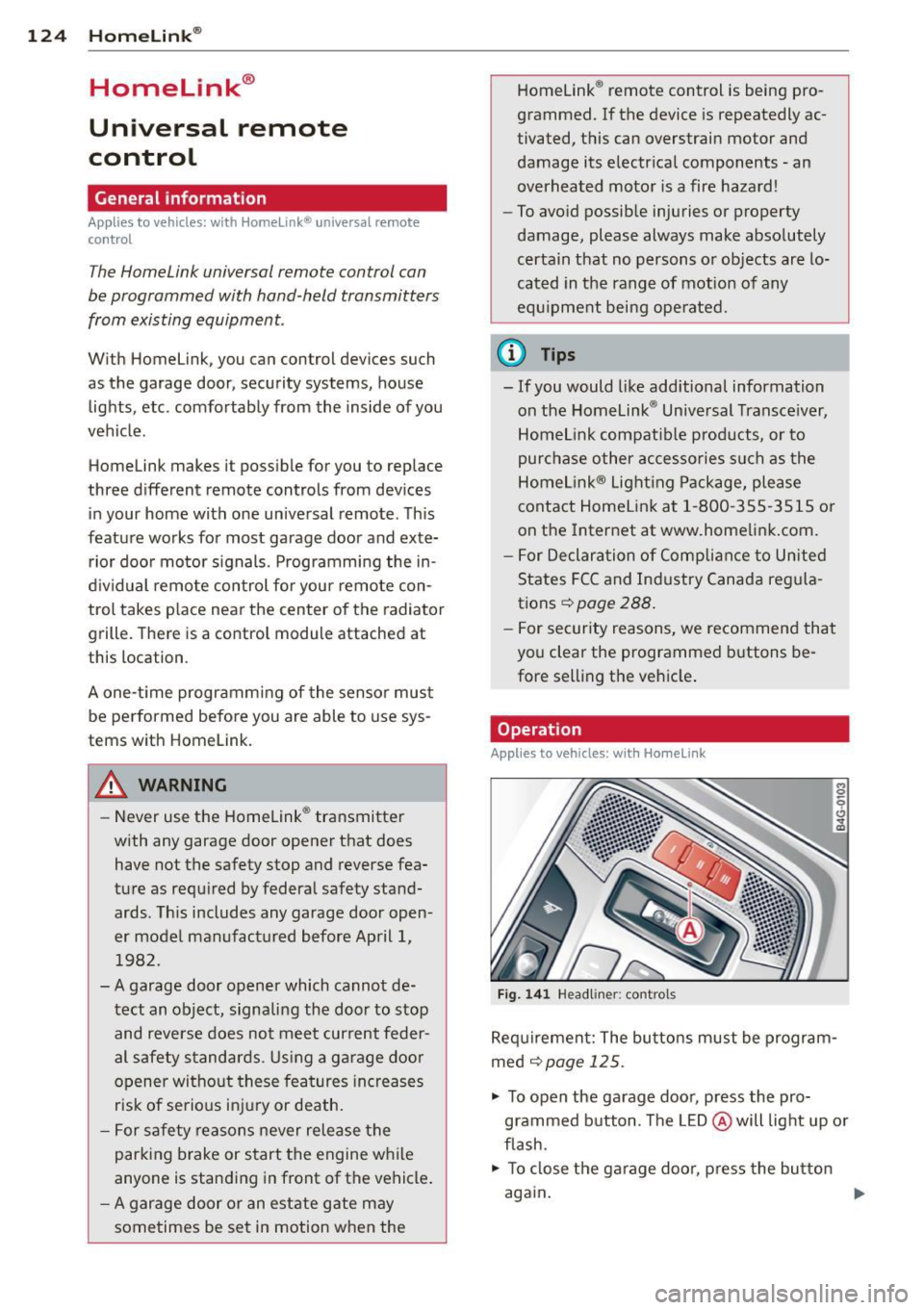
Fig . 14 1 Headliner: controls
M 0
9 (!)
~
Req uirement: The bu tto ns must be program
med ¢
page 125 .
"' To open the garage doo r, press the pro
grammed b utton. The LED @ will light up o r
flash.
"' To close the ga rage doo r, press the button
again .
Ill>
Page 128 of 306
126 Driving Saf ely
Driving Safely
General notes
Safe driving habits
Please remember -safety first!
This chapter contains important information,
tips, instructions and warnings that you need
to read and observe for your own safety, the
safety of your passengers and others . We have
summarized here what you need to know
about safety belts, a irbags, ch ild restra ints as
well as child safety. Your safety is for us
priori
ty number 1.
Always observe the info rmat ion
and warn ings in th is sect ion -fo r yo ur own
safety as well as that of your passengers .
The information in this se ction app lies to all
model ve rsions of your veh icle . Some of the
feat ures described in this sec tions may be
standard equipment on some models, or may
be optional equipment on others . If you are
not sure, ask your authorized Audi dealer.
A WARNING
- Always make sure that you follow the in
struct ions and heed the WARNINGS in
this Manual. It is in your interest and in
the inte rest of you r passengers.
- Always keep the complete Owner's Liter
ature in your Audi when you lend or sell
your vehicle so that this important info r
mation will always be ava ilable to the
dr iver and passengers.
- Always keep the Owner's literature handy
so that you can find i t eas ily if you have
ques tions.
Safety equipment
The safety features are part of the occupant
restraint system and work together to help
redu ce the risk of injury in a wide variety of
accident situations.
Your safety and the safety of your passenge rs
should not be left to chance. Advances in
technology have made a varie ty o f fea tures
avai la bl e to he lp re duce the risk of injury in an accident
. The following is a list of just a few of
the safety features in your Audi:
- sophis tic ated s afety be lts fo r drive r and a ll
passenger sea ting pos it ions,
- safety belt prete nsioners ,
- safety belt force lim iters fo r the front seats,
- safety belt he ight adjustment systems for
the front seats ,
- front airbags,
- knee airbags for the front seats *
- side airbags in the front seats a nd outer rear
seats*,
- side curtain airbags ,
- specia l LATCH anchorages for child re-
straints,
- hea d restr aints for each sea ting pos ition,
- ad justab le s teer ing colum n.
These ind iv idual safety features, can work to
ge ther as a system to help protect you and
you r passengers in a wide range of accidents .
T hese features canno t wo rk as a system if
they are not always cor re ct ly adjusted and co r
rect ly used.
Safety i s everybody' s respon sibility!
Important things to do before driving
Safety is everybody 's job! Vehicle and occu
pant safety always depends on the informed and careful driver .
For your safety and the safety of your passen
gers,
befor e driv ing always:
.. Make s ure that all lig hts and signa ls are op
erating correctly.
.. Make sure that the tire pressure is correct .
.. Mak e sur e that all windows are clean and
afford good v is ibility to the outside .
.. Se cu re a ll luggage a nd o ther items carefu lly
<:!) page 61, ¢page 58.
.. Ma ke s ure that noth ing can interfere wi th
the peda ls .
.. Adjust front seat, head restraint and mir
rors correctly for your height.
.. Instruct passengers to adjust the head re-
straints according to the ir height . .,..
Page 129 of 306
.. Make sure to use the right child restraint
correct ly to protect children
Q page 171,
Child Safety.
.. Sit properly in your seat and make sure that
your passengers do the same¢
page SO,
General recommendations .
.. Faste n your safety belt and wear it properly.
Also instruct your passengers to fasten their
safety belts properly ¢
page 136.
What impairs driving safety?
Safe driving is directly related to the condi
tion of the vehicle, the driver as well as the
driver 's ability to concentrate on the road
without being distracted.
The driver is respons ible for the safety of the
veh icle and all of its occupants.
If your ability
to drive is impai red, safety r isks for everybody
in the vehicle increase and you also become a
hazard to everyone else on the road ¢ _&. .
Therefore:
.. Do not let yourself be dist racted by passen
gers or by using a cellular telephone.
.. NEVER drive when your driving ability is im
paired (by medications, alcohol, drugs, etc.).
.. Observe all traffic laws, rules of the road
and speed limits and plain common sense .
.. ALWAYS adjust your speed to road, traffic
and weather conditions .
.,. Take frequent breaks on long trips . Do not
drive for more than two hours at a stretch.
.. Do NOT drive when you are tired, under
pressure or when you are stressed.
A WARNING
Impaired driving safety increases the risk
of serious personal injury and death when
ever a vehicle is being used.
Driving Safely 12 7
Proper occupant
seating positions
Proper seating position for the driver
The proper driver seating position is impor
tant for safe, relaxed driving .
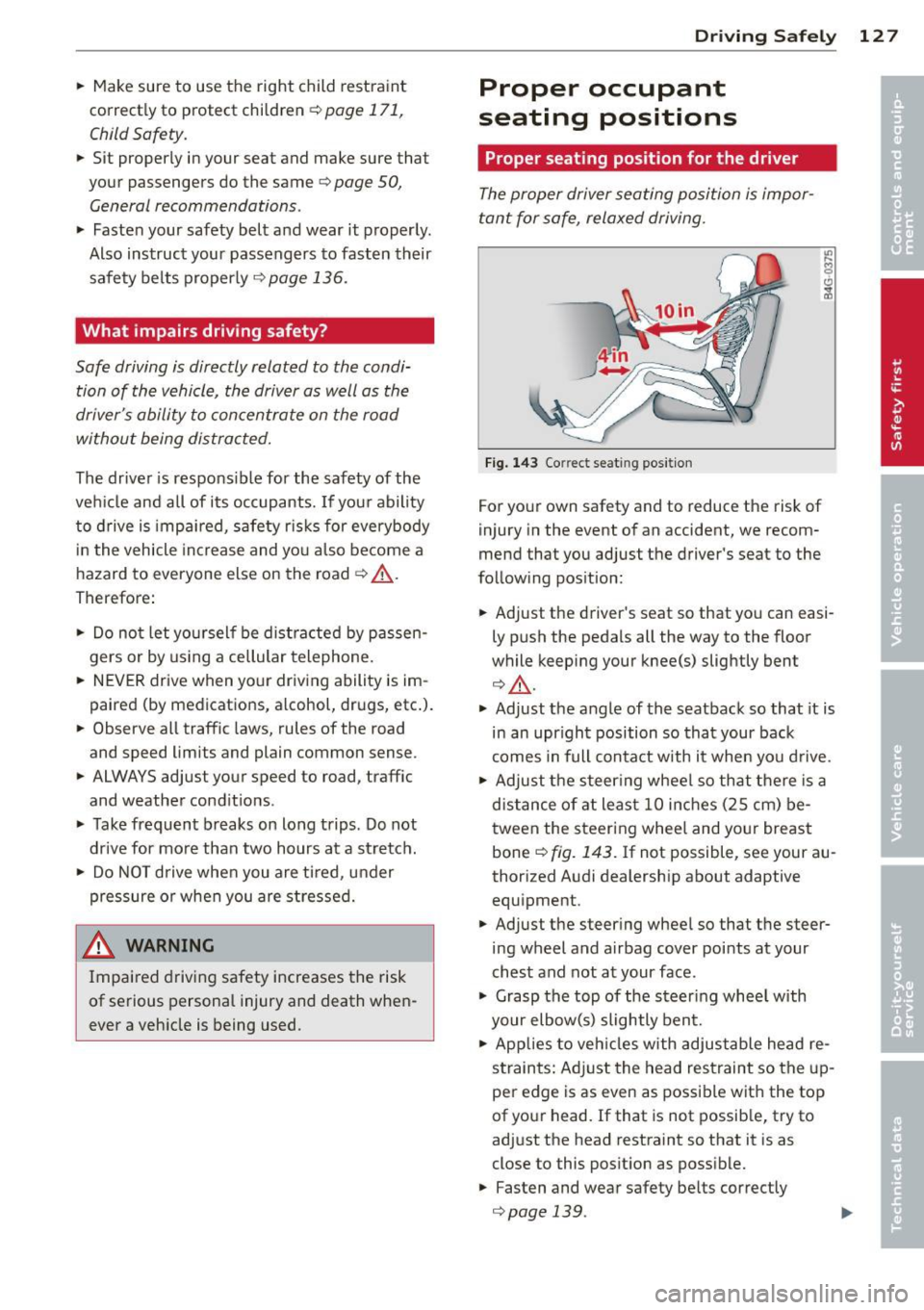
Fig. 143 Correct seat ing pos it ion
For your own safety and to reduce the risk of
injury in the event of an accident, we recom
mend that you adjust the driver's seat to the
follow ing pos ition:
.. Adjust the driver's seat so that you can easi
ly push the pedals all the way to the floor
wh ile keeping your knee(s) slightly bent
¢ _&. .
.. Adjust the angle of the seatback so that it is
in an upr ight position so that your back
comes in full contact w ith it when you drive.
.. Adjust the steering wheel so that there is a
distance of at least 10 inches (25 cm) be
tween the steering wheel and yo ur breast
bone
Q fig. 143. If not possible, see your au
thorized Audi dealership about adaptive
equipment .
.. Adjust the steer ing wheel so that the steer
ing wheel and airbag cover points at your
chest and not at your face.
.,. Grasp the top of the steering whee l with
your elbow(s) slightly bent.
.. Applies to vehicles with adjustable head re
straints: Ad just the head restraint so the up
per edge is as even as possible with the top
of your head. If that is not possible, try to
adjust the head restraint so that it is as
close to this posit ion as possible .
.. Fasten and wear safety be lts correctly
¢ page 139. .,.
Page 130 of 306
128 Driving Safely
• Always keep both feet in the footwell so
that you are in control of the vehicle at all
times.
For detailed information on how to adjust the
driver's seat, see
r:::> page 51.
A WARNING
Drivers who are unbelted, out of position
or too close to the airbag can be seriously
injured by an airbag as it unfolds. To help
reduce the risk of serious personal injury:
- Always adjust the driver's seat and the
steering wheel so that there are at least
10 inches (25 cm) between your breast
bone and the steering wheel.
- Always adjust the driver's seat and the
steering wheel so that there are at least
4 inches (10 cm) between the knees and
the lower part of the instrument panel.
- Always hold the steering wheel on the
outside of the steering wheel rim with
your hands at the 9 o'clock and 3 o'clock positions to help reduce the risk of per
sonal injury if the driver's airbag inflates.
- Never hold the steering wheel at the
12 o'clock position or with your hands at
other positions inside the steering wheel
rim or on the steering wheel hub. Hold
ing the steering wheel the wrong way
can cause serious injuries to the hands,
arms and head if the driver's airbag in
flates.
- Pointing the steering wheel toward your
face decreases the ability of the supple
mental driver's airbag to protect you in a
collision.
- Always sit in an upright position and nev
er lean against or place any part of your
body too close to the area where the air
bags are located.
- Before driving, always adjust the front
seats and head restraints properly and
make sure that all passengers are prop
erly restrained.
- Never adjust the seats while the vehicle
is moving. Your seat may move unexpect- edly and you could lose control of the ve
hicle .
- Never drive with the backrest reclined or
tilted far back! The farther the backrests
are tilted back, the greater the risk of in
jury due to incorrect positioning of the safety belt and improper seating posi
tion .
- Children must always ride in child seats
r:::> page 171. Special precautions apply
when installing a child seat on the front
passenger seat¢
page 145.
Proper seating position for the front
passenger
The proper front passenger seating position
is important for safe, relaxed driving .
For your own safety and to reduce the risk of
injury in the event of an accident, we recom
mend that you adjust the seat for the front
passenger to the following position :
• Adjust the angle of the seatback so that it is
in an upright position and your back comes in full contact with it whenever the vehicle is
moving.
• Adjust the head restraint so the upper edge
is as even as possible with the top of your
head. If that is not possibl e, try to adjust
the head restraint so that it is as close to
this position as possible¢
page 130.
• Keep both feet flat on the floor in front of
the front passenger seat .
• Fasten and wear safety belts correctly
r:::> page 13 9.
For detailed information on how to adjust the
front passenger's seat, see
r:::> page 50 .
A WARNING
-
Front seat passengers who are unbelted,
out of position or too close to the airbag
can be seriously injured or killed by the air
bag as it unfolds. To help reduce the risk of
serious personal injury:
Page 131 of 306
-Passengers must always sit in an upright
position and never lean against or place
any part of their body too close to the
area where the airbags are located.
- Passengers who are unbelted, out of po
sition or too close to the airbag can be
seriously injured by an airbag as it un
folds with great force in the blink of an
eye.
- Always make sure that there are at least
10 inches (25 cm) between the front
passenger's breastbone and the instru
ment panel.
- Always make sure that there are at least
4 inches (10 cm) between the front pas
senger's knees and the lower part of the
instrument panel.
- Each passenger must always sit on a seat
of their own and properly fasten and
wear the safety belt belonging to that
seat.
- Before driving, always adjust the front
passenger seat and head restraint prop
er ly.
- Always keep your feet on the floor in
front of the seat. Never rest them on the
seat, instrument panel, out of the win
dow, etc. The airbag system and safety
belt will not be able to protect you prop
erly and can even increase the risk of in
jury in a crash .
- Never drive with the backrest reclined or
tilted far back! The farther the backrests are tilted back, the greater the risk of in
jury due to incorrect positioning of the
safety belt and improper seating posi
tion.
- Children must always ride in child seats
¢
page 171. Special precautions apply
when installing a child seat on the front
passenger seat¢
page 145.
Driving Safely 129
Proper seating positions for passengers
in rear seats
Rear seat passengers must sit upright with
both feet on the floor consistent with their
physical size and be properly restrained
whenever the vehicle is in use.
To reduce the risk of injury caused by an incor
rect seating position in the event of a sudden
braking maneuver or an accident, your pas
sengers on the rear bench seat must always
observe the following:
.,. Adjust the head restraint so the upper edge
is as even as possible with the top of your
head. If that is not possible, try to adjust
the head restraint so that it is as close to
this position as possible¢
page 130 .
.,. Keep both feet flat in the footwell in front
of the rear seat.
.,. Fasten and wear safety belts properly
¢page 139.
.,. Make sure that children are always properly
restrained in a child restraint that is appro
priate for their size and age
r::, page 171.
,& WARNING
..-
Passengers who are improperly seated on
the rear seat can be seriously injured in a
crash.
- Each passenger must always sit on a seat
of their own and properly fasten and
wear the safety belt belonging to that seat.
- Safety belts only offer maximum protec
tion when the safety belts are properly
positioned on the body and securely
latched . By not sitting upright, a rear
seat passenger increases the risk of per
sonal injury from improperly positioned
safety belts!
- Always adjust the head restraint properly
so that it can give maximum protection.
•
•
Page 132 of 306
130 Driving Saf ely
Proper adjustment of head restraints
Correctly adjusted head restraints are an im
portant part of your vehicle's occupant re
straint system and can help to reduce the risk
of injuries in accident situations.
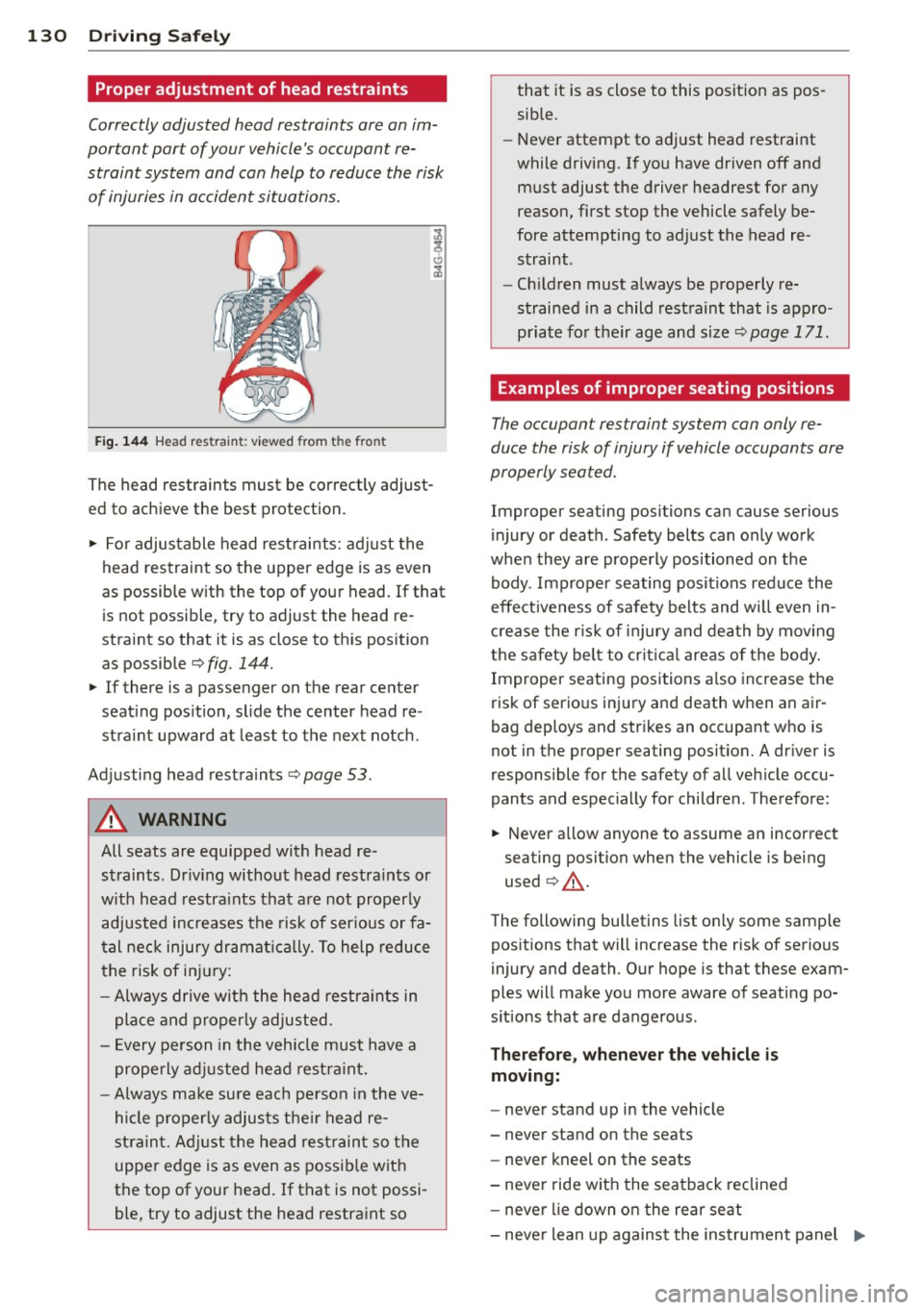
Fig . 14 4 Head restr ain t: vi ewed fro m the front
The head restraints must be correctly adjust
ed to achieve the best protection.
11> For adjustable head restraints: adjust the
head restraint so the upper edge is as even
as possible with the top of your head. If that
is not possible, try to adjust the head re
stra int so that it is as close to th is position
as possible ¢
fig. 144.
11> If there is a passenger on the rear center
seat ing pos it ion, slide the center head re
stra int upward at least to the next notch .
Adjusting head restraints¢
page 53.
A WARNING , _
All seats are equipped with head re
straints. Dr iv ing without head restraints or
w ith head restra ints that are not properly
adjusted increases the risk of ser ious or fa
tal nec k injury dramat ic al ly. To help reduce
t he risk of in ju ry:
- Always drive with the head restraints in
place and proper ly adjusted.
- E very person in the veh icle must have a
properly adj usted head restra int.
- Always make su re each pe rson in the ve
hicle proper ly adjusts the ir head re
st rain t. Ad just the head restrain t so the
upper edge is as even as possib le with
the top of your head. If that is not possi
ble, try to adjust the head restraint so that it is as close to this posit
ion as pos
sible.
- Never attempt to adjust head restraint
while driving. If you have driven off and
must adjust the driver headrest for any
reason, first stop the vehicle safely be
fore attempting to adjust the head re
straint .
- Chil dren must a lways be properly re
strained in a child restraint that is appro
priate for their age and size ¢
page 171.
Examples of improper seating positions
The occupant res traint sys tem can only re
duce the risk of injury if vehicle occupants are
properly seated .
Improper seating positions can cause serious
injury or death . Safety belts can only work
when they are properly positioned on the
body . Improper seating positions reduce the
effectiveness of safety belts and w ill even in
c rease the r is k of injury and dea th by moving
the safety be lt to cri tical areas o f the body.
Improper seating positions a lso increase the
risk of serio us injury and death when an air
bag deploys and strikes an occupant who is
not in the proper sea ting position. A dr iver is
responsible for the sa fety of all veh icle occu
pant s and espec ially for children . Therefore :
11> Never allow anyone to assume an incorrect
seating position when the vehicle is being
used ¢_& .
The following bulletins list on ly some samp le
positions that will increase the risk of serious
injury and death. Our hope is that these exam
ples will make you more aware of seat ing po
s itions that are dangerous .
Therefore, whenever the vehicle is
moving:
- never stand up i n the vehicle
- never stand on the seats
- never kneel on the seats
- never ride wit h the seatback reclined
- never lie down o n the rear seat
- neve r lean up against the instrument panel ..,_
Page 133 of 306
-never sit on the edge of the seat
- never sit sideways
- never lean out the w indow
- never put your feet out the window
- never put your feet on the instrument panel
- never rest your feet on the seat cushion or
back of the seat
- never ride in the footwe ll
- never ride in the cargo area
8_ WARNING
Improper seat ing positions increase the
r isk of serious personal injury and death
whenever a veh icle is being used .
- Always make sure that all vehicle occu
pants stay in a proper seating pos ition
and are properly restra ined whenever the
vehicle is be ing used.
Driver and passenger
side footwell
Important safety instructions
Applies to vehicles: with knee airbags
8_ WARNING
Always ma ke su re that the knee a irbag can
inflate without inte rfe rence. Objects be
t ween yourse lf and the airbag can increase
the risk of in jury in an acc ident by interfer
ing with the way the a irbag deploys or by
being p ushed into you as the airbag de
ploys.
- No persons (ch ildren) or animals should
ride in the footwell in front of the pas
senger seat. If the airbag deploys, this
can result in serious or fata l injuries.
- No objects of any k ind sho uld be carried
in the footwell area in front of the driv
er's or passenger's seat . Bulky objects
(shopping bags, for example) can ham
per or prevent p roper deployment of the
airbag. Small objec ts can be thrown
thro ugh the vehi cle if the airbag deploys
and injure you o r your passengers.
-
Dr iving S afel y 131
Pedal area
Pedals
The pedals must always be free to move and
must never be interfered with by a floor mat
or any other object.
Make sure that a ll peda ls move free ly without
interfe rence and that nothing prevents them
from return ing to their orig inal positions .
Only use floor mats t hat leave t he pedal area
free and can be secured with floor mat fasten ers .
If a brake circ uit fai ls, increased brake pedal
trave l is required to b ring the vehicle to a f ull
stop.
8_ WARNING
Pedals that cannot move free ly can cause
loss of vehicle control and increase the risk
of ser ious injury.
- Never p lace any objects in the driver's
footwell. An object cou ld get into the
pe dal area and inte rfe re with pedal func
tion. In case of sudden brak ing o r an ac
cident, yo u wo uld not be able to b rake or
accelerate!
- Always ma ke sure tha t no thing can f all
or move into the driver's footwel l.
Floor mats on the driver side
Always use floor mats that can be securely
attached to the floor mat fasteners and do
not in terfere with the free movement of the
pedals.
"' Ma ke s ure that the floor mats are prope rly
secured and cannot move and in terfere with
t he peda ls ¢ ..&_ .
U se only floor mats that leave the peda l area
u nobst ructed and th at are firmly secu re d so
that they c annot slip o ut o f posi tion. You c an
obta in suitab le floor mats from yo ur aut ho r
ized Audi Dealer.
Floor mat fastene rs a re in sta lled in your Aud i.
1111>
•
•
Page 134 of 306
132 Driving Safel y
Floor mats used in your vehicle m ust be at
tached to these fasteners. Proper ly securing
the floor mats will prevent them from s liding
into pos itions that could interfere with the
pedals or impair safe operation of your vehicle
in other ways .
A WARNING
Pedals that cannot move freely can result
in a loss of veh icle contro l and increase the
r isk of serious personal injury .
- Always make sure that floor mats are
properly secured.
- Never place or insta ll floor mats or other
floor coverings in the vehicle that cannot be properly secured in place to prevent
them from slipping and interfering w ith
the pedals or the ability to control the
vehicle.
- Never place o r insta ll floor ma ts or other
floor coverings on top of a lready insta l
led floor mats. Additional floor mats and
other coverings w ill reduce the size of
the pedal area and interfere with the
pedals.
- Always properly reinstall and sec ure floor
mats that have been taken out for clean
ing.
- Always make sure that objects cannot fall into the driver footwe ll wh ile the ve
hicle is moving. Objects can become
trapped under the b rake pedal and accel
erator peda l causing a loss of veh icle
c o ntrol.
Stowing luggage
Loading the luggage compartment
All luggage and other objec ts must be prop
erly stowed and secured in the luggage com
partment.
L oose items in the luggage comp art ment can
shift suddenly, changing veh icle hand ling
characteristics. Loose items can also increase
the risk of serious personal injury in a sudde n
vehicle maneuver or in a collision . ..
Distribute the load even ly in the luggage
compartment .
.. Always place and proper ly secure heavy
items in the luggage compartment as far
forward as possible .
.. Secure luggage using the tie -downs prov id
ed
¢ page 61, Luggage compartment.
.. Make s ure that the rear seatback is securely
la tc hed in place.
A WARNING
Imp roperly store d luggage or other items
can fly thro ugh the vehi cle causing ser ious
personal injury in the event of hard brak
i ng or an accident. To help reduce t he risk
of ser ious personal in jury:
- Always put objects, fo r example, luggage
or other heavy items in the luggage com pa rtment.
- Always secure objects in the luggage
compartment using the t ie-down hoo ks
and suitable straps.
A WARNING
=
Heavy loads w ill influence the way yo ur ve-
hi cle handles . To help reduce the risk of a
l oss of contro l leading to serious pe rsonal
i njury :
-Always keep in mind when transporting
heavy objects, that a change i n the cen
ter of gravity can also cause changes in
veh icle ha ndling:
- Always distribute the load as evenly as
poss ible.
- Place heavy objects as far forward in
the luggage compartment as possible .
- Never exceed the Gross Axle Weight Rat
ing or the Gross Vehicle We ight Rating
specified on the safety compliance stick
er on the left door jamb. Exceed ing per
miss ible weight standards can cause the
veh icle to slide and handle differently .
- Please observe information on safe dr iv
ing¢
page 126.