Parking AUDI A6 2013 User Guide
[x] Cancel search | Manufacturer: AUDI, Model Year: 2013, Model line: A6, Model: AUDI A6 2013Pages: 306, PDF Size: 76.92 MB
Page 62 of 306
60 Seats and storage
can cause the roof rack or the items at
tached to it to fall off the roof onto the
road .
- Objects falling from the roof of a vehicle
can cause a crash and personal injury .
- Only mount the roof rack on the desig
nated locations on the roof
c> fig. 61.
-The roof rack system must be installed
exactly according to the instructions pro
vided.
- When driving with a roof rack system,
changes to the center of gravity and wind
resistance can change the vehicle han
dling and lead to a collision . Always
adapt your driving and your speed to the
current conditions .
@ Note
-Your vehicle warranty does not cover any
damages to the vehicle caused by using
roof racks or mounting structures not
approved by Audi for your vehicle . The
same applies to damage resulting from
incorrect roof rack installation .
- Always check the roof rack mountings
and hardware before each trip and dur
ing a trip to make sure everything is se
curely tightened. If necessary, retighten
the mountings and check the entire sys
tem from time to time.
- After mounting a roof rack system, or when you transport objects on the roof
of your vehicle, the height of the vehicle is naturally increased. Be careful when
driving under low bridges or in parking
garages for example . This could cause
damage to the load and even the vehicle itself.
- Make sure the open rear lid and the sun
roof* do not come into contact with the
roof rack.
Loading the roof rack
Always distribute loads evenly. Make sure
anything on the roof rack is securely tied
down.
.. Always distribute the loads on the roof rack
evenly .
.. Always attach items to the roof rack secure-
ly before you drive off.
The maximum permissible roof weight is
220 lb (100 kg). The roof weight is the total
of the weight of the roof rack, the attach
ments and the cargo you are carrying. You
must also not exceed the maximum load
weight for the roof rack you are using.
When using a roof rack system which has a lower load carrying capacity, you must not use
up the total maximum permissible load carry
ing capacity specified above. Instead, you
should load the roof rack system only to the
maximum capacity specified by the manufac
turer of the roof rack system .
A WARNING
-Weak, damaged or improper straps used
to secure items to the roof rack can fail
during hard braking or in a collision and
cause serious personal injury .
- Make sure the roof rack is installed exact
ly as specified above
c> page 59.
-Always use suitable mounting straps for
securing items to the roof rack to help
prevent items from shifting or flying for
ward .
- Items on the roof rack must always be
securely mounted .
- The use of a roof rack can negatively af
fect the way a vehicle handles . Cargo
that is large, heavy, bulky, long or flat
will have a greater negative influence on
the vehicle's aerodynamics, center of
gravity and overall handling. Always
drive slowly, avoid sudden braking and
maneuvers when transporting cargo on
the roof of your vehicle.
ll>-
Page 76 of 306
7 4 On the road
running for approximately two minutes to
prevent excessive heat build-up .
Starting the engine if there is a
malfunction
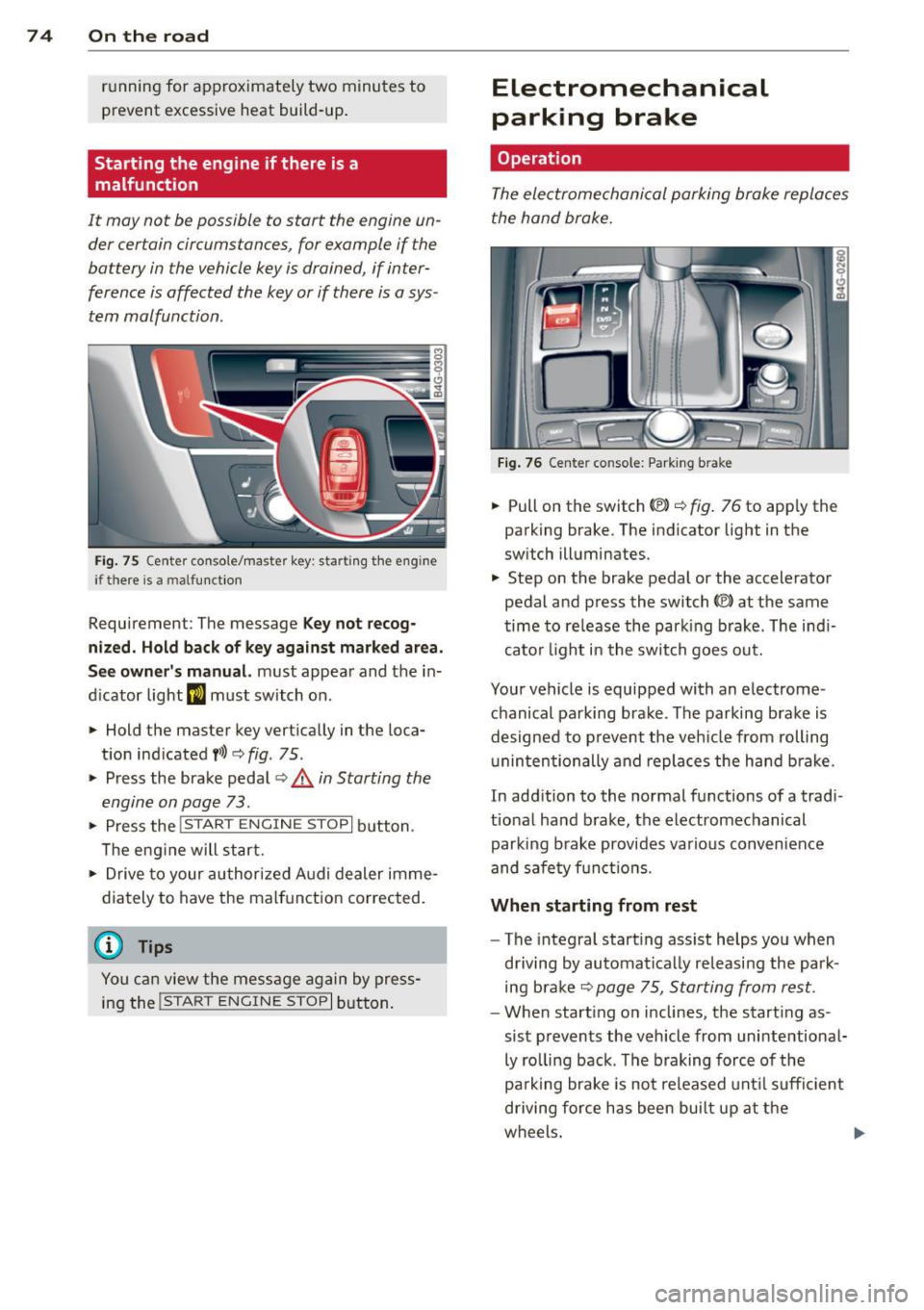
It may not b e possible to start the engine un
der cer tain circumstances , for example if the
battery in the vehicle key is drained , if inter
ference is affected the key or if there is a sys
tem malfunction.
Fig. 75 C en ter conso le/ma ster key: startin g th e eng ine
if th ere is a mal function
Requirement : The message Key not recog
nized. Hold back of key against marked area.
See owner's manual.
must appear and the in
dicator light
II must switch on .
.,. Hold the master key vertically in the loca
t ion ind icated
f >l) ¢ fig . 75 .
.,. Press the brake pedal~.& in Starting the
engine on page 73.
.. Press the !~ S_ T_A_R_ T_E _N_G_I_N_ E_S_ T_O_P~I button.
T he eng ine will start.
"' Drive to your authorized Audi dealer imme
dia tely to have the malfunction corrected.
{D) Tips
You can view the message again by press
ing the
!S TAR T ENGINE STOP I button.
Electromechanical
parking brake
Operation
The electromechanical parking brake replaces
the hand brake.
Fig. 76 Center co nsole: Park ing b ra ke
.,. Pull on the switch (V) ¢ fig. 76 to app ly the
parking brake . The indicator light in the
sw itch ill uminates.
.,. Step on the brake pedal or the accelerator
pedal and p ress the switch
© at the same
time to release the park ing brake . The ind i
cato r light in the swit ch goes out.
Your vehicle is equipped with an electrome
chanical parking brake . The parking brake is
designed to p revent the veh icle from rolling
un intentionally and replaces the hand brake .
In addition to the no rmal functions of a tradi
tional hand brake, the electromechanical
parki ng brake provides vario us convenience
and safety functi ons.
When starting from rest
-The integral starting ass ist helps you when
driving by automat ically releasi ng the park
ing brake
~ page 75 , Starting from rest .
-When start ing on inclines, the start ing as
sist prevents the vehicle from unintentional
ly rolling back. The braking force of the
pa rking brake is not released until sufficient
driving force has been bui lt up at the
wheels . .,,.
Page 77 of 306
Emergency brake function
An emergency brake ensures that the vehicle
can be slowed down even if the
normal brakes
fail
c::> pag e 76, Emergency broking .
Indicator light s
-If the par king b rake is closed w ith the igni
t ion
s witched on the indicator lights come
on - (USA models)/ . (Canada models)
in the instrument cluster and in the switch.
- If the par king brake is closed w ith the igni
tion
s witc hed off the indicator lights come
on - (USA models)/ . (Canada models)
in the instr ument cluster and in the switch
for about 20 seconds.
A WARNING
Do not press the accelerator peda l inadver
tently if the vehicle is stat ionary but the
eng ine is running and a gear is selected .
Otherw ise the vehicle will start to move
immediately and cou ld result in a crash .
(D Note
If the symbol . in the display or the ind i
cato r light
1111 (USA models) . (Cana
da models) in the instrument cluster flash
es , the re is a malfunction in the bra ke sys
tem. Please refer to t he detai led descr ip
t ion of the indicator lights ¢
page 15.
- If the indicato r light - (USA mod-
els) . (Canada mode ls) or
IIJ t ur ns
on, there may be a malfunction in the
parking brake
r=> page 16.
@ Tips
-You can apply the pa rking brake at any
time -even w ith the ignition swi tched
off. The ignition must be on in order to
release the parking brake.
- Occasiona l noises when the parking
brake is applied and re leased are norma l
and are not a ca use for concern .
- When the vehicle is parked, the parking
brake goes thro ugh a se lf-test cycle at
r egular intervals . Any assoc iated noises
are norma l.
On the ro ad 75
Parking
Parking
~ Stop the vehicle with the foot brake .
~ Pull the switch(®) to apply t he pa rking
bra ke .
~ Select the P se lec to r lever posit ion
r=> poge 105.
~ Turn the engine off c::> &_.
In addition on inclines and grades
~ Tu rn the steering wheel so that yo ur vehicle
w il l roll aga inst the c urb in c ase it shou ld
s tart to move .
T he pa rk ing brake activates automat ica lly
when you swi tch the ign ition off. This does not
happe n if you se lect the N selector lever posi
tion or switch the parking off with the~ but
ton before switching the ignition off .
A WARNING
-When you leave your vehicle -even if on
ly briefly -always take the ign it ion key
with you . This applies particularly when
children remain in the vehicle. Othe rwise
the children could start the engine, re lease the parking brake o r operate elec
trica l equipment (e.g. power wi ndows).
There i s the r is k of an accident.
- When the veh icle is locked, no one -par
ticularly not childre n should rema in in
the vehicle . Locked doors ma ke it mo re
difficult for emergency wo rke rs to ge t in
to the vehicle -putting lives at risk .
Starting from rest
The starting assist fun ction ensures that the
parking broke is released automatically upon starting .
Stopping and applying parking brake
~ Pull the switch(®) to apply the pa rking
bra ke .
Page 78 of 306
76 On the road
Startin g and automati cally r ele a s ing the
p ark ing b rake
.. When you sta rt to drive as usua l, the park
ing brake is automatically re leased and your
vehicle begins to move.
When stopping at a traffic signa l or stopping
in city traffic, the parking brake can be ap
plied. The veh icle does not have to be held
with the footbrake. The park ing brake elimi
nates the tendency to creep with a drive range
engaged . As soon as you dr ive off as usual,
the park ing brake is released automatically
and the veh icle sta rts to move .
Starting on slope s
When starting on inclines, the starting assist
prevents the vehicle from unintentionally roll
ing back . The braking force of the parking
brake is not released until sufficient dr iv ing
fo rce has been bu ilt up at the whee ls.
(D Tips
For safety reasons, the park ing brake is re
leased automatically only when the dr iv
er 's safety belt is engaged in the buck le.
Starting off with a trailer
To prevent rolling back unintentionally on an
incline, do the following:
.. Keep the switch
accelerator. The park ing brake stays applied
and prevents the vehicle from ro lling back
ward.
.. You can release the switch
C®l once you are
sure that you a re develop ing enough for
ward momentum at the wheels as you de
press the accelerator .
Depending on the weight of the r ig (vehicle
and trai ler) and the seve rity of the incline, you
may roll backwards as you start. You can pre
vent rolling backwards by holding the parking brake switch(®) pulled out and acce lerating -
just as you would when starting on a hill with a conventional hand brake .
Emergency braking
In the event that the conventional brake sys
tem fails or locks .
.. In an emergency, pull the switch C®l and
con tinue to pull it to slow your vehicle down
w ith the park ing brake.
.. As soon as you release the switch (®) or ac-
celerate, the b rak ing process stops.
If you pull the switch C®l and hold it above a
speed of about 5 mph (8 km/h), the emergen
cy brak ing f unct ion is init iated . T he ve hicle is
braked at all fou r whee ls by activating the hy
draulic b rake sys tem. The brake performance
is similar to making an emergency stop~&. .
In order not to act ivate the emergency brak
ing by mis take, an audib le warning tone (buz
zer) sounds whe n the switch(®) is pulled . As
soon as t he sw itch C®l is re leased , or the accel
erator peda l is depressed, emergency braking
stops.
_& WARNING
-Emergency braking should only be used in
an emergency, when the norma l foot brake
has fa iled or the brake pedal is obstructed.
Using the parking brake to perform emer
gency b raking will slow your veh icle down
as if you had made a full bra ke application .
The laws of physics cannot be suspended
even with ESC and i ts associated compo
nents (ABS, ASR, EDL) . In corners and
when road or weathe r conditions are bad,
a full brake application can ca use the vehi
cle to sk id or the rear end to break away -
risking an accident.
Start-Stop-System
Description
Applies to vehicles: with Start -Stop -System
T he Start -Stop-Sys tem can help increase fuel
e conomy and reduce CO 2 emissions.
In the Start-Stop-mode, the engine shuts off
automat ica lly when the veh icle is stopped,
such as at a traffi c light. The igni tion remains .,.
Page 91 of 306
Audi adaptive cru ise control and brakin g guar d 89
(end of a traffic jam or veh icle t hat has
br oken down in traffic).
- Alw ays remember that the radar sensor
for the b raking guard works only within
defined detection and ra nge limits that
may prev ent the proper det ection of oth
er ve hicles.
- The ra dar sensor's function and range
can be reduced by rain, snow and heavy
spray. Moving vehicles up ahead may not
be promptly detected or may not be de
tected at al l.
- Reflective surfaces includ ing crash barr i
ers or tunnel ent rances may impair the
function of the radar sensor.
(0 Tips
- You can cance l the braking w ith increas
i ng fo rce that is initiated by the system
by braking yo urself, by accelerating no
ticeab ly or by swerving.
- Brak ing guard error messages
~ page
89.
-Keep in mind that braking guard can
brake unexpectedly. Always secure any
ca rgo or objec ts that you are transport
i ng to reduce t he risk of d amage o r in
Ju ry.
Settings in the MMI
Appl ies to vehicles: with Audi adaptive cruise co ntrol
~ Se lect: ICARlf unct ion button> ( Car )* sys
tems
contro l button > D river assi st > Audi
braking guard .
System -
Switch braking g ua rd On and Off .
When you sw itch the ignition on, the message
Audi braking guard off appears if the system
is switched off.
Early warning -The distance and approac h
warn ings in the display can be switched
On /
Off .
(D Tips
- Your settings are automatically stored
and assigned to the remote control key being used at the time the settings
are
ma de.
- If you switch the ES C to spo rt mode,
braking g uard switches off a utomatica lly
~page
194.
- Switch braking guard off when you a re
loading the vehicle onto a vehicle carrier,
t rain, ship o r other type of transporta
t ion. This can prevent undesired warn
ings from the braking guard system.
Messages
App lies to vehicles : wit h Audi ada ptive c ruise contro l
ACC unavail able
ACC and braking guard: unavailable
T he system cannot detect mov ing vehicles up
ahead co rrec tly and is switched off. The sen
sors have been displaced or a re not worki ng
properly . The Audi pre sense func tions may a l
so be affected. Drive to yo ur autho rized Audi
dealer or authorized A udi se rvice facility im
med iate ly to have the malfunction corrected.
ACC: unavailable at this time. No sensor vi
sion
ACC and braking guide: unavailable at this
time . No sensor vision
Th is message appears if the senso r view is ob
structed, for examp le by leaves, snow, heavy
sp ray or d irt. C lean the sensors~
fig. 82.
ACC: unava ilabl e at this time . Inclin e too
steep
The road exceeds the max imum possible an
gle for proper adaptive cru ise control opera
tion. Adaptive cru ise con tro l is switched off .
ACC: only selector lever positions D , S or M
available
Se lect t he D/S or M selector leve r pos ition.
ACC: unavailabl e at this time . Parking brake
s et
The adaptive cr uise cont rol system switches
off automatically if the park ing b rake is set. ..,.
Page 109 of 306
The Automatic Shift Lock only functions when
the vehicle is stationary or at speeds below 1 mph (2 km/h).
At speeds above about 1 mph (2 km/h) the
Automatic Shift Lock is automatically deacti
vated in the N position.
A time delay element prevents the se lector
l eve r from locking when it is moved thro ugh
the N position (going from R to 0/5). The lock
ing e lement w ill lock the selector lever if the
lever is left in N (Neutral) for more than ap
prox imately 2 second, without the brake ped
al being pressed.
R elease button
The release button on the selector lever pre
vents the lever from being accidenta lly shifted
into certain positions. Depending on the di rec
tion of the shift, the se lector lever locks at d if
ferent positions. The positions are h ighligh ted
in the illustration
¢ fig . 112 .
Driving the automatic transmission
Applies to vehicles: with multitronic/S tronic/t iptro nic
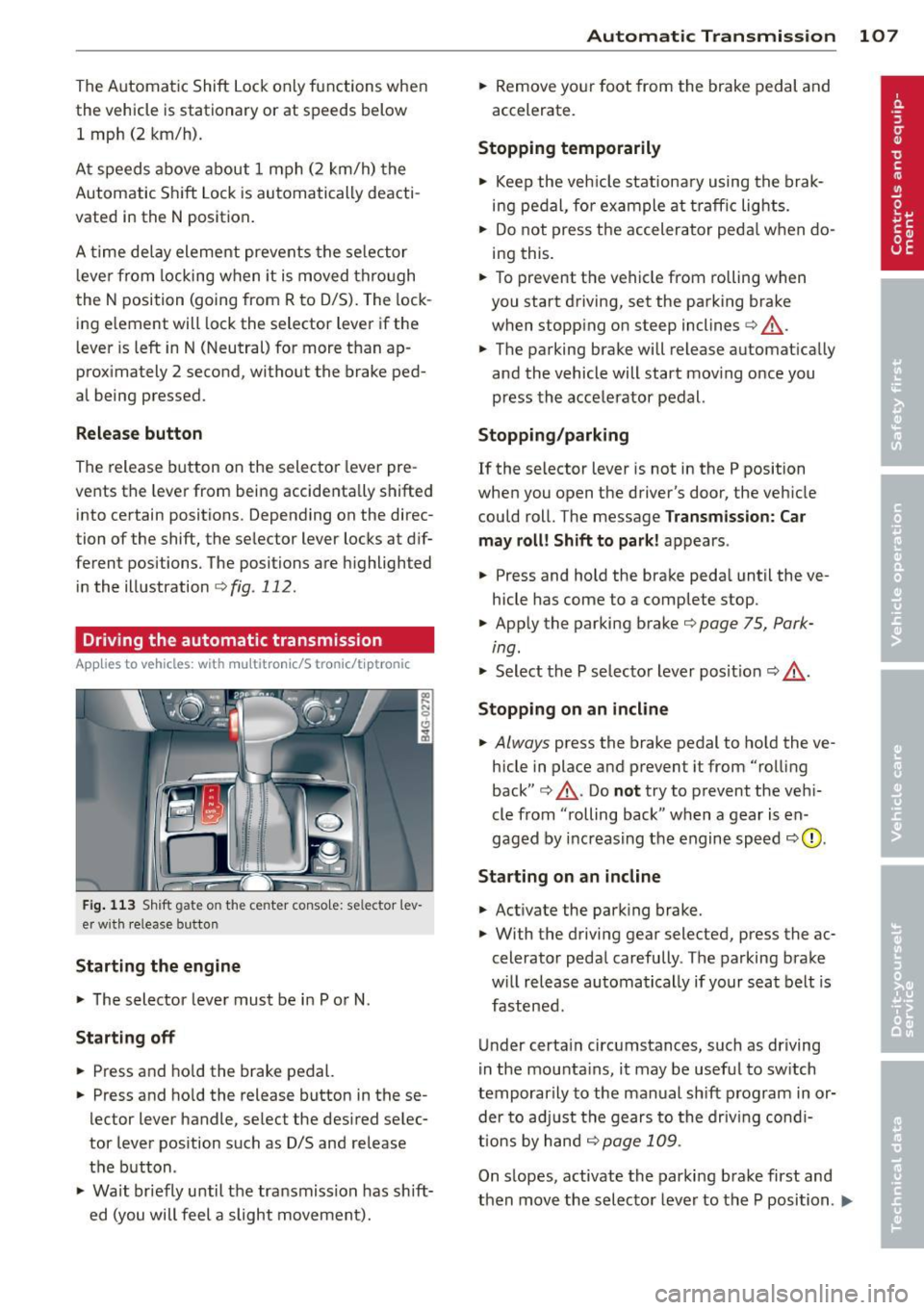
Fig. 1 13 Sh ift gate on the center conso le: se lector l ev
er w it h release button
Starting the engine
.., The selector lever must be i n P or N.
Starting off
.., Press and ho ld the brake pedal.
.., Press and ho ld the release button in these
lector lever handle , select the desired selec
tor lever pos ition such as D/S and release
the button .
.., Wait br iefly until the tra nsmission has sh ift
ed (you will feel a slight movement).
Automatic Tra nsmi ssi on 10 7
.., Remove yo ur foot from the brake pedal and
accelerate.
Stopping t emporarily
.., Keep the veh icle stationa ry using the brak
ing pedal , for example at traffic lights.
.., Do not press the accelerator peda l when do
i ng this .
.., To prevent the vehicle from rolling when
you start driving, set the parking brake
when stopp ing on steep inclines¢,&. .
.., The parking brake will release automat ically
and the vehicle will start mov ing once you
press the accelerator pedal.
Stopping /parking
If the selector leve r is not in the P position
when you open the driver's door, the veh icle
could roll. The message
Transm ission: Car
may roll! Shift to park !
appears.
.., Press and hold the brake peda l until the ve
hicle has come to a complete stop .
.., App ly the parking brake ¢
page 75, Park-
ing.
"' Select the P selecto r lever pos it ion <=:> ,&. .
Stoppin g on an incline
.., Always press the brake pedal to ho ld the ve
hicle in place and prevent it from "rolling
back" ¢,&. . Do
no t try to prevent the veh i
cle from "rolling back " when a gear is en
gaged by increasing the engine speed
<=:> 0 .
Starting on a n incline
.., Activate the park ing brake.
.., With the driving gear selected, press the ac
celerator peda l carefully . The parking brake
w ill release automatically if your seat belt is
fastened .
Under certa in circumstances, such as driving
i n the mounta ins , it may be usefu l to sw itch
temporarily to the manual sh ift p rogram in or
der to ad just the gears to the driv ing cond i
ti ons by hand
<=:> page 109 .
On slopes, activate the parking brake first and
then move the selecto r lever to the P position .
Ill-
Page 110 of 306
108 Automatic Transmission
This prevents too much stress from being placed on the locking mechanism.
multitronic transmission : Your vehicle is
equipped with
hill hold assist allowing you to
start while on an incline. The system is acti
vated when the brake pedal is pressed down
and held
for a few seconds. T he brake pres
sure will hold for
o moment after the brake
pedal loosens to prevent the vehicle from roll
ing backwards while starting up .
A WARNING
-The vehicle can also roll when the engine
is stopped .
- Unintended vehicle movement can cause serious injury.
- Never leave your vehicle with the engine
running while in gear. If you must leave
your vehicle when the engine is running, activate the parking brake and move the
selector lever to P.
- Power is still transmitted to the wheels
when the engine is running at idle. To
prevent the vehicle from "creeping ", you
must keep your foot on the brake when
the engine is running and the selector lever is in D/S or R or "tiptronic" mode is
selected.
- Do not press the accelerator pedal when
changing the selector lever position
while the vehicle is stationary and the
engine is running.
- Never shift into R or P while driving.
- Before driving down a steep slope, re-
duce your speed and shift into a lower
gear with "tiptronic".
- Do not ride the brakes or press the brake
pedal too often or too long when driving
down a hill. Constant braking causes the
brakes to overheat and substantially re
duces braking performance, increases
braking distance or causes complete fail
ure of the brake system.
- To prevent the vehicle from rolling back
when stopping on inclines, always hold it
in place with the brake pedal or parking
brake. -
Never hold the vehicle on an incline with
a slipping clutch. The clutch opens auto
matically when it becomes too hot from
the overload . An indicator lamp
[O] illu
minates and a driver message appears
~ page 110 when the clutch is overload
ed.
- If the engine must remain running, never
have any driving position engaged when
checking under the hood. Make sure the
selector lever has securely engaged and
is locked in P with the parking brake set
~ page 219, Engine comportment. Oth
erwise, any increase in engine speed may
set the vehicle in motion, even with the
parking brake applied.
(D Note
- 5 tronic ®- and tiptronic transmission :
When stopping on an incline, do not try
to hold the vehicle in place by pressing
the accelerator pedal while a driving gear
is selected . This can cause the transmis
sion to overheat and can damage it. Acti
vate the parking brake or press the brake
pedal to prevent the vehicle from rolling .
- 5 tronic ®- and tiptronic transmission : Al
lowing the vehicle to roll when the en
gine is stopped and the selector lever is
in N will damage the transmission be
cause it is not lubricated under those cir
cumstances.
(D Tips
For safety reasons, the parking brake is re
leased automatically only when the driv
er's safety belt is engaged in the buckle.
Hill descent control
Applies to vehicles: with mult itronic/5 tronic/tiptronic
The hill descent control system assists the
driver when driving down declines.
Hill descent control is activated when these
lector lever is in D/S and you press the brake
pedal. The transmission automatically selects .,.
Page 114 of 306
112 Parking system s
Parking systems
General information
A ppl ies to vehicles: with pa rk in g system plus/ rear view
camera/peripheral cameras/par king ass istant
Depending on your vehicle's equ ipment, vari
ous parking aids will help yo u when pa rk ing
and maneuvering.
The
pa rking sy stem plu s assists you when
pa rking by audib ly and visually indicat ing ob
jects detected
in front of and behind t he vehi
cle
~ page 113.
The rear vie w c am era shows the area behind
the vehicle in the Infotainment d isp lay. This
d isplay assists you when you are c ross o r par
allel parking
q page 114. In addit ion, you are
assisted by the functions from the parking
system plus
~ page 113 .
The periph eral camera s ass ist you with park
ing and maneuvering. You are aided by var ious
cameras depending on the vehicle equipment leve l¢
page 117. In addition, you are assist
ed by the function s from the parking sy stem
p lus ¢ page 113.
A WARNING
- Always look for traff ic and check the area
around your vehicle by looking at it di
rectly as well . The parking system cannot
replace the d rive r's attent ion. The dr iver
is always respons ible for safety during
par king and for all other maneuvers.
- Please note that some surfaces, such as
clothing, are not detected by the system.
- Sensors and cameras have blind spots in
w hich peop le and objects cannot be de
tected. Be especially cautious of children
and animals.
- T he sensors can be displaced by impacts
or damage to the radiato r grille, bumper,
wheel housing and the unde rbody. The
parking systems may become impaired
as a result . Have your authorized Audi
dealer or qualified workshop check their
function. -
Make sure the sensors are not covered by
stickers, deposits or any other obstruc
tions as it may impair the sensor func
tion . For information on cleaning, refer
to
~ page 211 .
(D Note
- Some objects are not detected by the
system under certain c ircumstances :
- Objects su ch as ba rrie r chains, trailer
draw bars, vertical po les or fences
- Objects above the senso rs such as wall
extensions
- Objects w ith specific surfaces or struc
tures su ch as chain link fences or pow
der snow.
- If you contin ue driving closer to a low- ly
ing object, it may disappear from the
sensor range. Note that you w ill no lon
ger be warned abo ut this obstacle.
(j) Tips
- The system may provide a wa rning even
tho ugh there are no obs tacles in the cov
erage area in some situations, such as:
- certain road surfaces or for long grass.
- externa l ultrasonic sources e.g. from
clean ing vehicles.
- heavy rain, snow or thick vehicle ex
haust.
- We recommend that you practice park
ing in a traff ic-free location or park ing
lot to become familiar with the system.
When doing this, there should be good light and weather cond itions .
- You can change the volume and pitch of
the s ignals as we ll as the display
¢page 122.
- Please refer to the instructions for tow
ing a trailer
¢ page 123 .
-What appears in the infotainment dis
play is somewhat time-delayed .
Page 115 of 306
Parking system plus
Description
Applies to vehicles: with parking system plus
Audi parking system plus provides audio and
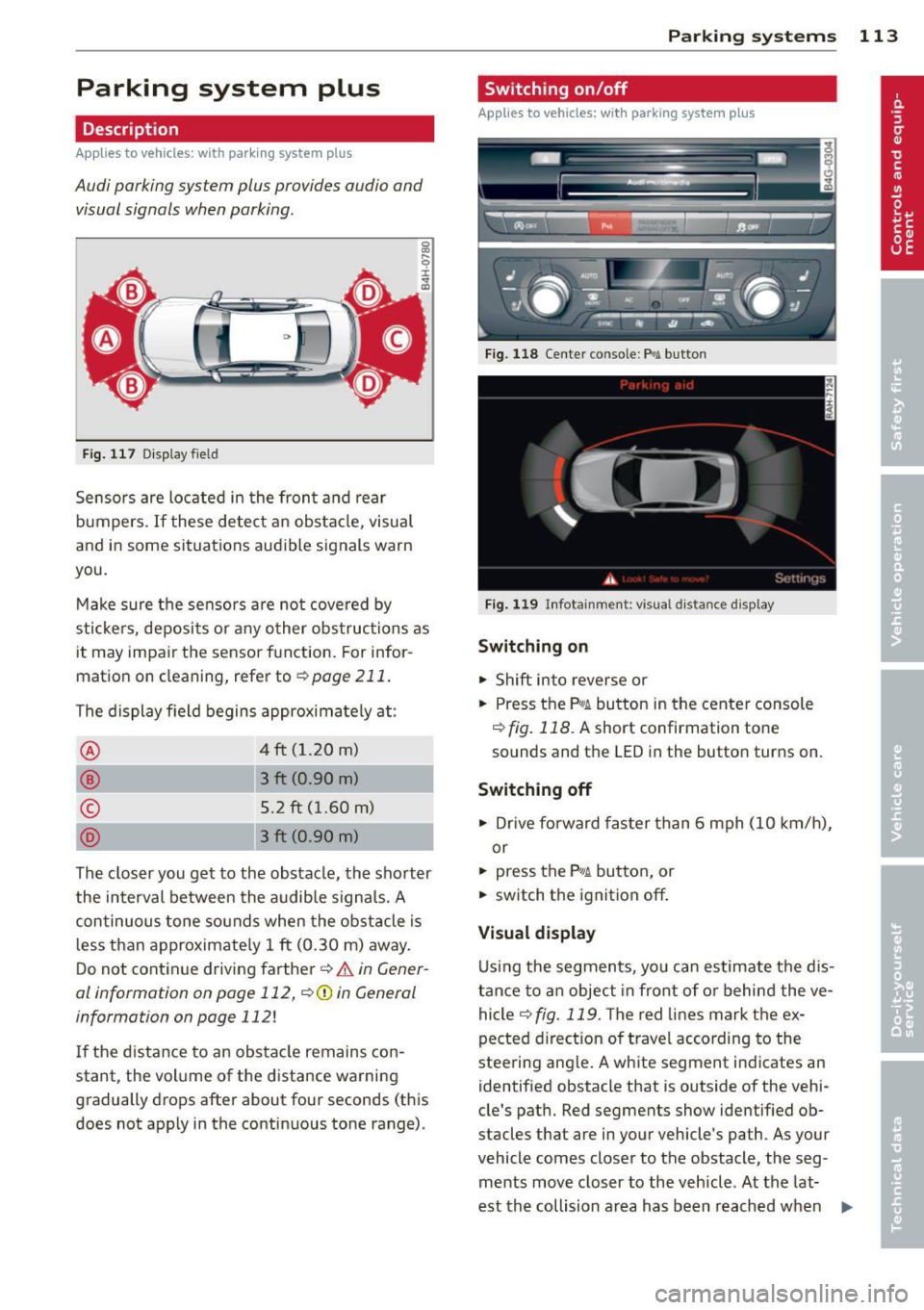
visual signals when parking.
Fi g. 1 17 Dis p lay f ie ld
Sensors are located in the front and rear
bumpers.
If these detect an obs tacle, visual
and in some situations aud ible signals warn
you.
M ake sure t he sensors are not cove red by
s t icke rs, deposits or a ny o ther obs truc tions as
it may impair the sensor f unction. For infor
matio n on cleaning, refer to
c::> page 211 .
The display field begins approximately at:
® 4 ft (1.20 m)
® 3 ft (0.90 m)
© 5 .2 ft (1.60 m)
D 3 ft (0.90 m)
The clos er you get to the obstacle, the sho rter
the interval between the audible signa ls. A
con tinuous tone sounds when the obstacle is
l ess than approximate ly 1 ft (0.30 m) away .
Do not continue driving farther¢
& in Gener
al information on page 112, ¢(Di n General
information on page
112 !
If the d istance to an obstacle remains con
stant, the volume of the d istance wa rning
gradually drops after about four seconds (this
does not apply in the continuous tone range).
P arking systems 113
Switching on/off
Applies to vehicles: with parking system plus
F ig. 118 Ce nter co nso le :
Pv! button
Fig . 1 19 Infota in m ent : vi su al d is ta n ce d isplay
Switching on
.,. Shift into reverse or
.,. Press the
P,,1~ bu tton in the center console
c::> fig. 118 . A short confirmation tone
sounds and the LED in the button turns on .
Switching off
.,. Drive fo rward fas ter than 6 mph (10 k m/h),
or
.,. press the P"1~ butto n, or
.,. switch the ignition
off .
Visual d isplay
U sing the segments, yo u can estimate the dis
tan ce to an object in front of o r behind the ve
hicle ¢
fig. 119 . The red lines mark the ex
pected di rect ion of travel according to the
steering ang le . A wh ite segment indicates an
identified obstacle that is outside of the vehi
cle's pat h. Red segments show identified ob
stacles that are in your vehicle's path . As your
vehicle comes close r to the obstacle, the seg
ments move closer to the vehicle . At the lat-
est th e collision area has been reached when ..,.
Page 116 of 306
114 Parking systems
the next to last segment is displayed. Obsta
cles in the collision area, includ ing those out
side of the vehicle 's path, are shown in red. Do
not continue driving farther forward or in re
verse
q .&. in General informa tion on
page 112 , q (f)in General information on
page 112 .
Rear view camera
Introduction
Applies to vehicles: with parki ng system p lus wit h rear
view camera
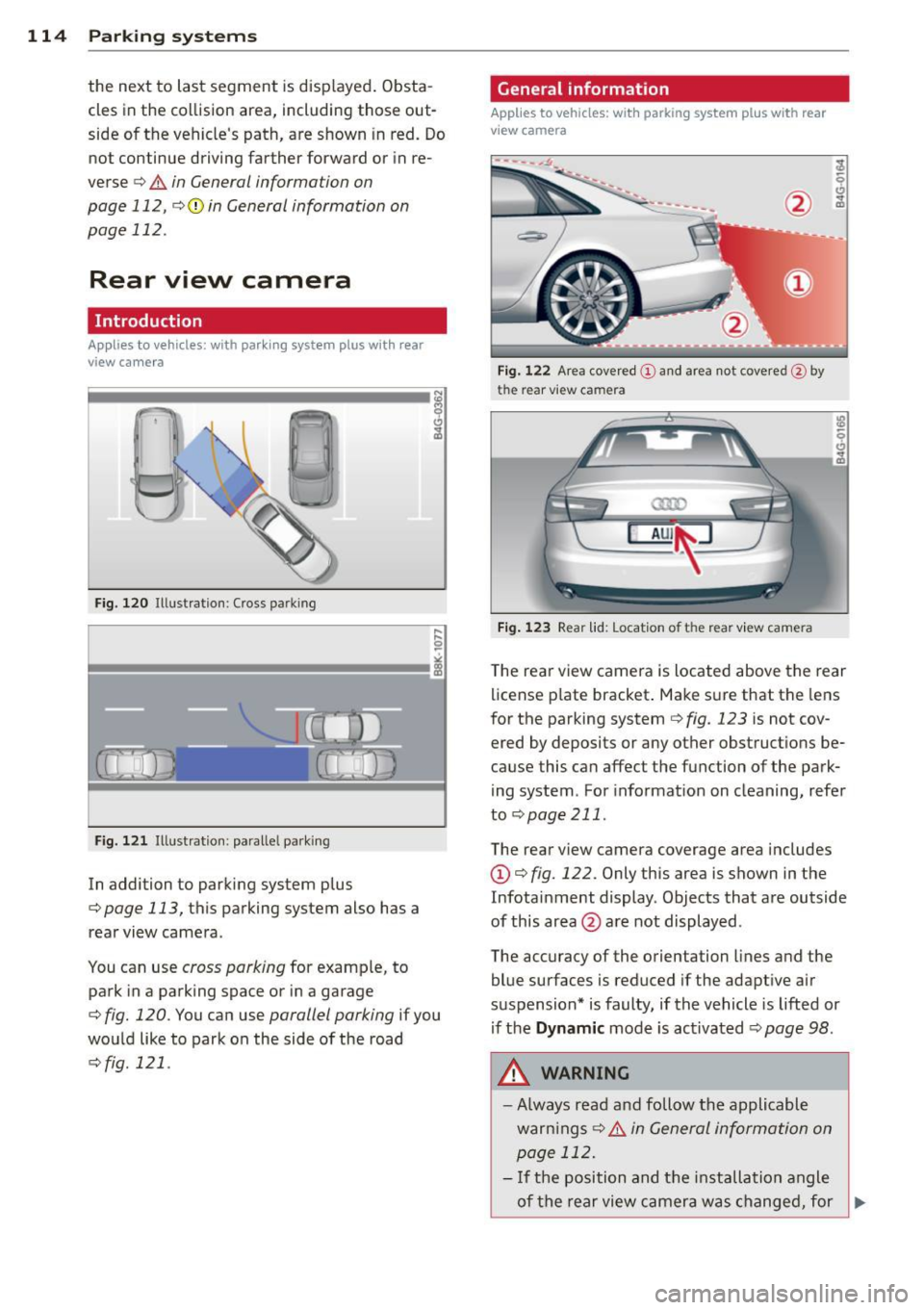
Fig. 120 Ill ustration: Cross parking
Fig. 121 Illustration: parallel park ing
In addition to parking system plus
q page 113, this parking system also has a
rear view camera .
You can use
cross parking for example, to
park in a parking space or in a garage
q fig. 120. You can use parallel parking if you
would like to park on the side of the road
r::;, fig . 121 .
General information
Applies to vehicles: with parking system plus with rear
v iew camera
Fig. 122 Area covered (D and area not covere d@ by
t he r ear v ie w ca mera
Fig. 123 Rea r lid : Locatio n of th e re ar view ca mera
The rear view camera is located above the rear
license plate bracket. Make sure that the lens
for the parking system
q fig . 123 is not cov
ered by deposits or any other obstructions be
cause this can affect the function of the park
ing system . For information on cleaning, refer
to
q page 211.
The rear view camera coverage area includes
(D q fig. 122 . Only this area is shown in the
Infotainment display . Objects that are outside
of this area @are not displayed.
The accuracy of the orientation lines and the
blue surfaces is reduced if the adaptive air
suspension* is faulty, if the vehicle is lifted or
if the
Dynamic mode is activated r::;, page 98 .
A WARNING
-
- Always read and follow the applicable
warn ings
r::;, .&. in General information on
page 112.
-If the position and the installation angle
-
of the rear view camera was changed, for ~