remote control AUDI A6 2013 User Guide
[x] Cancel search | Manufacturer: AUDI, Model Year: 2013, Model line: A6, Model: AUDI A6 2013Pages: 306, PDF Size: 76.92 MB
Page 66 of 306
64 Warm and cold
Warm and cold
Climate controls
Description
A pplies to vehicles: with three-zone cl imate cont ro l or
four-zone a uto mat ic climate contro l
The climate control system warms, cools and
adds humidity to the air in the vehicle interior. It is the most effective when the windows and
sunroof* are closed .
If the temperature inside
the parked veh icle becomes very warm, open
ing the w indow br iefly will speed up the cool
ing process.
In all heating mode functions except
defrost,
the blower on ly switches to a highe r speed
once the engine coolant has reached a certain
temperature.
Condensat ion from the cooling system can
d rip and form a puddle of wate r under the ve
h icle. This is normal and does not mean there
is a leak .
Pollutant filt er
The pollutant filter removes pollutants such
as dust and po llen from the air.
The air pollutants filter must be changed at
the intervals spec ified in your Warranty
&
Maintenance booklet, so that the air condi
tioner can properly work .
If you drive your vehicle in an area with high
a ir pollution, the filter may need to be
changed more freq uently than specified in
your Aud i Warranty & Ma intenance booklet. If
i n doubt, as k your author ized Audi Se rvice Ad
visor for adv ice.
K ey coded setting s
Three-zone climate control: The blower set
ting and air distribution are stored automati
cally and assigned to the remote control key
that is in use.
Four-zone automatic climate control: The cli
mate control settings are automatica lly stor
ed and assigned to the remote control key
that is in use.
A WARNING
Reduced visibility is dangerous and can
cause accidents.
-
- For safe driving it is very important that
all windows be free of ice, snow and con
densat ion .
- Comp lete ly fami liarize yourse lf with the
proper use and funct ion of the heat ing
and ventilation system and especially
how to defog and defrost the w indows.
- Never use the windshield wiper/washer system in freez ing weather unt il you
have wa rmed the windshie ld first, using
the heating and ventilation system. The
washer sol ution may freeze on the w ind
shie ld and red uce visib ility.
(D Note
- If you suspect that the air conditioner
has been damaged, switch the system
off to avoid further d amage and have i t
inspected by a q uali fied dealership .
- Repairs to the Audi air conditioner re
quire speci al technical know ledge and
special tools. Contact an authorized Audi
dea ler fo r ass istance.
@ For the sake of the environment
By reducing the amount of f uel you use,
you also red uce the amount of pollutants
emitted into the air.
(D Tips
- Keep the air intake s lo ts (in front o f the
windshield) free from ice, snow and de
bris in order to maintain the proper func
tion of the climate control system.
- The energy management system may
switch the seat heating* or rear window
defroster off temporar ily. These systems
are available again as soon as the energy
balance has been restored .
-Air escapes through vents under the rear
w indow. When plac ing items of cloth ing
on the luggage compartment cover, en
sure that the openings are not covered.
Page 71 of 306
(D Note
To avoid damage to the heating elements in the seats, do not kneel on the seats or
place heavy loads on a small area of the
seat.
Setup
App lies to vehicles: with four-zone a utomat ic climate con·
tro t
The climate con trol system setup is accessed
through the MMI.
" Select: ICARI function button > ( Car) * sys-
tems con trol button > AC.
Rear cabin settings*
When this function is selected, all settings for
the rear can be adjusted through the climate
control system in the cockpit. The climate
control system settings cannot be adjusted in
the rear seat at the same time. This function
switches
off after a certain period of time or
when one of the dials in the cockpit is press
ed .
Auto recirculation*
The sensitivity level of the automatic rec ircu
la tion mode can be set at various leve ls from
off to sensitive. The recirculation mode is con
trolled automat ica lly. You must press the~
button if fog forms on the windows.
Footwell temperature
You can adjust the footwell temperature so
that it is cooler or warmer.
AC mode
The strength of the airflow can be adjusted to
light, med ium or strong.
Warm and cold 69
Steering wheel heating
Applies to vehicles: wit h hea ted stee ring wheel
The steering wheel rim con be heated .
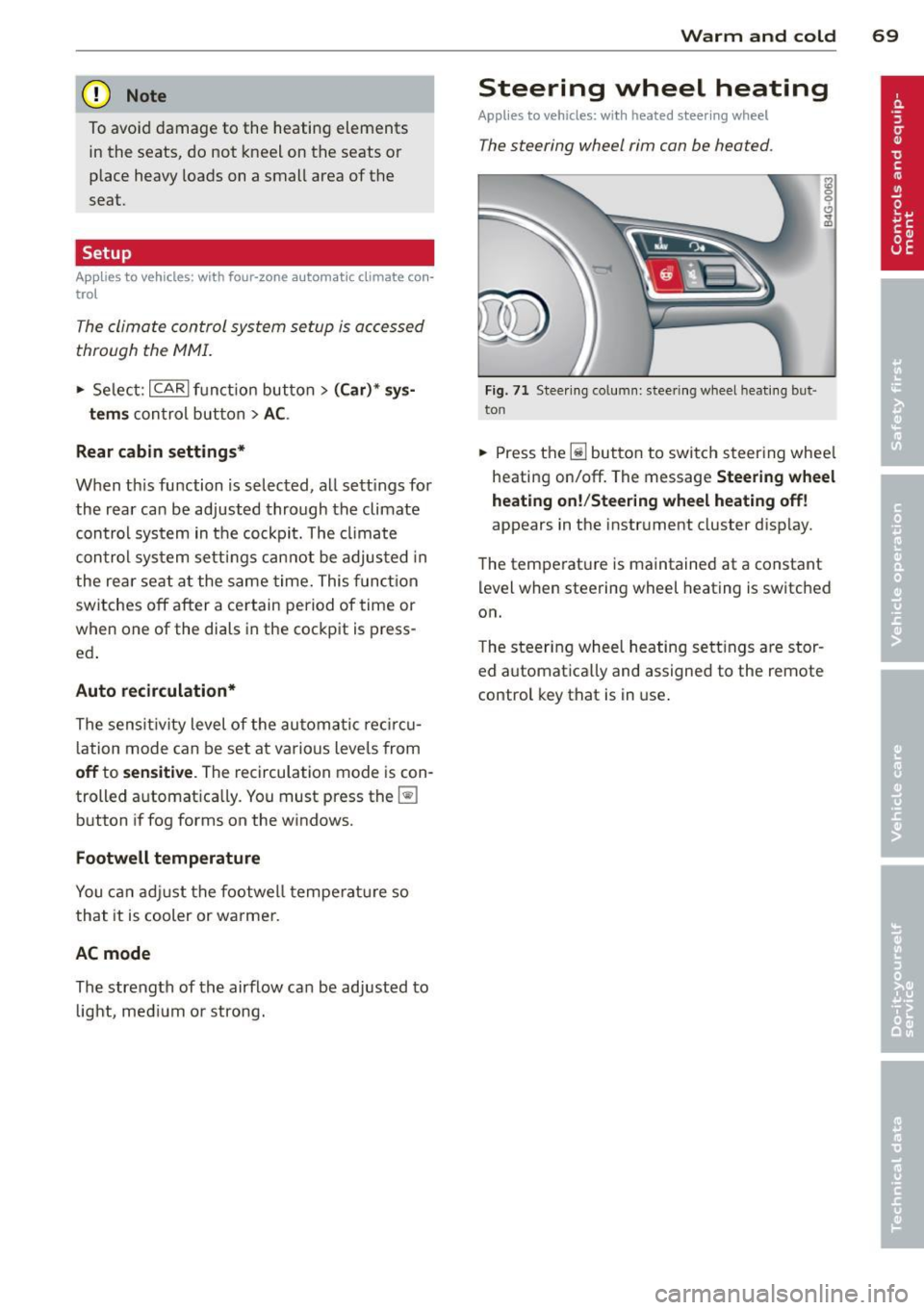
Fig. 71 Steering column: steering wheel hea tin g but ·
ton
.. Press the lil button to switch steering whee l
heating on/off. The message
Steering wheel
heating on! /Steering wheel heating off!
appears in the instrument cluster disp lay.
The temperat ure is maintained at a constant
level when steering wheel heating is switched
on.
T he steer ing wheel heating settings are stor
ed automat ica lly and assigned to the remote
control key that is in use .
Page 89 of 306
Audi adaptive cruise control and braking guard 87
then maintains the stored distance. If the ve
hicle ahead accelerates , adaptiv e cr uis e con
trol will also accelerate up to the stored
speed.
The higher the speed, the greater the distance
in yards (meters)
Q .&. . The Distance 3 setting
is recommended .
The distances prov ided are spec ified values.
Depending on the driving situation and the
how the vehicle ahead is driving, the actual
d istance may be more or less than these tar
ge t distances.
The various symbols for the time increments
appear briefly in the information line @
¢fig. 87when you change the settings.
~-~ --- Distance 1: This setting corre
sponds to a distance of 92 feet/28 meters
when traveling at 62 mph (100 km/h), or a
time interval of 1 second .
~-- ~-- Distan ce 2: This setting corre
sponds to a distance of 118 feet/36 meters
when traveling at 62 mph (100 km/h), or a
time interval of 1.3 seconds .
~--- ~-Distance 3: This setting corre
sponds to a distance of 164 feet/SO meters
when traveling at 62 mph (100 km/h), or a
time interval of 1.8 seconds .
~---- ~ Distance 4: This setting corre
sponds to a distance of 210 feet/64 meters
when traveling at 62 mph (100 km/h), or a
time interval of 2.3 seconds .
.&_ WARNING
Following other vehicles too closely in
creases the risk of co llisions and serious
personal injury.
- Setting short distances to the traffic
ahead reduces the t ime and distance
available to br ing your vehicle to a safe
stop and makes it even more necessary
to pay close attention to traffic.
-
-Always obey applicable traffic laws, use
good judgment, and select a safe follow
ing distance for the traffic, road and
weather conditions .
@ Tips
-Distance 3 is set automatically each time
you switch the ignition on.
- Your standard settings are automatically
stored and assigned to the remote con
trol key being used.
Selecting the driving mode
Applies to vehicles : wit h Audi adapt ive cr uise contro l
.,. Select the desired driving mode in drive se
lect ¢
page 98.
@ Tips
Your settings are automatically stored and
assigned to the remote control key being
used.
Prompt for driver intervention
Applies to vehicles: with A ud i ada ptive cr uise contro l
Fig. 91 Ins trumen t cluster: req ues t fo r drive r inte rven
t io n
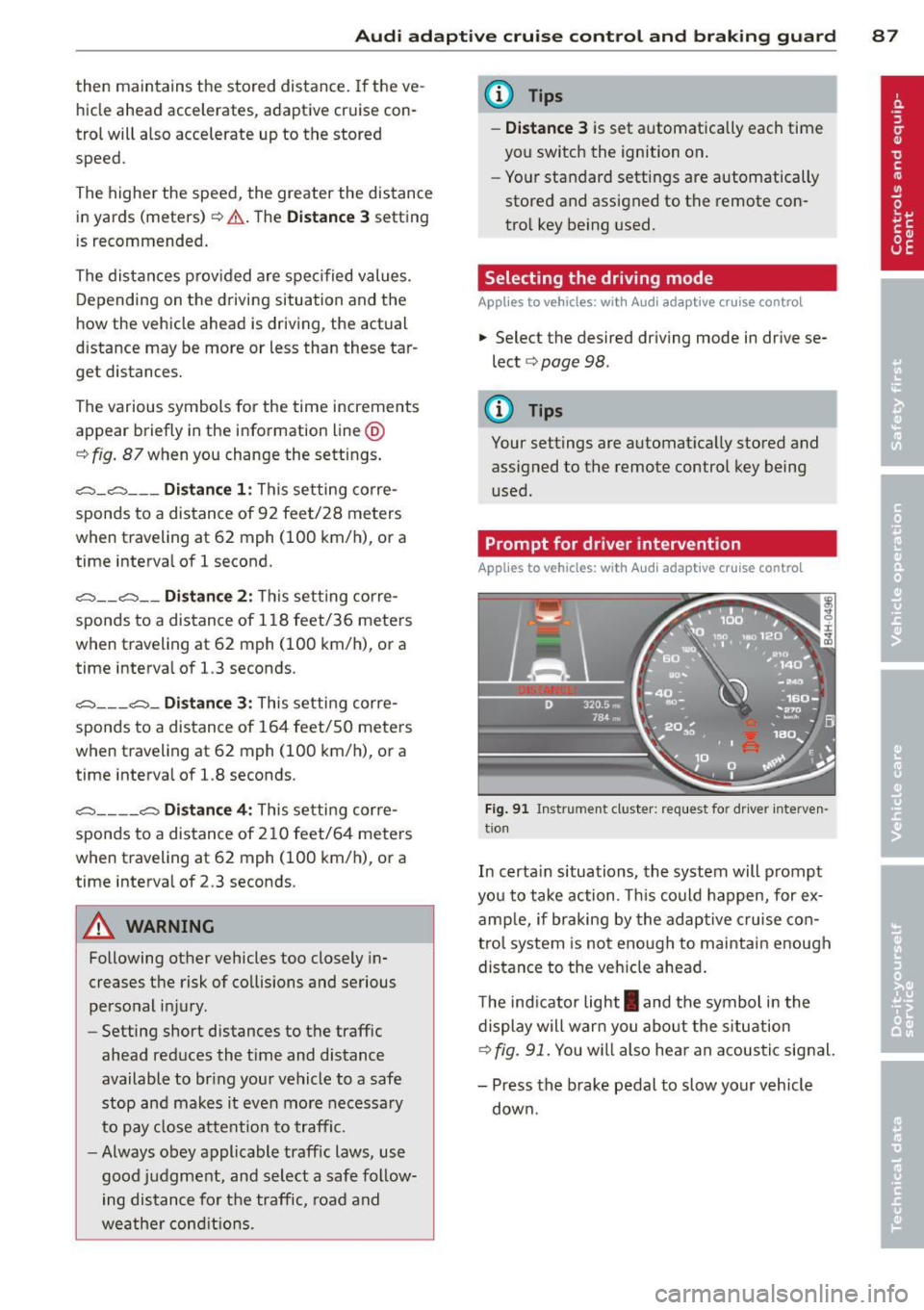
In certain situations, the system will prompt
you to take action . Thi s could happen, for ex
amp le, if braking by the adaptive cruise con
trol system is not enough to maintain enough
distance to the vehicle ahead .
T he ind icator light
I and the symbol in the
display will warn you about the s ituation
¢ fig. 91. You w ill also hea r an acoustic signal.
- Press the brake pedal to slow your vehicle
down.
Page 91 of 306
Audi adaptive cru ise control and brakin g guar d 89
(end of a traffic jam or veh icle t hat has
br oken down in traffic).
- Alw ays remember that the radar sensor
for the b raking guard works only within
defined detection and ra nge limits that
may prev ent the proper det ection of oth
er ve hicles.
- The ra dar sensor's function and range
can be reduced by rain, snow and heavy
spray. Moving vehicles up ahead may not
be promptly detected or may not be de
tected at al l.
- Reflective surfaces includ ing crash barr i
ers or tunnel ent rances may impair the
function of the radar sensor.
(0 Tips
- You can cance l the braking w ith increas
i ng fo rce that is initiated by the system
by braking yo urself, by accelerating no
ticeab ly or by swerving.
- Brak ing guard error messages
~ page
89.
-Keep in mind that braking guard can
brake unexpectedly. Always secure any
ca rgo or objec ts that you are transport
i ng to reduce t he risk of d amage o r in
Ju ry.
Settings in the MMI
Appl ies to vehicles: with Audi adaptive cruise co ntrol
~ Se lect: ICARlf unct ion button> ( Car )* sys
tems
contro l button > D river assi st > Audi
braking guard .
System -
Switch braking g ua rd On and Off .
When you sw itch the ignition on, the message
Audi braking guard off appears if the system
is switched off.
Early warning -The distance and approac h
warn ings in the display can be switched
On /
Off .
(D Tips
- Your settings are automatically stored
and assigned to the remote control key being used at the time the settings
are
ma de.
- If you switch the ES C to spo rt mode,
braking g uard switches off a utomatica lly
~page
194.
- Switch braking guard off when you a re
loading the vehicle onto a vehicle carrier,
t rain, ship o r other type of transporta
t ion. This can prevent undesired warn
ings from the braking guard system.
Messages
App lies to vehicles : wit h Audi ada ptive c ruise contro l
ACC unavail able
ACC and braking guard: unavailable
T he system cannot detect mov ing vehicles up
ahead co rrec tly and is switched off. The sen
sors have been displaced or a re not worki ng
properly . The Audi pre sense func tions may a l
so be affected. Drive to yo ur autho rized Audi
dealer or authorized A udi se rvice facility im
med iate ly to have the malfunction corrected.
ACC: unavailable at this time. No sensor vi
sion
ACC and braking guide: unavailable at this
time . No sensor vision
Th is message appears if the senso r view is ob
structed, for examp le by leaves, snow, heavy
sp ray or d irt. C lean the sensors~
fig. 82.
ACC: unava ilabl e at this time . Inclin e too
steep
The road exceeds the max imum possible an
gle for proper adaptive cru ise control opera
tion. Adaptive cru ise con tro l is switched off .
ACC: only selector lever positions D , S or M
available
Se lect t he D/S or M selector leve r pos ition.
ACC: unavailabl e at this time . Parking brake
s et
The adaptive cr uise cont rol system switches
off automatically if the park ing b rake is set. ..,.
Page 99 of 306
@ Tips
-Side assist is not active while you are
making the adjustment.
- Your settings are automatically stored
and assigned to the remote control key
being used.
Driver messages
Applies to vehicles: with side assist
If side assist switches off by itself, the LED in
the button turns off and a message will ap
pear in the instrument cluster display:
Audi side assist: Currently unavailable. No
sensor vision
The radar sensors' vision is affected. Do not
cover the area in front of the sensors with bike
wheels, stickers, dirt or other objects. Clean
the area in front of the sensors, if necessary
c>fig. 100.
Audi side assist: Currently unavailable
Side assist cannot be switched on temporarily
because there is a malfunction (for example,
the battery charge level may be too low).
Audi side assist: System fault!
The system cannot guarantee that it will de
tect vehicles correctly and it is switched off .
The sensors have been displaced or are faulty.
Have the system checked by an authorized
Audi dealer or authorized Audi Service Facility
soon.
Audi side assist: Unavailable when towing.
Side assist switches off automatically when a
factory-installed trailer hitch is connected to
the electrical connector on the trailer. There is
no guarantee the system will switch off when
using a retrofitted trailer hitch. Do not use
side assist when towing a trailer.
Audi side assist 97
Page 124 of 306
122 Park in g s ystems
Trailer view
Ap plies to vehicles: with par king system p lus and tra iler
hitch
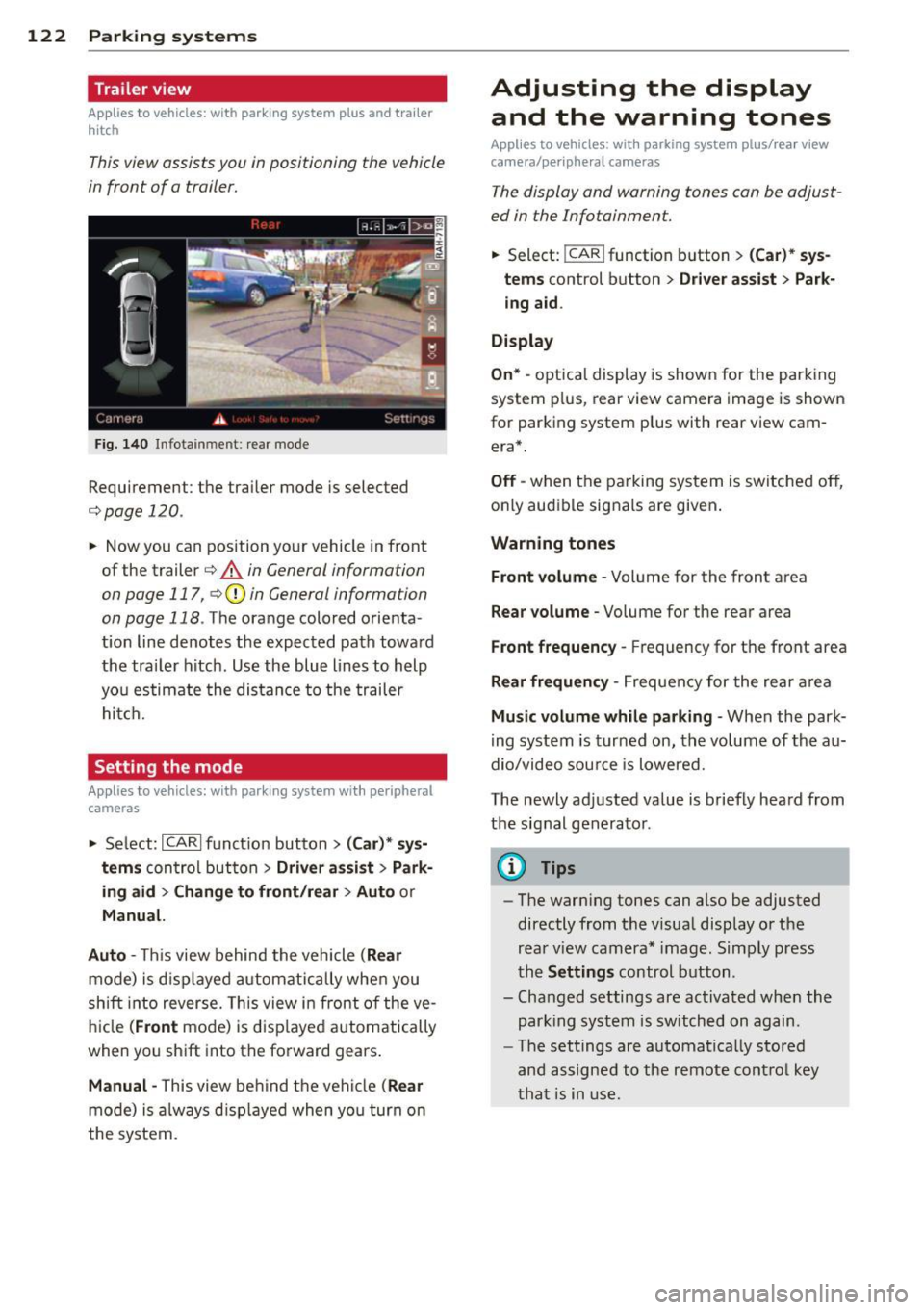
This view assists you in positioning the vehicle
in front of a trailer.
F ig. 1 40 Infotainment: rear mode
Requirement: the trailer mode is selected
c:;,page 120.
.. Now you can position your vehicle in front
of the trailer
c:;, .&. in General information
on page 117, c:;,Q) in General information
on page 118 .
The orange colo red orienta
t ion line denotes the expected path toward
the trai ler hitch . Use the blue lines to help
yo u estimate the distan ce to the trailer
hitch.
Setting the mode
Ap plies to veh icles: with par king system wi th peripheral
cameras
.. Select: ICARI funct ion button > ( Car )* sys
tem s
control button > Driv er a ssis t > Park
ing aid > Ch ange to front /rea r> A uto
or
Manu al.
Aut o -
This view behind the vehicle ( Rear
mode) is d isplayed a utomatically when you
shift into reverse. This view in front of the ve
hicle
( Front mode) is d isp layed automatically
when you sh ift into the forward gears .
Manual -This view behind the vehicle (Rear
mode) is a lways d isp layed when you turn on
the system.
Adjusting the display and the warning tones
Applies to vehicles: wit h parking syste m plus/ rea r view
came ra/ peri pheral cameras
The display and warning tones can be adjust
ed in the Infotainment.
.. Select: !CAR ! function b utton > (C ar)* sys
tem s
control button > Drive r a ssist > Par k
in g a id .
Di splay
On * -
optical display is shown for the parking
system p lus, rear view camera image is shown
for parking system plus with rear view cam era*.
Off -when the parking system is switched off,
only audible signals are given .
Warning tones
Fr ont volume -
Volume for the front area
Rear volume -Volume for the rear area
Front frequency -Frequency for the front area
Rear frequen cy -Frequency for the rear area
Mu sic v olum e wh ile parkin g -When the park
ing system is turned on, the volume of the au
dio/video sou rce is lowered.
The newly adjusted value is briefly heard from
the signal generator .
@ Tips
-The warn ing tones can also be adjusted
directly from the visual display o r the
rear v iew camera* image. Simply press
the
Setting s control button .
- Changed settings are act ivated when the
park ing system is switched on again.
- The settings are automatica lly stored
and assigned to the remote control key
that is in use .
Page 126 of 306
124 Homelin k®
Homelink ®
Universal remote
control
General information
Applies to vehicles: with Homelink® unive rsal remote
co ntrol
The Homelink universal remote control can
be programmed with hand-held transmitters
from existing equipment.
With Homelink, you can control devices such
as the garage door, security systems, house lights, etc. comfortably from the inside of you
vehicle.
Homelink makes it possible for you to replace
three different remote controls from devices in your home with one universal remote . Th is
feature works for most garage door and exte rior door moto r signals. Programming the in
d iv idual remote control fo r you r remote con
trol takes p lace near the center of the radiator
grille. There is a control module attached at
this location .
A one-t ime programm ing of the sensor mus t
be performed before you are able to use sys
tems w ith Homelink.
A WARNING
- Never use the Homelink ® transmitter
with any garage door opener that does have not the safety stop and reverse fea
ture as required by federal safety stand
ards. This includes any garage door open
er mode l manufact ured before April 1,
1982.
- A garage door opener which cannot de
tect an object, signaling the door to stop
and reverse does not meet current feder
al safety s tandards. Us ing a garage doo r
o pener witho ut these fea tures increases
risk of serious inj ury or death.
- F or safety reasons never release t he
parking brake or s tart the engine while
anyone is standing in front of the vehicle .
- A garage door or an est ate gate may
sometimes be set in motion when the Homelink
® remote control is being pro
grammed. If the device is repeatedly ac
tivated, this can overstrain motor and
damage its electrica l components - an
overheated motor is a fire hazard!
- To avo id possible injuries or property
damage, please always make absolutely
certa in that no persons or objects are lo
cated in the rang e of motion of any
equ ipme nt being ope rated.
(0 Tips
- If you would like add itional information
on the Home Link® Unive rsal Transce iver,
Homelink compatib le products, or to
purc hase other accessories s uch as the
HomeL ink® Light ing Package, please
contact Homelink at 1-800 -355 -3515 or
on the Internet at www.homelink .com.
- For Declaration of Comp liance to United
States FCC and Ind ustry Canada reg ula
tions
¢page 288.
-For security reasons, we recommend that
you clear the programmed b uttons be
fore selling the vehicle .
Operation
Applies to vehicles: wit h Ho meli nk
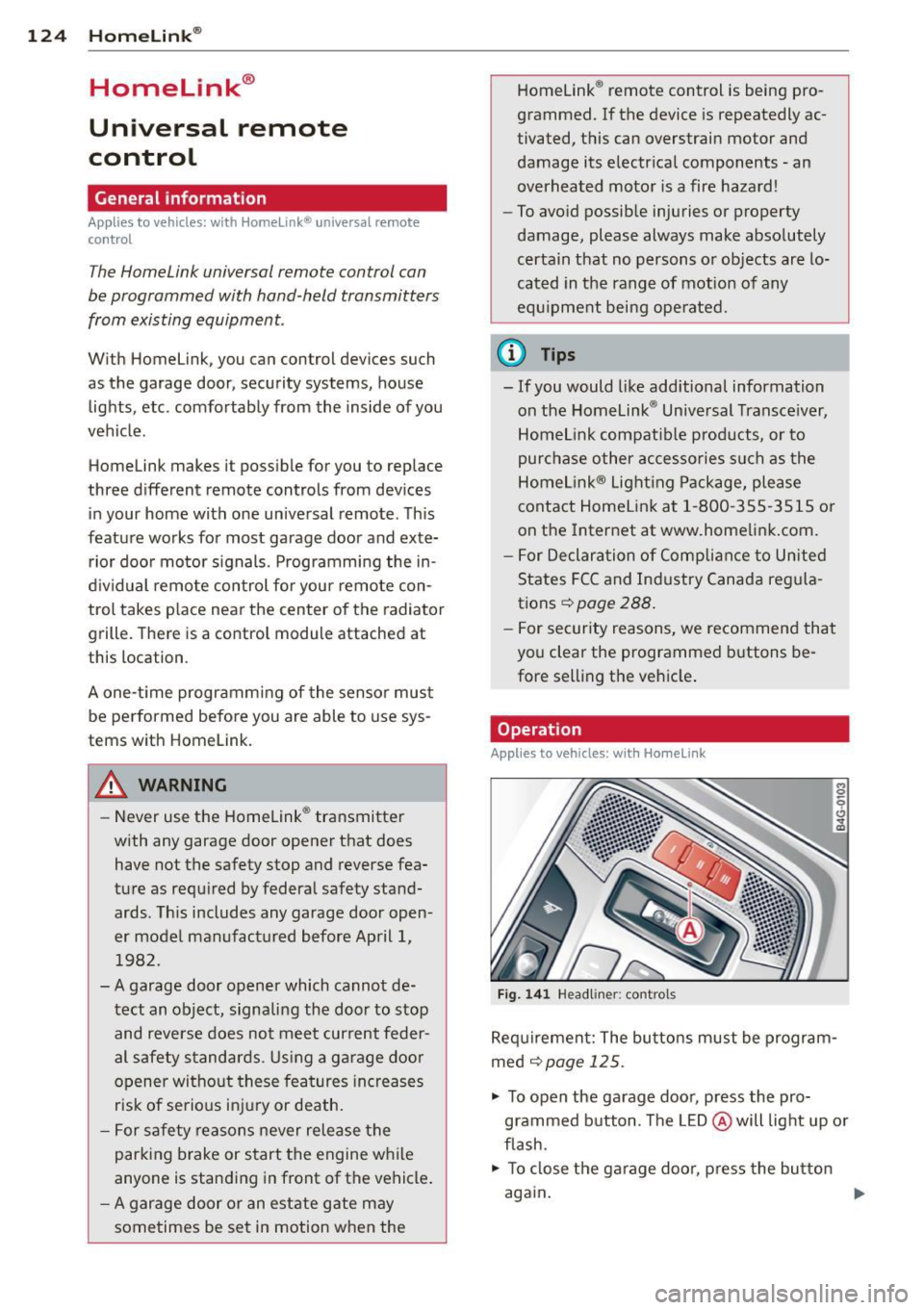
Fig . 14 1 Headliner: controls
M 0
9 (!)
~
Req uirement: The bu tto ns must be program
med ¢
page 125 .
"' To open the garage doo r, press the pro
grammed b utton. The LED @ will light up o r
flash.
"' To close the ga rage doo r, press the button
again .
Ill>
Page 127 of 306
@ Tips
To open the garage door, press the button,
but do not press it for longer ten seconds
or the Homelink modu le w ill switch to
programming mode .
Programming the transmitter
Applies to vehicles : with Home Link
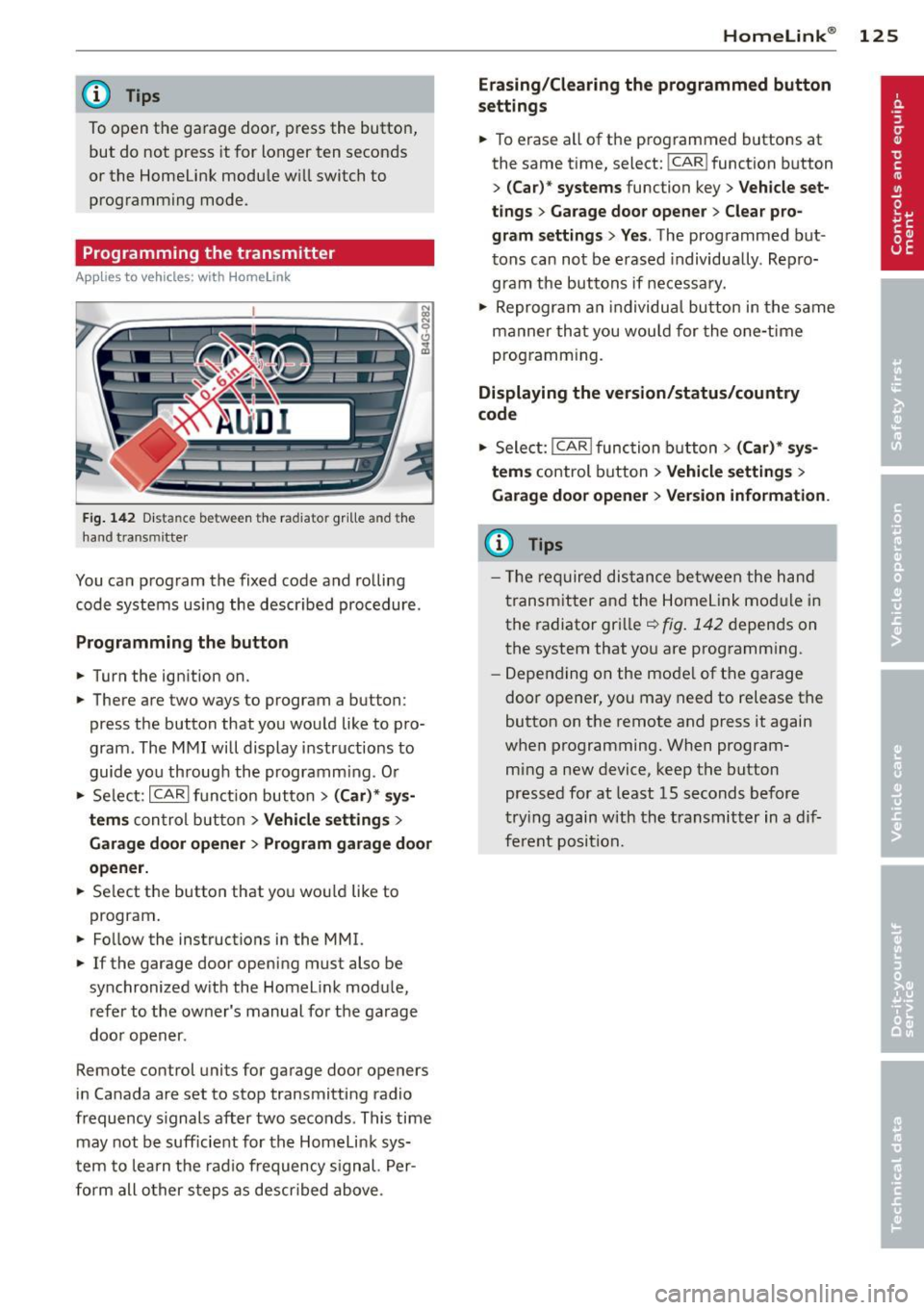
Fig. 142 Dist an ce be tween the ra diato r gr ille a nd the
hand t ransm itter
You can program the fixed code and rolling
code systems using the described procedure.
Programming the button
.. Turn the ignition on.
.. There are two ways to program a button:
press the button that you would like to pro
gram . The MMI will display instructions to
guide you through the programm ing . O r
.. Se lect: ICARlfunction button>
( Car) * sys
tems
con trol button > Vehicle settings >
Garage door opener > Program garage door
opener .
.. Se lect the button that you wou ld like to
program .
.. Fo llow the instructions in the MMI.
.. If the garage door opening must also be
synchronized with the Homelink module,
refer to the owner's manual for the garage
door opener .
Remote control units for garage door openers
in Canada are set to stop transmitting radio
frequency s ignals after two seconds . This time
may not be sufficient for the Homelink sys
tem to learn the radio frequency signal. Per
form all other steps as descr ibed above .
Homelink ® 125
Erasing/Clearing the programmed button
settings
.. To erase all of the programmed buttons at
the same time, select: !CAR ! function button
>
(Car)* systems function key> Vehicle set
tings
> Garage door opener > Clear pro
gram settings> Yes .
The programmed but
tons can not be erased individua lly . Repro
gram the buttons if necessary .
.. Reprogram an individual button in the same
manner that you wou ld for the one-time
programming.
Displaying the version/status/country
code
.. Select: I CAR I function button > (Car)* sys
tems
control button > Vehicle settings >
Garage door opener > Version information .
(D Tips
- The required distance between the hand
transmitter and the Homelink mod ule in
the radiator grille~
fig. 142 depends on
the system that you are programm ing .
- Depending on the mode l of the garage
door opener, you may need to release the
button on the remote and press it again
when programming. When program
ming a new device, keep the button
pressed for at least 15 seconds before
trying again with the transmitter in a dif
ferent position.
Page 290 of 306
288 Consumer Information
Technical Modifications
Our guidelines must be complied with when technical modifications are made .
Always consult an authorized Audi dealer be
fore starting work on any modifications.
This will help ensure that vehicle function,
performance and safety are not impaired
¢ &. .
Attempting to work on electronic components
and the software used with them can cause
malfunctions. Because of the way electronic
components are interconnected with each
other, such malfunctions can also have an ad
verse affect on other systems that are not di
rectly involved. This means that you risk both
a substantial reduction in the operational
safety of your vehicle and an increased wear of
ve hicle parts ¢
A:,..
Author ized Audi dealers will perform th is
wo rk in a professiona l and competent manner
or, in special cases, refer you to a professional
company that specializes in such modifica
tions .
A WARNING
Improper repairs and modifications can
change the way vehicle systems work and
cause damage to the vehicle and serious
personal injury.
-
If emergency repairs must be performed
elsewhere, have the vehicle examined by
an authorized Audi dealer as soon as possi
ble.
Declaration of
Compliance, Telecom
munication and
Electronic Systems
Radio Frequency Devices and Radiocommuni
cation Equipment User Manual Notice.
The manufacturer is not responsib le for any
radio or TV interference caused by unauthor
ized modifications to this equipment.
Devices
T he following devices each comply with FCC
Part 15.19, FCC 15.21 and RSS-Gen Issue 1:
- Adapt ive cru ise control*
- Aud i side assist*
- Cell phone package*
- Convenience key*
- Electron ic immobilizer
- Homelink ® universal remote contro l*
- Remo te control key
FCC Part 15.19
This device complies with part 15 of the FCC
Ru les. Operation is subject to the follow ing
two conditions:
(1) This device may not cause harmful inter
ference, and
(2) this device must accept any interference
received, including interference that may
cause undesired operation .
FCC Part 15.21
CAUTION:
Changes or modificat ions not expressly ap
proved by the party responsible for compli
ance could void the user's authority to operate
the equipment .
RSS-Gen Issue 1
Operation is subject to the following two con
ditions:
(1) this device may not cause interference ,
and
Page 295 of 306
Curve light ... ... ... ...... ... .. .. .... 98
Cylinder on demand System ........... 26
D
Data ...... ... ................ .. .. . 282
Data recorder . .... ..... ... ... ... ... 192
Date display . ................. .. .... 27
Daytime running lights ................ 41
Declaration of compliance Adaptive cruise control . ... .. .. .. .. . 288
Audi side assist .. ..... ... ... ... .. . 288
Ce ll phone package ................ 288
Conven ience key .......... .. .. .. .. . 288
Electron ic immobilizer .............. 288
Homelink ® universal remote contro l .. 288
Remote control key ......... .. .. .. . 288
DEF What does this mean when it appears in
the trip odometer d isplay? ... .. .. .. .. 27
D efective light bulb warning . . . . . . . . . . . 22
Defrosting (w indows)
automatic climate control .. .. .. .. .. .. 68
climate cont ro l . . . . . . . . . . . . . . . . . . . . . 66
Determi ning correct load limit ... .. ... 249
D imensions . ... .... .... ... .. .. .. ... 281
D imm ing the rearview mir ror .......... 48
Distance . . . . . . . . . . . . . . . . . . . . . . . . . . . 24
D oor/rear lid warning . . . . . . . . . . . . . . . . . 23
Doors Powe r child safety lock . . . . . . . . . . . . . . 38
Driver information system
CD/radio display . . . . . . . . . . . . . . . . . . . . 23
Door/rear lid warning . . . . . . . . . . . . . . . 23
Efficiency program . . . . . . . . . . . . . . . . . . 25
E xte rio r tempe ratu re d isplay ... .. .. .. 23
On-boa rd compute r . . . . . . . . . . . . . . . . . 24
Driver seating position ............... 127
d rive select . ... ... ..... ... .. .. .. .... 98
adaptive air s uspension/spo rt ... .. .. .. 98
Adaptive dampers . . . . . . . . . . . . . . . . . . 98
Curve light . . . . . . . . . . . . . . . . . . . . . . . . 98
Eng ine sound ............ .... .. .. .. 98
Safety bel t tensioner . . . . . . . . . . . . . . . . 98
Sport different ial . . . . . . . . . . . . . . . . . . . 98
Driving safe ly . .... ..... ... .. .. .. ... 126
Dr iving through water ............... 201
Inde x 293
Driving time . ..... .. . .. .. ..... ... .. . 24
D uplicate key . . . . . . . . . . . . . . . . . . . . . . . 31
D ust filter
refer to Pollutant filter .............. 64
E
Easy entry feature . . . . . . . . . . . . . . . . . . . . 71
E fficiency program . .. .. ......... .. .. . 25
F uel economy messages .......... .. . 26
Other equipment ... . ... ...... ... .. . 26
E lectrical accessories (sockets) . . . . . . . . . 56
E lectro-mechan ica l power assist ... .. .. 196
El ectromech anica l pa rking brake
E mergency bra king .. .. ... .... ... .. . 76
Operation . . . . . . . . . . . . . . . . . . . . . . . . . 7 4
Pa rking ... .. .... ... .. .. ..... ... .. . 75
Re leas ing and closing .......... .. .. . 74
Starting assist ... .... ......... .. .. . 75
Starting from rest ................. . 75
Starting off w ith a trailer . . . . . . . . . . . . . 76
Warning/ind icator lights .... ...... .. . 16
E lectronic differential lock ( EDL) ..... .. 192
Warning/ind icator lights ........ .. .. . 20
E lectronic immob ilizer . . . . . . . . . . . . 27, 32
E lectronic power control (EPC)
warning/indicator light . . . . . . . . . . . . . . 21
E lectronic speed limiter .......... .. .. . 30
El ectronic Stab iliz ation Contro l (E SC) . .. 192
Warning/ind icator lights ..... ... .. .. . 19
Emergency actuat ion
Doors ....... ... .. ................ 37
Power sunroof . .. ............. .. .. . 40
Emergency brak ing . .. ........... .... . 76
Emergency flasher .... .. .. ..... ... .. . 42
Warning/ind icator lights ..... ... .. .. . 23
E mergency re lease
Se lector lever . . . . . . . . . . . . . . . . . . . . . 111
Emergency starti ng ................. 274
Emergency towing ... . .. .. ..... ... .. 276
Emergency un lock ing
Rea r lid . . . . . . . . . . . . . . . . . . . . . . . . . . . 38
Emergency warning triangle .......... 261
Energy management .. .. .. ..... ... .. 197
Engine Compartment .. .. .. ........... .... 22 7
Coolant ... .. .. .. .... ............. 232
•
•