tow AUDI A6 2013 User Guide
[x] Cancel search | Manufacturer: AUDI, Model Year: 2013, Model line: A6, Model: AUDI A6 2013Pages: 306, PDF Size: 76.92 MB
Page 64 of 306
62 Seats and storage
entry from the vehicle interior into the lug
gage compartment.
The luggage compartment can on ly enlarged
when the seatback is unlocked .
A WARNING
-
-The backrest must a lways be securely
latched so that the safety belt of the cen
ter seating pos ition can work properly to
help protect the occupant.
- The backrest must be securely latched in
position so that no items contained in
the luggage compartment can slide for
ward upon sudden braking .
-Always check whether the latch is fully
engaged by p ulling the seatback for
ward .
- Never allow safety belts to become dam
aged by being caught in door or seat
hardware .
- Torn or frayed safety belts can tear and
damaged belt hardware can break in a
c rash . Inspect the be lts periodically .
Belts showing damage to webbing, bind
ings, b uckles, or retractors mus t be re
placed .
W Note
- If you move the front sea t back when the
r ear seat bac krest is fo lded fo rward, yo u
could damage the head restraints on t he
r e ar seat.
- Slide the belt guide on th e outside safety
b elt all the way up before folding the
ba ckrest b ack fo rward. Make su re the
seat belt is no t pinched or dam aged
when the rear seat backrest if folded back . Other objects shou ld be removed
from the rear seat bench to protect the
seatback from damage.
Tie-downs and cargo net
The cargo net* prevents small objects from
sliding .
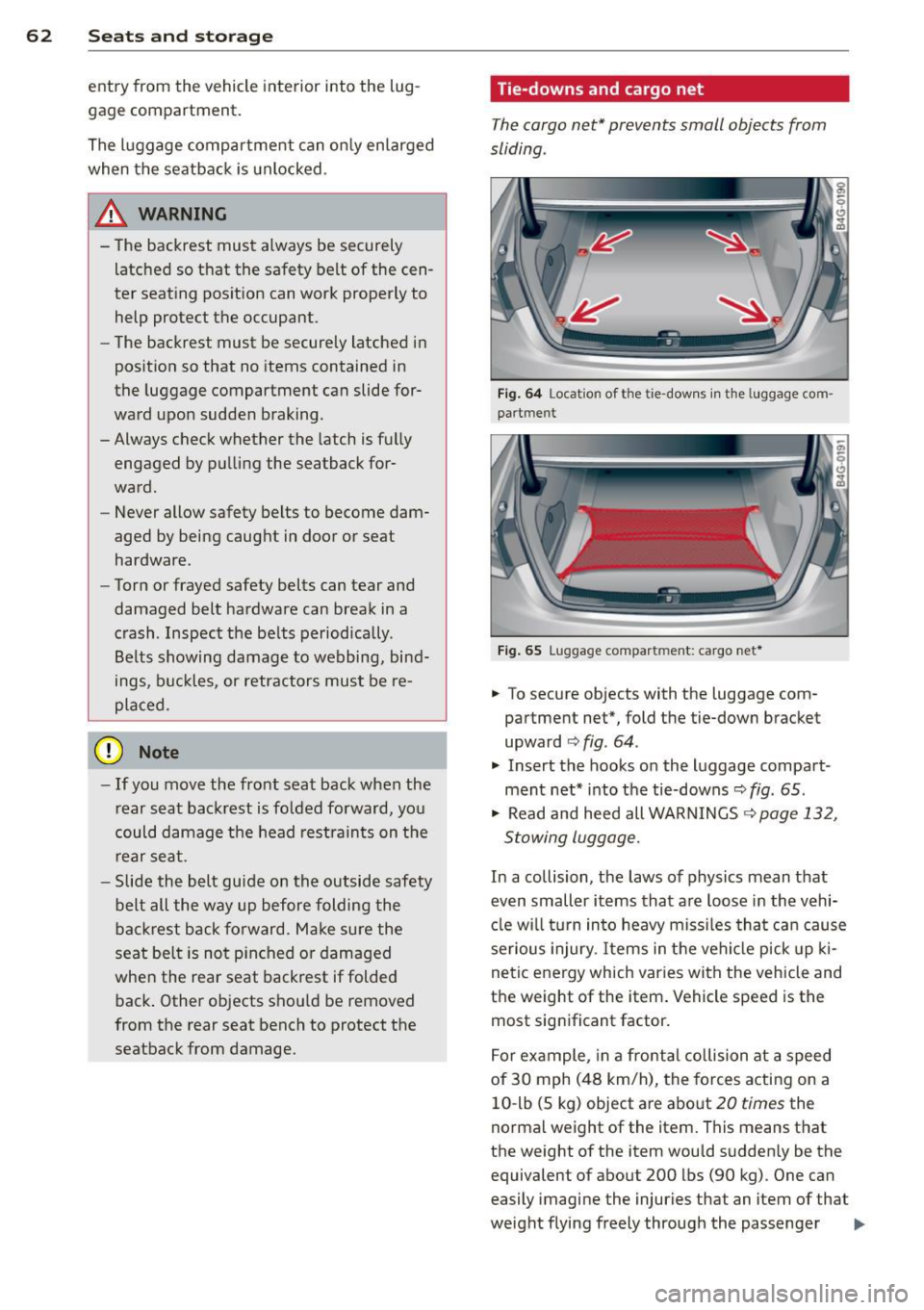
Fig . 6 4 Locat io n of t he ti e-dow ns in the lu ggage com
pa rt m en t
Fig. 65 Lugga ge compart men t: cargo net *
.. To secure objects with the luggage com
partment net*, fold the tie-down bracket
upward
c:> fig . 64 .
.. Insert the hooks on the luggage compart
ment net * into t he tie-downs~
fig . 65 .
.. Read and heed all WARNINGS ~ page 132,
Stowing luggage.
In a collision, the laws of physics mean that
even smaller items that a re loose in the vehi
cl e w ill turn in to heavy m iss iles tha t ca n cause
serious injury. Items in the veh icle p ick up ki
ne tic energy which varies with the vehicle and
the weight of the item . Vehicle speed is the
most sign ificant factor.
F o r ex ample, in a fro nta l collision at a speed
of 30 mph (48 km/h), the forces acting on a
10 -lb (5 kg) object are abo ut
20 times the
norma l weight of the item. This means that
the weight of the item wou ld sudden ly be the
equivalent of about 200 lbs (90 kg) . One can
easily imagi ne the injuries that an item of that
weight flying freely through the passenger ..,.
Page 65 of 306
compartment can cause in a collision at a
speed considered relatively low .
A WARNING
Weak, damaged or improper straps used
to secure items to tie-downs can fail dur
ing hard braking or in a collision and cause
serious personal injury.
- Always use suitable retaining straps and
properly secure items to the tie-downs in
the luggage compartment to help pre
vent items from shifting or flying for
ward.
- Never attach a child seat tether strap to
a tie-down.
- For strength-related reasons, the mount
ing hooks can only be used to secure ob
jects we ighing up to 10 lb. (5 kg) . Heavi
er objects will not be adequa tely secured
- there is a risk of injury.
Pass-through with ski
sack
Pass-through with ski sack
App lies to vehicles: with s ki sack
Long objects such as skis can be transported
in the ski sack ...
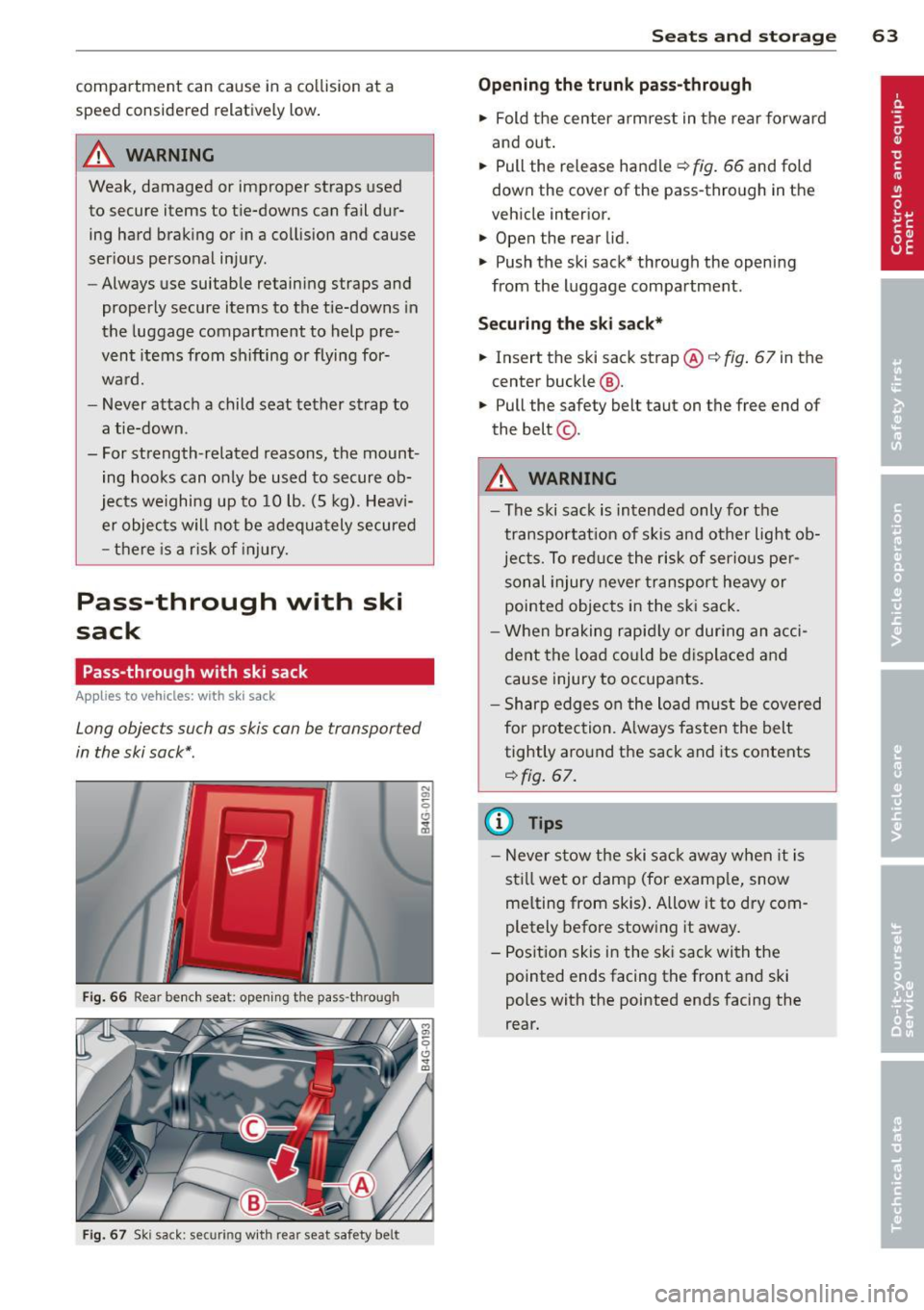
Fig. 66 Rear bench seat: opening the pass-through
Fig. 67 Ski sack: sec uring wit h rear seat safety be lt
.
S ea ts a nd s to rage 63
Op enin g th e trun k pass-through
.,. Fold the center arm rest in the rear forward
and out .
.,. Pull the release handle¢
fig. 66 and fold
down the cover of the pass-through in the
vehicle interior.
.,. Open the rear lid.
.,. Push the ski sack* through the opening
from the luggage compartment .
Securing the ski sack*
.,. Insert the ski sack strap@¢ fig. 67 in the
center buckle@.
.,. Pull the safety belt taut on the free end of
the belt ©-
A WARNING
-
- The ski sack is intended only for the
transportat ion of skis and other light ob
jects. To reduce the risk of serious per
sonal injury never transport heavy or
pointed objects in the ski sack.
- When braking rapidly or during an acci dent the load could be d isp laced and
cause injury to occupants.
- Sharp edges on the load must be covered
for protection. A lways fasten the belt
tightly around the sack and its contents
¢fig . 67.
¢j) Tips
-Never stow the ski sack away when it is
sti ll wet or damp (for examp le, snow
me lting from skis) . Allow it to dry com
pletely before stow ing it away.
- Position skis in the sk i sack with the
pointed ends facing the front and ski
poles with the pointed ends facing the
rear.
Page 75 of 306
the sel ector lever is not in the P position. Shift
the s ele ctor lever into th e P position and
sw itch
off the ign ition when you ex it the vehi
cle . Otherwise the vehicle could ro ll. See a lso
c::;,page
72.
St eeri ng lock
The steering locks when you turn the engine
off using the I S TAR T ENGINE STOP I button
and open the d river 's door. The locked steer
ing helps prevent vehicle theft.
A WARNING
- Never allow the engine to ru n in confined
spaces -dange r of asphyxiation .
- Never turn
off the eng ine until the vehi
cle has come to a complete stop .
- The brake booster and power steer ing
only work when the engine is running . If
the engine is
off, you have to use more
force when steering or braking . Because
you cannot stee r and brake as you usua l
ly wou ld, this could lead to crashes and
serious injur ies.
(IT),) Note
- Avoid high eng ine rpm , fu ll th rottle and
heavy engine loads unti l the engine has
r eached operating temperat ure -ot her
wise yo u risk eng ine dam age.
- The eng ine cannot be sta rted by pushing
or tow ing the veh icle.
-If the engine has been under heavy load
fo r an ex tended pe riod, hea t builds up in
the engine compartment after the en
gine is switched
off -there is a risk of
damaging the engine. Allow the engine
to run at idle for about 2 m inutes befo re
switch ing it
off.
@ Tips
- If you open the driver's door with the ig
nitio n on, a buzzer sounds and the mes
sage
Ignition is on appears in the instru
ment cluster disp lay. Switch the ign it ion
off .
- If you leave the vehicle with t he ignit ion
switched on, the igniti on will switch
off
On th e ro ad 73
after a cer tain per iod of t ime. P lease
note that electrical eq uipment such as
exterior lights will sw itch
off as well
when that happens.
Stopping the engine
... Bri ng your ve hicle to a complete stop.
... Move the se lector lever to the P or N posi
tion .
... Press the
I STA RT ENGINE ST OP ! button
¢fig. 74 .
Emergency off
If necessary, the engine can be switched off
with the selector lever in the R or D/S posi
t ion . The eng ine stops if you press the
I S TAR T ENG INE S T OPI button at speeds below
6 mph (10 km/h) and press the b rake peda l.
A WARNING
-Never turn off the en gine until the vehi
cle has come to a complete stop .
- The brake booster and p owe r stee ring
only work when the eng ine is r unning .
If
the engine is off, you have to use more
force when steering or braking. Because
you cannot steer and bra ke as you usual
ly would, this cou ld lead to crashes and
serious inju ries.
- For safety reasons, you sho uld a lways
park your vehicle w it h the selector lever
in P. Otherwise, the vehicle could inad
vertently roll away .
- After the eng ine has been switched
off,
the radiator fa n can cont in ue to run for
up to 10 minutes - even with the ignition
sw itc hed
off. It can also sw itch on again
afte r some t ime if the coo lant tempera
ture rises as the resu lt of a hea t buildu p
or if the engine is hot and the engine
compa rtment is additionally heated by
the s un's rays .
(D Note
Do no t stop the eng ine immedia tely after
hard o r extended driving . Keep the engine
.
Page 82 of 306
80 On the road
The stored speed and the ind icator light
A;(l)~i~ (US mo dels) 1,'I (Canadian mode ls) a p
pea r in the instrument cluster d isp lay
c::> fig. 81. The display may vary, depending on
the type of d isplay in your vehicle .
This informat ion is also shown briefly in the
Head -up Display*.
The speed is kept constant v ia an engine o ut
put adjustment or active b rake intervention.
A WARNING
- Always pay attention to traffic even when
the cruise control is switched on. You are
always responsible for your speed and
the distance between your vehicle and
other vehicles .
- For safety reasons, the cruise control
should not be used in the city, in stop
and-go traff ic, on twist ing roads and
when road conditions are poor (such as ice , fog, grave l, heavy ra in and hydro
planing) -risk of accident.
- Turn
off the cruise control temporar ily
when entering turn lanes, highway exit lanes o r in construc tion zones.
- Please note that inadvertently "rest ing"
yo ur foot on the accelerator peda l causes
the cruise control not to brake . T his is
because the cr uise control is overridden
by the d river's acce leration .
- If a brake system malfunc tion such as
overheating occurs when the cruise con
tro l system is switched on, the braking
function in the system may be switched
off. The other cruise control functions re
ma in active as long as the indicator light
[~;rn~i~ (US models) !Ill (Canad ian mod
els) is on .
(j) Tips
The brake lights illuminate as soon as the
brakes decelerate automat ica lly.
Changing speed
Applies to veh icles: w ith cru ise control
., To increase/decrease the speed in inc re
ments, tap the lever in the
0 10 direc tion
c::> fig . 80
., To increase/decrease the speed quic kly,
hold t he lever in the
0 10 direction until
the desired speed is displayed.
You can also press the accelerator pedal down
to increase your speed, e.g . if you want to
pass someone . The speed you saved earlier
will res ume as soon as you release the acceler
ator pedal.
If, however, you exceed your saved speed by
6 mph (10 km/h) for longer than 5 m inutes,
the cr uise control wi ll turn
off temporari ly.
The green symbol
A;(l)~i~ (US mode ls) 1,'I
(Canadian mode ls) in the display will go out
but the saved speed rema ins the same .
Presetting your speed
Applies to veh icles : w ith cru ise control
You can preset your desired speed while the
vehicle is not moving.
., Switch on the ignition.
., Pull lever into position
(D c::> fig . 80.
., Press t he lever in the 0 or 0 direction to
increase or decrease your speed .
., Release the lever to save that speed .
This function makes it possible, for examp le,
to save the speed you want before dr iving on
the h ighway. Once on t he h ighway, act ivate
the cru ise control by pulling the lever toward
(D .
Switching the system off
Applies to veh icles: w ith cruise control
Temporary deactivation
., Press the b rake pedal, or
., Press the leve r into posi tion @(n ot clicked
into place)
c::> fig. 80, or
... Drive for longer t han 5 min utes at more
than 5 mph (10 km/h) above the stored
speed.
Page 84 of 306
82 Audi adaptive cruise control and braking guard
Audi adaptive cruise
control and braking
guard
Introduction
App lies to vehicles: with Audi adaptive cruise co ntrol
The adaptive cruise control system assists the
driver by regulating vehicle speed and helping
to maintain a set distance to the vehicle
ahead, within the limits of the system .
If the
system detects a moving vehicle up ahead,
adaptive cruise control can brake and then ac
celerate your vehicle. This helps to make driv
ing more comfortable both on long highway
stretches and in stop-and-go traffic.
The braking guard system can warn you about
an impending collision and initiate braking
maneuvers
c:::> page 88.
Adaptive cruise control and braking guard
have technical limitations that you must
know, so please read this section carefully, un
derstand how the system works and use them
properly at all times.
General information
General information
Applies to vehicles: with Audi adaptive cruise co ntrol
Fig. 82 Front of the veh icle: sensors and video camera
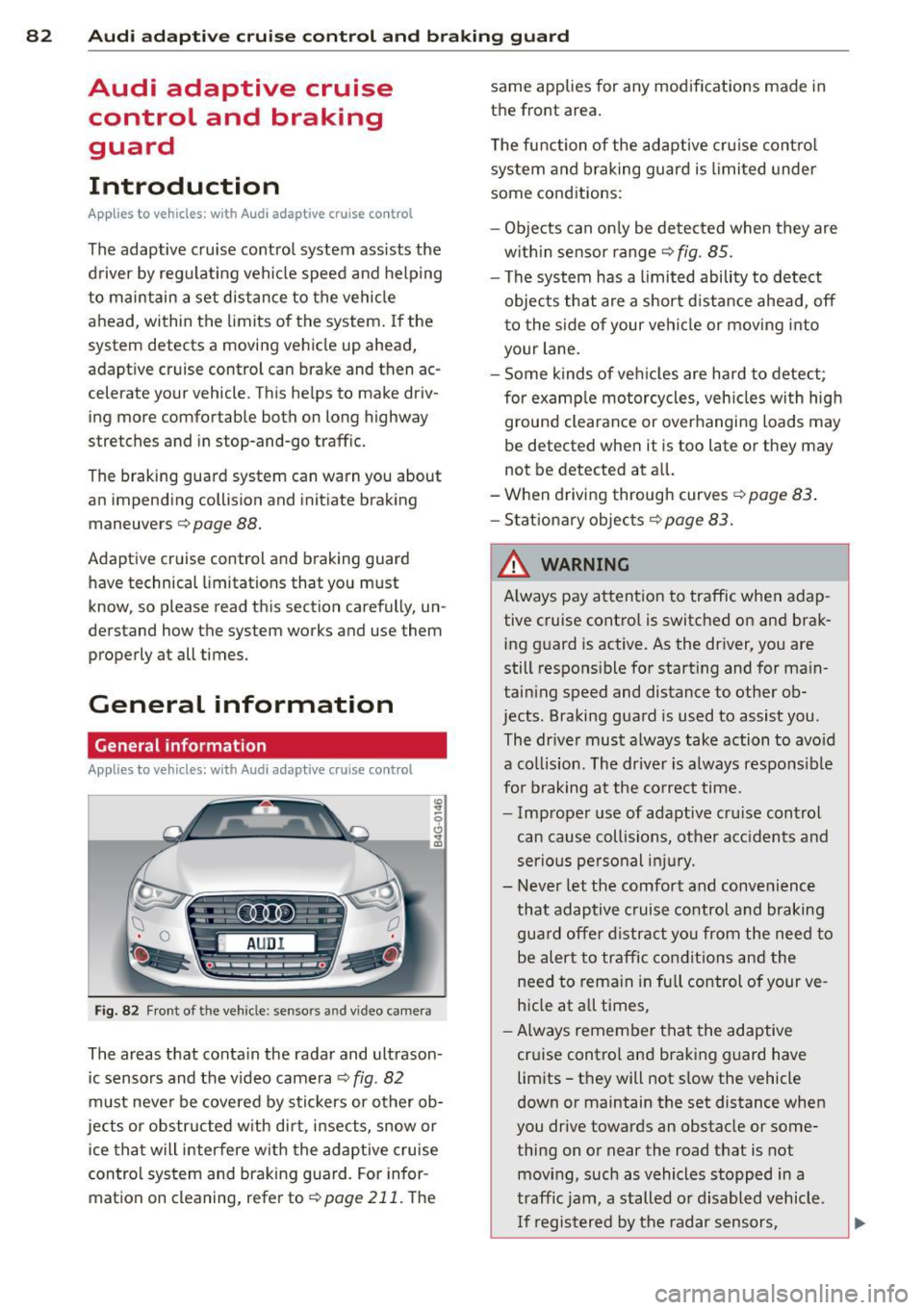
The areas that conta in the radar and ultrason
ic sensors and the v ideo camera
c:::> fig. 82
must never be cove red by stic kers or other ob
jects or obstructed with dirt, insects, snow or
ice that will interfere w ith the adaptive cruise
control system and braking guard. For infor
mation on cleaning, refer to
r:;, page 211. The same applies
for any modifications made in
the front area.
T he function of the adaptive cruise control
system and braking guard is limited under
some cond itions:
- Objects can only be de tected when they are
w ithin sensor range
c:::> fig . 85.
-The system has a limited ability to detect
objects that are a short distance ahead, off
to the side of your vehi cle or mov ing into
your lane.
- Some kinds of veh icles are hard to detect;
for examp le motorcycles, veh icles with high
ground clearance or overhanging loads may
be detected when it is too late or they may
not be detected at al l.
-When drivin g through curves
c:::> page 83 .
-Stat ionary objec ts c:::>page 83.
& WARNING
A lways pay attention to traffic when adap
tive cruise contro l is switched on and brak
ing guard is active. As the driver, you are
still respons ible for starting and for main
taining speed and distance to other ob
jects. Braking guard is used to assist you .
The dr iver must always take action to avo id
a collis ion . The driver is a lways respons ible
fo r braking at the correct time.
- Improper use of adaptive cru ise control
can cause collisions, other acc idents and
serious personal injury.
- Never let the comfort and convenience
that adaptive cruise control and braking
gua rd offer distract you from the need to
be alert to traffic conditions and the
need to remain in full control of your ve
hicle at a ll times,
- Always remember that the adaptive
cr uise control and braking guard have
limits -they will not s low the vehicle
down or maintain the set distance when
you drive towards an obstacle or some
thing on or near the road that is not
mov ing, such as vehicles stopped in a
traffic jam, a stalled o r disabled vehicle.
I f re gistered by the radar sensors,
Page 86 of 306
84 Audi adaptive cruise control and braking guard
@ is located in front of that vehicle, the sys
tem will not react to the stationary vehicle.
Audi adaptive cruise control
Description
Applies to vehicles: with Audi adaptive cruise control
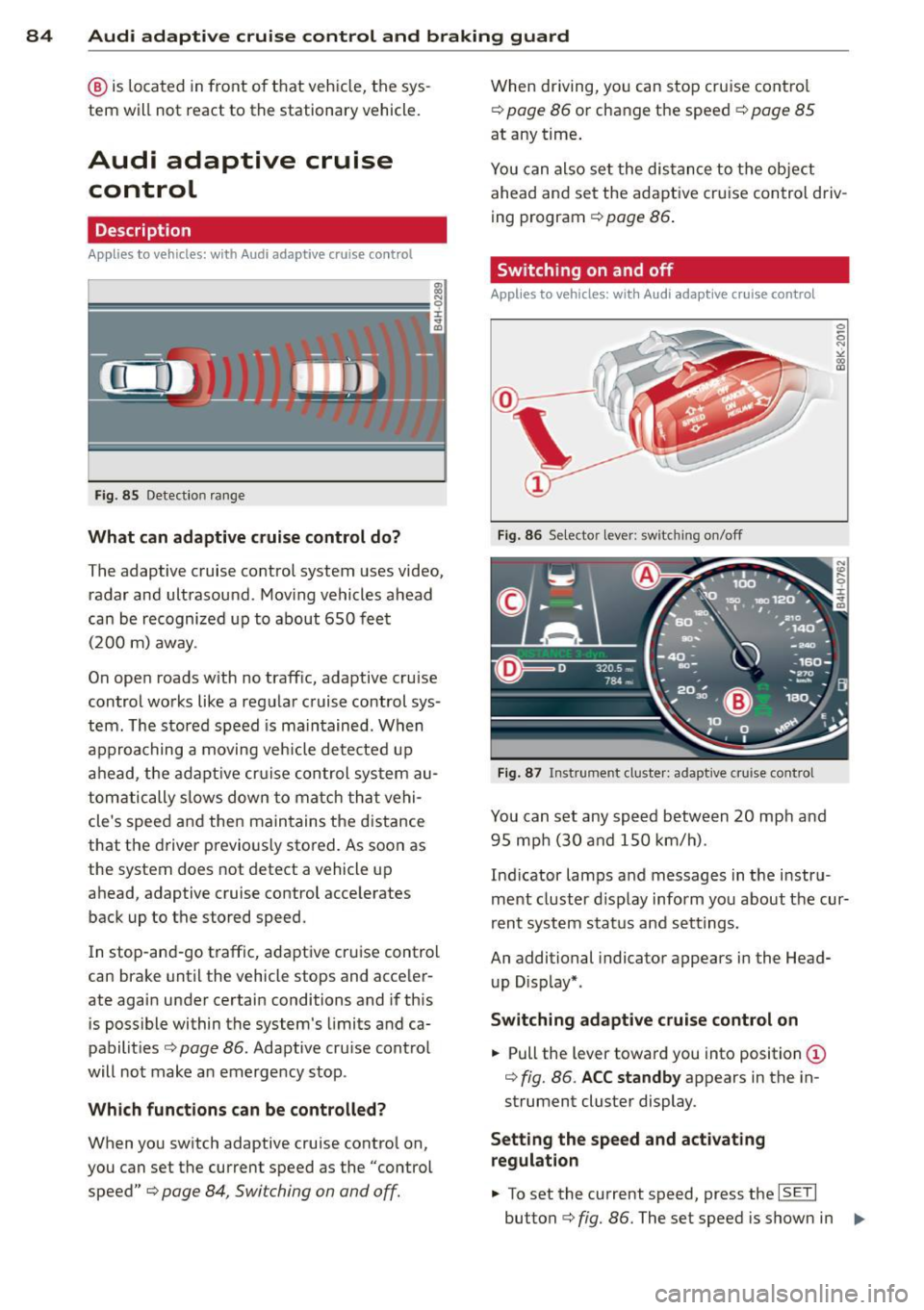
Fig. 85 Detection range
What can adaptive cruise control do?
The adaptive cruise control system uses video,
radar and ultrasou nd. Moving vehicles ahead
can be recognized up to about 650 feet (200 m) away.
On open roads w ith no traffic, adaptive cruise
control works like a regular cruise control sys
tem. The stored speed is maintained. When
approaching a moving vehicle detected up
ahead, the adaptive cruise control system au
tomatically s lows down to match that vehi
cle's speed and then maintains the distance
that the driver previous ly stored. As soon as
the system does not detect a vehicle up
ahead, adaptive cruise control accelerates
back up to the stored speed.
In stop-and-go traffic, adaptive cru ise control
can brake until the vehicle stops and acceler
ate again under certain conditions and if this
is possible within the system's limits and ca
pabilities¢
page 86. Adaptive cruise control
will not make an emergency stop .
Which functions can be controlled?
When you switch adaptive cruise contro l on,
you can set the current speed as the "control
speed" ¢
page 84, Switching on and off.
When driving, you can stop cruise control
¢
poge 86 or change the speed ¢ page 85
at any time.
You can also set the distance to the object
ahead and set the adaptive cruise control driv
ing program ¢
page 86.
Switching on and off
Applies to vehicles: with Audi adaptive cruise control
Fig. 86 Selector lever: switching on/off
Fig. 87 Instrument cluster: adaptive cruise control
You can set any speed between 20 mph and
95 mph (30 and 150 km/h).
Indicator lamps and messages in the instru
ment cluster d isplay inform you about the cur
rent system status and settings.
An additional indicator appears in the Head
up D isplay*.
Switching adaptive cruise control on
.,. Pull the lever toward you into position (D
¢ fig. 86. ACC standby appears in the in
strument cluster display.
Setting the speed and activating
regulation
.,. To set the current speed, press the ISETI
button ¢ fig. 86. The set speed is shown in 1111-
Page 88 of 306
86 Audi adaptive cruise control and braking guard
Driv ing in stop-and-go traff ic
App lies to vehicles: with Audi adaptive cruise control
The adaptive cruise co ntro l system a lso as
sis ts you in stop- and -go traff ic. If a previo us
detec ted veh icle ahead s tops, yo ur vehicle will
brake to a stop, within the limits o f the sys
tem .
,,. To resume driv ing wi th adap tive cruise con
t ro l, tap the accelerator pe dal or
,,. Pu ll the lever toward yo u in to posit ion @
¢fig. 89.
@ Tips
-If ada ptive cruise con trol is a ctive an d
you r vehicle does not start driving as ex
pected after pulling the lever once, you
can start out aga in by tapp ing the accel
erato r pedal.
- If an obstacle is detected when yo ur ve
h icle starts dr iv ing, the system w ill
prompt you to take over¢
page 87.
Your vehicle w ill drive more s low ly when
star ting . This may a lso happe n in some
s ituation s whe n no obstacle is apparent .
Interrupting cruise control
Applies to vehicles: with Audi adaptive cruise control
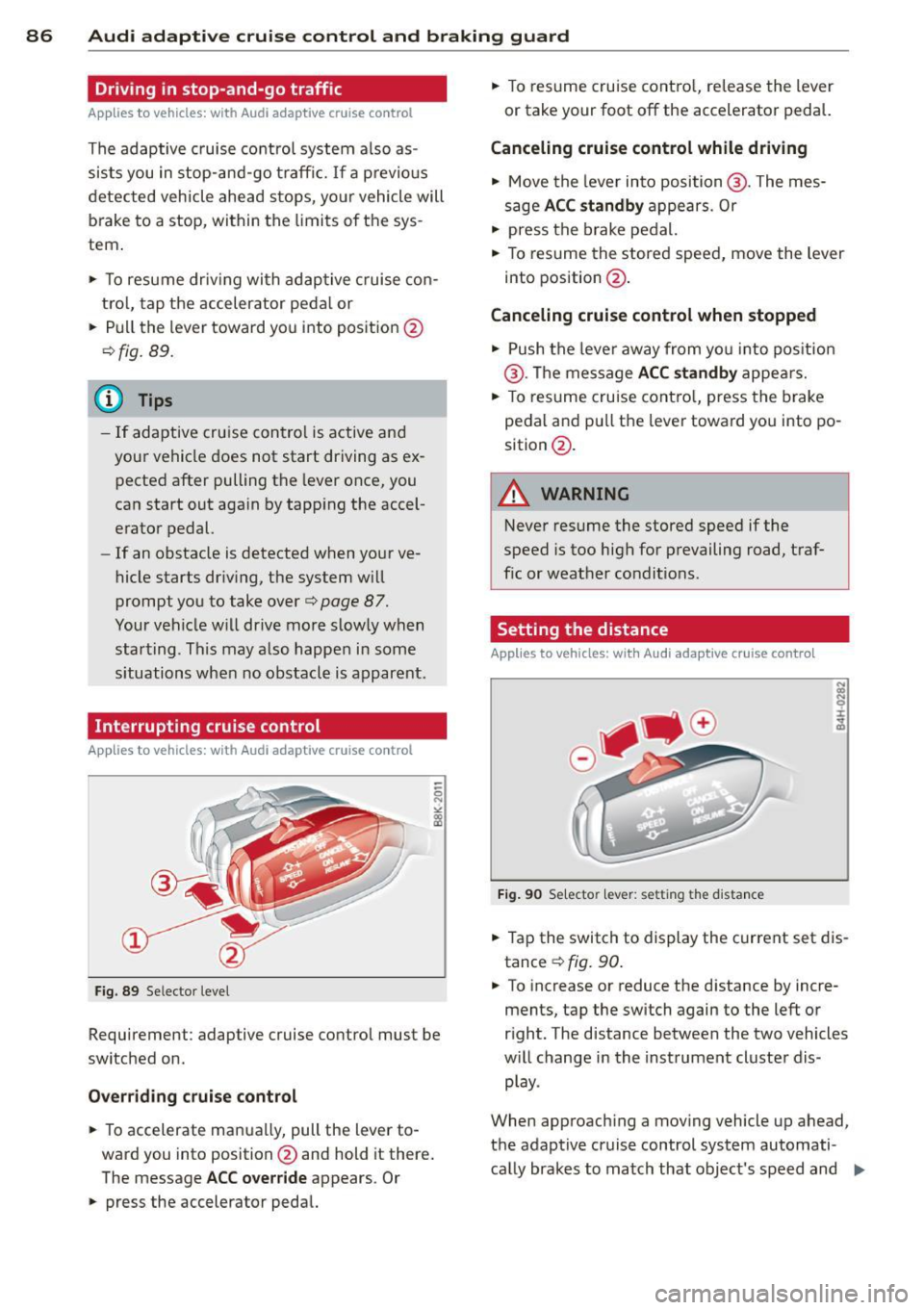
Fig. 89 Se lecto r leve l
Requ irement : adaptive cruise control must be
sw itched on.
Overriding crui se control
,,. To accelerate ma nually, pull the lever to
ward you into position @and hold it there .
The message
ACC override appears . Or
,,. press the accelerato r peda l. ,,.
To res ume cruise cont ro l, re lease the lever
or take your foot off the accelerato r pedal.
Canceling cruise control while driving
,,. Move the lever in to posi tion @. The mes
s a ge
ACC standby ap pears. Or
,,. press t he br ake pedal.
,,. To res ume the stored spee d, move the lever
into position @.
Canceling cruise control when stopped
,,. Push the leve r away from yo u into pos it io n
@ . Th e message
ACC standby appe ars.
,,. To res ume cruise cont ro l, press the brake
pedal an d pull th e lever toward you into po
sition @.
A WARNING
• -
Never resume the stored speed if the
sp eed is too high for p revailing r oad, traf
f ic or weat her condit io ns .
Setting the distance
Applies to vehicles: with Aud i adapt ive cru ise contro l
Fig. 90 Se lecto r lever : setting t he distance
,,. Tap the switch to display the current set dis
tance
¢ fig. 90 .
,,. To increase or reduce the d istance by incre
ments, tap the switch again to the left or
r ight. The d istance between the two vehicles
w ill change in the instrument cluste r dis
p lay .
When approac hing a mov ing vehicle up ahead,
the adaptive cruise control system automati
ca lly brakes to match th at object's speed and
Ill>
Page 96 of 306
94 Audi side assist
Audi side assist
Lane Change Assistant
Description
App lies to vehicles: wit h side ass ist
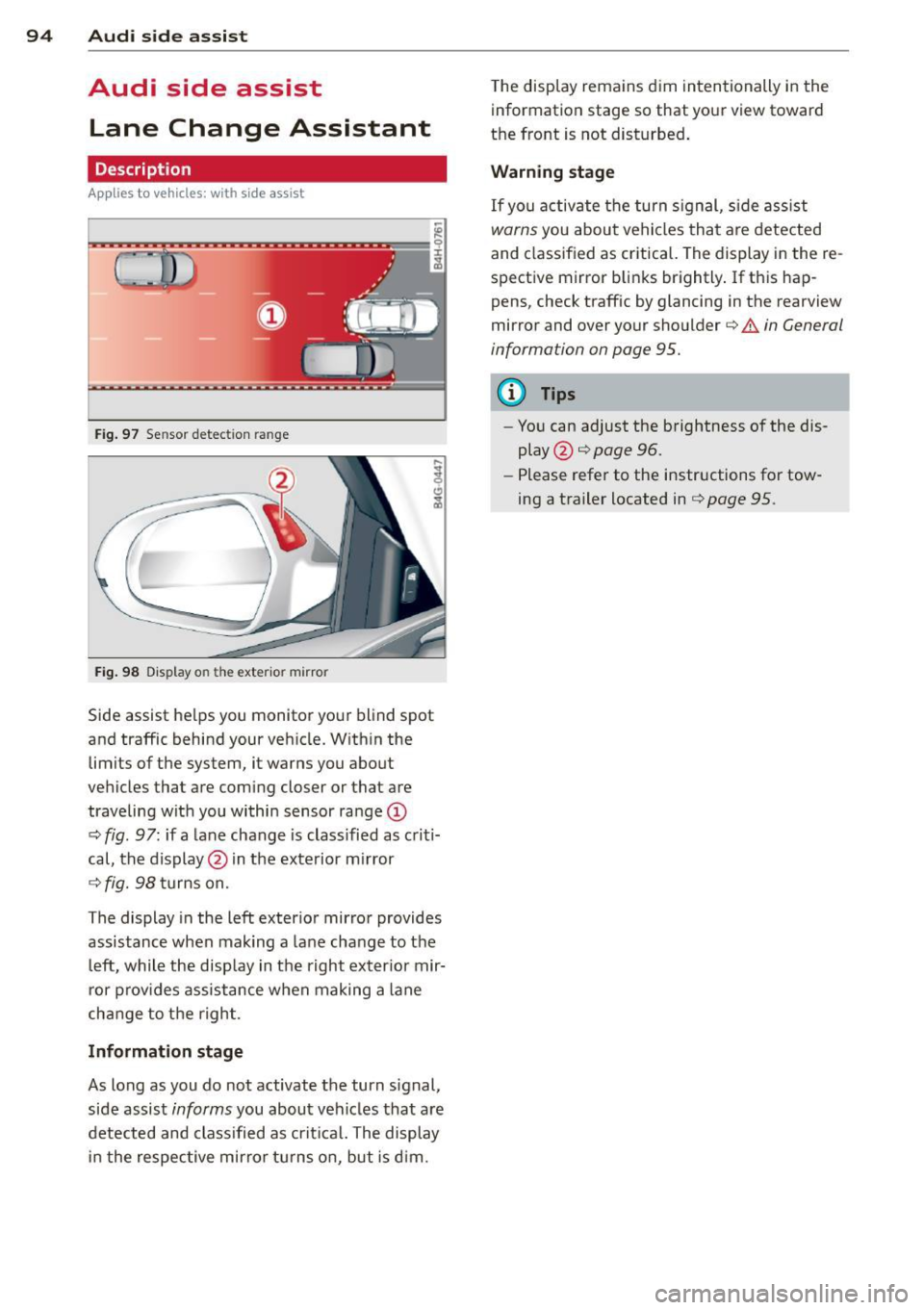
Fig . 97 Se nsor detect ion ra nge
Fig. 98 Display o n the exte rior mirror
Side assist he lps you monitor your blind spot
and traffic behind your veh icle. Within the
limits of the system, it warns you about
vehicles that are com ing closer or that are
traveling wit h you within sensor range
(D
c:> fig . 97 : if a lane change is class ified as c riti·
cal, the display@in the exterior mirror
¢ fig. 98 turns on.
The display in the left exterior mirror provides
assistance when mak ing a lane change to the
le ft, while the disp lay in the right exter ior mir·
ror p rov ides assistance when making a lane
cha nge to the righ t.
Information stage
As long as you do not activate the turn signal,
side assist
informs you about veh icles that are
detected and class ified as cr it ical. The display
in the respective mirror turns on, but is d im. T
he display remains d im intentionally in the
information stage so that your view toward
the front is not disturbed .
Warning stage
If you activate the turn signal, s ide ass ist
warns you about vehicles that are detected
and class ified as critical. The display in the re
spective mirror blinks brightly . If this hap
pens, check traffic by glancing in the rearview
mirror and over your shoulder c:>
.&. in General
information on page 95.
(D Tips
- Yo u can adjust the brightness of the dis
play @c:>
page 96.
-Please refer to the instructions for tow·
ing a trailer located in
¢ page 95 .
Page 97 of 306
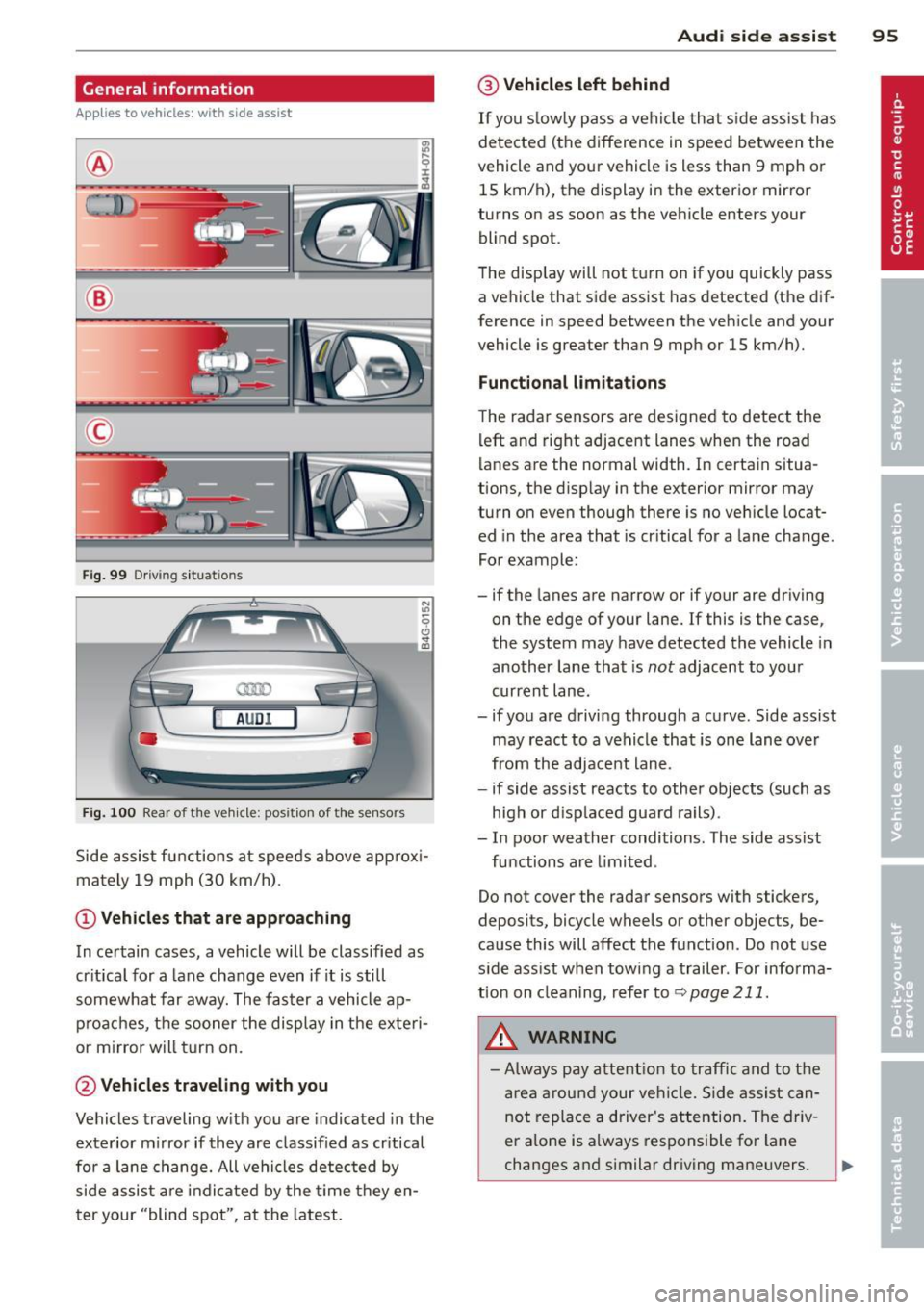
General information
Applies to vehicles: with side assist
®
©
Fig . 99 Driving situations
A UD I
Fi g. 100 Rear of t he ve hicle: positio n of t he se nsors
Side assist functions at speeds above approx i
mately 19 mph (30 km/h).
@ Vehicl es th at ar e approaching
In certain cases, a vehicle will be classified as
cr itical for a lane change even if it is still
somewhat far away. The fas ter a vehicle ap
p roaches, the sooner the display in the exteri
or m irror will t urn on.
@ Vehicles traveling with you
Vehicles traveling w ith you are indicated in the
exterior m irror if they are classified as cr itical
for a lane change. All vehicles detec ted by
side assist are indicated by the time they en
t er your "blind spot", at the latest.
Aud i side assist 95
@ Veh icles left behind
If you s low ly pass a vehi cle that s ide assist has
detected (the difference in speed between the
vehicle and you r vehicle is less than 9 mph or
15 km/h), the display in the exterio r mir ror
turns on as soon as the vehicle enters your blind spot.
T he disp lay will not t urn on if you quickly pass
a vehicle that side assist has detected (the dif
ference in speed between the veh icle and your
vehicle is greater than 9 mph or 15 km/h).
Functi onal limitations
The radar sensors are designed to detect the
left and right adjacent lanes when the road
lanes are the normal width. In certain situa
tions, the d isp lay in the exterior mirror may
turn on even though there is no veh icle locat
ed in the area that is cr itical for a lane change.
For example:
- if the lanes are narrow or if your are dr iving
on the edge of your lane.
If this is the case,
the system may have detected the vehicle in
another lane that is
not adjacent to you r
current lane .
- if you a re driving through a curve. Side assist
may react to a vehicle that is one lan e ove r
from the adjacent lane.
- if side assist reacts to other objects (such as
high or d isp laced guard rails) .
- In poor weather conditions. The side assist
functions are l imited .
Do not cover the radar sensors with stickers,
deposits, bicycle wheels or other objects, be
cause this will affect the function . Do not use
s ide ass ist when towing a trailer . For informa
tion on clean ing, refer to
q page 211.
_&. WARNING
-Always pay a ttent ion to traffic and to t he
ar ea a round your ve hicl e. S ide assist can
not repla ce a driver's attention. The driv
er a lone is always responsible fo r lane
changes and similar driving mane uvers.
Page 99 of 306
@ Tips
-Side assist is not active while you are
making the adjustment.
- Your settings are automatically stored
and assigned to the remote control key
being used.
Driver messages
Applies to vehicles: with side assist
If side assist switches off by itself, the LED in
the button turns off and a message will ap
pear in the instrument cluster display:
Audi side assist: Currently unavailable. No
sensor vision
The radar sensors' vision is affected. Do not
cover the area in front of the sensors with bike
wheels, stickers, dirt or other objects. Clean
the area in front of the sensors, if necessary
c>fig. 100.
Audi side assist: Currently unavailable
Side assist cannot be switched on temporarily
because there is a malfunction (for example,
the battery charge level may be too low).
Audi side assist: System fault!
The system cannot guarantee that it will de
tect vehicles correctly and it is switched off .
The sensors have been displaced or are faulty.
Have the system checked by an authorized
Audi dealer or authorized Audi Service Facility
soon.
Audi side assist: Unavailable when towing.
Side assist switches off automatically when a
factory-installed trailer hitch is connected to
the electrical connector on the trailer. There is
no guarantee the system will switch off when
using a retrofitted trailer hitch. Do not use
side assist when towing a trailer.
Audi side assist 97