light AUDI A6 2013 Owner's Manual
[x] Cancel search | Manufacturer: AUDI, Model Year: 2013, Model line: A6, Model: AUDI A6 2013Pages: 306, PDF Size: 76.92 MB
Page 30 of 306
28 Instruments and warning /indicator lights
Selec t the !CAR ! func tion b utton> (Car )* sy s
tems
co ntrol button > Servicing & checks >
Se rvice interval disp lays . In new vehicles, the
sched ule can only be called up after approxi
mately 500 km.
Resetting the serv ice interval display
Your authori zed A udi dealer wi ll reset the cor
respo nding service sched ule after performing
the appropriate serv ice on yo ur vehicle . Yo u
a lso have the possibility to reset the oi l
change schedule after having performed an
oil c hange accord ing to Audi specifications.
Selec t the
!CAR ! func tion b utton> (Car) * sys
tems
co ntrol button > Servicing & checks >
Service Intervals > Re set oil change interval.
If you disconnect the battery termi na ls, no
calc ulations can be m ade for th e se rvice
in te rva l d is p lay during this t ime and no
s ervi ce rem inder w ill appea r. Remembe r
t h at obse rving the proper serv ice inte rva ls
is vita lly im po rtant to extending the life of
your veh icle, part icu larly the eng ine, and
maintaining its va lue. Even if t he mileage
driven is low, the maxim um period of one
yea r from one service to the next must not
be exce eded.
(!) Tips
- Do not reset t he display between oil
changes, otherw ise the display will be in
correct.
- The information in the Service Reminder
r ema ins sto red even when the veh icle
batte ry is discon nected.
Head-up Display
Applies to vehicles: wit h Head-up Display
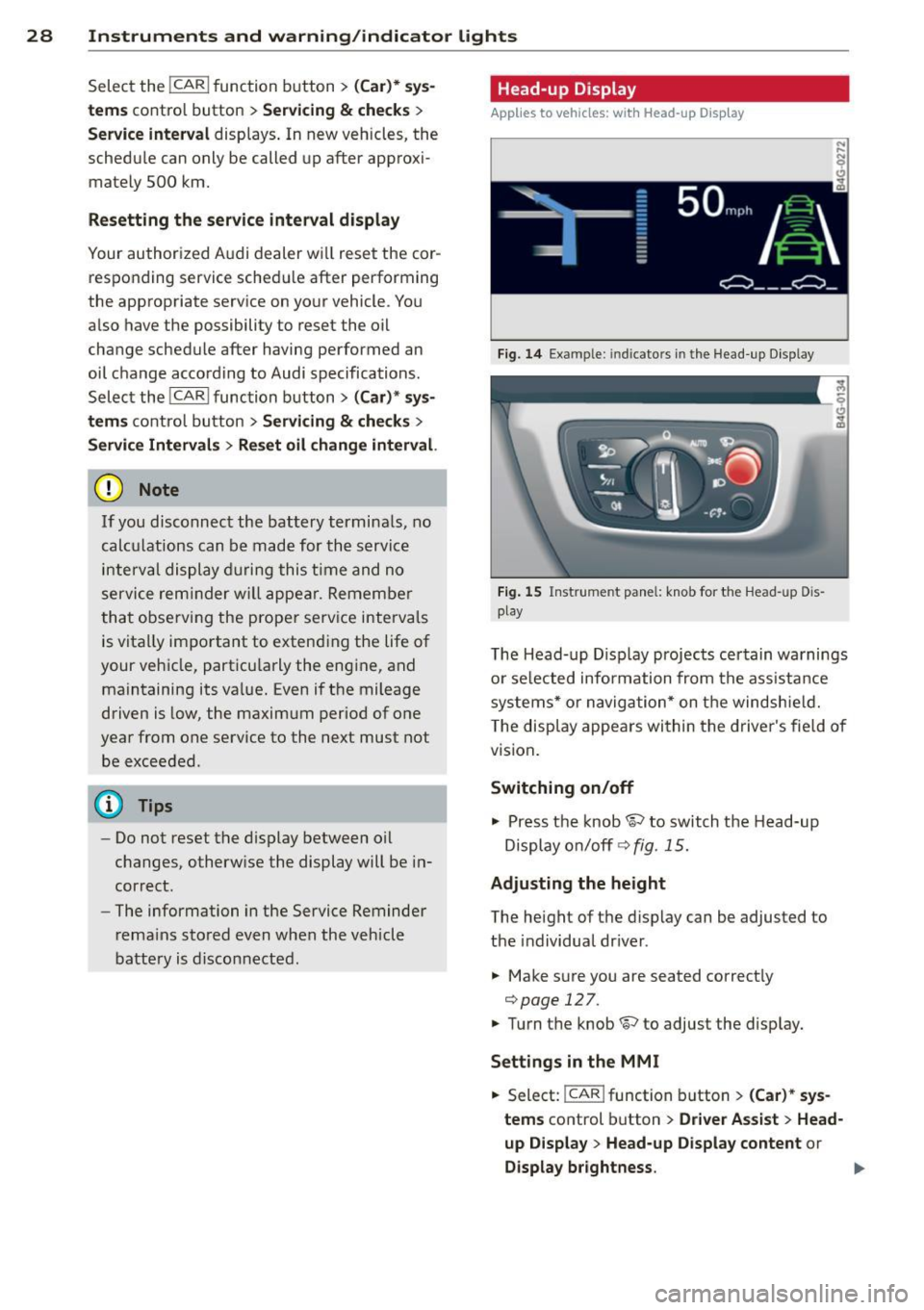
Fig .
14 Example : in dica to rs i n the Head -up D isplay
Fig. 1 5 Instrument pa nel: k nob for the Head-up D is
p lay
T he Head- up D isp lay projects certain wa rnings
o r se lecte d infor mation from the ass ista nce
systems* or naviga tion* on t he windshie ld.
T he disp lay appears wi thin the drive r's fie ld o f
vision .
Switching on/off
"' Press t he knob~ to switch the Head-up
Displ ay on/off ¢
fig. 15.
Adjusting the height
The heig ht of t he d is play can be adjusted to
the individual dr iver .
"' Make s ure you are seated correct ly
¢page
127 .
"' Turn t he knob~ to adjust the disp lay.
Sett ings in the MMI
"' Select: !CAR I function b utton > (Car) * sy s
tems
control button > Driver Assist > Head
up D isplay
> Head-up Display content or
Display br ightness . Ill>
Page 31 of 306
Instrument s and warning /indicator lights 29
Display content
In the MMI, you can specify which information
should be displayed :
- Cruise contro l system*
- Nav igat ion information*
- Audi adap tive cruise control*
- Audi active lane assist*
- Night vision assistant* (pedestrian warning)
The speed display and some of the red indica
tor lights cannot be hidden in the MMI.
Display brightness
You can adjust the display brightness in the MMI. The display brightness decreases auto
mat ica lly as the amount of light decreases .
The basic leve l o f brightness is adjusted with
the instrument illumination~
page 44.
(D Note
To prevent scratches on the glass covering
the Head-up Display, do not place any ob
jec ts in the projection opening .
(D Tips
- Sunglasses with polar izat ion filters and
unfavorable lighting conditions can af
fect the display.
- Vehicles with seat memory* : your Head
up Display settings are stored automati
cally and assigned to the remote control
key that you are using.
- A specia l windshield is needed for the
Head-up Display function .
- For information on cleaning, refe r to
~ page 215.
On-Board Diagnostic
system (OBD)
Malfunction Indicator Lamp (MIL)
The Malfunction Ind icator Lamp (MIL) ¢'4 i n
the instrument cluster is part of the On-Board
Diagnostic (OBD II) system.
The warning/indicator light illuminates when
the ignition is switched on and goes out after the engine starts and the id
le has stabilized.
This indicates that the MIL is working proper
ly .
If the light does not go out after the engine
is started, or illuminates while you are driv
ing, a malfunction may ex ist in the engine sys
tem.
If the light illuminates, the catalytic con
verter could be damaged .
Continue driving
with reduced power (avoid
ing sustained high speeds and/or rapid accel
erations) and have the cond ition corrected.
Contact your authori zed Audi dealer.
If the light illuminates, the electronic speed
limiter may also be malfunctioning . For more
information
¢ pag e 30, Electronic spe ed
limiter.
An improperly closed fuel filler cap may also
cause the MIL light to illuminate
~page 222.
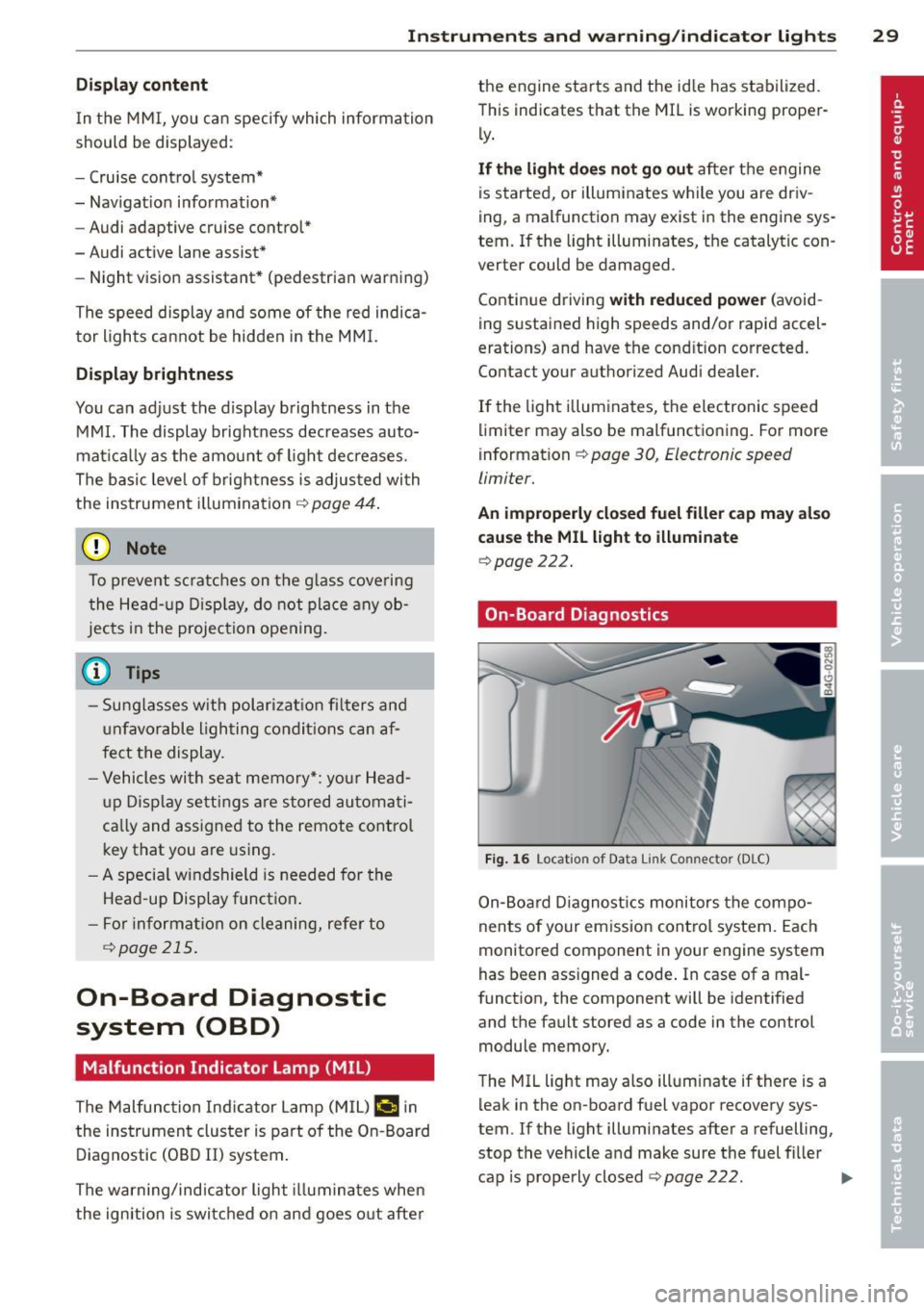
On-Board Diagnostics
Fig. 16 Locat ion o f Data Li nk Co nnector (DLC)
On-Board Diagnostics monitors the compo
nents of your emission control system. Each
monitored component in your eng ine system
has been ass igned a code . In case of a mal
function, the component will be identified
and the fault stored as a code in the control module memory.
The MIL light may also illuminate if there is a
leak in the on -board fuel vapor recovery sys
tem. If the light illuminates after a refuelling,
stop the vehicle and make sure the fuel filler
cap is properly closed
~ page 222. IIJ,,
Page 32 of 306
30 Instruments and warning /indicator lights
In order to make an accurate diagnosis, the
stored data can only be displayed using spe
cial diagnostic equipment (gener ic scan tool
for OBD).
I n order to connect the special diagnostic
equipment, push the plug into the Data Link
Connector (DLC) . The DLC is located to the
right of the hood release
c> fig. 16.
Your authorized Audi dealer or a qualified
service station can interpret the code and per
form the necessary repa ir.
A WARNING
Do not use the diagnostic connector for
personal use. Incorrect usage can cause
malfunctions, which can increase the risk
of a collis ion!
Electronic speed limiter -
Your veh
icle may be factory equipped with
tires that are rated for a maximum speed of
130 mph (210 km/h). Thi s is less than the
maximum speed of your vehicle. To reduce the
risk of sudden tire failure and loss of control if
the vehicle is operated at excessive speeds,
your vehicle also has an electronic speed limit
er. The electronic speed limiter prevents your
vehicle from going faster than the tire speed rating. For more information
c> page 251.
If the engine control unit receives faulty vehi
cle road speed signals, the Malfunction Indi
cator Lamp (MIU
¢1111i will illuminate. If this
occurs, contact the nearest authorized Aud i
dealer for assistance .
S models
Your vehicle's top speed is e lectronically limit
ed to 155 mph (250 km/h).
If the engine control unit receives faulty vehi
cle roadspeed signals, the Ma lfunction Indica
tor Lamp (MIU
¢1111i will illuminate. If th is oc
curs, contact the nearest authori zed Audi
dealer for assistance.
A WARNING
Always observe the posted speed limits
and adjust your speed to suit prevailing road, traffic and weather cond itions . Never
drive your vehicle faster than the maxi
mum speed rating of the tires installed.
Page 33 of 306
Opening and closing Keys
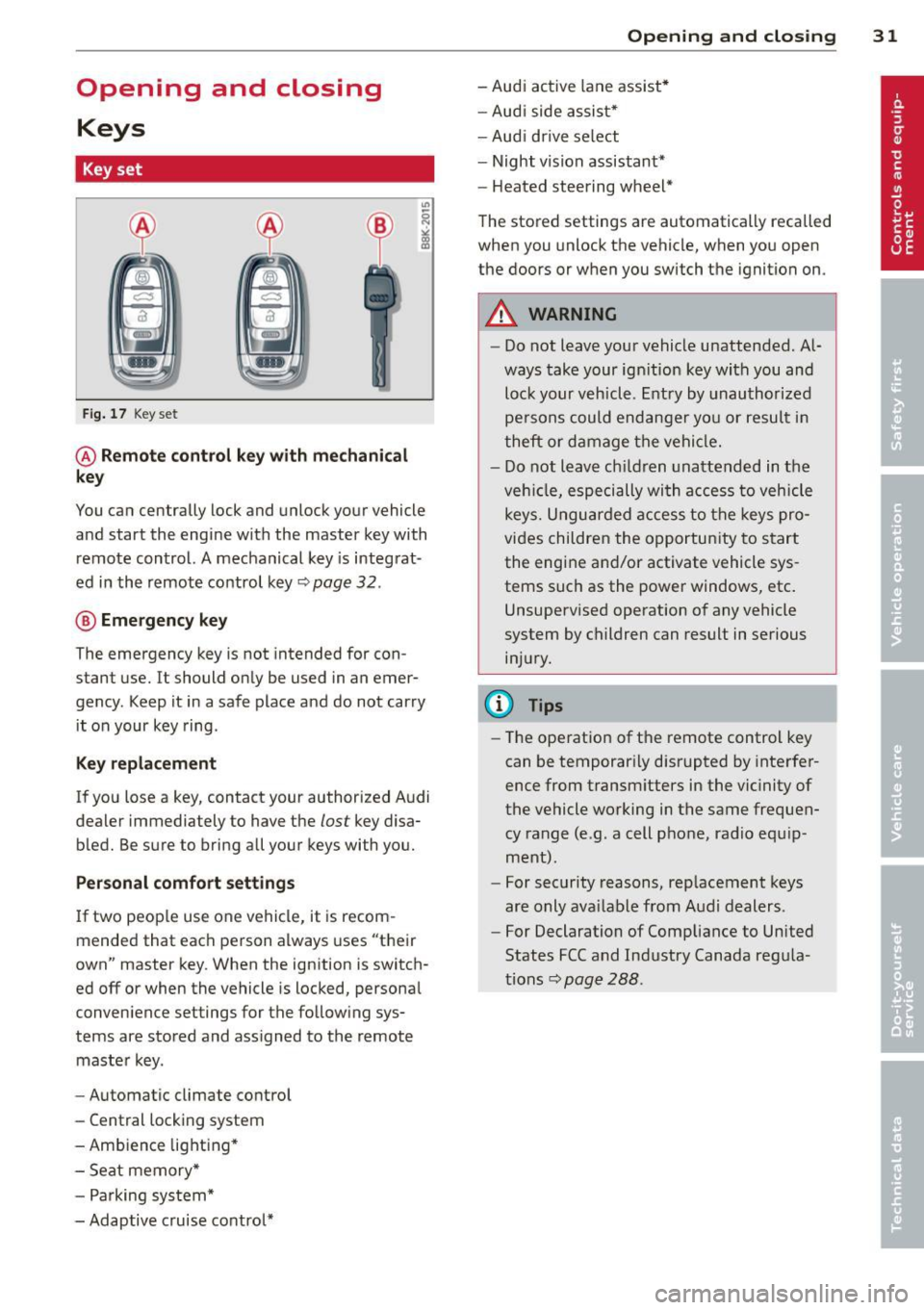
Key set
Fig. 17 Key set
@ Remote control key with mechanical
key
You can centrally lock and unlock your vehicle
and start the engine with the master key with
remote control. A mechanical key is integrat
ed in the remote control key~ page
32 .
® Emergency key
The emergency key is not intended for con
stant use.
It should only be used in an emer
gency . Keep it in a safe place and do not carry
it on your key ring .
Key replacement
If you lose a key, contact your authorized Audi
dealer immediately to have the
lost key disa
bled. Be sure to bring all your keys with you.
Personal comfort settings
If two people use one vehicle, it is recom
mended that each person always uses "their
own" master key. When the ignition is switch
ed off or when the vehicle is locked, personal
convenience settings for the following sys
tems are stored and assigned to the remote
master key.
- Automatic climate control
- Central locking system
- Ambience lighting*
- Seat memory*
- Parking system*
- Adaptive cruise control*
Opening and closing 31
- Audi active lane assist*
- Audi side assist*
-Audi drive select
- Night vision assistant*
- Heated steering wheel*
The stored settings are automatically recalled
when you unlock the vehicle, when you open
the doors or when you switch the ignition on.
A WARNING
- Do not leave your vehicle unattended. Al
ways take your ignition key with you and
lock your vehicle. Entry by unauthorized
persons could endanger you or result in
theft or damage the vehicle.
- Do not leave children unattended in the
vehicle, especially with access to vehicle
keys. Unguarded access to the keys pro
vides children the opportunity to start
the engine and/or activate vehicle sys
tems such as the power windows, etc.
Unsupervised operation of any vehicle
system by children can result in serious
injury.
(D Tips
- The operation of the remote control key
can be temporarily disrupted by interfer
ence from transmitters in the vicinity of
the vehicle working in the same frequen
cy range (e.g . a cell phone, radio equip
ment).
- For security reasons, replacement keys
are only available from Audi dealers.
- For Declaration of Compliance to United
States FCC and Industry Canada regula
tions~ page
288.
Page 34 of 306
32 Opening and closing
Removing the mechanical key
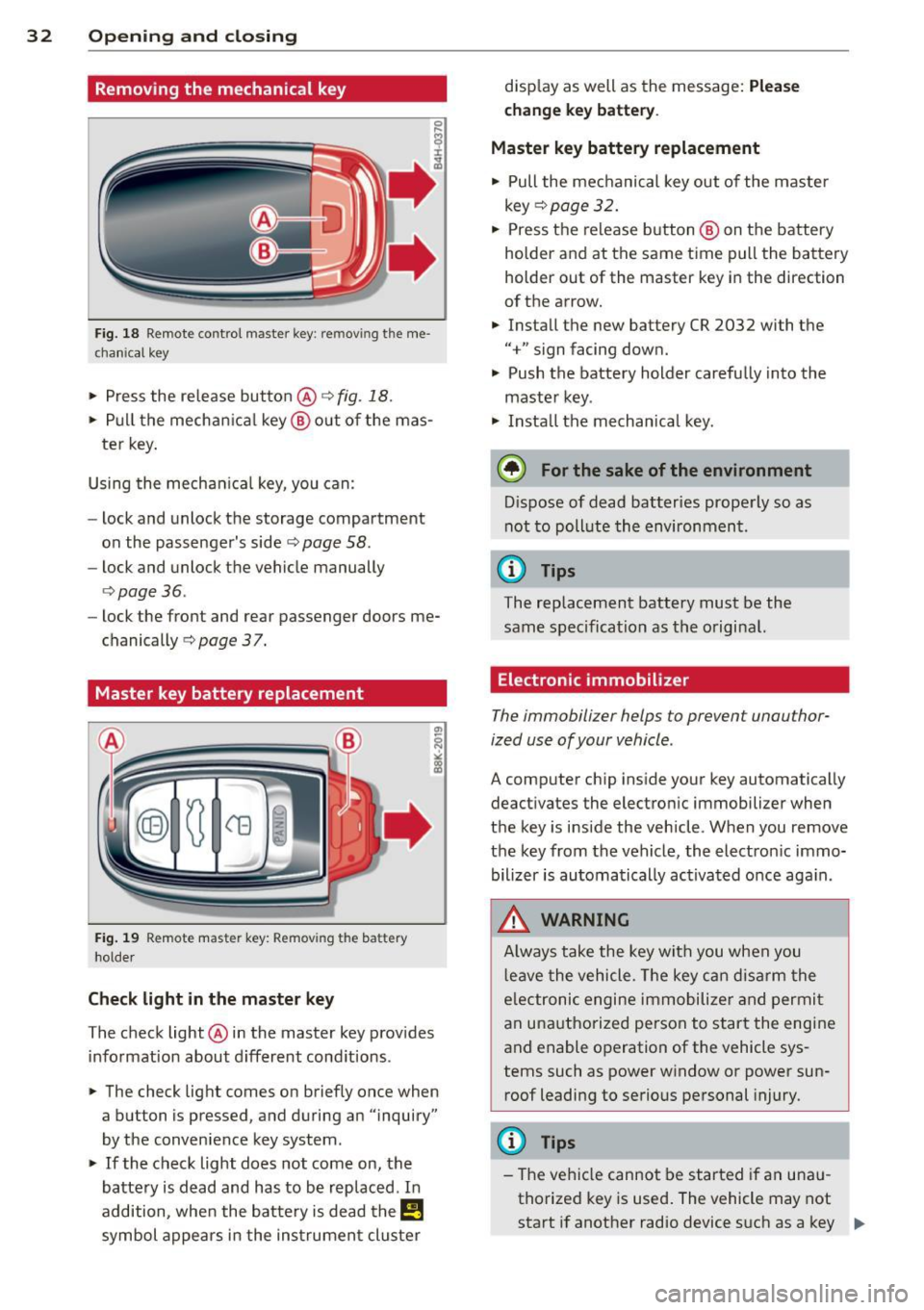
Fig. 18 Remote control master key : re m ov ing the me
c hani cal key
> Press the release button @ c:> fig. 18.
.. Pull the mechanical key@out of the mas
te r key.
Using the mechanical key, you can:
- lock and unlock the storage compartment
on the passenger's side
c:> page 58.
- lock and unlock the vehicle manually
<=>page 36.
-lock the front and rear passenger doors me
chanically
c:> page 37.
Master key battery replacement
Fig. 19 Remote master key: Remov ing th e ba tte ry
ho lder
Check light in the master key
The check light @in the master key provides
information about different conditions .
.. The check light comes on briefly once when
a button is pressed , and during an "inquiry"
by the convenience key system .
> If the check light does not come on, the
battery is dead and has to be replaced . In
addition, when the battery is dead
them
symbol appears in the instrument cluster disp
lay as well as the message:
Please
change key battery.
Master key battery replacement
• Pull the mechanical key out of the master
key
<=> page 32.
"' Press the release button @ on the battery
holder and at the same time pull the battery
holder out of the master key in the direction
of the arrow .
.. Install the new battery CR 2032 with the
"+" sign facing down.
• Push the battery holder carefully into the
maste r key .
• Insta ll the mechanical key.
@ For the sake of the environment
Dispose of dead batteries properly so as
not to pollute the environment.
(D Tips
The replacement battery must be the
same specification as the original.
Electronic immobilizer
The immobilizer helps to prevent unauthor
ized use of your vehicle .
A computer chip ins ide your key automatically
deactivates the electronic immobilizer when
the key is inside the vehicle . When you remove
the key from the vehicle, the electron ic immo
bilizer is automatically activated once aga in.
_& WARNING
-
Always take the key with you when you
l eave the vehicle. The key can disarm the
e lectronic engine immobilize r and permit
an unauthorized person to start the engine
and enable operation of the vehicle sys
tems such as power window or power sun
roof leadi ng to serious personal injury.
(D Tips
- The vehicle cannot be started if an unau
thorized key is used. The vehicle may not
start if another radio device such as a key ""
Page 35 of 306
for another vehicle or a transponder is located on the key ring.
- For Declaration of Compliance to United
States FCC and Industry Canada regula
tions ¢
page 288.
Power locking system
General description
The power locking system locks or unlocks all
doors and the rear lid simultaneously.
You can lock and unlock the vehicle centrally.
You have the following choices:
- Remote master key¢
page 34,
- Door handles with convenience key*
¢page 35 ,
- Lock cylinder at the driver's door
¢page 36, or
- Power locking switch inside¢
page 36.
Selective unlocking
When you lock the vehicle, the power locking
system will lock the doors and the rear lid.
When unlocking, you can set in the MMI
whether only the driver's door or the entire
vehicle should be unlocked
¢page 34.
Automatic locking
The automatic locking feature locks all the ve
hicle doors and the rear lid when you drive
faster than 9 mph (1S km/h).
T he car is unlocked again, when the opening
function in the power locking system switch
or at one of the door levers is actuated .
Anti-theft alarm warning system
If the anti-theft alarm warning system de
tects a break-in into the vehicle, acoustic and
visual warning signals are triggered .
T he anti-theft warning system is activated au
tomatically when you lock the vehicle . It is de
activated when unlocking using the remote key, with the mechanical key, and when you
switch the ignition on.
The alarm also turns off when the alarm cycle has expired.
Opening and closing 33
Turn signals
When you unlock the vehicle, the turn signals
flash twice. When you lock the vehicle the
turn signals flash once. If they do not flash ,
one of the doors, the rear lid or the hood is not locked.
Unintentionally locking yourself out
In the following cases there safeguards to
prevent you locking your remote master key in
the vehicle:
- The vehicle does not lock with the central
locking switch¢
page 36 if the driver's
door is open.
- On vehicles with convenience key*, if the
most recently used master key is in the lug
gage compartment, the rear lid is automati
cally unlocked again after it is closed.
Do not lock your vehicle with the
remote mas
ter key or convenience key*
until all doors
and the rear lid are closed. In this way you
avoid locking yourself out accidentally.
Power side door closer*
The vehicle doors are equipped with a power
side door closer. When closing a door, you on
ly have to let it fall lightly into the latch. The
door will then automatically close by itself
¢..1, .
A WARNING
-
- When you lock your vehicle from outside,
nobody -especially children -should re
main inside the vehicle. Remember,
when you lock the vehicle from the out
side the windows cannot be opened from
the inside.
- When you leave the vehicle, always take
the ignition key with you . This will pre
vent passengers (children, for example) from accidentally being locked in the ve
hicle should they accidentally press the
power locking switch in the doors.
- Do not leave children inside the vehicle
unsupervised. In an emergency it would
be impossible to open the doors from
the outside without the key.
Page 38 of 306
36 Opening and clo sing
- Fo r Declaration of Compliance to United
States FCC and Industry Canada regula
tions
<::> page 288.
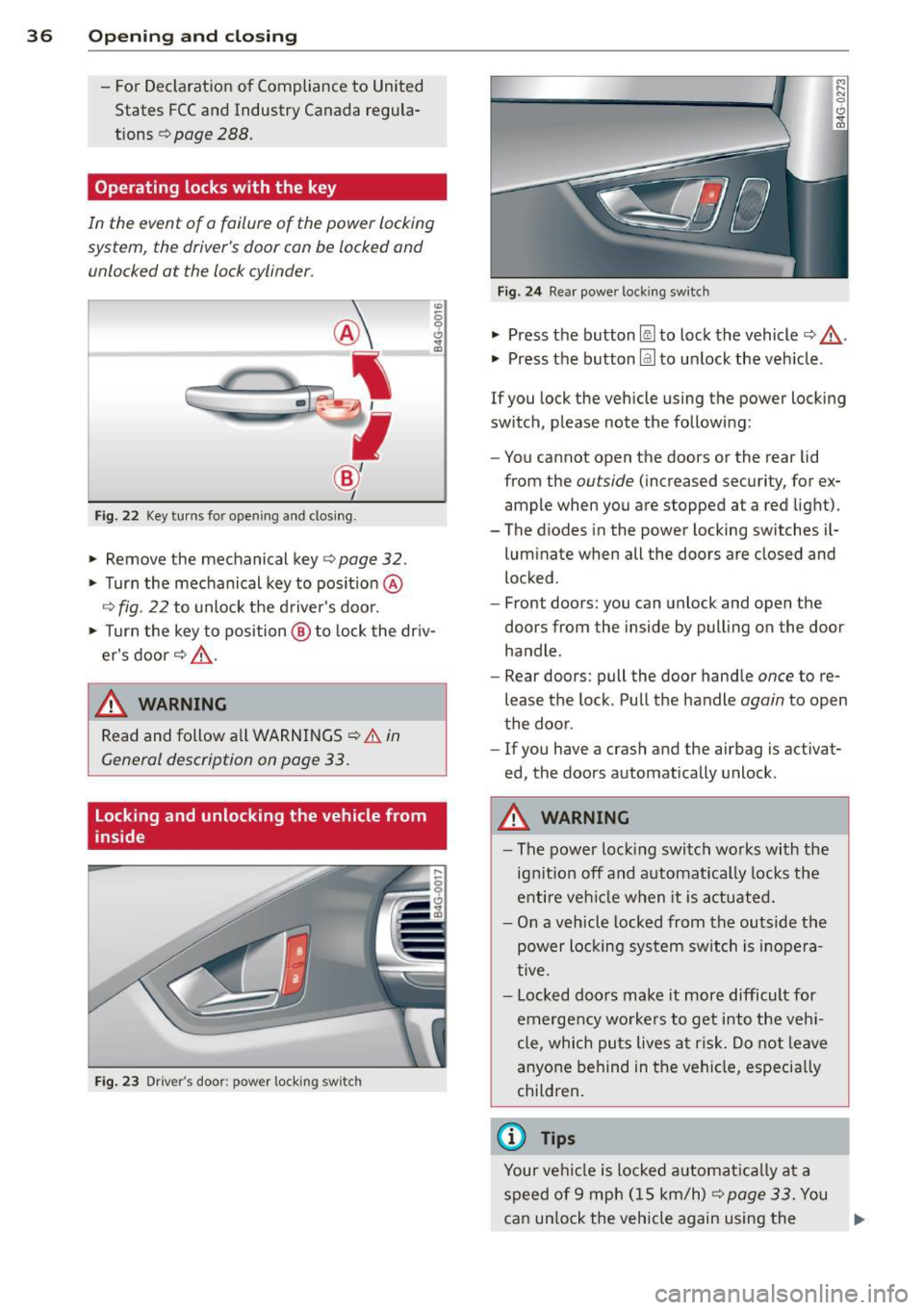
Operating locks with the key
In the event of a failure of the power locking
syst em , the driver 's door can be locked and
unlocked at the lack cylinder .
Fig. 22 Key turns fo r openi ng a nd closing.
"" Remove the mechanical key <=> page 32.
"" Turn the mechanical key to pos it io n @
r::':> fig . 22 to unlock the d river's door.
"' ~ 0 0 c!,
i
"" Turn the key to position @ to lock the dr iv
er's door
<=> ,&. .
.&_ WARNING
Read and follow a ll WARNINGS r::':> & in
General description on page 33.
Locking and unlocking the vehicle from
inside
Fi g. 2 3 Drive r's door ; pow er lo ckin g sw it c h
-
F ig. 2 4 Rear powe r loc king sw itc h
"" Press the button [@ to lock the vehicle <=> ,&. .
"" Press the button@] to unlock the veh icle.
If you lock the vehicle using the power locking
switch, p lease note the followi ng:
- You cannot open the doo rs or the rear lid
from the
ou tside (increased security, for ex
ample when you are s topped at a red light).
- The diodes in the power locking swit ches i l-
lum inate when all the doors are closed and
locked .
- Front doors: you can unlock and open the
doors from the inside by pull ing on the door
handle .
- Rear doors : pull the door hand le
once to re
lease the lock . Pull t he handle
again to open
the door .
- If you have a crash and the airbag is activa t
ed, the doors automatically unlock .
.&_ WARNING
=
-The power loc king swi tch wo rks wi th the
ignit ion off and a utomat ica lly locks the
en tire veh icle when it is a ctuated.
- On a v eh icl e locked from the outside the
power locking system switch is inopera
tive .
- Loc ked doo rs make it more difficult for
emerge ncy worke rs to ge t into the veh i
cle , which pu ts lives at ri sk. Do not leave
a nyo ne behind in the vehi cle, especi ally
chi ldren .
© Tips
Your ve hicl e is l ocked a utomat ically a t a
s p eed of 9 mp h (1 5 km/h)
<=> page 33. You
can un lo ck the vehicle again using the ..,.
Page 40 of 306
38 Opening and closing
- Always ensure that no one is within
range of the rear lid when
it is mov ing, in
particular close to the hinges - fingers or
hands can be pinched.
(D Tips
When the vehicle is locked, the rear lid can
be opened separately by pressing the but
ton
l .::::sl on the master key . When you close
the rear lid again, it locks automatically .
Rear lid emergency release
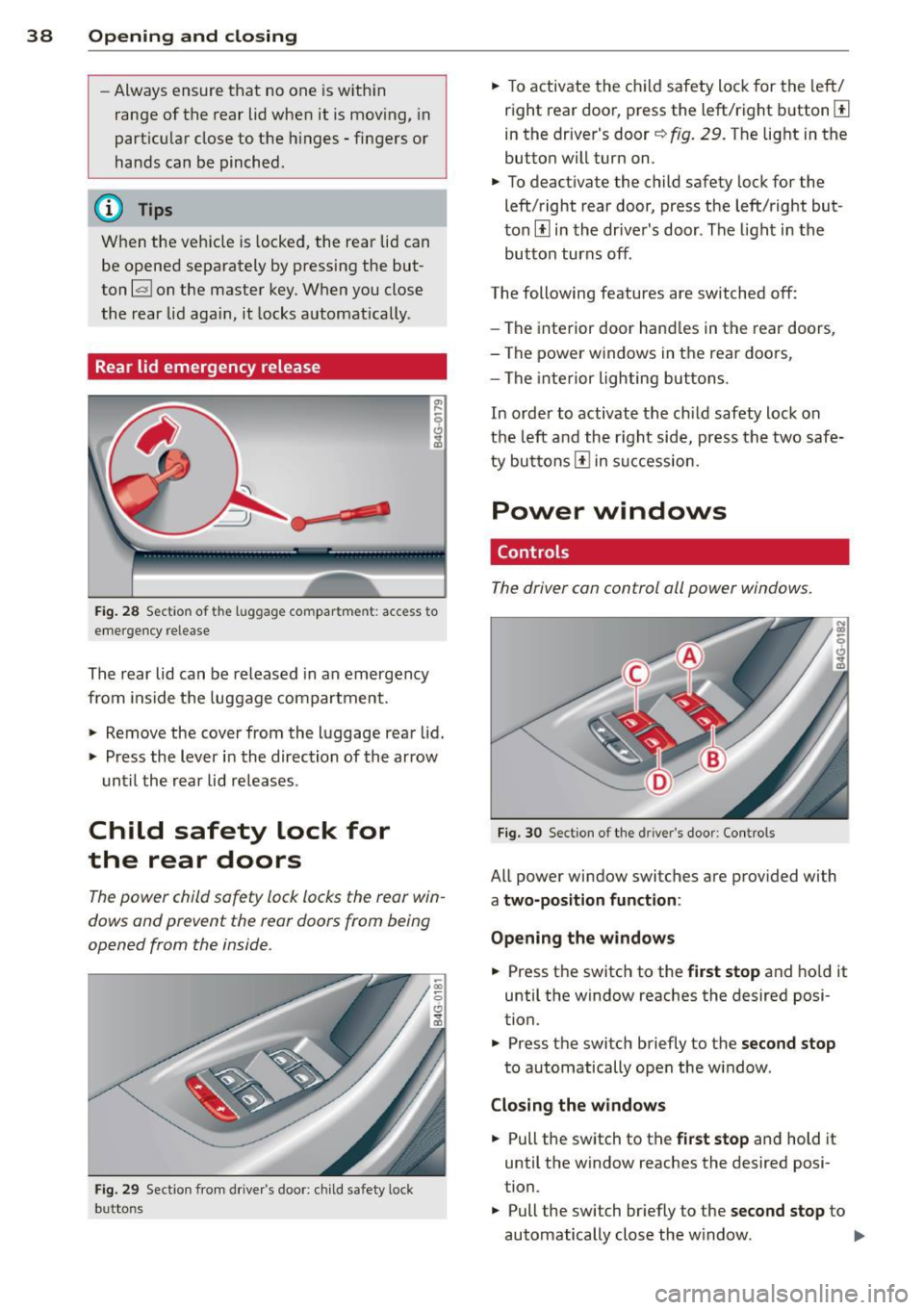
Fig. 28 Sectio n of t he lu ggage compar tme nt: access to
emergency re lease
The rear lid can be released in an emergency
from inside the luggage compartment .
.. Remove the cover from the luggage rear lid .
.. Press the lever in the direction of the arrow
until the rear lid releases .
Child safety lock for
the rear doors
The power child safety lock locks the rear win
dows and prevent the rear doors from being
opened from the inside .
Fig. 29 Section from drive r's door : ch ild safety lock
b u tto ns
.. To activate the child safety lock for the left/
right rear door, press the left/right button[!]
in the driver's door~
fig. 29. The light in the
button will turn on.
.. To deactivate the child safety lock for the
left/right rear door, press the left/right but
ton[!] in the driver's door. The light in the
button turns off .
The following features are switched off:
- The interior door handles in the rear doors ,
- The power windows in the rear doo rs,
- The interior lighting buttons .
In order to activate the child safety lock on
the left and the right side, press the two safe
ty buttons[!] in succession.
Power windows
Controls
The driver can control all power windows.
Fig. 30 Section of the dri ver 's doo r: Con tro ls
All power window switches are provided with
a two-position function :
Opening the windows
.. Press the switch to the first stop and hold it
until the window reaches the desired posi
tion .
.. Press the switch briefly to the
second stop
to automatically open the w indow .
Closing the windows
.. Pull the switch to the first stop and hold it
until the window reaches the desired posi
tion.
.. Pull the switch br iefly to the
second stop to
automatically close the w indow. ..,_
Page 41 of 306
Pow er w ind ow switche s
@ Driver's door
® Passenger's door
© Le ft rea r door
@ Ri ght rear door
~ WARNING
- When you leave your veh icle -even if on
ly briefly -always take the ignition key
with you. This applies particularly when
children remain in the vehicle. Otherw ise
the ch ildren could start the engine or op
erate electrical eq uipment (e.g. power
windows). The power windows are func
t io nal until the d river's doo r or passeng
er's door has been opened.
- Be careful when closing the windows.
Check to see that no one is in the way, or
serious injury could result!
- When lo cking the veh icle from ou tside,
t he ve hicle must be unocc upied s in ce the
windows can no longer be opened in an eme rgency.
(D Tips
After the ig nition has been switched off,
t he wi ndows can still be opened or closed
for about 10 minutes. The power w indows
are not switched off until the dr iver's door
or passenger's door has been opened .
What to do after a malfunction
The one-touch open and close function must
be reactivated if the battery has been discon
nected .
.,. Pull and hold t he power w indow switch un
ti l the window is fully closed .
.,. Re lease the switch and then p ull it again for
at least one second.
Opening and clo sin g 39
Valet parking
The valet parking feature protects the lug
gage compartment from unauthorized ac
cess.
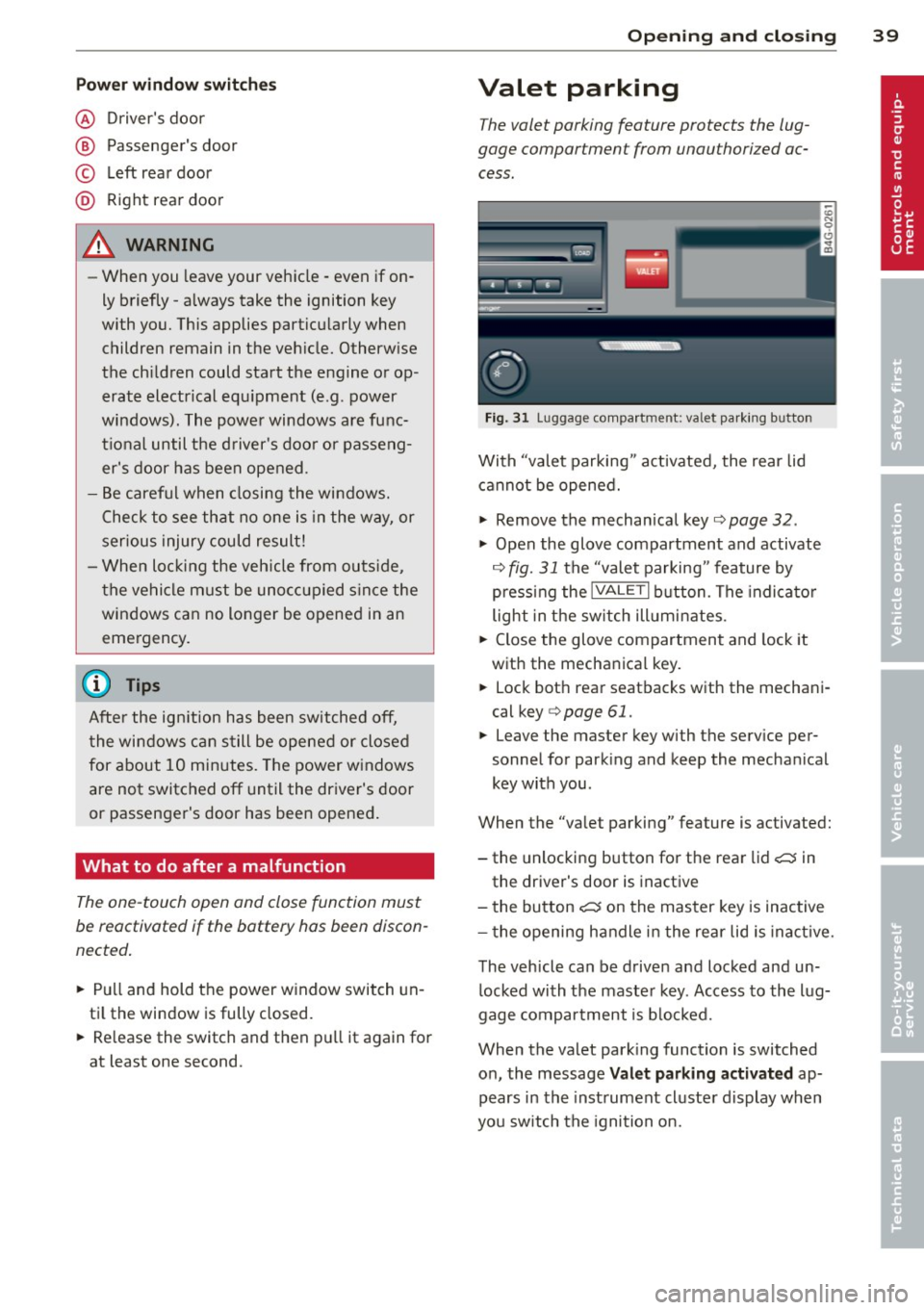
F ig. 31 Luggage compartment: valet parking button
With "valet parking" act ivated, the rear lid
cannot be opened.
.,. Remove the mechan ical key¢
page 32 .
.,. Open the glove compartment and activate
¢
fig. 31 the "valet parking" feature by
p ressi ng the
!VALET I b utton. The indica to r
light in the sw itch ill umi nates .
.,. Close the glove compartment and lock it
with the mechanical key.
.,. Lock bot h rea r seatbacks with the mechani
cal key ¢
page 61.
.,. Leave the master key with the service per
sonnel for park ing and keep the mecha nical
key with you.
When the "valet parking" feature is activated:
- the unlocking button for the rear lid
c:::; in
the driver's door is inact ive
- the bu tton
c:::; on the mas ter key is inactive
- the opening h andle i n the rear lid is inac tive.
The vehicle can be drive n and locked and un
l ocked with the maste r key. Access to the lug
gage co mpar tment is b locked.
When the valet park ing function is switched
o n, the message
Valet parking activat ed ap
pears in the inst rument cl uste r display when
you sw itch the igni tion on.
Page 43 of 306
Clear vision Lights
Switching the headlights on and off
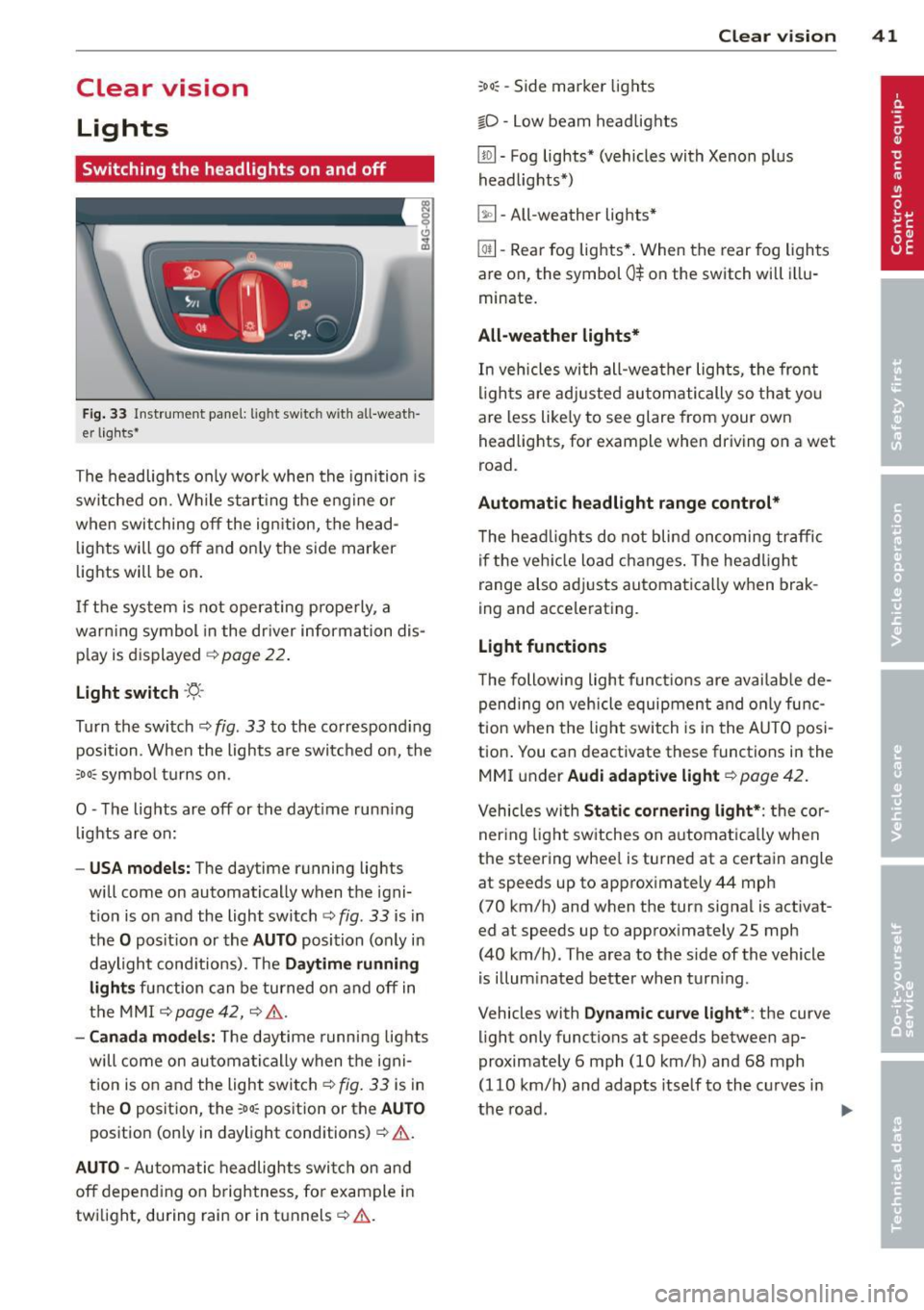
Fig . 33 Instrument pane l: lig ht sw itc h wit h all -weath
er lights•
The headlights only wo rk when the ignition is
switched on. Wh ile start ing the eng ine o r
when switching off the ign ition, the head
lights will go off and on ly the side marker
lights will be on .
If the system is not operating p rope rly, a
war ning symbol in the dr iver information dis
p lay is d isplayed
c::> page 22 .
Light switch -'tj_ -
Tu rn the switch c::> fig . 33 to the correspond ing
position . When the lights a re switched on, the
oD o: symbo l tu rns on .
0 -The lig hts are off or the dayt ime runn ing
lights are on:
- USA models: The day time running lights
will come on automatically when the igni
t ion is on and the light switch
c::> fig . 33 is in
the
O posit ion or the AUTO position (only in
daylight cond itions). The
Daytime running
light s
function can be turned on and off in
the MMI
c::> page42, c::>A .
-Ca nada model s: The daytime running lig hts
will come on automa tically when the igni
t ion is on and the light switch
c::> fig . 33 is in
the
O position, the : Do: pos ition or the AUTO
position (only in daylight conditions) c::> A .
AUTO -Automatic headlights swi tch on and
off depend ing o n brightness, for example i n
tw ilight, during rain or in tunnels
c::> &. .
:Do: -Side marker lights
io -Low beam headlights
Clear vi sion 41
lm -Fog lights* (vehicles with Xenon p lus
headlights *)
~ -All-weather lights *
@il-Rear fog lights* . When the rear fog lights
are on, the symbol
0$ on the switch will i llu
minate.
All-weather lights*
In vehicles with all-wea ther lights , the front
ligh ts are ad justed au tomatically so that yo u
are less like ly to see glare from your own
head lights , for example when driving on a wet
road.
Automatic h eadl ight range control*
T he head lights do not blind oncoming traffic
i f the veh icle load changes . The headligh t
range also adj usts automatically when brak
ing and accelerating .
Light functions
The following light funct io ns are availab le de
pend ing on vehicle equipment and o nly func
tion when t he lig ht switch is in the AUTO posi
tion . You can deactivate these functions in the
MMI under
Audi adaptive light c::> page 42.
Vehicles with St atic corn ering light* : the cor
ner ing ligh t sw itches on a utomat ically when
the steering whee l is turned at a certain angle
at speeds up to approximately 44 mph
( 7 0 km/h) and when the turn signa l is activat
ed at speeds up to approximately 25 mph
(40 km/h) . The area to the side of the vehicle
is illum inated better when turn ing .
Vehicles with
Dynamic cu rve light* : the curve
light only functions at speeds between ap
proximately 6 mph (10 km/h) and 68 mph
(110 km/h) and adapts itself to the curves in
the road .
~