Nav AUDI A6 2014 Owners Manual
[x] Cancel search | Manufacturer: AUDI, Model Year: 2014, Model line: A6, Model: AUDI A6 2014Pages: 304, PDF Size: 76.32 MB
Page 7 of 304
In addition to t his Owner's Ma nual, your A udi
comes w ith t he
- MMI Oper ating In st ru cti ons
- Warranty
& Ma intenance boo klet.
If you are m iss ing one of these publicat ions,
or if you believ e that the information is not
comp lete, contact you r auth orized Audi dea le r
for assistanc e.
MMI Operating Instructions
contain detailed desc ription of the Aud i M ulti
Media Interface (MMI) including t he nav iga
tion system, the so und system and the ha nd
h e ld pho ne.
The Warranty & Maintenance booklet
explains how yo u can keep your A udi in top
driving condition by hav ing it serviced regular
l y and conta ins detai led info rmat ion about
the wa rra nties covering your Aud i. Always
h ave the boo klet with yo u when yo u take your
ve hicl e to a n author ized Audi dealer for serv
i ce. Y our Audi Servi ce A dvis or will re cord each
sche duled service and can an swe r any ques
tions you may have rega rding how to ma in tain
your ve hicle.
In Canada,
the veh icle lite rat ure is also avai lab le in
Fr ench . T o ob tain a cop y, contact your dea le r
or wri te to:
Au Canada, on peut se p rocure r un exemp la ire
e n fr an<;ais de ce do cument aupres du conces
sio nnair e ou de:
Volkswagen Canada Inc.
C lient Assistance
Assis tance a la Clientele
7 77 Bayly S tree t, Wes t,
A jax, On tario LlS 7G 7
If you sell your Audi
all lite ratu re should be left in the ve hicle to
make th e Warranty terms as we ll as a ll oper
ating, safety and m aintenan ce inform ation
a vaila ble to the nex t owne r.
Vehicle literature 5
If you change your address or if you
bought this Audi used
be s ure to send in a "Notice of Add ress
Change"/ " Notice of Used Car Purchase" post
card. T his card can be fo und in the Warranty
&
Maintenance booklet or obtained from your
autho rized Aud i dea ler .
It is in your own interest that we are able to
contact you should the need arise .
•
•
Page 11 of 304
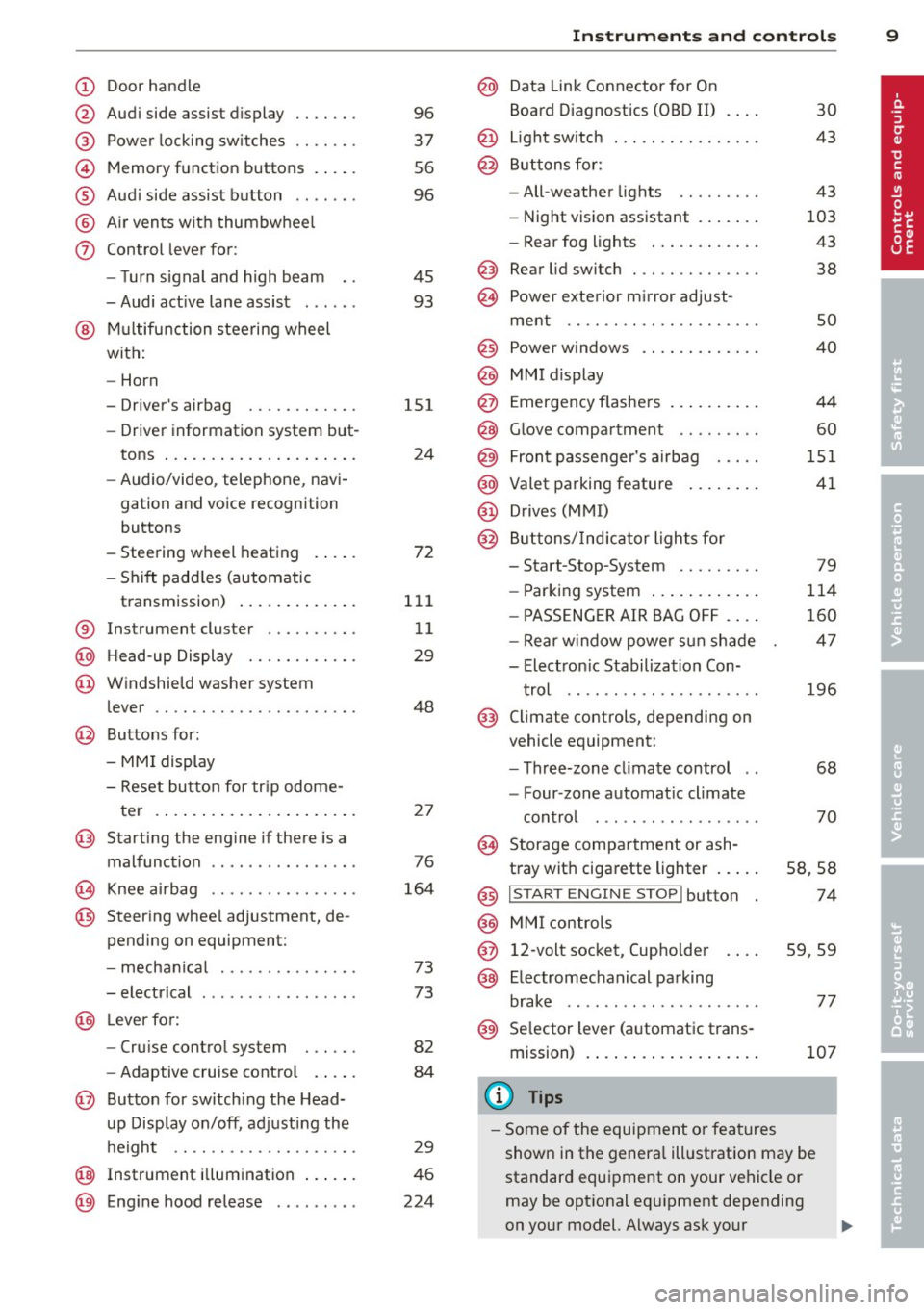
CD
@
®
©
®
®
(j)
Door handle
Audi side assist display
Power locking sw itches
Memory function buttons .. .. .
Aud i side assist button ...... .
A ir vents with thumbwheel
Control lever for:
- T urn signal and high beam
- Audi act ive lane assist . .. .. .
@ Mu ltifunction steering wheel
with:
- Horn
- Driver's airbag
- Driver information system but-
tons ... ..... ....... ... .. .
- Audio/video , telephone, navi
gation and voice recognition
buttons
- Steering wheel heating . ... .
- Shift padd les (automatic
transmission) ..... ... ... . .
® Instrument cluster ......... .
@ Head-up Display ........... .
@ Windshield washer system
lever ..................... .
@ Buttons for:
- MMI display
- Reset bu tton for tr ip odome-
te r .. .. ... .. ..... ... .. .. .
@ Starting the engine if there is a
malfunction ............... .
~ Knee airbag ........... .. .. .
@ Steer ing whee l adjustment, de
pending on equipment:
- mechan ical .......... .. .. .
- electrical .... .. ..... ... .. .
@ Leve r for:
- Cru ise control system ... .. .
- Adaptive cruise contro l .. .. .
@ Button for sw itch ing the Head
up Disp lay on/off, adjusting the
h eight .. ............. .. .. .
@ Instrument illumination ... .. .
@ Eng ine hood release ........ . 96
37
56
96
45
93
151
24
72
111
11
29
48
2 7
76
164
73
73
82
84
29
46
224
In strument s and control s 9
@ Data Link Connector for On
Board Diagnostics (OBD II)
@ Light switch ... .. . .. .... ... .
@ Buttons for :
- All-weather lights
- Night vision assistant .... .. .
- Rear fog lights .. .. .. ..... .
@ Rear lid switch ............. .
~ Power exterior m irror adjust-
30
43
43
103
43
38
ment . . . . . . . . . . . . . . . . . . . . . 50
@ Power w indows . . . . . . . . . . . . . 40
@ MMI display
@ Emergency flashe rs . . . . . . . . . . 44
@ Glove compartment . . . . . . . . . 60
@) Front passenger's airbag . . . . . 151
@ Valet parking feature . . . . . . . . 41
@ Drives (MMI)
@ Buttons/Indicator lights fo r
- Start-Stop-System . . . . . . . . . 79
- Parking system . . . . . . . . . . . . 114
- PASSENG ER AIR BAG OF F . . . . 160
- Rear w indow powe r sun shade 47
- Electron ic Stabilization Con-
t rol . . . . . . . . . . . . . . . . . . . . . 196
@ Climate controls, depending on
vehicle equipment:
- Three-zone cl imate control . . 68
- F our-zone automatic climate
cont rol . . . . . . . . . . . . . . . . . . 70
@ Storage compartment or ash-
t ray wit h cigarette lighter . . . . . S8, 58
@ I S T ART ENGINE STOPI button 74
@ MM I controls
@ 12-volt socket, (upho lder 59, 59
@ E lectromechanical parking
brake . . . . . . . . . . . . . . . . . . . . . 77
@ Selector lever (a utomatic trans-
mission) 107
(D Tips
-Some of the equipment or fea tures
show n in the genera l ill ustration may be
standard equipment on your vehicle or
may be opt ional eq uipment depending
on your model. Always ask your
ll>
Page 26 of 304
24 Instr uments and warning/indicator lights
¢¢Turn signals
The indicator light blinks when you use either
turn signal .
Whenever you use the left II or the rig ht a
turn signal, the indicator light blinks. When
you use the emergency flashers, both indica
tor lights flash.
If one of the turn signal light bulbs burn out,
the turn signal will blink twice as fast as nor
mal. Carefully drive to your authorized Audi
dealer immediately to have the malfunction
corrected. The indicator light does not indi
cate a malfunction if a turn signal on the trail
er or on the vehicle fails in trailer towing
mode.
@ Tips
For more informat ion on the turn signals,
refer to
c::> page 45.
CRUISE/" (') Cruise control
The warning/indicator light (ij;(l)~i~ (USA mod
e ls)/ il (Canada mode ls) illuminates when
the cruise contro l is activated
c::> page 82.
Driver information
display
Overview
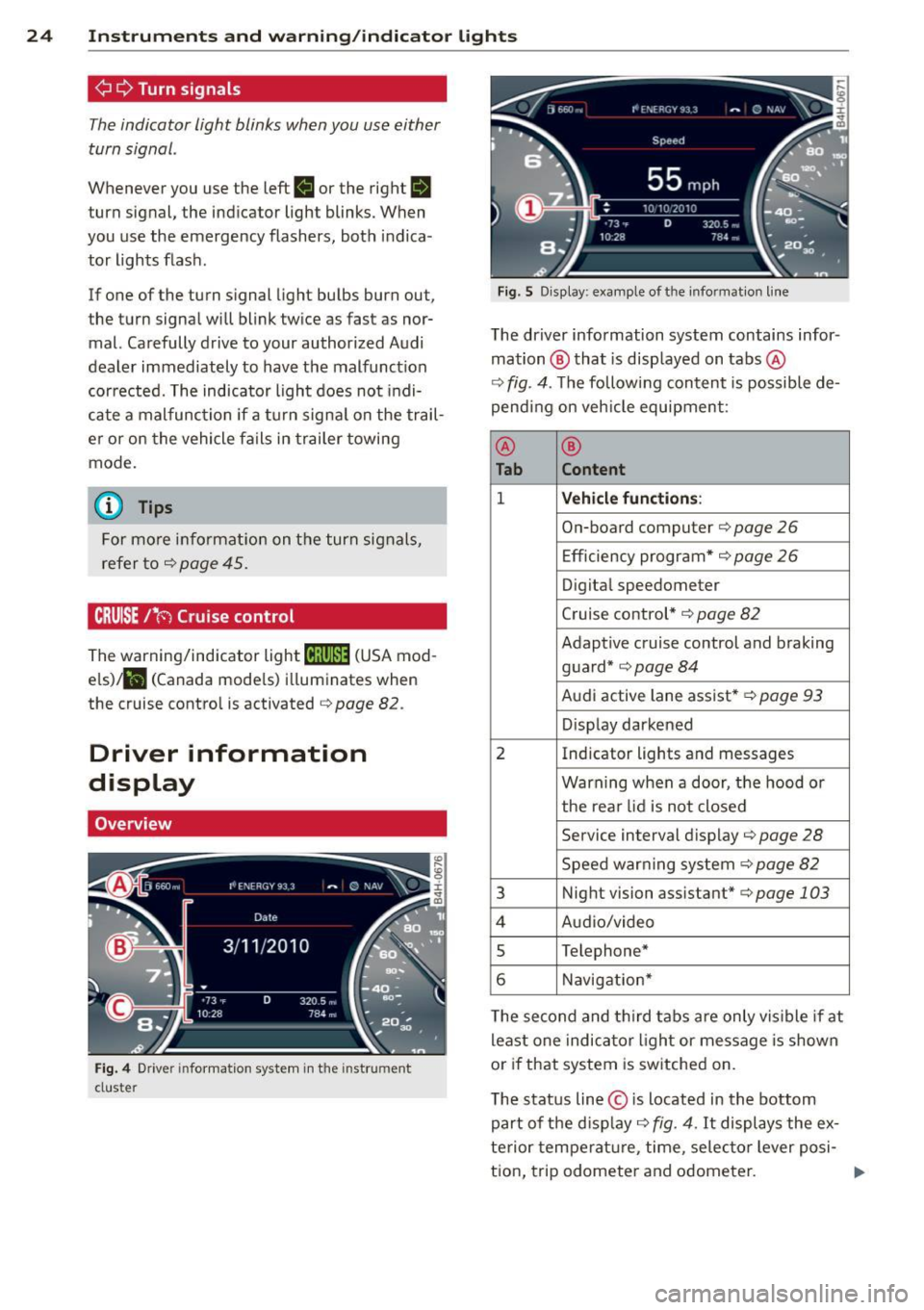
Fig. 4 Driver information system in the instrument
cluster
Fig. 5 Disp lay: example of the informat ion line
The driver information system contains infor
mation ® that is disp layed on tabs@
c::> fig. 4. The following content is possible de
pending on veh icle equipment:
@ ®
Tab Content
1 Vehicle functions :
On-board computer c::> page 26
Efficiency program*
c::> page 26
Digital speedometer
Cruise control*
c::> page 82
Adaptive c ruise control and braking
guard*
c::> page 84
Audi active lane assist* c::> page 93
Display darkened
2 Indicator lights and messages
Warning when a door, the hood or
the rea r lid is not closed
Service interval display
c::> page 28
Speed warning system c::> page 82
3 Night vision assistant* c::> page 103
4 Audio/video
s Telephone*
6 Navigation*
The second and third tabs a re only vis ible if at
least one indicator lig ht or message is shown
or if that system is switched on.
T he status line © is located in the bottom
part of the display
c::> fig. 4. It displays the ex
terior temperature , time, se lector lever posi-
tion, trip odometer and odometer. ..,.
Page 27 of 304
Instruments and warning/indicator lights 25
For some vehicle functions, you can access the
trip information from the temporary memory
¢
page 26 in the line CD¢ fig. 5.
.&_ WARNING
-
- Never rely exclusively on the outside
temperature display to determine if a
road surface is icy or not . Keep in mind
that road surfaces, especially bridges
and overpasses, could be ice covered and
slippery even at an outside temperature above
41 °F (+5 °().
- Always remember, even if the "snow
flake" symbol (ice warning) does not ap
pear in the display, black ice could be on
the road.
- Always reduce your speed and drive with
special care in cold weather conditions
when the chance of encountering icy
road surfaces increases.
@ Tips
- At temperatures below 14 °F (+ 5 °C) a
snowflake symbol appears ahead of the
temperature display. It is intended to re
mind the driver to pay special attention
to
ice on the road ¢ ,&. . If the vehicle is
stationary, or if you are driving at a very
low speed, the temperature shown in the
display might be slightly higher than the
actual outside temperature . This is
caused by the heat being radiated from
the engine .
- You can select the units used for temper
ature, speed and other measurements in
the MMI.
- For information on the audio/video and
navigation* functions, refer to the sepa
rate MMI owner's manual.
Operation
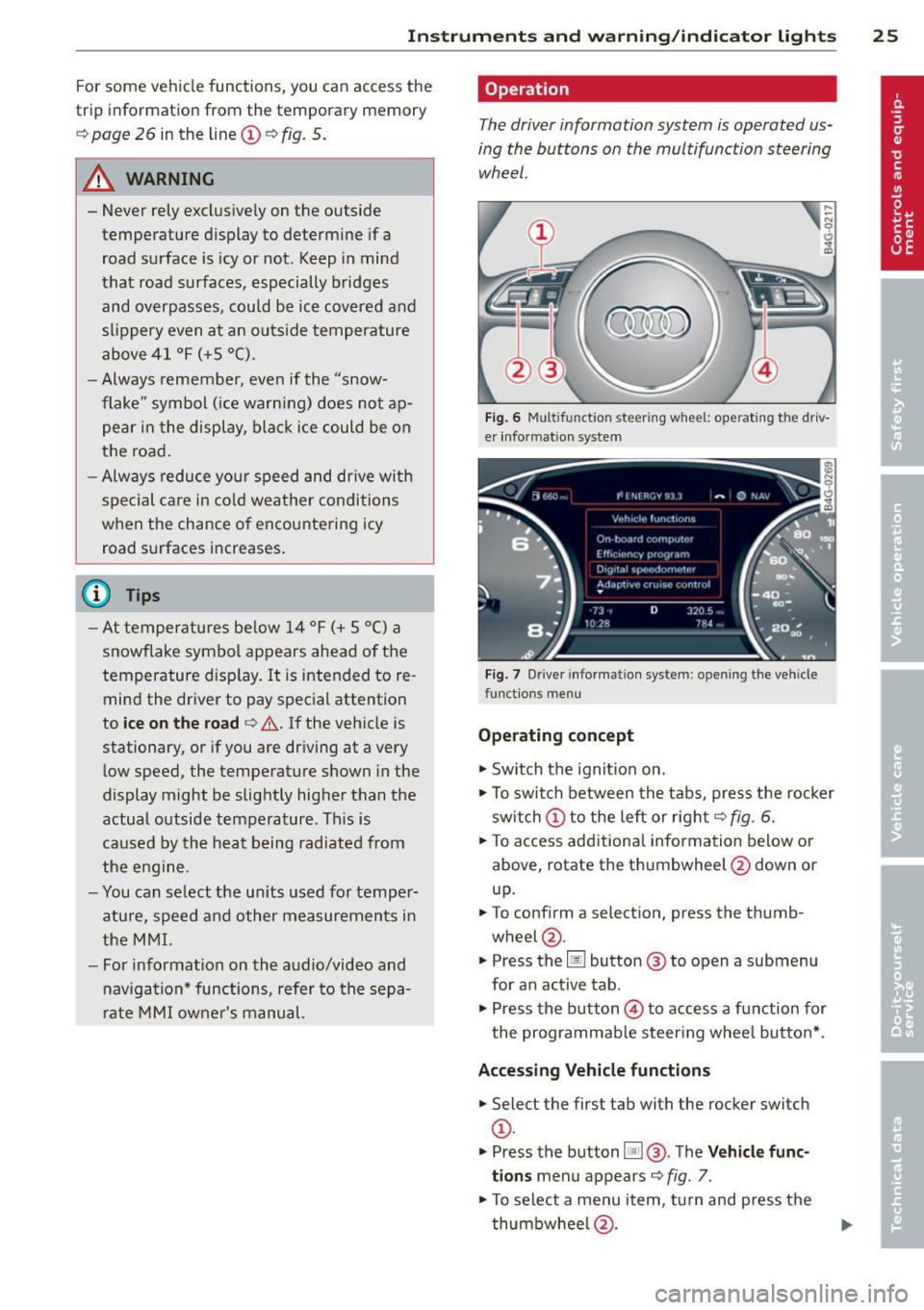
The driver information system is operated us
ing the buttons on the multifunction steering
wheel.
Fig. 6 Multif unctio n steerin g wh eel: operat in g th e driv
er informat ion sys te m
Fig . 7 Dr iver informat ion syste m: o penin g the ve hicle
fu nctio ns me nu
Operating concept
"'Switch the ignition on .
"'To switch between the tabs, press the rocker
switch CD to the left or right ¢
fig. 6.
"'To access additional information below or
above, rotate the thumbwheel @down or
up.
"' To confirm a selection, press the thumb
wheel @.
"' Press the
Iii button @ to open a sub menu
for an active tab .
"'Press the button @ to access a function for
the programmable steering wheel button* .
Accessing Vehicle functions
"'Select the first tab with the rocker switch
CD -
.. Press the button
liJ@. The Vehicle func
tions
menu appears ¢ fig. 7.
"'To select a menu item, turn and press the
thumbwheel @.
Page 31 of 304
Instrument s and warning /indicator lights 29
Resetting the service interval display
Your authorized A udi dealer w ill rese t the cor
respo nding service sche dule after per forming
the approp riate service on yo ur vehicle. Yo u
also have the possibility to reset the oil
change schedu le after having performed an
oil change according to Audi specifications.
Select the
I CAR ! function button > ( Car) * sy s
tems
control bu tton > Servicing & checks >
Service Int ervals > Re set oil change interval.
(D Note
If you disconnect the battery termina ls, no
calc ulations can be made for the serv ice
interval display d uring this time and no
s ervice re min der w ill appea r. Remembe r
t ha t obse rv in g the pr ope r se rv ice in tervals
is v itally impo rtant to ex ten ding the life o f
your vehicle, part icu larly the eng ine , and
maintaining its va lue . Even if t he mileage
driven is low, the maxim um period o f one
year from one se rvice to the next must not
be exceeded.
{!) Tips
- Do not reset the display between o il
c hanges, otherw ise the display will be i n
cor rect.
- The information in the Service Reminder
r ema ins stored even when the veh icle
battery is discon nected .
Head-up Display
Applies to vehicles: with Head -up Display
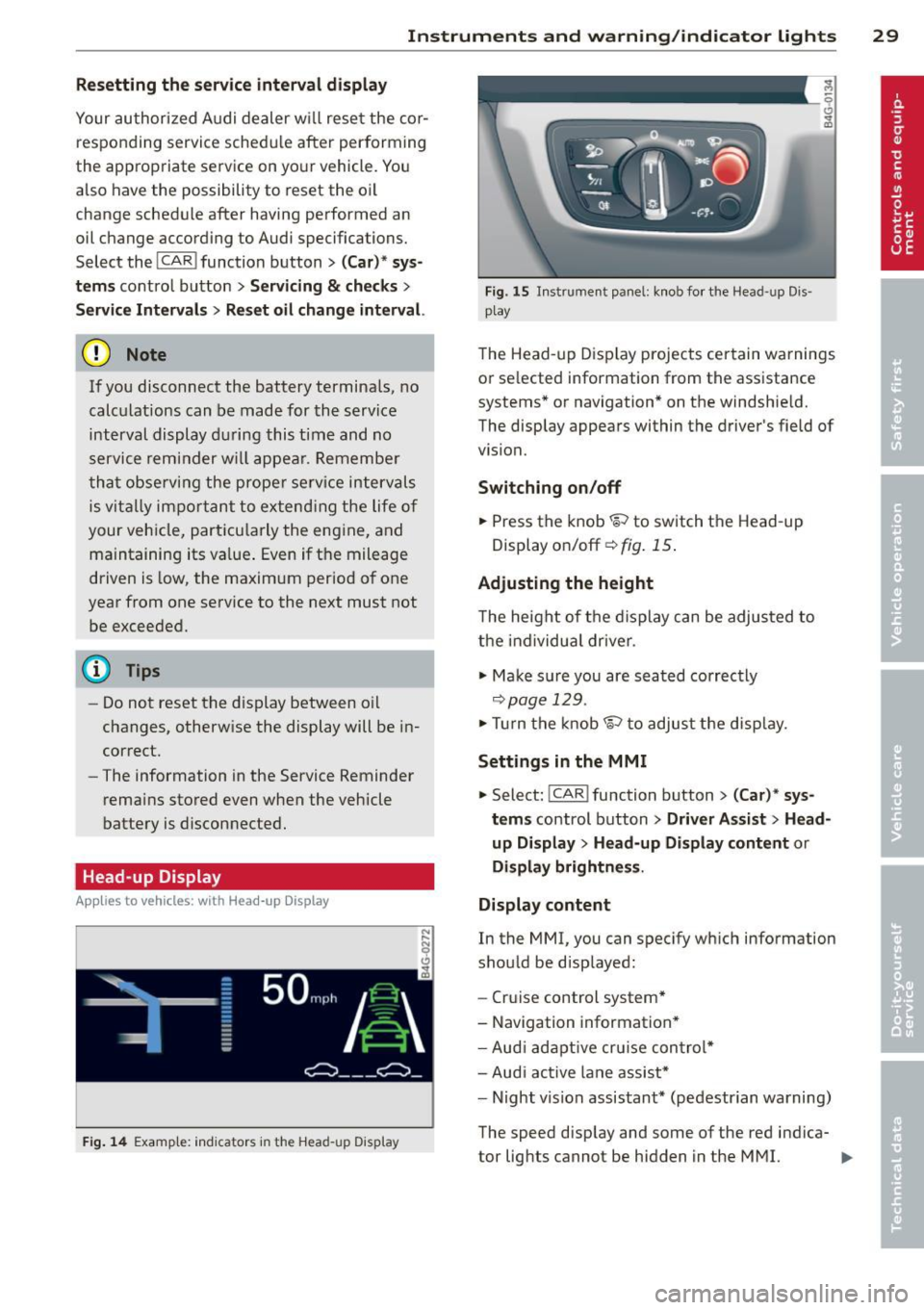
F ig. 14 Examp le: indicators in the Hea d-up Disp la y
Fig . 15 In strumen t pa nel: k nob fo r th e Head -up D is
p lay
The Head -up D is p lay projec ts cer tain warnings
or se lected information from the ass istance
systems* o r navigation * on the windshie ld.
The display appears within the driver 's fie ld of
vision.
Switching on/off
.,. Press the knob~ to switch t he Head -up
Display on/off ¢
fig. 15 .
Adjusting the height
The heig ht of t he di s p lay can be adju sted to
the individua l driver .
.,. Ma ke sur e you are seated correc tly
¢ page 129 .
.,. Tur n t he kn ob~ to adjus t th e disp lay.
Settings in the MMI
.,. Select: !CAR !function button> ( Car) * sys
tems
control button > Driver Assist > Head
up Display
> Head-up Display content or
Display brightness .
Display content
In the MMI, you can spec ify w hich information
sho uld be disp layed:
- Cr uise control system*
- Navigation information *
- Aud i adapt ive cr uise con trol *
- Aud i act ive lane ass ist*
- Night vision assistant* (pe destrian warning)
The speed d isp lay and some of the red indica-
tor lig hts cannot be hidden in the MMI. .,..
Page 41 of 304
-Always ensure that no one is with in
range of the rear lid when it is mov ing, in
particular close to the hinges -fingers or
hands can be pinched.
(D Tips
When the vehicle is locked, the rear lid can
be opened separately by pressing the but
ton
l a ! on the master key. When you close
the rear lid again, it locks automatically.
Luggage compartment with movement
activated opening
Applies to vehicles : with convenience key and sensor-con
trolled luggage compartment lid
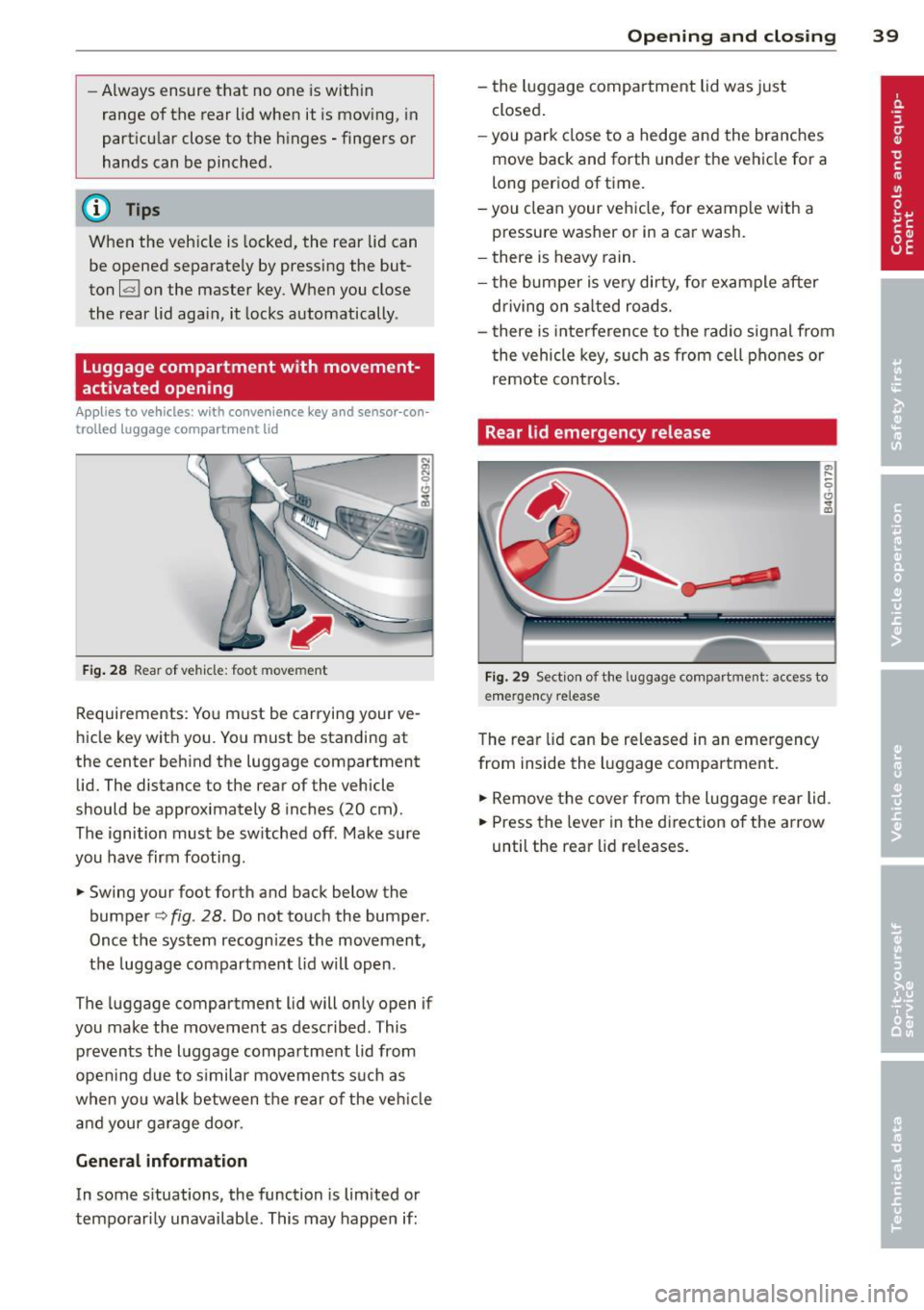
Fig . 28 Rear of vehicle: foot movement
Requirements: You must be carrying your ve
hicle key with you . You must be standing at
the center beh ind the luggage compartment
lid. The distance to the rear of the vehicle
should be approximately 8 inches (20 cm).
The ignition must be sw itched off. Make sure
you have firm footing .
.. Swing your foot forth and back below the
bumpe r<=>
fig . 28. Do not touch the bumper.
Once the system recognizes the movement,
the luggage compartment lid wil l open.
The luggage compartment l id will only open if
you make the movement as described. This prevents the luggage compartment lid from
opening due to s imilar movements such as
when yo u walk between the rear o f the ve hicle
and your ga rage doo r.
General information
In some s ituations, the function is limited or
temporarily unavailable. This may happen if:
Opening and closing 39
- the luggage compartment lid was just
closed.
-you park close to a hedge and the branches
move back and forth under the vehicle for a
long period of time.
-you clean your vehicle, for example with a
pressure washer or in a car wash.
- there is heavy rain.
- the bumper is very dirty, fo r example after
driving on sa lted roads.
- there is interference to the radio signal from
the vehicle key, such as from cell phones or
remote contro ls.
Rear lid emergency release
Fig. 29 Section of the luggage compartment: access to
emerge ncy release
The rear lid can be released in an emergency
from inside the luggage compartment.
.. Remove the cover from the luggage rear lid.
.. Press the leve r in the direction of the arrow
until the rear lid releases.
Page 83 of 304
-The windshield is being defrosted
Q page 69, ~ page 71 .
-The brake peda l is pressed several times in a
row.
- The battery charge level becomes too low.
- High power consumption .
Switching the ignition automatically
To prevent the battery from draining, the igni
tion will switch off
automatically when all of
the following conditions have been met:
- The vehicle has already been driven .
- The engine has been turned off by the Start-
Stop-System*.
- The driver's door is opened .
- The driver's seat belt is removed.
- The bra ke peda l is not pressed down.
- The vehicle is stationary.
In this case, the activated low beam will be re
placed by the side marker lights. The side
marker lights will switch off after approx i
mately 30 minutes or when you lock the vehi
cle .
If the Start-Stop System has
not turned off
the engine or if you have switched the Start
Stop system off manually, the ignition wil l
not
be automatically switched off and the engine
will continue to run ~,& .
& WARNING
Never allow the engine to run in confined
spaces -danger of asphyxiation.
(0 Tips
If you shift into the D, N or S positions af
ter shifting into reverse, the vehicle must
be driven faster than 6 mph (10 km/h) in
order for the engine to switch off again .
On the road 81
Switching the Start-Stop-System on/off
manually
Applies to veh icles: w ith Star t-Stop-Sys te m
If you do not wish to use the system, you can
switch it off manually.
=~-
-~ ---
' I~ -
--
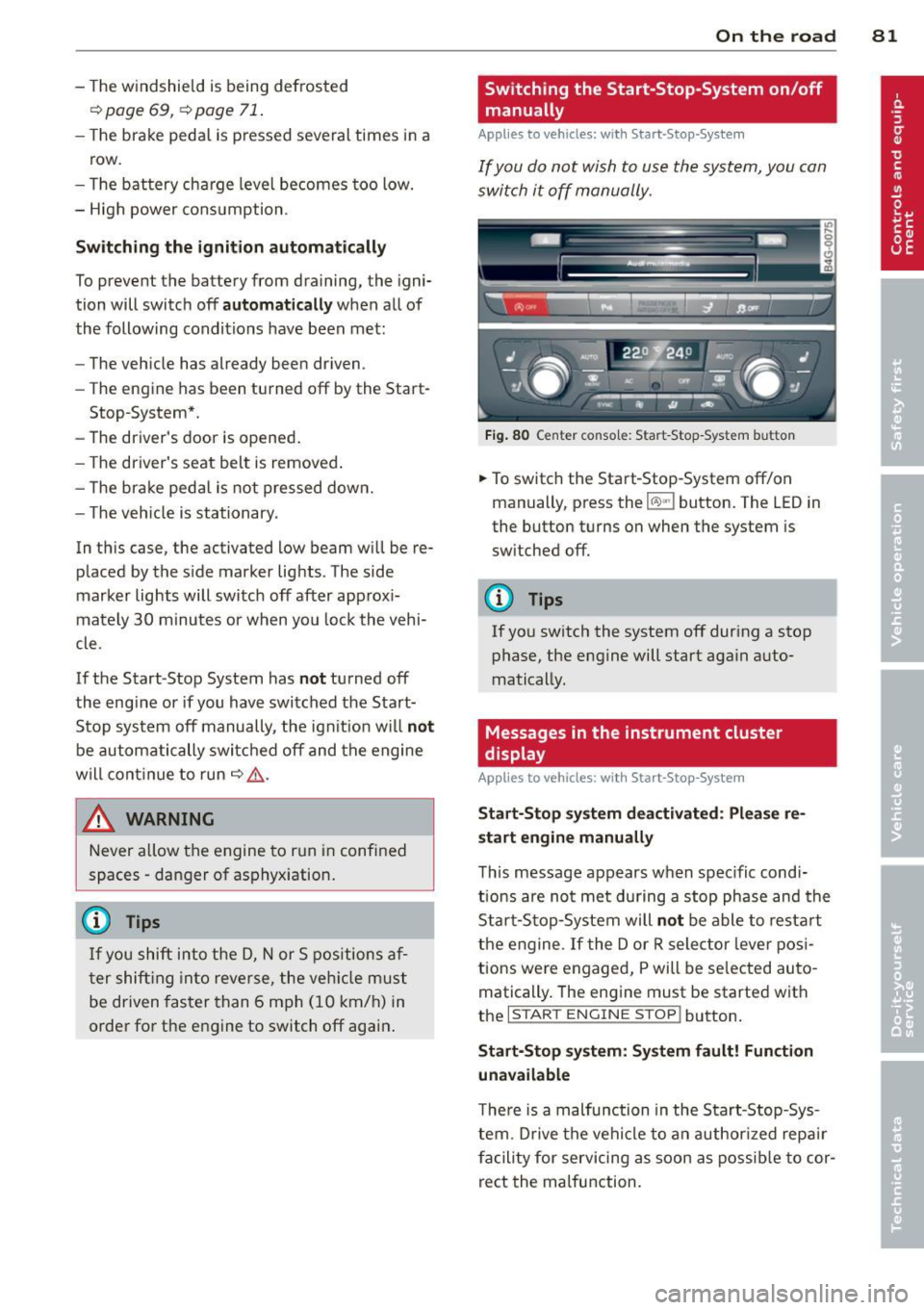
Fig. 80 Center console: Start-Stop-System button
.,. To switch the Start-Stop-System off/on
manually, press the
1 (1() ~·1 button. The LED in
the button turns on when the system is
switched off.
(D Tips
If you switch the system off during a stop phase, the engine will start again auto
matically.
Messages in the instrument cluster
display
A pp lies to veh icles : w ith S tart-Stop -Sys tem
Start-Stop system deactivated: Please re
start engine manually
This message appears when spec ific condi
tions are not met during a stop phase and the
Start-Stop-System will
not be able to restart
the engine . If the Dor R selector lever posi
tions were engaged, P will be selected auto
matically. The engine must be started with
the
I START ENGINE STOP! button.
Start-Stop system: System fault! Function
unavailable
There is a malfunction in the Start-Stop-Sys
tem . Drive the vehicle to an authorized repair
facility for servicing as soon as possible to cor
rect the malfunction.
Page 93 of 304
Audi adaptive cru ise control and brakin g guar d 91
stopped vehicle or stationary obstacle
(end of a traff ic jam or veh icle that has
broken down in traffic).
- Always remember that the radar sensor
for the braking guard works only within
defined detection and range limits that
may prevent the proper detection of oth
er vehicles.
- The radar sensor's function and range
can be reduced by rain, snow and heavy
spray . Moving vehicles up ahead may not
be promptly detected or may not be de
tected at al l.
- Reflective surfaces in cl ud ing crash barr i
ers or tunnel ent rances may impair the
function of the radar sensor.
(D Tips
- You can ca ncel the braking w ith increas
i ng force that is initiated by the system
by b raking yo urself, by accelerating no
ticeab ly or by swerving.
- Bra king guard error messages
¢page 91.
- Keep in m ind that braking guard can
brake unexpectedly. Always secure any
c ar go or objec ts that you are transpor t
i ng to reduce the risk of damage or in
ju ry.
Settings in the MMI
App lies to vehicles: with Audi adaptive cruise co ntrol
... Se lect: I CARI function button > (Car )* sy s
tems
control button > Dri ve r assi st > Audi
bra king guard .
System -
Switch braking g uard On and Off .
When you sw itch the ignition on, the message
Audi braking guard off appears if the system
is switched off.
Early warning -The d istance and approach
warn ings in the disp lay can be switched
On /
Off .
@ Tips
- Your settings are automatica lly stored
and assigned to the remote control key being used at the time the settings are
made
.
-If you res trict the ESC, the braking gua rd
also sw itches itself off¢
page 196.
-Swi tch braking guard off when you a re
loading the vehicle onto a veh icle carrier,
t rain, ship or other type of transporta
tion . This can prevent undesired warn
ings from the braking guard system.
Messages
Applies to vehicles: wi th Audi ada ptive c ruise con tro l
Braking gu ard : off
T his dr iver message appears if the system is
turned off via the infotainment . Otherwise, if
the system is turned off, the information ap
pears every time shortly after the start of the
trip.
T he driver message a lso appears if the system
is not ava ilable d ue to a malfunct ion or if the
ESC is not switched on¢
page 196 . If this is
the case, the system will not prov ide warnings
about a possible collision.
Braking guard : acti vated
This dr iver message appears if sharp b rake
pressure was applied due to an acu te warning.
ACC: Unavailable!
ACC and Audi braking guard: not a vailable
The system cannot detect mov ing vehicles up
ahead correctly and is switched off . The sen
sors have been displaced or are not working
proper ly. The Audi pre sense functions may al
so be affected. Drive to your authorized Audi
dealer or author ized Audi serv ice facility im
med iate ly to have the malfunction cor rected .
ACC: currently unavailable. No sensor v is ion
ACC and b rak ing guide: cu rrentl y una vaila
ble . No sensor vis ion
T h is mess age appears if the senso r view is ob
structed, for example by leaves, snow, heavy
spray or dirt. Clean the sensors
i=:>page 84,
rg.83 . ~
Page 94 of 304
92 Audi adaptive cruise control and bra king guard
ACC : Currently unavailable . Gradient too
steep
T he road ex ceeds the maxim um poss ible an
g le for proper adaptive cruise co ntrol opera
tion . Adaptive cruise control is sw itched off .
ACC: Only available in D, Sor M
Select the D/S or M selector lever position .
ACC: currently unavailable. Parking brake
appl ied
T he adaptive c ruise co ntro l system swi tc hes
off a utomat ica lly if t he pa rking brake is set.
ACC : Currently unavailable . Stability control
(ESC) input .
This message appea rs if the Elect ron ic Stabili
z ation Cont ro l (ES C) is wo rking to help stabi
l iz e the vehicle. In thi s case, a dap tive cru ise
con tro l sw itches o ff autom atically .
ACC off: Manual control!
This message appears whe n adapt ive cr uise
control can not set the par king b rake. Press
the brake peda l to prevent the vehicle from
rolling .
•••
Three w hite dots appear if a settin g can not be
se lected with the se lecto r lever. For example,
this happens if adapt ive cr uise control cannot
resume driv ing in stop-and-go traff ic because
one o f the conditions required for ACC to wor k
i s not present .
Door open
The adaptive c ruise control system c annot
switch on whe n a doo r is open .
Stationary object ahead
This message appea rs if you would like to
sw itch adaptive cru ise cont rol on and ther e is
a stat io na ry ve hicle o r obstacle directly ahead
of yo ur vehicle .
Page 101 of 304
@ Tips
-Side assist is not active whi le you are
making the adjustment.
- Your settings are automatica lly stored
and assigned to the remote control key
being used.
Driver messages
Applies to vehicles: with side assist
If side ass ist switches off by itself, the LED in
the button turns off and a message will ap
pear in the instrument cluster d isplay:
Audi side assist: Currently unavailable . No
sensor vision
The radar sensors' vision is affected. Do not
cover the area in front of the sensors with bike
wheels, stickers, dirt or other objects. Clean
the area in front of the sensors, if necessary
c>page97, fig.101.
Audi side assist: Currently unavailable
Side assist cannot be swi tched on temporarily
because there is a malfunction (for example,
the battery charge leve l may be too low) .
Audi side assist: System fault!
The system cannot guarantee that it will de
tect vehicles correctly and it is switched off .
The senso rs have been displaced or are faulty.
Ha ve the sys tem checked by an authorized
Aud i dealer o r autho rized Aud i Service Fac ilit y
soon.
Audi side assist: Unavailable when towing.
Side assist sw itches off automatically when a
factory- installed trailer hitch is connected to
the electrical connector on the trailer. There is
no guarantee the system will switc h off when
using a retrofitted trailer hitch. Do not use
side assist when towing a trailer .
Audi side assist 99