light AUDI A6 2014 Owners Manual
[x] Cancel search | Manufacturer: AUDI, Model Year: 2014, Model line: A6, Model: AUDI A6 2014Pages: 304, PDF Size: 76.32 MB
Page 261 of 304
remain continuously illuminated. This se
quence will continue upon subsequent vehicle
start-ups as long as the malfunction exists.
When the malfunction indicator is illuminat
ed, the system may not be able to detect or
signal low tire pressure as intended . TPMS
malfunctions may occur for a variety of rea
sons, including the installation of replace
ment or alternate tires or wheels on the vehi
cle that prevent the TPMS from functioning
properly . Always check the TPMS malfunction
telltale after replacing one or more tires or
wheels on your vehicle to ensure that the re
placement or alternate tires and wheels allow
the TPMS to continue to function properly.
Tire pressure indicator appears
Appl ies to vehicles: with tire pressur e monitoring sys te m
The tire pressure indicator in the instrument
cluster informs you if the tire pressure is too
low or if there is a system malfunction.
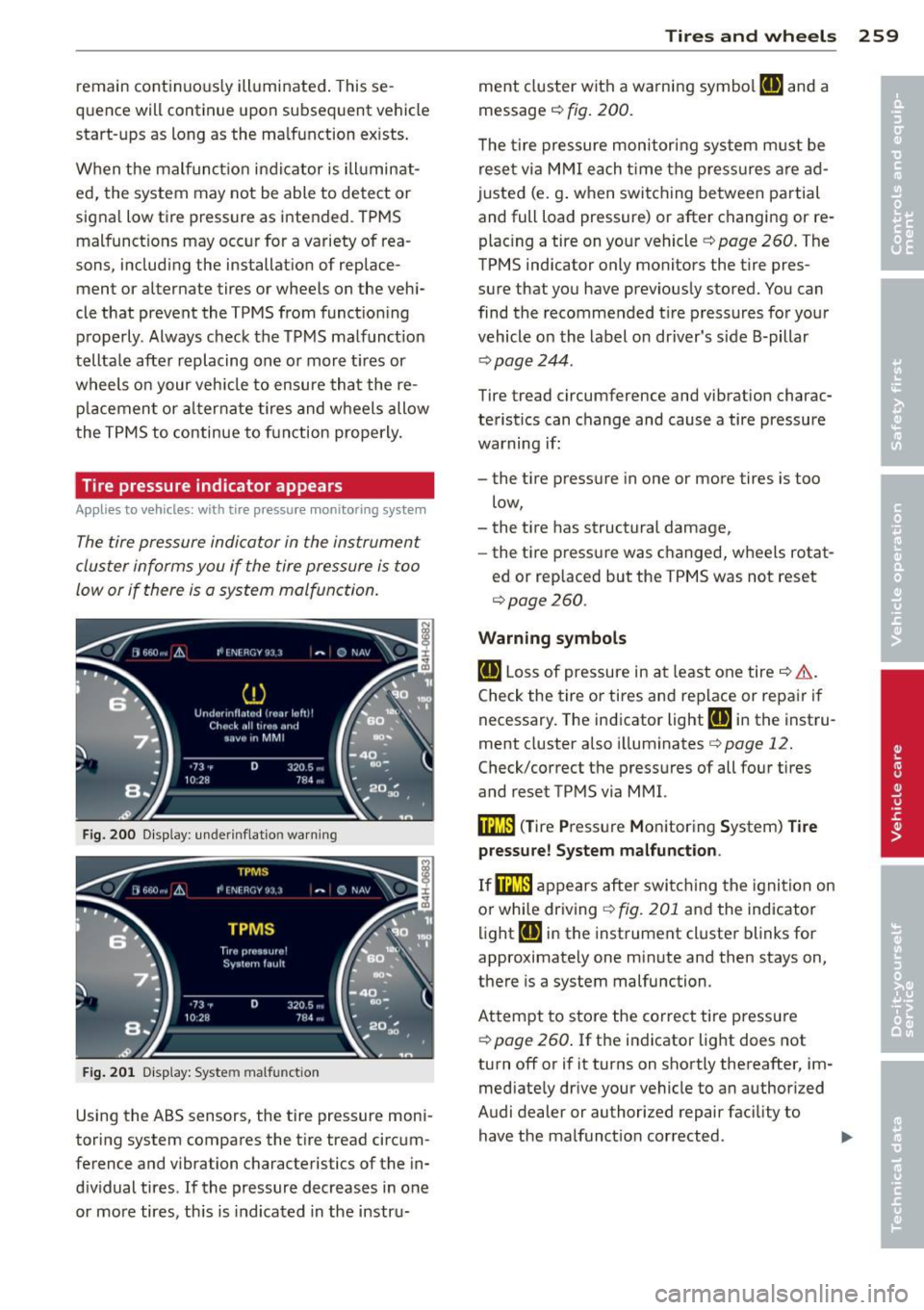
Fig. 200 Display : underinflation warning
Fig. 201 Display: System malfunction
Using the ABS sensors, the tire pressure moni
toring system compares the tire tread circum
ference and vibration characteristics of the in
dividual tires. If the pressure decreases in one
or more tires, this is indicated in the instru-
Tires and wheels 259
ment cluster with a warning symbol [I] and a
message
c::, fig. 200.
The tire pressure monitoring system must be
reset via MMI each time the pressures are ad
justed (e.g. when switching between partial
and full load pressure) or after changing or re
placing a tire on your vehicle
c::, page 260. The
TPMS indicator only monitors the tire pres
sure that you have previously stored. You can
find the recommended tire pressures for your
vehicle on the label on driver's side 8-pillar
~page 244.
Tire tread circumference and vibration charac
teristics can change and cause a tire pressure
warning if:
- the tire pressure in one or more tires is too
low,
- the tire has structural damage,
- the tire pressure was changed, wheels rotat-
ed or replaced but the TPMS was not reset
c::, page 260 .
Warning symbols
[I] Loss of pressure in at least one tire c::> &..
Check the tire or tires and replace or repair if
necessary. The indicator light
[I] in the instru
ment cluster also illuminates
c::>page 12.
Check/correct the pressures of all four tires
and reset TPMS via MMI.
i:mJ) (Tire Pressure Monitoring System) Tire
pressure! System malfunction .
If@m appears after switching the ignition on
or while driving
c::, fig. 201 and the indicator
light
[I] in the instrument cluster blinks for
approximately one minute and then stays on,
there is a system malfunction.
Attempt to store the correct tire pressure
c::, page 260. If the indicator light does not
turn off or if it turns on shortly thereafter, im
mediately drive your vehicle to an authorized
Audi dealer or authorized repair facility to
have the malfunction corrected.
Page 266 of 304
264 What do I do now?
&_ WARNING
You or your passengers could be injured
while changing a wheel if yo u do n ot fol
low t hese safety precautions:
- If you have a flat t ire, move a safe dis
tance
off the road. Turn off the engine,
turn the emergency flashers on and use other warning dev ices to alert other mo
torists.
- Make sure that passengers wait in a safe
place away from the vehicle and well
away from the road and traff ic.
- T o help p revent the veh icle from mov ing
sudden ly and possibly slipping off the
ja ck, always fully set the parking b rake
and bloc k the whee l diagona lly opposite
the whee l being changed. When one
front whee l is lifted off the gro und, plac
ing the Automat ic Transmiss ion in P
(Park) will
not prevent the vehicle from
moving.
- Before you change a wheel, be sure the
ground is level and firm. If necessary,
use a sturdy board under the jack.
- Always store the vehicle tool kit, the jack
and the replaced t ire i n the luggage com
partment
c> page 134.
Before chang ing the wheel, yo u m ust acti
vate the jacking mode, so that the auto mat ic cont rols for the Adaptive Air S us
pens ion* do not make it more difficult to
lift the vehicle with the jack
c> page 266.
Changing a wheel
When you change a wheel, follow these
quence described below step-by-step and in
exactly that order .
1. Activate the vehicle jack mode*
~page 266.
-
2. Remove the decorative wheel cov er* . For
mo re details see also
c> page 265, Deco
rative wheel covers
or c> page 265,
Wheels with wheel bolt caps.
3 . L oosen the wheel bolt s c> page 265.
4. Locate the proper mounting point for the
jack and alig n the jack below that point
c> page 266 .
5.
Raise the car with the jack c> page 266.
6. Remove the wheel with the flat tire and
then insta ll
the s pare c>page 267.
7. Tighten all whee l bolts lightly.
8 . Lower the vehicle with the jack .
9. Use the wheel bolt wrench and firmly
t igh ten al l w heel bo lts c> page 265.
10. Replace the decora tive wh eel co ver*.
11. Deactivate the vehicle jack mode * in the
MMI:
I CARI f u nction button > (Car )* sys
tems
control button > Se rvicing & chec ks
> A ir susp .: jac k mode > Off .
The vehicle jack mode * switches off automati
ca lly at speeds above
6 mph (1 0 km/h) .
&_ WARNING ,.__
Always read and follow all WARNINGS and
i nformat ion
c> &. in Raising the vehicle on
page 266
and c> page 268.
After changing a wheel
A wheel change is not complete without the
doing the following.
.,. Always store the vehicle tool kit, the jack*
and the rep laced tire in the luggage com
partment
c> page 134.
.,. Check the tire pressu re on the spare whee l
immed iate ly after mounting it .
.,. As soon as poss ible, have the
tight ening
torques
on all whee l bolts checked with a
t o rque wrenc h. The co rrect tighte ning tor
que is 90 ft lb (120 Nm).
.,. Have the fla t tire
replaced as soon as possi
b le.
(D Tips
- If you not ice th at the wheel bo lts a re
co rroded and difficult to turn while
changing a tire, they should be rep laced
before you check the tightening torque.
- Drive at reduced speed until you have the
tightening torques checked .
ll-
Page 270 of 304
268 What do I do no w?
P uttin g on the spare wheel
.. Lift the spare wheel and ca refully slide it
over the alignment pin to guide it in place
¢ (D .
.. Use the hexagonal socket in the screwdriver
handle to screw in and tighten all wheel
bolts
slightly.
.. Remove the alignment pin and insert and
t ighten the remaining wheel bolt slightly
l ike the rest .
.. Turn the jack handle counte r-clockw ise to
lower the vehicle unt il the jac k is fully re
leased.
.. Use the wheel bolt wrench to tighten all
wheel bolts firmly¢
page 265 . Tighten
them
crosswise, from one bolt to the (ap
proximately) opposite one, to keep the
wheel centered.
When removing or installing the wheel,
the rim could hit the brake rotor and dam
age the rotor. Work carefully and have a
second person help you .
(j) Tips
Never use the hexagonal socket in the han
dle of the screwdriver to loosen or t ighten
the wheel bolts .
- Pull the reversible blade from the screw
driver before you use the hexagonal
socket in the handle to turn the wheel bo lts.
- When mounting tires with
unid ir ec tional
tread design
make su re the tread pat
tern is pointed the right way
¢ page 268.
-The wheel bolts should be clean and easy
to tu rn . Check for d irt and corrosion on
t h e mat ing s urfaces of both the whee l
and the h ub. Remove al l dirt from these
s ur faces before remo unting the wheel.
Tires with unidirectional tread design
Tires with unidirectional tread design must be
mounted with their tread pattern pointed in the right direction .
Using a sp are t ire w ith a tre ad pattern
intended for use in a specific direction
When using a spare t ire with a tread patter n
intended for use in a spec ific d irection , please
note the following :
- The direct ion of rotation is marked by an ar
row on the side of the ti re .
- If the spare tire has to be installed in the in
correct direct ion, use the spare tire only
temporarily s ince the tire will not be able to
achieve its optim um performance cha racte r
is tic s wit h regard to aquap la ni ng, no ise and
wear .
- We recommend that you pay part icu la r at
t en tion to th is fact d uring wet wea ther and
t ha t you adjust you r speed to match road
conditions .
- Replace the fl at tir e with a new o ne an d
have it insta lled on you r vehicle as soon as
possible to resto re the handling advantages
of a u nidirectional tire .
Notes on wheel changing
Please read the information¢ page 251, New
tires and replacing tires and wheels
if you a re
going to use a spare tire which is different
from the ti res on your vehicle .
After you change a tire:
- Check the tire pre ssure on the spare imme
diately after install ation.
- Have th e whe el bolt tightening torque
c hecked with a torque wrench as soon a s
possible by your author ized Audi dealer or
a qualified service stat ion.
- With steel and alloy wheel rims, the wheel
bolt s are cor re ctl y tightened at a torque of
90 ft lb (120 Nm ).
- If you noti ce that the wheel bolts are cor
roded and diffi cult to turn while changing
a ti re , they should be replaced before you
check the t ightening torque. .,..
Page 273 of 304
No. Equ ipment Amps
4 Suspension control system sen-s sor
s
E
lectronic Stabilization Cont rol
s (ESC) module
6 Climate control
5
7 Adaptive cruise control 10
8
Airbag control module, front
5
passenger 's seat sensor system
9 Gateway 5
Homelink (garage doo r opener),
10 night vis ion system cont ro l 5
module
11 Image
process ing (act ive lane
10
ass ist, adaptive cruise control)
12 Dynamic steering 5
13 Terminal 15 in
the instrument
15
panel
14 Terminal 15 in
the luggage com-
partment 30
15 Terminal 15 (eng
ine)
15
16 Starter 40
Fuse p anel ® (brown )
No . Equipment Amps
1 Gateway
5
2 C limate control 10
3 E
lectronic Stabili zation Contro l
10
(ESC) module
4 Fron
t door (driver 's side)
30
s
Power seat adjustment (driver's
7,5
seat)
6 Dynam
ic steering
35
7 Su nroof 20
8
Rear door control module (driv-
15
er 's side)
9 Lumbar support (
Front passen-
s ger seat)
10 Tire
pressure monitoring system
5
11 Su
nroof, rear spoi ler (Sport ba ck )
20
12 Driver door
control module
15
Fuse s and bulb s 2 71
Fuse panel © (red )
No . Equipment
2 Fuel pump
3 Brake lig
ht sensor/brake pedal
sensor system
AdBlue control module (Diesel)/
4 Engine acoustics
5 Left rear door cont rol modu le
6 Power seat adjustment
(pas-
senge r's seat)
7 Horn
8 Windshield wiper motor
9 Light/rain sensor, heater
for vid-
eo camera in windscreen
10 L umba r suppo rt (dr iver seat)
1 1 Front
passenger door control
modu le
1 2 Right rea r door cont rol mod ule
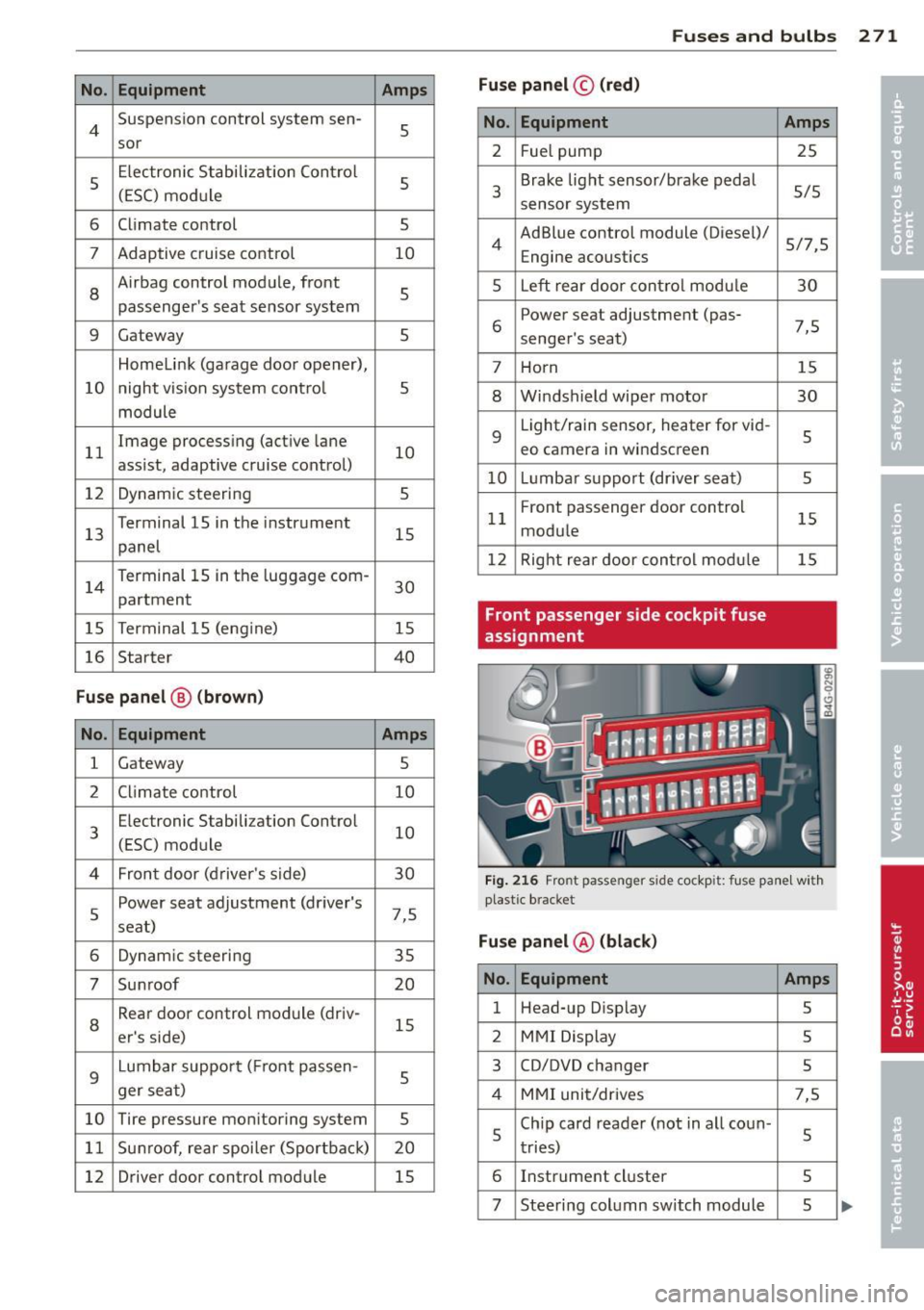
Front passenger side cockpit fuse
assignment Amp
s
25
5/5
5/7,S 30
7,5 15
30
s
5
15
15
F ig . 216 Front passenger side cockpit: f use panel w it h
plast ic brac ket
Fuse panel @ (blac k)
No . Equipment Amps
1 Head-up D
isplay
5
2 MMI Display 5
3 CO/DVD changer
5
4 MMI uni t/drives 7,5
5 Chip
card reader ( not in a ll coun -
5
tries)
6 Instrument
cluster
5
7 Steering col umn switch module 5 ...
Page 274 of 304
272 Fu ses and bulb s
No. Equ ipment Amps
8
Headlight range adjustment/
5/7,S
adaptive lighting system
10 Left headlight
(headlight with
7,5
adaptive light)
11 Supplementary heater
s
Fu
se p ane l@ (b ro w n)
No . Equipment Amps
1 Climate control
10
2 Climate control system blower 40
3 Diagnostic interface
10
4 E lectrical ignition lock
s
s
Power steering column adjust-
s ment
6 Steering column switch module
10
7 Power
steering column adjust-
ment 25
8 Light switch
s
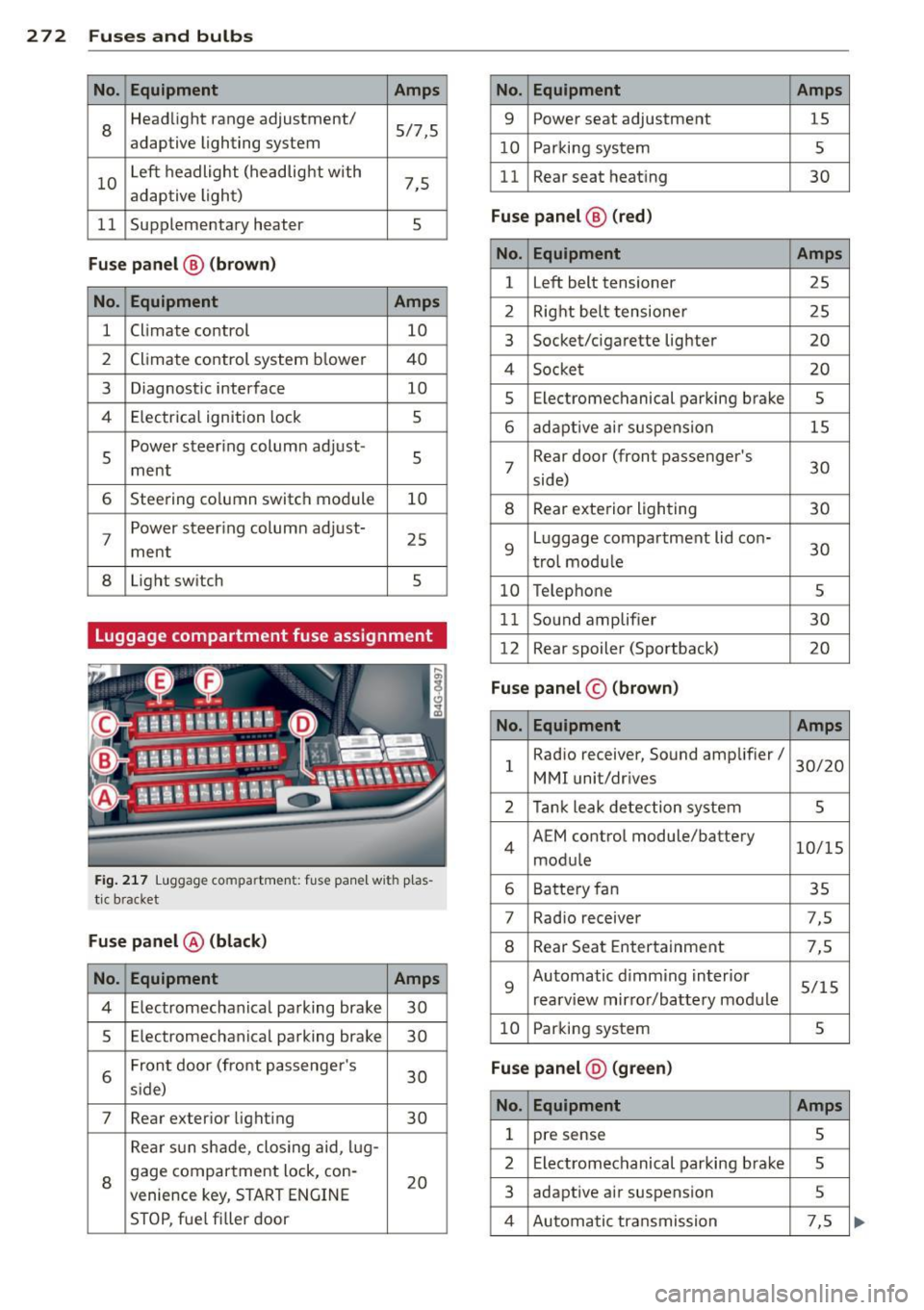
Luggage compartment fuse assignment
Fig
. 217 Luggage compartment: fuse panel with plas
tic bracket
Fuse p anel @ (b la ck )
No. Equipment Amps
4 E lectromechanical parking brake 30
s Electromechanical parking brake
30
6 Front door
(front passenger's
30
s ide)
7 Rear exter ior lighting
30
Rear sun shade, closing aid, lug-
8 gage compartment
lock, con-
20
venience key, START ENGINE
STOP, fuel filler door
No. Equipment Amps
9 Power seat adjustment
15
10 Parking system
s
11 Rear seat
heating
30
Fuse pan el@ (r e d )
No . Equipment Amps
l Left belt tensioner
25
2 Right belt tensioner 25
3 Socket/cigarette
lighter
20
4 Socket 20
5 Electromechanical
parking brake
5
6 adaptive ai r suspension 15
7 Rear door
(front passenger's
30
side)
8 Rear exterior lighting 30
9 Luggage compartment
lid con-
30
t rol modu le
10 Telephone 5
11 Sound amplifier 30
12 Rear
spoiler (Sportback)
20
Fuse pan el© (brown)
No . Equipment Amps
1 Radio receiver,
Sound amplifier/
30/20
MMI unit/drives
2 Tank leak detection system
s
4 AEM
control module/battery
10/15
module
6 Battery fan 35
7 Rad
io receiver 7,5
8 Rear Seat Entertainment 7,5
9 Automatic d
imming interior
5/15
rearview mirror/battery module
10 Parking system 5
Fuse pan el@ (gre en)
No . Equipment Amps
1 pre sense 5
2 Electromechanical parking brake
s
3 adaptive
air suspension
5
4 Automatic transmission 7,5
Page 275 of 304
No. Equipment Amps
5 Parking system 5
6 Rear Seat Entertainment 5
7 Start-Stop-System 5
8 side ass ist 5
9
Gateway, Vehicle electrical sys-
5 tern control module 1
10 Sport differential
5
Fuse panel © (black)
No. Equipment
Amps
1 Not used
Fuse panel ® (black)
No. Equipment
Amps
1 Movement-activated luggage 1
compartment lid opening
Bulbs
Replacing light bulbs
For your safety, we recommend that you have
your authorized Audi dealer replace burned
out bulbs for you.
It is becoming increasingly more and more
difficult to replace vehicle light bulbs since in
many cases, other parts of the car must first
be removed before you are able to get to the
bulb. This appl ies especially to the light bulbs
in the front of your car which you can only
reach through the engine compartment .
Sheet metal and bulb ho lders can have sharp
edges that can cause ser ious cuts, and parts
must be correctly taken apart and then prop
erly put back together to help prevent break
age of parts and long term damage from wa
ter that can enter housings that have not been properly resealed.
F or your safety, we recommend that you have
your authorized Audi dealer replace any bulbs for you, since your dealer has the proper tools,
the correct bu lbs and the expertise .
Gas discharge lamps (Xenon lights):
Fuses and bulbs
Due to the high e lectr ica l voltage, have the
bulbs replaced by a qualified technician.
Head lights w ith Xenon light can be identified
by the high voltage sticker.
LED headlights* require no maintenance.
Please contact your authorized Audi dealer if a
bulb needs to be replaced.
_& WARNING
Contact with high-voltage components of
the electrical system and improper re
placement of gas discharge (Xenon) head
light bulbs can cause ser ious personal in
jury and death .
- Xenon bulbs are pressur ized and can ex
plode when being changed .
- Changing Xenon lamps requ ires the spe
cial tra ining, instructions and equip
ment.
- Only an authorized Audi dealer or other
qualified workshop should change the
bulbs in gas discharge lamps.
&_ WARNING
There are parts with sharp edges on the
openings and on the bulb holders that can
cause serious cuts.
- If you are uncertain about what to do,
have the work performed by an author
ized Audi dealer or other qualified work
shop . Serious personal injury may result
from improperly performed work.
(D Tips
-If you still prefer to replace the light
bulbs yourself, be aware that the engine
compartment is a hazardous area to
work in ¢
page 224¢ &.
-It is best to ask your authorized Audi
dealer whenever yo u need to change a
bulb .
273
•
•
Page 276 of 304
2 7 4 Emergency situations
Emergency situations
General
This chapter is intended for trained emer
gency crews and working personnel who
have the necessary tools and equipment to
perform these ope rations.
Starting by pushing or
towing
Q;) Note
Vehicles w ith an automatic transmission
cannot be started by pus hing o r tow ing.
Starting with jumper
cables
If necessary, the engine can be started by
connecting it to the battery of another vehi
cle.
If the engine should fail to start because of a
discharged or weak battery, the battery can be
connected to the battery of
another veh icle,
using a
pair of jumpe r cables to start the en
g ine .
Jumper cables
Use only jumper cables of sufficiently large
cross section to carry the starter current safe
ly. Refer to the manufacturer's specif ications.
Use only jumper cables with
insulated termi
na l clamps which are distinctly marked:
plus(+) cable in most cases colored red
minu s(-) cable
in most cases colored black .
A WARNING
Batteries contain electricity, acid, and gas.
Any of these can cause very serious or fatal
inju ry. Follow the instructions below for
safe handling of your veh icle's battery.
- Always shield you r eyes and avoid lean
ing over the battery whenever possible.
- A discharged battery can freeze at tem
peratures just be low 32 °F (0 °C). Before connecting a
jumper cable, you must
thaw the frozen battery complete ly, oth
erwise it could explode.
- Do not allow battery acid to contact eyes
or skin . Flush any contacted area with
water immediately .
- Improper use of a booster battery to start a vehicle may cause an explosion.
- Vehicle batteries generate explosive gas
es. Keep sparks, flame and lighted ciga
rettes away from batteries.
- Do not try to jump start any vehicle with a low acid level in the battery.
- The vo ltage of the booster battery must
also have a 12-volt rating. The capacity
(Ah) of the booster battery should not be
lower than that of the discharged bat
tery . Use of batteries of d ifferent voltage
or substantially different "Ah" rating
may cause an exp losion and personal in
jury.
- Never charge a frozen batte ry. Gas trap
ped in the ice may cause an explosion.
- Never charge or use a battery that has
been frozen. The battery case may have
be weakened.
- Use of batter ies of different voltage or
substantially different capacity (Ah) rat
ing may cause an exp losion and injury.
The capacity (Ah) of the booster battery
should not be lower than that of the dis
charged battery.
- Before you check anything in the engine
compartment, always read and heed a ll
WARNINGS¢
page 224.
(D Note
- App lying a higher voltage booster bat
tery will cause expensive damage to sen
sitive electronic components, such as
contro l units, relays, radio, etc .
- Th ere must be no electrical contact be
tween the vehicles as otherwise current cou ld already start to f low as soon as the
positive(+) terminals are connected. .,.
Page 277 of 304
@ Tips
The disc harged battery must be properly
connected to the vehicle's electrical sys
tem. When jump starting or charg ing the
battery, never connect the negative
ground cable to the battery negat ive post
because the ba ttery manager system must
be ab le to detect the battery's state of
charge. Always connect the negative
g round cab le to the negative ground pos t
of t he battery manager cont ro l unit.
Use of jumper cables
Make sure to connect the jumper coble
clomps in exactly the order described b elow!
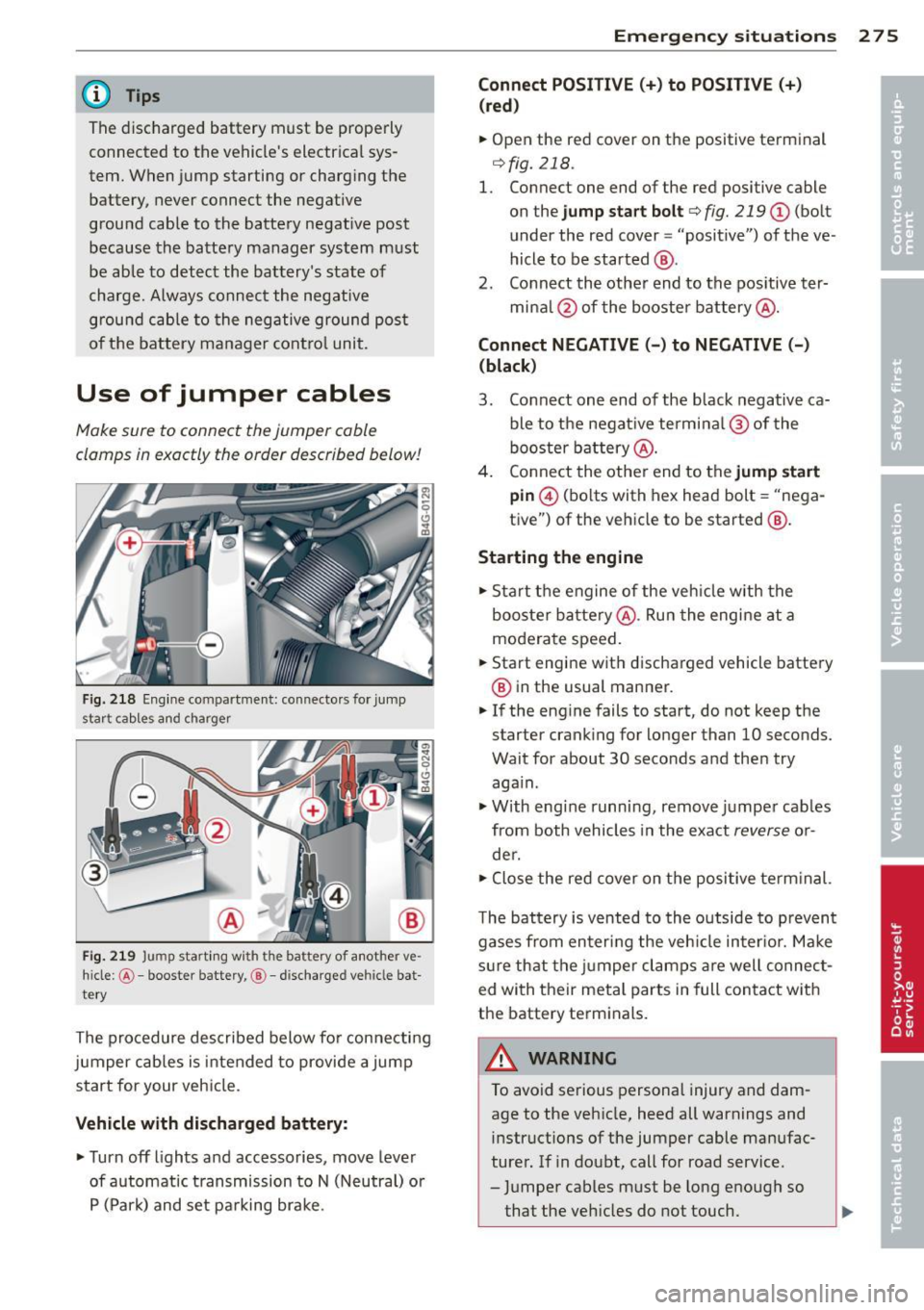
Fi g. 21 8 Eng ine co mpar tment : connecto rs for jum p
s tar t cab les and ch arg er
F ig. 219 Jump start in g w ith t he ba ttery of a not her ve ·
hi cle :
@-booster battery, ®-disc harged ve hicle bat
te ry
The procedure described below fo r connecting
jumper cables is intended to provide a jump
start for your veh icle.
Vehicle with discharged battery :
• Turnoff lights and accessories, move lever
of automatic t ransmission to N (Neutral) o r
P ( Par k) and set pa rking brake .
Emergenc y situ ation s 2 7 5
Connect POSI TIVE(+) to POSITIVE(+)
(red )
• Open the red cov er on the posit ive te rminal
¢ fig. 218 .
1. Connect one end of the red positive cable
on the jump sta rt bolt
¢ fig. 219 (D (bolt
under the red cover = "positive") of the ve
hicle to be started @.
2 . Connect th e othe r end to the pos itive ter-
mi na l@ of the booster battery @.
Connect NEGATIVE( -) to NEGATIVE(-)
(black )
3. Connect one end of the black negative ca ble to the negat ive termi na l@ of the
booster b attery @.
4. Connect the othe r end to the jump start
pin @ (bo lts w ith hex head bolt = "nega
tive") of the vehicle to be started @.
Starting the engine • Sta rt the engine of the veh icle w ith the
booste r ba tte ry @ . Ru n the engine at a
moderate speed.
• Start engine w it h discharged vehicle battery
@ in the usual manner.
• If the eng ine fails to start, do not keep the
starter c ranking for longer than 10 seconds.
Wait for about 30 seco nds a nd the n try
aga in .
• With eng ine runni ng,
remove ju mpe r cab les
from both vehicles in the exact
reverse o r
de r.
• Close the re d
cover on the positive te rm inal.
T he battery is v ented to th e outside to p rev ent
gases from en ter ing the veh icle in ter io r. Ma ke
s ur e th at the j umper clamps are well connec t
ed with their meta l parts in full con ta ct w ith
the battery term inals.
,8. WARNING
To avoid se rious personal injury and dam
age to the veh icle, heed all warnings and
instructions of the jumper cable man ufac
ture r. If in doubt, call for road service .
- Ju mpe r cables m ust be long enough so
that the veh icles d o not touch.
-
Page 283 of 304
Gros s Axle Wei ght Rati ng
The G ross Axle Weight Rating is the maximum
l oad that can be applied at each axle of the
vehicle
c::> &. .
Vehicle capacit y weight
The vehicle capacity we ight (max. load) is list
ed eithe r on the dr iver's side B-pillar or inside
the fue l filler flap.
& WARNING
-
- The actual Gross Axle Weight Rating at
the front and rear axles shou ld not ex
ceed the perm iss ible weights, and their
combination must not exceed the Gross
Vehicle Weight Rat ing.
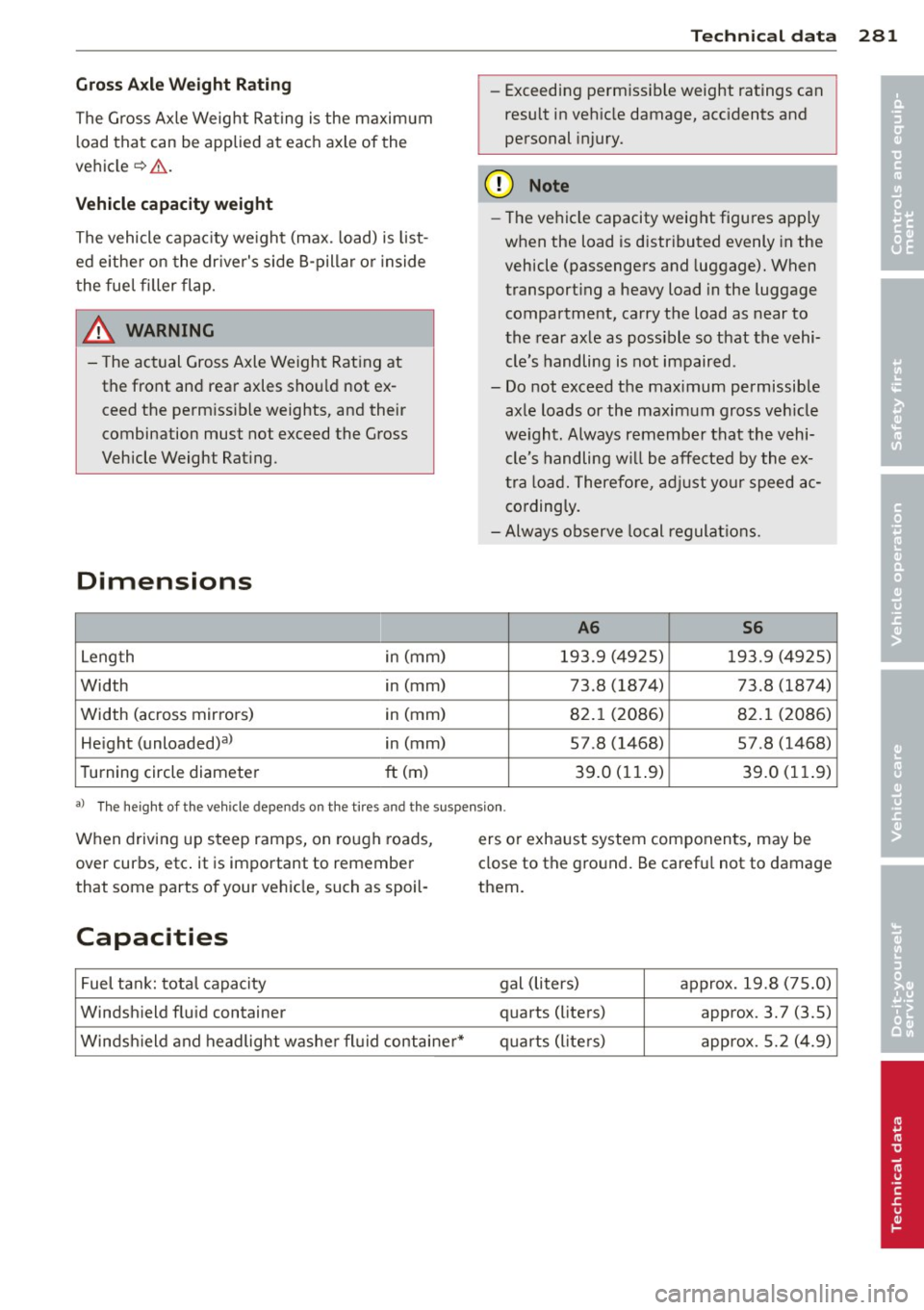
Dimensions
Length in (mm)
Width in
(mm)
Width (across mirrors) in (mm)
He ight (unloaded)a) in (mm)
Turning circle diameter
ft (m)
T e chn ic a l da ta 281
- Exceeding permiss ible weight ratings can
result in vehicle damage, accidents and
personal injury.
([) Note
-The vehicle capacity weight figures apply
when the load is d istr ibuted evenly in the
vehicle (passengers and luggage). When
transport ing a heavy load in the luggage
compartment, carry the load as near to
the rear axle as poss ible so that the vehi
cle's handling is not impaired.
- Do not exceed the maximum permissible axle loads or the maximum gross veh icle
we ight. Always remember that the vehi
cle's handling w ill be affected by the ex
tra load. Therefore, ad just yo ur speed ac
co rdingly.
- Always observe local regulat ions.
A6 S6
193.9 (4925) 193.9 (4925)
73.8 (1874) 73 .8 (1874)
82.1 (2086) 82.1 (2086)
57.8 (1468) 57.8 (1468)
39.0 (11.9) 39.0 (11. 9)
•
•
aJ The he ight of the veh icle depen ds on the t ires and the suspe nsion .
When driving up steep ramps, on rough roads,
over curbs, etc. it is important to remember
that some parts of your ve hicle, such as spoil-
Capacities
Fuel ta nk: total capacity
Windshield flu id container
Windsh ield and headlight washer fluid containe r* ers
or exhaust system components, may be
close to the ground. Be careful not to damage
them .
gal (liters) approx. 19.8 (75.0)
quarts (liters) approx. 3.7 (3.5)
quarts (liters) approx. 5.2
(4.9)
Page 290 of 304
288 Index
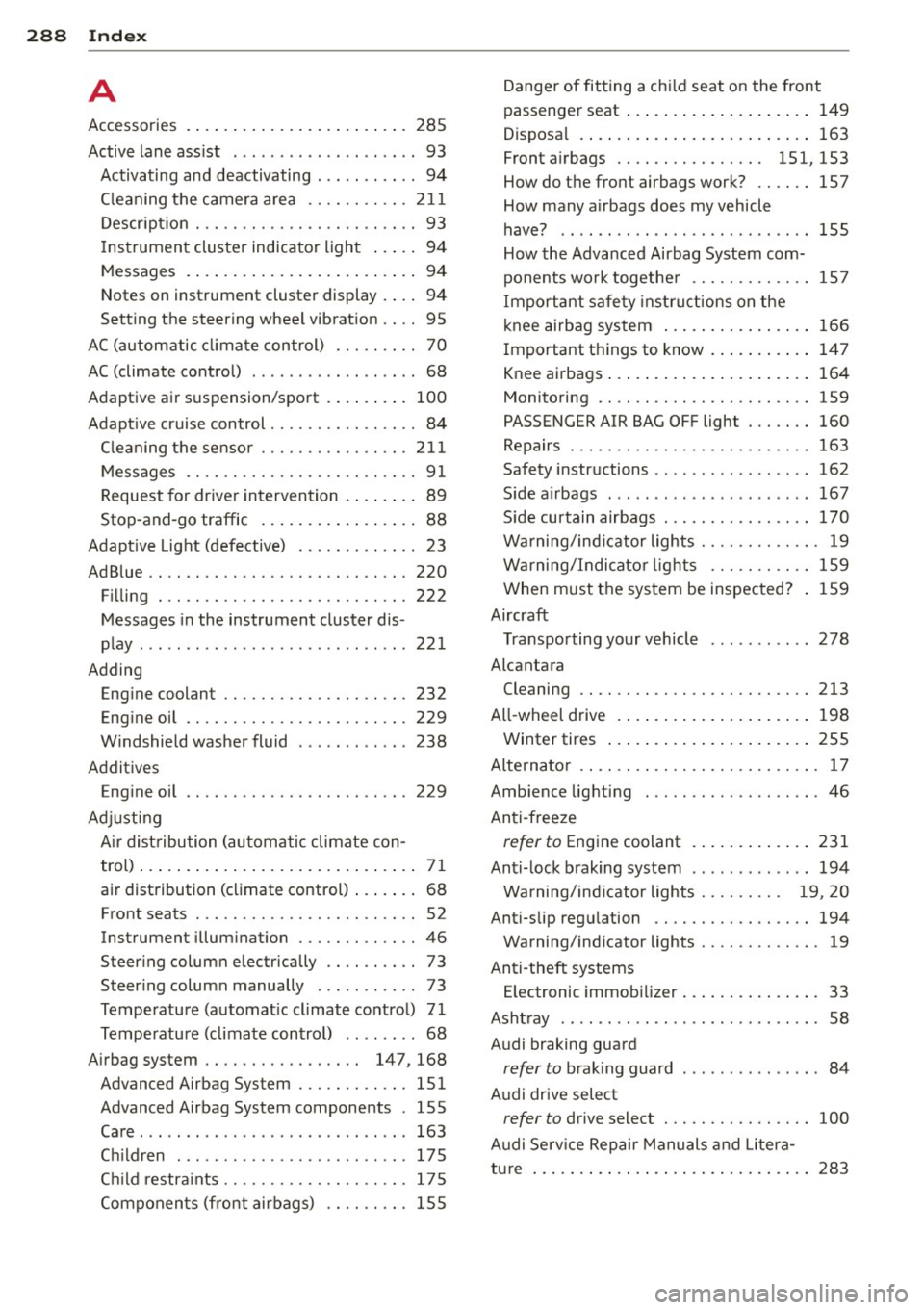
A
Accessories ....... ......... ... .... . 285
Active lane ass ist . . . . . . . . . . . . . . . . . . . . 93
Activating and deactivating . . . . . . . . . . . 94
C leaning the camera area .. .. .. .. .. . 211
Description .............. .. .. .... .. 93
I nstrument cluster indicator light . . . . . 94
Messages . . . . . . . . . . . . . . . . . . . . . . . . . 94
Notes on instrument cluster display . . . . 94
Setting the steering wheel vibration . . . . 95
AC (automatic climate control) . .. .. .. .. 70
AC (climate control) . . . . . . . . . . . . . . . . . . 68
Adaptive air suspension/sport . ... .. .. . 100
Adapt ive cruise control . . . . . . . . . . . . . . . . 84
C leaning the senso r ....... .. .. .... . 211
Messages . . . . . . . . . . . . . . . . . . . . . . . . . 91
Request for driver intervention . . . . . . . . 89
Stop-and-go traffic . . . . . . . . . . . . . . . . . 88
Adapt ive Light (defective) ... .. .. .... .. 23
AdBlue .. .. .. .. . .......... .. .. .... . 220
Filling . .. .. ............... .. .... . 222
Messages in the instrument cluster dis-
play ... .. .. ... .... ...... .. .. .. .. . 22 1
Adding Engine coolant ........... .. .. .. .. . 232
Engine oil ................. .. .... . 229
Windshield washer fluid . ...... .. .. . 238
Additives Engine oil ............... .. .. .... . 229
Adjusting Air distribution (automatic climate con-
trol) . . . . . . . . . . . . . . . . . . . . . . . . . . . . . . 71
air distribution (climate control) ... .. .. 68
Front seats . . . . . . . . . . . . . . . . . . . . . . . . 52
Instrument illumination ..... .. .... .. 46
Steering column electrically .. .. .... .. 73
Steering column manually ... .. .. .. . . 73
Temperature (automat ic climate control) 71
Temperature (climate control) .... .. .. 68
Airbag system . . . . . . . . . . . . . . . . . 147, 168
Advanced Airbag System ... .. .. .... . 151
Advanced Airbag System components . 155
Care ..... .. ................ ... ... 163
Children ... ... .... ...... .. .. .. .. . 175
Ch ild restraints ........... .. .. .. .. . 175
Components (front airbags) .. .. .. .. . 155 Danger of fitting a chi
ld seat on the front
passenger seat ... ................ . 149
Disposa l .. .. .. .. ................ . 163
Front airbags . . . . . . . . . . . . . . . . 151, 153
How do the front airbags work? .. .... 157
How many airbags does my vehicle
have? ...... .. .. .. ...... ....... .. 155
How the Advanced Airbag System com-
ponents work together ......... .. .. 157
Important safety instructions on the
knee airbag system ................ 166
Important things to know ....... .. .. 147
Knee airbags ..... ................ . 164
Monitoring .... .. ............. .... 159
PASSENGER AIR BAG OFF light ... .... 160
Repairs ... .... .. ............. .... 163
Safety instructions ................. 162
S ide airbags ... .. ....... ...... .. .. 167
S ide curtain airbags ... ...... ... .. .. 170
Warning/ind icator lights ........ .. .. . 19
Warning/Indicator lights ....... .. .. 159
When must the system be inspected? 159
Aircraft Transporting your vehicle
Alcantara 278
Cleaning .. .... .. ............. .... 213
All-wheel drive .... ................ . 198
Winter tires ..... ................ . 255
Alternator . . . . . . . . . . . . . . . . . . . . . . . . . . 17
Ambience lighting .............. .... . 46
Anti-freeze
refer to Engine coolant ............ . 231
Anti-lock braking system ............. 194
Warning/indicator lights . . . . . . . . . 19, 20
Anti-slip regulation ............. .. .. 194
Warning/indicator lights ..... ... .. .. . 19
Anti-theft systems Electronic immobilizer ............... 33
Ashtray .... .... ................... . 58
Audi braking guard
refer to brak ing guard ............. .. 84
Audi drive select
refer to drive select ............ .... 100
Audi Serv ice Repair Manuals and Litera-
tu re .............................. 283