park assist AUDI A6 2014 User Guide
[x] Cancel search | Manufacturer: AUDI, Model Year: 2014, Model line: A6, Model: AUDI A6 2014Pages: 304, PDF Size: 76.32 MB
Page 112 of 304
110 Automatic Tran sm iss ion
multitronic transmission : Your vehicle is
equipped with
hill hold assist allowing you to
start while on an incline. The system is acti
vated when the brake pedal is pressed down
and held
f o r a few s econds . The brake pres
sure will hold for
a moment after the brake
pedal loosens to prevent the veh icle from roll
ing backwards whi le starting up .
A WARNING
- The veh icle can also roll when the engine
is stopped.
- Unintended veh icle movement can cause
serious injury .
- Never leave your vehicle with the eng ine
running wh ile in gea r. If you must leave
yo ur vehicle when the engine is running,
act ivate the park ing brake and move the
selector lever to P .
- Power is st ill transmitted to the whee ls
when the engine is running at idle . To
prevent the vehicle from "creeping", you
must keep your foot on the brake when
the engine is running and the selector
lever is in D/S or R or "tiptronic" mode is
selected.
- Do not press the accelerator pedal when
changing the selector lever pos ition
wh ile the vehicle is stat io nary and the
engine is running .
- Never shift into R or P wh ile driving .
- Before driv ing down a steep slope, re-
duce your speed and shift into a lower
gear with "tiptronic" .
- Do not ride the brakes or press the brake
pedal too often or too long when dr iving
down a hill. Constant braking causes the
brakes to overheat and substant ially re
duces b raking performance, inc reases
braking distance or causes comp lete fail
ure of the brake system.
- T o prevent the veh icle from rolling back
when stoppi ng on incl ines, always hold it
in place with the brake peda l or parking
brake.
- Never hold the veh icle on an incl ine with
a slipping clutch. The clutch opens auto
matically when it becomes too hot from the overload. An indicato
r lamp
[O] illu
minates and a driver message appears
¢ page 112 when the clutch is overload
ed.
- If the engine must remain running, never
have any driving posit io n engaged when
checking under the hood . Make sure the
selector lever has securely engaged and is locked in P with the park ing brake set
¢ page 224. O therwise, any increase in
engine speed m ay se t the vehicle in mo
tion, even with the parking brake ap plied .
(D Note
-S tronic- and tiptronic transmission :
When stopping on an incl ine , do not try
to hold the vehicle in place by pressing
the acce lerator pedal while a driving gear
is se lected. This can cause the transmis
sion to overheat and can damage it. Acti
vate the parking brake or press the brake
peda l to prevent the vehicle from roll ing.
- S tronic- and tiptronic transmission : A l
lowing the vehicle to ro ll when the en
gine is stopped and the selector lever is
in N will damage the transmission be
cause it is not l ubricated unde r those cir
cumstances.
{!) Tips
For safety reasons, the parking brake is re
l eased automatically only when the d riv
er's safety belt is engaged in the buckle.
Hill descent control
Applies to vehicles: with multitro nic/5 tronic/t iptronic
The hill descent control system assists the
driver when driving down declines .
Hill descent control is activated when these
lector lever is in D/S and you press the brake
pedal. The transmission automatically selects
a gear that is sui table fo r the incline. H ill de
scent contro l tries to ma inta in the speed ach-
ieved at the time of b raking, with in physica l .,.
Page 116 of 304
114 Parking system s
Parking systems
General information
A ppl ies to vehicles: with parkin g system plus/rear view
camera/peripheral cameras
Depending on your vehicle's equ ipment, vari
ous parking a ids wi ll help you when pa rk ing
and maneuvering.
The
p ar king sy st e m plu s assists you when
pa rking by audib ly and visually indicat ing ob
jects detected
in front of and behind the vehi
cle
~ page 115.
The rear view ca m era shows the area behind
the vehicle in the Infotainment d isp lay. This
d isplay assists you when you are c ross o r par
allel parking
q page 116. In addit ion, you are
assisted by the functions from the parking
system plus
~ page 115 .
The peripher al cam era s ass ist you with park
ing and maneuvering. You are aided by var ious
cameras depending on the vehicle equipment leve l
¢page 119. In addition, you are assist
ed by the functions from the parking system
plus ¢ page 115.
A WARNING
- Always look for traff ic and check the area
around your vehicle by looking at it di
rectly as well . The parking system cannot
rep lace the d river's attent ion. The dr iver
is always respons ible for safety during
p arki ng and for all other maneuvers.
- Please note that some surfaces, such as
clothing, a re not detected by the system.
- Senso rs and cameras have blind spots in
wh ich peop le and objects ca nnot be de
te cted. Be especially cau tious of children
and animals.
- T he sensors can be displaced by impacts
or damage to the radia to r grille, bumpe r,
wheel housing and the unde rbody. The
par king systems may become impaired
as a resu lt . Have your authorized Audi
dealer or qualified workshop check their
function. -
Make s ure the sensors are not covered by
stickers, deposits or any other obstruc
tions as it may impair the sensor func
tion . For information on cleaning, refer
to
~ page 210.
(D Note
- Some objects are not detected by the
system under certain c ircumstances:
- Obje cts su ch as ba rrie r chains, trailer
draw bars, vertical po les or fences
- Objects above t he senso rs such as wall
extensions
- Objects w ith specific surfaces or struc
tures su ch as chain link fences or pow
der snow.
- If you conti nue d riving closer to a low- ly
ing object, it may disappea r from the
sensor range. Note th at yo u w ill no lon
ger be warned abo ut this obstacle.
(j) Tips
- T he system may provide a wa rni ng even
t ho ugh the re are no obs ta cl es in the cov
erage a rea in some situa tions, such as:
- certain road surfaces or for long grass.
- externa l ultrasonic sources e.g. from
clean ing vehicles.
- heavy rain, snow or thick vehicle ex
ha ust.
- We recommend that you practice park
ing in a traff ic-free location or park ing
lot to become familiar w ith the system.
When doing this, there should be good light and weather cond itions .
- You can change the volume and pitch of
the s ignals as we ll as the disp lay
¢page 124.
- Please refer to the instructions for tow
ing a t railer
¢ page 125.
- What appears in the infotainment dis
play is somewhat time-delayed.
Page 119 of 304
example, after a collision, do not contin
ue to use the system for safety reasons.
Have it checked by your authorized Audi
dealership or authorized repa ir facility .
- Only use the rear v iew camera to assist
you if it shows a good, clear picture. For
example, the image may be affected by
the sun shin ing into the lens, dirt on the
lens or if there is a system fau lt.
- Use the rear view camera only if the lug
gage compartment lid is comp letely
closed. Ma ke su re any objects you may
h ave mounted on the luggage compart
ment lid do not block the rear view cam
era.
- The camera lens en la rges and dis torts
the field of vision. The ob ject appears
both a ltered and inaccurate on the
screen .
- In certain s ituations, peop le or objects in
the display appear closer or f urther
away:
- objects that do not touch the ground,
such as the bumper of a parked vehicle ,
a trailer hitch o r the rear of a truck. Do
not use the help lines in this case.
- If driven from a leve l surface onto a n
incline, or a downward slope.
- If driven towa rd protruding objects .
- If the ve hicle is carrying too much load
in the rear.
({D Note
- Always read and follow the applicable
warnings
¢ (Din General information on
page 114 .
-The orange colored orientat ion lines in
the Infotainment disp lay show the vehi
cle path depending on the steering
whee l ang le. The front of the vehicle
front sw ings out more than t he rear of
the veh icle. Maint ain p lenty of distan ce
so that your ou ts ide mirror or a corner of
you r vehicle does not collide with any ob
stacles .
Parking sys tem s 117
Switching on/off
App lies to vehicles: wit h parking system plus w ith rear
v iew camera
Switching on
.. Shift in to reverse or
.. press the
PwA bu tton in the center console
¢ page 115, fig . 119 . A short confirmation
tone sounds and the LED in the button turns
on .
Swi tching between the re ar view camera
and optical displa y
.,. Press the Graphi c control button®
¢ page 118, fig. 125 to see the optical d is
play .
.. Press the
Rearview control b utton to see the
rear view camera image.
Switching off
.,. Dr ive forward faster than 6 mph (10 km/h),
or
.. Press the
P111A button, or
.,. Switch the ignit ion off.
(D Tips
The visual d isplay in the left part of the
display should help you detec t the critical
vehicle areas .
Page 123 of 304
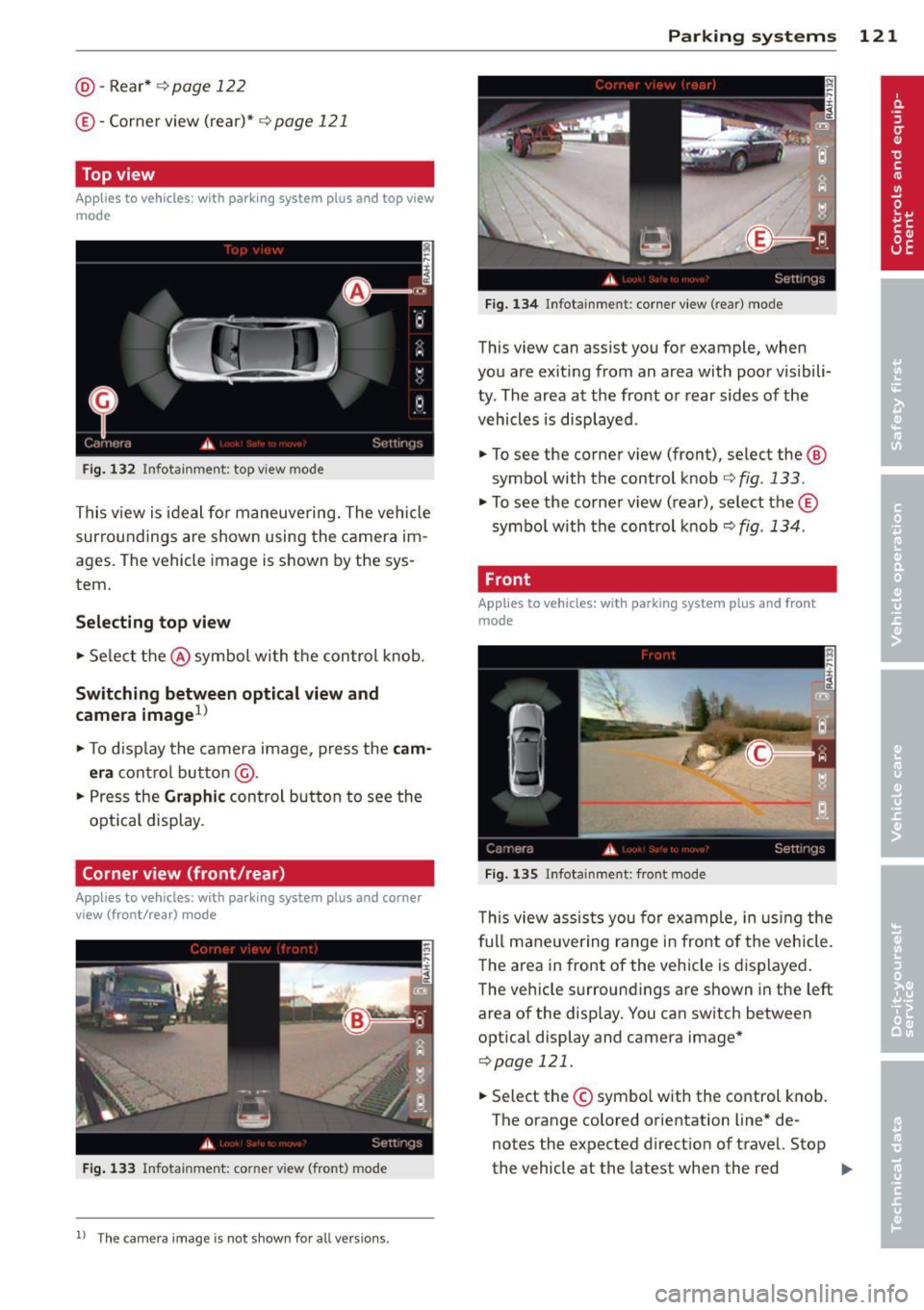
@-Rear* ¢ page 122
©- Corner view (rear)* ¢ page 121
Top view
Applies to vehicles: with parking system plus and top view
mode
Fi g. 1 32 In fota inm ent: top v iew mode
This v iew is ideal for maneuve ring. The vehicle
surro undings are shown using the camera im
ag es. The vehicle image is shown by the sys
tem.
Selecting top vi ew
~ Se lect the @symbol with the control knob.
Switching between optical view and
came ra image
1
)
~ To d isp lay the camera image, press the c am
era
contro l bu tton @ .
~ Press the Graph ic control button to see the
opt ica l display .
Corner view (front /rear )
Applies to vehicles: with parki ng system plus and corner
view (front/rear ) mode
Fig. 133 In fot ainm en t: co rn er view (fro nt} mode
1 1
Th e cam era im age is n ot s how n for al l ve rs ion s.
Parking systems 121
Fig . 1 34 Infot ainm en t: corne r vie w (r ea r) mode
This view can assist you for example, when
you are exit ing from an area with poor visibili
ty . The area at the front or rear sides of the
vehicles is displayed .
~ To see the corner view (fron t), select the @
symbol with the control knob
¢ fig . 133 .
~ To see the co rner v iew ( rear), select the ©
symbo l with the control knob
r=> fig . 134 .
, Front
Applies to vehicles: with parking system plus and front
mo de
Fig. 1 35 ln fota inment: front mode
T his view assis ts you for example, in us ing the
full maneuver ing range in front of the vehicle.
The area in front of the vehicle is displayed .
The vehicle s urround ings are shown in the left
area of the display . You can switch between
optical display and camera image*
<=> page 121.
~ Select the © symbo l with the control knob .
T he o range colored orientation line* de
notes the expected d irection of travel. Stop
the vehicle at the latest when the red
Iii>-
Page 124 of 304
122 Park in g s ystems
orientation line * borders an object q .&. in
General information on page 120 .
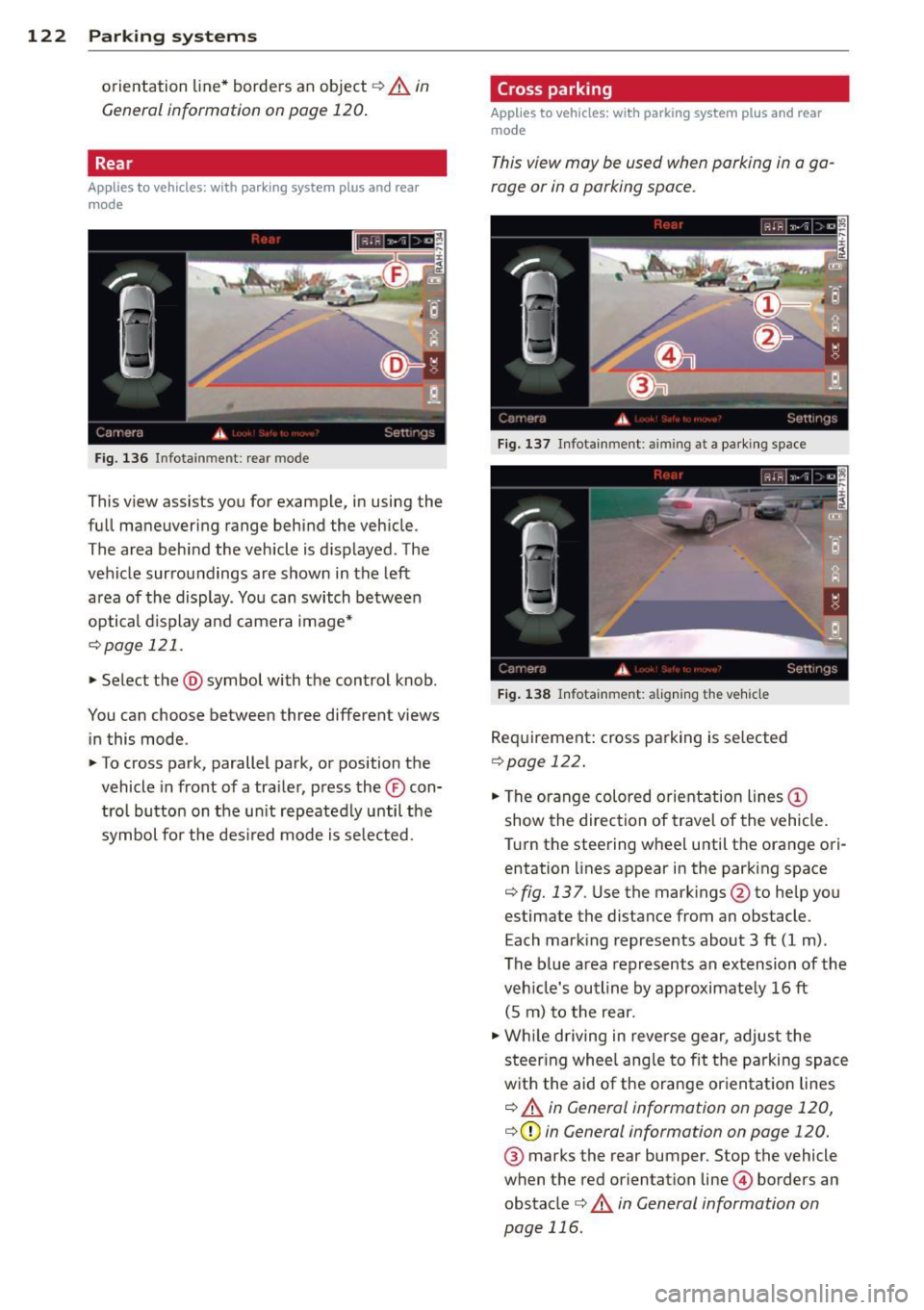
Rear
Applies to vehicles: with parking system plus and rear
mode
F ig. 136 Infotainment: rear mode
This view assists you for example, in using the
full maneuvering range behind the veh icle.
The area beh ind the veh icle is d isplayed. The
vehicle surroundings are shown in the left
area of the display. You can switch between
optical d isplay and camera image*
¢page 121 .
.,. Select the @symbol with the control knob.
You can choose between three different views in this mode.
.,. To cross park, parallel park, or position the
vehicle in front of a tra iler, p ress the ® con
t ro l button on the un it repeatedly until the
symbol for the des ired mode is se lected.
Cross parking
Applies to vehicles: w ith park ing system plus and rear
mode
This view may be used when parking in a ga
rage or in a parking space.
F ig . 1 37 Infotainment: aiming at a pa rki ng space
Fig . 1 38 Infotainment: aligning the vehicle
Requirement: cross parking is se lected
Q page 122 .
.,. The orange colored orientation lines@
show the direction of travel of the vehicle.
T urn the steering wheel until the orange ori
entation lines appear in the parking space
¢ fig. 137 . Use the mark ings @to he lp you
estimate the distance from an obstacle.
Each marking represents about 3 ft (1 m).
The b lue area represents an extension of the
veh icle's outline by approximate ly 16 ft
(5 m) to the rear .
.,. Wh ile d riving in reverse gear, adjust the
steer ing whee l ang le to fit t he parking space
w ith the aid of the orange or ientat ion lines
¢ .&. in General information on page 120,
¢ (Din General information on page 120.
® marks the rear bumper. Stop the vehicle
when the red orientation line© borders an
obstacle
¢ .&. in General information on
page 116.
Page 126 of 304
124 Park in g s yste m s
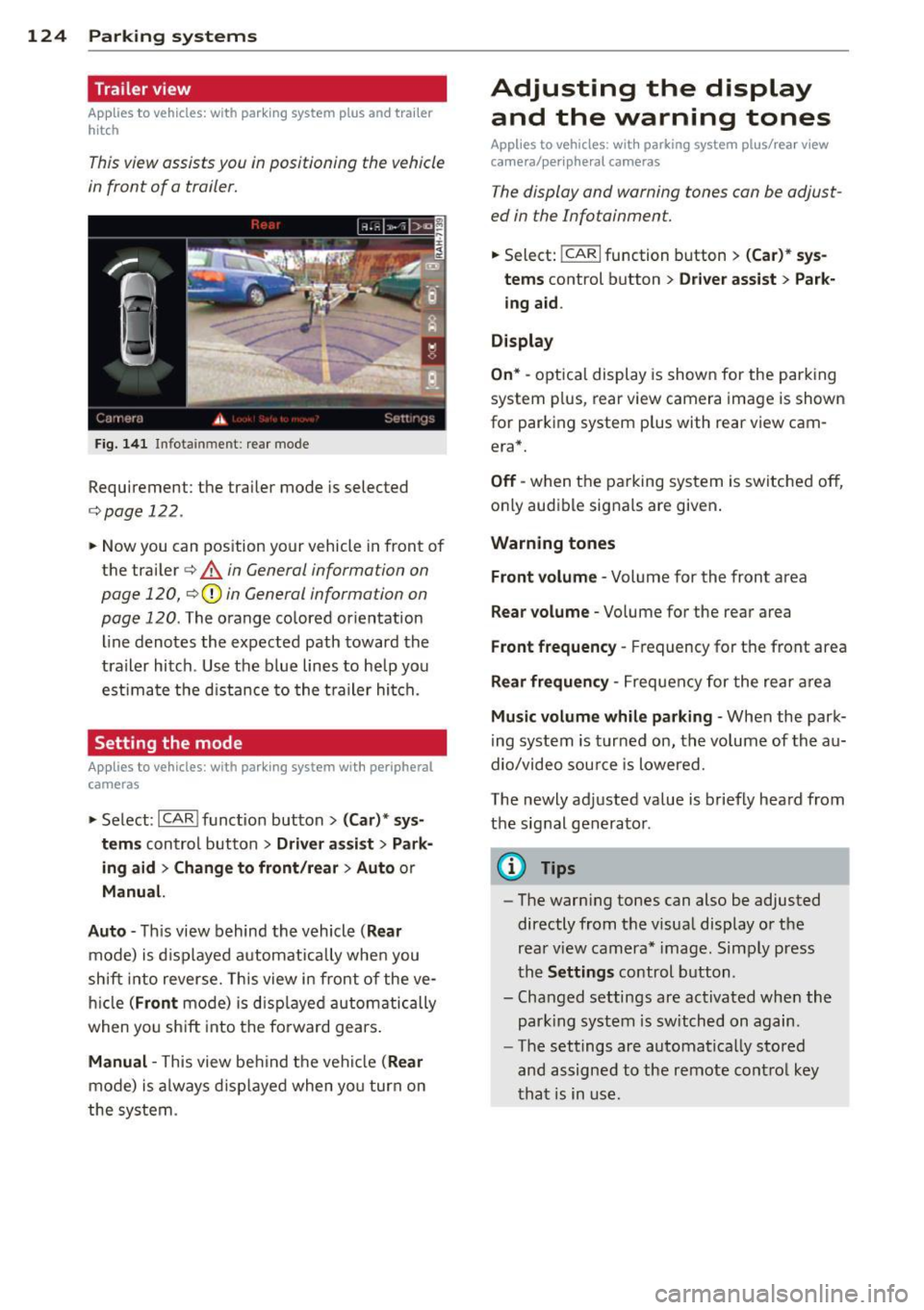
Trailer view
Applies to vehicles: with par king system p lus and tra iler
hitch
This view assists you in positioning the vehicle
in front of a trailer.
F ig. 1 41 Infotainment: rear mode
Requirement: the trailer mode is selected
c:;,page 122.
.. Now you can pos ition your vehicle in front of
the trailer
c:;, A in General information on
page 120,
c:;, (D in General information on
page 120.
The orange colored orientation
line denotes the expected path toward the
trailer hitch . Use the b lue lines to he lp you
est imate the d istance to the t railer hi tch.
Setting the mode
A ppl ies to vehicles: with park ing system wit h peripheral
cameras
.. Se lect : I CAR I func tion button> (Car )* sys
t e m s
control button > Dri ver as sis t > Park
ing aid > Ch ange to front /re ar > Aut o
or
Manua l.
A uto -
Th is view behind the vehicle ( Rea r
mode) is d isplayed automatically when you
shift into reverse. This view in front of the ve
h icle
( Fron t mode) is d isp layed automatically
when you sh ift into the fo rward gears .
Manual -This view behind t he vehicle (Rear
mode) is a lways d is p layed when you turn on
the system .
Adjusting the display
and the warning tones
Applies to vehicles: wit h parking system plus/ rea r vi ew
came ra/ peri pheral cameras
The display and warning tones can be adjust
ed in the Infotainment.
.. Select: !CARI function button > ( Car )* sys
tem s
control button > Drive r a ssist > Par k
in g a id .
Di splay
On * -
optical display is shown for the parking
system p lus, rear view camera image is shown
for parking system plus with rear view cam
era*.
Off -when the parking system is switched off,
only audible signals are given .
Warning tones
Fr ont volume -
Volume for the front area
Rear volume -Volume for the rear area
Front frequency -Frequency for the front area
Rear frequen cy -Frequency for the rear area
Mu sic v olum e wh ile parkin g -When the park
ing system is turned on, the volume of the au
dio/video sou rce is lowered.
The newly adjusted value is briefly heard from
the signal generator .
@ Tips
-The warn ing tones can also be adjusted
directly from the visual display o r the
rear v iew camera* image. Simply press
the
Setting s control button .
- Changed settings are act ivated when the
park ing system is switched on again.
- The settings are automatica lly stored
and assigned to the remote control key
that is in use .
Page 272 of 304
2 70 Fuses and bulbs
Fuses and bulbs
Fuses
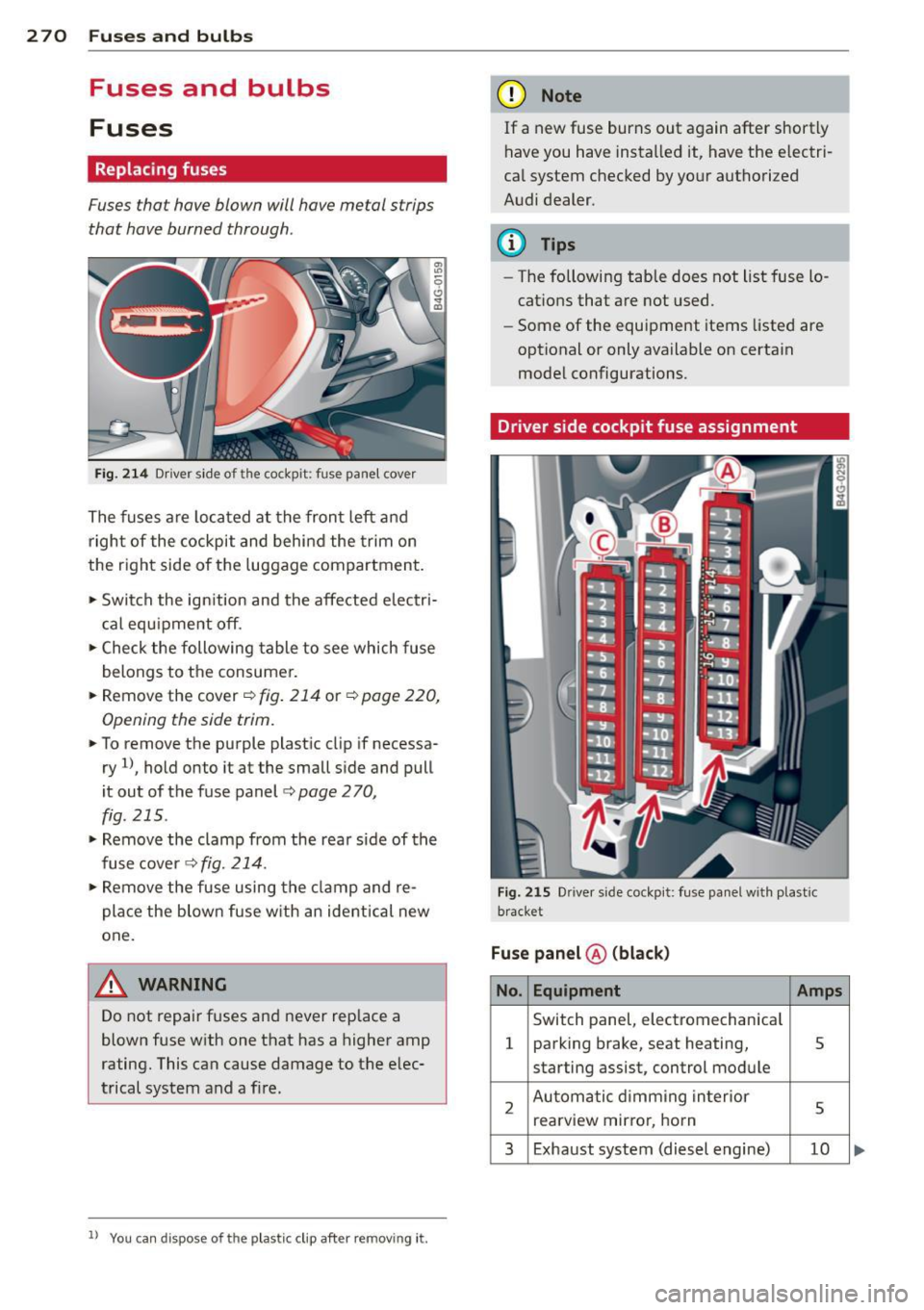
Replacing fuses
Fuses that have blown will have metal strips
that have burned through.
Fig. 214 Dr iver side of the cockpit: fuse panel cover
The fuses are located at the front left and
right of the cockpit and behi nd the trim on
the right side of the luggage compartment.
• Switch the ign ition and the affected electri
c al equ ipment off.
• Check the following table to see which fuse
belongs to the consumer.
• Remove the cover ¢
fig. 214 or¢ page 220,
Opening the side trim.
• To remove the purple plast ic clip if necessa
ry
ll, hold onto it at the small side and pull
i t out of the fuse panel
c:> page 2 70,
fig. 215 .
• Remove the clamp from the rear s ide of the
fuse cover ¢
fig. 214.
• Remove the fuse using the cla mp and re
pla ce the blown fuse w ith an ident ical new
one.
A WARNING
Do not repair fuses and never rep lace a
blown fuse with one that has a higher amp
rating. This can cause damage to the e lec
trical system and a fi re.
ll You can dis pose of the plastic clip after removing it.
(D Note
If a new fuse burns out again after shortly
have you have installed it, have the electri
ca l system checked by yo ur authorized
Audi dealer.
(D Tips
- The following table does not list fuse lo
cations that are not used .
- Some of the equipment items listed are
optional or only available on certain
model configurations.
Driver side cockpit fuse assignment
Fig . 2 15 Dr iver side cockpit: fuse pa nel w ith plast ic
bracket
Fuse panel ® (blac k)
No. Equipment Amps
Switch panel, electromechan ica l
1 parking brake, seat heating, 5
starting assist, control module
2 Automatic d imming in terior
5 rea rview mirro r, horn
3 Exhaust system (diesel engine) 10
Page 293 of 304
-----------------------------~I~n~d~e~x 291
Convenience key ................... 286
Electronic immobilizer ........ ... .. . 286
Homelink universal remote control ... 286
Remote control key . . . . . . . . . . . . . . . . 286
Decorative parts/trim
C leaning ... ................ ... ...
212
DEF
What does this mean when it appears in
the trip odometer display? . .. .. .. .. .. 27
Defective light bulb warning . . . . . . . . . . . 23
Defrosting (windows)
automatic climate control ... ... .. .. ..
71
climate control . . . . . . . . . . . . . . . . . . . . . 69
Determining correct load limit ... .. .. . 249
Diesel fuel . . . . . . . . . . . . . . . . . . . . . . . . .
216
Diesel particulate filter . . . . . . . . . . 22, 202
D. . 1mens1ons .. ............. .... .. ... 281
Dimming the rearview mirror .. .. .. .. .. 51
Displays
Cleaning ... ................ ... ...
212
Distance . . . . . . . . . . . . . . . . . . . . . . . . . . . 25
Door/rear lid warning . . . . . . . . . . . . . . . . .
24
Doors
Power child safety lock ....... ... .. ..
40
Driver information system
CD/radio display . . . . . . . . . . . . . . . . . . . . 24
Door/rear lid warning . . . . . . . . . . . . . . . 24
Efficiency program . . . . . . . . . . . . . . . . . .
26
Exterior temperature display ... .. .. .. 24
On-board computer . . . . . . . . . . . . . . . . . 25
Driver seating position ...... .. .. .. .. .
drive select
. . ............. .... .. ...
adaptive air suspension/sport . .. .. .. .
Adaptive dampers ........... .... . .
Curve light .... .. .. ...... .. .. .. .. .
Engine sound ............... ... .. .
Safety belt tensioner ...... .. .. .. .. .
Sport differential ......... .. .. .. .. .
Driving safely
Driving through water
129
100
100
100
100
100
100
100
128
203
Driving time
Duplicate key ·
· · · · · · · ...... .... .. .... 25
32
Dust filter
refer to Pollutant filter ....... ... .. .. 67
E
Easy entry feature .... ................ 74
Efficiency program . . . . . . . . . . . . . . . . . . .
26
Fuel economy messages . ....... .... . 27
Other equipment . .. . .......... .....
26
Electrical accessories (sockets) ......... 59
Electro-mechanical powe r assist .......
198
Electromechanical parking brake
Emergency braking ............ .. .. . 79
Operation . . . . . . . . . . . . . . . . . . . . . . . . . 77
Parking ....... .. ................. . 78
Releasing and closing ............... 77
Starting assist . . . . . . . . . . . . . . . . . . . . . 78
Starting from rest . . . . . . . . . . . . . . . . . . 78
Starting off with a trailer . . . . . . . . . . . . . 78
Warning/indicator lights ........ .... .
16
Electronic differential lock
Warning/indicator lights .............
19
Electronic differential lock (EDL) ..... .. 194
Warning/indicator lights ............ . 20
Electronic immobilizer . . . . . . . . . . . . 27, 33
Electronic power control (EPC)
warning/indicator light ............ ..
21
Electronic speed limiter . . . . . . . . . . . . . . . 31
Elec tronic Stabilization Control (ESC) . .. 194
Warning/indicator lights .... .... .... . 19
Emergency actuation
Doors ..... ... .... ................ 38
Power sunroof . .. ................. .
42
Emergency braking .............. .... . 79
Emergency flasher . ..... ....... .... .. 44
Warning/indicator lights . .......... ..
24
Emergency release
Selector lever . . . . . . . . . . . . . . . . . . . . .
113
Emergency starting
Emergency towing
Emergency unlocking 274
276
Rear lid ... .. .. .. .. ............... . 39
Emergency warning triangle ........ . .
Energy management .. .... .. .... ... .
Engine Compartment .. .. .... ........... . .
Coolant
..... .. .. .. . ..............
Data ....... .. ...... .............
261
199
226
231
282
Start-Stop -System . . . . . . . . . . . . . . . . . . 79
starting ......... .. ................ 74
•
•
Page 297 of 304
Night vision assistant .... ... .. .. .. .. . 103
C leaning camera lenses . ... .. .. .. .. . 211
Nitrogen oxide (NOx) cata lytic conve rter
refer to Ad Blue ........... .. .. .. ... 220
Number of seats .. .. .... .... . .. .. .. . 138
0
Occupant seating positions
129
Octane rating ............. .... .. .. . 215
Odometer ..... ................ .... . 27
O FF (automatic climate contro l) . . . . . . . . 70
O FF ( clima te control) ....... .. .. .. .. .. 68
O il
refer to Engine oil ......... ... ... .. 226
On-board compute r ..... ... .. .. .. .. .. 25
On-Board Diagnostic System (OBD) Data L ink Connector (DLC) .. .. .. .. .. .. 30
E lectron ic speed lim ite r . . . . . . . . . . . . . . 3 1
M alfunct ion Indica tor Lamp (M IL) ... .. 30
Open door/hood/rear lid warning . . . . . . . 24
Opening Hood .... .. ................. .. ... 224
Powe r windows .......... .... .. .. .. 40
Sliding/tilting sunroof ........ .... ... 41
Operate you r vehicle economica lly and
minim ize po llution ......... .. .. .. .. . 203
Othe r equipmen t (eff ic iency p rog ram) . .. 26
Outlet .. .. .. .... ... .. ... ... .. .. .. .. 58
p
Paint damage
212
P aint No . .. .. .... ......... .... .. .. . 280
Park ing . .. ... ......... ...... .... ... 78
Automatic t ransmission ... .. .. .. .. . 109
Valet park ing ............ .. .. .. .. .. 41
Park ing brake ............. .... .. .. .. 77
also refer to Electromechanical park ing
brake .. .. ... ............. ... ... ... 77
Park ing system
Ad justing the disp lay/warning tone .. . 124
C leaning sensors/camera lenses . .. .. . 211
C leaning the rear view camera .. .. .. . 116
Malfunct io n .. ........... .. .. .. .. . 125
Par king system plus .......... .... .. 115
P eriphe ra l came ras .... ... .. .. .. .. . 119
Rear view camera ......... .. .. .. .. . 116
Inde x 295
Trai le r hitch ..... ... .. .. ..... ... .. 125
o/sorefertoPa rkingsystems . .. 115,116
Pa rking systems . .. ................. 11 4
Particle f ilter
refer to Diese l part icu late filter .. .. .. . 22
Pa rts replacement ... . .. .. ..... ... .. 285
Pass-through w ith sk i sack . . . . . . . . . . . . . 65
PASSENGER AIR BAG OFF light ...... .. 160
P a ssenger protect ion ............ .... 192
Passive safety system ... .. ...... .... . 128
Pedals ... .. .. .. .... . ... ...... ... .. 133
Physical p rinciples of a frontal collision 139
Plastic parts Cleaning ........ .. ............... 212
Polishing ... .. .... .. . .. .. ..... ... .. 212
Pollen filter
refer to P oll utant fil ter ........... .. . 67
Pollutant f ilter .. .. .... ......... .. .. . 67
Power locking system .. .. .. ..... ... .. . 34
Locking/unlocking the vehicle from in-
s ide .......... .. .. ................ 37
Rear lid . . . . . . . . . . . . . . . . . . . . . . . . . . . 38
Se lective unlock feature ........ .. .. . 35
Settings ........ .. ................ 35
U nlocking and locking vehicle ....... .. 35
Power seat adjustment Front seats . . . . . . . . . . . . . . . . . . . . . . . . 53
Power steer ing
refer to Ele ct ro -mechanical power as -
sist . ... .. .. .... ... . ... ..... ... .. 198
Power w indows .. .. ............. .. .. . 40
m alfu nction . .. .... ... .......... .. . 41
P regnant women
Spec ia l considerations when wear ing a
safety belt . . . . . . . . . . . . . . . . . . . . . . . 143
pre sense ... .... .. .. . .............. 192
P reventative passenge r protection . .. .. 192
Programming the Homeli nk unive rsal re -
mote control .. .. .. .. . .. .... .... .. .. 126
Proper occupant seating positions ... .. 129
P roper s afety belt posi tion . . . . . . . . . . . . 142
Proper seating position Front passenger .................. . 130
Occupan ts . .. .. .... .. ........ ..... 129
Rea r passengers .. ............. .... 131
Protecting .. .. .. .. ................. 212
•
•