warning lights AUDI A6 2014 Owner's Guide
[x] Cancel search | Manufacturer: AUDI, Model Year: 2014, Model line: A6, Model: AUDI A6 2014Pages: 304, PDF Size: 76.32 MB
Page 89 of 304
Audi adaptive cruise control and braking guard 87
tachometer @and is also shown briefly in
the display @
c::> fig. 88.
.. You must also press the brake pedal when
the vehicle is stopped.
Switching adaptive cruise control off
.. Push the lever away from you into position
@ until it clicks into place. The message
ACC off appears.
@ Indicator lights
ra 1 -Adaptive cruise control is switched on. No
vehicles are detected up ahead . The stored
speed is ma intained.
I -A moving vehicle is detected up ahead .
The adaptive cruise control system regulates
the speed and distance to the moving vehicle
ahead and acce lerates/brakes automatical ly.
fa) -Adaptive cruise contro l is switched on. A
moving vehicle up ahead was detected. Your
ve hicl e remains stopped.
I -When automat ic braking is not able to
keep enough distance to a previously detected
moving vehicle up ahead, you must take con
trol and brake
c::> page 89, Prompt for driver
intervention.
© Display
If adaptive cruise control is not shown in the
disp lay, you can call it up with the multifunc
tion steering wheel buttons
c::> page 24.
Based on the symbols in the d isplay, you can
determine if the system is maintaining a dis
tance to the vehicle ahead and what that d is
tance is.
No vehicle -No veh icle ahead was detected .
White vehicle -A vehicle ahead was detected.
Red vehicle -Prompt for the driver to take ac
tion
c::> page 89.
Both arrow s on the scale© indicate the dis
tance to the vehicle ahead. No arrow appears
when the vehicle is on an open road and there
is no object ahead . If an object is detected
ahead , the arrow moves on the scale . The
green zone on the scale shows the stored
distance. For information on changing the
stored distance, refer to
c::> page 88 . If the
distance selected is too close or may soon be
come too close, the arrows move into the red
zone on the sca le .
A WARNING
Improper use of the adaptive cruise con
trol can cause collisions, other accidents
and serious personal injur ies .
- Pressing the
!SET ! button when driv ing at
speeds below
20 mph (30 km/h), will au
tomatically accelerate the vehicle to
20
mph (30 km/h), which is the minimum
speed that can be set.
(D Tips
-If you switch the ignit ion or the adaptive
cruise control off, the set speed is erased
from the system memory.
- You cannot switch the Electronic Stabili
zation Control (ESC) to the SPORT mode
when adaptive cruise control is switched
on.
Changing the speed
Applies to vehicles: with Aud i adapt ive crui se control
0
f
• 0
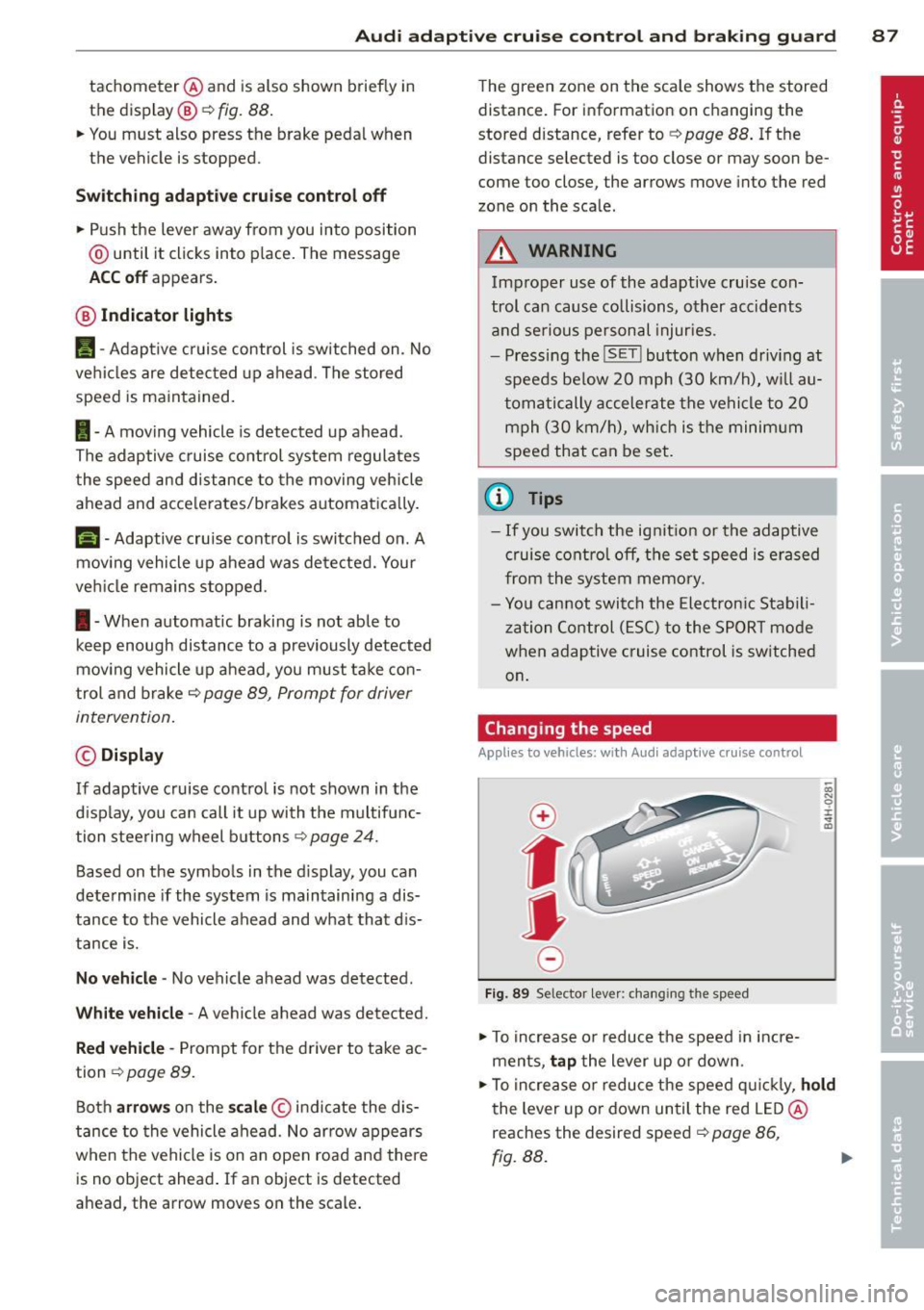
Fig. 89 Selector lever: changing the speed
.. To increase or reduce the speed in incre
ments,
tap the lever up or down.
-0:, N 0 ± ... a)
.. To increase or reduce the speed quickly, hold
the lever up or down until the red LED @
reaches the desired speed
c::> page 86,
fig.BB.
~
Page 128 of 304
126 Homelink
Homelink
Universal remote
control
General information
Applies to vehicles: with Homelink u nive rsal remote con
tro l
The HomeLink universal remote control can
be programmed with hand-held transmitters
from existing equipment.
With Homelink, you can control devices such
as the garage door, security systems, house
lights, etc. comfortably from the inside of you
vehicle.
Homelink makes it possible for you to replace
three different remote controls from devices in your home with one universal remote . Th is
feature works for most garage door and exte
rior door motor signals. Programming the in
d iv idual remo te control fo r your remote con
trol takes p lace near the center of the radiator
grille. There is a control module attached at
this location .
A one-t ime programm ing of the sensor mus t
be performed before you are able to use sys
tems w ith Homelink.
A WARNING
- Never use the Homelink transmitter
with any garage door opener that does
have not the safety stop and reverse fea
ture as requ ired by federal safety stand
ards. Th is includes any garage door open
er model manufactured before April 1, 1982.
- A garage door opener which cannot de
tect an object, signaling the door to stop
and reverse does not meet current feder
al safety standards . Us ing a garage doo r
opener witho ut these fea tures increases
risk of serious injury or death.
- For safety reasons never release the
parking brake or start the engine while
anyone is standing in front of the vehicle .
- A garage door or an estate gate may
sometimes be set in motion when the Homelink remote control is being pro
grammed. If the device is repeatedly ac
tivated, this can overstrain motor and
damage its electrical components -an
overheated motor is a fire hazard!
- To avo id possible injuries or property
damage, please always make absolutely
certa in that no persons or objects are lo
cated in the range of motion of any
equ ipment being operated.
(0 Tips
- If you would like additional information
on the Homelink Un iversal Transceiver,
Homelink compatible products, or to
purchase other accessories su ch as the
Homelink Lighting Package, please con
tact Homelink at 1 -800-355-3515 or on
the Internet at www.homelink.com.
- For Declara tion of Comp liance to United
States FCC and Ind ustry Canada reg ula
tions¢
page 286 .
-For security reasons, we recommend that
you clear the programmed b uttons be
fore selling the ve hicle .
Operation
Appl ies to vehicles: wit h Ho melink
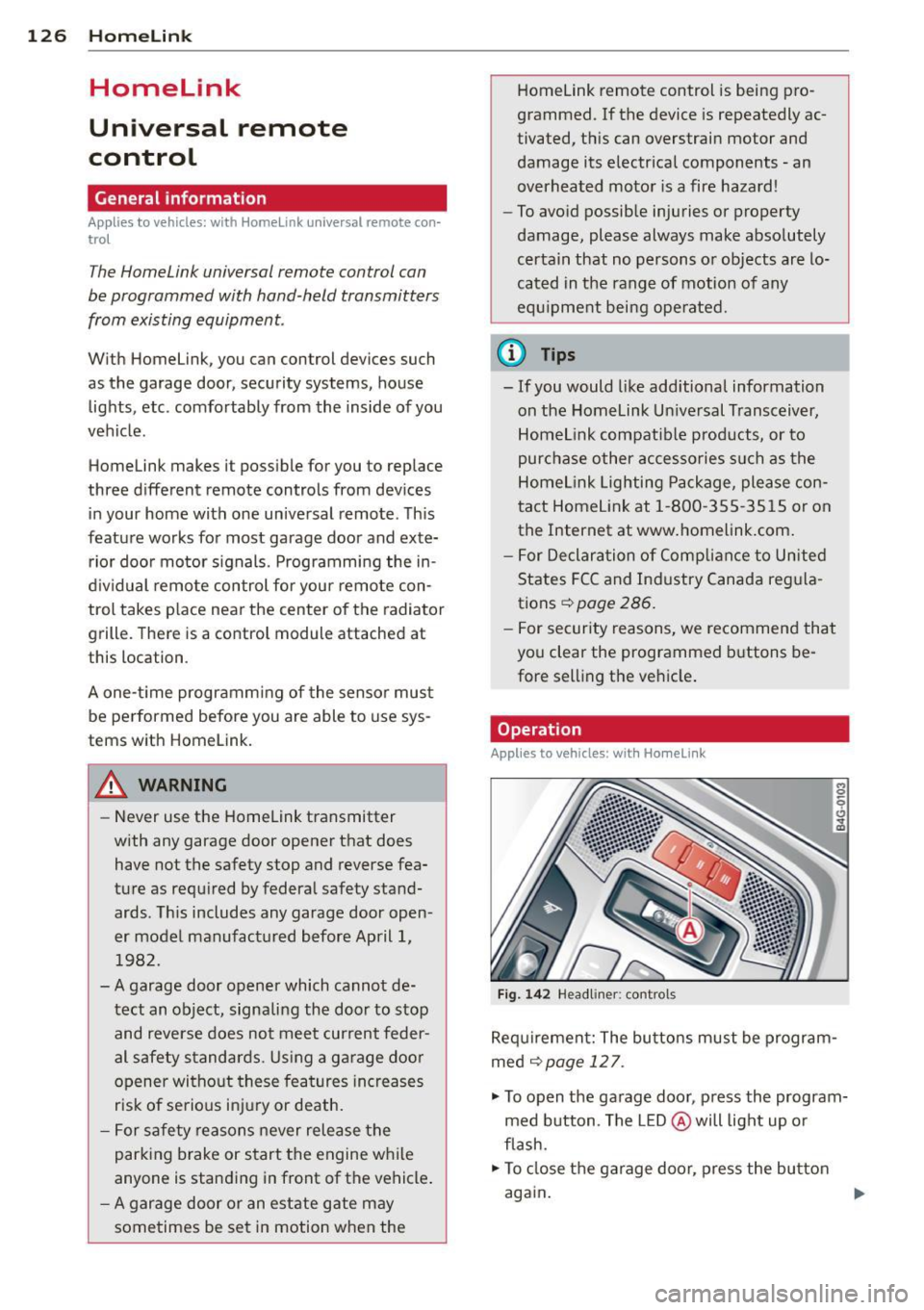
Fig . 14 2 Headliner: controls
M 0
9 (!)
~
Requirement: The buttons must be program
med
¢page 127.
"'To open the garage door , press the program
med b utton . The LED @ will light up o r
flash.
"' To close the garage door, press the button
again .
Ill>
Page 130 of 304
128 Driving Safely
Driving Safely
General notes
Safe driving habits
Please remember -safety first!
This chapter contains important information,
tips, instructions and warnings that you need
to read and observe for your own safety, the
safety of your passengers and others . We have
summarized here what you need to know
about safety belts, airbags, child restraints as
well as child safety. Your safety is for us
priori
ty number 1.
Always observe the information
and warnings in this section - for your own
safety as well as that of your passengers.
The information in this section applies to all
model versions of your vehicle . Some of the
features described in this sections may be
standard equipment on some models, or may
be optional equipment on others. If you are
not sure, ask your authorized Audi dealer.
A WARNING
- Always make sure that you follow the in
structions and heed the WARNINGS in
this Manual. It is in your interest and in
the interest of your passengers.
- Always keep the complete Owner's Liter
ature in your Audi when you lend or sell
your vehicle so that this important infor
mation will always be available to the
driver and passengers.
- Always keep the Owner's literature handy
so that you can find it easily if you have
questions.
Safety equipment
The safety features are part of the occupant
restraint system and work together to help
reduce the risk of injury in a wide variety of
accident situations.
Your safety and the safety of your passengers
should not be left to chance. Advances in
technology have made a variety of features
available to help reduce the risk of injury in an accident.
The following is a list of just a few of
the safety features in your Audi:
- sophisticated safety belts for driver and all
passenger seating positions,
- safety belt pretensioners ,
- safety belt force limiters for the front seats,
- safety belt height adjustment systems for
the front seats,
- front airbags,
- knee airbags for the front seats*
- side airbags in the front seats and outer rear
seats*,
- side curtain airbags ,
- special LATCH anchorages for child re-
straints,
- head restraints for each seating position,
- adjustable steering column.
These individual safety features, can work to gether as a system to help protect you and
your passengers in a wide range of accidents .
These features cannot work as a system if
they are not always correctly adjusted and cor
rectly used.
Safety is everybody's responsibility!
Important things to do before driving
Safety is everybody 's job! Vehicle and occu
pant safety always depends on the informed and careful driver .
For your safety and the safety of your passen
gers,
before driving always:
.. Make sure that all lights and signals are op
erating correctly.
.. Make sure that the tire pressure is correct .
.. Make sure that all windows are clean and af
ford good visibility to the outside .
.. Secure all luggage and other items carefully
q page 63, q page 60 .
.. Make sure that nothing can interfere with
the pedals.
.. Adjust front seat, head restraint and mirrors
correctly for your height.
.. Instruct passengers to adjust the head re-
straints according to their height . .,..
Page 198 of 304
196 Intelligent technology
@ Tips
-ABS and ASR on ly work correctly when
all four wheels are equipped with identi
ca l tires. Different tire sizes can lead to a
reduct ion in engine power.
- You may hear noises when the systems
described are working.
Switching on and off
- If the indicator light DJ or til] (USA
mode ls)/ [I] (Canada models) appears,
there may be a malfunction
¢ page 20 ,
¢ page 19.
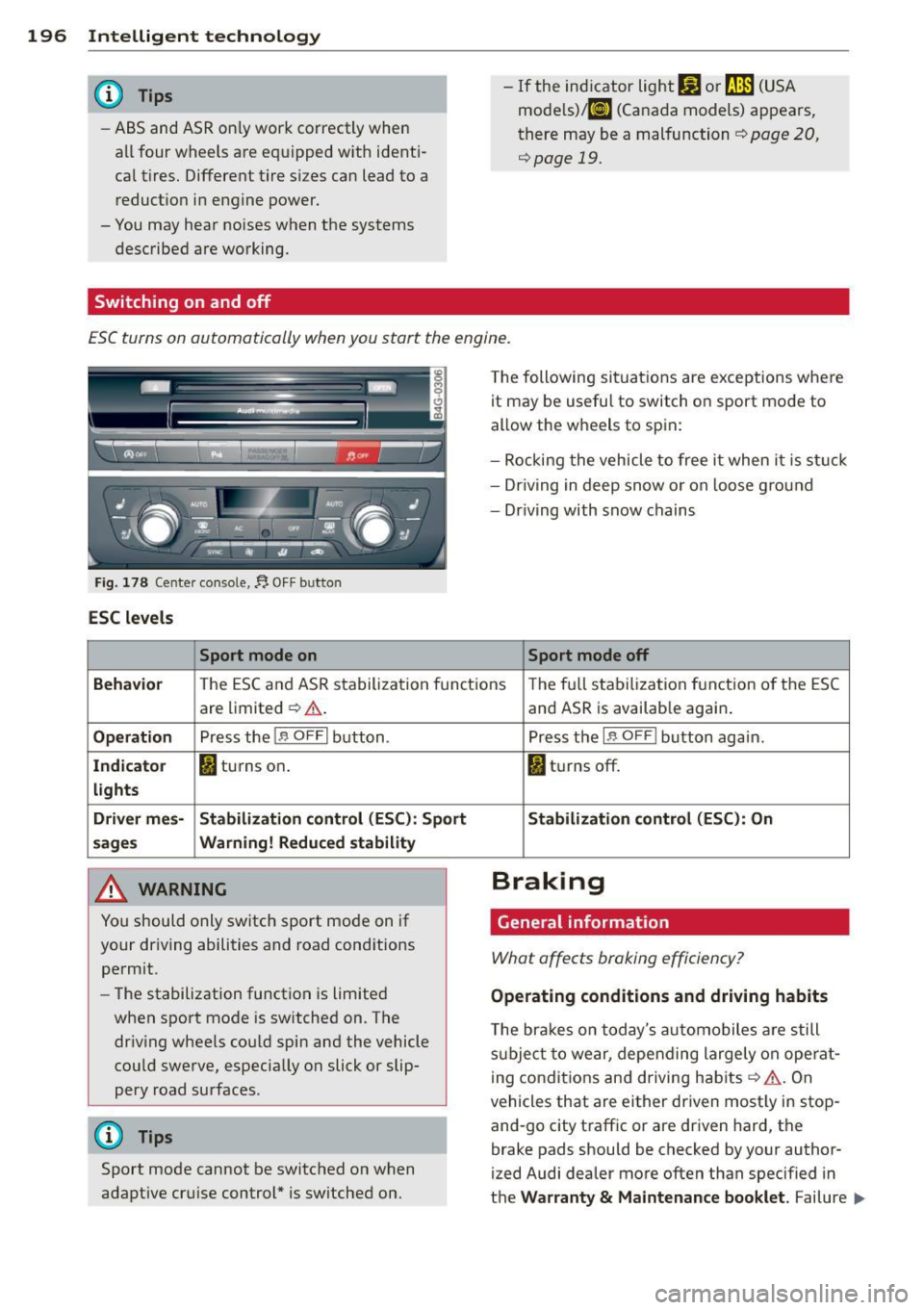
ESC turns on automatically when you start the engine.
Fig. 178 Ce nter co ns ole, f). O FF bu tton
ESC levels
Sport mode on
The following situations are exceptions where
it may be usefu l to switch on sport mode to
allow the wheels to spin:
- Rocking the vehicle to free it when it i s st uck
- Dr iving in deep snow or on loose g round
- Driving with snow chains
Sport mode off
Beha vio r
The ESC a nd ASR stabilization fun ct ions The fu ll stabilization function o f the ESC
are limited ¢.&, .
Op eration Pr ess the 1.$ O FFI button .
Indicato r I) turns on.
lights
Driv er mes- Stabiliza tion control (ESC ): Sport
sage s Warning! R educed stability
,8. WARNING
You should only switch sport mode on if
your driving abilities and road cond itions
permit.
- The stabilization function is limited
when sport mode is sw itched on. The
dr iv ing whee ls could spin and the vehicle
cou ld swe rve, especially on slick or slip
pery road surfaces .
{D) Tips
Sport mode cannot be switched on when
adapt ive cr uise control* is switched on.
-
and ASR is availab le again .
Press the
1 .$ O FF I button again.
fl tu rns off.
Stabilization c ontrol (ESC ): On
Braking
General information
What affects braking efficiency?
Operating conditions and driving habits
The bra kes on today's automobiles a re still
s u bje ct to wear, depending largely on ope rat
i ng conditions and driving hab its
¢ A . On
vehicles that are either driven most ly in stop
and-go city traff ic or are driven hard, the
brake pads should be checked by your author
ized Audi dealer more often than specified in
the
Warranty & Maintenance booklet . Failure .,,_
Page 202 of 304
200 Intelligent technology
critical if the engine is not running and electri
cal components are turned on. In this in
stance energy is being consumed but none is
being generated.
It is in precisely these situations that you wi ll
notice energy management actively regulat
ing the distribut ion of energy .
Vehicle stands for an extended period
If you do not drive your vehicle over a pe riod
of severa l days or weeks, electrical compo
nents are gradually cut back or switched off.
This reduces energy consumption and main
tains starting capab ility over a longer period.
Some of the conven ience functions may not
operate, such as the inter ior lights or the
power seat adjustment. The conven ience
functions will be available again when you
switch on the ignition and start the engine.
With the engine turned off
If you listen to the radio, for example, with
the eng ine turned off or use other MMI func
tions, the battery is being discharged .
If starting capability is jeopardized due to en
ergy consumption, the following warning ap
pears in the MMI display:
Please start the engine soon or the system
will be turned off.
The warning indicates that the system will be
turned off automatically after 3 minutes. If
you wish to continue using the functions, you
have to start the engine.
With the engine running
Although elect rical energy is generated when
the vehicle is being driven, the battery can be
come discharged. This happens most ly when
little energy is being generated and a great
dea l consumed and the battery 's state of
charge is not optimal.
To bring the energy balance back into equili
brium, consumers which require especia lly
large amounts of energy are temporarily cut
back or switched off. Heating systems in par
ticular requ ire a great deal of energy. If you notice,
for example, that the heated seats* or
the heated rear window are not heating, they
have been temporarily cut back or switched
off. These systems will be available again as
soon as the energy balance has been restored.
You will also notice that engine id le speed has
been increased slightly. Th is is normal and not
a cause for concern. By increasing engine idle
speed the additional energy required is gener
ated and the battery is charged.
Page 208 of 304
206 Trailer towing
Trailer towing
Driving with a trailer
General information
Your Audi was designed primarily for passen
ger transportation .
If you plan to tow a trailer, p lease remember
that the additional load will affect durability,
economy and performance .
Trailer towing not on ly places more stress on
the vehicle, it also calls for more concentra
tion from the driver.
For this reason, always follow the operating
and driving instructions provided and use
common sense.
@ Note
If you are going to tow a trai ler, you must
activate the trailer operation mode
c:::> page 206, Operating instructions.
Technical requirements
Trailer hitch
Use a weight-carrying hitch conforming to the
gross trailer weight. The hitch must be suita ble for your vehicle and trailer and must be
mounted securely on the vehicle's chassis at a
technically sound location . Use only a trailer
hitch with a removable ball mount. Always
check with the trailer hitch manufacturer to
make sure that you are using the cor rect
hitch.
Do not use a bumper hitch.
The hitch must be installed in such a way that
it does not interfere with the impact-absorb
ing bumper system. No modifications should
be made to the vehicle exhaust and brake sys
tems . From time to time, check that all hitch
mounting bolts remain securely fastened.
When you are not towing a trailer, remove the
trai ler hitch ball mount. This prevents the
hitch from causing damage should your vehi
cle be struck from behind
c:::> A.
Trailer brakes
If your trailer is equipped with a brakin g sys
tem, check to be sure that it conforms to all
regulations.
T he trailer hydraulic brake system must not be
directly connected to the vehicle's hydraulic
brake system .
Safety chains
Always use safety chains between your veh icle
and the trailer.
Trailer lights
Trailer lights must meet all regulations. Be
sure to check with your Audi dealer for correct
wiring, switches and relays.
Mirrors
If you are unable to see the traffic behind you
using the regular outside mirrors, then you
must install extended mirrors. It is important
that you
always have clear v is ion to the rear .
A WARNING
--
After removing the trailer hitch, do not
store it in your vehicle . In case of sudden
braking, the hitch could fly forward and in
jure you or your passengers.
Operating instructions
Maximum trailer weight
A trailer for your vehicle is limited to a typical
class 1 or class 2 trailer.
Trailer load distribution
Be sure the load in the trailer is held securely
in place to prevent it from shift ing forward,
backward or sideways.
Never allow a passenger to ride in a trailer
c:::> A in Driving instructions on page 208.
Engine cooling system
Towing a trailer makes the engine work hard
er . It is important that the cooling system 's
performance is up to the additional load.
Page 210 of 304
208 Trailer towing
Always apply brakes early. When driving
downhill, shift into a lower gear to use the en
g ine braking effect to slow the vehicle . Use of
the brakes alone can cause them to overheat
and fail.
Coolant temperature
The coolant temperature gauge¢ page 11
must be observed carefully. The coolant tem
perature can increase if you drive on long in
clines in a low gear at high engine speeds. Re
duce your speed immediately if the LEDs in
the top part of the display turn on .
For more information about indicator lights,
refer to.
¢ page 17 .
A WARNING
Anyone not properly restrained in a mov
ing vehicle is at a much greater risk in an
accident . Never let anyone r ide in your car
who is not properly wear ing the restraints
provided by Aud i.
Trailer towing tips
Important to know
Your vehicle handles differently when towing
a trailer because of the additional weight and
different weight distribution . Safety, perform
ance and economy w ill greatly depend on how
carefully you load your trailer and operate
your rig .
Before you actually tow your trailer, practice
turn ing, stopp ing and back ing up in an area
away from traffic. Keep practicing until you
have become comp lete ly familiar with the way
your ve hicle-trai ler comb ination behaves and
responds.
Backing up is difficult and requires practice .
Backing up with a tra iler generally requi res
steering act ion opposite to that when backing
up your vehicle without a trailer.
Maintain a greater distance between your ve
hicle and the one in front of you. You will need
more room to stop. To compensate for the trailer, you wi
ll need a larger than normal
turning radius.
When passing, remember that you cannot ac
celerate as fast as you norma lly would be
cause of the added load. Make sure you have
enough room to pass . After passing, a llow
plenty of room for your trailer before chang
ing lanes again.
Avoid jerky starts , sharp turns or rapid lane
changes.
(D Tips
- Do not tow a trailer during the break-in
period of your vehicle.
- If you tow a trailer, your Audi may re
quire more frequent maintenance due to
the extra load ¢
page 283.
Parking on a slope
Do not park on o slope with a trailer. If it can
not be avoided, do so only after doing the fol
lowing:
When parking:
.,. App ly the foot brake .
.. Have someone place chocks under both the
vehicle and the trailer wheels.
.. With chocks in place, slowly release the
brakes until the wheel chocks absorb the
load .
.. Turn the wheels towards the curb.
.. Apply the parking brake.
.. Select the P selector lever position .
When restarting after parking:
.. Apply the foot brake.
.. Start the engine.
.. Select the D/S selector lever position .
.. Release the parking brake and slowly pull
out and away from the wheel chocks .
.,. Stop and have someone retr ieve the wheel
chocks .
Ill-
Page 215 of 304
Vehicle care and cleaning 213
Component Situation Solution
Te xtile s,
Stains adhering to Vacuum cleaner
Vinyl, the surface
Alcantara Water-based stains Absorbent cloth and mild soap
solutional
such as coffee, tea, blood, etc.
Oil-based stains Apply a mild soap solutiona l, blot away the d issolved oil
such as oil, make- or dye, treat afterward w ith water, if necessary
up, etc.
Special stains such Special stain remover, b lot with absorbent material,
as ballpoint pen, treat afterward with mild soap solutiona l, if necessary
na il polish, latex
pa int, shoe polish,
etc.
Natural leather Fresh stains Cotton cloth with a mild soap solutiona l
Water-based stains Fresh sta ins: absorbent cloth
such as coffee, tea, Dried stains: stain remover suitable for leather
blood , etc .
Oil-based stains Fresh stains: absorbent cloth and stain remover suitable
such as oil, make- for leather
up , etc . dried sta ins: Oil cleaning spray
Special stains such Sta in remover suitable for leather
as ballpo int pen,
nai l polish, latex
paint, shoe polish,
etc.
Care Regularly apply conditioning cream that protects from
light and penetrates
into the material. Use specially-col-
ored conditioning cream, if necessary.
Carbon parts Dirty Clean the same way as plastic parts
al Mil d soap so lution: m axim um two ta bles poo ns neu tral soa p in a lite r of water
& WARNING
The windshie ld may not be treated with
water-repelling windshie ld coating agents .
Unfavorab le conditions such as wetness,
darkness, or low sun can result in in
creased glare. W iper blade chatter is also
possible.
- Headlights/tail lights
- Never clean headlights or tail lights
w ith a dry cloth or sponge. -
Do not use any cleaning product that
contains alcohol, because they could
cause cracks to form.
-Wheels
-Never use any paint polish or other
abrasive mater ials.
- Damage to the protective layer on the
rims such as stone chips or scratches
must be repaired immediately .
-Sensors/camera lenses
- Never use warm or hot water to re-
move snow or ice from the camera
len s. This could cause the lens to crack .
IJII>
•
•
Page 230 of 304
228 Check ing and filling
current list of oils (manufacturers , brand
names etc.) that conform to Aud i oi l standard
VW 502 00 (vehicles with gasoline engine) or
VW 507 00 (vehicles with diesel engine).
C hang in g th e en gin e oil
The engine oil and o il filter must be changed
according to the m ileage (ki lomete rs) and
time inte rva ls spec ified in your vehicle's War
ranty
& Maintenance booklet . Do not exceed
these intervals - harmful deposits from old
engine o il can reduce engine performance and
can lead to expensive engine repairs .
Changing the oil at the recommended inte r
va ls is so very important because the lubricat
ing properties of oi l decrease grad ually during
norma l vehicle use. If you are not sure when
you have your oil changed, ask your author
ized Audi Service Advisor .
Under some circumstances the engine o il
should even be changed more frequently .
Change oil more often if you drive mostly
short d istances, operate the vehicle in dusty
areas or mostly under stop-and-go traffic con
d itions, or when you use your vehicle where
temperatures stay below freezing point fo r
l ong periods.
Detergent add it ives in the o il w ill make fresh
oil look dark after the eng ine has been run
n ing fo r a short time. This is no rma l and is not
a reason to change the o il more often than
recommended.
Dama ge or ma lfun cti ons du e to la ck of
maint enan ce
It is essential that you change your oil at the
recommended intervals using only engine oil
that complies with Audi oil standard
VW 502 00 (vehicles wi th gaso lin e engine) or
VW 507 00 (veh icles with diese l engine) . Yo ur
Limited New Vehicle Warranty does not cover
damage or ma lf u nctions due to failure to fol
low recommended maintenance and use re
qu irements as set forth in the A udi Owner's
Manual and War ranty
& Maintenance book let.
Your dea ler will have to deny warranty cover
age unless you present to the dealer proof in the form o
f Service or Repair Orders that all
scheduled maintenance was performed in a
t imely manner.
Engine oil consumption
The engine in your vehicle depends on on ade
quate amount of oil to lubricate and cool oil
of its moving ports.
In order to provide effective lubrication and
cooling of interna l engine components, all in
ternal combust ion engines consume a certain
amount of oil. Oil consumpt ion varies from
engine to engine and may change sign ificantly
over the life of the engine. Typically , engines
with a spec ified break- in period (see
¢ page 201) consume more oil during the
break -in pe riod t han they consume afte r o il
consumption has stabilized.
Under normal cond it ions, the rate of oil con
sumption depends on the q ua lity and viscos ity
of the oil , the RPM (revol utio ns per minute) at
which the engine is opera ted, the ambient
temperature and road conditions . Furt her fac
tors are the amount of oil dilution from water
condensation or fue l residue and the oxida
tion level of the oil. As any engine is subject to
wear as m ileage builds up, the oil consump
t ion may increase over time until replacement
of worn components may become necessary .
With a ll these variab les coming into p lay, no
standard rate of oil consumpt ion can be es
tablished or spec ified . There is no alternative
to regular and frequent checking of the o il lev
el, see
Not e.
If the yellow engine oil level warning symbol
in the instrument clus ter
II lights up, you
shou ld check the oil leve l as soon as possib le
¢
page 229 . Top off the oil at your earl iest
convenience
9 poge 229.
,&. WARNING
Before you che ck anything in the engine
compartmen t, a lways rea d and heed al l
WAR NIN GS ¢.&
in Working in the engine
comportment on page 224 .
-
Page 237 of 304
@ For the sake of the environment
Because of the pr oblem of proper d isposa l
of brake flu id as we ll as the special tools
requ ired and the necessary expert ise, we
recommend that you have the brake fluid
changed by your author ized Audi dealer .
Battery
General information
Under normal operating conditions, the bat
tery in your Audi does not need any mainte
nance. With
high outside temperatures or
long daily dr ives we recommend that you have
the electro lyte level checked by a service fa
cility . The electrolyte level shou ld also be
checked each time the battery is charged
¢ page 237.
Have the battery checked when you take your
ve hicle in for service . Yo u are well adv ised to
replace a battery that is older than 5 yea rs .
W ith certa in types of a irbag deployment, t he
b attery is d isconnected from the vehicle elec
tr ica l system for safety reasons¢.&.
in Re
pair, core and disposal of the airbags on
page 163.
Disconnecting the battery terminals
Some vehicle functions (power w indow regu
lators , for example) are lost if the battery ter
m inals a re d isconnected. These func tions have
to be re lea rned after the batte ry term inals a re
connected agai n. T o prevent this , the bat tery
should only be d isconnec ted from the vehicle
e lec tric al system when absolu tely necessa ry
for repairs .
Vehicles not driven for long periods
If you do not drive you r vehicle over a period
of severa l days or weeks, ele ctrical compo
nen ts are gr adually cut b ack o r swi tched off .
This redu ces energy cons umption and main
tains starting capab ility over a longer per io d
¢
page 199. Some of the co nvenience func
tions may not operate, s uch as the inte rior
lights or power seat adjustme nt. The conven-
Checkin g and fillin g 235
ience funct ions w ill be available again when
yo u sw itch on the ign ition an d start the en
gine.
Winter operation
D ur ing the w inte r mon ths, bat tery ca pa city
tends to decrease as tempera tures drop . This
is beca use more power is a lso consumed wh ile
starting, and the headlights, rear window de
fogger, etc., are used mo re often.
Avoid unnecess ary powe r consumpt ion, pa r
ticu lar ly in city traffic o r when traveling only
sho rt distances. Let yo ur authorized A udi
dealer check the capacity of the vehicle bat
tery before w inter sets in¢
page 23 7. A well
charged battery will no t on ly prevent star tin g
problems w hen the weather is cold, but w ill
also last longer .
@ Tips
If your vehicle is left standing for seve ral
weeks at extremely low temperatures, the
vehicle battery s hou ld be removed and
stored where it will not freez e. This will
p reve nt it from be ing dam aged and having
to be repl aced .
Working on the battery
Be especially careful when working on or near
the bat tery.
The battery is located in the luggage compar t
ment under the floor . B efo re you che ck any
thi ng in the luggage compartment,
read and
heed all WARNINGS
¢ .&, .
Always heed the safety warnings , when work
i ng on the veh icle batte ry or t he vehicle e lec
t rical sys tem to p reven t inju ry.
The following WARNINGS are very
important when working on the battery:
Always heed the following WARNING SYM· BO LS and safety precautions when working
on the battery .
®
Always wear eye protection.
•
•