child lock AUDI A6 2014 Owners Manual
[x] Cancel search | Manufacturer: AUDI, Model Year: 2014, Model line: A6, Model: AUDI A6 2014Pages: 304, PDF Size: 76.32 MB
Page 4 of 304
2 Table of contents Vehicle literature .. .. .. .. .. ... .
5
About this Owner's Manual . . . 6
Controls and equipment ..... .
Instruments and controls ... .
General illustration ......... .. ... .
Instruments and warning/
indicator lights ............... .
Instruments ............ ... .. ... .
Warning/indicator lights ..... ... .. .
Driver information display ... ... ... .
On-Board Diagnostic system (OBD) .. .
Opening and closing .. .. .... . .
Keys .......................... .
Power locking system ............ .
Rear lid ...................... .. .
Child safety lock for the rear doors .. .
Power windows ........... ... .. . .
Valet park ing ................... .
Sliding/tilting sun roof ............ .
Clear vision ................... .
Lights ......................... .
I nter ior lights ................... .
V1s 1on .......... ......... ... ... .
Wiper and washer system ... .... .. .
Mir rors .... .............. ... ... .
Seats and storage ......... ... .
General recommendations ... .... . .
Front seats ..................... .
Head restraints ................. .
Seat memory ................... .
Ashtray .. .. ... ... .... ......... . .
C igarette lighter .............. ... .
12-vo lt sockets .................. .
Storage ........ .............. .. .
Roof rack .... ................ .. .
L uggage compartment ...... ... .. .
Pass-through with ski sack ... .. ... . 8
8
8
11
11
12
24
30
32
32
34
38
40
40
41
41
43
43
46
47
48
so
52
52
53
55
56
58
58
59
59
61
63
65
Warm and cold . . . . . . . . . . . . . . . . 67
Climate controls . . . . . . . . . . . . . . . . . . 67
Three-zone climate control . . . . . . . . . 68 Four-zone
automatic climate control
Steering wheel heating ........... . 70
72
On the road
. . . . . . . . . . . . . . . . . . . 73
Steer ing . . . . . . . . . . . . . . . . . . . . . . . . 73
Starting and stopping the engine . . . . 74
E lectromechanical parking brake . . . . 77
Start-Stop-System . . . . . . . . . . . . . . . . 79
Speed warning system . . . . . . . . . . . . . 82
Cruise control . . . . . . . . . . . . . . . . . . . . 82
Audi adaptive cruise control
and braking guard . . . . . . . . . . . .
84
Introduction . . . . . . . . . . . . . . . . . . . . . 84
Genera l information . . . . . . . . . . . . . . 84
Audi adaptive cruise control . . . . . . . . 86
Audi braking gua rd . . . . . . . . . . . . . . . 90
Messages . . . . . . . . . . . . . . . . . . . . . . . 91
Audi active lane assist . . . . . . . . 93
Active lane assist . . . . . . . . . . . . . . . . . 93
Audi side assist . . . . . . . . . . . . . . . 96
Lane Change Assistant. . . . . . . . . . . . . 96
Audi drive select . . . . . . . . . . . . . . 100
Driving settings . . . . . . . . . . . . . . . . . . 100
Raising/lowering the vehicle . . . . . . . . 102
Driver messages . . . . . . . . . . . . . . . . . . 102
Night vision assistant . . . . . . . . . 103
Night vision assistant with detected
pedes trian marking . . . . . . . . . . . . . . . 103
Automatic Transmission . . . . . . 107
multitronic, S tronic, tiptronic. . . . . . . 107
Parking systems . . . . . . . . . . . . . . 114
General information . . . . . . . . . . . . . . 114
Parking system plus . . . . . . . . . . . . . . . 115
Rearviewcamera ................. 116
Peripheral cameras . . . . . . . . . . . . . . . 119
Adjusting the d isplay and the warning
tones. . . . . . . . . . . . . . . . . . . . . . . . . . . 124
Page 34 of 304
32 Opening and clo sing
Opening and closing
Keys
Key set
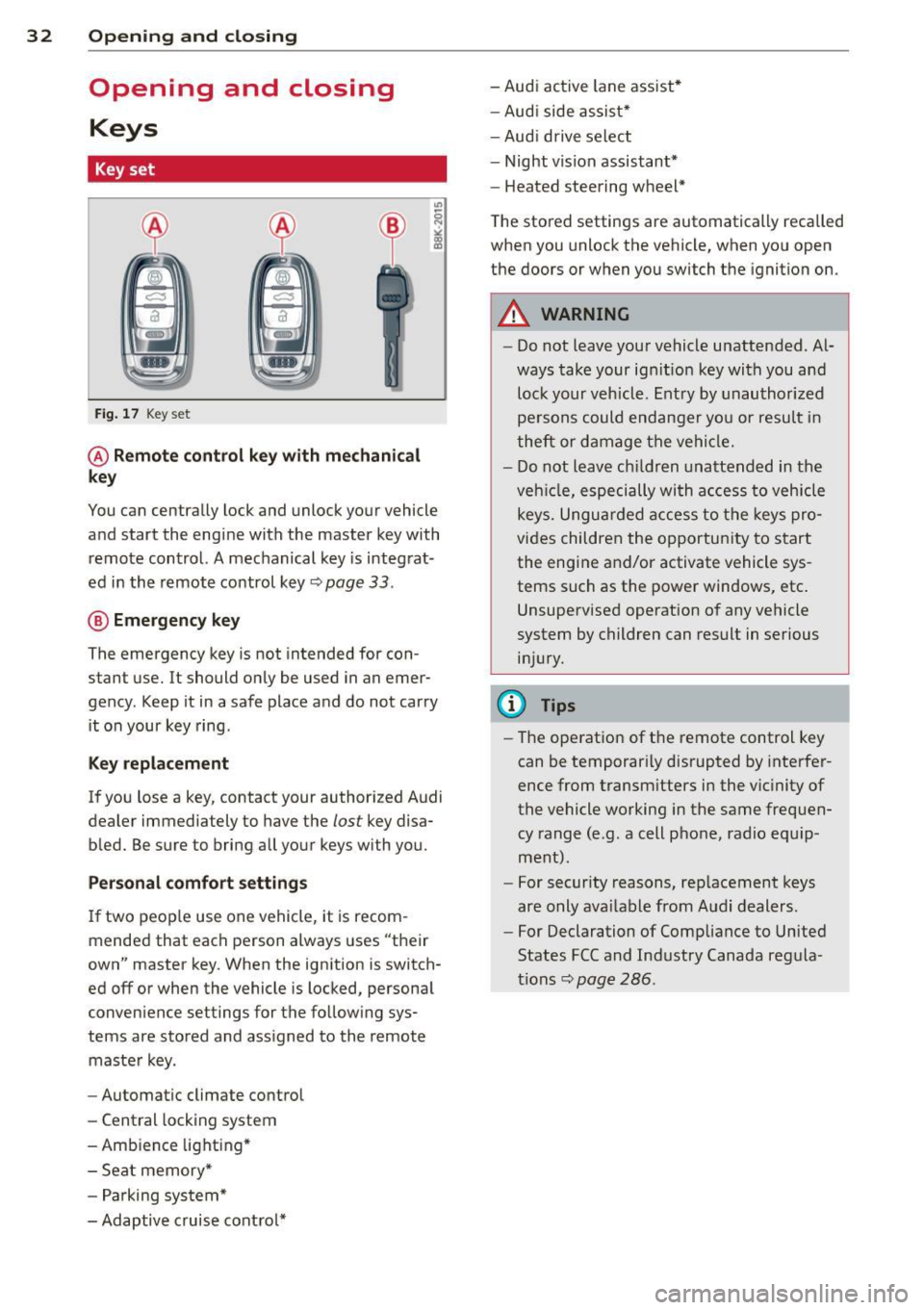
Fig . 17 Key set
@ Remot e control k ey w ith m echan ical
ke y
You can centrally lock and unlock your vehicle
and start the engine with the master key with
remote control. A mechanical key is integrat
ed in the remote control key
r:::;, page 33 .
@ Eme rgenc y ke y
The emergency key is not intended for con
stant use.
It should only be used in an emer
gency. Keep it in a safe place and do not carry it on your key ring .
Key replac em ent
If you lose a key, contact your authorized Audi
dealer immediately to have the
lost key disa
bled. Be sure to bring all your keys with you.
P er sonal c omfo rt se ttin gs
If two peop le use one vehicle, it is recom
mended that each person always uses "their
own" master key . When the ignition is switch
ed off or when the vehicle is locked, personal
convenience settings for the follow ing sys
tems are stored and assigned to the remote master key .
- Automatic climate control
- Central locking system
- Amb ience light ing*
- Seat memory*
- Parking system*
- Adaptive cruise control* - Audi active
lane assist *
- Aud i side assist*
- Aud i drive select
- Night vision assistant*
- Heated steering wheel*
The stored settings are automatically recalled
when you unlock the vehicle, when you open
the doors or when you switch the ignition on.
A WARNING
-- Do not leave your vehicle unattended . Al-
ways take your ignit ion key with you and
lock your vehicle . Entry by unauthorized
persons could endanger yo u or resu lt in
theft or damage the vehicle.
- Do not leave ch ildren unattended in the
veh icle, especially with access to vehicle
keys. Unguarded access to the keys pro
vides children the opportunity to start the engine and/or activate vehicle sys
tems such as the power windows, etc .
Unsupervised operation of any vehicle
system by children can result in serious
injury.
(1) Tips
- The operation of the remote control key
can be temporar ily disrupted by interfer
ence from transm itters in the vic inity of
the vehicle working in the same frequen
cy range (e.g. a cell phone, radio equip
ment).
- For security reasons, rep lacement keys
are only ava ilable from Audi dealers.
- For Declaration of Compliance to United
States FCC and Industry Canada regula
tions
r:::;, page 286.
Page 36 of 304
34 Opening and closing
for another vehicle or a transponder is
located on the key ring.
- For Declaration of Compliance to United
States FCC and Industry Canada regula
tions ¢
page 286.
Power locking system
General description
The power locking system locks or unlocks all
doors and the rear lid simultaneously.
You can lock and unlock the vehicle centrally.
You have the following choices:
- Remote master key¢
page 35,
-Door handles with convenience key*
¢page 36,
-Lock cylinder at the driver's door
<=?page 37, or
- Power locking switch inside
<=? page 37.
Selective unlocking
When you lock the vehicle, the power locking
system w ill lock the doors and the rear lid .
When unlocking, you can set in the MMI
whether only the driver's door or the entire
vehicle should be unlocked <=?
page 35.
Automatic locking
The automat ic locking feature locks all the ve
h icle doors and the rear lid when you drive
faster tha n 9 mph (15 km/h).
The car is unlocked again, when the opening
function in the power locking system sw itch
or at one of the door levers is actuated .
Anti-theft alarm warning system
If the anti-theft alarm warning system de
tects a break- in into the vehicle, acoust ic and
visual warning signals are triggered .
The anti-theft warning system is activated au
tomatically when you lock the vehicle . It is de
activated when u nlocking using the remote
key, with the mechanical key, and when you
switch the ignition on.
The alarm also turns off when the alarm cycle has expired.
Turn signals
When you unlock the vehicle, the turn s ignals
flash twice. When you lock the vehicle the
turn signals flash once. If they do not flash ,
one of the doors, the rear lid or the hood is
not locked .
Unintentionally locking yourself out
In the follow ing cases there safeguards to
prevent you locking your remote master key in
the vehicle:
- The vehicle does not lock w ith the central
locking switch <=?
page 37 if the driver's
door is open.
- On veh icles with convenience key*, if the
most recently used master key is in the lug
gage compartment, the rear lid is automati
cally un locked again after it is closed.
Do not lock your veh icle w ith the
remote mas
ter key or convenience key*
unti l all doors
and the rear lid are closed. In this way you
avoid locking yourself out accidentally .
Power side door closer*
The veh icle doors are equipped with a power
s ide door closer . When closing a door, you on
ly have to let it fall light ly into the latch . The
door will then automatically close by itself
¢& .
A WARNING
-- When you lock your vehicle from outside,
nobody - especially children -should re
main inside the vehicle. Remember,
when you lock the vehicle from the out
side the windows cannot be opened from
the inside.
- When you leave the vehicle, always take
the ignition key with you . This will pre
vent passengers (children, for example)
from accidentally being locked in the ve
hicle should they accidentally press the
power locking switch in the doors.
- Do not leave children inside the vehicle
unsupervised. In an emergency it would
be impossible to open the doors from
the o utside without the key.
Page 39 of 304
-For Declaration of Compliance to United
States FCC and Industry Canada regula
tions ¢
page 286.
Operating locks with the key
In the event of a failure of the power locking
system, the driver's door can be locked and
unlocked at the lock cylinder.
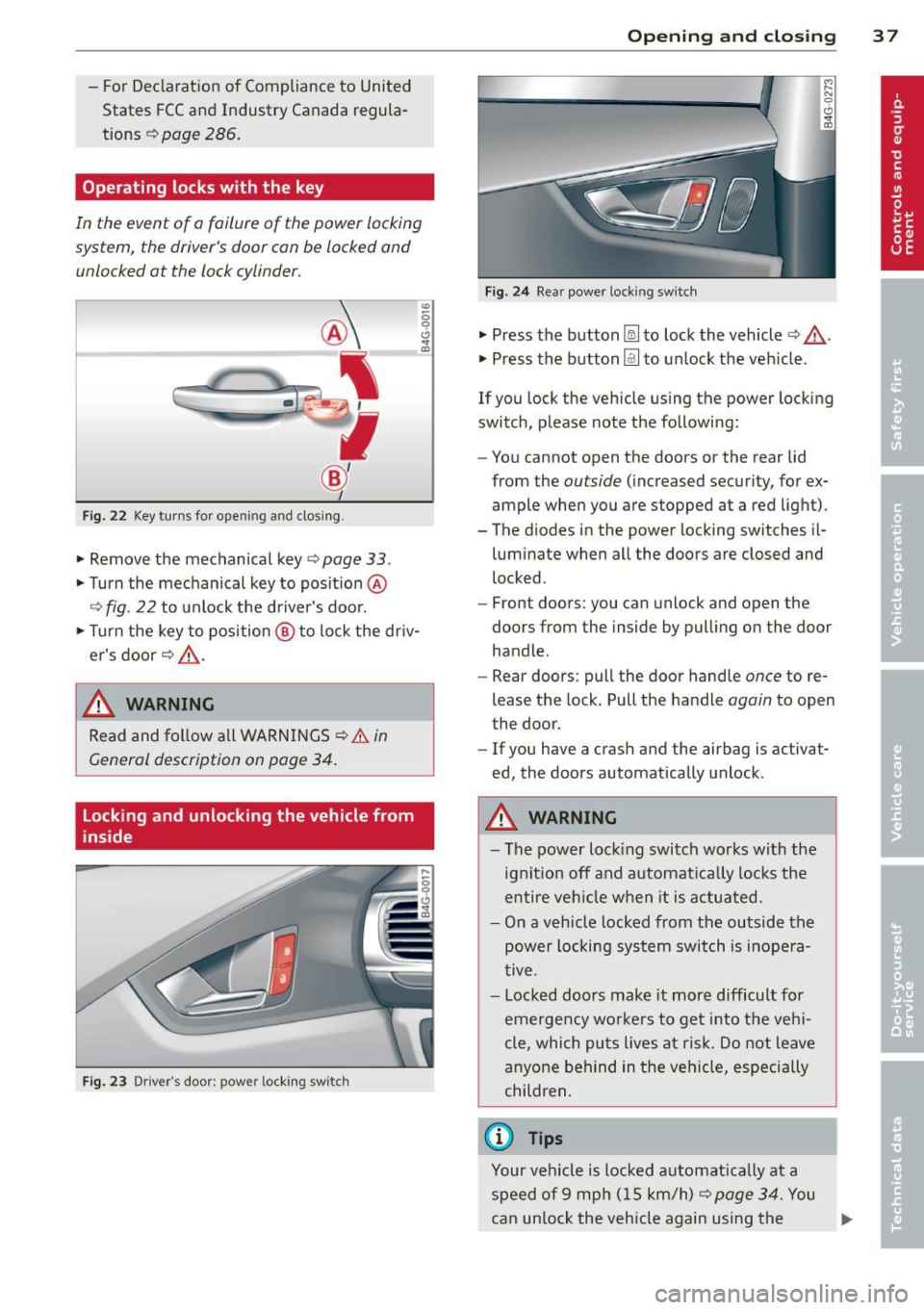
Fig . 22 Key tur ns for open ing and dosing .
• Remove the mechanical key <::> page 33 .
• Turn the mechanical key to posit ion @
9fig . 22 to unlock the d river's door.
• Turn the key to position ® to lock the dr iv
er's door
r:::> .&_ .
A WARNING
"' :; 0 0 .., a,
-
Read and follow a ll WARNINGS ¢.& in
General description on poge 34.
Locking and unlocking the vehicle from
inside
Fig . 23 Driver' s door: power lockin g swi tc h
Op enin g an d clos ing 3 7
Fig . 24 Rea r powe r lock ing switch
• Press the button~ to lock the vehicle Q .&_ .
• Press the button Im to un lock the veh icle .
If you lock the vehicle using the power locking
switch, please note the following:
- You cannot open the doors or the rear lid
from the
outside (increased security, for ex
ample when you are stopped at a red light).
- The diodes in the power locking switches il- luminate when all the doors are closed and
locked .
- Front doors: you can unlock and open the
doors from the inside by pulling on the door
handle.
- Rear doors: pull the door handle
once to re
lease the lock. Pull the handle
again to open
the door .
- If you have a crash and the airbag is activat
ed, the doors automatically unlock .
A WARNING
-The power locking switch wo rks with the
ignition off and automat ica lly locks the
entire veh icle when it is actuated.
- On a vehicle locked from the outside the
power locking sys tem switch is inope ra
tive .
- Locked doors make it more difficult for
emergency wo rke rs to get into the veh i
cle, which puts lives at risk. Do not leave
anyone behind in the vehicle, especially
children .
(D Tips
Your vehicle is locked a utomat ica lly at a
speed of 9 mph ( 15 km/h)
r:::> page 34. You
can un lock the vehicle again using the .,..
Page 40 of 304
38 Openin g and clo sing
opening function in the power locking sys
tem switch.
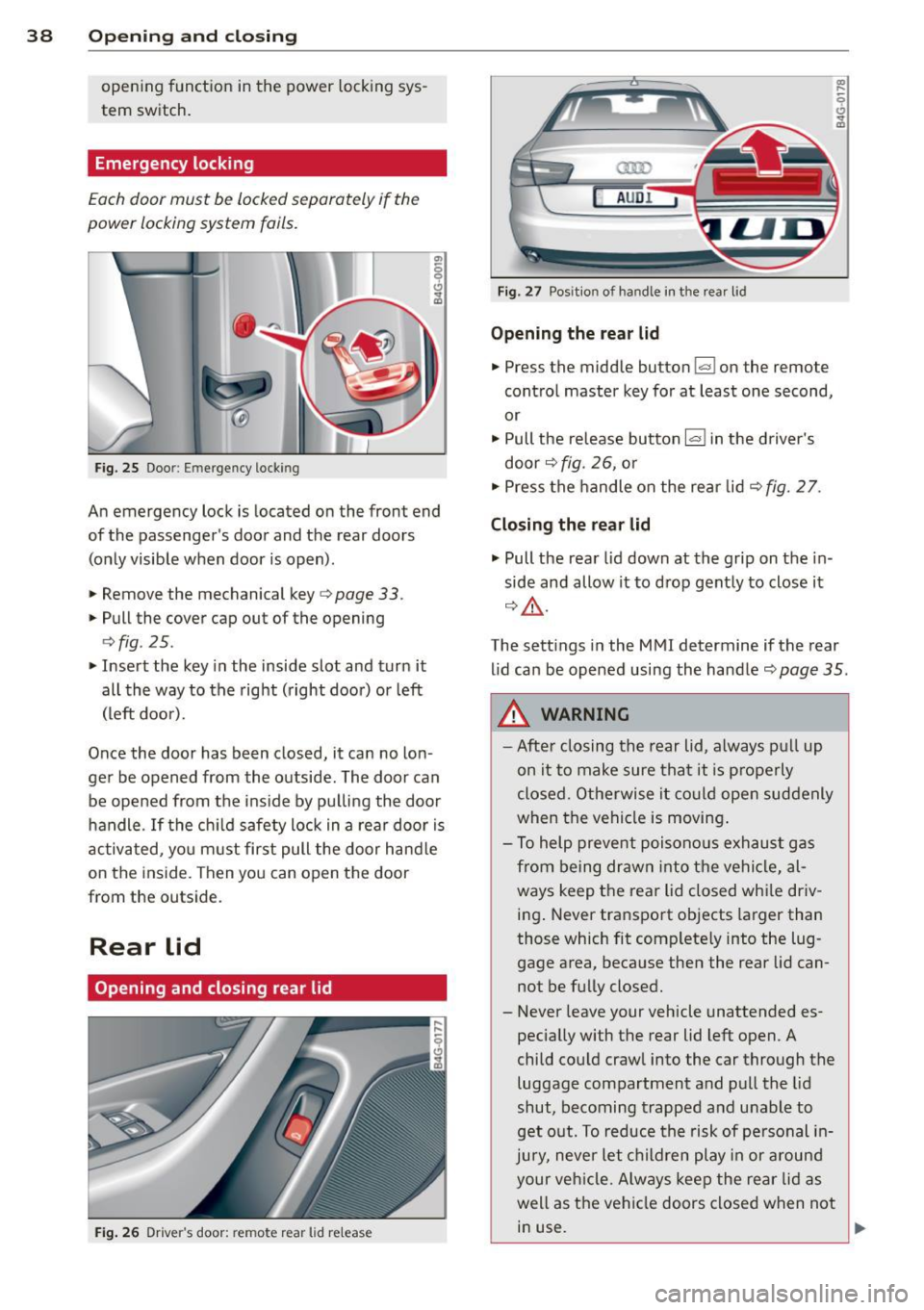
Emergency locking
Each door must be locked separately if the
power locking system fails.
Fig. 25 Doo r: Em erge ncy lock ing
An emergency lock is located on the front end
of the passenger's doo r and the rear doors
(only visible when door is open).
.. Remove the mechanical key ¢
page 33.
.. Pull the cover cap out of the opening
¢ fig . 25 .
.. Insert the key in the inside slot and turn it
all the way to the right (right doo r) or left
(left door).
Once the doo r has been closed, it can no lon
ger be opened from the outside. The door can be opened from the ins ide by pu lling the door
handle . If the ch ild safety lock in a rea r door is
activated, yo u m ust first pull the door hand le
on the inside. Then you can open the door
from the outside.
Rear lid
Opening and closing rear lid
F ig . 26 Drive r's door: re m ote rear lid release
a:ro
AU DI
Fig. 27 Pos it io n of ha ndle i n th e rear l id
Opening the re a r lid
.. Press the middle button~ on the remote
cont ro l master key for at least one second,
or
.. Pull the release button
l«=>I in the driver's
door ¢
fig. 26, o r
.. Press the handle on the rear lid ¢
fig. 2 7.
Closing the rear lid
.. Pull the rear lid down at the grip on the in
side and allow it to d rop gent ly to close it
¢ &, .
The sett ings in the M MI determine if the rear
l id can be opened using the handler=)
page 35 .
&, WARNING
-Afte r closing the rear lid, a lways p ull up
on it to make sure tha t it is p rope rly
closed. Otherwise it co uld ope n suddenly
when the vehicle is moving .
- T o help prevent p oisono us e xhaust gas
from being dr awn i nto t he ve hicl e, al
ways keep the rear lid closed whi le driv
ing . Never transpo rt objects larger than
those which fit complete ly into the lug
gage area, beca use then the rear lid can
not be fully closed.
- Never leave your vehicle unattended es
pecially with the rear lid left open. A
child cou ld craw l into the car through the
luggage compartment and pul l the lid
shut, becoming trapped and unable to
get o ut. To reduce the risk of pe rsonal i n
jury, neve r let ch ildren play in or a round
your ve hicle. Alw ays kee p the rear lid as
well as the vehi cle doors closed when not
in use.
L,__ _______________ _J ~
Page 42 of 304
40 Opening and clo sing
Child safety lock for
the rear doors
The power child safety lock locks the rear win
dows and prevent the rear doors from being
opened from the inside.
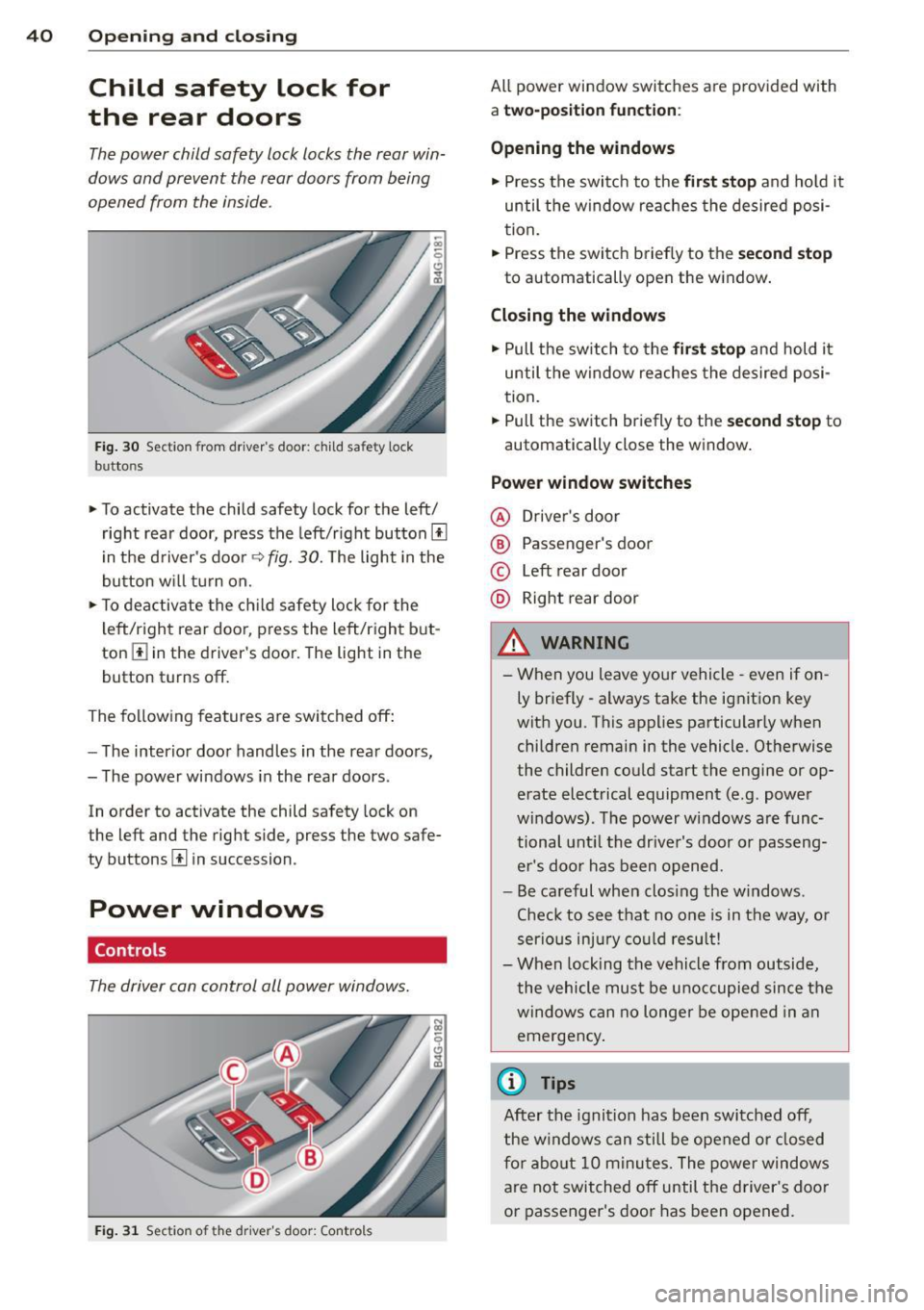
Fig. 30 Section from driver's door: child safety lock
buttons
• To activate the child safety lock for the left/
right rear door, press the left/right button[!]
i n the d river's door
q fig. 30. The light in the
button w ill turn on.
• To deactivate the ch ild safety lock for the
l eft/right rear door, press the left/right b ut
ton
III in the driver's door. The light in the
button turns off.
The following features are switched off:
- The interior door handles in the rear doors,
- The power windows in the rear doors .
In order to activate the child safety lock on
the left and the right side, press the two safe
ty buttons[!] in succession.
Power windows
Controls
The driver can control all power windows.
Fig . 31 Section of the driver's door: Controls
All power window switches are provided with
a two-po sition function :
Opening the windows
• Press the switc h to the fir st sto p and hold it
until the window re aches the desired posi
tion.
• Press the switch briefly to the
second stop
to automatically open the window .
Closing the windows
• Pull the sw itch to the fir st stop and hold it
until the window reaches the desired posi
tion .
.. Pull the switch br iefly to the
s e cond stop to
automatically close the window.
Power window switches
@ Drive r's door
® Passenger's door
© Left rear door
@ Right rear door
& WARNING
- When you leave you r vehicle -even if on
ly briefly -always take the ignition key
wit h you . This applies particularly when
children remain in the vehicle. Otherwise
the children could start the engine or op
erate electrical equipment (e.g. power
windows). The power windows are func
tional unt il the drive r's door or passeng
er 's doo r ha s been opened.
- Be careful when clos ing the w indows .
Chec k to see that no o ne is in the way, or
serio us inju ry co uld resu lt!
- When lock ing the vehicle from outside,
the vehicle mu st be u noccupied since the
windows can no longer be opened in an
emergency .
{1) Tips
After the ignition has been switched off,
the windows can still be opened o r closed
fo r a bout 10 m inu tes. The power windows
are not switched off until the driver 's doo r
or passenger 's door has been opened.
Page 58 of 304
56 Seats and storage
Rear head restraints
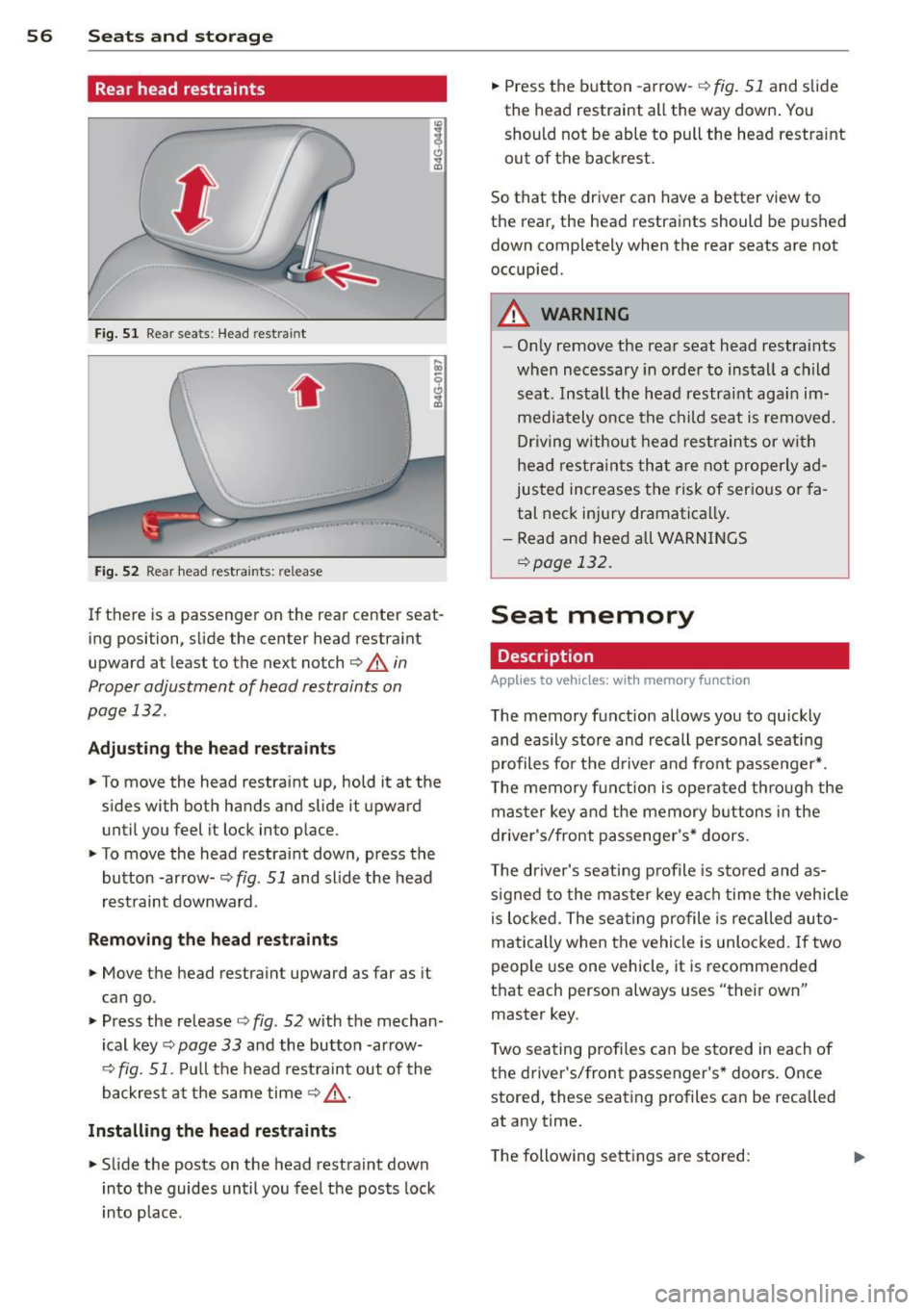
Fig. 51 Rear seats: Head restra int
. .
Fig . 52 Rear head restraints: release
If there is a passenger on the rear center seat
ing position, slide the center head restraint
upward at least to the next notch
c::> A in
Proper adjustment of head restraints on
page 132 .
Adjusting the he ad restr aint s
• To move the head restraint up, hold it at the
sides with both hands and slide it upward
until you feel it lock into place.
• To move the head restraint down, press the
button -ar row-
c::> fig. 51 and slide the head
rest raint downward.
Rem oving the head re straints
• Move the head restraint upward as far as it
can go.
• Press the release
c::> fig. 52 with the mechan
ical key
c::> page 33 and the button -ar row-
c::> fig. 51. Pu ll the head rest raint out of the
backrest at the same time
c::> .,&. .
Install ing th e he ad re str aints
• Slide the posts on the head restraint down
into the guides until you feel the posts lock
i nto place. •
Press the b utton -arrow-
c::> fig. 51 and slide
the head restraint all the way down . You
should not be able to pull the head restraint
out of the backrest.
So that the dr iver can have a better view to
the rear, the head restraints should be p ushed
down completely when the rear seats are not
occupied.
A WARNING
-- On ly remove the rear seat head restraints
when necessary in order to install a child
seat . Install the head restraint agai n im
mediately once the child seat is removed.
Dr iving without head rest rain ts or wi th
head restra ints tha t a re no t properly ad
justed increases the risk of ser ious or fa
tal neck injury dramatically .
- Read and heed all WARN INGS
c::>page 132.
Seat memory
Description
Applies to vehicles: with memory function
The memory function allows you to quickly
and easily stor e and recall pe rsonal seati ng
profiles for the d river a nd front passenger *.
T he memory f un ction is opera ted th ro ugh the
mas ter key and the memory buttons in the
driver's/front passenger's* doors .
T he driver's seat ing profile is stored and as
s igned to the master key ea ch time the vehicle
i s lo cked. The sea ting profile is rec alled au to
matically when the vehicle is unlocked. If two
people use one vehicle, it is recommended
that each person always uses "their own" master key.
T wo sea ting profiles can be stored in each of
the d river's/front passenger's * doors. Once
stored, these seating profiles can be recalled
at any time.
T he following sett ings a re stored:
Page 60 of 304
58 Seats and storage
@ Tips
When matching seat settings, the settings
for the lumbar support and seating s ur
face w ill not transfer to the front passeng
er's seat.
Ashtray
Applies to vehicles: with ashtray
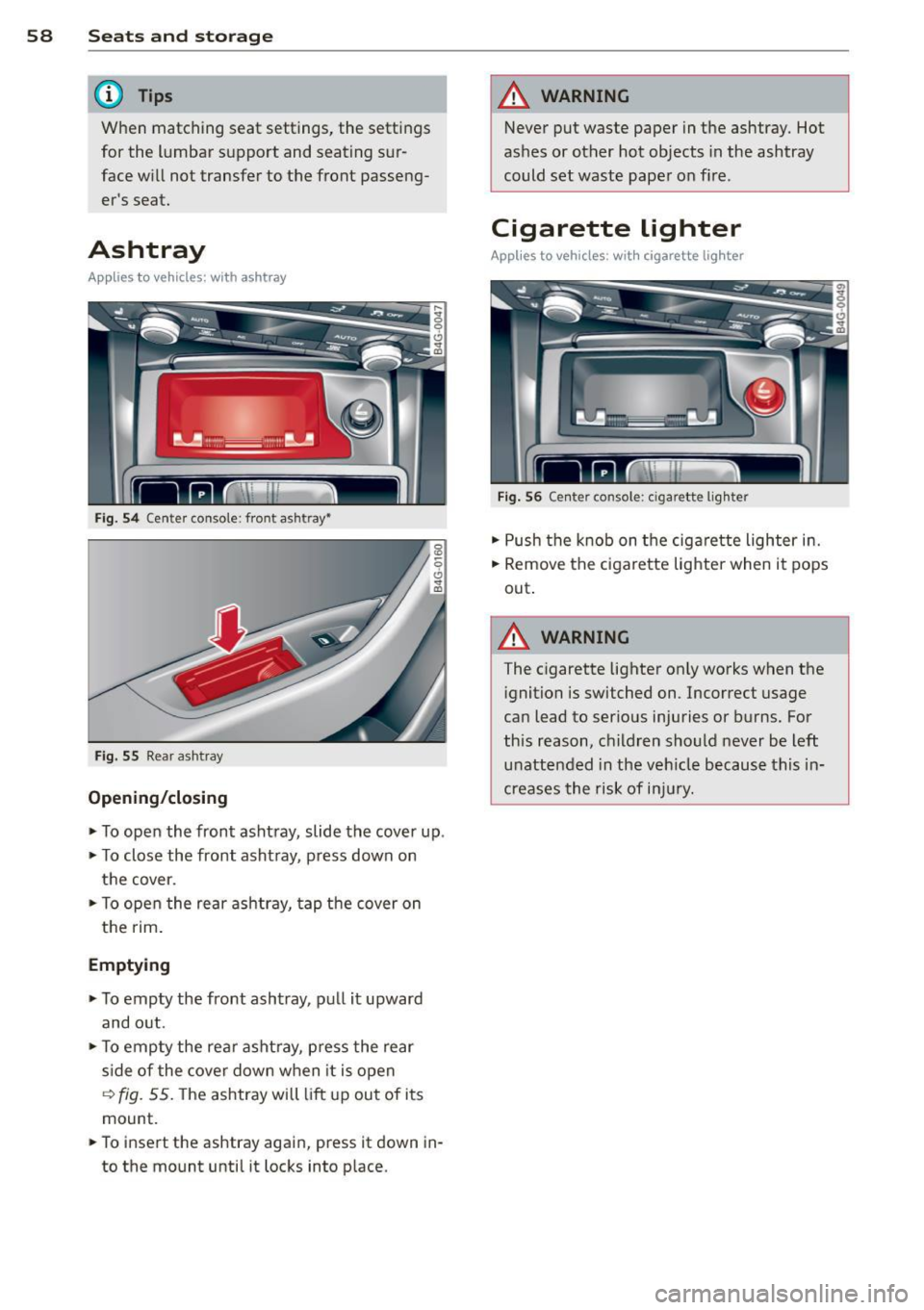
F ig . 54 C ente r con so le: fron t ash tr ay•
Fi g. 55 Rea r a sh tray
Opening /closing
~ To open the front ashtray, slide the cove r up .
~ To close the front ashtray , press down on
the cover.
~ T o open the rear ashtray, tap the cover on
the rim .
Emptying
~ To emp ty the front ashtray, pull it upward
and o ut.
~ T o emp ty the rear ashtray, p ress the rear
s ide of the cove r down w hen it is open
'=? fig . 55. The ashtray will lift up ou t of i ts
mount.
~ To insert the ashtray again, press it down in
to the mount until it locks into p la ce .
A WARNING
-Never put waste paper in t he ashtray. Hot
ashes or other hot objects in the ashtray
could set waste paper on f ire.
Cigarette lighter
Applies to vehicles : wit h cigarette lighter
Fig. 5 6 Ce nter co nso le: c iga rett e li ghter
~ Push the k nob on t he cigarette lighter in.
~ Remove the c igarette lighte r when it pops
out .
A WARNING
The cigarette lighter on ly works when the
i gnition is switched on . Incorrect usage
ca n lead to ser ious injuries or burns . For
this reason, children sho uld never be left
unattended in the veh icle because this in
creases the risk of i njur y.
Page 132 of 304
130 Driving Safely
• Fasten and wear safety belts correctly
9 page 141.
• Always keep both feet in the footwell so
that you are in control of the vehicle at all
t imes.
Fo r detailed information on how to adjust the
driver's seat, see
<=>page 53.
A WARNING
Drivers who are unbelted, out of position
or too close to the airbag can be seriously
injured by an airbag as it unfolds . To help
reduce the risk of serious personal injury:
- Always adjust the driver's seat and the
steering wheel so that there are at least 10 inches (25 cm) between your breast
bone and the steering wheel.
- Always adjust the driver's seat and the
steering wheel so that there are at least
4 inches (10 cm) between the knees and
the lower part of the instrument panel.
- Always hold the steering wheel on the
outside of the steering wheel rim with
your hands at the 9 o'clock and 3 o'clock
positions to help reduce the risk of per
sonal injury if the driver's airbag inflates.
- Never hold the steering wheel at the
12 o'clock position or with your hands at
other positions inside the steering wheel
rim or on the steering wheel hub. Hold
ing the steering wheel the wrong way
can cause serious injuries to the hands,
arms and head if the driver's airbag in
flates.
- Pointing the steering wheel toward your
face decreases the ability of the supple
mental driver's airbag to protect you in a
collision.
- Always sit in an upright position and nev
er lean against or place any part of your
body too close to the area where the air
bags are located.
- Before driving, always adjust the front
seats and head restraints properly and
make sure that all passengers are prop
erly restrained. -
Never adjust the seats while the vehicle
is moving. Your seat may move unexpect
edly and you could lose control of the ve
hicle .
- Never drive with the backrest reclined or
tilted far back! The farther the backrests
are tilted back, the greater the risk of in
jury due to incorrect positioning of the safety belt and improper seating posi
tion .
- Children must always ride in child seats
<=> page 173. Special precautions apply
when installing a child seat on the front
passenger seat
c:> page 147.
Proper seating position for the front
passenger
The proper front passenger seating position
is important for safe, relaxed driving.
For your own safety and to reduce the risk of
injury in the event of an accident, we recom
mend that you adjust the seat for the front
passenger to the following position:
• Adjust the angle of the seatback so that it is
in an upright position and your back comes
in full contact w ith it whenever the vehicle is
moving.
• Adjust the head restraint so the upper edge
is as even as possible with the top of your
head. If that is not possible, try to adjust
the head restraint so that it is as close to
this position as possible
<=> page 132. Move
the head restraint so that it is as close to the
back of the head as possible.
• Keep both feet flat on the floor in front of
th e front passenger seat.
• Fasten and wear safety belts correctly
<=> page 141.
For detailed information on how to adjust the
front passenger's seat, see
9 page 52.
WARNING
Front seat passengers who are unbelted,
out of position or too close to the airbag
Page 137 of 304
A WARNING
To help prevent poisonous exhaust gas
from being drawn into the vehicle, always keep the rear lid closed while driving .
- Never transport objects larger than
those fitting completely into the luggage
area because the rear lid cannot be fully
closed.
- If you absolutely must drive with the rear
lid open, observe the following notes to
reduce the risk of poisoning:
- Close all windows,
- Close the power roof*,
- Open all air outlets in the instrument
panel,
- Switch off the air recirculation,
- Set the fresh air fan to the highest
speed.
A WARNING
Always make sure that the doors, all win dows, the power roof* and the rear lid are
securely closed and locked to reduce the
risk of injury when the vehicle is not being
used.
- After closing the rear lid, always make
sure that it is properly closed and locked.
- Never leave your vehicle unattended es
pecially with the rear lid left open. A
child could crawl into the vehicle through
the luggage compartment and close the
rear lid becoming trapped and unable to
get out. Being trapped in a vehicle can
lead to serious personal injury.
- Never let children play in or around the
vehicle .
- Never let passengers ride in the luggage
compartment. Vehicle occupants must
always be properly restrained in one of
the vehicle's seating positions.
Gj) Tips
-Air circulation helps to reduce window fogging. Stale air escapes to the outside
through vents in the trim panel. Be sure
to keep these slots free and open .
-
Driving Safely 135
-The tire pressure must correspond to the
load. The tire pressure is shown on the
tire pressure label. The tire pressure la
bel is located on the driver's side B-pillar.
The tire pressure label lists the recom
mended cold tire inflation pressures for
the vehicle at its maximum capacity
weight and the tires that were on your
vehicle at the time it was manufactured. For recommended tire pressures for nor
mal load conditions, please see chapter
~page 244.
Tie-downs
The luggage compartment is equipped with
four tie-downs to secure luggage and other
items.
Use the tie-downs to secure your cargo prop
erly<>
page 134, Loading the luggage com
partment.
In a collision, the laws of physics mean that
even smaller items that are loose in the vehi
cle will become heavy missiles that can cause
serious injury. Items in the vehicle possess en
ergy which vary with vehicle speed and the
weight of the item. Vehicle speed is the most
significant factor.
For example , in a frontal collision at a speed
of 30 mph (48 km/h), the forces acting on a 10-lb (4.5 kg) object are about 20 times the
normal weight of the item. This means that
the weight of the item would suddenly be about 200 lbs. (90 kg) . You can imagine the
injuries that a 200 lbs . (90 kg) item flying
freely through the passenger compartment
could cause in a collision like this.
A WARNING
Weak, damaged or improper straps used
to secure items to tie-downs can fail dur
ing hard braking or in a collision and cause
serious personal injury.
-Always use suitable mounting straps and properly secure items to the tie-downs in
.
•
•