light AUDI A6 2016 Owners Manual
[x] Cancel search | Manufacturer: AUDI, Model Year: 2016, Model line: A6, Model: AUDI A6 2016Pages: 294, PDF Size: 73.88 MB
Page 229 of 294
@
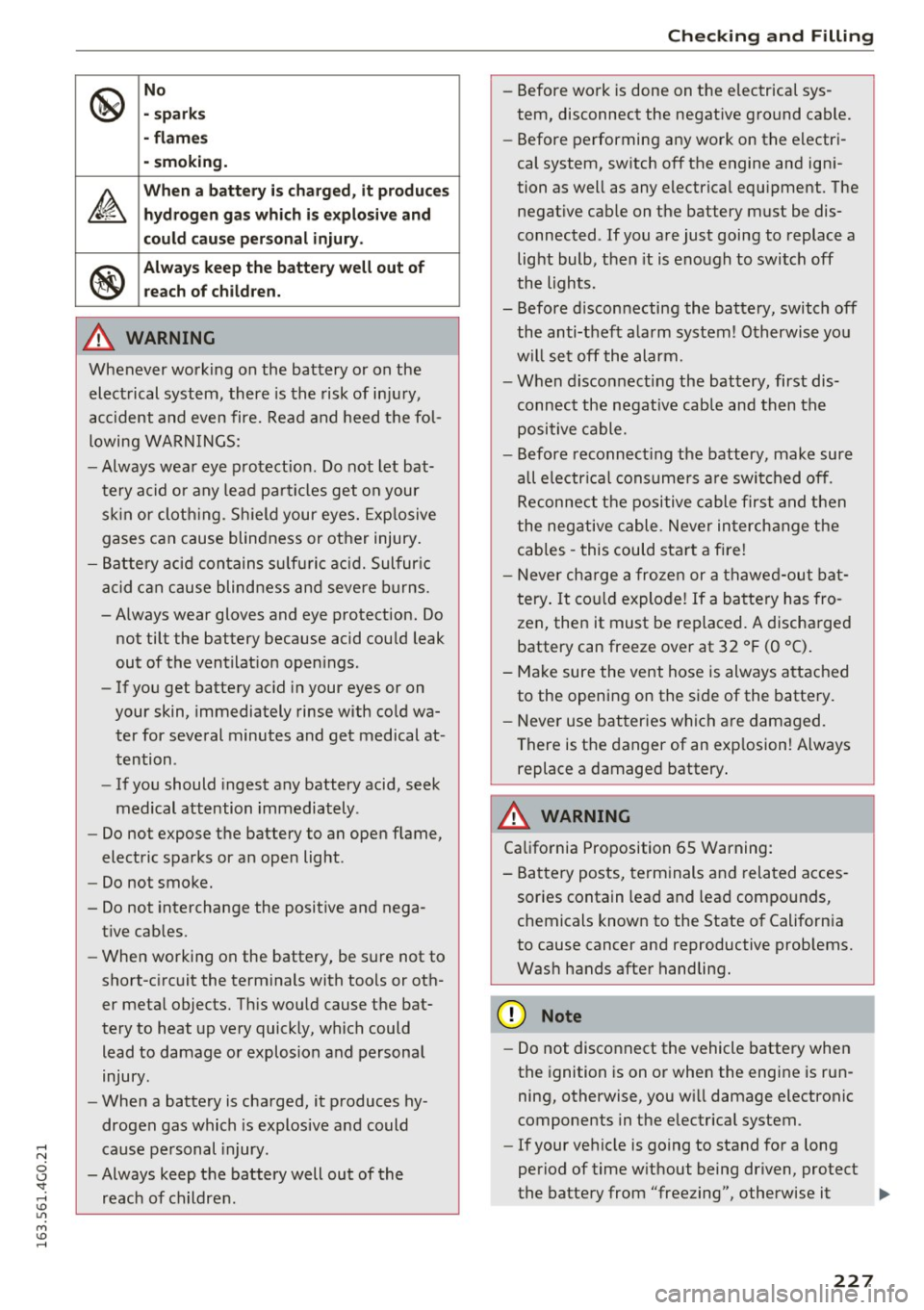
No
• sp ark s
• fl ame s
· sm oki ng .
&
Wh en a battery is charg ed , it produces
h yd rogen ga s which i s ex plosi ve and
c o uld c au se p ers onal injury .
®
Always keep the b atter y well out of
rea ch of child ren.
A WARNING
Whenever working on the battery or on the
electrical system, there is the risk of injury,
accident and even fire. Read and heed the fol
lowing WARN INGS:
- Always wear eye protection. Do not let bat
tery a cid or any lead pa rticles get on your
sk in or cloth ing. Sh ield your eyes. Exp losive
gases can cause blindness or other injury .
- Battery acid contains su lf ur ic ac id. Sulfur ic
acid can cause blindness and severe b urns.
-Always wear gloves and eye protection. Do
not tilt the battery because acid could leak
out of the ventilat ion open ings.
- If you get battery ac id in your eyes or on
your skin, immediately rinse with co ld wa
ter for seve ral minutes and get medical at·
tention .
- If you should ingest any battery acid, seek
medical attention immediately .
- Do not expose the battery to an open flame,
electric sparks or an open light.
- Do not smoke.
- Do not interchange the positive and nega -
tive cab les.
- When working on the battery, be sure not to
short-c ircuit the terminals with tools or oth
er meta l objects. Th is wou ld cause the bat
tery to heat up very quickly, which could
lead to damage or explosion and persona l
injury.
- When a battery is charged, it produces hy
drogen gas which is explosive and could
cause pe rsonal injury.
- Always keep the battery well out of the
reac h of ch ildren .
-
Check ing and Filling
-Before work is done on the electrical sys
tem, disconnect the negat ive ground cable.
- Before performing any work on the electri
cal system, switch off the engine and igni
tion as well as any electrical equ ipment. The
negat ive cable on the battery must be dis
connected . If you are just going to replace a
light bulb, then it is enough to switch off
the lights.
- Before d isconnecting the battery, switch off
the anti-theft a larm system! Otherwise you
will set off the alarm.
- When disconnecting the battery, first dis
connect the negat ive cable and then the
positive cable.
- Before reconnect ing the battery, make sure
all electrical consumers a re switched off.
Reconnect the positive cable first and then
the negative cable. Never in terchange the
cables -this could start a fire !
- Never cha rge a froze n or a thawed-out bat
t ery . It co uld explode! If a battery has fro
zen, then it must be replaced. A discharged
battery can freeze over at 32 °F (0 °C).
- Make sure the vent hose is always attached to the opening on the side of the battery.
- Never use batteries which are damaged.
There is the danger of an exp losion! Always
replace a damaged battery .
A WARNING ,_____
California Proposition 65 Warning:
- Ba ttery posts, term inals and related acces
sories contain lead and lead compounds,
chemicals known to the State of California
to cause cancer and reproductive prob lems.
Was h hands after handling.
(D Note
- Do not disconnect the vehicle battery when
the ignition is on or when the engine is run ning, otherwise, you w ill damage electronic
components in the electrical system.
- If your ve hicle is go ing to stand for a long
period of time w ithout being driven, protect
the battery from "freezing", otherwise it .,..
227
Page 231 of 294
(D Note
Never use a fast charger as a booster to start
the engine . This will serious ly damage sensi
tive electronic components, such as control units, relays, radio, etc., as well as the battery
charger.
Battery replacement
The new battery must have the same specifica
tions and dimensions as the original equipment
battery .
Intelligent energy management in your vehicle is
responsible for distributing the electrical energy
throughout your vehicle
¢ page 192 . The intelli
gent energy management system w ill keep the
engine battery charged better than vehicles with
out this system . To make sure the addit ional
e lectrica l energy is available once again after you
have changed the battery, we recommend that
you install batteries of the same type and manu
facture only (the same as those installed at the
time your veh icle was delivered). Specifications
are listed on the battery housing. Your author
ized dealer must code the battery in the energy
management system to enable you to use the en
ergy management functions correctly after re
p lacing the battery .
The new battery must have the same capacity,
voltage (12-volts), amperage, construction and
plug sealing .
When installing the battery, make sure the igni
tion and all electrical consumers are sw itched
off.
(D Note
Make sure the ventilation hose on the side of
the battery is connected, otherw ise fumes or
battery acid can leak out.
- Vehicles with the Start-Stop-System* are
equipped with a special cycle-proof AGM
battery . Install ing a different type of bat
tery can cause prob lems in the vehicle elec
trical system. When replacing the vehicle
battery, always install one with the same
specifications as the original battery.
Checking and Filling
{® For the sake of the environment
Because of the problem of proper disposal of
a battery, we recommend your authorized
Audi dealer change the battery for you. Bat
teries contain sulfur ic acid and lead and must
always be disposed of properly in compliance
with all environmental regulations. Disposing
of veh icle batteries improperly is very danger
ous to the environment .
Windshield/head Light
washer container
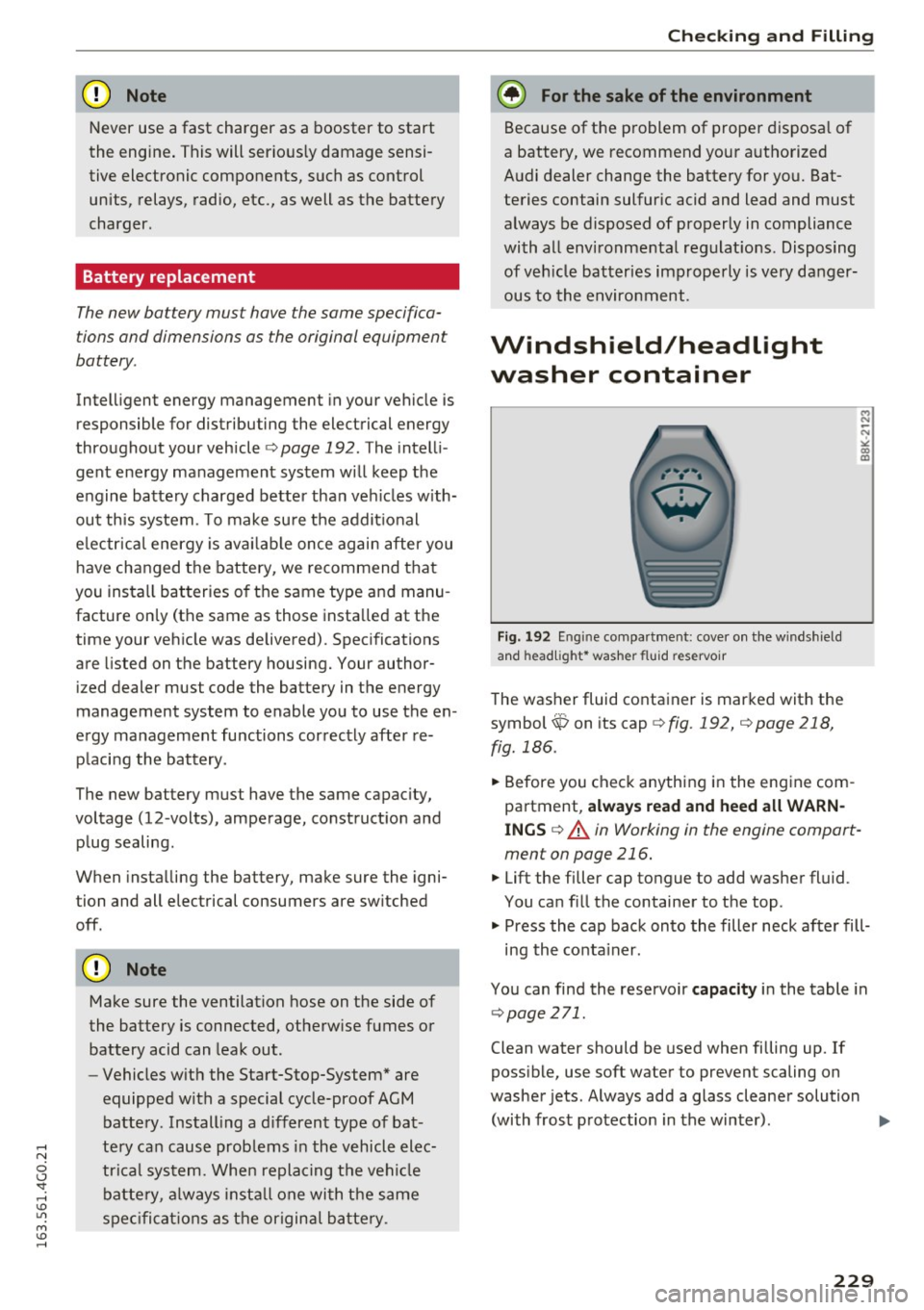
Fig. 192 Eng in e compar tment: cover on the windshie ld
and head light * washer fluid reservoir
The washer fluid container is marked with the
symbol~ on its cap
¢fig. 192, c:;,page 218,
fig. 186 .
.. Before you check anything in the engine com
partment,
always read and heed all WARN
INGS c::;, A in Working in the engine compart
ment on page 216.
.. Lift the filler cap tongue to add washer fluid .
You can fill the container to the top .
.. Press the cap back onto the filler neck after fill-
ing the container .
You can find the reservoir
capacity in the table in
¢page 271.
Clean water should be used when filling up. If
possible, use soft water to prevent scaling on
washer jets. Always add a glass cleaner solution
(with frost protection in the winter) . ..,.
229
Page 233 of 294
Wheels
Wheels and Tires
General information
.,.Check your tires regularly for
damage (punctures, cuts, cracks
and bulges). Remove foreign ob
jects from the tire tread.
.,. If driving over curbs or similar
obstacles, drive slowly and ap
proach the curb at an angle.
.,.Have faulty tires or rims re
placed immediately.
"'Protect your tires from oil,
grease and fuel.
.,.M ark tires before removing
them so that the same running
direction can be maintained if
they are reinstalled.
"'Lay tires flat when storing and
store them in a cool, dry location
with as little exposure to light as
possible.
(D Note
-Please note that summer and
winter tires are designed for
the conditions that are typical in those seasons. Audi recom
mends using winter tires dur
ing the winter months. Low
temperatures significantly de crease the elasticity of summ
er tires, which affects traction
Wheels
and braking ability. If summer
tires are used in very cold
temperatures, cracks can form
on the tread bars, resulting in
permanent tire damage that
can cause loud driving noise
and unbalanced tires.
-Burnished, polished or
chromed rims must not be
used in winter driving condi
tions. The surface of the rims
does not have sufficient corro
sion protection for this and
could be permanently dam aged by road salt or similar
substances.
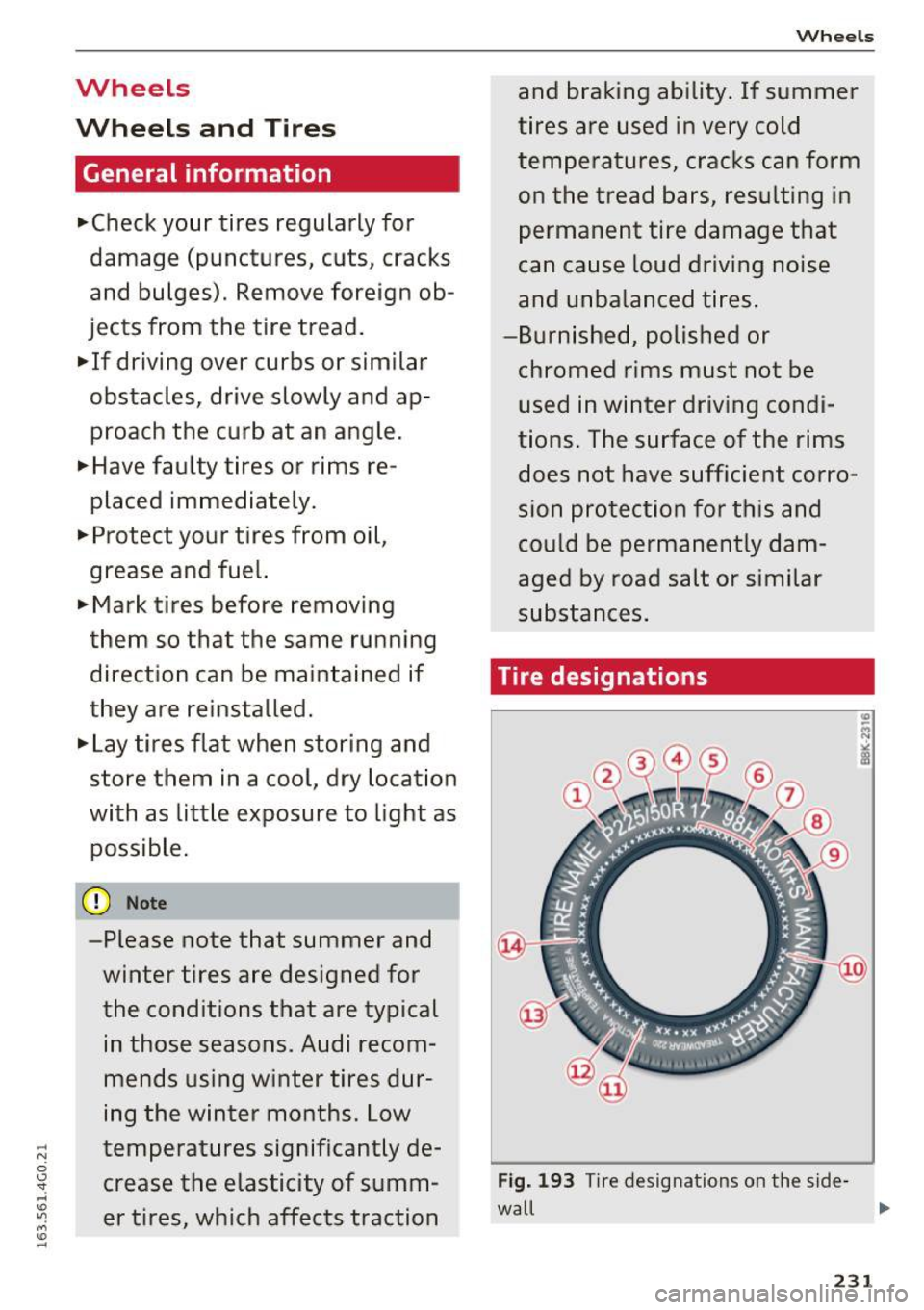
Tire designations
Fig. 193 T ir e designations on the side -
wall ,..
231
Page 251 of 294
.... N
0 CJ '
_& WARNING
Temperature grades apply to tires that are properly inflated and not over or underinflat
ed .
Tire pressure monitoring
system
CD General notes
Each t ire, including the spare (if provided),
should be checked monthly when cold and inflat
ed to the inflation pressure recommended by the
veh icle manufac turer on the vehicle placard or
tire inflation pressure label. (If your vehicle has
tires of a different size than the size indicated on
the vehicle placard or tire inf lation pressure la
be l, you should determine the proper tire infla
tion pressure for those tires).
As an added safety feature, your veh icle has been
equipped with a tire pressure monitoring system
(TPMS) that illuminates a low tire press ure te ll
tale when one or more of your tires is significant l y under-inflated. Accordingly, when the low tire
pressure tellta le illuminates, you should stop and
check your tires as soon as possible, and inflate
them to the proper pressure. Driving on a s ignifi
cantly under-inflated tire causes the tire to over
heat and can lead to t ire failure. Unde r-inflation
also reduces fuel efficiency and tire tread life,
and may affect the vehicle's handling and stop
ping ability .
Please note that the TPMS is not a substitute for
proper tire maintenance, and i t is the driver's re
sponsib ility to ma inta in correct tire pressure,
even if under -inflation has not reached the level
to trigger illum inat ion of the TPMS low tire pres
sure telltale.
Your veh icle has also bee n eq uipp ed w ith a TPMS
mal function indicator to indicate when the sys
tem is not operating properly. The TPMS mal
function indicator is combined w ith the low tire
pressure tellta le. When the system detects a
malfunction, the telltale will flash for approxi
mately one minute and then remain cont inuously
illuminated . This sequence will continue upon
Wheels
subsequent vehicle start-ups as long as the mal
function exists .
When the malfunction indicator is illuminated ,
the system may not be able to detect or signal
low tire pressure as intended. TPMS malfunctions
may occur for a variety of reasons, including the
i nsta llation of replacement or alternate tires or
whee ls on the vehicle that prevent the TPMS
from functioning properly. Always check the
TPMS ma lfunction telltale after replac ing one or
more tires or wheels on your vehicle to ensure
that the replacement or a lternate tires and
whee ls allow the TPMS to continue to function
properly.
If the Tire Pressure Monitoring System
indicator appears
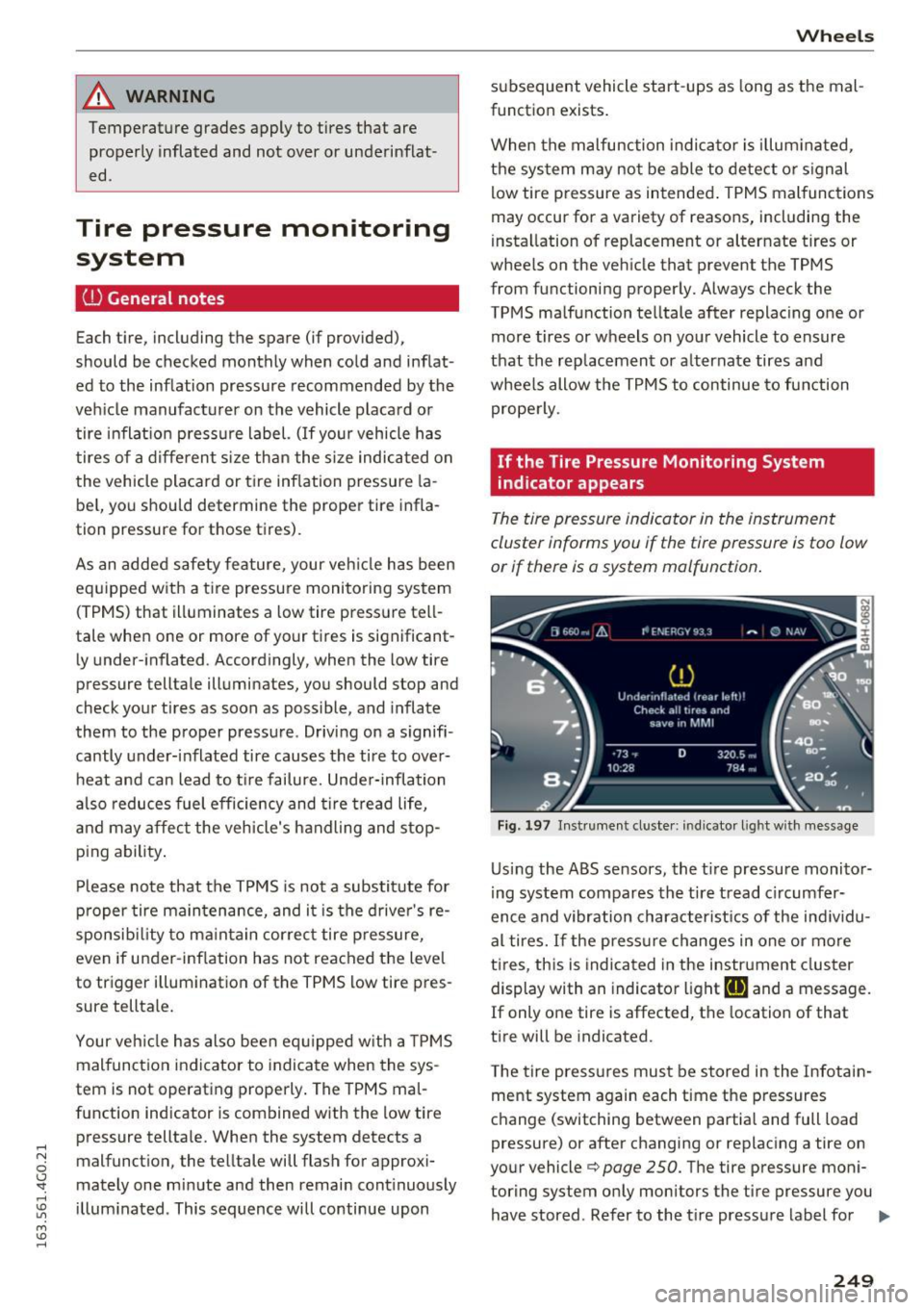
The tire pressure indicator in the instrument
cluster informs you if the tire pressure is too low
or if there is a system mo/function .
Fig. 197 Instrume nt cluste r: indicator light with message
Us ing the ABS sensors, the tir e pressure monitor
ing system compares the tire tread circumfer
ence and vibration characteristics of the individu
al tires. If the press ure changes in one or more
tires , this is indicated in the instrument cluster
display with an indicator light
ti] and a message.
If only one tire is affected, the location of that
tire will be indicated.
T he tire press ures must be stored in the Infotain
ment system again each time the pressures
change (switching between partial and full load
pressure) or after changing or replacing a tire on
your vehicle¢
page 250. The tire pressure moni
toring system only monitors the tire pressure you have stored. Refer to the tire pressure label for ..,.
249
Page 252 of 294
Wheels
the recommended tire pressure for your vehicle
¢ page 241, fig. 196.
Tire tread circumference and vibration character
istics can change and cause a tire pressure warn
ing if:
- the tire pressure in one or more tires is too low.
- the tire has structural damage .
- the tire was replaced or the tire pressure was
changed and it was not stored¢
page 250.
-the spare tire* is installed.
Indicator lights
IE Loss of pressure in at least one tire¢&. .
Check the tires and replace or repair if necessary.
Check/correct the pressures of all four tires and
store the pressure again in the Infotainment sys
tem ¢
page 250 .
mm (Tire Pressure Monitoring System) Tire
pressure: System malfunction!.
Ifmm appears
after switching the ignition on or while driving
and the
IE indicator light in the instrument clus
ter blinks for approximately one minute and then
stays on , there is system malfunction . Try to
store the correct tire pressures¢
page 250. If
the indicator light does turn off or turns on again
after a short period of time, drive to your author
ized Audi dealer or qualified repair facility imme
diate ly to have the malfunction corrected.
A WARNING
- If the ti re pressure indicator appears in the
display, reduce your speed immediately and
avoid any hard steering or braking maneu
vers. Stop as soon as possible and check the
t ir es and their pressure .
- The driver is responsible for maintaining the
correct tire pressure. You must check the
t ir e pressure regularly.
- Under certain conditions (such as a sporty
dr iv ing style, winter cond itions or unpaved
roads), the tire pressure mon itoring system
indicator may be delayed.
- Do not use run-flat tires on your vehicle. Us
ing them when not permitted can lead to
vehicle damage or accidents.
250
(D Tips
-The tire pressure monitoring system can al
so stop working when there is an ESC mal
function.
- Using snow chains may result in a system
malfunction.
- The tires with the identification "AO" or
"RO" ¢
page 2 38 have been matched with
your Audi tire pressure monitoring system.
We recommend that you use these tires.
Storing tire pressures
If the tire pressure changes or a tire is replaced,
it mus t be confirmed in the Infotainmen t sys
tem.
... Make sure before storing that the tire pressures
of all four tires meet the specified values and
are adapted to the load ¢
page 241.
... Switch the ignition on .
... Select: the
I CARI function button > (Car)* Sys
tems
contro l button > Servicing & checks >
Tire pressure monitoring > Store tire pressures
> Yes, store now.
(D Tips
Do not sto re the tire pressures if snow chains
a re installed.
Page 256 of 294
Emergency assistance
2. Remove the decorative wheel cover*. For
mo re deta ils see also
c::> page 254, Decora
tiv e wheel cov ers
or c::> page 2 54, Wheels
with wheel bolt caps.
3. Loosen the wheel bolts c::> page 255 .
4. Locate the proper mounting point for the
jack and align the jack below tha t poi nt
~ pag e 255 .
5. Raise the car w ith the ja ck¢ page 255 .
6. Remove t he wheel with the flat tire an d t hen
install
the spare ¢ page 257.
7. Tighten all wheel bo lts light ly .
8. Lower the veh icle with the jack .
9. Use the whee l bolt wrench and firmly tighten
a ll whee l bolts ¢
page 255 .
10. Replace the decorative wheel cover* .
11. Deactivate the vehicle jack mode * in the
M MI: !CARI function button> ( Car )* systems
control b utton > Servicing & checks > Air
susp.: jack mode > Off .
The vehicle jack mode * switches off automatical
ly a t sp eed s above
6 mph (10 km/h) .
_&. WARNING
Always read and fo llow all WARNIN GS and in
f o rm atio n ¢
A in Raisi ng the vehicle on
p age 256
an d ¢page 258.
After changing a wheel
A wheel change is not complete without th e do
ing the following.
• Always store the veh icle tool kit, the jack* and
the replaced t ire in the luggage compartment
¢ page 131.
• Che ck the tire pressure on the sp are whee l im
med iate ly after mo unt ing it.
• As soon as possible, have t he
tightening tor
ques
on all whee l bo lts checked with a torque
wrench . The correct tightening torque is
90 ft
lb
(120 N m).
• Have the flat tire
replaced as soon as possible.
(D Tips
- If you notice t hat the w hee l bolts are cor
r oded and diffic ult to t urn w hile cha nging a
254
tir e, they s hou ld be re pla ce d b efo re yo u
check the t ightening torque .
- Drive at red uce d spee d unt il yo u ha ve the
t ightenin g torques checked .
- Aft er ch angin g a whee l, the tire pres sure i n
all fou r tires must be che cke d/cor rec ted and
t h e tire pressure mo nito ring ind icator must
be stored in the
MM I ¢ page 25 0.
, Decorative wheel covers
Applies to vehicles: with decorative w heel covers
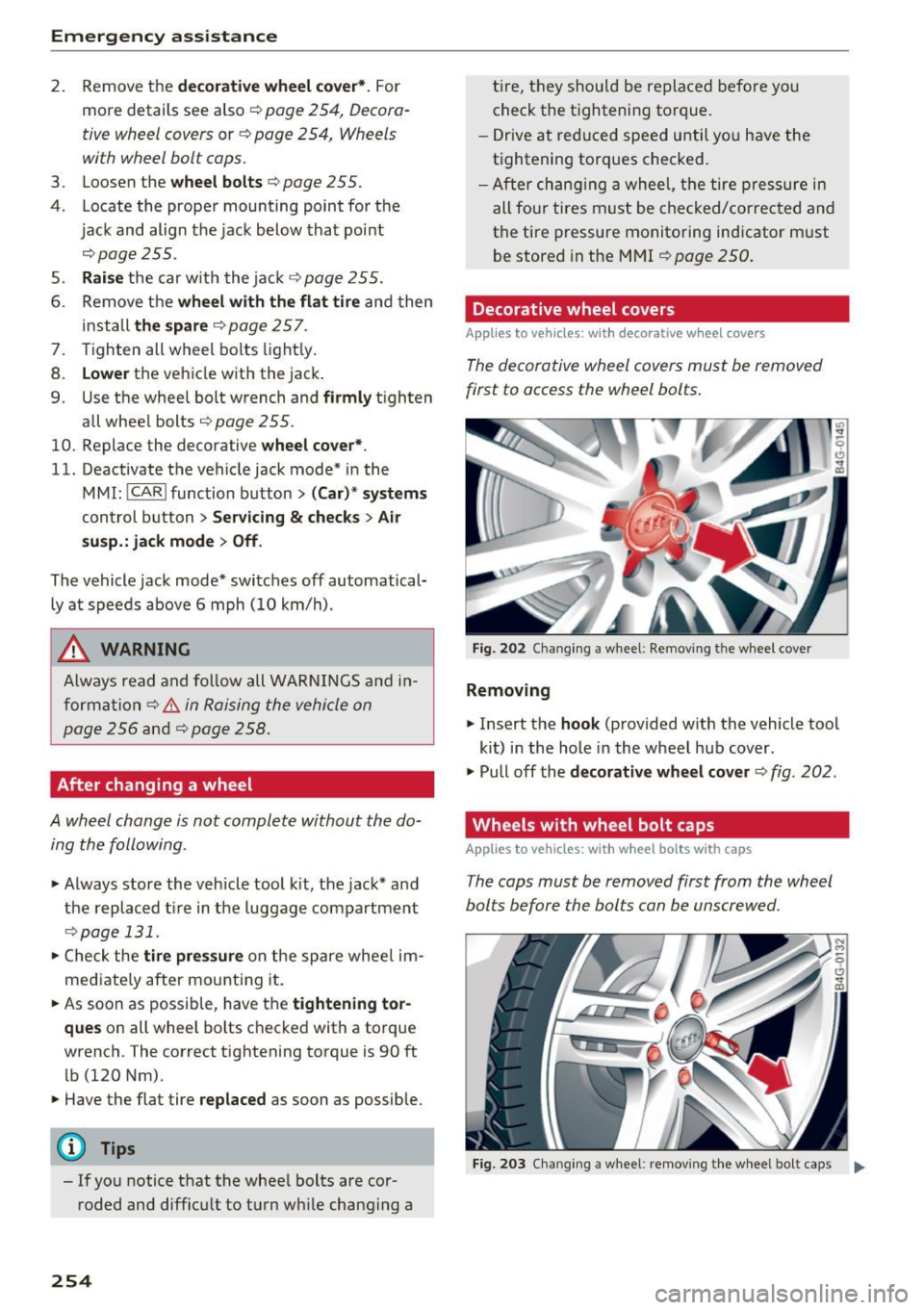
The decorative wheel co vers must be removed
first to access the wheel bolts .
Fig. 202 Cha ng ing a w heel : Re mov ing t he w heel cover
Removing
• Insert the hook (p rovided w ith the vehicle tool
kit) i n the hole in the wheel hub cover.
• Pull off th e
decorative wheel cover ¢ fig. 202 .
Wheels with wheel bolt caps
Applies to vehicles: wit h wheel bolts with caps
The caps must be removed first from the wheel
bolts before the bolts can b e unscrewed .
Fig. 203 Cha ngi ng a w hee l: re m ovin g the w heel bo lt ca ps ..,
Page 259 of 294
.... N
0 CJ '
cover must be flush with the surface of the sill
extension.
(D T ips
Some mode ls may also have a cover for the
rear vehicle lift point .
Taking the wheel off/installing the spare
Follow these instructions step-by-step for chang
ing the wheel.
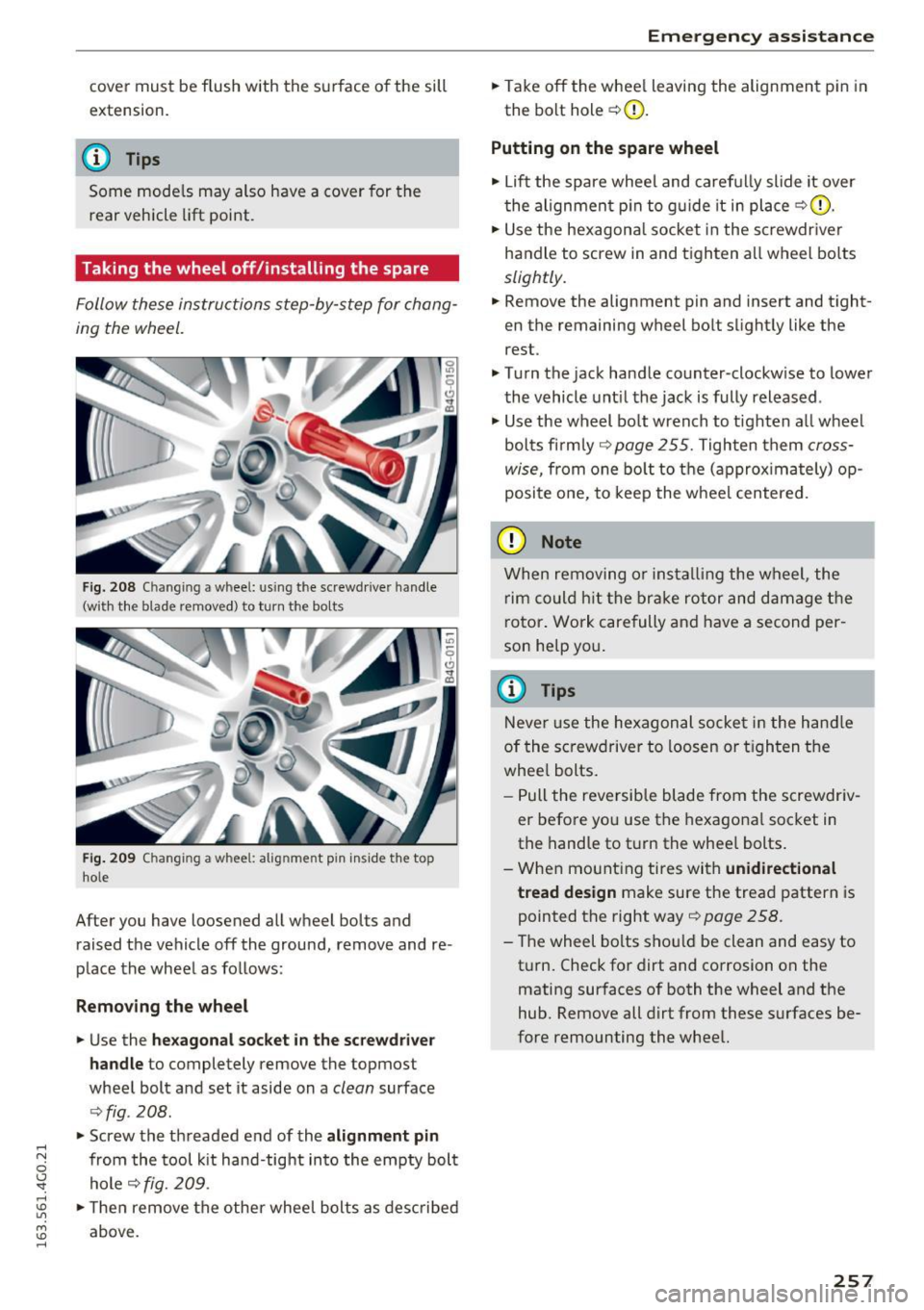
Fig. 208 C hangin g a whee l: u sin g t he screwdrive r ha ndle
(wi th the b lade removed) to turn t he bo lts
F ig. 20 9 Ch an gin g a wheel: alignmen t pin insid e th e top
ho le
After you have loosened all wheel bol ts and
raised the vehicle off the ground, remove and re
place the whee l as fo llows:
Remo ving the wheel
• Use the he xagon al socket in the sc rewd river
ha ndle
to completely remove the topmost
wheel bolt and set it aside on a
clean surface
Q fig . 208.
• Screw the threaded end of the alignmen t pin
from the tool kit hand-tight into the empty bolt
hole
Q fig. 209 .
• Then remove the other whee l bolts as described
above .
Emergen cy a ssis tanc e
•Takeoff the whee l leaving the alignment pin in
the bolt hol e
Q0.
Putting on th e spare whe el
• Lift the spare whee l and carefu lly slide it over
t he alignment p in to g uide it in place
Q 0.
• Use the hexagonal socket in the screwdr iver
handle to screw in and tighten all wheel bolts
slightly .
.. Remove the alignment pin and insert and tight
en the remaining wheel bol t slight ly like the
rest.
• Turn the jack handle counter -clockw ise to lower
the vehicle unt il the jack is fully released .
• Use the wheel bo lt wrench to t ighten a ll wheel
bolts firmly
9 page 255. Tighten them cross
wise,
from one bo lt to the ( approx imately) op
posite one, to keep the wheel centered.
(D Note
When removing o r installing the wheel, the
rim co uld h it the brake rotor and damage t he
rotor . Work carefully and have a second per
son help you .
@ Tips
Never use the he xagonal socke t in the hand le
of the sc rewdriver to loosen or t ighten the
whee l bolts.
- Pull the reversible blade from the screwdr iv
er before you use the hexagona l socket in
the handle to t urn the whee l bolts .
- When mount ing tires with
unidirectional
tread design
make sure the tread pattern is
pointed the right way
Q page 258.
- T he wheel bolts shou ld be clean and easy to
turn. Check for dirt and corrosion on the mating surfaces of both the wheel and the
hub. Remove all dirt from these surfaces be
fore remounting the wheel.
257
Page 262 of 294
Fuses
Driver side cockpit fuse
assignment
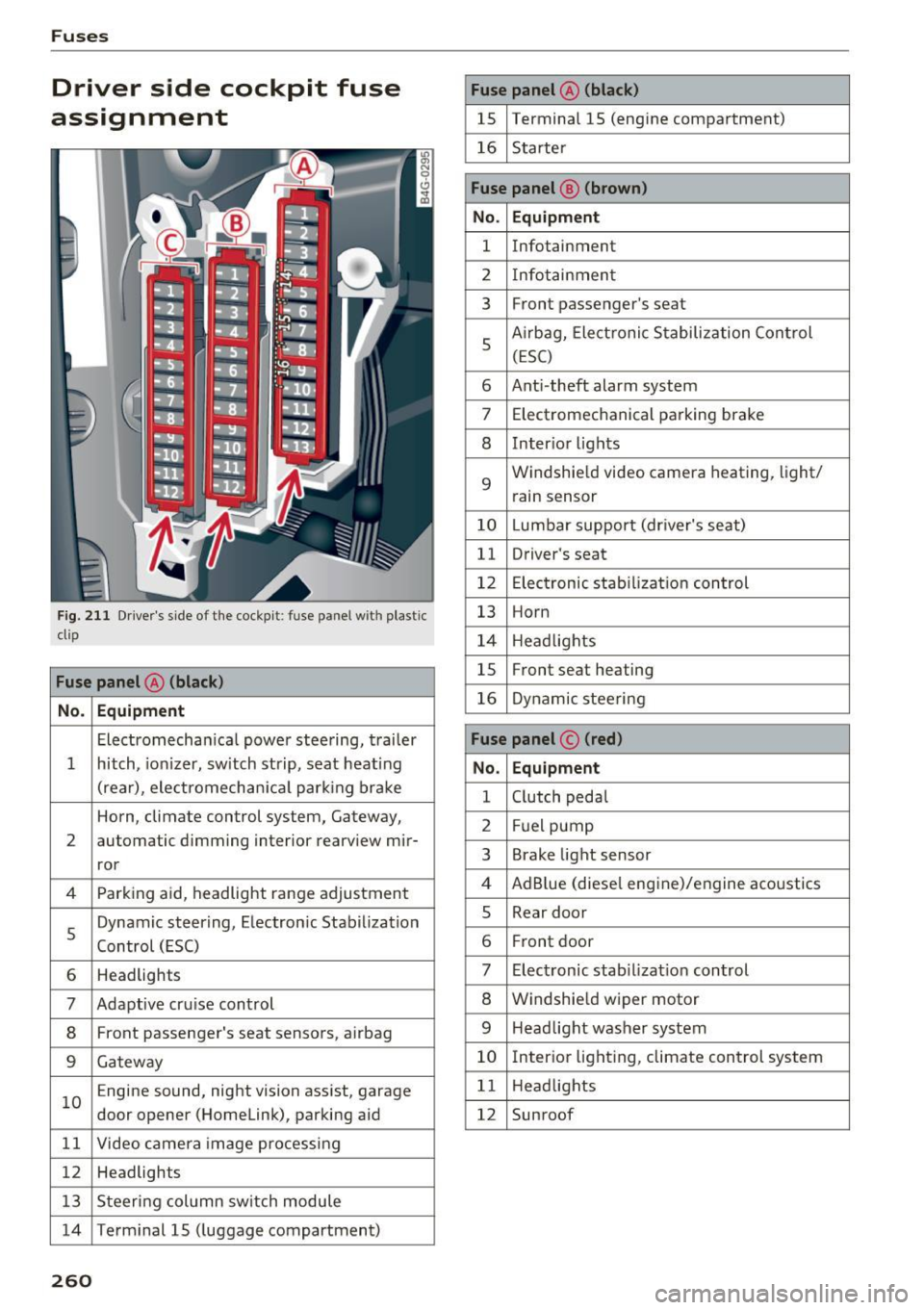
F ig. 211 Driver 's side of t he cockpit : fuse pa nel w it h plastic
clip
Fuse panel @ (black )
No . Equipment
Electromecha nica l powe r stee ring, trai ler
1 hitch, io nizer, sw itch st rip, sea t heat ing
(rear), ele ctromech an ical parking br ake
Horn, climate control system, Gateway,
2 automatic dimming interior rearv
iew mir-
ror
4 Parking aid, headlight range adjustment
5 Dynamic steering, Electron
ic Stabilization
Control (ESC)
6 Headlights
7 Adaptive cru ise control
8 Front passenger's seat senso rs, airbag
9 Gateway
1 0 E
ngine sound, night vision ass ist, garage
door opener (Homelink), parking aid
1 1 Video camera im age pro cessing
12 Headlights
1 3 Steeri ng col umn sw itch module
14 Term inal 15 ( luggage compartment)
260
Fuse panel @ (black)
15 Terminal 15 (engine compartment)
16 Starte r
Fuse panel @ (brown )
No. Equipment
1 Infotainment
2 Infotainmen t
3 F
ront passenger's seat
5 A
irbag, Elect ronic S tabiliza tion Con trol
( E SC)
6 Ant i- theft alarm system
7 Electromechanical pa rking brake
8 Inter io r li ghts
9
Windshie ld video camera heating, light/
rain sensor
10 Lumbar support (dr iver's seat)
11 Driver's seat
12 Elec tronic stab ilizati on con trol
13 Horn
1 4 H eadlights
15 Front seat heating
16 Dynamic stee ring
Fuse panel © (red)
No . Equipment
1 C lutch peda l
2 Fuel pump
3 Brake light sensor
4 AdB
lue (diese l eng ine)/engine aco ustics
5 Rear door
6 Fr
ont door
7 Electronic stab ili z at ion con trol
8 Windshie ld wiper motor
9 Headlight washer system
10 Inter
ior lig hting, climate control system
1 1 Headlights
12 Sunroof
Page 263 of 294
..... N
0 CJ '
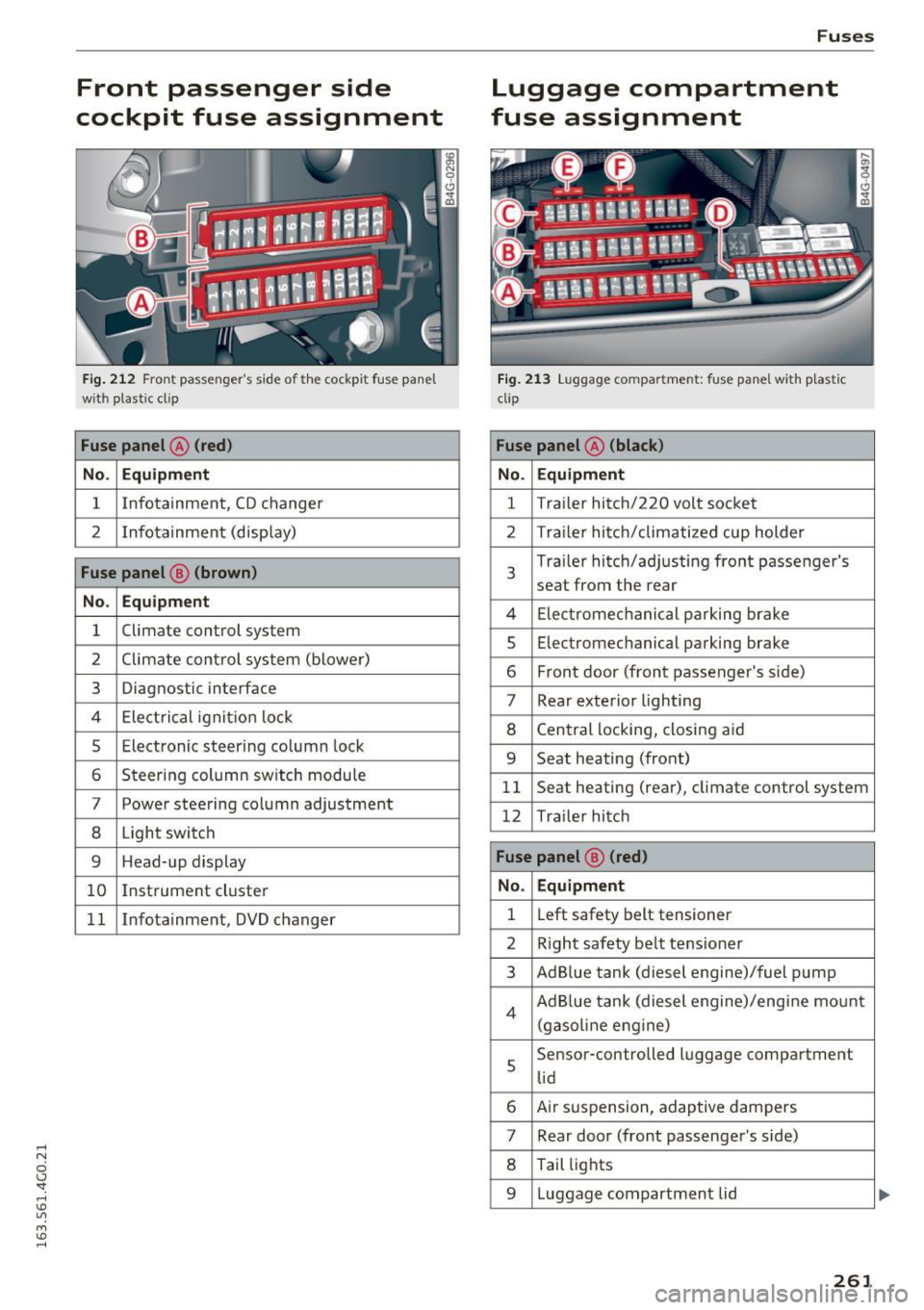
Front passenger side
cockpit fuse assignment
Fig. 212 Front passenger's sid e of t he cockpit fuse pane l
with plastic cl ip
Fuse panel @ (red)
No. Equipment
1 Infotainment, CD changer
2 Infotainment
(display)
Fuse panel@ (brown)
No . Equipment
1 Climate
control system
2 Climate control
system (blower)
3 Diagnostic interface
4 Electrical ignition lock
5 Electronic steering column lock
6 Steering column sw itch module
7 Power steering column adjustment
8 Light switch
9 Head-up display
10 I
nst rument cluster
1 1 Infotainment, DVD changer
Fuses
Luggage compartment
fuse assignment
Fig. 213 Luggage compartment: fuse panel with plastic
clip
Fuse panel @ (black )
No. Equipment
1 Tra
iler hitch/220 volt socket
2 Tra ile r hitch/climatized cup holder
3
Tra iler hitch/adjusting front passenger's
seat from the rear
4 Elec trom echan ica l parking brake
5 Electromec hanical parking brake
6 Front door (front passenger's side)
7 Rear exterior lighting
8 Central locking, closing aid
9 Seat heating (front)
1 1 Seat heating
(rear), climate control system
12 Tra iler hitch
Fuse panel @ (red)
No . Equipment
1 Left
safety belt tensioner
2 R ight safety belt tensioner
3 Ad Blue tank (diesel engine)/fuel pump
4 Ad Blue tank (diesel engine)/engine mount
(gasoline eng ine)
s
Sensor-controlled luggage compartment
lid
6 Air suspension, adaptive dampers
7 Rear door (front passenger's side)
8 Tail lights
9 Luggage compartmen t lid
261
Page 265 of 294
Bulbs
Replacing light bulbs
For your safety, we recommend that you have
your authorized Audi dealer replace burned out
bulbs for you.
It is becoming increasingly more and more diffi
cult to replace vehicle light bulbs since in many
cases, other parts of the car must first be re
moved before you are able to get to the bulb.
This applies especially to the light bulbs in the
front of your car wh ich you can only reach
through the eng ine compartment.
Sheet metal and bulb holders can have sharp
edges that can cause serious cuts, and parts must be correctly taken apart and then properly
put back together to help prevent breakage of
parts and long term damage from water that can
ente r hous ings that have not been properly re
sea led .
F or your safety, we recommend that you have
your author ized Audi dealer replace any bu lbs for
you, s ince your dealer has the p roper tools, the
correct bulbs and the expertise.
Gas di schar ge l amp s (X enon li ghts):
Due to the high electrical voltage, have the bulbs
replaced by a qual ified technician . Headlights
w ith Xenon light can be identified by the high
voltage sticker.
LED headlights* require no maintenance. Please
contact your authorized Audi dealer if a bulb needs to be replaced.
A WARNING
Contact w ith high-voltage components of the
elect rical system a nd improper rep lacement
of gas d ischarge (Xenon) headlight b ulbs can
cause serious personal injury and death .
- Xenon bulbs are press urized and can ex
plode when be ing changed.
- Chang ing Xenon lamps requires the spec ial
t rain ing, instructions and equipment.
- Only an autho rized Aud i dea le r o r other
qualified wo rkshop s hou ld change the bulbs
in gas disc harge lamps .
Bulbs
A WARNING
There are parts with sharp edges on the open
i ngs and on the bulb holders that can cause
serious cuts.
- If you are uncertain about what to do, have
the work performed by an authorized Audi dealer or other qualified workshop. Ser ious
pe rsonal injury may result from improperly
pe rformed work.
0) Tips
- If you st ill prefer to replace the light bulbs
yourself, be aware that the engine compart ment is a hazardous area to work in
~page 216~ .&
-It is best to ask your authorized Audi dealer
w henever you need to change a bu lb.
263