change wheel AUDI A6 2016 User Guide
[x] Cancel search | Manufacturer: AUDI, Model Year: 2016, Model line: A6, Model: AUDI A6 2016Pages: 294, PDF Size: 73.88 MB
Page 120 of 294
Parking system s
CD Note
Keep enough distance from the curb to avoid
damage to the rims .
@ Tips
The left or right orientation lines and surfaces
wi ll be displayed, depending on the turn sig
nal being used .
Peripheral cameras
Introduction
Applies to vehicles: with peripheral cameras
With this equipment, die parking system plus* is
supp lemented with var io us peripheral cameras
qpage 114. Depending on vehicle equipment,
you are provided with the following views: Around the vehicle, front corner and rear corner,
in front of the vehicle and behind the vehicle.
General information
Applies to veh icles: with peripheral cameras
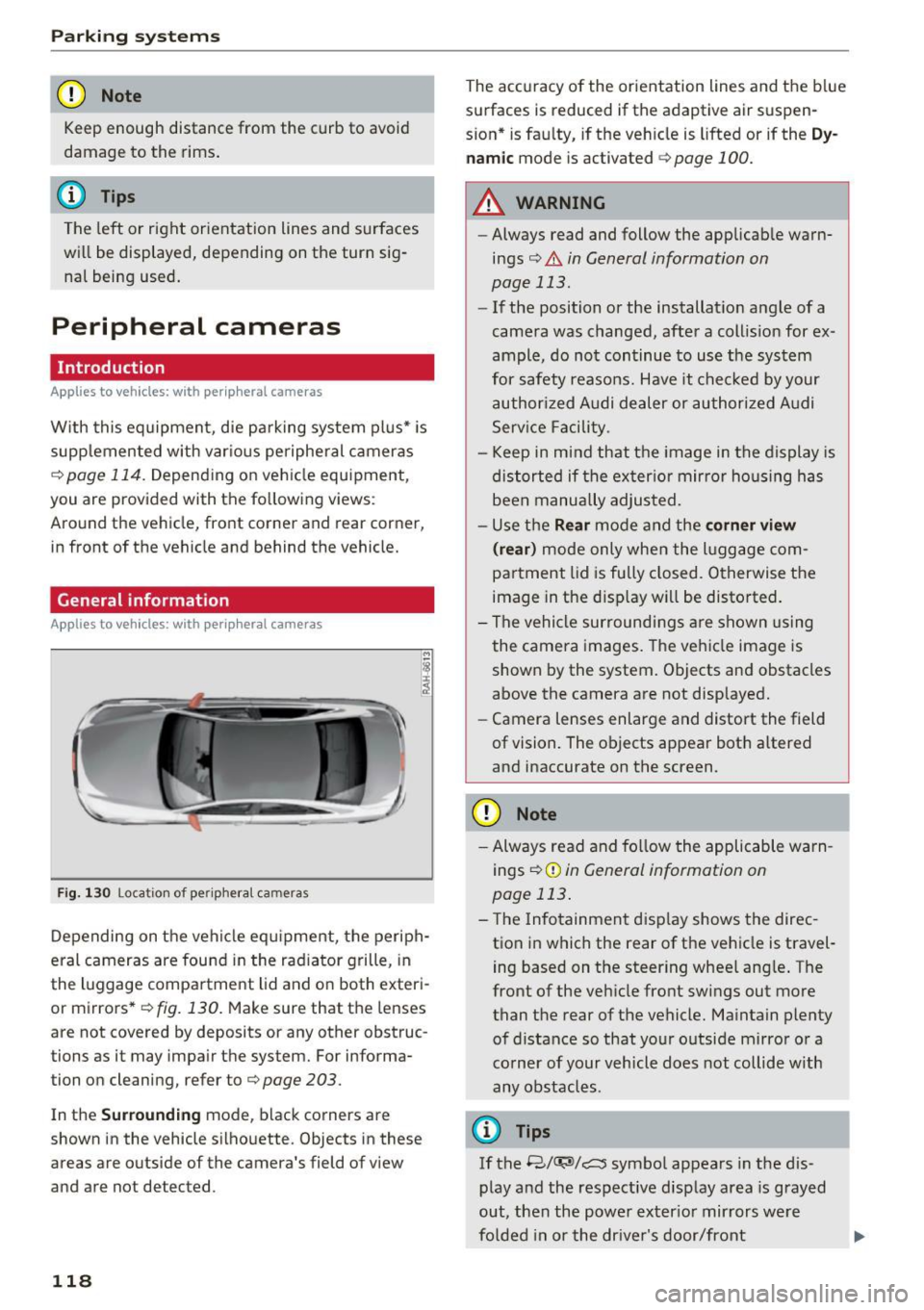
F ig . 1 30 Location of periphe ral cameras
Depending on the vehicle eq uipment, the periph
eral cameras are fou nd in the radiator grille, in
the luggage compa rtment lid and on both exteri
or mirrors *
q fig. 130. Make sure that the lenses
are not covered by deposits or any other obstruc
tions as it may impair the system. For informa
tion on cleaning, refer to¢
page 203.
In the Surrounding mode, black corners are
shown in the vehicle silhouette. Objects in these
areas are outside of the camera's field of v iew
and are not detected.
118
The accuracy of the orientation lines and the b lue
surfaces is reduced if the adaptive air suspen
s ion* is fau lty, if the veh icle is lifted or if the
D y
nam ic mode is activated qpage 100.
A WARNING
-Always read and follow the applicab le warn
ings¢ .&
in General information on
page 113.
- If the position or the installat ion angle of a
camera was changed, after a collis ion for ex
ample, do not continue to use the system
for safety reasons. Have it chec ked by your
authorized Audi dealer or authori zed A udi
Serv ice Facility.
- Keep in mind that the image in the display is
distorted if the exter ior mir ror ho using has
been manually adjusted.
- Use the
Rear mode and the corner view
( rear )
mode only when the l uggage com
partment lid is fu lly closed. Otherwise the
image in the disp lay will be disto rted.
- The vehicle surroundi ngs a re shown using
the camera images. The veh icle image is
shown by the system. Objects and obstacles
above the camera are not displayed.
- Camera lenses enlarge and distort the field
of vision. The objects appear both a ltered
and inaccurate on the screen.
CD Note
- Always read and fo llow the applicable warn
ings
¢ (Din General information on
page 113 .
-The Infotainment d isp lay shows the direc
tion in which the rear of the vehicle is travel
ing based on the steering wheel ang le . The
front of the vehicle front sw ings out more
than the rear of the vehicle. Maintain plenty of distance so that your o utside mirror or a
corner of your vehicle does not collide with
any obstacles.
(I} Tips
If the 8/(J;(SJ/c:, symbol appears in the dis
play and the respective display area is grayed
out, then the power exter io r mir rors we re
fo lded in or the dr ive r's door/front
Page 155 of 294
A WARNING 1=-
Objects between you and the airbag will in
crease the risk of injury in a crash by interfer
ing w ith the way the airbag unfolds or by be
ing pushed into you as the a irbag inflates .
- Never hold th ings in your hands or on your
lap when the vehicle is in use .
- Never transport items on or in the area of
the front passenger seat . Objects could
move into the area of the front airbags dur
ing brak ing or other sudden maneuvers and
become dangerous projectiles that can
cause serious personal injury if the airbags
inflate.
- Never place or attach accessories or other
objects (such as cup holders, te lephone
brackets, large, heavy or bulky objects) on
the doors, over or near the area marked "AIRBAG" on the steering wheel, instru
ment pane l, seat backrests or between
those areas and yourself . These objects
could cause injury in a crash, especially
when the airbags inflate .
- Never recline the front passenger 's seat to
transport objects . Items can also move into
the area of the side airbag or the front a ir
bag dur ing bra king or in a sudden maneu
ver. Objects near the airbags can become
projectiles and cause injury, particular ly
when the seat is reclined.
-
- Never place or transport objects on the
front passenger seat . Objects on the front
passenger seat could cause the capacitive
sensor in the seat to signal to airbag system
that the seat is occup ied by a person when it
in fact is not, or that the person on the seat
is heavier than he or she actually is . The
change in electric capac itance because of
such objects can cause the passenger front
airbag to be turned on when it shou ld be
off, or can cause the airbag to work in a way
that is different from the way it would have
worked without objects on the seat.
- Always ma ke sure that there is nothing on
the front passenger seat that wi ll cause the
capacit ive passenger detection system in
the seat to signa l to the Airbag System that
Airb ag sys tem
the seat is occupied by a person when it is
not, or to signal that it is occupied by some
one who is heavier than the person actually
sitt ing on the seat . The presence of an ob
ject could cause the passenger front airbag to be turned on when it should be off , or
could cause the airbag to work in a way that
is different from the way it would have
worked without the object on the seat.
A WARNING
=
The fine dust created when airbags deploy can
cause breathing prob lems for people with a
history of asthma or other breathing condi
tions .
- To reduce the risk of breathing problems,
those with asthma or other respiratory con
ditions should get fresh air right away by
getting out of the vehicle or open ing win
dows or doors.
- If you are in a collision in wh ich airbags de
ploy, wash your hands and face w ith m ild
soap and water before eating .
- Be carefu l not to get the dust into your eyes,
or into any cuts or scratches.
- If the residue should get into your eyes,
flush them w ith water .
Monitoring the
Advanced Airbag System
t!~ (USA models) /!t (Canada models)
Airbag monitoring indicator light
T wo separate indicators monitor the function of
the Advanced Airbag System : the airbag moni
toring indicator light and the
PASSENGER AIR
BAG OFF
light.
The Advanced Airbag System as well as the side
airbags and side curtain airbags with ejection
mitigation fea tures (including the electronic con
trol unit, sensors and system wiring) are all monitored continuously to make sure that they
are functioning properly whenever the ignition is
on. Every time you turn on the ign ition, the a ir
bag system indicato r light
II (USA models) tfll
(Canada models) wi ll come on for a few seconds
(function check).
153
...
Page 159 of 294
(D Tips
If the capacitive passenger detection system
determines that the front passenger seat is
empty, the frontal airbag on the passenger
side will be turned off, and the
PA SSENGER
A IR BAG OFF
light will stay on.
Repair , care and disposal of the airbags
Parts of the a irbag system are installed at many
d ifferent p laces on your Aud i. Installing, remov
ing, servic ing o r repa iring a part in an area of the
vehicle can damage a part of an airbag system
and p revent that system from working properly
in a co llision.
There are some important things you have to
know to make su re t hat the effectiveness of the
system w ill not be impaired and that discarded
components do not cause injury or pollute the
environment .
A WARNING
Improper care, serv icing and repa ir proce
dures can increase the r isk of personal injury
and death by preventing an airbag from de
ploying when needed or deploying an airbag
unexpectedly:
-
- Never cover, obstruct, or change the steer ing wheel horn pad or a irbag cover or the in
strument panel or mod ify them in any way.
- Never attach any objects such as cup holders or te lephone mountings to the su rfaces cov
er ing the airbag units.
- For cleaning the ho rn pad or instrument
pane l, use on ly a soft, dry cloth or one mois
tened with plain water. Solvents or cleaners cou ld damage the a irbag cover or change
the stiffness or strength of the mater ial so
that the airbag cannot dep loy and protect
properly.
- Never repair, adjust, or change any parts of
the airbag system.
- All work on the steering wheel, instr ument
pane l, front seats or electrical system (in
cluding the installation of audio equipment,
cellu lar telephones and CB rad ios, etc.)
must be performed by a qualified technician
Airb ag sys tem
who has the t raining and spec ial equ ipment
necessary.
- For any wo rk on the airbag system, we
strong ly recommend that you see yo ur au
thorized Audi dealer or qualified workshop.
- Never modify the front b umper or parts of
the vehicle body.
- Always make sure that the side a irbag can
inflate w ithout interference:
- Never ins tall seat covers or replacement
u pholste ry ove r the front seatbacks that
have not been specifica lly approved by
Audi.
- Never use addi tional seat cushions that
cove r the areas where the side airbags in
flate.
- Damage to the orig inal se at cove rs or to
the se am in the area of the s ide airbag
module must a lways be repaired immedi
ate ly by an authorize d Aud i dealer.
- The airb ag system can deploy on ly on ce. Af
ter an airbag has been deployed, it must be
replaced with new replacement parts de
signed and approve d espec ially for your
Aud i model version. Replacement of com
p lete airbag systems or airbag components
m ust be performed by qualified workshops
only . Make sure that any airbag service ac
tion is entered in you r A udi Warranty
&
Maintenance boo klet under AIRBAG R E
PLAC EM ENT R ECORD.
- For safety reasons in severe accidents, the
alternator and starte r are separated from
the vehicle ba tte ry with a pyro te chnic cir cui t
interrupter.
- Work on the pyrotechnic c ircuit interrupt
er must on ly be performed by a qualif ied
technic ians who have the exper ience, in
format ion and specia l tools necessa ry to
perfo rm the wor k safely.
- If the vehicle or the circuit interr upte r is
scrapped, all applicable safety p recautions
must be followed.
157
Page 170 of 294
Child safety
Advanced front airbag system and children
Your vehicle is equipped with a front "Advanced
Airbag System" in compliance with United States Federal Motor Vehicle Safety Standard (FMVSS)
208, as well as Canada Motor Vehicle Safety
Standard (CMVSS) 208 as applicable at the time
your vehicle was manufactured.
The Advanced Airbag system in your vehicle has
been certified to meet the "low-risk" require
ments for 3- and 6-year old children on the pas
senger side and small adults on the driver side.
The low risk deployment criteria are intended to
reduce the risk of injury through interaction with
the airbag that can occur, for example, by being
too close to the steering wheel and instrument panel when the a irbag inflates. In addition, the
system has been certified to comply with the
"suppression " requirements of the Safety Stand
ard, to turn off the front airbag for infants up to
12 months who are restrained on the front pas
senger seat in child restraints that are listed in
the Standard.
Even though your vehicle is equipped with an Ad ·
vanced Airbag system, all children, especially
those 12 years and younger, should always ride in the back seat properly restrained for their age
and size. The airbag on the passenger side makes
the front seat a potentially dangerous place for a
child to ride . The front seat is not the safest place
for a child in a forward-facing child safety seat . It
can be a very dangerous place for an infant or a
larger child in a rearward-facing seat.
The vehicle's Advanced Airbag System has a ca
pacitive passenger detection system in the front
passenger seat cushion that can detect the pres
ence of a baby or a child in a child restraint sys
tem on this seat .
The capacit ive passenger detection system regis
ters the changes that result in an electrical field
when a child, a child restraint, and a baby blanket
are on the front passenger seat. The change in
the measured capacitance due to the presence of
a child, a child restraint, and a baby blanket on
the front passenger seat is related to the child restraint system resting on the seat. The meas
ured capacitance of a child restraint system var-
168
ies depending on the type of system and specific
make and model.
The electrical ca pacita nee of the various types,
makes, and models of child restraints specified
by the U.S .National Highway Traffic Safety Ad
ministration (NHTSA) in the relevant safety
standard are stored in the Advanced Airbag Sys
tem control unit together with the capacitances
typical of infants and a 1-year old child. When a
child restraint is used on the front passenger
seat w ith a typical 1 year-old infant, the Ad
vanced Airbag System compares the capacitance measured by the capacitive passenger detection
system with the data stored in the electronic con
trol unit.
Child restraints and Advanced front airbag
system
Regardless of the child restraint that you use,
make sure that it has been certified to meet Safe
ty Standards and has been certified by its manu
facturer for use with an airbag . Always be sure
that the child restraint is properly installed at
one of the rear seating positions. If in exception
al circumstances you must use it on the front
passenger seat, carefully read all of the informa
tion on child safety and Advanced Airbags and heed all of the applicable WARNINGS. Make cer
tain that the child and child restraint are correct ly recognized by the capacitive passenger detec
tion system in the front passenger seat, that the
front passenger airbag is turned off, and that the airbag status is always correctly signaled by the
PASSENGER AIR BAG OFF light .
Many types and models of child restraints have
been available over the years, new models are in
troduced regularly incorporating new and im
proved designs and older models are taken out of
production. Child restraints are not standardized.
Child restraints of the same type typically have
different weights and sizes and different "foot
prints", the size and shape of the bottom of the
child restraint that sits on the seat, when they
are installed on a vehicle seat. These differences make it virtually impossible to certify compliance
with the requirements for advanced airbags with
each and every child restraint that has ever been .,..
Page 189 of 294
shared, please see your contract with the
wireless telecommunications provider and the
"About Aud i connect" tab in your vehicle's
MMI:
! MENUI button> Aud i connect > About
Audi conn ect.
Electronic Stabilization
Control (ESC)
Description
ESC helps to improve road ho ld ing and vehicle
dynamics to help reduce the probability of skid
d ing and loss of vehicle control. It works only
when the engine is runn ing . E SC detects certain
d ifficult dr iving sit uat ions, including when t he
ve hicl e is begin ning to spin (yaw) out of contro l
and helps you to ge t the veh icle back under con
tro l by se lective ly braking the wheels, and/or re
ducing engine powe r and provid ing steering as
sistance to help hold the vehicle on the dr iver's
intended course. The indicator light
GJ in the in
strument cluster blinks when ESC is taking action
to help you co ntrol the vehicle.
ESC has limitations. It is important to remember
that ESC cannot overcome the laws of physics. It
will not a lways be able to help out under all con
d itions you may come up aga inst. For example,
ESC may not always be able to help you master
situations where there is a sudden change in the
coeff icient of friction of the road surface. When
there is a section of dry road that is sudde nly cov
e red with water, slush o r snow, ESC cannot pe r
form the same way it wo uld on the dry s urface . If
the vehicle hydrop lanes (rides on a cushion of wa
ter i nstead of the road su rface), ESC wi ll not be
ab le to he lp you steer the veh icle because contact
with the pavement has been interrupted and the
ve hicle cannot be braked or steered. Dur ing fast
cornering, pa rticula rly on w inding roads, ESC
cannot always deal as effect ively w it h difficult
d riving si tuations tha n at lowe r speeds.
Always adjust your speed and driving style to road , traffic and weather cond itions . ESC cannot
override the vehicle's physical lim its, increase the
ava ilab le traction, o r keep a ve hicle on the road if
road departure is a resu lt of driver in attention .
I nstead, ESC imp roves the possibi lity of keep ing
Intellig ent Technology
the vehicle under contro l and on the road d uring
extreme mane uvers by using the driver's steering
i nputs to help keep the vehicle go ing in the in
tended direction. If you are traveling at a speed
that causes you to run off the road before ESC
can provide any assistance, you may not exper i
ence the benefits of ESC.
ESC is switched on all the time. In certain s itua
tions when you need less tract ion, you can sw itch
off ASR by press ing the button
lm c> page 188,
fig . 177 . Be sure to switc h ASR on again whe n
you no longer need less traction.
The following systems are integrated in the ESC:
Anti-lock braking sy stem (ABS )
ABS prevents the wheels from locking when brak
ing. The vehicle can still be steered even dur ing
hard braking. Apply steady pressure to the brake
pedal. Do not pump the pedal. A pulsing in the
brake pedal ind icates that the system is acting to
stab ilize the veh icle .
Brake assist system
The brake assist system can decrease braking dis
tance. It increases braking power when the dr iver
presses the brake peda l quickly in emergency sit
uat ions. You must press and ho ld the brake pedal
unt il the dange rous situation is over . In vehicles
with adaptive c ruise cont rol*, the b rake ass ist
system is more se nsitive if the distance detected
to the ve hicle ahead is too sma ll.
Anti-slip regulation (ASR)
ASR reduces engine power whe n the dr ive wheels
begin spin ning and adapts the force to the road
co ndit ions. This makes it eas ier to s tart, acce ler
ate a nd d rive up incl ines.
Electronic differential lock (EDL)
The EDL brakes wheels that are spinning and
transfers the drive power to the other dr ive
wheel or wheels if the vehicle is equ ipped with all
whee l drive*) . This function is not available a t
highe r speeds .
In extreme cases, EDL automat ica lly switches off
to keep t he brake o n the braked wheel from over
hea ting . T he veh icle is still working co rrectly. EDL
IJJ>
187
Page 203 of 294
braking effect to slow the vehicle. Use of the
brakes alone can cause them to overheat and fail.
Air suspension*
When driving with a tra ile r, activate the trailer
mode of the air suspension. Switch the air sus
pension trailer mode on when you are towing a
trailer. This will limit the regulation by the air
suspension while driving. Select in the MMI :
ICARI function button > (Car)* systems control
button>
Vehicle settings> Air susp.: towing>
On.
Coolant temperature
The coolant temperature gauge¢ page 10 must
be observed carefully . The coolant temperature
can increase if you drive on long inclines in a low
gear at high engine speeds. Reduce your speed immediately if the LEDs in the top part of the dis
play turn on .
For more information about ind icator lights, re
fer to. ¢
page 15.
A WARNING
Anyone not properly restrained in a moving
vehicle is at a much greater risk in an acci
dent. Never let anyone ride in your car who is
not p roperly wearing the restraints p rovided
by Audi.
Trailer mode notes
Important to know -
Your vehicle handles differently when towing a
trailer because of the additional weight and dif
ferent weight distribution. Safety, performance
and
economy will greatly depend on how careful
ly you load your trailer and operate your rig .
Before you actually tow your trailer, practice
turning, stopping and backing up in an area away
from traff ic. Keep practicing until you have be
come comp letely fami liar with the way your vehi
cle-trailer comb inat ion behaves and responds.
Backing up is difficult and requires practice.
Backing up with a trailer generally requires steer-
Trailer mode
ing action opposite to that when backing up your
vehicle without a trailer .
Maintain a greater distance between your vehicle
and the one in front of you. You will need more
room to stop . To compensate for the trailer, you
will need a larger than normal turning radius .
When passing, remember that you cannot accel
erate as fast as you normally wo uld because of
the added load . Make sure you have enough room
to pass. After passing, allow p lenty of room for
your trailer before changing lanes again .
Avo id jerky starts, sharp turns or rapid lane
changes.
(D Tips
- Do not tow a trailer during the break-in peri
od of your veh icle.
-If you tow a trailer, your Audi may require
more frequent maintenance due to the ex
tra load ¢
page 2 73.
Parking on a slope
Do not pork on a slope with a trailer. If it cannot
be avoided, do so only ofter doing the following:
When parking:
"Apply the foot brake .
" Have someone place chocks under both the ve
hicle and the trailer wheels.
"W ith chocks in place, slowly release the brakes
until the wheel chocks absorb the load.
" Turn the whee ls towards the curb.
" App ly the parking brake.
" Select the P selector lever position.
When restarting after parking:
"App ly the foot brake.
" Start the engine .
"S elect the D/S se lector lever position.
" Release the parking brake and slowly pull out
and away from the wheel chocks.
" Stop and have someone retrieve the wheel
chocks.
201
Page 238 of 294
Wheels
"XL" "xl" "EXTRA LOAD" or "RF" I I I
on the sidewall.
Rim
means a metal support for a tire
or a tire and tube assembly upon
which the tire beads are seated.
Rim diameter
means nominal diameter of the
bead seat . If you change your
wheel size, you w ill have to p ur
chase new tires to match the new rim diameter .
Rim size designation
means rim diameter and width.
Rim width
means nomina l distance between
rim flanges.
S idewall
means that portion of a tire be
tween the tread and bead .
Speed rating (letter code)
means the speed at which a tire is
designed to be driven for extend
ed periods of time. The rat ings
range from 93 mph (150 km/h)
to 186 mph (298 km/h)
¢ table
on page 232.
You may not find
this information on all tires be
cause it is not requ ired by law.
23 6
The speed rating letter code,
where applicable, is molded on
the tire sidewall and ind icates the
maximum permissible road
speeds
¢ .&. in Winter tires on
page 246.
Tire pressure monitoring system*
means a system that detects
when one or mo re of a vehicle's
tires are underinflated and illum i
na tes a low tire pressure warning
te lltale .
Tread
means that portion of a tire that
comes into contact w ith the road .
Tread separation
means pulling away o f the tread
from the t ire carcass .
Treadwear indicators (TWI)
means the projections within the
principal grooves designed to give
a visua l indication of the deg rees
of wear of the tread. Se e
¢ page 240, Treadwear indicator
for more information on measur
ing tire wear.
Page 244 of 294
Wheels
and follow the important safe
ty precautions in
q page 243,
Tires and vehicle load limits.
-The tire must flex more if the
tire pressure is too low or if
the vehicle speed or load are
too high. This heats the tire up
too much. This increases the
risk of an accident because it
can cause the tire to burst and
result in loss of vehicle con
trol.
-Incorrect tire pressure in
creases tire wear and has a
negative effect on driving and
Tire pressure table
Please note that the information
contained in the following table
was correct at the time of print ing , and the information is sub
ject to change. If there are differ
ences between this information
and the tire pressures specified
on the label on the driver's side B
pillar, always follow the specifica
tion on the B-pillar label
q page 241, fig. 195.
242
braking behavior, which in
creases the risk of an accident.
(D Note
Replace lost valve caps to re
duce the risk of damage to the
tire valves.
@ For the sake of the environment
Tire pressure that is too low in
creases fuel consumption.
(D Tips
Audi recommends using the
tire pressure specified for a normal load
q table on
page 243
or for a full load
when the vehicle is partially
loaded.
Make sure that the tire designa
tion on your tire matches the des
ignation on the tire pressure label
and the tire pressure table.
The following table lists recom
mended tire pressures in cold
tires according to the load and
the size of the tires installed. ..,
Page 251 of 294
.... N
0 CJ '
_& WARNING
Temperature grades apply to tires that are properly inflated and not over or underinflat
ed .
Tire pressure monitoring
system
CD General notes
Each t ire, including the spare (if provided),
should be checked monthly when cold and inflat
ed to the inflation pressure recommended by the
veh icle manufac turer on the vehicle placard or
tire inflation pressure label. (If your vehicle has
tires of a different size than the size indicated on
the vehicle placard or tire inf lation pressure la
be l, you should determine the proper tire infla
tion pressure for those tires).
As an added safety feature, your veh icle has been
equipped with a tire pressure monitoring system
(TPMS) that illuminates a low tire press ure te ll
tale when one or more of your tires is significant l y under-inflated. Accordingly, when the low tire
pressure tellta le illuminates, you should stop and
check your tires as soon as possible, and inflate
them to the proper pressure. Driving on a s ignifi
cantly under-inflated tire causes the tire to over
heat and can lead to t ire failure. Unde r-inflation
also reduces fuel efficiency and tire tread life,
and may affect the vehicle's handling and stop
ping ability .
Please note that the TPMS is not a substitute for
proper tire maintenance, and i t is the driver's re
sponsib ility to ma inta in correct tire pressure,
even if under -inflation has not reached the level
to trigger illum inat ion of the TPMS low tire pres
sure telltale.
Your veh icle has also bee n eq uipp ed w ith a TPMS
mal function indicator to indicate when the sys
tem is not operating properly. The TPMS mal
function indicator is combined w ith the low tire
pressure tellta le. When the system detects a
malfunction, the telltale will flash for approxi
mately one minute and then remain cont inuously
illuminated . This sequence will continue upon
Wheels
subsequent vehicle start-ups as long as the mal
function exists .
When the malfunction indicator is illuminated ,
the system may not be able to detect or signal
low tire pressure as intended. TPMS malfunctions
may occur for a variety of reasons, including the
i nsta llation of replacement or alternate tires or
whee ls on the vehicle that prevent the TPMS
from functioning properly. Always check the
TPMS ma lfunction telltale after replac ing one or
more tires or wheels on your vehicle to ensure
that the replacement or a lternate tires and
whee ls allow the TPMS to continue to function
properly.
If the Tire Pressure Monitoring System
indicator appears
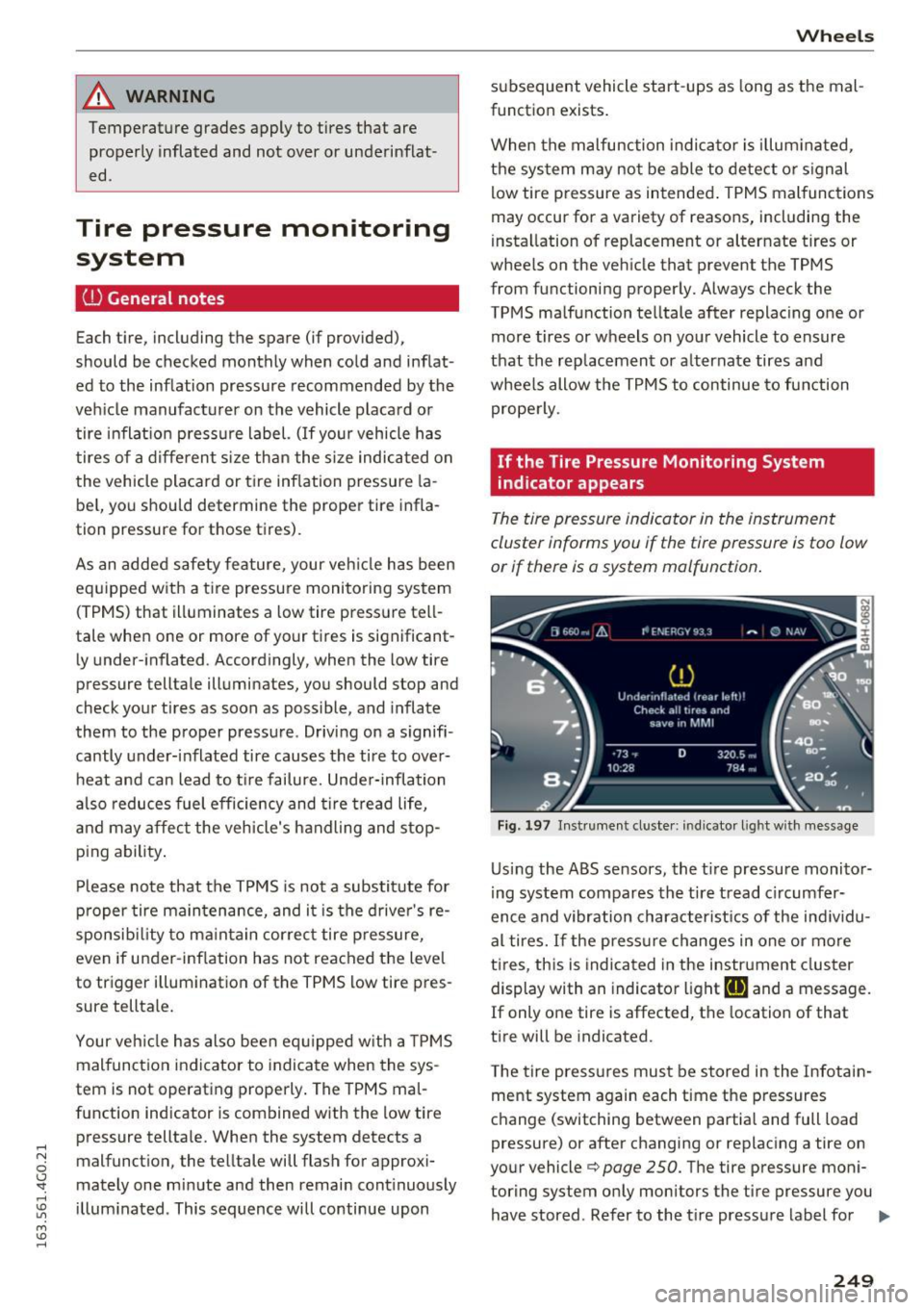
The tire pressure indicator in the instrument
cluster informs you if the tire pressure is too low
or if there is a system mo/function .
Fig. 197 Instrume nt cluste r: indicator light with message
Us ing the ABS sensors, the tir e pressure monitor
ing system compares the tire tread circumfer
ence and vibration characteristics of the individu
al tires. If the press ure changes in one or more
tires , this is indicated in the instrument cluster
display with an indicator light
ti] and a message.
If only one tire is affected, the location of that
tire will be indicated.
T he tire press ures must be stored in the Infotain
ment system again each time the pressures
change (switching between partial and full load
pressure) or after changing or replacing a tire on
your vehicle¢
page 250. The tire pressure moni
toring system only monitors the tire pressure you have stored. Refer to the tire pressure label for ..,.
249
Page 252 of 294
Wheels
the recommended tire pressure for your vehicle
¢ page 241, fig. 196.
Tire tread circumference and vibration character
istics can change and cause a tire pressure warn
ing if:
- the tire pressure in one or more tires is too low.
- the tire has structural damage .
- the tire was replaced or the tire pressure was
changed and it was not stored¢
page 250.
-the spare tire* is installed.
Indicator lights
IE Loss of pressure in at least one tire¢&. .
Check the tires and replace or repair if necessary.
Check/correct the pressures of all four tires and
store the pressure again in the Infotainment sys
tem ¢
page 250 .
mm (Tire Pressure Monitoring System) Tire
pressure: System malfunction!.
Ifmm appears
after switching the ignition on or while driving
and the
IE indicator light in the instrument clus
ter blinks for approximately one minute and then
stays on , there is system malfunction . Try to
store the correct tire pressures¢
page 250. If
the indicator light does turn off or turns on again
after a short period of time, drive to your author
ized Audi dealer or qualified repair facility imme
diate ly to have the malfunction corrected.
A WARNING
- If the ti re pressure indicator appears in the
display, reduce your speed immediately and
avoid any hard steering or braking maneu
vers. Stop as soon as possible and check the
t ir es and their pressure .
- The driver is responsible for maintaining the
correct tire pressure. You must check the
t ir e pressure regularly.
- Under certain conditions (such as a sporty
dr iv ing style, winter cond itions or unpaved
roads), the tire pressure mon itoring system
indicator may be delayed.
- Do not use run-flat tires on your vehicle. Us
ing them when not permitted can lead to
vehicle damage or accidents.
250
(D Tips
-The tire pressure monitoring system can al
so stop working when there is an ESC mal
function.
- Using snow chains may result in a system
malfunction.
- The tires with the identification "AO" or
"RO" ¢
page 2 38 have been matched with
your Audi tire pressure monitoring system.
We recommend that you use these tires.
Storing tire pressures
If the tire pressure changes or a tire is replaced,
it mus t be confirmed in the Infotainmen t sys
tem.
... Make sure before storing that the tire pressures
of all four tires meet the specified values and
are adapted to the load ¢
page 241.
... Switch the ignition on .
... Select: the
I CARI function button > (Car)* Sys
tems
contro l button > Servicing & checks >
Tire pressure monitoring > Store tire pressures
> Yes, store now.
(D Tips
Do not sto re the tire pressures if snow chains
a re installed.