service AUDI A6 2016 User Guide
[x] Cancel search | Manufacturer: AUDI, Model Year: 2016, Model line: A6, Model: AUDI A6 2016Pages: 294, PDF Size: 73.88 MB
Page 31 of 294
Your authorized Audi dealer or a qualified service
station can interpret the code and perform the necessary repair.
A WARNING
Do not use the diagnostic connector for per
sonal use. Incorrect usage can cause malfunc tions, which can increase the risk of a colli
sion!
Electronic speed limiter -
Your veh
icle may be factory equipped with t ires
that are rated for a maximum speed of 130 mph
(210 km/h) . This is less than the maximum speed
of your vehicle . To reduce the risk of sudden tire
failure and loss of control if the vehicle is operat
ed at excessive speeds, your vehicle a lso has an
electronic speed limiter. The electronic speed limiter prevents your vehicle from going faster
than the tire speed rating. For more information
c::;, page 238 .
If the engine contro l unit receives faulty vehicle
road speed signals, the Malfunction Indicator
Lamp (MIL)
¢4 will illuminate . If this occurs,
contact the nearest authorized Audi dealer for
assistance .
S models
Your vehicle's top speed is e lectron ically limited
to 155 mph (250 km/h).
If the engine contro l unit receives faulty vehicle
roadspeed signa ls, the Malfunction Indicator
Lamp (MIL)
¢4 will illuminate. If this occurs,
contact the nearest authorized Audi dealer for
assistance .
A WARNING
Always observe the posted speed limits and
adjust your speed to suit prevailing road, traf
fic and weather cond it io ns. Never drive your
vehicle faster than the maximum speed rating
of the tires installed.
-
Instruments and indicator lights
29
Page 43 of 294
.... N
0 CJ '
Correcting power window malfunctions
After disconnecting the vehicle battery, the one
touch up and down feature must be activated
again .
.,. Pull the powe r window switch until the window
is completely ra ised.
.,. Release the switch and pull it aga in for at least
one second.
Valet parking
The valet parking feature protects the luggage
compartment from unauthorized access .
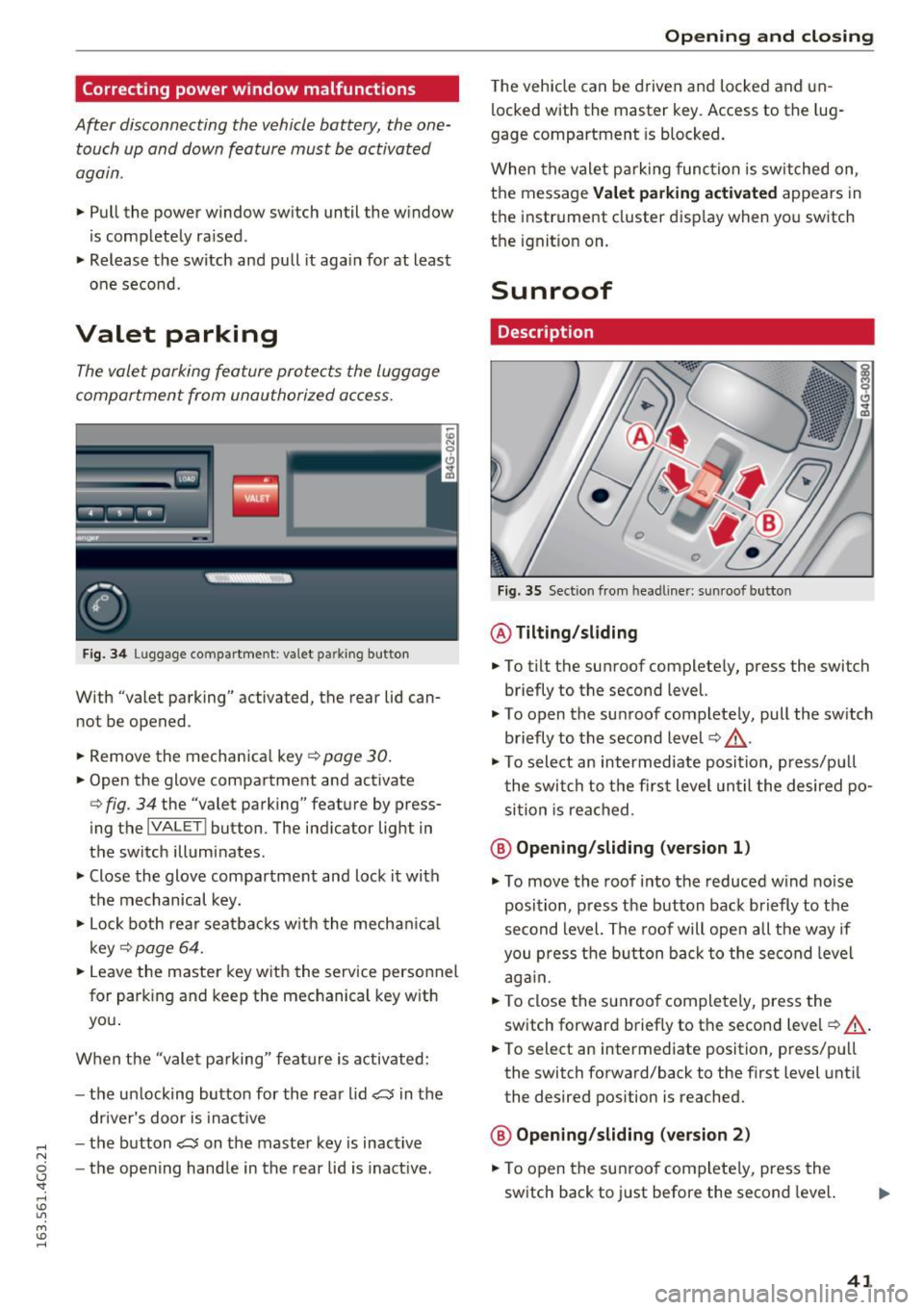
Fig. 34 Lu gg age comp artment : v a let parkin g button
W ith "valet parking" activated, the rea r lid can
no t be opened .
.,. Remove the mechanical key
Q page 30.
.,. Open the glove compartment and activate
Q fig . 34 the "valet parking" feature by press
ing the
I VA LETI button . The indicator light in
the switch illuminates .
.,. Close the glove compartment and lock it with
the mechanical key.
.,. Lock both rear seatbacks w ith the mechanical
key
Q page 64 .
.,. Leave the master key with the service personnel
for park ing and keep the mechanical key with
you .
When the "valet parking" feature is activated:
- the un locking button for the rear lid
~ in the
driver's door is inact ive
- the button~ on the master key is inactive
- the opening handle in the rear lid is inactive.
Opening and closing
The vehicle can be driven and locked and un
locked with the master key. Access to the lug
gage compartment is blocked.
When the valet parking function is switched on ,
the message
Valet parking activated appears in
the instrument cluster display when you switch
the ignition on .
Sunroof
Description
Fig. 35 Section from hea dline r: sun roo f b utton
@ Tilting /sliding
.,. To tilt the sunroof completely, press the switch
briefly to the second level.
"' To open the sunroof completely, pull the sw itch
briefly to the second level¢,&. .
.. To select an intermediate position , press/pu ll
the switch to the first level until the desired po
sition is reached .
@ Opening /sliding (version 1)
"'To move the roof into the reduced wind noise
position, press the button back briefly to the
second level. The roof will open all the way if
you press the button back to the second level
again.
.,. To close the sunroof completely, press the
switch forward briefly to the second level
Q ,&..
.. To select an intermediate position, press/pull
the switch forward/back to the first level until
the desired position is reached.
@ Opening/sliding (version 2)
.,. To open the sunroof complete ly, press the
switch back to just before the second level.
41
Page 47 of 294
.... N
0 CJ '
-In cool or damp weather, the inside of the
headlights, turn signals and tai l lights can
fog over due to the temperature difference
between the inside and outside. They will
clear short ly after switching them on. This
does not affect the service life of the light
i ng.
Turn signals and high beam lever
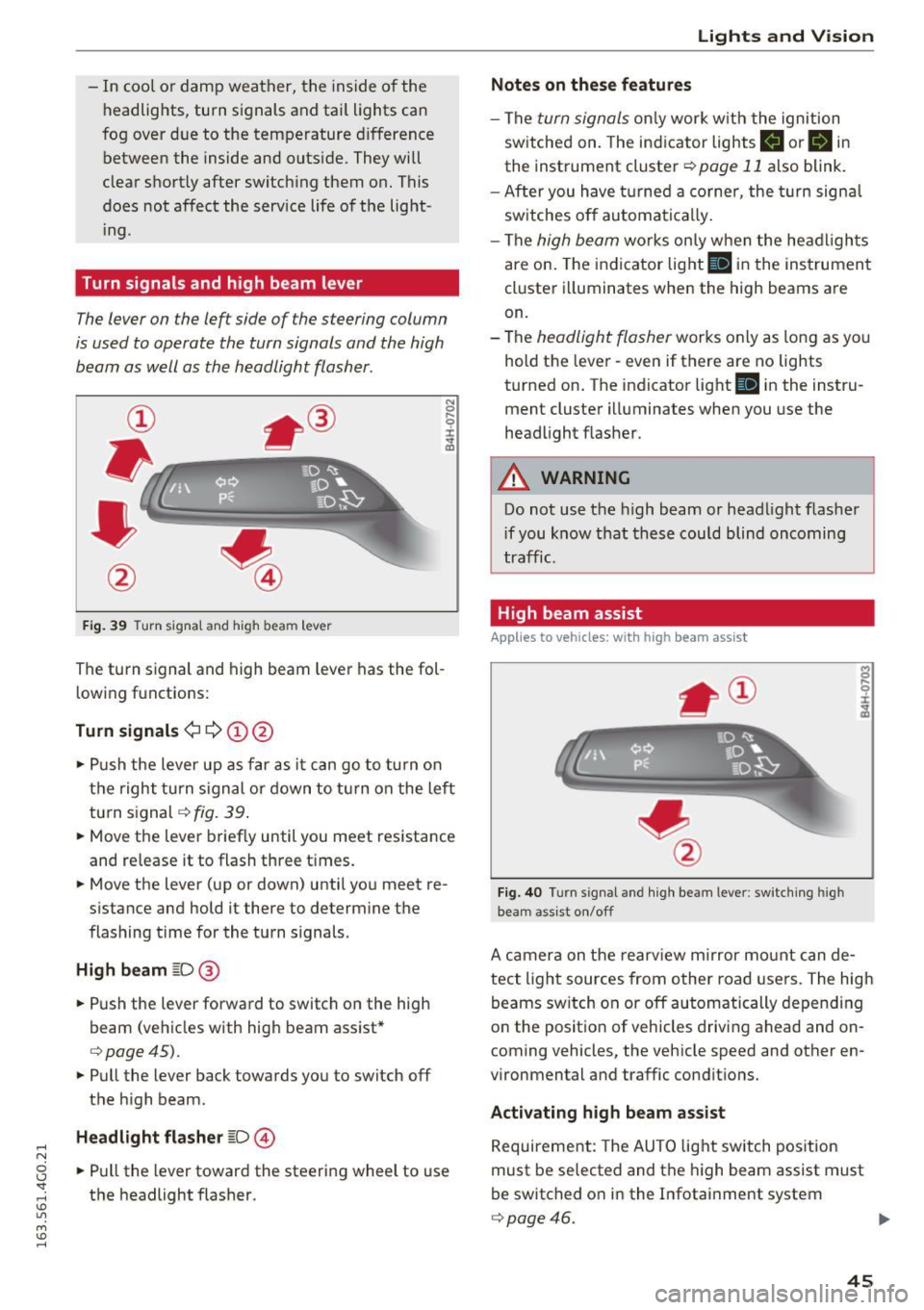
The lever on the left side of the steering column
is used to operate the turn signals and the high
beam as well as the headlight flasher.
F ig . 39 Turn signal and high beam lever
The turn s ignal and high beam lever has the fol
lowing fu nctions:
Turn signals¢¢ (!)@
N
0
..... 0
~ IJl
• Push the lever up as far as it can go to turn on
the right turn s ignal or down to turn on the left
turn signal¢
fig. 39 .
• Move the lever brief ly until you meet resistance
and re lease it to flash three times.
• Move the lever (up or down) until you meet re
s istan ce and hold it there to determine the
flashing time for the turn signals.
High beam ~D@
• Push the lever forward to switch on the high
beam (vehicles with high beam assist*
¢ page45).
• Pull the lever back towards you to switch off
the high beam .
Headlight flasher ~D@
• Pull the lever toward the steering wheel to use
the headlight flasher .
Lights and V ision
Notes on these features
-The turn signals only work w ith the ignition
sw itched on. The indicator lights
B or B in
the instrument cluster¢ page 11 also blink.
- After you have turned a corner , the turn signa l
switches off automatically.
- The
high beam works on ly when the headlights
are on. The indicator light
II in the instrument
cluster illuminates when the high beams are
on.
- The
headlight flasher works only as long as yo u
hold the lever -even if there are no lights
turned on. The indicator light
Iii in the instru
ment cluster illuminates when you use the
headlight flasher .
A WARNING
-Do not use the high beam or headlight flasher
i f you know that these could blind oncoming
traffic.
High beam assist
Applies to veh icles: w ith high beam assist
Fig. 40 Turn signal and high beam lever: switching high
beam assist on/off
A camera on the rearview mirror mount can de
tect light sources from other road users. The high
beams switch on or off automatically depending
on the posit ion of vehicles driving ahead and on
coming vehicles, the vehicle speed and other en
vironmental and traffic conditions.
Activating high beam assist
Requirement: The AUTO light switch position
must be selected and the high beam assist must
be switched o n in the Infotainment system
¢page 46.
45
Page 54 of 294
Lights and Vi sion
Cleaning w indshield wiper blades
Clean the wiper blades when you see wiper
s treaks. Use a soft cloth and a glass cleaner .
... Place the w indshield wiper arms in the service
pos ition
c::> page 52 .
... Fo ld the windshield wipe r arms away from the
winds hield.
A WARNING
Dirty windshield wiper blades can impair vi
sion, which increases the risk of an accident.
Replacing windshield wipe r blades
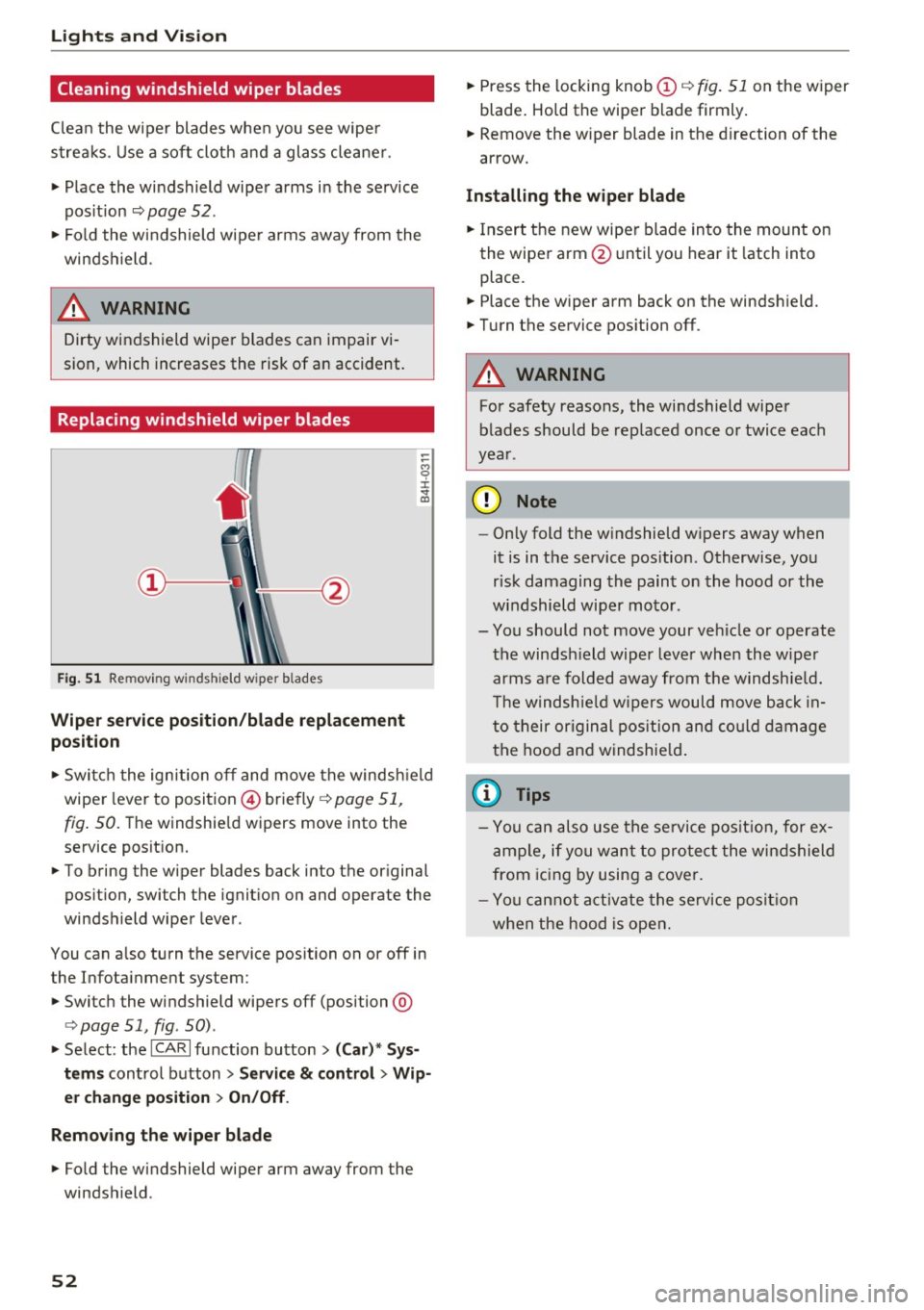
Fig. 51 Remov ing w indshi eld wiper b lades
Wiper service position/blade replacement
posit ion
:= M 0 ±
" CD
... Switch the ignition off and move the windsh ield
wiper lever to position @) briefly
c::> page 51,
fig. 50. Th e windshie ld wipers move into the
service position.
... To bring the wiper blades back into the original
position, switch the ignition on and operate the
windshield wiper lever.
You can also turn the service position on or off in
the Infotainment system:
... Switch the windshield wipers off (position @
¢ page 51, fig. 50) .
... Select: the
ICA RI function button> (Car)* Sys
tems
control button > Service & control > Wip
er change position
> On/Off .
Removing the wiper blade
... Fo ld the windshield wiper arm away from the
windshield .
52
... Press the locking knob (D c::> fig. 51 on the wiper
blade . Hold the wiper blade firmly.
... Remove the wiper blade in the direction of the
arrow .
Installing the wiper blade
... Insert the new wiper blade into the mount on
the wiper arm @until you hear it latch into
place .
... Place the wiper arm back on the windshield.
... Turn the service position off.
A WARNING
-
For safety reasons, the windshield wiper
blades should be replaced once or twice each
year .
(D Note
-Only fold the w indshield w ipers away when
it is in the service position. Otherwise, you
risk damaging the paint on the hood or the
windshield wiper motor.
- You should not move your veh icle or operate
the windsh ield wiper lever when the wiper
arms are folded away from the w indshie ld.
Th e windshie ld wipers would move back in
to their original position and could damage
the hood and windshield .
{i) Tips
- You can also use the service position, for ex
ample, if you want to protect the windshield
from icing by using a cover.
- You cannot activate the service position
when the hood is open.
Page 69 of 294
Warm and cold Climate control system
Description
App lies to vehicles: with three-zone climate control or four
zone a utomat ic climate contro l
The climate control system warms, cools and
adds humidity to the air in the vehicle interior . It
is the most effective when the windows and sun
roof* are closed .
If the temperature inside the
parked vehicle becomes very warm, opening the
window briefly will speed up the cooling process.
In all heating mode functions except
defrost, the
blower only switches to a higher speed once the
engine coolant has reached a certain tempera
ture.
Condensat ion from the cooling system can drip
and form a puddle of water under the vehicle.
This is normal and does not mean there is a leak.
Pollutant filter
The pollutant filter removes pollutants such as
dust and pollen from the air.
T he air pollutants filter must be changed at the
intervals specified in your Warranty
& Mainte
nance booklet, so that the air conditioner can
properly work .
If you drive your vehicle in an area with high air pollution, the filter may need to be changed
more frequently than specified in your Audi War
ranty
& Maintenance booklet . If in doubt, ask
your authorized Audi Service Advisor for advice .
Key coded settings
Three-zone climate control: The blower setting
and air distribution are stored automatically and
assigned to the remote contro l key that is in use.
Four-zone automatic climate control: Th e cli
mate control settings are automatically stored
and assigned to the remote contro l key that is in
use.
Warm and cold
A WARNING
Reduced visibility is dangerous and can cause
accidents .
- For safe driving it is very important that all
windows be free of ice, snow and condensa
tion .
- Completely familiarize yourself with the
proper use and function of the heating and
ventilation system and especially how to de
fog and defrost the windows .
- Never use the windshield wiper/washer sys tem in freezing weather until you have warmed the windshield first, using the heat
ing and vent ilation system. The washer so lu
tion may freeze on the w indshield and re
duce visibility.
(D Note
- If you suspect that the air conditioner has
been damaged, sw itch the system off to
avoid further damage and have it inspected
by a qualified dealership.
- Repa irs to the Aud i air cond itioner require
special technical knowledge and special
tools. Contact an authorized Audi dea ler for
assistance.
@ For the sake of the environment
By reduc ing the amount of fuel you use, you
also reduce the amount of pollutants emitted
into the air.
(D Tips
- Keep the air intake slots (in front of the
windshield) free from ice, snow and debris
in order to maintain the proper function of
the climate control system.
- The energy management system may switch
the seat heating* or rear window defroster off temporarily . These systems are availab le
again as soon as the energy balance has
been restored .
- Air escapes through vents under the rear
window. When placing items of clothing on the luggage compartment cover, ensure
that the openings are not covered.
67
Page 79 of 294
.. Drive to an authorized A udi dealer or author
ized Audi Service Facility immediately to have
the malfunction corrected.
@ Tips
You can view the message again by pressi ng
the
I START E NGINE STOP! button.
Electromechanical
parking brake
Operation
The elec trome chanical parking brake replaces
the hand brake.
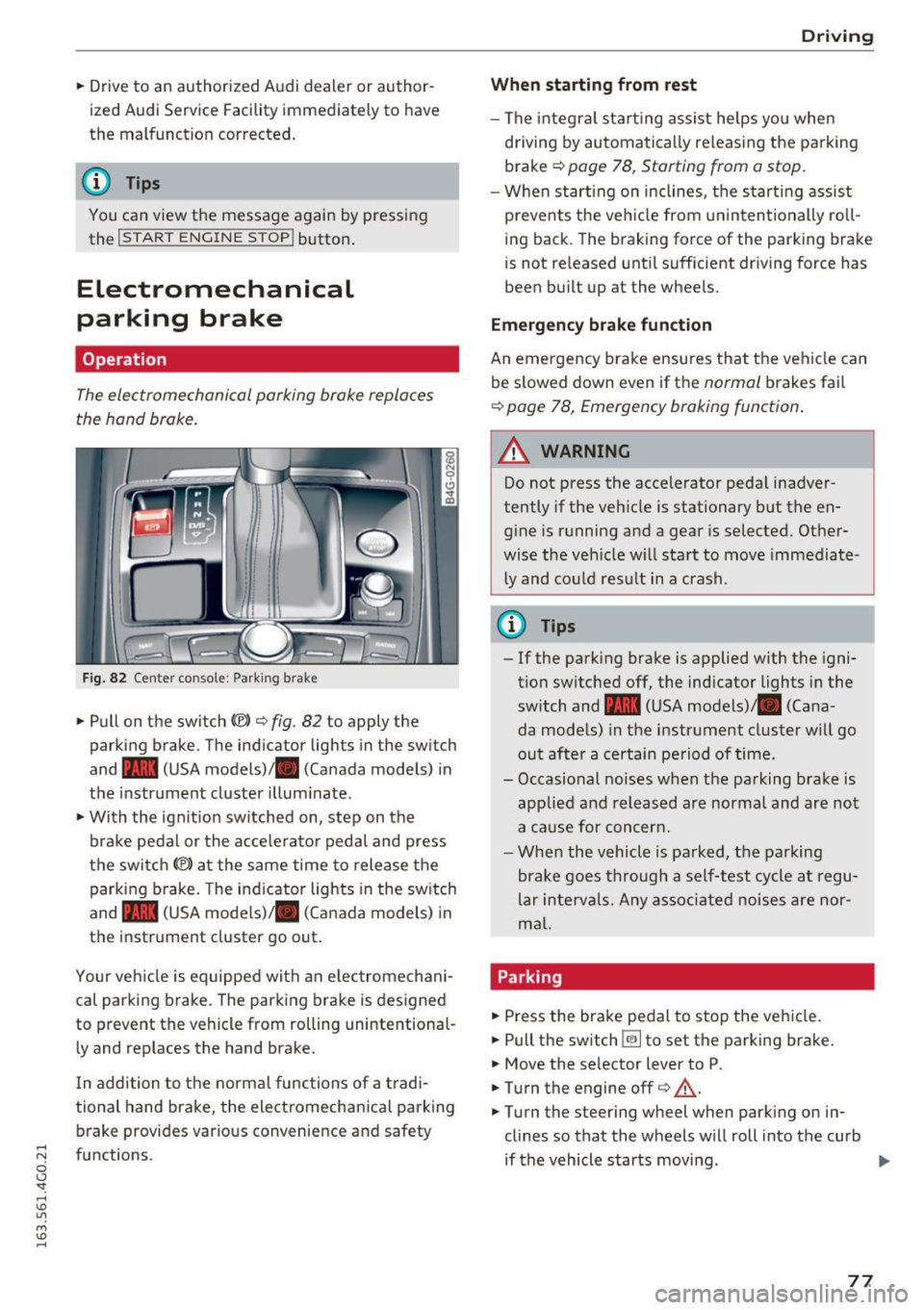
Fig. 8 2 Center co nsole : Park ing b rake
.. Pull on the switch C®> c> fig . 82 to apply the
parking brake . The ind icator lights in the sw itch
and - (USA
models) ,11 (Canada models) in
the instr ument cluster illum inate .
.. With the ign it ion sw itched on, step on the
bra ke pedal or the a cce le rato r pedal and press
the switch
(®) at the same time to release t he
parking b rake. The ind icator lights in the sw itch
and - (USA
models) ,11 (Canada models) in
the instrument cluster go out .
Your ve hicle is equipped with an e lec tromechani
cal parking brake. The parking brake is designed
to prevent the vehicle from rolling unintentional
l y and rep laces the hand brake.
I n addition to t he norma l func tions of a tradi
tional hand brake, the electromechanica l parking
b rake provides various conve nience and safety
;::j fu nctions .
0 CJ '
Drivi ng
When starting from rest
-The integra l sta rting assist helps yo u when
driving by au toma tically re leas ing the parking
brake
Q page 78 , Starting from a stop.
- When start ing on inclines, t he s tarti ng assist
prevents the veh icle from un in ten tionally ro ll
ing back . The braking force of the parking bra ke
is not re leased unti l sufficient dr iving force has
been bu ilt up at the whee ls.
Emergency brake function
An emergency brake ensures that t he vehicle can
be s lowed down even if t he
normal brakes fail
Q page 78, Emergency braking function .
A WARNING
--
Do not press the accelerator peda l inadver
tently if the veh icle is stationary but the en
g ine is running and a gear is selected. Other
wise the veh icle w ill sta rt to move immediate
l y and co uld res ult in a crash.
@ Tips
- If the park ing bra ke is applied w ith the igni
tion switched off, the indicator lights in the
switch and -(USA
models) ,11 (Cana
da models) in the instr ument cluster will go
out afte r a certain pe riod of time.
- Occasional noises when the parking brake is
applie d and released are normal and are not
a ca use for con cern.
- When the vehicle is pa rked, the parking
brake goes through a self-test cycle at regu
lar in tervals. Any as so ci ate d noi ses are nor
ma l.
Parking
.. Press the brake pedal to stop the veh icle.
.. Pull the switch ~ to set the pa rking brake .
.. Move the selector lever to P .
.. Turn the engine off
c> &, .
.,. Turn the steering wheel when park ing on in
clines so that the wheels w ill roll into the curb
if the vehicle starts moving.
77
...
Page 87 of 294
.... N
0 CJ '
Audi ada pti ve c ruise contr ol and br akin g gu ard
-For safety reasons, do not use adapt ive
cruise contro l when driv ing on roads with
many curves, when the road surface is in
poor condit ion and/or in bad weather (such
as ice, fog, gravel, heavy rain and hydroplan
ing) . Us ing the system under these condi
t ions could result in a collision .
- Switch adaptive cruise contro l off tempora
rily when driving in turn ing lanes, on ex
pressway exits or in const ruc tion zones. This
preven ts the vehicle from accelerating to
the set speed when in these situat ions .
- T he adapt ive cr uise con trol system will no t
br ake by i tself if you pu t your foot on the ac
celerator peda l. Doing so can override the
speed and distance regulation.
- Whe n approaching stat ionary obje cts such
as stopped traffic, adapt ive cruise control
will not respo nd and braking guard will have
limited function .
- The adaptive cruise control system and
brak ing guard do not react to peop le, ani
ma ls, objects crossing the road or oncom ing
objects.
- The function of the radar sensors can be af
fected by reflective objects such as guard
rai ls, t he entrance to a tunnel, heavy rain or
ice.
- Never follow a veh icle so closely that you
cannot stop your vehicle safely . The adap
t ive cr uise control cannot slow or brake the
vehicle safely when you follow another veh i
cle too close ly. Always remember th at the
au tom atic b raking function ca nnot br ing the
vehicle to a sudden or emergency stop un
der these conditions .
- T o preven t unintended operation, alw ays
switch AC C off when i t is not be ing used.
(D Note
The sensors can be displaced by impacts o r
damage to the bumper, whee l housing and
underbody. That co uld affect the adaptive
cru ise con trol sys tem and braking guard .
Have your a uthorized Audi dea ler or author·
ized Aud i Service Facility check their function.
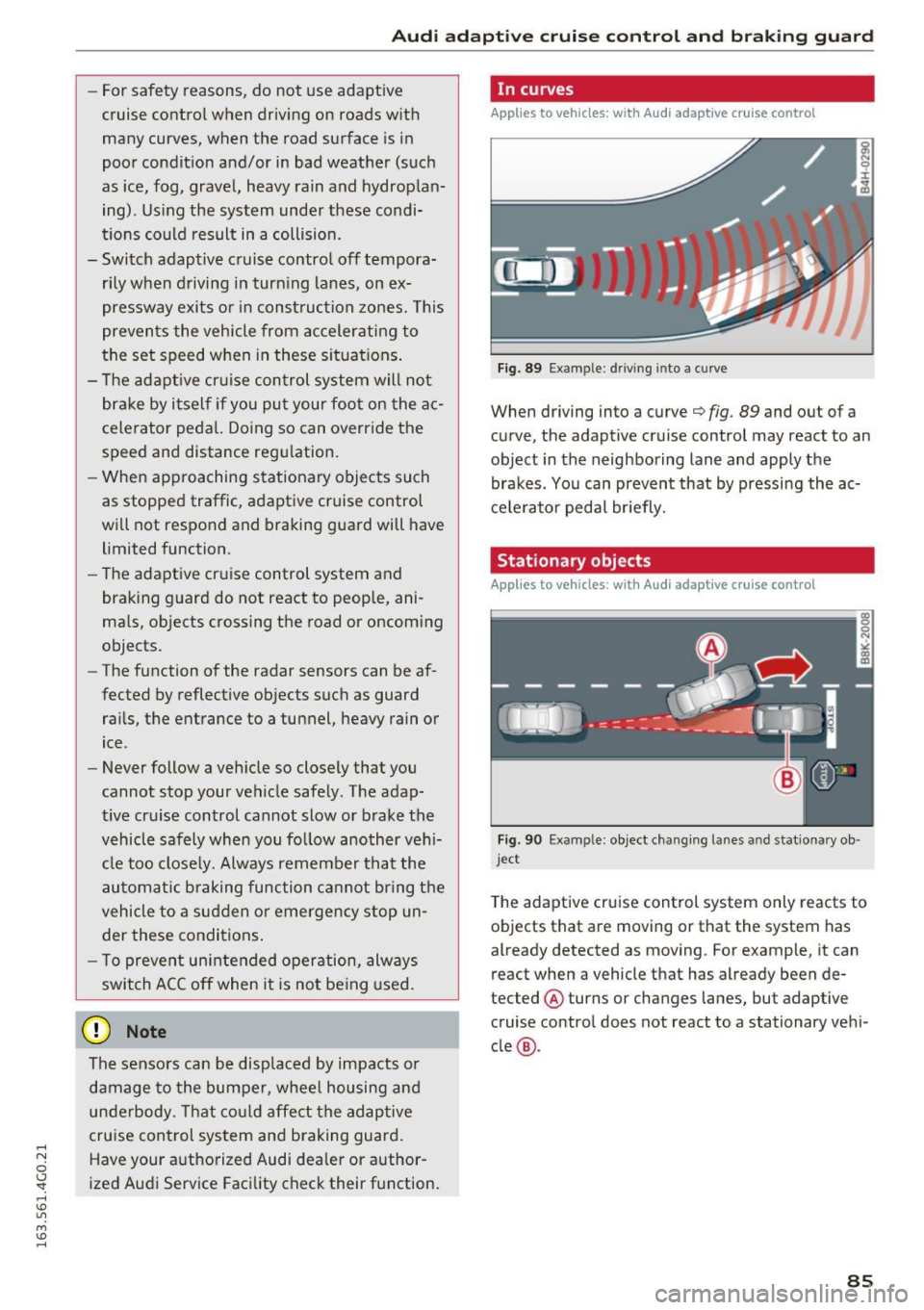
In curves
Applies to vehicles: w ith Audi adapt ive cruise control
F ig. 89 Exampl e: d ri ving into a curve
When driving into a curve¢ fig. 89 and out of a
curve, the adaptive cruise control may react to an
object in the neighboring lane and app ly the
brakes . Yo u can prevent that by pressing the ac
ce le rator peda l br iefly.
Stationary objects
Applies to vehicles : w ith Audi adaptive cruise control
Fig. 90 Exa mple : object changing la nes a nd s tatio nary ob ·
j e ct
T he adaptive cruise control system only reacts to
objects that are moving or that the system has
already detected as moving. For example, it can
react when a vehicle that has already been de
tected @ turns or changes lanes, but adaptive
cruise control does not react to a stationary veh i
cle @.
85
Page 97 of 294
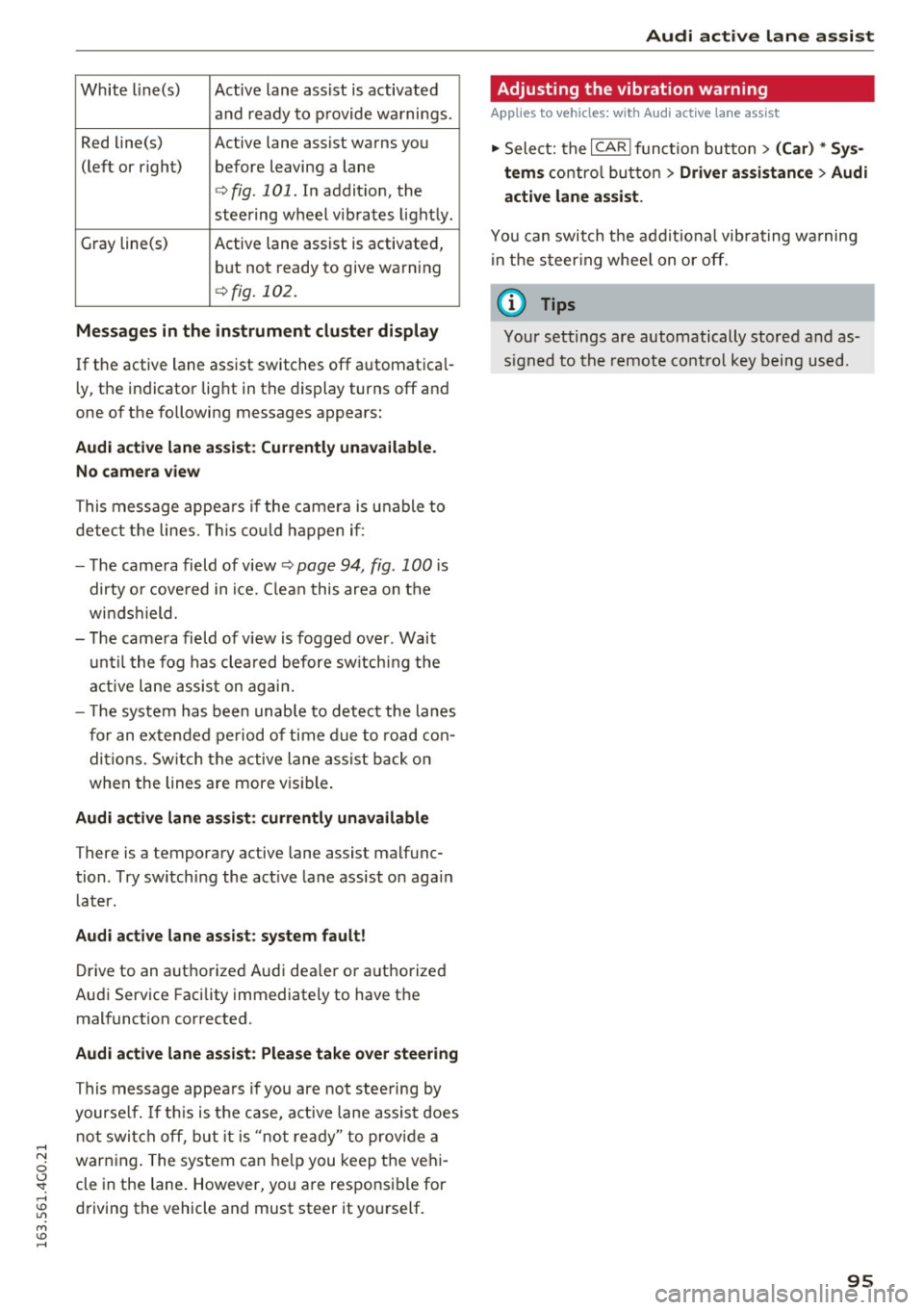
White line(s) Active lane assist is activated and re a dy to p rovide wa rnings.
Red line(s) Active lane assist wa rns you
(left or right) before leaving a lane
c:> fig . 101. In addit io n, the
steering wheel vib rates light ly.
Gray line(s) Active lane a ssist is activated,
but not ready to give warning
c:> fig. 102.
Messages in the instrument clu ster di splay
If the active lane ass ist switches off a utomat ica l
l y, the indicator lig ht in the display turns off an d
one o f th e following messages appears:
Audi active lane assist: Currently unavailable .
No camera view
This message appea rs if the c amera is u nable to
detec t th e lines. This co uld ha ppen i f:
- T he came ra field of v iew
c:> page 94, fig. 100 i s
dirty o r cove red in i ce. C lea n this are a on t he
wi nd shi eld.
- T he came ra field of v iew is fogged ove r. Wai t
u nt il the fog has clea red before sw itch ing the
a ctive la ne assis t on ag ain .
- Th e system has been unab le to detec t the lanes
f o r an extende d period o f ti m e du e to road con
di tions. Sw itch t he active lane ass is t back on
when the lines are more v is ib le .
Audi active lane assist: currently unavailable
There is a temporary active lane assist malfunc
tion . Try sw itching the act ive la n e assist on aga in
l ater.
Audi active lane assist: system fault!
D rive to an autho rize d Aud i dea ler o r a uth orized
Au di Service Facility immediately to have t he
malfunct ion corrected.
Audi active lane as sist: Please take over steering
This message appea rs if you are no t st eer ing by
yourse lf . I f thi s is the c ase, a ctive l ane assi st does
not swi tc h off, but it is "no t ready" t o pr ovid e a
war ning. The system can he lp you keep t he ve hi
cle in the lane . However, you a re responsi ble for
d riving the vehicle and must steer it yo urself.
Audi active lane assist
Adjusting the vibration warning
Applies to veh icles: w ith Audi active lane assist
., Sele ct: the I CAR ! fu ncti on bu tton > (Car) * Sy s
tem s
control butto n > Driver as sistance > Audi
active lane assist .
You c an switch t he a ddi tio nal vib rat ing wa rning
i n t he s teer ing whee l on o r off.
(D Tips
Your settings are automatically store d and as
s igned to the remo te control key b eing used.
95
Page 100 of 294
Audi side assist
-Improper reliance on the side assist system
can cause collisions and serious personal in
jury:
- Never rely only on side assist when chang
ing lanes.
- Always check rear view mirrors to make
sure that it is safe to change lanes.
- Side assist cannot detect all vehicles under
all conditions- danger of accident!
- Please note that side assist indicates there
are approaching vehicles, or vehicles in your blind spot, only after your vehicle has
reached a driving speed of at least 19 mph
(30 km/h).
- In certain situations, the system may not
function or its function may be limited. For
example:
- if vehicles are approaching or being left
behind very quickly . The display may not
turn on in time .
- in poor weather conditions such as heavy
rain, snow or heavy mist .
- on very wide lanes, in tight curves or if
there is a rise in the road surface . Vehicles
in the adjacent lane may not be detected
because they are outside of the sensor
range.
(D Note
The sensors can be displaced by impacts or damage to the bumper, wheel housing and
underbody . This can affect the system . Have
your authorized Audi dealer or authorized
Audi Service Facility check their function.
(D Tips
-If the window glass in the driver's door or
front passenger's door has been tinted, the
display in the exterior mirror may be misin
terpreted.
- For Declaration of Compliance to United
States FCC and Industry Canada regulations
¢page 276.
98
Switching on and off
Applies to vehicles: with A udi side assist
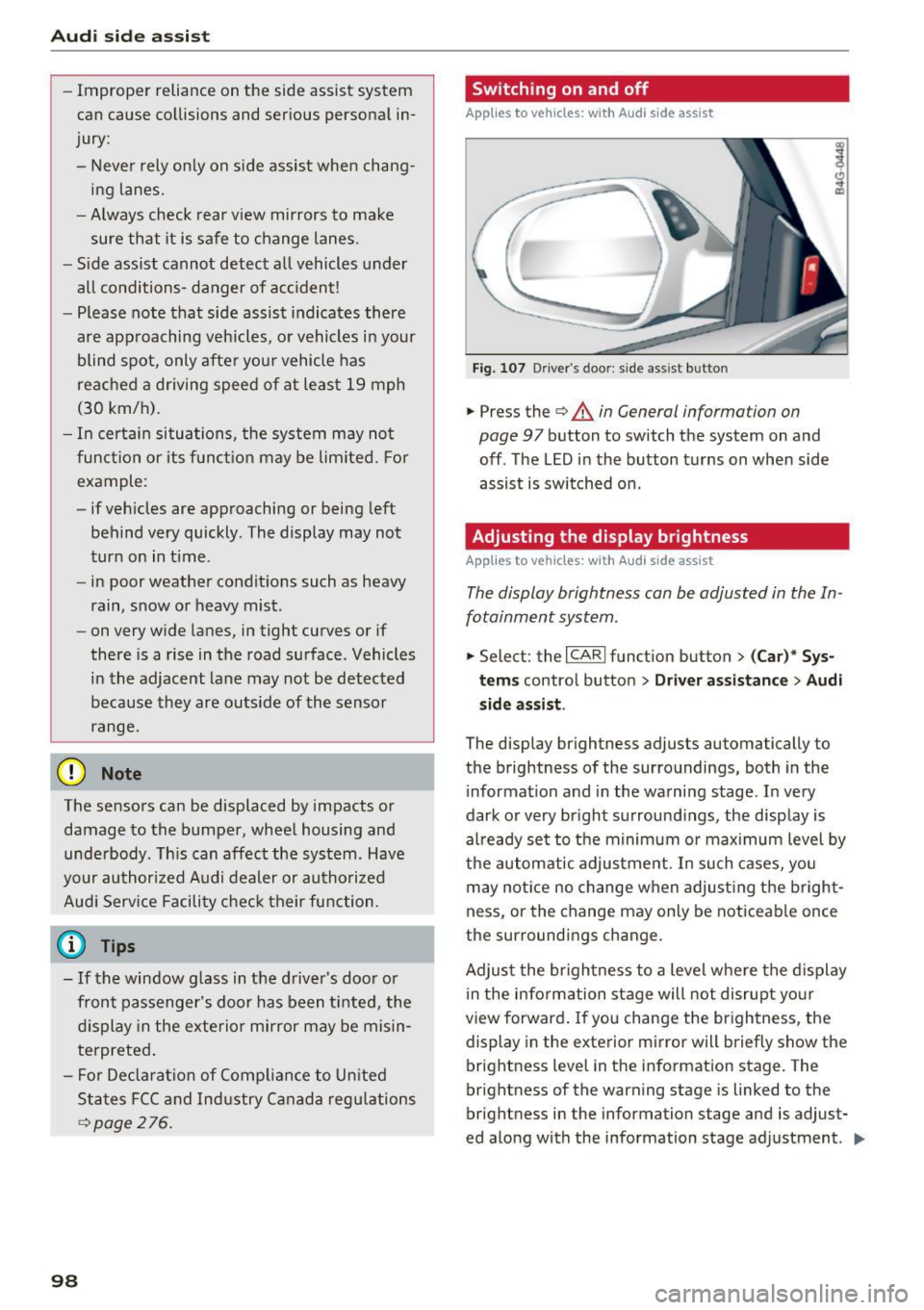
Fig. 107 D river 's doo r: side assi st but ton
.,.. Press the ¢&. in General information on
page
97 button to switch the system on and
off . The LED in the button turns on when side
assist is switched on .
Adjusting the display brightness
Applies to vehicles: with A udi side assist
The display brightness can be adjusted in the In
fotainment system .
.,.. Select: the I CARI function button > (Car)* Sys
tems control button > Driver assistance> Audi
side assist .
The display brightness adjusts automatically to
the brightness of the surroundings, both in the
information and in the warning stage . In very
dark or very bright surroundings, the display is
already set to the minimum or maximum level by
the automatic adjustment. In such cases, you
may notice no change when adjusting the bright
ness, or the change may only be noticeable once
the surroundings change.
Adjust the brightness to a level where the display
in the information stage will not disrupt your
view forward. If you change the brightness, the
display in the exterior mirror will briefly show the
brightness level in the information stage. The
brightness of the warning stage is linked to the
brightness in the information stage and is adjust
ed along with the information stage adjustment . ..,.
Page 101 of 294
@ Tips
-Side assist is not active whi le you are ma k
i ng the ad justment .
- Your settings are automatically stored and
ass igned to the remote control key being
u sed.
Driver messages
App lies to vehicles: with Audi side assist
If side ass ist switches off by itself, the LED in the
button turns off and a message will appear in the
i nstr ument cluster d is pl ay :
Audi side assist not available: sensor blocked
T he radar senso rs ' vision is affected. Do not cover
the area in front of the senso rs with bike wheels,
sticke rs, dirt or other ob jects . Clean the area in
front of the senso rs, if necessary
c:> page 97,
fig . 10 6.
Aud i side assist: currently unavailable
Side assist cannot be switched o n tempo rar ily be
cause there is a malfunction (for exam ple, the
battery charge level may be too low).
Audi side assist: Syst em fault!
The system cannot guarantee that it will detect
ve hicles co rrectly and it is switched off. The sen
sors have been d isp laced or are fa ulty. Have the
system checked by an authori zed Audi dealer or
author ized Audi Service Facility soon .
Audi side assist : Unavailable when towing
Side assist sw itches off automatically when a fac
tory-installed trailer hitch is connected to t he
e lectrical connector on the trailer. T he re is no
gua rantee the system will sw itch off when using
a retrofitted tra iler hitch . Do not use s ide ass ist
when towing a trailer .
Audi side assist
99