tow AUDI A6 2016 User Guide
[x] Cancel search | Manufacturer: AUDI, Model Year: 2016, Model line: A6, Model: AUDI A6 2016Pages: 294, PDF Size: 73.88 MB
Page 85 of 294

(Canadian models) in t he d isp lay will go out but
the saved speed remains the same.
Preselecting the speed
A pp lies to vehicles: with c ruise control system
You con preselect your desired speed when the
vehicle is stationary .
~ Switch the ign ition on.
~ Pu ll the lever in to posi tion (D q page 82,
fig . 86 .
~ To inc rease or decrease the speed, tap the leve r
toward
G) !Q .
~ To store the speed displayed, re lease the lever .
This f unct ion makes it possib le, for examp le, to
save the speed yo u want before dr iving on the
hi ghway . Once on the h ighway, activate the
cru ise control by pu lling the lever toward
(D .
Switching the system off
Appl ies to vehicles: with c ruise control
Temporary deactivation
~ Press t he b rake pedal, o r
~ Press the leve r into posi tion @(not cl icked into
place)
q page 82 , fig . 86, or
~ D rive for longer tha n 5 minutes at mo re than
5 m ph (1 0 km /h) above the stored speed.
Switching off completely
~ Press lever into position @(clicked into place),
or
~ Swi tch the ign ition o ff .
The system retains the saved speed if you deact i
vate the cruise contro l temporarily . To resume
the saved speed , re lease the brake pedal a nd p ull
the lever to position
(D .
Sw itching the ign ition off erases the saved speed .
A WARNING
You should only return to the saved speed if it
is not too fas t for the cur rent traffic co ndi
t io ns -risk of an a ccident!
D riving
83
Page 86 of 294
Audi adaptive cruise control and braking guard
Audi adaptive cruise
control and braking
guard
Introduction
Applies to vehicles: with Audi adaptive cruise control
The adaptive cruise contro l system assists the
driver by regulating vehicle speed and helping to
maintain a set distance to the veh icle ahead ,
within the limits of the system. If the system de
tects a moving vehicle up ahead, adaptive cruise
control can brake and then accelerate your vehi
cle. This helps to make driving more comfortable
both on long highway stretches and in stop-and
go traffic.
The braking guard system can warn you about an
impending collision and initiate braking maneu
vers
c::> page 90.
Adaptive cruise control and braking guard have
technical limitations that you must know, so
please read this section carefully, understand
how the system works and use them properly at
all times.
General information
General information
Applies to vehicles: with Audi adaptive cruise control
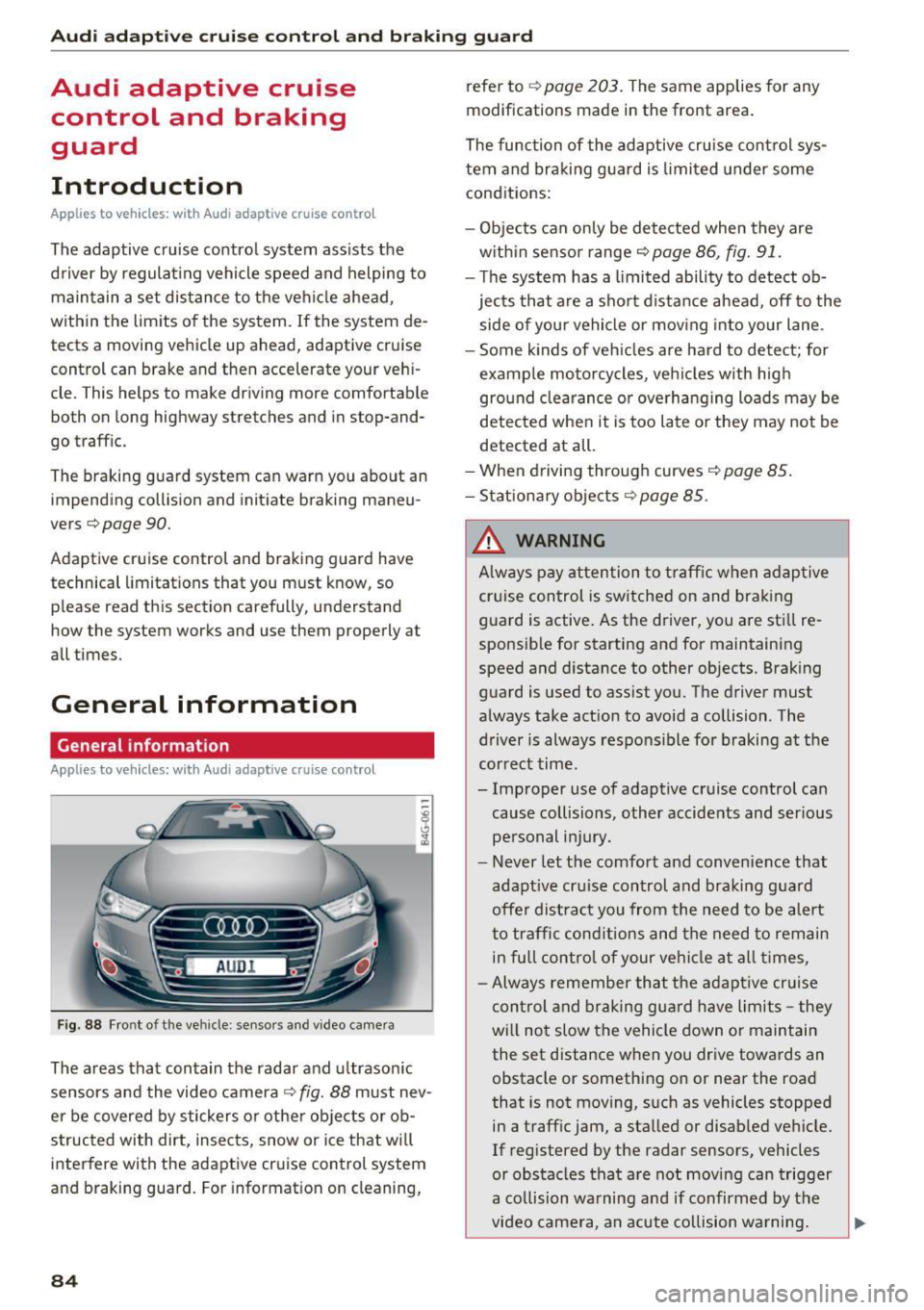
Fig. 88 Front of the ve hicle: sensors and video camera
The areas that contain the radar and ultrasonic
sensors and the video camera
c::> fig. 88 must nev
er be covered by stickers or othe r objects or ob
structed with dirt, insects, snow or ice that will
interfere with the adaptive cruise control system
and braking guard. For information on cleaning,
84
refer to c::> page 203. The same applies for any
modifications made in the front area .
The function of the adaptive cruise control sys
tem and braking guard is limited under some
conditions:
- Objects can only be detected when they are
w ithin sensor range
c::>page 86, fig. 91.
- Th e system has a limited ability to detect ob
jects that are a short distance ahead, off to the
side of you r vehicle or moving into your lane .
- Some kinds of vehicles are hard to detect; for
example motorcycles, veh icles with high
ground clearance or overhanging loads may be
detected when it is too late or they may not be
detected at all.
- When driving through curves
c::> page 85.
-Stationary objects c::> page 85.
A WARNING
Always pay attention to traffic when adaptive
cruise control is switched on and braking
guard is active. As the driver, you are still re
sponsible for starting and for maintaining
speed and distance to other objects. Braking
guard is used to assist you. The driver must
always take act ion to avoid a collision . The
driver is always respons ible for braking at the
correct time.
- Improper use of adaptive cruise control can cause collisions , other accidents and serious
personal injury.
- Never let the comfort and convenience that
adapt ive cru ise control and braking guard
offe r dist ract you from the need to be alert
to traffic conditions and the need to remain
in fu ll contro l of your ve hicle at all times,
- Always remember that the adaptive cruise
control and braking guard have limits -they
will no t slow the vehicle down or maintain
the set distance when you drive towards an
obstacle or something on or near the road
that is not moving, s uch as vehicles stopped
in a traff ic jam, a stalled or disab led vehicle.
If registered by the radar sensors, vehicles
or obstacles that are not moving can trigger
a co llision warning and if confirmed by the
video camera, an acute co llision warning.
Page 88 of 294
Audi adaptive cruise control and braking guard
Audi adaptive cruise
control
Description
Applies to vehicles: with Audi adaptive cruise control
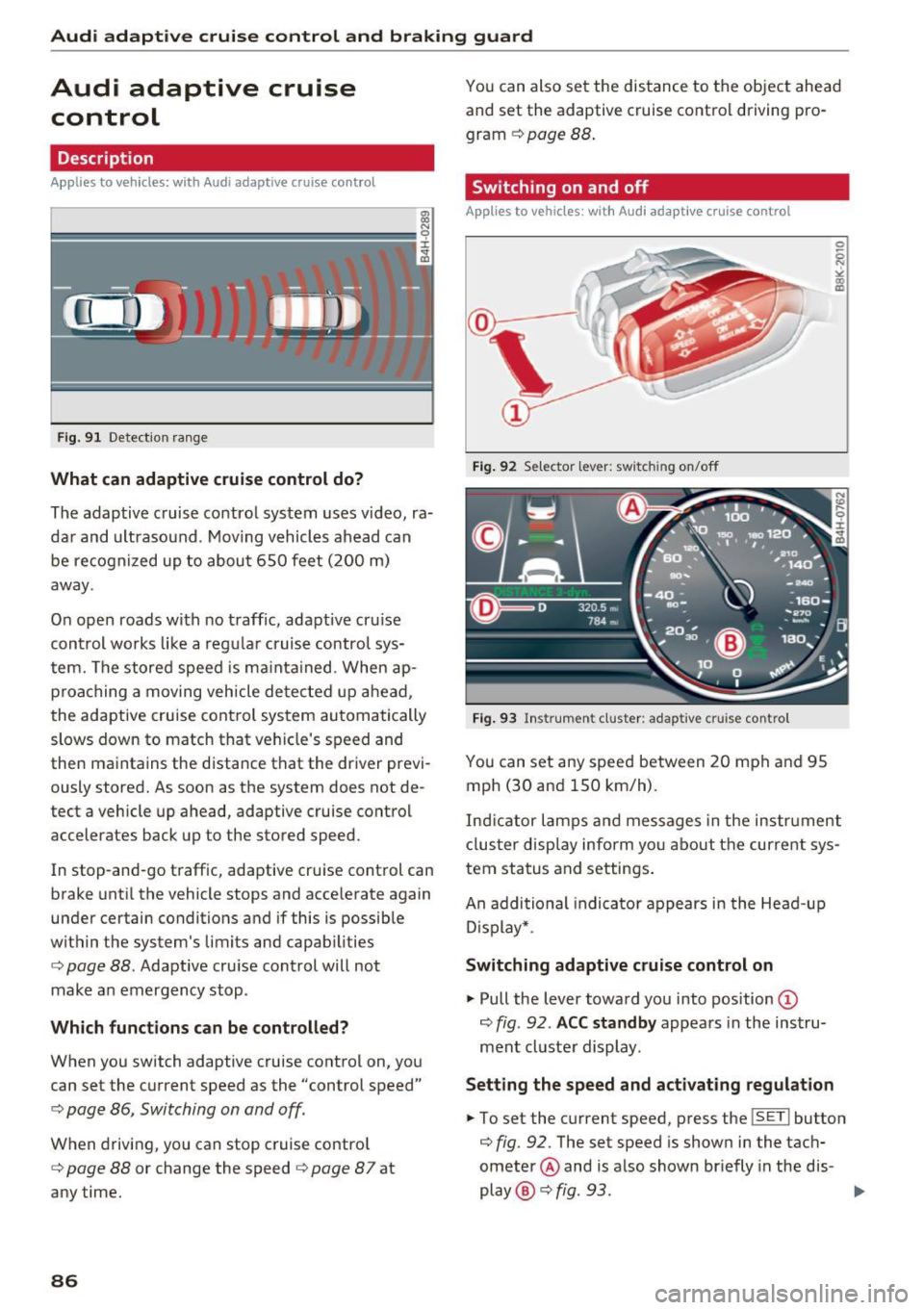
F ig. 91 Detection range
What can adaptive cruise control do?
The adaptive cruise control system uses video, ra
dar and ultrasound . Moving vehicles ahead can
be recognized up to about 650 feet (200 m)
away .
On open roads with no traffic, adaptive cru ise
control works like a regular cruise control sys
tem. The stored speed is ma inta ined. When ap
proaching a moving vehicle detected up ahead,
the adaptive cruise cont rol system automatically
slows down to match that vehicle's speed and
then maintains the distance that the driver previ ously stored. As soon as the system does not de
tect a vehicle up ahead, adaptive cruise control
accelerates back up to the stored speed.
In stop-and-go traffic, adaptive cruise control can
brake until the vehicle stops and accelerate again
under certain conditions and if this is possible
within the system's limits and capabilities
¢ page 88. Adaptive cruise control will not
make an emergency stop .
Which functions can be controlled?
When you switch adaptive cruise control on, you
can set the current speed as the "control speed"
¢ page 86, Switching on and off.
When driving, you can stop cruise control
¢ page 88 or change the speed ¢ page 8 7 at
any time.
86
You can also set the distance to the object ahead and set the adaptive cruise control driving pro
gram
¢ page 88.
Switching on and off
Applies to vehicles: with Audi adaptive cruise control
Fig. 92 Selector leve r: switch ing on/off
Fig. 93 Instrument cluster : adaptive cruise contro l
You can set any speed between 20 mph and 95
mph (30 and 150 km/h) .
Indicator lamps and messages in the instrument
cluster display inform you about the current sys
tem status and settings.
An addi tional indicator appears in the Head-up
D isplay* .
Switching adaptive cruise control on
.,. Pull the lever toward you into position ©
¢
fig . 92 . ACC standby appears in the instru
ment cluster display.
Setting the speed and activating regulation
.,. To set the current speed, press the ISETI button
¢ fig. 92. The set speed is shown in the tach
ometer @ and is also shown br iefly in the dis-
play @¢
fig. 93 . II>
Page 90 of 294

Audi adaptive cruise control and braking guard
Driving in stop-and-go traffic
Applies to vehicles: with Audi adaptive cruise control
The adaptive cruise control system also assists
you in stop-and-go traffic.
If a previous detected
vehicle ahead stops, your vehicle will brake to a
stop, within the limits of the system.
• To resume driving with adaptive cruise control,
tap the accelerator pedal or
• Pull the lever toward you into position @
¢ page 88, fig. 95.
(Di Tips
-If adaptive cruise control is active and your
vehicle does not start driving as expected
after pulling the lever once, you can start
out again by tapping the accelerator pedal.
- If an obstacle is detected when your vehicle
starts driving, the system will prompt you
to take over¢
page 89. Your vehicle will
drive more slowly when starting. This may
also happen in some situations when no ob
stacle is apparent.
Interrupting cruise control
Applies to vehicles: with Audi adaptive cruise contro l
Fig. 95 Selector lever
Requirement: The adaptive cruise control is
switched on.
Overriding cruise control
• To accelerate manually, pull the lever toward
you into position@and hold it there. The mes
sage
ACC: Override appears. Or
• press the accelerator pedal.
• To resume cruise control, release the lever or
take your foot off the accelerator pedal.
88
Canceling cruise control while driving
• Move the lever into position @. The message
ACC: Standby appears. Or
• press the brake pedal.
• To resume the stored speed, move the lever in
to position @.
Canceling cruise control when stopped
• Push the lever away from you into position@.
The message
ACC: Standby appears.
• To resume cruise control, press the brake pedal
and pull the lever toward you into position @.
A WARNING
It is dangerous to activate cruise control and
resume the stored speed when the current
road, traffic or weather conditions do not per
mit this . This could result in a crash.
Setting the distance
Applies to vehicles: with Audi adapt ive cruise control
Fig. 96 Selector lever: setting the dista nce
• Tap the switch to display the current set dis
tance ¢
fig. 96.
• To increase or reduce the distance by incre
ments, tap the switch again to the left or right.
The distance between the two vehicles will
change in the instrument cluster display.
When approaching a moving vehicle up ahead,
the adaptive cruise control system automatically brakes to match that object's speed and then
maintains the stored distance.
If the vehicle
ahead accelerates, adaptive cruise control will al-
so accelerate up to the stored speed.
II--
Page 98 of 294
Audi side assist
Audi side assist
Side assist
Description
Applies to vehicles: with Audi side assist
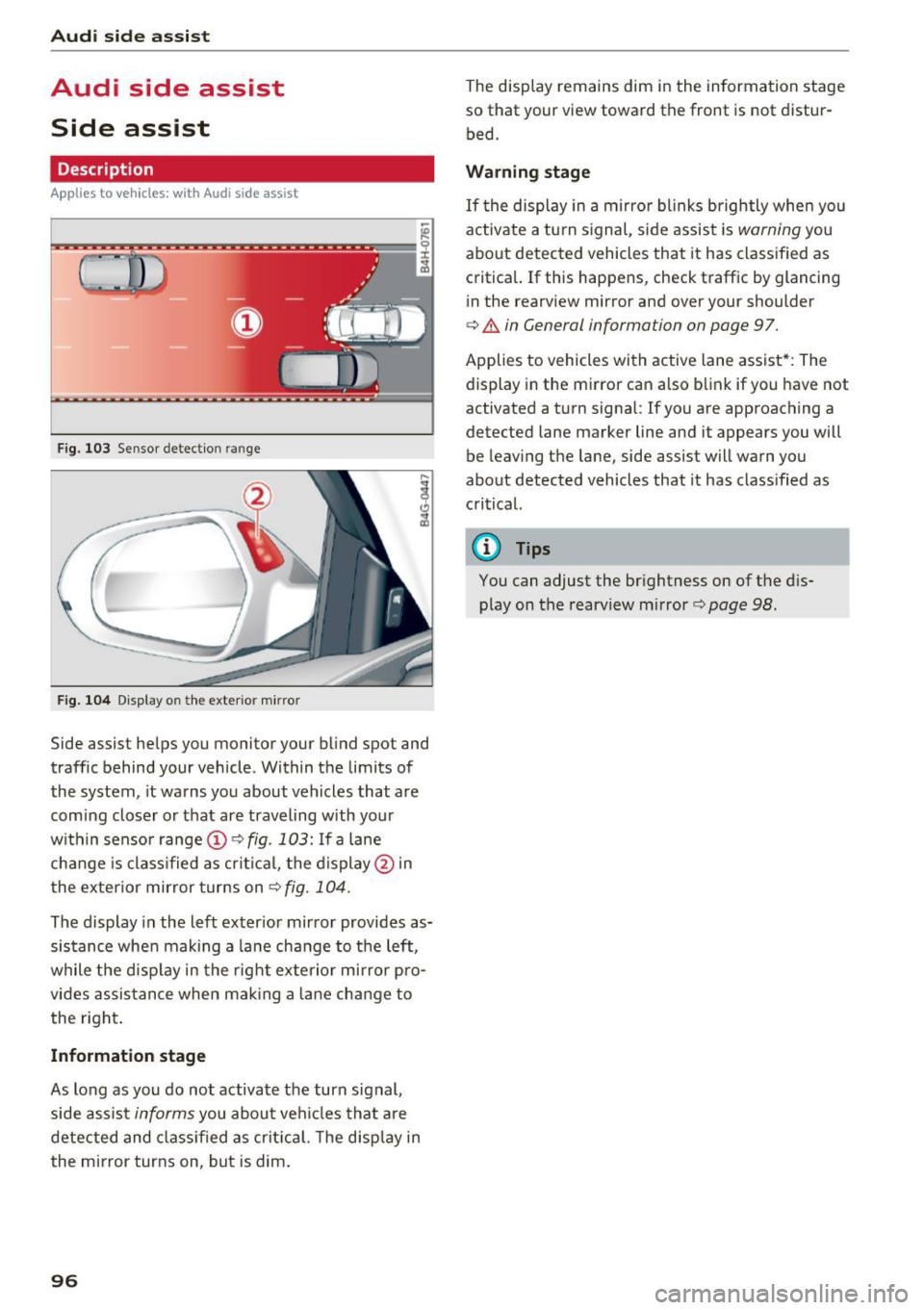
F ig. 103 Sensor detection ra nge
F ig . 104 Display o n the exte rio r m irror
Side assist helps you monitor your blind spot and
traffic behind your vehicle. Within the limits of
the system , it warns you about vehicles that are
comi ng closer o r that are traveling with your
within senso r range @
c:> fig. 103: If a lane
cha nge is class ified as crit ica l, the display @in
the exte rior mirror turns on
c:> fig. 104.
The display in the left exter ior mir ror provides as
sis tance whe n making a la ne change to the left,
while the disp lay in the rig ht exte rio r mi rror pro
vides assis tance when mak ing a lane change to
the right .
Informat ion stage
As lo ng as you do no t activate the turn signal,
side assis t
informs you about ve hicles that a re
detected and class if ied as crit ic al. T he disp lay in
the mirror turns on, but is dim .
96
The display remains dim in the information stage
so that your view toward the front is not distur
bed.
Warning stage
If the display in a mirro r blinks brightly when you
activate a tu rn s ignal, side assist is
warning you
about detected vehicles that it has classified as critical. If this happens, check traffic by glancing
in the rearview mirror and over your shoulder
c:> & in General information on page 97.
Applies to vehicles with active lane assist* : The
display in the mirror can also b link if you have not
activated a turn signal:
If you are approach ing a
detected lane marker line and it appears you will
be leaving the lane, side assist will warn you
about detected vehicles that it has class ified as
critical.
@ Tips
You can adjust the brightness on of the d is
play on the rearview m irror
c:> page 98.
Page 99 of 294
.... N
0 CJ '
M
"' ......
General information
Applies to vehicles: with side assist
®
®
©
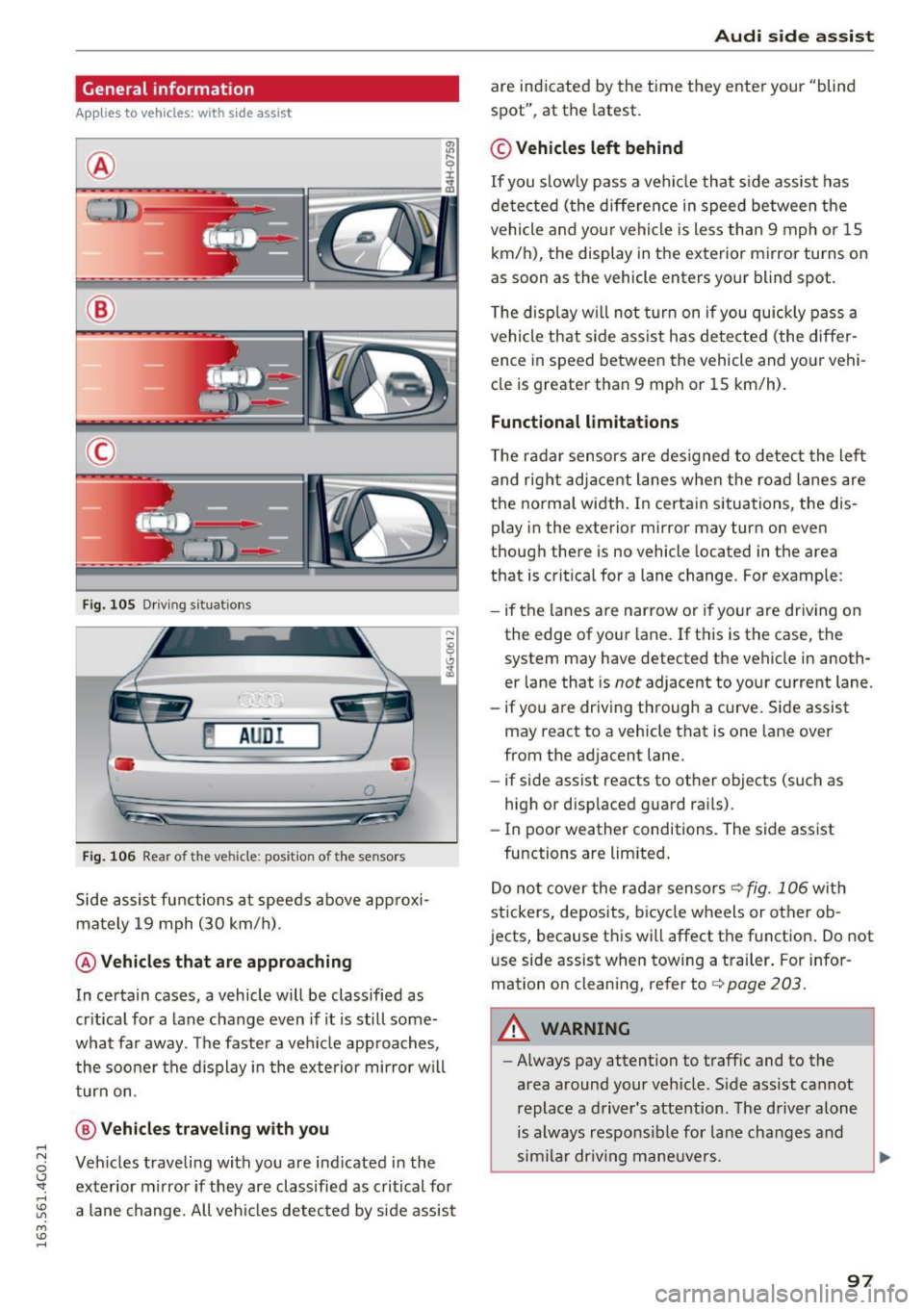
Fig. 105 Driving s it u atio ns
~ AUD !
• •
F ig. 106 Rear of the vehicle: position of the senso rs
S ide a ssist fu nctions a t speeds above ap proxi
ma te ly 19 mph (30 km/h).
@ Vehicles that are approaching
In ce rtain cases, a vehicle will be classified as
cr itica l for a lane change even if it is still some
what far aw ay. The faste r a ve hicle app roaches,
t he soo ner the d isplay in the exterio r mirror w ill
t urn on.
@ Vehicles traveling with you
Ve hicles traveli ng w ith you are ind icated i n the
ex te rior m irro r if they are classifie d as critical for
a lane change. All vehi cles detec ted by s ide assist
Aud i side assist
are ind icate d by the time they ente r your "blin d
spot", at the latest.
© Vehicles left behind
If you s low ly pas s a vehi cle that s ide ass ist has
de te cted ( the diffe re nce in speed between t he
vehicle and you r vehicle is less than 9 mph or 15
km/h), the display in the exterior mirror turns on
as soon as the vehicle enters your blind spot.
T he disp lay w ill not tu rn on if you quickly pass a
vehicle th at side a ssist h as dete cte d (t he differ
ence in speed between the vehicle and yo ur vehi
cl e is greater tha n 9 mp h or 15 km/h).
Functional limitations
The radar se nsors are des igned to detect the le ft
and right adj ace nt lane s whe n the ro ad la nes are
the normal width . In certa in situations, the dis
play in the exte rior mirror may turn on eve n
though there is no vehicle located in the area
that is critical for a lane change. For e xample:
- if the lanes a re narrow or i f yo ur are dr iv ing on
the edge o f you r lane. If t his is the case, the
system may have detected t he vehicle in anoth
er lane that is
not adjacent to you r cu rrent lane.
- if you are dr iv ing through a curve. Si de assist
may react to a vehicle that is one lane over
from the ad jacent lane .
- if side assist reacts to ot her objects (such as
high or disp laced guard ra ils).
- In poor weather conditions. The side assist
fu nctions a re limited .
D o no t cover the r adar senso rs
c> fig. 106 wit h
stickers, deposits, b icycle wheels or other o b
jects, because th is wi ll affect the f unction . Do not
u se side assist when towing a t railer . For info r
mation o n cleaning, refer to
c> page 203.
A WARNING
- Always pay attention t o traffic and to the
area a round your veh icle . S ide assist cannot
replace a driver' s attention. The driver alone
is always respo nsibl e for la ne cha nges and
s im ila r dr iv in g ma neuve rs.
97
Page 101 of 294
@ Tips
-Side assist is not active whi le you are ma k
i ng the ad justment .
- Your settings are automatically stored and
ass igned to the remote control key being
u sed.
Driver messages
App lies to vehicles: with Audi side assist
If side ass ist switches off by itself, the LED in the
button turns off and a message will appear in the
i nstr ument cluster d is pl ay :
Audi side assist not available: sensor blocked
T he radar senso rs ' vision is affected. Do not cover
the area in front of the senso rs with bike wheels,
sticke rs, dirt or other ob jects . Clean the area in
front of the senso rs, if necessary
c:> page 97,
fig . 10 6.
Aud i side assist: currently unavailable
Side assist cannot be switched o n tempo rar ily be
cause there is a malfunction (for exam ple, the
battery charge level may be too low).
Audi side assist: Syst em fault!
The system cannot guarantee that it will detect
ve hicles co rrectly and it is switched off. The sen
sors have been d isp laced or are fa ulty. Have the
system checked by an authori zed Audi dealer or
author ized Audi Service Facility soon .
Audi side assist : Unavailable when towing
Side assist sw itches off automatically when a fac
tory-installed trailer hitch is connected to t he
e lectrical connector on the trailer. T he re is no
gua rantee the system will sw itch off when using
a retrofitted tra iler hitch . Do not use s ide ass ist
when towing a trailer .
Audi side assist
99
Page 103 of 294
.... N
0 CJ '
Engine sound *
The sou nd of the engine is adapted to the select
ed mode and ranges from subt le to sporty.
(D Note
- Make sure there is enough cle arance above
and below t he vehicle when parking. The
height of the vehicle can change once it is
parked due to temperature f luctuations,
changes to the load conditions and changes
to the driving modes, which can affect clear
ance.
- When transporting the vehicle on a car car
rier, tra in, ship or by other means, only t ie
the vehicle down at the running surface of
the tires, which is the outer circumference.
Securing the vehicle at the axle compo
nents, suspe ns ion struts or towing eyes is
not permitted be cause the press ure in the
air suspension struts can change dur ing
transport . The vehicle may not be secured
sufficiently if this happens .
-If yo u are going to tow a tra ile r, you m ust
activate the trailer operation mode
r:!;> page 199 .
(D Tips
-In some models, the maximum vehicle
speed can only be reached in the
Auto and
D ynami c modes.
- Se lecting the
D ynamic mode resu lts in spor
ty shifting characteristics. The S gear posi
tion engages a utomatically.
- In vehicles with spo rt d ifferen tial *, the
D y
n amic
mode is deactivated when towing a
trailer .
- In vehicles that have dynamic steering*, op
erating noise is heard when start ing or stop -
Adjusting the Individual mode
Audi driv e se lect
ping the engine. This does not indicate a
prob lem.
Selecting the driving mode
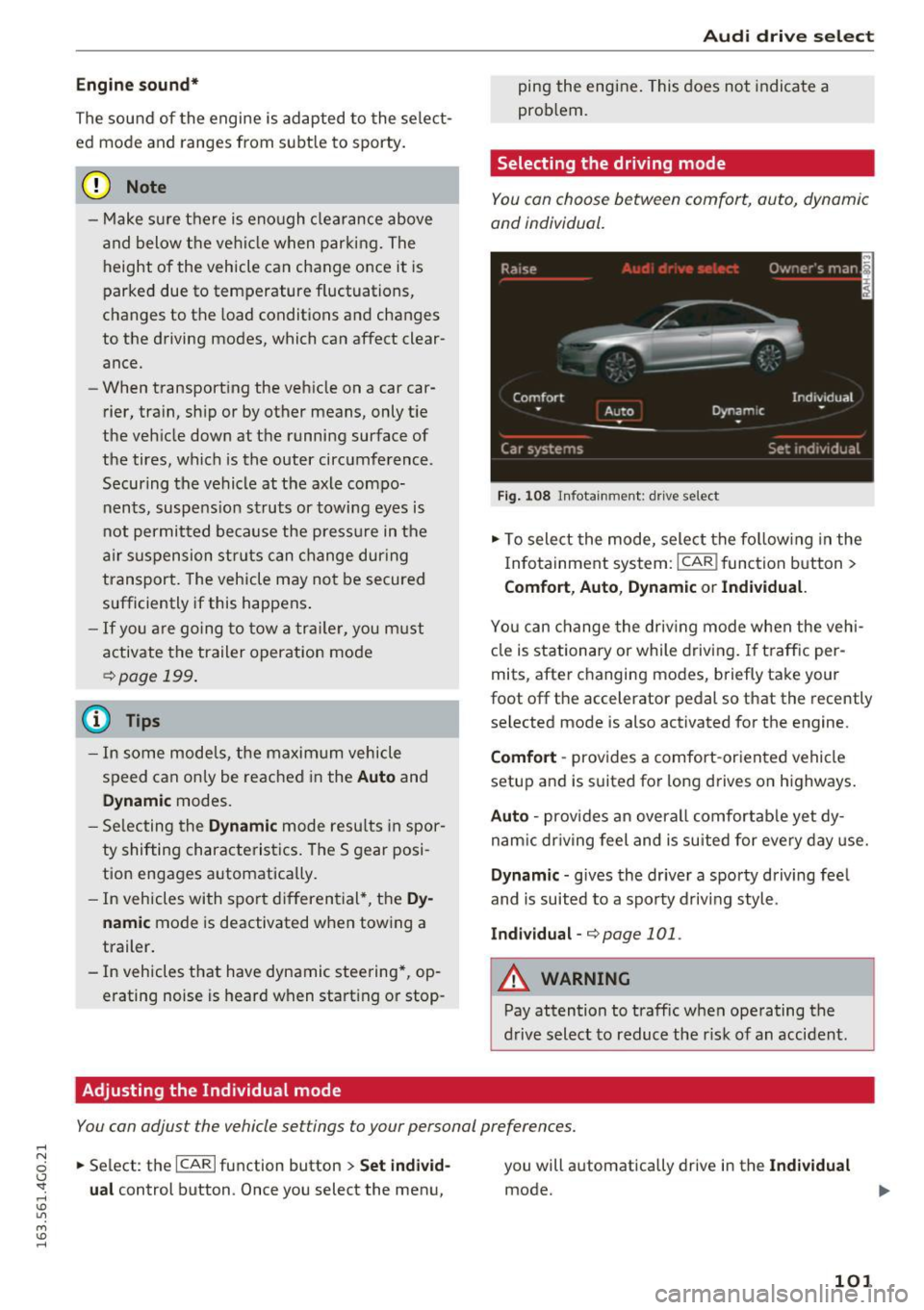
You con choose between comfort, auto, dynamic
and individual.
F ig. 1 08 In fotainment: drive select
.,. To sele ct the mode, select the fo llow ing in the
I n fotainment system:
I CAR ! function button >
Comfort , Auto , Dynam ic or Indi vidual.
Yo u can change the driv ing mode when the vehi
cle is stationary or while driving. If t raffic per
mits, after changing modes, briefly take your
foot off the accelerator pedal so that the recently selected mode is also activated for the engine.
Comfort -provides a comfort-oriented vehicle
setup and is suited for long d rives on h ighways .
Auto -provides an overa ll comfortab le yet dy
nam ic dr iving feel and is suited for every day use.
Dynamic -gives the driver a sporty driving fee l
and is suited to a sporty driv ing style.
Indi vidual -r:!;> page 101 .
A WARNING
Pay attention to traffic when operating the
d rive select to reduce the risk of an accident.
You con adjust the vehicle settings to your personal preferences .
.,. Se lect: the ICARI function button > Set indi vid
u al
control button . Once you select the menu, you will a
utomatically drive in the
Indi vidual
mode .
101
Page 114 of 294
Automatic transmission
Selector lever emergency release
If the vehicle's power supply fails, the selector
lever can be released in an emergency.
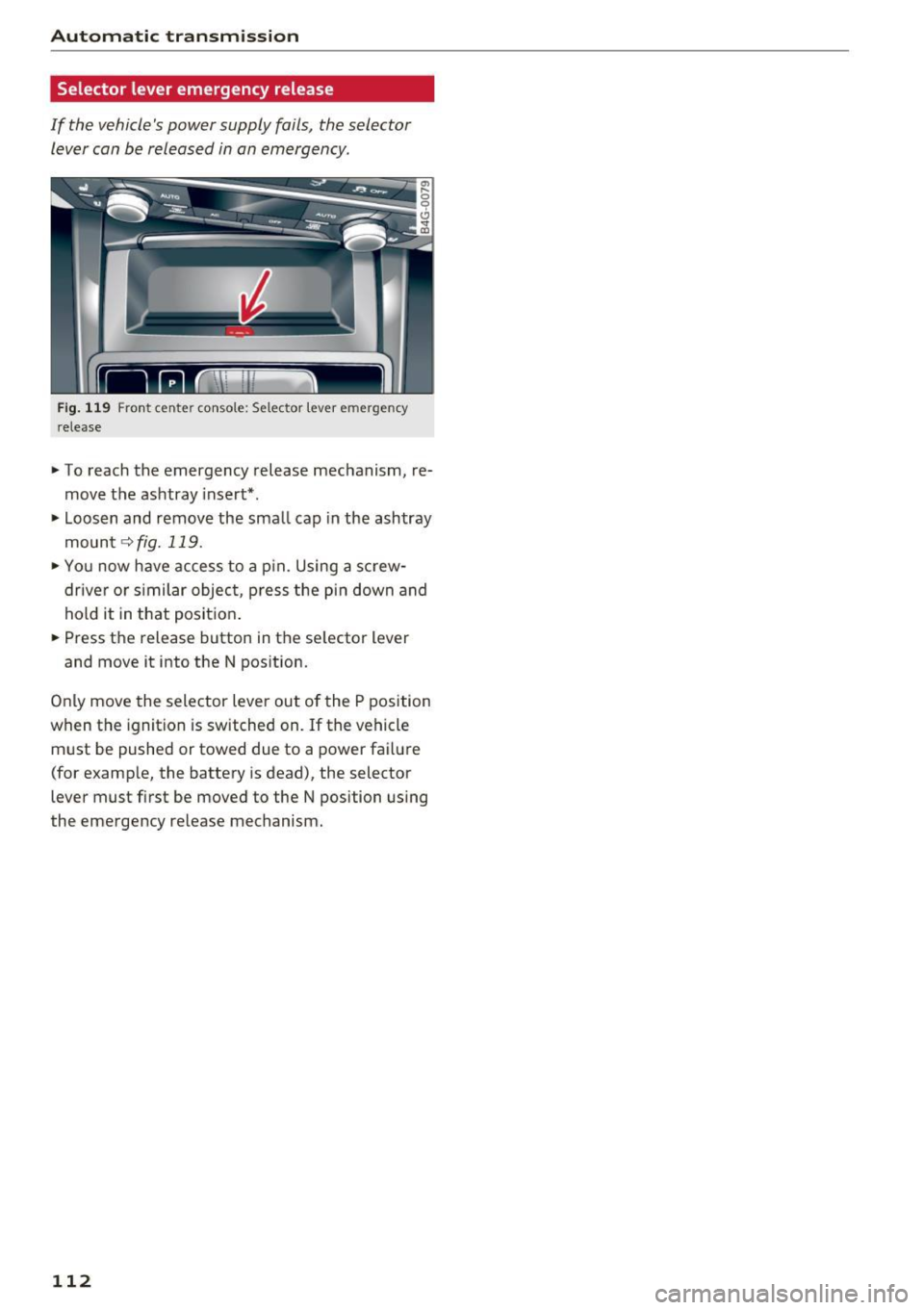
F ig. 119 F ront cen te r co nsole: Selector leve r em ergency
r elease
~ To reach the emergency release mechanism, re
move the ashtray insert*.
~ Loosen and remove the sma ll cap in the ashtray
mount
~ fig. 119.
~ You now have access to a p in. Using a screw
drive r or s imilar objec t, p ress the pi n down and
hold it in that posit ion .
~ Press the release button in the se lector lever
and move it into the N pos ition.
Only move the selector lever out of the P position
when the ignition is switched on. If the vehicle
must be pushed or towed due to a power fa ilure
(for examp le, the battery is dead), the selector
lever must first be moved to the N position using
the emergency re lease mechanism.
112
Page 115 of 294
Parking systems
General information
Applies to vehicles: with parking system plus/rear view cam
era/peripheral cameras
Depending on your vehicle's equipment, various
parking aids will help you when parking and ma
neuvering.
The
parking system plus assists you when park
ing by audibly and visually indicating objects de
tected
in front of and behind the vehicle
r::!:>page 114.
The rear view camera shows the area behind the
vehicle in the Infotainment display. This display
assists you when you are cross or parallel parking
r::!:> page 115. In addition, you are assisted by the
functions from the parking system plus
r::!:>page 114.
The peripheral cameras assist you with parking
and maneuvering. You are aided by various cam
e ras depending on the vehicle equipment leve l
¢ page 118. In addition, you are assisted by the
functions from the parking system plus
r::!:>page 114.
A WARNING
-Always look for traffic and check the area
around your vehicle by looking at it directly
as well. The parking system cannot replace
the driver's attention. The driver is always
responsible for safety during parking and
for all other maneuvers.
-
-Please note that some surfaces, such as
clothing, are not detected by the system.
- Sensors and cameras have blind spots in
which people and objects cannot be detect ed. Be especially cautious of children and
animals.
- The sensors can be displaced by impacts or
damage to the radiator grille, bumper,
wheel housing and the underbody. The park
ing systems may become impaired as a re
sult. Have your authorized Audi dealer or
qualified workshop check their function.
- Make sure the sensors are not covered by
stickers, deposits or any other obstructions
Parking systems
as it may impair the sensor function. For in
formation on cleaning, refer to
r::!:>page203.
(D Note
-Some objects are not detected by the sys
tem under certain circumstances:
- Objects such as barrier chains, trailer draw
bars, vertical poles or fences
- Objects above the sensors such as wall ex tensions
- Objects with specific surfaces or struc
tures such as chain link fences or powder
snow.
- If you continue driving closer to a low-lying
object, it may disappear from the sensor
range. Note that you will no longer be
warned about this obstacle.
(D Tips
- The system may provide a warning even
though there are no obstacles in the cover age area in some situations, such as:
- certain road surfaces or for long grass.
- external ultrasonic sources e.g. from cleaning vehicles.
- heavy rain, snow or thick vehicle exhaust.
- We recommend that you practice parking in
a traffic-free location or parking lot to be
come familiar with the system. When doing
this, there should be good light and weath
er conditions.
- You can change the volume and pitch of the
signals as well as the display
r::!:>page 123.
-Please refer to the instructions for towing a
trailer
r::!:>page 123.
-What appears in the infotainment display is
somewhat time-delayed.
113