tow AUDI A6 2016 Owner's Manual
[x] Cancel search | Manufacturer: AUDI, Model Year: 2016, Model line: A6, Model: AUDI A6 2016Pages: 294, PDF Size: 73.88 MB
Page 118 of 294
Parking systems
-The camera lens enlarges and distorts the
field of vision. The object appears both al
tered and inaccurate on the screen.
- In certain situations, people or objects in
the display appear closer or farther away:
- For objects that do not touch the ground,
such as the bumper of a parked vehicle, a
trailer hitch or the rear of a truck. Do not
use the help lines in this case.
- If driven from a level surface onto an in
cline, or a downward slope.
- If driven toward protruding objects.
- If the vehicle is carrying too much load in
the rear.
(D Note
- Always read and follow the applicable warn
ings r::!>(D
in General information on
page 113 .
-The orange colored orientation lines in the
Infotainment display show the vehicle path
depending on the steering wheel angle. The
front of the vehicle front swings out more
than the rear of the vehicle . Maintain plenty
of distance so that your outside mirror or a
corner of your vehicle does not collide with
any obstacles.
Switching on/off
Applies to vehicles: with rearview camera
Switching on
.,. Shift into reverse, or
.,. Press the
P,,, A button in the center console
r:=> page 114, fig. 121. A short confirmation
tone sounds and the LED in the button turns
on.
Switching between the rearview camera and
optical display
.,. Press the Graphic control button ®
r:=> page 116, fig. 126 to see the optical display .
.,. Press the
Rear view control button to see the
. . rearv1ew camera image.
Switching off
.,. Drive forward faster than 10 km/h, or
.,. press the
P,1
1.A button, or
116
.,. Switch the ignition off.
@ Tips
- The visual display in the left part of the dis
play should help you detect the critical vehi
cle areas.
- You can change the volume and pitch of the
signals as well as the dis play
r:=> page 123.
Cross parking
Applies to vehicles: with rearview camera
This view may be used when parking in a garage
or in a parking space.
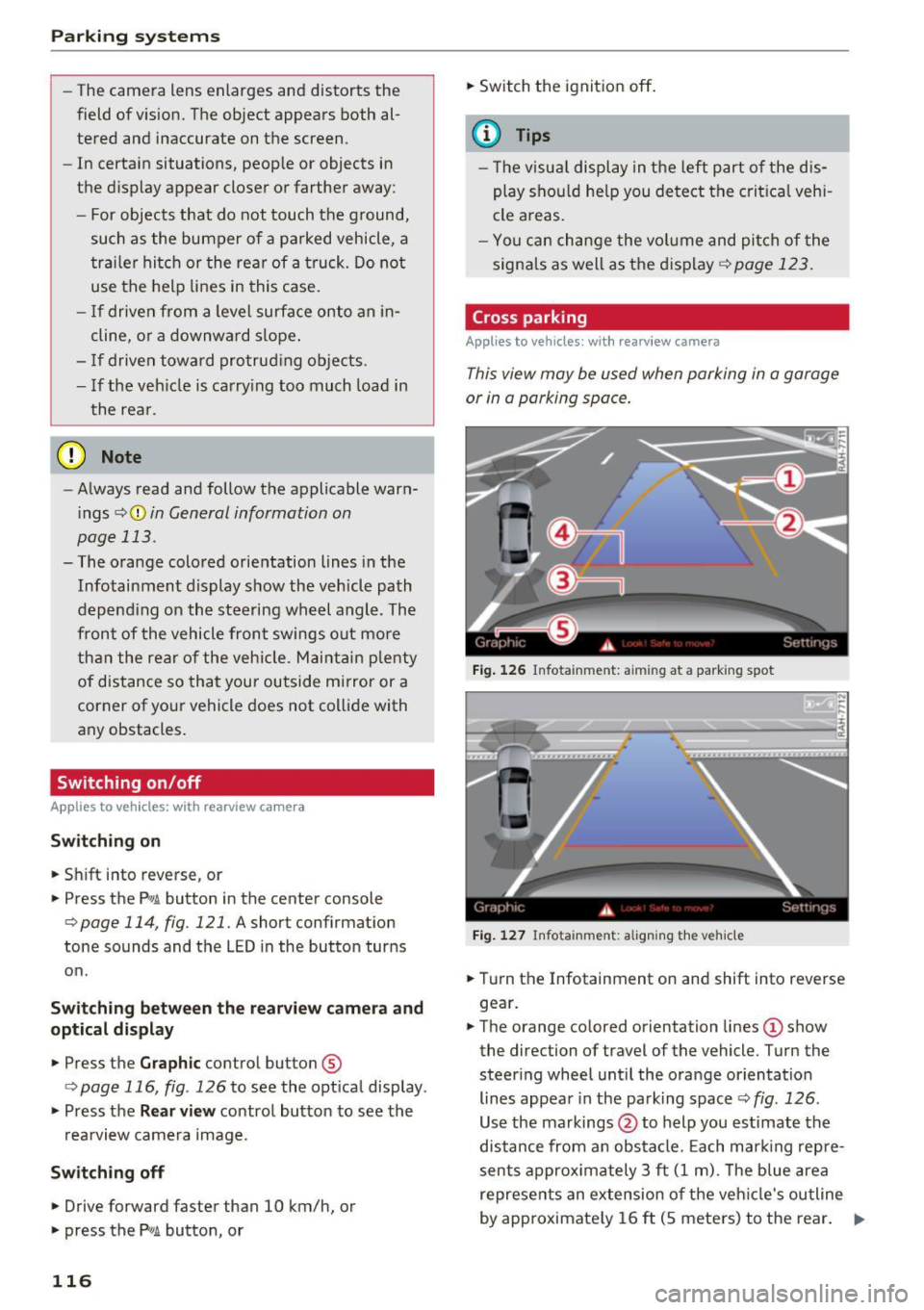
Fig. 126 Infotainment: aiming at a parking spot
Fig. 127 Infota inment: aligning the vehicle
.,. Turn the Infotainment on and shift into reverse
gear.
.,. The orange colored orientation lines
(D show
the direction of travel of the vehicle. Turn the
steer ing wheel until the orange orientation
lines appear in the parking space r::!>
fig. 126 .
Use the markings @to help you estimate the
distance from an obstacle. Each marking repre
sents approximately 3 ft
(1 m). The blue area
represents an extension of the vehicle's outline
by approximately
16 ft (5 meters) to the rear. .,._
Page 122 of 294
Parking system s
Corner view (front)/corner view (rear)
Applies to vehicles: with peripheral cameras
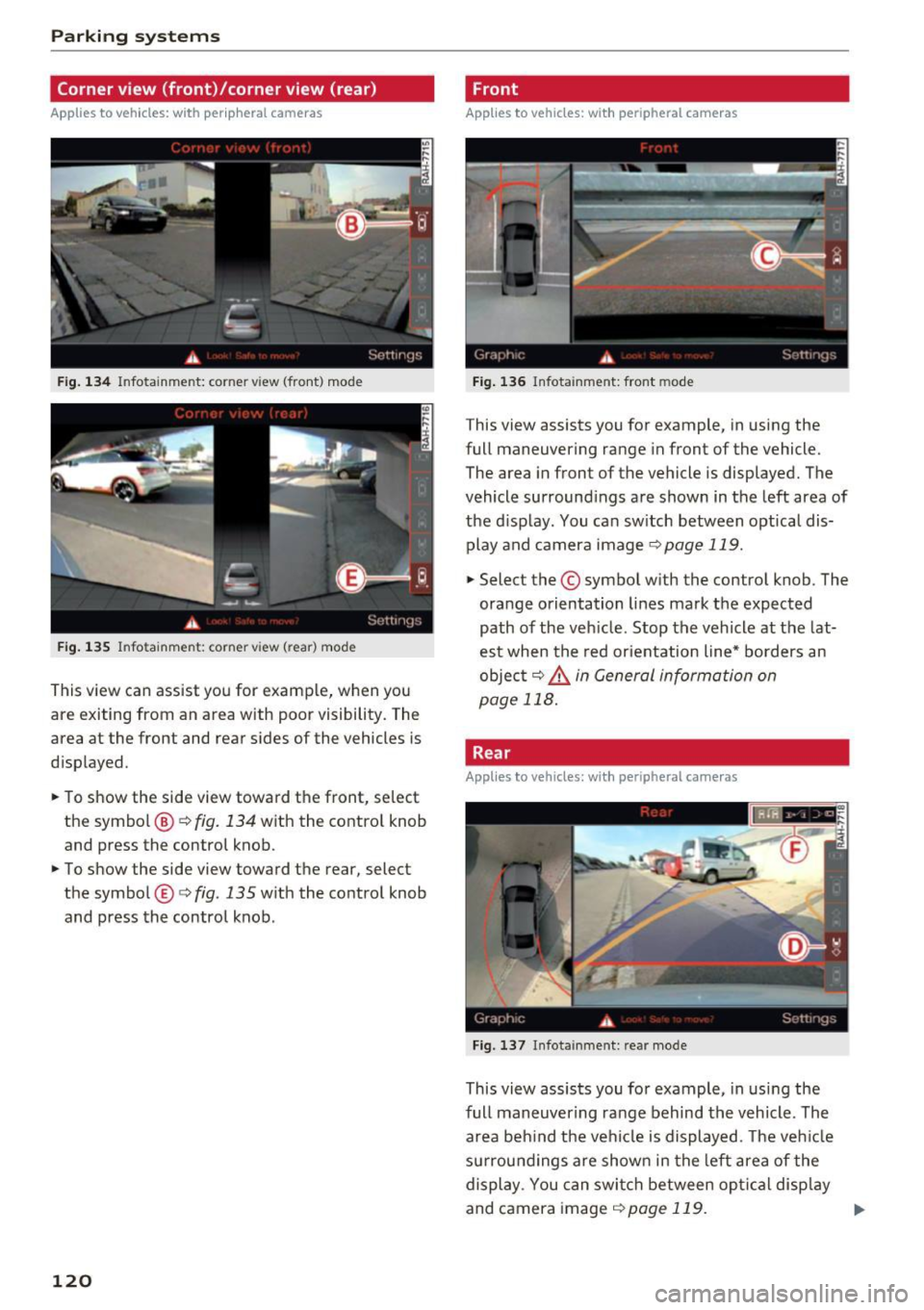
Fig . 1 34 In fo ta inme nt: co rner view (front ) mode
Fig . 135 In fo tainme nt: corner vie w ( rea r) mode
This view can assist you for examp le, when you
are exiting from an area with poor visibility. The
area at the front and rear sides of the vehicles is
d isp layed.
~ To show the side view toward the front, se lect
the symbol @¢
fig. 134 with the contro l knob
and press the control knob.
~ To show the side view toward the rear, selec t
the symbol ®¢
fig. 135 w ith the control knob
and press the control knob .
120
Front
Applies to vehicles: with peripheral cameras
Fig . 1 36 Infot ainm ent: fro nt m ode
This view assists you for example, in using the
full maneuvering range in front of the vehicle.
The area in front of the vehicle is displayed. The
vehicle surround ings are shown in the left area of
the d isplay . You can sw itch between optical dis·
play and camera image
¢ page 119.
~ Select the © symbol with the control knob. The
orange orientation lines mark the expected
path of the veh icle . Stop the vehicle at the lat·
est when the red orientation line* borders an
objec t
9 &. in General information on
page
118.
Rear
Applies to vehicles: with peripheral cameras
F ig. 137 Infota inmen t: rea r mo de
This view assists you fo r example, in usi ng the
full maneuver ing ra nge behind the vehicle. The
area beh ind the vehicle is displayed . T he ve hicle
su rrou nd ings a re shown in the left area of the
display . You can swi tch between op tical disp lay
and camera image
9 page 119. ..,_
Page 124 of 294
Parking system s
to this vehicle should be approximately 3 ft (1
m).
.. Turn the Infota inment on and shift into reverse
gear. The parking system is turned on and the
cro ss park ing view is disp layed .
.. Press the control button on the Infotainment
unit (D
¢page 117, fig . 128 . The par all el park
ing
ind icator is displayed .
.,. Back up and align yo ur vehicle so the b lue area
@ borders on the rear end of the ve hicle be
hind you or on the parking space line
¢ ..&. in
General information on page 118, ¢(D in Gen
eral information on page 118 .
The blue area
represents an extension of the vehicle's out line
by approximately
16 ft (5 meters) to the rear .
The long side of the blue area should be on the
curb . The entire blue area must f it into the
parking space .
.,. With the veh icle stopped, turn the steer ing
whee l to the right as far as it w ill go .
.,. Back in to the par king space until the b lue curve
¢
page 117, fig. 129 touches the curb¢..&. in
General information on page 118, ¢(D in Gen
eral information on page 118 .
Stop the vehicle.
.. With the veh icle stopped, turn the steering
whee l to the left as far as it will go.
.. Cont inue to back into the parking space unt il
the ve hicle is parked parallel to the curb¢
&
in General information on page 118, ¢(D in
General information on page 118. @
displays
the rear bumper. Stop the vehicle, at the latest ,
whe n the re d or ien ta ti on line @ borders an ob
ject. Keep an eye on the front of your vehicle
whi le doing this.
Parking next to obstacles
When the re is an obs tacle (such as a wa ll) next to
the par king space, choose a space with more
space on the sides. Posit ion the long side of the
b lue area so t hat there is sufficient space from
the object . The area must not be on the curb . You
will also need to start turn ing the steer ing whee l
much earlier. The b lue curve¢
page 117,
fig . 129
must not touch the obstacle, but rather
there should be enough distance.
122
@ Tips
The left or right orientation lines and surfaces
will be d isp layed, depend ing on the tu rn s ig
nal be ing used.
Trailer mode
App lies to vehicles: wit h peripheral ca meras a nd trailer hitch
This view assists you in positioning the vehicle in
front of a trailer.
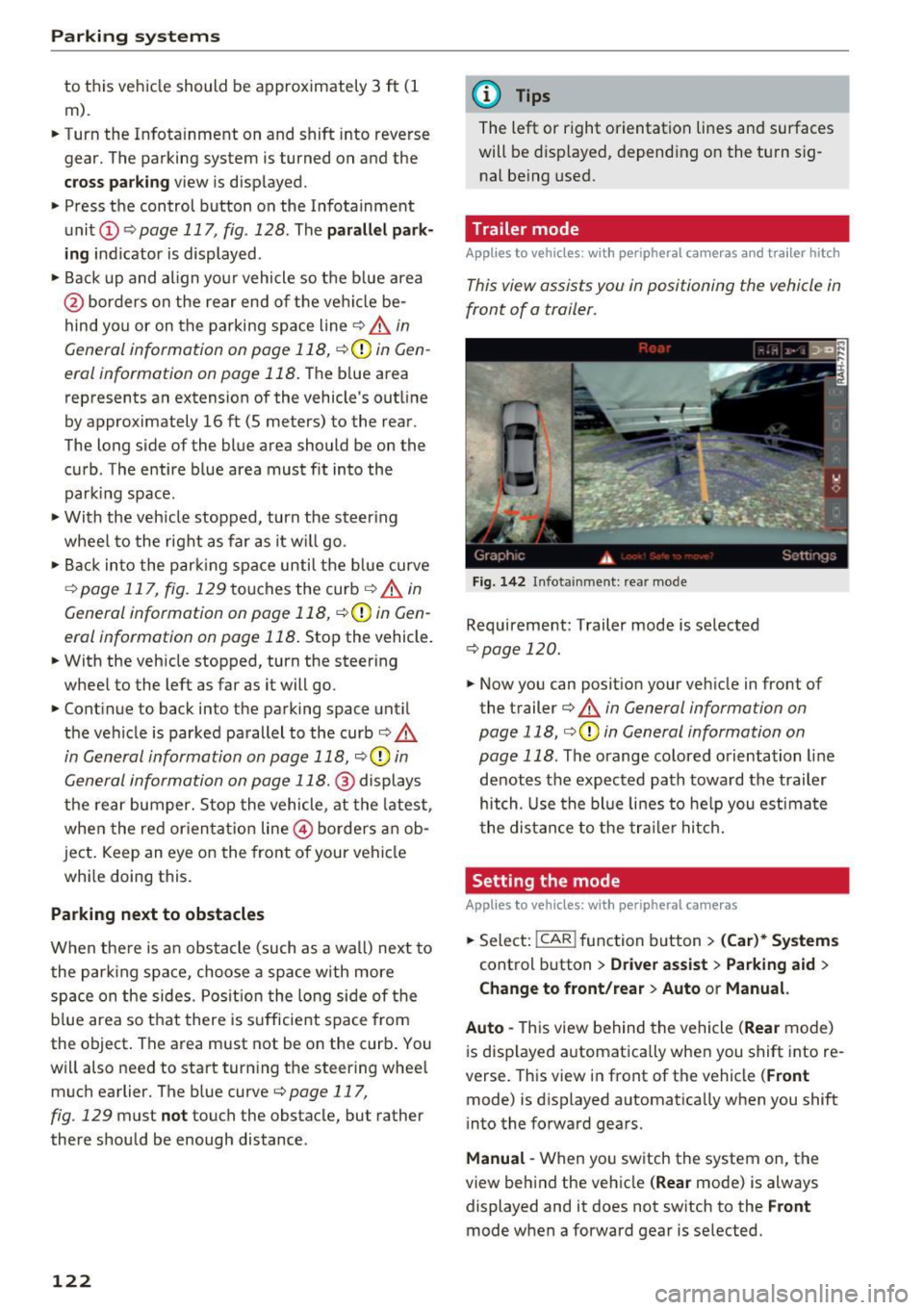
F ig. 142 I n fota inment: rea r mode
Requirement: Trailer mode is selected
¢ page 120 .
.. Now you can posit ion your veh icle in front of
the trailer
¢ & in General information on
page 118, ¢(D in General information on
page 118 .
The orange colored orientation line
denotes the expected path towa rd the trailer
hitch. Use the bl ue lines to he lp you est ima te
the distance to the tra ile r hitc h.
Setting the mode
App lies to vehicles : wit h peripheral ca meras
.. Select: !CAR ! function b utton> (Car )* System s
control button > Driver assi st > Parking aid >
Change to front/rear > Auto or Manual.
Auto -
This view behind the vehicle (Rear mode)
i s disp layed automatica lly when you shift into re
verse. This view in front of the vehicle
( Front
mode) is displayed automat ica lly when you shift
i nto the forward gears.
Manu al -When yo u sw itch the system on, the
view beh ind the veh icle
( Rear mode) is always
displayed and it does not switch to the
Front
mode when a forward gear is se lected.
Page 125 of 294
Adjusting the display and the warning tones
A ppl ies to vehicles: W it h parkin g system plus/rearview c am·
era/peripheral ca meras
The display and warning tones can be adjusted in
the Infotainment.
~ Se lect: the ICARI function button > ( Car)* Sys
tems control b utton
> Driver ass istance > Pa rk
ing aid .
Display
On * -An op tical d isp lay is shown for the parking
system plus, a rearview camera image is s hown
for the rearview camera *.
Off -Whe n the par king system is switched off,
only audib le signa ls are give n.
Warning tones Front volume - Volume for the front a rea
Rear volume - Volume fo r the rear area
Front frequency· Frequency for the front a rea
Rear frequency · Freq uency for the rear area
Entertainment volume lowering - When the
pa rking system is turned on, the volume of the
aud io/video so urce is lowered .
The new ly adjusted value is briefly heard from
the signal generato r.
@ Tips
- The warning tones can also be adjusted d i
rectly by the vis ual disp lay or the pictu re
from the camera. Simply press the Settings
control bu tton.
- Changed settings are activated when the
parking system is switched o n aga in.
- The settings for volume and frequency are
automat ica lly saved and assigned to the re
mote control key be ing used .
Error messages
Appl ies to vehicles: W ith pa rk in g syste m plus/rearview ca m·
era/per ipheral ca meras
There is an erro r in the system if the LED in the
Pw , button is b linking and yo u hear a continuous
Parking systems
alarm for a few seconds after sw itch ing on the
par king system or w hen the pa rking system is a l·
ready activated. If the error is not cor rected be
fo re you switch
off the ignition, the LED in the Pw ,
button wi ll blink the next time you switch on the
park ing system by shifting into reverse.
Parking sy stem plus
If a sensor is fa ulty, the .l?4 symbo l will appear i n
front of/behind the vehicle in the Infotainment
display. If a rear sensor is faulty, on ly obstacles
that are in areas @and @ are shown
¢ page 114, fig . 120 . If a front sensor is faulty,
only obs tacles tha t are in areas © and @are
shown. The re is a lso a system ma lf u nction if all
segme nts ar ound the veh icle are red or if no seg·
me nts are disp laye d.
Peripheral cameras*
T he re is a system malfu nction if t he
t8> • symbol
appea rs and the co rresponding disp lay area is
shown in bl ue. The camera is not wo rking in this
area.
Drive to an authorized A udi dealer or authorized
Audi Service Facility immed iate ly to have the
malfunction corrected.
Trailer hitch
App lies to vehicles: wit h parking system pl us/rea rv iew cam
era/periphera l cameras an d tra ile r hitc h
For vehicles using the t rai ler socket, the park ing
system rear sensors do not tu rn on whe n you
shift into reverse gear or when yo u press the
Pwi
button. This resu lts in the following restrict ions.
Parking system plus
There is no distance warning for the rear. The
front senso rs remain activated. The v isua l display
switches to t he tra iler tow ing mode.
Rearview camera* /peripheral cameras *
T he re is no distance warning for the rear . The
front sensors remain activated . The visua l display
switches to the tra ile r towing mode. The rearv iew
camera image w ill not show the orientation lines
and the b lue surfaces. .,,.
123
Page 129 of 294
~ Always keep both feet in the footwell so that
you are in control of the vehicle at all times.
F or detailed information on how to adjust the
driver's seat, see
¢ page 54.
A WARNING
Drivers who are unbelted, out of position or
too close to the airbag can be seriously in
jured by an airbag as it unfolds. To help re
duce the risk of serious personal injury:
- Always adjust the driver's seat and the
steering wheel so that there are at least
10 inches (25 cm) between your breastbone
and the steering wheel.
- Always adjust the driver's seat and the
steering wheel so that there are at least
4 inches (10 cm) between the knees and the
lower part of the instrument panel.
- Always hold the steering wheel on the out
side of the steering wheel rim with your
hands at the 9 o'clock and 3 o'clock posi
tions to help reduce the risk of personal in
jury if the driver's airbag inflates.
- Never hold the steer ing wheel at the
12 o'clock posit ion or with your hands at
other positions inside the steering wheel
rim or on the steering wheel hub. Holding
the steering wheel the wrong way can cause
serious injuries to the hands, arms and head if the driver 's airbag inflates.
- Pointing the steering wheel toward your
face decreases the ability of the supplemen
tal driver's airbag to protect you in a colli sion.
- Always sit in an upright position and never
lean against or place any part of your body
too close to the area where the airbags are
located.
- Before driving, always adjust the front seats
properly and make sure that all passengers
are properly restrained.
- For adjustable head restraints: before driv
ing, always also adjust the head restraints
properly .
- Never adjust the seats while the vehicle is
moving. Your seat may move unexpectedly
and you could lose control of the vehicle.
-
Driving safety
-Never drive with the backrest reclined or
tilted far back! The farther the backrests are
tilted back, the greater the risk of injury due
to incorrect positioning of the safety belt
and improper seating position.
- Children must always ride in child seats
¢ page 166 . Special precautions apply
when installing a child seat on the front
passenger seat¢
page 142.
Proper seating position for the front
passenger
The proper front passenger seating position is
important for safe, relaxed driving.
For your own safety and to reduce the risk of in
jury in the event of an accident, we recommend
that you adjust the seat for the front passenger
to the fol lowing position:
~ Adjust the angle of the seatback so that it is in
an upright position and your back comes in full
contact with it whenever the vehicle is moving.
~ For adjustable head restraints: adjust the head
restraint so the upper edge is as even as possi
ble with the top of your head. If that is not pos
sible, try to adjust the head restraint so that it is as close to this position as possible
¢
page 128 . Move the head restraint so that it
is as close to the back of the head as possible.
~ Keep both feet flat on the floor in front of the
front passenger seat.
~ Fasten and wear safety belts correctly
¢page 137.
For detailed information on how to adjust the
front passenger's seat, see
¢ page 53 .
A WARNING
Front seat passengers who are unbe lted, out
of position or too close to the airbag can be
seriously injured or killed by the airbag as it
unfolds . To help reduce the risk of serious
personal injury:
- Passengers must always sit in an upright po
sition and never lean against or place any pa rt of their body too close to the area
where the airbags are located. ..,.
127
Page 133 of 294
-Never place or install floor mats or other
floor coverings on top of already installed
floor mats. Additional floor mats and other
coverings will reduce the size of the pedal
area and interfere with the pedals .
- Always properly reinstall and secure floor
mats that have been taken out for cleaning.
- Always make sure that objects cannot fall
into the driver footwell while the vehicle is
moving . Objects can become trapped under
the brake pedal and accelerator pedal caus ing a loss of veh icle control.
Storing cargo correctly
Loading the luggage compartment
All luggage and other objects must be properly
stowed and secured in the luggage compart
ment.
L oose items in the luggage compartment can
shift suddenly, changing vehicle handling charac
teristics. Loose items can also increase the risk of
serious personal injury in a sudden vehicle ma
neuver or in a collision.
.. Distribute the load evenly in the luggage com
partment.
.. Always place and properly secure heavy items in
the luggage compartment as far forward as
possible.
.,. Secure luggage using the tie-downs provided
¢ page 64, Luggage compartment .
.,. Make sure that the rear seatback is securely
latched in place.
A WARNING
Improperly stored luggage or other items can
fly through the vehicle causing serious per
sonal injury in the event of hard braking or an
accident. To help reduce the risk of serious
personal injury:
- Always put objects, for example, luggage or
other heavy items in the luggage compart
ment.
- Always secure objects in the luggage com
partment using the tie-down hooks and
suitable straps.
Driving safety
A WARNING
Heavy loads will influence the way your vehi
cle handles. To help reduce the risk of a loss
of control lead ing to serious personal injury:
- Always keep in mind when transporting
heavy objects, that a change in the center of
gravity can also cause changes in vehicle handling:
- Always distribute the load as evenly as
possible .
- Place heavy objects as far forward in the
luggage compartment as possible.
- Never exceed the Gross Axle Weight Rating
or the Gross Vehicle Weight Rating specified
on the safety compliance sticker on the left
door jamb. Exceeding permissible weight
standards can cause the vehicle to slide and handle differently.
- Please observe information on safe driving
¢page 125.
A WARNING
To help prevent poisonous exhaust gas from
being drawn into the vehicle, always keep the
rear lid closed while driving .
- Never transport objects larger than those
f itting completely into the luggage area be
cause the rear lid cannot be fully closed.
- If you absolutely must drive with the rear lid open, observe the following notes to reduce
the risk of poisoning:
- Close all windows,
- Close the power roof*,
- Open all air outlets in the instrument pan-
el,
- Switch off the air recirculation,
- Set the fresh air fan to the highest speed .
A WARNING
Always make sure that the doors, all win
dows , the power roof* and the rear lid are se
curely closed and locked to reduce the r isk of
in jury when the vehicle is not being used.
- After closing the rear lid, always make sure
-
that it is properly closed and locked. ~
131
Page 141 of 294
.... N
0 CJ '
Pregnant women must also be correctly
restrained
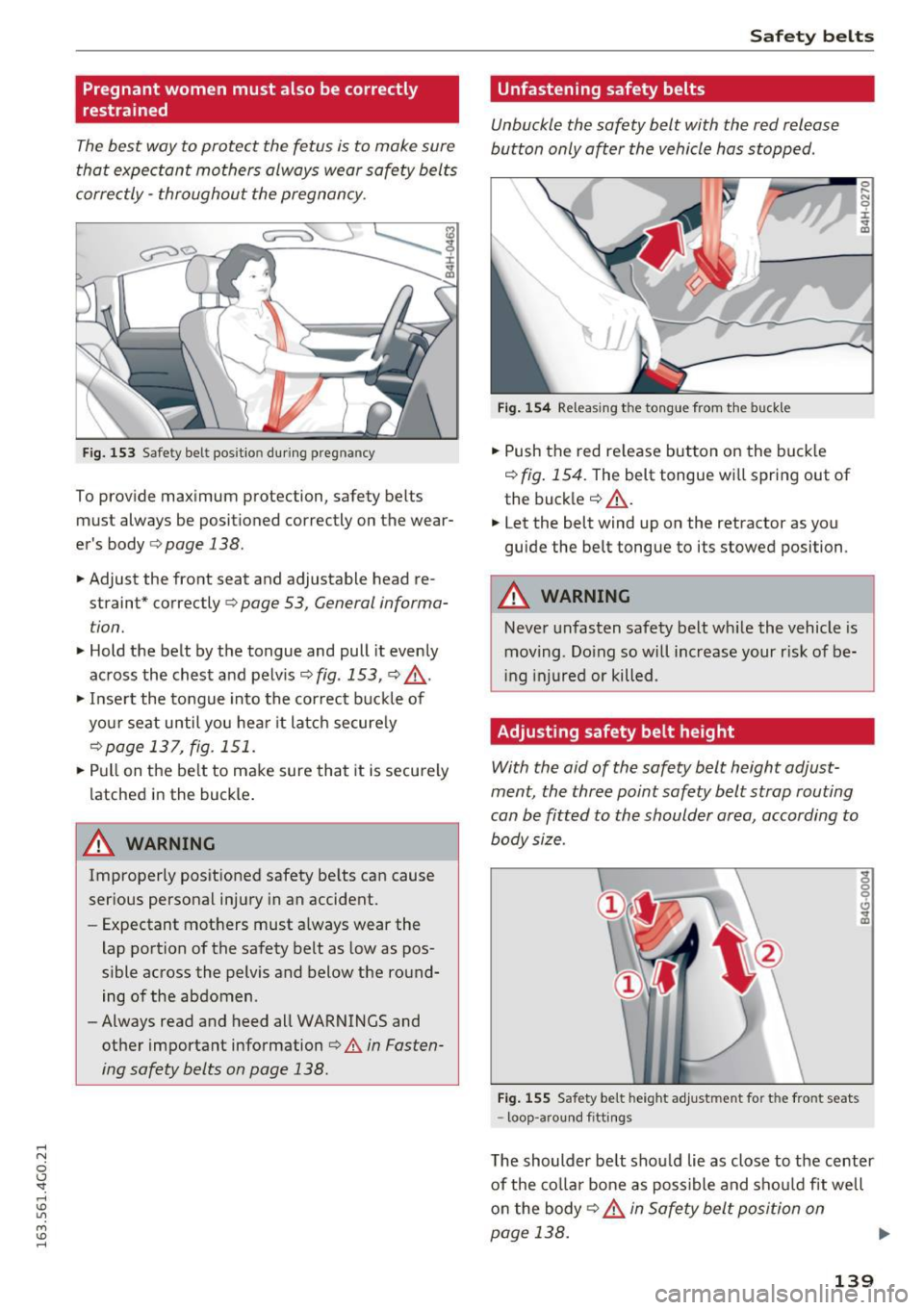
The best way to protect the fetus is to make sure
that expectant mothers always wear safety belts
corre ctly -throughout the pregnan cy.
F ig. 153 Safety belt pos itio n dur ing pregnancy
To provide max imum protection, safety belts
must always be posit ioned correctly on the wear
er 's body
¢ page 138.
.. Adjust the front seat and adjustable head re
straint* correctly
r:::;, page 53, General informa
tion .
.. Hold the belt by the tongue and pull it evenly
across the chest and pelv is
r:::;, fig . 153, r:::;, &_ .
.,. Inse rt the tongue into the cor rect b uckle of
yo ur seat until you hea r it latch secure ly
r:=:>poge 137, fig . 151.
.,. Pull on the be lt to make sure that it is secu rely
latched in the buckle .
_& WARNING
Improperly positioned safety be lts can cause
ser ious personal injury in an accident.
- Expectant mot hers must a lways wear the
lap portion of the safety belt as low as pos
sible across the pelvis and below the round ing of the abdomen .
- Always read and heed all WARNINGS and
other important information
¢ A in Fasten
ing safety belts on page 138.
Safet y bel ts
Unfastening safety belts
Unbuckle the safety belt with the red release
button only o~er the vehicle hos stopped .
J-L
Fig . 1 54 Releasing t he tongue from the buckle
.. Push the red re lease button on the buck le
r:::;, fig . 154. The belt tongue w ill spring out of
the buck ler:::;, &_.
.,. Let the belt wind up on the retractor as you
guide the belt tongue to its stowed position .
_& WARNING
-Never unfasten safety belt wh ile the vehicle is
moving . Do ing so will increase your r isk of be
i ng injured or killed .
Adjusting safety belt height
With the aid of the safety belt height adjust
ment, the three point safety belt strop routing
con be fitted to the shoulder area, according to
body size.
F ig . 1 55 Safety belt height adj ust m ent fo r th e fro nt seats
- loop -arou nd f itt ings
0 ..... N
0
:i:
"' CD
The shoulder be lt shou ld lie as close to the center
of the co ll ar bone as possible and shou ld fit well
o n the body
¢ &. in Safe ty belt position on
page 138. .,,.
139
Page 153 of 294
.... N
0 CJ -
manufacturer's instructions require the use
of a towel, foam cushion or someth ing else
to properly pos ition the child restraint,
make certain that the
PA SS EN GE R A IR B AG
OFF
light comes on and stays on whenever
the ch ild restraint is installed on the front
passenge r seat.
- If the
PASSENGER AIR BA G OFF light does
not come on and stay on, immediately in
stall child res traint in a rear seating position
and have the airbag system inspected by
your Audi dealer .
_& WARNING
If the front passenger seat gets wet, dry it im
mediately .
-If liqu id soaks into the fron t passenger seat,
this can keep the airbag system from work
ing properly and may, for instance, deacti
vate the passenger frontal airbag. If this
happens, the
PASSENGER AIR BAG OFF
light will come on and stay on together with
the a irbag indicator light
II (USA models)/
E,I (Canada models) in the instrument clus
ter .
- If liquid is pooled on the seat, but has not soaked in, this may also keep the a irbag sys
tem from working properly and ca use the
pa ssenge r frontal a irbag to be enabled
(t ur ned on), even t hough the re is a properly
installed child restraint system on the seat.
Wet towe ls or other wet things o n the seat
cushion can have the same effect. If the
front passenger frontal airbag is t urned on,
the
PASSENGER AIR BAG OFF light light
will go out .
How the Advanced Airbag System
components work together
The front Advanced Airbag System and the side
airbags s upplemen t the protection offered by the
front three-point safety bel ts with pretensioners
and load limiters and the adjustable head re
straints * to help reduce the risk of injury in a
wide range of accident and crash situations. Be
sure to read the important information about
safety and heed the WARNINGS in this chapter.
Airb ag sys tem
Deployment of the Adv a need Airbag System and
the activation of the safety belt pretensioners de
pend on the dece leration measured by the crash
sensors and registered by the electronic control
unit. Crash severity depends on speed and decel
eration as well as the mass and stiffness of the
vehicle or object involved in the crash .
On the passenger side, regard less of safety belt
use, the front passenger frontal airbag will be
turned off if the e lectr ica l capacitance measured
by the capacitive passenger detect ion system on
the front passenger seat is less than the amount
programmed in the electron ic contro l unit. The
front passenge r frontal a irbag wi ll also be turned
off if the capaci tance measured by the system for
the front passenger seat equals that of an infant
of about one year of age in one of the chi ld seats
that was used to certify the Advanced Airbag Sys
tem under Federal Motor Vehicle Safety Standard
208 . The
P ASS ENGER AIR BA G OFF light comes
on and stays o n to tell you when the front Ad
vanced Airbag System on the passenger side has been t urned off
c::> page 154 .
_& WARNING
To reduce the ris k of injury when an airbag in
flates, always wear safety belts prope rly.
- If you are un restra ined, leaning forward, sit
ting sideways or ou t of position in a ny way ,
your r isk of injury is much higher .
- You will a lso receive ser ious injuries and
could even be killed if you are up against the
a ir bag or too close to it when it inflates -
even with an Advanced Airbag
c::> page 142.
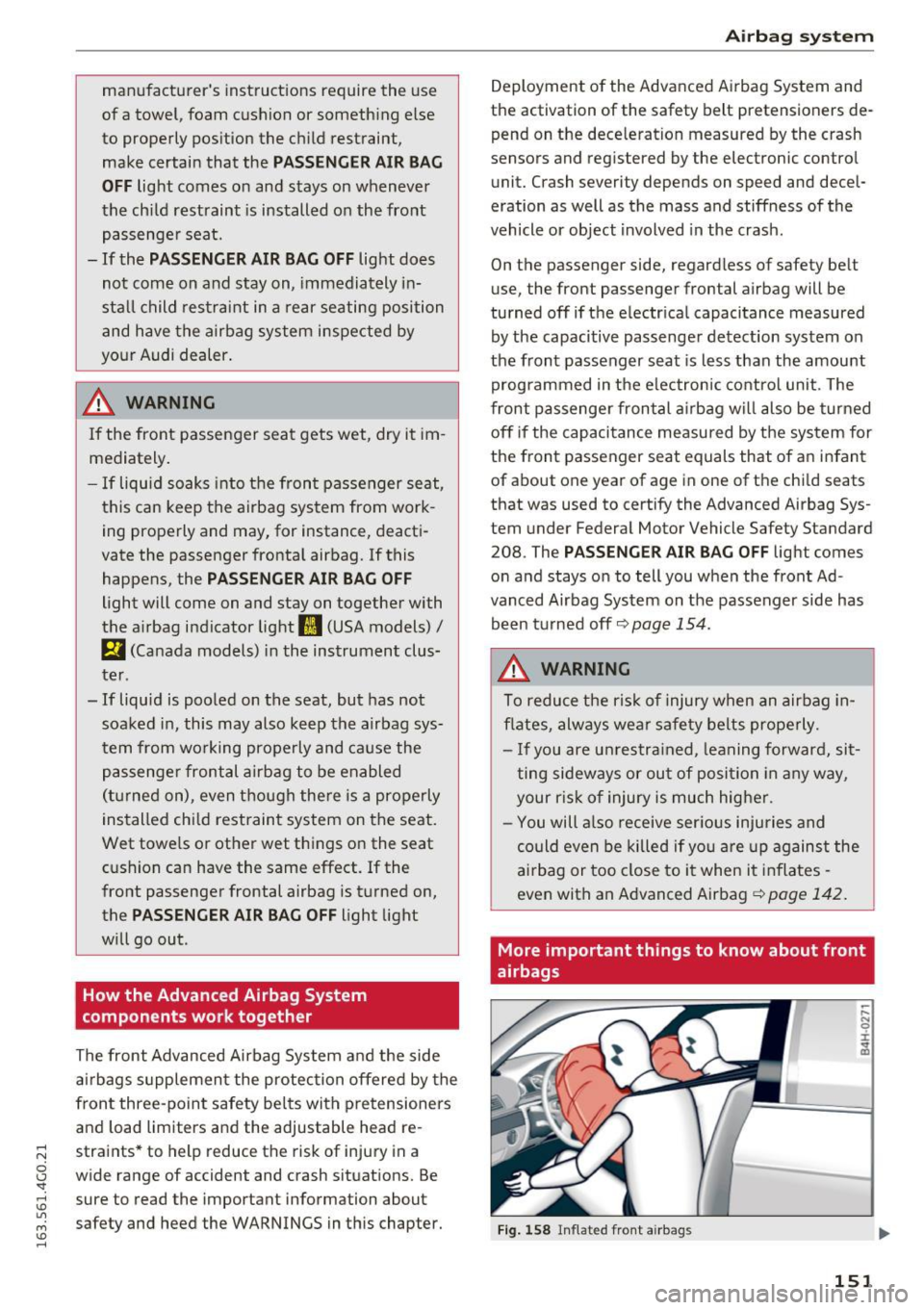
More important things to know about front
airbags
Fig . 158 Inflated front airbags
151
Page 157 of 294
restraints that were used to certify your vehi
cle's compliance with the U.S. Safety Standard
¢ page 168.
-will go out if the front passenger seat is occu
pied by an adult as registered by the capacitive
passenger detection system .
- The
PASSENGER AIR BAG OFF light must come
on and stay on if the ignition is on and .. .
- a car bed has been insta lled on the front pas
senger seat, or
- a rearward- facing child restraint has been in
sta lled on the front passenger seat, or
- a forward-facing child restra int has been instal
led on the front passenger seat,
- and if the e lectr ica l capacitance reg istered on
the front passenger seat is equal to or less than
the combined capacitance of a typical 1 year
old infant and one of the rearward-facing or
forward-facing chi ld restraints listed in Federal
Motor Vehicle Safety Standard 208 w ith which
the Advanced Airbag System in your vehicle was
certified.
If the front passenger seat is not occupied, the
front a irbag w ill not deploy, and the P A SSENGER
AIR BAG OFF
light will stay on. Never install a
rearward -fac ing ch ild restraint on the front pas
senger seat, the safest place for a child in any
kind of child rest ra int is at one of the seat ing po
sitions on the rea r seat
¢ page 143, Child re
straints on the front seat -some important
things to know
and ~ page 166, Child safety .
If the PASSENGER AIR BAG light comes
on ...
If the PASSENGER AIR BAG OFF ligh t comes on
when one of the condit ions listed above is met,
be sure to check the light regularly to make cer
tain that the
PAS SENGER AIR BA G OFF lig ht
stays on cont inuous ly whenever the ign ition is
on. If the
PA SSENGER AIR BAG OFF light does
not appear on and does not stay on all the time,
stop as soon as it is safe to do so and
- reactivate the system by turning the ign ition
off for more than 4 seconds and then turning it
on again;
- remove and reinstall the child restra int. Make
sure that the child restraint is properly instal-
Airb ag sys tem
led and that the safety belt for the front pas
senger seat has been correct ly routed through
the child restraint as described in the c hil d re
straint manufacturer's instruct ions;
- make sure that the convertible locking retrac
tor on the safety belt for the front passenger
seat has been activated and that the safety belt
has been pulled tight.
- make sure that no e lectr ica l device (such as a
laptop, CD player, e lectron ic games device,
power inverter or seat heater for ch ild seats) is
placed or used on the fro nt passenger seat if
the device is connected to the 12-volt socket or
t he c igarette ligh ter socket;
- make sure that no seat heater has been ret ro
fitted o r othe rw ise added to the front passen
ge r seat;
- make sure that not hing can inte rfere wi th the
safety belt buckles and t hat they are not ob
s t ructed;
- make sure that there are no wet objects (such
as a wet towe l) and no wa ter or other liquids on
t he front p assenge r seat cushion .
If the PASSENGER AIR BAG light still does
not come on ...
If the PASSENGER AIR BAG OFF light still does
not come on and does no t stay on continuously
(when the ignition is switched on),
- take the child restra int off the front passenge r
seat and insta ll it properly at o ne of the rear
seat pos itions. Have the airbag system i nspect
ed by yo ur Audi dealer immed iately .
- move the child to a rear seat pos ition and ma ke
sure that the chi ld is p roperly rest rained in a
child restra int that is app ropr iate for its s ize
and age .
The PASSENGER AIR BAG light should NOT
come on ...
The PASSENGER AIR BAG OFF light should NOT
come on when the ignition is on and an adu lt is
sitting in a prope r seating position on the front
passenger seat. If the
PASSENGER AIR BAG OFF
light comes on and stays on or flashes for about
5 seconds while dr iv ing, under these circumstan-
ces, make sure that :
Ill-
155
Page 169 of 294
exceptional circumstances and the
PASSENGER AIR BAG OFF light does not
come on and stay on, immediately install
the rear-facing child safety seat in a rear
seating position and have the airbag system
inspected immediately by your Audi dealer .
A WARNING
-Forward-facing child seats installed on the
front passenger seat may interfere with the deployment of the airbag and cause serious
personal injury to the child.
- If exceptional circumstances require the use
of a forward-facing child restraint on the
front passenger's seat , the child's safety
and well-being require the following special
precautions to be taken:
- Always make sure that the forward -facing
seat has been designed and certified by its manufacturer for use on a front passenger
seat with a front and side airbag.
- Always carefully follow the manufacturer's instructions provided with the child seat
or infant carrier.
- Never install a child restraint without a
properly attached top tether strap if the
child restraint manufacturer's instructions
require the top tether strap to be used.
- Never put the forward-facing child re
straint up against or very near the instru
ment panel.
- Always set the safety belt upper anchor
age to the adjustment position that per
mits proper installation in accordance
with the child restraint manufacturer's in
structions.
- Always move the passenger seat into its
rearmost position in the seat's fore and
aft adjustment range, as far away from
the airbag as possible before installing the
child restraint. The backrest must be ad
justed to an upright position .
- Always make sure that nothing prevents
the front passenger's seat from being moved to the rearmost position in its fore
and aft adjustment range .
Child safety
-Never place objects on the seat (such as a
laptop, CD player, electronic games de
vice, power inverter or seat heater for
child seats) . These may influence the elec
trical capacitance measured by the capaci
tive passenger detection system and can
also fly around in an accident and cause serious personal injury.
- Never place or use any electrical device
(such as a laptop, CD player, electronic
games device, power inverter or seat heat
er for child seats) on the front passenger
seat if the device is connected to the 12-
volt socket or the cigarette lighter socket.
- If a seat heater has been retrofitted or
otherwise added to the front passenger
seat, never install any child restraint sys
tem on this seat.
- Make sure that there are no wet objects
(such as a wet towel) and no water or oth
er liquids on the front passenger seat cushion.
- Always make sure that the
PASSENGER
AIR BAG OFF
light comes on and stays on
all the time whenever the ignition is
switched on.
- If the
PASSENGER AIR BAG OFF light
does not come on and stay on, immediate
ly install the forward-facing child seat in a
rear seating position and have the airbag
system inspected by your authorized Audi
dealer.
- Always buckle the child seat firmly in
place even if a child is not sitting in it. A
loose child seat can fly around during a
sudden stop or in a collision.
- Always read and heed all WARNINGS
whenever using a child restraint in a vehi
cle
r=;, page 134, Safety belts, r=;, page 142,
Airbag system
and ¢ page 166, Impor
tant informat ion .
(D Tips
Always replace child restraints that were in
stalled in a vehicle during a crash. Damage to
a child restraint that is not visible could cause it to fail in another collision situation.
167