brake light AUDI A6 2016 Owner's Manual
[x] Cancel search | Manufacturer: AUDI, Model Year: 2016, Model line: A6, Model: AUDI A6 2016Pages: 294, PDF Size: 73.88 MB
Page 91 of 294
.... N
0 CJ '
M
"' ......
Audi ada pti ve c ruise contr ol and br akin g gu ard
The highe r the speed, the greater the distance in
yards (meters) ¢&. .The
Distance 3 setting is
recommended .
The distan ces p rovided are specified values. De
pending on the driving situation and the how the
vehicle ahead is driving, the actual distance may
be more or less than these target d istances.
The various symbols fo r the time increments ap
pear br ie fly in the information line @ ¢
page 86,
fig. 93 when you change the settings.
c:::, _c:::, ___ Dis tan ce 1: This setting corresponds
to a distance of 92 fee t/28 meters when travel
ing at 62 mph (100 km/h), o r a time interval of 1
second.
c:::, __ c:::, __ Distan ce 2 : This setting corresponds
to a distance of 118 feet/36 meters whe n travel
ing at 62 mph (100 km/h), or a time interval of
1.3 seconds.
c:::, ___ c:::,_ Distanc e 3: This setti ng corresponds
to a distance of 164 feet/SO meters when travel ing at 62 mph (100 km/h), o r a time interval of
1.8 seconds.
c:::, __ __ c:::, Di stance 4 : This setti ng corresponds
to a distance of 210 feet/64 meters when travel ing at 62 mph (100 km/h), or a time interval of
2 .3 seconds.
A WARNING
Following other vehicles too closely increases
the risk of collisions and ser ious personal in
jury.
- Setting short distances to the traffic ahead reduces the t ime and distance available to
br ing your vehicle to a safe stop a nd makes
it even more necessary to pay close atten
t ion to traffic .
- Always obey applicable traff ic laws, use
good judgment, and select a safe following distance for the traffic, road and weathe r
condit io ns.
(D Tips
- Di stance 3 is set automatically each time
you switch the ignition on . -
Your standard settings are automatically
stored and assigned to the remote control
key being used.
Selecting the driving mode
Applies to vehicles: with Aud i adapt ive cru ise control
.,. Select the desired driving mode in drive select
¢page 100.
{!) Tips
Your settings are automatically stored and as
s igned to the remote control key being used.
Prompt for driver intervention
Applies to vehicles: with Aud i adapt ive cru ise control
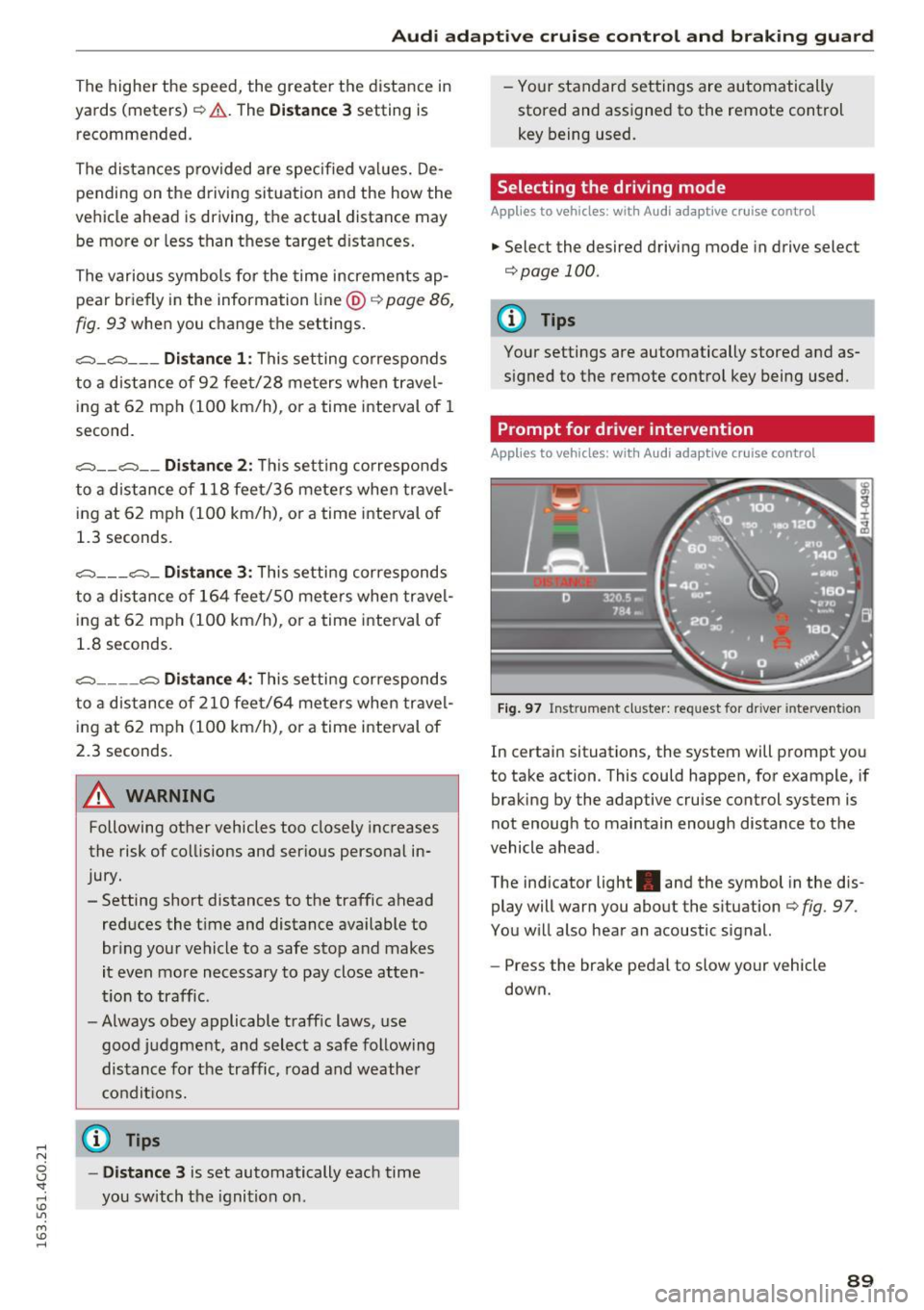
F ig . 97 Inst rume nt cluster: request for d river in tervention
In certain situations, the system will prompt you
to take action . This could happen, for example, if
braking by the adaptive cru ise control system is
not enough to maintain enough distance to the
vehicle ahead .
The ind icator light . and the symbol in the dis
play will warn you about the situation ¢
fig. 97 .
You w ill also hear an acoustic signal.
- Press the brake pedal to slow yo ur vehicle
down.
89
Page 92 of 294
Audi adaptive cruise control and braking guard
Audi braking guard
Description
Applies to vehicles: w ith Audi adaptive cruise co ntro l
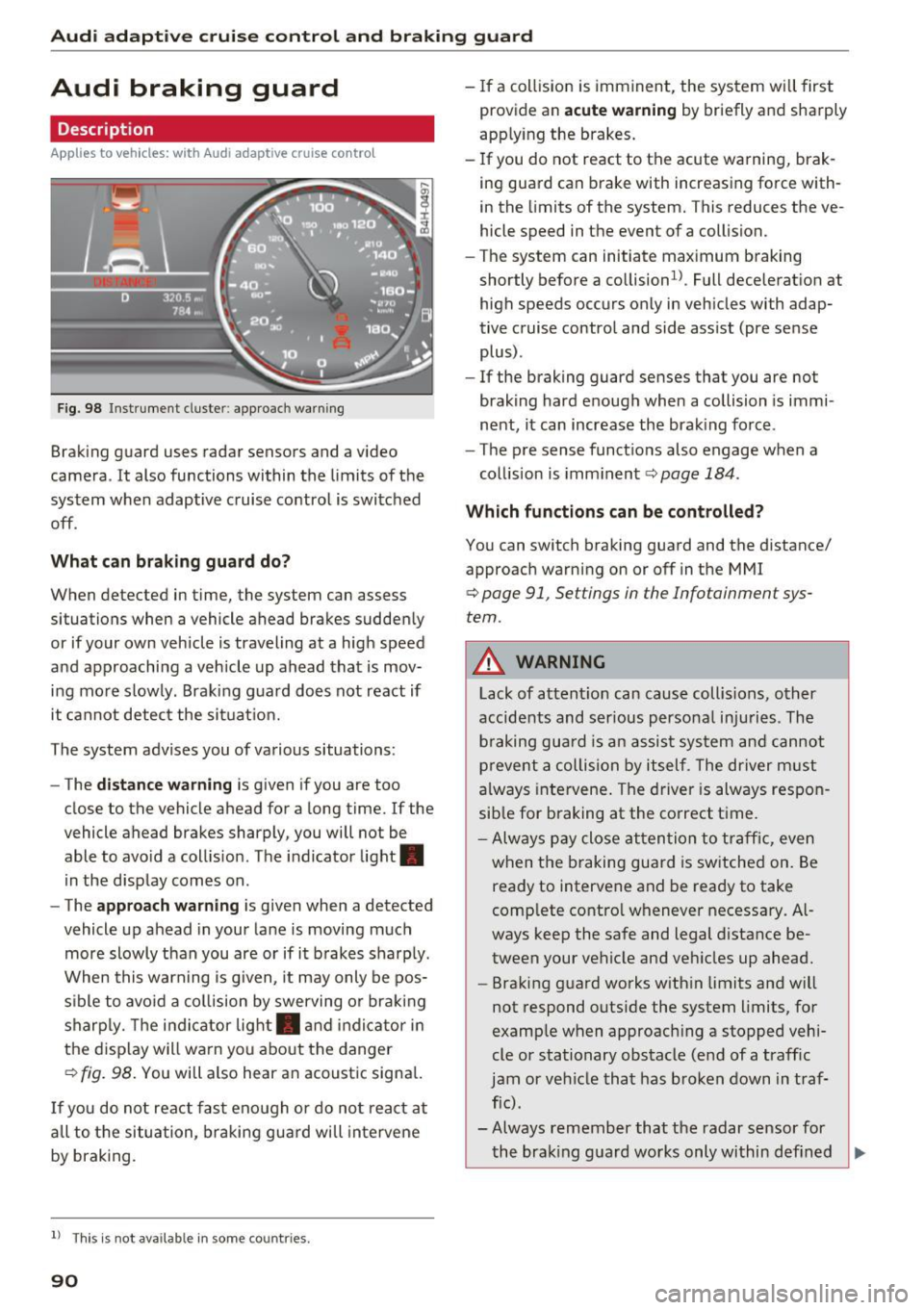
Fig. 98 Instrument cluster: approach warning
Braking guard uses radar sensors and a video
camera . It also functions within the limits of the
system when adaptive cruise control is switched
off .
What can braking guard do?
When detected in time, the system can assess
situations when a vehicle ahead brakes suddenly
or if your own vehicle is traveling at a high speed
and approaching a vehicle up ahead that is mov
ing more slowly . Braking guard does not react if
it cannot detect the situat ion.
The system advises you of various situations:
- The
distance warning is given if you are too
close to the vehicle ahead for a long time.
If the
vehicle ahead brakes sharply, you will not be
able to avo id a coll is ion. The indicator light.
in the display comes on .
- The
approach warning is given when a detected
vehicle up ahead in your lane is moving much
more slowly than you are or if it brakes sharply .
When this warning is g iven, it may only be pos
sible to avo id a collision by swerving or braking
sharp ly. Th e indicator light. and indicator in
the display will warn you about the danger
qfig. 98. You will also hear an acoustic signal.
If you do not react fast enough or do not react at
all to t he situation, braking guard will intervene
by braking.
l ) Thi s is not ava ilab le in some co un tri es .
90
-If a collision is imminent, the system will first
provide an
acute warning by briefly and sharply
app lying the brakes.
- If you do not react to the acute warning, brak
ing guard can brake with increasing force with
in the limits of the system. This reduces the ve
hicle speed in the event of a collision.
- The system can initiate maximum braking
shortly before a co llision
1
) . Full deceleration at
high speeds occurs only in vehicles with adap
tive cruise control and side assist (pre sense
plus) .
- If the braking guard senses that you are not
braking hard enough when a collision is immi
nent, it can increase the braking force .
- The pre sense functions also engage when a
collision is imminent
qpage 184.
Which functions can be controlled?
You can switch braking guard and the distance/
approach warning on or off in the MMI
q page 91, Settings in the Infotainment sys
tem .
A WARNING
Lack of attent ion can cause collisions, other
accidents and serious personal injuries . The
b ra king guard is an assist system and cannot
prevent a collision by itself. The driver must
always intervene . The driver is always respon
sib le for braking at the correct time .
- Always pay close atten tion to traffic, even
when the braking guard is switched on. Be
ready to intervene and be ready to take
comp lete contro l whenever necessary. Al
ways keep the safe and legal distance be
tween your vehicle and vehicles up ahead.
- Braking guard works with in limits and will
not respond outside the system limits, for
example when approaching a stopped vehi
cle or stationary obstacle (end of a traffic
jam or vehicle that has broken down in traf
fic) .
- Always remember that the radar sensor for
-
the brak ing guard works only within def ined Ill>
Page 108 of 294
Automatic transmission
Automatic transmission S tronic, tiptronic
Introduction
The automatic transmission is controlled elec
tronically. The transmission upshifts or down
shifts automatically depending on which drive
program is selected.
When a
moderate driving style is used, the
transmission selects the most economical driving
mode. The transmission upshifts at a lower RPM
and downshifts at a higher RPM to improve fuel
efficiency.
The transmission switches to a sporty mode after
a kick-down or when the driver uses a
sporty
driving style
characterized by quick accelerator
pedal movements, heavy acceleration, frequent
changes in speed and traveling at the maximum
speed.
If desired , th e driver can also select the gears
manually (tiptronic mode) 9 page 110.
Various automatic transmissions may be instal
led, depending on the model:
S tronic transmission
The S tronic is a dual-clutch transmission. Power
is transferred using two clutches that work inde
pendently from one another. They replace the
torque converter used in conventional automatic
transmissions and allow the vehicle to accelerate
without a noticeable interruption in traction.
tiptronic transmission
In the tiptronic transmission, power is transfer
red by a torque converter.
106
Selector lever positions
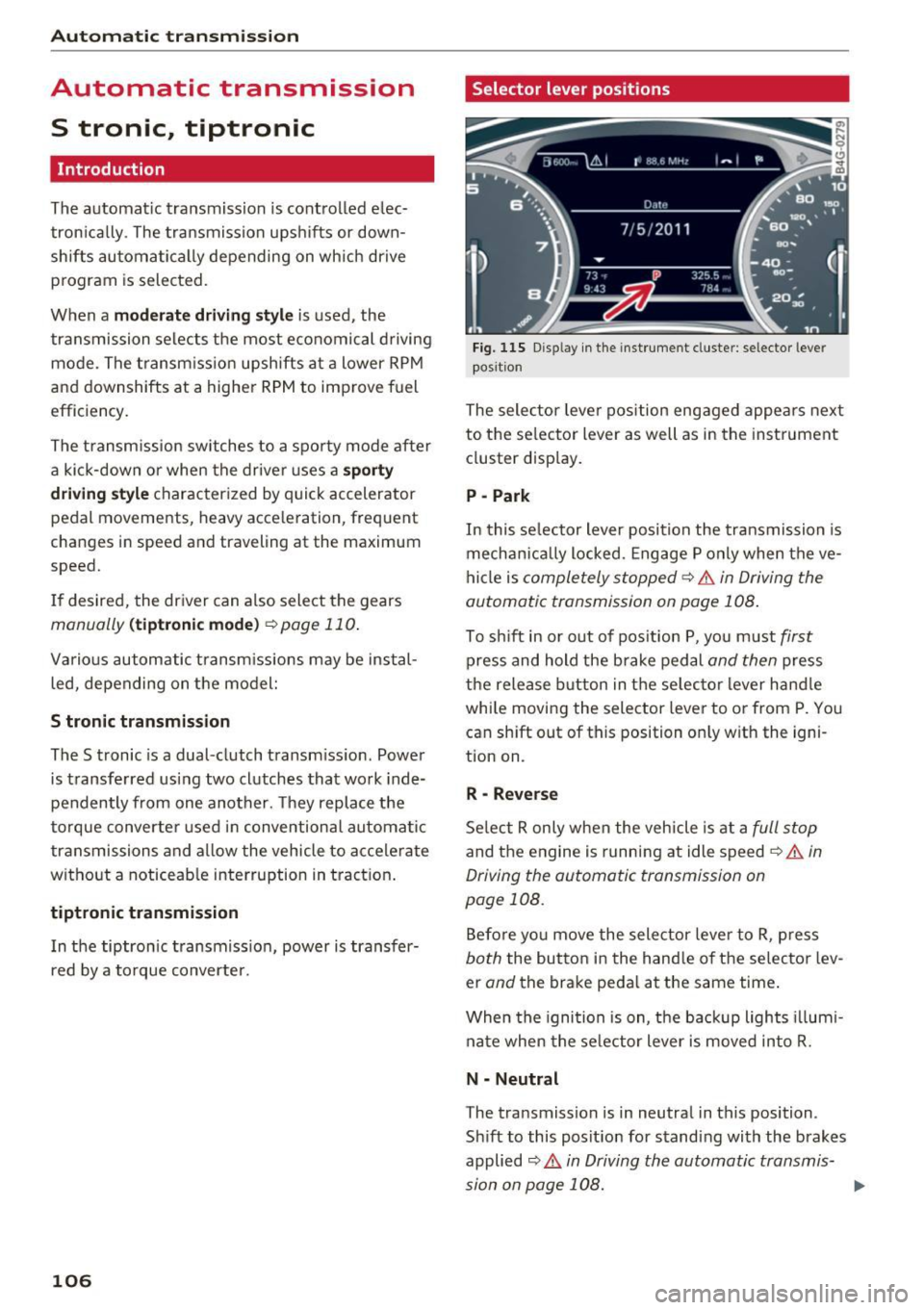
Fig. 115 Display in the instrument cluster: selector lever
position
The selector lever position engaged appears next
to the selector lever as well as in the instrument
cluster display.
P -Park
In this selector lever position the transmission is
mechanically locked. Engage P only when the ve
hicle is
completely stopped¢&. in Driving the
automatic transmission on page 108.
To shift in or out of position P, you must first
press and hold the brake pedal and then press
the release button in the selector lever handle
while moving the selector lever to or from P. You
can shift out of this position only with the igni
tion on.
R -Reverse
Select R only when the vehicle is at a full stop
and the engine is running at idle speed¢&. in
Driving the automatic transmission on
page 108.
Before you move the selector lever to R, press
both the button in the handle of the selector lev
er
and the brake pedal at the same time.
When the ignition is on, the backup lights illumi
nate when the selector lever is moved into R.
N -Neutral
The transmission is in neutral in this position.
Shift to this position for standing with the brakes
applied
9 A in Driving the automatic transmis
sion on page 108.
...
Page 110 of 294
Automatic transmissio n
than 2 seconds when the brake pedal is not
pressed.
Lock button
The lock button in the selecto r lever hand le pre
ve nts yo u from moving the selector lever un in
tentionally while in some se lector lever positions .
The positions that require the lock button to be
pr essed are marked in co lor in the i llustration
¢ fig. 116 .
Driving the automatic transmission
Starting the engine
~ T he selector lever must be in P or N.
Starting off
~ Press and hold the brake pedal.
~ Press and hold the release button in the selec
tor lever handle, se lect the des ired selector lev
er position such as D/S and r ele ase the button.
~ Wait briefly until the transmission has shifted
(you w ill feel a slight movement).
~ Remove your foot from the brake pedal and ac
celerate .
Stopping t emporar ily
~ Keep the vehicle stationary using the braking
pedal , for example at traffic lights .
~ Do not press the accelerator pedal when doing
th is .
~ To prevent the vehicle from rolling when you
start driving, set the park ing brake when stop
ping on steep inclines¢,& .
~ The pa rk ing brake w ill release automatically
and the vehi cle will start moving once you press
the accelerator pedal.
Stopping /parking
If the se lector lever is not in the P posit ion when
you open the d river's door, the vehicle could roll.
The message
Tran smission : Car ma y roll! Shift
to park!
appears .
~ Press and hold the brake pedal unt il the vehicle
has come to a complete stop.
~ Apply the pa rking brake ¢ page 77, Parking .
~ Select the P selector leve r position ¢ ,& .
108
Stopping on an incline
~ Always press the brake pedal to ho ld the vehi
cle in p lace and prevent it from "rolling back"
¢
,& . Do not try to prevent the vehicle from
"rolling back" when a gear is engaged by in
creas ing the engine speed ¢(D .
Starting on an inclin e
~ Activate the pa rk ing br ake.
~ With the driving gear selected, press the accel
erator pedal carefully. The parking brake will
re lease a utomatically if your seat belt is fas
tened.
Under certain circumstances, such as driving in
the mountains, it may be useful to switch tempo rarily to the manual sh ift program in order to ad
j ust the gears to the dr iv ing cond it ions by hand
Q ,&. .
On s lopes, activate the parking brake first and
then move the selector lever to the P position.
This prevents too much stress from being placed
on the locking mechanism.
A WARNING
- The vehicle can also roll when the eng ine is
stopped .
- Unintended vehicle movement can cause se
rious injury .
- Never leave your veh icle with the engine
r u nning while in gear. If you must leave
your veh icle when the eng ine is r unning, ac
tivate t he pa rking bra ke a nd move the selec
to r lever to P.
- P owe r is still transmitted to the wheels
when the engine is runn ing a t idle . To p re
ve nt the vehicle from "creeping ", yo u m ust
keep your foot on the b rake when the en
gine is running and the se lector lever is in D/
5 or R or "tiptronic" mode is se lected .
- D o not press the acce le ra tor peda l when
changing the se lector lever posit ion while
the vehicle is stationary and the engine is
r u nning.
- Never sh ift into R or P whi le driving.
Page 113 of 294
DYNAMIC driving mode in drive select
¢page 101.
~ Press the brake pedal firmly with your left food
and hold it all the way down for at least 1 sec
ond.
~ At the same time, press the gas pedal all the
way dow n with your right foot unt il the engine
reaches and stays at a high RPM level.
~ Remove your foot from the b rake pedal within
5 seconds
¢ /1. .
& WARNING
-
-Always adapt yo ur driv ing to the tra ffic flow.
- Only use the La unch control prog ram when
road and traffic conditions allow it and oth
er drivers wi ll not be endangered or both
ered by your driving and the vehicle's accel
eration.
- Please note that the drive whee ls can spin
and the vehicle can break away when sport
mode is switched on, especia lly when the
road is s lippery.
- Once the vehicle has started moving, press
the
I~ OF FI button briefly to tu rn the sport
mode off.
@ Tips
- The t ransmission temperature may increase
s ignificantly after using the launch control
program. If that happens, the program may
not be available for a few m inutes. It w ill be
available again after a cool-down pe riod .
- When accelerating using the la unch control
p rogram, all veh icle parts are subject to
heavy loads. This can lead to increased
wear .
Transmission malfunction
[il Transmi ssion : Please press brake pedal and
s elect gear again.
Press the brake pedal and se lect the des ired se
l ecto r lever pos it io n aga in . You can t hen continue
,... driving.
N
~ [il Transmission overheating : Pl ease drive con-
~ se rvatively . Lil
M v:, ....
Autom atic tran sm iss ion
The t ransmission temperature has inc reased sig
nificantly due to the sporty driving manner . Drive
i n a less spo rty manner unt il the temperatu re re
turns to the normal range and the ind icator light
switches of.
[il Tran smission malfunction: you can continue
driving
T he re is a system malfunction in t he tra nsmis
s ion . You may contin ue driving . Dr ive to your A udi
dealer or authorized A udi Service Faci lity soon to
have the malfunction cor rected.
[il Transmission malfunction: You can continue
dri ving with limited functionality
T he re is a system malfu nction in t he transmis
s io n. The transm ission is swi tc hi ng to eme rge ncy
mode. This mode only sh ifts into ce rtain gears or
will no longer shift at a ll. The eng ine may sta ll.
Drive to an authorized A udi dealer or authorized
Audi Se rvice Facility immed iate ly to have the
malfunction corrected.
l'iJ li'J Transmission malfunct ion: No reverse
gear . You can continue driving
S tronic t ransm iss io n: Th ere is a sys tem ma lf u nc
t io n in the t ransm iss ion. The tra nsmission is
swi tching to emergency mode . This mode only
shifts into ce rtain gears or w ill no longer shift at
al l. The engine may stal l. You cannot engage the
reve rse gear. Dr ive to an a uthori zed Audi dealer
or authorized Audi Serv ice Facility immediately to
have the malfunction corrected .
[il Transmission malfunction: Stop vehicle and
shift to park.
Do not continue dr iving. Se lect t he P selector lev
er position and see an authorized A udi dealer or
autho rized Aud i Serv ice Facility for ass istance.
(D Note
If t he transm ission has swi tched to emergen
cy mode, drive to your autho rized Aud i dea ler
or authorized Audi Service Facility immediate
l y to have the ma lfunction co rrected.
111
Page 189 of 294
shared, please see your contract with the
wireless telecommunications provider and the
"About Aud i connect" tab in your vehicle's
MMI:
! MENUI button> Aud i connect > About
Audi conn ect.
Electronic Stabilization
Control (ESC)
Description
ESC helps to improve road ho ld ing and vehicle
dynamics to help reduce the probability of skid
d ing and loss of vehicle control. It works only
when the engine is runn ing . E SC detects certain
d ifficult dr iving sit uat ions, including when t he
ve hicl e is begin ning to spin (yaw) out of contro l
and helps you to ge t the veh icle back under con
tro l by se lective ly braking the wheels, and/or re
ducing engine powe r and provid ing steering as
sistance to help hold the vehicle on the dr iver's
intended course. The indicator light
GJ in the in
strument cluster blinks when ESC is taking action
to help you co ntrol the vehicle.
ESC has limitations. It is important to remember
that ESC cannot overcome the laws of physics. It
will not a lways be able to help out under all con
d itions you may come up aga inst. For example,
ESC may not always be able to help you master
situations where there is a sudden change in the
coeff icient of friction of the road surface. When
there is a section of dry road that is sudde nly cov
e red with water, slush o r snow, ESC cannot pe r
form the same way it wo uld on the dry s urface . If
the vehicle hydrop lanes (rides on a cushion of wa
ter i nstead of the road su rface), ESC wi ll not be
ab le to he lp you steer the veh icle because contact
with the pavement has been interrupted and the
ve hicle cannot be braked or steered. Dur ing fast
cornering, pa rticula rly on w inding roads, ESC
cannot always deal as effect ively w it h difficult
d riving si tuations tha n at lowe r speeds.
Always adjust your speed and driving style to road , traffic and weather cond itions . ESC cannot
override the vehicle's physical lim its, increase the
ava ilab le traction, o r keep a ve hicle on the road if
road departure is a resu lt of driver in attention .
I nstead, ESC imp roves the possibi lity of keep ing
Intellig ent Technology
the vehicle under contro l and on the road d uring
extreme mane uvers by using the driver's steering
i nputs to help keep the vehicle go ing in the in
tended direction. If you are traveling at a speed
that causes you to run off the road before ESC
can provide any assistance, you may not exper i
ence the benefits of ESC.
ESC is switched on all the time. In certain s itua
tions when you need less tract ion, you can sw itch
off ASR by press ing the button
lm c> page 188,
fig . 177 . Be sure to switc h ASR on again whe n
you no longer need less traction.
The following systems are integrated in the ESC:
Anti-lock braking sy stem (ABS )
ABS prevents the wheels from locking when brak
ing. The vehicle can still be steered even dur ing
hard braking. Apply steady pressure to the brake
pedal. Do not pump the pedal. A pulsing in the
brake pedal ind icates that the system is acting to
stab ilize the veh icle .
Brake assist system
The brake assist system can decrease braking dis
tance. It increases braking power when the dr iver
presses the brake peda l quickly in emergency sit
uat ions. You must press and ho ld the brake pedal
unt il the dange rous situation is over . In vehicles
with adaptive c ruise cont rol*, the b rake ass ist
system is more se nsitive if the distance detected
to the ve hicle ahead is too sma ll.
Anti-slip regulation (ASR)
ASR reduces engine power whe n the dr ive wheels
begin spin ning and adapts the force to the road
co ndit ions. This makes it eas ier to s tart, acce ler
ate a nd d rive up incl ines.
Electronic differential lock (EDL)
The EDL brakes wheels that are spinning and
transfers the drive power to the other dr ive
wheel or wheels if the vehicle is equ ipped with all
whee l drive*) . This function is not available a t
highe r speeds .
In extreme cases, EDL automat ica lly switches off
to keep t he brake o n the braked wheel from over
hea ting . T he veh icle is still working co rrectly. EDL
IJJ>
187
Page 191 of 294
Intelligent Technology
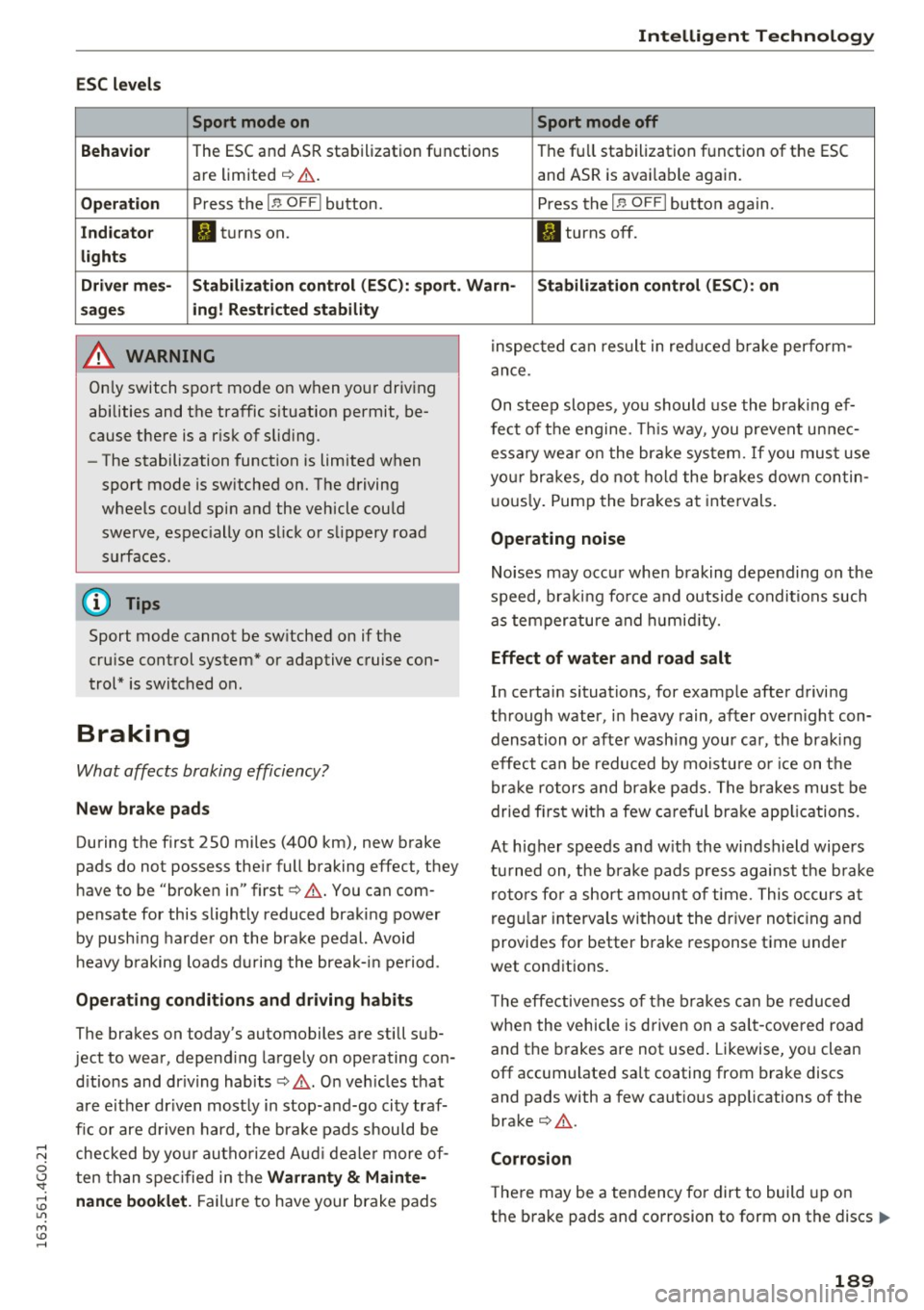
ESC levels Sport mode on Sport mode off
Behavio r
The ESC and ASR stabilization functions The fu ll stabilization function of the ESC
are limited ¢ .&. . and ASR is avai lable again.
Operation Press the I .a OFF I button.
Press the I.a OFFI button again .
Indicator II turns on. II turns off.
lights
Driver mes- Stabilization control (ESC): sport. Warn- Stabilization control (ESC): on
sages ing! Restricted stability
A WARNING
Only switch sport mode on when your driving
abilities and the traffic s ituation permit, be
cause there is a r isk of slid ing .
- The stabilization function is limited when
sport mode is sw itched on. The driving
wheels could spin and the vehicle cou ld
swerve, espec ially on slick or slippery road
surfaces .
(D Tips
Sport mode cannot be sw itched on if the
cru ise control system* or adaptive cruise con
trol* is switched on.
Braking
What affects braking efficiency?
New brake pads
During the first 250 miles (400 km), new brake
pads do not possess the ir full braking effect, they
have to be "broken in" first¢.&. . You can com
pensate for this slightly reduced braking power
by push ing harder on the brake pedal. Avoid
h eavy braking loads during the break-in period .
Operating conditions and driving habits
The brakes on today's automobiles are still sub
ject to wear , depend ing largely on operating con
d itions and dr iving habits ¢.&. . On veh icles that
are e ither dr iven most ly in stop-and-go city traf
fic or are driven hard, the brake pads should be
checked by your authorized Audi deale r more of
ten than specified in the
Warranty & Mainte
nance booklet.
F ailure to have your brake pads inspected can result
in reduced brake perform
ance.
On steep slopes, you should use the braking ef
fect of the engine. This way, you prevent un nec
essa ry wea r on the brake system. If you must use
you r brakes, do not hold the brakes down contin
u ous ly. Pump the brakes at intervals.
Operating noise
Noises may occur when braking depending on the
speed, bra king fo rce and outside conditions such
as temperature and humidity.
Effect of water and road salt
In certain situations, for example after driving
through water, in heavy rain, after overn ight con
densation or afte r wash ing your car, the brak ing
effect can be reduced by moisture or ic e on the
brake rotors and brake pads. The brakes must be
dried f irst with a few careful brake applications .
At h igher speeds and w ith the windshield wipers
turned on, the brake pads press against the brak e
rotors for a short amount of time. This occurs at
regular intervals without the driver noticing and
provides for better brake response t ime under
wet conditions.
T he effectiveness of the brakes can be reduced
when the vehicle is driven on a sa lt-covered road
and the brakes are not used . Likewise, yo u clean
off accum ulated salt coating from brake discs
and pads with a few cautious applications of the
brake¢ .&..
Corrosion
There may be a tendency fo r dirt to build up on
the brake pads and corrosion to form on the discs .,..
189
Page 198 of 294
Driving and th e en vironm ent
content of the fuel be ing used. Using a differ
ent brand of fue l may he lp, or filling the tank
w ith lead-free super grade gasoline.
Diesel particulate filter
Applies to vehicles: with diesel engine
The diesel particulate fi lter fi lters nearly all of
the soot particles out of the exhaust. The fi lter
cleans itself automatically under normal driving
conditions.
If the filter cannot clean itself (for ex
ample, because you are only driving short distan
ces), the filter becomes clogged w ith soot and
the
II symbo l for the diesel particulate filter il
lum inates ¢
page 20.
_& WARNING
-Do not park you r vehicle over flammable
materials such as grass or leaves because
the high temperature of the diese l particu
late fi lter could start a fire .
-
-Do not apply an underbody protectant in the
exhaust system area or a fire could start.
Placing your vehicle out
of service
If you would like to take your vehicle out of serv
ice for a longer time, contact your authorized
Audi dealer or qualified repair facility. They will
adv ise you of important measures, such as corro
sion protection, maintenance and storage proce
dures. A lso follow the information about the bat
tery ¢
page 226 .
Economical and environ
mentally-friendly driving
General
Your personal style of driving will determine the
economy of your vehicle, as well as exhaust and
noise levels .
Fuel economy, environmental impact, and wear
on your engine, brakes and tires largely depend
on three factors :
-your personal driving style
- operating conditions
196
- technical limitations
If you ant icipate what you need to do next and
drive economically, you can easily cut your fuel
consumption by 10-15 percent. This sect ion will
give you some tips on how you can help the envi
ronment and your pocketbook.
(D Tips
'
The consumption estimates as published by
ENVIRONMENTAL PROTECTION AGENCY
(EPA) and Transport Canada may not corre
spond to your actual consumption on the
road, which will vary depending upon vehicle
load and speed, road and weather conditions,
trip length, etc.
Drive smoothly and keep a lookout ahead
Vehicles use the most fuel when they are acceler
ating.
.. Avoid unnecessary accelerat ing and braking .
Vehicles use the most fuel when they are acceler
ating. If you anticipate what is going to happen
next, you will need to brake less and, thus, accel
erate less. Let the vehicle coast whenever possi
ble -for example when you see that the next traf
fic light is red.
Avoid full throttle
Driving at moderate speeds saves fuel and im
proves your mileage.
.. Try and keep well below your car's maximum
speed.
Acce lerating gently reduces fuel consumption,
engine wear, and does not disturb the environ
ment .
Fuel consumption, exhaust emissions and engine
noise increase disproportionate ly at high speeds.
If you drive at approximately three quarters of
top speed, fuel consumption will be reduced by
one half. Never drive faster than the posted
speed limit and weather conditions permit.
Page 201 of 294
Trailer mode Driving with a trailer
General information
Your Audi was designed primarily for passenger
transportation .
If you plan to tow a trailer, please remember that
the additional load will affect durability, econo
my and performance.
T railer tow ing not only p laces more stress on the
vehicle, it a lso calls for more concentration from
the dr iver.
F or this reason, always follow the operating and
driving instructions provided and use common
sense.
(D Note
If you are going to tow a trailer, you must ac
tivate the trai ler operation mode
¢ page 199, Operating instructions.
Technical requirements
Tr ailer hitch
Use a weight -carrying hitch conforming to the
gross tra iler weight. The h itch must be suitab le
for your vehicle and tra ile r and must be mo unted
securely on the vehicle's chassis at a
technically
sound
location . Use on ly a trailer hitch with a re
movable ba ll mou nt. Always che ck wit h the t rail
e r hitch manufac turer to make s ure that you a re
usi ng the co rrect hitch .
Do not use a bumper hitch .
The hitch must be installed in such a way that it
does not interfere with the impact -absorbing
bumper system . No mod ifica tions should be
made to the vehicle exhaust and brake systems .
Fr om time to time, chec k that all hitch mo un ting
bo lts rem ain securely fastened.
W hen you are not tow ing a trailer,
remove the
tra iler hitch ba ll mount . This prevents the hitch
from ca u sing damage s hou ld your veh icle be
struck from behind
¢ .&, .
Trailer mode
Trailer brakes
If your traile r i s equ ipped with a b raking sys tem,
c h ec k t o be sure that it con forms to a ll regu la
tions.
T he tra ile r h ydr aulic bra ke sy stem must not be
directly con nected to the vehicle's hydr aulic
brake sy stem.
Safety chains
Always use safety chains between your vehicle
and the tra iler .
Trailer lights
Trailer lights must meet all regulations. Be sure
to check w it h your Aud i dealer for correct wir ing,
swi tches and relays .
Mirrors
If you are unab le to see the traffic behind you us
ing the regular outside mirrors, then you
must in
stall extended mirrors . It is important that you
always have clear vision to the rear .
A WARNING
--
After remov ing the tra ile r hi tch, do not sto re
i t in yo ur vehicle. In case of sudde n brak ing,
t he hitch could fly fo rwa rd and injure you or
your passengers.
Operating instructions
Maximum trailer weight
A traile r for yo ur vehicle is lim ited to a typical
cla ss 1 or class 2 trailer.
Trailer load distribut ion
Be sure the load in the tra iler is held secure ly in
place to p reve nt it from shifting forward, back
ward o r sideways.
Ne ver allow a passenger to ride in a trailer¢.&.
in Driving instructions on page 201 .
Engine cooling system
Towing a tra ile r makes the engine wor k harder. It
is important that the cooling system's perform
ance is up to the additional load. Make sure that
the cool ing system has enoug h fluid . .,..
199
Page 202 of 294
Trailer mod e
Tire pr essure
When tow ing a tra iler, inflate the tires of you r
veh icle to the cold tire pressure listed under "Fu ll
load" on the label located on the driver's side B
pillar (visib le when the door is open) . Inflate
trai ler tires to trailer and tire manufacturers'
specifications.
Light s
Check to make sure both vehicle and trailer lights
are working proper ly.
Safet y chains
Be sure t railer safety chains are properly connect
ed from the trailer to the h itch on the veh icle.
L eave enough slack in the chains to permit turn
ing corners . When yo u install safety chains, make
sure they wi ll not drag on the road when you are
driving.
The chains shou ld cross under the trailer tongue
to prevent it from dropping in case of separation
from the hitch .
Adjusting the Audi d rive select
Make sure the vehicle is on a level surface bef ore
hitching up the t railer and bef ore adjust ing the
tongue we ight . The vehicle must be in
auto or
comf ort driving mode and not raised
r::!> page 100, r::!> 0 .
Make sure that the vehicle is lowered. In Info
tainment, select:
ICARI function button > Lower
control button .
I f you m ust dr ive under poor road condit ions, you
can ra ise the vehicle
afte r coup ling the t rai ler or
after adjusting the tongue weight r:!> page 102.
(D Note
-Changes in tempe rature or load can affect
the he ight of the vehicle.
- Always se lect
auto or comfort mode. Othe r
wise, the tongue load spec ified for yo ur ve
hicle w ill no longer be applicable .
200
· Driving instructions
Driving with a trailer always requires extra care
and consideration .
To obtain the best possible hand ling of veh icle
and trailer, please note the following:
.,. Do not tow a loaded trailer when your car itself
is not loaded .
.,. Be especially careful when passing other
vehicles .
.,. Observe speed limits .
.,. Do not dr ive at the maximum permissible
speed.
.,. Always app ly brakes ea rly.
.,. Monitor the temperat ure gauge.
Weight distribution
Towing a loaded trai ler with an empty car results
i n a h ighly unstab le distribution of weight . If this
cannot be avoided, drive at very low speeds only
to avoid the risk of losing steer ing contro l.
A "balanced" rig is easier to operate and control.
This means that the tow vehicle shou ld be loaded
to the extent possible and permissib le, wh ile
k eeping the trailer as l ight as poss ible under the
c ircu mstances . Wheneve r possib le, transfer
some ca rgo to the luggage compartment of the
tow vehicle while observing tongue load require
ments and vehicle loading considerations.
Speed
The higher the speed, the mo re diff icu lt i t be
comes fo r the driver to con trol the r ig . Do not
drive at the maximum permissible speed. Reduce
your speed even more if load, weather or wind
cond itions are unfavorab le -particularly when
go ing downh ill.
Reduce vehicle speed
i mmed iatel y if the trailer
shows the slightest sign of swaying.
Do not tr y
to stop the swaying by accelerating.
Observe speed limits . In some areas, speeds for
vehicles towing trailers are lower than for regular
vehicles .
Always apply bra kes early. Whe n driving down -
hill, shift into a lower gear to use the engine .,..