lights AUDI A6 2016 Owner's Manual
[x] Cancel search | Manufacturer: AUDI, Model Year: 2016, Model line: A6, Model: AUDI A6 2016Pages: 294, PDF Size: 73.88 MB
Page 31 of 294
Your authorized Audi dealer or a qualified service
station can interpret the code and perform the necessary repair.
A WARNING
Do not use the diagnostic connector for per
sonal use. Incorrect usage can cause malfunc tions, which can increase the risk of a colli
sion!
Electronic speed limiter -
Your veh
icle may be factory equipped with t ires
that are rated for a maximum speed of 130 mph
(210 km/h) . This is less than the maximum speed
of your vehicle . To reduce the risk of sudden tire
failure and loss of control if the vehicle is operat
ed at excessive speeds, your vehicle a lso has an
electronic speed limiter. The electronic speed limiter prevents your vehicle from going faster
than the tire speed rating. For more information
c::;, page 238 .
If the engine contro l unit receives faulty vehicle
road speed signals, the Malfunction Indicator
Lamp (MIL)
¢4 will illuminate . If this occurs,
contact the nearest authorized Audi dealer for
assistance .
S models
Your vehicle's top speed is e lectron ically limited
to 155 mph (250 km/h).
If the engine contro l unit receives faulty vehicle
roadspeed signa ls, the Malfunction Indicator
Lamp (MIL)
¢4 will illuminate. If this occurs,
contact the nearest authorized Audi dealer for
assistance .
A WARNING
Always observe the posted speed limits and
adjust your speed to suit prevailing road, traf
fic and weather cond it io ns. Never drive your
vehicle faster than the maximum speed rating
of the tires installed.
-
Instruments and indicator lights
29
Page 46 of 294
Lights and Vision
Lights and Vision
Exterior lighting
Switching the lights on and off
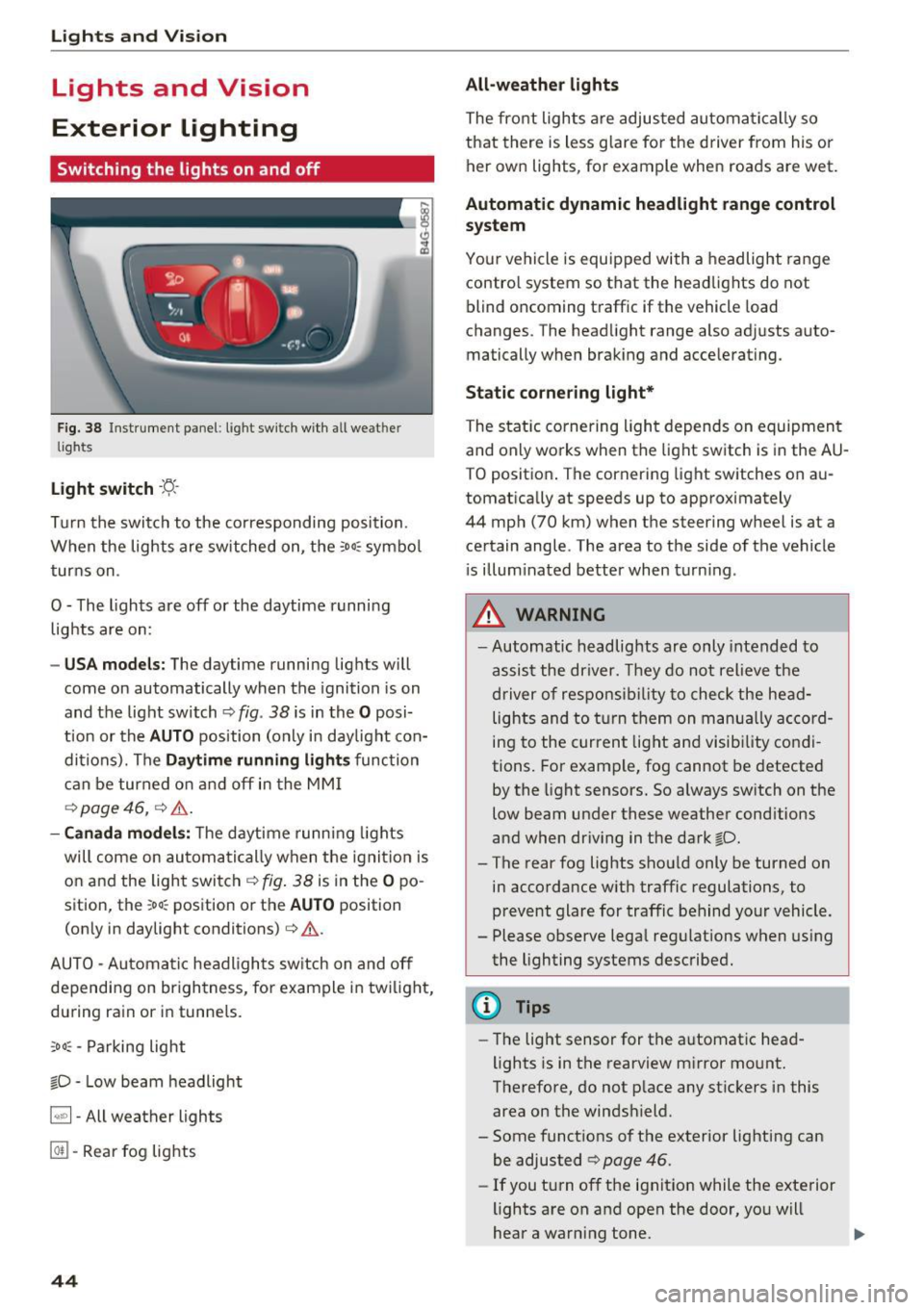
Fig. 38 Instrument panel : lig ht sw it c h with all we ath er
li gh ts
Light switch ·t:/.. ·
Tu rn the switch to the corresponding posi tion .
When the lights are sw itched on, the
:o o:c symbo l
turns on .
O - The lights are off or the daytime running lights are on :
-USA mode ls: The daytime running lig hts will
come on automatically when the ignition is on
and the light switch¢
fig. 38 is in the O posi
t ion or the
AUTO position (only in day light con
ditions). The
D aytime running light s function
can be turned o n and off in the MM I
¢ page 46, ¢ &.
- Canada mo del s: T he d aytime runn ing lights
will come on automati cally when the ignit io n is
on and the ligh t swi tch ¢
fig. 38 is in the O po
sition, the
; oo :c position or th e AUTO position
(on ly in daylight conditions) ¢
&.
AUTO - Automatic hea dlights sw itch on and off
depending on br igh tness, for example i n tw ilig ht,
du ring rain or in tunne ls.
;oo :c -Parking light
io -Low beam headlight
~ - All weather lights
@TI -Rear fog lights
44
All-weather lights
The front lights a re adjusted au toma tically so
that there is less g lare fo r the d river from his o r
her ow n lights , fo r example when roads are wet .
Automatic dynamic headlight range control
system
Your vehicle is equ ipped with a headlight range
contro l system so tha t the head lights do not
blind oncoming t raff ic if the vehicle load
changes. The head light range also adjusts auto
matically when brak ing and acce lerating .
Static cornering light*
The static co rnering light depends on equipmen t
and only wo rks when the light sw itch is in the AU
T O positio n. The corn ering light switches on au
tomatically at speeds up to app roximately
44 mph (70 km) when the steer ing wheel is at a
ce rtain angle. The area to the side of the vehicle
i s illum inated better when t urn ing .
,&. WARNING
-Automatic headlights are only intended to
assis t the driver. They do not relieve t he
driver of respons ibility to check the he ad
lights and to t urn them on manu ally a ccord
ing to the current light and visibility co ndi
tions. For exam ple, fog cannot be detected
by the light sensors. So always sw itch on the
low beam under these weather cond itions
and when dr iv ing in the dark
io.
-The rear fog lights shou ld only be turned on
in acco rdance with traffic regulations, to
p revent glare for traffic behind your vehicle .
- Please observe lega l reg ulations when using
the lighting systems described .
@ Tips
-Th e light sensor for the a utomat ic head
lights is in the rearview m irror mo unt.
Therefore, do not p lace any st ickers in this
area on the winds hield.
- Some funct ions of t he exterior lighting can
be adjusted ¢ page
46 .
-If you t urn of f the ignit ion while the e xte rior
lights are on a nd open the door, yo u will
hear a warning tone .
Page 47 of 294
.... N
0 CJ '
-In cool or damp weather, the inside of the
headlights, turn signals and tai l lights can
fog over due to the temperature difference
between the inside and outside. They will
clear short ly after switching them on. This
does not affect the service life of the light
i ng.
Turn signals and high beam lever
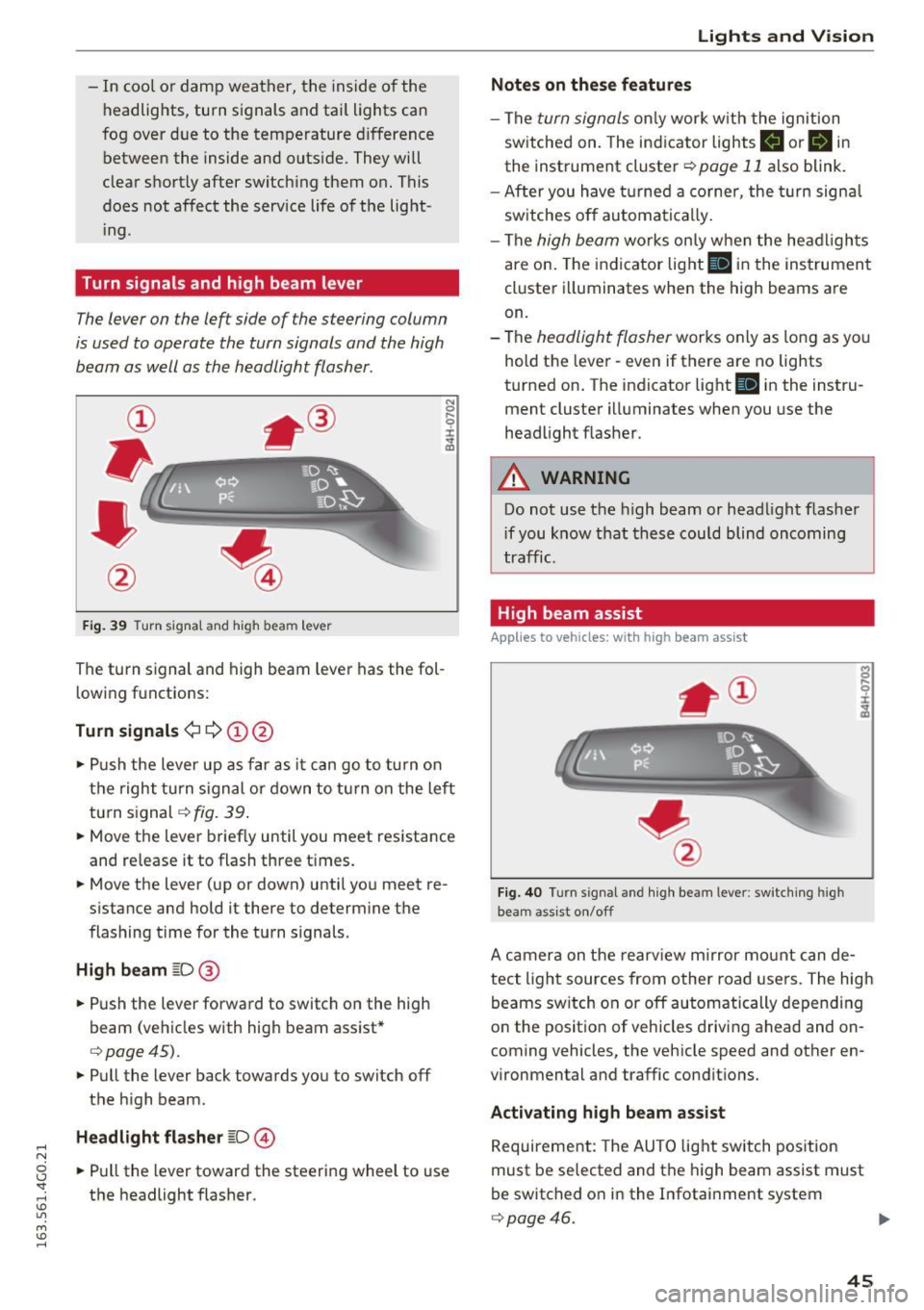
The lever on the left side of the steering column
is used to operate the turn signals and the high
beam as well as the headlight flasher.
F ig . 39 Turn signal and high beam lever
The turn s ignal and high beam lever has the fol
lowing fu nctions:
Turn signals¢¢ (!)@
N
0
..... 0
~ IJl
• Push the lever up as far as it can go to turn on
the right turn s ignal or down to turn on the left
turn signal¢
fig. 39 .
• Move the lever brief ly until you meet resistance
and re lease it to flash three times.
• Move the lever (up or down) until you meet re
s istan ce and hold it there to determine the
flashing time for the turn signals.
High beam ~D@
• Push the lever forward to switch on the high
beam (vehicles with high beam assist*
¢ page45).
• Pull the lever back towards you to switch off
the high beam .
Headlight flasher ~D@
• Pull the lever toward the steering wheel to use
the headlight flasher .
Lights and V ision
Notes on these features
-The turn signals only work w ith the ignition
sw itched on. The indicator lights
B or B in
the instrument cluster¢ page 11 also blink.
- After you have turned a corner , the turn signa l
switches off automatically.
- The
high beam works on ly when the headlights
are on. The indicator light
II in the instrument
cluster illuminates when the high beams are
on.
- The
headlight flasher works only as long as yo u
hold the lever -even if there are no lights
turned on. The indicator light
Iii in the instru
ment cluster illuminates when you use the
headlight flasher .
A WARNING
-Do not use the high beam or headlight flasher
i f you know that these could blind oncoming
traffic.
High beam assist
Applies to veh icles: w ith high beam assist
Fig. 40 Turn signal and high beam lever: switching high
beam assist on/off
A camera on the rearview mirror mount can de
tect light sources from other road users. The high
beams switch on or off automatically depending
on the posit ion of vehicles driving ahead and on
coming vehicles, the vehicle speed and other en
vironmental and traffic conditions.
Activating high beam assist
Requirement: The AUTO light switch position
must be selected and the high beam assist must
be switched o n in the Infotainment system
¢page 46.
45
Page 48 of 294
Lights and Vi sion
"'T o activ ate t he h igh beam assist, tap the lever
forward
(D . The ii indicator light appears in
the instr ument cluster d isp lay an d the high
beam assist is switched on/off automatically.
The
Bl indicator lig ht also turns on if the h igh
beams are switched on .
Switching the high beam s on /off manually
If the high beams did not sw itch on/off a utomat
ically as expected, you may sw itch them on or off
manually instead:
"'T o swi tc h the high beams on manually, tap the
l ever forward
(D . The Bl indicator lig ht t urns
on.
"' To switc h the high beams off manually, p ull the
lever back@. The h igh beam assist is deact i
vated .
Operating the headlight flasher
"'To ope rate the headlight flasher w hen the h igh
beam assist is act ivated and high beams are
switched off, p ull the leve r back @. The high
beam assist rema ins ac tive .
Me ssages in the instrument cluster display
ml Audi adaptive light: system fault!
Headlight a ssist: System fault
Dr ive to an a uthorized Aud i dea ler or a uth orized
Aud i Serv ice Fac ility immediately to have t he
malfunct io n co rrected. You can still switc h the
h igh beams on or off ma nually.
Headlight assist: Unavailable No camera view
The camera v iew is b locked, fo r example by a
sticke r or debr is.
The senso r is locate d between the interior rear
view m ir ror and the windshield. Therefore, do not
p lace any st ic kers in this area on the windshie ld.
A WARNING
-
H igh beam assist is only intended to assist
the drive r. The dr iver is still responsible for
cont rolli ng the headligh ts a nd switch ing
t hem ma nually de pendi ng on light and vis ibil
i t y conditions.
It ma y be ne cess ary to operate
t he m man ually i n situ at io ns such as:
46
- In adverse weat her condi tions such as fog,
heavy rain, blowing snow or spray ing water.
- On roads where oncoming traffic may be
pa rtially obscure d, such as expressways.
- When the re are roa d users that do not have
suff icient lighting, such as bicyclers or
veh icles with dirty tail lamps.
- In tig ht curves an d on stee p slopes.
- In poorly lit a re a s.
- W it h st ro ng refle cto rs, such a s signs .
-If th e ar ea of the wi ndshi eld n ear the s ensor
i s f ogged over, dirty, icy or covered with a
s tick er.
Adjusting the exterior lighting
The settings are adjusted in the MMI.
"'Select: !C A R! function button> (Car) * systems
cont rol button > Vehicle settings > Exterior
lighting .
Automatic headlights
You can adjust the following sett ings in the Au
tomatic headl ights
menu:
Headlights activation time -You can adjust if the
h eadlights switch o n
Early, Med . or Late accord
i ng to the sens itiv ity o f the lig ht sensor .
Audi adaptive light* -You can sw itch ad aptive
li ght
On an d Off .
Automatic high beams*
Y ou can switch the hig h beam assist on an d off .
Daytime running lights
USA models:
You can switch the daytime runn ing
li gh ts
on and off .
Canada models:
The function cannot be turned
off. It is act ivated a utomatically each time the ig
nit ion is switched on. This menu item is shown
"g reye d out" .
Coming home, Leaving home
The coming home function ill uminates the a rea
outside the vehicle when you switch the ign ition
off and open the driver's door. To turn the func-
tion on , se lect
Lights when leav ing car > On . .,._
Page 49 of 294
.... N
0 CJ '
The leaving home function illuminates the area
outside the vehicle when you un lock the vehicle.
To turn the function on, select
Lights when un
locking car> On.
The coming home and leaving home functions
only operate when it is dark and the light switch
is in the
AUTO position.
Emergency flasher
The emergency flasher makes other motorists
aware that you or your vehicle are in an emer
gency situation.
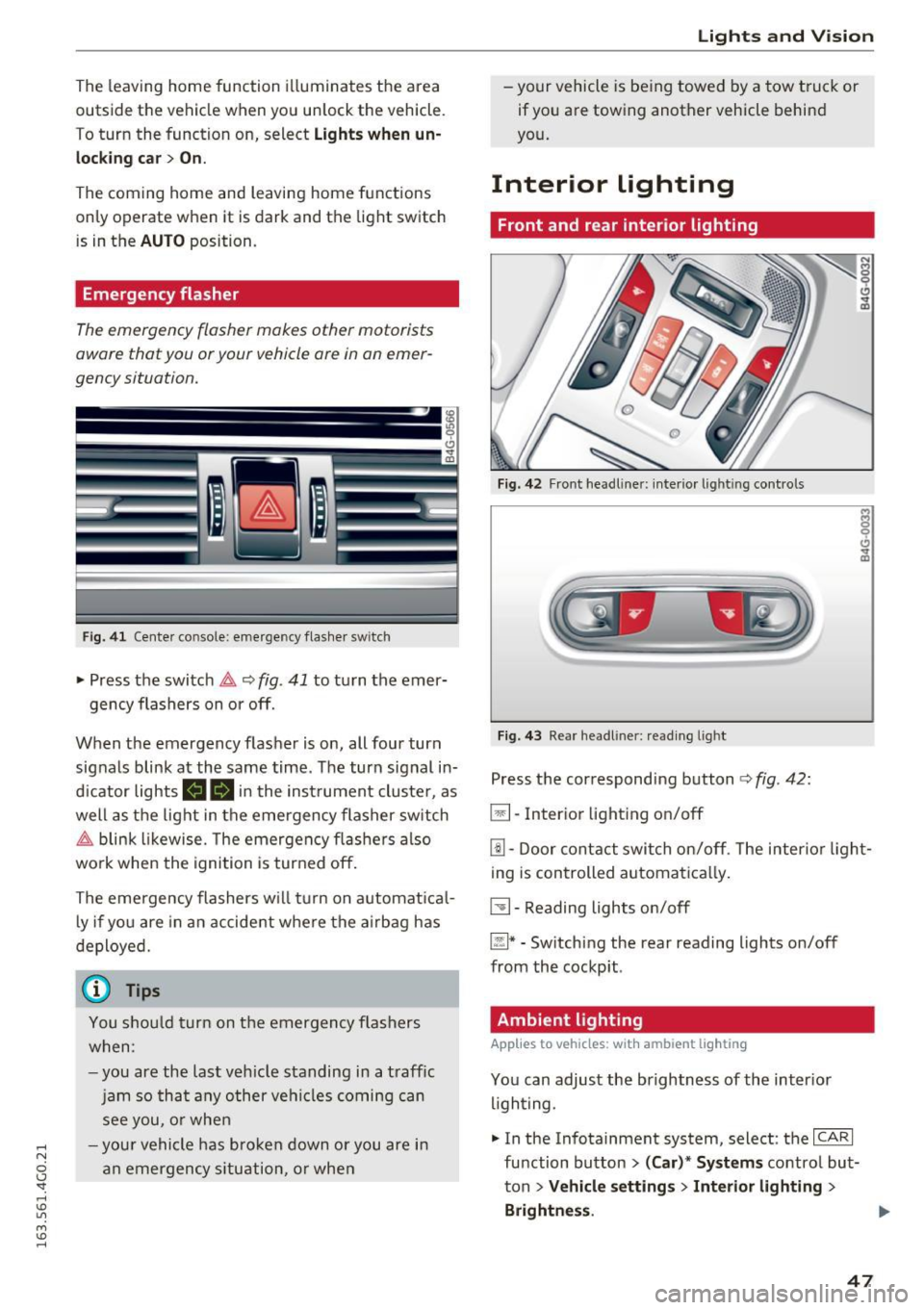
Fi g. 41 Cente r console: emergency flasher swit ch
• Press the switch &,. ~ fig. 41 to turn the emer-
gency flashers on or off.
When the emergency flasher is on, all four turn
signals blink at the same time. The turn signal in
d icator lights
(4B in the inst rument cluste r, as
well as the light in the emergency flasher switch
&,. blink likewise. The emergency flashers also
work when the ignition is turned off.
The emergency flashers w ill turn on automatical
l y if you are in an accident where the airbag has
deployed.
(0) Tips
You shou ld turn on th e emergency flashers
when:
-you are the last veh icle standing in a traff ic
jam so that any other vehicles coming can
see you, or when
- you r vehicle has broken down or you are in
an emergency situation, or when
Lights and V ision
-your vehicle is being towed by a tow truck or
if you are towing another vehicle behind
you.
Interior lighting
Front and rear interior lighting
Fig. 42 Front headl iner : in terio r light ing con trols
Fig. 43 Rea r headl iner : read ing light
Press the correspond ing button ¢ fig. 42:
El-Inter ior lighting on/off
[!] -Door contact switch on/off. The interior light
ing is controlled automatica lly.
~- Reading lights on/off
~* -Sw itch ing the rear reading lights on/off
from the cockpit .
Ambient lighting
Applies to vehicles: with ambient ligh ting
You can adjust the brightness of the inter ior
lighting.
• In the Infotainment system, select: the
ICARI
function button > (Car)'" Systems control but
ton
> Vehicle settings> Interior lighting >
Brightness . .,.
47
Page 50 of 294
Lights and Vision
.. To increase or reduce the brightness, turn the
knob and press it.
The interior lighting turns on when you switch
the headlights on while the ignition is on .
(i)} Tips
The setting is a utomat ica lly stored and as
signed to the remo te control key th at is in
use.
Instrument illumination
The brightness of the illumination for the instru
ments, display and head-up display* con be ad
justed .
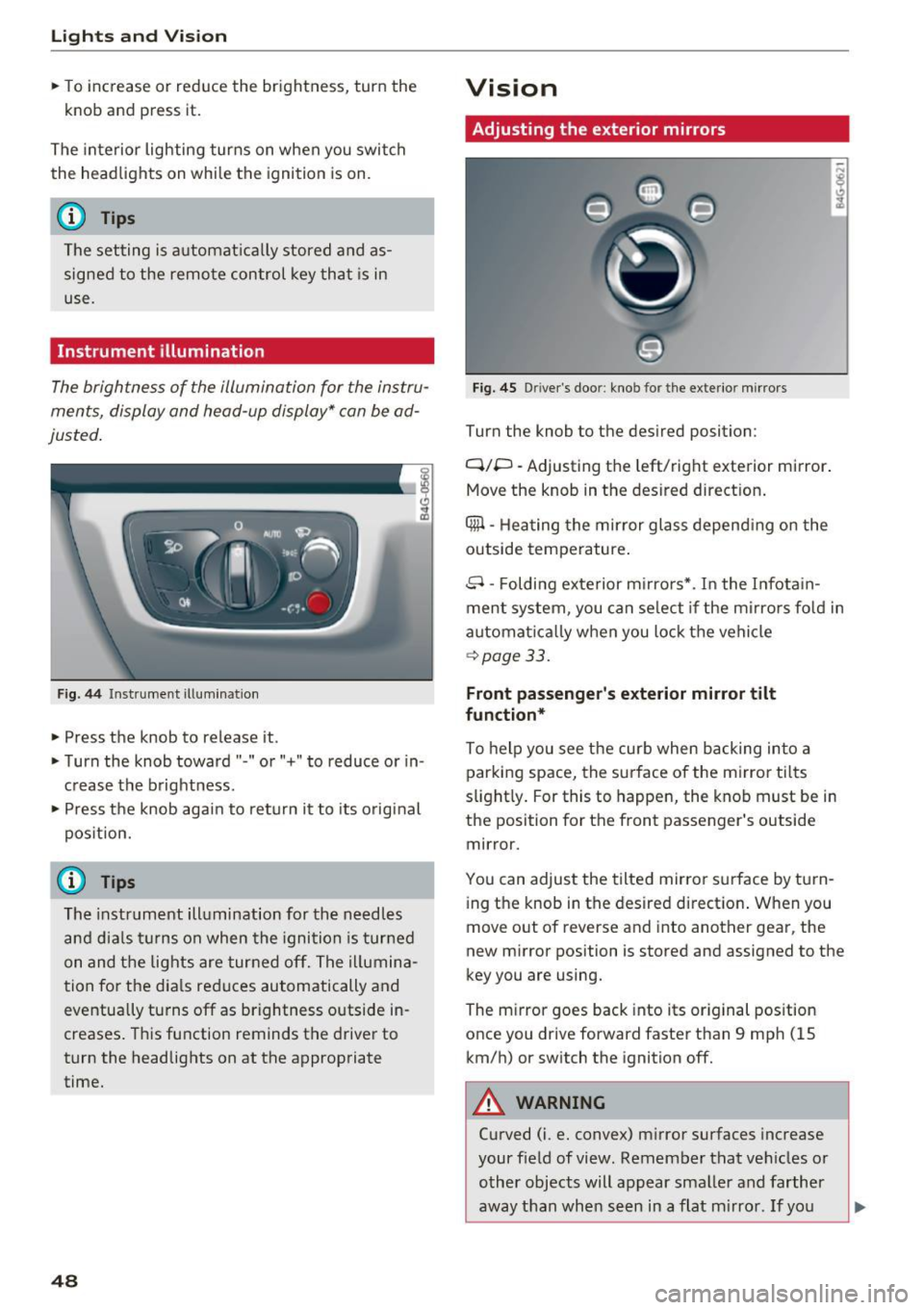
Fig . 44 Inst rument illuminat ion
.. Press the knob to release it.
.. Turn the knob toward" -" o r"+" to reduce or in
c rease the brightness .
" Press th e knob again to re turn it to its original
pos ition.
(D Tips
The instr um ent ill umination for th e need les
a n d dia ls tur ns on when the igni tio n is tur ned
on and t he lights are turned off. The i llumina
t ion for t he dia ls reduces automatically and
eventua lly tu rns off as brightness outside in
creases . T hi s function reminds the drive r to
turn the headlights on at the appropriate
time.
48
Vision
Adjusting the exterior mirrors
Fig. 45 Driver's door: kno b for the ex terio r mirrors
Turn the knob to the desired position :
Q/P -Adjusting the left/right exterior mirror.
Move the knob in the des ired dir ect ion .
Qill -Hea ting the mirror glass depend ing on the
outside temperature .
8 -Folding exterior m irro rs*. I n the I nfota in
ment system , you can se lect if the m irro rs fo ld in
automat ica lly when you lock the vehicle
~ page 33.
Front passenger 's exterior mirror tilt
function*
To help you see the curb when backing into a
par king space, the surface of the m irror tilts
s light ly . For this to happen, the knob must be in
the position for the front passenger's outside
mirror.
You can adjust the tilted mirror s urface by tu rn
i ng the knob in the desired directio n. When you
move out of reverse and i nto anot her gea r, the
new m irror position is stored and assigned to the
key you are using.
The m irror goes back into its or ig inal pos ition
once you drive forward faster than 9 mp h (15
km/h) or switch the ignition off.
A WARNING
Curved (i .e. convex) m irror surfaces increase
your f ield of view. Remember that ve hicles or
o ther objects will appear sma ller and farther
away than when s een in a flat m irro r. If yo u
Page 51 of 294
.... N
0 CJ '
use this m irror to estimate distances of fol
lowing veh icles when changing lanes, you
could estimate incorrect ly and cause an acci
dent.
CJ) Note
- If the mirror housing was moved by force
(for example, by running into an object
when maneuvering the vehicle), the mirror must be folded all the way in using the pow
er folding function. The mirror housing
must not be moved back into place by hand
because this would impair the f unct ion of
the mirror mechan ism.
- If you wash the veh icle in an automatic car
wash, yo u m ust fold the exterior m irrors in
to reduce the risk of damage to the mirrors.
Never fold power folding exterior mirrors *
by hand. Only fo ld them in and out using
the power contro ls.
@ Tips
- If the power adjusting f unction ma lf u nc
tions, t he g lass in both mirrors can be ad
justed by press ing on the edge of it by hand .
- The exterior mirror sett ings are stored with
the memory function*~
page 57.
Dimming the mirrors
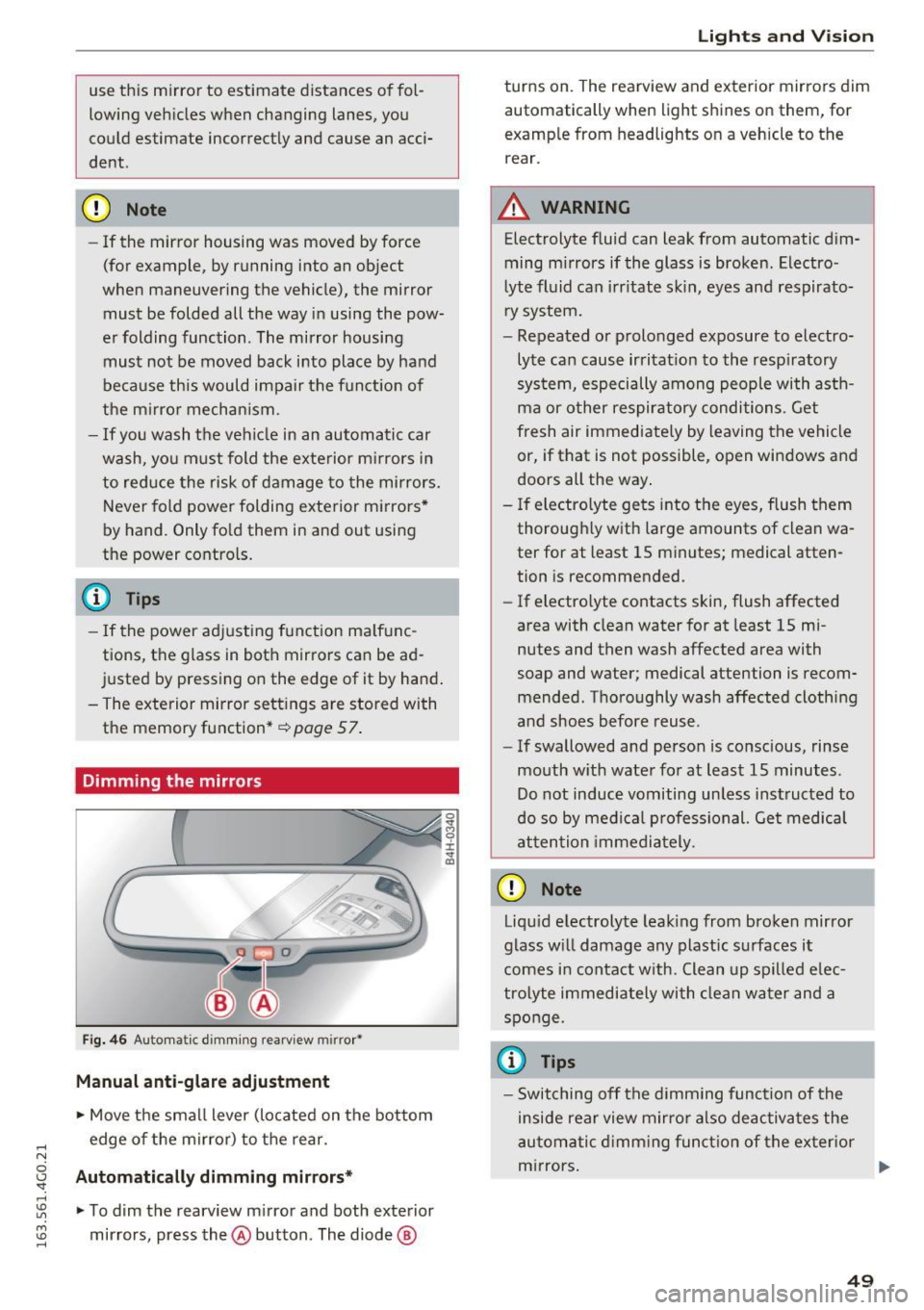
Fig. 4 6 Auto m atic d imm ing rearv iew m irro r•
Manual anti-glare adjustment
• Move the small lever (located on the bottom
edge of the mirror) to the rear.
Automatic ally dimming mirrors*
• To dim the rearview m irror and both exterior
mirrors, press the@ button. The diode @
Lights and Vision
turns on. The rearview and exterior mirrors dim
automatically when light shines on them, for
examp le from headlights on a vehicle to the
rear.
A WARNING
-Electrolyte fluid can leak from automatic dim-
ming mirrors if the glass is broken. Electro
lyte fl uid can irritate sk in, eyes and respirato
r y system.
- Repeated or prolonged exposure to electro lyte can cause irritat ion to the resp iratory
sys tem, especially among people with asth
ma or other respiratory conditions. Get
fresh air immediately by leaving the vehicle
or, if that is not possible, open windows and
doors all the way .
- If electro lyte gets into the eyes, flush them
thorough ly with large amounts of clean wa
ter for at least 15 minutes; medical atten
tion is recommended.
- If electro lyte contacts skin, flush affected
area with clean water for at least 15 mi
nutes and then wash affected area with
soap and water; medical attention is recom
mended . Thoroughly wash affected clothing
a nd shoes before reuse.
- If swallowed and person is conscious, rinse
mouth w ith water for at least 15 minutes .
Do not induce vomiting unless inst ructed to
do so by medical professional. Get medical
attention immediately.
(D Note
Liqu id e lectrolyte leak ing from bro ken mirror
glass w ill damage any plastic surfaces it
comes i n contact with. Clean up spilled e lec
tro lyte immediately with clean water and a
sponge.
(0 Tips
- Switching off the dimming function of the
inside rear view m irro r also deactivates the
au tomatic d imm ing funct ion of the ex ter ior
m irrors . .,..
49
Page 52 of 294
Lights and Vision
-The automatic dimming mir rors do not dim
when the interior lighting is turned on or
the reverse gear is selected.
- Automatic dimming for the mi rror only op
erates properly if the light str iking the in
s ide mirror is not hindered in any way.
Sun visors
( )
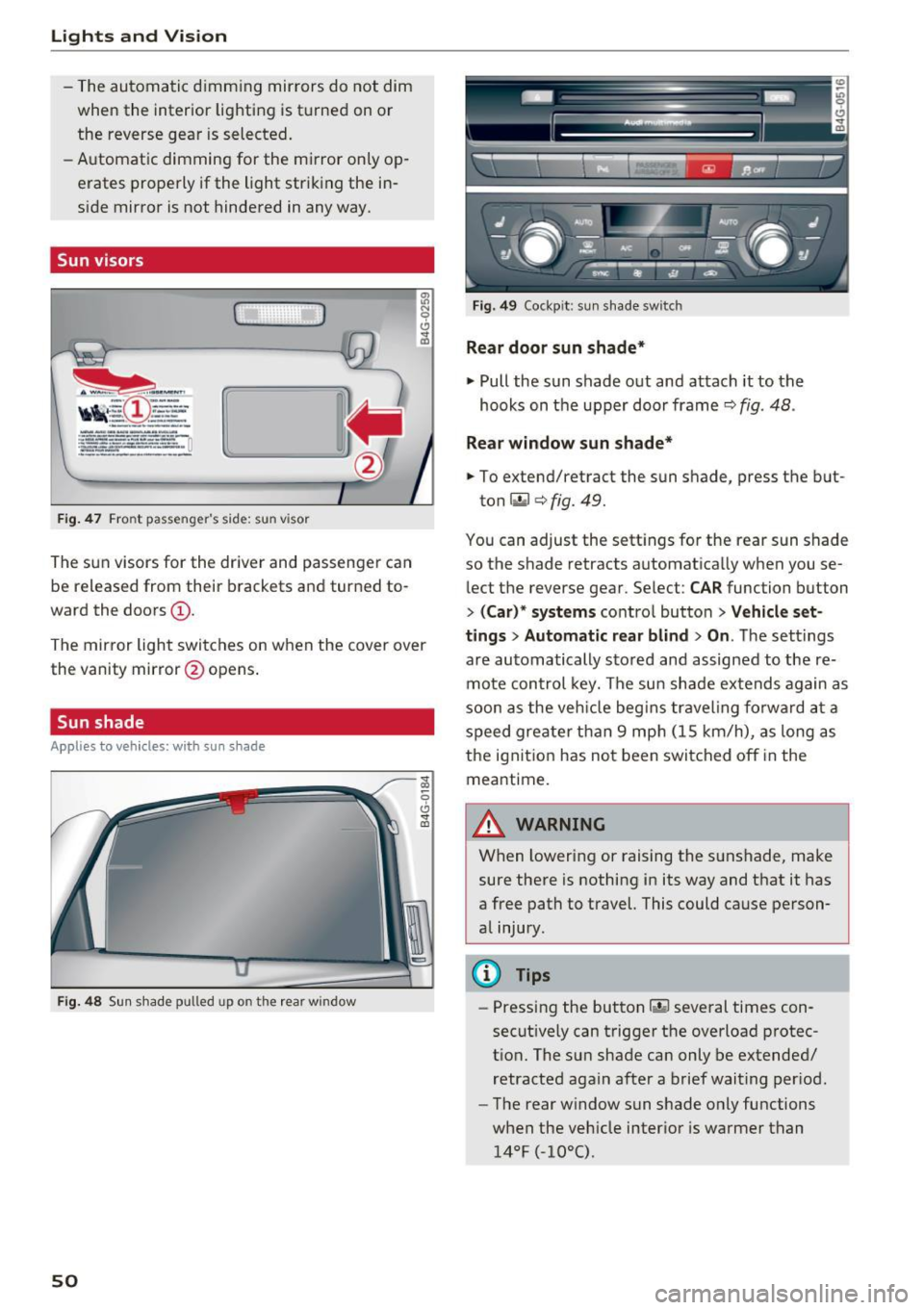
Fig . 4 7 Front passenger 's side: sun v isor
The sun visors for the driver and passenger can
be released from their brackets and turned to
ward the doors
(D .
The mirror light switches on when the cover over
the vanity mirror @opens .
Sun shade
A ppl ie s to ve hicles: w ith s un shade
Fig. 4 8 Sun shade pulled up on the rear window
50
Fig. 49 Cockp it: sun s hade switch
Rear door sun shade*
~ Pull the sun shade out and attach it to the
hooks on t he upper door frame¢
fig. 48 .
Rear window sun shade*
~ To extend/retract the sun shade, press the b ut-
ton
r.,.I ¢ fig. 49.
You can adjust the sett ings fo r the rear sun shade
so the shade retracts automatically when you se
lect the reverse gear. Select:
CAR function button
> ( Car )* systems contro l button > Vehicle set
t ings > Automatic rear blind
> On . The sett ings
a re automatically sto red and assigned to the re
mote con trol key. The su n shade e xtends again as
soon as the veh icle beg ins traveling fo rwa rd a t a
speed greate r tha n 9 mp h (15 km/h) , as long as
the ignit ion has no t been swi tched off in the
meantime.
A WARNING
When lowering or raising the sunshade, make
sure there is nothing in its way and t hat it has
a free path to travel. This could cause person
a l injury.
@ Tips
- Pressing the button~ several times con
secut ively can trigger the overload protec
t ion. The sun shade can only be extended/
retracted again after a brief wait ing per iod.
- The rear w indow sun shade only functions
when the veh icle inter ior is warmer than
14°F (-10°().
Page 53 of 294
.... N
0 CJ '
Windshield wipers
Switching the windshield wipers on
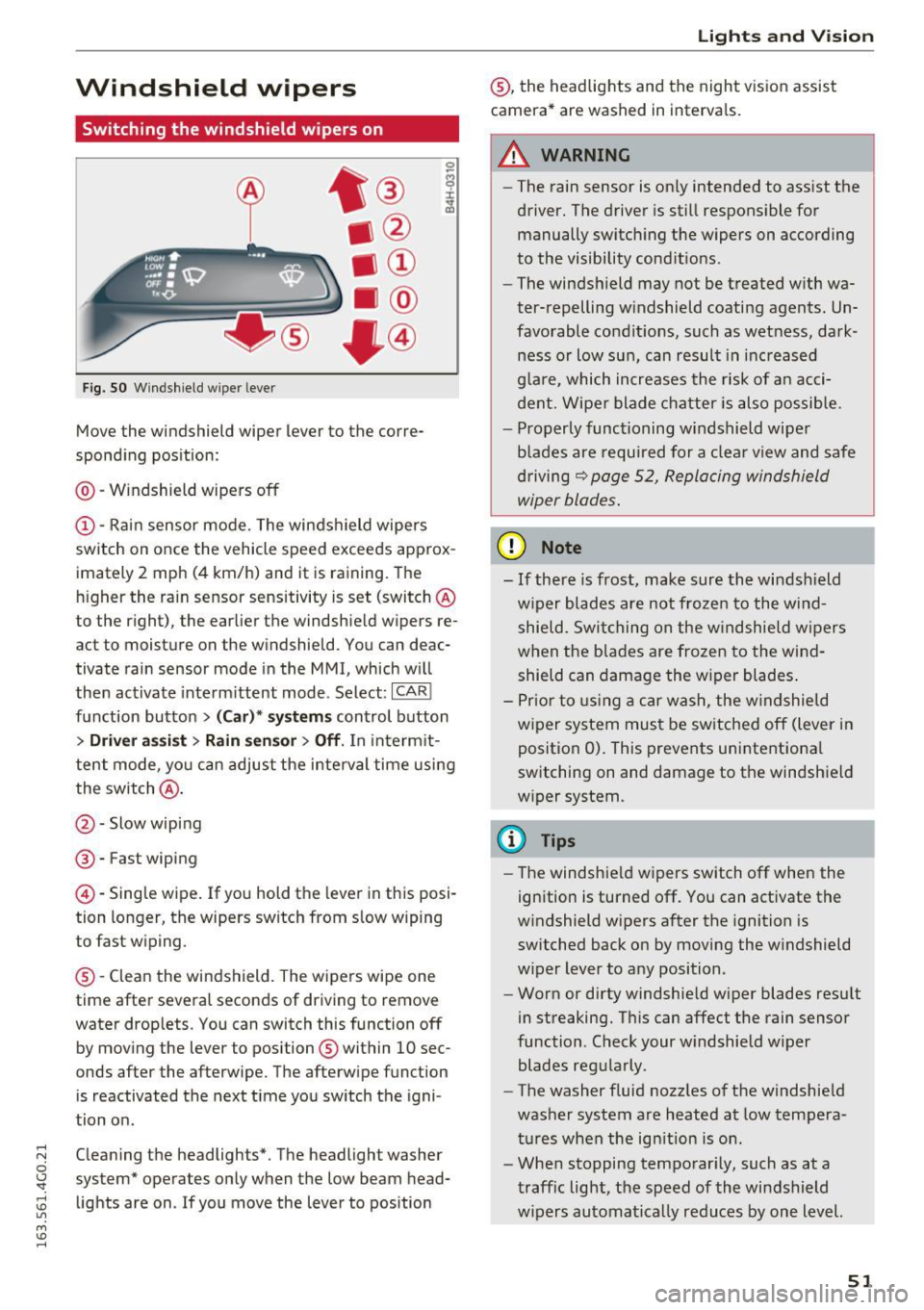
Fig. SO Windshield wiper lever
Move the windshield wiper lever to the corre
spond ing pos ition:
@ -Windshield wipers off
@-Rai n sensor mo de. The windshield wipe rs
switch on once the vehicle speed exceeds approx
imately 2 mph (4 km/h) and it is raining. The
h igher the ra in sensor sensitivity is set (switch @
to the r ight), the earlier the windshield wipers re
act to moisture on the windshield. You can deac
tivate rain sensor mode in the MMI, which w ill
then activate interm ittent mode . Select :
ICAR!
fu nction butto n > (Car )* sys tems control button
> Driver a ssis t > Rain sen sor > Off . In inte rm it
te nt mode, yo u can adjust the interval time usi ng
the switch @.
@-Slow wiping
®-Fast wiping
@-Single wipe . If you hold the leve r in this posi
tion longer, the wipers switch from s low wiping
to fast wiping .
® -Clean the windshield. The wipers wipe one
time afte r severa l seconds of driving to remove
water drop lets. You can switch this function off
by mov ing the lever to position ® within 10 sec
onds after the afterwipe. T he afterwipe function
is reactivated the next t ime you sw itch the igni
tion o n.
C leaning the headlights *. The headlight washe r
system" operates on ly when the low beam head
lights are on . If you move the lever to position
Lights and V ision
® , the headlights and the night v is ion assist
camera * are washed in interva ls.
.&_ WARNING
-
- The rain sensor is on ly intended to ass ist the
driver . The driver is sti ll respons ible for
manually switch ing the wipers on according
to the visibility cond it io ns.
- The windsh ield may not be t reated w ith wa
ter-repelling w indshield coating agents . Un
favorable condit ions, such as wet ness, dark
ness o r low sun, can result in inc reased
g la re, which increases the risk of an acci
dent. Wipe r blade chatter is also possible .
- Properly func tioning windshield wipe r
b lades are requi red for a clea r view and safe
dr iving
r:¢> page 52, Repla cing windshield
wiper blades .
(D Note
-If there is frost, make sure the wi ndshield
w iper blades are not froze n to the wi nd
shield. Swi tching on the w indshie ld w ipers
when the b la d es are frozen to the win d
shield can damage the w iper blades .
- P rior to using a c ar wash, the w indshield
w iper system mus t be sw itched off (lever i n
position 0). This prevents unintentiona l
switching on and damage to the windsh ield
w iper system .
CI) Tips
-The windshie ld wipers switch off when the
ign ition is turned off. You can activate the
w indshield wipers a fter the ignition is
switched back on by moving the w indshield
w iper lever to any position.
- Worn or dirty windshie ld w iper blades res ult
in streaking. T his can affect the rain sensor
function. Check your w indshield w iper
blades reg ularly .
- The washer f luid nozz les of the w indshie ld
was her system are heated at low tempera
tur es whe n the ign it ion is on .
- Whe n stopping temporar ily, such as at a
t raffic light, the speed of the wi ndshield
w ipers au tomatically reduces by one level.
51
Page 54 of 294
Lights and Vi sion
Cleaning w indshield wiper blades
Clean the wiper blades when you see wiper
s treaks. Use a soft cloth and a glass cleaner .
... Place the w indshield wiper arms in the service
pos ition
c::> page 52 .
... Fo ld the windshield wipe r arms away from the
winds hield.
A WARNING
Dirty windshield wiper blades can impair vi
sion, which increases the risk of an accident.
Replacing windshield wipe r blades
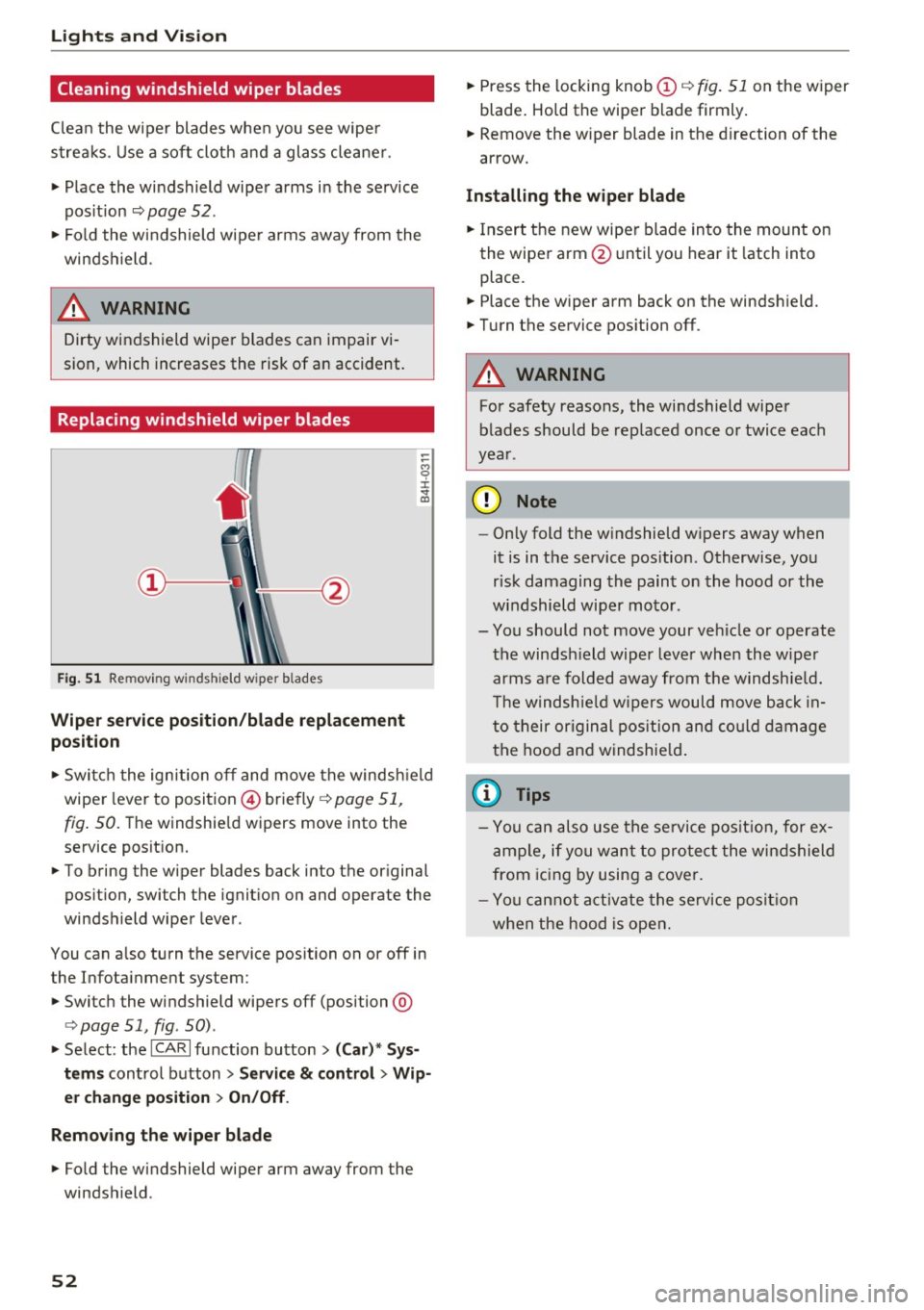
Fig. 51 Remov ing w indshi eld wiper b lades
Wiper service position/blade replacement
posit ion
:= M 0 ±
" CD
... Switch the ignition off and move the windsh ield
wiper lever to position @) briefly
c::> page 51,
fig. 50. Th e windshie ld wipers move into the
service position.
... To bring the wiper blades back into the original
position, switch the ignition on and operate the
windshield wiper lever.
You can also turn the service position on or off in
the Infotainment system:
... Switch the windshield wipers off (position @
¢ page 51, fig. 50) .
... Select: the
ICA RI function button> (Car)* Sys
tems
control button > Service & control > Wip
er change position
> On/Off .
Removing the wiper blade
... Fo ld the windshield wiper arm away from the
windshield .
52
... Press the locking knob (D c::> fig. 51 on the wiper
blade . Hold the wiper blade firmly.
... Remove the wiper blade in the direction of the
arrow .
Installing the wiper blade
... Insert the new wiper blade into the mount on
the wiper arm @until you hear it latch into
place .
... Place the wiper arm back on the windshield.
... Turn the service position off.
A WARNING
-
For safety reasons, the windshield wiper
blades should be replaced once or twice each
year .
(D Note
-Only fold the w indshield w ipers away when
it is in the service position. Otherwise, you
risk damaging the paint on the hood or the
windshield wiper motor.
- You should not move your veh icle or operate
the windsh ield wiper lever when the wiper
arms are folded away from the w indshie ld.
Th e windshie ld wipers would move back in
to their original position and could damage
the hood and windshield .
{i) Tips
- You can also use the service position, for ex
ample, if you want to protect the windshield
from icing by using a cover.
- You cannot activate the service position
when the hood is open.