steering wheel AUDI A6 2016 Owner's Manual
[x] Cancel search | Manufacturer: AUDI, Model Year: 2016, Model line: A6, Model: AUDI A6 2016Pages: 294, PDF Size: 73.88 MB
Page 106 of 294
Night vision assist
Display in the instrument cluster/head-up
display*
If there are pedestrians or wild animals in an
area in front of your vehicle that is classified as
critical, the system will direct your attention to
this :
- Pedestrians or wild animals are highlighted in
red and the corresponding symbol. or.
turns on
¢fig. 111.
-There is also a tone.
The area class ified as crit ica l is based on the vehi
cle speed and the steering wheel angle . Pedes
trian and wild animal warning encourages you to
pay more attention.
If the n ight vision assist image is replaced by an
other display (such as the on-board computer),
the red indicator light . or. will appear if
there is a pedestrian or wild animal warning
¢ fig. 112 .
If the head-up display* is switched on and the
night vision assist content is activated, • or.
will appear in the head-up display*.
Marking light*
To direct the driver's at tention to a pedest rian,
the head lights can flash on the pedestrian three
times in a row when there is a pedestrian warn
ing .
This happens at speeds above approx imately
35 mph (60 km/h) when you are traveling out
side of well-lit areas and when flashing the head lights will not create glare for a vehicle detected
in the oncoming lane . The marker light* is con
trolled by the high beam assist*
c;, page 45, High
beam assist.
The marking light is not used for wi ld animals.
104
General information
Applies to vehicles: with night vision assist
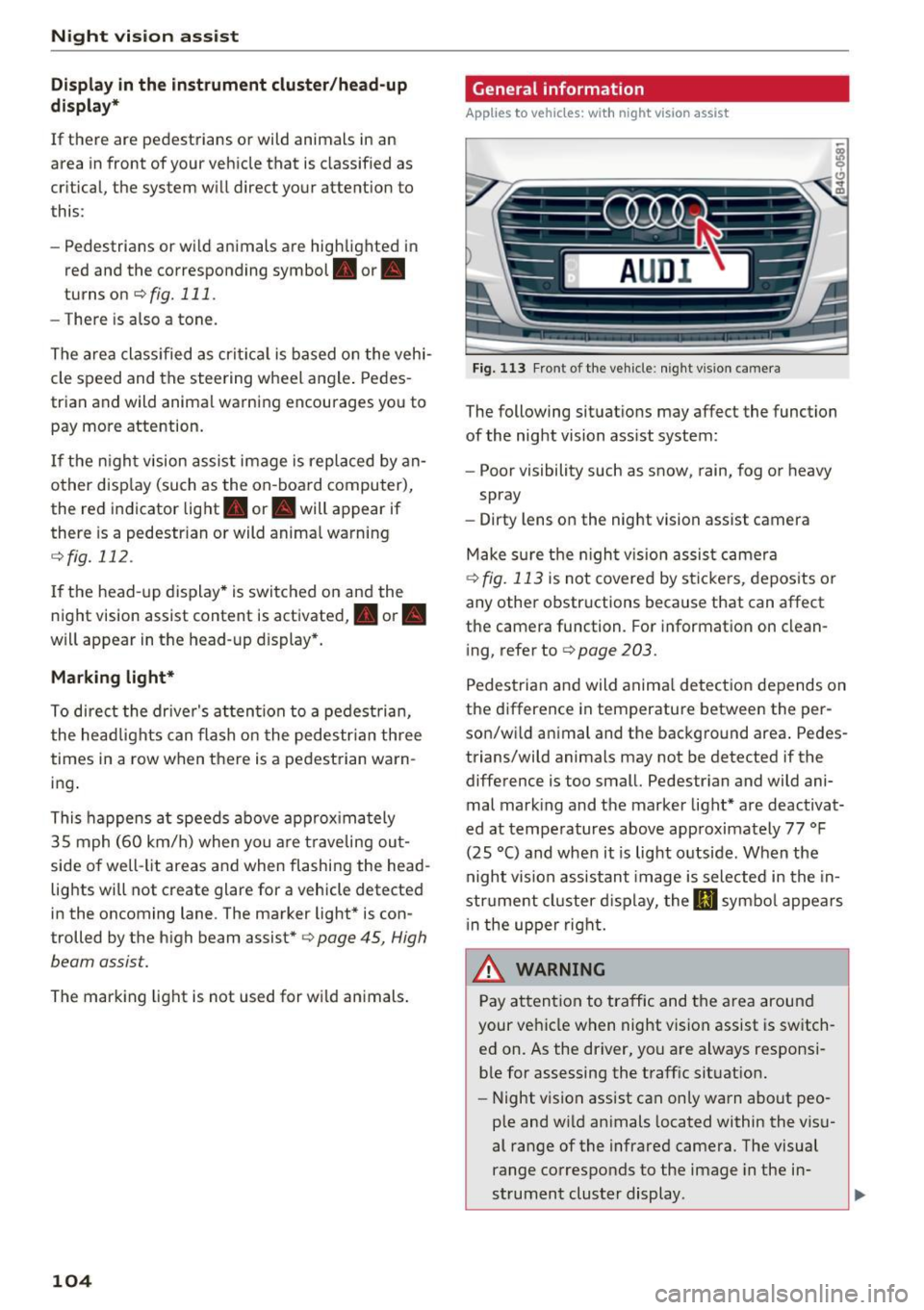
Fig. 113 Front of the vehicle: night vision camera
The following situations may affect the function
of the night vision assist system:
- Poor visibility such as snow, rain, fog or heavy
spray
- Dirty lens on the night vision assist camera
Make sure the night vision assist camera
¢fig. 113 is not covered by sticke rs, deposits or
any other obstructions because that can affect
the camera function. For information on clean
ing, refer to
c;, page 203.
Pedestrian and wild anima l detect ion depends on
the difference in temperature between the per
son/wild animal and the background area . Pedes
trians/wild animals may not be detected if the
difference is too small. Pedestrian and wild ani mal marking and the marker light* are deactivat
ed at temperatures above approximately 77 °F
(25 °() and when it is light outside . When the
night vision assistant image is selected in the in
strument cluster display, the
II symbol appears
i n the upper right.
.&_ WARNING
Pay attention to traffic and the area around
your vehicle when night vision assist is switch
ed on . As the driver, you are always responsi
ble for assessing the traffic situat ion.
- Night vision assist can only warn about peo
ple and wild animals located within the visu
al range of the infrared camera. The visual
range corresponds to the image in the in
strument cluster display .
-
Page 112 of 294
Automatic transmission
Manual shift program
Using the manual shift program you can man
ually select gears .
)
r
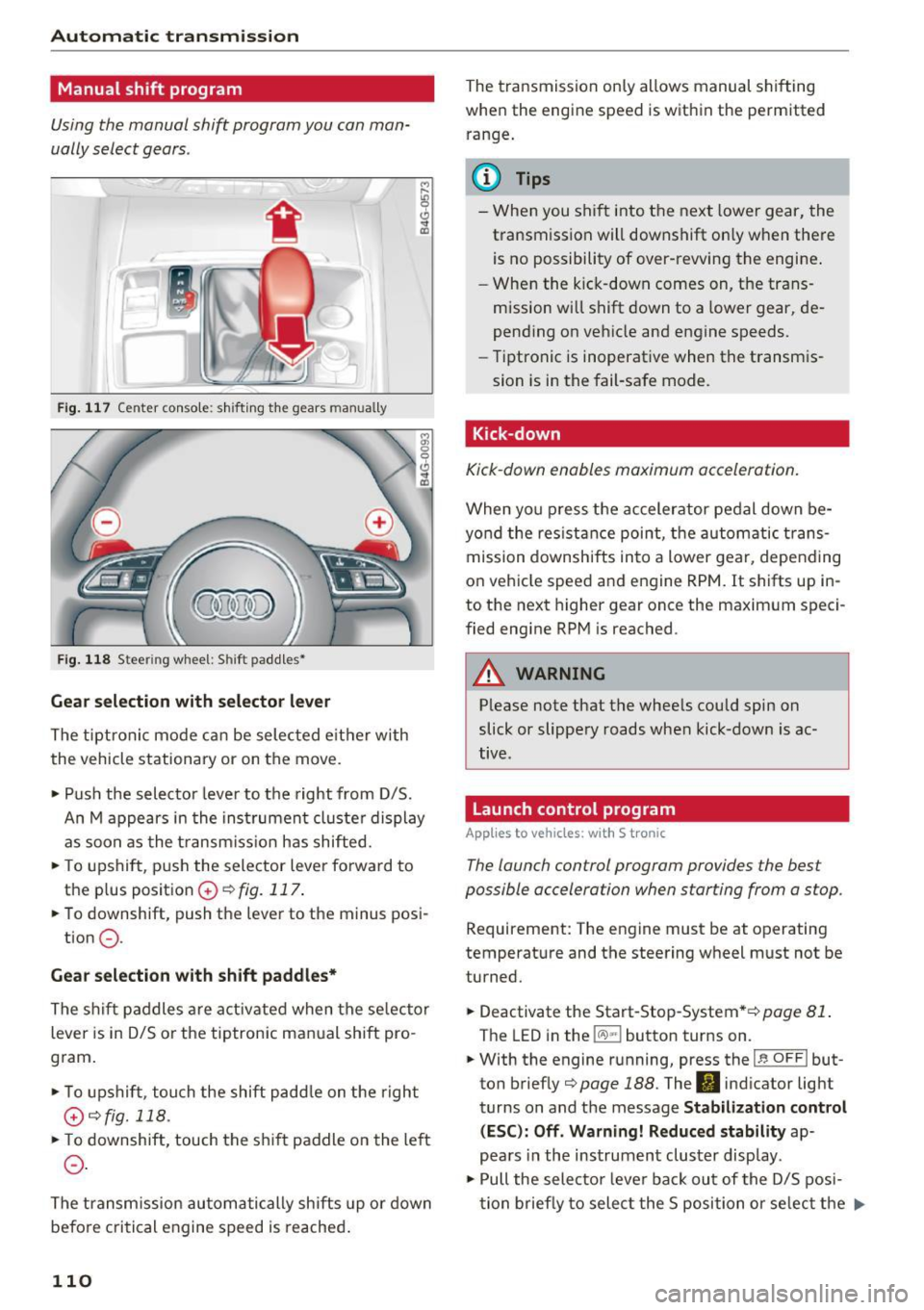
Fig. 117 Center console: shifting the gears manually
Fig. 118 Steering whee l: Shift paddles•
Gear selection with selector lever
The tiptronic mode can be selected eith er with
the vehicle stationary or on the
move.
• Push the selector lever to the right from D/S.
An M appears in the instrument cluster display
as soon as the transmission has shifted.
• To upshift, push the selector lever forward to
the plus position
G) ¢ fig. 117 .
• To downshift, push the lever to the minus posi-
tion
0 .
Gear selection with shift paddles*
The shift paddles are activated when the selector
lever is in D/S or the tiptronic manual shift pro
gram.
• To upshift , touch the shift padd le on the right
G)¢fig. 118.
• To downshift, touch the shift paddle on the left
0.
The transmission automatically shifts up or down
before critical engine speed is reached .
110
The transmission only allows manual shifting
when the engine speed is within the permitted
range.
(D Tips
- When you shift into the next lower gear, the
transmiss ion will downshift on ly when there
is no possibility of over-rewing the engine .
- When the kick-down comes on, the trans
mission will shift down to a lower gear, de
pending on vehicle and engine speeds.
- Tiptronic is inoperative when the transmis
sion is in the fail-safe mode.
Kick-down
Kick-down enables maximum acceleration.
When you press the accelerator pedal down be
yond the resistan ce point, the automatic tra ns
mission downshifts into a lower gear, depending
on vehicle speed and engine RPM. It shifts up in
to the next higher gear once the maximum speci
fied engine RPM is reached.
A WARNING
Please note that the whee ls could spin on
slick or slippery roads when kick-down is ac
tive.
Launch control program
App lies to vehicles: with S t ronic
The launch control program provides the best
possible acceleration when starting from a stop .
Requirement: The engine must be at operating
temperature and the steering wheel must not be
turned.
• Deactivate the Start-Stop-System *¢
page 81 .
The LED in the !CA.l "'! button turns on.
• With the engine running, press the
~,~-0-F F~I but
ton briefly¢
page 188. The II indicator light
turns on and the message
Stabilization control
(ESC): Off. Warning! Reduced stability
ap
pears in the instrument cluster display.
• Pull the selector leve r back out of the D/S posi
tion briefly to select the S position or se lect the .,..
Page 118 of 294
Parking systems
-The camera lens enlarges and distorts the
field of vision. The object appears both al
tered and inaccurate on the screen.
- In certain situations, people or objects in
the display appear closer or farther away:
- For objects that do not touch the ground,
such as the bumper of a parked vehicle, a
trailer hitch or the rear of a truck. Do not
use the help lines in this case.
- If driven from a level surface onto an in
cline, or a downward slope.
- If driven toward protruding objects.
- If the vehicle is carrying too much load in
the rear.
(D Note
- Always read and follow the applicable warn
ings r::!>(D
in General information on
page 113 .
-The orange colored orientation lines in the
Infotainment display show the vehicle path
depending on the steering wheel angle. The
front of the vehicle front swings out more
than the rear of the vehicle . Maintain plenty
of distance so that your outside mirror or a
corner of your vehicle does not collide with
any obstacles.
Switching on/off
Applies to vehicles: with rearview camera
Switching on
.,. Shift into reverse, or
.,. Press the
P,,, A button in the center console
r:=> page 114, fig. 121. A short confirmation
tone sounds and the LED in the button turns
on.
Switching between the rearview camera and
optical display
.,. Press the Graphic control button ®
r:=> page 116, fig. 126 to see the optical display .
.,. Press the
Rear view control button to see the
. . rearv1ew camera image.
Switching off
.,. Drive forward faster than 10 km/h, or
.,. press the
P,1
1.A button, or
116
.,. Switch the ignition off.
@ Tips
- The visual display in the left part of the dis
play should help you detect the critical vehi
cle areas.
- You can change the volume and pitch of the
signals as well as the dis play
r:=> page 123.
Cross parking
Applies to vehicles: with rearview camera
This view may be used when parking in a garage
or in a parking space.
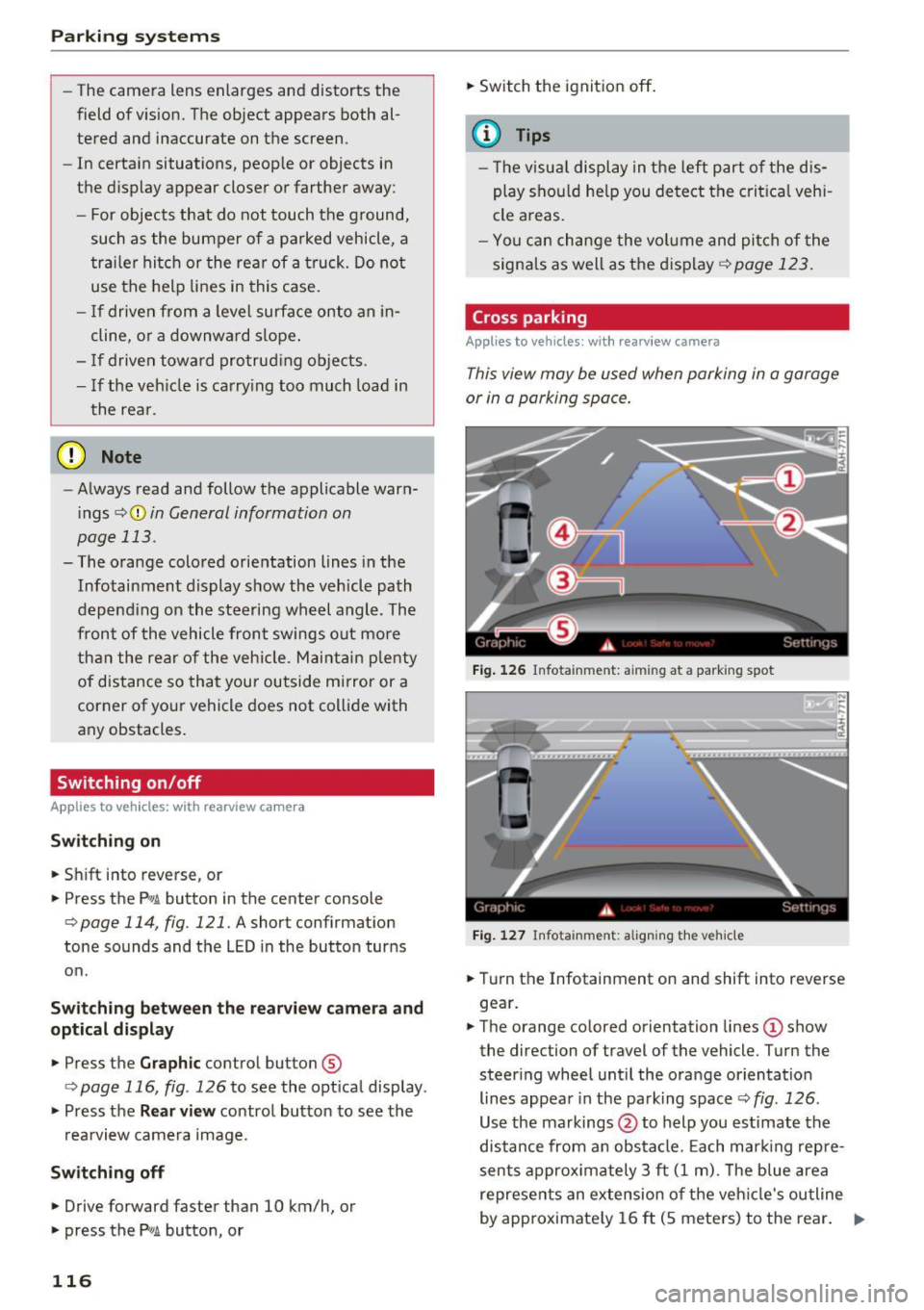
Fig. 126 Infotainment: aiming at a parking spot
Fig. 127 Infota inment: aligning the vehicle
.,. Turn the Infotainment on and shift into reverse
gear.
.,. The orange colored orientation lines
(D show
the direction of travel of the vehicle. Turn the
steer ing wheel until the orange orientation
lines appear in the parking space r::!>
fig. 126 .
Use the markings @to help you estimate the
distance from an obstacle. Each marking repre
sents approximately 3 ft
(1 m). The blue area
represents an extension of the vehicle's outline
by approximately
16 ft (5 meters) to the rear. .,._
Page 119 of 294
.... N
0 CJ '
.. While driving in reverse gear, adjust the steer
ing wheel ang le to fit the parkin g space with
the a id of the orange orientation lines
c::> A in
General information on page 115,
c:> (D in Gen
eral information on page 116. @
displays the
rear bumper . Stop the veh icle, at the latest,
when the red or ientat io n line @ borders an ob
ject.
Parallel parking
App lies to vehicles : wit h re arv iew camera
This view may be used when parallel parking
along the side of a street.
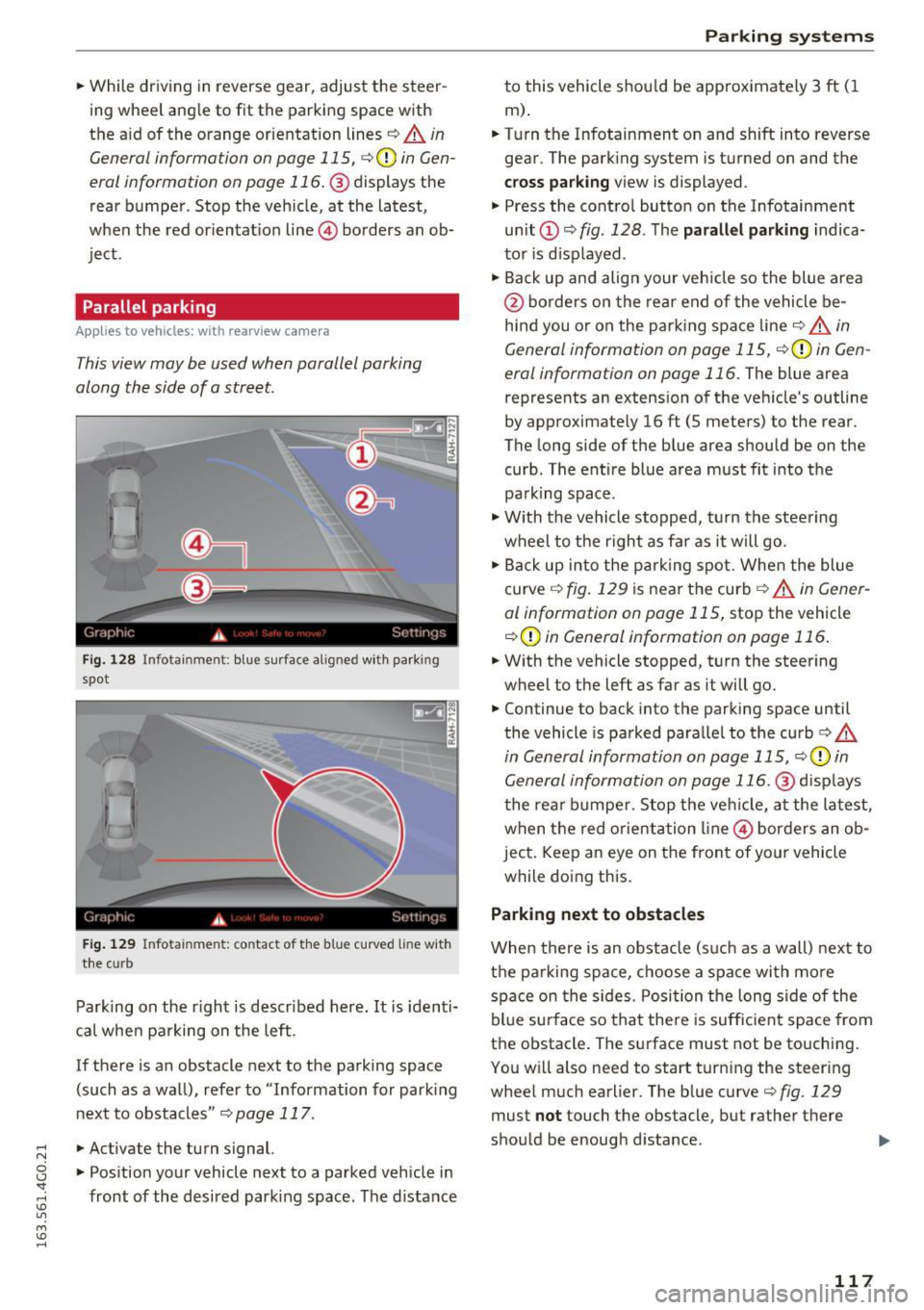
Fi g. 128 Infotai nmen t: b lue surface a lig ned w it h park ing
spot
F ig . 12 9 In fota inmen t: co ntac t of t he blue curved li ne w it h
t h e cu rb
Pa rk ing on the r ight is descr ibed here. It is iden ti
cal whe n pa rking on the left .
If there is an obstacle next to the pa rking space
(such as a wall), refe r to "Information for park ing
nex t to obstacles"
c:> page 117 .
.. Activate the turn s ignal.
.. Pos ition your vehicle next to a parked veh icle in
front of the desired parking space. The d istance
Parking systems
to this vehicle shou ld be app roximately 3 ft ( 1
m).
.. Turn the Infotainment on and shift into reverse
gear . The park ing system is turned on and the
cross parking view is displayed .
.,. Press the contro l button on the Infotainment
unit
(D c:> fig . 128 . The parallel parking indica
to r is d isp layed .
.,. Back up and align your veh icle so the blue a rea
@ bo rde rs on the re a r end of the vehicle be
hind you o r on the park ing spa ce line
c::> A in
General information on page 115,
c::> (D in Gen
eral information on page 116.
The blue area
represents an extension of the ve hicle's outline
by approximate ly 16 ft (5 meters) to the rear.
The long side of the b lue area should be on the
curb . The ent ire blue area must fit into the
pa rk ing space .
.,. With the vehicle s topped, t urn the stee ring
wheel to the r ight as far as it will go .
.,. Back up into the park ing spot. Whe n the blue
curve
c::> fig . 129 is near the curb c::> A in Gen er
al information on page 115,
stop the vehicle
c::> (D in General information on page 116 .
.. W ith the vehicle stopped, t urn the steering
wheel to the left as far as it will go .
.. Continue to back into the parking space until
the vehicle is parked para llel to the curb
c:> .&.
in General information on page 115, c::> (D in
Gen eral information on page 116. @
disp lays
t he rea r bu mpe r. Stop the ve hicle, at the la test,
w hen t he red o rient ation line @ bor ders an o b
ject. Keep a n eye on the fron t of yo ur vehicle
while do ing this.
Parking next to obstacles
When there is an obstacle (suc h as a wall) next to
t h e pa rking space, c hoose a spa ce with mo re
spa ce on the s ides. Posi tion t he long side of the
bl ue su rface so that the re is suff ic ient space from
the obstacle . The su rface must not be touching.
Yo u w ill also need to start t urn ing the steer ing
whee l much earlier. The b lue curve
c:> fig. 129
must not touch the obstacle, but rathe r the re
sho uld be enough d istance .
117
Page 120 of 294
Parking system s
CD Note
Keep enough distance from the curb to avoid
damage to the rims .
@ Tips
The left or right orientation lines and surfaces
wi ll be displayed, depending on the turn sig
nal being used .
Peripheral cameras
Introduction
Applies to vehicles: with peripheral cameras
With this equipment, die parking system plus* is
supp lemented with var io us peripheral cameras
qpage 114. Depending on vehicle equipment,
you are provided with the following views: Around the vehicle, front corner and rear corner,
in front of the vehicle and behind the vehicle.
General information
Applies to veh icles: with peripheral cameras
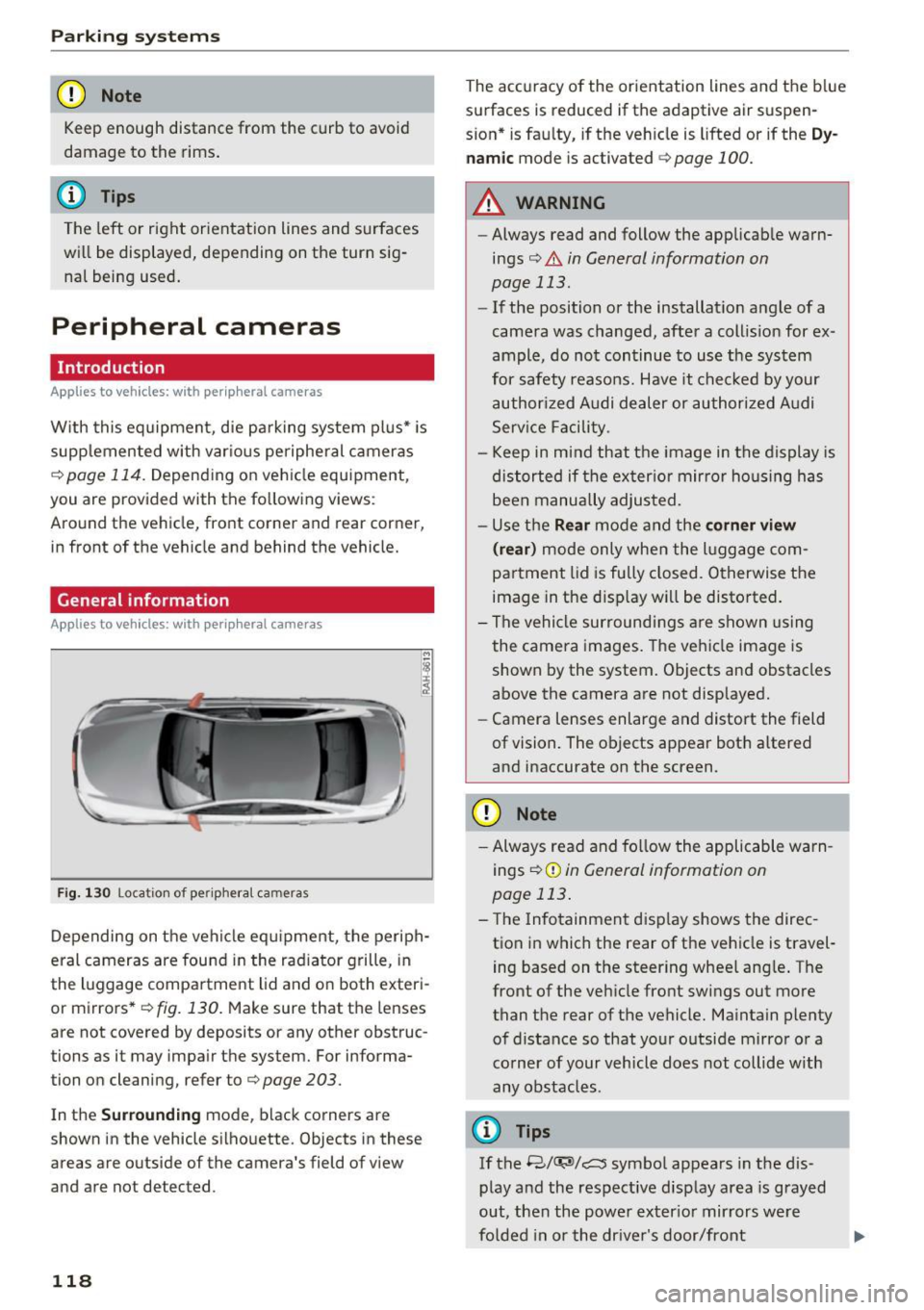
F ig . 1 30 Location of periphe ral cameras
Depending on the vehicle eq uipment, the periph
eral cameras are fou nd in the radiator grille, in
the luggage compa rtment lid and on both exteri
or mirrors *
q fig. 130. Make sure that the lenses
are not covered by deposits or any other obstruc
tions as it may impair the system. For informa
tion on cleaning, refer to¢
page 203.
In the Surrounding mode, black corners are
shown in the vehicle silhouette. Objects in these
areas are outside of the camera's field of v iew
and are not detected.
118
The accuracy of the orientation lines and the b lue
surfaces is reduced if the adaptive air suspen
s ion* is fau lty, if the veh icle is lifted or if the
D y
nam ic mode is activated qpage 100.
A WARNING
-Always read and follow the applicab le warn
ings¢ .&
in General information on
page 113.
- If the position or the installat ion angle of a
camera was changed, after a collis ion for ex
ample, do not continue to use the system
for safety reasons. Have it chec ked by your
authorized Audi dealer or authori zed A udi
Serv ice Facility.
- Keep in mind that the image in the display is
distorted if the exter ior mir ror ho using has
been manually adjusted.
- Use the
Rear mode and the corner view
( rear )
mode only when the l uggage com
partment lid is fu lly closed. Otherwise the
image in the disp lay will be disto rted.
- The vehicle surroundi ngs a re shown using
the camera images. The veh icle image is
shown by the system. Objects and obstacles
above the camera are not displayed.
- Camera lenses enlarge and distort the field
of vision. The objects appear both a ltered
and inaccurate on the screen.
CD Note
- Always read and fo llow the applicable warn
ings
¢ (Din General information on
page 113 .
-The Infotainment d isp lay shows the direc
tion in which the rear of the vehicle is travel
ing based on the steering wheel ang le . The
front of the vehicle front sw ings out more
than the rear of the vehicle. Maintain plenty of distance so that your o utside mirror or a
corner of your vehicle does not collide with
any obstacles.
(I} Tips
If the 8/(J;(SJ/c:, symbol appears in the dis
play and the respective display area is grayed
out, then the power exter io r mir rors we re
fo lded in or the dr ive r's door/front
Page 123 of 294
.... N
0 CJ '
.. Se lect the @symbol with the control knob .
You can choose between three different v iews in
this mode. .. To c ross park, pa rallel park or position the vehi
cle in front o f a trailer*, press the control but
ton ® on the contro l pane l repeatedly unti l the
symbol for the des ired mode is selected .
Cross parking
Applies to vehicles: with peripheral cameras
This view may be used when parking in a garage
or in a parking space.
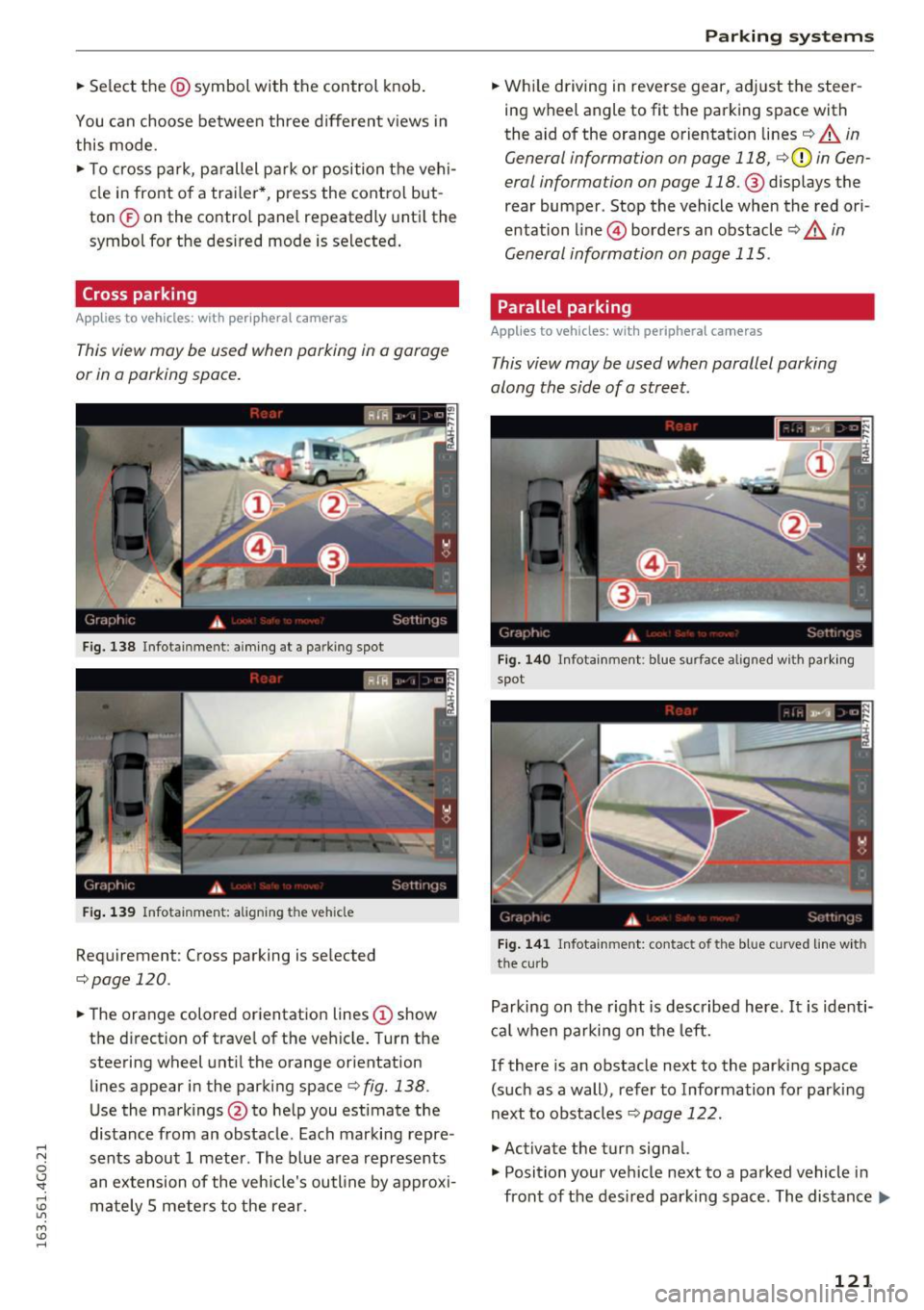
Fig. 138 Infotainment: aiming at a parking spot
Fig . 139 Infotainment: aligning the veh icle
Requirement: Cross parking is se lected
,=;,page 120.
.. The orange colored orientation lines (D show
the d irection of trave l of the veh icle. Turn the
steering wheel unt il the orange orientation
lines appear in the parking space¢
fig. 138.
Use the markings@to help you estimate the
distance from an obstacle. Each marking repre
sents about 1 meter. The blue area represents an extension of the vehicle's outline by approx i
mately 5 mete rs to the rear.
Parking systems
.. Wh ile driving in reverse gear, adj ust the steer
ing wheel angle to fit the parking space with
the aid of the orange orientation lines¢
A in
General information on page 118,
c;, (D in Gen
eral information on page
118. @displays the
rear bumper . Stop the vehicle when the red ori
entation line@) borders an obstacle¢
A in
General information on page 115 .
Parallel parking
Applies to vehicles: with peripheral cameras
This view may be used when parallel parking
along the side of a street.
Fig. 14 0 Infotainment: blue surface a lig ned w ith parki ng
spot
F ig. 14 1 Infotainment: contact of the blue curved line with
the curb
Parking on the right is described here. It is identi
cal when parking on the left.
If there is an obstacle next to the parking space
(such as a wall), refer to Information for parking
next to obstacles¢
page 122.
.,. Activate the turn signal.
.,. Position your ve hicle next to a parked vehicle in
front of the des ired parking space. The distance..,.
121
Page 128 of 294
Driving safety
• Make sure to use the right child restraint cor
rectly to protect children
c::> page 166, Child
safety.
• Sit properly in your seat and make sure that
your passengers do the same
c::> page 53, Gen
eral information.
• Fasten your safety belt and wear it properly. Al
so instruct your passengers to fasten their safe
ty belts properly
c::> page 134 .
What impairs driving safety?
Safe driving is directly related to the condition of
the vehicle, the driver as well as the driver's abili
ty to concentrate on the road without being dis
tracted .
The driver is responsible for the safety of the ve
hicle and all of its occupants. If your ability to
drive is impaired, safety risks for everybody in the
veh icle increase and you also become a hazard to
everyone else on the road
c::> ,&. . Therefore :
• Do not let yourself be distracted by passengers
or by using a cellular telephone .
• NEVER drive when your dr iv ing ability is im
paired (by medications, alcohol, drugs, etc .).
• Observe all traffic laws, rules of the road and
speed limits and plain common sense .
• ALWAYS adjust your speed to road, traffic and
weather conditions .
• Take frequent breaks on long trips . Do not drive
for more than two hours at a stretch .
• Do NOT drive when you are tired, under pres
sure or when you are stressed.
.&, WARNING
Impaired driving safety increases the risk of
serious personal injury and death whenever a
vehicle is being used.
126
.
Correct passenger
seating positions
Proper seating position for the driver
The proper driver seating position is important
for safe, relaxed driving.
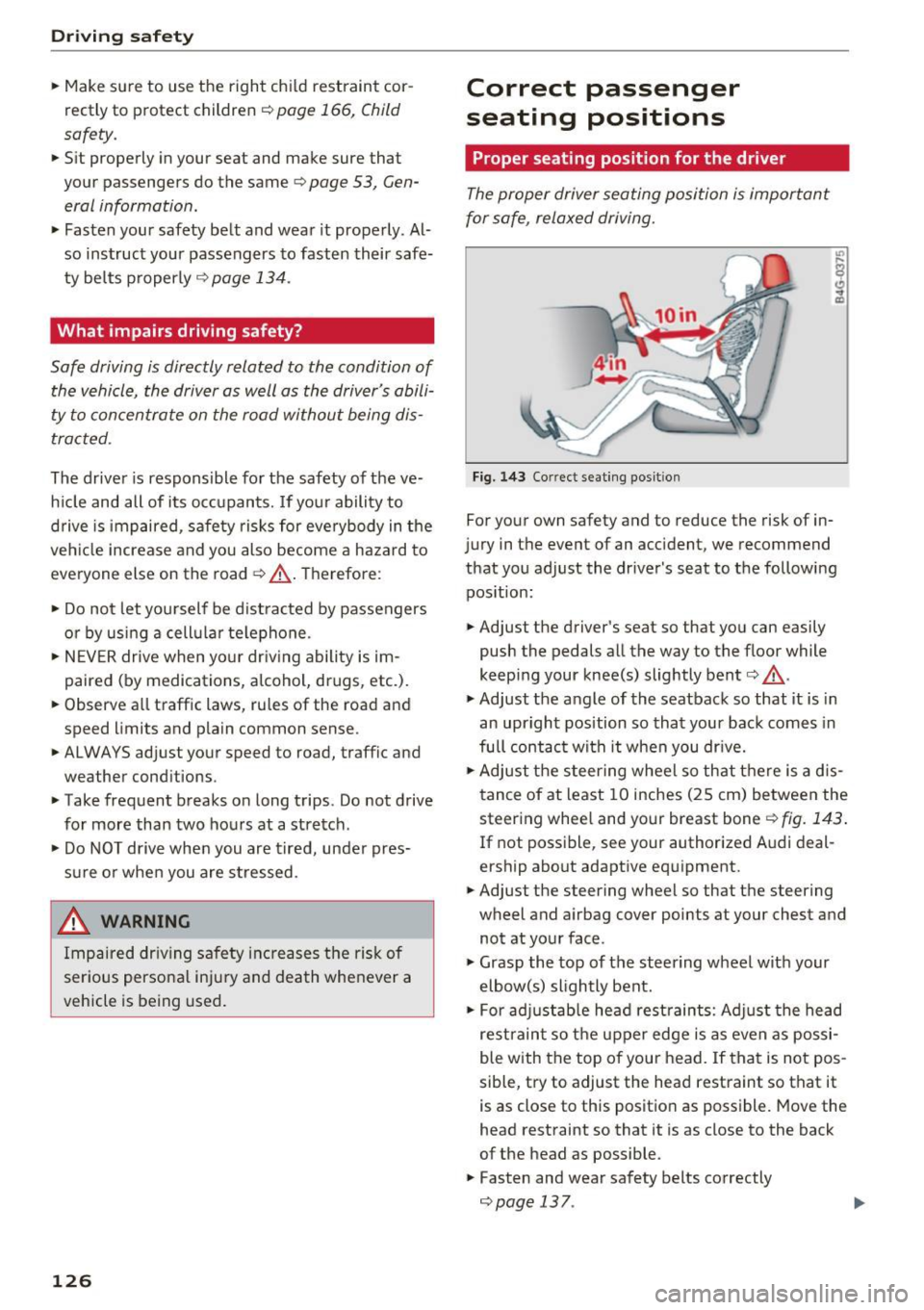
Fig. 143 Correct seating posit ion
For your own safety and to reduce the risk of in
jury in the event of an accident, we recommend
that you adjust the driver's seat to the following position:
• Adjust the driver's seat so that you can easily
push the pedals all the way to the floor while
keeping your knee(s) slightly bent
c:> .&_ .
• Adjust the angle of the seatback so that it is in
an upright position so that your back comes in
full contact with it when you dr ive.
• Adjust the steering wheel so that there is a d is
tance of at least 10 inches (25 cm) between the
steering wheel and your breast bone
r::!) fig. 143.
If not possible, see your authorized Audi deal
ership about adaptive equipment.
• Adjust the steering wheel so that the steering
wheel and airbag cover points at your chest and
not at your face .
• Grasp the top of the steering wheel with your
elbow(s) slightly bent.
• For adjustable head restraints: Adjust the head
restraint so the upper edge is as even as possi
ble with the top of your head. If that is not pos
sible, try to adjust the head restraint so that it
is as close to this position as possible. Move the
head restraint so that it is as close to the back
of the head as possible .
• Fasten and wear safety belts correctly
c::> page 13 7. .,._
Page 129 of 294
~ Always keep both feet in the footwell so that
you are in control of the vehicle at all times.
F or detailed information on how to adjust the
driver's seat, see
¢ page 54.
A WARNING
Drivers who are unbelted, out of position or
too close to the airbag can be seriously in
jured by an airbag as it unfolds. To help re
duce the risk of serious personal injury:
- Always adjust the driver's seat and the
steering wheel so that there are at least
10 inches (25 cm) between your breastbone
and the steering wheel.
- Always adjust the driver's seat and the
steering wheel so that there are at least
4 inches (10 cm) between the knees and the
lower part of the instrument panel.
- Always hold the steering wheel on the out
side of the steering wheel rim with your
hands at the 9 o'clock and 3 o'clock posi
tions to help reduce the risk of personal in
jury if the driver's airbag inflates.
- Never hold the steer ing wheel at the
12 o'clock posit ion or with your hands at
other positions inside the steering wheel
rim or on the steering wheel hub. Holding
the steering wheel the wrong way can cause
serious injuries to the hands, arms and head if the driver 's airbag inflates.
- Pointing the steering wheel toward your
face decreases the ability of the supplemen
tal driver's airbag to protect you in a colli sion.
- Always sit in an upright position and never
lean against or place any part of your body
too close to the area where the airbags are
located.
- Before driving, always adjust the front seats
properly and make sure that all passengers
are properly restrained.
- For adjustable head restraints: before driv
ing, always also adjust the head restraints
properly .
- Never adjust the seats while the vehicle is
moving. Your seat may move unexpectedly
and you could lose control of the vehicle.
-
Driving safety
-Never drive with the backrest reclined or
tilted far back! The farther the backrests are
tilted back, the greater the risk of injury due
to incorrect positioning of the safety belt
and improper seating position.
- Children must always ride in child seats
¢ page 166 . Special precautions apply
when installing a child seat on the front
passenger seat¢
page 142.
Proper seating position for the front
passenger
The proper front passenger seating position is
important for safe, relaxed driving.
For your own safety and to reduce the risk of in
jury in the event of an accident, we recommend
that you adjust the seat for the front passenger
to the fol lowing position:
~ Adjust the angle of the seatback so that it is in
an upright position and your back comes in full
contact with it whenever the vehicle is moving.
~ For adjustable head restraints: adjust the head
restraint so the upper edge is as even as possi
ble with the top of your head. If that is not pos
sible, try to adjust the head restraint so that it is as close to this position as possible
¢
page 128 . Move the head restraint so that it
is as close to the back of the head as possible.
~ Keep both feet flat on the floor in front of the
front passenger seat.
~ Fasten and wear safety belts correctly
¢page 137.
For detailed information on how to adjust the
front passenger's seat, see
¢ page 53 .
A WARNING
Front seat passengers who are unbe lted, out
of position or too close to the airbag can be
seriously injured or killed by the airbag as it
unfolds . To help reduce the risk of serious
personal injury:
- Passengers must always sit in an upright po
sition and never lean against or place any pa rt of their body too close to the area
where the airbags are located. ..,.
127
Page 137 of 294
.... N
0 CJ '
Why use safety belts?
Frontal collisions and the law of physics
Frontal crashes create very strong forces for peo
ple riding in vehicles .
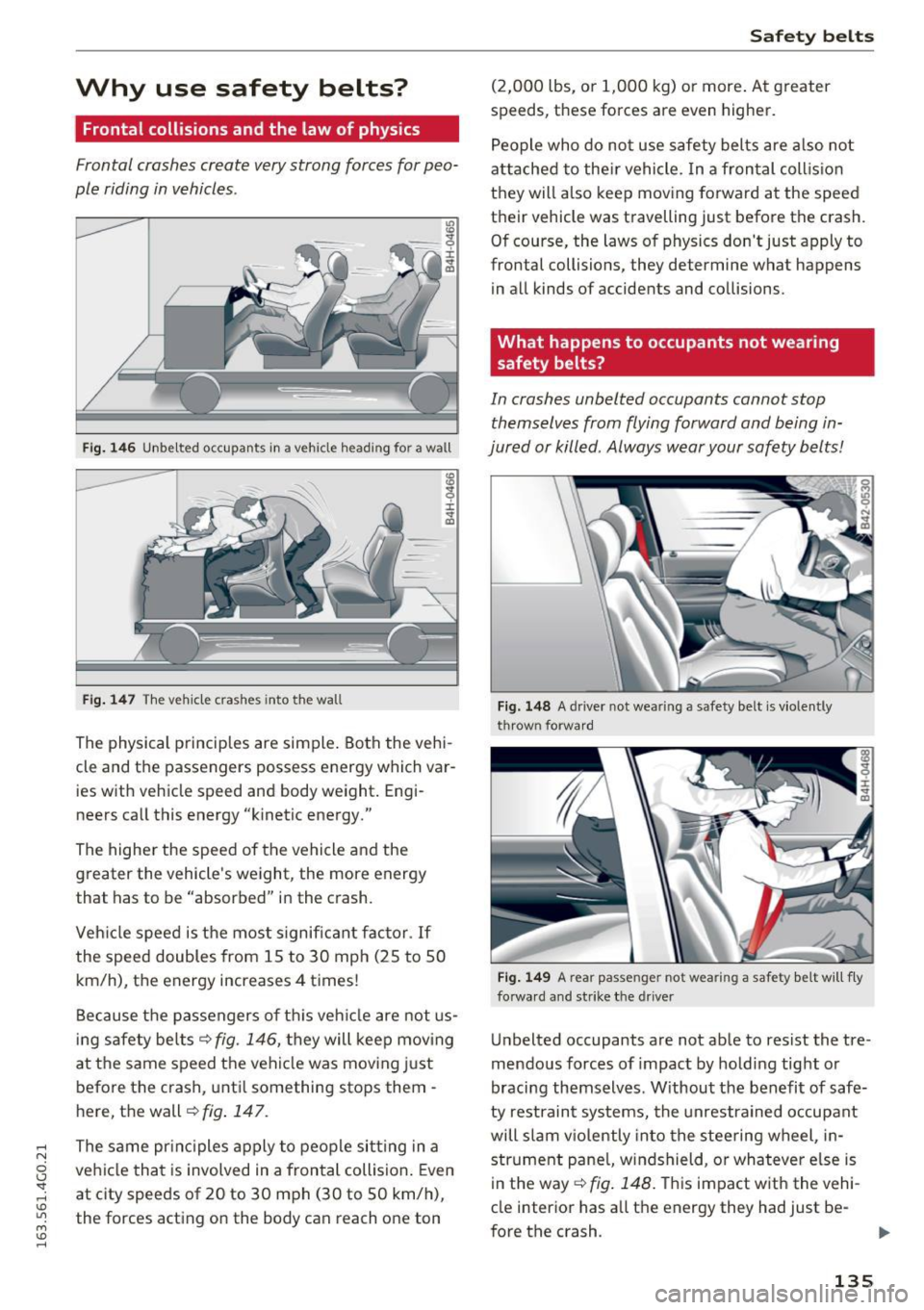
Fig. 146 Unbelted occupants in a vehicle heading for a wall
Fig . 147 The vehicle crashes into the wall
CD
~ ±
cle and the passengers possess energy which var
ies with vehicle speed and body weight. Engi
neers call this energy "kinetic energy."
The higher the speed of the vehicle and the
greater the vehicle's weight, the more energy
that has to be "absorbed" in the crash.
Veh icle speed is the most significant factor.
If
the speed doubles from 15 to 30 mph (25 to SO
km/h), the energy increases 4 times!
Because the passengers of this vehicle are not us
ing safety belts ¢
fig. 146, they will keep mov ing
at the same speed the vehicle was moving just
before the crash, until something stops them -
here, the wall ¢
fig. 147.
The same principles apply to people sitting in a
vehicle that is involved in a frontal collision. Even
at city speeds of 20 to 30 mph (30 to SO km/h),
the forces acting on the body can reach one ton
Safety belts
(2,000 lbs, or 1,000 kg) or more . At greater
speeds, these forces are even higher.
People who do not use safety belts are also not
attached to their vehicle. In a frontal collision
they will also keep moving forward at the speed
their vehicle was travelling just before the crash.
Of course, the laws of physics don't just apply to
frontal collisions, they determine what happens in all kinds of accidents and collisions.
What happens to occupants not wearing
safety belts?
In crashes unbelted occupants cannot stop
themselves from flying forward and being in
jured or killed . Always wear your safety belts!
Fig. 148 A dr iver not wea ring a safe ty belt is v io lent ly
throw n forward
Fig. 149 A rea r passe nge r not wea ring a safe ty belt will f ly
forwa rd and strike th e
driver
Unbelted occupants are not able to resist the tre
mendous forces of impact by holding tight or
bracing themselves . Without the benefit of safe
ty restraint systems, the unrestrained occupant
will slam viol ently into the steering wheel, in
strument panel, windshield , o r whatever else is
in the way
¢fig. 148. This impact with the vehi
cle interior has all the energy they had just be-
fore the crash . ..,.
135
Page 144 of 294
Airbag syste m
Airbag system
Important information
Importance of wearing safety belts and
sitting properly
Airbags are only supplemental restraints . For
airbags to do their job, occupants must always
properly wear their safety belts and be in a prop
er seating position.
For your safety and the safety of your passen
ge rs , before driving off, always :
"' Adjust the driver's seat and steering wheel
properly ¢
page 126,
"'Adjust the front passenge r's seat properly
¢ page 54,
"'Wear safety belts p roperly ¢ page 136 ,
"'Always properly use the proper child restraint
to protect children ¢
page 166.
In a coll is io n, airbags mus t inflate within the
blink of an eye and wi th considerab le force. The
supp lemental airbags can cause injuries if the
driv er or th e front s eat passeng er is not s eated
properly. Therefore in order to he lp the airbag to
do its job, it is important, both as a dr iver and as
a passenger to sit properly at all t imes.
By keeping room between your body and the
steering whee l and the front of the passenger
compartment, the a irbag can inflate fully and
completely and provide supplemental protect ion
in certain frontal collisions¢
page 126, Correct
passenger seating positions .
For details on the
operation of the seat adjustment con trols
¢ page 54.
It's especially important that children are proper
ly restra ined ¢
page 166 .
There is a lot that the driver and the passengers
can and must do to help the ind iv idual safety fea
tures installed in your Audi work together as a
system .
Proper seating posit ion is important so that the
front airbag on the drive r side can do its job. If
you have a physical impairment or cond ition that
prevents you from s itting properly on the driver
seat with the safety be lt properly fastened and
142
reaching the peda ls, or if yo u have concerns w ith
regard to the function or operation of the Ad
vanced Airbag System, please contact your a u
thori zed Audi dea ler or qua lified workshop, or
ca ll Audi Customer Relations at 1-800-822-2834
for poss ib le modifications to your vehicle .
When the airbag system dep loys, a gas generator
will fill the airbags, break open the padded cov ers, and infla te between the steering wheel and
the driver and between the instrument panel and
t h e front passenger . T he a irbags w il l deflate im
med iate ly after deployment so that the front oc
cupants can see t hrou gh the windsh ie ld again
without i nterruption.
All of th is takes p lace in the b link of an eye, so
fast that many people don't even rea lize that the
a irbags have deployed. The airbags a lso infla te
with a g re at deal of force and nothing should be
i n the ir way when they deploy. Front airbags in
combination with properly worn safety belts slow
down and limit the occupant 's forward move
ment . Together they he lp to prevent the driver
and front seat passenger from hitting pa rts of
the ins ide of the vehicle while reduc ing the fo rces
acting on the occupant dur ing the cras h. In th is
way they help to reduce the risk of injury to the
head and uppe r body i n the crash . Airbags do not
protect the arms or the lower pa rts of the body.
Both front airbags will not inflate in all frontal
collisions . The t riggering of the a irbag system de
pends on the veh icle decelerat ion rate caused by
t h e coll is io n and regis tered by the ele ctroni c con
tro l unit . If this ra te is be low the refe rence value
programmed in to the contro l unit, the airbags
will not be trigge red, even tho ugh the car may be
badly damaged as a resu lt of the collision. Vehi
cle damage, rep air costs or even the lack of vehi
cle damage is not necessarily an indication of
whether an a irbag should inflate or not .
Since the circumstances will vary cons iderab ly
between one co llision and another, it is not possi
ble to define a range of veh icle speeds that will
cover every poss ible kind and angle of impact
that w ill always t rigger t he a irbags . Important
factors i nclude, for examp le, the nat ure (hard or
soft) of the object which the ca r hits, the angle of
i mp act , vehicle speed , etc. The front airbags will .,.