rest AUDI A6 2017 Owners Manual
[x] Cancel search | Manufacturer: AUDI, Model Year: 2017, Model line: A6, Model: AUDI A6 2017Pages: 280, PDF Size: 70.24 MB
Page 4 of 280
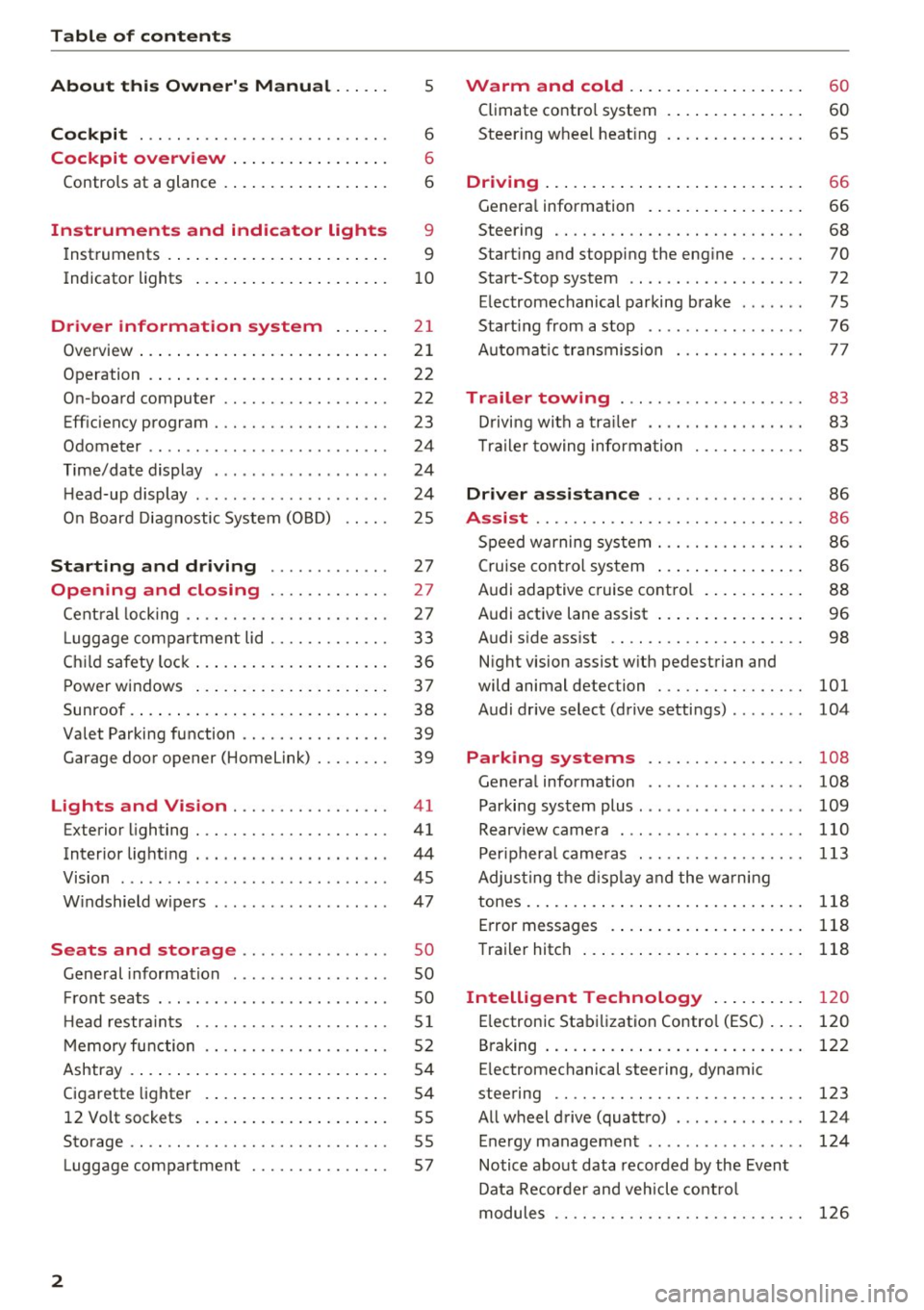
Table of contents
About this Owner's Manual ... .. .
Cockpit ... .. ............... .... .. .
Cockpit overview ................ .
Controls at a glance ... .......... .. .. .
Instruments and indicator lights
Instruments .... ... .......... .. .. .. .
Indicator lights .. .. .......... .. .. .. .
Driver information system ... .. .
Overview ... .... ... .......... ...... .
Operation .... .. ... .......... .. .. .. .
On-board computer ........... .... .. .
Eff iciency program . ........... .. .. .. .
Odometer .. .. .. ............ .... ... .
T ime/date display ........... .... ... .
He ad-up display .... .. .. ..... ... .. .. .
On Board Diagnostic System (OBD) .. .. .
Starting and driving ...... .. .. .. .
Opening and closing .......... .. .
Central locking ... ............ .... .. .
L uggage compartment lid ...... .... .. .
Child safety lock .... .......... .. .. .. .
Power windows ...... ..... ... .. .. .. .
Sunroof . ... .... .. ........... .. .. .. . 5
6
6
6
9
9
10
2 1
21
22
22
23
24
24
24
25
27
27
27
33
36
37
38
Valet Parking function . . . . . . . . . . . . . . . . 39
Garage door opener (Home link) . . . . . . . . 39
Lights and Vision . . . . . . . . . . . . . . . . . 41
Exterior lighting . . . . . . . . . . . . . . . . . . . . . 41
Interior lighting . . . . . . . . . . . . . . . . . . . . . 44
V1s1on . . . . . . . . . . . . . . . . . . . . . . . . . . . . . 45
Windshield wipers . . . . . . . . . . . . . . . . . . . 47
S eats and storage . . . . . . . . . . . . . . . . 50
Gene ral information . . . . . . . . . . . . . . . . . 50
Fro nt seats . . . . . . . . . . . . . . . . . . . . . . . . . 50
H ead restraints . . . . . . . . . . . . . . . . . . . . .
51
Memory function . . . . . . . . . . . . . . . . . . . . 52
Ashtray . . . . . . . . . . . . . . . . . . . . . . . . . . . . 54
Cigarette lighter . . . . . . . . . . . . . . . . . . . . 54
12 Volt sockets . . . . . . . . . . . . . . . . . . . . . 55
Storage . . . . . . . . . . . . . . . . . . . . . . . . . . . . 55
Luggage compartment . . . . . . . . . . . . . . . 57
2
Warm and cold .. .. ... .......... . .
Climate contro l system . ............ . .
Steering wheel heating .. . .......... . .
Driving ..... .. .. .. .. ... .......... . .
General information . .... .......... . .
Steering .. .. .. .. .. .. ............. . .
Start ing and stopping the eng ine ..... . .
Start-Stop system .. .. ... .. ..... ... . .
E le ctromechanical parking brake ..... . .
Start ing from a stop .. .............. .
Automatic transmission
Trailer towing ..... .............. .
Driving with a trailer .. ... .. ... ... .. . .
T ra iler towing information .......... . .
Driver assistance .. ........ ..... . .
Assist ...... .. .. .. .. .. ........... . .
Speed warning system . ............. . .
Cruise control system ... ........... . .
Audi adaptive c ruise contro l .......... .
Audi active lane assist ... ........... . .
Audi s ide ass ist .. .. .. ............. . .
Night vision assist w ith pedestrian and
wild animal detection ............... .
Audi drive select (drive settings) ....... .
60
60
65
66
66
68
70
72
75
76
77
83
83
85
86
86
86
86
88
96
98
101
104
Park ing systems . . . . . . . . . . . . . . . . . 108
Genera l information . . . . . . . . . . . . . . . . . 108
Parking system plus . . . . . . . . . . . . . . . . . . 109
Rearviewcamera . ......... ....... ... 110
Peripheral cameras . . . . . . . . . . . . . . . . . . 113
Adjus ting the display and the warning
tones..............................
118
Error messages . . . . . . . . . . . . . . . . . . . . . 118
Trailer hitch . . . . . . . . . . . . . . . . . . . . . . . . 118
Intelligent Technology . . . . . . . . . . 120
E lectronic Stabilization Control (ESC) . . . . 120
B raking . . . . . . . . . . . . . . . . . . . . . . . . . . . . 122
E lectromechanical steering, dynamic
steering . . . . . . . . . . . . . . . . . . . . . . . . . . .
123
All wheel drive (quattro) . . . . . . . . . . . . . . 124
Energy management . . . . . . . . . . . . . . . . . 124
Notice about data recorded by the Event
Data Recorder and vehicle control
modules . . . . . . . . . . . . . . . . . . . . . . . . . . .
126
Page 18 of 280
Instruments and indicator lights
Drive to an autho rized Aud i dea ler or a uth orized
Aud i Service Facility immediately to have t he
malfunct ion corrected .
0 Air suspension
• Air suspension : System fault Driving slowly
at ma ximum 35 mph is possible.
There is a malfunction that can result in restrict
ed driving stability.
Drive to an a utho rized Audi dea ler or authorized
Audi Serv ice Facility immediately at a maximum
speed of 35 mph (60 km/ h) to have the ma lf u nc
tion corrected .
• Air sus pension : Service mode. Vehicle can
onl y be mo ved with restriction s
Carefully drive to your author ized A udi dealer or
author ized Audi Se rvice Facility immed iate ly to
have the serv ice mode deactivated .
II Air su spen sion : Sy stem fault
There is a system malfunct ion that ca n result in
restricted driving stability or reduced gro und
clearance.
Drive to an authori zed Aud i dea ler or authori zed
Aud i Serv ice Facility immediately to have the
malfunct ion corrected.
II Air sus pension : Vehicle is too low . Ground
clearance limited
The ground clearance is very low due to a system malfunctio n. Wait until the air suspension sys
tem has restored norma l ground clearance. Oth
erwise, conditions such as an uneven road surface
can lead to vehicle damage.
0 Clutch
A pp lies to: ve hicles w ith manu al transmiss ion
• Clutch: malfunction! Safely park vehicle
There is an ongoing ma lfunction in the clutch.
Stop the vehicle safely . See an authorized Audi
dealer or a uthorized Aud i Serv ice Facility fo r as
sistance .
[O] Clutch malfunction! Adapt d riving sty le.
Contact Ser vice
16
There is an ongoing ma lf u nct ion in the clutch.
The engine torq ue that can be transfer red is re
duced. You may continue driv ing. Avo id using the
clutch in any way that w ill place a heavy load on
i t. For example, do not let the clutch rub when
start ing o n hills, whe n towing a trai ler or when
maneuveri ng the vehicle . Drive to an author ized
Audi dealer or authorized Audi Service Fac ility im
med iate ly to have the malfu nction corrected.
fiB Clut ch malfunction! You may continue driv
ing
There is a ma lfunction in the clutch. The engine
torque that can be transferred is reduced. You
may contin ue driving . Avoid using the clutch in
t h e future in any way that w ill place a heavy load
o n it. Fo r example , do no t let the clutc h ru b when
starting o n hill s, when towing a trailer or when
mane uve rin g the vehicle . The ind ic a tor light
turns off once the clutch is fully operab le ag ain.
Lt Brake booster
D Brake servo : limited functionality. You can
conti nue d riving. Conta ct w ork shop
There is a m alfu nction in the brake booster. The
bra ke booste r is ava ilable, but its effectiveness is
reduced . Braking behavior may be different from
how it normally f unctions and the bra ke pedal
may vibrate.
Drive to an au thorized A udi dealer or au thorized
Audi Se rvice Facility immediate ly to have the
malfunction corrected.
n/ u Electronic Stabilization Control (ESC)
If the G1 ind icator light blinks while driving, the
ESC or ASR (Anti-Slip Regulation) is act ively regu
lating .
If the
GJ ind icator light turns on, the system has
switched the ESC off. In t his case, yo u can switch
the ignit io n off and then on to switch the ESC on
again . T he i ndicator light t urns off when the sys
tem is functioning fully .
If the
II ind icator light turns on, ESC was
switched off us ing the
I~ OFFI button
<=> page 120 .
Page 19 of 280
co
co
.... N
" N .... 0 0 <..:l '
See owne r's manual
I f the
G1 indicato r light and the ABS indicator
l ight ~ (USA models)
I (c a (C anada models)
turn on and this message appears, the re is a ma l
function in the ABS system or electronic differen
tial lock. This also causes the ESC to malfunct ion .
The brakes st ill function with their normal power,
but ABS is not act ive.
Drive to an authorized Audi dea ler or authorized
Aud i Service Facility immediately to have the
malfunction corrected.
_&. WARNING
If the 1111 (USA models)/ . (Canada mod
els) brake system indicator light turns on to
gether with the ABS and ESC indicator lights,
the ABS and ESC regulating function may
have malf uncti oned. Functions that stabilize
the vehicle are no longer available . This could
cause the vehicle to swerve, which increases
the risk that the vehicle will slide. Drive care
fully to the nearest authorized Audi dealer or
authorized Audi Service Facility and have the
ma lfunction corrected.
@ Tips
For additional information on ESC and ABS,
see
~page 120.
~/ !f Safety systems
The
II (USA models) / m (Canada mode ls) indi
cator light monitors the safety systems.
If the
II (USA mode ls)/ m (Canada models) in
dicator light turns on or blinks, there is a mal
function in a safety system such as the airbag or be lt tensioner system .
Drive to an authorized Audi dea ler or authorized
Audi Service Facility immediately to have the
malfunction corrected.
_&. WARNING
Have the malfunction in the safety systems
inspected immediately . Otherwise, there is a
r isk that the systems may not activate during
-
Instruments and indicator lights
a collision, which increases the risk of serious
injury or death.
(0) Brake pads
EiJ Brake pads!
The brake pads are worn .
Drive to an authorized Audi dealer or authorized
A udi Service Facility immediate ly to have the
brake pads checked.
Applies to: USA models
T he EiJ ind icator light turns on together with the
1111 indicator light
EPC Engine control (gasoline engine)
If the~ indicator light turns on if there is a
malfunction in the engine contro l.
Drive slowly to an authorized Audi dealer or au
thorized Aud i Serv ice Facility to have the engine
checked.
W Engine control (die sel engine )
T he engine is preheating if the
II indicator light
turns on when the ignition is switched on .
If the indicator light does not turn on or blinks
whi le driving, there is an engine control malfunc
tion .
Immediately drive slow ly to an authorized Audi
dealer or authorized Audi Service Facility to have
the malfunction cor rected.
a Malfunction indicato r lamp (MIL)
The malfunction indicator lamp (MIL) is part of
the On Board Diagnostic system (080 II) . The
('4 c;ymbol turns on when the ignition is switched
on and turns off aga in once the engine is started
and running at a steady idle speed . This indicates
that the MIL is function ing correctly.
The ind icator light turns on if there is a malfunc
t ion in the engine electronics . See an authorized
Audi dealer or authorized Audi Service Fac ility to
have the malfunction corrected. For additional
information, see~
page 25.
17
Page 28 of 280
Driver information s ystem
In order to connect the specia l diagnostic equip
ment, push the plug into the Data Link Connector
(DLC). The DLC is located to the rig ht of the hood
release
c:> fig. 14.
Your author ized Audi dealer or a qualified service
station can interpret the code and perform the necessary repa ir.
A WARNING
Do not use the diagnostic connector for pe r
sonal use. Incorrect usage can cause malfunc
tions, which can increase the risk of a colli
sion!
Electronic speed limiter
-
Your veh icle may be factory equipped wi th t ires
that a re rated for a maximum speed of 130 mph
(2 10 km/h) . This is less than the maxim um speed
of yo ur vehicle. To reduce t he risk of s udden tire
fa ilu re and loss o f control if the veh icle is operat
e d at excessive speeds, yo ur vehicle a lso has an
electronic speed limiter . The electronic speed
lim ite r prevents your veh icle from going faster
than the t ire speed rating. For more information
c:>page 217.
I f the en gine contro l unit receives faulty vehicle
road speed s ignals, the Malfunction Indicator
Lamp (MIL)
II will illuminate. If this occurs,
contact the nearest authorized Aud i dealer for
assis tance .
S models
Your veh icle's top speed is e lectron ica lly limited
to 155 mph (250 km/h).
If th e engine contro l unit receives faul ty vehi cle
roadspeed signa ls, the Malfunct io n Indicator
Lamp (MIL)
¢4 will illuminate. If this occurs,
contact the nearest autho rized Audi dealer for
assistance .
A WARNING
Always observe the posted speed limits and
adjust you r speed to s uit prevailing road, traf
fic and weathe r con ditions. Never driv e you r
vehicle fa ster t han t he maximum spee d rat ing
o f t he ti re s inst alled.
26
-
Page 41 of 280
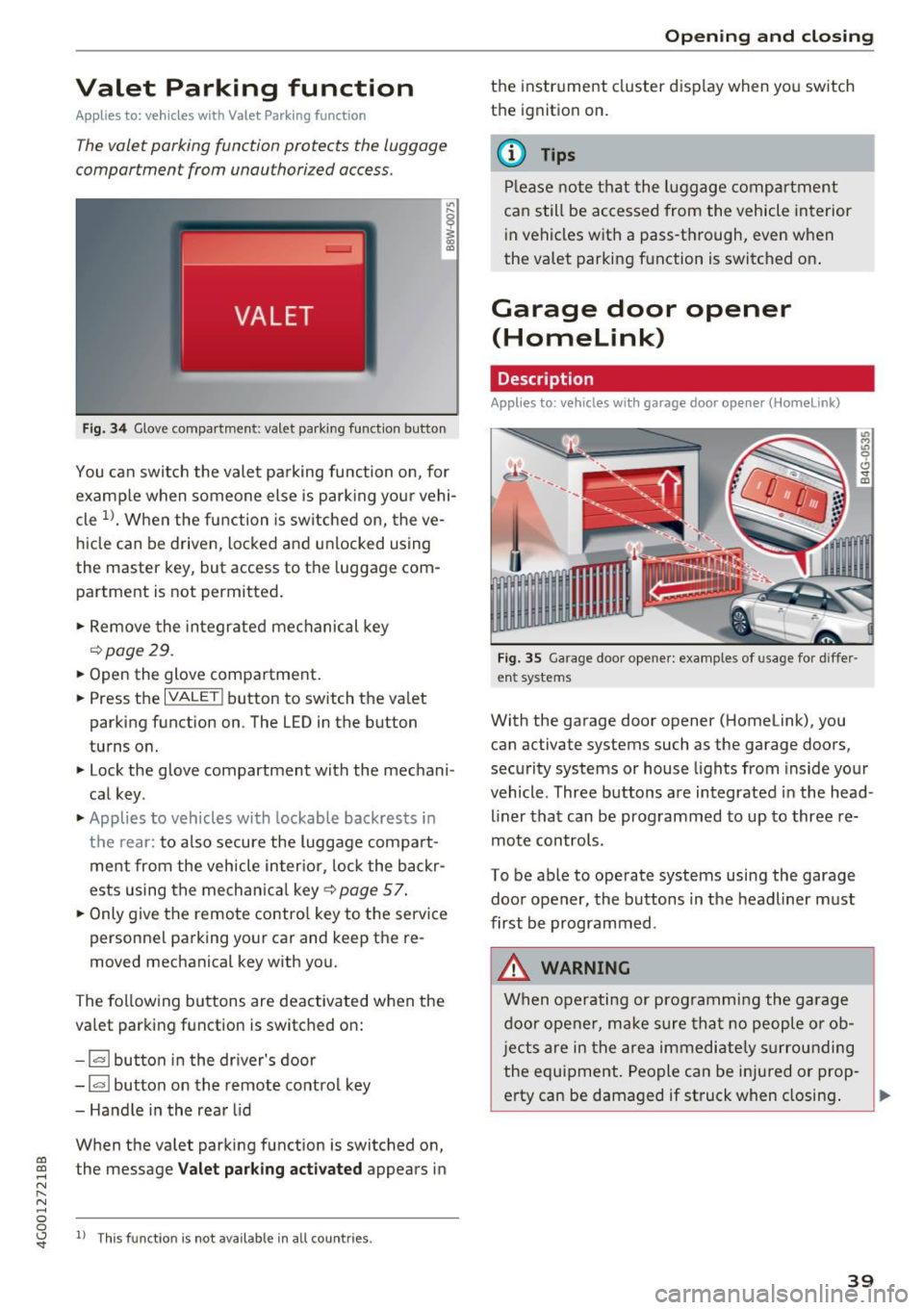
Valet Parking function
Applies to: veh icles wit h Valet Parking function
The valet parking function protects the luggage
comportment from unauthorized access .
Fig. 34 Glove compartment: valet park ing function button
You can switch the valet parking function on, for
example when someone else is parking your vehi
cle
l)_ When the function is switched on, the ve
hicle can be driven, locked and unlocked using
the master key, but access to the luggage com
partment is not permitted .
.,. Remove the integrated mechanical key
r::!:>poge 29.
.,. Open the glove compartment.
.,. Press the
IVALET I button to switch the valet
parking function on. The LED in the button
turns on.
.,. Lock the glove compartment with the mechani
cal key .
.,. Applies to vehicles with lockable backrests in
t h e rear: to also secure the luggage compart
ment from the vehicle inter ior, lock the backr
ests using the mechanica l key ¢
page 57.
.,. Only giv e the remote control key to the service
personnel parking your car and keep the re
moved mechanical key with you.
The following buttons are deactivated when the
va let parking function is switched on:
- 1""' 1 button in the driver's door
-la l button on the remote control key
- Handle in the rear lid
When the valet parking function is switched on,
co ~ the message Valet parking activated appears in
N
" N .... 0 0
~ ll This func tion is not available in all co untries .
Open ing and closing
the instrument cluster display when you switch
the ignition on.
(D Tips
Please note that the luggage compartment
can still be accessed from the vehicle interior
in vehicles with a pass-through, even when
the valet parking function is switched on .
Garage door opener
(Homelink)
Description
Applies to: veh icles with garage door opener (Home link)
Fig . 35 Garage door opene r: examples of usage for diffe r
ent systems
With the garage door opener (Homelink), you
can activate systems such as the garage doors ,
security systems or house lights from inside your
vehicle. Three buttons a re integrated in the head
liner that can be programmed to up to three re
mote controls.
To be able to operate systems using the garage
door opener, the buttons in the headliner must
first be programmed .
_&. WARNING
When operating or programming the garage
door opener, make sure that no people or ob
j ects are in the area immediate ly surrounding
the equipment. People can be injured or prop-
erty can be damaged if struck when closing. .,.
39
Page 52 of 280
Sea ts and stor age
Seats and storage
General information
A WARNING
Refer to c::> page 128, Driving safety for im
portant information, tips, suggestions and
warnings that you should read and follow for
your own safety and the safety of you r pas
sengers.
Front seats
Power seat adjustment
App lies to veh icles with power adjustable seats
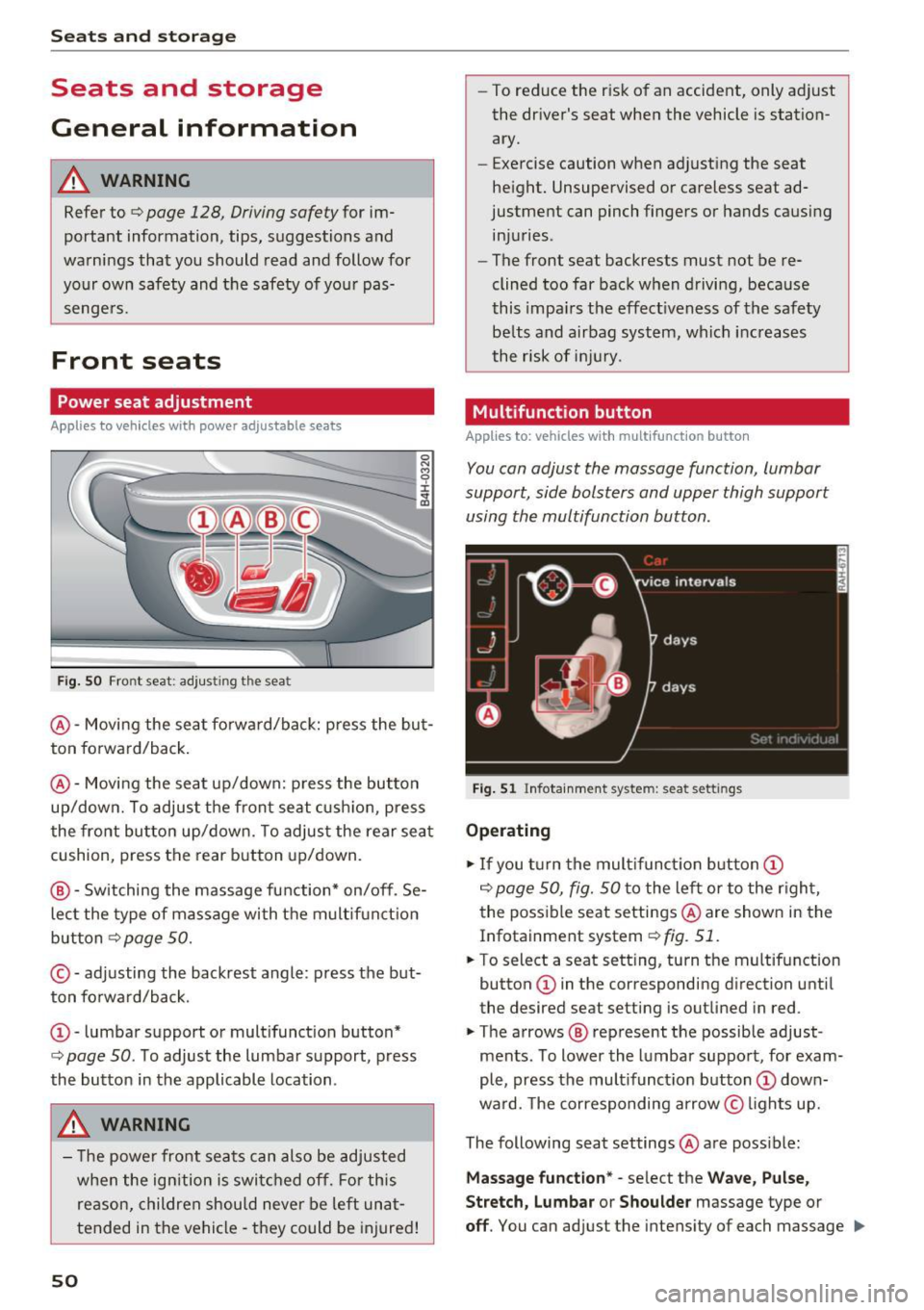
F ig. SO Front seat: adj usting the seat
@ -Movi ng the seat fo rwa rd/back: p ress the but
ton forwa rd/back .
@ -Moving the seat up/down: press the button
up/dow n. To adjust the front seat cush ion, press
the front button up/dow n. T o adjus t the rear sea t
cushion, press the rear button up/down.
@ - Switching the massage function * on/off. Se
lec t the type of massage with the multif unct ion
button
c::> page 50.
© - adjusting the backrest angle: press the but
ton fo rwa rd/back.
CD -lumbar support or multifunct ion button*
c::> page 50 . To adjust the lumbar support, press
the button in the applicable location .
A WARNING
- The power fro nt seats can also be adjusted
when the ign ition is swi tc h ed off. For this
reason, children should never be left una t
tended in the vehicle -they could be injured!
50
- To reduce the r isk of an accident, only adjust
the driver's seat when the vehicle is station ary.
- Exercise caution when adjusting the seat
height. Unsupervised or careless seat ad
justment can pinch fingers or hands causing
injuries.
- The front seat backrests must not be re
clined too far back when driving, because
this impa irs the effect iveness of the safety
be lts and airbag system, which increases
the risk of i nju ry.
Multifunction button
App lies to: vehicles wit h mult ifunct ion b utto n
You can adjust the massage function, lumbar
support, side bolsters and upper thigh support using the multifunction button.
Fig . 51 Infotainme nt system: seat settings
Operating
.,. If you t urn the mult ifunct ion b utton CD
c::> page 50, fig. 50 to the lef t or to the r igh t,
the poss ible seat settings @are shown in the
Infotainment system
c::> fig. 51.
.,. To select a seat sett ing, turn the multifunction
button
CD in the corresponding direction until
the desired seat setting is outlined in red .
.,. The arrows @ represent the possible adjust
ments . To lower the lumbar support, for exam
ple, press the mult ifunct ion button
CD down
ward. The corresponding arrow © lights up.
The following seat settings @are poss ible:
Ma ssa ge fun ctio n* -select the W ave, Pulse ,
Stretch, Lumbar or Shoulder
massage type or
off. You can adjust the intensity of each massage IIJ,,
Page 53 of 280
from 1 through 5. You can switch the selected massage on/off using the button @~
page 50,
fig.
so.
Lumbar support -you can ad just the lumbar sup
port up/down and to be stronge r/weaker .
Side section seat * -you can inc rease/decrease
the latera l s u pport in the seat using the side bol
sters a t the seat su rface and the back res t.
Upp er thigh support * -yo u can increase/de
crease the upper t high suppo rt.
@ Tips
- The massage function switches off a uto
matically after approx imately 10 minutes.
- The air in the s ide bolsters* is released as
soon as the driver's door opens. This makes i s possibl e to enter and exit the vehicl e
more comfortab ly. As soon as you s tart driv
i ng the ve hicle, the s ide bo lsters fi ll.
Center armrest
There is a storage compartment under the arm
rest.
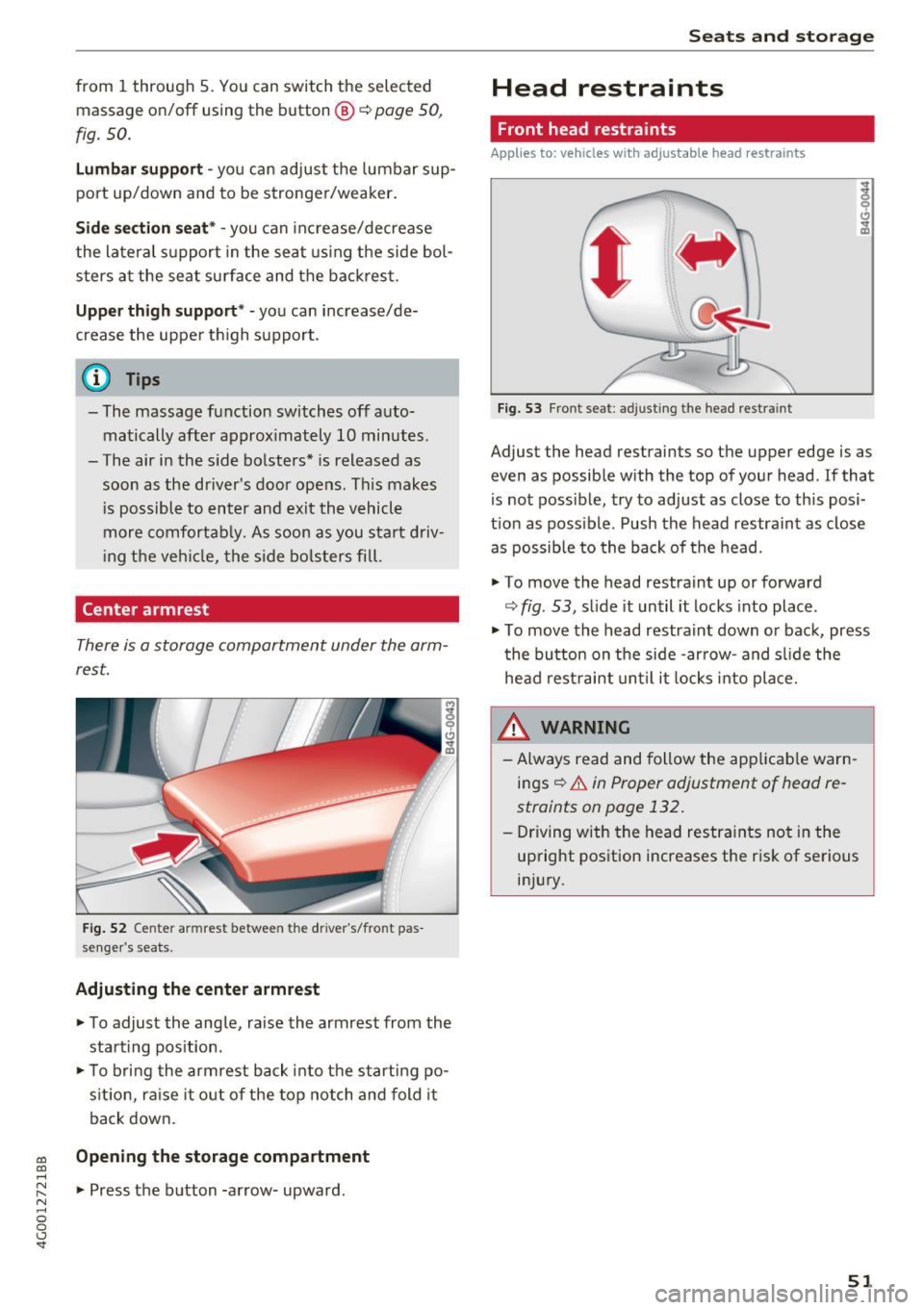
F ig. 52 Center armrest between the driver 's/fron t pas
se nge r's seats.
Adjusting the center armr est
... To adjust the ang le, raise the armrest from the
sta rt ing pos it ion .
... To bri ng the armrest bac k into t he starting po
s it ion, ra ise it o ut of the top notch and fold it
back down.
co Opening the storage compartment co ....
~ ... Press the b utton -a rrow- upward . N .... 0 0 <.,;) 'SI"
Seats and storag e
Head restraints
Front head restraints
Applies to: vehicles with adjustable head restraints
Fig. 5 3 Front seat: adj ust ing the head restra int
Adjust the head restraints so t he upper edge is as
even as possible with the top of yo ur head . If that
is not possible, try to adjust as close to th is posi
t ion as poss ible. Push the head restraint as close
as possible to the back of the head.
" To
move the head restraint up or forward
~ fig . 53, s lide it un til it locks into place .
" To
move the head restra int down or back, press
t he button on the side -ar row- and s lide the
head rest raint until it locks into pla ce.
A WARNING
- Always read and follow the app licab le warn
ings~
& in Proper adjustment of head re
straints on page 132 .
-Driving w ith the head restra ints no t in the
up right position increases the r is k of se rious
in jury.
51
Page 54 of 280
Sea ts and stor age
Rear head restraints
Applies to: ve hicles w ith adj ustable head restra ints
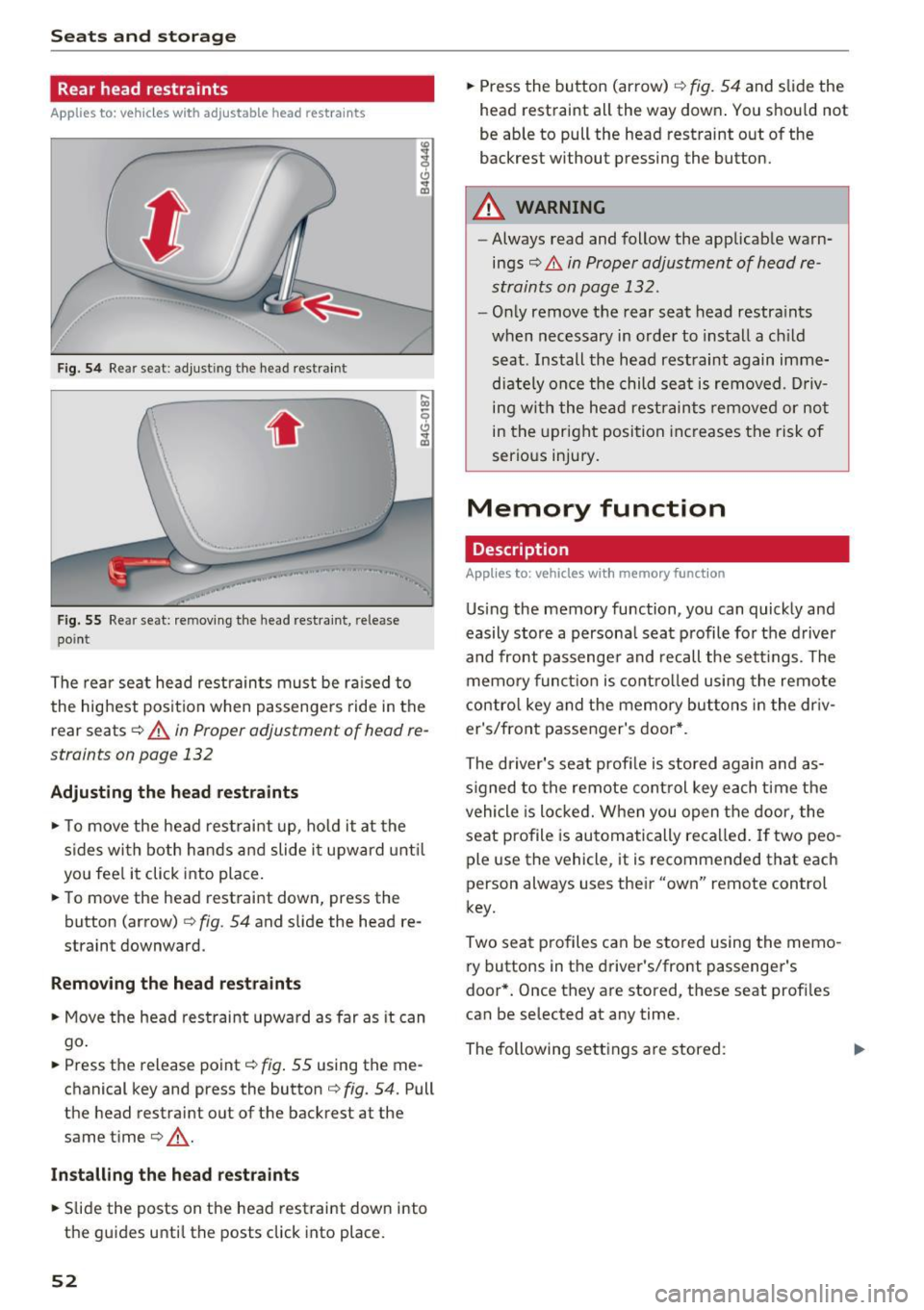
Fig. 54 Re ar seat: adju stin g th e head restra int
.. , ,.
F ig . 5 5 Re ar seat: remov ing the head res traint , rele ase
poin t
The rea r seat head restraints must be ra ised to
the highest posit io n when passenge rs ride in the
r e ar seats ¢
A in Proper adjustment of h ead re
straints on page 132
Adjusting the head rest raints
"' To move the head rest rai nt up, ho ld it at the
s ides wi th both hands a nd slide i t upward unt il
yo u fee l it click into place.
"' To move the head restraint down, press the
button (a rrow)
¢ fig . 54 and slide the head re
straint downward.
Remov ing th e head re st ra ints
"' Move the head restraint upward as far as it can
go .
"' Press the release point¢
fig. 55 using the me
chanical key and p ress the button ¢
fig. 54. Pull
the he ad restraint out of the ba ckrest at the
same time¢,&. .
Install ing the head restra ints
"' Slide the posts on the head restraint dow n into
the guides unti l the posts click into place.
52
"' Press the button (arrow) ¢ fig . 54 and slide the
head restra int all the way down . You should not
be able to pull the head restraint out of the
backres t wi thout pressing the button.
A WARNING
- Always read and follow the applicab le warn
ings
¢ .&. in Proper adjustment of head re
straints on page 132.
- Only remove t he rear seat head restra ints
when necessary in order to install a ch ild
seat . Install the head restraint again imme
dia tely once the child sea t is removed . D riv
ing with the he ad restraints remove d or no t
in the upright posi tion increases the risk of
serious injury.
Memory function
Description
App lies to: vehicles with memory funct ion
Using the memory function, you can quick ly and
easily store a persona l seat profile fo r the d river
and front passenge r and recall the sett ings. The
memory funct ion is contro lled using the remote
contro l key and the memory but tons in the dr iv
er's/front passenger's door *.
The driver's seat profi le is stored again and as
s igned to the remote cont rol key each time the
vehicle is locked. W hen you open the door, the
seat profile is automatically recalled. If two peo
ple use the vehicl e, it is recommend ed that each
person always uses the ir "own" remote control
key.
Two sea t profiles can be s tored using the memo
ry buttons in t he driver's/front passenge r's
door *. Once they are stored, these seat profi les
can be selected at any time.
The following se ttings are stored :
Iii>
Page 57 of 280
co
co
.... N
" N .... 0 0 <..:l 'SI'
12 Volt sockets
App lies to: ve hicles with 12 volt socke ts
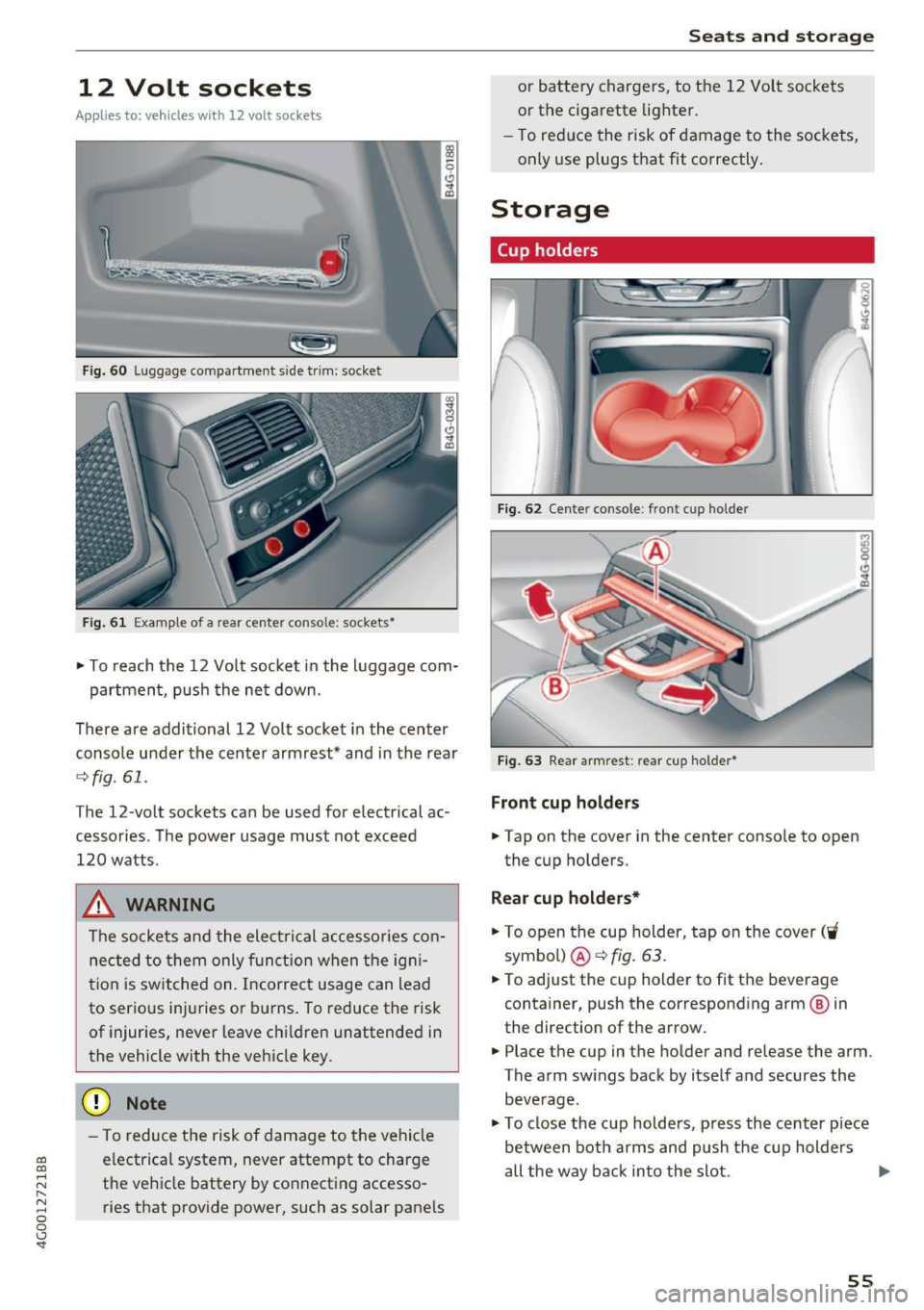
Fi g. 60 Luggage compartment s ide tr im: socket
Fi g. 61 Exa mple of a rear center conso le: sockets•
~ T o reach the 12 Vo lt socket in the luggage com-
partmen t, push the ne t down.
There are additional 12 Volt socket in the center
console under the cente r armrest* and in the rear
¢ fig.61.
The 12-volt sockets can be used for electrical ac
cessories. The power usage must not exceed
120 watts .
_& WARNING
The sockets and the electrical accessories con
nec ted to them only f unction when the ig ni
t ion is switched on. Incorrect usage can lead
to serious injuries or b urns . To reduce the risk
of injur ies, never leave chi ldren unattended in
the vehicle with the vehicle key .
(D Note
-To reduce the risk of damage to t he vehicle
electrica l system, never attempt to charge
t h e veh icle battery by co nnect ing accesso
ries that provide power, such as solar pane ls
Seats and storag e
or battery chargers, to the 12 Vol t sockets
or the cigarette lighter.
- To red uce the risk of damage to the sockets,
only use plugs t hat fit correctly .
Storage
Cup holders
I
I
Fig . 6 2 Cente r console : front cup ho lder
Fi g. 63 Rear a rmrest : rear cup holder•
Front cup holders
~ Tap on the cover in the center conso le to open
the cup holders.
Rear cup holders*
~ To open the cup holder, tap on the cover ('i
symbo l) @ ¢fig . 63.
~ To adjust the cup holder to fit the beverage
container, push the corresponding arm @ in
the direction of the arrow.
~ Place the cup in the holder and release the arm.
The arm sw ings back by itse lf and secures the
beve rage.
~ To close the cup holders, p ress the center piece
between both arms and push t he cup holders
all the way back in to the slot . .,.
55
Page 58 of 280
Seats and storage
_& WARNING
-Do not put any hot beverages in the cup
holder while the vehicle is moving. Hot bev
erages could spill, which can cause injury.
- Do not use any breakable beverage contain
ers (for example, made out of glass or por
celain) . You could be injured by them in the
event of an accident.
0 Note
Beverage containers in the cup holders should
always have a lid . If not, beverages could spill
and cause damage to vehicle equipment, such
electronics or seat covers .
Cooled glove compartment
Applies to: veh icles with cooled glove compartment
The cooled glove compartment only functions
when the
AIC system is switched on.
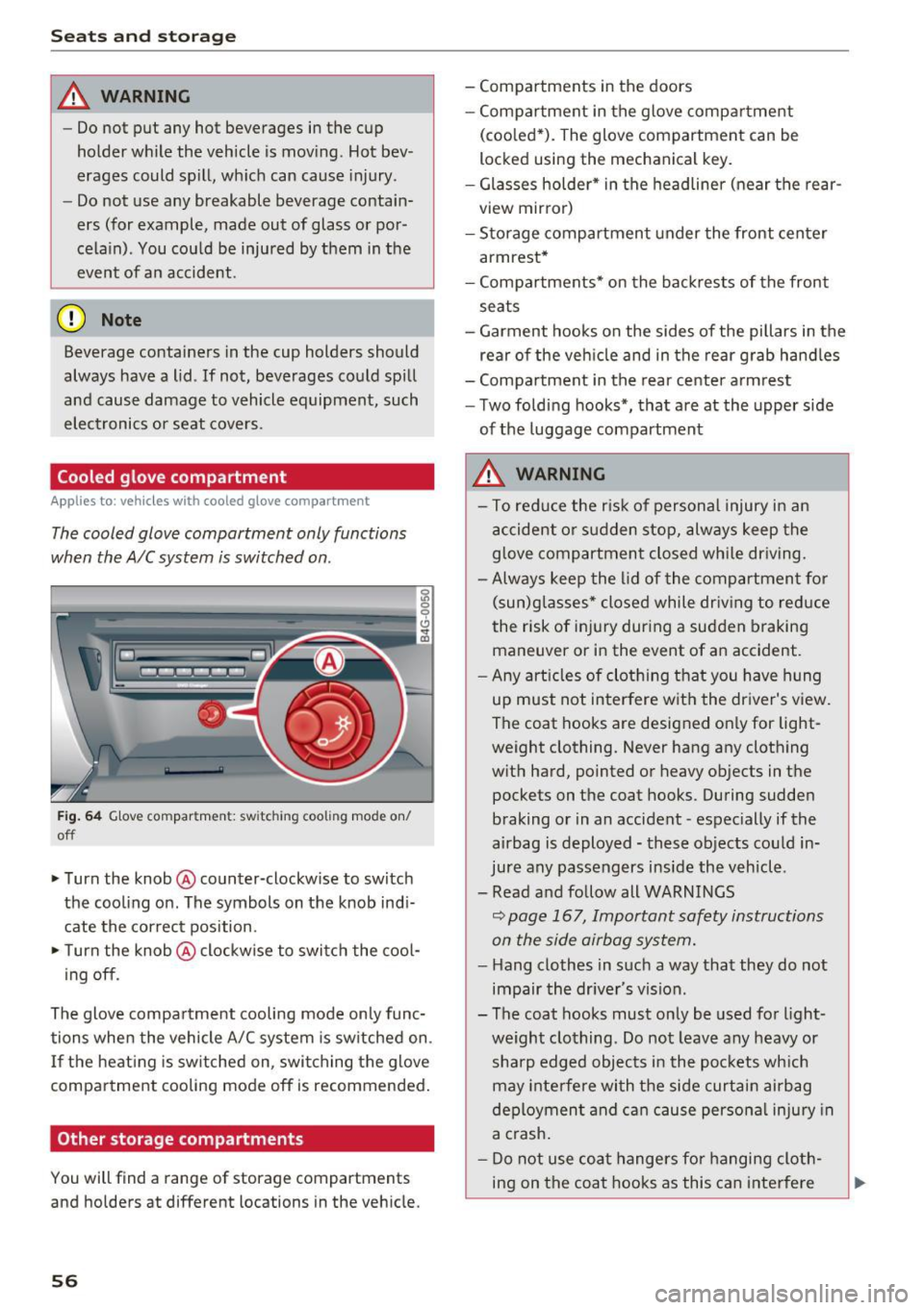
Fig. 64 Glove compar tm ent: s witch in g coo ling mode on/
off
~ Turn the knob@ counter-clockwise to switch
the cooling on . The symbols on the knob indi
cate the correct position.
~ Turn the knob @ clockwise to switch the cool-
ing off .
The glove compartment cooling mode only func
tions when the vehicle A/C system is switched on .
If the heating is switched on, switching the glove
compartment cooling mode off is recommended.
Other storage compartments
You will find a range of storage compartments
and holders at different locations in the vehicle.
56
- Compartments in the doors
-Compartment in the glove compartment
(cooled*) . The glove compartment can be
locked using the mechanical key.
- Glasses holder* in the headliner (near the rear
view mirror)
- Storage compartment under the front center
armrest*
- Compartments* on the backrests of the front
seats
- Garment hooks on the sides of the pillars in the
rear of the vehicle and in the rear grab handles
- Compartment in the rear center armrest
- Two folding hooks*, that are at the upper side
of the luggage compartment
_& WARNING
- To reduce the risk of personal injury in an
accident or sudden stop, always keep the
glove compartment closed while driving.
- Always keep the lid of the compartment for
(sun)glasses* closed while driving to reduce
the risk of injury during a sudden braking
maneuver or in the event of an accident .
- Any articles of clothing that you have hung
up must not interfere with the driver's view.
The coat hooks are designed only for light
weight clothing. Never hang any clothing
with hard, pointed or heavy objects in the pockets on the coat hooks. During sudden
braking or in an accident -especially if the
airbag is deployed - these objects could in
jure any passengers inside the vehicle .
- Read and follow all WARNINGS
c::> page 167, Important safety instructions
on the side airbag system.
- Hang clothes in such a way that they do not
impair the driver 's vision .
-
- The coat hooks must only be used for light
weight clothing . Do not leave any heavy or
sharp edged objects in the pockets which
may interfere with the side curtain airbag
deployment and can cause personal injury in
a crash.
- Do not use coat hangers for hanging cloth
ing on the coat hooks as this can interfere