rest AUDI A6 2017 User Guide
[x] Cancel search | Manufacturer: AUDI, Model Year: 2017, Model line: A6, Model: AUDI A6 2017Pages: 280, PDF Size: 70.24 MB
Page 59 of 280
co
co
.... N
" N .... 0 0 <..:l 'SI"
with proper deployment of the side curtain
airbags in an accident.
- Do not hang heavy objects on the coat
hooks, as they could cause personal injury in
a sudden stop.
CD Note
Objects on the rear shelf that rub against the
rear window can damage the rear window
heating wires.
Roof rack
App lies to: ve hicles with roof rac k
~
------~~ ~
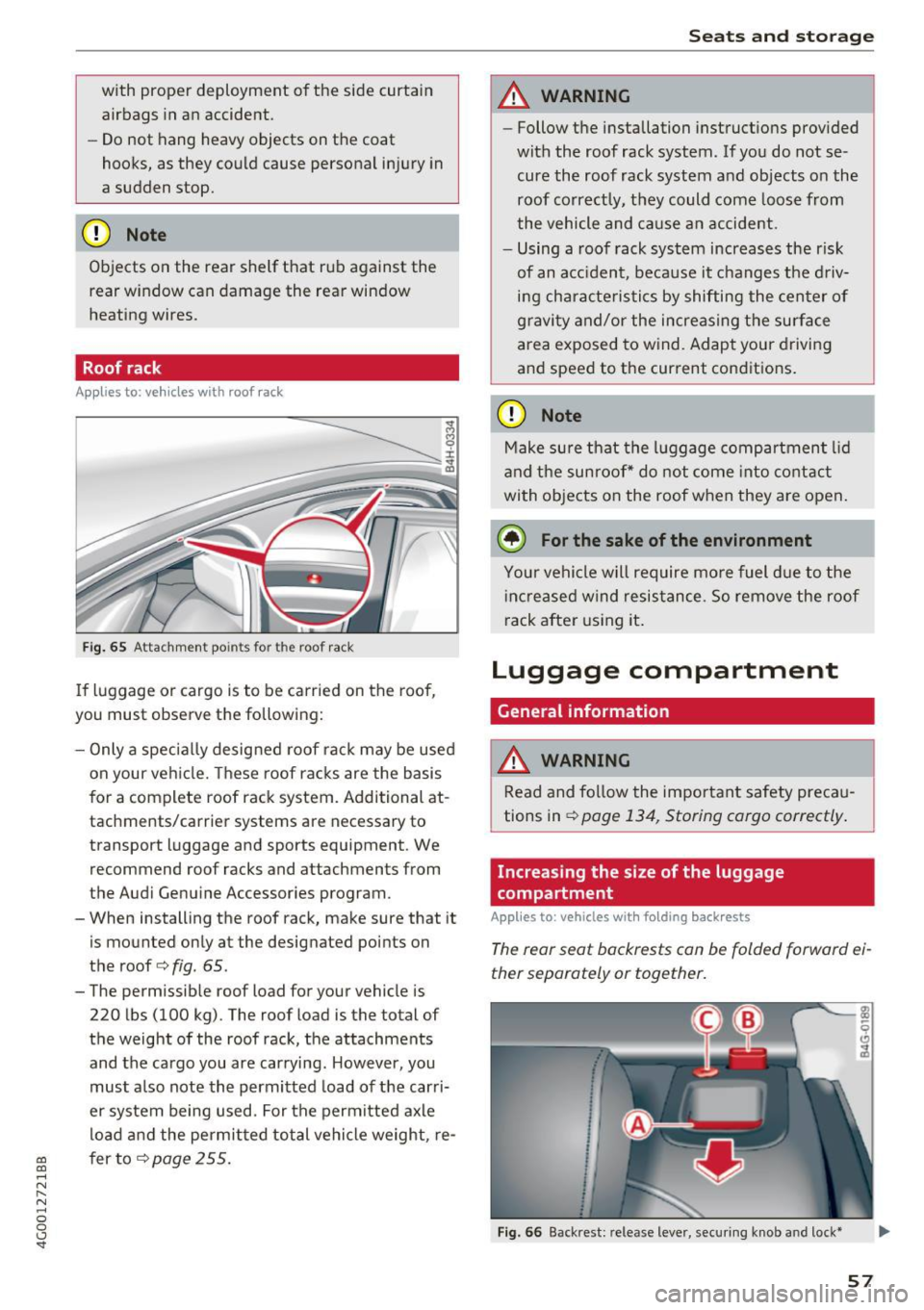
Fig. 65 Attachm ent points for the roof rack
If luggage or cargo is to be carried on the roof,
you must observe the following:
- Only a specially designed roof rack may be used
on your vehicle. These roof racks are the basis
for a complete roof rack system. Additional at
tachments/carrier systems are necessary to
transport luggage and sports equipment . We
recommend roof racks and attachments from
the Audi Genuine Accessories program.
- When installing the roof rack, make sure that it
is mounted only at the designated points on
the roof
c> fig . 65 .
- The permissible roof load for your vehicle is
220 lbs (100 kg). The roof load is the total of
the weight of the roof rack, the attachments
and the cargo you are carrying . However, you
must also note the permitted load of the carri
er system being used. For the permitted axle
load and the permitted total vehicle weight, re
fer to
c> page 255.
Seats and storage
A WARNING
--Follow the installation instructions provided
with the roof rack system. If you do not se cure the roof rack system and objects on the
roof correctly, they could come loose from
the vehicle and cause an accident.
- Using a roof rack system increases the r isk
of an accident, because it changes the driv
ing characteristics by shifting the center of
gravity and/or the increasing the surface
area exposed to wind. Adapt your driving
and speed to the current cond itions.
CD Note
Make sure that the luggage compartment lid
and the sunroof* do not come into contact
with objects on the roof when they are open.
(,® For the sake of the environment
Your vehicle will require more fuel due to the
increased wind resistance. So remove the roof
rack after using it.
Luggage compartment
General information
A WARNING ~
Read and follow the important safety precau-
tions in
c> page 134, Storing cargo correctly .
Increasing the size of the luggage
compartment
Applies to : vehicles wit h folding back rests
The rear seat backrests can be folded forward ei
ther separately or together.
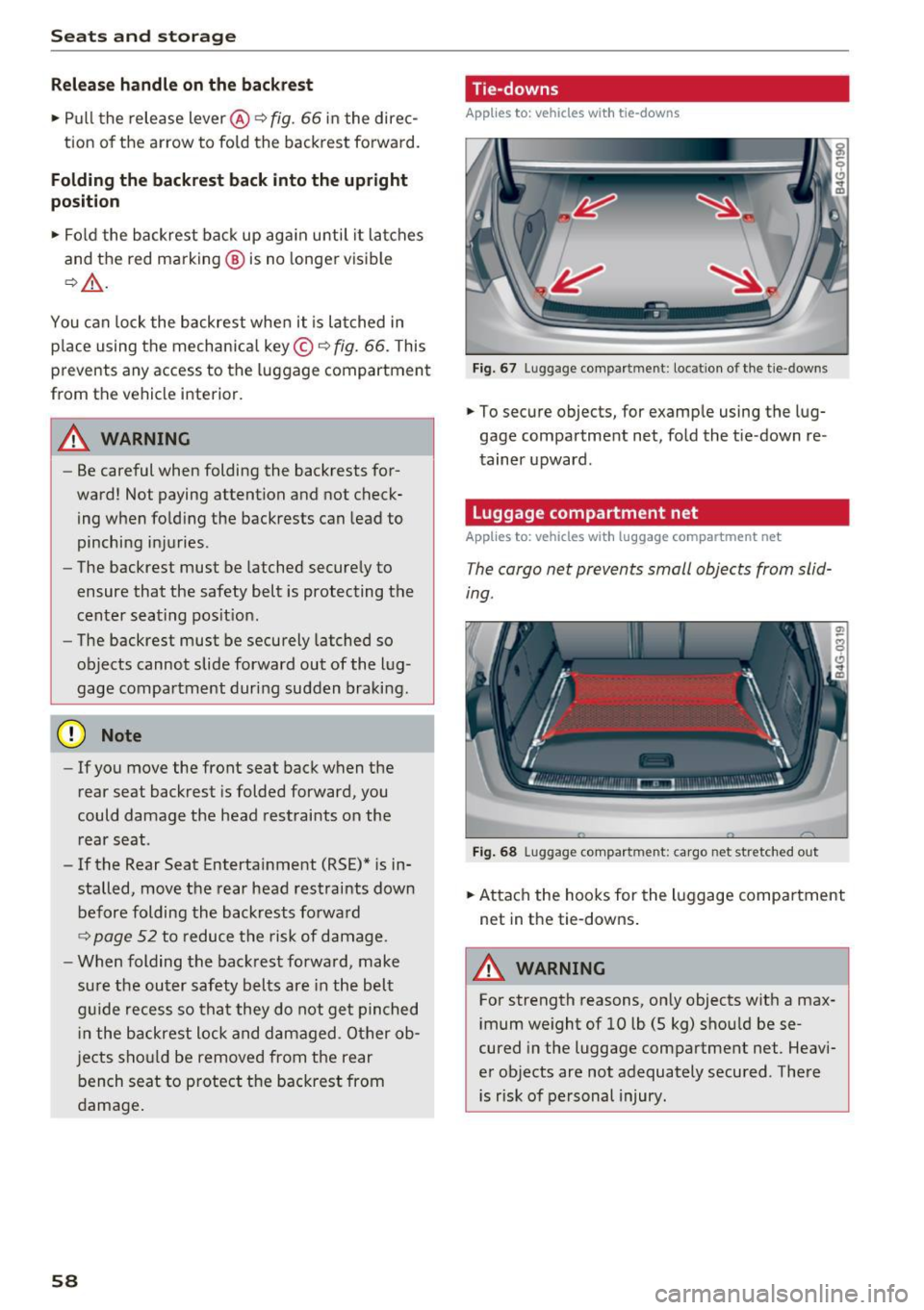
Fig. 66 Backrest: re lease lever, securing knob a nd lock*
57
Page 60 of 280
Sea ts and stor age
Rel ease h andl e on the b ackr est
.. Pull the release lever@~ fig. 66 in the direc-
tion of the arrow to fold the backrest fo rward.
Folding the backrest back into the upr ight
po sit ion
.. Fol d the backrest back up aga in until it latches
and the red marking @ is no longer vis ible
9 _&. .
You can lock the backrest whe n it is latched in
p lace using the mechanical key ©
c::> fig. 66. This
prevents any access to the luggage compartment
from the vehicle interior.
.&_ WARNING
- Be careful when folding the backrests for
ward! Not paying attention and not check
ing when fo ld ing the backrests can lead to
pinching injuries.
- The backrest must be latched secure ly to
ensure that the safety belt is protecting the
center seating pos it ion.
- The backrest must be securely latched so
objects cannot slide forward out of the lug
gage compartment during sudden braking.
(D Note
- If you move the front seat back when the
rear seat backrest is folded forward, you
could damage the head restraints on the rear seat.
- If the Rear Seat Entertainment (RSE)* is in
stalled, move the rear head restraints down before folding the backrests forward
9 page 52 to reduce the risk of damage.
- When folding the backrest forward, make
sure the outer safety belts are in the belt
g uide recess so that they do not get pinched
i n the backrest lock and damaged. O ther ob
j ects sho uld be removed from the rear
bench seat to protect the backrest from
damage .
58
-
Tie-downs
Applies to: vehicles with tie -dow ns
Fig. 67 Luggage compartment: locat io n of the t ie-downs
.. To secure objects, for example using the lug
gage compartment net, fold the t ie-down re
tainer upward.
Luggage compartment net
Applies to: vehicles with luggage compartment net
The cargo net prevents small objects from slid
ing.
F ig . 68 Luggage compartment: cargo net stretched out
.. Attach the hooks for the luggage compa rtment
net in the tie-downs .
.&_ WARNING
For strength reasons, on ly objects wit h a max
imum we ight of 10 lb (5 kg) shou ld be se
cured in the luggage compartment net. Heavi
er objects are not adequately secured . There
is risk of personal injury.
Page 61 of 280
co
co
... N
" N ... 0 0 <..:l 'SI'
Storage hooks
Applies to: vehicles with bag hooks
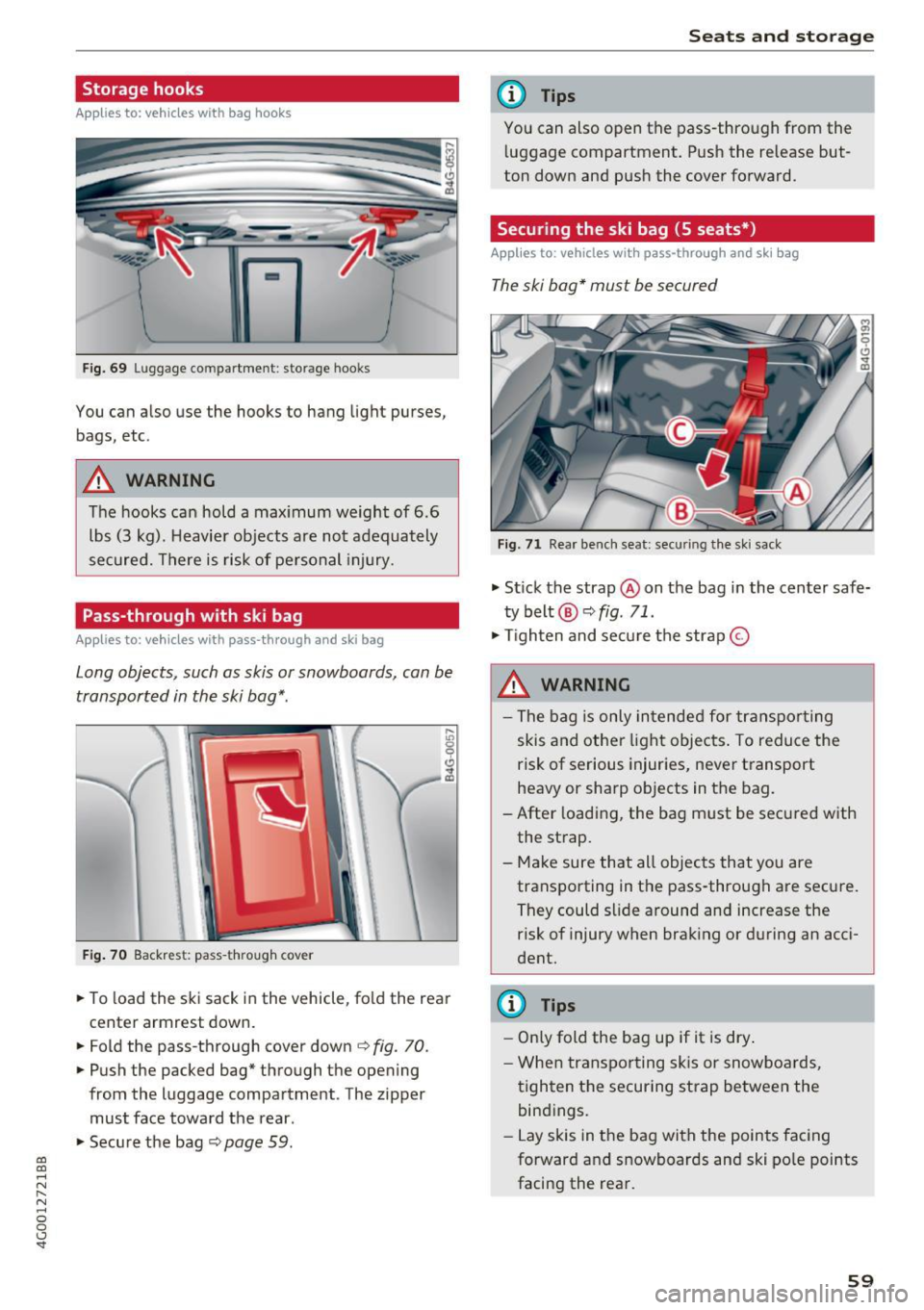
Fig. 69 Luggage compartment : storage hooks
You can also use the hooks to hang light purses,
bags, etc .
A WARNING
The hooks can hold a maximum weight of 6.6
lbs (3 kg). Heavier objects are not adequately
secured. There is risk of personal injury.
Pass-through with ski bag
Applies to: vehicles with pass-through and ski bag
Long objects, such as skis or snowboards, con be
transported in the ski bog* .
Fig. 70 Backrest : pass-through cover
.. To load the ski sack in the vehicle, fold the rear
center armrest down.
"'Fold the pass-through cover down
c:;, fig. 70.
"'Push the packed bag* through the opening
from the luggage compartment . The zipper
must face toward the rear .
.. Secure the bag
c:;, page 59.
Seats and storage
(D Tips
You can also open the pass-through from the
luggage compartment. Push the release but
ton down and push the cover forward.
Securing the ski bag (5 seats*)
Appl ies to : vehicles with pass-through and ski bag
The ski bag* must be secured
Fig. 71 Rear bench seat: sec uring the ski sack
"' Stick the strap @on the bag in the center safe
ty belt @¢
fig. 71 .
"'Tighten and secure the strap ©
A WARNING
- The bag is only intended for transporting
skis and other light objects. To reduce the
risk of serious injuries, never transport
heavy or sharp objects in the bag.
-After loading, the bag must be secured with
the strap.
- Make sure that all objects that you are transporting in the pass-through are secure.
They could slide around and increase the risk of injury when braking or during an acci
dent .
(D Tips
- Only fold the bag up if it is dry.
- When transporting skis or snowboards,
tighten the securing strap between the
bindings.
- Lay skis in the bag with the points facing
forward and snowboards and ski pole points
facing the rear.
-
59
Page 62 of 280
Warm and cold
Warm and cold
Climate control system
Description
The climate control system warms, cools and re moves humidity from the air in the vehicle interi
or. It is the most effective when the windows and
sunroof * are closed. If there is a bui ld-up of heat
insid e the vehicle, ventilation can he lp to speed
up the cooling process.
I n all heating mode f unctions, except for defrost,
the blower only switches to a higher speed once
the engine coolant has reach ed a suffici ent tem
perature .
Pollutant filt er
The po llutant filter removes poll utants such as
dust and pollen from the a ir .
Ke y recognit ion
A pp lies to: ve hicles w ith de luxe au toma tic clima te co ntro l
The blower sett ing and air distribut ion are stored
automatically and ass igned to the remote control
key that you are using.
A ppl ies to: ve hicles w ith 4 -zo ne del uxe auto matic c limate
co ntrol
The climate con trol set tings are automatically
stored and assigned to the remote control key
that is in use.
A WARNING
Poor visibility can lead to accidents.
- For safer driving, keep all windows free of
ice, snow and fog .
- Become familiar as quickly as possible with the correct use and function of the cl imate
contro l system, especially with the defrost
ing and defogg ing function.
- When the temperat ure is below freezing,
only use the windsh ield washer system after
60
the windshield has been warmed by the cli
mate control system. The washer fluid could
freeze on the windshie ld and impair visibi li
ty .
Cl) Note
-If you suspect that the cl imate contro l sys
tem is damaged, switch the system
off to
prevent further damage and have it checked
by an authorized Aud i dealer or authorized
Audi Service Facility .
- Repa irs to the Aud i climate control system
requ ire special technical knowledge and
special tools . See an authorized Aud i dea le r
or autho rized Aud i Service Faci lity .
@ For the sake of the environment
- To save fuel, turn off cooling mode by press
ing the
IAJC I button. This w ill also reduce
em issions .
- In veh icles w ith a diesel engine, you ca n
switch the auto supplementary heater off in
the Infotainment system.
(D Tips
- To prevent interference with the heat ing
and cooling output and to prevent the win
dows from fogging over, the a ir intake in
front of the windshie ld must be free of ice ,
snow or leaves.
- Conde nsation from the coo ling system can
dr ip and fo rm a pudd le of water under the
vehicle. This is norma l and does not mean
there is a leak.
- Th e energy managemen t sys tem may tem
porarily switch
off certain functions, such as
t h e seat heating * or rear window defogger.
These systems are ava ilable again as soon
as the ene rgy supply has been restored.
Page 69 of 280
co
co
.... N
" N .... 0 0 <..:l '
th rough water.
- Always swi tch the Sta rt/S top sys tem * off
when driving through wate r
r:!;> page 72.
@ Tips
-De te rmi ne the de pth befo re dr iv ing th ro ugh
w at er.
- Do no t stop the veh icle, dr ive i n reverse or
swi tch the eng ine off when dr iving t hrough
wa ter .
- K eep in mind that oncomin g ve hicl es m ay
crea te waves that raise the wate r level an d
make it too deep for your vehi cle to drive
th rough sa fely.
- Avo id d riving throu gh sal t wa ter, because
th is can ca use corros ion .
Economical and environmentally-friendly
driving
The amount of fue l consumption, the e nviron
men tal impact and the wear to the engine ,
b rakes and ti res depends mostly on your dr iving
s tyle. W it h an anticipatory a nd econom ic dr iv ing
style , fu el consumpt ion can be reduced by ap
p roxima te ly 10 -15% . The following tips will help
you conse rve the environment and you r money at
the same time .
Anticipatory driving
A vehicle uses the mos t fu el when a ccele ra ting.
W hen you drive wi th an tic ipa tion, you do not
n eed to brake as often and so yo u ac celerate less .
When possib le, let your vehicle coast w ith a
gear
engaged ,
for example, when you notice that the
next tra ffic light is red. This produces an engine
braking effect, which helps to protect the brakes
and tires and reduces the emissions and fuel con
sumpt io n to ze ro (fuel shut-off dur ing decelera
tion) .
Shift efficiently
An effective way to save f uel is to upshift earlier .
Staying in a gear too long uses fue l unnecessari
l y .
Press down o n the acce lerator peda l s lowly and
avoid "k ic k -down".
D riving
Avoid full acceleration
Yo u should rarely travel at the maxi mum vehicle
speed. High speeds cause a disproport ionate ly
high increase i n fue l cons umption, emissions and
t raffic noise. S lowe r driving saves fue l.
Reduce idling time
The Sta rt-Stop system* helps to red uce the idling
t ime a utoma tically. In veh icles w ithout the S ta rt
Stop system *, i t is eff icient to sw itch the engine
off when stopped at railroad crossings and long
r ed lights. Stopping the engine for 30-40 sec
onds a lready saves more fuel than the amo unt of
extra fue l needed to restart the engine.
It ta kes a very long time in id le to warm the en
gine up to operating temperature. Wear and
emissions are especially high in the warm- up
phase. Therefore, you sho uld begin driving im
med iate ly after starting the engine. Avoid h igh
RPMs wh ile doing this .
Have maintenance performed regularly
By having maintenance pe rformed regu larly on
your vehicle, you can help to reduce fuel co n
sumption before you even start to drive. The
maintenance condition of your vehicle not o nly
affects traffic safe ty a nd long-term val ue but al
so impa cts
fuel consumption . A poorly main
t ai ned engi ne ca n lead t o fuel co nsump tion that
is 1 0% hig he r th an no rmal.
Avoid short trips
The eng ine and exhaust cleaning system must
r each their optima l
operating temperature to ef
fec tively reduce consu mption a nd emissions.
A cold engine uses a d isproportionately high
amount of fue l. The engine reac hes operat ing
temperat ure and cons umption normal izes on ly
af ter app roxima tely
2 .5 miles (4 km ).
Check the tire pressure
To save fuel, make sure the t ires are always in
flated to the correct press ure
r:!;> page 220. The
fuel consumpt io n can increase by 5% if the pres
s ur e is on ly 0 .5 bar too low. Due to t he inc reased
r oll ing resistance, low tire p ressures w ill also .,..
67
Page 74 of 280
Driving
Tur n off igniti on b efore lea ving v ehicle. B atte ry
i s di sch arg ing
This message appea rs if the driver's door is
opened while the ignition is switched on . A lways
switch off the ignition if you are leaving the vehi
cle. A lso see
¢ page 74.
Shift to P and turn off ignition bef ore leaving
ca r, othe rwi se vehicle can ro ll aw ay
This message appea rs if the driver's door is
opened while the ignition is switched on and the
selec to r l ever is not in the P posit io n. Move the
selector lever in to the P position and switch the
ignition off when you exit the vehicle. Otherwise
the vehicle could roll. A lso see
¢ page 74 .
Starting the engine when there is a
malfunction
It may not be possible to start the engine under
certain circums tances, for example if the bat tery
in the vehicle key is drained , if in terference is af
fected the key or if there is a system malfunc
tion.
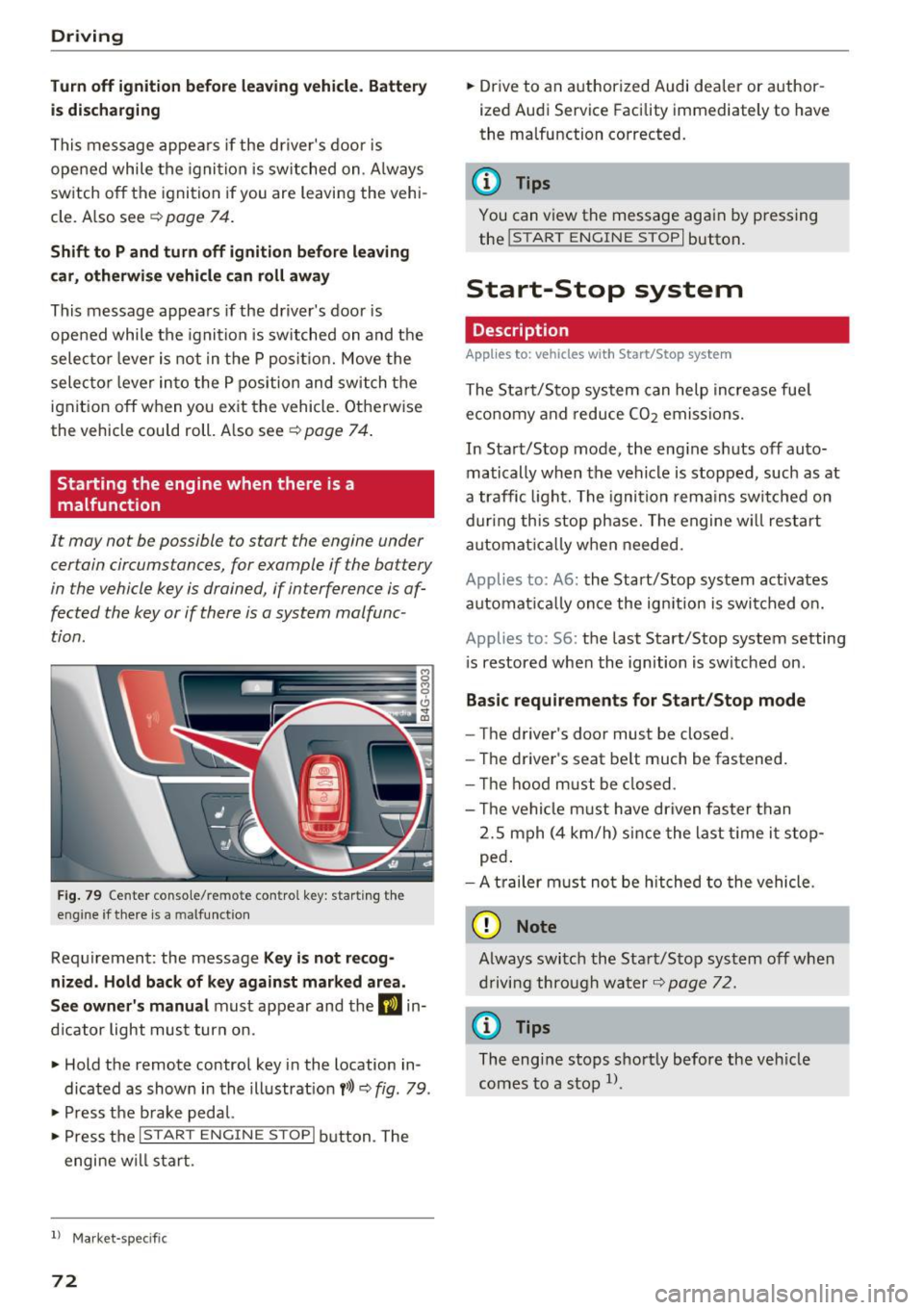
F ig . 79 Ce nter co n so le/ re m ote con tro l key : star ting th e
eng ine if there is a malfunction
Requirement: the message Ke y is not recog
ni zed . Ho ld ba ck of ke y again st mark ed area.
See ow ner's m anual
must appear and the DJ in
d icator light must turn on .
" Hold the remote control key in the location in
dicated as shown in the illustrat ion
f >l) ~ fig. 79 .
" Press t he b rake pedal.
" Press the
I START ENGIN E STOPI button . The
engine w ill start .
l) Market -specifi c
72
"Drive to an authorized Audi dealer or author
ized Audi Service Facility immediately to have
the malfunction corrected.
@ Tips
You can view the message again by p ressing
the
! START ENGINE STOP I button.
Start-Stop system
Description
Applies to: vehicles with Start/Stop system
The Start/Stop system can help increase fue l
eco nomy and reduce
CO2 emissions.
In Start/Stop mode, the eng ine shuts off auto
matically when the vehicle is stopped, such as at
a traffic light. The ignition rema ins swi tched on
during this stop phase. The engine w ill restart
automat ica lly w hen needed.
Applies to: A6: the Start/Stop system act ivates
automa tica lly once the ign ition is swi tched o n.
Applies to: S6: the last Start/Stop system setting
i s restored when the ignition is switched on .
Basic r equir ement s for Start /Stop mod e
-The driver's door must be closed.
- The driver's seat be lt much be fastened.
- T he hood must be closed .
- T he vehicle must have driven faste r than
2.S mph (4 km/h) since the last t ime it stop
ped .
- A t railer m ust not be hitched to the vehicle .
(D Note
Always switch the Sta rt/Stop system off when
driving through water
¢ page 72.
{t) Tips
The eng ine stops shortly before the veh icle
comes to a stop
l) .
Page 75 of 280
co
co
.... N
" N .... 0 0 <.,;) 'SI"
Stopping/starting the engine
Applies to: vehicles with Start/Stop system
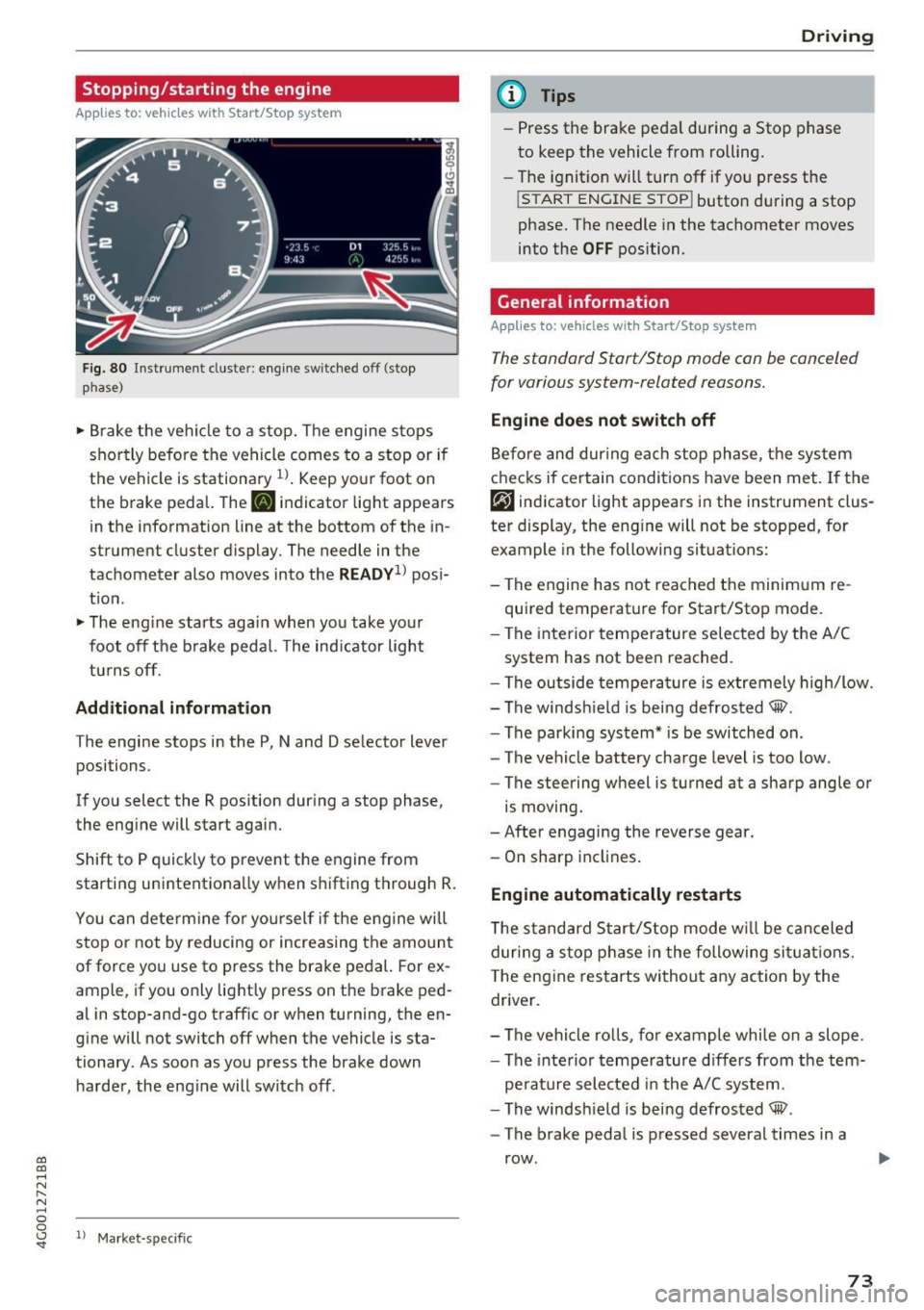
Fig. 80 ll)strument cluster: eng ine sw itched off (stop
p hase)
~ B rake the ve hicle to a stop. The engine stops
shortly befo re the vehicle comes to a stop or if
the vehicle is stationa ry
1l . Keep yo ur foot on
the brake pedal. The
II indicator light appears
in the information line at the bottom of the in
strument cluster d isplay. The needle in the
tachometer also moves into the
READY1 ) pos i
t ion .
~ The eng ine starts aga in when you take you r
foot off the b rake pedal. The ind ic a tor light
tu rns off.
Additional information
T he engine stops in the P, N and D se lector lever
positions .
If you select the R position dur ing a stop phase,
the eng ine will start again.
Shift to P quick ly to prevent the engine from
starting unintentionally w hen s hifting t hrough R.
You can dete rm ine for yo ursel f if the eng ine will
stop or not by reducing or increas ing the amount
of force you use to press the brake pedal. For ex
ample, if you only lightly press on the brake ped
al in stop-and -go traff ic or when turning, the en
g ine will not switch off when the vehicle is sta
tionary . As soon as you press the brake down
ha rder, the eng ine will switch off .
ll Market -s p ecific
D rivi ng
(D Tips
-Press the bra ke peda l during a Stop phase
to keep the vehicle from rolling.
- The ignition will turn off if yo u press the
!START ENGINE STOPI butto n dur ing a stop
phase. The needle in the tachometer moves
into the
OFF position.
General information
Applies to: vehicles with Start/Stop system
T he standard Start/Stop mode con be canceled
for various system-related reasons.
Eng ine does not swit ch off
Be fo re and dur ing each stop phase, the system
checks if certain conditions have been met. If the
rjj indicator light appears in the instrument clus
ter display, the eng ine will not be stopped, for
example in the following situations:
- The engine has not reached the minim um re
quired temperature for Start/Stop mode .
- The interior temperature selec ted by the A/C
system has not been reached.
- The outside tempera ture is ex tremely high/low.
- The windsh ield is being defrosted® .
- The parking system * is be switched on .
- The vehicle battery charge level is too low.
- The steering wheel is turned at a sharp angle or
is moving.
- After engaging the reverse gear.
- On sharp incl ines .
Engine automatically restarts
The s tandard Start/Stop mode w ill be can celed
dur ing a stop phase in the following si tuations.
T he eng ine res tarts wi thout a ny action by the
driver .
- The vehi cle ro lls, fo r example whi le on a slope .
- The inte rior tempe rature d iffers from the tem-
pe rature selected in the A/C sys tem.
- The windsh ield is being defrosted® .
- The brake peda l is pressed several times in a
row .
73
Page 76 of 280
Driving
-The vehicle battery charge leve l is too low.
- Power consumption is high .
The engine can turn off again when the condi
tions fo r Start-Stop mode are met .
Ignition is switched off automati call y
To prevent the veh icle battery from drain ing, the
ignit ion will switch off
automat ic a lly under the
following conditions:
- The vehicle must have already been driven.
- The Start/Stop system has stopped the engine.
- The driver's door must be open.
- The driver's safety be lt must be unb uckled.
- The brake pedal must not be p ressed .
- The vehicle must be stationary .
In th is case, the activated low beam is replaced
by the parking light. The parking lights will
sw itch off after approximately 30 minutes or
when you lock the vehicle .
If the Start/Stop system has not turned off the
engine or if you have sw itched the Start/Stop sys
tem off manually , the ignition will not be auto
mat ically switched off and the engine w ill contin
ue to run
~ ,& .
A WARNING
To red uce the risk of poisoning, never allow
t he engine to r un in confined spa ces .
@ Tips
If you select the Dor N se lector lever position
after sh ift ing into reverse, t he vehicle m ust
be driven faster than 6 mph (10 km/h) in or
de r fo r th e e ng ine to swit ch off again.
74
-
Manually switching the Start /Stop system
off /on
Appl ies to: vehicles with Start/Stop system
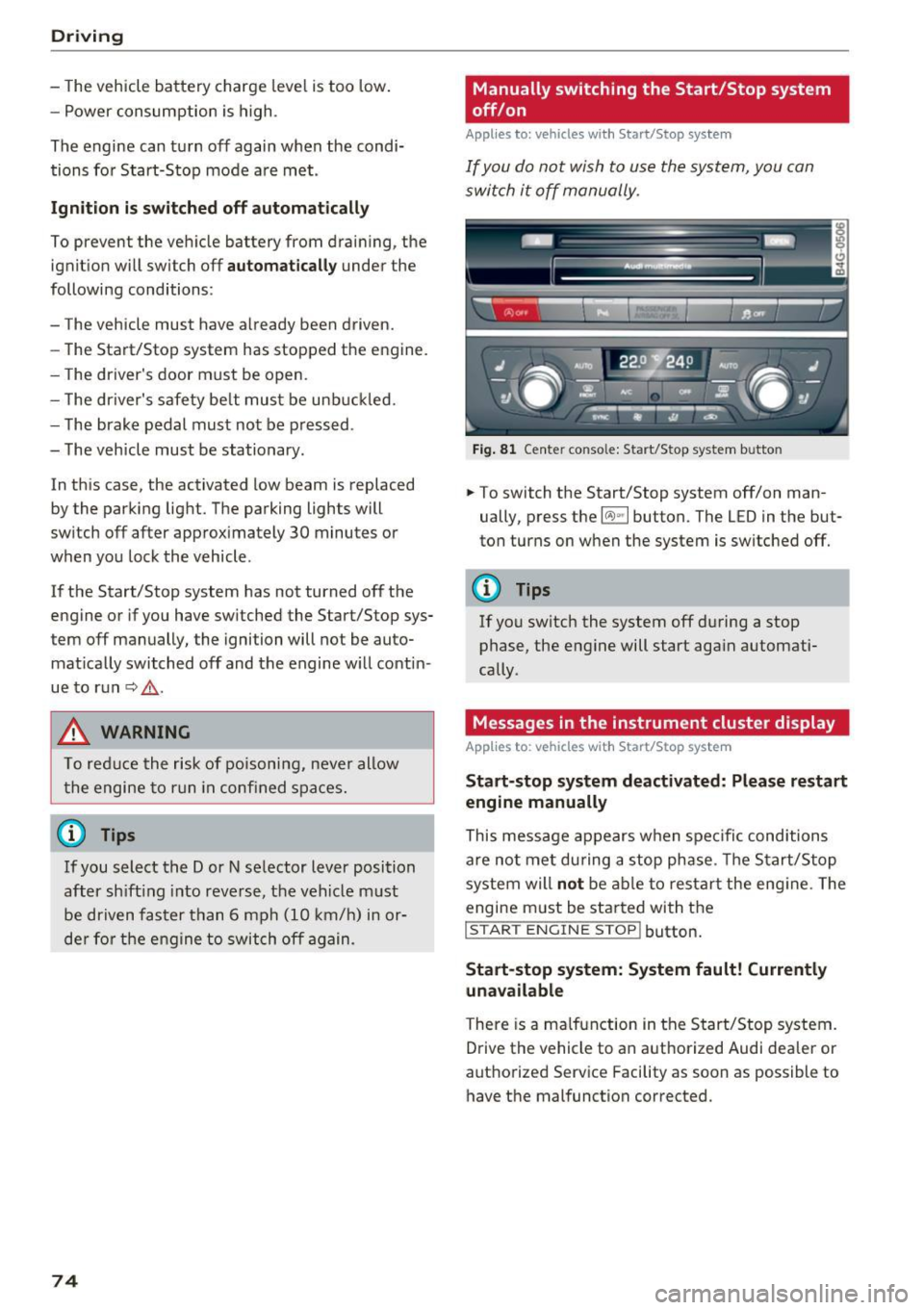
If you do not wish to us e th e system, you can
switch i t off manually.
Fig . 8 1 Ce nte r conso le: Start/Stop system b utto n
.,. To switch the Start/Stop system off/on man
ually, press the
l (A) ~I button. The LED in the but
ton turns on when the system is switched off.
0) Tips
If yo u switch the system off d uring a stop
phase, the engine will start aga in automati
cally .
Messages in the instrument cluster display
Applies to : vehicles with Start/Stop system
Start-stop system deactivated: Please restart
engine manually
This message appears w hen spec ific cond itions
are not me t during a stop phase. The S tart/S top
system will
not b e a ble to re sta rt the eng ine. The
engine m ust be started with the
I S TAR T ENGINE ST OP ! button.
Start -stop system: System fault! Currently
una vailable
There is a ma lfunction in the Start/Stop system.
Drive the vehicle to an author ized Audi dea ler or
autho rized Service Facility as soon as possible to
have the malfunction corrected.
Page 87 of 280
co
co
.... N
" N .... 0 0 <..:l '
The coolant temperature gauge c::> page 9 must
be observed carefu lly . The coolant temperature
can increase if you drive on long inclines in a low
gear at high engine speeds. Reduce your speed immediately if the LEDs in the top part of the dis
play turn on.
F or more information about ind icator lights, re
fer to.
c::> page 14.
A WARNING
Anyone not proper ly restrained in a moving
vehicle is at a much greater risk in an acci
dent. Never let anyone ride in your car who is
not properly wearing the restraints provided
by Audi.
Trailer towing information
Important to know
Your vehicle handles differently when towing a
tra iler because of the additional weight and dif
ferent weight distribut ion . Safety, performance
and economy will greatly depend on how careful
ly you load your trailer and operate your rig.
Before you actually tow your trailer, practice
turning, stopp ing and back ing up in an area away
from traff ic. Keep practicing until you have be
come completely fam iliar with the way your vehi
cle-trailer combination behaves and responds.
Backing up is difficult and requires pract ice.
Backing up with a trailer generally requires steer
ing action opposite to that when backing up your
vehicle without a trailer.
Maintain a greater d istance between your vehicle
and the one in front of you. You w ill need more
r oom to stop. To compensate for the trailer, you
will need a larger than normal turning radius.
When passing, remember that you cannot accel
erate as fast as you normally wou ld because of
the added load. Make s ure you have enough room
to pass. After passing, a llow plenty of room for
your tra iler before changing lanes again.
Trailer towing
Avoid jerky starts, sharp turns or rapid lane
changes.
(D Tips
- Do not tow a trailer during the break-in peri
od of your vehicle.
- If you tow a trailer, your Audi may require
more frequent maintenance due to the ex
tra load
c::> page 259 .
Parking on a slope
Do not pork on a slope with a trailer. If it cannot
be avoided, do so only after doing the following:
When parking:
• Apply the foot brake.
• Have someone place chocks under both the ve
hicle and the trailer wheels.
• With chocks in place, slowly release the brakes
until the wheel chocks absorb the load.
• Turn the whee ls towards the curb.
• App ly the parking brake.
• Select the P selector lever position.
When restarting after parking:
• App ly the foot brake.
• Start the engine.
• Select the D/S se lector lever position.
• Release the parking brake and slowly pull out
and away from the wheel chocks.
• Stop and have someone retrieve the wheel
chocks.
(D Tips
If you move the selector lever of the automat
i c transmission to P before applying the park
i ng brake and before blocking the wheels, you
may have to use more force later to move the
l ever out of the P position.
85
Page 89 of 280
co
co
.... N
" N .... 0 0 <..:l '
your foot on the accelerator pedal prevents
the cruise control from braking. This is be
cause pressing the accelerator pedal over
rides the cruise control system .
- If a brake system malfunction such as over
heating occurs when the cruise control sys
tem is switched on, the braking function in
the system may be switched off. The rest of
the cruise control system functions remain
active as long as the
(tj;(IM@ (USA models) /
ii (Canada models) indicator light is on.
@ Tips
The brake lights turn on when the brakes are
applied automat ically .
Changing speed
Applies to: vehicles with cruise control system
.. To increase or decrease the speed in incre
ments, tap the lever toward
010 ¢ page 86,
fig. 88 .
.. To increase or decrease the speed quickly, hold
the lever in the
G)/0 direction until the de
sired speed is displayed.
You can also press the accelerator pedal down to
increase your speed, for example if you want to
pass someone. The speed you set earlier will re
sume as soon as you release the accelerator ped
al.
However, if you exceed your saved speed by 5
mph (10 km/h) for longer than 6 minutes, the
cruise control system turns off temporarily .
The green
ltj;(i )~i@ (USA models) 1 '11 (Canada mod
els) indicator light in the speedometer turns off
and the stored speed is maintained.
Preselecting the speed
App lies to: ve hicles with cru ise control system
You can pre-select your desired speed when the
vehicle is stationary.
.. Switch the ignition on.
.. Pull the lever into position
(D ¢ page 86,
fig. 88 .
Assist
.. To increase or decrease the speed, tap the lever
toward
0 10 .
.. To store the speed displayed, release the lever.
T his function makes it possible, for example, to
save the speed you want before driving on the
highway. Once on the highway, activate the
cruise control by pulling the lever toward @.
Switching off
Appl ies to : vehicles with cruise co ntrol system
Temporary deactivation
.. Press the brake pedal, or
.. Press the lever into position @ (not clicked into
place)
¢ page 86, fig. 88, or
.. Drive for longer than 5 minutes faster than 5
mph (10 km/h) above the stored speed .
Switching off completely
.. Press the lever into position @(clicked into
place), or
.. Switch the ignition off.
The speed you stored will be maintained if the cruise control has been switched off temporarily .
To resume the stored speed, release the brake pedal and pull the lever to position@.
Switching the ignition off will erase the stored
speed .
A WARNING
--You should only resume the stored speed if it
i s not too high for existing traff ic conditions.
Otherw ise you can inc rease the risk of an acci
dent.
87