change wheel AUDI A6 2017 User Guide
[x] Cancel search | Manufacturer: AUDI, Model Year: 2017, Model line: A6, Model: AUDI A6 2017Pages: 280, PDF Size: 70.24 MB
Page 115 of 280
co
co
.... N
" N .... 0 0 <.,;) 'SI"
@ Tips
The left or right orientation lines and surfaces
will be displayed, depending on the turn sig nal being used.
Peripheral cameras
Introduction
Applies to: vehicles with peripheral cameras
With this equipment, the parking system plus*
c::!;> page 109 is supplemented with various periph
e ral cameras.
Depending on vehicle equipment, you are provid
ed with the following views: area around the ve
hicle, front corner view and rear corner view, view
in front of the vehicle and behind the vehicle.
General information
Applies to: vehicles with pe ripheral came ras
);
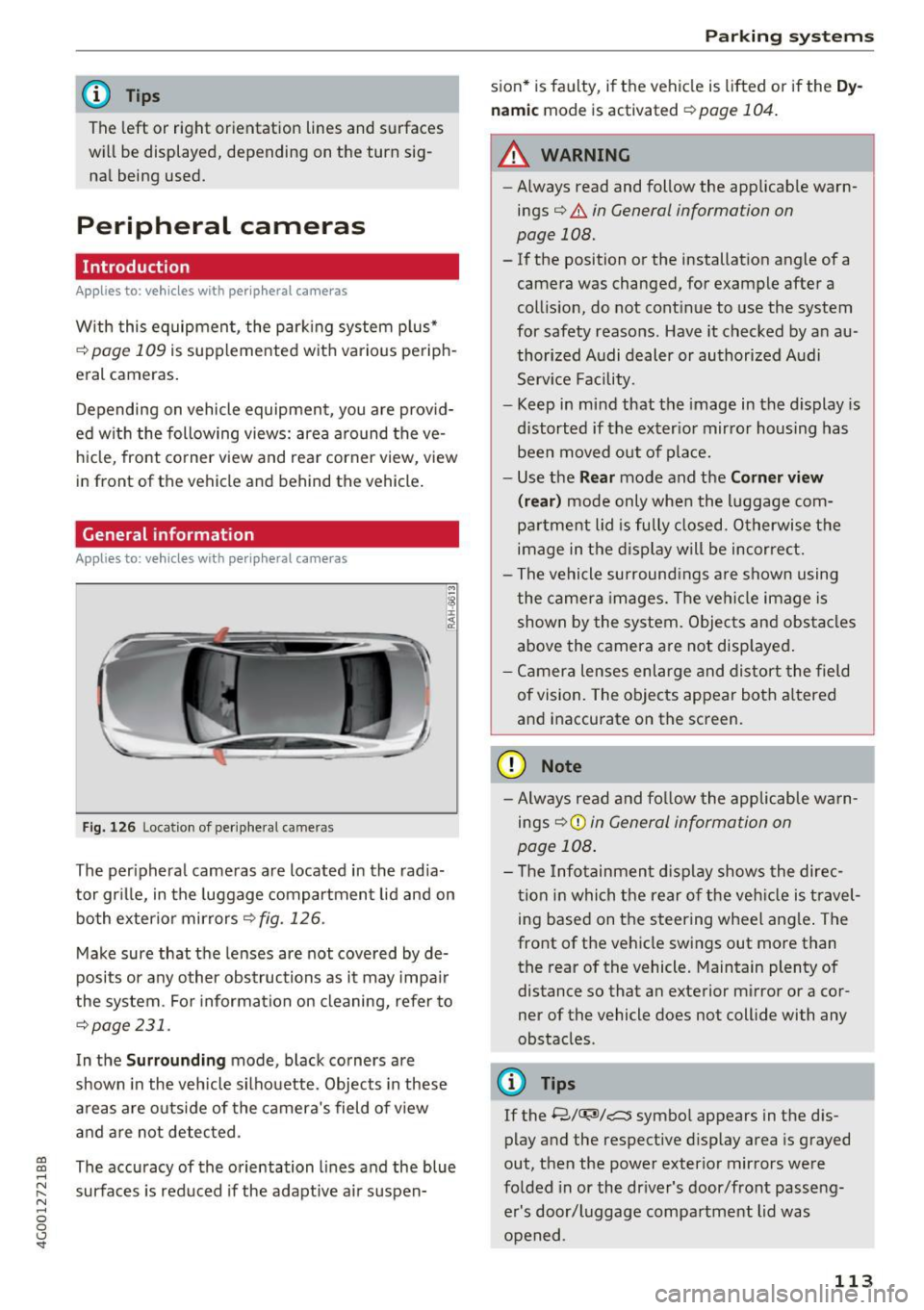
Fig. 126 Locatio n of peripheral came ras
The peripheral cameras are located in the radia
tor grille, in the luggage compartment lid and on
both exterior mirrors
r::!;> fig . 126.
Make sure that the lenses are not covered by de
posits or any other obstructions as it may impair
the system . For information on cleaning, refer to
¢page 231.
In the Surrounding mode, black corners are
shown in the vehicle silhouette. Objects in these
areas are outside of the camera's field of view
and are not detected .
The accuracy of the orientation lines and the blue
surfaces is reduced if the adaptive air suspen-
Parking systems
sion* is faulty, if the vehicle is lift ed or if the Dy
namic
mode is activated ¢ page 104.
.&_ WARNING
-
-Always read and follow the applicable warn-
ings¢ .&.
in General information on
page 108.
- If the position or the installation angle of a
camera was changed, for example after a
collision, do not continue to use the system
for safety reasons . Have it checked by an au
thorized Audi dealer or authorized Audi
Service Facility .
- Keep in mind that the image in the display is
distorted if the exterior mirror housing has
been moved out of place.
- Use the
Rear mode and the Corner view
(rear)
mode only when the luggage com
partment lid is fully closed . Otherwise the
image in the display will be incorrect.
- The vehicle surroundings are shown using
the camera images. The vehicle image is
shown by the system. Objects and obstacles
above the camera are not displayed.
- Camera lenses enlarge and distort the field
of vision. The objects appear both altered
and inaccurate on the screen.
(D Note
- Always read and follow the applicable warn
ings
9 (£) in General information on
page 108.
- The Infotainment display shows the direc
tion in which the rear of the vehicle is travel
ing based on the steering wheel angle. The
front of the vehicle swings out more than
the rear of the vehicle. Maintain plenty of
distance so that an exterior mirror or a cor
ner of the vehicle does not collide with any
obstacles .
@ Tips
If the 8/u;ri/r::::::5, symbol appears in the dis
play and the respective display area is grayed
out, then the power exterior mirrors were
folded in or the driver's door/front passeng
er's door/luggage compartment lid was
opened .
113
Page 160 of 280
Airbag system
A WARNING
A child in a rearward-facing child seat instal
led on the front passenger seat will be seri
ously injured and can be killed if the front air
bag inflates - even with an Advanced Airbag
System.
- The inflating airbag will hit the child seat or
infant carrier with great force and will
smash the child seat and child against the backrest, center armrest, door or roof.
- Always install rear-facing child seats on the
rear seat.
- If you must install a rearward facing child
seat on the front passenger seat because of exceptional circumstances and the
PASSEN
GER AIR BAG OFF
light does not come on
and stay on, immediately install the rear
facing child seat in a rear seating position
and have the airbag system inspected by
your Audi dealer.
A WARNING
Objects between you and the airbag will in
crease the risk of injury in a crash by interfer
ing with the way the airbag unfolds or by be
ing pushed into you as the airbag inflates .
- Never hold things in your hands or on your
lap when the vehicle is in use .
- Never transport items on or in the area of
the front passenger seat . Objects could
move into the area of the front airbags dur
ing braking or other sudden maneuvers and
become dangerous projectiles that can
cause serious personal injury if the airbags
inflate.
- Never place or attach accessories or other
objects (such as cup holders, telephone
brackets , large, heavy or bulky objects) on
the doors, over or near the area marked "A IRBAG" on the steering wheel, instru
ment panel, seat backrests or between
those areas and yourself. These objects
could cause injury in a crash, especially
when the airbags inflate .
- Never recline the front passenger 's seat to
transport objects. Items can also move into
the area of the side airbag or the front air-
158
-
bag during braking or in a sudden maneu
ver. Objects near the airbags can become
projectiles and cause injury, particularly
when the seat is reclined.
- Never place or transport objects on the
front passenger seat. Objects on the front passenger seat could cause the capacitive
sensor in the seat to signal to airbag system
that the seat is occupied by a person when it
in fact is not , or that the person on the seat
is heavier than he or she actually is. The
change in electric capacitance because of
such objects can cause the passenger front
airbag to be turned on when it should be
off, or can cause the airbag to work in a way
that is different from the way it would have
worked without objects on the seat.
- Always make sure that there is nothing on
the front passenger seat that will cause the
capacitive passenger detection system in
the seat to signal to the Airbag System that
the seat is occupied by a person when it is not, or to signal that it is occupied by some
one who is heavier than the person actually
sitting on the seat. The presence of an ob
ject could cause the passenger front airbag to be turned on when it should be off, or
could cause the airbag to work in a way that is different from the way it would have
worked without the object on the seat.
A WARNING
The fine dust created when airbags deploy can
cause breathing problems for people with a history of asthma or other breathing condi
tions .
- To reduce the risk of breathing problems,
those with asthma or other respiratory con
ditions should get fresh air right away by
getting out of the vehicle or opening win
dows or doors .
- If you are in a collision in which airbags de
ploy , wash your hands and face with mild
soap and water before eating.
- Be careful not to get the dust into your eyes,
or into any cuts or scratches.
- If the residue should get into your eyes,
flush them with water .
Page 164 of 280
Airbag system
-If, in exceptional circumstances, you must
install a forward-facing child restraint on
the front passenger seat, always move the
seat into its rearmost position in the seat 's
fore and aft adjustment range , as far away
from the airbag as possible . The backrest
must be adjusted to an upright position.
- Make sure that the
PASSENGER AIR BAG
OFF
light comes on and stays on all the time
whenever the ignition is switched on.
_& WARNING
-If the PASSENGER AIR BAG OFF light does
not go out when an adult is sitting on the
front passenger seat after taking the steps
described above, make sure the adult is
properly seated and restrained at one of the
rear seating positions .
- Have the airbag system inspected by your
Audi dealer before transporting anyone on
the front passenger seat .
@ Tips
If the capacitive passenger detection system
determines that the front passenger seat is
empty, the frontal airbag on the passenger
side will be turned
off, and the PASSENGER
AIR BAG OFF
light will stay on.
Repair , care and disposal of the airbags
Parts of the airbag system are installed at many
different places on your Audi. Installing , remov
ing, servicing or repairing a part in an area of the
vehicle can damage a part of an airbag system
and prevent that system from working properly
in a collision .
There are some important things you have to
know to make sure that the effectiveness of the
system will not be impaired and that discarded
components do not cause injury or pollute the
environment.
A WARNING
Improper care, servicing and repair proce
dures can increase the risk of personal injury
and death by preventing an airbag from de-
162
ploying when needed or deploying an airbag
unexpectedly :
- Never cover, obstruct, or change the steer
ing wheel horn pad or airbag cover or the in
strument panel or modify them in any way .
- Never attach any objects such as cup holders
or telephone mountings to the surfaces cov
ering the airbag units .
- For cleaning the horn pad or instrument
panel, use only a soft, dry cloth or one mois
tened with plain water. Solvents or cleaners could damage the airbag cover or change
the stiffness or strength of the material so
that the airbag cannot deploy and protect properly.
- Never repair , adjust, or change any parts of
the airbag system.
-All work on the steering wheel, instrument
panel, front seats or electrical system (in
cluding the installation of audio equipment,
cellular telephones and CB radios, etc.) must be performed by a qualified technician
who has the training and special equipment
necessary.
- For any work on the airbag system, we
strongly recommend that you see your au
thorized Audi dealer or qualified workshop.
- Never modify the front bumper or parts of the vehicle body.
- Always make sure that the side airbag can inflate without interference:
- Never install seat covers or replacement
upholstery over the front seatbacks that
have not been specifically approved by
Audi .
- Never use additional seat cushions that
cover the areas where the side airbags in
flate.
- Damage to the original seat covers or to
the seam in the area of the side airbag
module must always be repaired immedi
ately by an authorized Audi dealer .
- The airbag system can deploy only once. Af
ter an airbag has been deployed, it must be
replaced with new replacement parts de
signed and approved especially for your
Audi model version. Replacement of com
plete airbag systems or airbag components
Page 217 of 280
a,
a,
..... N r-. N ..... 0
s ..
Rim
means a metal support for a tire
or a tire and tube assembly upon
which the tire beads are seated.
Rim di amet er
means nominal diameter of the
bead seat. If you change your
wheel size, you will have to pur
chase new tires to match the new
rim diameter.
Rim size designation
means rim diameter and width.
Rim width
means nominal distance between
rim flanges.
Sidewall
means that portion of a tire be
tween the tread and bead.
Speed rating (letter code )
means the speed at wh ich a tire is
designed to be driven for extend
ed periods of time . The ratings
range from 93 mph (150 km/h)
to 186 mph (298 km/h)
¢ table
on page 211.
You may not find
this information on all tires be
cause it is not required by law.
The speed rating letter code,
where applicable, is molded on
the tire sidewall and indicates the
Wheels
maximum permissible road
speeds
¢ A in Winter tires on
page 225.
T ire pressure mon itoring
system *
means a system that detects
when one or more of a vehicle's
tires are underinflated and illumi
nates a low tire pressure warning
telltale.
T read
means that portion of a tire that
comes into contact with the road .
Tread separation
means pulling away of the tread
from the tire carcass.
Treadwear indicators (TWI )
means the projections within the
principal grooves designed to give
a visual indication of the degrees
of wear of the tread. See
¢ page 219, Treadwear indicator
for more information on measur
ing tire wear .
Uniform Tire Quality Grading
is a tire information system devel
oped by the United States Nation
a l Highway Traffic Safety Admin
istration (NHTSA) that is designed
to help buyers make relative
215
..
Page 223 of 280
-The tire must flex more if the
tire pressure is too low or if
the vehicle speed or load are
too high. This heats the tire up
too much . This increases the
risk of an accident because it
can cause the tire to burst and result in loss of vehicle con
trol.
-Incorrect tire pressure in
creases tire wear and has a
negative effect on driving and
braking behavior, which in
creases the risk of an accident .
(D Note
Replace lost valve caps to re
duce the risk of damage to the
tire valves.
Tire pressure table
Please note that the information
contained in the following table
was correct at the time of print ing, and the information is sub
ject to change. If there are differ
ences between this information
and the tire pressures specified
on the label on the driver's side B
pillar, always follow the specifica
tion on the B -pillar label
! ¢ page 220, fig. 190. N r-. N ..... 0
s ..
Wheels
'® For the sake of the environment
Tire pressure that is too low in
creases fuel consumption .
Audi recommends using the
tire pressure specified for a normal load
¢ table on
page 222
or for a full load
when the vehicle is partially loaded.
Make sure that the tire designa
tion on your tire matches the des ignation on the tire pressure label
and the tire pressure table.
The following table lists recom mended tire pressures in cold
tires according to the load and
the size of the tires installed . ..
221
Page 231 of 280
Tire pressure monitoring system
Applies to: vehicles with Tire Pressure Monitoring System in
dicator
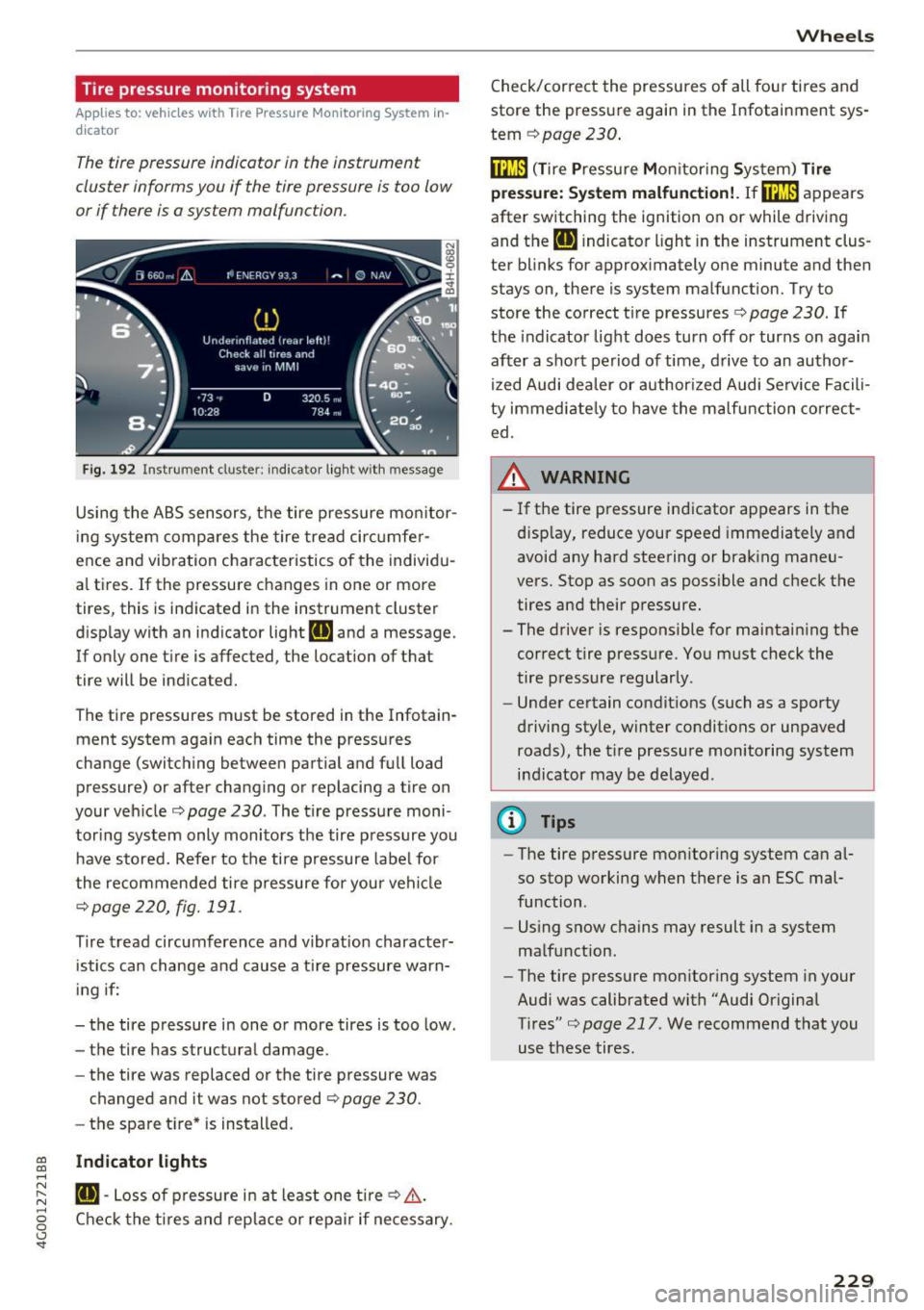
The tire pressure indicator in the instrument
cluster informs you if the tire pressure is too low
or if there is a system malfunction .
Fig. 192 Instrument clus ter : indicator ligh t w ith message
Using the ABS sensors, the tire pressure monitor
ing system compares the tire tread circumfer
ence and vib ration characteristics of the individu
al tires.
If the pressure changes in one or more
tires, this is indicated in the instrument cluster
display with an indicator light
RE and a message.
If only one tire is affected, the location of that
tire will be indicated.
The tire pressures must be stored in the Infotain
ment system again each time the pressures
change (switching between partial and full load pressure) or after changing or replacing a tire on
your vehicle ¢
page 230 . The tire pressure moni
toring system only monitors the tire pressure you have stored. Refer to the tire pressure label for
the recommended tire pressure for your vehicle
¢page 220, fig.191 .
Tire tread circumference and v ibration character
istics can change and cause a tire pressure warn
ing if:
- the tire pressure in one or more tires is too low.
- the tire has structural damage.
- the tire was replaced or the tire pressure was
changed and it was not stored
¢ page 230.
- the spare tire* is installed.
~ Indicator lights ....
~ RE-Loss of pressure in at least one tire¢,&,. . ....
g Check the tires and replace or repair if necessary.
<.,;) 'SI"
Wheels
Check/correct the pressures of all four tires and
store the pressure again in the Infotainment sys
tem
¢ page 230 .
fflm (T ire Pressure Monitoring System) Tire
press ure: System malfunction!.
Ifffi:m appears
after switching the ignition on or while driving
and the
RE indicator light in the instrument clus
ter blinks for approximately one minute and then
stays on, there is system malfunction. Try to
store the correct tire pressures¢
page 230. If
the indicator light does turn off or turns on again
after a short period of time , drive to an author
ized Audi dealer or author ized Audi Service Facili
ty immediately to have the malfunction correct
ed.
_& WARNING ,..___
- If the tire pressure indicator appears in the
d isplay, reduce your speed immediately and
avoid any hard steering or braking maneu
vers. Stop as soon as possible and check the
tires and their pressure.
- The driver is responsible for maintaining the
correct tire pressure. You must check the
tire pressure regularly.
- Under certain conditions (such as a sporty
driving style, winter conditions or unpaved roads), the tire pressure monitoring system
indicator may be delayed .
@ Tips
-The tire pressure monitoring system can al
so stop working when there is an ESC mal
function .
- Using snow chains may result in a system
malfunction.
- The tire pressure monitoring system in your
Audi was calibrated with "Audi Original
Tires"¢
page 217 . We recommend that you
use these tires.
229
Page 232 of 280
Wheels
Storing tire pressures
Applies to: vehicles with Tire Pressure Monito ring System in
dicator
If the tire pressure changes or a tire is replaced, it must be confirmed in the Infotainment system.
• Make s ure before storing that the tire pressures
of all fo ur t ires meet the specified val ues and
are adapted to the load
c> page 220.
• Switc h the ignition on.
• Se lect : the ICARI function button
> (Car )* Sys
tems
con trol b utton > Service & checks > Tire
pres sure monitor > Store tire pres sure > Yes,
stor e now .
(D Tips
Do not s tore the tire press ures if snow chains
a re installed.
230
Page 239 of 280
co
co
.... N
" N .... 0 0 <..:l '
The vehicle jack* in your vehicle is mainte
nance-free.
Replacing wheels
Before changing a wheel
Observe the following precautions for your own
and your passenger's safety when changing a
wheel .
.,. After you experience a tire failure, pull the car
well away from moving traffic and try to reach
level ground before you stop¢,&. .
.,. All passengers should
leave the car and move
to a safe location (for instance, beh ind the
guardrail)¢ ,&..
.. Engage the
parking brake to prevent your vehi
cle from rolling unintentionally ¢,&. .
.. Move
selector lever to position P ¢ ,&. .
.,. If you are towing a trailer, unhitch the trailer
from your vehicle.
.,. Take the
jack and the spare tire* out of the lug
gage compartment c:> page 236.
A WARNING
You or your passengers could be inju red wh ile
changing a wheel if you do not follow these
safety precautions:
- If you have a flat tire, move a safe distance
off the road. Turn off the engine, turn the
emergency flashers on and use other warn
ing devices to alert other motorists .
- Make sure that passengers wait in a safe
place away from the vehicle and well away
from the road and traffic.
- T o help prevent the vehicle from moving
sudden ly and possibly slipping off the jack,
always fully set the parking brake and block
the wheel diagonally opposite the wheel be ing changed. When one front wheel is lifted
off the ground, plac ing the Automatic
Transmission in P (Park) will
not prevent the
vehicle from mov ing.
- Before you change a wheel, be sure the
ground is level and firm. If necessary, use a
sturdy board under the jack .
Emergency assistance
-Always store the vehicle too l kit, the jack
and the replaced tire in the luggage com
partment
¢page 134.
@ Tips
Before changing the wheel, you must activate
the jacking mode, so that the automatic con
tro ls for the Adaptive Air Suspension* do not
make it more difficult to lift the vehicle with
the jack
c> page 239.
Changing a wheel
When you change a wheel, follow the sequence
described below step-by-step and in exactly that
order .
l. Activate the vehicle jack mode* ¢ page 239 .
2. Remove the decorative wheel cover* or the
wheel bolt caps* . For more details see also
¢ page 238, Decorative wheel covers or
¢ page 238, Wheels with wheel bolt caps .
3. Loosen the wheel bolts¢ page 238 .
4. Locate the proper mounting point for the
jack and align the jack below that point
¢page 239.
5. Raise the car with the jack c> page 239 .
6. Remove the wheel with the flat tire and then
install
the spare ¢ page 241.
7. Tighten all wheel bolts lightly.
8.
Lower the vehicle with the jack .
9 . Use the wheel bolt wrench and
firmly tighten
all wheel bolts
c> page 238.
10. Replace the decorative wheel cover* or the
wheel bolt caps*.
11. Deactivate the vehicle jack mode* in the
MMI:
I CARI function button > ( Car)* systems
control button > Servicing & checks > Air
susp.: jack mode > Off.
The vehicle jack mode* switches off automatica l
ly at speeds above 6 mph (10 km/h).
A WARNING
--
Always read and follow all WARNINGS and in
formation
¢ .&. in Raising the vehicle on
page 240
and c> page 242 .
237
Page 240 of 280
Emergency assistance
After changing a wheel
A wheel change is not complete without the do
ing the following .
• Always store the vehicle tool kit, the jack* and
the replaced tire in the luggage compartment
<=>page 134.
• Check the tire pressure on the spare wheel im
mediate ly after mounting it.
• As soon as possible, have the
tightening tor
ques
on all wheel bolts checked with a torque
wrench. The correct tightening torque is 90 ft
lb (120 Nm).
• Have the flat tire
replaced as soon as possible.
@ Tips
- If you notice that the whee l bolts are cor
roded and difficu lt to turn while changing a
tire, they should be replaced before you
check the tightening torque .
- Drive at reduced speed until you have the
tightening torques checked.
- After changing a wheel, the tire pressure in
a ll four tires must be checked/corrected and
the tire pressure mon itor ing indicator must
be stored in the MMI
c> page 230.
Decorative wheel covers
App lies to: vehicles with decorative wheel covers
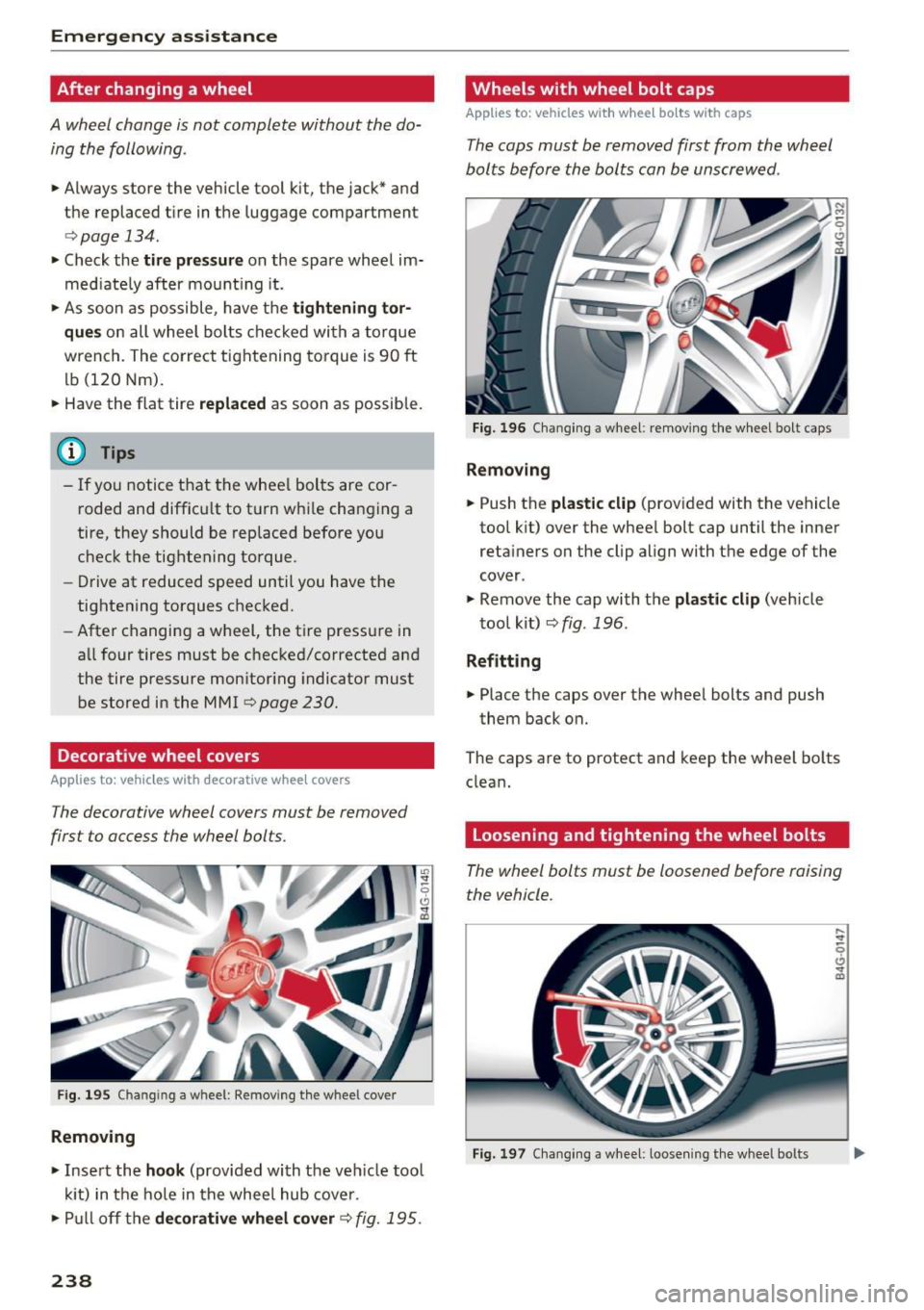
The decorative wheel covers must be removed
first to access the wheel bolts .
Fig. 195 Chan gin g a w hee l: Removing the whee l cover
Removing
• Insert the hook (provided with the ve hicle tool
kit) in the hole in the wheel hub cover.
• Pull off the
decorative wheel cover c> fig. 195.
238
Wheels with wheel bolt caps
Applies to: vehicles with wheel bo lts with caps
The caps must be removed first from the wheel
bolts before the bolts can be unscrewed .
Fig. 196 Changing a whee l: removing the wheel bolt caps
Removing
• Push the plastic clip (provided with the vehicle
tool k it) over the wheel bolt cap until the inner
retainers on the clip align with the edge of the
cover .
• Remove the cap with the
plastic clip (vehicle
tool kit)¢
fig. 196.
Refitting
• Place the caps over the wheel bolts and push
them back on.
The caps are to protect and keep the wheel bolts
clean.
Loosening and tightening the wheel bolts
The wheel bolts must be loosened before raising
the vehicle.
Fig. 197 Chang ing a wheel : loosen ing the whee l bo lts
Page 241 of 280
co
co
.... N
" N .... 0 0 <..:l 'SI"
Loosening
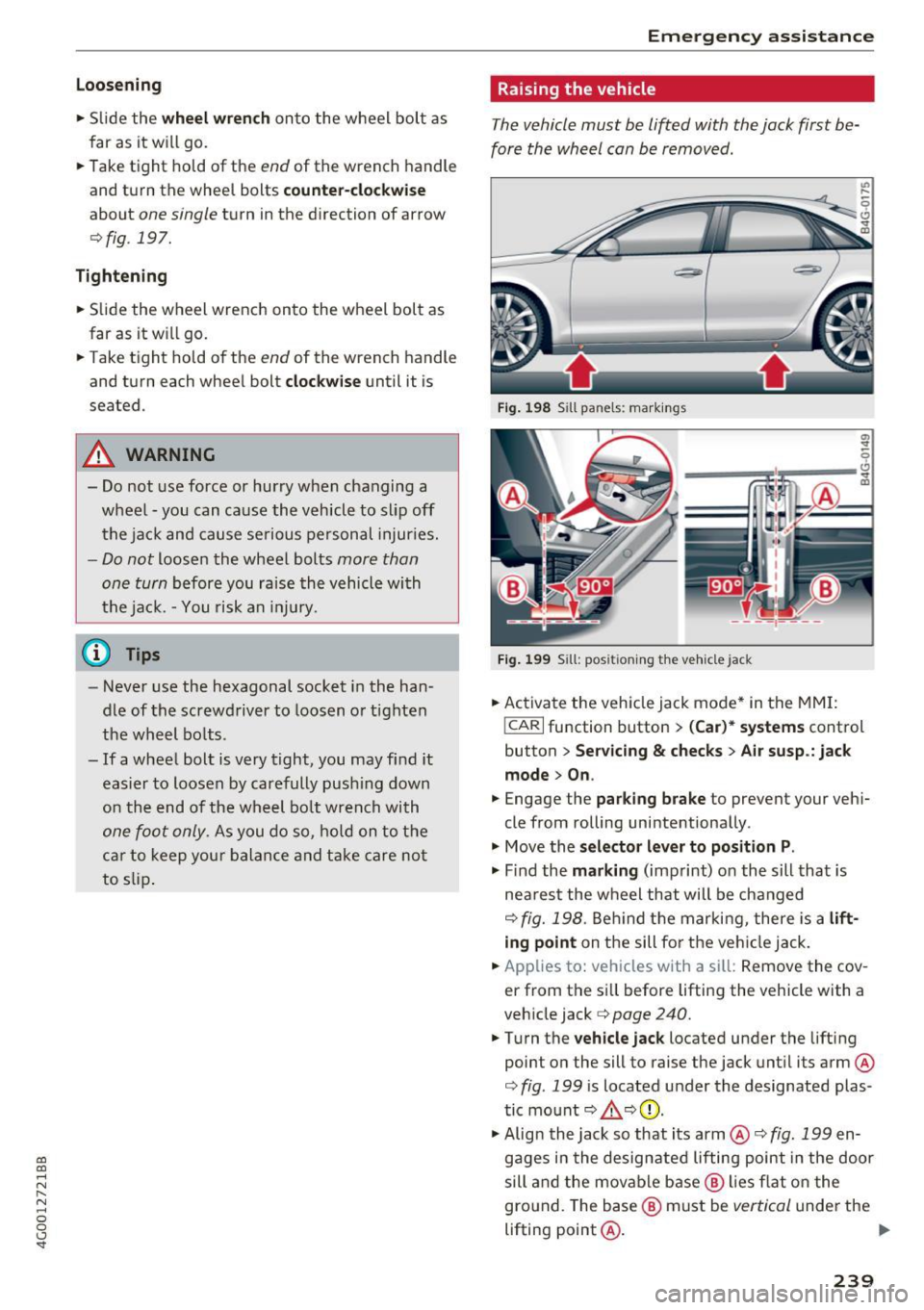
• Slide the wh eel wr ench onto the wheel bolt as
far as it will go.
• Take tight hold of the
end of the wrench handle
and turn the wheel bolts
counter-cloc kwise
about one single turn in the direction of arrow
<=>fig. 197.
Tightening
• Slide the wheel wrench onto the wheel bolt as
far as it will go.
• Take tight hold of the
end of the wrench handle
and turn each wheel bolt
cloc kwise until it is
seated.
A WARNING
- Do not use force or hurry when changing a
wheel· you can cause the vehicle to slip off
the jack and cause se rious personal injur ies.
- Do not loosen the wheel bolts more than
one turn
before you raise the vehicle with
the jack. -You risk an injury.
(D Tips
- Never use the hexagonal socket in the han
dle of the screwdriver to loosen or tighten
the wheel bo lts .
- If a wheel bolt is
very tight, you may find it
easier to loosen by carefully push ing down
on the end of the wheel bo lt wrench with
one
foot only . As you do so, hold on to the
car to keep your balan ce and take care no t
to slip .
Emergen cy a ssis tanc e
Raising the vehicle
The vehicle must be lifted with the jack first be
fore the wheel can be removed.
Fig . 1 98 Sill panels: markings
0, ...
0
---~~ i~~:--~
F ig . 1 99 Sill: posit ioning the vehicle jack
• Activate the vehicle jack mode* in the MM I:
!CARI function button > (Car )* s ystem s control
button
> Ser vicin g & checks > A ir su sp .: jac k
m ode > On .
• Engage the pa rki ng br ake to prevent your veh i
cle from rolling unintentionally .
"' Move the
selector l eve r to position P .
"' Find the mark ing (imprint) o n the sill that is
nea rest the wheel that will be changed
<=> fig. 198 . Behind t he marking, there is a lift
ing point on the sill fo r th e vehi cle jack.
• Applies to: vehicles with a si ll: Remove the
cov
er from the sill before lifting the vehicle with a
vehicle jack<=>
page 240.
"'Turn the vehicle jack located under the lifting
point on the sill to raise the jack until its arm @
<=> fig . 199 is located under the designated plas
tic mount <=> &. <=>0 .
"' Alig n the jack so that its arm@¢
fig. 199 en
gages i n the designated lifting point in the door
sill and the movable b ase @ lies flat o n the
gro und. The base @ must be
vertical under the
lifting point@.
Ii"'
239