infotainment AUDI A6 2017 User Guide
[x] Cancel search | Manufacturer: AUDI, Model Year: 2017, Model line: A6, Model: AUDI A6 2017Pages: 280, PDF Size: 70.24 MB
Page 39 of 280
co
co
.... N
" N .... 0 0 <.,;) 'SI"
time. T hi s app lies pa rt icu larly when children
remain in the vehicle. Othe rw ise children
co uld start t he engine or operate elect rical
equipment (such as power windows), which
increases the r is k of an accident .
Power windows
Controls
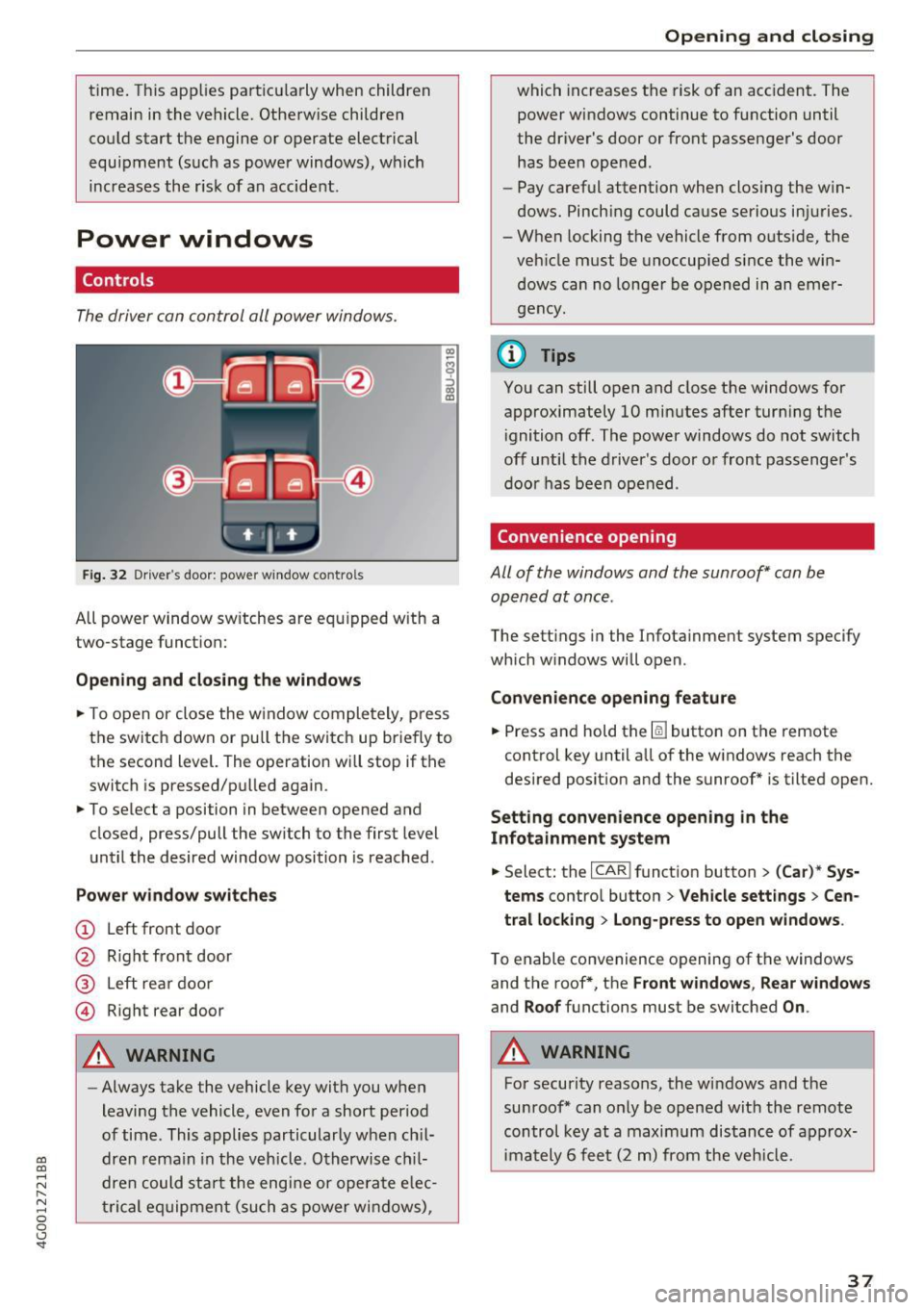
The driver can control all power window s.
F ig. 32 Dr ive r's door : power w indow co ntro ls
All power window sw itches are eq uipped w ith a
two-stage funct ion:
Opening and closing the windows
"' -$ :,
"' CD
~ T o open or close the w indow completely, p ress
the switch down or pu ll the switch up briefly to
the second level. The operation will stop if the
switch is pressed/pu lled again.
~ To se lect a position in between opened and
closed, press/pull the sw itch to the first level
u nt il the desired window position is reached.
Power window switches
(!) L eft front door
@ R ight front door
® L eft rea r d oor
© Right rear door
A WARNING
- Always take the vehicle key wit h you when
leaving the vehicle, even fo r a short period
of time . This applies particularly w hen ch il
dr en re ma in in the vehicl e. O th erwis e chi l
dre n cou ld st art t he engi ne or ope ra te e lec
t ric al eq uip m ent (such as power wi ndows),
Open ing and closing
which increases the risk of an acc ident. The
power windows continue to function until
the dr iver's door or front passenge r's door
has been opened .
- Pay careful attention when closing the w in
dows . Pinch ing could ca use serio us in juries.
- When locking the vehicle from o utside, the
veh icle must be unoccup ied since the win
d ows can no longe r be o pened in an emer
g e ncy .
@ Tips
You can still o pen and close the windows for
approximately 10 mi nutes after tur ning t he
i gnition off . The power windows do not switch
off until the driver 's door o r front passenger 's
door has been open ed .
Convenience opening
All of the windows and the sunroof* can be
opened at once .
The settings in the Infota inment system specify
which w indows will open .
Convenience opening feature
~ Press and hold the~ button on the remote
control key until a ll of the w indows reach the
desired position and the sunroof* is tilted open.
Setting convenience opening in the
Infotainment system
~ Select: the I CAR I funct io n button > (Car) * Sys
tems
contro l button > Vehicle sett ings > Cen
tral locking
> Long-press to open windows .
To enable convenience openin g of the w indows
and the roof *, th e
Front windows , Rear windows
and Roof functions must be switched On .
A WARNING
For security reasons, the w indows and the
su nroof* can o nly be opened wit h the remote
control key at a maximum distance of a pprox
im ately 6 fee t (2 m ) from the veh icle .
37
Page 45 of 280
Messages in the instrument cluster display
Headlight a ssist: System fault !
Drive to an authorized Aud i dealer or a uthorized
Aud i Service Facility immediately to have the
malfunct ion cor rected. You can still switc h the
hi gh beams on or off manually.
Headlight as sis t: Unavailable No camera view
The camera view is blocked, for example by a
sticker or debris.
The sensor is located between the interior rear
v iew mirror and the windshield . Do not p lace any
stickers in this area on the windshield.
A WARNING
H igh beam assistant is only intended to assist
the drive r. The dr iver is still responsible for
con troll ing the headlights a nd sw itch ing
them manually depend ing on light and v is ibil
i t y cond itions .
It may be neces sary to operate
t hem manually in situ at ions such as:
- In adverse weathe r co nd itions s uch as fog,
heavy r ain, b low ing snow o r sp raying wate r.
- On roads whe re oncoming traffic may be
partia lly obs cured, su ch as exp ressways .
- Whe n there are road users that do not have
s ufficient lighting, s uch as bi cycler s or
vehicles wi th dirty ta il lamps .
- In tight cu rv es and on steep hills.
- In poor ly l it areas.
- With strong reflectors, such as s igns.
- If the area of the windsh ield near the sensor
is fogged over, dirty, icy or covered w ith a
st icker.
Adjusting the exterior lighting
The functions ore adjusted in the Infotainment
system.
.,. Se lect : I CARI fu nction button> (Car )* Systems
contro l button > Vehicle setting s> Exterior
lighting .
co Automatic headlights co ....
~ You can adjust the fo llowing settings in the Au-N
8 tomatic headlight s menu: 0 <.,;) 'SI"
Lights and Vision
A cti vation sensitivity -you can adjust if the
headlights switch on
Early , Medium or Late ac
cording to the sensitivity of the light sensor .
Auto-dimming high beams* -yo u can sw itch the
high beam assistant*
On and Off .
Daytime running lights*
USA mode ls:
the daytime running lights can be
swit ched on/off. Select
On or Off .
Canada models:
this function cannot be switched
off . They act ivate automatically each time the ig
ni tion is switched on.
Coming home , Leaving home
The coming home function illuminates the area
outside the vehicle when you turn the ignit ion off
and open the driver 's doo r. To turn the function
o n, select
Light s when leaving car > On .
The leaving home illum inates the area outside
the vehicle when you unlock the vehicle . To turn
the function on, se lect
Li ghts when unlocking
car > On .
The coming home and leav ing home functions
only operate when it is dark and the light switc h
is in the
AUTO pos ition .
Emergency flashers
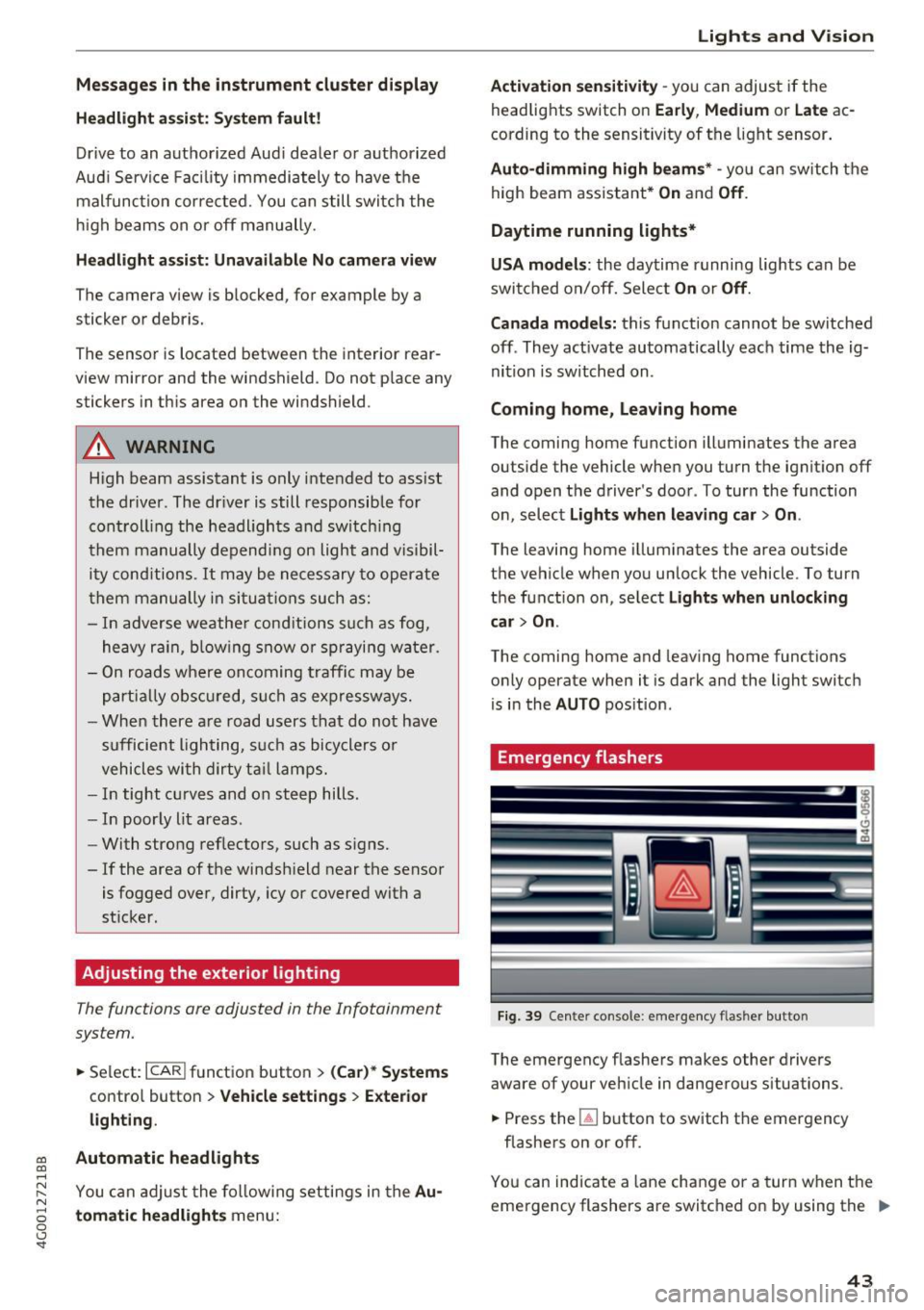
Fi9. 39 Cente r console : emergency f las her button
The emergency flashe rs makes other drivers
aware of your vehicle in dangerous situations .
.,. Press the~ button to switch the emergency
flashe rs on or off.
You can indicate a lane change or a turn w hen the
eme rgency flashers are switched on by using the .,.
43
Page 46 of 280
Lights and Vision
turn signal lever . The emergency flashers stop
temporarily .
The emergency flashers also wo rk when the igni
tion is turned off.
Interior lighting
Front and rear interior lighting
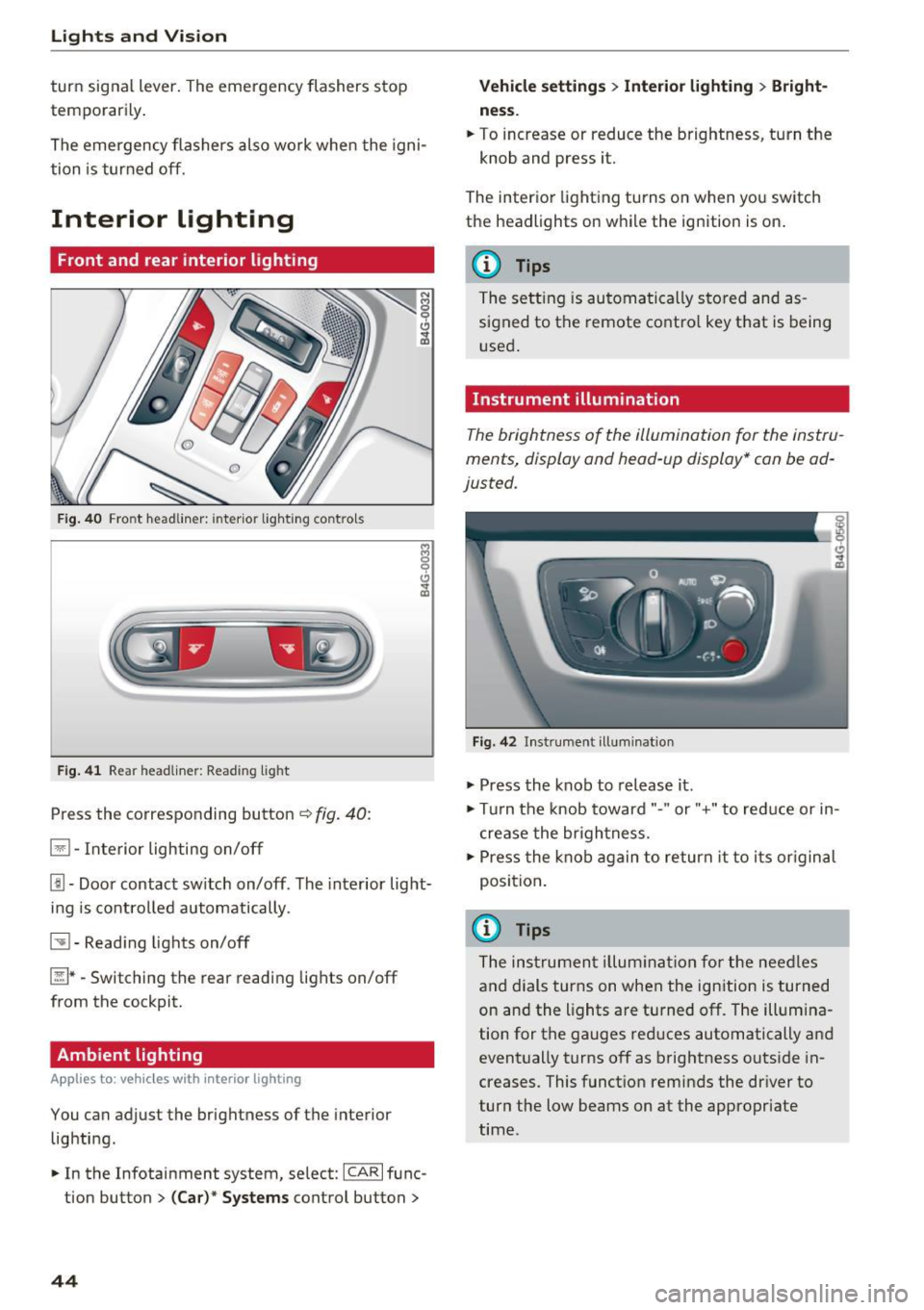
Fig . 4 0 Fro nt headli ner: inter io r lig hting co ntro ls
F ig . 4 1 Rea r headliner: Read ing light
Press the corresponding button ~ fig. 40:
El -Interior lighting on/off
Jjj -Door contact sw itch on/off. The interior light
ing is contro lled automatically.
~ - Read ing lights on/off
~ *·Switching the rear reading lights on/off
from the cockpit.
Ambient lighting
Ap plies to: vehicl es w ith i nterio r lighting
You can adjust the brightness of the interior
lighting .
.. In the Infotainment system , select:
ICAR I func
tion button
> ( Ca r)* Sy stems control button >
44
Vehicle setting s> Interior lighting > Bright
ne ss .
.. To increase or reduce the brightness, turn the
knob and press it.
The inter ior lighting turns on when yo u switch
the headlights on w hile the ignition is on .
(D Tips
The setting is automa tically stored and as
s igned to the remote contro l key that is being
u sed .
Instrument illumination
The brightness of the illumination for the instru
ments, display and head -up display* can be ad
justed.
F ig. 42 In strument illuminat ion
.,. Press the knob to release it .
.,. Tur n the knob toward"." or"+" to reduce or in
c rease the br ightness.
.,. Press the knob again to return it to i ts or iginal
position .
(i} Tips
The ins trumen t illum ina tion for the nee dles
and dials turns on when the ign ition is turned
on and the lights are turned off. The illum ina
tion for the gauges red uces automatically and
event ually turns off as brightness outside in
creases. This funct ion reminds the dr iver to
turn the low beams on at the appropriate
time.
Page 50 of 280
Lights and Vi sion
® , the headlights and the night vision assist
camera* are cleaned at intervals.
A WARNING
-The rain sensor is only intended to assist the
driver. The driver may still be responsible
for manually switching the wipers on based on visibility conditions.
- The windshield may not be treated with wa
te r-repell ing windsh ield coating agents. Un
favorable conditions, such as wetness, dark
ness or low sun, can result in increased
glare, which increases the risk of an acc i
dent. Wiper blade chatter is also poss ible.
- Properly functioning windsh ield wiper
blades are required for a clear view and safe
dr iv ing¢
page 48, Replacing windshield
wiper blades.
(D Note
- If there is frost, make sure the w indshie ld
wiper blades a re not frozen to the wind
s hi eld. Sw itching on the winds hield wipers
when the blades are frozen to the wind
shield can damage the wiper blades.
- Prior to using a car wash, the windshield
wiper system must be switched off (lever in
position 0) . This prevents the wipers from
switching on unintentiona lly and causing
damage to the w indshield wiper system.
(D Tips
- The windshield wipers switch off when the
ignition is switched off. You can activate the
windsh ield wipers after the ign ition is
switched back on by moving the windsh ield
wiper lever to any pos it ion.
- Worn or dirty windshield wiper blades result
i n streak ing. This can affect the rain sensor
funct ion . Check your winds hield wiper
blades regularly.
- The washer fluid nozzles for the windshie ld
washer system are heated at low tempera
tures when the ignition is on .
- When stopp ing temporarily, such as at a
traffic l ight, the speed of the windshield
wipers automat ically reduces by one level.
48
· Cleaning windshield wiper blades
Clean the wiper b lades when yo u see w iper
streaks. Use a soft cloth and a g lass cleaner.
.. Place the w indshield w iper arms in the service
position ¢
page 48.
" Fold the windsh ie ld w iper arms away from the
w indshie ld.
A WARNING
D irty windshie ld w iper blades can impa ir vi
sion, which increases the r isk of an accident .
Replacing windshield wiper blades
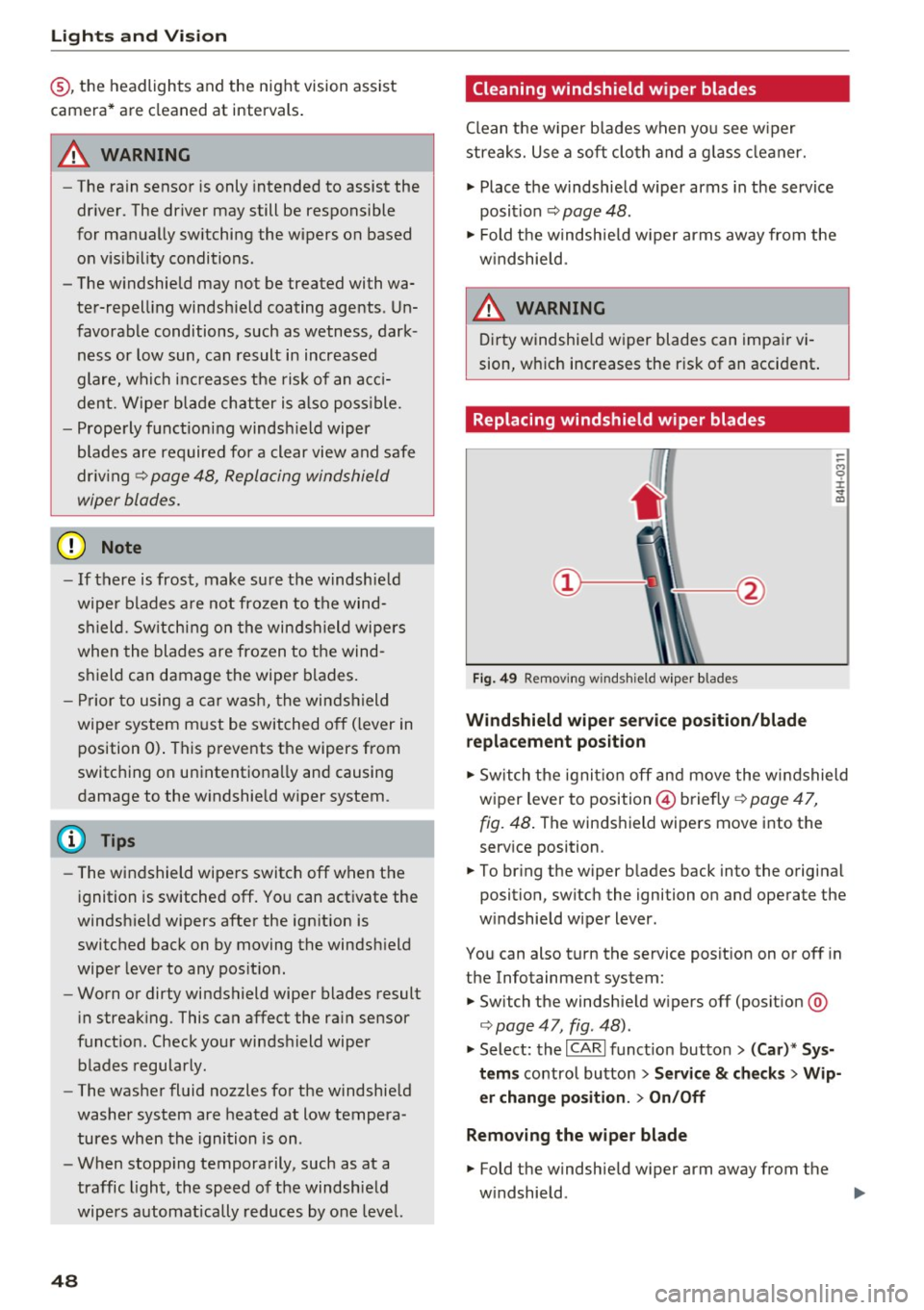
Fig. 49 Removi ng w inds hield w ipe r blades
Windshield wiper service position /blade
replacement po sition
-
-
-M 0 :i: V m
" Sw itch the ignit ion off and move the windshield
wiper lever to position © briefly ¢
page 47,
fig. 48 .
The winds hield wipers move into the
serv ice position .
.. To br ing the wiper b lades back into the original
position, switch the ignition on and operate the
w indshield wiper lever.
You can also turn the service posit ion on or off in
the Infotainment system:
.. Switch the windshie ld w ipers off (posit ion @
¢page 47, fig. 48).
" Select: the I CARI funct ion button > (Car )* Sys
tems
control button > S ervice & ch ecks > Wip
er chang e po sition .
> On/Off
Remo ving the wiper blade
.. Fold the windshield w iper arm away from the
w indshield .
1111>
Page 52 of 280
Sea ts and stor age
Seats and storage
General information
A WARNING
Refer to c::> page 128, Driving safety for im
portant information, tips, suggestions and
warnings that you should read and follow for
your own safety and the safety of you r pas
sengers.
Front seats
Power seat adjustment
App lies to veh icles with power adjustable seats
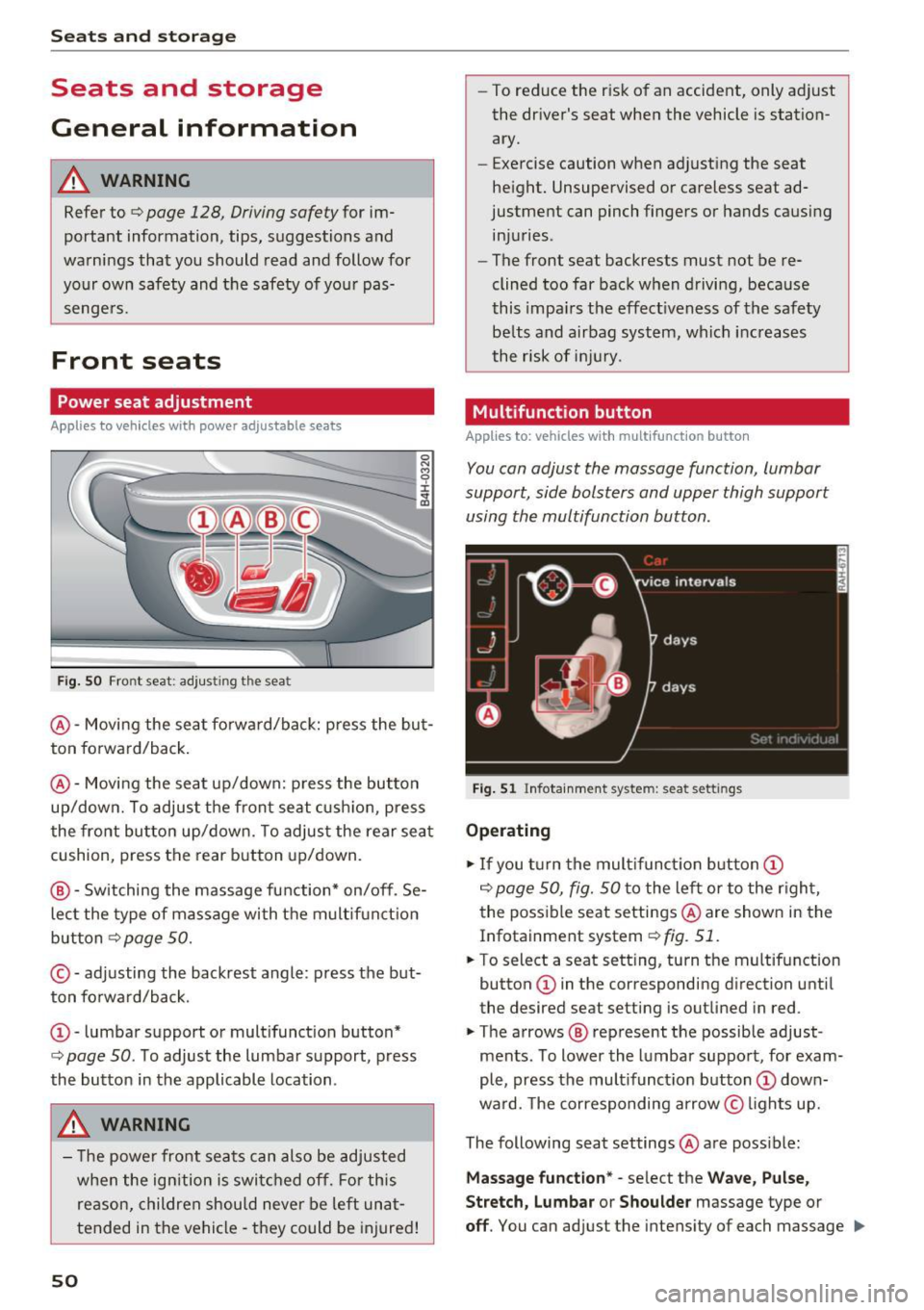
F ig. SO Front seat: adj usting the seat
@ -Movi ng the seat fo rwa rd/back: p ress the but
ton forwa rd/back .
@ -Moving the seat up/down: press the button
up/dow n. To adjust the front seat cush ion, press
the front button up/dow n. T o adjus t the rear sea t
cushion, press the rear button up/down.
@ - Switching the massage function * on/off. Se
lec t the type of massage with the multif unct ion
button
c::> page 50.
© - adjusting the backrest angle: press the but
ton fo rwa rd/back.
CD -lumbar support or multifunct ion button*
c::> page 50 . To adjust the lumbar support, press
the button in the applicable location .
A WARNING
- The power fro nt seats can also be adjusted
when the ign ition is swi tc h ed off. For this
reason, children should never be left una t
tended in the vehicle -they could be injured!
50
- To reduce the r isk of an accident, only adjust
the driver's seat when the vehicle is station ary.
- Exercise caution when adjusting the seat
height. Unsupervised or careless seat ad
justment can pinch fingers or hands causing
injuries.
- The front seat backrests must not be re
clined too far back when driving, because
this impa irs the effect iveness of the safety
be lts and airbag system, which increases
the risk of i nju ry.
Multifunction button
App lies to: vehicles wit h mult ifunct ion b utto n
You can adjust the massage function, lumbar
support, side bolsters and upper thigh support using the multifunction button.
Fig . 51 Infotainme nt system: seat settings
Operating
.,. If you t urn the mult ifunct ion b utton CD
c::> page 50, fig. 50 to the lef t or to the r igh t,
the poss ible seat settings @are shown in the
Infotainment system
c::> fig. 51.
.,. To select a seat sett ing, turn the multifunction
button
CD in the corresponding direction until
the desired seat setting is outlined in red .
.,. The arrows @ represent the possible adjust
ments . To lower the lumbar support, for exam
ple, press the mult ifunct ion button
CD down
ward. The corresponding arrow © lights up.
The following seat settings @are poss ible:
Ma ssa ge fun ctio n* -select the W ave, Pulse ,
Stretch, Lumbar or Shoulder
massage type or
off. You can adjust the intensity of each massage IIJ,,
Page 55 of 280
co
co
.... N
" N .... 0 0 <.,;) 'SI"
Remote Memory button control key
Driver D river Front
passen-ger
Seat X X X
Steering wheel* X X
Both
exterior X X
mirrors*
Remote control key
Applies to: vehicles with memory function
The driver's seat profile can be assigned to the
remote control key when the vehicle is locked.
• Select: the ICARI function button > (Car)* Sys
tems
control button > Vehicle settings > Driv
er's seat
> Remote control key > On .
(D Tips
If you do not wish to have the seat profile for
another driver assigned to the remote control
key, switch the memory function off in the In
fotainment system or using the
IOFFI button
¢page 53.
Memory buttons
Applies to: vehicles with memory function
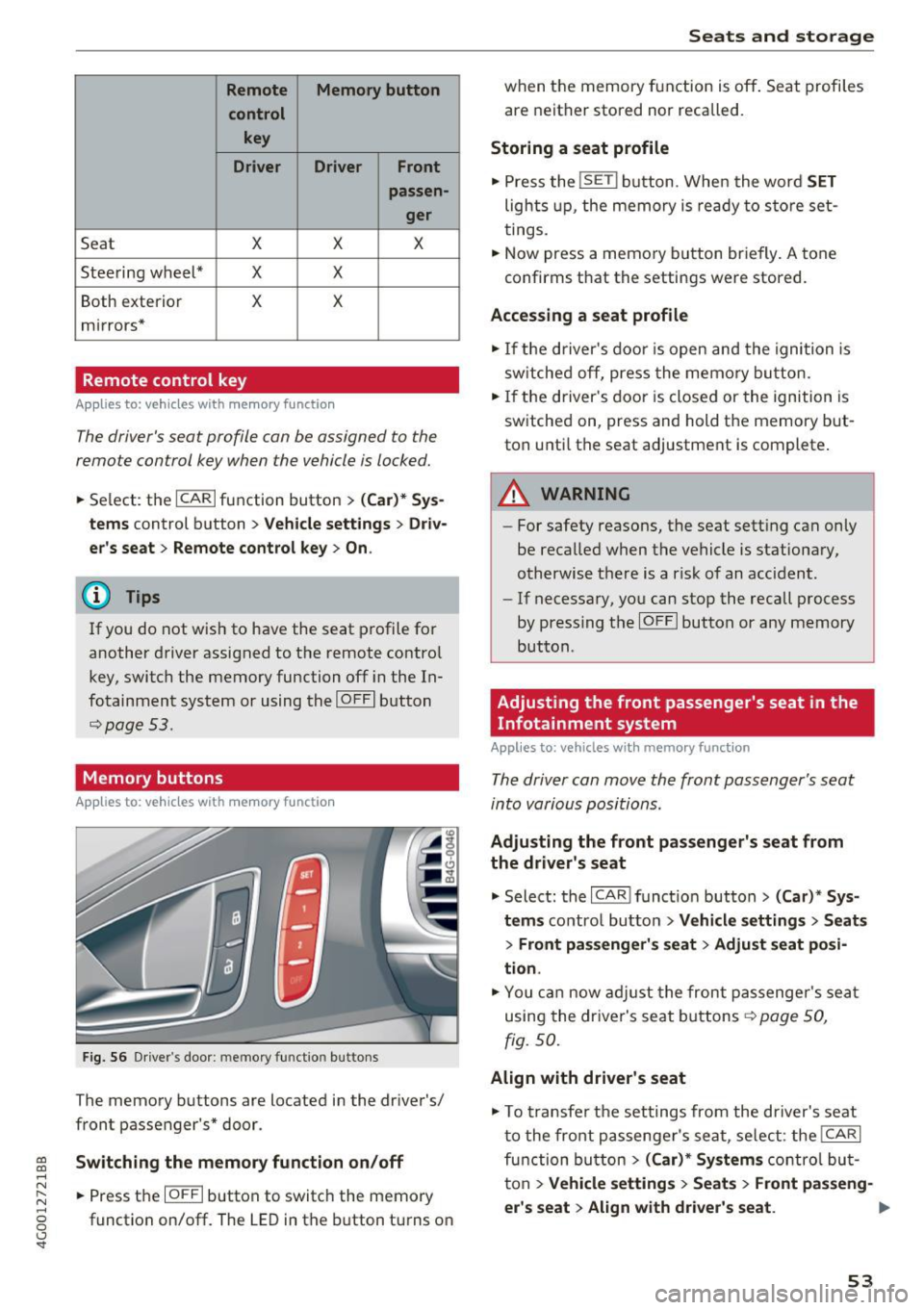
Fig. S6 Driver 's door: memory function buttons
The memory buttons are located in the driver's/
front passenger's* door.
Switching the memory function on/off
• Press the IOFFI button to switch the memory
function on/off. The LED in the button turns on
Seats and storage
when the memory function is off . Seat profiles
are neither stored nor recalled.
Storing a seat profile
• Press the ISET I button. When the word SET
lights up, the memory is ready to store set
tings .
• Now press a memory button briefly. A tone
confirms that the settings were stored.
Accessing a seat profile
• If the driver's door is open and the ignition is
sw itched off, press the memo ry button.
.. If the driver's door is closed or the ignition is
switched on, press and hold the memory but
ton until the seat adjustment is complete .
A WARNING
-For safety reasons, the seat setting can only
be recalled when the vehicle is stationary,
otherwise the re is a risk of an accident.
- If necessary, you can stop the recall process
by press ing the
IOFFI button or any memory
button.
Adjusting the front passenger's seat in the
Infotainment system
Applies to: vehicles with memory function
The driver can move the front passenger's seat
into various positions.
Adjusting the front passenger's seat from
the driver's seat
• Select: the I CAR I funct ion button > (Car) * Sys
tems
contro l button > Vehicle settings > Seats
> Front passenger's seat > Adjust seat posi
tion .
• You can now adjust the front passenger's seat
using the driver's seat buttons
¢ page SO,
fig.
so.
Align with driver's seat
• To transfer the settings from the driver's seat
to the front passenger's seat, select: the
I CAR I
function button > (Car)* Systems control but
ton
> Vehicle settings> Seats > Front passeng-
er 's seat > Align with driver 's seat. ..,.
53
Page 62 of 280
Warm and cold
Warm and cold
Climate control system
Description
The climate control system warms, cools and re moves humidity from the air in the vehicle interi
or. It is the most effective when the windows and
sunroof * are closed. If there is a bui ld-up of heat
insid e the vehicle, ventilation can he lp to speed
up the cooling process.
I n all heating mode f unctions, except for defrost,
the blower only switches to a higher speed once
the engine coolant has reach ed a suffici ent tem
perature .
Pollutant filt er
The po llutant filter removes poll utants such as
dust and pollen from the a ir .
Ke y recognit ion
A pp lies to: ve hicles w ith de luxe au toma tic clima te co ntro l
The blower sett ing and air distribut ion are stored
automatically and ass igned to the remote control
key that you are using.
A ppl ies to: ve hicles w ith 4 -zo ne del uxe auto matic c limate
co ntrol
The climate con trol set tings are automatically
stored and assigned to the remote control key
that is in use.
A WARNING
Poor visibility can lead to accidents.
- For safer driving, keep all windows free of
ice, snow and fog .
- Become familiar as quickly as possible with the correct use and function of the cl imate
contro l system, especially with the defrost
ing and defogg ing function.
- When the temperat ure is below freezing,
only use the windsh ield washer system after
60
the windshield has been warmed by the cli
mate control system. The washer fluid could
freeze on the windshie ld and impair visibi li
ty .
Cl) Note
-If you suspect that the cl imate contro l sys
tem is damaged, switch the system
off to
prevent further damage and have it checked
by an authorized Aud i dealer or authorized
Audi Service Facility .
- Repa irs to the Aud i climate control system
requ ire special technical knowledge and
special tools . See an authorized Aud i dea le r
or autho rized Aud i Service Faci lity .
@ For the sake of the environment
- To save fuel, turn off cooling mode by press
ing the
IAJC I button. This w ill also reduce
em issions .
- In veh icles w ith a diesel engine, you ca n
switch the auto supplementary heater off in
the Infotainment system.
(D Tips
- To prevent interference with the heat ing
and cooling output and to prevent the win
dows from fogging over, the a ir intake in
front of the windshie ld must be free of ice ,
snow or leaves.
- Conde nsation from the coo ling system can
dr ip and fo rm a pudd le of water under the
vehicle. This is norma l and does not mean
there is a leak.
- Th e energy managemen t sys tem may tem
porarily switch
off certain functions, such as
t h e seat heating * or rear window defogger.
These systems are ava ilable again as soon
as the ene rgy supply has been restored.
Page 66 of 280
Warm and cold
mode switches off. The temperature shou ld be
set to approximate ly 72 °F (22 °C).
The
IAUTOI button switches the defroster off.
IQiiJ REARI S witching the re ar window defo gger
o n/off
The rear window heater on ly operates when the
engine is running.
It sw itches off a utomat ica lly
afte r a few minutes, depending on the outs ide
temperature.
To prevent the rear w indow heater from switch
ing off automatically, p ress and ho ld the
l iiiP REAR I
button for more than 2 seconds . This is stored
until the ignition is switched off.
ISYNC I Sy nchronization
When synchronization is switched on, the set
tings for the drive r's side are applied to the front
passenger's side (ex cept for seat heating/ventila
tion*). The settings in the rear are a lso synchron
ized. Synchronization switches off if the settings
are adjusted on the front passenger's side or in
the rear.
You can synch ronize the settings in a row by
pressing and holding a contro l. For example, to
apply the settings for the front passenger's side
to the driver's side, press and ho ld the contro l on
the front passenger's side. The same applies to
the rear .
Res idua l h eat *
With the ignition turned off, you can activate the
residual heat function by pressing the~ button
¢ fig. 73. The residual heat from the coolant is
used to heat the vehicle interior. The residual
heat function switches off automatically after
about 30 m inutes .
Air vents
You can open or close the center and rear vents in
the cockpit and the vents in the rear center con
sole and door pillars using the ridged thumb
wheels . The levers adjust the direction of the air
flow from the vents .
64
A WARNING ,_
- You shou ld not use the recircu lation mode
for an extended period of time since no
fresh air is drawn in. W ith the air-condition
ing sw itched off, the windows can fog up,
which inc reases the risk of an acc ident.
- Individuals w ith reduced sensit iv ity to pa in
or temperature could develop bu rns when
using the sea t heati ng f unct ion. To red uce
the risk of i nju ry, these individuals sho uld
not use seat heating.
(D Note
To avoid damage to the heating elements in
the seats, do no t knee l on the se ats or place
heavy loads on a small area of the seat.
Basic settings
The climate control system basic settings are ac
cessed in the Infotainment system.
"' Select: the I CARI funct ion button > (Car )* Sys-
tems
contro l button > AC .
Rea r seat setting s*
When this function is se lected, all settings for
the rear can be adjusted through the climate con
trol system in the cockpit. The climate control
system settings cannot be adjusted in the rear
seat at the same time. This funct ion sw itches off
after a ce rtain per iod of t ime o r whe n one of the
contro ls in the coc kp it is pressed.
Automatic recirculation*
The sensitivity level of the automatic recircula
t ion mode can be set at various levels from
Off to
Sen siti ve . Reci rculat ion mode is contro lled auto
matically. If the windows fog up, p ress the
I@ FRO NT ! button.
Footwell temperature *
You can adjust the footwell temperature so that
i t is cooler or warme r.
Automat ic au xilia ry heater*
In vehicles with diesel engines*, the auxiliary
heater helps to warm the vehicle interior more
Page 72 of 280
Driving
Easy seat entry
Applies to: ve hicles w ith power steering whee l adj ustment
Easy seat entry makes it easier to enter and exit
the vehicle by adjusting the steering column au
tomatically .
.-In the Infotainment system, select the ICARI
funct ion button > (C ar) * Systems control but
ton
> Vehi cle settings > Seat s > Dr iver' s seat >
Easy seat ent ry > On .
When easy seat entry is switched on, the steering
column goes back up into the park position when
the ignition is switched off . After entering the ve
h icle, the steering co lumn re turns to the stored
position once the ignition is sw itched on.
Starting and stopping
the engine
Starting the engine
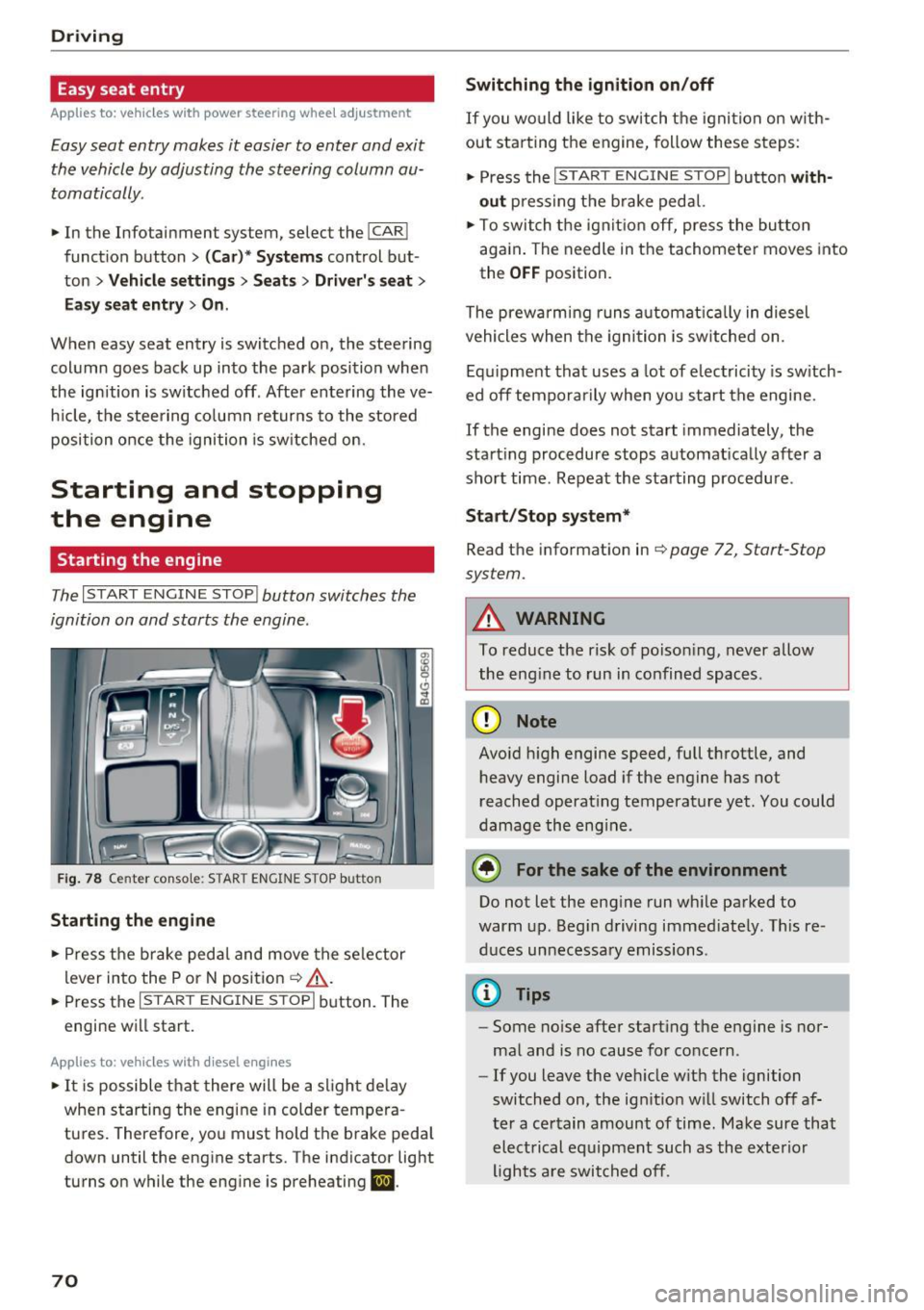
The I START ENGINE STOP I button switches the
ignition on and starts the engine.
Fig. 78 Center console: STAR T ENGINE STOP button
Starting the engine
.- Press the brake pedal and move the se lector
lever into the P or N posit ion ¢
&_.
.-Press the I START ENGINE STOPI button. The
engine will start.
App lies to: ve hicles w ith diesel e ngi nes
.- It is possible t hat there will be a slight de lay
when starting the engine in colder tempera
tures. Therefore, you must hold the brake peda l
down until the engine starts. The indicator light
turns on while the engine is preheating
II .
70
Switching the ignition on /off
If you wo uld like to switch t he igni tion on w ith
out star ting the engine, follow these s teps:
.- Press the
I START ENGINE STOP I button with
out press ing the b rake pedal.
.- To switch the igni tion off, press the bu tton
aga in . The needle in the tachomete r moves into
the
O FF position.
The prewarming runs a utomat ica lly in diesel
vehicles when the igni tion is sw itched on .
Equ ipment that uses a lot of electricity is sw itch
ed off tempo rarily when you start the engine.
If the engine does not start immediately, the
start ing procedure stops automat ically after a
short time. Repeat the starting procedure .
Start /Stop system*
Read the information in¢ page 72, Start-Stop
system.
A WARNING
To reduce the risk of poison ing, never allow
the eng ine to run in confined spaces.
(D Note
Avo id h igh engine speed, full throttle, and
heavy engine load if the engine has not
reached operat ing temperature yet. You could
damage the eng ine.
® For the sake of the environment
Do not let the eng ine run wh ile parked to
warm up. Beg in driving immed iately. Th is re
d uces unnecessary emissions .
(D Tips
-Some noise after start ing the engine is nor
ma l and is no cause for concern .
- If you leave the veh icle w it h the ignition
switched on, the ign ition w ill switch off af
ter a certain amount of time. Make sure that electrical equipment such as the exterior
lights a re switched off.
-
Page 88 of 280
Assist
Assist Speed warning system
Applies to: vehicles with speed warning system
The speed warning system helps you to stay un
der a specified maximum speed.
The speed warning system warns you if you are
exceeding the maximum speed that you have set.
A warning tone will sound as soon as your speed
exceeds the stored value slightly.
The . (USA models)/ . (Canada models) indi
cator light and a message appear in the instru
ment cluster display at the same time. The •
• indicator light and the message turn off if the
speed falls back below the stored maximum
speed .
Setting a threshold is recommended if you would
like to be reminded when you reach a certain
maximum speed. Situations where you may want
to do so include driving in a country with a gener
al speed limit or if there is a specified maximum
speed for winter tires.
Setting the warning threshold
The warning threshold is set in the Infotainment
system.
.. Select: the
ICARI function button > (Car)* Sys
tems
control button > Driver assistance >
Speed warning.
(D Tips
Regardless of the speed warning system, you
should always monitor your speed using the
speedometer and make sure you are following
the legal speed limit.
86
Cruise control system
Switching on
Applies to: vehicles with cruise control system
The cruise control system makes it possible to
drive at a constant speed starting at 20 mph (30
km/h) .
0
f
~
0
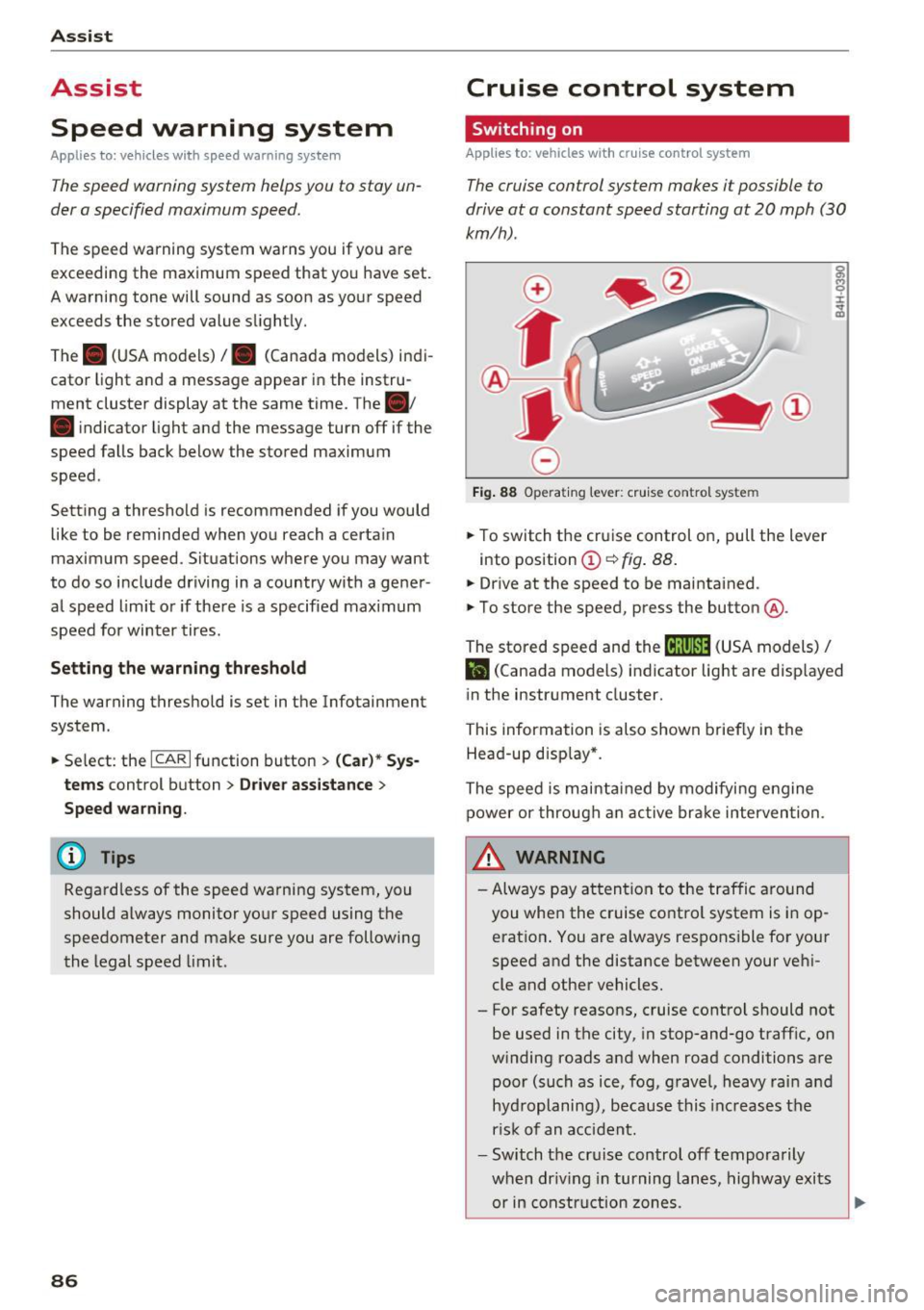
Fig. 88 Operat ing lever: cruise co ntro l syste m
.,. To switch the cruise control on, pull the lever
into posit ion
(D ~ fig . 88.
.,. Drive at the speed to be maintained .
.,. To store the speed, press the button @.
~ M 0 :i:
;;i;
The stored speed and the (ij;\1)~14 (USA models) /
l'I (Canada models) indicator light are disp layed
in the instrument cluster.
This information is also shown briefly in the
Head-up disp lay* .
The speed is maintained by modifying engine
power or through an active brake intervention.
~ WARNING
-Always pay attention to the traffic around
you when the cruise control system is in op
eration . You are always responsible for your
speed and the distance between your vehi
cle and other vehicles.
- For safety reasons, cruise control should not be used in the city, in stop-and-go traffic, on
winding roads and when road conditions are poor (such as ice, fog, gravel, heavy rain and
hydroplaning), because this increases the
r isk of an accident.
- Switch the cruise control off temporarily
when dr iv in g in turning lanes, highway exits
or in construction zones.
-