steering AUDI A6 2017 User Guide
[x] Cancel search | Manufacturer: AUDI, Model Year: 2017, Model line: A6, Model: AUDI A6 2017Pages: 280, PDF Size: 70.24 MB
Page 71 of 280
co
co
...,
N
" N ...,
0 0 <.,;) 'SI'
~ page 129, fig. 140. If you cannot main
tain this minimum distance, the airbag sys
tem cannot protect you properly.
- If physical limitations prevent you from sit
ting 10 in (25 cm) or more from the steer ing wheel, check with your authorized Audi
dealer to see if adaptive equipment is avail
able.
- If the steering wheel is aligned with your
face, the supplemental driver's airbag can
not provide as much protection in an acci
dent. Always make sure that the steering
wheel is aligned with your chest.
-Always hold the steering wheel with your
hands at the 9 o'clock and 3 o'clock posi
tions to reduce the risk of personal injury if
the driver's airbag deploys.
- Never hold the steer ing wheel at the 12
o'clock position or with your hands inside
the steering wheel rim or on the steering
wheel hub . Holding the steering wheel the
wrong way can cause serious injuries to the
hands, arms and head if the driver's airbag
deploys.
Power steering wheel position adjustment
App lies to: ve hicles with power steering whee l adjustment
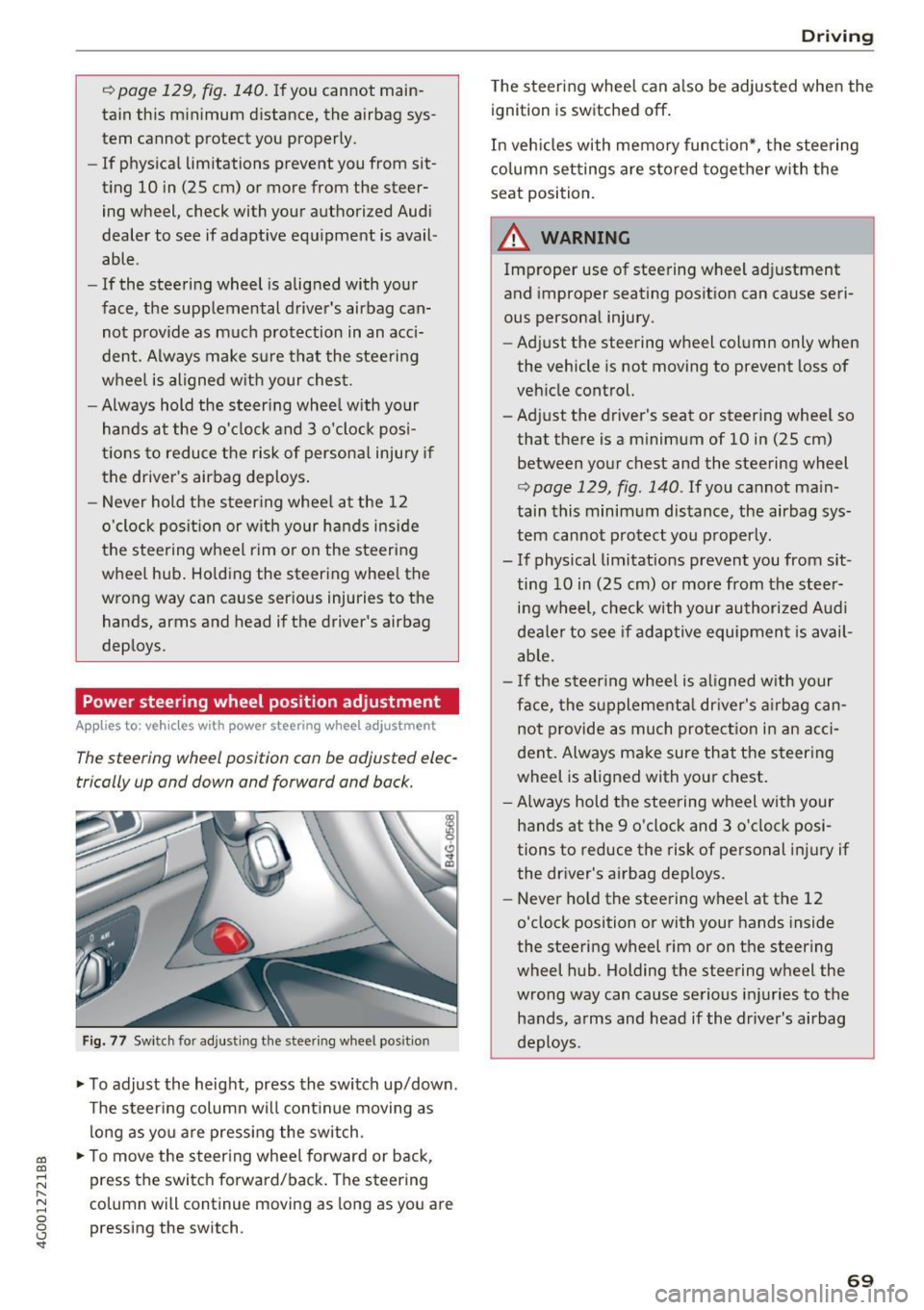
The steering wheel position can be adjusted elec
trically up and down and forward and back.
Fig. 77 Switch for adjust ing the steer ing whee l pos ition
~ To adjust the height, press the switch up/down.
The steering column will cont inue moving as
long as you are pressing the switch .
~ To move the steering wheel forward or back,
press the switch forward/back. The steering
column will continue moving as long as you are
pressing the switch.
Driving
The steering wheel can a lso be adjusted when the
ignition is switched off .
In vehicles with memory function*, the steering
column settings are sto red together with the
seat position.
A WARNING
Improper use of steering wheel adjustment
and improper seating position can cause seri
ous personal injury.
- Adjust the steering wheel column only when
the vehicle is not moving to prevent loss of
vehicle control.
- Adjust the driver's seat or steering whee l so
that there is a minimum of 10 in (25 cm)
between your chest and the steering wheel
r:=;, page 129, fig . 140 . If you cannot main
tain this minimum distance, the airbag sys
tem cannot protect you properly.
- If physical limitations prevent you from sit ting 10 in (25 cm) or more from the steer
ing wheel, check with your authorized Audi
dealer to see if adaptive equipment is avail
able.
- If the steering wheel is aligned with your
face, the supplemental dr iver's airbag can
not provide as much protection in an acci
dent. Always make sure that the steering
wheel is aligned with your chest.
- Always hold the steering wheel with your
hands at the 9 o'clock and 3 o'clock posi
tions to reduce the risk of personal injury if
the driver's airbag deploys.
- Never hold the steering wheel at the 12
o'clock position or with your hands inside
the steering wheel rim or on the steering
wheel hub . Holding the steering wheel the
wrong way can cause serious injuries to the
hands, arms and head if the driver's airbag
deploys.
-
69
Page 72 of 280
Driving
Easy seat entry
Applies to: ve hicles w ith power steering whee l adj ustment
Easy seat entry makes it easier to enter and exit
the vehicle by adjusting the steering column au
tomatically .
.-In the Infotainment system, select the ICARI
funct ion button > (C ar) * Systems control but
ton
> Vehi cle settings > Seat s > Dr iver' s seat >
Easy seat ent ry > On .
When easy seat entry is switched on, the steering
column goes back up into the park position when
the ignition is switched off . After entering the ve
h icle, the steering co lumn re turns to the stored
position once the ignition is sw itched on.
Starting and stopping
the engine
Starting the engine
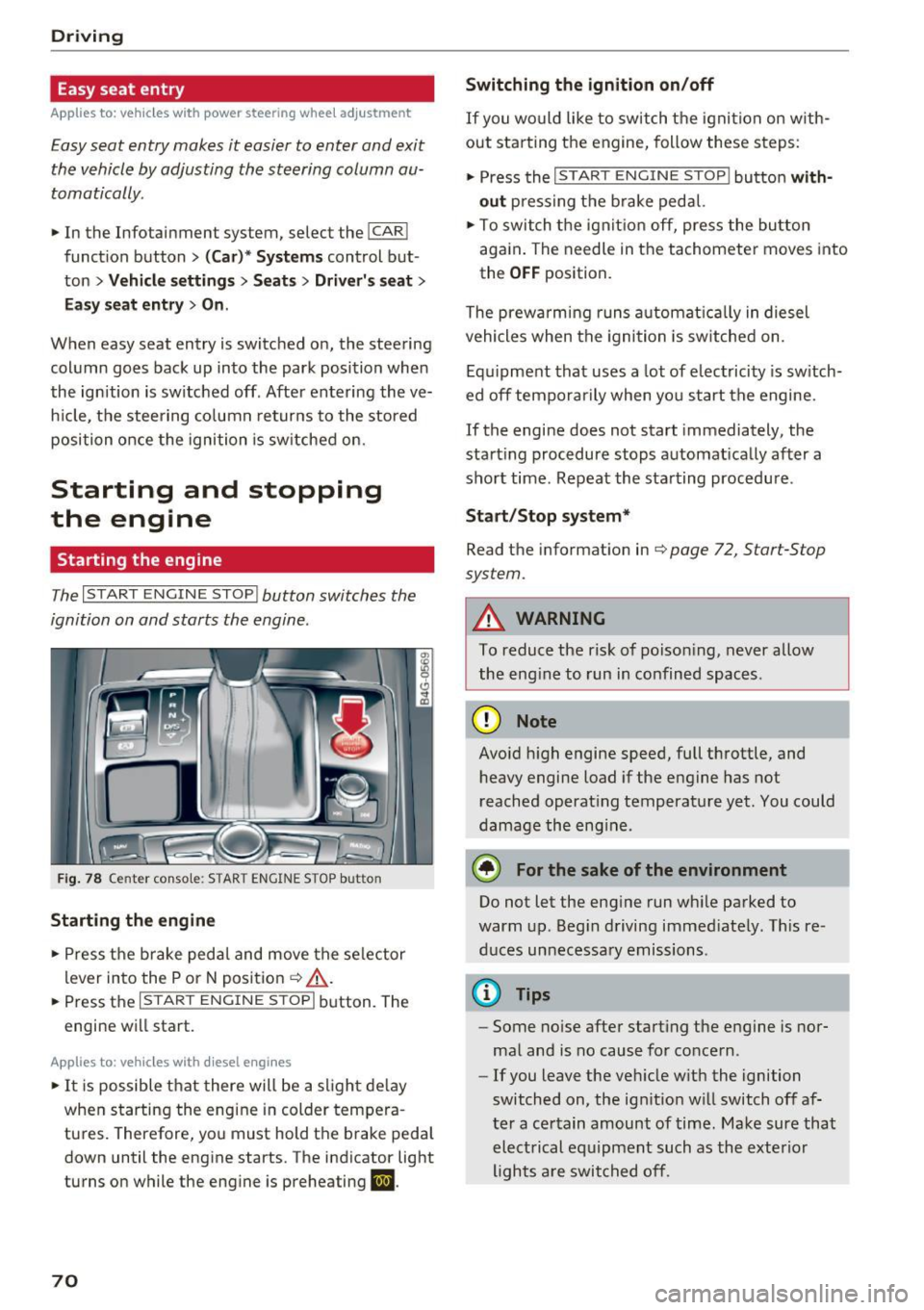
The I START ENGINE STOP I button switches the
ignition on and starts the engine.
Fig. 78 Center console: STAR T ENGINE STOP button
Starting the engine
.- Press the brake pedal and move the se lector
lever into the P or N posit ion ¢
&_.
.-Press the I START ENGINE STOPI button. The
engine will start.
App lies to: ve hicles w ith diesel e ngi nes
.- It is possible t hat there will be a slight de lay
when starting the engine in colder tempera
tures. Therefore, you must hold the brake peda l
down until the engine starts. The indicator light
turns on while the engine is preheating
II .
70
Switching the ignition on /off
If you wo uld like to switch t he igni tion on w ith
out star ting the engine, follow these s teps:
.- Press the
I START ENGINE STOP I button with
out press ing the b rake pedal.
.- To switch the igni tion off, press the bu tton
aga in . The needle in the tachomete r moves into
the
O FF position.
The prewarming runs a utomat ica lly in diesel
vehicles when the igni tion is sw itched on .
Equ ipment that uses a lot of electricity is sw itch
ed off tempo rarily when you start the engine.
If the engine does not start immediately, the
start ing procedure stops automat ically after a
short time. Repeat the starting procedure .
Start /Stop system*
Read the information in¢ page 72, Start-Stop
system.
A WARNING
To reduce the risk of poison ing, never allow
the eng ine to run in confined spaces.
(D Note
Avo id h igh engine speed, full throttle, and
heavy engine load if the engine has not
reached operat ing temperature yet. You could
damage the eng ine.
® For the sake of the environment
Do not let the eng ine run wh ile parked to
warm up. Beg in driving immed iately. Th is re
d uces unnecessary emissions .
(D Tips
-Some noise after start ing the engine is nor
ma l and is no cause for concern .
- If you leave the veh icle w it h the ignition
switched on, the ign ition w ill switch off af
ter a certain amount of time. Make sure that electrical equipment such as the exterior
lights a re switched off.
-
Page 73 of 280
co
co
.... N ,..._
N .... 0 0 <..:l '
~ Bring the vehicle to a full stop.
~ Move the selector lever to the P or N position.
~ Press the I START ENGINE STOPI ~page 70,
fig. 78 button.
Steering lock1
)
The steering locks when you turn the engine off
using the
I START ENGINE STOPI button and
open the driver's door. The locked steering helps
prevent vehicle theft.
Emergency off function*
If it is absolutely necessary, the engine can also
be turned off while driving in the R or D/S selec
tor lever position at speeds below 6 mph (10 km/
h). To stop the engine, press and hold the
I START ENGINE STOPI button and also press the
brake pedal.
~ WARNING
- Never turn off the engine before the vehicle
has come to a complete stop. The full func
tion of the brake booster and the power
steering is not guaranteed. You may need to
use more force when braking or steering.
Because you cannot brake and steer as you
usually would, this could lead to accidents
and serious injuries.
- Always take the key with you whenever you
leave your vehicle. Otherwise, the engine
could be started or electrical equipment
such as the power windows could be operat
ed. This can lead to serious injury.
- For safety reasons, always park the vehicle
with the selector lever in the P position.
Otherwise, there is the risk that the vehicle
could roll unintentionally.
(D Note
If the engine has been under heavy load for
an extended period of time, heat builds up in
the engine compartment after the engine is
switched off and there is a risk of damaging
the engine. For this reason, let the engine run
l ) This function is not available in all countr ies.
Driving
at idle for approximately two minutes before
shutting it off.
(D Tips
After the engine has been switched off, the
radiator fan can continue to run for up to 10
minutes -even with the ignition switched off.
It can also switch on again after some time if
the coolant temperature rises as the result of
heat buildup or if the engine is already warm
and the engine compartment is also heated
by the sun's rays.
Messages
Turn off ignition before leaving car
This message appears and a warning tone sounds
if you open the driver's door when the ignition is
switched on.
Press brake pedal to start engine
This message appears if you do not press the brake pedal when starting the engine.
II Key not in vehicle?
This indicator light turns on and this message ap·
pears if the ignition key was removed from the
vehicle when the engine was running.
If the igni
tion key is no longer in the vehicle, you cannot
switch on the ignition or start the engine once
you stop it. You also cannot lock the vehicle from
the outside.
Shift to P, otherwise vehicle can roll away.
Doors do not lock if lever is not in P.
This message appears for safety reasons if the
transmission is not in the P position when you
switch the ignition off. Move the selector lever to
the P position. Otherwise the vehicle is not pro
tected from rolling and it cannot be locked.
II Key is not recognized. Hold back of key
against marked area. See owner's manual
If the indicator light turns on and this message
appears, there is a malfunction
~page 72. .,..
71
Page 75 of 280
co
co
.... N
" N .... 0 0 <.,;) 'SI"
Stopping/starting the engine
Applies to: vehicles with Start/Stop system
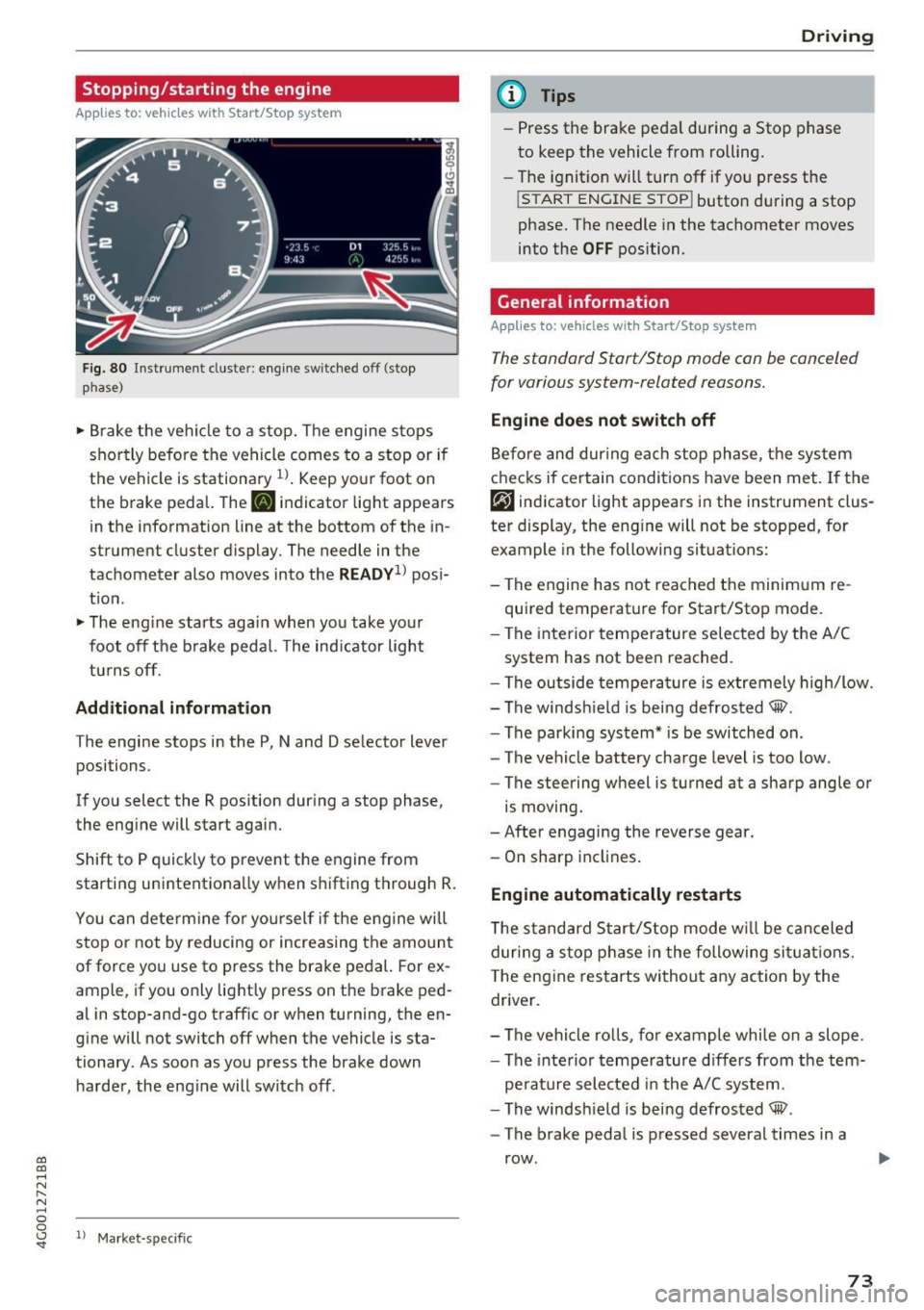
Fig. 80 ll)strument cluster: eng ine sw itched off (stop
p hase)
~ B rake the ve hicle to a stop. The engine stops
shortly befo re the vehicle comes to a stop or if
the vehicle is stationa ry
1l . Keep yo ur foot on
the brake pedal. The
II indicator light appears
in the information line at the bottom of the in
strument cluster d isplay. The needle in the
tachometer also moves into the
READY1 ) pos i
t ion .
~ The eng ine starts aga in when you take you r
foot off the b rake pedal. The ind ic a tor light
tu rns off.
Additional information
T he engine stops in the P, N and D se lector lever
positions .
If you select the R position dur ing a stop phase,
the eng ine will start again.
Shift to P quick ly to prevent the engine from
starting unintentionally w hen s hifting t hrough R.
You can dete rm ine for yo ursel f if the eng ine will
stop or not by reducing or increas ing the amount
of force you use to press the brake pedal. For ex
ample, if you only lightly press on the brake ped
al in stop-and -go traff ic or when turning, the en
g ine will not switch off when the vehicle is sta
tionary . As soon as you press the brake down
ha rder, the eng ine will switch off .
ll Market -s p ecific
D rivi ng
(D Tips
-Press the bra ke peda l during a Stop phase
to keep the vehicle from rolling.
- The ignition will turn off if yo u press the
!START ENGINE STOPI butto n dur ing a stop
phase. The needle in the tachometer moves
into the
OFF position.
General information
Applies to: vehicles with Start/Stop system
T he standard Start/Stop mode con be canceled
for various system-related reasons.
Eng ine does not swit ch off
Be fo re and dur ing each stop phase, the system
checks if certain conditions have been met. If the
rjj indicator light appears in the instrument clus
ter display, the eng ine will not be stopped, for
example in the following situations:
- The engine has not reached the minim um re
quired temperature for Start/Stop mode .
- The interior temperature selec ted by the A/C
system has not been reached.
- The outside tempera ture is ex tremely high/low.
- The windsh ield is being defrosted® .
- The parking system * is be switched on .
- The vehicle battery charge level is too low.
- The steering wheel is turned at a sharp angle or
is moving.
- After engaging the reverse gear.
- On sharp incl ines .
Engine automatically restarts
The s tandard Start/Stop mode w ill be can celed
dur ing a stop phase in the following si tuations.
T he eng ine res tarts wi thout a ny action by the
driver .
- The vehi cle ro lls, fo r example whi le on a slope .
- The inte rior tempe rature d iffers from the tem-
pe rature selected in the A/C sys tem.
- The windsh ield is being defrosted® .
- The brake peda l is pressed several times in a
row .
73
Page 77 of 280
co
co
.... N
" N .... 0 0 <.,;) 'SI"
Electromechanical
parking brake
Fig . 82 Center co nso le: park ing brake
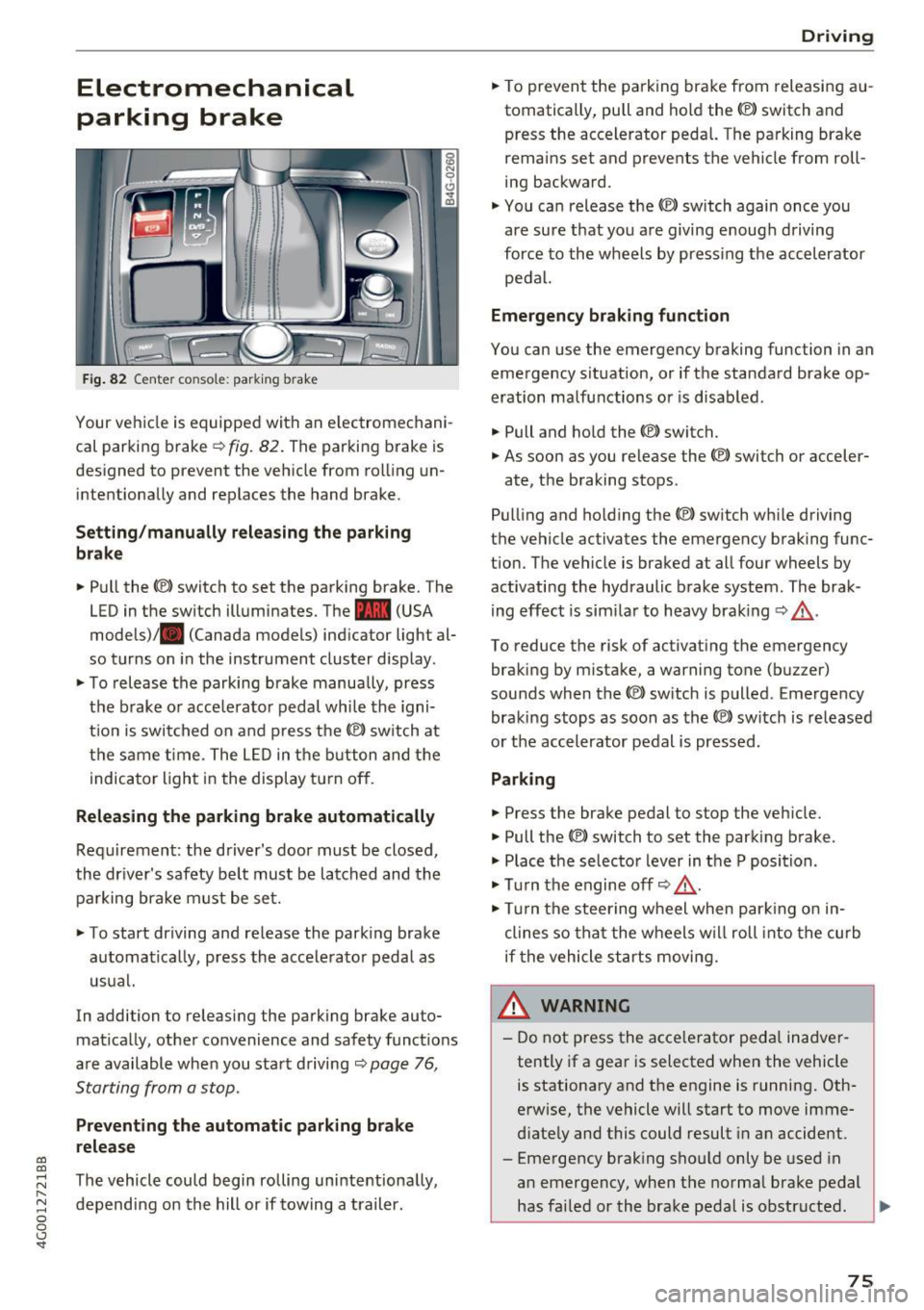
Your vehicle is equipped with an e lectromechani
cal parking brake
¢ fig. 82. The parking brake is
designed to prevent the veh icle from roll ing un
intentiona lly and replaces the hand brake.
Setting /manually relea sing th e parking
b rake
.. Pull the<®> switch to set the park ing brake. The
LED in the switch illuminates. The -(USA
models)/ . (Canada models) ind icator light al
so turns on in the instrument cluster display .
.. To release the parking brake manua lly, press
the b rake o r acce lerato r pedal whi le the igni
t ion is switched on and p ress the© switch at
the same t ime . The L ED in the b utton and the
i ndicator light in the display t urn off .
Releasing the parking brake automatically
Requirement : the driver's door must be closed,
the dr iver's safety be lt must be latched and the
pa rking brake must be set.
"' To start driving and re lease the park ing brake
automatically, press the acce lerato r peda l as
usual.
In addi tion to releasing the parking brake auto
mat ica lly, other convenience and safety funct ions
are available when you sta rt driving ¢
page 76,
Starting from a stop.
Preventing the automatic parking br ake
release
The vehicle could begin rolling uninte ntiona lly,
depending on the hill or if towing a trail er.
D rivi ng
"'To prevent the parking brake from releasi ng au
tomatically, pull and hold the<®> switch and
press the accelerator peda l. The pa rking brake
remains set and prevents the vehicle from roll
ing backward.
"' You can release the<®> switch again once you
are sure t hat you are giving enoug h driving
force to the wheels by press ing the accel erator
pedal.
Emergency braking function
You can use the emergency braking function in an
emergency s ituation, or if the standard brake op
eration malfunctions or is disabled.
.. Pull and ho ld the(®) switch.
"' As soon as you release the <®> switch or acceler-
ate, the braking stops .
Pull ing and ho ld ing the© switch wh ile driving
the vehicle activates the emergency braking func
t ion. The vehicle is braked at all four wheels by
activating the hydraulic brake system . The brak
ing effect is sim ila r to heavy braking ¢_& .
To reduce the risk of activat ing the emergency
braking by mistake, a warning tone (buz zer)
sounds when the© switch is p ulled . Emergency
braking stops as soon as the© switc h is released
or t he accelerator pedal is pressed.
Parking
.. Press the brake pedal to stop the veh icle.
"' Pull the(®) switch to set the parking brake .
"' Place t he selector lever in t he P position .
"' Tu rn the engine off¢_& .
"' Tur n the steering w heel when par king o n in
clines so tha t the wheels w ill roll into the curb
if the vehicle st arts moving.
& WARNING
-
- Do not press the acce lerator peda l inadver
tently if a gea r is selected when the vehicle
is stationary and the engine is running. Oth
erwise, the vehicle will start to move imme
d iate ly and this could result in a n accide nt.
- Eme rgency brak ing sho uld only be used in
an emergency, when the norma l brake pedal
has fai led or the brake pedal is obstructed . .,.
75
Page 82 of 280
Driving
-Never hold the vehicle on an incline with a
slipping clutch. The clutch opens automati
cally when it becomes too hot from the
overload . The
[i1 indicator Light turns on
and a message appears~
page 81 when
the clutch is overloaded.
(D Note
-When stopping on an incline, do not try to
hold the vehicle in place by pressing the ac
celerator pedal while a driving gear is se
lected. This can cause the transmission to
overheat and can damage it. Set the parking brake or press the brake pedal to prevent
the vehicle from rolling.
- Allowing the vehicle to roll when the engine
is stopped will damage the transmission be
cause it is not lubricated .
@ Tips
For safety reasons, the parking brake is re
leased automatically only when the driver's
safety belt is fastened.
Hill descent control
The hill descent control system assists the driver
when driving down hills .
Hill descent control is activated when the selec
tor lever is in the Dor S position and you press
the brake pedal. The transmission automatically
selects a gear that is suitable for the hill . Hill de
scent control tries to maintain the speed ach
ieved at the time of braking, within physical and
technical limitations. If may still be necessary to
adjust the speed with the brake pedal.
Hill descent control switches off once the hill lev
els out or you press the accelerator pedal.
On vehicles with a cruise control system*
~ page 86, hill descent control is also activated
when the speed is set.
A WARNING
Hill descent control cannot overcome physical
limitations , so it may not be able to maintain
80
a constant speed under all conditions. Always
be ready to apply the brakes .
Shifting manually (tiptronic mode)
The tiptronic mode allows the driver to shift the
gears manually.
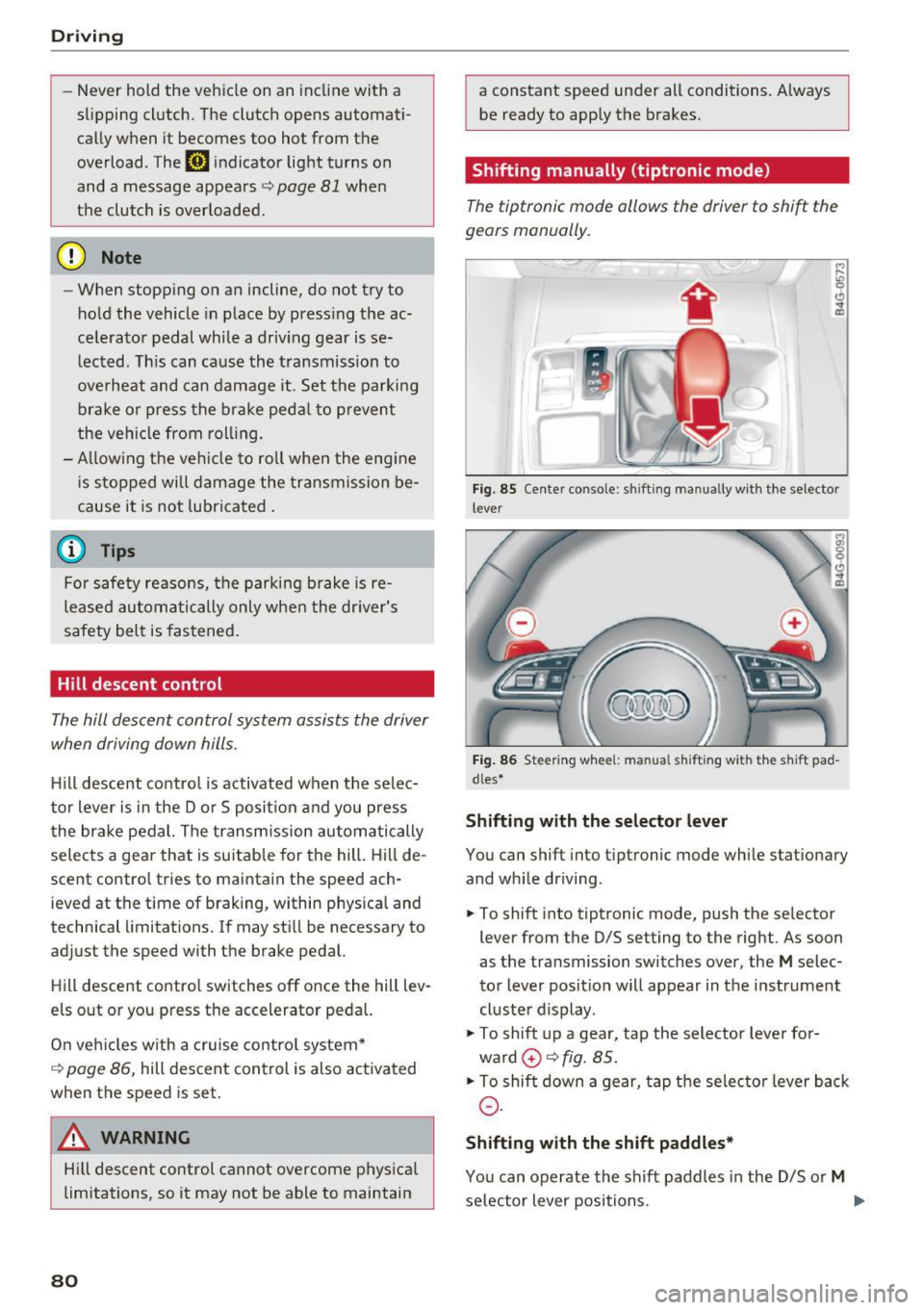
'
}
Fig . 85 Center console: sh ift ing manually with the selector
l ever
Fig. 86 Steering wheel : manual s hift ing with the s hift pad
dles*
Shifting with the selector lever
You can shift into tip tron ic mode while stationary
and while driving.
.,. To shift into tiptronic mode, push the selector
lever from the D/S setting to the right. As soon
as the transmission switches over, the
M selec
tor lever position will appear in the instrument
cluster display .
.,. To shift up a gear, tap the selector lever for
ward
0 ~ fig. 85.
.,. To shift down a gear, tap the selector lever back
0-
Shifting with the shift paddles*
You can operate the shift paddles in the D/S or M
selector lever positions. ..,.
Page 83 of 280
co
co
.... N
" N .... 0 0 <..:l '
¢fig. 86.
~ To shift down one gear, tap the 0 shift paddle.
The transmission automatically shifts up or down before critical engine speed is reached.
The transmission only allows manual shifting
when the engine speed is within the permitted
range.
Kick-down
Kick-down enables maximum acceleration.
When you press the accelerator pedal down be
yond the resistance point, the automatic trans
mission downshifts into a lower gear, depending
on vehicle speed and engine RPM.
It shifts up in
to the next higher gear once the maximum speci
fied engine RPM is reached.
A WARNING
Please note that the wheels could spin on
slick or slippery roads when kick-down is ac
tive.
Launch control program
A ppl ies to: ve hicles wit h S tro nic
-
The launch control program provides the best
possible acceleration when starting from a stop.
Requirement: the engine must be at operating
temperature and the steering wheel must not be
turned .
~ Deactivate the Start/Stop system*¢ page 74.
The LED in the l0 u•I button turns on.
~ Switch the Electronic Stabilization Control
(ESC) sport mode on ¢
page 121. The II i ndi
cator light turns on.
~ Pull the selector lever back out of the D/S posi
tion briefly to select the S position or select the
DYNAMIC driving mode in drive select
¢page 106.
~ Press the brake pedal firmly with your left foot
and hold it all the way down for at least one
second .
Driving
~ At the same time, press the gas pedal all the
way down with your right foot until the engine reaches and stays at a high RPM level.
~ Remove your foot from the brake pedal within
five seconds ¢_& .
A WARNING
-Always adapt your driving to the traffic flow.
- Only use the Launch control program when
road and traffic conditions allow it and oth
er drivers will not be endangered or both
ered by your driving and the vehicle's accel
eration.
- Please note that the drive wheels can spin
and the vehicle can break away when sport
mode is switched on, especially when the
road is slippery.
- Once the vehicle has started moving, press
the
I.P-O FFI button briefly to turn the sport
mode off.
@ Tips
- The transmission temperature may increase
significantly after using the launch control
program. If that happens, the program may
not be available for a few minutes.
It will be
available again after a cool-down period.
- When accelerating using the launch control
program, all vehicle parts are subject to
heavy loads. This can lead to increased
wear.
Transmission malfunction
DD Transmission: please press brake pedal and
select gear again
Press the brake pedal and select the desired se
lector lever position again. You can then continue
driving.
DD Transmission overheating: Please drive con
servatively.
The transmission temperature has increased sig
nificantly due to the sporty driving manner. Drive
in a less sporty manner until the temperature re
turns to the normal range and the indicator light switches of. .,..
81
Page 86 of 280
Trailer towing
Tire pr essure
When tow ing a tra iler, inflate the tires of yo ur
veh icle to the tire pressure listed under " Fu ll
load" on the label¢
page 220. Inflate trai ler
tires to trai ler and tire manufacturers' specifica
tions.
Lights
Check to ma ke sure both vehicle and t railer lights
are working proper ly.
Safety chains
Be sure trailer safety chains are proper ly connect
ed from the traile r to the hitch on the vehicle.
L eave enough slac k in the c ha ins to permi t turn
ing corners. When you install safety chains, make
sure they wi ll not drag on the road when you are
driving.
The chains shou ld cross under the trailer tongue
to prevent it from dropping in case of separation
from the hitch .
Adjusting the Audi drive select
Make sure the veh icle is on a level surface before
h itchi ng up the t railer a nd before adjus ting the
tongue we igh t. The vehicle must be in
auto or
c omfort driving mode and not ra ised
¢page 104, ¢(!) .
Make sure that the vehicle is lowered. In Info
tainmen t, se lect:
ICARI f u nct ion butto n> Lower
con trol b utton.
I f you must dr ive under poo r road conditions, you
can ra ise the vehicle
aft er coup ling the t rai ler or
after adj usting the tongue weight¢ page 106.
@ Note
-Changes in tempe rature or load ca n affect
the he ight of the vehicle.
- Always se lect
auto or comfort mode . Other
wise, the tongue load spec ified for your ve
hi cle w ill no longe r be applicable.
84
· Driving instructions
Driving with a trailer always requires extra care
and consideration.
Weight distribution
Towing a loaded trailer with an empty car results
i n a h ighly unstab le distribut ion of weight. If this
cannot be avoided, drive at very low speeds only
to avoid the risk of losing steering control.
A "balanced" rig is easier to operate and control.
This means that the tow vehicle shou ld be loaded
to the extent possible and permissible, wh ile
keeping the trailer as light as possible under the
c ir cumstances . Wheneve r possible, transfer
some cargo to the luggage compartment of the
tow ve hicle while observing tongue load require
ments and vehicle load ing conside ra tions.
Speed
The higher the speed, the more difficult it be
comes for the dr iver to control the r ig. Do not
drive at the maximum permissible speed. Reduce
yo ur speed even more if load, weather or wind
cond it ions are unfavo rab le -pa rtic ularly whe n
going downh ill.
Reduce vehicle speed
immed iately if the t railer
shows the slightest sign of sway ing.
Do not try
t o stop th e s waying by accelerating.
Observe speed limits. In some areas, speeds fo r
vehicles tow ing traile rs are lower than for regular
vehicles.
Always apply brakes early. When driving down
hill, shift into a lower gear to use the eng ine
braki ng effect to slow the vehicle. Use of the
bra kes alone ca n cause them to overheat a nd fail.
Air suspension*
When dr iving with a trailer, act ivate the trailer
mode of the air suspens io n. Switch the a ir sus
pension trailer mode on w hen you are towing a
trailer. This wi ll limit the regulation by the air
s u spension while dr iv ing. Se lect in the M MI:
I CAR ! funct ion but ton > (Car )* s ystem s contro l
button >
Vehicle setting s > Air su sp .: towing >
On . .,_
Page 93 of 280
co
co
.... N
" N .... 0 0 <..:l 'SI'
•-T he automatic braking is not enough to
maintain a sufficient distance to an object ahead.
You must intervene ¢
page 93, Request for
driver intervention.
© In str um ent clust er dis pla y
If adaptive cruise control is not shown in the in
strument cluster display, you can call it up using
the multifunction steering wheel b uttons
¢ page 21.
Based on the graphics in the d isp lay, you can de
termine if the system is maintaining a distance to
the object ahead and what that distance is.
No v ehi cle -No object ahead was detected .
Whit e v ehicle -An object ahead was detected .
Red veh icle -Request for driver intervention
¢page 93.
Both arro ws on the scale© indicate the distance
to the object ahead. No arrow appears when the
vehicle is on an open road and there is no object
ahead .
If an object is detected ahead, the arrow
moves on the scale .
The green zone on the scale indicates the store
distance. For information on changing the dis
tance, refer to ¢
page 92 . If the distance se
lected is exceeded or not reached, the arrow
moves into the red zone on the scale.
A WARNING
If you press the !SETI button when driving at
speeds below 20 mph (30 km/h), the vehicle
accelerates automatically up to 20 mph (30
km/h), which is the minimum speed that can
be set .
(}) Tips
-If yo u switch the ignition or the adapt ive
cruise control system off, the set speed is
erased for safety reasons .
- The elect ronic stabi lization cont rol (ESC)
and the anti-slip-regulation (ASR) are au to
matically sw itched on when the adaptive
cruise control is switched on .
Ass ist
Changing the speed
Applies to: vehicles with Audi adaptive cruise control
0
f
•
0
Fig. 95 Operating lever: changing the speed
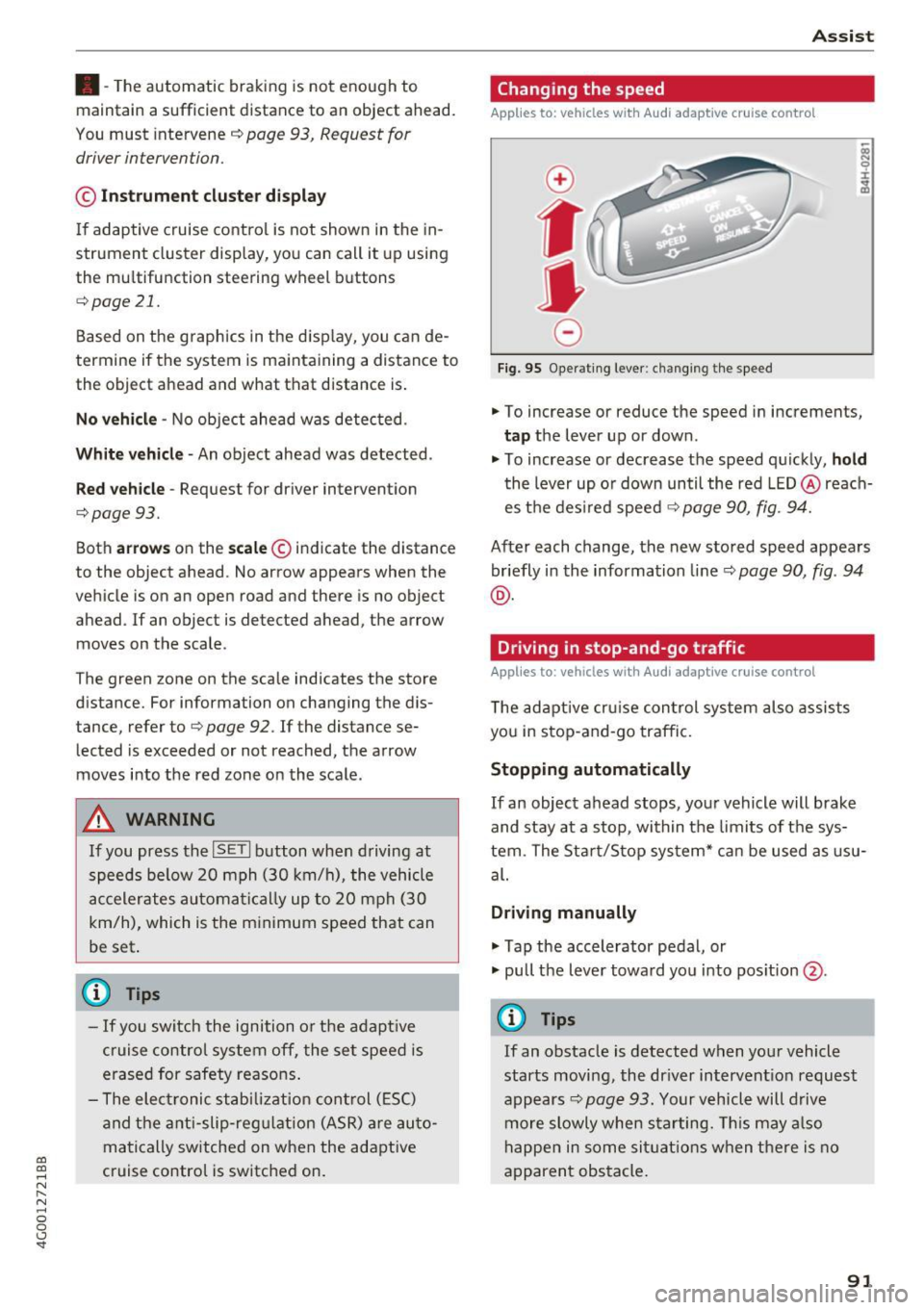
.,. To increase or reduce the speed in increments,
tap the lever up or down .
.. To increase or decrease the speed quickly,
ho ld
the lever up or down until the red LED @reach
es the des ired speed ¢
page 90, fig. 94.
After each change, the new stored speed appears
briefly in the information line¢
page 90, fig. 94
@ .
Driving in stop-and-go traffic
Applies to: vehicles with Audi adaptive cruise control
The adaptive cru ise con trol system also assists
you in stop-and-go traffic.
Stopping automatically
If an object ahead stops, your vehicle will brake
and stay at a stop, within the limits of the sys
tem. The Sta rt/Stop system* can be used as usu
al.
Dri ving manu ally
.,. Tap the accelerator pedal, or
.,. pull the lever toward you into pos ition @.
(D Tips
If an obstacle is detected when your vehicle
starts moving, the dr iver intervent ion request
appears¢
page 93. Your vehicle will drive
more slowly when starting. Th is may a lso
happen in some sit uat ions when there is no
apparent obstacle.
91
Page 98 of 280
Ass is t
D oor open
The adaptive c ruise contro l system cannot sw itch
on when a door is open.
Stat ionar y obj ect ah ead
This message appears if you would like to switch
adapt ive cruise control on and there is a station
ary object or obstacle directly ahead of your vehi
cle .
Audi active Lane assist
Description
Appl ies to: ve hicles w ith Audi active lane assist
Active lane assist detects lane marker lines with
in the limits of the system using a camera in the
windshield. If you are approaching a detected lane marker line and it appears likely that you
will leave the lane, the system will warn you with
correct ive steering . You can ove rride th is steer ing
at any time . If you pass over a line, the steer ing
wheel will v ibrate l ightly. In order for this warn
ing vib ration to occur, it must fi rst be sw itched
on in the Infotainment sys tem . Active lane assist
is ready for operation when the lane marker line
is detected on at least one side of the vehicle .
The system is designed for driving on express
ways and highways and therefore only activates
at speeds above approximately 40 mph (65 km/
h).
A pp lies to: ve hicles w ith s ide assist
If you activate a turn sig na l when active lane as
sist is ready and it classifies a lane change as crit
ical because of vehicles traveling alongside you or
approaching you, there will be noticeab le correc
tive steering shortly before you leave the lane.
This will attempt to keep your vehicle in the lane.
A ppl ies to: ve hicles w ithout s ide ass ist
The system will not warn you before crossing a
lane marker line if yo u have activated the tu rn
signa l. In this case, it ass umes that you are
changing lanes intentiona lly .
A ppl ies to: ve hicles with adaptive cruise co ntrol
The corrective stee ring is targeted based on the
driving situat ion . In addition to the lane marker
96
li nes, the system can a lso take into account other
objects such as guard rails. If they are detected in close prox imity to the ve hicle, active lane assist
helps prevent the vehicle from dr iving too close
to them. There is a lso pass ing ass istance. The
system does not provide any corrective steering if i t detects that you are pass ing another vehicle .
A WARNING
-The system warns the drive r that the vehicle
is leaving the lane using cor rect ive steering.
The drive r is always responsible fo r keeping
the vehicle within the lane.
- The system can help you keep the vehicle in
the lane, but it does not drive by itse lf. Al
ways keep your hands on the steering
wheel.
- Cor rective steering m ay no t occur in certain
si tuations, such as during heavy braking.
- There may be cases where t he camera does
not recognize all lane marker lines . Correc
tive steering can only take place on the s ide
of the vehicle where lane marker lines are
detected.
- Other road structures or objects could possi
bly be identified unintent ionally as lane
marker lines. As a result, corrective steering
may be unexpected or may not occur.
- The camera view can be restricted, for ex
ample by vehicles driving ahead or by rain,
snow, heavy spray or light shining into the
camera . This can result in active lane ass ist
not detecting the lane marker lines or de
tect ing them inco rrectly .
- Under certain cond it ions such as ruts in the
road, a banked roadway or crosswinds, the
corrective steer ing alone may not be enough
to keep the vehicle in the m iddle of the lane.
- For safety reasons, act ive la ne assist must
no t be use d when there are poor road and/
or weather condi tions such as slippery
roads, fog, gravel, heavy rain, snow and the potential for hydrop laning. Using active lane
assist under these conditions may increase
the risk of a crash.