warning AUDI A6 2017 User Guide
[x] Cancel search | Manufacturer: AUDI, Model Year: 2017, Model line: A6, Model: AUDI A6 2017Pages: 280, PDF Size: 70.24 MB
Page 23 of 280
co
co
.... N
" N .... 0 0 <.,;) 'SI"
Driver information
system
Overview
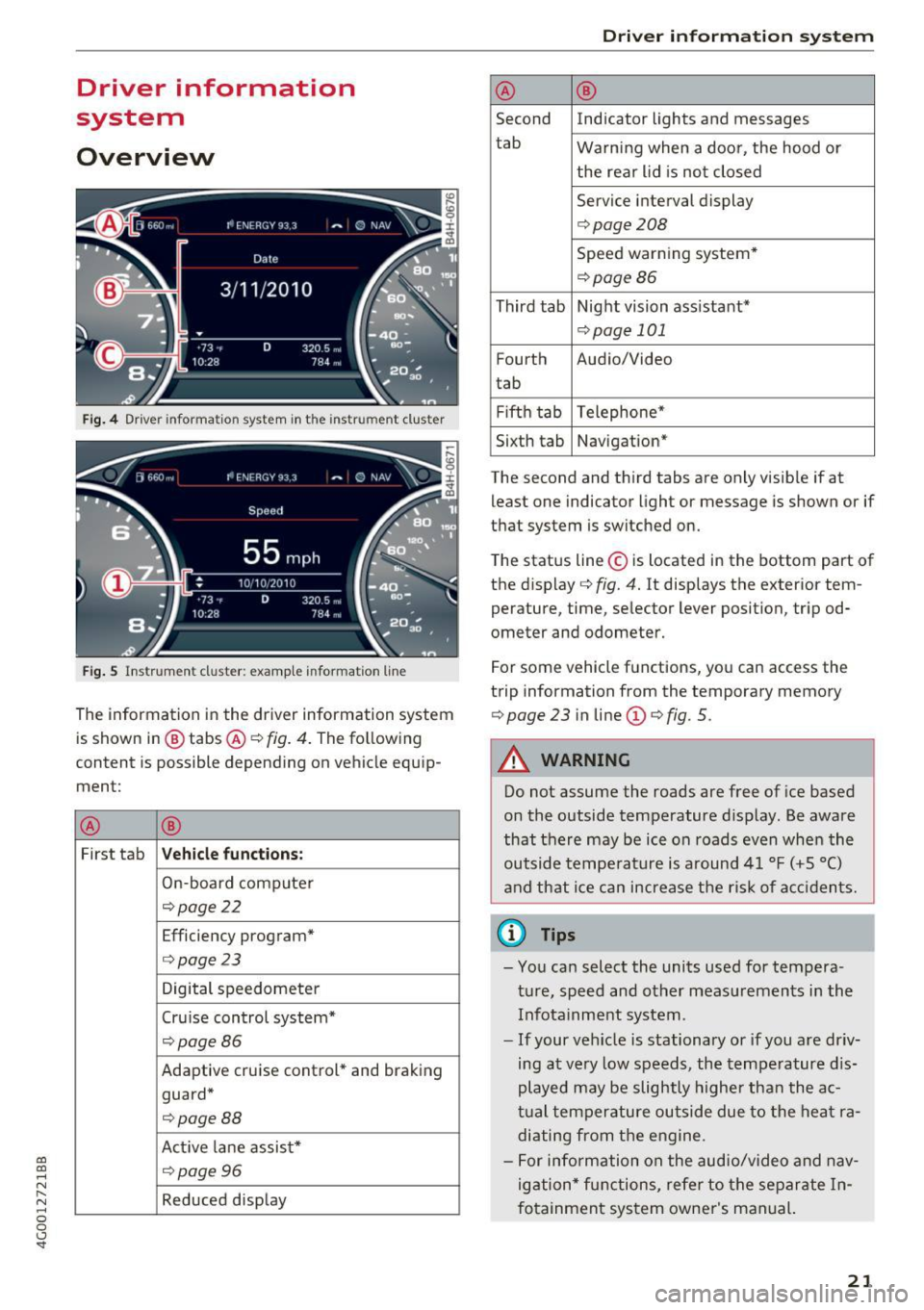
Fig . 4 Dr iver informa tion system in t he inst rum ent clus ter
Fig . S Ins trum ent cl uster: examp le in formation line
The information in the driver information system
is shown in @ tabs @¢
fig. 4. The following
content is possible depending on vehicle equip
ment:
® ®
First tab Vehicle functions :
On-board computer
¢page22
Efficiency program*
¢page 23
Digital speedometer
Cru ise control system*
¢ page86
Adaptive cruise control* and braking
guard*
¢ page88
Act ive lane assist*
¢page96
Reduced display
Driver in forma tion system
® ®
Second Indicator lights and messages
tab Warning when a door, the hood or
the rear lid is not closed
Service interval display
¢ page208
Speed warning system*
¢page86
Third tab Night vision assistant*
¢page 101
Fourth Audio/Video
t ab
Fifth tab Telephone*
Sixth tab Navigation*
The second and third tabs are only visible if at least one indicator light or message is shown or if
that system is switched on.
The status line © is located in the bottom part of
the display ¢
fig. 4. It displays the exterior tem
perature, time, selector lever position, tripod
ometer and odometer.
For some vehicle functions, you can access the
trip information from the temporary memory
¢
page 23 in line @¢ fig. 5 .
A WARNING
Do not assume the roads are free of ice based
on the outside temperature display. Be aware
that there may be ice on roads even when the
outside temperature is around 41 °F ( +5 °C)
and that ice can increase the risk of accidents.
(i} Tips
-You can select the units used for tempera
ture, speed and other measurements in the
Infotainment system .
- If your vehicle is stationary or if you are driv
ing at very low speeds , the temperature dis
played may be slightly higher than the ac
tual temperature outside due to the heat ra
diating from the eng ine.
- For info rmation on the audio/video and nav
igation* functions, refer to the separate In
fotainment system owner's manual.
21
Page 27 of 280
Hea d-u p di spl ay> Head- up di spla y conten ts or
Displ ay brigh tn ess.
Di spla y content
In the Infotainment system, you can specify
which information should be displayed: For ex
ample, th is can include navigation informat ion *,
Adaptive cruise control* or night vision assist*.
The display of certa in info rmation and some of
the red indicator lights cannot be h idden in the
I nfotainment system.
Displ ay brightness
You can adjust the display br ightness in the Info
tainment system. The display brightness decreas
es automatically as the amount of light decreas
es. The backgro und brightness is adjusted with
the instrument il lumination
c::> page 44 .
(D Note
To prevent scratches on the g lass cove ring the
head- up d isplay, do not place any objects in
the projection opening.
(D Tips
- Sunglasses w ith polar izat ion fi lters and u n
favorab le lighting conditions can have a
negative effect on the display.
- An optim um display depends on the seat
pos ition and the height adjustment of the
head -up display.
- A specia l windshield is needed for the head
up display function.
- Fo r information on cleaning, refer to
c::> ta
ble on page 233.
On Board Diagnostic
System (OBD)
Malfunction Indicator Lamp (MIL)
The Malfunction Ind icator Lamp (MIL) a in the
instr ument cluster is part of the On-Board Diag
nostic (OBD II) system.
~ The warning/indicator light i lluminates when the ....
~ ign it ion is switched on and goes ou t after the en-N .... 0 0 <.,;) 'SI"
Driver info rm atio n sys tem
gine starts and the idle has stab ilized. This indi
cates that the MIL is working properly.
If th e light does not go ou t after the eng ine is
sta rted, or i llum inates while you are driving, a
malfunction may exist in the engine system. If
the light illuminates, the catalytic converter
could be damaged.
Cont inue driving
with redu ced p ower (avoiding
sustained high speeds and/or rapid accelera
tions) and have the condition corrected. Contact
your authorized Audi dealer.
If the ligh t illum ina tes, the electronic speed lim
iter may also be malfunctioning. For more infor
mation
c::> page 26, Electronic speed limiter.
An impro perl y close d fuel fi ller cap may al so
ca use the
MIL li g ht to illuminate c::> page 192.
On-Board Diagnostics
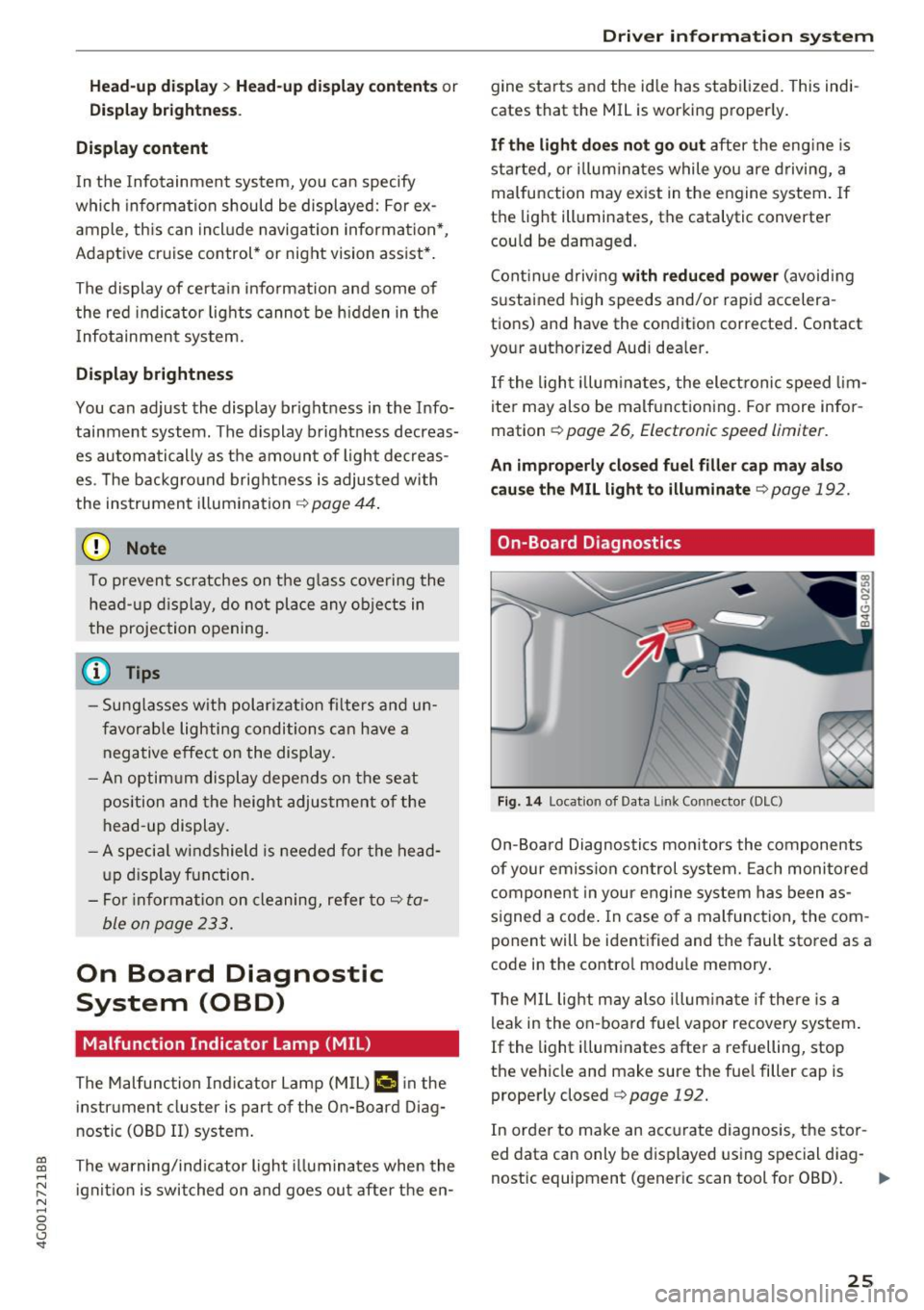
Fig. 14 Locat ion of Data L ink Connector (DLC)
On-Board Diagnostics monitors the components
of your emission control system. Each monitored
component in your engine system has been as
s igned a code . In case of a malfunction, the com
ponent will be identified and the fault stored as a
code in the contro l module memory.
T he M IL light may also illum inate if there is a
leak in the on-board fuel vapor recovery system.
If the light i lluminates after a refuelling, stop
the vehicle and make sure the fue l filler cap is
properly closed
c::> page 192.
In order to make an accurate diagnosis, the stor
ed data can only be displayed using special diag-
nostic equipment (generic scan tool for OBD).
IJI,-
25
Page 28 of 280
Driver information s ystem
In order to connect the specia l diagnostic equip
ment, push the plug into the Data Link Connector
(DLC). The DLC is located to the rig ht of the hood
release
c:> fig. 14.
Your author ized Audi dealer or a qualified service
station can interpret the code and perform the necessary repa ir.
A WARNING
Do not use the diagnostic connector for pe r
sonal use. Incorrect usage can cause malfunc
tions, which can increase the risk of a colli
sion!
Electronic speed limiter
-
Your veh icle may be factory equipped wi th t ires
that a re rated for a maximum speed of 130 mph
(2 10 km/h) . This is less than the maxim um speed
of yo ur vehicle. To reduce t he risk of s udden tire
fa ilu re and loss o f control if the veh icle is operat
e d at excessive speeds, yo ur vehicle a lso has an
electronic speed limiter . The electronic speed
lim ite r prevents your veh icle from going faster
than the t ire speed rating. For more information
c:>page 217.
I f the en gine contro l unit receives faulty vehicle
road speed s ignals, the Malfunction Indicator
Lamp (MIL)
II will illuminate. If this occurs,
contact the nearest authorized Aud i dealer for
assis tance .
S models
Your veh icle's top speed is e lectron ica lly limited
to 155 mph (250 km/h).
If th e engine contro l unit receives faul ty vehi cle
roadspeed signa ls, the Malfunct io n Indicator
Lamp (MIL)
¢4 will illuminate. If this occurs,
contact the nearest autho rized Audi dealer for
assistance .
A WARNING
Always observe the posted speed limits and
adjust you r speed to s uit prevailing road, traf
fic and weathe r con ditions. Never driv e you r
vehicle fa ster t han t he maximum spee d rat ing
o f t he ti re s inst alled.
26
-
Page 29 of 280
Opening and closing
Central locking
Description
You can lock and unlock the veh icle centrally . You
have the following options:
- Remote control key¢
page 30,
-Sensors in the door handles* ¢ page 30,
-Lock cylinder on the driver's door c::> page 32,
or
- Interior central locking switch
c::> page 31.
Turn signals
The turn s ignals flash twice when you unlock the
veh icle and flash once when you lock the veh icle.
If the blinking continues, one of the doors or the
luggage compartment lid/hood is not closed or
the ignition is still switched on.
Auto Lock
The Auto Lock function locks all doors and the
l uggage compartment lid once the speed has ex
ceeded approximately 9 mph (15 km/h).
The vehicle can be unlocked if the opening func
tion in the central locking system sw itch is used
or one of the door handles is pulled.
I n the event of a crash with airbag deployment,
the doors will also automatically unlock to allow
access to the vehicle.
Selective door unlocking
The doors and luggage compartment lid will lock
when they close . You can set in the Infotainment
system whether
only the driver's door or the en
tire vehicle should be unlocked when unlocking
c::> page 32.
Unintentionally locking yourself out
The follow ing cond it ions prevent you from lock
ing your remote control key in the vehicle :
-If the driver's door is open, the vehicle cannot
be locked by pressing the
lil button on the re-
~ mote control key or touching the locking sen-,...,
~ sor* on a door. N .... 0 0 <..:l '
-When locking using the lil button in the central
locking switch, the vehicle will not lock if a door
is open
¢ page 31.
-On vehicles with a convenience key*, the lug
gage compartment lid unlocks again after clos
ing if the most recent ly used key is in the lug
gage compartment. The emergency flashers
blink four times.
Do not lock your vehicle with the remote control
key or convenience key* until all doors and the
luggage compartment lid are closed. This helps
to prevent you from locking yourself out acciden
tally .
Closing aid on the doors*
The vehicle doors are equipped with closing aids.
When closing a door, you only have to let it fall
lightly into the latch. It then closes automatically
c::> &..
A WARNING "----When you lock your vehicle from outs ide,
nobody -especially children -should rema in
inside the vehicle. Remember, when you
lock the vehicle from the outside the win
dows cannot be opened from the inside.
- When you leave the vehicle, always take the
ignit ion key with yo u. This will prevent pas
sengers (children, for examp le) from acci
dentally being locked in the vehicle should
they accidentally press the power locking
switch in the doors.
- Do not leave children inside the vehicle un
supervised. In an emergency it would be im
possible to open the doors from the outside
without the key.
- Applies to vehicles with power side door
closer*:
- When closing a door, make sure nothing
can interfere with the door. Th is could
cause serious personal inj ury.
- You can stop the door from closing at any
time by pulling on the inside or outside
doo r handle.
27
Page 30 of 280
Opening and clo sin g
@ Tips
- Do not leave valuables unattended in the ve
hicle . A locked vehicle is not a safe!
- The LED in the driver 's door rail blinks when
you lock the vehicle . If the LED lights up for
approximately 30 seconds after locking,
there is a ma lfunction in the central locking
system. Have the problem corrected by an
authorized Audi dealer or authorized Audi Service Fac ility.
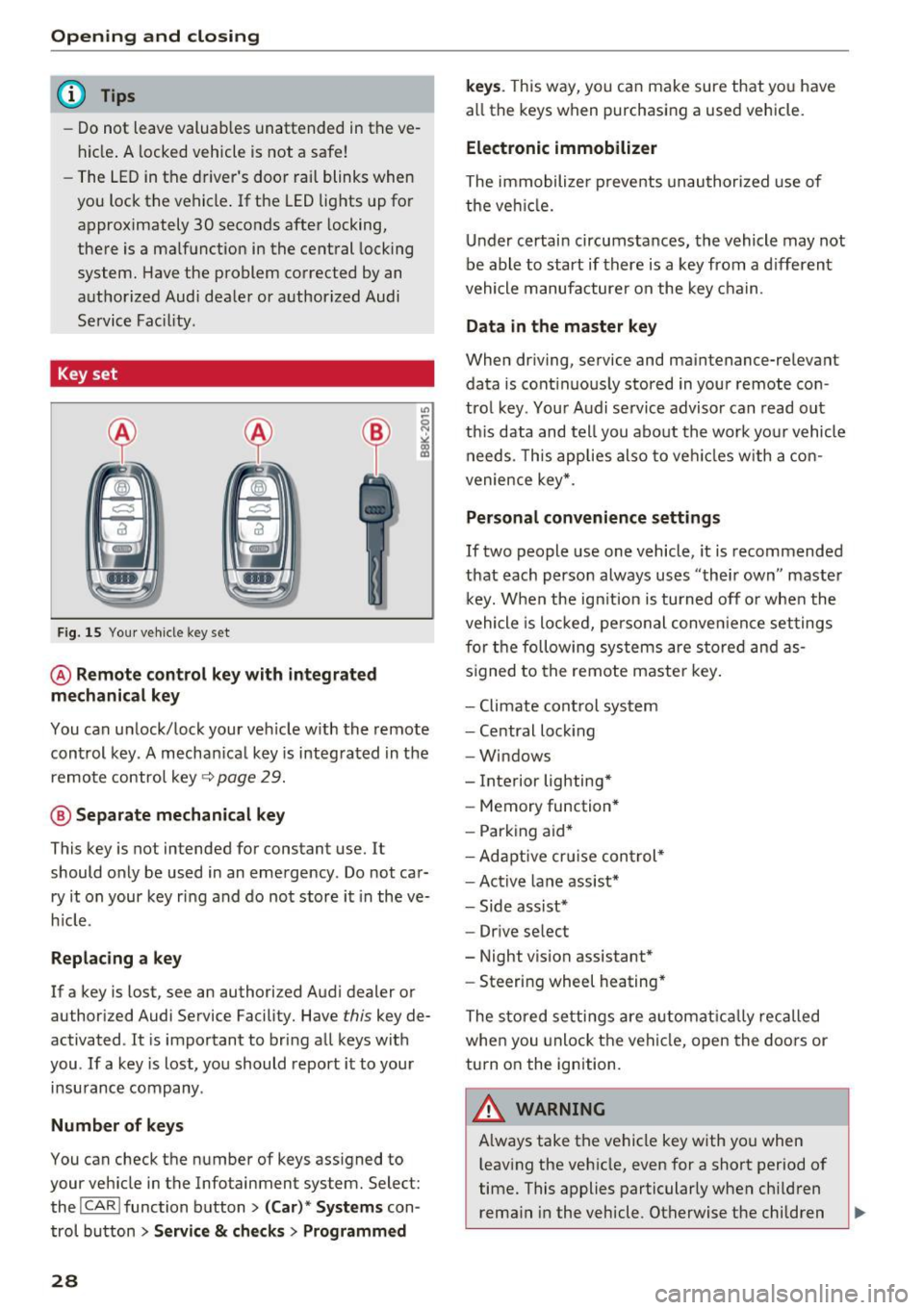
Key set
Fig. 15 You r veh icle key set
@ Remote control ke y with integr ated
mechanica l key
You can unlock/lock your veh icle w ith the remote
control key . A mechan ical key is integrated in the
remote control key~
page 29.
@ Separate mechanical ke y
This key is not intended for constant use. It
should only be used in an emergency . Do not car
ry it on your key ring and do not store it in the ve
h icle.
Replacing a ke y
If a key is lost, see an authorized Audi dealer or
authorized Audi Service Facility. Have
this key de
activated . It is important to bring all keys with
you . If a key is lost, you should report it to your
insurance company.
Number of key s
You can check the number of keys ass igned to
your veh icle in the Infotainment system. Select:
the !CAR !function button>
(C ar )* S yst e m s con
trol button
> Service & che cks > Programmed
28
k ey s. T his way, you can make sure that you have
all the keys when purchasing a used vehicle.
El ectronic immobiliz er
The immobilizer p revents unauthorized use of
the ve hicle.
Under certain circumstances, the vehicle may not
be able to start if there is a key from a d ifferent
vehicle manufacturer on the key chain.
Da ta in th e master key
When dr iving, service and maintenance-relevant
data is cont inuous ly stored in your remote con
trol key. Your A udi se rvice advisor can read out
th is data and tell you about the work yo ur vehicle
needs . This applies also to veh icles with a con
venience key *.
Personal convenience sett ings
If two people use one vehicle, it is recommended
that each person always uses "their own" master k ey. When the ign ition is turned off o r whe n the
vehicle is locked, personal conve nience set tings
for the following systems are stored and as
s igned to the remote maste r key .
- Climate cont rol system
- Central lock ing
- Windows
- Interior lighting*
- Memory function*
- Park ing aid*
- Ad aptive cru ise con trol *
- Ac tive lane assist*
- Side ass ist*
- Drive select
- Night vision assistant*
- Steering wheel heating *
The stored settings a re a utomat ica lly recalled
whe n you unlock t he vehi cle, open the doors or
turn on the ignition.
A WARNING
A lways take the vehicle key with you when
leaving the vehicle, even for a short period of
time. This applies particularly when child ren
rema in in the vehicle . Otherwise the children
-
Page 32 of 280
Opening and clo sin g
@ Tips
The replacement battery must meet the same
specifications as the orig inal battery in the re
mote control key.
Unlocking/locking by remote control
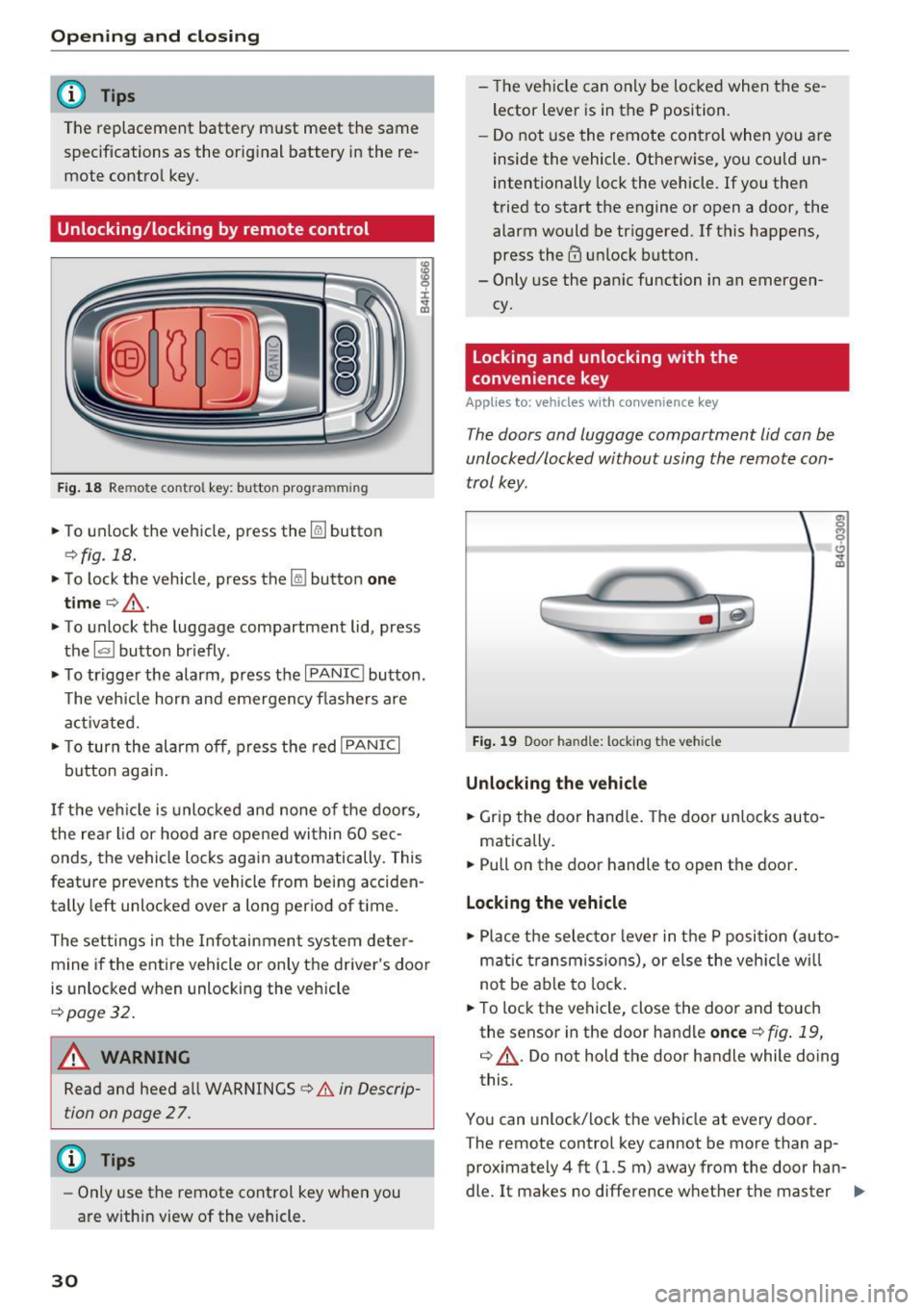
F ig . 18 Rem ote contro l key : bu tton prog ra mmin g
• To unlock the vehicle, press the~ button
¢fig. 18.
• To lock the vehicle, press the lil button one
tim e¢ ,& .
• To unlock the luggage compartment lid, press
the
1£1 button br iefly .
• To trigger the alarm, press the
I PANIC I button.
T he vehicle horn and emergency flashers are
activated.
• To turn the alarm off , press the red
I PANIC I
button again .
If the vehicle is unlocked and none of the doors,
the rear lid or hood are opened within 60 se c
onds, the veh icle locks again automatically. This
feature prevents the vehicle from being acciden
tally left unlocked over a long p eriod of t ime.
The settings in the Infotainment system deter mine if the entire veh icle or only the driver 's door
is unlocked when unlocking the vehicle
¢ page 32.
A WARNING
Read and heed all WARNINGS¢.& in Descrip
tion on page 2
7 .
@ Tips
- Only use the remote control key when you
are within view of the vehicle.
30
- The vehicle can only be locked when the se
lector lever is in the P position.
- Do not use the remote control when you are
inside the vehicle. Otherwise, you could un
intentionally lock the vehicle. If you then
tried to start the engine or open a door, the alarm would be tr iggered. If this happens,
press the@ unlock button.
- Only use the pan ic function in an emergen
cy.
Locking and unlocking with the
convenience key
Applies to: vehicles with convenience key
T he doors and luggage compartment lid can be
unlocked/locked without using the remote con
trol key.
F ig . 19 Door han d le : locking t he vehicle
Unlocking the vehicl e
• Grip the door hand le . T he door un locks auto-
matically.
• Pull on the door handle to open the doo r.
Locking the vehicle
• Place the selec to r l eve r in the P position (auto
matic t ransmiss ions), or else the veh icle wi ll
not be ab le to lock .
• To lock the vehi cle, close the door and touch
the sensor in the door handle
once ¢ fig . 19,
¢ ,& . Do not hold the door handle while doing
this.
You can unlock/lock the ve hicle at every door .
T he remote control key cannot be more than ap
proximately 4 ft (1.5 m) away from the door han
dle. It makes no difference whether the master ..,.
Page 33 of 280
co
co
.... N
" N .... 0 0 <.,;) 'SI"
key is in your jacket pocket or in your briefcase,
for example .
The door ca nnot be opened for a br ief period di
rect ly after loc king it. This way you have the op
portunity to check if the doors locked correctly.
The settings in the Infotainment system deter mine if the entire vehicle or only one of the doors
is unlocked when unlocking the vehicle
¢page 32.
WARNING .1!!!!!!!!!. !!..-
Read and heed a ll WARNINGS ~.& in Descrip
tion on page
2 7.
@ Tips
If your vehicle is left stand ing for a long peri
od of time, note the following:
- The proximity senso r switches off after a
few days to save energy. You then have to
pull once on the door handle to unlock the
vehicle and a second time to open it .
- The energy management system gradually
turns off unnecessary convenience functions
to prevent the vehicle battery from draining
and to maintain the vehicle 's abi lity to start
for as long as possible. You may not be able to unlock your vehicle using the convenience
key.
- For an explanation on conformity with the
FCC regulations in the United States and the
Industry Canada regulations, see
¢page 262.
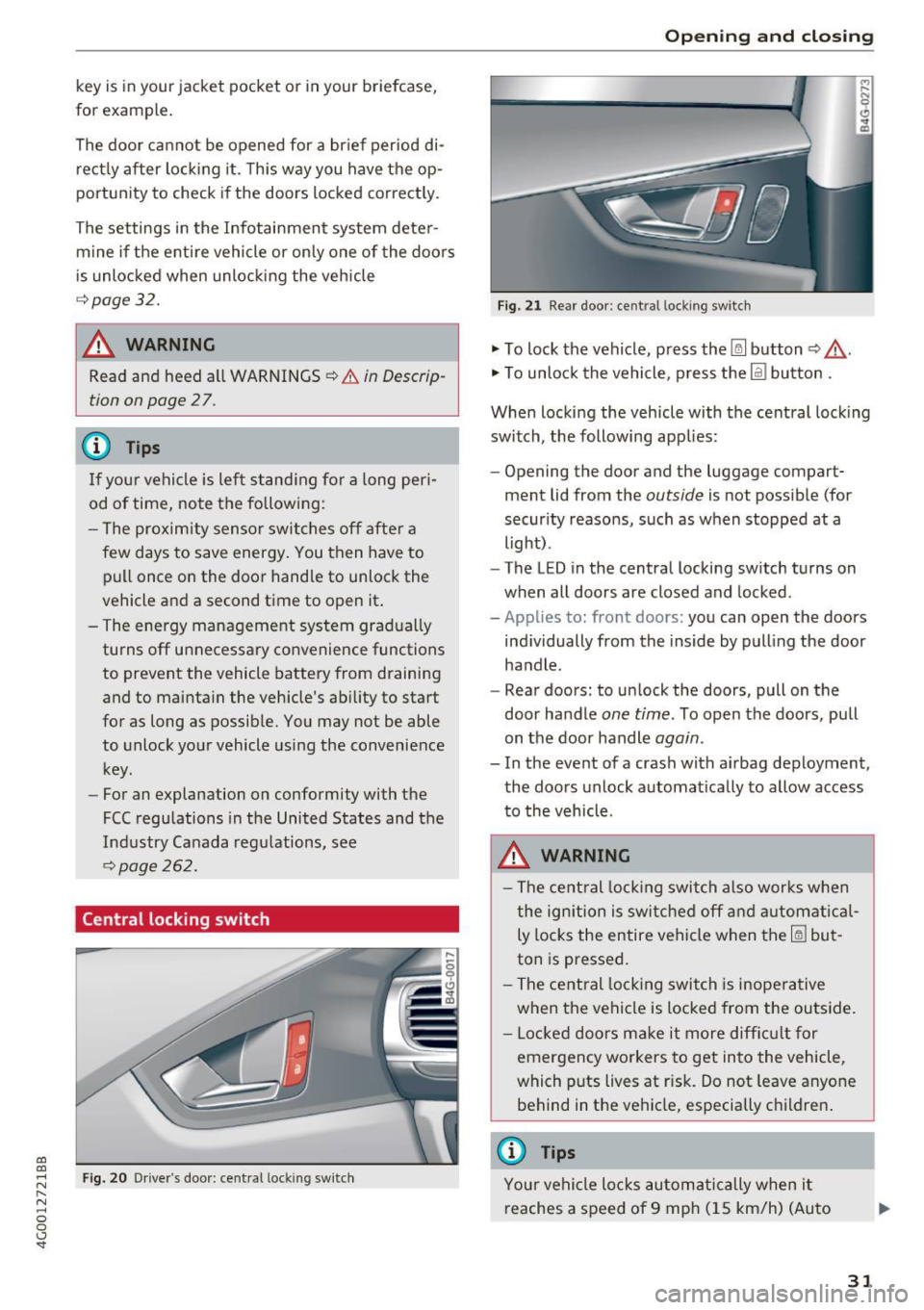
Central locking switch
Fig. 20 Drive r's door: central loc king switch
Open ing and closing
Fig. 21 Rear doo r: ce ntra l locking sw it c h
"' To lock the vehicle, press the~ button ~,&. .
"' To unlock the vehicle, p ress the @l button .
When locking the vehicle with the central locking
switch, the following app lies:
- Opening the door and the luggage compart
ment lid from the
outside is not possible (for
security reasons, such as when stopped at a
light) .
- The L ED in the central locking switch turns on
when all doors are closed and locked.
-Applies to: front doors: you can open the doors
ind ividually from the inside by pulling the door
handle .
- Rear doors: to unlock the doors, pull on the
door ha ndle
one time . To open the doors, pull
on the door handle
again .
- In the event of a crash with a irbag deployment,
the doors unlock automat ically to allow access
to the vehicle.
A WARNING
-The central locking switch also works when
the ignition is switched off and automatical
ly locks the entire vehicle when the~ but
ton is pressed.
- The central locking switch is inoperative
when the vehicle is locked from the outside.
- Locked doors make it more difficult for
emergency workers to get into the vehicle,
which puts lives at r isk. Do not leave anyone
behind in the vehicle, especially c hildren .
@ Tips
Your vehicle locks automatically when it
reaches a speed of 9 mph (15 km/h) (Auto
31
Page 35 of 280
co
co
.... N
" N .... 0 0 <.,;) 'SI'
.. Remove the integrated mechanical key
Q page 29 or use the separate mechan ical key .
.. Pull the cap out of the opening
¢ fig. 23 .
.. Insert the key in the inside slot and turn it all
the way to the right (right door) or left (left
door).
A WARNING
Read and heed all WARNINGS¢ A in Descrip
tion on page
27.
Anti-theft alarm system
If the anti-theft alarm system detects a vehicle
b reak-in, audio and visual warning signals are
triggered. The anti-theft alarm system is activat
ed when the vehicle is locked as usual.
It
switches off when the vehicle is unlocked.
If the alarm is triggered, it w ill shut
off automat
ically after a ce rtain amount of time. Switch the
ignition on or press the~ button on the remote
control key to turn
off the alarm.
Luggage compartment
Lid
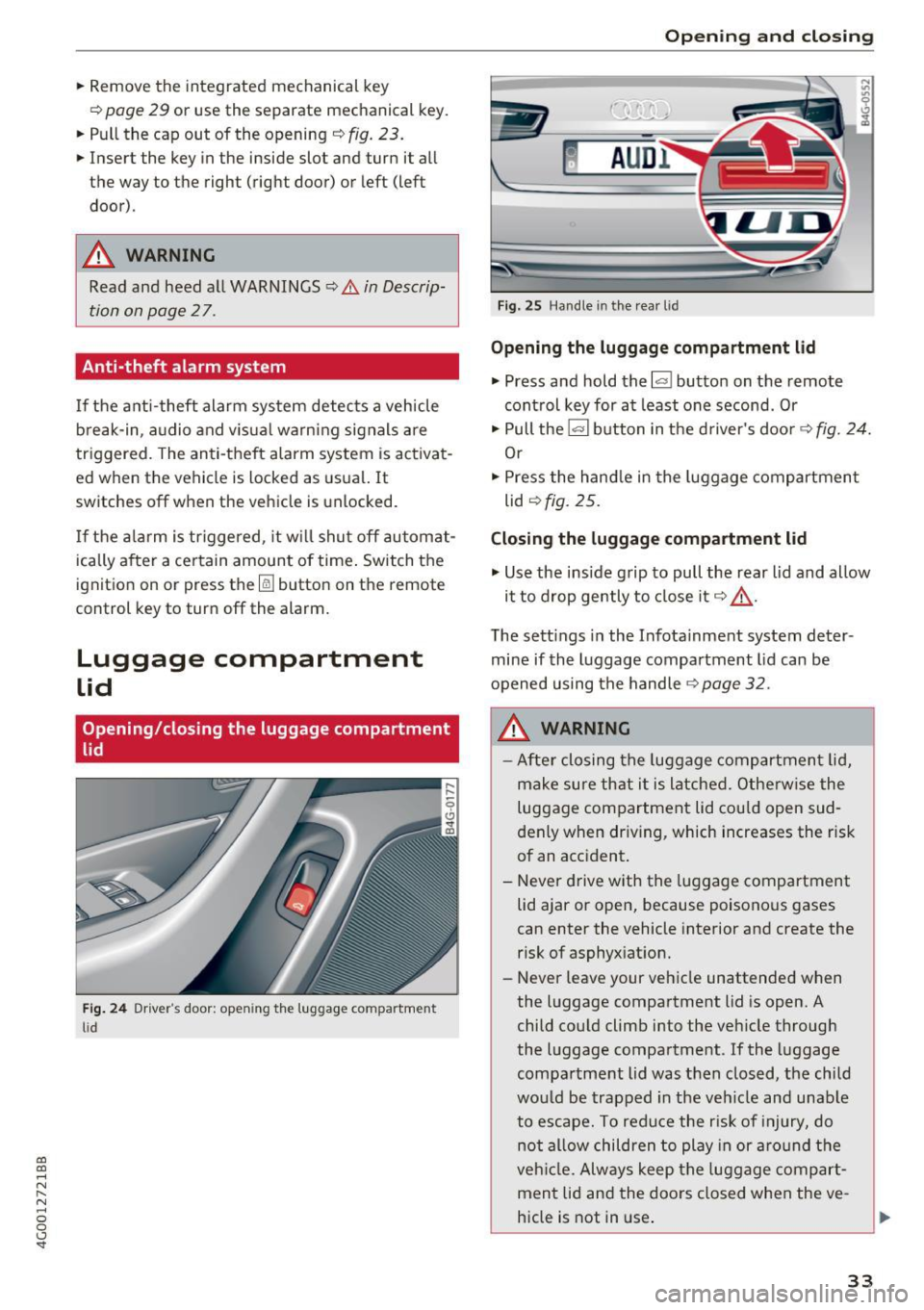
Opening /closing the luggage compartment
lid
Fig. 24 Dr iver's door : opening the luggage compartment
li d
Open ing and closing
Fig. 25 Handle in the rea r lid
Opening the luggage compartment lid
.. Press and hold the l""I button on the remote
control key for at least one second . Or
.. Pull the~ button in the driver's door¢
fig. 24.
Or
.. Press the hand le in the luggage compartment
lid
Q fig. 25.
Closing the luggage compartment lid
.,. Use the inside grip to pull the rear lid and allow
it to drop gently to close it¢ _&. .
T he sett ings in the Infota inment system deter
mine if the luggage compartment lid can be
opened using the handle
¢ page 32.
A WARNING
- After closing the luggage compartment lid,
make sure that it is latched. Otherwise the
luggage compartment lid could open sud
denly when driv ing, which increases the risk
of an accident.
- Never drive with the luggage compartment
lid ajar or open, because poisonous gases
can enter the vehicle interior and create the
risk of asphyxiation.
- Never leave your vehicle unattended when
the luggage compartment lid is open. A
child could climb into the vehicle through
the luggage compartment . If the luggage
compartment lid was then closed, the child
would be trapped in the vehicle and unable
to escape. To reduce the r isk of injury, do
not allow children to play in or around the
veh icle. Always keep the luggage compart
ment lid and the doors closed when the ve
hicle is not in use.
33
Page 37 of 280
co
co
.... N
" N .... 0 0 <.:l 'SI'
A WARNING
-Read and follow all WARNINGS¢&. in De
scription on page
27 .
-After closing the luggage compartment lid,
always pull up on it to make sure that it is
properly closed. Otherwise it could open
suddenly when the veh icle is moving.
- To help prevent poisonous exhaust gas from
being drawn into the veh icle, always keep
the luggage compartment lid closed while driving. Never transport objects larger than
those which fit completely into the luggage area, because then the luggage compart
ment lid cannot be fully closed.
- Never leave your vehicle unattended espe
cially with the l uggage compartment l id left
open. A chi ld co uld crawl into the car
through the luggage compartment and pull
the lid shut, becoming trapped and unable
to get out. To reduce the risk of personal in
jury, never let children p lay in or around
your vehicle. Always keep the luggage com partment lid as well as the vehicle doors
closed when not in use.
- Never close the luggage compartment lid
inattentively or without checking first. Al
though the closing force of the luggage
compartment lid is limited, yo u can st ill se
riously injure yourself or others.
- Always ensure that no one is within ra nge of
the luggage compartment lid when it is
moving, in part icular close to the h inges and
the upper and lower edges -fingers o r
hands can be pinched.
- Never try to interfere w ith the l uggage com
partment lid or help i t when it is being
opened or closed automatically.
([) Note
The luggage compartment lid can bump into
objects such as the garage ceiling when open
ing and become damaged.
(D Tips
- The settings in the Infota inment system de
te rmine if the luggage compa rtment lid can
be opened us ing the handle
¢ page 32.
Op enin g an d clos ing
-There are audio signa ls when closing the
luggage compartment lid with the remote
control key (vehicles with conven ience key*)
or with the
l ""'I button in the driver's door.
- When the vehicle is locked, the luggage
compartment lid can be unlocked separately
by pressing the
1£) button on the remote
control key. The luggage compartment lid
locks automatically when it is closed again.
- You can close the luggage compartment lid
using the remote control key (vehicles with
convenience key*) up to a distance of ap
proximately 9 feet (3 m).
- The luggage compartment lid can be oper
ated manually if the vehicle battery is low .
It is necessary to use more force when doing
this. Move the lid s low ly to redu ce the
amou nt of fo rce needed.
Luggage compartment with movement
activated opening
Applies to: vehicles with convenience key and senso r-co ntro l·
led luggage compartment lid
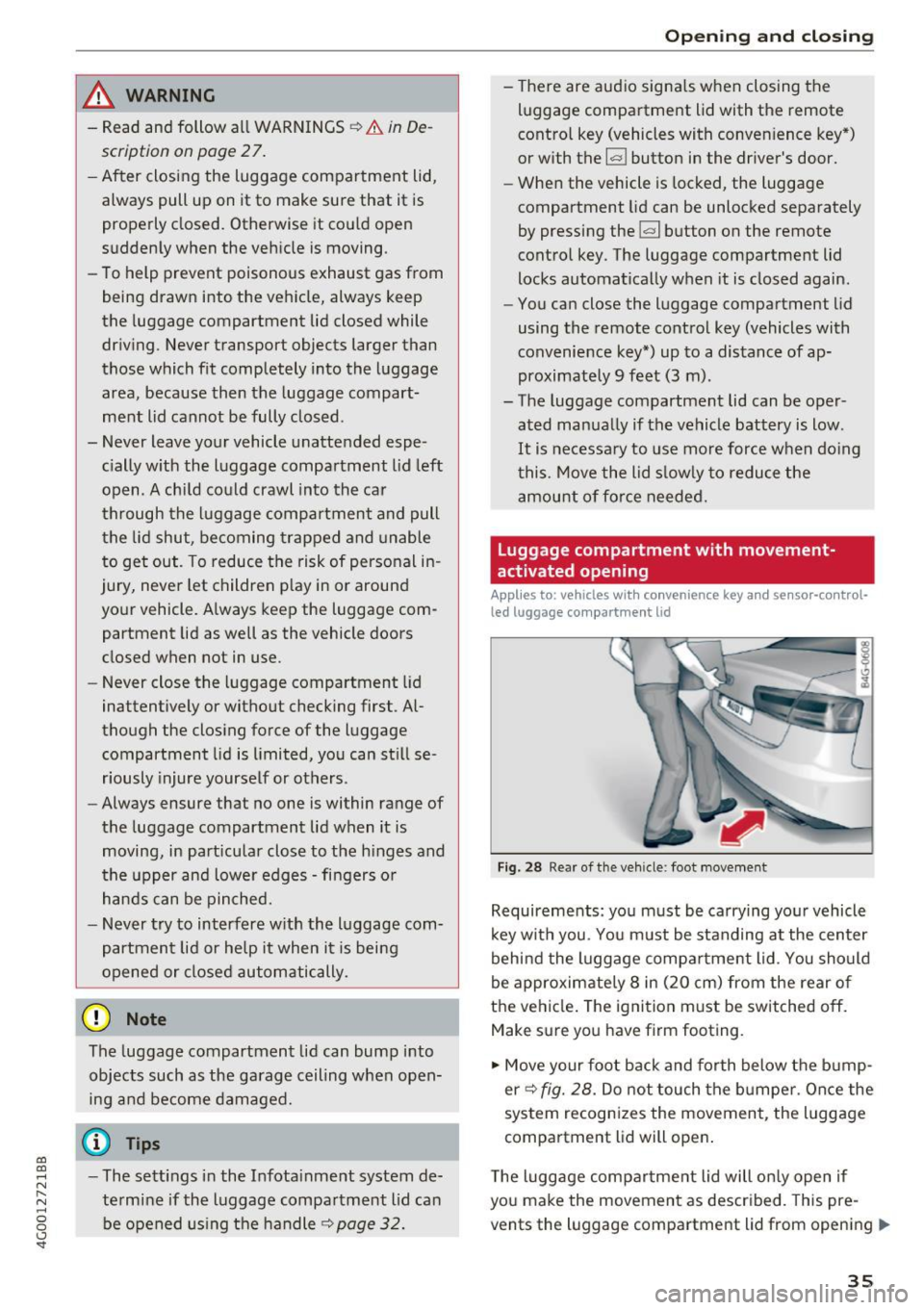
Fig. 28 Rea r of the veh icle: foot movement
Requirements: you must be carrying you r vehicle
k ey w ith you. You m ust be standing at the center
behind the luggage compa rtment lid. You should
be approximately 8 in (20 cm) from the rear of
the ve hicle. The ignition m ust be switched off.
Make sure you have firm footing.
.,. Move your foot back and forth below the b ump
er ¢
fig. 28. Do not touch the bumpe r. Once the
system recognizes the movement, the luggage
compartment l id will open .
T he luggage compar tme nt lid will on ly open if
you make the movement as described. This pre
vents the luggage compartment lid from opening
llll>
3 5
Page 38 of 280
Opening and clo sin g
due to similar movements, such as when you
walk between the rear of th e vehicle and your ga
rage door.
General inform ation
I n some situations, the function may be lim ited
or tempo rar ily unava ilable . This may happen if :
- the luggage compartment lid was closed imme diately before .
-you park close to a hedge and the branches move back and forth under the vehicle for a
long period of time.
- you clean your vehicle , fo r example with a pres
sure washe r or i n a car wash.
- there is heavy rain.
- the bumper is very dirty , for example after driv-
ing on salt-covered roads .
- there is interference to the radio signal from
the ve hicle key, such as from cell phones or re
mote controls .
Luggage compartment lid emergency
release
F ig . 29 Inner luggage compart men t lid : access to the
emergen cy re le ase
.,. Pry the cover off using a screwdriver or the me
chan ical key ¢
fig. 29 . Remove the mechan ica l
key ¢
page 29 .
.,. Press the lever in the direct ion of the arrow to
release the luggage compartment lid .
36
Opening the luggage compartment lid
from the ins ide in an emergency
Fig. 30 I nne r luggage compart ment l id : leve r
.,. Pull the lever downward¢ fig. 30 .
(D Tips
Never close t he luggage compartment lid us
i ng the emergency handle .
Child safety lock
The child safety lock prevents the rear doors
from being opened from the inside and the rear
power windows from be operated.
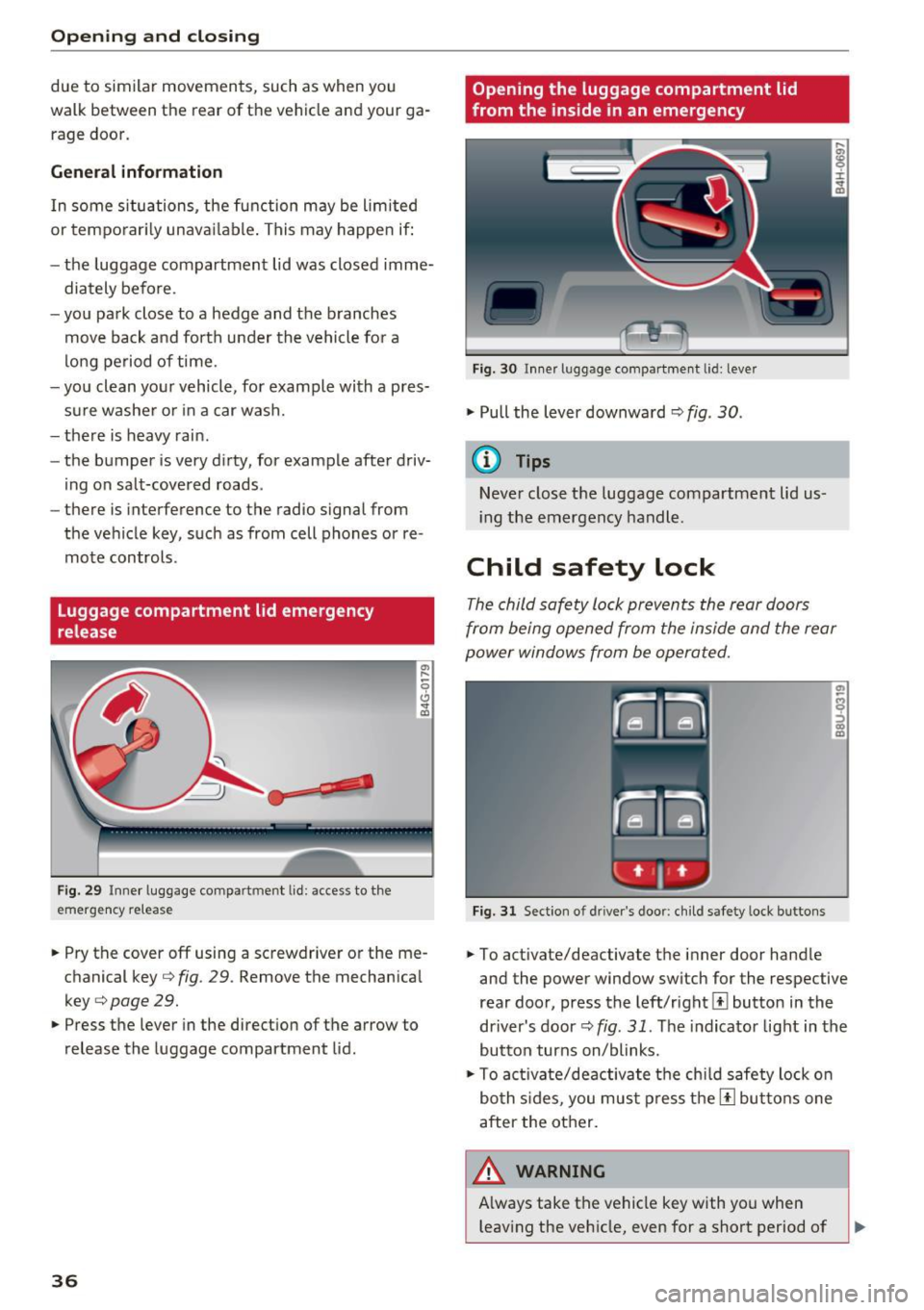
Fig. 31 Sect ion o f dri ver's doo r: ch ild safety loc k bu ttons
.,. To activate/deactivate the inner door hand le
and the power window switch for the respective
rear doo r, press the left/rightl±l button in the
driver's door¢
fig. 31 . The indicator light in the
button turns on/blinks .
.,. To act ivate/deactivate the chi ld safety lock o n
bo th s ides, you mus t press the [!l but tons one
after the other.
A WARNING , ~
A lways take the vehicle key with you when
leaving the veh icle, even for a short period of