brake AUDI A6 2017 Owner's Manual
[x] Cancel search | Manufacturer: AUDI, Model Year: 2017, Model line: A6, Model: AUDI A6 2017Pages: 280, PDF Size: 70.24 MB
Page 83 of 280
co
co
.... N
" N .... 0 0 <..:l '
¢fig. 86.
~ To shift down one gear, tap the 0 shift paddle.
The transmission automatically shifts up or down before critical engine speed is reached.
The transmission only allows manual shifting
when the engine speed is within the permitted
range.
Kick-down
Kick-down enables maximum acceleration.
When you press the accelerator pedal down be
yond the resistance point, the automatic trans
mission downshifts into a lower gear, depending
on vehicle speed and engine RPM.
It shifts up in
to the next higher gear once the maximum speci
fied engine RPM is reached.
A WARNING
Please note that the wheels could spin on
slick or slippery roads when kick-down is ac
tive.
Launch control program
A ppl ies to: ve hicles wit h S tro nic
-
The launch control program provides the best
possible acceleration when starting from a stop.
Requirement: the engine must be at operating
temperature and the steering wheel must not be
turned .
~ Deactivate the Start/Stop system*¢ page 74.
The LED in the l0 u•I button turns on.
~ Switch the Electronic Stabilization Control
(ESC) sport mode on ¢
page 121. The II i ndi
cator light turns on.
~ Pull the selector lever back out of the D/S posi
tion briefly to select the S position or select the
DYNAMIC driving mode in drive select
¢page 106.
~ Press the brake pedal firmly with your left foot
and hold it all the way down for at least one
second .
Driving
~ At the same time, press the gas pedal all the
way down with your right foot until the engine reaches and stays at a high RPM level.
~ Remove your foot from the brake pedal within
five seconds ¢_& .
A WARNING
-Always adapt your driving to the traffic flow.
- Only use the Launch control program when
road and traffic conditions allow it and oth
er drivers will not be endangered or both
ered by your driving and the vehicle's accel
eration.
- Please note that the drive wheels can spin
and the vehicle can break away when sport
mode is switched on, especially when the
road is slippery.
- Once the vehicle has started moving, press
the
I.P-O FFI button briefly to turn the sport
mode off.
@ Tips
- The transmission temperature may increase
significantly after using the launch control
program. If that happens, the program may
not be available for a few minutes.
It will be
available again after a cool-down period.
- When accelerating using the launch control
program, all vehicle parts are subject to
heavy loads. This can lead to increased
wear.
Transmission malfunction
DD Transmission: please press brake pedal and
select gear again
Press the brake pedal and select the desired se
lector lever position again. You can then continue
driving.
DD Transmission overheating: Please drive con
servatively.
The transmission temperature has increased sig
nificantly due to the sporty driving manner. Drive
in a less sporty manner until the temperature re
turns to the normal range and the indicator light switches of. .,..
81
Page 85 of 280
co
co
.... N
" N .... 0 0 <..:l '
General information
Your Audi was designed primarily for passenger
transportation .
If you plan to tow a trailer, please remember that
the additional load will affect durability, econo
my and performance.
Trailer towing not only places more stress on the
vehicle, it also calls for more concentration from
the driver.
For this reason, always follow the operating and
driving instructions provided and use common
sense.
(D Note
If you are going to tow a trailer, you must ac
tivate the trai ler operation mode
c::> page 83, Operating instructions.
Technical requirements
Trailer hitch
Use a weight-carrying hitch conforming to the
gross trailer weight. The hitch must be suitable
for your vehicle and trailer and must be mounted
securely on the vehicle's chassis at a
technically
sound
location . Use only a trailer hitch with a re
movable ball mount. Always check with the trail
er hitch manufacturer to make sure that you are
using the correct hitch.
Do not use a bumper hitch.
The hitch must be installed in such a way that it
does not interfere with the impact -absorbing
bumper system . No modifications should be
made to the vehicle exhaust and brake systems .
From time to time, check that all hitch mounting
bolts remain securely fastened.
When you are not towing a trailer,
remove the
trailer hitch ball mount . This prevents the hitch
from causing damage shou ld your vehicle be
struck from behind
c::> .&, .
Tra iler towing
Trailer brakes
If your trailer is equipped with a braking system,
check to be sure that it conforms to all regu la
tions.
T he trailer hydraulic brake system must not be
directly connected to the vehicle's hydraulic
brake system.
Safety chains
Always use safety chains between your vehicle
and the tra iler .
Trailer lights
Trailer lights must meet all regulations. Be sure
to check with your Audi dealer for correct wiring,
switches and relays.
Mirrors
If you are unable to see the traffic behind you us
ing the regular outside mirrors, then you
must in
stall extended mirrors . It is important that you
always have clear vision to the rear .
A WARNING
--
After removing the trailer hitch, do not store
it in your vehicle. In case of sudden braking,
the hitch could fly forward and injure you or
your passengers.
Operating instructions
Maximum trailer weight
A trailer for your vehicle is lim ited to a typical
class 1 or class 2 trailer.
Trailer load distribution
Be sure the load in the trailer is held securely in
place to prevent it from shifting forward, back
ward or s ideways.
Never allow a passenger to ride in a trailer c::> .&.
in Driving instructions on page 85 .
Engine cooling system
Towing a trailer makes the engine work harder. It
is important that the cooling system's perform
ance is up to the additional load. Make sure that
the cooling system has enough fluid . ..,.
83
Page 86 of 280
Trailer towing
Tire pr essure
When tow ing a tra iler, inflate the tires of yo ur
veh icle to the tire pressure listed under " Fu ll
load" on the label¢
page 220. Inflate trai ler
tires to trai ler and tire manufacturers' specifica
tions.
Lights
Check to ma ke sure both vehicle and t railer lights
are working proper ly.
Safety chains
Be sure trailer safety chains are proper ly connect
ed from the traile r to the hitch on the vehicle.
L eave enough slac k in the c ha ins to permi t turn
ing corners. When you install safety chains, make
sure they wi ll not drag on the road when you are
driving.
The chains shou ld cross under the trailer tongue
to prevent it from dropping in case of separation
from the hitch .
Adjusting the Audi drive select
Make sure the veh icle is on a level surface before
h itchi ng up the t railer a nd before adjus ting the
tongue we igh t. The vehicle must be in
auto or
c omfort driving mode and not ra ised
¢page 104, ¢(!) .
Make sure that the vehicle is lowered. In Info
tainmen t, se lect:
ICARI f u nct ion butto n> Lower
con trol b utton.
I f you must dr ive under poo r road conditions, you
can ra ise the vehicle
aft er coup ling the t rai ler or
after adj usting the tongue weight¢ page 106.
@ Note
-Changes in tempe rature or load ca n affect
the he ight of the vehicle.
- Always se lect
auto or comfort mode . Other
wise, the tongue load spec ified for your ve
hi cle w ill no longe r be applicable.
84
· Driving instructions
Driving with a trailer always requires extra care
and consideration.
Weight distribution
Towing a loaded trailer with an empty car results
i n a h ighly unstab le distribut ion of weight. If this
cannot be avoided, drive at very low speeds only
to avoid the risk of losing steering control.
A "balanced" rig is easier to operate and control.
This means that the tow vehicle shou ld be loaded
to the extent possible and permissible, wh ile
keeping the trailer as light as possible under the
c ir cumstances . Wheneve r possible, transfer
some cargo to the luggage compartment of the
tow ve hicle while observing tongue load require
ments and vehicle load ing conside ra tions.
Speed
The higher the speed, the more difficult it be
comes for the dr iver to control the r ig. Do not
drive at the maximum permissible speed. Reduce
yo ur speed even more if load, weather or wind
cond it ions are unfavo rab le -pa rtic ularly whe n
going downh ill.
Reduce vehicle speed
immed iately if the t railer
shows the slightest sign of sway ing.
Do not try
t o stop th e s waying by accelerating.
Observe speed limits. In some areas, speeds fo r
vehicles tow ing traile rs are lower than for regular
vehicles.
Always apply brakes early. When driving down
hill, shift into a lower gear to use the eng ine
braki ng effect to slow the vehicle. Use of the
bra kes alone ca n cause them to overheat a nd fail.
Air suspension*
When dr iving with a trailer, act ivate the trailer
mode of the air suspens io n. Switch the a ir sus
pension trailer mode on w hen you are towing a
trailer. This wi ll limit the regulation by the air
s u spension while dr iv ing. Se lect in the M MI:
I CAR ! funct ion but ton > (Car )* s ystem s contro l
button >
Vehicle setting s > Air su sp .: towing >
On . .,_
Page 87 of 280
co
co
.... N
" N .... 0 0 <..:l '
The coolant temperature gauge c::> page 9 must
be observed carefu lly . The coolant temperature
can increase if you drive on long inclines in a low
gear at high engine speeds. Reduce your speed immediately if the LEDs in the top part of the dis
play turn on.
F or more information about ind icator lights, re
fer to.
c::> page 14.
A WARNING
Anyone not proper ly restrained in a moving
vehicle is at a much greater risk in an acci
dent. Never let anyone ride in your car who is
not properly wearing the restraints provided
by Audi.
Trailer towing information
Important to know
Your vehicle handles differently when towing a
tra iler because of the additional weight and dif
ferent weight distribut ion . Safety, performance
and economy will greatly depend on how careful
ly you load your trailer and operate your rig.
Before you actually tow your trailer, practice
turning, stopp ing and back ing up in an area away
from traff ic. Keep practicing until you have be
come completely fam iliar with the way your vehi
cle-trailer combination behaves and responds.
Backing up is difficult and requires pract ice.
Backing up with a trailer generally requires steer
ing action opposite to that when backing up your
vehicle without a trailer.
Maintain a greater d istance between your vehicle
and the one in front of you. You w ill need more
r oom to stop. To compensate for the trailer, you
will need a larger than normal turning radius.
When passing, remember that you cannot accel
erate as fast as you normally wou ld because of
the added load. Make s ure you have enough room
to pass. After passing, a llow plenty of room for
your tra iler before changing lanes again.
Trailer towing
Avoid jerky starts, sharp turns or rapid lane
changes.
(D Tips
- Do not tow a trailer during the break-in peri
od of your vehicle.
- If you tow a trailer, your Audi may require
more frequent maintenance due to the ex
tra load
c::> page 259 .
Parking on a slope
Do not pork on a slope with a trailer. If it cannot
be avoided, do so only after doing the following:
When parking:
• Apply the foot brake.
• Have someone place chocks under both the ve
hicle and the trailer wheels.
• With chocks in place, slowly release the brakes
until the wheel chocks absorb the load.
• Turn the whee ls towards the curb.
• App ly the parking brake.
• Select the P selector lever position.
When restarting after parking:
• App ly the foot brake.
• Start the engine.
• Select the D/S se lector lever position.
• Release the parking brake and slowly pull out
and away from the wheel chocks.
• Stop and have someone retrieve the wheel
chocks.
(D Tips
If you move the selector lever of the automat
i c transmission to P before applying the park
i ng brake and before blocking the wheels, you
may have to use more force later to move the
l ever out of the P position.
85
Page 88 of 280
Assist
Assist Speed warning system
Applies to: vehicles with speed warning system
The speed warning system helps you to stay un
der a specified maximum speed.
The speed warning system warns you if you are
exceeding the maximum speed that you have set.
A warning tone will sound as soon as your speed
exceeds the stored value slightly.
The . (USA models)/ . (Canada models) indi
cator light and a message appear in the instru
ment cluster display at the same time. The •
• indicator light and the message turn off if the
speed falls back below the stored maximum
speed .
Setting a threshold is recommended if you would
like to be reminded when you reach a certain
maximum speed. Situations where you may want
to do so include driving in a country with a gener
al speed limit or if there is a specified maximum
speed for winter tires.
Setting the warning threshold
The warning threshold is set in the Infotainment
system.
.. Select: the
ICARI function button > (Car)* Sys
tems
control button > Driver assistance >
Speed warning.
(D Tips
Regardless of the speed warning system, you
should always monitor your speed using the
speedometer and make sure you are following
the legal speed limit.
86
Cruise control system
Switching on
Applies to: vehicles with cruise control system
The cruise control system makes it possible to
drive at a constant speed starting at 20 mph (30
km/h) .
0
f
~
0
Fig. 88 Operat ing lever: cruise co ntro l syste m
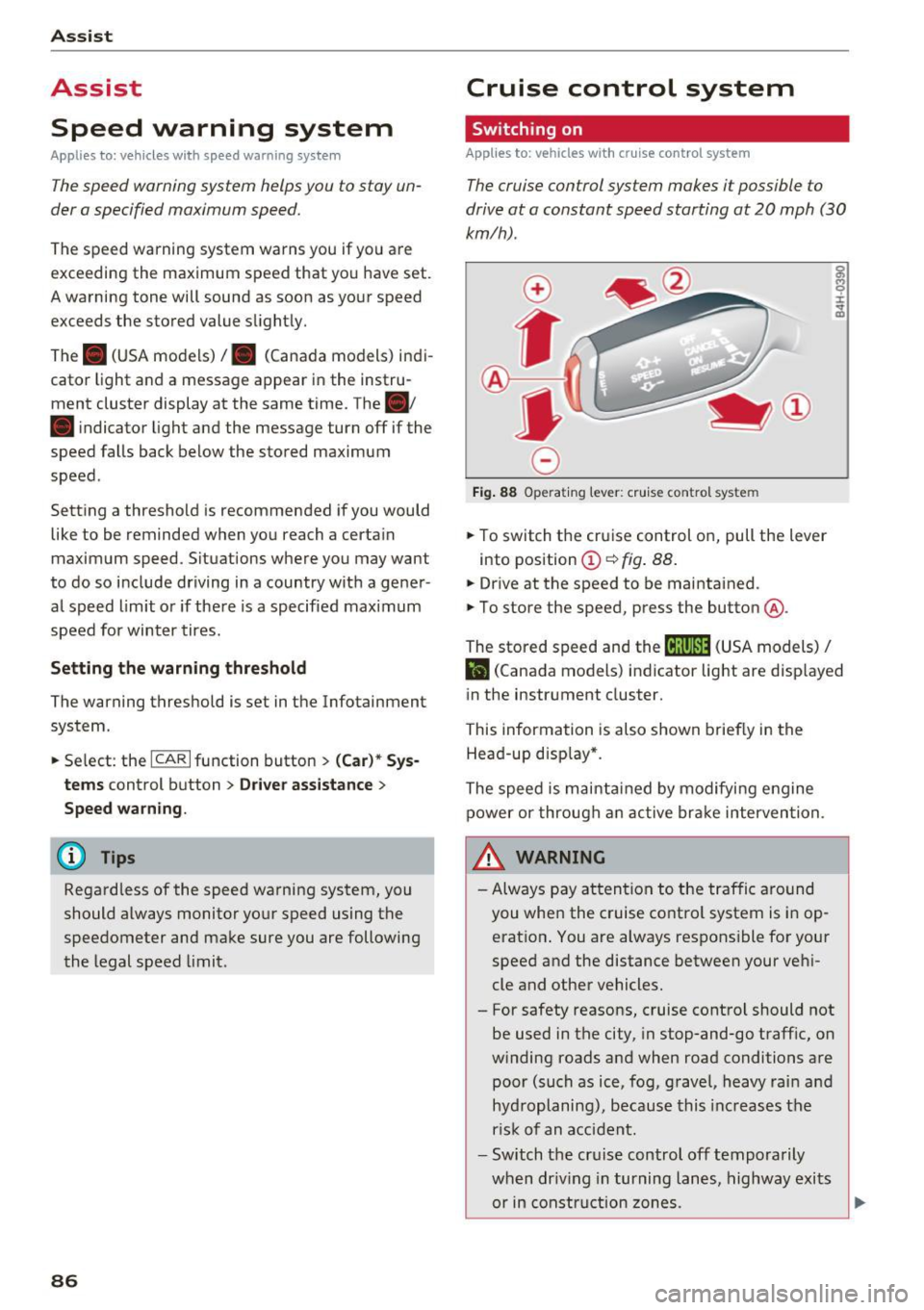
.,. To switch the cruise control on, pull the lever
into posit ion
(D ~ fig . 88.
.,. Drive at the speed to be maintained .
.,. To store the speed, press the button @.
~ M 0 :i:
;;i;
The stored speed and the (ij;\1)~14 (USA models) /
l'I (Canada models) indicator light are disp layed
in the instrument cluster.
This information is also shown briefly in the
Head-up disp lay* .
The speed is maintained by modifying engine
power or through an active brake intervention.
~ WARNING
-Always pay attention to the traffic around
you when the cruise control system is in op
eration . You are always responsible for your
speed and the distance between your vehi
cle and other vehicles.
- For safety reasons, cruise control should not be used in the city, in stop-and-go traffic, on
winding roads and when road conditions are poor (such as ice, fog, gravel, heavy rain and
hydroplaning), because this increases the
r isk of an accident.
- Switch the cruise control off temporarily
when dr iv in g in turning lanes, highway exits
or in construction zones.
-
Page 89 of 280
co
co
.... N
" N .... 0 0 <..:l '
your foot on the accelerator pedal prevents
the cruise control from braking. This is be
cause pressing the accelerator pedal over
rides the cruise control system .
- If a brake system malfunction such as over
heating occurs when the cruise control sys
tem is switched on, the braking function in
the system may be switched off. The rest of
the cruise control system functions remain
active as long as the
(tj;(IM@ (USA models) /
ii (Canada models) indicator light is on.
@ Tips
The brake lights turn on when the brakes are
applied automat ically .
Changing speed
Applies to: vehicles with cruise control system
.. To increase or decrease the speed in incre
ments, tap the lever toward
010 ¢ page 86,
fig. 88 .
.. To increase or decrease the speed quickly, hold
the lever in the
G)/0 direction until the de
sired speed is displayed.
You can also press the accelerator pedal down to
increase your speed, for example if you want to
pass someone. The speed you set earlier will re
sume as soon as you release the accelerator ped
al.
However, if you exceed your saved speed by 5
mph (10 km/h) for longer than 6 minutes, the
cruise control system turns off temporarily .
The green
ltj;(i )~i@ (USA models) 1 '11 (Canada mod
els) indicator light in the speedometer turns off
and the stored speed is maintained.
Preselecting the speed
App lies to: ve hicles with cru ise control system
You can pre-select your desired speed when the
vehicle is stationary.
.. Switch the ignition on.
.. Pull the lever into position
(D ¢ page 86,
fig. 88 .
Assist
.. To increase or decrease the speed, tap the lever
toward
0 10 .
.. To store the speed displayed, release the lever.
T his function makes it possible, for example, to
save the speed you want before driving on the
highway. Once on the highway, activate the
cruise control by pulling the lever toward @.
Switching off
Appl ies to : vehicles with cruise co ntrol system
Temporary deactivation
.. Press the brake pedal, or
.. Press the lever into position @ (not clicked into
place)
¢ page 86, fig. 88, or
.. Drive for longer than 5 minutes faster than 5
mph (10 km/h) above the stored speed .
Switching off completely
.. Press the lever into position @(clicked into
place), or
.. Switch the ignition off.
The speed you stored will be maintained if the cruise control has been switched off temporarily .
To resume the stored speed, release the brake pedal and pull the lever to position@.
Switching the ignition off will erase the stored
speed .
A WARNING
--You should only resume the stored speed if it
i s not too high for existing traff ic conditions.
Otherw ise you can inc rease the risk of an acci
dent.
87
Page 90 of 280
Assist
Audi adaptive cruise
control
Description
Applies to: vehicles with Audi adapt ive cruise control
F ig. 89 Detection range
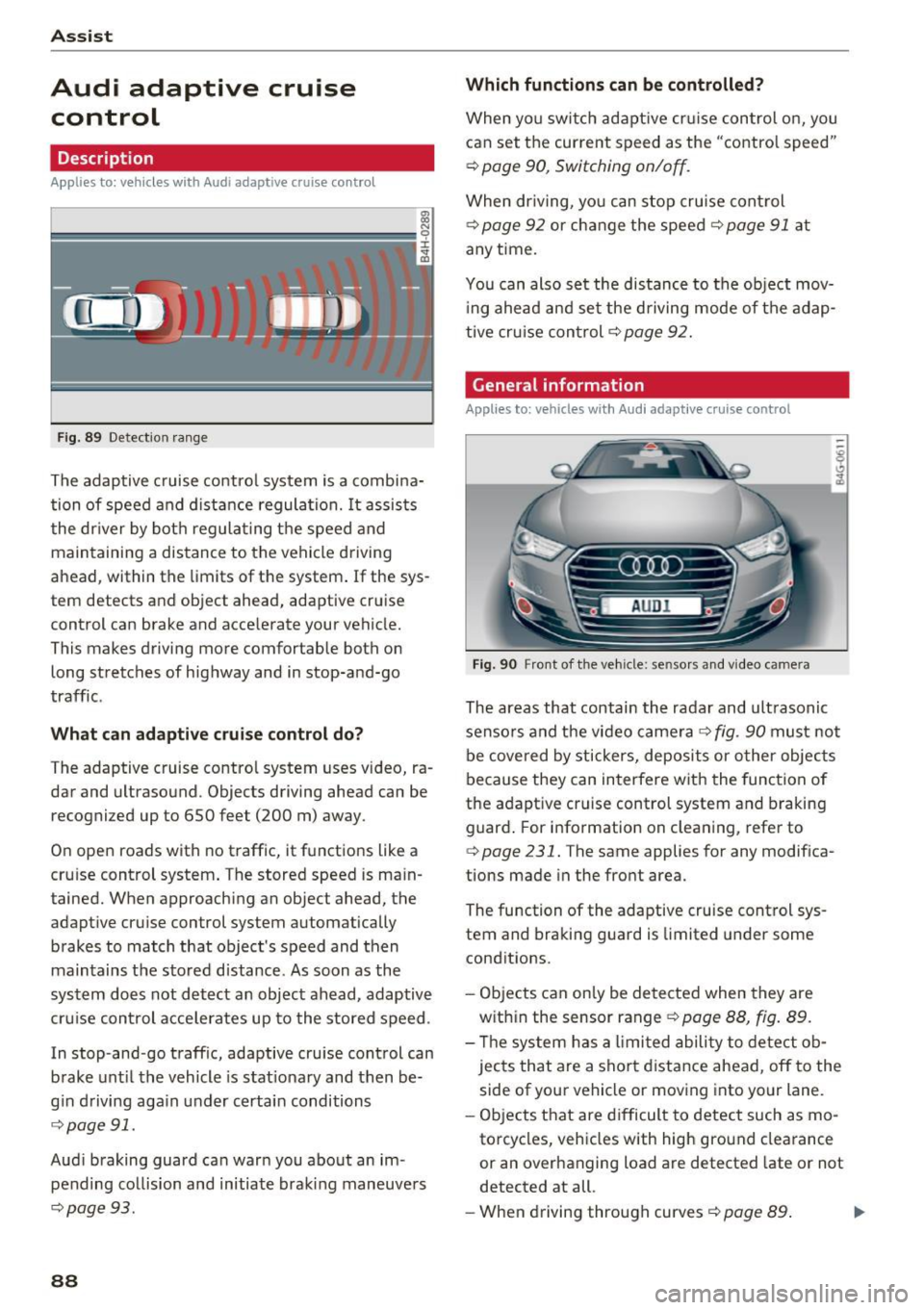
The adaptive cruise control system is a combina
tion of speed and distance regulation.
It assists
the driver by both regulating the speed and
maintaining a distance to the vehicle driving
ahead, within the limits of the system .
If the sys
tem detects and object ahead, adaptive cruise
control can brake and acce lerate your vehicle.
This makes driving more comfortable both on long stretches of highway and in stop-and-go
traffic.
What can adaptive cruise control do?
The adaptive cruise contro l system uses video, ra
dar and ultrasound . Objects driving ahead can be
recognized up to 650 feet (200 m) away.
On open roads with no traffic, it functions
like a
cruise control system . The stored speed is main
tained. When approaching an object ahead, the
adaptive cruise control system automatically
brakes to match that object's speed and then
maintains t he stored distance . As soon as the
system does not detect an object ahead, adaptive
cru ise control acce lerates up to the stored speed .
In stop-and-go traffic, adaptive cru ise control can
brake until the vehicle is stat ionary and then be
g in driving aga in under certain conditions
¢page 91.
Audi braking guard can warn you about an im
pending collision and initiate braking maneuvers
¢page 93.
88
Which functions can be controlled?
When you switch adaptive cruise control on, you
can set the current speed as the "control speed"
¢ page 90, Switching on/off.
When driving, you can stop cruise control
¢page 92 or cha nge the speed ¢ page 91 at
any time.
You can also set the distance to the object mov
ing ahead and set the driving mode of the adap
tive cruis e con trol
¢p age 92.
General information
Applies to: vehicles with Audi adaptive cruise control
Fig. 90 Front of the vehicle: sensors and video camera
The areas that contain the radar and ultrasonic
senso rs and the video camera ¢
fig. 90 must not
be covered by stickers, deposits or other objects
because they can interfere with the function of
the adapt ive cruise control system and braking
guard. For information on clea ning, refer to
¢ page 231. The same applies for any modif ica
tions made in the front area.
The function of the adaptive cruise control sys
tem and braking guard is limited under some
conditions.
- Objects can only be detected when they are
with in the sensor range
¢p age 88, fig. 89.
- Th e system has a limit ed ability to detect ob
jects that are a sho rt distance ahead, off to the
side of your vehicle or moving into your lane.
- Objects that are difficult to detect such as mo
torcycles, vehicles with high ground clearance
or an overhanging load are detected late or not
detected at all.
- When driving through curves¢
page 89. ll>
Page 91 of 280
co
co
.... N
" N .... 0 0 <.,;) 'SI"
- With stationary objects~ page 90.
A WARNING
Always pay attention to traffic when adapt ive
cruise control is switched on and braking
guard is active . As the dr iver, you are still re
sponsible for starting and for maintaining
speed and d istance to other objects. Braking
guard is used to assist you . The driver must
always take action to avoid a collision . The
driver is always responsib le for brak ing at the
co rrect time .
- For safety reasons, do not use adapt ive
cruise co ntro l when driv ing on ro ads w ith
many curves, when the road su rface is in
poor condit ion and/or in bad weather (s uch
as ice, fog, grave l, heavy rain and hydrop la n
ing). Using the system under these condi
t ions increases the risk of an accident.
- Switch adaptive cruise contro l off tempora
rily when driving in turning lanes, on ex
pressway exits or in construction zones. This
prevents the vehicle from accelerating to
the stored speed when in these situations .
- The adapt ive cru ise control system will not
brake by itself if you put your foot on the ac
celerator pedal. Doing so can overr ide the
speed and distance regulation .
- When approaching stat ionary objects such
as stopped traffic, adapt ive cru ise control
will not respo nd and braking gua rd will have
l imited func tion .
- The adapt ive cru ise control system and
bra king g uard do not react to people, ani
mals, objects crossing the road or oncom ing
objects.
- T he function of the radar sensors can be af
fec ted by reflec tive objects s uch as guard
rai ls, the ent rance to a tunnel, heavy rain or
ice.
& WARNING
- Improper use of adaptive cruise control can cause collisions, other accidents and serious
persona l injury.
- Never let the comfort and convenience that
adaptive cruise cont rol and braking guard
A ss ist
offe r dist ract you from the need to be alert
to traffic cond itions and the need to remain
in full control of your vehicle at all times,
- Always remember that the adaptive cruise
control and braking guard have limits -they
will not slow the vehicle down or maintain
the set distance when you dr ive towa rds an
obstacle or something on or near the road
that is not moving, s uch as vehicles stopped
in a t raff ic jam, a stalled or disab led vehicle.
If r eg istered by the radar sensors, vehicles
or obsta cles that are not moving ca n trigger
a co llision wa rning and if confirmed by the
video came ra, an acute co llision wa rning .
- Never fo llow a vehicle so closely that you
cannot stop your vehicle safely . The adap
tive cruise contro l cannot slow or brake the
veh icle safely w hen you follow another vehi
cle too closely. A lways remember that the
automatic braking function cannot bring the
veh icle to a sudde n or emergency stop u n
der these conditions .
- To prevent unintended operat ion , always
sw itch ACC off when it is not being used .
(D Note
The sensors can be d isplaced by impacts or
damage to the bumper, wheel housing and
underbody. That could affect the adaptive
cruise contro l system and braking gua rd .
Have an au thorized Audi dealer o r autho rized
A udi Service Fac ility check the ir funct ion.
In curves
Applies to: vehicles with Audi adaptive cruise control
I
F ig. 91 Exa mpl e: dri ving into a c urve
89
Page 92 of 280
Ass is t
When driving into a curve ~ fig. 91 and out of a
curve, the adaptive cruise control may react to an
object in the neighbor ing lane and apply the
brakes. You can prevent that by pressing the ac
celerator pedal brief ly .
Stationary objects
App lies to: vehicles with Audi adaptive cruise contro l
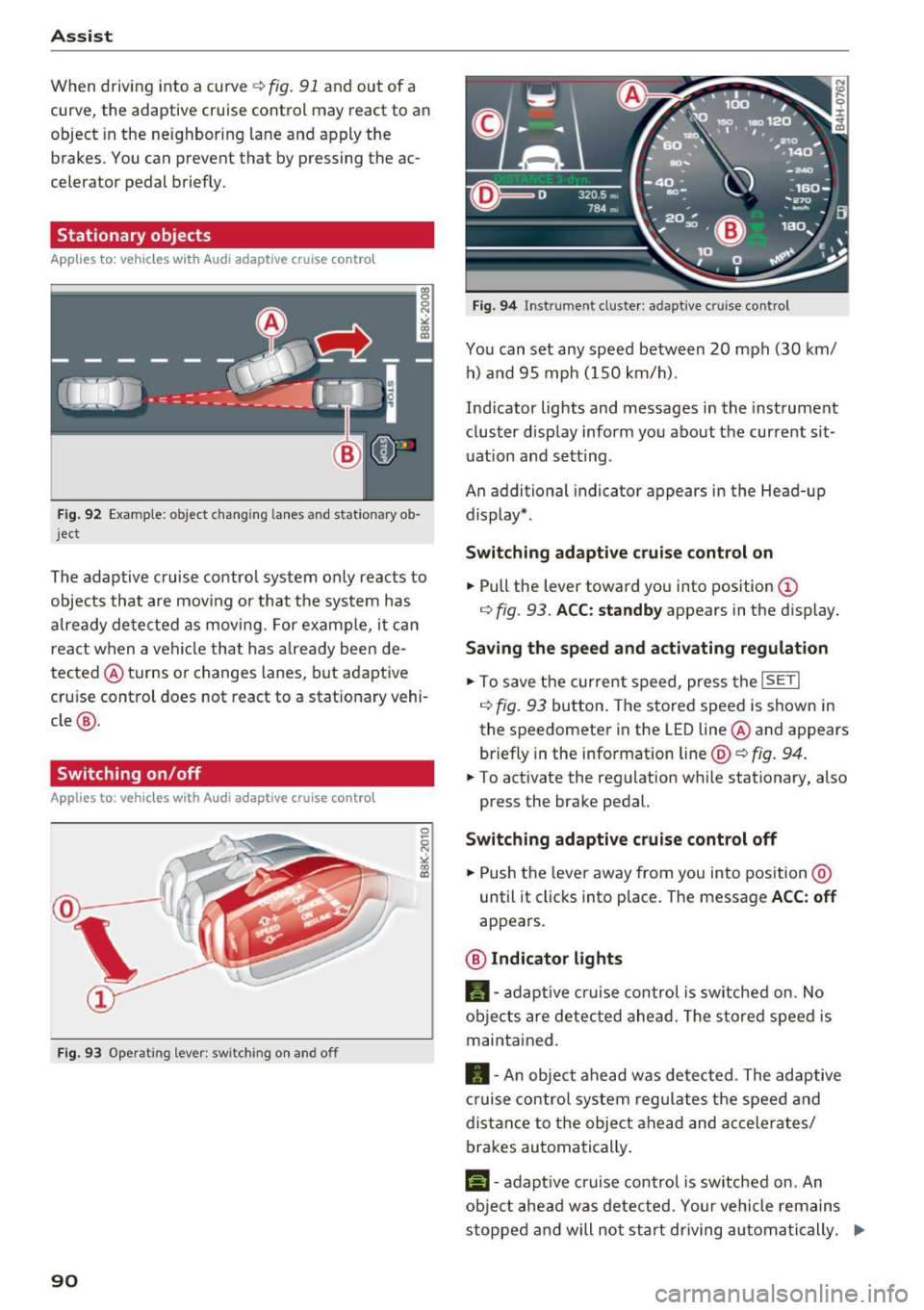
Fig . 92 Examp le: ob ject changin g lanes and stationary o b
j ect
The adaptive cruise contro l system only reacts to
objects that are mov ing or that the system has
a lready detected as moving. For examp le, it can
react when a vehicle that has a lready been de
tected @turns or changes lanes, but adaptive
cru ise control does not react to a stat ionary vehi
cle @.
Switching on /off
Applies to: vehicles with Audi adaptive cruise control
Fig. 9 3 Operat ing leve r: sw itching on a nd o ff
90
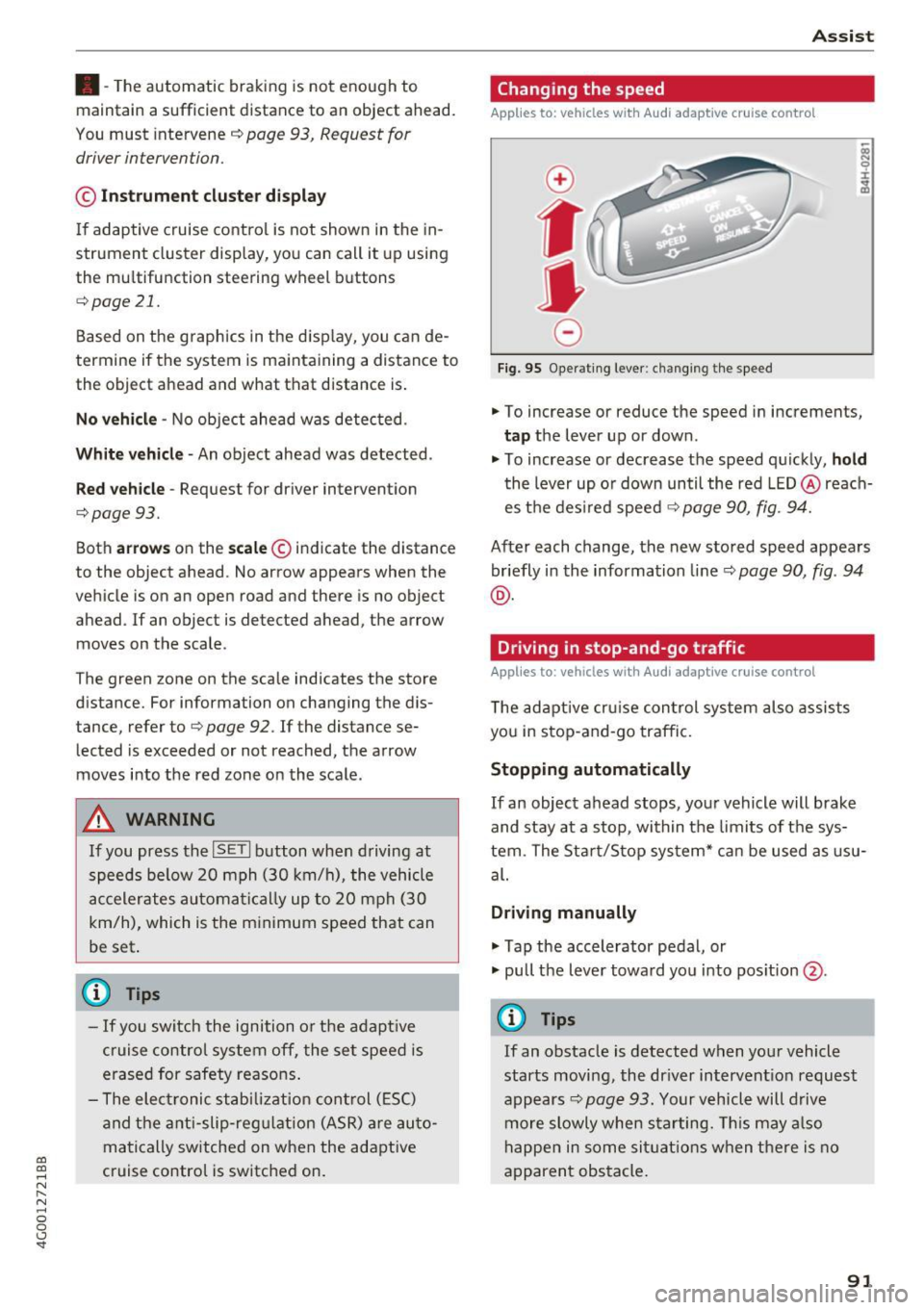
F ig. 94 In str umen t cl uste r: ad ap tive cr uise cont rol
You can set any speed between 20 mph (30 km/
h) a nd 95 mph ( 150 km/h).
Ind icator lights and messages in the instrument
cluster display inform you about the current sit
uat ion and setting .
An additional indicator appears in the Head-up display* .
Switching ad apti ve c ruise control on
.,. Pull the lever toward you into position (D
r=> fig. 93 . ACC: standb y appears in the disp lay.
Saving the speed and activating regulat ion
.,. To save the current speed, press the ISETI
r=> fig . 93 button . The stored speed is shown in
the speedomete r in the LED line @and appears
briefly in the info rmation line @'=>
fig. 94.
.,. To activate the regu lation while stationary, also
press the brake pedal.
Switching adaptive crui se control off
.,. Push the lever away from you into position @
until it clicks into place. The message
ACC : off
appears .
@ Indicator lights
fll-adap tive cr uise contro l is sw itched on. No
objects are detec ted ahead. The s tored speed is
maintained.
• -A n object ahead was detected . The adaptive
cruise contro l sys tem regu lates the speed and
d istance to the objec t ahead and ac ce lera tes/
brakes automatically .
f:i-adaptive cruise control is switched on. An
object ahead was detected . Yo ur vehicle remains
stopped and will not start driving au toma tically. ..,.
Page 93 of 280
co
co
.... N
" N .... 0 0 <..:l 'SI'
•-T he automatic braking is not enough to
maintain a sufficient distance to an object ahead.
You must intervene ¢
page 93, Request for
driver intervention.
© In str um ent clust er dis pla y
If adaptive cruise control is not shown in the in
strument cluster display, you can call it up using
the multifunction steering wheel b uttons
¢ page 21.
Based on the graphics in the d isp lay, you can de
termine if the system is maintaining a distance to
the object ahead and what that distance is.
No v ehi cle -No object ahead was detected .
Whit e v ehicle -An object ahead was detected .
Red veh icle -Request for driver intervention
¢page 93.
Both arro ws on the scale© indicate the distance
to the object ahead. No arrow appears when the
vehicle is on an open road and there is no object
ahead .
If an object is detected ahead, the arrow
moves on the scale .
The green zone on the scale indicates the store
distance. For information on changing the dis
tance, refer to ¢
page 92 . If the distance se
lected is exceeded or not reached, the arrow
moves into the red zone on the scale.
A WARNING
If you press the !SETI button when driving at
speeds below 20 mph (30 km/h), the vehicle
accelerates automatically up to 20 mph (30
km/h), which is the minimum speed that can
be set .
(}) Tips
-If yo u switch the ignition or the adapt ive
cruise control system off, the set speed is
erased for safety reasons .
- The elect ronic stabi lization cont rol (ESC)
and the anti-slip-regulation (ASR) are au to
matically sw itched on when the adaptive
cruise control is switched on .
Ass ist
Changing the speed
Applies to: vehicles with Audi adaptive cruise control
0
f
•
0
Fig. 95 Operating lever: changing the speed
.,. To increase or reduce the speed in increments,
tap the lever up or down .
.. To increase or decrease the speed quickly,
ho ld
the lever up or down until the red LED @reach
es the des ired speed ¢
page 90, fig. 94.
After each change, the new stored speed appears
briefly in the information line¢
page 90, fig. 94
@ .
Driving in stop-and-go traffic
Applies to: vehicles with Audi adaptive cruise control
The adaptive cru ise con trol system also assists
you in stop-and-go traffic.
Stopping automatically
If an object ahead stops, your vehicle will brake
and stay at a stop, within the limits of the sys
tem. The Sta rt/Stop system* can be used as usu
al.
Dri ving manu ally
.,. Tap the accelerator pedal, or
.,. pull the lever toward you into pos ition @.
(D Tips
If an obstacle is detected when your vehicle
starts moving, the dr iver intervent ion request
appears¢
page 93. Your vehicle will drive
more slowly when starting. Th is may a lso
happen in some sit uat ions when there is no
apparent obstacle.
91