steering wheel AUDI A6 2017 Owner's Manual
[x] Cancel search | Manufacturer: AUDI, Model Year: 2017, Model line: A6, Model: AUDI A6 2017Pages: 280, PDF Size: 70.24 MB
Page 115 of 280
co
co
.... N
" N .... 0 0 <.,;) 'SI"
@ Tips
The left or right orientation lines and surfaces
will be displayed, depending on the turn sig nal being used.
Peripheral cameras
Introduction
Applies to: vehicles with peripheral cameras
With this equipment, the parking system plus*
c::!;> page 109 is supplemented with various periph
e ral cameras.
Depending on vehicle equipment, you are provid
ed with the following views: area around the ve
hicle, front corner view and rear corner view, view
in front of the vehicle and behind the vehicle.
General information
Applies to: vehicles with pe ripheral came ras
);
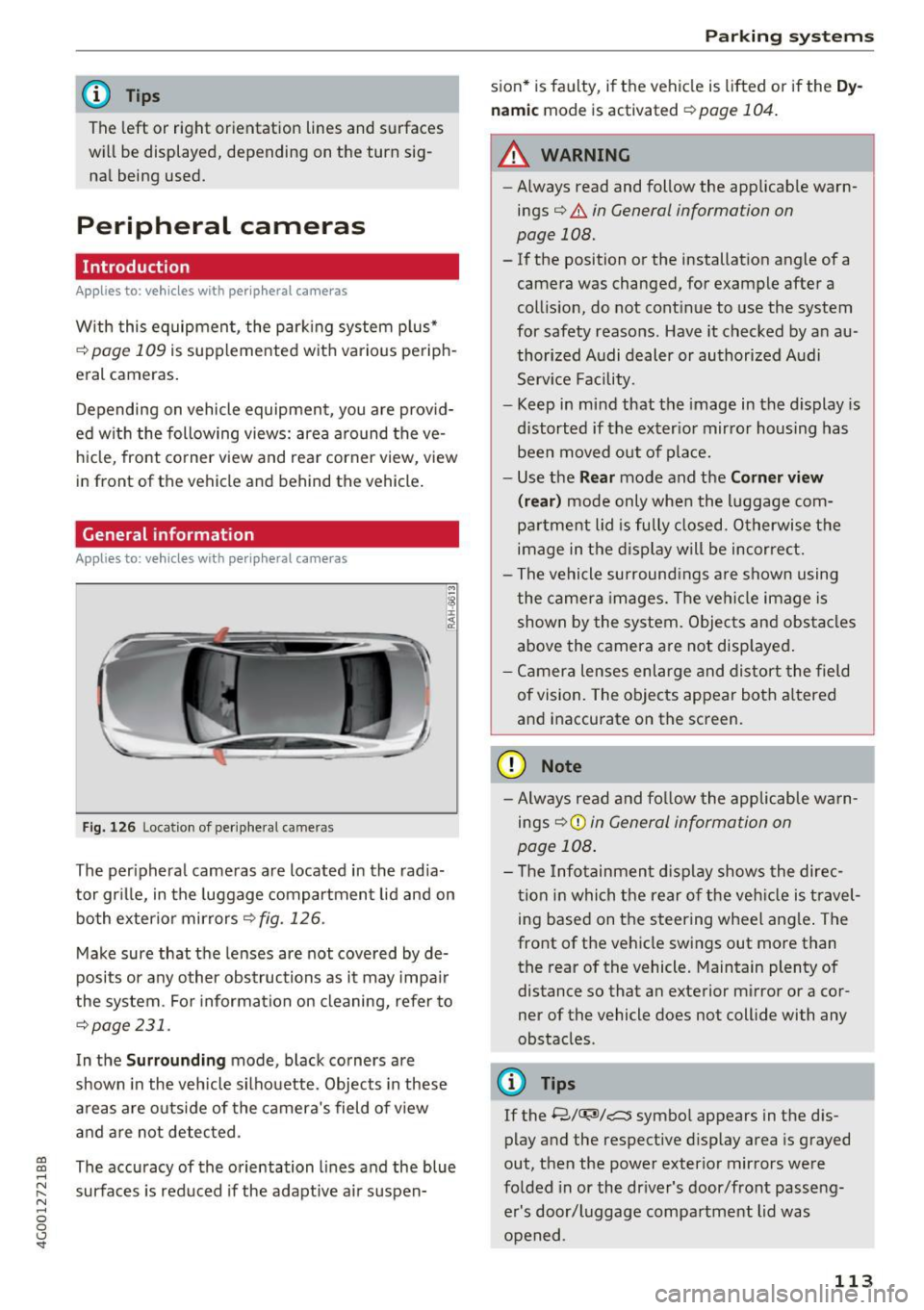
Fig. 126 Locatio n of peripheral came ras
The peripheral cameras are located in the radia
tor grille, in the luggage compartment lid and on
both exterior mirrors
r::!;> fig . 126.
Make sure that the lenses are not covered by de
posits or any other obstructions as it may impair
the system . For information on cleaning, refer to
¢page 231.
In the Surrounding mode, black corners are
shown in the vehicle silhouette. Objects in these
areas are outside of the camera's field of view
and are not detected .
The accuracy of the orientation lines and the blue
surfaces is reduced if the adaptive air suspen-
Parking systems
sion* is faulty, if the vehicle is lift ed or if the Dy
namic
mode is activated ¢ page 104.
.&_ WARNING
-
-Always read and follow the applicable warn-
ings¢ .&.
in General information on
page 108.
- If the position or the installation angle of a
camera was changed, for example after a
collision, do not continue to use the system
for safety reasons . Have it checked by an au
thorized Audi dealer or authorized Audi
Service Facility .
- Keep in mind that the image in the display is
distorted if the exterior mirror housing has
been moved out of place.
- Use the
Rear mode and the Corner view
(rear)
mode only when the luggage com
partment lid is fully closed . Otherwise the
image in the display will be incorrect.
- The vehicle surroundings are shown using
the camera images. The vehicle image is
shown by the system. Objects and obstacles
above the camera are not displayed.
- Camera lenses enlarge and distort the field
of vision. The objects appear both altered
and inaccurate on the screen.
(D Note
- Always read and follow the applicable warn
ings
9 (£) in General information on
page 108.
- The Infotainment display shows the direc
tion in which the rear of the vehicle is travel
ing based on the steering wheel angle. The
front of the vehicle swings out more than
the rear of the vehicle. Maintain plenty of
distance so that an exterior mirror or a cor
ner of the vehicle does not collide with any
obstacles .
@ Tips
If the 8/u;ri/r::::::5, symbol appears in the dis
play and the respective display area is grayed
out, then the power exterior mirrors were
folded in or the driver's door/front passeng
er's door/luggage compartment lid was
opened .
113
Page 118 of 280
Parking system s
You can choose between three different views in
this mode.
.,. To cross park, parallel park or position the vehi
cle in front of a tra iler*, press the control but
ton ® on the contro l pane l repeatedly unt il the
symbol for the des ired mode is selected .
Perpendicular parking
Applies to: ve hicles w ith perip hera l cameras
This view may be used when parking in a garage
or in a parking space .
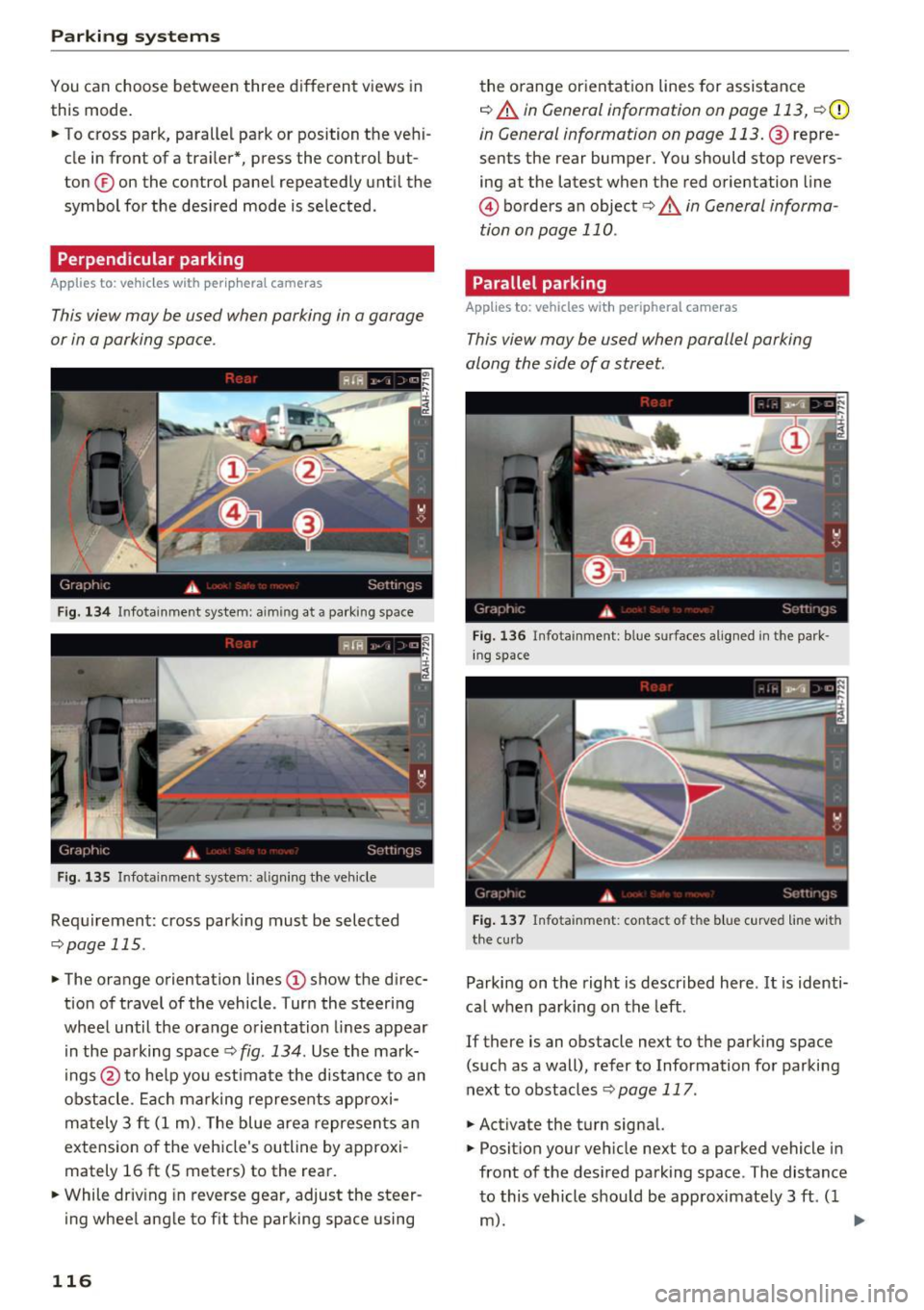
Fig . 13 4 Infotainment system: aiming at a parking space
Fig . 135 Infotainment system: aligning the veh icle
Requ irement: cross park ing must be selec ted
q page 115 .
.,. The orange orientation lines (D show the d irec
tion of travel of the vehicle . Turn the steering
wheel until the orange orientation lines appear i n the pa rking space ¢
fig. 134 . Use the ma rk
ings @to he lp you estimate the d istance to an
obstacle . Ea ch marking represents approxi
ma tely 3 ft (1 m). The blue area represents an
extension o f the vehicle's outline by approxi
mately 16
ft (S meters) to the rear.
.,. While driv ing in reverse gear, adjust the steer
ing wheel angle to f it the parking space using
116
the o range or ientation lines for assistance
q A in General information on page 113, q (D
in General information on page 113. @repre
sents the rear bumper. You should stop revers
ing at the latest when the red o rientation line
@ borders an object<=>.&. in General informa
tion on page 110.
Parallel parking
App lies to: vehicles wit h peripheral cameras
This view may be used when parallel parking
along the side of a street.
Fi g. 136 I nfota inment: blue surfaces alig ned in the park
in g space
Fig. 13 7 Infota inment: contact of the blue c urved line w ith
the cu rb
Parking on the right is descr ibed here . It is identi
ca l when parking on the left.
If there is an obstacle next to the parking space (such as a wall), refer to Information fo r parking
next to obstacles
q page 117 .
.,. Activate the turn signal.
.,. Posit ion your veh icle next to a parked vehicle in
front of the des ired park ing space . The distance
to this vehicle should be approximate ly 3 ft. ( 1
m). ..,.
Page 119 of 280
co
co
.... N
" N .... 0 0 <.,;) 'SI"
.. Turn the Infotainment system on and shift into
reverse gear. The parking system must be
turned on and the
Cro ss pa rking view must be
displayed .
.. Press the control button on the Infotainment
unit @¢
page 112, fig . 124. The Parall el park
ing
view is displayed .
.. Back up and align your vehicle so the blue area
@ borders on the rear end of the vehicle be
hind yo u or on the parking space line
¢ ,&. in
General information an page 113, ¢(Din Gen
eral information on page 113 .
The blue area
represents an extens ion of the vehicle's out line
by approximately 16 ft (5 mete rs) to the rear .
The long side of the blue area should be on the
curb . The entire blue area must f it into the
parking space .
.,. With the ve hicle stopped, turn the steer ing
wheel to the right as far as it will go .
.. Back into the park ing space until the b lue curve
¢
page 112, fig . 125 tou ches the curb¢,&. in
General information on pag e 113, ¢(Din Gen
eral information on page 113 .
Stop the vehicle.
.. With the vehicle stopped, tu rn the steering
whee l to the left as far as it will go .
.. Cont inue to back into the parking space unt il
the vehicle is parked parallel to the curb¢.&.
in General information on page 113, ¢(Din
General information on page 113.@
repre
sents the rea r bumpe r. At the very latest, stop
the vehicle when the red orientation line @
borde rs an object. Keep an eye on t he front of
your vehicle while doing this .
Parking next to obstacles
If
there is an obstacle (such as a wall) next to the
parking space, pos ition the vehicle so t here is
mo re spa ce on that side. Posi tion the long s ide of
the blue area so th at there is s ufficient space
from the object. The area must not be on the
curb . You will also need to start turning the
steer ing whee l earlier. The blue curve
¢
page 112, fig. 125 must not touch the obsta
cle, but rather there should be enough distance.
Parking systems
(D Tips
The left or right orientation lines and surfaces
will be d isp layed, depend ing on the turn sig
nal be ing used .
Trailer mode
Appl ies to : vehicles with peripheral cameras a nd trai le r hitch
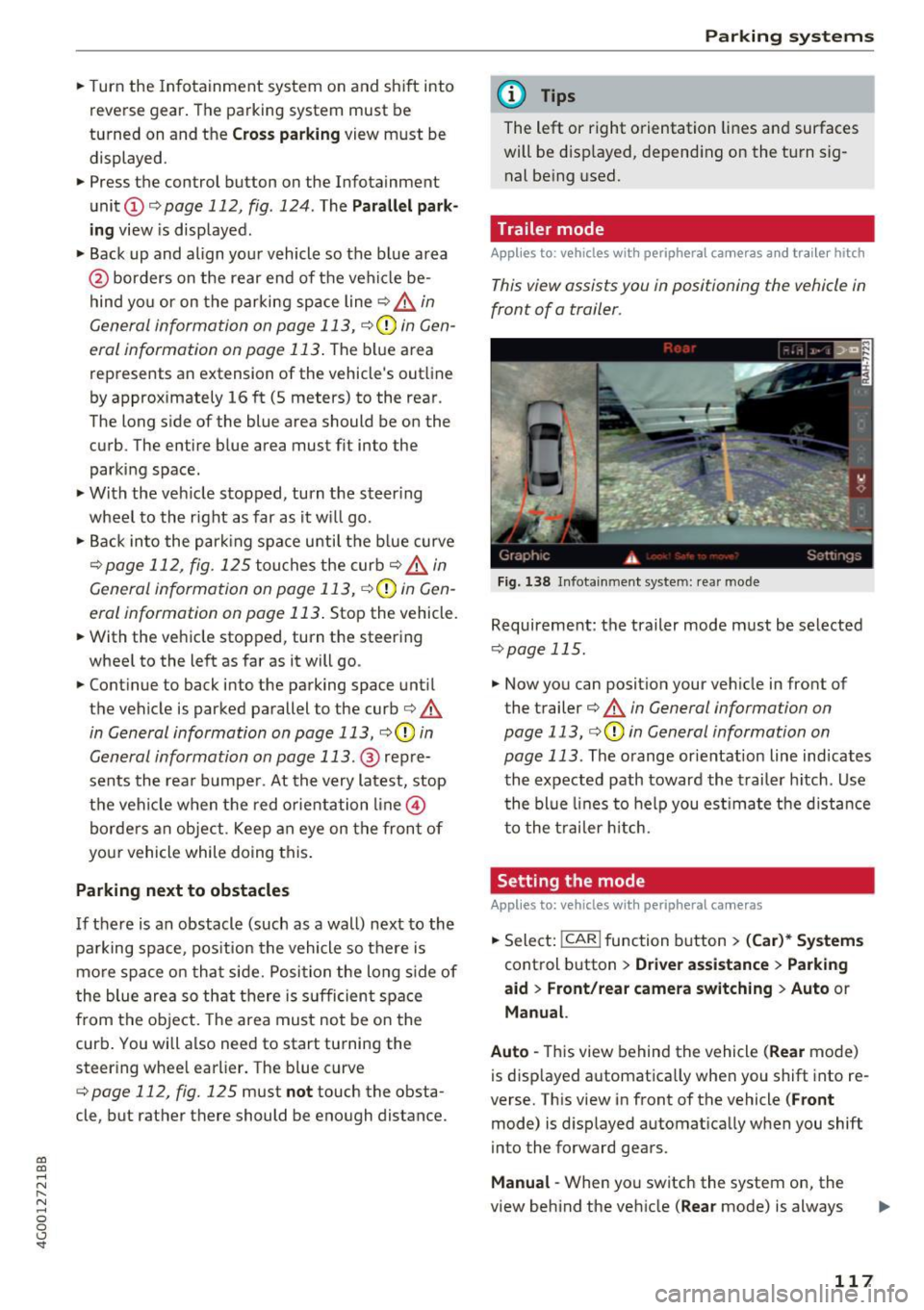
This view assists you in positioning the vehicle in
front of a trailer .
Fig. 1 38 Infot ainme nt syste m: rear mode
Requireme nt: the trailer mode must be selected
¢ page 115 .
.. Now you can posit ion you r ve hicle in front of
the trailer
¢ &. in General information on
page 113, ¢(Din General information on
page 113 .
The orange orientat ion line indicates
th e expected path toward the trailer h itch . Use
t he bl ue lines to help you es timate the d istance
t o the trai ler hitch.
Setting the mode
Appl ies to : vehicles wit h peripheral cameras
.. Sele ct: !CAR ! function button> (Car )* Sy stem s
control button > Driver assistance > Pa rking
aid
> Front /re ar camera swit ching > Auto or
M anual.
Auto -
This view behind the vehicle (Rear mode)
is disp layed automatically when you shift into re
verse. This view in front of the vehicle
( Front
mode) is d isplayed automat ica lly when you shift
into the forward gears.
Manu al -When you switch the system on, the
view beh ind the veh icle
(Rear mode) is always
117
Page 122 of 280
Intelligent Technology
Intelligent Technology
Electronic Stabilization
Control (ESC)
Description
Elect ronic Stabilization Control (ESC) suppo rts
driver safety.
It red uces the risk of slipping and
improves dr iving stability. ESC detects crit ica l sit
uations such as the veh icle oversteering and un
dersteering or the wheels are sp inning. The vehi
cle is stabilized by app lying the brakes or reduc
ing engine torque. As soon as the ESC is active ly
regulat ing, the
D.1 indicato r light blin ks in the in
s trumen t clus ter.
The fo llow ing systems are integrated in the ESC :
Ant i-lock braking system (ABS)
ABS p revents the whee ls from locking whe n brak
ing. The vehicle can sti ll be steered even during
hard brak ing. Apply steady press ure to the brake
pedal. Do not pump the pedal. A puls ing in t he
b rake pedal indicates that the system is acting to
s tabilize the vehicle .
Br ake assist system
The brake assist system can decrease brak ing dis
tance . It increases brak ing power when the driver
presses the brake pedal q uick ly in emergency sit
uations . You must press and hold t he b rake pedal
until the dangerous sit uat io n is over . In veh icles
with adapt ive c ruise control*, the bra ke as sist
sy stem is more sensitive if t he di sta nce detec ted
t o the vehicle dr iv ing ahead is too small. On
ve hicl es with act ivated and f unct io ni ng night vi
sion assist*, the brake assist system can respond mo re sensit ively if there is a warning .
Anti-slip regulation (ASR)
ASR red uces eng ine power when the drive w heels
be gin sp inning an d adapts the force to the road
conditions. This makes it easie r to sta rt, acceler
ate and dr ive up h ills.
Electronic differential lock (EDL)
T he EDL applies the b rakes to a whee l t h at s tarts
sp inning and tra nsfe rs t he dr ive powe r to t he
o ther driving wheel or wheels (if the veh icle is
120
equipped with a ll w hee l drive*) . T h is f unction is
not avai lab le at higher speeds .
I n extreme cases , EDL automat ic al ly swi tches off
to keep t he b rake o n the br aked wheel from ove r
heating. The ve hicle is still working correct ly. ED L
will switc h on again automatically when condi
tions have returned to normal.
Steering recommendation
The ESC he lps to s tabili ze th e vehicle by ch ang ing
t h e s teer ing torque.
I n veh icles with dynamic s teer ing*, ESC a lso
helps to stab ilize the s teeri ng in cr it ic al situ a
tions.
Selective wheel torque control
Se lective wheel to rque control is used when d riv
i ng on curves . The front whee l on the ins ide of
t h e curve or both whe els on the i nside of th e
cu rve are braked se lectively as needed. This al
l ows mo re pre cise driving in curves .
Automatic post -collision braking system
The "a utomat ic post -coll is io n braking system"
can help to reduce the risk of sl iding and of addi
tiona l co llisions after an acc iden t. If the a irbag
c on tro l modu le dete cts a collision above a cer tain
vehicle speed, the veh icle is braked by t he ESC.
The veh icle does not brake automatically if:
- the drive r presses the accelerator pedal, or
- the bra king force generate d by the pressed
brake pedal is greater than the b raking force
that would be in itiated by the system, or
- the ESC, the bra ke system or the vehicle elect ri
cal system are not functioning.
A WARNING
- The ESC and its integ rated systems can not
overcome the lim its imposed by natura l
p hys ica l laws. Th is is es pec ially i mpo rtan t
on s lippery or we t roads. If the system s be
g in a cting to s tabili ze yo ur vehicle, you
should immedi ately alte r your speed to
match the road and tra ffi c conditions. Do
not let the inc reased safety provided tempt
Page 125 of 280
co
co
.... N
" N .... 0 0 <..:l '
plying the brakes carefully several times
dries the brakes and removes ice bui ld-up.
- The effic iency of the brakes can also be im
paired by driving for long stretches on roads
covered w ith salt without using the brakes.
You can remove salt deposits from the brake rotors and pads by ca ref ull y applyi ng
the brakes severa l t imes.
- If the front spo iler is damaged or you install
another spoiler, ma ke sure the front w heel
bra kes are vent ilated p roperly. O therwise,
t h e brake syste m could ove rheat, wh ic h re
duces the ir effec tiveness.
- Failure of a bra ke circuit impai rs b raking
performan ce, which incre ases bra king dis
tance . Avoid driving the vehicle and have it
towed it to the nearest authorized A udi
dealer or author ized Audi Service Facility .
- If the brake booste r is not working, you wi ll
have to press m uch ha rder on the bra ke
peda l to compensate for the lac k of the
booster.
(D Note
- Never let the brakes "rub" by pressing the
p edal light ly when bra king is not actually
necessa ry. This causes the brakes to over
heat and increases bra king d istance and
causes wear.
- Befo re driving downh ill a long distance on a
steep h ill, decrease your speed and select a
l ower gear. This makes use of the engine
braking effect and relieves the brakes. If
you need to b rake additionally, brake in in
te rvals and not cont inuous ly .
(0 Tips
- If the brake booster is not working, you
must p ress the brake pedal with much mor e
fo rc e th an norma l.
-If you re trofit your vehicle wi th a front spoil
er, whee l covers o r similar items, ma ke sure
t h at t he ai r flow to the front whee ls is not
i nte rru pted. Ot he rw ise the brake sys tem
c a n become too hot.
Intellig ent Technology
Electromechanical
steering, dynamic
steering
The ele ctromechanical s teering supports the
driver's steering movements.
P ower s teer ing adapts electroni cally based on
the ve hicle spee d.
Indicator lights and messages
• Do not dr iv e vehicle: steering defective
If this indicator light turns on and stays on and
t hi s message appears, the power steering may
have failed.
Stop the vehicle in a safe location as soon as pos
s ible. Do
not cont inue driving. See an authorized
Audi dealer or authorized A udi Service Fac ility for
ass istance.
,~n Stee ring: System fault You can continue
driving
If the indicator light turns on and the message
appea rs, the steering whee l may be more diffi
cul t to move o r more sensitive than us ual. The
steering wheel may also be at an ang le when
driv ing straight.
Drive slowly to an a uth orized Audi dea ler or a u
t h orized Audi Service Facility to have the mal
f unct ion corrected.
,Ion Dynamic steering: Initiali zing
If the indicator light is blinking and this message
appea rs, dynam ic steering* is be ing ini tialized.
T he s teer ing whee l will be easy to move a fter
sta rt ing the engine. Re -ini tialization mig ht be
necessary if the steering w heel was moved hard
to the left and right while the ve hicle was not
moving. The d isp lay turns off if the init ialization
was s uccessful.
(D Tips
- If the . or
,Ion indicato r light only stays on
for a short time, you may continue driving.
- The dynamic steering stability systems
¢ page 120 are not ava ilable in the event of
a system mal function.
IJJ,
123
Page 126 of 280
Intelligent Technology
- For addi tional in format ion on dynamic
steering, refer to
c:> page 104.
ALL wheel drive (quattro)
Applies to: vehicles with all wheel drive
In oil wheel drive, all four wheels ore powered.
General information
In a ll wheel d rive, the d rivi ng power is divided be
t ween a ll four wheels. Th is happens au tomatical
ly depending on your driving behavior as well as
the current road cond itions. Also see
c::> page 120, Electronic Stabilization Control
(ESC) .
A center differentia l distrib utes the driv ing power
variably to the front and rear axle. It works to
gethe r with selective wheel torq ue control, which
activates when driving through curves
c::> page 120. With the sport differentia l", power
d istr ibut ion to the rear wheels is variable and can
be ad justed w ith drive select
c::> page 104.
The a ll wheel drive concept is designed for h igh
engine power. Your ve hicle is exceptionally pow
erful and has excellent driving characterist ics
both under normal dr iv ing condit ions and on
snow a nd ice . Always read and fo llow safety pre
cautions
c::> ,& .
Winter tires
By us ing a ll wheel drive, your vehicle has good
forward mot io n with standard t ires in winter con
d itions . However, in winter we recommend using
w inter or all season t ires on all fo ur wheels, be
cause th is w ill improve the b raking effe ct.
Snow chains
If there are snow chain laws, snow chains must
also be used on vehicles with all wheel drive
c::> page 226, Snow chains .
Replacing tires
For vehicles w ith all wheel dr ive, only whee ls with
the same rolling circumference should be used .
Avoid using t ires with different tread depths
c::> page 217, New tires or wheels .
124 Offroad vehicle?
You
r A udi is no t an off road vehicle -there is not
eno ugh ground clearan ce . F or this reason, avoid
difficult terra in .
_&. WARNING
- Also, in veh icles with all wheel drive, adapt
your driving sty le to the current road and
traffic conditions. Do not let the increased
safety provided tempt you into taking r isks,
because this inc reases the risk of an acc i
dent .
- The b raking ab ility of your vehicle is limited
to the t raction of the whee ls . In this way, i t
is not different from a two wheel d rive vehi
cle. Do not be tempte d to accelerate to a
hig h speed when the ro ad i s slip pery, be
cause th is increases the r is k of an accident .
- Note that on wet s treets, the front wheels
c a n " hyd ropla ne" if driv ing a t spee ds tha t
are too h igh. Unlike front wheel drive
veh icles, t he engine does not rev higher sud
de nly when t he vehicle begins hydroplan ing.
For this reason, adapt yo ur speed to the
road conditions to reduce the risk of an acci
de nt.
Energy management
The starting ability is optimized
The energy management system manages the
elec trical energy distribution and optimi zes the
availability of electri cal energy for starting the
engine .
When a vehicle wi th a conventiona l energy sys
tem is no t driven for a l ong time , the veh icle ba t
te ry is d raine d by equ ipment ( fo r example, the
immo biliz er). In certa in circ umstances, there
could may not be enough energy to start the en
gine.
Yo ur vehicle is equipped with an inte lligen t ener
gy management system fo r dist ributing elec trici
ty. This significantly improves the starting ability
and increases the vehicle battery life . .,.
Page 131 of 280
co
co
.... N
" N .... 0 0 <.,;) 'SI"
.. Make sure to use the right chi ld restraint cor
rectly to protect children
~ page 171 , Child
safety .
.. Sit properly in your seat and make sure that
your passengers do the same¢
page SO, Seats
and storage .
.. Fasten your safety belt and wear it properly . Al
so instruct your passengers to fasten their safe
ty be lts properly ¢
page 139 .
What impairs driving safety?
Safe driving is directly related to the condition of
the vehicle, the driver as well as the driver's abili
ty to concentrate on the road without being dis
tracted.
The driver is responsible for the safety of the ve
h icle and all of its occupants. If you r ability to
d rive is impaired, safety risks for eve rybody in the
veh icle increase and you also become a hazard to
everyone else on the road ¢A -Therefore :
.. Do not let you rself be dist racted by passengers
or by us ing a cellular te lephone .
.. NEVER dr ive when your dr iv ing ability is im
paired (by medications, alcohol, drugs, etc.).
.. Observe all traff ic laws, rules of the road and
speed limits and plain common sense.
.. ALWAYS adjust your speed to road, traffic and
weather cond itions.
.. Take frequent breaks on long trips. Do not drive
for more than two ho urs at a stretch .
.. Do NOT drive when you are tired, under pres
s ur e o r when you are st ressed.
_& WARNING
Impaired dr iv ing safe ty inc reases the risk of
ser ious personal inju ry and death whenever a
vehicle is being used.
.
Dr iving safety
Correct passenger
seating positions
Proper seating position for the driver
The proper driver seating position is important
for safe, relaxed driving .
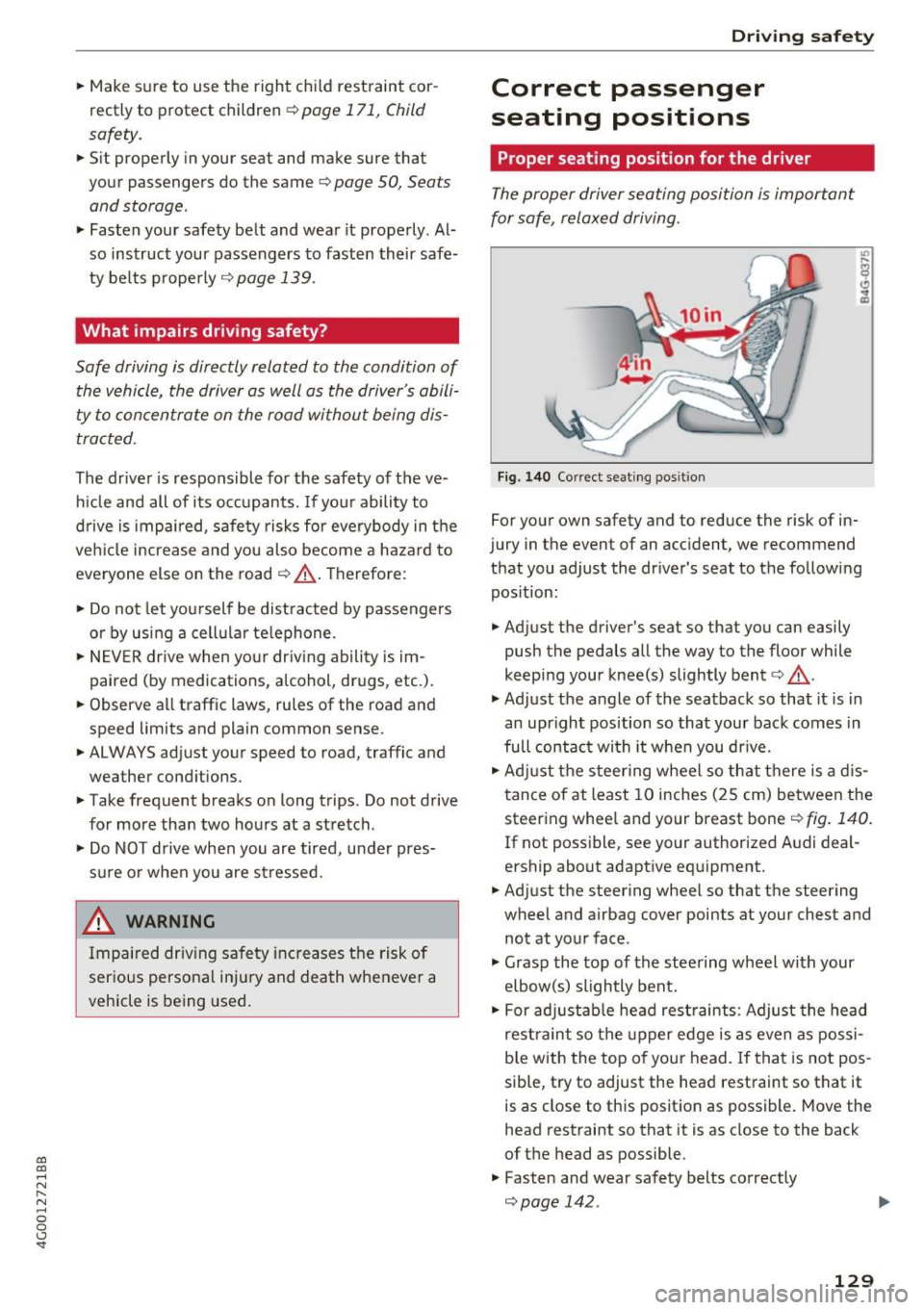
F ig. 140 Correct seat ing pos it io n
For your own safety and to reduce the risk of in
jury in the event of an accident, we recommend
that you adjust the dr iver 's seat to the fo llowing
pos ition:
.. Adjust the driver's seat so that you can easily
push the pedals all the way to the floor while
keep ing your knee(s) slightly bent¢&. -
.,. Adjust the angle of the seatback so that it is in
an upright position so that your back comes in
full contac t wi th it when you dr ive .
.. Adj ust the steer ing wheel so that there is a d is
tance of at least 10 inches (25 cm) between the steering whee l and your breast bone¢
fig. 140.
If not poss ible, see your author ized A udi deal
ership about adapt ive equipment.
.. Adjust the steering wheel so that the steering
wheel and airbag cover points at your chest and
not at your face .
.,. Grasp the top of the steering wheel with your
elbow(s) slightly bent.
.. For adjustab le head rest raints: Adjust the head
rest raint so the upper edge is as even as possi
b le with the top of your head. If that is not pos
sible, t ry to adjust the head restraint so that it
is as close to this posit ion as possible. Move the
head restraint so that it is as close to the back
of t he head as possible.
.. Fasten and wear safety belts correctly
Qpage 142. ..,.
129
Page 132 of 280
Driving safety
"' Always keep both feet in the footwell so that
you are in control of the vehicle at all times.
For detailed information on how to adjust the
driver's seat, see
c;, page SO.
A WARNING
Drivers who are unbelted, out of position or
too close to the airbag can be seriously in
jured by an airbag as it unfolds . To help re
duce the risk of serious personal injury:
- Always adjust the driver's seat and the
steering wheel so that there are at least
10 inches (25 cm) between your breastbone
and the steering wheel.
- Always adjust the driver's seat and the
steering wheel so that there are at least
4 inches (10 cm) between the knees and the
lower part of the instrument panel.
- Always hold the steering wheel on the out
side of the steering wheel rim with your
hands at the 9 o'clock and 3 o'clock posi
tions to help reduce the risk of personal in
jury if the driver's airbag inflates.
- Never hold the steering wheel at the
12 o'clock position or with your hands at
other positions inside the steering wheel
rim or on the steering wheel hub. Holding
the steering wheel the wrong way can cause
serious injuries to the hands, arms and head if the driver's airbag inflates.
- Pointing the steering wheel toward your
face decreases the ability of the su pplemen
tal driver's airbag to protect you in a colli
sion.
- Always sit in an upright position and never lean against or place any part of your body
too close to the area where the airbags are
located .
- Before driving, always adjust the front seats
properly and make sure that all passengers
are properly restrained .
- For adjustable head restraints: before driv
ing, always also adjust the head restraints
properly .
- Never adjust the seats while the vehicle is
moving. Your seat may move unexpectedly
and you could lose control of the vehicle.
130
-
-Never drive with the backrest reclined or
tilted far back! The farther the backrests are
tilted back, the greater the risk of injury due
to incorrect positioning of the safety belt
and improper seating position .
- Children must always ride in child seats
c;,page 171. Special precautions apply
when installing a child seat on the front
passenger seat
c:;, page 147.
Proper seating position for the front
passenger
The proper front passenger seating position is
important for safe, relaxed driving.
For your own safety and to reduce the risk of in
jury in the event of an accident , we recommend
that you adjust the seat for the front passenger
to the following position:
"'Adjust the angle of the seatback so that it is in
an upright position and your back comes in full
contact with it whenever the vehicle is moving.
"'For adjustable head restraints: adjust the head
restraint so the upper edge is as even as possi
ble with the top of your head. If that is not pos
sible, try to adjust the head restraint so that it
is as close to this position as possible
c:;, page 131 . Move the head restraint so that it
is as close to the back of the head as possible.
"' Keep both feet flat on the floor in front of the
front passenger seat .
"' Fasten and wear safety belts correctly
c;,page 142.
For detailed information on how to adjust the
front passenger's seat, see
c:;, page SO .
A WARNING
Front seat passengers who are unbelted, out
of position or too close to the airbag can be
seriously injured or killed by the airbag as it
unfolds. To help reduce the risk of serious
personal injury:
- Passengers must always sit in an upright po
sition and never lean against or place any part of their body too close to the area
where the airbags are located.
Ill-
Page 142 of 280
Safety belts
Why use safety belts?
Frontal collisions and the law of physics
Frontal crashes create very strong forces for peo
ple riding in vehicles .
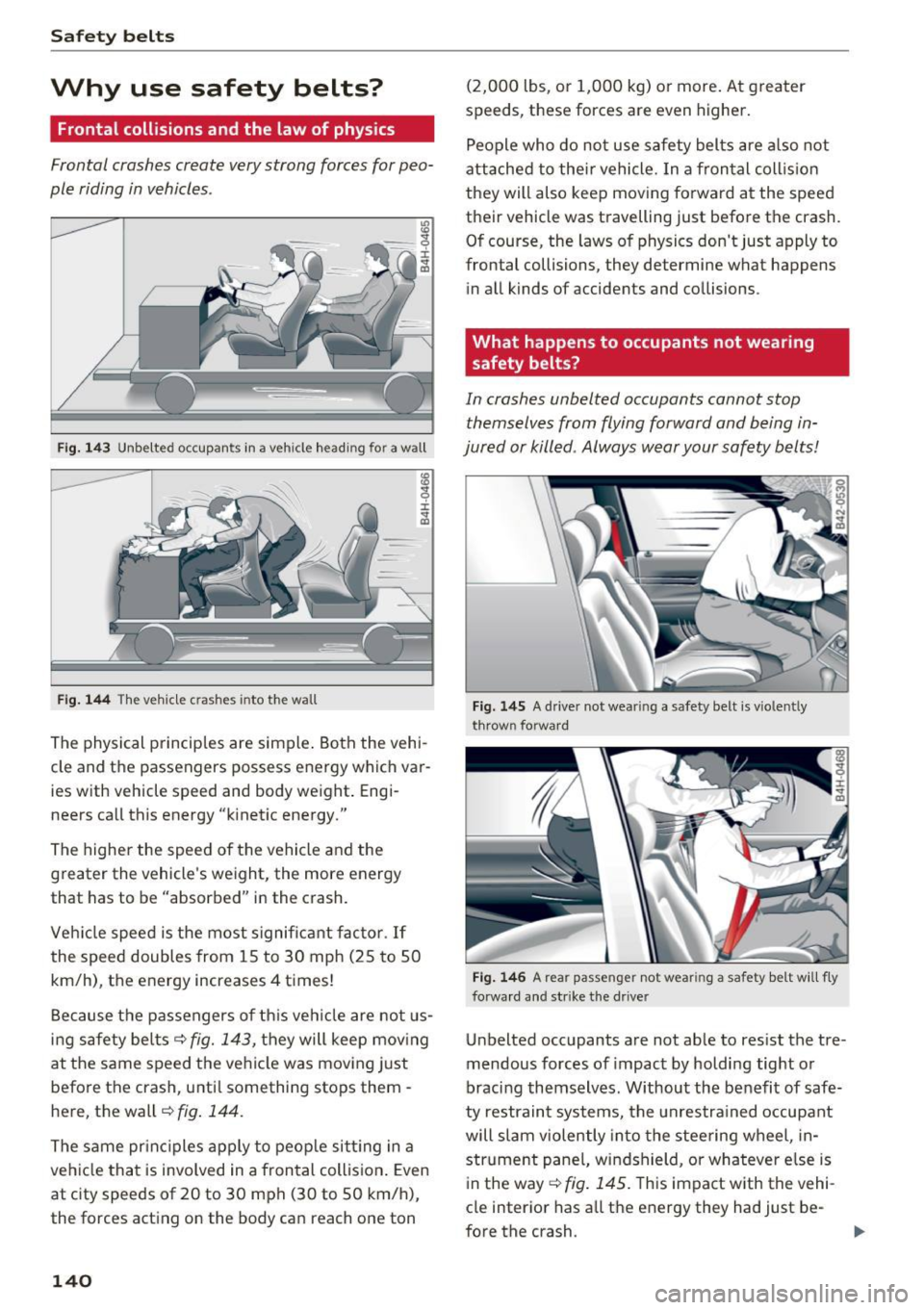
Fig. 143 Unbelted occupants in a veh icle headi ng fo r a wall
Fig. 144 The vehicle c rashes into the wall
The physical principles are simple. Both the vehi
cle and the passengers possess energy which var ies w ith vehicle speed and body weight . Engi
neers call this energy "k inetic energy."
The higher the speed of the vehicle and the
greater the vehicle's weight, the more energy
that has to be "absorbed" in the crash.
Vehicle speed is the most significant factor .
If
the speed doubles from 15 to 30 mph (25 to 50
km/h), the energy increases 4 times!
Because the passengers of this vehicle are not us
ing safety belts
~fig. 143, they will keep moving
at the same speed the vehicle was moving just
before the crash, unti l something stops them -
here, the wall~
fig. 144.
The same principles apply to people sitting in a
vehicle that is involved in a frontal collision . Even
at c ity speeds of 20 to 30 mph (30 to 50 km/h),
the forces acting on the body can reach one ton
140
(2,000 lbs, or 1,000 kg) or more . At greater
speeds, these forces are even higher.
People who do not use safety belts are also not
attached to their vehicle. In a frontal collision
they will also keep moving forward at the speed
their vehicle was travelling just before the crash.
Of course, the laws of physics don't just apply to
frontal collisions, they determine what happens in all kinds of accidents and collisions .
What happens to occupants not wearing
safety belts?
In crashes unbelted occupants cannot stop
themselves from flying forward and being in
jured or killed . Always wear your safety belts!
Fig. 145 A drive r not wea ring a safety belt is vio len tly
t hrow n forward
Fig. 146 A rear passe nge r not wear ing a sa fety belt will f ly
forward an d str ike the driver
Unbelted occupants a re not able to res ist the tre
mendous forces of impact by holding tight or
bracing themselves. Without the benefit of safe
ty restraint systems, the unrestra ined occupant
will slam violently into the steering wheel, in
strument pane l, windshield, or whatever e lse is
in the way ~
fig. 145. T his impact with the vehi
cle interior has all the energy they had just be-
fore the crash.
liJJ,-
Page 149 of 280
co
co
.... N
" N .... 0 0 <..:l '
Important information
Importance of wearing safety belts and
sitting properly
Airbags are only supplemental restraints. For
airbags to do their job, occupants must always
properly wear their safety belts and be in a prop er seating position.
For your safety and the safety of your passen
gers, before driving off, always:
.,. Adjust the driver's seat and steering wheel
properly
9 page 129,
.,. Adjust the front passenger's seat properly
9page 50,
.,. Wear safety belts properly 9 page 141,
.,. Always properly use the proper child restraint
to protect children
9 page 171.
In a collision, airbags must inflate within the
blink of an eye and with considerable force. The
supplemental airbags can cause injuries if the
driver or the front seat passenger is not seated
properly. Therefore in order to help the airbag to
do its job, it is important, both as a driver and as
a passenger to sit properly at all times.
By keeping room between your body and the
steering wheel and the front of the passenger
compartment, the airbag can inflate fully and
completely and provide supplemental protection in certain frontal collisions
o page 129, Correct
passenger seating positions.
For details on the
operation of the seat adjustment controls
opageSO.
It's especially important that children are proper
ly restrained
9page 171.
There is a lot that the driver and the passengers
can and must do to help the individual safety fea
tures installed in your Audi work together as a
system.
Proper seating position is important so that the
front airbag on the driver side can do its job. If
you have a physical impairment or condition that prevents you from sitting properly on the driver
seat with the safety belt properly fastened and
Airbag system
reaching the pedals, or if you have concerns with
regard to the function or operation of the Ad
vanced Airbag System, please contact your au
thori zed Audi dealer or qualified workshop, or
call Audi Customer Relations at 1-800-822-2834
for possible modifications to your vehicle.
When the airbag system deploys, a gas generator
will fill the airbags, break open the padded cov ers, and inflate between the steering wheel and
the driver and between the instrument panel and
the front passenger. The airbags will deflate im
mediately after deployment so that the front oc
cupants can see through the windshield again
without interruption.
All of this takes place in the blink of an eye, so
fast that many people don't even realize that the
airbags have deployed. The airbags also inflate
with a great deal of force and nothing should be
in their way when they deploy. Front airbags in
combination with properly worn safety belts slow
down and limit the occupant's forward move
ment. Together they help to prevent the driver
and front seat passenger from hitting parts of
the inside of the vehicle while reducing the forces
acting on the occupant during the crash. In this
way they help to reduce the risk of injury to the
head and upper body in the crash. Airbags do not
protect the arms or the lower parts of the body.
Both front airbags will not inflate in all frontal
collisions . The triggering of the airbag system de
pends on the vehicle deceleration rate caused by
the collision and registered by the electronic con
trol unit . If this rate is below the reference value
programmed into the control unit, the airbags
will not be triggered, even though the car may be badly damaged as a result of the collision. Vehi
cle damage, repair costs or even the lack of vehi
cle damage is not necessarily an indication of
whether an airbag should inflate or not.
Since the circumstances will vary considerably between one collision and another, it is not possi
ble to define a range of vehicle speeds that will
cover every possible kind and angle of impact
that will always trigger the airbags. Important
factors include, for example, the nature (hard or
soft) of the object which the car hits, the angle of
impact, vehicle speed, etc. The front airbags will
II>
147