wheel AUDI A6 2017 Owner's Manual
[x] Cancel search | Manufacturer: AUDI, Model Year: 2017, Model line: A6, Model: AUDI A6 2017Pages: 280, PDF Size: 70.24 MB
Page 91 of 280
co
co
.... N
" N .... 0 0 <.,;) 'SI"
- With stationary objects~ page 90.
A WARNING
Always pay attention to traffic when adapt ive
cruise control is switched on and braking
guard is active . As the dr iver, you are still re
sponsible for starting and for maintaining
speed and d istance to other objects. Braking
guard is used to assist you . The driver must
always take action to avoid a collision . The
driver is always responsib le for brak ing at the
co rrect time .
- For safety reasons, do not use adapt ive
cruise co ntro l when driv ing on ro ads w ith
many curves, when the road su rface is in
poor condit ion and/or in bad weather (s uch
as ice, fog, grave l, heavy rain and hydrop la n
ing). Using the system under these condi
t ions increases the risk of an accident.
- Switch adaptive cruise contro l off tempora
rily when driving in turning lanes, on ex
pressway exits or in construction zones. This
prevents the vehicle from accelerating to
the stored speed when in these situations .
- The adapt ive cru ise control system will not
brake by itself if you put your foot on the ac
celerator pedal. Doing so can overr ide the
speed and distance regulation .
- When approaching stat ionary objects such
as stopped traffic, adapt ive cru ise control
will not respo nd and braking gua rd will have
l imited func tion .
- The adapt ive cru ise control system and
bra king g uard do not react to people, ani
mals, objects crossing the road or oncom ing
objects.
- T he function of the radar sensors can be af
fec ted by reflec tive objects s uch as guard
rai ls, the ent rance to a tunnel, heavy rain or
ice.
& WARNING
- Improper use of adaptive cruise control can cause collisions, other accidents and serious
persona l injury.
- Never let the comfort and convenience that
adaptive cruise cont rol and braking guard
A ss ist
offe r dist ract you from the need to be alert
to traffic cond itions and the need to remain
in full control of your vehicle at all times,
- Always remember that the adaptive cruise
control and braking guard have limits -they
will not slow the vehicle down or maintain
the set distance when you dr ive towa rds an
obstacle or something on or near the road
that is not moving, s uch as vehicles stopped
in a t raff ic jam, a stalled or disab led vehicle.
If r eg istered by the radar sensors, vehicles
or obsta cles that are not moving ca n trigger
a co llision wa rning and if confirmed by the
video came ra, an acute co llision wa rning .
- Never fo llow a vehicle so closely that you
cannot stop your vehicle safely . The adap
tive cruise contro l cannot slow or brake the
veh icle safely w hen you follow another vehi
cle too closely. A lways remember that the
automatic braking function cannot bring the
veh icle to a sudde n or emergency stop u n
der these conditions .
- To prevent unintended operat ion , always
sw itch ACC off when it is not being used .
(D Note
The sensors can be d isplaced by impacts or
damage to the bumper, wheel housing and
underbody. That could affect the adaptive
cruise contro l system and braking gua rd .
Have an au thorized Audi dealer o r autho rized
A udi Service Fac ility check the ir funct ion.
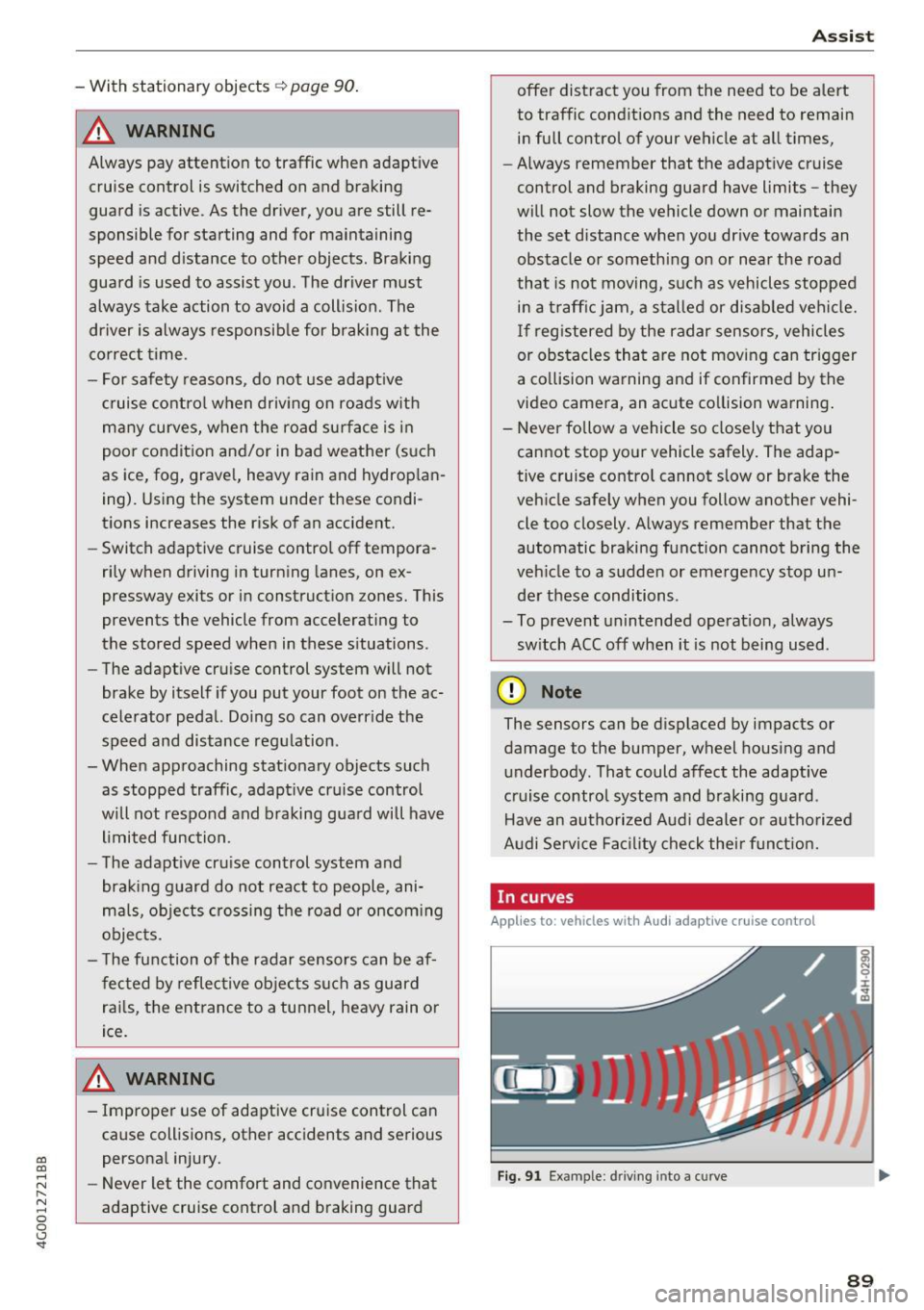
In curves
Applies to: vehicles with Audi adaptive cruise control
I
F ig. 91 Exa mpl e: dri ving into a c urve
89
Page 93 of 280
co
co
.... N
" N .... 0 0 <..:l 'SI'
•-T he automatic braking is not enough to
maintain a sufficient distance to an object ahead.
You must intervene ¢
page 93, Request for
driver intervention.
© In str um ent clust er dis pla y
If adaptive cruise control is not shown in the in
strument cluster display, you can call it up using
the multifunction steering wheel b uttons
¢ page 21.
Based on the graphics in the d isp lay, you can de
termine if the system is maintaining a distance to
the object ahead and what that distance is.
No v ehi cle -No object ahead was detected .
Whit e v ehicle -An object ahead was detected .
Red veh icle -Request for driver intervention
¢page 93.
Both arro ws on the scale© indicate the distance
to the object ahead. No arrow appears when the
vehicle is on an open road and there is no object
ahead .
If an object is detected ahead, the arrow
moves on the scale .
The green zone on the scale indicates the store
distance. For information on changing the dis
tance, refer to ¢
page 92 . If the distance se
lected is exceeded or not reached, the arrow
moves into the red zone on the scale.
A WARNING
If you press the !SETI button when driving at
speeds below 20 mph (30 km/h), the vehicle
accelerates automatically up to 20 mph (30
km/h), which is the minimum speed that can
be set .
(}) Tips
-If yo u switch the ignition or the adapt ive
cruise control system off, the set speed is
erased for safety reasons .
- The elect ronic stabi lization cont rol (ESC)
and the anti-slip-regulation (ASR) are au to
matically sw itched on when the adaptive
cruise control is switched on .
Ass ist
Changing the speed
Applies to: vehicles with Audi adaptive cruise control
0
f
•
0
Fig. 95 Operating lever: changing the speed
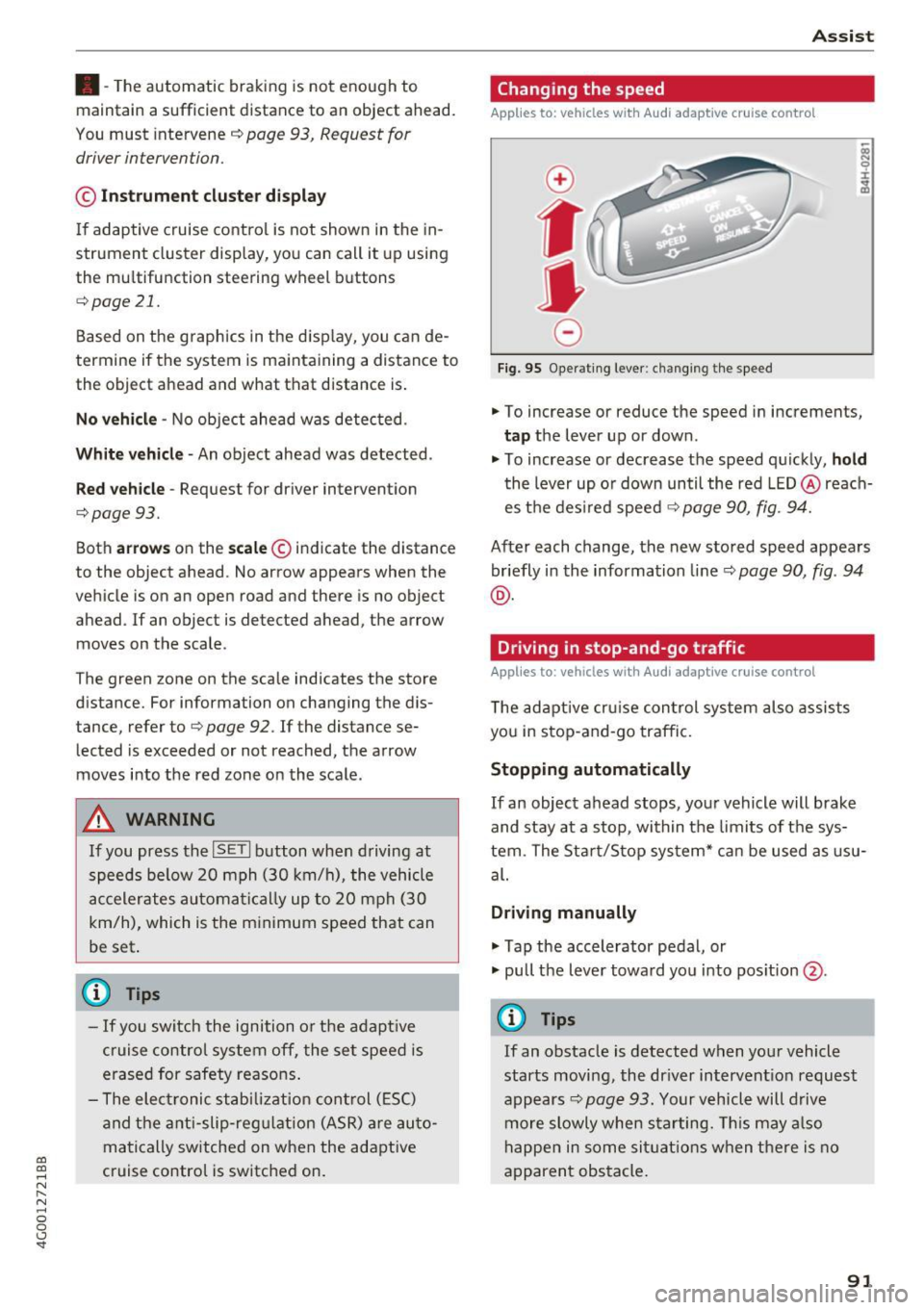
.,. To increase or reduce the speed in increments,
tap the lever up or down .
.. To increase or decrease the speed quickly,
ho ld
the lever up or down until the red LED @reach
es the des ired speed ¢
page 90, fig. 94.
After each change, the new stored speed appears
briefly in the information line¢
page 90, fig. 94
@ .
Driving in stop-and-go traffic
Applies to: vehicles with Audi adaptive cruise control
The adaptive cru ise con trol system also assists
you in stop-and-go traffic.
Stopping automatically
If an object ahead stops, your vehicle will brake
and stay at a stop, within the limits of the sys
tem. The Sta rt/Stop system* can be used as usu
al.
Dri ving manu ally
.,. Tap the accelerator pedal, or
.,. pull the lever toward you into pos ition @.
(D Tips
If an obstacle is detected when your vehicle
starts moving, the dr iver intervent ion request
appears¢
page 93. Your vehicle will drive
more slowly when starting. Th is may a lso
happen in some sit uat ions when there is no
apparent obstacle.
91
Page 98 of 280
Ass is t
D oor open
The adaptive c ruise contro l system cannot sw itch
on when a door is open.
Stat ionar y obj ect ah ead
This message appears if you would like to switch
adapt ive cruise control on and there is a station
ary object or obstacle directly ahead of your vehi
cle .
Audi active Lane assist
Description
Appl ies to: ve hicles w ith Audi active lane assist
Active lane assist detects lane marker lines with
in the limits of the system using a camera in the
windshield. If you are approaching a detected lane marker line and it appears likely that you
will leave the lane, the system will warn you with
correct ive steering . You can ove rride th is steer ing
at any time . If you pass over a line, the steer ing
wheel will v ibrate l ightly. In order for this warn
ing vib ration to occur, it must fi rst be sw itched
on in the Infotainment sys tem . Active lane assist
is ready for operation when the lane marker line
is detected on at least one side of the vehicle .
The system is designed for driving on express
ways and highways and therefore only activates
at speeds above approximately 40 mph (65 km/
h).
A pp lies to: ve hicles w ith s ide assist
If you activate a turn sig na l when active lane as
sist is ready and it classifies a lane change as crit
ical because of vehicles traveling alongside you or
approaching you, there will be noticeab le correc
tive steering shortly before you leave the lane.
This will attempt to keep your vehicle in the lane.
A ppl ies to: ve hicles w ithout s ide ass ist
The system will not warn you before crossing a
lane marker line if yo u have activated the tu rn
signa l. In this case, it ass umes that you are
changing lanes intentiona lly .
A ppl ies to: ve hicles with adaptive cruise co ntrol
The corrective stee ring is targeted based on the
driving situat ion . In addition to the lane marker
96
li nes, the system can a lso take into account other
objects such as guard rails. If they are detected in close prox imity to the ve hicle, active lane assist
helps prevent the vehicle from dr iving too close
to them. There is a lso pass ing ass istance. The
system does not provide any corrective steering if i t detects that you are pass ing another vehicle .
A WARNING
-The system warns the drive r that the vehicle
is leaving the lane using cor rect ive steering.
The drive r is always responsible fo r keeping
the vehicle within the lane.
- The system can help you keep the vehicle in
the lane, but it does not drive by itse lf. Al
ways keep your hands on the steering
wheel.
- Cor rective steering m ay no t occur in certain
si tuations, such as during heavy braking.
- There may be cases where t he camera does
not recognize all lane marker lines . Correc
tive steering can only take place on the s ide
of the vehicle where lane marker lines are
detected.
- Other road structures or objects could possi
bly be identified unintent ionally as lane
marker lines. As a result, corrective steering
may be unexpected or may not occur.
- The camera view can be restricted, for ex
ample by vehicles driving ahead or by rain,
snow, heavy spray or light shining into the
camera . This can result in active lane ass ist
not detecting the lane marker lines or de
tect ing them inco rrectly .
- Under certain cond it ions such as ruts in the
road, a banked roadway or crosswinds, the
corrective steer ing alone may not be enough
to keep the vehicle in the m iddle of the lane.
- For safety reasons, act ive la ne assist must
no t be use d when there are poor road and/
or weather condi tions such as slippery
roads, fog, gravel, heavy rain, snow and the potential for hydrop laning. Using active lane
assist under these conditions may increase
the risk of a crash.
Page 99 of 280
Switching on/off
A ppl ies to: ve hicles with Audi active lane assist
Fig. 100 Turn s ig n al lever: button for active lane ass ist
F ig. 101 Windsh ield: camera window fo r ac tive lane assist
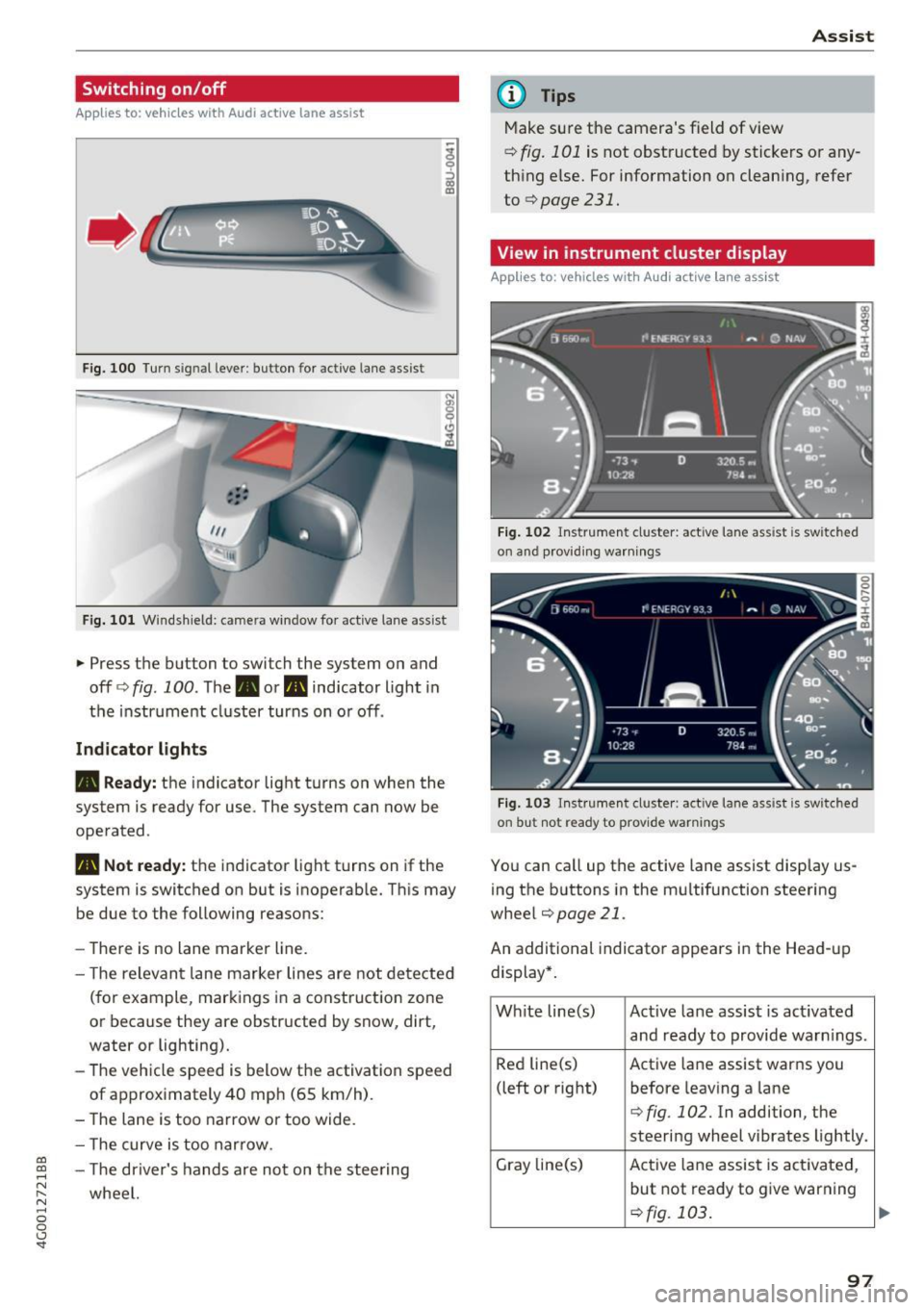
... Press the button to switch the system on and
off ¢fig . 100 . The. or. indicator light in
the instrument cluster turns on o r off .
Indicator lights
• Ready: the indicator light turns on when the
system is ready for use. The system can now be
operated .
., Not ready: the indicator light turns on if the
system is switched on but is inoperab le. Th is may
be due to the following reasons:
- The re is no lane marker line.
- T he relevan t lane marker lines are not detected
(for example, mark ings in a construction zone
or because they are obstructed by snow, dirt,
water or lighting).
- The vehicle speed is below the activation speed
of approx imately 40 mph (65 km/h) .
- The lane is too narrow or too wide.
- The curve is too narrow.
co ~ - The driver's hands are not on the stee ring
~ wheel. N .... 0 0 <.,;) 'SI"
Assist
(D Tips
Make sure the camera's field of view
¢ fig. 101 is not obstructed by stickers or any
thing else. For information on clean ing, refer
to
¢page 231.
View in instrument cluster display
App lies to: vehicles with Audi a ctive la ne ass ist
Fig. 102 Instrument cluster: active lane ass ist is sw itc hed
on and providing warnings
Fig. 103 Instrument cluste r: act ive lane ass ist is sw itc hed
on b ut not ready to provide warnings
You can call up the active lane assist display us
ing the b uttons in the mu ltifunction steering
wheel
¢ page 21 .
An additional indicato r appears i n the Head-up
display*.
White line(s) Active lane assist is act ivated
and ready to provide warn ings .
Red line(s) Active lane assist warns you
(left or right) before leav ing a lane
¢fig . 102. In addition, the
steering wheel vibrates lightly.
Gray line(s) Active lane assist is activated,
but not ready to give warning
¢fig. 103 .
97
Page 100 of 280
Ass is t
Messag es in the instrument cluster display
If the active lane ass ist switches off automatica l
ly, the indicator lig ht in the display turns off and
one of the follow ing messages appears:
Audi acti ve lan e ass ist : Cur rently un availabl e.
No camera vie w
This message appears if the camera is unable to
detect the lines. This co uld happen if :
- The camera field of view
9 page 97, fig . 101 is
dirty or cove red in ice . Clean this area on the
windshield .
- The camera field of v iew is fogged over . Wait
unt il the fog has cleared before sw itch ing the
active lane assist on again .
- The system has been unable to detect the lanes for an extended period of time d ue to road con
ditions . Switch a ctive lane assist back on when
the lines are mo re visible .
Audi acti ve lan e ass ist : Cu rrently un available
There is a temporary active lane assist ma lf u nc
tion . Try sw itching the ac tive lane assist on aga in
la ter.
Audi active lane a ssist : System fault!
Dr ive to an a utho rized Aud i dea le r or a uthorized
Aud i Serv ice Facility immediately to have t he
malfunction corrected.
Audi active lane a ssist : Please take over steering
This message appea rs if you are not steering by
yourself . If th is is the case, active lane assist does
no t swi tch off, but it is "not ready " to provide a
warn ing . The system ca n he lp you keep the veh i
cle in the lane . However, yo u are responsib le for
d riving the vehicle and must steer it yo ursel f.
Adju sting the vibrat ion warning
Applies to: ve hicles with Audi active lane assist
.,. Se lect : th e ICARI function button > (Car )* Sys
tems
control button > Drive r assist ance > Audi
acti ve lane assist .
V ibrat ion warning
You can switch the additional vibration warni ng
in the steer ing wheel o n or off.
98
@ Tips
Your settings are automatically stored and as
signed to the remote contro l key being used.
Audi side assist
Description
App lies to: vehicles with Aud i side ass ist
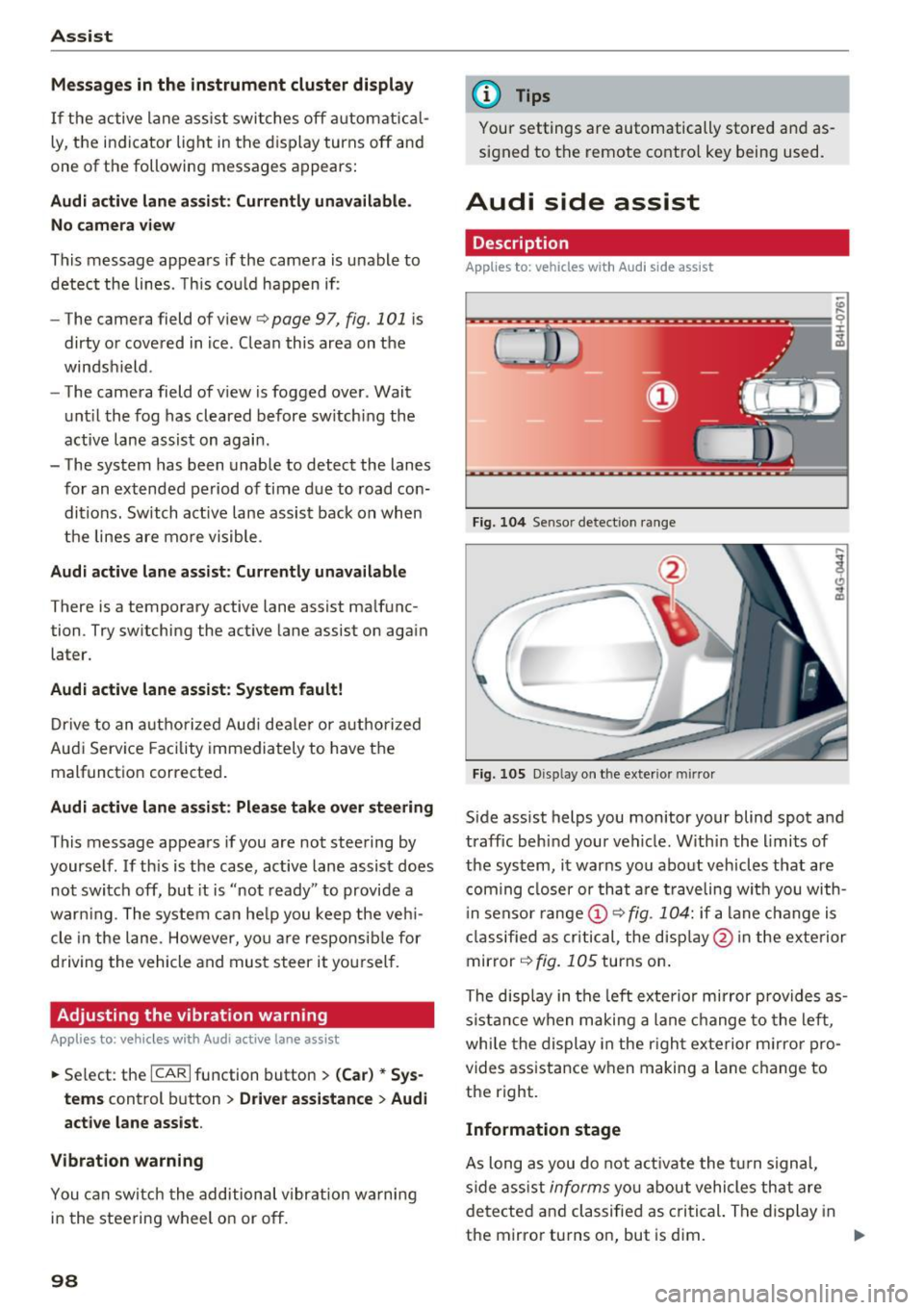
Fi g. 10 4 Senso r detect ion ra nge
Fig. 10 5 Dis pla y on t he exterio r mirr or
Side assist helps you monitor your blind spot and
traffic behind your vehicle. W ithin the limits of
the system, it warns you abo ut vehicles that are
coming closer or th at a re t raveling wit h you with
i n senso r range @
9 fig. 104: if a lane change is
classified as cri tical, the disp lay @ in the exte rior
mirror
9 fig. 105 turns on .
The disp lay in the left exte rio r mirror prov ides as
s ista nce when making a lane change to the left ,
whi le the display in the r igh t exterior m irror pro
vides assistance w hen making a lane c hange to
the right.
Information stage
As long as you do not a ct iva te the t urn signal,
side ass ist
informs yo u about vehicle s th at are
detected a nd classified as c rit ical. The di splay in
t he mirror turns on, but is dim. ""
Page 102 of 280
Assist
system may have detected a vehicle in another
lane that is
not adjacent to your current lane.
- If you are driving through a curve. Side assist
may react to a vehicle that is one lane over
from the adjacent lane.
- If side assist reacts to other objects (such as
high or displaced guard rails).
- In poor weather conditions. The side assist
functions are limited.
Do not cover the radar sensors <=>
fig. 107 with
stickers, deposits, bicycle wheels or other ob
jects, because they will impair the function. Do not use side assist when towing a trailer. For in
formation on cleaning, see <=>
page 231.
A WARNING
-Always pay attention to traffic and to the
area around your vehicle. Side assist cannot
replace a driver's attention. The driver alone
is always responsible for lane changes and
similar driving maneuvers.
- In some situations, the system may not
function or its function may be limited. For
example:
- If vehicles are approaching or being left
behind very quickly. The display may not
turn on in time.
- In poor weather conditions such as heavy
rain, snow or heavy mist.
- On very wide lanes, in tight curves, or if
there is a rise in the road surface. Vehicles
in the adjacent lane may not be detected
because they are outside of the sensor
range.
- Audi side assist cannot detect all vehicles under all conditions, which can increase the
risk of accidents.
- Please note that side assist only displays ap proaching vehicles or vehicles in your blind
spot if your vehicle is traveling at least
19 mph (30 km/h).
- In certain situations, the system may not
work or its function may be limited. For ex
ample:
- The display may not turn on at the right
time if veh ides are approaching or passing
very quickly.
100
-
-In poor weather conditions, such as heavy
rain, snow or fog.
- In very wide lanes, in tight curves or when
there are slopes in the roadway, vehicles
in the neighboring lanes may not be de
tected because they a re outside of the
sensor range.
(D Note
The sensors can be displaced by impacts or
damage to the bumper, wheel housing and
underbody. This can impair the system. Have
an authorized Audi dealer or authorized Audi
Service Facility check their function .
@ Tips
If the window glass in the driver's door or
front passenger's door has been tinted, the display in the exterior mirror may be incor
rect.
- For an explanation on conformity with the
FCC regulations in the United States and the
Industry Canada regulations, see
~page 262.
Switching on and off
Appl ies to : vehicles wi th Audi side ass ist
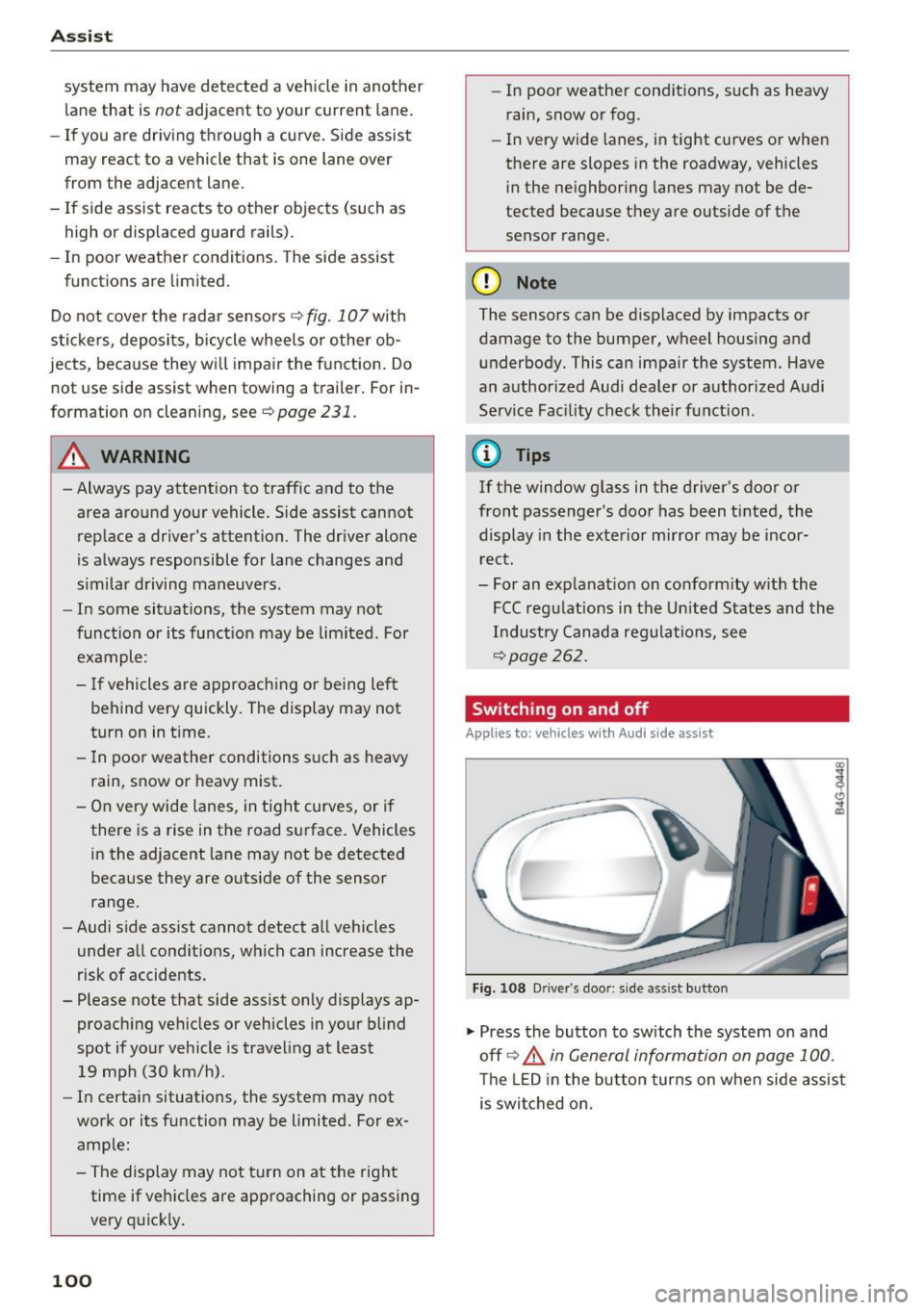
Fig. 108 Driver's door: side assist button
"" Press the button to switch the system on and
off <=>.&
in General information on page 100.
The LED in the button turns on when side assist
is switched on.
Page 103 of 280
co
co
.... N
" N .... 0 0 <..:l -
Applies to: vehicl es with Audi side assist
The display brightness can be adjusted in the In
fotainment system.
.. Se lect: the ICARI function button > ( Car )* Sys
tems
control button > Driver ass istance > Audi
side a ssist .
The display brightness ad justs automat ica lly to
the br ightness of the surroundings, bot h in the
i n formation and in the warning stage . In very
dark or very bright sur roundi ngs, the automatic
ad ju stment will set t he d isp lay to the m inimum
or maxim um level. In such cases, you may no tice
no change when adjus ting the brightness, o r the
change may only be no tic eable once the s ur
ro undings change .
Ad just the b rig htness to a level where the d isp lay
i n the inform ation stage wi ll no t dis rup t your
view ahead. If you change the bright ness, the dis
p lay in the ex terior mir ror will brief ly show the
b rightness level in the information stage . The
b rightness of the warning stage is linked to the
brightness in the informat ion stage and is ad just
ed along with the information stage.
(D Tips
- Side assist is not active wh ile you are ma k
i ng the ad justment.
- Your settings are automatically stored and
ass igned to the remote control key being
u sed.
Messages
App lies to: vehicl es with Audi side assist
If side ass ist switches off by itself, the LED in the
button turns off and a message will appear in the
i nstr ument cluster d isp lay :
Audi side assist: Currently unavailable . No
sensor vision
The rada r senso r vis io n i s impa ired . Do not cove r
the area in front of the senso rs with bike wheels ,
sticke rs, dirt o r othe r objects . Clean t he a rea in
fr on t of the senso rs , if necess ary
c> page 99,
fig. 107 .
Assist
Audi side assist: Currently unavailable
S id e assist c annot be sw itched on at this time be
ca use there is a ma lfunction (for example, the
batte ry c harge leve l may be too low).
Audi side assist: System fault!
T he system cannot gua rantee that it will detect
vehicles cor rect ly a nd i t has switc hed off. The
senso rs have been moved or are f aulty. Have the
system checked by an au thorized Aud i dea ler or
authorized Audi Serv ice Facility soon.
Audi side assist: Unavailable when towing
S ide ass ist swit ches off automatically when a fac
tory- inst alled tra ile r hi tch is con nected to the
elect rica l connec tor on the t rai ler . There is no
guarantee the system will switch off when using
a retrofitted trailer hitch. Do not use side assist
when towing a trai ler.
Night vision assist with
pedestrian and wild
animal detection
Description
Applies to : vehicles with night vision assist
The night vision assist can detect, highlight and,
if necessary, warn about pedestrians and large wild animals.
Night v ision assist w it h pedestrian and w ild a ni
mal detection assists you at nig ht by using an in
frared camera to monitor the a rea in front of
your vehicle, within t he limits of the system. It
can d isplay objects up to a distance of approxi
mately 1000 feet (300 m) . The thermal image
de tected by the camera is show n in the inst ru
me nt cl uster d is pla y. Wa rm areas appear lighter
and co ld areas appear da rker.
101
Page 104 of 280
Ass is t
Highlighting detected pedestrians and wild
animals
A pplies to: ve hicles w ith night vi sion ass ist
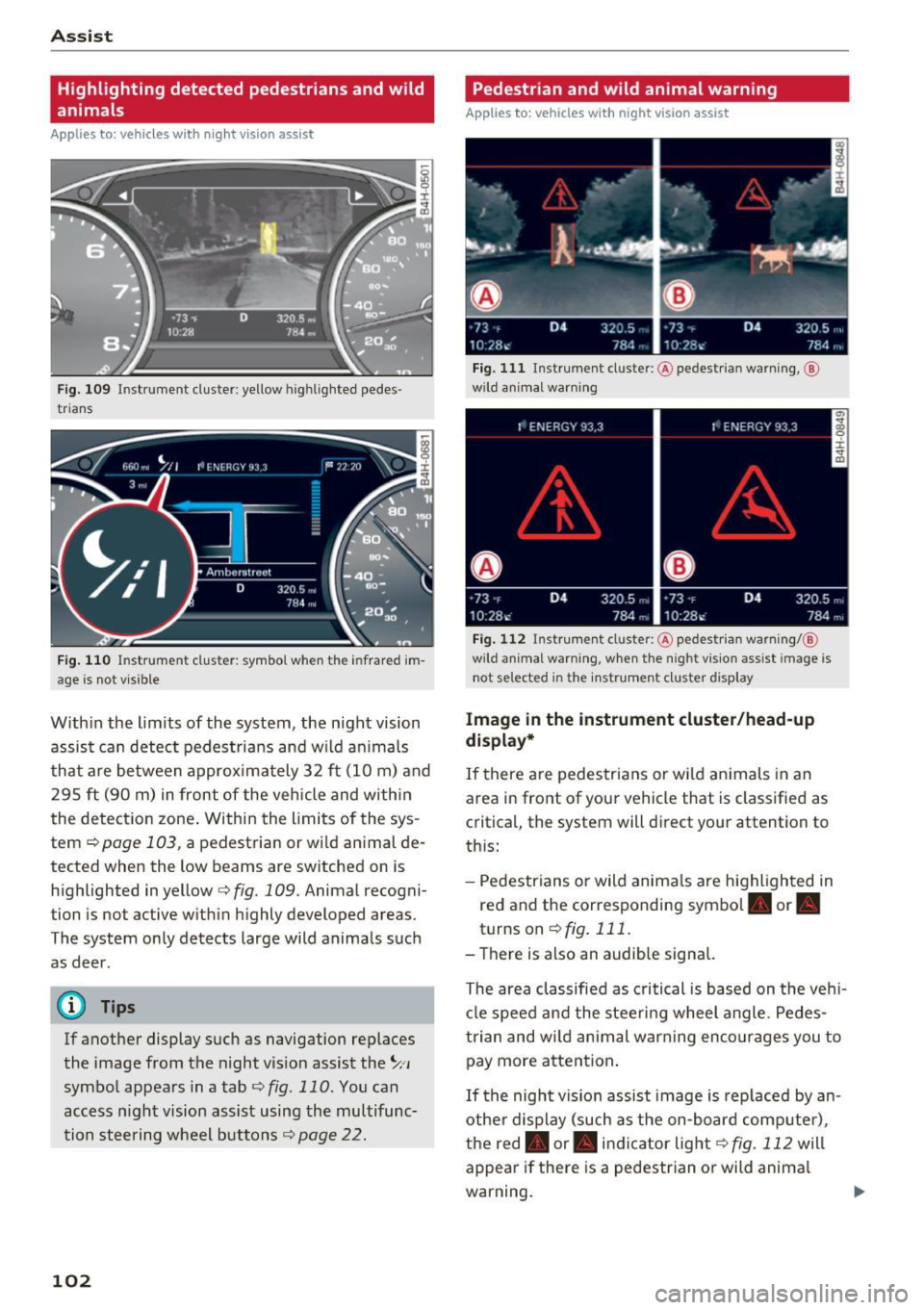
F ig. 109 Instrument cluster: yellow highl ighted pedes
trians
F ig. 110 Instrument cluster: symbol when the infrared im
age is not vi sible
With in the limits of the system, the night vision
assist can detect pedestria ns and w ild an imals
that are between approximately 32 ft (10 m) and 295
ft (90 m) in front of the vehicle and within
the detection zone . Within the limits of the sys
tem
q poge 103, a pedestrian or wild an imal de
tected when the low beams are switched on is
highlighted in yellow
q fig. 109. Animal recogni
tion is not active with in h ighly developed areas.
The system only detects large wild animals such
as deer.
@ Tips
If another display such as navigation replaces
the image from the night v is ion assist the~,,
symbo l appears in a tab
q fig . 110 . You can
access n ight vision assist using the multifunc
tion steering wheel buttons
q page 22.
102
Pedestrian and wild animal warning
App lies to : vehicles wit h night vision assis t
Fig. 111 Instrument cluster: @ pedest rian warning, @
wild anim al warn ing
Fig . 112 Instr ument clus ter: @pedestria n warning/ @
wild animal warning, when the nigh t vision ass ist im age is
not selected in the instru ment cluster display
Image in the instrument cluster /head-up
di spl ay *
If there are pedestrians or wild an imals in an
area in front of your vehicle that is classified as
cr itical, the system will direct your attention to
th is:
- Pedestrians or wild anima ls are highlighted in
red and the corresponding symbol. or.
turnson ~fig.111 .
- There is also an audible signal.
The area classified as critical is based on the veh i
cle speed and the steeri ng wheel angle . Pedes
trian and wild animal warning enco urages you to
pay more attention.
If the night vision assist image is rep laced by an
othe r d isplay (such as the on-board compute r),
the red. or. in dicator light~
fig. 112 will
appear if there is a pedestrian or wild anima l
warning.
Page 107 of 280
The adjustment depends on the driving mode se
l ected, steering movements, the driver's brak ing
and accelerat ion, and as the road su rface, vehicle
speed and load.
The vehicle ground clearance depends on the mode se lected and the speed . When you are in
the
auto , the highway setting is act ivated when
you dr ive above 75 mph (120 km/h) for more
than 30 seconds. The g round clearance is in
creased automat ica lly if the speed drops below
44 mph (70 km/h) for more than 120 seconds .
Steering
The power steering adapts. Ind irect steering that
moves easily as in comfort mode is especially
sui ted to long drives on a h ighway. The Dynamic
mode provides sporty, direct steering .
Applie s to: vehicles with dynamic steering
The steering ratio changes based on vehicle
speed in order to maintain optimum steering ef
fort for the dr iver at a ll times. This sets the steer
i ng to be less sensit ive at higher speeds in order
to p rovide imp roved vehicle contro l. At reduced
speeds, steer ing is mo re direct in order to keep
t he s teering effo rt as m inima l as poss ib le when
t he dr iver is maneuvering the vehicle . At low and
ave rage speeds, dynamic steering* additionally
p rovides more responsive stee ring performance.
Sport differential *
As a component of the all wheel d rive system
(quattro)
<=? page 124 , the sport diffe rential dis
tr ib utes the dr iv ing power to the rear ax le de
pending on the situation. The distribution o f
power varies from balanced (comfort) to sporty
(dynamic) depending on the selected mode . The
goa l is a high leve l of agility and ab ility to accel
erate on curves. The ve hicle is very respons ive to
steer ing.
Cornering light*
The cornering light adapts the high beams to the
direction of the curve depending on the speed.
The pivot ing action and the light ing also adapt to
~ t he mode . .... N
" N .... 0 0 <..:l -
Adaptive cruise control*
T he behavio r whe n accelerating ca n be adjusted
from comfortable to sporty, depending on the
drive select mode. Adaptive cruise control also
responds to the driving behavior of the vehicle
ahead in a more conservative or sporty manner.
Engine sound *
The eng ine sound adapts to the c urren t mode
and can be subtle to sporty.
(D Note
Applies to: vehicles with adaptive ai r suspension
- Make sure there is enough clearance above
and be low the vehicle when parking. The
height of the vehicle (gro und clearance) can
change once it is parked due to temperature
fluctuations, changes to the load conditions
and changes to the dr iving modes .
- When transporting the vehicle on a car car
r ie r, train, ship or by other means, o nly tie
the vehicle down at the run ning s urface of
the t ires , which is the outer c ircumference.
Se cur ing the vehicle at the axle compo
nents, sus pen sion str uts o r towing eyes is
no t perm itted because the pressure in the
air suspens ion struts can change d uring
transport . The vehicle may not be secured
sufficiently if th is happens .
(D Tips
-In some models, the maximum vehicle
speed can only be reached in the auto and
dynamic modes.
- The S selector lever position automatica lly
engages if the dynamic mode is selected.
- Applies to: vehicles with dynamic steering:
operating noise is heard when starting or
stopping the engine. Th is does not ind icate
a problem.
105
Page 110 of 280
Parking systems
Parking systems
General information
Applies to: vehicles with parking system plus/rearview cam
era/peripheral camera
Depending on your vehicle's equipment , various
parking aids will help you when parking and ma
neuvering.
The
parking system plus assists you when park
ing by audibly and visually indicating objects de
tected
in front of and behind the vehicle
¢page 109.
The
rearview camera shows the area behind the
vehicle in the Infotainment system display. This
display assists you when you are cross or parallel parking
¢ page 110. The parking system plus
functions are also available
¢ page 109.
The
peripheral cameras assist you with parking
and maneuvering. You are aided by various cam
eras depending on the vehicle equipment level
¢ page 113. The parking system plus functions
are also available
¢ page 109.
A WARNING
-Always look for traffic and check the area
around your vehicle by looking at it directly
as well. The parking system cannot replace
the driver's attention. The driver is always responsible when entering or leaving a park
ing space and during similar maneuvers.
- Please note that some surfaces, such as
clothing, are not detected by the system .
-
-Sensors and cameras have blind spots in
which people and objects cannot be detect ed . Be especially cautious of small children
and animals.
- The sensors can be displaced by impacts or
damage to the radiator grille, bumper,
wheel housing and the underbody . The park
ing system may be impaired as a result.
Have an authorized Audi dealer or author
ized Audi Service Facility check their func
tion .
- Make sure the sensors are not obstructed by stickers, deposits or other materials. If they
are, the sensor function could be impaired.
108
For additional information on cleaning, see
¢page 231.
(D Note
-Some objects are not detected or displayed
by the system under certain circumstances:
- Objects such as barrier chains, trailer draw
bars, vertical poles or fences
- Objects above the sensors such as wall ex
tensions
- Objects with certain surfaces or structures
such as chain link fences or powder snow
- If you continue driving closer to a low ob
ject, it may disappear from the sensor range. Note that you will no longer be
warned about th is obstacle .
- Keep enough distance from the curb to re
duce the risk of damage to the rims .
(D Tips
-The system may provide a warning even
though there are no obstacles in the cover
age area in some situations, such as :
- certa in road surfaces or when there is tall
grass.
- external ultrasonic sources such as from
cleaning vehicles .
- in heavy rain, snow, or thick vehicle ex
haust.
- We recommend that you practice parking in
a traffic-free location or parking lot to be
come familiar with the system . When doing
this, there should be good light and weath
er conditions.
- You can change the volume and pitch of the
signals as well as the display
¢ page 118.
- Please refer to the instructions for towing a
trailer located in
¢page 118.
- What appears in the infotainment d isplay is
somewhat time-delayed.
- Th e sensors must be kept clean and free of
snow and ice for park aid to operate .