driver seat adjustment AUDI A6 2017 Owners Manual
[x] Cancel search | Manufacturer: AUDI, Model Year: 2017, Model line: A6, Model: AUDI A6 2017Pages: 280, PDF Size: 70.24 MB
Page 27 of 280
Hea d-u p di spl ay> Head- up di spla y conten ts or
Displ ay brigh tn ess.
Di spla y content
In the Infotainment system, you can specify
which information should be displayed: For ex
ample, th is can include navigation informat ion *,
Adaptive cruise control* or night vision assist*.
The display of certa in info rmation and some of
the red indicator lights cannot be h idden in the
I nfotainment system.
Displ ay brightness
You can adjust the display br ightness in the Info
tainment system. The display brightness decreas
es automatically as the amount of light decreas
es. The backgro und brightness is adjusted with
the instrument il lumination
c::> page 44 .
(D Note
To prevent scratches on the g lass cove ring the
head- up d isplay, do not place any objects in
the projection opening.
(D Tips
- Sunglasses w ith polar izat ion fi lters and u n
favorab le lighting conditions can have a
negative effect on the display.
- An optim um display depends on the seat
pos ition and the height adjustment of the
head -up display.
- A specia l windshield is needed for the head
up display function.
- Fo r information on cleaning, refer to
c::> ta
ble on page 233.
On Board Diagnostic
System (OBD)
Malfunction Indicator Lamp (MIL)
The Malfunction Ind icator Lamp (MIL) a in the
instr ument cluster is part of the On-Board Diag
nostic (OBD II) system.
~ The warning/indicator light i lluminates when the ....
~ ign it ion is switched on and goes ou t after the en-N .... 0 0 <.,;) 'SI"
Driver info rm atio n sys tem
gine starts and the idle has stab ilized. This indi
cates that the MIL is working properly.
If th e light does not go ou t after the eng ine is
sta rted, or i llum inates while you are driving, a
malfunction may exist in the engine system. If
the light illuminates, the catalytic converter
could be damaged.
Cont inue driving
with redu ced p ower (avoiding
sustained high speeds and/or rapid accelera
tions) and have the condition corrected. Contact
your authorized Audi dealer.
If the ligh t illum ina tes, the electronic speed lim
iter may also be malfunctioning. For more infor
mation
c::> page 26, Electronic speed limiter.
An impro perl y close d fuel fi ller cap may al so
ca use the
MIL li g ht to illuminate c::> page 192.
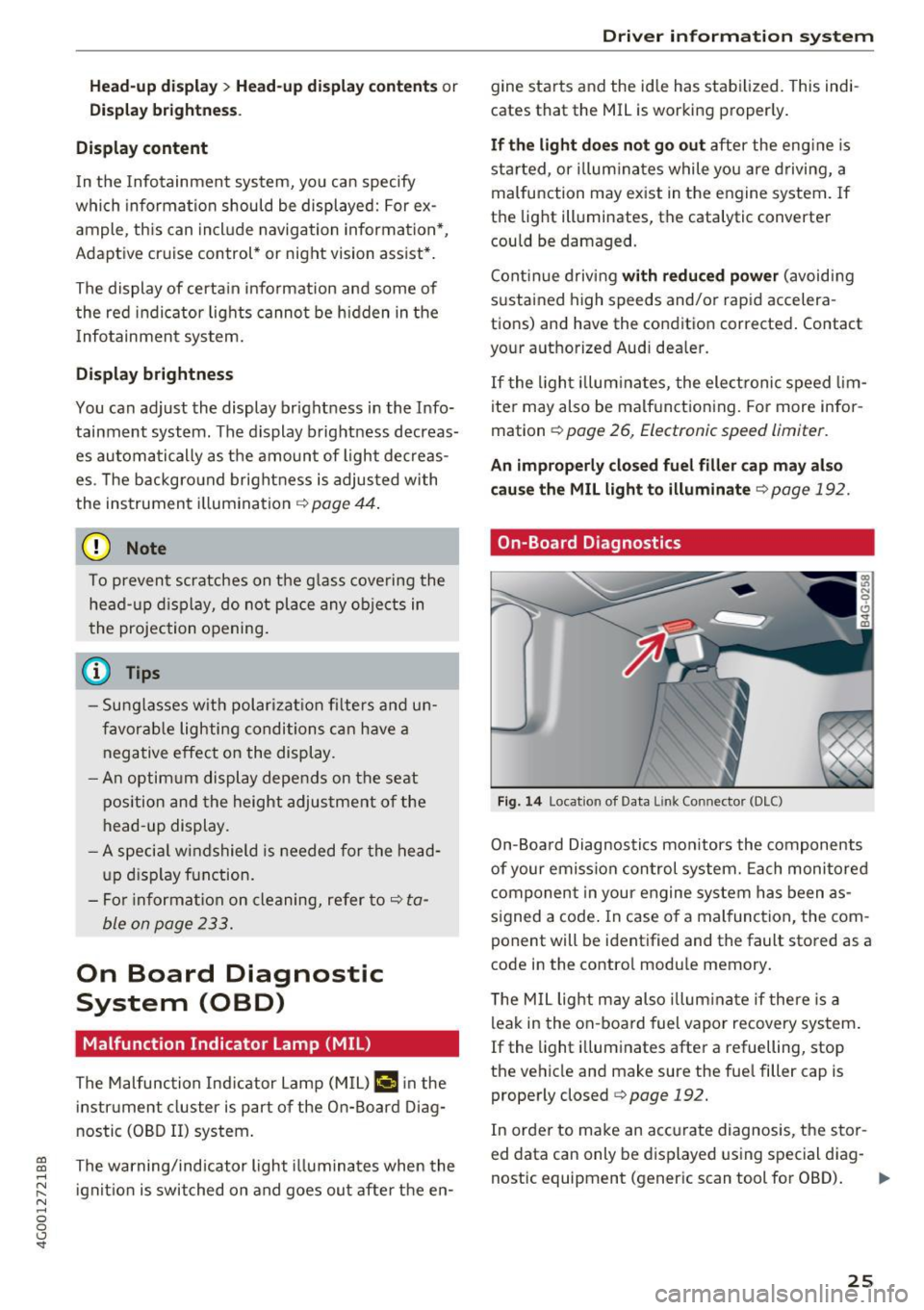
On-Board Diagnostics
Fig. 14 Locat ion of Data L ink Connector (DLC)
On-Board Diagnostics monitors the components
of your emission control system. Each monitored
component in your engine system has been as
s igned a code . In case of a malfunction, the com
ponent will be identified and the fault stored as a
code in the contro l module memory.
T he M IL light may also illum inate if there is a
leak in the on-board fuel vapor recovery system.
If the light i lluminates after a refuelling, stop
the vehicle and make sure the fue l filler cap is
properly closed
c::> page 192.
In order to make an accurate diagnosis, the stor
ed data can only be displayed using special diag-
nostic equipment (generic scan tool for OBD).
IJI,-
25
Page 52 of 280
Sea ts and stor age
Seats and storage
General information
A WARNING
Refer to c::> page 128, Driving safety for im
portant information, tips, suggestions and
warnings that you should read and follow for
your own safety and the safety of you r pas
sengers.
Front seats
Power seat adjustment
App lies to veh icles with power adjustable seats
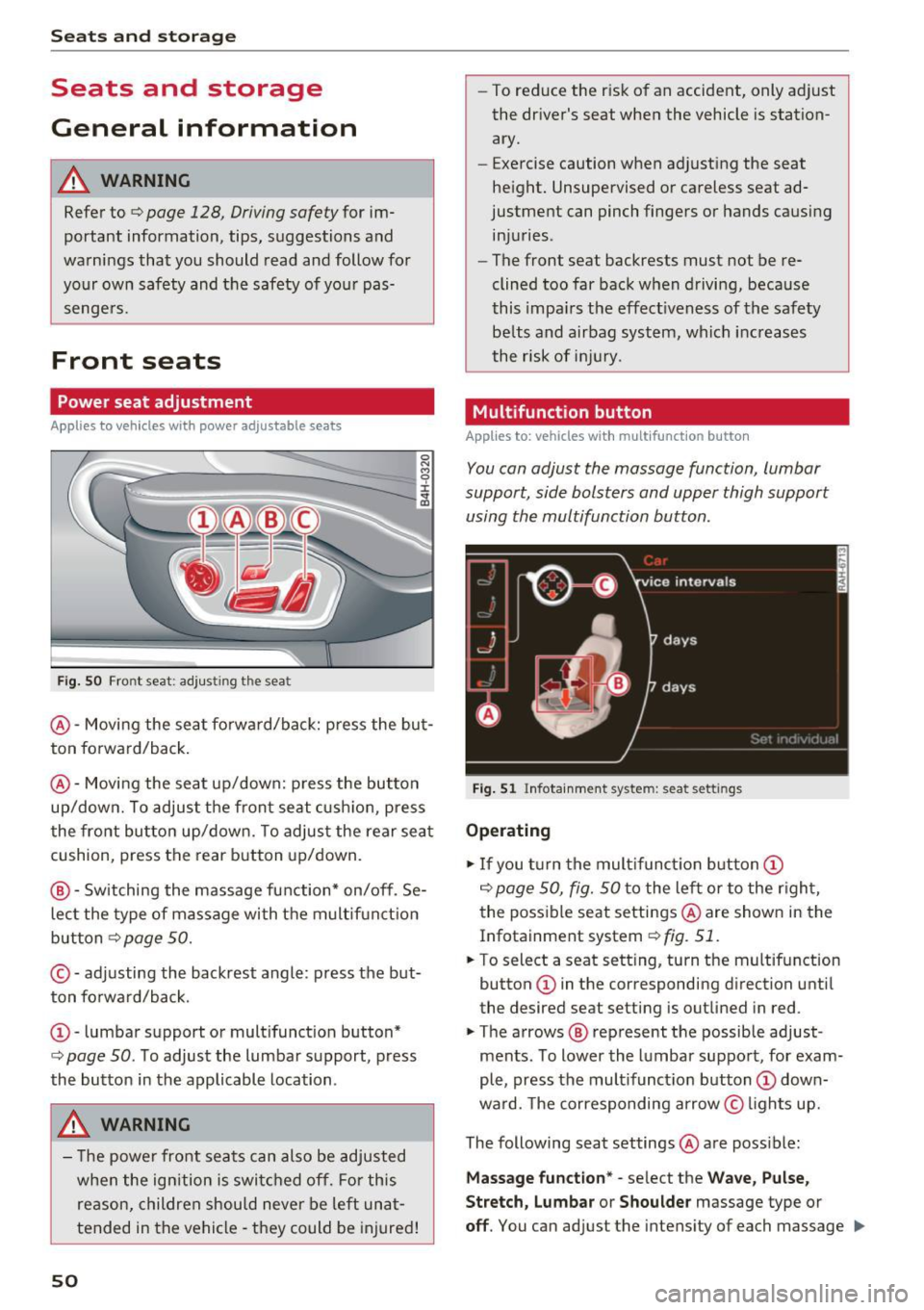
F ig. SO Front seat: adj usting the seat
@ -Movi ng the seat fo rwa rd/back: p ress the but
ton forwa rd/back .
@ -Moving the seat up/down: press the button
up/dow n. To adjust the front seat cush ion, press
the front button up/dow n. T o adjus t the rear sea t
cushion, press the rear button up/down.
@ - Switching the massage function * on/off. Se
lec t the type of massage with the multif unct ion
button
c::> page 50.
© - adjusting the backrest angle: press the but
ton fo rwa rd/back.
CD -lumbar support or multifunct ion button*
c::> page 50 . To adjust the lumbar support, press
the button in the applicable location .
A WARNING
- The power fro nt seats can also be adjusted
when the ign ition is swi tc h ed off. For this
reason, children should never be left una t
tended in the vehicle -they could be injured!
50
- To reduce the r isk of an accident, only adjust
the driver's seat when the vehicle is station ary.
- Exercise caution when adjusting the seat
height. Unsupervised or careless seat ad
justment can pinch fingers or hands causing
injuries.
- The front seat backrests must not be re
clined too far back when driving, because
this impa irs the effect iveness of the safety
be lts and airbag system, which increases
the risk of i nju ry.
Multifunction button
App lies to: vehicles wit h mult ifunct ion b utto n
You can adjust the massage function, lumbar
support, side bolsters and upper thigh support using the multifunction button.
Fig . 51 Infotainme nt system: seat settings
Operating
.,. If you t urn the mult ifunct ion b utton CD
c::> page 50, fig. 50 to the lef t or to the r igh t,
the poss ible seat settings @are shown in the
Infotainment system
c::> fig. 51.
.,. To select a seat sett ing, turn the multifunction
button
CD in the corresponding direction until
the desired seat setting is outlined in red .
.,. The arrows @ represent the possible adjust
ments . To lower the lumbar support, for exam
ple, press the mult ifunct ion button
CD down
ward. The corresponding arrow © lights up.
The following seat settings @are poss ible:
Ma ssa ge fun ctio n* -select the W ave, Pulse ,
Stretch, Lumbar or Shoulder
massage type or
off. You can adjust the intensity of each massage IIJ,,
Page 53 of 280
from 1 through 5. You can switch the selected massage on/off using the button @~
page 50,
fig.
so.
Lumbar support -you can ad just the lumbar sup
port up/down and to be stronge r/weaker .
Side section seat * -you can inc rease/decrease
the latera l s u pport in the seat using the side bol
sters a t the seat su rface and the back res t.
Upp er thigh support * -yo u can increase/de
crease the upper t high suppo rt.
@ Tips
- The massage function switches off a uto
matically after approx imately 10 minutes.
- The air in the s ide bolsters* is released as
soon as the driver's door opens. This makes i s possibl e to enter and exit the vehicl e
more comfortab ly. As soon as you s tart driv
i ng the ve hicle, the s ide bo lsters fi ll.
Center armrest
There is a storage compartment under the arm
rest.
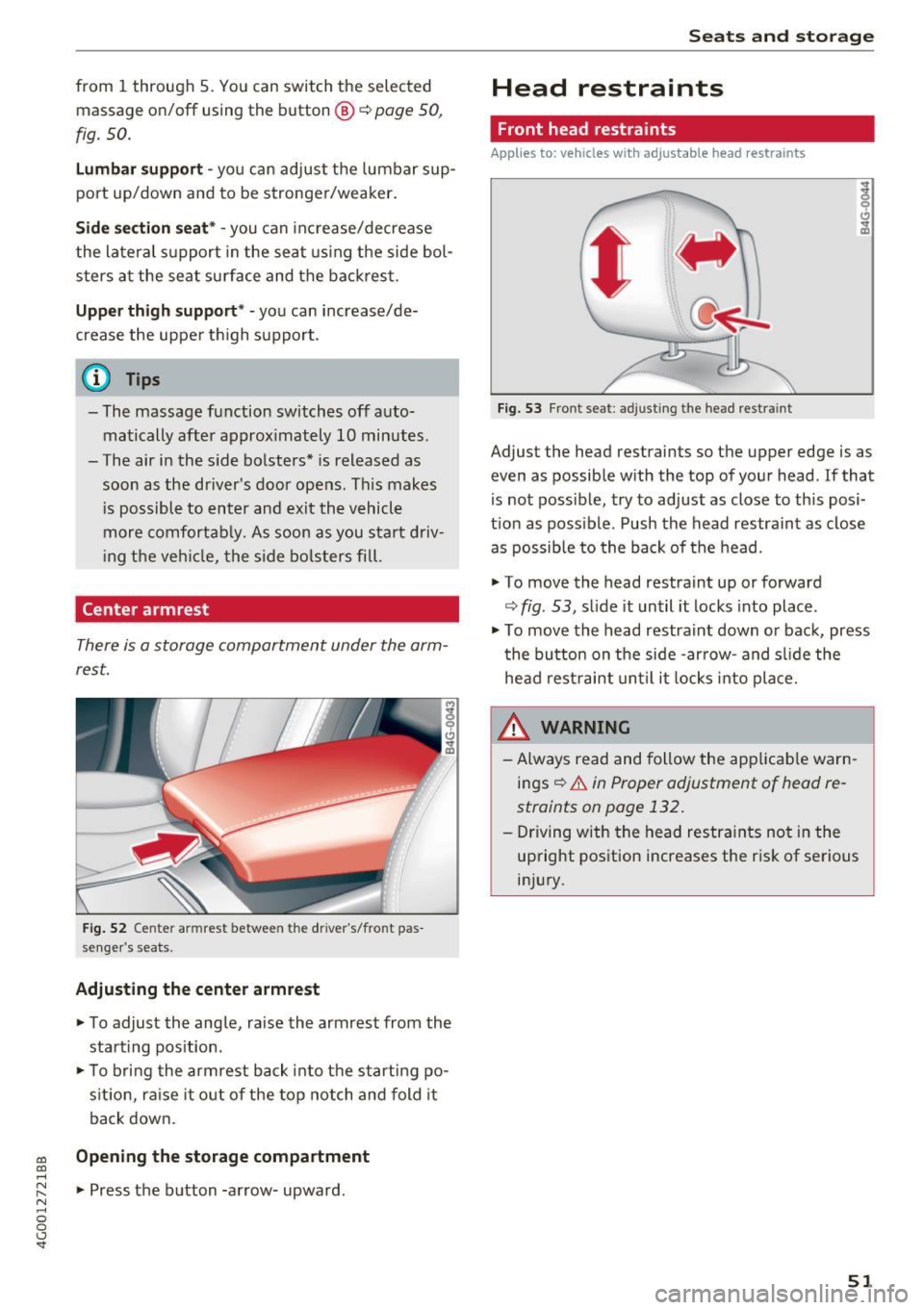
F ig. 52 Center armrest between the driver 's/fron t pas
se nge r's seats.
Adjusting the center armr est
... To adjust the ang le, raise the armrest from the
sta rt ing pos it ion .
... To bri ng the armrest bac k into t he starting po
s it ion, ra ise it o ut of the top notch and fold it
back down.
co Opening the storage compartment co ....
~ ... Press the b utton -a rrow- upward . N .... 0 0 <.,;) 'SI"
Seats and storag e
Head restraints
Front head restraints
Applies to: vehicles with adjustable head restraints
Fig. 5 3 Front seat: adj ust ing the head restra int
Adjust the head restraints so t he upper edge is as
even as possible with the top of yo ur head . If that
is not possible, try to adjust as close to th is posi
t ion as poss ible. Push the head restraint as close
as possible to the back of the head.
" To
move the head restraint up or forward
~ fig . 53, s lide it un til it locks into place .
" To
move the head restra int down or back, press
t he button on the side -ar row- and s lide the
head rest raint until it locks into pla ce.
A WARNING
- Always read and follow the app licab le warn
ings~
& in Proper adjustment of head re
straints on page 132 .
-Driving w ith the head restra ints no t in the
up right position increases the r is k of se rious
in jury.
51
Page 54 of 280
Sea ts and stor age
Rear head restraints
Applies to: ve hicles w ith adj ustable head restra ints
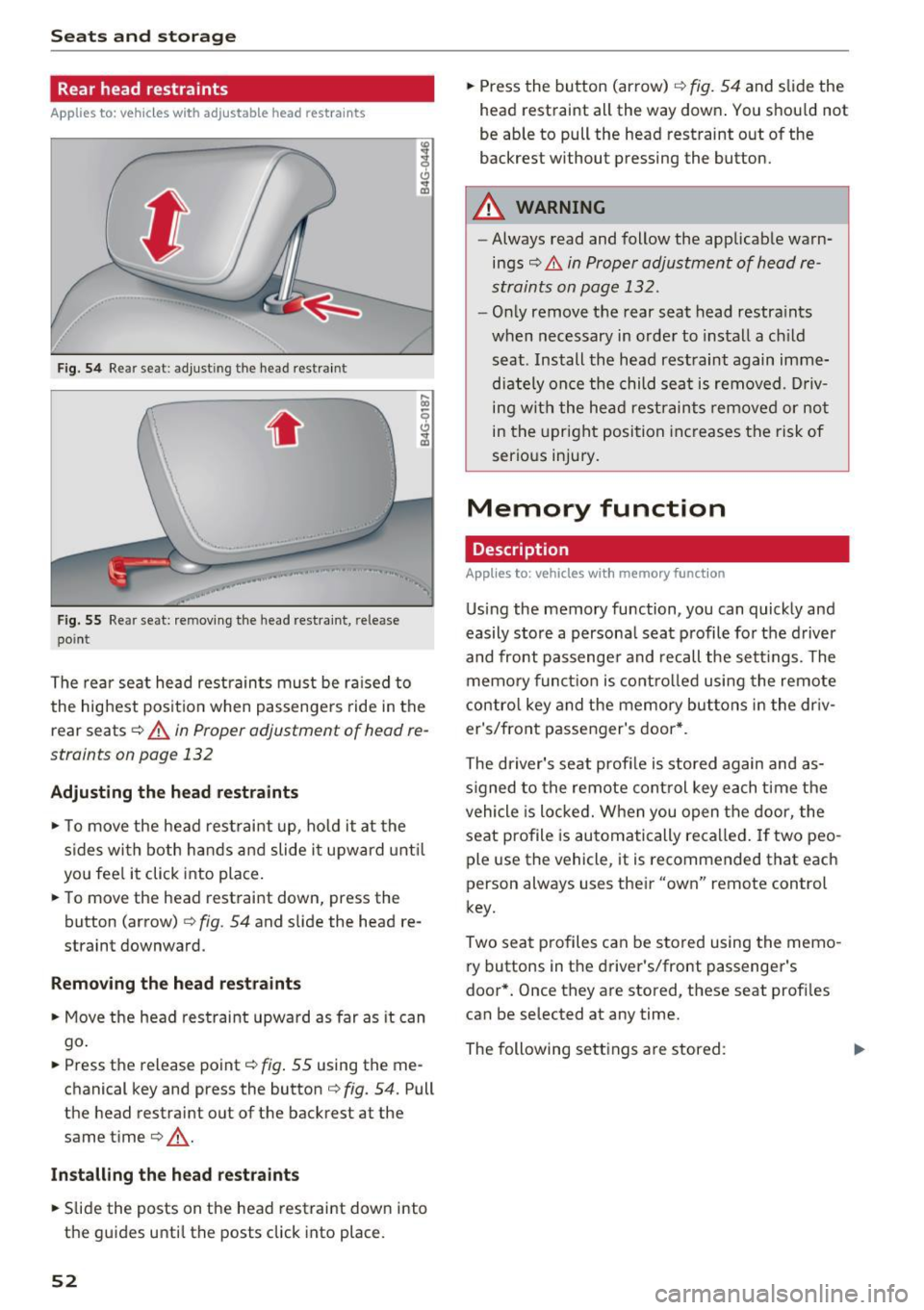
Fig. 54 Re ar seat: adju stin g th e head restra int
.. , ,.
F ig . 5 5 Re ar seat: remov ing the head res traint , rele ase
poin t
The rea r seat head restraints must be ra ised to
the highest posit io n when passenge rs ride in the
r e ar seats ¢
A in Proper adjustment of h ead re
straints on page 132
Adjusting the head rest raints
"' To move the head rest rai nt up, ho ld it at the
s ides wi th both hands a nd slide i t upward unt il
yo u fee l it click into place.
"' To move the head restraint down, press the
button (a rrow)
¢ fig . 54 and slide the head re
straint downward.
Remov ing th e head re st ra ints
"' Move the head restraint upward as far as it can
go .
"' Press the release point¢
fig. 55 using the me
chanical key and p ress the button ¢
fig. 54. Pull
the he ad restraint out of the ba ckrest at the
same time¢,&. .
Install ing the head restra ints
"' Slide the posts on the head restraint dow n into
the guides unti l the posts click into place.
52
"' Press the button (arrow) ¢ fig . 54 and slide the
head restra int all the way down . You should not
be able to pull the head restraint out of the
backres t wi thout pressing the button.
A WARNING
- Always read and follow the applicab le warn
ings
¢ .&. in Proper adjustment of head re
straints on page 132.
- Only remove t he rear seat head restra ints
when necessary in order to install a ch ild
seat . Install the head restraint again imme
dia tely once the child sea t is removed . D riv
ing with the he ad restraints remove d or no t
in the upright posi tion increases the risk of
serious injury.
Memory function
Description
App lies to: vehicles with memory funct ion
Using the memory function, you can quick ly and
easily store a persona l seat profile fo r the d river
and front passenge r and recall the sett ings. The
memory funct ion is contro lled using the remote
contro l key and the memory but tons in the dr iv
er's/front passenger's door *.
The driver's seat profi le is stored again and as
s igned to the remote cont rol key each time the
vehicle is locked. W hen you open the door, the
seat profile is automatically recalled. If two peo
ple use the vehicl e, it is recommend ed that each
person always uses the ir "own" remote control
key.
Two sea t profiles can be s tored using the memo
ry buttons in t he driver's/front passenge r's
door *. Once they are stored, these seat profi les
can be selected at any time.
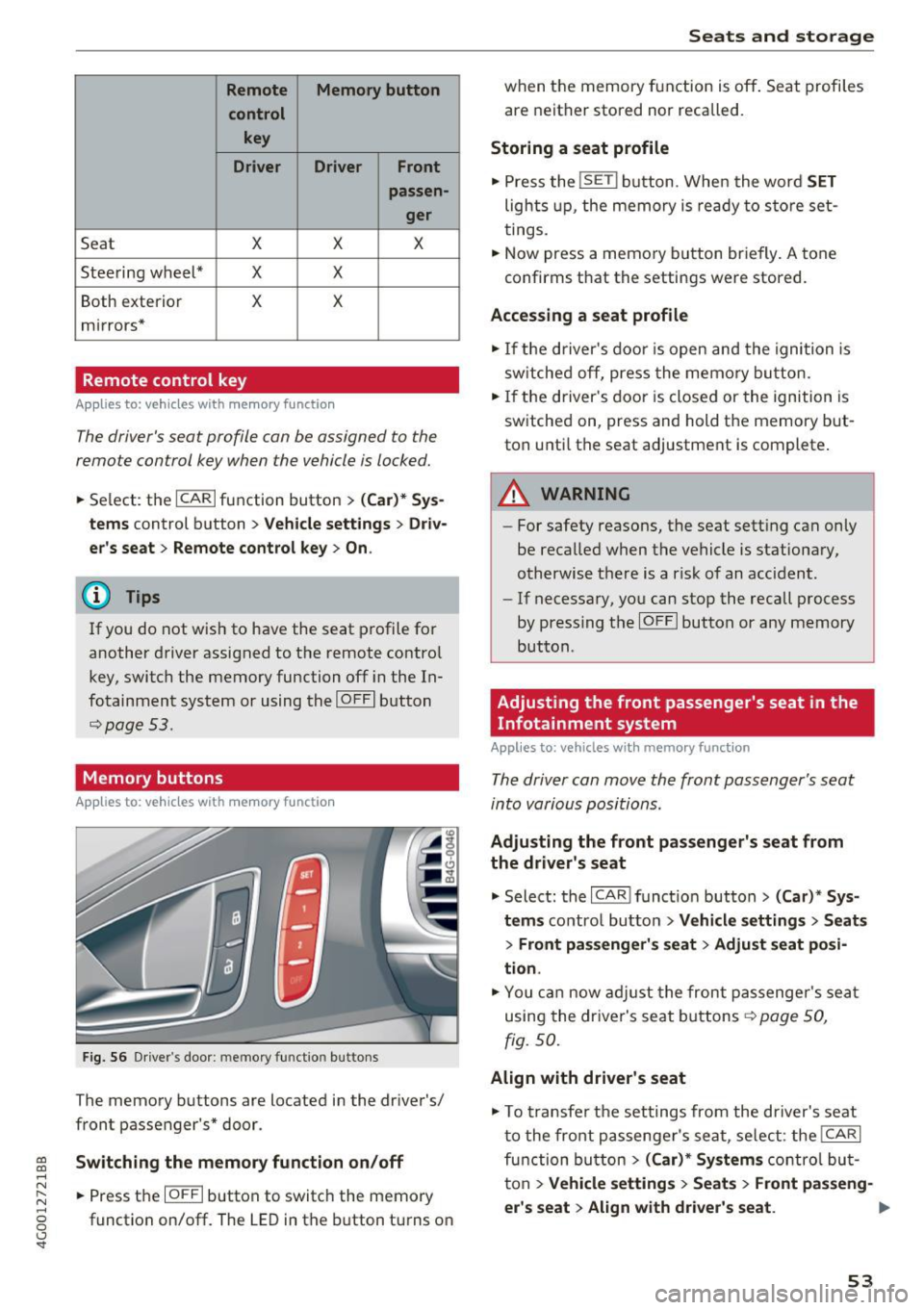
The following se ttings are stored :
Iii>
Page 55 of 280
co
co
.... N
" N .... 0 0 <.,;) 'SI"
Remote Memory button control key
Driver D river Front
passen-ger
Seat X X X
Steering wheel* X X
Both
exterior X X
mirrors*
Remote control key
Applies to: vehicles with memory function
The driver's seat profile can be assigned to the
remote control key when the vehicle is locked.
• Select: the ICARI function button > (Car)* Sys
tems
control button > Vehicle settings > Driv
er's seat
> Remote control key > On .
(D Tips
If you do not wish to have the seat profile for
another driver assigned to the remote control
key, switch the memory function off in the In
fotainment system or using the
IOFFI button
¢page 53.
Memory buttons
Applies to: vehicles with memory function
Fig. S6 Driver 's door: memory function buttons
The memory buttons are located in the driver's/
front passenger's* door.
Switching the memory function on/off
• Press the IOFFI button to switch the memory
function on/off. The LED in the button turns on
Seats and storage
when the memory function is off . Seat profiles
are neither stored nor recalled.
Storing a seat profile
• Press the ISET I button. When the word SET
lights up, the memory is ready to store set
tings .
• Now press a memory button briefly. A tone
confirms that the settings were stored.
Accessing a seat profile
• If the driver's door is open and the ignition is
sw itched off, press the memo ry button.
.. If the driver's door is closed or the ignition is
switched on, press and hold the memory but
ton until the seat adjustment is complete .
A WARNING
-For safety reasons, the seat setting can only
be recalled when the vehicle is stationary,
otherwise the re is a risk of an accident.
- If necessary, you can stop the recall process
by press ing the
IOFFI button or any memory
button.
Adjusting the front passenger's seat in the
Infotainment system
Applies to: vehicles with memory function
The driver can move the front passenger's seat
into various positions.
Adjusting the front passenger's seat from
the driver's seat
• Select: the I CAR I funct ion button > (Car) * Sys
tems
contro l button > Vehicle settings > Seats
> Front passenger's seat > Adjust seat posi
tion .
• You can now adjust the front passenger's seat
using the driver's seat buttons
¢ page SO,
fig.
so.
Align with driver's seat
• To transfer the settings from the driver's seat
to the front passenger's seat, select: the
I CAR I
function button > (Car)* Systems control but
ton
> Vehicle settings> Seats > Front passeng-
er 's seat > Align with driver 's seat. ..,.
53
Page 70 of 280
Driving
lead to greater tire wear and will affect driving
behavior.
Do not drive on
winter tires year-round, as this
will consume up to 10% more fuel.
Eliminate unnecessary weight
Since every kilogram of extra
weight increases
fuel consumption, a quick inspection of the lug
gage compartment may be worth it to avoid un
necessary weight.
When not being used, a roof rack should be re moved to decrease the wind resistance of the ve
hicle. You will save approximately 12% of your
fuel when at speeds from 62- 7 5 mph (100-120 km/h) .
Save energy
The engine drives the generator, which generates
electricity; the fuel consumption also increases
with the demand for electricity. Therefore, switch electrical equipment off when you no longer
need it. Examples of equipment that uses a lot of
energy are air blowers at a high setting, the rear
window defogger and seat heating*.
CD Note
Do not leave engine idling unattended after
starting.
If warning lights should come on to
indicate improper operation, they would go
unheeded. Extended idling also produces
heat, which could result in overheating or
other damage to the vehicle or other proper
ty .
CD Note
- Have your vehicle maintained properly and
in accordance with the service recommenda
tions in your Warranty
& Maintenance book
let . Lack of proper maintenance as well as
improper use of the vehicle will impair the
function of the emission control system and
could lead to damage.
- Do not alter or
remove any component of
the Emission Control System unless ap
proved by the manufacturer.
- Do not alter or remove any device, such as
heat shields, switches, ignition wires,
68
valves, which are designed to protect your
vehicle's Emission Control System and other
important vehicle components.
(D Tips
The consumption estimates as published by
ENVIRONMENTAL PROTECTION AGENCY
(EPA) and Transport Canada may not corre
spond to your actual consumption on the
road, which will vary depending upon vehicle
load and speed, road and weather conditions,
trip length, etc.
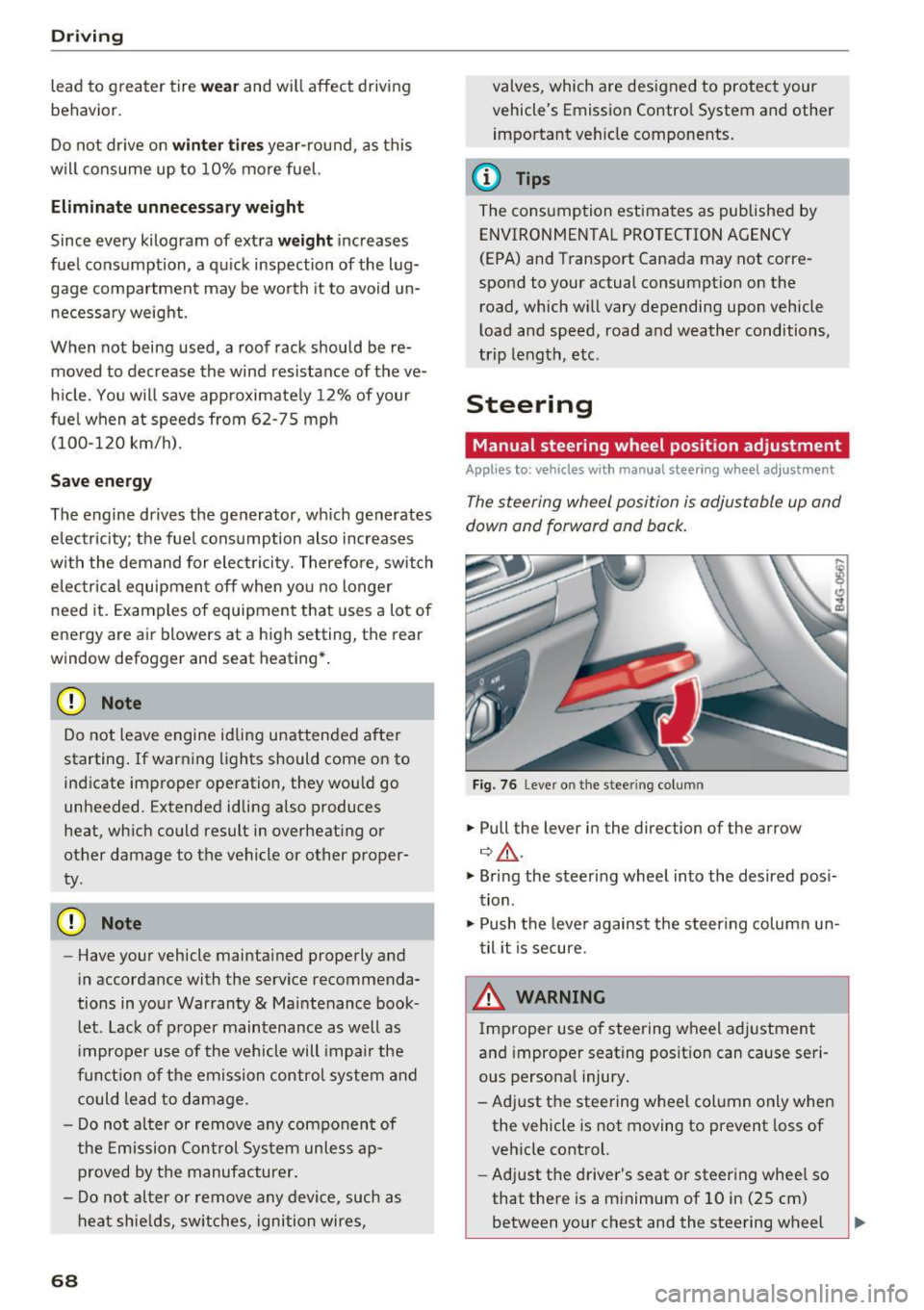
Steering
Manual steering wheel position adjustment
Applies to: vehicles with manual steering wheel adjustment
The steering wheel position is adjustable up and
down and forward and back.
Fig. 76 Lever o n the stee ring col umn
.,. Pull the lever in the direction of the arrow
¢ ,&. .
.,. Bring the steering wheel into the desired posi
tion .
.,. Push the lever against the steering column un
til it is secure.
& WARNING
Improper use of steering wheel adjustment
and improper seating position can cause seri
ous personal injury.
- Adjust the steering wheel column only when the vehicle is not moving to prevent loss of
vehicle control.
- Adjust the driver's seat or steering wheel so
that there is a minimum of 10 in (25 cm)
between your chest and the steering wheel -
Page 71 of 280
co
co
...,
N
" N ...,
0 0 <.,;) 'SI'
~ page 129, fig. 140. If you cannot main
tain this minimum distance, the airbag sys
tem cannot protect you properly.
- If physical limitations prevent you from sit
ting 10 in (25 cm) or more from the steer ing wheel, check with your authorized Audi
dealer to see if adaptive equipment is avail
able.
- If the steering wheel is aligned with your
face, the supplemental driver's airbag can
not provide as much protection in an acci
dent. Always make sure that the steering
wheel is aligned with your chest.
-Always hold the steering wheel with your
hands at the 9 o'clock and 3 o'clock posi
tions to reduce the risk of personal injury if
the driver's airbag deploys.
- Never hold the steer ing wheel at the 12
o'clock position or with your hands inside
the steering wheel rim or on the steering
wheel hub . Holding the steering wheel the
wrong way can cause serious injuries to the
hands, arms and head if the driver's airbag
deploys.
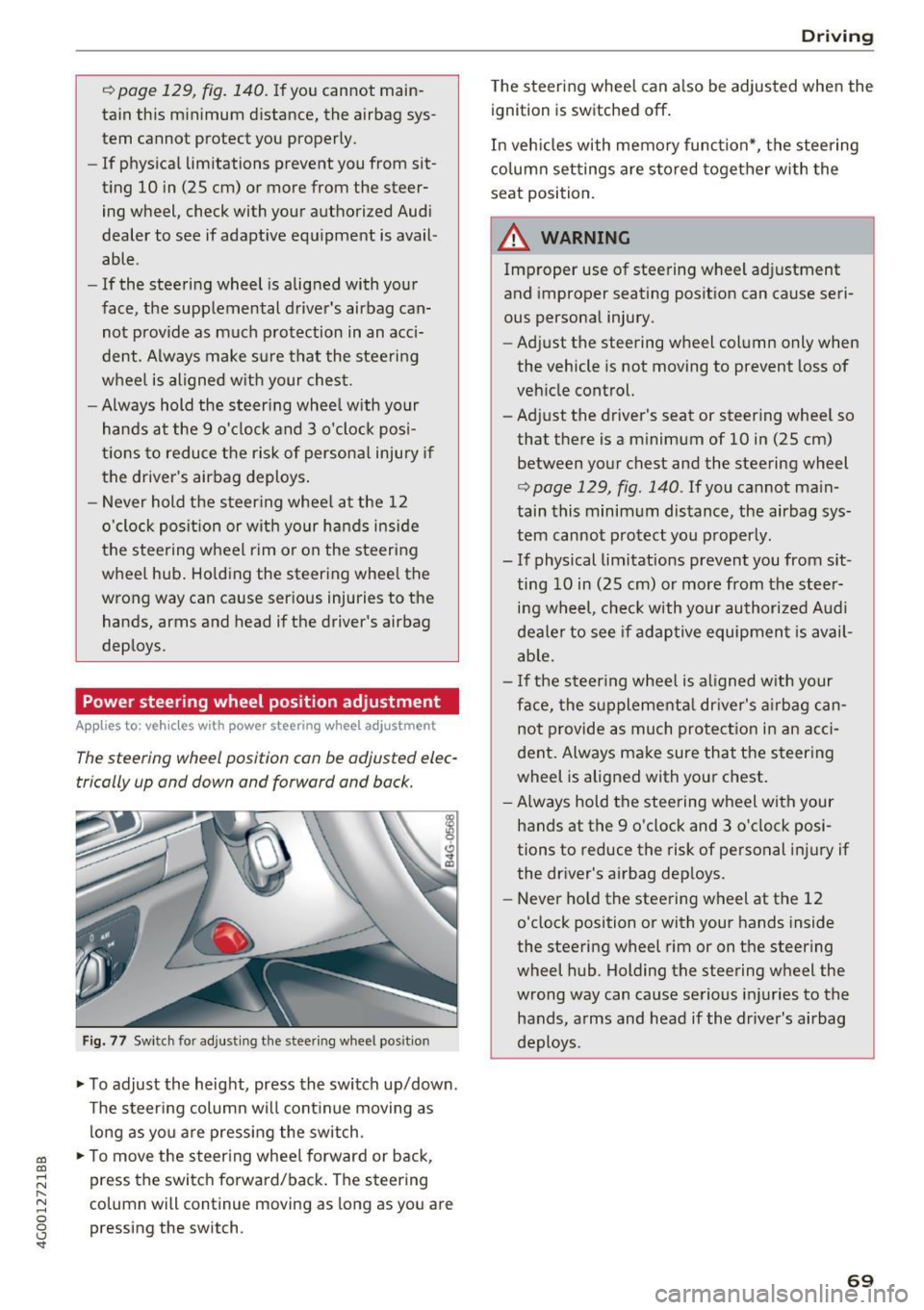
Power steering wheel position adjustment
App lies to: ve hicles with power steering whee l adjustment
The steering wheel position can be adjusted elec
trically up and down and forward and back.
Fig. 77 Switch for adjust ing the steer ing whee l pos ition
~ To adjust the height, press the switch up/down.
The steering column will cont inue moving as
long as you are pressing the switch .
~ To move the steering wheel forward or back,
press the switch forward/back. The steering
column will continue moving as long as you are
pressing the switch.
Driving
The steering wheel can a lso be adjusted when the
ignition is switched off .
In vehicles with memory function*, the steering
column settings are sto red together with the
seat position.
A WARNING
Improper use of steering wheel adjustment
and improper seating position can cause seri
ous personal injury.
- Adjust the steering wheel column only when
the vehicle is not moving to prevent loss of
vehicle control.
- Adjust the driver's seat or steering whee l so
that there is a minimum of 10 in (25 cm)
between your chest and the steering wheel
r:=;, page 129, fig . 140 . If you cannot main
tain this minimum distance, the airbag sys
tem cannot protect you properly.
- If physical limitations prevent you from sit ting 10 in (25 cm) or more from the steer
ing wheel, check with your authorized Audi
dealer to see if adaptive equipment is avail
able.
- If the steering wheel is aligned with your
face, the supplemental dr iver's airbag can
not provide as much protection in an acci
dent. Always make sure that the steering
wheel is aligned with your chest.
- Always hold the steering wheel with your
hands at the 9 o'clock and 3 o'clock posi
tions to reduce the risk of personal injury if
the driver's airbag deploys.
- Never hold the steering wheel at the 12
o'clock position or with your hands inside
the steering wheel rim or on the steering
wheel hub . Holding the steering wheel the
wrong way can cause serious injuries to the
hands, arms and head if the driver's airbag
deploys.
-
69
Page 130 of 280
Driving sa fe ty
Driving safety
Basics
Safe driving habits
Please remember -safety first!
This chapter contains important information,
tips, instruct ions and warn ings that you need to
read and observe for your own safety, the safety
of your passengers and others. We have summar ized here what you need to know about safety
be lts, a irbags, child restra ints as well as child
safety. Your safety is for us
priority number 1 . Al
ways observe the i nfo rmation and wa rn ings in
this section - for your own safety as well as that
of your passengers.
The information i n this section applies to all
model versions of yo ur vehicle . Some of the fea
tures descr ibed in t his sections may be s tanda rd
equipment on some models, or may be optional
equipment on others . If you are not sure, ask
your authorized Audi dealer.
A WARNING
- Always make sure that you follow the in
structions and heed the WARNINGS in th is
Manual.
It is in your interest and in the in
te rest of your passengers.
- Always keep the comp lete Owner's Litera
ture in your A udi when you lend or sell your
vehicle so that this important information
will always be available to the d river and
passenge rs.
- Always keep the Owner 's literature handy so
that you can find it easily if you have ques
t ions.
Safety equipment
The safety features are part of the occupant re
straint system and work together to help reduce
the risk of injury in a wide variety of occident si t
uations.
Your safety and the safety of your passenge rs
should not be left to chance. Advan ces i n tech
nology have made a var iety of features avai lab le
to help reduce t he risk of injury in an accident .
128
The following is a list of just a few of the sa fety
features in your Audi :
- sophis tica ted safety be lts fo r dr ive r and all pas-
senge r seat ing pos itions,
- safety belt p retensioners,
- safety belt force lim ite rs fo r th e front seats,
- safety belt he ight adjustment systems for the
front seats,
- front airbags,
- knee airbags for the front seats*
- side airbags in the front seats and outer rear
seats*,
- side curtain airbags with ejection mitigation
features,
- special LATCH anchorages for child restraints,
- head rest raints fo r ea ch seating position,
- adj ustab le steering col umn.
These ind iv idual safety features, can work to
ge ther as a system to help protect you and your
passengers in a wide range of acc idents. These
features canno t wo rk as a sys tem if they are not
alw ays cor rec tly adj usted and cor rect ly used.
Safety is everybody' s re sponsibility!
Important things to do before driving
Safety is everybody's job! Vehicle and occupant
safety always depends on the informed and care
ful driver .
For your safety and the safety of your passen
gers,
before driving alway s:
.. Make sure that a ll lights and signals are operat
ing correctly.
.. Make sure that the tire pressure is correct.
.,. Make sure that all windows are clean and afford
good visibility to the outs ide .
.. Sec ure all luggage and othe r items carefully
~page 57, ~page 56 .
.. Ma ke sure that noth ing ca n interfere wi th the
peda ls .
.. Adjust front seat, head restraint and mirrors
correctly for yo ur height .
.. Instruct passengers to adjust the head re
straints according to their he ight.
Page 147 of 280
co
co
.... N
" N .... 0 0 <..:l '
or
~ squeeze together the(!) button, and push the
loop-around fittings
do wn@ .
~ Pull the belt to make sure that the upper at
tachment is properly engaged .
A WARNING
Always read and heed all WARNINGS and oth
er important informat ion
Q page 141.
With the front seats, the height adjustment
of the seat can also be used to adjust the po
sition of the safety belts.
Improperly worn safety belts
Incorrectly positioned safety belts can cause se
vere injuries.
Wearing safety belts improperly can cause seri
ous injury or death. Safety belts can only work
when they are correctly pos itioned on the body .
Improper seating positions reduce the effect ive
n ess of safety be lts and will
even i ncrease the
ris k of injury and death by mov ing the safety belt
to cr it ica l areas of the body. Imp roper seating
positions also increase the risk of serious inj ury
and death when an airbag deploys and strikes an
occ upant who is not in the correct seat ing posi
tion. A driver is respons ible for the safety of all
vehicle occupants and espec ia lly for children.
Therefore:
~ Never permit anyone to assume an incorrect
s itting position in the veh icle wh ile traveling
Q A .
A WARNING
Improperly worn safety belts increase the risk
of serious personal injury and death wheneve r
a vehicle is be ing used.
- Always make sure that al l vehicle occupants
are correctly restra ined and stay in a co rrect
seating pos it io n whenever the ve hicle is be
ing used.
S afet y be lts
- Always read and heed all WARNINGS and
other important in format ion
q page 141.
Belt tensioners
How safety belt pretensioners work
In front, side and rear-end collisions above a
particular severity and in a rollover, safety belts are tensioned automatically.
Rever sible safety belt tensioner s
The safety belts on the front seats are equipped
with power reversible tensioners. The following
funct ions are available when the dr iver's/front
passenger's safety belts are fastened:
- Automatic tens ioners: at the start of a drive,
the safety belts automatically adjust to the passenger after a certain time period or vehicle
speed. To switch the automatic tensioners off,
select the following in the MMI :
!CARI function
button
> (Car )* system s > Vehicle setting s >
Seats > Driver's seat or Passeng er' s s eat > Au
tom atic belt ten sioner
> Off .
- In certain driving situations, the safety bel ts
may tighten w it h a reve rsib le tensioning func
tion
q page 137.
-The safety be lts may also tigh ten with this re-
versible tension ing function in m inor collisions.
Pyrotechnic safety belt pretens ioners
The safety belts are equipped w it h safety belt
prete nsioners. The system is activated by sensors
in front, side and rear -end collisions of great se
verity and in a ro llover. This tightens the belt and
takes up belt slack
q .& in Service and disposal of
safety belt pretensioner on page 146.
Taking up
the slack he lps to reduce forward occupant
movement during a collision.
A WARNING
--
- It is poss ible for the pretensioners to dep loy
incorrectly.
- The pyrotechnic system can only provide
protection for one collision. If the pyrotech
n ic pretens ioners deploy, the pretensioning
system must be replaced.
145
Page 149 of 280
co
co
.... N
" N .... 0 0 <..:l '
Important information
Importance of wearing safety belts and
sitting properly
Airbags are only supplemental restraints. For
airbags to do their job, occupants must always
properly wear their safety belts and be in a prop er seating position.
For your safety and the safety of your passen
gers, before driving off, always:
.,. Adjust the driver's seat and steering wheel
properly
9 page 129,
.,. Adjust the front passenger's seat properly
9page 50,
.,. Wear safety belts properly 9 page 141,
.,. Always properly use the proper child restraint
to protect children
9 page 171.
In a collision, airbags must inflate within the
blink of an eye and with considerable force. The
supplemental airbags can cause injuries if the
driver or the front seat passenger is not seated
properly. Therefore in order to help the airbag to
do its job, it is important, both as a driver and as
a passenger to sit properly at all times.
By keeping room between your body and the
steering wheel and the front of the passenger
compartment, the airbag can inflate fully and
completely and provide supplemental protection in certain frontal collisions
o page 129, Correct
passenger seating positions.
For details on the
operation of the seat adjustment controls
opageSO.
It's especially important that children are proper
ly restrained
9page 171.
There is a lot that the driver and the passengers
can and must do to help the individual safety fea
tures installed in your Audi work together as a
system.
Proper seating position is important so that the
front airbag on the driver side can do its job. If
you have a physical impairment or condition that prevents you from sitting properly on the driver
seat with the safety belt properly fastened and
Airbag system
reaching the pedals, or if you have concerns with
regard to the function or operation of the Ad
vanced Airbag System, please contact your au
thori zed Audi dealer or qualified workshop, or
call Audi Customer Relations at 1-800-822-2834
for possible modifications to your vehicle.
When the airbag system deploys, a gas generator
will fill the airbags, break open the padded cov ers, and inflate between the steering wheel and
the driver and between the instrument panel and
the front passenger. The airbags will deflate im
mediately after deployment so that the front oc
cupants can see through the windshield again
without interruption.
All of this takes place in the blink of an eye, so
fast that many people don't even realize that the
airbags have deployed. The airbags also inflate
with a great deal of force and nothing should be
in their way when they deploy. Front airbags in
combination with properly worn safety belts slow
down and limit the occupant's forward move
ment. Together they help to prevent the driver
and front seat passenger from hitting parts of
the inside of the vehicle while reducing the forces
acting on the occupant during the crash. In this
way they help to reduce the risk of injury to the
head and upper body in the crash. Airbags do not
protect the arms or the lower parts of the body.
Both front airbags will not inflate in all frontal
collisions . The triggering of the airbag system de
pends on the vehicle deceleration rate caused by
the collision and registered by the electronic con
trol unit . If this rate is below the reference value
programmed into the control unit, the airbags
will not be triggered, even though the car may be badly damaged as a result of the collision. Vehi
cle damage, repair costs or even the lack of vehi
cle damage is not necessarily an indication of
whether an airbag should inflate or not.
Since the circumstances will vary considerably between one collision and another, it is not possi
ble to define a range of vehicle speeds that will
cover every possible kind and angle of impact
that will always trigger the airbags. Important
factors include, for example, the nature (hard or
soft) of the object which the car hits, the angle of
impact, vehicle speed, etc. The front airbags will
II>
147