lane assist AUDI A6 2018 User Guide
[x] Cancel search | Manufacturer: AUDI, Model Year: 2018, Model line: A6, Model: AUDI A6 2018Pages: 266, PDF Size: 41.38 MB
Page 98 of 266

Assistance systems
-Under certain conditions such as ruts in the
road, a banked roadway or crosswinds, the
corrective steering alone may not be enough
to keep the vehicle in the middle of the lane.
- For safety reasons, active lane assist must
not be used when there are poor road and/
or weather conditions such as slippery
roads, fog, gravel, heavy rain, snow and the
potential for hydroplaning. Using active lane
assist under these conditions may increase
the risk of a crash.
Switching on/off
A pplies to: ve hicles w ith Audi active lane assist
-;g
9 ::i 00 CD
Fig. 99 Turn signa l lever: button for active lane assist
Fig. 100 Windshield: camera window for active lane assist
• Press the button to switch the system on and
off ¢
fig. 99. The. or. indicator light in
the instrument cluster turns on or off.
Indicator lights
• Ready: the indicator light turns on when the
system is ready for use . The system can now be
operated .
• Not ready: the indicator light turns on if the
system is switched on but is inoperable. This may
be due to the following reasons:
96
-Th ere is no lane marker line.
-The relevant lan e marker lines are not detected
(for example, markings in a construction zone
or because they are obstructed by snow, dirt,
water or lighting).
-Th e vehicle speed is below the activation speed
of approximate ly 40 mph (65 km/h).
-The lane is too narrow or too wide.
-The curve is too narrow.
-The driver's hands are not on the steering
wheel.
@ Tips
Make sure the camera's field of view
¢ fig. 100 is not obstructed by stickers or any
thing else. For information on cleaning, see
¢page 221.
View in instrument cluster display
Appl ies to: vehicles wi th Aud i ac tive la ne ass ist
Fig. 101 Instrument cl uste r: active lane assist is sw itched
on and providing warnings
Fig. 102 Instrument cluster: active lane assist is switched
on but not ready to provide warnings
You can call up the active lane assist display us
ing the buttons in the multifunction steering
wheel
¢page 19. Ill>
Page 99 of 266

a co .... N
" N .... 0 0 \.J '
disp lay *.
White line(s) Active lane assist is activated and ready to provide warnings .
Red line(s) Active lane assist warns yo u
(left or right) before leaving a lane
c> fig. 101. In addit ion, the
steering wheel vibra tes light ly.
Gray line(s) Active lane ass ist is activ ated,
b ut not ready to give warning
c> fig . 102 .
Messages in the instrument cluster display
If t he ac tive lane ass ist switches off automat ic al
l y, the indicator lig ht in the display turns off and
one of the following messages appears :
Audi active lane assis t: Currently unavailabl e.
No camera view
This message appea rs if the came ra is u nable to
detect t he lines. This co uld happen if:
- The camera field of v iew
c> page 96, fig . 100 is
dirty or covered in ice. C lea n this area on the
wi ndsh ield .
- The camera field of v iew is fogged over . Wait
u nt il the fog has cleared before sw itch ing the
active lane assist on again .
- T he system has been unab le to detect the lanes
fo r an extended pe riod of time due to road con
dit ions. Sw itch act ive lane assist bac k on when
t h e lines are mo re visible .
Audi active lane a ssist : Currently unavailable
T here is a temporary active lane assist malf unc
tion . Try sw itching the act ive lane assist on aga in
l a ter.
Audi active lane as sist : System fault!
D rive to an autho rized Aud i de aler o r a uth o rized
Aud i Service Facility immediately to have t he
malfunction corrected.
Audi active lane as sist: Please take over steering
T his message appea rs if you are not steering by
yourself . If t his is t he case, active lane assist does
n ot swi tch off, but it is "no t ready " to prov ide a
war ning. The system c an help you keep t he ve hi-
A ss istance systems
cle in the lane . Howeve r, you are responsible for
driving the ve hicle and m ust steer it yourse lf .
A WARNING
--
Note that messages may be de layed or not
d isplayed o n ve hicles w ith accessories mount
ed on the steering wheel, such as a steer ing
whee l spinne r knob . Always keep your hands
on the steering wheel.
Adjusting the vibration warning
App lies to: veh icles w it h Audi act ive lane ass ist
.,. Select: the I CAR ! funct io n button > (Car) * Sys
tem s
contro l butto n > Driver as sistance > Audi
activ e lane assi st.
Vibration warning
You can switch the add it io nal vibration warn ing
i n t he steer ing whee l on or off .
(D Tips
Your settings are automatically stored and as
s igned to the remote co ntro l key being used .
97
Page 100 of 266

Assistance systems
Audi side assist
Description
Applies to: vehicles with Audi side assist
F ig. 103 Sensor detectfon ra nge
F ig. 104 Display o n the exterio r m irror
Side assist helps you monitor your blind spo t and
traffic behind your vehicle . Within the limits of
the system, it warns you about vehicles that are
coming closer or that are traveling with you with
i n sensor
range @<=> fig. 103 : if a lane change is
classified as critical, the display@in the exter io r
mirror
c> fig. 104 turns on.
The display in the left exter ior mirror provides as
sistance when making a lane change to the left,
while the display in the right exterior mirror pro
vides assistance when making a lane change to
the right .
Information stage
As long as you do not activate the turn signal,
side assist
informs you about vehicles that are
detected and classified as critical. The display in
the mi rror turns on, but is dim .
The display remains dim in the info rmat ion stage
so that your view toward the front is not distur
bed.
98
Warning stage
If the display in a mirror blinks brightly when you
activate a turn signal , side assist is
warning you
about detected vehicles that it has classified as
critical. If this happens, check traffic by glancing
in the exterior mirro rs and over your shoulder
c> .&. in General informa tion on page 99.
Applies to: vehicles with active lane assist
The display in the mirror can also blink if you
have not activated a turn signal: if you are ap
proaching a detected lane marker line and it ap
pears you will be leaving the lane, side ass ist will
warn you about detected vehicles that it has clas
s if ied as crit ical.
@ Tips
You can adjust the br ightness on of the d is
play on the rearview mirror
c> page 100 .
Page 101 of 266

a co ,...,
N
" N ,...,
0 0 \,;J '
Applies to: ve hicles with Audi side assist
®
®
©
F ig . 105 D riving situat io ns
~ AUD !
. ---.
Fi g. 10 6 Rear of the vehicle: position of the sensors
Side assis t fun ctions at speeds above app roxi
mate ly 19 mph (30 km/h).
® Vehicles that are approaching
In ce rtain cases, a vehicle will be classified as
cr itica l for a lane change even if it is still some
what far away. The faste r a ve hicle app roaches,
the soo ner the display in the exterio r mirror w ill
turn on.
@ Vehicles traveling with you
Veh icles traveli ng w ith you are ind icated i n the
exte rior m irro r if they are classified as critical for
a lane change. All vehi cles detec ted by side assist
A ssi st a nce systems
are indicated by the time they enter your "blind
spot", at the latest.
© Vehicles you are passing
If
you s low ly pass a vehi cle that s ide assist has
de tected (the difference in speed between t he
vehicle and you r vehicle is less than 9 mph ( 15
km/h)), the display in the exterior mi rror turns
on as soon as the vehicle enters your blind spot.
T he display w ill not turn on if you quickly pass a
vehicle th at s ide ass ist has de te cted (the differ
ence in speed is greater than 9 mph (15 km/ h)) .
Functional limitations
The radar sensors are des igned to detect the left
and right adjacent lanes when the road lanes are
t h e norma l width. In some si tua tions, the display
in the exterior m irror may turn on even though
there is no veh icle located in the area that is criti
ca l for a lane change. For example:
- I f the lanes are na rrow or if you a re dr iving on
the edge o f you r lane . If t his is the case, the
system may have detected a vehicle i n another
lane that is
not adjacent to your current lane.
- If you are driving through a curve . Side assist
may react to a vehicle that is one lane over
from the ad jacent lane .
- If side assist reacts to other objects (such as
high or disp laced guard rai ls).
- In poor weather conditions. The side assist
functions are limited .
D o no t cover the radar senso rs
¢ fig. 106 wit h
stickers, deposits, bicycle wheels or other ob
j ects, because t hey will impair the func tion. Do
not use side assist when towing a trai ler. For in
f ormat ion on cleaning,
see ¢ page 221.
A WARNING
-== -
-Always pay attention to traffic and to the
area around your vehicle. S ide assist cannot
replace a driver's atte ntion. The driver alone
is always respons ible for la ne cha nges and
similar dr iv ing maneuvers .
- In some situations, the system may not function o r its function may be limi ted. For
examp le:
99
Page 102 of 266
Ass is tance sy stem s
-If vehicles are a pproach ing or being left
behind very quickly. The display may not
turn on in time.
- In poor weather conditions such as heavy
rain, snow or heavy mist.
- On very wide lanes, in tight curves, or if
there is a rise in the road surface. Vehicles
in the adjacent lane may not be detected because they are outside of the sensor
range.
- Audi side assist cannot detect all vehicles
under all conditions, which can increase the
risk of accidents .
- Please note that side assist only displays ap
proaching vehicles or vehicles in your bl ind
spot if your vehicle is traveling at least
1 9 mph (30 km/h).
- In certai n situations, the system may not
work or its function may be limited. For ex amp le:
- The display may not turn on at the rig ht
time if vehicles are approaching or passing
very quick ly.
- In poor weather conditions, such as heavy
rain, snow or fog.
- In very wide lanes, in tight curves or when
there are slopes in the roadway, vehicles
in the neighboring lanes may not be de
tected because they are outside of the
sensor range.
(D Note
The sensors can be displaced by impacts or damage to the bumper, whee l housing and
underbody. Th is can impa ir the system. Have
an authorized Audi dealer or authorized Audi
Serv ice Facility check their function .
(D Tips
-If the window g lass in the driver's door or
front passenger's door has been tinted, the display in the exterio r mirror may be incor
r ect.
- Fo r an explanation on conformity with the
FCC regulations in the Uni ted States and the
Industry Ca nada regu lations, see
¢page 2 50.
100
Switching on and off
App lies to : vehicles wi th Audi side ass ist
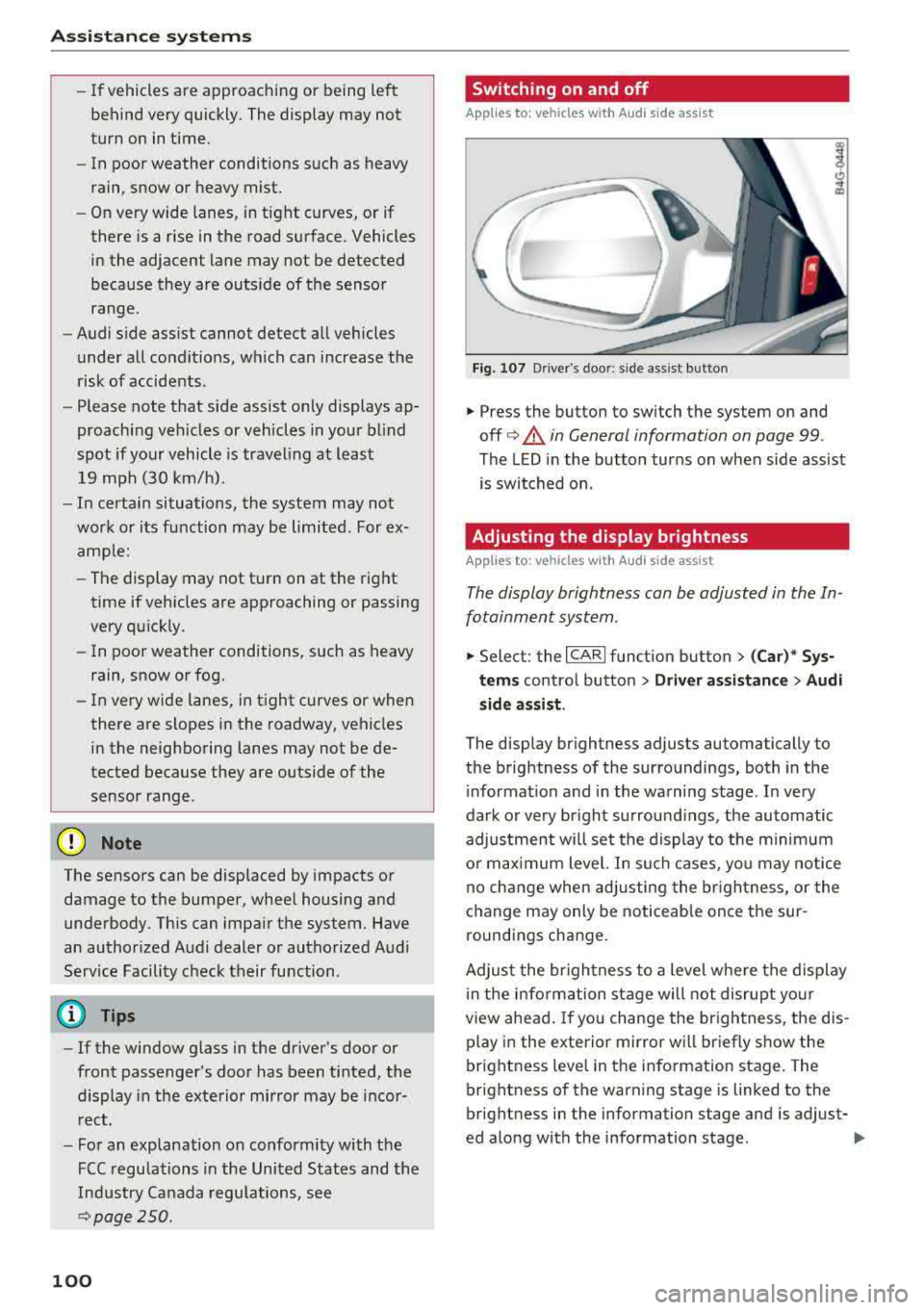
Fig. 107 Driver 's door : s ide ass ist button
.,. Press the button to sw itch the system on and
off ¢.&. in General information on page 99 .
The LED in the button turns on when side assist
is switched on.
Adjusting the display brightness
App lies to: vehicles wit h Audi side ass ist
The display brightness can be adjusted in the In
fotainment system .
.,. Select: the I CARI function button > (Car)* Sys
tems contro l button > Driv er a ssistan ce> Audi
s ide assi st .
The display brightness adjusts automatically to
the brightness of the surroundings, both in the
i nformation and in the warning stage . In very
dark o r very bright surround ings, the automatic
adjustment will set the display to the minimum
o r max imum level. In su ch cases, yo u may notice
no c hange when adjusting the br igh tness, or the
change may only be noticeab le once the sur
round ings change.
Adjus t the br igh tness to a level whe re the display
i n the information stage will not disrupt yo ur
view ahea d. If you change the br igh tness, the dis
play in the exterior mirror wi ll br iefly show the
brightness level in the information stage. The
brightness of the warning stage is linked to the
br ightness in the information stage and is adjust-
ed along with the information stage .
..,
Page 253 of 266
a co .... N
" N .... 0 0 \.J '
Symbols
4-zone deluxe automatic climate control 58
Air vents . . . . . . . . . . . . . . . . . . . . . . . . . . . . 62
Key recognition . . . . . . . . . . . . . . . . . . . . . . 58
Operation . . . . . . . . . . . . . . . . . . . . . . . . . . . 60
Residual heat . . . . . . . . . . . . . . . . . . . . . . . . 62
Synchronizing . . . . . . . . . . . . . . . . . . . . . . . . 62
A
A/C (4-zone de luxe automatic climate
control) . . . . . . . . . . . . . . . . . . . . . . . . . . . . . . 61
A/C (deluxe automatic climate control) 59
ABS
refer to Anti-lock braking system . . . . . . . 119
Accessories . . . . . . . . . . . . . . . . . . . . . . . 52, 249
Active lane assist . . . . . . . . . . . . . . . . . . . . . . 95
Adjusting the vibration warning . . . . . . . . . 97
Clean ing the camera area . . . . . . . . . . . . . 222
Indicator light . . . . . . . . . . . . . . . . . . . . . . . 96
Messages . . . . . . . . . . . . . . . . . . . . . . . . . . . 96
Switching on/off . . . . . . . . . . . . . . . . . . . . . 96
Adapt ive a ir suspension . . . . . . . . . . . . . . . . 104
Adaptive cruise control . . . . . . . . . . . . . . . . . . 86
Braking guard ................. ..... .. 91
Cleaning the sensor . . . . . . . . . . . . . . . . . . 222
Messages . . . . . . . . . . . . . . . . . . . . . . . . . . . 93
Request for driver intervention . . . . . . . . . . 91
Stop -and-go traffic . . . . . . . . . . . . . . . . . . . 89
Adjusting air distribution (4-zone de luxe auto
matic climate control) . . . . . . . . . . . . . . . . . . 61
Adjusting air distribution (deluxe automatic
climate control) . . . . . . . . . . . . . . . . . . . . . . . 59
Adjust ing the temperature (4-zone deluxe au
tomatic climate control) . . . . . . . . . . . . . . . . 61
Adjusting the temperature (deluxe automat ic
climate control) . . . . . . . . . . . . . . . . . . . . . . . 59
Advanced key
refer to Convenience key . . . . . . . . . . . . . . . 68
Airbag . . . . . . . . . . . . . . . . . . . . . . . . . . . . . . 142
Airbag system . . . . . . . . . . . . . . . . . . . . . . . . 162
Advanced Airbag System . . . . . . . . . . . . . . 146
Advanced Airbag System components . . . 149
Care . . . . . . . . . . . . . . . . . . . . . . . . . . . . . . 157
Ch ild ren . . . . . . . . . . . . . . . . . . . . . . . . . . . 168
Index
Child r estraints . . . . . . . . . . . . . . . . . . . . . 168
Components (front airbags) . . . . . . . . . . . 149
Danger of fitting a child seat on the front
passenger seat . . . . . . . . . . . . . . . . . . . . . . 143
Disposal . . . . . . . . . . . . . . . . . . . . . . . . . . . 157
Front airbags . . . . . . . . . . . . . . . . . . . 146, 14 7
How do the front a irbags work? . . . . . . . . 152
How many a irbags does my vehicle have? 149
How the Advanced Airbag System compo-
nents work togethe r . . . . . . . . . . . . . . . . . 151
Important information . . . . . . . . . . . . . . . 142
Important safety instructions on the knee
airbag system . . . . . . . . . . . . . . . . . . . . . . . 160
Knee airbags . . . . . . . . . . . . . . . . . . . . . . . . 158
Monitoring . . . . . . . . . . . . . . . . . . . . . . . . . 154
PASSENGER AIR BAG OFF light . . . . . . . . . 154
Repairs . . . . . . . . . . . . . . . . . . . . . . . . . . . . 157
Safety instructions . . . . . . . . . . . . . . . . . . . 156
S ide a irbags . . . . . . . . . . . . . . . . . . . . . . . . 160
S ide curta in a irbags . . . . . . . . . . . . . . . . . . 163
Warning/Ind icator lights . . . . . . . . . . . . . 154
When must the system be inspected? . . . 154
Air suspension . . . . . . . . . . . . . . . . . . . . . . . 104
Alarm system
refer to Anti-theft alarm system . . . . . . . . . 30
Alignment pin (tire changing) . . . . . . . . . . . 226
All -weather lights . . . . . . . . . . . . . . . . . . . . . . 38
All season ti res . . . . . . . . . . . . . . . . . . . . . . . 216
All wheel drive . . . . . . . . . . . . . . . . . . . . . . . 123
Alternator
refer to Alternator (indicator light) . . . . . . 14
Alternator (indicator light) . . . . . . . . . . . . . . 14
Amb ient lighting . . . . . . . . . . . . . . . . . . . . . . 41
Anti-freeze Windshield washer system . . . . . . . . . . . . 199
Anti- lock braking system . . . . . . . . . . . . . . . 119
Indicator light . . . . . . . . . . . . . . . . . . . . . . . 16
Anti-Slip Regu lation . . . . . . . . . . . . . . . . . . . 119
Indicator light . . . . . . . . . . . . . . . . . . . . . . . 16
Anti -theft alarm system . . . . . . . . . . . . . . . . . 30
Ashtray . . . . . . . . . . . . . . . . . . . . . . . . . . . . . . 51
ASR
refer to Anti-Slip Regulation . . . . . . . . . . . 119
Audi braking guard
refer to Braking guard . . . . . . . . . . . . . . . . . 91
Audi drive select
refer to Drive se lect . . . . . . . . . . . . . . . . . . 104
251
Page 258 of 266
Index
Headlight range contro l system . . . . . . . . . . 38
Indicator light . . . . . . . . . . . . . . . . . . . . . . . 1 8
H eadlig hts . . . . . . . . . . . . . . . . . . . . . . . . . . . 39
Clea ning . . . . . . . . . . . . . . . . . . . . . . . . . . . 222
H eadlig ht range contro l system . . . . . . . . . 38
Washer system . . . . . . . . . . . . . . . . . . . . . . 44
H ead restra ints . . . . . . . . . . . . . . . . . . . . . . . 128
Ad justi ng .. .. .. ............. . 48, 49 , 128
Removing and ins tall ing . . . . . . . . . . . . . . . 49
H eated
Exterior mirrors . . . . . . . . . . . . . . . . . . . . . . 42
Rea r window (4-zone deluxe automatic cli
mate control) . . . . . . . . . . . . . . . . . . . . . . . . 6 2
Rea r window (del uxe automat ic climate con
t rol) . . . . . . . . . . . . . . . . . . . . . . . . . . . . . . . 60
Seats (4 -zone deluxe automatic climate con -
trol) . . . . . . . . . . . . . . . . . . . . . . . . . . . . . . . 61
Seats (de luxe automatic climate contro l) . . 60
Washer no zzles . . . . . . . . . . . . . . . . . . . . . . 44
H ea ting . . . . . . . . . . . . . . . . . . . . . . . . . . . . . . 58
H eavy clothing and safety belts . . . . . . . . . . 1 36
High beams Assistant. . . . . . . . . . . . . . . . . . . . . . . . . . . . 39
Hi ll
descent contro l . . . . . . . . . . . . . . . . . . . . 77
Hi ll hold ass ist . . . . . . . . . . . . . . . . . . . . . . . . 74
also refer to Hi ll hold ass ist . . . . . . . . . . . . 74
Homelink (garage door opener) . . . . . . . . . . 36
H oo ks . . . . . . . . . . . . . . . . . . . . . . . . . . . . . . . 56
H orn . . . . . . . . . . . . . . . . . . . . . . . . . . . . . . . . . 6
How are child restraint system anchors re lat-
ed to chi ld safety . . . . . . . . . . . . . . . . . . . . . 180
H ow many airbags does my veh icle have? . . 149
H ow safety belt pretens ioners work . . . . . . 140
I
Ignition
Indicator light . . . . . . . . . . . . . . . . . . . . . . . 15
Sw itching on/off . . . . . . . . . . . . . . . . . . . . . 68
I mba lance (wheels) .. .. ..... ... .. .. ... 210
Immob il izer . . . . . . . . . . . . . . . . . . . . . . . 22, 25
Important things to do before driving . . . . 125
I mp roperly worn s afety be lts . . . . . . . . . . . 140
Indicator lights . . . . . . . . . . . . . . . . . . . . . . . . 10
Infant seats . . . . . . . . . . . . . . . . . . . . . . . . . 172
I nspection inte rval . . . . . . . . . . . . . . . . . . . . 199
256
Installing child safety seats
Safety be lts . . . . . . . . . . . . . . . . . . . . . . . . 177
Installing the upper tether st rap on t he a n
c h orage . . . . . . . . . . . . . . . . . . . . . . . . . . . . . 183
Instrument cluster . . . . . . . . . . . . . . . . . . . . . . 9
Ind icator lig hts . . . . . . . . . . . . . . . . . . . . . .
10
Messages . . . . . . . . . . . . . . . . . . . . . . . . . . . 10
Instruments . . . . . . . . . . . . . . . . . . . . . . . . . . . 9
Adjusting illumination . . . . . . . . . . . . . . . . . 41
Interior ligh ting
Ambient lighting . . . . . . . . . . . . . . . . . . . . . 41
Front and rear . . . . . . . . . . . . . . . . . . . . . . . 41
Intermittent (windsh ie ld w ipers) . . . . . . . . . 44
l
Jump-start ing 239
Jumper cables . . . . . . . . . . . . . . . . . . . . . . . . 240
K
Key ..... ... .. .. .... .. ... .. ..... ... .. . 25
Indicator lig ht . . . . . . . . . . . . . . . . . . . . . . . 69
Key not recognized . . . . . . . . . . . . . . . . . . . 70
Key replacement . . . . . . . . . . . . . . . . . . . . . 25
Mechan ica l key . . . . . . . . . . . . . . . . . . . . 25, 26
Replacing the battery . . . . . . . . . . . . . . . . . 26
Un locking/locking .. .. ............. 27, 29
Key recognit ion (climate control system) . . . 58
K ick -dow n (au tomatic transm ission) . . . . . . . 78
Knee a irbags . . . . . . . . . . . . . . . . . . . . . . . . . 158
Description . . . . . . . . . . . . . . . . . . . . . . . . . 158
How they work . . . . . . . . . . . . . . . . . . . . . . 159
Impo rtant safety instr uctions . . . . . . . . . . 160
L
Lane assist
refer to Active lane ass ist . . . . . . . . . . . . . . 95
LATCH . . . . . . . . . . . . . . . . . . . . . . . . . . . . . . 180
Description . . . . . . . . . . . . . . . . . . . . . . . . . 181
Installing a ch ild restraint . . . . . . . . . . . . . 182
Location . . . . . . . . . . . . . . . . . . . . . . . . . . . 181
Mount ing and re leas ing the anchorage
hoo k ..... .. .. .. .. .. ............. .. 182
Launc h control program . . . . . . . . . . . . . . . . . 78
Leat her care/ cleaning . . . . . . . . . . . . . . . . . 224
Leav ing home . . . . . . . . . . . . . . . . . . . . . . . . . 40